WordPress - Moderate Comments
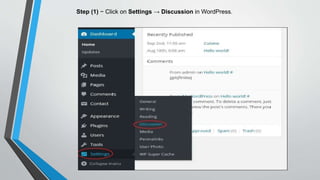
Step (1) − Click on Settings → Discussion in WordPress.
Step (2) − The Discussion Setting page gets displayed.
In the Comment Moderation field, enter those words or URLs you do not want any visitor to add
comments. Whenever a visitor gives any comments it would be moderated by the admin first and
then published.
Step (3) − Click on Save Changes.

Word press moderate comments

  • 1.
  • 2.
    Step (1) −Click on Settings → Discussion in WordPress.
  • 3.
    Step (2) −The Discussion Setting page gets displayed.
  • 5.
    In the CommentModeration field, enter those words or URLs you do not want any visitor to add comments. Whenever a visitor gives any comments it would be moderated by the admin first and then published. Step (3) − Click on Save Changes.