SVG Overview:
How To Draw, Use And
Animate
Bartosz Bazański
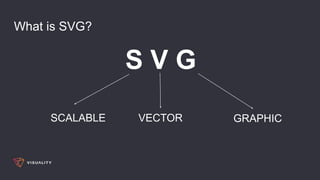
What is SVG?
S V G
SCALABLE VECTOR GRAPHIC
What are SVG good for?
Standard image (PNG, JPEG, etc.)
- complex images
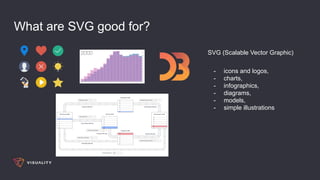
What are SVG good for?
SVG (Scalable Vector Graphic)
- icons and logos,
- charts,
- infographics,
- diagrams,
- models,
- simple illustrations
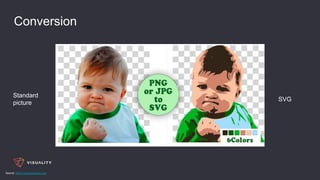
Conversion
Standard
picture
SVG
Source: https://www.pngtosvg.com
How to draw?
viewbox=“Px
, Py
, maxWidth, maxHeight”
maxWidth
maxHeight
P
xmlns=“http://www.w3.org/2000/svg”
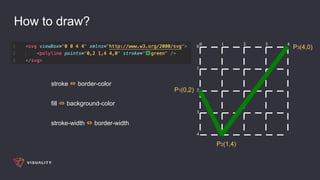
How to draw?
stroke ⇔ border-color
fill ⇔ background-color
stroke-width ⇔ border-width
P1(0,2)
P2(1,4)
P3(4,0)
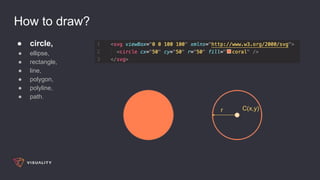
How to draw?
● circle,
● ellipse,
● rectangle,
● line,
● polygon,
● polyline,
● path.
C(x,y)r
How to draw?
● circle,
● ellipse,
● rectangle,
● line,
● polygon,
● polyline,
● path.
C(x,y)rx
ry
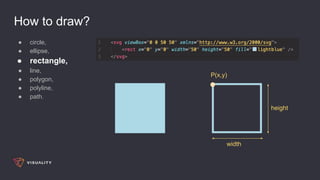
How to draw?
● circle,
● ellipse,
● rectangle,
● line,
● polygon,
● polyline,
● path.
P(x,y)
width
height
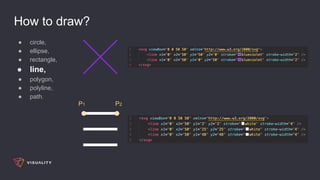
How to draw?
● circle,
● ellipse,
● rectangle,
● line,
● polygon,
● polyline,
● path.
P1 P2
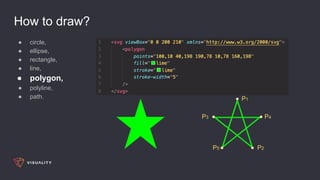
How to draw?
● circle,
● ellipse,
● rectangle,
● line,
● polygon,
● polyline,
● path. P1
P2
P3 P4
P5
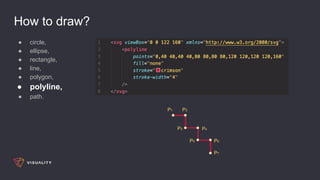
How to draw?
● circle,
● ellipse,
● rectangle,
● line,
● polygon,
● polyline,
● path.
P1 P2
P3 P4
P5 P6
P7
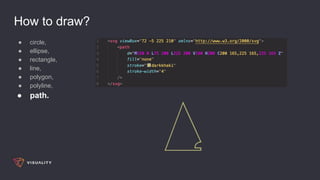
How to draw?
● circle,
● ellipse,
● rectangle,
● line,
● polygon,
● polyline,
● path.
The end result :)
Source: http://codinginparadise.org
How to put it on the page?
● in the image tag,
● in CSS,
● embedded directly into HTML,
● in the object tag.
Source: https://css-tricks.com/using-svg
SVG magic a.k.a Animations
Source: https://github.com/cgoldsby/LoginCritter
SVG magic a.k.a Animations
Source: http://themaninblue.com/experiment/Blobular
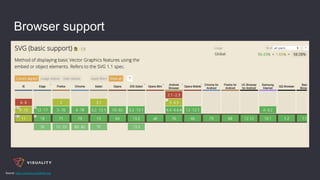
Browser support
Source: https://caniuse.com/#feat=svg
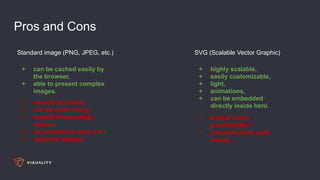
Pros and Cons
Standard image (PNG, JPEG, etc.) SVG (Scalable Vector Graphic)
+ can be cached easily by
the browser,
+ able to present complex
images.
+ highly scalable,
+ easily customizable,
+ light,
+ animations,
+ can be embedded
directly inside html.
− cannot be scaled,
− can be quite heavy,
− limited customizing
options,
− no animations (only GIF),
− separate request.
− limited cache
possibilities,
− can make html code
messy.
Libraries - D3.js
Source: https://github.com/d3/d3
Libraries - React Kawaii
Source: https://github.com/miukimiu/react-kawaii
Resources
● PNG to SVG: https://www.pngtosvg.com,
● Coding in Paradise: http://codinginparadise.org,
● Login Critter: https://github.com/cgoldsby/LoginCritter,
● Blobular: http://themaninblue.com/experiment/Blobular,
● Can I Use It: https://caniuse.com/#feat=svg,
● D3.js: https://github.com/d3/d3,
● React Kawaii: https://github.com/miukimiu/react-kawaii.
Thanks you for your attention.

SVG Overview - How To Draw, Use and Animate

  • 1.
    SVG Overview: How ToDraw, Use And Animate Bartosz Bazański
  • 2.
    What is SVG? SV G SCALABLE VECTOR GRAPHIC
  • 3.
    What are SVGgood for? Standard image (PNG, JPEG, etc.) - complex images
  • 4.
    What are SVGgood for? SVG (Scalable Vector Graphic) - icons and logos, - charts, - infographics, - diagrams, - models, - simple illustrations
  • 5.
  • 6.
    How to draw? viewbox=“Px ,Py , maxWidth, maxHeight” maxWidth maxHeight P xmlns=“http://www.w3.org/2000/svg”
  • 7.
    How to draw? stroke⇔ border-color fill ⇔ background-color stroke-width ⇔ border-width P1(0,2) P2(1,4) P3(4,0)
  • 8.
    How to draw? ●circle, ● ellipse, ● rectangle, ● line, ● polygon, ● polyline, ● path. C(x,y)r
  • 9.
    How to draw? ●circle, ● ellipse, ● rectangle, ● line, ● polygon, ● polyline, ● path. C(x,y)rx ry
  • 10.
    How to draw? ●circle, ● ellipse, ● rectangle, ● line, ● polygon, ● polyline, ● path. P(x,y) width height
  • 11.
    How to draw? ●circle, ● ellipse, ● rectangle, ● line, ● polygon, ● polyline, ● path. P1 P2
  • 12.
    How to draw? ●circle, ● ellipse, ● rectangle, ● line, ● polygon, ● polyline, ● path. P1 P2 P3 P4 P5
  • 13.
    How to draw? ●circle, ● ellipse, ● rectangle, ● line, ● polygon, ● polyline, ● path. P1 P2 P3 P4 P5 P6 P7
  • 14.
    How to draw? ●circle, ● ellipse, ● rectangle, ● line, ● polygon, ● polyline, ● path.
  • 15.
    The end result:) Source: http://codinginparadise.org
  • 16.
    How to putit on the page? ● in the image tag, ● in CSS, ● embedded directly into HTML, ● in the object tag. Source: https://css-tricks.com/using-svg
  • 17.
    SVG magic a.k.aAnimations
  • 18.
    SVG magic a.k.aAnimations
  • 19.
    SVG magic a.k.aAnimations Source: https://github.com/cgoldsby/LoginCritter
  • 20.
    SVG magic a.k.aAnimations Source: http://themaninblue.com/experiment/Blobular
  • 21.
  • 22.
    Pros and Cons Standardimage (PNG, JPEG, etc.) SVG (Scalable Vector Graphic) + can be cached easily by the browser, + able to present complex images. + highly scalable, + easily customizable, + light, + animations, + can be embedded directly inside html. − cannot be scaled, − can be quite heavy, − limited customizing options, − no animations (only GIF), − separate request. − limited cache possibilities, − can make html code messy.
  • 23.
    Libraries - D3.js Source:https://github.com/d3/d3
  • 24.
    Libraries - ReactKawaii Source: https://github.com/miukimiu/react-kawaii
  • 25.
    Resources ● PNG toSVG: https://www.pngtosvg.com, ● Coding in Paradise: http://codinginparadise.org, ● Login Critter: https://github.com/cgoldsby/LoginCritter, ● Blobular: http://themaninblue.com/experiment/Blobular, ● Can I Use It: https://caniuse.com/#feat=svg, ● D3.js: https://github.com/d3/d3, ● React Kawaii: https://github.com/miukimiu/react-kawaii.
  • 26.
    Thanks you foryour attention.