HTML5


Everything that makes the
        web sing.

     Shaify Mehta
http://www.shaify.com
Agenda


Agenda
           • Introduction to HTML5.
           • New Elements .
           • New Features.
           • Browser Supports.
           • Tutorials.
           • Live demos.
Who am I?


Who Am I ?


             Who am I?
Who am I?


Who Am I ?

                                         HTML5*
              Web Development to the next level
             *Including other next generation technologies of the Web Development stack
Rough Timeline Of Web Technologies


              1991 HTML
              1994  HTML 2
 Who Am I ?   1996  CSS 1 + JavaScript
              1997  HTML 4
              1998  CSS 2
              2000  XHTML 1
              2002  Tableless Web Design
              2005  AJAX
              2009  HTML 5
HTML5


Who Am I ?

             HTML5 ~= HTML + CSS + JS
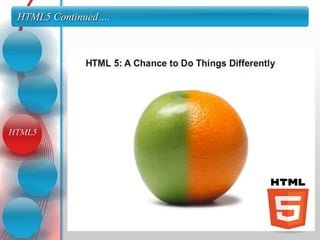
HTML5 Continued….


HTML5
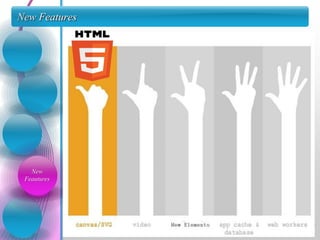
New Features

             We intend to develop a service which is a blend of all
             above said services.

             This is saves the hassles of maintaining different user
             accounts for different services.

             Our website will be comprising of
             1. Photo Sharing
             2. Video Sharing
             3. Document Sharing
   New
 Feautures
Canvas Element

            • The HTML5 canvas element uses JavaScript to draw
            graphics on a web page.

            • A canvas is a rectangular area, and you control every pixel
            of it.

            <canvas id=“my Canvas” width=“200” height=“100” >
            </canvas>


Canvas
Element
Canvas Element Continued….


Canvas
Element
Audio & Video

 Audio
& Video
Audio & Video Continued…..
               • Today, most audio & videos are played through a plugin
 Audio
& Video
               (like flash). However, not all browsers have the same
               plugins.

               • HTML5 specifies a standard way to include these, with
               the audio & video elements.

               • <audio src="song.ogg“ controls="controls“ > </audio>
               • <video src="movie.ogg“ controls="controls"> </video>
Attributes : video

 Audio
& Video
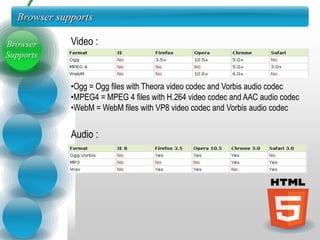
Browser supports

Browser      Video :
Supports


             •Ogg = Ogg files with Theora video codec and Vorbis audio codec
             •MPEG4 = MPEG 4 files with H.264 video codec and AAC audio codec
             •WebM = WebM files with VP8 video codec and Vorbis audio codec


             Audio :
New Elements


  New
Elements
New Input Types

            • Email
            • Url
            • Number
New Input   • Range
  Types     • Date pickers (date, month, week, time, datetime, datetime-local)
            • Search
            • Color
Elements

           • <input type="email" name="user_email" />

           • <input type="url" name="user_url" />
Elements
           • <input type="number" name="points" min="1" max="10" />

           • <input type="range" name="points" min="1“ max="10" />

           • <input type="date" name="user_date" />

           • <input type="color" name="user_color" />
Web Storage


  Web
Storage
Web Storage

            • HTML5 offers two new objects for storing data on the
            client:

            • LocalStorage - stores data with no time limit

            • SessionStorage - stores data for one session
  Web
Storage     • Earlier, this was done with cookies. Cookies are not
            suitable for large amounts of data, because they are passed
            on by EVERY request to the server, making it very slow and
            in-effective.

            • HTML5 uses JavaScript to store and access
            the data.
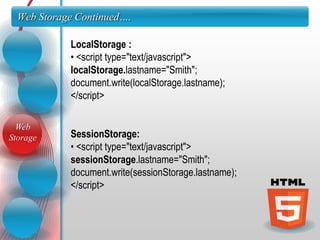
Web Storage Continued….

            LocalStorage :
            • <script type="text/javascript">
            localStorage.lastname="Smith";
            document.write(localStorage.lastname);
            </script>

  Web
Storage     SessionStorage:
            • <script type="text/javascript">
            sessionStorage.lastname="Smith";
            document.write(sessionStorage.lastname);
            </script>
HTML5 Support


 HTML5
 Support
Web Workers


 Web
Workers
Web Workers


 Web
Workers

Html5

  • 2.
    HTML5 Everything that makesthe web sing. Shaify Mehta http://www.shaify.com
  • 3.
    Agenda Agenda • Introduction to HTML5. • New Elements . • New Features. • Browser Supports. • Tutorials. • Live demos.
  • 4.
    Who am I? WhoAm I ? Who am I?
  • 5.
    Who am I? WhoAm I ? HTML5* Web Development to the next level *Including other next generation technologies of the Web Development stack
  • 6.
    Rough Timeline OfWeb Technologies 1991 HTML 1994  HTML 2 Who Am I ? 1996  CSS 1 + JavaScript 1997  HTML 4 1998  CSS 2 2000  XHTML 1 2002  Tableless Web Design 2005  AJAX 2009  HTML 5
  • 7.
    HTML5 Who Am I? HTML5 ~= HTML + CSS + JS
  • 8.
  • 9.
    New Features We intend to develop a service which is a blend of all above said services. This is saves the hassles of maintaining different user accounts for different services. Our website will be comprising of 1. Photo Sharing 2. Video Sharing 3. Document Sharing New Feautures
  • 10.
    Canvas Element • The HTML5 canvas element uses JavaScript to draw graphics on a web page. • A canvas is a rectangular area, and you control every pixel of it. <canvas id=“my Canvas” width=“200” height=“100” > </canvas> Canvas Element
  • 11.
  • 12.
    Audio & Video Audio & Video
  • 13.
    Audio & VideoContinued….. • Today, most audio & videos are played through a plugin Audio & Video (like flash). However, not all browsers have the same plugins. • HTML5 specifies a standard way to include these, with the audio & video elements. • <audio src="song.ogg“ controls="controls“ > </audio> • <video src="movie.ogg“ controls="controls"> </video>
  • 14.
    Attributes : video Audio & Video
  • 15.
    Browser supports Browser Video : Supports •Ogg = Ogg files with Theora video codec and Vorbis audio codec •MPEG4 = MPEG 4 files with H.264 video codec and AAC audio codec •WebM = WebM files with VP8 video codec and Vorbis audio codec Audio :
  • 16.
    New Elements New Elements
  • 17.
    New Input Types • Email • Url • Number New Input • Range Types • Date pickers (date, month, week, time, datetime, datetime-local) • Search • Color
  • 18.
    Elements • <input type="email" name="user_email" /> • <input type="url" name="user_url" /> Elements • <input type="number" name="points" min="1" max="10" /> • <input type="range" name="points" min="1“ max="10" /> • <input type="date" name="user_date" /> • <input type="color" name="user_color" />
  • 19.
    Web Storage Web Storage
  • 20.
    Web Storage • HTML5 offers two new objects for storing data on the client: • LocalStorage - stores data with no time limit • SessionStorage - stores data for one session Web Storage • Earlier, this was done with cookies. Cookies are not suitable for large amounts of data, because they are passed on by EVERY request to the server, making it very slow and in-effective. • HTML5 uses JavaScript to store and access the data.
  • 21.
    Web Storage Continued…. LocalStorage : • <script type="text/javascript"> localStorage.lastname="Smith"; document.write(localStorage.lastname); </script> Web Storage SessionStorage: • <script type="text/javascript"> sessionStorage.lastname="Smith"; document.write(sessionStorage.lastname); </script>
  • 22.
  • 23.
  • 24.