

What is HTML5
1) HTML5 will be the new standard for
HTML.
2) HTML5 is a cooperation between the
World Wide Web Consortium (W3C) and the
Web Hypertext Application Technology
Working Group (WHATWG).
New Features in HTML5
1)    Canvas
2)    Geo Location
3)    Video and Audio
4)    Web storage
5)    Application Cache
6)    Server sent events
7)    Web Workers
8)    New Form Input types
9)    New Form Elements
10)   New Form Attributes
Canvas
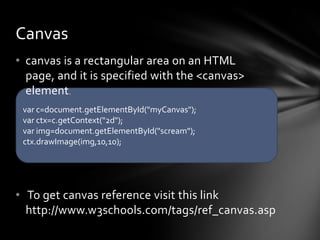
• canvas is a rectangular area on an HTML
  page, and it is specified with the <canvas>
  element.
 var c=document.getElementById("myCanvas");
 var ctx=c.getContext("2d");
 var img=document.getElementById("scream");
 ctx.drawImage(img,10,10);


• To get canvas reference visit this link
  http://www.w3schools.com/tags/ref_canvas.asp
Geo Location
• The HTML5 Geo location API is used to get the
  geographical position of a user.

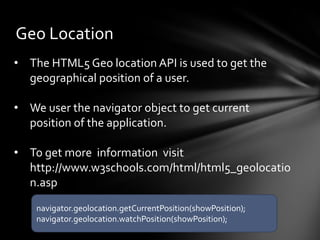
• We user the navigator object to get current
  position of the application.

• To get more information visit
  http://www.w3schools.com/html/html5_geolocatio
  n.asp
    navigator.geolocation.getCurrentPosition(showPosition);
    navigator.geolocation.watchPosition(showPosition);
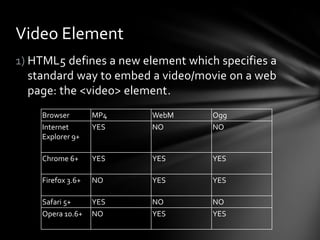
Video Element
1) HTML5 defines a new element which specifies a
   standard way to embed a video/movie on a web
   page: the <video> element.
    Browser        MP4   WebM       Ogg
    Internet       YES   NO         NO
    Explorer 9+

    Chrome 6+      YES   YES        YES

    Firefox 3.6+   NO    YES        YES

    Safari 5+      YES   NO         NO
    Opera 10.6+    NO    YES        YES
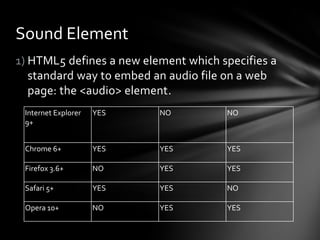
Sound Element
1) HTML5 defines a new element which specifies a
   standard way to embed an audio file on a web
   page: the <audio> element.
 Internet Explorer   YES   NO         NO
 9+


 Chrome 6+           YES   YES        YES

 Firefox 3.6+        NO    YES        YES

 Safari 5+           YES   YES        NO

 Opera 10+           NO    YES        YES
Web Storage
With HTML5, web pages can store data locally
within the user's browser.
Earlier, this was done with cookies. However, Web
Storage is more secure and faster. The data is not
included with every server request, but used
ONLY when asked for. It is also possible to store
large amounts of data, without affecting the
website's performance.
The data is stored in key/value pairs, and a web
page can only access data stored by itself.
Application Cache
1. HTML5 introduces application cache, which means that a web
   application is cached, and accessible without an internet
   connection.
2. Application cache gives an application three advantages:
       1. Offline browsing - users can use the application when
           they're offline
       2. Speed - cached resources load faster
       3. Reduced server load - the browser will only download
           updated/changed resources from the server


3. To enable application cache, include the manifest attribute in the
   document's <html> tag.
Server Sent Events
1. A server-sent event is when a web page
   automatically gets updates from a server.
2. This was also possible before, but the web page
   would have to ask if any updates were available.
   With server-sent events, the updates come
   automatically.
3. Examples: Facebook/Twitter updates, stock price
   updates, news feeds, sport results, etc.
4. The EventSource object is used to receive server-
   sent event notifications
5. Each time an update is received, the onmessage
   event occurs
Web Workers
1. When executing scripts in an HTML page, the
   page becomes unresponsive until the script is
   finished.
2. A web worker is a JavaScript that runs in the
   background, independently of other
   scripts, without affecting the performance of
   the page. You can continue to do whatever you
   want: clicking, selecting things, etc., while the
   web worker runs in the background.
New Form Input types
Html 5 provide new input types like
       1. color
       2. date
       3. datetime
       4. datetime-local
       5. email
       6. month
       7. number
       8. range
       9. search
       10.tel
       11. time
       12.url
       13. week
New Form Elements
HTML5 has the following new form
elements:
     1. <datalist>
     2. <keygen>
     3. <output>
Form Attributes
Html5 added new attribute to new and existing html tags
like video , audio , form and input tags
Other Features of HTML5
1)   Communication API
2)   Web Socket API
HTML5 with MVC
There are MVC toolkits that supports HTML5
like :
ASP.net MVC HTML5 Toolkit
Kendu UI
Questions?

Html5

  • 2.
    What is HTML5 1)HTML5 will be the new standard for HTML. 2) HTML5 is a cooperation between the World Wide Web Consortium (W3C) and the Web Hypertext Application Technology Working Group (WHATWG).
  • 3.
    New Features inHTML5 1) Canvas 2) Geo Location 3) Video and Audio 4) Web storage 5) Application Cache 6) Server sent events 7) Web Workers 8) New Form Input types 9) New Form Elements 10) New Form Attributes
  • 4.
    Canvas • canvas isa rectangular area on an HTML page, and it is specified with the <canvas> element. var c=document.getElementById("myCanvas"); var ctx=c.getContext("2d"); var img=document.getElementById("scream"); ctx.drawImage(img,10,10); • To get canvas reference visit this link http://www.w3schools.com/tags/ref_canvas.asp
  • 5.
    Geo Location • TheHTML5 Geo location API is used to get the geographical position of a user. • We user the navigator object to get current position of the application. • To get more information visit http://www.w3schools.com/html/html5_geolocatio n.asp navigator.geolocation.getCurrentPosition(showPosition); navigator.geolocation.watchPosition(showPosition);
  • 6.
    Video Element 1) HTML5defines a new element which specifies a standard way to embed a video/movie on a web page: the <video> element. Browser MP4 WebM Ogg Internet YES NO NO Explorer 9+ Chrome 6+ YES YES YES Firefox 3.6+ NO YES YES Safari 5+ YES NO NO Opera 10.6+ NO YES YES
  • 7.
    Sound Element 1) HTML5defines a new element which specifies a standard way to embed an audio file on a web page: the <audio> element. Internet Explorer YES NO NO 9+ Chrome 6+ YES YES YES Firefox 3.6+ NO YES YES Safari 5+ YES YES NO Opera 10+ NO YES YES
  • 8.
    Web Storage With HTML5,web pages can store data locally within the user's browser. Earlier, this was done with cookies. However, Web Storage is more secure and faster. The data is not included with every server request, but used ONLY when asked for. It is also possible to store large amounts of data, without affecting the website's performance. The data is stored in key/value pairs, and a web page can only access data stored by itself.
  • 9.
    Application Cache 1. HTML5introduces application cache, which means that a web application is cached, and accessible without an internet connection. 2. Application cache gives an application three advantages: 1. Offline browsing - users can use the application when they're offline 2. Speed - cached resources load faster 3. Reduced server load - the browser will only download updated/changed resources from the server 3. To enable application cache, include the manifest attribute in the document's <html> tag.
  • 10.
    Server Sent Events 1.A server-sent event is when a web page automatically gets updates from a server. 2. This was also possible before, but the web page would have to ask if any updates were available. With server-sent events, the updates come automatically. 3. Examples: Facebook/Twitter updates, stock price updates, news feeds, sport results, etc. 4. The EventSource object is used to receive server- sent event notifications 5. Each time an update is received, the onmessage event occurs
  • 11.
    Web Workers 1. Whenexecuting scripts in an HTML page, the page becomes unresponsive until the script is finished. 2. A web worker is a JavaScript that runs in the background, independently of other scripts, without affecting the performance of the page. You can continue to do whatever you want: clicking, selecting things, etc., while the web worker runs in the background.
  • 12.
    New Form Inputtypes Html 5 provide new input types like 1. color 2. date 3. datetime 4. datetime-local 5. email 6. month 7. number 8. range 9. search 10.tel 11. time 12.url 13. week
  • 13.
    New Form Elements HTML5has the following new form elements: 1. <datalist> 2. <keygen> 3. <output>
  • 14.
    Form Attributes Html5 addednew attribute to new and existing html tags like video , audio , form and input tags
  • 15.
    Other Features ofHTML5 1) Communication API 2) Web Socket API
  • 16.
    HTML5 with MVC Thereare MVC toolkits that supports HTML5 like : ASP.net MVC HTML5 Toolkit Kendu UI
  • 17.

Editor's Notes

  • #4 http://www.w3schools.com/tags/tryit.asp?filename=tryhtml5_menu
  • #5 Example can be found here http://www.w3schools.com/html/tryit.asp?filename=tryhtml5_canvas_tut_imgWebGL is based on the use of the canvashttp://js13kgames.com/games/johnny-smiter-13th-knight/index.html
  • #6 Example can be found here http://www.w3schools.com/html/tryit.asp?filename=tryhtml5_geolocation
  • #7 Video tag reference is http://www.w3schools.com/tags/tag_video.asphttp://www.w3schools.com/html5/tryit.asp?filename=tryhtml5_video_posterhttp://www.w3schools.com/html/tryit.asp?filename=tryhtml5_video_js_prop
  • #8 Audio tag reference http://www.w3schools.com/tags/tag_audio.aspThe HTML5 DOM has methods, properties, and events for the &lt;audio&gt; and &lt;video&gt; elements.For more information visit http://www.w3schools.com/tags/ref_av_dom.asp
  • #9 Web Storage uses two kinds of storage local storage and session storageExample can be found here http://www.w3schools.com/html/tryit.asp?filename=tryhtml5_webstorage_local_clickcount
  • #10 1) The manifest file is a simple text file, which tells the browser what to cache (and what to never cache).The manifest file has three sections:CACHE MANIFEST - Files listed under this header will be cached after they are downloaded for the first timeNETWORK - Files listed under this header require a connection to the server, and will never be cachedFALLBACK - Files listed under this header specifies fallback pages if a page is inaccessible CACHE MANIFEST# 2012-02-21 v1.0.0/theme.css/logo.gif/main.jsNETWORK:login.aspFALLBACK:/html/ /offline.html2) Example http://www.w3schools.com/html/tryhtml5_html_manifest.htm3) If you wanted to update cache you either update manifest file or call window.applicationCache.update()
  • #11 http://www.w3schools.com/html/tryit.asp?filename=tryhtml5_sse
  • #12 For example on web workers visit http://www.w3schools.com/html/tryit.asp?filename=tryhtml5_webworker
  • #14 Input list example http://www.w3schools.com/html/tryit.asp?filename=tryhtml5_datalistOutput example http://www.w3schools.com/html/tryit.asp?filename=tryhtml5_output
  • #15 New attributes for &lt;form&gt;:autocompleteNovalidateNew attributes for &lt;input&gt;:autocompleteautofocusformformactionformenctypeformmethodformnovalidateformtargetheight and widthlistmin and maxmultiplepattern (regexp)placeholderrequiredstep&lt;Video &gt;:AutoplayLoopControlsWidthHeightPosterSrcPreload&lt;Audio&gt;:AutoplayLoopControlsSrcPreload