Anuj Kumar
                                            ciscobulls@gmail.com

             CCNP SWITCH
        PORTABLE STUDY GUIDE
                     &
         PRACTICE WORK BOOK


ANUJ KUMAR


             email:- ciscobulls@gmail.com
                anuj_dev007@yahoo.com
                  networkbulls.com
Anuj Kumar
                                                                                               ciscobulls@gmail.com

                                           REDUNDANCY PROTOCOLS

Cisco IOS offers feature to provide a redundant default gateway to end devices. The following are the default
gateway features supported by Cisco IOS and switches.

Hot Standby Routing Protocol (HSRP)
Virtual Router Redundancy Protocol (VRRP)
Gateway Load Balancing Protocol (GLBP)


                                       HSRP (Hot Standby Routing Protocol)

Feature:-
It is Cisco proprietary protocol.
It uses UDP Port no 1985
It sends hello message on multicast address 224.0.0.2
It sends out hello message every 3 sec (hold timer 10 sec)
Priority by default 100
It supports two types of authentication.
It supports tracking.

HSRP States: -
Active State: - in this active state, the router is send packets that are sent to virtual MAC and IP address of the
HSRP group. The active router also sends periodic hello message.

Standby: - in this state, the HSRP router is the next active router and it send periodic hello message. There must
be at least one standby router in the HSRP group.

Note: - A router does not hear any higher priority that router assume itself, so promote itself standby router.
A router does not hear an active router, so promote itself active router.
When the preempt option is not configure, the first router to initialize HSRP becomes the active router.

                           Configuration of HSRP on Switch
Switch1(config)#interface vlan 10
Switch1(config-if)#ip address 192.168.101.2 255.255.255.0
Switch1(config-if)#standby 1 ip 192.168.101.1
Switch1(config-if)#standby priority 150
Switch1(config-if)#standby 1 preempt

Switch2(config)#interface vlan 10
Switch2(config-if)#ip address 192.168.101.3 255.255.255.0
Switch2(config-if)#standby 1 ip 192.168.101.1
Switch2(config-if)#standby priority 200
Switch2(config-if)#standby 1 preempt
Anuj Kumar
                                                                                               ciscobulls@gmail.com


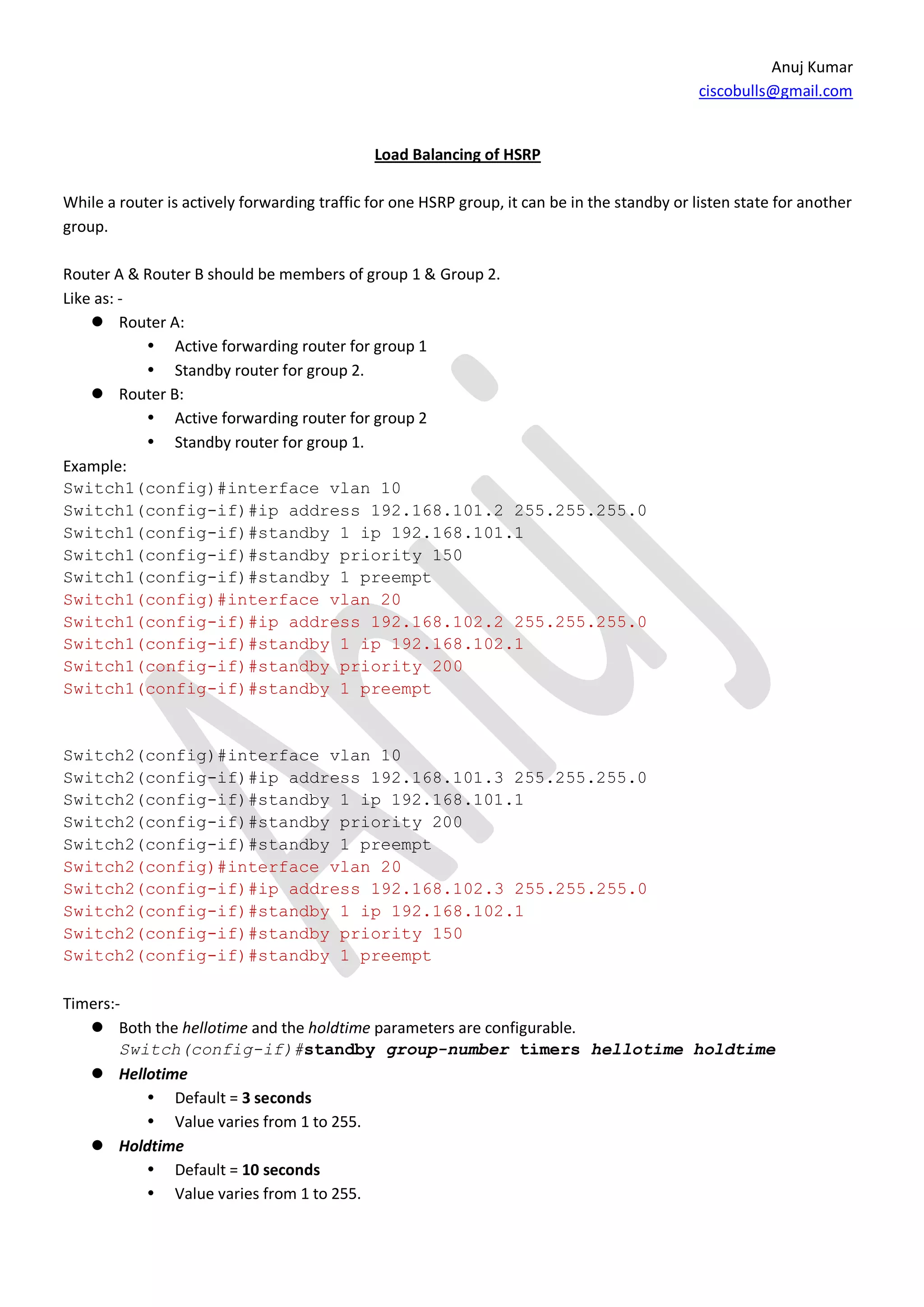
                                              Load Balancing of HSRP

While a router is actively forwarding traffic for one HSRP group, it can be in the standby or listen state for another
group.

Router A & Router B should be members of group 1 & Group 2.
Like as: -
     Router A:
            Active forwarding router for group 1
            Standby router for group 2.
     Router B:
            Active forwarding router for group 2
            Standby router for group 1.
Example:
Switch1(config)#interface vlan 10
Switch1(config-if)#ip address 192.168.101.2 255.255.255.0
Switch1(config-if)#standby 1 ip 192.168.101.1
Switch1(config-if)#standby priority 150
Switch1(config-if)#standby 1 preempt
Switch1(config)#interface vlan 20
Switch1(config-if)#ip address 192.168.102.2 255.255.255.0
Switch1(config-if)#standby 1 ip 192.168.102.1
Switch1(config-if)#standby priority 200
Switch1(config-if)#standby 1 preempt


Switch2(config)#interface vlan 10
Switch2(config-if)#ip address 192.168.101.3 255.255.255.0
Switch2(config-if)#standby 1 ip 192.168.101.1
Switch2(config-if)#standby priority 200
Switch2(config-if)#standby 1 preempt
Switch2(config)#interface vlan 20
Switch2(config-if)#ip address 192.168.102.3 255.255.255.0
Switch2(config-if)#standby 1 ip 192.168.102.1
Switch2(config-if)#standby priority 150
Switch2(config-if)#standby 1 preempt

Timers:-
    Both the hellotime and the holdtime parameters are configurable.
        Switch(config-if)#standby group-number timers hellotime holdtime
    Hellotime
            Default = 3 seconds
            Value varies from 1 to 255.
    Holdtime
            Default = 10 seconds
            Value varies from 1 to 255.
Anuj Kumar
                                                                                              ciscobulls@gmail.com

     To reinstate the default standby timer values, enter the following command:
      Switch(config-if)#no standby group-number timers

                                       Configuring HSRP Interface Tracking

The f0/0 interfaces on router A tracks the S0/0 interface. If the link between the S0/0 interface and Core fails, the
router automatically decrements its priority (10) on that interface and stops transmitting hello messages out
interface f0/0. Router B assumes the active router role when no hello messages are detected for the specific
holdtime period.

Switch1(config)#interface vlan 10
Switch1(config-if)#ip address 192.168.101.2 255.255.255.0
Switch1(config-if)#standby 1 ip 192.168.101.1
Switch1(config-if)#standby priority 150
Switch1(config-if)#standby 1 preempt
Switch1(config-if)#standby 1 track serial0/0(self interface name)

Switch2(config)#interface vlan 10
Switch2(config-if)#ip address 192.168.101.3 255.255.255.0
Switch2(config-if)#standby 1 ip 192.168.101.1
Switch2(config-if)#standby priority 200
Switch2(config-if)#standby 1 preempt
Switch2(config-if)#standby 1 track serial0/0 (self interface name)


                                                      Practical
Anuj Kumar
                                                             ciscobulls@gmail.com

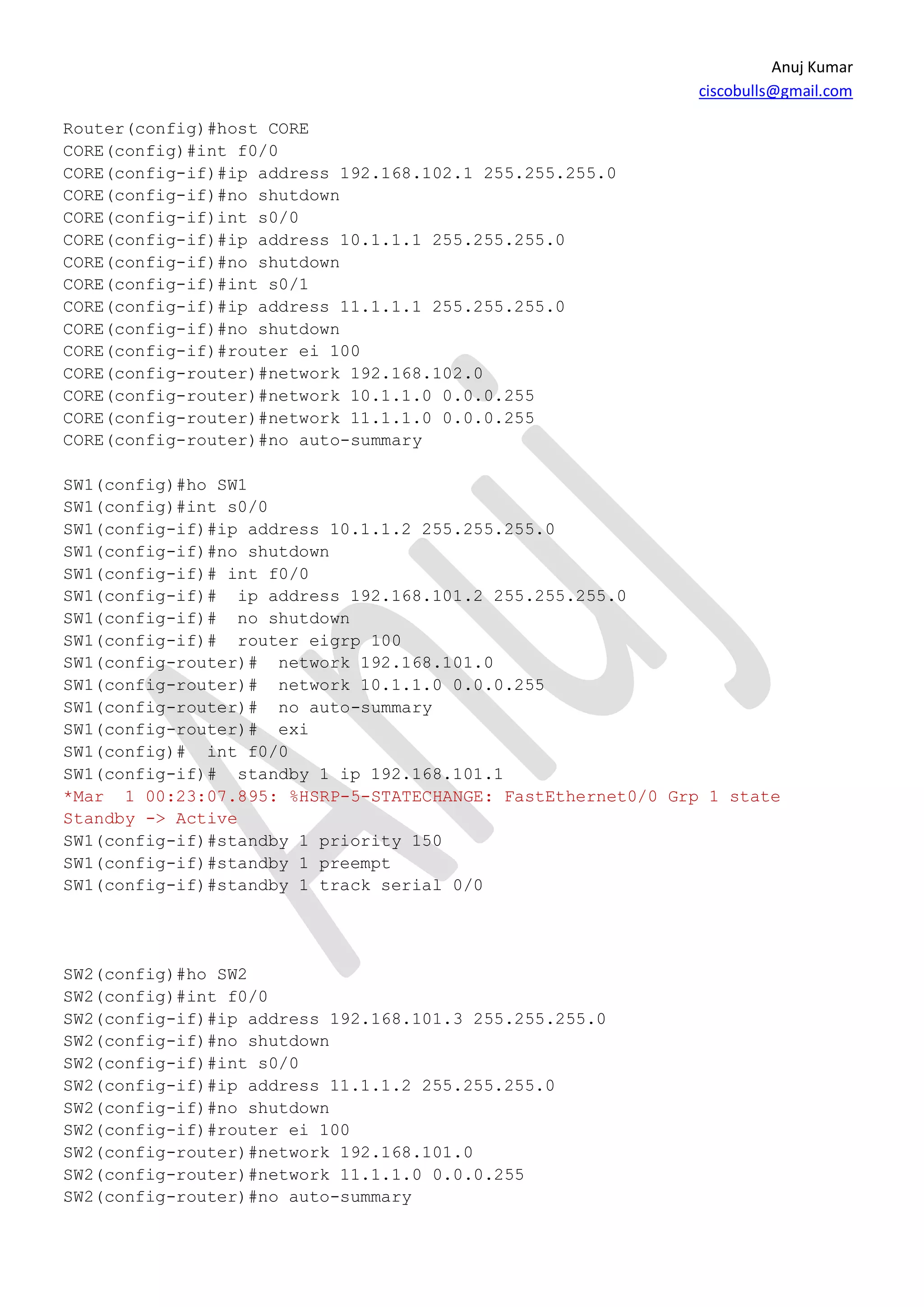
Router(config)#host CORE
CORE(config)#int f0/0
CORE(config-if)#ip address 192.168.102.1 255.255.255.0
CORE(config-if)#no shutdown
CORE(config-if)int s0/0
CORE(config-if)#ip address 10.1.1.1 255.255.255.0
CORE(config-if)#no shutdown
CORE(config-if)#int s0/1
CORE(config-if)#ip address 11.1.1.1 255.255.255.0
CORE(config-if)#no shutdown
CORE(config-if)#router ei 100
CORE(config-router)#network 192.168.102.0
CORE(config-router)#network 10.1.1.0 0.0.0.255
CORE(config-router)#network 11.1.1.0 0.0.0.255
CORE(config-router)#no auto-summary

SW1(config)#ho SW1
SW1(config)#int s0/0
SW1(config-if)#ip address 10.1.1.2 255.255.255.0
SW1(config-if)#no shutdown
SW1(config-if)# int f0/0
SW1(config-if)# ip address 192.168.101.2 255.255.255.0
SW1(config-if)# no shutdown
SW1(config-if)# router eigrp 100
SW1(config-router)# network 192.168.101.0
SW1(config-router)# network 10.1.1.0 0.0.0.255
SW1(config-router)# no auto-summary
SW1(config-router)# exi
SW1(config)# int f0/0
SW1(config-if)# standby 1 ip 192.168.101.1
*Mar 1 00:23:07.895: %HSRP-5-STATECHANGE: FastEthernet0/0 Grp 1 state
Standby -> Active
SW1(config-if)#standby 1 priority 150
SW1(config-if)#standby 1 preempt
SW1(config-if)#standby 1 track serial 0/0


SW2(config)#ho SW2
SW2(config)#int f0/0
SW2(config-if)#ip address 192.168.101.3 255.255.255.0
SW2(config-if)#no shutdown
SW2(config-if)#int s0/0
SW2(config-if)#ip address 11.1.1.2 255.255.255.0
SW2(config-if)#no shutdown
SW2(config-if)#router ei 100
SW2(config-router)#network 192.168.101.0
SW2(config-router)#network 11.1.1.0 0.0.0.255
SW2(config-router)#no auto-summary
Anuj Kumar
                                                              ciscobulls@gmail.com

SW2(config-router)#int f0/0
SW2(config-if)#standby 1 ip 192.168.101.1
SW2(config-if)#standby 1 priority 200
SW2(config-if)#standby 1 preempt
*Mar 1 00:34:31.431: %HSRP-5-STATECHANGE: FastEthernet0/0 Grp 1 state
Standby -> Active
SW2(config-if)#standby 1 track serial 0/0


Verifying
SW1#sh standby
FastEthernet0/0 - Group 1
  State is Standby
    4 state changes, last state change 00:43:18
  Virtual IP address is 192.168.101.1
  Active virtual MAC address is 0000.0c07.ac01
    Local virtual MAC address is 0000.0c07.ac01 (v1 default)
  Hello time 3 sec, hold time 10 sec
    Next hello sent in 0.000 secs
  Preemption enabled
  Active router is 192.168.101.3, priority 190 (expires in 6.912 sec)
  Standby router is local
  Priority 150 (configured 150)
    Track interface Serial0/0 state Up decrement 10
  Group name is "hsrp-Fa0/0-1" (default)
SW2#sh standby
FastEthernet0/0 - Group 1
  State is Active
    2 state changes, last state change 00:44:28
  Virtual IP address is 192.168.101.1
  Active virtual MAC address is 0000.0c07.ac01
    Local virtual MAC address is 0000.0c07.ac01 (v1 default)
  Hello time 3 sec, hold time 10 sec
    Next hello sent in 1.296 secs
  Preemption enabled
  Active router is local
  Standby router is 192.168.101.2, priority 150 (expires in 8.436 sec)
  Priority 190 (configured 200)
    Track interface Serial0/0 state Down decrement 10
  Group name is "hsrp-Fa0/0-1" (default)
Thank you for giving me your precious time.
Anuj Kumar

Hsrp

  • 1.
    Anuj Kumar ciscobulls@gmail.com CCNP SWITCH PORTABLE STUDY GUIDE & PRACTICE WORK BOOK ANUJ KUMAR email:- ciscobulls@gmail.com anuj_dev007@yahoo.com networkbulls.com
  • 2.
    Anuj Kumar ciscobulls@gmail.com REDUNDANCY PROTOCOLS Cisco IOS offers feature to provide a redundant default gateway to end devices. The following are the default gateway features supported by Cisco IOS and switches. Hot Standby Routing Protocol (HSRP) Virtual Router Redundancy Protocol (VRRP) Gateway Load Balancing Protocol (GLBP) HSRP (Hot Standby Routing Protocol) Feature:- It is Cisco proprietary protocol. It uses UDP Port no 1985 It sends hello message on multicast address 224.0.0.2 It sends out hello message every 3 sec (hold timer 10 sec) Priority by default 100 It supports two types of authentication. It supports tracking. HSRP States: - Active State: - in this active state, the router is send packets that are sent to virtual MAC and IP address of the HSRP group. The active router also sends periodic hello message. Standby: - in this state, the HSRP router is the next active router and it send periodic hello message. There must be at least one standby router in the HSRP group. Note: - A router does not hear any higher priority that router assume itself, so promote itself standby router. A router does not hear an active router, so promote itself active router. When the preempt option is not configure, the first router to initialize HSRP becomes the active router. Configuration of HSRP on Switch Switch1(config)#interface vlan 10 Switch1(config-if)#ip address 192.168.101.2 255.255.255.0 Switch1(config-if)#standby 1 ip 192.168.101.1 Switch1(config-if)#standby priority 150 Switch1(config-if)#standby 1 preempt Switch2(config)#interface vlan 10 Switch2(config-if)#ip address 192.168.101.3 255.255.255.0 Switch2(config-if)#standby 1 ip 192.168.101.1 Switch2(config-if)#standby priority 200 Switch2(config-if)#standby 1 preempt
  • 3.
    Anuj Kumar ciscobulls@gmail.com Load Balancing of HSRP While a router is actively forwarding traffic for one HSRP group, it can be in the standby or listen state for another group. Router A & Router B should be members of group 1 & Group 2. Like as: -  Router A:  Active forwarding router for group 1  Standby router for group 2.  Router B:  Active forwarding router for group 2  Standby router for group 1. Example: Switch1(config)#interface vlan 10 Switch1(config-if)#ip address 192.168.101.2 255.255.255.0 Switch1(config-if)#standby 1 ip 192.168.101.1 Switch1(config-if)#standby priority 150 Switch1(config-if)#standby 1 preempt Switch1(config)#interface vlan 20 Switch1(config-if)#ip address 192.168.102.2 255.255.255.0 Switch1(config-if)#standby 1 ip 192.168.102.1 Switch1(config-if)#standby priority 200 Switch1(config-if)#standby 1 preempt Switch2(config)#interface vlan 10 Switch2(config-if)#ip address 192.168.101.3 255.255.255.0 Switch2(config-if)#standby 1 ip 192.168.101.1 Switch2(config-if)#standby priority 200 Switch2(config-if)#standby 1 preempt Switch2(config)#interface vlan 20 Switch2(config-if)#ip address 192.168.102.3 255.255.255.0 Switch2(config-if)#standby 1 ip 192.168.102.1 Switch2(config-if)#standby priority 150 Switch2(config-if)#standby 1 preempt Timers:-  Both the hellotime and the holdtime parameters are configurable. Switch(config-if)#standby group-number timers hellotime holdtime  Hellotime  Default = 3 seconds  Value varies from 1 to 255.  Holdtime  Default = 10 seconds  Value varies from 1 to 255.
  • 4.
    Anuj Kumar ciscobulls@gmail.com  To reinstate the default standby timer values, enter the following command: Switch(config-if)#no standby group-number timers Configuring HSRP Interface Tracking The f0/0 interfaces on router A tracks the S0/0 interface. If the link between the S0/0 interface and Core fails, the router automatically decrements its priority (10) on that interface and stops transmitting hello messages out interface f0/0. Router B assumes the active router role when no hello messages are detected for the specific holdtime period. Switch1(config)#interface vlan 10 Switch1(config-if)#ip address 192.168.101.2 255.255.255.0 Switch1(config-if)#standby 1 ip 192.168.101.1 Switch1(config-if)#standby priority 150 Switch1(config-if)#standby 1 preempt Switch1(config-if)#standby 1 track serial0/0(self interface name) Switch2(config)#interface vlan 10 Switch2(config-if)#ip address 192.168.101.3 255.255.255.0 Switch2(config-if)#standby 1 ip 192.168.101.1 Switch2(config-if)#standby priority 200 Switch2(config-if)#standby 1 preempt Switch2(config-if)#standby 1 track serial0/0 (self interface name) Practical
  • 5.
    Anuj Kumar ciscobulls@gmail.com Router(config)#host CORE CORE(config)#int f0/0 CORE(config-if)#ip address 192.168.102.1 255.255.255.0 CORE(config-if)#no shutdown CORE(config-if)int s0/0 CORE(config-if)#ip address 10.1.1.1 255.255.255.0 CORE(config-if)#no shutdown CORE(config-if)#int s0/1 CORE(config-if)#ip address 11.1.1.1 255.255.255.0 CORE(config-if)#no shutdown CORE(config-if)#router ei 100 CORE(config-router)#network 192.168.102.0 CORE(config-router)#network 10.1.1.0 0.0.0.255 CORE(config-router)#network 11.1.1.0 0.0.0.255 CORE(config-router)#no auto-summary SW1(config)#ho SW1 SW1(config)#int s0/0 SW1(config-if)#ip address 10.1.1.2 255.255.255.0 SW1(config-if)#no shutdown SW1(config-if)# int f0/0 SW1(config-if)# ip address 192.168.101.2 255.255.255.0 SW1(config-if)# no shutdown SW1(config-if)# router eigrp 100 SW1(config-router)# network 192.168.101.0 SW1(config-router)# network 10.1.1.0 0.0.0.255 SW1(config-router)# no auto-summary SW1(config-router)# exi SW1(config)# int f0/0 SW1(config-if)# standby 1 ip 192.168.101.1 *Mar 1 00:23:07.895: %HSRP-5-STATECHANGE: FastEthernet0/0 Grp 1 state Standby -> Active SW1(config-if)#standby 1 priority 150 SW1(config-if)#standby 1 preempt SW1(config-if)#standby 1 track serial 0/0 SW2(config)#ho SW2 SW2(config)#int f0/0 SW2(config-if)#ip address 192.168.101.3 255.255.255.0 SW2(config-if)#no shutdown SW2(config-if)#int s0/0 SW2(config-if)#ip address 11.1.1.2 255.255.255.0 SW2(config-if)#no shutdown SW2(config-if)#router ei 100 SW2(config-router)#network 192.168.101.0 SW2(config-router)#network 11.1.1.0 0.0.0.255 SW2(config-router)#no auto-summary
  • 6.
    Anuj Kumar ciscobulls@gmail.com SW2(config-router)#int f0/0 SW2(config-if)#standby 1 ip 192.168.101.1 SW2(config-if)#standby 1 priority 200 SW2(config-if)#standby 1 preempt *Mar 1 00:34:31.431: %HSRP-5-STATECHANGE: FastEthernet0/0 Grp 1 state Standby -> Active SW2(config-if)#standby 1 track serial 0/0 Verifying SW1#sh standby FastEthernet0/0 - Group 1 State is Standby 4 state changes, last state change 00:43:18 Virtual IP address is 192.168.101.1 Active virtual MAC address is 0000.0c07.ac01 Local virtual MAC address is 0000.0c07.ac01 (v1 default) Hello time 3 sec, hold time 10 sec Next hello sent in 0.000 secs Preemption enabled Active router is 192.168.101.3, priority 190 (expires in 6.912 sec) Standby router is local Priority 150 (configured 150) Track interface Serial0/0 state Up decrement 10 Group name is "hsrp-Fa0/0-1" (default) SW2#sh standby FastEthernet0/0 - Group 1 State is Active 2 state changes, last state change 00:44:28 Virtual IP address is 192.168.101.1 Active virtual MAC address is 0000.0c07.ac01 Local virtual MAC address is 0000.0c07.ac01 (v1 default) Hello time 3 sec, hold time 10 sec Next hello sent in 1.296 secs Preemption enabled Active router is local Standby router is 192.168.101.2, priority 150 (expires in 8.436 sec) Priority 190 (configured 200) Track interface Serial0/0 state Down decrement 10 Group name is "hsrp-Fa0/0-1" (default) Thank you for giving me your precious time. Anuj Kumar