OSWAN
The Odisha State Wide Area Network (OSWAN) would serve as the backbone network for data, video and
voice communications throughout the State which includes 1 State Head Quarter (SHQ), 30 District Head
Quarters (DHQ), 284 Block Head Quarters (BHQ) and 1214 Horizontal Offices, 866 P2P , 347 MPLS (317-
Tahashil + 30 Sadar Block) & 47 vertical Horizontal Offices (VHO)
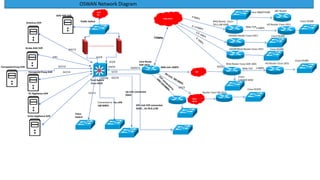
OSWAN Network Diagram
BSNL MPLS
Core Route
ASR 1013
Gi0/0/11 NKN Link 1GBPS
NIC
DHQ Router Cisco-ASR-1001
0/0/2
BHQ Router Cisco-
2911,ISR-4300
BSNL P2P
HO Router Cisco-1921
TAHASIL Router Cisco-1921
SADAR Block Router Cisco-1921
2 MBPS
HO Router Cisco-1921
2 MBPS
BSNL P2P
Cisco-SG300
Cisco-2960/CE500
Cisco-SG300
Cisco-SG300
Cisco-SG300
Cisco-
C3560/C3650
SRC Router
BSNL
MPLS
Router Cisco-ISR-4221
Cisco-SG350
Core Switch
Cisco 4510
NKN
ISP
GOV APP SVR
Public Switch
Connected to Sec LAN
100 MBPS
Antivirus SVR
Aruba AAA SVR
Forcepoint Proxy SVR
VC Appliance SVR
Voice Appliance SVR
Gi4/41
Gi4/48
Gi2/9
Gi2/8
Voice
Switch
Gi2/12
Gi4/13
Forcepoint Proxy SVR
Gi4/
Gi2/13
Gi2/14
OFC Link P2P connected
OSDC , 10.78.0.1/30
Gi7/3
Gi2/19
Up Link connected
OSDC
0/0/2
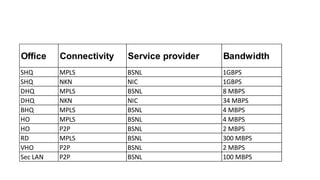
Office Connectivity Service provider Bandwidth
SHQ MPLS BSNL 1GBPS
SHQ NKN NIC 1GBPS
DHQ MPLS BSNL 8 MBPS
DHQ NKN NIC 34 MBPS
BHQ MPLS BSNL 4 MBPS
HO MPLS BSNL 4 MBPS
HO P2P BSNL 2 MBPS
RD MPLS BSNL 300 MBPS
VHO P2P BSNL 2 MBPS
Sec LAN P2P BSNL 100 MBPS
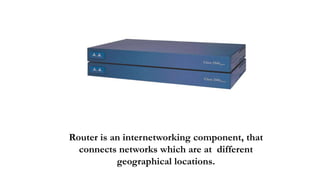
Router is an internetworking component, that
connects networks which are at different
geographical locations.
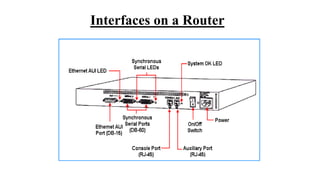
Interfaces on a Router
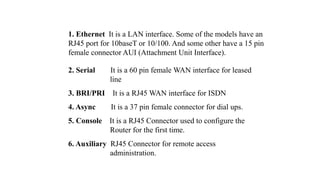
1. Ethernet It is a LAN interface. Some of the models have an
RJ45 port for 10baseT or 10/100. And some other have a 15 pin
female connector AUI (Attachment Unit Interface).
2. Serial It is a 60 pin female WAN interface for leased
line
3. BRI/PRI It is a RJ45 WAN interface for ISDN
4. Async It is a 37 pin female connector for dial ups.
5. Console It is a RJ45 Connector used to configure the
Router for the first time.
6. Auxiliary RJ45 Connector for remote access
administration.
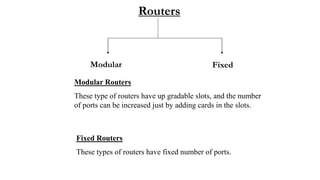
Routers
Modular Fixed
Modular Routers
These type of routers have up gradable slots, and the number
of ports can be increased just by adding cards in the slots.
Fixed Routers
These types of routers have fixed number of ports.
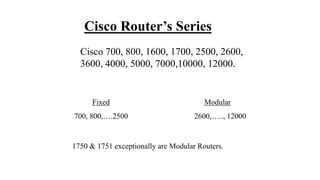
Cisco Router’s Series
Cisco 700, 800, 1600, 1700, 2500, 2600,
3600, 4000, 5000, 7000,10000, 12000.
Fixed Modular
700, 800,….2500 2600,….., 12000
1750 & 1751 exceptionally are Modular Routers.
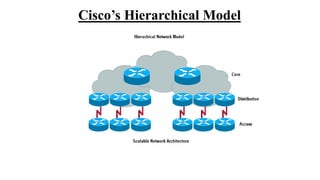
Cisco’s Hierarchical Model
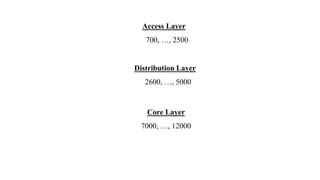
Access Layer
700, …, 2500
Distribution Layer
2600, …, 5000
Core Layer
7000, …, 12000
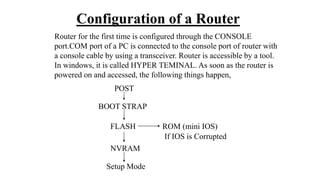
Configuration of a Router
Router for the first time is configured through the CONSOLE
port.COM port of a PC is connected to the console port of router with
a console cable by using a transceiver. Router is accessible by a tool.
In windows, it is called HYPER TEMINAL. As soon as the router is
powered on and accessed, the following things happen,
POST
BOOT STRAP
FLASH
NVRAM
Setup Mode
ROM (mini IOS)
If IOS is Corrupted
In Setup mode, there will be a message,
“Would You Like To Enter The Initial Configuration [Y/N]” :
If “Y” then, initial configuration starts.
If “N” would you like to terminate the auto installation?
Press “RETURN” to get started……You will land on the default prompt
of the Router “ ROUTER >”.
Router>_
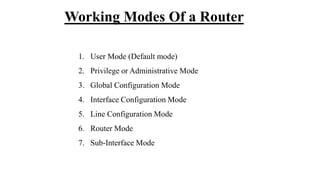
Working Modes Of a Router
1. User Mode (Default mode)
2. Privilege or Administrative Mode
3. Global Configuration Mode
4. Interface Configuration Mode
5. Line Configuration Mode
6. Router Mode
7. Sub-Interface Mode
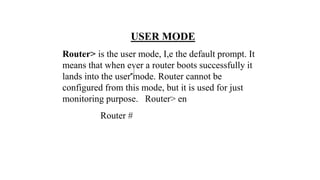
USER MODE
Router> is the user mode, I,e the default prompt. It
means that when ever a router boots successfully it
lands into the user mode. Router cannot be
configured from this mode, but it is used for just
monitoring purpose. Router> en
Router #
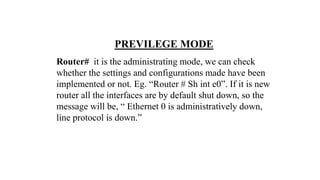
PREVILEGE MODE
Router# it is the administrating mode, we can check
whether the settings and configurations made have been
implemented or not. Eg. “Router # Sh int e0”. If it is new
router all the interfaces are by default shut down, so the
message will be, “ Ethernet 0 is administratively down,
line protocol is down.”
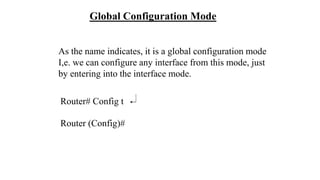
Router# Config t
Router (Config)#
Global Configuration Mode
As the name indicates, it is a global configuration mode
I,e. we can configure any interface from this mode, just
by entering into the interface mode.
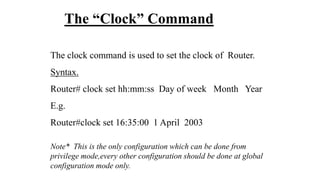
The “Clock” Command
The clock command is used to set the clock of Router.
Syntax.
Router# clock set hh:mm:ss Day of week Month Year
E.g.
Router#clock set 16:35:00 1 April 2003
Note* This is the only configuration which can be done from
privilege mode,every other configuration should be done at global
configuration mode only.
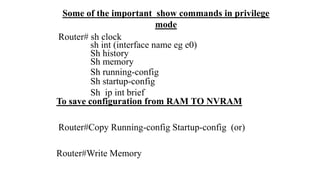
Some of the important show commands in privilege
mode
Router# sh clock
sh int (interface name eg e0)
Sh history
Sh memory
Sh running-config
Sh startup-config
Sh ip int brief
To save configuration from RAM TO NVRAM
Router#Copy Running-config Startup-config (or)
Router#Write Memory
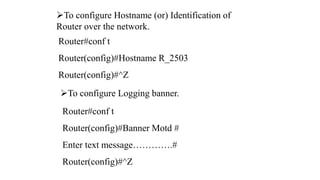
To configure Hostname (or) Identification of
Router over the network.
Router#conf t
Router(config)#Hostname R_2503
Router(config)#^Z
To configure Logging banner.
Router#conf t
Router(config)#Banner Motd #
Enter text message………….#
Router(config)#^Z
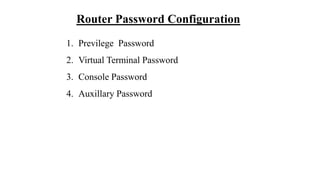
Router Password Configuration
1. Previlege Password
2. Virtual Terminal Password
3. Console Password
4. Auxillary Password
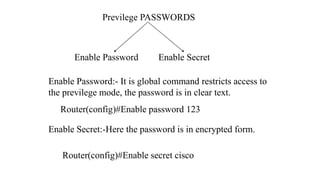
Previlege PASSWORDS
Enable Password Enable Secret
Enable Password:- It is global command restricts access to
the previlege mode, the password is in clear text.
Router(config)#Enable password 123
Enable Secret:-Here the password is in encrypted form.
Router(config)#Enable secret cisco
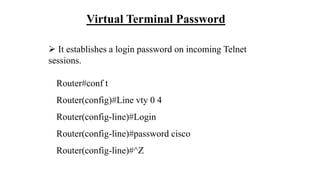
Virtual Terminal Password
 It establishes a login password on incoming Telnet
sessions.
Router#conf t
Router(config)#Line vty 0 4
Router(config-line)#Login
Router(config-line)#password cisco
Router(config-line)#^Z
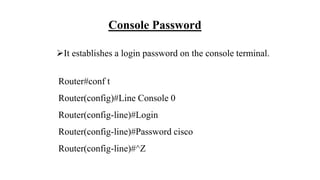
Console Password
It establishes a login password on the console terminal.
Router#conf t
Router(config)#Line Console 0
Router(config-line)#Login
Router(config-line)#Password cisco
Router(config-line)#^Z
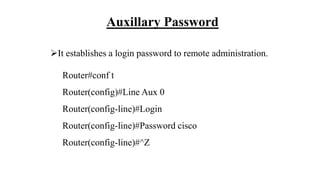
Auxillary Password
It establishes a login password to remote administration.
Router#conf t
Router(config)#Line Aux 0
Router(config-line)#Login
Router(config-line)#Password cisco
Router(config-line)#^Z
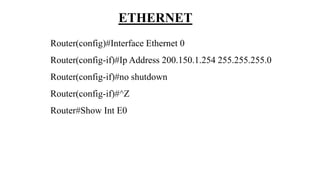
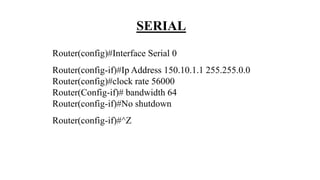
CONFIGURING INTERFACES
LAN interface (ETHERNET Port)
WAN interface (SERIAL Port)
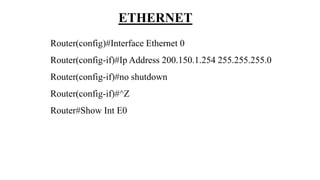
ETHERNET
Router(config)#Interface Ethernet 0
Router(config-if)#Ip Address 200.150.1.254 255.255.255.0
Router(config-if)#no shutdown
Router(config-if)#^Z
Router#Show Int E0
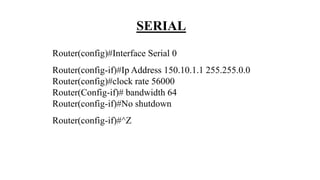
SERIAL
Router(config)#Interface Serial 0
Router(config-if)#Ip Address 150.10.1.1 255.255.0.0
Router(config)#clock rate 56000
Router(Config-if)# bandwidth 64
Router(config-if)#No shutdown
Router(config-if)#^Z
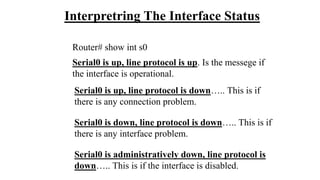
Interpretring The Interface Status
Router# show int s0
Serial0 is up, line protocol is up. Is the messege if
the interface is operational.
Serial0 is up, line protocol is down….. This is if
there is any connection problem.
Serial0 is down, line protocol is down….. This is if
there is any interface problem.
Serial0 is administratively down, line protocol is
down….. This is if the interface is disabled.
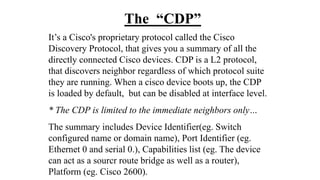
The “CDP”
It’s a Cisco's proprietary protocol called the Cisco
Discovery Protocol, that gives you a summary of all the
directly connected Cisco devices. CDP is a L2 protocol,
that discovers neighbor regardless of which protocol suite
they are running. When a cisco device boots up, the CDP
is loaded by default, but can be disabled at interface level.
* The CDP is limited to the immediate neighbors only…
The summary includes Device Identifier(eg. Switch
configured name or domain name), Port Identifier (eg.
Ethernet 0 and serial 0.), Capabilities list (eg. The device
can act as a sourcr route bridge as well as a router),
Platform (eg. Cisco 2600).
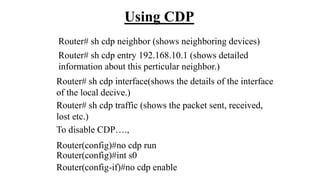
Using CDP
Router# sh cdp neighbor (shows neighboring devices)
To disable CDP….,
Router(config)#no cdp run
Router(config)#int s0
Router(config-if)#no cdp enable
Router# sh cdp entry 192.168.10.1 (shows detailed
information about this perticular neighbor.)
Router# sh cdp interface(shows the details of the interface
of the local decive.)
Router# sh cdp traffic (shows the packet sent, received,
lost etc.)
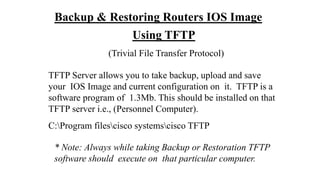
Backup & Restoring Routers IOS Image
Using TFTP
(Trivial File Transfer Protocol)
TFTP Server allows you to take backup, upload and save
your IOS Image and current configuration on it. TFTP is a
software program of 1.3Mb. This should be installed on that
TFTP server i.e., (Personnel Computer).
C:Program filescisco systemscisco TFTP
* Note: Always while taking Backup or Restoration TFTP
software should execute on that particular computer.
Backup Sources :
1. Through Telnet Session.
2. Through Console Session.
3. Through Auxillary Port (Remote Session)
Backup of IOS Image
Router#Copy Flash:(Press Tab key) Tftp
Address or name of the remote host [ ]? (Ip address of tftp)
Destination file name [ ] ? (Press enter key or a name)
Backup of Configuration
Router#Copy Startup-config Tftp
Address or name of the remote host [ ]? (Ip address of tftp)
Destination file name [ ] ? (Give a name)
Upgrading IOS Image
Note: This process can only be done by Console Session.
Router#Copy tftp Flash:
Address or name of remote host []?
Source file name []?
Destination file name []?
Erase Flash: before copying [confirm]?
Erasing the Flash file system will remove all files: continue?
[confirm]
Erasing device eeeeeeee……….eeeeeee.eee.eeee.ee
Loading!!!!!!!!!!!!!!!!!!!!!!!!!!!!!…….!!!!…….!!!!!!
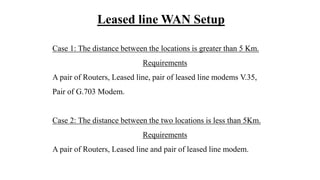
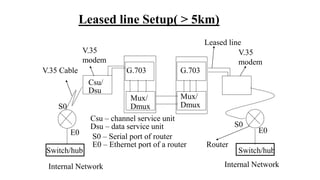
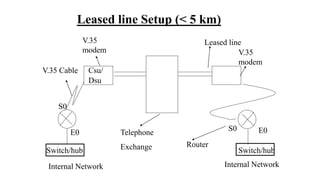
Leased line WAN Setup
Case 1: The distance between the locations is greater than 5 Km.
Requirements
A pair of Routers, Leased line, pair of leased line modems V.35,
Pair of G.703 Modem.
Case 2: The distance between the two locations is less than 5Km.
Requirements
A pair of Routers, Leased line and pair of leased line modem.
Internal Network Internal Network
V.35 Cable
Csu/
Dsu
Switch/hub
V.35
modem
Csu – channel service unit
Dsu – data service unit
S0 – Serial port of router
E0 – Ethernet port of a router
G.703 G.703
Mux/
Dmux
Mux/
Dmux
S0
E0
S0
E0
Switch/hub
Router
V.35
modem
Leased line Setup( > 5km)
Leased line
Leased line Setup (< 5 km)
Internal Network Internal Network
V.35 Cable Csu/
Dsu
Switch/hub
V.35
modem
S0
E0 S0 E0
Switch/hub
Router
V.35
modem
Leased line
Telephone
Exchange
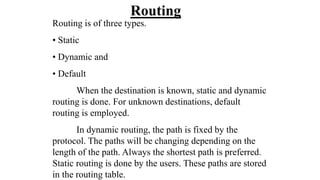
Routing
Routing is of three types.
• Static
• Dynamic and
• Default
When the destination is known, static and dynamic
routing is done. For unknown destinations, default
routing is employed.
In dynamic routing, the path is fixed by the
protocol. The paths will be changing depending on the
length of the path. Always the shortest path is preferred.
Static routing is done by the users. These paths are stored
in the routing table.
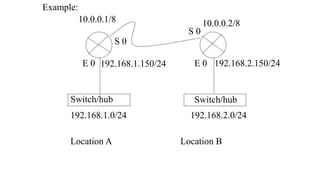
Example:
Switch/hub Switch/hub
E 0 E 0
S 0
S 0
192.168.1.0/24 192.168.2.0/24
192.168.1.150/24 192.168.2.150/24
10.0.0.1/8 10.0.0.2/8
Location A Location B
CONFIGURING INTERFACES
LAN interface (ETHERNET Port)
WAN interface (SERIAL Port)
ETHERNET
Router(config)#Interface Ethernet 0
Router(config-if)#Ip Address 200.150.1.254 255.255.255.0
Router(config-if)#no shutdown
Router(config-if)#^Z
Router#Show Int E0
SERIAL
Router(config)#Interface Serial 0
Router(config-if)#Ip Address 150.10.1.1 255.255.0.0
Router(config)#clock rate 56000
Router(Config-if)# bandwidth 64
Router(config-if)#No shutdown
Router(config-if)#^Z
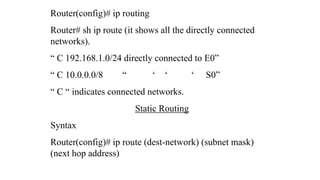
Router(config)# ip routing
Router# sh ip route (it shows all the directly connected
networks).
“ C 192.168.1.0/24 directly connected to E0”
“ C 10.0.0.0/8 “ ‘ ‘ ‘ S0”
“ C “ indicates connected networks.
Static Routing
Syntax
Router(config)# ip route (dest-network) (subnet mask)
(next hop address)
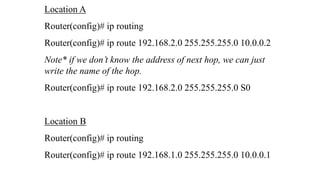
Location A
Router(config)# ip routing
Router(config)# ip route 192.168.2.0 255.255.255.0 10.0.0.2
Note* if we don’t know the address of next hop, we can just
write the name of the hop.
Router(config)# ip route 192.168.2.0 255.255.255.0 S0
Location B
Router(config)# ip routing
Router(config)# ip route 192.168.1.0 255.255.255.0 10.0.0.1
Router# sh ip route
C 192.168.1.0/24 directly connected to E0
C 10.0.0.0/8 “ ‘ “ “ S0
S 192.168.2.0/24 [1/0] via 10.0.0.2
•“S” represents static. [a/b] ~ [1/0], here a=1 is the
administrative distance value and b has no significance in
static routing. For static and default routing b can be 0 or 1.
• lesser the administrative distance value, higher the
preference.
“Tracert”, “Trace Route” and “Route
print”.
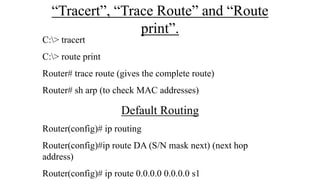
C:> tracert
C:> route print
Router# trace route (gives the complete route)
Router# sh arp (to check MAC addresses)
Default Routing
Router(config)# ip routing
Router(config)#ip route DA (S/N mask next) (next hop
address)
Router(config)# ip route 0.0.0.0 0.0.0.0 s1
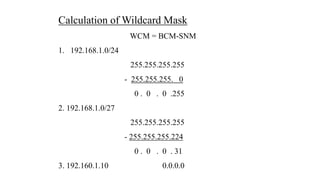
Calculation of Wildcard Mask
WCM = BCM-SNM
1. 192.168.1.0/24
255.255.255.255
- 255.255.255. 0
0 . 0 . 0 .255
2. 192.168.1.0/27
255.255.255.255
- 255.255.255.224
0 . 0 . 0 . 31
3. 192.160.1.10 0.0.0.0
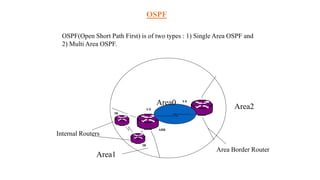
OSPF
OSPF(Open Short Path First) is of two types : 1) Single Area OSPF and
2) Multi Area OSPF.
Internal Routers
Area1
Area2
Area Border Router
IR
IR
ABR
ABR
Area0
S 0
S 0
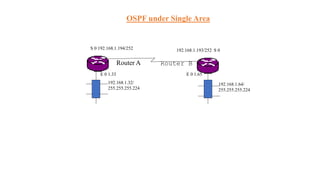
Router A Router B
S 0 192.168.1.194/252 192.168.1.193/252 S 0
E 0 1.65
192.168.1.32/
255.255.255.224
192.168.1.64/
255.255.255.224
E 0 1.33
OSPF under Single Area
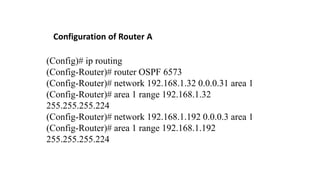
(Config)# ip routing
(Config-Router)# router OSPF 6573
(Config-Router)# network 192.168.1.32 0.0.0.31 area 1
(Config-Router)# area 1 range 192.168.1.32
255.255.255.224
(Config-Router)# network 192.168.1.192 0.0.0.3 area 1
(Config-Router)# area 1 range 192.168.1.192
255.255.255.224
Configuration of Router A
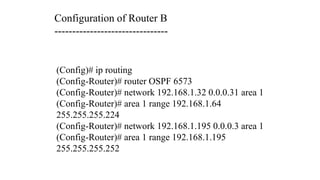
(Config)# ip routing
(Config-Router)# router OSPF 6573
(Config-Router)# network 192.168.1.32 0.0.0.31 area 1
(Config-Router)# area 1 range 192.168.1.64
255.255.255.224
(Config-Router)# network 192.168.1.195 0.0.0.3 area 1
(Config-Router)# area 1 range 192.168.1.195
255.255.255.252
Configuration of Router B
--------------------------------
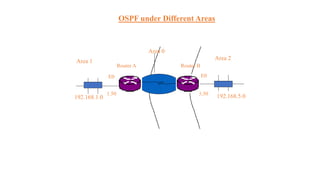
OSPF under Different Areas
Area 0
192.168.1.0 192.168.5.0
Area 1
Area 2
E0 E0
5.50
Router A Router B
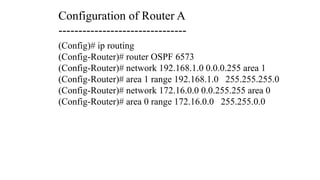
1.50
(Config)# ip routing
(Config-Router)# router OSPF 6573
(Config-Router)# network 192.168.1.0 0.0.0.255 area 1
(Config-Router)# area 1 range 192.168.1.0 255.255.255.0
(Config-Router)# network 172.16.0.0 0.0.255.255 area 0
(Config-Router)# area 0 range 172.16.0.0 255.255.0.0
Configuration of Router A
--------------------------------
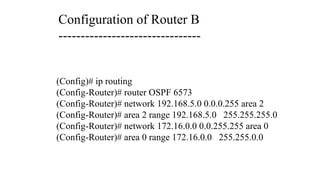
Configuration of Router B
--------------------------------
(Config)# ip routing
(Config-Router)# router OSPF 6573
(Config-Router)# network 192.168.5.0 0.0.0.255 area 2
(Config-Router)# area 2 range 192.168.5.0 255.255.255.0
(Config-Router)# network 172.16.0.0 0.0.255.255 area 0
(Config-Router)# area 0 range 172.16.0.0 255.255.0.0
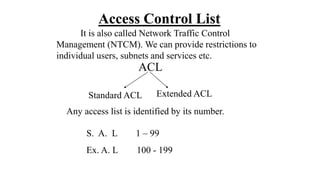
Access Control List
It is also called Network Traffic Control
Management (NTCM). We can provide restrictions to
individual users, subnets and services etc.
ACL
Standard ACL Extended ACL
Any access list is identified by its number.
S. A. L 1 – 99
Ex. A. L 100 - 199
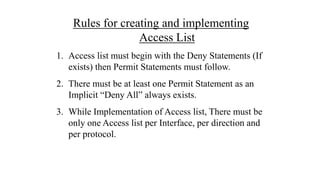
Rules for creating and implementing
Access List
1. Access list must begin with the Deny Statements (If
exists) then Permit Statements must follow.
2. There must be at least one Permit Statement as an
Implicit “Deny All” always exists.
3. While Implementation of Access list, There must be
only one Access list per Interface, per direction and
per protocol.
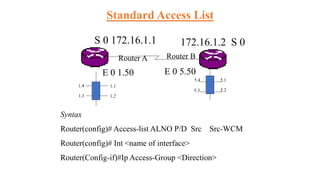
Standard Access List
Router A Router B
S 0 172.16.1.1 172.16.1.2 S 0
E 0 5.50
1.1
1.2
1.3
1.4
5.1
5.2
5.4
5.3
E 0 1.50
Syntax
Router(config)# Access-list ALNO P/D Src Src-WCM
Router(config)# Int <name of interface>
Router(Config-if)#Ip Access-Group <Direction>
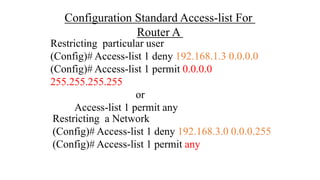
Configuration Standard Access-list For
Router A
Restricting particular user
(Config)# Access-list 1 deny 192.168.1.3 0.0.0.0
(Config)# Access-list 1 permit 0.0.0.0
255.255.255.255
or
Access-list 1 permit any
Restricting a Network
(Config)# Access-list 1 deny 192.168.3.0 0.0.0.255
(Config)# Access-list 1 permit any
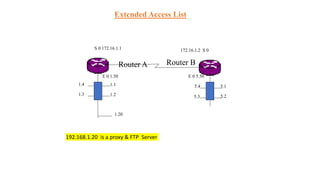
Extended Access List
Router A Router B
S 0 172.16.1.1 172.16.1.2 S 0
E 0 5.50
1.1
1.2
1.3
1.4 5.1
5.2
5.4
5.3
E 0 1.50
1.20
192.168.1.20 is a proxy & FTP Server
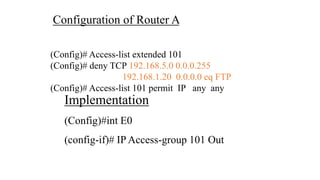
Configuration of Router A
(Config)# Access-list extended 101
(Config)# deny TCP 192.168.5.0 0.0.0.255
192.168.1.20 0.0.0.0 eq FTP
(Config)# Access-list 101 permit IP any any
Implementation
(Config)#int E0
(config-if)# IP Access-group 101 Out
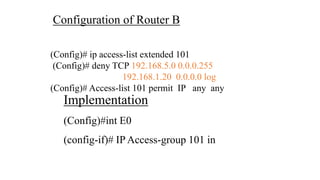
Configuration of Router B
(Config)# ip access-list extended 101
(Config)# deny TCP 192.168.5.0 0.0.0.255
192.168.1.20 0.0.0.0 log
(Config)# Access-list 101 permit IP any any
Implementation
(Config)#int E0
(config-if)# IP Access-group 101 in
Autonomous Systems
An autonomous system is a collection of networks
under a common administrative domain. IGPs operate within
an autonomous system where as EGP connects different
autonomous systems.
Every autonomous system has a distinct number.The
Internet Assigned Numbers Authority (IANA) is responsible
for allocating this number. Eg. Autonomous system 100.
We can use any number unless the organization plans
for an EGP.
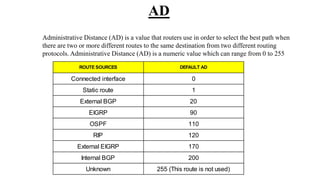
AD
Administrative Distance (AD) is a value that routers use in order to select the best path when
there are two or more different routes to the same destination from two different routing
protocols. Administrative Distance (AD) is a numeric value which can range from 0 to 255
ROUTE SOURCES DEFAULT AD
Connected interface 0
Static route 1
External BGP 20
EIGRP 90
OSPF 110
RIP 120
External EIGRP 170
Internal BGP 200
Unknown 255 (This route is not used)
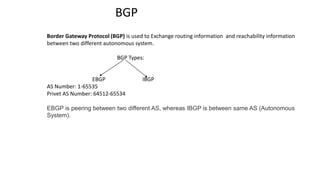
BGP
Border Gateway Protocol (BGP) is used to Exchange routing information and reachability information
between two different autonomous system.
BGP Types:
EBGP IBGP
AS Number: 1-65535
Privet AS Number: 64512-65534
EBGP is peering between two different AS, whereas IBGP is between same AS (Autonomous
System).
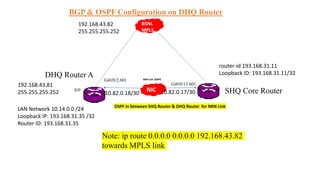
BGP & OSPF Configuration on DHQ Router
DHQ Router A
192.168.43.81
255.255.255.252
192.168.43.82
255.255.255.252
BSNL
MPLS
LAN Network 10.14.0.0 /24
Loopback IP: 193.168.31.35 /32
Router ID: 193.168.31.35
0/0
Gi0/0/2.601
NIC SHQ Core Router
NKN Link 1GBPS
Gi0/0/13.601
router-id 193.168.31.11
Loopback ID: 193.168.31.11/32
10.82.0.17/30
10.82.0.18/30
Note: ip route 0.0.0.0 0.0.0.0 192.168.43.82
towards MPLS link
OSPF in between SHQ Router & DHQ Router for NKN Link
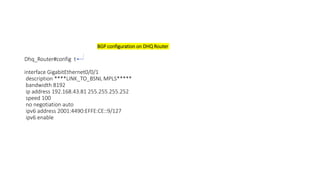
BGP configuration on DHQ Router
Dhq_Router#config t
interface GigabitEthernet0/0/1
description ****LINK_TO_BSNL MPLS*****
bandwidth 8192
ip address 192.168.43.81 255.255.255.252
speed 100
no negotiation auto
ipv6 address 2001:4490:EFFE:CE::9/127
ipv6 enable
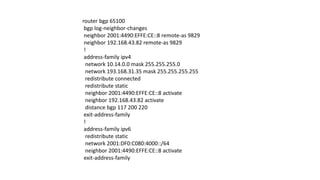
router bgp 65100
bgp log-neighbor-changes
neighbor 2001:4490:EFFE:CE::8 remote-as 9829
neighbor 192.168.43.82 remote-as 9829
!
address-family ipv4
network 10.14.0.0 mask 255.255.255.0
network 193.168.31.35 mask 255.255.255.255
redistribute connected
redistribute static
neighbor 2001:4490:EFFE:CE::8 activate
neighbor 192.168.43.82 activate
distance bgp 117 200 220
exit-address-family
!
address-family ipv6
redistribute static
network 2001:DF0:C080:4000::/64
neighbor 2001:4490:EFFE:CE::8 activate
exit-address-family
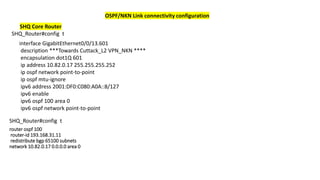
OSPF/NKN Link connectivity configuration
interface GigabitEthernet0/0/13.601
description ***Towards Cuttack_L2 VPN_NKN ****
encapsulation dot1Q 601
ip address 10.82.0.17 255.255.255.252
ip ospf network point-to-point
ip ospf mtu-ignore
ipv6 address 2001:DF0:C080:A0A::8/127
ipv6 enable
ipv6 ospf 100 area 0
ipv6 ospf network point-to-point
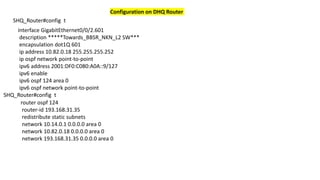
SHQ Core Router
SHQ_Router#config t
router ospf 100
router-id 193.168.31.11
redistribute bgp 65100 subnets
network 10.82.0.17 0.0.0.0 area 0
SHQ_Router#config t
Configuration on DHQ Router
SHQ_Router#config t
interface GigabitEthernet0/0/2.601
description *****Towards_BBSR_NKN_L2 SW***
encapsulation dot1Q 601
ip address 10.82.0.18 255.255.255.252
ip ospf network point-to-point
ipv6 address 2001:DF0:C080:A0A::9/127
ipv6 enable
ipv6 ospf 124 area 0
ipv6 ospf network point-to-point
router ospf 124
router-id 193.168.31.35
redistribute static subnets
network 10.14.0.1 0.0.0.0 area 0
network 10.82.0.18 0.0.0.0 area 0
network 193.168.31.35 0.0.0.0 area 0
SHQ_Router#config t
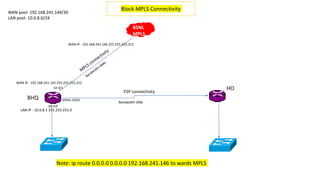
BHQ
HO
P2P connectivity
WAN pool- 192.168.241.144/30
LAN pool- 10.0.8.0/24
GE-0/1
GE-0/0
SERIAL-0/0/0
Block MPLS Connectivity
LAN IP - 10.0.8.1 255.255.255.0
WAN IP - 192.168.241.145 255.255.255.252
WAN IP - 192.168.241.146 255.255.255.252
Bandwidth-2Mb
BSNL
MPLS
Note: ip route 0.0.0.0 0.0.0.0 192.168.241.146 to wards MPLS
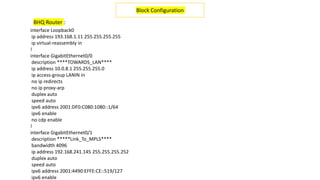
interface Loopback0
ip address 193.168.1.11 255.255.255.255
ip virtual-reassembly in
!
interface GigabitEthernet0/0
description ****TOWARDS_LAN****
ip address 10.0.8.1 255.255.255.0
ip access-group LANIN in
no ip redirects
no ip proxy-arp
duplex auto
speed auto
ipv6 address 2001:DF0:C080:1080::1/64
ipv6 enable
no cdp enable
!
interface GigabitEthernet0/1
description *****Link_To_MPLS****
bandwidth 4096
ip address 192.168.241.145 255.255.255.252
duplex auto
speed auto
ipv6 address 2001:4490:EFFE:CE::519/127
ipv6 enable
Block Configuration
BHQ Router :
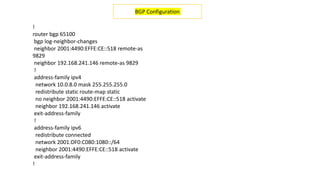
!
router bgp 65100
bgp log-neighbor-changes
neighbor 2001:4490:EFFE:CE::518 remote-as
9829
neighbor 192.168.241.146 remote-as 9829
!
address-family ipv4
network 10.0.8.0 mask 255.255.255.0
redistribute static route-map static
no neighbor 2001:4490:EFFE:CE::518 activate
neighbor 192.168.241.146 activate
exit-address-family
!
address-family ipv6
redistribute connected
network 2001:DF0:C080:1080::/64
neighbor 2001:4490:EFFE:CE::518 activate
exit-address-family
!
BGP Configuration
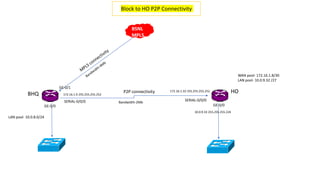
BHQ HO
P2P connectivity
LAN pool- 10.0.8.0/24
GE-0/1
GE-0/0
SERIAL-0/0/0
Block to HO P2P Connectivity
WAN pool- 172.16.1.8/30
LAN pool- 10.0.9.32 /27
SERIAL-0/0/0
GE-0/0
172.16.1.10 255.255.255.252
172.16.1.9 255.255.255.252
10.0.9.33 255.255.255.224
Bandwidth-2Mb
BSNL
MPLS
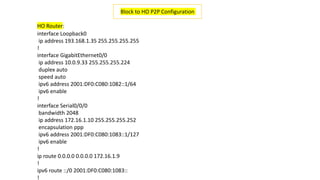
interface Loopback0
ip address 193.168.1.35 255.255.255.255
!
interface GigabitEthernet0/0
ip address 10.0.9.33 255.255.255.224
duplex auto
speed auto
ipv6 address 2001:DF0:C080:1082::1/64
ipv6 enable
!
interface Serial0/0/0
bandwidth 2048
ip address 172.16.1.10 255.255.255.252
encapsulation ppp
ipv6 address 2001:DF0:C080:1083::1/127
ipv6 enable
!
ip route 0.0.0.0 0.0.0.0 172.16.1.9
!
ipv6 route ::/0 2001:DF0:C080:1083::
!
Block to HO P2P Configuration
HO Router:
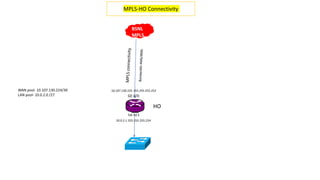
HO
GE-0/1
GE-0/0
MPLS-HO Connectivity
WAN pool- 10.107.130.224/30
LAN pool- 10.0.2.0 /27
10.107.130.225 255.255.255.252
10.0.2.1 255.255.255.224
BSNL
MPLS
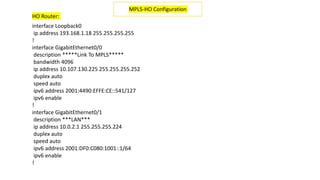
interface Loopback0
ip address 193.168.1.18 255.255.255.255
!
interface GigabitEthernet0/0
description *****Link To MPLS*****
bandwidth 4096
ip address 10.107.130.225 255.255.255.252
duplex auto
speed auto
ipv6 address 2001:4490:EFFE:CE::541/127
ipv6 enable
!
interface GigabitEthernet0/1
description ***LAN***
ip address 10.0.2.1 255.255.255.224
duplex auto
speed auto
ipv6 address 2001:DF0:C080:1001::1/64
ipv6 enable
!
MPLS-HO Configuration
HO Router:
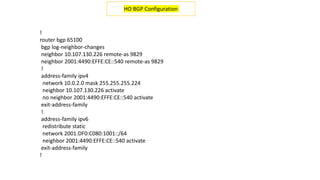
!
router bgp 65100
bgp log-neighbor-changes
neighbor 10.107.130.226 remote-as 9829
neighbor 2001:4490:EFFE:CE::540 remote-as 9829
!
address-family ipv4
network 10.0.2.0 mask 255.255.255.224
neighbor 10.107.130.226 activate
no neighbor 2001:4490:EFFE:CE::540 activate
exit-address-family
!
address-family ipv6
redistribute static
network 2001:DF0:C080:1001::/64
neighbor 2001:4490:EFFE:CE::540 activate
exit-address-family
!
HO BGP Configuration

OSWAN.pptx

  • 1.
    OSWAN The Odisha StateWide Area Network (OSWAN) would serve as the backbone network for data, video and voice communications throughout the State which includes 1 State Head Quarter (SHQ), 30 District Head Quarters (DHQ), 284 Block Head Quarters (BHQ) and 1214 Horizontal Offices, 866 P2P , 347 MPLS (317- Tahashil + 30 Sadar Block) & 47 vertical Horizontal Offices (VHO)
  • 2.
    OSWAN Network Diagram BSNLMPLS Core Route ASR 1013 Gi0/0/11 NKN Link 1GBPS NIC DHQ Router Cisco-ASR-1001 0/0/2 BHQ Router Cisco- 2911,ISR-4300 BSNL P2P HO Router Cisco-1921 TAHASIL Router Cisco-1921 SADAR Block Router Cisco-1921 2 MBPS HO Router Cisco-1921 2 MBPS BSNL P2P Cisco-SG300 Cisco-2960/CE500 Cisco-SG300 Cisco-SG300 Cisco-SG300 Cisco- C3560/C3650 SRC Router BSNL MPLS Router Cisco-ISR-4221 Cisco-SG350 Core Switch Cisco 4510 NKN ISP GOV APP SVR Public Switch Connected to Sec LAN 100 MBPS Antivirus SVR Aruba AAA SVR Forcepoint Proxy SVR VC Appliance SVR Voice Appliance SVR Gi4/41 Gi4/48 Gi2/9 Gi2/8 Voice Switch Gi2/12 Gi4/13 Forcepoint Proxy SVR Gi4/ Gi2/13 Gi2/14 OFC Link P2P connected OSDC , 10.78.0.1/30 Gi7/3 Gi2/19 Up Link connected OSDC 0/0/2
  • 3.
    Office Connectivity Serviceprovider Bandwidth SHQ MPLS BSNL 1GBPS SHQ NKN NIC 1GBPS DHQ MPLS BSNL 8 MBPS DHQ NKN NIC 34 MBPS BHQ MPLS BSNL 4 MBPS HO MPLS BSNL 4 MBPS HO P2P BSNL 2 MBPS RD MPLS BSNL 300 MBPS VHO P2P BSNL 2 MBPS Sec LAN P2P BSNL 100 MBPS
  • 4.
    Router is aninternetworking component, that connects networks which are at different geographical locations.
  • 5.
  • 6.
    1. Ethernet Itis a LAN interface. Some of the models have an RJ45 port for 10baseT or 10/100. And some other have a 15 pin female connector AUI (Attachment Unit Interface). 2. Serial It is a 60 pin female WAN interface for leased line 3. BRI/PRI It is a RJ45 WAN interface for ISDN 4. Async It is a 37 pin female connector for dial ups. 5. Console It is a RJ45 Connector used to configure the Router for the first time. 6. Auxiliary RJ45 Connector for remote access administration.
  • 7.
    Routers Modular Fixed Modular Routers Thesetype of routers have up gradable slots, and the number of ports can be increased just by adding cards in the slots. Fixed Routers These types of routers have fixed number of ports.
  • 8.
    Cisco Router’s Series Cisco700, 800, 1600, 1700, 2500, 2600, 3600, 4000, 5000, 7000,10000, 12000. Fixed Modular 700, 800,….2500 2600,….., 12000 1750 & 1751 exceptionally are Modular Routers.
  • 9.
  • 10.
    Access Layer 700, …,2500 Distribution Layer 2600, …, 5000 Core Layer 7000, …, 12000
  • 11.
    Configuration of aRouter Router for the first time is configured through the CONSOLE port.COM port of a PC is connected to the console port of router with a console cable by using a transceiver. Router is accessible by a tool. In windows, it is called HYPER TEMINAL. As soon as the router is powered on and accessed, the following things happen, POST BOOT STRAP FLASH NVRAM Setup Mode ROM (mini IOS) If IOS is Corrupted
  • 12.
    In Setup mode,there will be a message, “Would You Like To Enter The Initial Configuration [Y/N]” : If “Y” then, initial configuration starts. If “N” would you like to terminate the auto installation? Press “RETURN” to get started……You will land on the default prompt of the Router “ ROUTER >”. Router>_
  • 13.
    Working Modes Ofa Router 1. User Mode (Default mode) 2. Privilege or Administrative Mode 3. Global Configuration Mode 4. Interface Configuration Mode 5. Line Configuration Mode 6. Router Mode 7. Sub-Interface Mode
  • 14.
    USER MODE Router> isthe user mode, I,e the default prompt. It means that when ever a router boots successfully it lands into the user mode. Router cannot be configured from this mode, but it is used for just monitoring purpose. Router> en Router #
  • 15.
    PREVILEGE MODE Router# itis the administrating mode, we can check whether the settings and configurations made have been implemented or not. Eg. “Router # Sh int e0”. If it is new router all the interfaces are by default shut down, so the message will be, “ Ethernet 0 is administratively down, line protocol is down.”
  • 16.
    Router# Config t Router(Config)# Global Configuration Mode As the name indicates, it is a global configuration mode I,e. we can configure any interface from this mode, just by entering into the interface mode.
  • 17.
    The “Clock” Command Theclock command is used to set the clock of Router. Syntax. Router# clock set hh:mm:ss Day of week Month Year E.g. Router#clock set 16:35:00 1 April 2003 Note* This is the only configuration which can be done from privilege mode,every other configuration should be done at global configuration mode only.
  • 18.
    Some of theimportant show commands in privilege mode Router# sh clock sh int (interface name eg e0) Sh history Sh memory Sh running-config Sh startup-config Sh ip int brief To save configuration from RAM TO NVRAM Router#Copy Running-config Startup-config (or) Router#Write Memory
  • 19.
    To configure Hostname(or) Identification of Router over the network. Router#conf t Router(config)#Hostname R_2503 Router(config)#^Z To configure Logging banner. Router#conf t Router(config)#Banner Motd # Enter text message………….# Router(config)#^Z
  • 20.
    Router Password Configuration 1.Previlege Password 2. Virtual Terminal Password 3. Console Password 4. Auxillary Password
  • 21.
    Previlege PASSWORDS Enable PasswordEnable Secret Enable Password:- It is global command restricts access to the previlege mode, the password is in clear text. Router(config)#Enable password 123 Enable Secret:-Here the password is in encrypted form. Router(config)#Enable secret cisco
  • 22.
    Virtual Terminal Password It establishes a login password on incoming Telnet sessions. Router#conf t Router(config)#Line vty 0 4 Router(config-line)#Login Router(config-line)#password cisco Router(config-line)#^Z
  • 23.
    Console Password It establishesa login password on the console terminal. Router#conf t Router(config)#Line Console 0 Router(config-line)#Login Router(config-line)#Password cisco Router(config-line)#^Z
  • 24.
    Auxillary Password It establishesa login password to remote administration. Router#conf t Router(config)#Line Aux 0 Router(config-line)#Login Router(config-line)#Password cisco Router(config-line)#^Z
  • 25.
    CONFIGURING INTERFACES LAN interface(ETHERNET Port) WAN interface (SERIAL Port)
  • 26.
    ETHERNET Router(config)#Interface Ethernet 0 Router(config-if)#IpAddress 200.150.1.254 255.255.255.0 Router(config-if)#no shutdown Router(config-if)#^Z Router#Show Int E0
  • 27.
    SERIAL Router(config)#Interface Serial 0 Router(config-if)#IpAddress 150.10.1.1 255.255.0.0 Router(config)#clock rate 56000 Router(Config-if)# bandwidth 64 Router(config-if)#No shutdown Router(config-if)#^Z
  • 28.
    Interpretring The InterfaceStatus Router# show int s0 Serial0 is up, line protocol is up. Is the messege if the interface is operational. Serial0 is up, line protocol is down….. This is if there is any connection problem. Serial0 is down, line protocol is down….. This is if there is any interface problem. Serial0 is administratively down, line protocol is down….. This is if the interface is disabled.
  • 29.
    The “CDP” It’s aCisco's proprietary protocol called the Cisco Discovery Protocol, that gives you a summary of all the directly connected Cisco devices. CDP is a L2 protocol, that discovers neighbor regardless of which protocol suite they are running. When a cisco device boots up, the CDP is loaded by default, but can be disabled at interface level. * The CDP is limited to the immediate neighbors only… The summary includes Device Identifier(eg. Switch configured name or domain name), Port Identifier (eg. Ethernet 0 and serial 0.), Capabilities list (eg. The device can act as a sourcr route bridge as well as a router), Platform (eg. Cisco 2600).
  • 30.
    Using CDP Router# shcdp neighbor (shows neighboring devices) To disable CDP…., Router(config)#no cdp run Router(config)#int s0 Router(config-if)#no cdp enable Router# sh cdp entry 192.168.10.1 (shows detailed information about this perticular neighbor.) Router# sh cdp interface(shows the details of the interface of the local decive.) Router# sh cdp traffic (shows the packet sent, received, lost etc.)
  • 31.
    Backup & RestoringRouters IOS Image Using TFTP (Trivial File Transfer Protocol) TFTP Server allows you to take backup, upload and save your IOS Image and current configuration on it. TFTP is a software program of 1.3Mb. This should be installed on that TFTP server i.e., (Personnel Computer). C:Program filescisco systemscisco TFTP * Note: Always while taking Backup or Restoration TFTP software should execute on that particular computer.
  • 32.
    Backup Sources : 1.Through Telnet Session. 2. Through Console Session. 3. Through Auxillary Port (Remote Session)
  • 33.
    Backup of IOSImage Router#Copy Flash:(Press Tab key) Tftp Address or name of the remote host [ ]? (Ip address of tftp) Destination file name [ ] ? (Press enter key or a name) Backup of Configuration Router#Copy Startup-config Tftp Address or name of the remote host [ ]? (Ip address of tftp) Destination file name [ ] ? (Give a name)
  • 34.
    Upgrading IOS Image Note:This process can only be done by Console Session. Router#Copy tftp Flash: Address or name of remote host []? Source file name []? Destination file name []? Erase Flash: before copying [confirm]? Erasing the Flash file system will remove all files: continue? [confirm] Erasing device eeeeeeee……….eeeeeee.eee.eeee.ee Loading!!!!!!!!!!!!!!!!!!!!!!!!!!!!!…….!!!!…….!!!!!!
  • 35.
    Leased line WANSetup Case 1: The distance between the locations is greater than 5 Km. Requirements A pair of Routers, Leased line, pair of leased line modems V.35, Pair of G.703 Modem. Case 2: The distance between the two locations is less than 5Km. Requirements A pair of Routers, Leased line and pair of leased line modem.
  • 36.
    Internal Network InternalNetwork V.35 Cable Csu/ Dsu Switch/hub V.35 modem Csu – channel service unit Dsu – data service unit S0 – Serial port of router E0 – Ethernet port of a router G.703 G.703 Mux/ Dmux Mux/ Dmux S0 E0 S0 E0 Switch/hub Router V.35 modem Leased line Setup( > 5km) Leased line
  • 37.
    Leased line Setup(< 5 km) Internal Network Internal Network V.35 Cable Csu/ Dsu Switch/hub V.35 modem S0 E0 S0 E0 Switch/hub Router V.35 modem Leased line Telephone Exchange
  • 38.
    Routing Routing is ofthree types. • Static • Dynamic and • Default When the destination is known, static and dynamic routing is done. For unknown destinations, default routing is employed. In dynamic routing, the path is fixed by the protocol. The paths will be changing depending on the length of the path. Always the shortest path is preferred. Static routing is done by the users. These paths are stored in the routing table.
  • 39.
    Example: Switch/hub Switch/hub E 0E 0 S 0 S 0 192.168.1.0/24 192.168.2.0/24 192.168.1.150/24 192.168.2.150/24 10.0.0.1/8 10.0.0.2/8 Location A Location B
  • 40.
    CONFIGURING INTERFACES LAN interface(ETHERNET Port) WAN interface (SERIAL Port)
  • 41.
    ETHERNET Router(config)#Interface Ethernet 0 Router(config-if)#IpAddress 200.150.1.254 255.255.255.0 Router(config-if)#no shutdown Router(config-if)#^Z Router#Show Int E0
  • 42.
    SERIAL Router(config)#Interface Serial 0 Router(config-if)#IpAddress 150.10.1.1 255.255.0.0 Router(config)#clock rate 56000 Router(Config-if)# bandwidth 64 Router(config-if)#No shutdown Router(config-if)#^Z
  • 43.
    Router(config)# ip routing Router#sh ip route (it shows all the directly connected networks). “ C 192.168.1.0/24 directly connected to E0” “ C 10.0.0.0/8 “ ‘ ‘ ‘ S0” “ C “ indicates connected networks. Static Routing Syntax Router(config)# ip route (dest-network) (subnet mask) (next hop address)
  • 44.
    Location A Router(config)# iprouting Router(config)# ip route 192.168.2.0 255.255.255.0 10.0.0.2 Note* if we don’t know the address of next hop, we can just write the name of the hop. Router(config)# ip route 192.168.2.0 255.255.255.0 S0 Location B Router(config)# ip routing Router(config)# ip route 192.168.1.0 255.255.255.0 10.0.0.1
  • 45.
    Router# sh iproute C 192.168.1.0/24 directly connected to E0 C 10.0.0.0/8 “ ‘ “ “ S0 S 192.168.2.0/24 [1/0] via 10.0.0.2 •“S” represents static. [a/b] ~ [1/0], here a=1 is the administrative distance value and b has no significance in static routing. For static and default routing b can be 0 or 1. • lesser the administrative distance value, higher the preference.
  • 46.
    “Tracert”, “Trace Route”and “Route print”. C:> tracert C:> route print Router# trace route (gives the complete route) Router# sh arp (to check MAC addresses) Default Routing Router(config)# ip routing Router(config)#ip route DA (S/N mask next) (next hop address) Router(config)# ip route 0.0.0.0 0.0.0.0 s1
  • 47.
    Calculation of WildcardMask WCM = BCM-SNM 1. 192.168.1.0/24 255.255.255.255 - 255.255.255. 0 0 . 0 . 0 .255 2. 192.168.1.0/27 255.255.255.255 - 255.255.255.224 0 . 0 . 0 . 31 3. 192.160.1.10 0.0.0.0
  • 48.
    OSPF OSPF(Open Short PathFirst) is of two types : 1) Single Area OSPF and 2) Multi Area OSPF. Internal Routers Area1 Area2 Area Border Router IR IR ABR ABR Area0 S 0 S 0
  • 49.
    Router A RouterB S 0 192.168.1.194/252 192.168.1.193/252 S 0 E 0 1.65 192.168.1.32/ 255.255.255.224 192.168.1.64/ 255.255.255.224 E 0 1.33 OSPF under Single Area
  • 50.
    (Config)# ip routing (Config-Router)#router OSPF 6573 (Config-Router)# network 192.168.1.32 0.0.0.31 area 1 (Config-Router)# area 1 range 192.168.1.32 255.255.255.224 (Config-Router)# network 192.168.1.192 0.0.0.3 area 1 (Config-Router)# area 1 range 192.168.1.192 255.255.255.224 Configuration of Router A
  • 51.
    (Config)# ip routing (Config-Router)#router OSPF 6573 (Config-Router)# network 192.168.1.32 0.0.0.31 area 1 (Config-Router)# area 1 range 192.168.1.64 255.255.255.224 (Config-Router)# network 192.168.1.195 0.0.0.3 area 1 (Config-Router)# area 1 range 192.168.1.195 255.255.255.252 Configuration of Router B --------------------------------
  • 52.
    OSPF under DifferentAreas Area 0 192.168.1.0 192.168.5.0 Area 1 Area 2 E0 E0 5.50 Router A Router B 1.50
  • 53.
    (Config)# ip routing (Config-Router)#router OSPF 6573 (Config-Router)# network 192.168.1.0 0.0.0.255 area 1 (Config-Router)# area 1 range 192.168.1.0 255.255.255.0 (Config-Router)# network 172.16.0.0 0.0.255.255 area 0 (Config-Router)# area 0 range 172.16.0.0 255.255.0.0 Configuration of Router A --------------------------------
  • 54.
    Configuration of RouterB -------------------------------- (Config)# ip routing (Config-Router)# router OSPF 6573 (Config-Router)# network 192.168.5.0 0.0.0.255 area 2 (Config-Router)# area 2 range 192.168.5.0 255.255.255.0 (Config-Router)# network 172.16.0.0 0.0.255.255 area 0 (Config-Router)# area 0 range 172.16.0.0 255.255.0.0
  • 55.
    Access Control List Itis also called Network Traffic Control Management (NTCM). We can provide restrictions to individual users, subnets and services etc. ACL Standard ACL Extended ACL Any access list is identified by its number. S. A. L 1 – 99 Ex. A. L 100 - 199
  • 56.
    Rules for creatingand implementing Access List 1. Access list must begin with the Deny Statements (If exists) then Permit Statements must follow. 2. There must be at least one Permit Statement as an Implicit “Deny All” always exists. 3. While Implementation of Access list, There must be only one Access list per Interface, per direction and per protocol.
  • 57.
    Standard Access List RouterA Router B S 0 172.16.1.1 172.16.1.2 S 0 E 0 5.50 1.1 1.2 1.3 1.4 5.1 5.2 5.4 5.3 E 0 1.50 Syntax Router(config)# Access-list ALNO P/D Src Src-WCM Router(config)# Int <name of interface> Router(Config-if)#Ip Access-Group <Direction>
  • 58.
    Configuration Standard Access-listFor Router A Restricting particular user (Config)# Access-list 1 deny 192.168.1.3 0.0.0.0 (Config)# Access-list 1 permit 0.0.0.0 255.255.255.255 or Access-list 1 permit any Restricting a Network (Config)# Access-list 1 deny 192.168.3.0 0.0.0.255 (Config)# Access-list 1 permit any
  • 59.
    Extended Access List RouterA Router B S 0 172.16.1.1 172.16.1.2 S 0 E 0 5.50 1.1 1.2 1.3 1.4 5.1 5.2 5.4 5.3 E 0 1.50 1.20 192.168.1.20 is a proxy & FTP Server
  • 60.
    Configuration of RouterA (Config)# Access-list extended 101 (Config)# deny TCP 192.168.5.0 0.0.0.255 192.168.1.20 0.0.0.0 eq FTP (Config)# Access-list 101 permit IP any any Implementation (Config)#int E0 (config-if)# IP Access-group 101 Out
  • 61.
    Configuration of RouterB (Config)# ip access-list extended 101 (Config)# deny TCP 192.168.5.0 0.0.0.255 192.168.1.20 0.0.0.0 log (Config)# Access-list 101 permit IP any any Implementation (Config)#int E0 (config-if)# IP Access-group 101 in
  • 62.
    Autonomous Systems An autonomoussystem is a collection of networks under a common administrative domain. IGPs operate within an autonomous system where as EGP connects different autonomous systems. Every autonomous system has a distinct number.The Internet Assigned Numbers Authority (IANA) is responsible for allocating this number. Eg. Autonomous system 100. We can use any number unless the organization plans for an EGP.
  • 63.
    AD Administrative Distance (AD)is a value that routers use in order to select the best path when there are two or more different routes to the same destination from two different routing protocols. Administrative Distance (AD) is a numeric value which can range from 0 to 255 ROUTE SOURCES DEFAULT AD Connected interface 0 Static route 1 External BGP 20 EIGRP 90 OSPF 110 RIP 120 External EIGRP 170 Internal BGP 200 Unknown 255 (This route is not used)
  • 64.
    BGP Border Gateway Protocol(BGP) is used to Exchange routing information and reachability information between two different autonomous system. BGP Types: EBGP IBGP AS Number: 1-65535 Privet AS Number: 64512-65534 EBGP is peering between two different AS, whereas IBGP is between same AS (Autonomous System).
  • 65.
    BGP & OSPFConfiguration on DHQ Router DHQ Router A 192.168.43.81 255.255.255.252 192.168.43.82 255.255.255.252 BSNL MPLS LAN Network 10.14.0.0 /24 Loopback IP: 193.168.31.35 /32 Router ID: 193.168.31.35 0/0 Gi0/0/2.601 NIC SHQ Core Router NKN Link 1GBPS Gi0/0/13.601 router-id 193.168.31.11 Loopback ID: 193.168.31.11/32 10.82.0.17/30 10.82.0.18/30 Note: ip route 0.0.0.0 0.0.0.0 192.168.43.82 towards MPLS link OSPF in between SHQ Router & DHQ Router for NKN Link
  • 66.
    BGP configuration onDHQ Router Dhq_Router#config t interface GigabitEthernet0/0/1 description ****LINK_TO_BSNL MPLS***** bandwidth 8192 ip address 192.168.43.81 255.255.255.252 speed 100 no negotiation auto ipv6 address 2001:4490:EFFE:CE::9/127 ipv6 enable
  • 67.
    router bgp 65100 bgplog-neighbor-changes neighbor 2001:4490:EFFE:CE::8 remote-as 9829 neighbor 192.168.43.82 remote-as 9829 ! address-family ipv4 network 10.14.0.0 mask 255.255.255.0 network 193.168.31.35 mask 255.255.255.255 redistribute connected redistribute static neighbor 2001:4490:EFFE:CE::8 activate neighbor 192.168.43.82 activate distance bgp 117 200 220 exit-address-family ! address-family ipv6 redistribute static network 2001:DF0:C080:4000::/64 neighbor 2001:4490:EFFE:CE::8 activate exit-address-family
  • 68.
    OSPF/NKN Link connectivityconfiguration interface GigabitEthernet0/0/13.601 description ***Towards Cuttack_L2 VPN_NKN **** encapsulation dot1Q 601 ip address 10.82.0.17 255.255.255.252 ip ospf network point-to-point ip ospf mtu-ignore ipv6 address 2001:DF0:C080:A0A::8/127 ipv6 enable ipv6 ospf 100 area 0 ipv6 ospf network point-to-point SHQ Core Router SHQ_Router#config t router ospf 100 router-id 193.168.31.11 redistribute bgp 65100 subnets network 10.82.0.17 0.0.0.0 area 0 SHQ_Router#config t
  • 69.
    Configuration on DHQRouter SHQ_Router#config t interface GigabitEthernet0/0/2.601 description *****Towards_BBSR_NKN_L2 SW*** encapsulation dot1Q 601 ip address 10.82.0.18 255.255.255.252 ip ospf network point-to-point ipv6 address 2001:DF0:C080:A0A::9/127 ipv6 enable ipv6 ospf 124 area 0 ipv6 ospf network point-to-point router ospf 124 router-id 193.168.31.35 redistribute static subnets network 10.14.0.1 0.0.0.0 area 0 network 10.82.0.18 0.0.0.0 area 0 network 193.168.31.35 0.0.0.0 area 0 SHQ_Router#config t
  • 70.
    BHQ HO P2P connectivity WAN pool-192.168.241.144/30 LAN pool- 10.0.8.0/24 GE-0/1 GE-0/0 SERIAL-0/0/0 Block MPLS Connectivity LAN IP - 10.0.8.1 255.255.255.0 WAN IP - 192.168.241.145 255.255.255.252 WAN IP - 192.168.241.146 255.255.255.252 Bandwidth-2Mb BSNL MPLS Note: ip route 0.0.0.0 0.0.0.0 192.168.241.146 to wards MPLS
  • 71.
    interface Loopback0 ip address193.168.1.11 255.255.255.255 ip virtual-reassembly in ! interface GigabitEthernet0/0 description ****TOWARDS_LAN**** ip address 10.0.8.1 255.255.255.0 ip access-group LANIN in no ip redirects no ip proxy-arp duplex auto speed auto ipv6 address 2001:DF0:C080:1080::1/64 ipv6 enable no cdp enable ! interface GigabitEthernet0/1 description *****Link_To_MPLS**** bandwidth 4096 ip address 192.168.241.145 255.255.255.252 duplex auto speed auto ipv6 address 2001:4490:EFFE:CE::519/127 ipv6 enable Block Configuration BHQ Router :
  • 72.
    ! router bgp 65100 bgplog-neighbor-changes neighbor 2001:4490:EFFE:CE::518 remote-as 9829 neighbor 192.168.241.146 remote-as 9829 ! address-family ipv4 network 10.0.8.0 mask 255.255.255.0 redistribute static route-map static no neighbor 2001:4490:EFFE:CE::518 activate neighbor 192.168.241.146 activate exit-address-family ! address-family ipv6 redistribute connected network 2001:DF0:C080:1080::/64 neighbor 2001:4490:EFFE:CE::518 activate exit-address-family ! BGP Configuration
  • 73.
    BHQ HO P2P connectivity LANpool- 10.0.8.0/24 GE-0/1 GE-0/0 SERIAL-0/0/0 Block to HO P2P Connectivity WAN pool- 172.16.1.8/30 LAN pool- 10.0.9.32 /27 SERIAL-0/0/0 GE-0/0 172.16.1.10 255.255.255.252 172.16.1.9 255.255.255.252 10.0.9.33 255.255.255.224 Bandwidth-2Mb BSNL MPLS
  • 74.
    interface Loopback0 ip address193.168.1.35 255.255.255.255 ! interface GigabitEthernet0/0 ip address 10.0.9.33 255.255.255.224 duplex auto speed auto ipv6 address 2001:DF0:C080:1082::1/64 ipv6 enable ! interface Serial0/0/0 bandwidth 2048 ip address 172.16.1.10 255.255.255.252 encapsulation ppp ipv6 address 2001:DF0:C080:1083::1/127 ipv6 enable ! ip route 0.0.0.0 0.0.0.0 172.16.1.9 ! ipv6 route ::/0 2001:DF0:C080:1083:: ! Block to HO P2P Configuration HO Router:
  • 75.
    HO GE-0/1 GE-0/0 MPLS-HO Connectivity WAN pool-10.107.130.224/30 LAN pool- 10.0.2.0 /27 10.107.130.225 255.255.255.252 10.0.2.1 255.255.255.224 BSNL MPLS
  • 76.
    interface Loopback0 ip address193.168.1.18 255.255.255.255 ! interface GigabitEthernet0/0 description *****Link To MPLS***** bandwidth 4096 ip address 10.107.130.225 255.255.255.252 duplex auto speed auto ipv6 address 2001:4490:EFFE:CE::541/127 ipv6 enable ! interface GigabitEthernet0/1 description ***LAN*** ip address 10.0.2.1 255.255.255.224 duplex auto speed auto ipv6 address 2001:DF0:C080:1001::1/64 ipv6 enable ! MPLS-HO Configuration HO Router:
  • 77.
    ! router bgp 65100 bgplog-neighbor-changes neighbor 10.107.130.226 remote-as 9829 neighbor 2001:4490:EFFE:CE::540 remote-as 9829 ! address-family ipv4 network 10.0.2.0 mask 255.255.255.224 neighbor 10.107.130.226 activate no neighbor 2001:4490:EFFE:CE::540 activate exit-address-family ! address-family ipv6 redistribute static network 2001:DF0:C080:1001::/64 neighbor 2001:4490:EFFE:CE::540 activate exit-address-family ! HO BGP Configuration