

A.K. Gautam
                                            ciscobulls@gmail.com

             CCNP SWITCH
        PORTABLE STUDY GUIDE
                       &
         PRACTICE WORK BOOK


ANUJ KUMAR


             email:- ciscobulls@gmail.com
                anuj_dev007@yahoo.com
                  networkbulls.com
A.K. Gautam
                                                                                                   ciscobulls@gmail.com

                                        PORT AGGREGATION/ETHERCHANNEL

Spanning tree protocol only allows a single link between switch to switch because it prevents bridge loop.
Cisco Ether channel technology allows for the scaling of the link bandwidth by aggregating or bundling parallel links.
In Ether channel treats multiple line as a single link, logical link. The ether channel allows for two or eight links.
The Cisco catalyst family of switches supports two types of link aggregation.
PAgP (port aggregation protocol): - It is cisco proprietary protocol. It is default protocol, when we port channel
created.
LACP (link aggregation control protocol): - It is industy standard protocol. Its standard IEEE 802.3ad based protocol.
Etherchannel provide redundancy.
If one link fails traffic is automatically moved to another link.
Conditions:-

    1.   Both side same media type and speed.
    2.   Same duplex.
    3.   Same Vlan(If access)
    4.   Same trunking encapsulation and mode(if trunk)
    5.   Same native vlan.

Note: - Load is not balanced equally across links.
Etherchannel uses a hashing algorithm. Two inputs are used (Source IP address and Destination IP address)
How this work.
We will focus on the 2, 4, or 8 link because it is easier to understand for you.
A 2 link Etherchannel bundle require a 1 bit index using an XOR.
If the index is 0, link 0 is selected.
If the index is 1, link 1 is selected.
A 4 link Etherchannel bundle requires a 2 bit index using an XOR.
4 possible links: 00, 01, 10, 11
Let’s See
00 = link 0
01 = link 1
10 = link 2
11 = link 3
An 8 link etherchannel bundle requires a 3 bit index using an XOR.
8 possible links: 000, 001, 010, 011, 100, 101, 110, 111.
Same as:-
000 = link 0
001 = link 1
010 = link 2
011 = link 3
100 = link 4
101 = link 5
110 = link 6
111 = link 7
Note: - XOR (Exclusive OR), 0 value = false, 1 value = True. If boot bits have same value (both 0, both 1), the XOR will
result in a 0. Otherwise, if these value are different (one is a 0 and other is a 1), the result will be 1.
A.K. Gautam
                                                                                                       ciscobulls@gmail.com


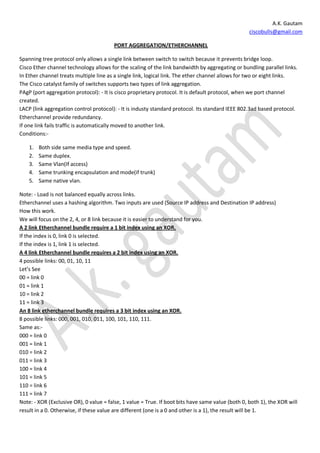
                                                                                                     Example: 2 Link
                                                                                                     EtherChannel.


Packet sent from 172.16.1.1 to 10.10.10.16. The chosen hash uses Source IP (172.16.1.1) and Destination IP
(10.10.10.16) address.
172.16.1.1 => 00000001 (Source IP address)
10.10.10.16 => 00001000 (Destination IP address)
 In our example we have 2 links in the EtherChannel (1 bit index):
             The XOR is performed only one rightmost(right side) bit 1 XOR 0
             1 XOR 0 = 1
             Link 1 is used
Note: - XOR of the two bits result in 0, then link 0 is used. If XOR of the two bits result in 1, then link 1 is used.


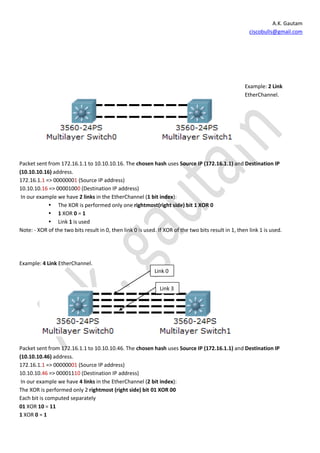
Example: 4 Link EtherChannel.
                                                            Link 0

                                                               Link 3


Packet sent from 172.16.1.1 to 10.10.10.46. The chosen hash uses Source IP (172.16.1.1) and Destination IP
(10.10.10.46) address.
172.16.1.1 => 00000001 (Source IP address)
10.10.10.46 => 00001110 (Destination IP address)
 In our example we have 4 links in the EtherChannel (2 bit index):
The XOR is performed only 2 rightmost (right side) bit 01 XOR 00
Each bit is computed separately
01 XOR 10 = 11
1 XOR 0 = 1
A.K. Gautam
                                                                                             ciscobulls@gmail.com

0 XOR 1 = 1
According to link
0 XOR 0 = 0 link = 0
0 XOR 1 = 1 link = 1
1 XOR 0 = 1 link = 2
1 XOR 1 = 0 link = 3


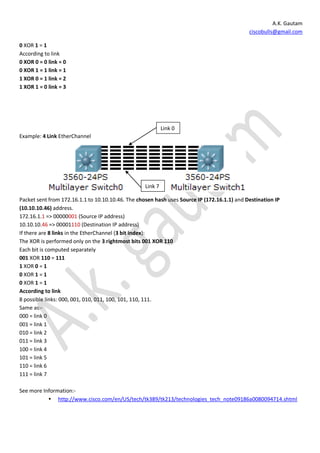
                                                            Link 0
Example: 4 Link EtherChannel


                                                   Link 7

Packet sent from 172.16.1.1 to 10.10.10.46. The chosen hash uses Source IP (172.16.1.1) and Destination IP
(10.10.10.46) address.
172.16.1.1 => 00000001 (Source IP address)
10.10.10.46 => 00001110 (Destination IP address)
If there are 8 links in the EtherChannel (3 bit index):
The XOR is performed only on the 3 rightmost bits 001 XOR 110
Each bit is computed separately
001 XOR 110 = 111
1 XOR 0 = 1
0 XOR 1 = 1
0 XOR 1 = 1
According to link
8 possible links: 000, 001, 010, 011, 100, 101, 110, 111.
Same as:-
000 = link 0
001 = link 1
010 = link 2
011 = link 3
100 = link 4
101 = link 5
110 = link 6
111 = link 7

See more Information:-
            http://www.cisco.com/en/US/tech/tk389/tk213/technologies_tech_note09186a0080094714.shtml
A.K. Gautam
                                                                                             ciscobulls@gmail.com

                                  CONFIGURE ETHERCHANNEL LOAD BALANCING.
                                                 EthjerChannel

                                 On                                            On


                                            PAgP Negotiated EtherChannel

                            Desirable       EtherChannel                       Auto


                                             LACP Negotiated EtherChannel
                                 Active                                        Passive


Load balancing configure on Global mode.

Switch(config)# port-channel load-balance method
Switch(config)# port-channel load-balance ?
  dst-ip         Dst   IP Addr                 bits
  dst-mac        Dst   Mac Addr                bits
  src-dst-ip     Src   XOR Dst IP Addr         XOR
  src-dst-mac    Src   XOR Dst Mac Addr        XOR
  src-ip         Src   IP Addr                 bits
  src-mac        Src   Mac Addr                bits


EtherChannel protocol
The Cisco Catalyst family of switches supports both:
Port Aggregation Protocol (PAgP) - Cisco proprietary (Default when port channel is created).
Link Aggregation Control Protocol (LACP) - Industry standard 802.3ad-based protocol (When a Cisco switch is
connected to a non-Cisco switch use LACP)
Note: - Must be same protocol on the both side.
switch(config)# interface range fa 0/1 - 4
switch(config-if-range)# channel-protocol ?
   lacp Prepare interface for LACP protocol
   pagp Prepare interface for PAgP protocol
switch(config-if-range)# channel-protocol pagp

Channel-group number: 1 – 64
(Does not need to be the same on both switches but it’s recommended that it usually is)

switch(config)# interface range fa 0/1 - 4
switch(config-if-range)# channel-protocol ?
  lacp Prepare interface for LACP protocol
  pagp Prepare interface for PAgP protocol
A.K. Gautam
                                                                                                 ciscobulls@gmail.com

switch(config-if-range)# channel-group number mode {active | on | {auto [non-
silent]} | {desirable [non-silent]} | passive}

                                         if No PAgP or LACP negotiation used

switch(config)# interface range fa 0/1 – 4
switch(config-if-range)# channel-protocol pagp
switch(config-if-range)# channel-group 1 mode on
  active          Enable LACP unconditionally
  auto            Enable PAgP only if a PAgP device is detected
  desirable Enable PAgP unconditionally
  on              Enable Etherchannel only
  passive         Enable LACP only if a LACP device is detected
Note: - Both ends must be on

                                           PAgP (Port Aggregation Protocol)
PAgP modes: -
1: -Desirable
2: -Auto
1:- in this mode switch sends a request to neighbor switch for either channel negotiation.
2:- in this mode a switch read for negotiation but it does not send a request to neighbor switch for either channel
negotiation.
Switch1(config)# interface range fa 0/1 – 4
Switch1(config-if-range)#switchport mode trunk
Switch1(config-if-range)# switchport trunk encapsulation dot1q
Switch1(config-if-range)# channel-protocol pagp
Switch1(config-if-range)# channel-group 1 mode desirable


Switch2(config)# interface range fa 0/1 – 4
Switch2(config-if-range)#switchport mode trunk
Switch2(config-if-range)#switchport trunk encapsulation dot1q
Switch2(config-if-range)# channel-protocol pagp
Switch2(config-if-range)# channel-group 1 mode auto

Note: - Load balancing does not have to match.
switch1(config)# port-channel load-balance dst-ip
switch2(config)# port-channel load-balance src-dst-ip

Verifying: -
Switch#show       etherchannel       protocol
Switch#show       etherchannel       load-balance
Switch#show       ehterchannel       summary
Switch#show       etherchannel       port
A.K. Gautam
                                                                                                 ciscobulls@gmail.com

                                      LACP (Link Aggregation control Protocol)
LACP Modes: -
1: -Active:
2: -Passive:
1: - An interface in the active mode can negotiation an EtherChannel with another interface that is in the active or
passive mode.
2: - An interface in the passive mode cans negotiation an EtherChannel with another interface that is in the active
mode.
Note: - An interface in the passive mode cannot negotiation an EtherChannel with another interface that is also in
the passive mode because neither interface starts LACP negotiation.

Switch1(config)# interface range fa 0/1 – 4
Switch1(config-if-range)#switchport mode trunk
Switch1(config-if-range)# switchport trunk encapsulation dot1q
Switch1(config-if-range)# channel-protocol lacp
Switch1(config-if-range)# channel-group 1 mode active


Switch2(config)# interface range fa 0/1 – 4
Switch2(config-if-range)#switchport mode trunk
Switch2(config-if-range)#switchport trunk encapsulation dot1q
Switch2(config-if-range)# channel-protocol lacp
Switch2(config-if-range)# channel-group 1 mode passive

Port Priority
LACP uses the port priority to decide which port should be put in standby mode.
Ports with lower priority are active, and rest ports are standby (Default
32678).
For Example we use 4 links.
Switch1(config)# interface range fa 0/1 – 2
Switch1(config-if-range)#switchport mode trunk
Switch1(config-if-range)# switchport trunk encapsulation dot1q
Switch1(config-if-range)# channel-protocol lacp
Switch1(config-if-range)# channel-group 1 mode active
Switch1(config-if-range)#lacp port-priority 99

Switch1(config)# interface range fa 0/3 – 4
Switch1(config-if-range)#switchport mode trunk
Switch1(config-if-range)#switchport trunk encapsulation dot1q
Switch1(config-if-range)# channel-protocol lacp
Switch1(config-if-range)# channel-group 1 mode passive
Note: - Load balancing does not have to match.
switch1(config)# port-channel load-balance dst-ip
switch2(config)# port-channel load-balance src-dst-ip


Verifying: -
Switch#show etherchannel protocol
A.K. Gautam
                                        ciscobulls@gmail.com

Switch#show etherchannel load-balance
Switch#show ehterchannel summary
Switch#show etherchannel port

Thanks giving me your precious time.
A.K. Gautam

Port aggregation

  • 1.
    A.K. Gautam ciscobulls@gmail.com CCNP SWITCH PORTABLE STUDY GUIDE & PRACTICE WORK BOOK ANUJ KUMAR email:- ciscobulls@gmail.com anuj_dev007@yahoo.com networkbulls.com
  • 2.
    A.K. Gautam ciscobulls@gmail.com PORT AGGREGATION/ETHERCHANNEL Spanning tree protocol only allows a single link between switch to switch because it prevents bridge loop. Cisco Ether channel technology allows for the scaling of the link bandwidth by aggregating or bundling parallel links. In Ether channel treats multiple line as a single link, logical link. The ether channel allows for two or eight links. The Cisco catalyst family of switches supports two types of link aggregation. PAgP (port aggregation protocol): - It is cisco proprietary protocol. It is default protocol, when we port channel created. LACP (link aggregation control protocol): - It is industy standard protocol. Its standard IEEE 802.3ad based protocol. Etherchannel provide redundancy. If one link fails traffic is automatically moved to another link. Conditions:- 1. Both side same media type and speed. 2. Same duplex. 3. Same Vlan(If access) 4. Same trunking encapsulation and mode(if trunk) 5. Same native vlan. Note: - Load is not balanced equally across links. Etherchannel uses a hashing algorithm. Two inputs are used (Source IP address and Destination IP address) How this work. We will focus on the 2, 4, or 8 link because it is easier to understand for you. A 2 link Etherchannel bundle require a 1 bit index using an XOR. If the index is 0, link 0 is selected. If the index is 1, link 1 is selected. A 4 link Etherchannel bundle requires a 2 bit index using an XOR. 4 possible links: 00, 01, 10, 11 Let’s See 00 = link 0 01 = link 1 10 = link 2 11 = link 3 An 8 link etherchannel bundle requires a 3 bit index using an XOR. 8 possible links: 000, 001, 010, 011, 100, 101, 110, 111. Same as:- 000 = link 0 001 = link 1 010 = link 2 011 = link 3 100 = link 4 101 = link 5 110 = link 6 111 = link 7 Note: - XOR (Exclusive OR), 0 value = false, 1 value = True. If boot bits have same value (both 0, both 1), the XOR will result in a 0. Otherwise, if these value are different (one is a 0 and other is a 1), the result will be 1.
  • 3.
    A.K. Gautam ciscobulls@gmail.com Example: 2 Link EtherChannel. Packet sent from 172.16.1.1 to 10.10.10.16. The chosen hash uses Source IP (172.16.1.1) and Destination IP (10.10.10.16) address. 172.16.1.1 => 00000001 (Source IP address) 10.10.10.16 => 00001000 (Destination IP address) In our example we have 2 links in the EtherChannel (1 bit index):  The XOR is performed only one rightmost(right side) bit 1 XOR 0  1 XOR 0 = 1  Link 1 is used Note: - XOR of the two bits result in 0, then link 0 is used. If XOR of the two bits result in 1, then link 1 is used. Example: 4 Link EtherChannel. Link 0 Link 3 Packet sent from 172.16.1.1 to 10.10.10.46. The chosen hash uses Source IP (172.16.1.1) and Destination IP (10.10.10.46) address. 172.16.1.1 => 00000001 (Source IP address) 10.10.10.46 => 00001110 (Destination IP address) In our example we have 4 links in the EtherChannel (2 bit index): The XOR is performed only 2 rightmost (right side) bit 01 XOR 00 Each bit is computed separately 01 XOR 10 = 11 1 XOR 0 = 1
  • 4.
    A.K. Gautam ciscobulls@gmail.com 0 XOR 1 = 1 According to link 0 XOR 0 = 0 link = 0 0 XOR 1 = 1 link = 1 1 XOR 0 = 1 link = 2 1 XOR 1 = 0 link = 3 Link 0 Example: 4 Link EtherChannel Link 7 Packet sent from 172.16.1.1 to 10.10.10.46. The chosen hash uses Source IP (172.16.1.1) and Destination IP (10.10.10.46) address. 172.16.1.1 => 00000001 (Source IP address) 10.10.10.46 => 00001110 (Destination IP address) If there are 8 links in the EtherChannel (3 bit index): The XOR is performed only on the 3 rightmost bits 001 XOR 110 Each bit is computed separately 001 XOR 110 = 111 1 XOR 0 = 1 0 XOR 1 = 1 0 XOR 1 = 1 According to link 8 possible links: 000, 001, 010, 011, 100, 101, 110, 111. Same as:- 000 = link 0 001 = link 1 010 = link 2 011 = link 3 100 = link 4 101 = link 5 110 = link 6 111 = link 7 See more Information:-  http://www.cisco.com/en/US/tech/tk389/tk213/technologies_tech_note09186a0080094714.shtml
  • 5.
    A.K. Gautam ciscobulls@gmail.com CONFIGURE ETHERCHANNEL LOAD BALANCING. EthjerChannel On On PAgP Negotiated EtherChannel Desirable EtherChannel Auto LACP Negotiated EtherChannel Active Passive Load balancing configure on Global mode. Switch(config)# port-channel load-balance method Switch(config)# port-channel load-balance ? dst-ip Dst IP Addr bits dst-mac Dst Mac Addr bits src-dst-ip Src XOR Dst IP Addr XOR src-dst-mac Src XOR Dst Mac Addr XOR src-ip Src IP Addr bits src-mac Src Mac Addr bits EtherChannel protocol The Cisco Catalyst family of switches supports both: Port Aggregation Protocol (PAgP) - Cisco proprietary (Default when port channel is created). Link Aggregation Control Protocol (LACP) - Industry standard 802.3ad-based protocol (When a Cisco switch is connected to a non-Cisco switch use LACP) Note: - Must be same protocol on the both side. switch(config)# interface range fa 0/1 - 4 switch(config-if-range)# channel-protocol ? lacp Prepare interface for LACP protocol pagp Prepare interface for PAgP protocol switch(config-if-range)# channel-protocol pagp Channel-group number: 1 – 64 (Does not need to be the same on both switches but it’s recommended that it usually is) switch(config)# interface range fa 0/1 - 4 switch(config-if-range)# channel-protocol ? lacp Prepare interface for LACP protocol pagp Prepare interface for PAgP protocol
  • 6.
    A.K. Gautam ciscobulls@gmail.com switch(config-if-range)# channel-group number mode {active | on | {auto [non- silent]} | {desirable [non-silent]} | passive} if No PAgP or LACP negotiation used switch(config)# interface range fa 0/1 – 4 switch(config-if-range)# channel-protocol pagp switch(config-if-range)# channel-group 1 mode on active Enable LACP unconditionally auto Enable PAgP only if a PAgP device is detected desirable Enable PAgP unconditionally on Enable Etherchannel only passive Enable LACP only if a LACP device is detected Note: - Both ends must be on PAgP (Port Aggregation Protocol) PAgP modes: - 1: -Desirable 2: -Auto 1:- in this mode switch sends a request to neighbor switch for either channel negotiation. 2:- in this mode a switch read for negotiation but it does not send a request to neighbor switch for either channel negotiation. Switch1(config)# interface range fa 0/1 – 4 Switch1(config-if-range)#switchport mode trunk Switch1(config-if-range)# switchport trunk encapsulation dot1q Switch1(config-if-range)# channel-protocol pagp Switch1(config-if-range)# channel-group 1 mode desirable Switch2(config)# interface range fa 0/1 – 4 Switch2(config-if-range)#switchport mode trunk Switch2(config-if-range)#switchport trunk encapsulation dot1q Switch2(config-if-range)# channel-protocol pagp Switch2(config-if-range)# channel-group 1 mode auto Note: - Load balancing does not have to match. switch1(config)# port-channel load-balance dst-ip switch2(config)# port-channel load-balance src-dst-ip Verifying: - Switch#show etherchannel protocol Switch#show etherchannel load-balance Switch#show ehterchannel summary Switch#show etherchannel port
  • 7.
    A.K. Gautam ciscobulls@gmail.com LACP (Link Aggregation control Protocol) LACP Modes: - 1: -Active: 2: -Passive: 1: - An interface in the active mode can negotiation an EtherChannel with another interface that is in the active or passive mode. 2: - An interface in the passive mode cans negotiation an EtherChannel with another interface that is in the active mode. Note: - An interface in the passive mode cannot negotiation an EtherChannel with another interface that is also in the passive mode because neither interface starts LACP negotiation. Switch1(config)# interface range fa 0/1 – 4 Switch1(config-if-range)#switchport mode trunk Switch1(config-if-range)# switchport trunk encapsulation dot1q Switch1(config-if-range)# channel-protocol lacp Switch1(config-if-range)# channel-group 1 mode active Switch2(config)# interface range fa 0/1 – 4 Switch2(config-if-range)#switchport mode trunk Switch2(config-if-range)#switchport trunk encapsulation dot1q Switch2(config-if-range)# channel-protocol lacp Switch2(config-if-range)# channel-group 1 mode passive Port Priority LACP uses the port priority to decide which port should be put in standby mode. Ports with lower priority are active, and rest ports are standby (Default 32678). For Example we use 4 links. Switch1(config)# interface range fa 0/1 – 2 Switch1(config-if-range)#switchport mode trunk Switch1(config-if-range)# switchport trunk encapsulation dot1q Switch1(config-if-range)# channel-protocol lacp Switch1(config-if-range)# channel-group 1 mode active Switch1(config-if-range)#lacp port-priority 99 Switch1(config)# interface range fa 0/3 – 4 Switch1(config-if-range)#switchport mode trunk Switch1(config-if-range)#switchport trunk encapsulation dot1q Switch1(config-if-range)# channel-protocol lacp Switch1(config-if-range)# channel-group 1 mode passive Note: - Load balancing does not have to match. switch1(config)# port-channel load-balance dst-ip switch2(config)# port-channel load-balance src-dst-ip Verifying: - Switch#show etherchannel protocol
  • 8.
    A.K. Gautam ciscobulls@gmail.com Switch#show etherchannel load-balance Switch#show ehterchannel summary Switch#show etherchannel port Thanks giving me your precious time. A.K. Gautam