HUMAN RESOURCE MANAGEMENT INFORMATION SYSTEM FOR CARE
BANGLADESH
A Project Report Submitted to the Department of MS in MIS for the Partial Fulfillment of
the Requirements for the Degree of MS in MIS
Department of MS in MIS
Daffodil International University (DIU)
Dhaka, Bangladesh
(i)
APPROVAL
This Project titled “Human Resource Management Information System for CARE
Bangladesh", submitted by Md. Rofiqul Islam to the Department of MS in MIS, Daffodil
International University (DIU), has been accepted as satisfactory for the partial
fulfillment of the requirements for the degree of MS in MIS and approved as to its style
and contents.
BOARD OF EXAMINERS
1. ________________________________ Dean
(Dr. M. Lutfar Rahman)
Professor and Dean
Faculty of Science and Information Technology
Daffodil International University (DIU)
Dhaka- 1207
2. ________________________________ Chairman
(Dr. Md. Fokhray Hossain)
Associate professor
Department of CSE, CIS & CS
Daffodil International University (DIU)
Dhaka- 1207
3. ________________________________ Internal Examiner
(Dr. Yousuf M Islam)
Associate professor
Department of CSE, CIS
Daffodil International University (DIU)
Dhaka- 1207
4. _________________________________ External Examiner
(ii)
DECLARATION
We thereby declare that, this project has been done by us under the supervision of Dr.
Md. Fokhray Hossain, Associate professor, Department of CSE, CIS & CS, Daffodil
International University (DIU). We also declare that neither this project nor any part of
the project has been submitted elsewhere for awarding of any degree or diploma.
Supervised by:
-----------------------------
Dr. Md. Fokhray Hossain
Associate professor
Department of CSE
Daffodil International University (DIU)
Submitted by:
--------------------------------
Md. Rofiqul Islam
ID: 063-17-179
Department of MS in MIS
Daffodil Internal University (DIU)
(iii)
ACKNOWLEDGEMENT
This study will be incomplete until my gratitude and heartfelt regards to my honorable
study supervisor Dr. Md. Fokhray Hossain, Associate professor, Department of CSE, CIS
& CS, Daffodil International University (DIU) is conveyed. His invaluably experienced
guidelines and continuous suggestions encouraged me to step in this study of HRMIS
Software. I am simply grateful to my teacher.
In way of the completion of this study I would also like to remember all the help and
support from my colleagues at CARE Bangladesh. Special thanks for my department and
IT for their great tolerance to my boundless queries. We walked together to the path of
the completion of this study.
The contribution of many authors, publishers and firms in the computer industry that
contributed case materials, ideas, illustrations and photographs used in this text are also
thankfully acknowledged.
Md. Rofiqul Islam
(iv)
ABSTRACT
Human Resources Management (HRM) is always a difficult question for the management
of an organization. In order to support effectively and efficiently this management aspect,
in the information technology (IT) area, the Human Resource Management Information
System (HRMIS) is the key tool for the organization to well organize the HRM
information, link it to the organizational business objectives, and align recourses to
support the corporate strategy.
The study provides an introduction to the background organizational perspective aiming
towards a successful and effective scope. A need-based assertion of the organization
reveals the theoretical classification, availability matrices, and other prerequisites of
HRMIS. A structured design and plan against vandalism with a proper maintenance of the
network monitoring both logical and physical security including a supportive
environment is the key for HRMIS. Server performance matrices with a secure server and
fault tolerance load balancing terminology are the other major elements towards a
successful data center to establish a high definition operational information system.
(vi)
CONTENTS
Page
APPROVAL…... ……………………………………………..……………….. (i)
BOARD OF EXAMINERS ……………………………………..…………….. (i)
DECLARATION………… ……………………………………..…………….. (ii)
ACKNOWLEDGEMENT …………………………………………..………… (iii)
ABSTRACT …………………………………………………………...…….… (iv)
CHAPTER
1. INTRODUCTION
1.1 Background of the Project ……………………………….… 1
1.2 Problems of the existing system …………………………… 3
1.3 Aim of the Project …………………………………………. 3
1.4 Methodology to be used …………………………………… 4
1.5 Conclusion …………………………………………………. 4
2. HUMAN RESOURCE MANAGEMENT INFORMATION SYSTEM
2.1 Introduction ………………………………………………… 6
2.2 HRM Definition ……………………………………………. 6
2.3 HRM Process ………………………………………………. 9
2.3.1 Planning Process …………………………………… 10
2.3.2 Recruitment Process ……………………………….. 10
2.3.3 Selection Process …………………………………... 10
2.3.4 Orientation, training and development process ……. 11
2.3.5 Career planning and development process ………… 11
2.3.6 Performance appraisal process …………………….. 12
2.3.7 Employee compensation and benefit process ……… 12
2.4 HRMIS in organization …………………………………… 13
2.4.1 Introduction …………………………………...……. 13
2.4.2 Definition of HRMIS ………………………………. 14
2.4.3 Components of a HRMIS ………………………….. 14
2.4.4 Users of HRMIS applications ……………...………. 15
Page
(vii)
2.4.5 HRIS functions ……………………………………... 15
2.4.5.1 Integrating the Technologies of HR ………... 16
2.4.5.2 Increased efficiency ………………………… 16
2.4.5.3 Increased effectiveness ……………………… 16
2.4.5.4 IT-Enabled process ………………………….. 16
2.5 Cost and benefits of HRIS …………………………………. 17
2.6 Conclusion ……………….…………………………………. 18
3. SYSTEM ANALYSIS & DESIGN
3.1 Introduction ………………………………………………… 19
3.2 Basic Concepts ……………………………………………… 19
3.3 HR and Information System ………………………………... 20
3.3.1 Impact of IS on HR strategic management …………. 20
3.3.2 Benefits of HRMIS …………………………………. 21
3.4 Scope define ……………………………………………….. 21
3.5 System components ………………………………………... 23
3.5.1 The HR function's reality …………………………… 23
3.6 Information requirement ……………………………………. 24
3.6.1 Personnel subsystem ………………………………... 25
3.6.2 Payroll subsystem …………………………………… 25
3.6.3 Standard reporting subsystem ………………………. 25
3.7 Data elements ……………………………………………….. 26
3.8 Data flow diagram (DFD) …………………………………... 27
3.8.1 Salary information ………………………………….. 27
3.8.2 Relative information ………………………………... 27
3.8.3 Staff transition (Promotion) ………………………… 28
3.8.4 Staff transition (Re-designation) ……………………. 28
3.8.5 Staff transition (Area Transfer) ……………………... 29
3.8.6 Disciplinary Action …………………………………. 29
3.8.7 Performance Evaluation …………………………….. 30
3.8.8 Training information ………………………………... 30
3.8.9 In-Charge information ………………………………. 31
Page
(viii)
3.9 Entity relationship diagram (ERD) ………………………….. 32
3.10 Methodology ………………………………………………… 32
3.11 Database design ……………………………………………... 33
3.12 Conclusion …………………………………………………... 33
4 PROPOSED SYSTEM
4.1 Introduction ………………………………………………… 34
4.2 Proposed System …………………………………………… 34
4.3 Conclusion ………………………………………………….. 34
5 TESTING & IMPLEMENTATION
5.1 Introduction ……………………………………………….. 35
5.2 Testing strategies ………………………………………….. 35
5.2.1 The strategies for conventional software …………... 35
5.2.2 System testing ……………………………………… 35
5.3 The art of debugging ……………………………………… 36
5.4 Testing tactics …………………………………………….. 36
5.4.1 Software testing fundamentals …………………….. 36
5.4.2 Attributes of a good test …………………………… 36
5.4.3 Black box testing …………………………………... 36
5.4.4 White box testing ………………………………….. 37
5.4.5 Control structure testing …………………………… 37
5.4.6 Object oriented (OO) testing methods …………….. 37
5.4.7 Testing patterns ……………………………………. 38
5.5 Some Testing Samples …………………………………… 38
5.6 Implementation …………………………………………… 41
5.7 Conclusion ………………………………………………... 51
6 CRITICAL APPRAISAL
6.1 Introduction ………………………………………………. 52
6.2 Critical Appraisal ………………………………………… 52
6.3 Conclusion ……………………………………………….. 53
Page
(ix)
7 CONCLUSION
7.1 Analysis of the contribution ……………………………….. 54
7.2 Recommendations and suggestions for further research …... 57
REFERENCES …………………………………………………….. 59
APPENDICES
Appendix A
(i) Confirmation ….……………………………….... A (i)
(ii) Warning Letter …………………………………. A (ii)
(iii) Training Log Sheet ……………………………. A (iii)
(iv) Data sheet on Separation ………………………. A (iv)
(v) In Charge Letter ………………………………... A (v)
(vi) Area Transfer ………………………………….. A (vi)
(vii) Acceptance of Resignation …………………… A (vii)
(viii) Promotion …………………………………… A (viii)
ANNEXURES
Annexure A ………………….………………… AA (i) – AA (xvi)
Annexure B ……………………...…………… AB (i) – AB (xxxx)
LIST OF TABLES
Table 1: Comparison between Old & New System ………... 41
LIST OF FIGURES
Figure 1: HRM Definition ………..………………………… 7
Figure 2: Salary Information ……..………………………… 27
Figure 3: Relative Information …...………………………… 27
Figure 4: Promotion ………..…………………………….… 28
Figure 5: Re-designation ..………..………………………… 28
Figure 6: Area Transfer ………..…………………………… 29
Figure 7: Disciplinary Action ...…..………………………… 29
Figure 8: Performance Evaluation ..………………………… 30
Page
(x)
Figure 9: Training Information .…..………………………… 30
Figure 10: In-Charge Information …………………………... 31
Figure 11: ERD ……………….…..………………………… 32
Figure 12: Methodology …………..………………………… 33
Figure 13: Promotion Sample Test-1 ……………………….. 38
Figure 14: Promotion Sample Test-2 ……………………….. 39
Figure 15: Promotion Sample Test-3 ……………………….. 39
Figure 16: Promotion Sample Test-4 ……………………….. 39
Figure 17: Login Tracking Sample Test-1 ……………..…… 40
Figure 18: Login Tracking Sample Test-2 ……………..…… 40
Figure 19: Sample Software Snapshot-1 …................……… 42
Figure 20: Sample Software Snapshot-2 …................……… 42
Figure 21: Sample Software Snapshot-3 …................……… 43
Figure 22: Sample Software Snapshot-4 …................……… 43
Figure 23: Sample Software Snapshot-5 …................……… 44
Figure 24: Sample Software Snapshot-6 …................……… 44
Figure 25: Sample Software Snapshot-7 …................……… 45
Figure 26: Sample Software Snapshot-8 …................……… 45
Figure 27: Sample Software Snapshot-9 …................……… 46
Figure 28: Sample Software Snapshot-10 …..............……… 46
Figure 29: Sample Software Snapshot-11 …..............……… 47
Figure 30: Sample Software Snapshot-12 …..............……… 47
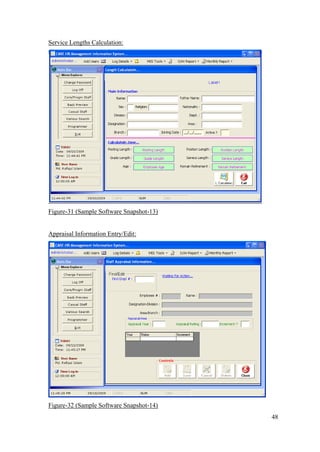
Figure 31: Sample Software Snapshot-13 …..............……… 48
Figure 32: Sample Software Snapshot-14 …..............……… 48
Figure 33: Sample Software Snapshot-15 …..............……… 49
Figure 34: Sample Software Snapshot-16 …..............……… 49
Figure 35: Sample Software Snapshot-17 …..............……… 50
Figure 36: Sample Software Snapshot-18 …..............……… 50
Figure 37: Sample Software Snapshot-19 …..............……… 51
1
Chapter 1
Introduction
1.1 Background of the Project
In the 21st
Century, no country can develop without the use of Information Technology
and Automated System. We have to spend money on hardware and software. The
percentage of money we spend on software and hardware, mostly we have to spend on
Software. Plus, the price of software is getting higher every year.
Organizations are spending billions of dollars every year for purchasing software from
outside vendors. To develop software within organization initiative, we can save the
money and use this money for other development project. We are far away from the use
of automated system. Information Technology has reached only in Telecommunication
Industries, Financial Institute and in some Multi National Company. Information
Technology has also been introduced in Governmental institute but, still most cases
planning stages, may be some of them in implementation stage. The country is still far
away from the blessings of new digital age.
Invariably, Human Resource Management (HRM) issues have been major concern for
managers at all levels, because they all meet their goals through the efforts of others,
which require the effective and efficient management of people. The spacious array of
HRM activities for example, planning, recruiting, selection, and training just to mention
but few place enormous responsibilities on supervisors and managers alike. These
embrace analyzing jobs, planning labour needs, selecting employees, orienting and
training employees, managing compensation, communicating (which includes counseling
and disciplining), and maintaining employee commitment.
In addition to the already mentioned activities are, ensuring fair treatment, appraising
performance, ensuring employee health and safety, building and maintaining good
employee/labour relations; handling complains and grievances, and ensuring compliance
with human rights, occupational health and safety, labour relations, and other legislation
affecting the workplace. Regardless of field of expertise, from accounting to production
control, learning about employee rights, employer responsibilities, and effective HRM
2
practices may provide all managers with knowledge that enables them to perform more
effectively.
However, according to Stewart (1996), the Human Resource Management function has
faced a scuffle in justifying its position in organizations. Firms easily justify expenditures
on training, staffing, reward, and employee involvement systems in favorable conditions,
but when faced with financial difficulties, such Human Resource (HR) systems become
prime target for cutbacks. Nonetheless, introducing Strategic Human Resource
Management (SHRM), in exploring HR’s supportive role in business strategy, presented a
possibility for demonstrating its value to the firm.
Lately, the increasing pressure to support strategic objectives and the greater focus on
shareholder value have led to changes in both job content and expectations of HR
professionals (Storey et al., 2000; Ball, 2000)[Ref-11] [Ref-15]
. Similarly, Schuler et al.,
(2001)[Ref-10]
and Mayfield et al., (2003) noted that one such major changes included
contemporary use of Information Systems (IS) in support of the HRM process. More so, a
careful analysis indicated that increased Human Resource Management Information
Systems (HRMIS) usage enabled improved professional performance and thus facilitated
involvement in internal consultancy activities (PMP (UK) Ltd 1997). In addition,
according to Ulrich (1997), using HRIS provides value to the organization and improves
HR professionals’ own standing in the organization.
HRMIS provides management with strategic data not only in recruitment and retention
strategies, but also in merging HRMIS data into large-scale corporate strategy. The data
collected from HRMIS provides management with decision-making tool. Through proper
HR management, firms are able to perform calculations that have effects on the business
as a whole. Such calculations include health-care costs per employee, pay benefits as a
percentage of operating expense, cost per hire, return on training, turnover rates and costs,
time required to fill certain jobs, return on human capital invested, and human value
added. It must be noted though, that, none of these calculations result in cost reduction in
the HR function (Gerardine DeSanctis, 1986: 15). The aforementioned areas however,
may realize significant savings using more complete and current data made available to
the appropriate decision makers. Consequently, HRMIS are seen to facilitate the
provision of quality information to management for informed decision-making. Most
3
notably, it supports the provision of executive reports and summaries for senior
management and is crucial for learning organizations that see their Human Resource as
providing a major competitive advantage. HRMIS is therefore a medium that helps HR
professionals perform their job roles more effectively (Grallagher, 1986; Broderick and
Boudreau, 1992).
Even though, numerous studies in this area have provided substantial empirical and
theoretical contributions to the field of HRMIS this area of investigation is still in its
infancy. Interestingly, little however is known about the role of HRMIS in SHRM. As the
pressure to shift from HRM to SHRM keeps on mounting, coupling with severe global
competition, and in conjunction with the ever-increasing demand for HRMIS, further
research is still needed in this field.
1.2 Problems of the existing System
Existing system are as follows:
1. Staff information preserves and retrieves.
2. Promotion Tracking.
3. Training Information.
4. Service Length Calculation.
5. MIS monthly Report.
Problems of the existing system are;
1. Working scope is limited.
2. Not integrated with other programs.
3. Less flexibility.
4. Reports not fulfill management requirements.
5. Developed with the help of old database and programming language.
1.3 Aim of the Project
Information system has a vital role to run the organizations operational activities
smoothly and in a systematic way. So that, all sections activities can be monitored by the
head of the department easily. At the end of the day, management can be informed with
the updated and accurate work status accordingly without asking anything to any body.
4
This project helps the management to fulfill the followings:
1. Work with broad scope.
2. Integration with other programs.
3. Flexibility.
4. User friendly.
5. Sufficient Reports that fulfill management requirements.
6. Less dependency to others.
7. Less paper work.
8. Maximum automation.
9. Ensure information accuracy and consistency.
10. In-house program development.
1.4 Methodology to be used
The following methodology would be used for this project.
 Back-end Database Use: MS SQL Server 2000 is the RDMS solution from
Microsoft Corporation. This is one of the leading and secured database software in the
world developed by Microsoft Corporation.
 Front-end Language: Microsoft Visual Studio development tools – The latest
powerful front-end development tools in the world developed by Microsoft
Corporation.
 User Friendliness: The software will be design to serve highly user friendliness.
User’s active involvement will be requested to advice their satisfaction and suitability.
 Multi-user: The software will be design to run from a single PC to multiple PCs in
large network like Windows NT or Window 2003 Server. Special care would be taken
in each stage of laboratory testing multi-user functionality would confirmed.
 Report Design: In generation of user, requested outputs and reports from the MIS
would be popular report generating software Crystal Report would be used.
 Operating System: Windows98, Windows Me, Windows 2000, windows XP,
Widows 2003 or higher.
1.5 Conclusion
In conclusion, the development of a project management culture within the organization
has meant a long-term commitment. One cannot really pinpoint in time when it began, but
like most other organizations, my organization has progressed along a path of project
5
management maturity. As a result of a major project failure in the early 1990’s, there was
recognition of the need for a structured approach to managing projects to increase their
likelihood of success. My organization’s project management methodology will be
develop and evolve over the past ten years. It has been an iterative process with input
from various parts.
The Project Management Resources and Information Project will be an exercise in
organizational change management. It resulted in the establishment of my organization
Project Management Framework and a small Project Services team. This team continues
to work collaboratively with our practitioners to keep our project management culture
alive and healthy. This work does require passion, commitment and continual
championship for ‘the cause’.
6
Chapter 2
Human Resource Management Information System
2.1 Introduction
The HRM concept is elaborated from different and varying view points. More so, the
various definitions of the concept, context and scope of HRM and its associated processes
are presented. The chapter ends with a summary. The term ‘Human Resource
Management’ has been the subject of considerable debate, and its underlying philosophy
and character are highly controversial. Much of this controversy stems from the absence
of a precise formulation of and agreement on its significance and definition (Storey, 1989;
and 1995a) [Ref-11]
, as cited by Bratton and Gold (2003: 7)[Ref-2]
. Obviously, definition of
the subject matter is needed for analysis and understanding of HRM theory and practice.
2.2 HRM definition
HRM has a variety of definitions but there is general agreement that it has a closer fit
with business strategy than previous models, specifically personnel management. In all
the debates about the meaning, significance and practice of HRM, nothing seems more
certain than the link between HRM and performance (HRM Guide October 2006). Below
are some of the definitions of HRM, although it can be argued that these will only be ones
of several possible definitions.
De Cenzo and Robbins (1996: 8)[Ref-3]
defined HRM as the part of the organization that is
concerned with the people dimension, and it is normally a staff or support function in the
organization. HRM role is the provision of assistance in HRM issues to line employees,
or those directly involved in producing the organization’s goods and services. Acquiring
people’s services, developing their skills, motivating them to high levels of performance,
and ensuring their continuing maintenance and commitment to the organization are
essential to achieving organizational goals. This is much the case regardless of the type of
organization, government, business, education, health, recreation, or social action. The
authors proposed an HRM specific approach as consisting of four functions- staffing,
training and development, motivation, and maintenance.
7
In addition, Bratton and Gold (2003: 7) [Ref-2]
define HRM as the strategic approach to
managing employment relations which emphasizes that leveraging people’s capabilities is
critical to achieving sustainable competitive advantage. This is achieved through a
distinctive set of integrated employment policies, programs and practices. The authors
presented HRM functions as planning, recruitment and selection, appraisal and
performance management, reward management, development, employee relations, health
and safety, and union-management relations. Moreover, to Alan Price (2004: 32)[Ref-1]
HRM aims at recruiting capable, flexible and committed people, managing and rewarding
their performance and developing key competencies.
Contributing to the working definition of HRM is Abecker et al., (2004)[Ref-13]
. They see
HRM as a strategic and target oriented composition, regulation and development of all
areas that affect human resources in a company. Efficient and effective management of
these resources to a large extend, affects human resource behavior, and consequently the
performance of the organization as a whole. Moreover, the authors identified HRM with
the field it covers. These include planning aspects- personnel requirements analysis and
personnel asset analysis, and change aspects- recruitment, personnel development and
labor displacement (Ibid). Next, is the diagrammatic representation of the said field.
Figure-1 (HRM Definition)
It is however, somehow strange, that, an important aspect of HRM, payroll or
compensation/payment is missing from the field in figure 1 above propounded by the
authors. Abecker et al., (2004) [Ref-13]
like the previous other authors, did not present a
conclusive and detailed definition of HRM including the other concepts (HR processes).
8
Lastly considered are the opinions of various management scholars who have taken a
more in-depth look at the whole concept of HRM. These opinions should be given the
greatest weight, since they reflect more in-depth research on the subject than is done by
most textbook authors. Few such authors are Dessler et al., (1999)[Ref-4]
, and Torrington et
al., (2005)[Ref-12]
.
According to Torrington et al., (2005: 5) [Ref-12]
HRM is fundamental to all management
activity and has evolved from a number of different strands of thought. It is best described
as a loose philosophy of people management rather than a focused methodology. Thus,
distinction has been made between HRM as body of management activities on one hand
(generically described as personnel management) and then on the other as a particular
approach to execute those activities (carrying out people-oriented organizational activities
than traditional personnel management).
An organization gains competitive advantage by using its employees effectively, drawing
on their expertise and ingenuity to meet clearly defined objectives. Torrington et al.,
(2005: 5) [Ref-12]
identified the role of the human resource functions with the key
objectives. These four objectives are the corner stone of all HR activities. These include
Staffing, Performance, Change-management and Administration. Staffing objective
focuses on finding the appropriate pool of human resources needed to ensure fully and
timely supply of work force (Ibid). It therefore involves designing organizational
structures, identifying working conditions for different groups of employees followed by
recruiting, selecting and developing the personnel required to fill the roles. Performance
objective aims at ensuring workforce motivation and commitment for effective
performance. Consequently, employees training and development remain important.
Moreover, managing change effectively and efficiently remains one of the core objectives
in almost every business. Key issues here include recruiting and/or developing people
with the required leadership skills to drive the change process. Change agents are
employed to encourage acceptance of change by coming out with reward systems
associated with the change process. Employees’ involvement is also paramount here and
is encouraged. The aim is to avoid resistance to change, more especially where it involves
cultural changes (attitude, philosophy or long-present organizational norms).
9
Administration objective aims at facilitating the smooth running of the organization.
Hence, there is the need for accurate and comprehensive data on individual employees,
records of achievement in terms of performance, attendance, training records, terms and
condition of employment and personal details are (Ibid).
However, for the purpose of this study, literature on the HRM concept will be based on
the opinions of Dessler et al., (1999) [Ref-4]
. The authors defined HRM as the management
of people in organizations. It consists of the activities, policies, and practices involved in
obtaining, developing, utilizing, evaluating, maintaining, and retaining the appropriate
number and skill mix of employees to accomplish the organization’s objectives. The goal
of HRM is to maximize employee’s contributions in order to achieve optimal productivity
and effectiveness, while simultaneously attaining individual objectives and societal
objectives Dessler et al., (1999: 2) [Ref-4]
. To the authors, the function of HRM include
assisting the organization in attracting the quality and quantity of candidates required with
respect to the organization’s strategy and operational goals, staffing needs, and desired
culture. Helping to maintain performance standards and increase productivity through
orientation, training, development, job design, effective communication, and performance
appraisal. Helping to create a climate in which employees are encouraged to develop and
utilize their skills to the fullest. Helping to establish and maintain cordial working
relationship with employees. Helping to create and maintain safe and healthy work
environment. Development of programs to meet economic, psychological, and social
needs of the employees. Helping the organization to retain productive employees and
ensuring that the organization complies with provincial/territorial and federal laws
affecting the work place such as human rights, employment equity, occupational health
and safety (Ibid).
2.3 HRM processes
This sub section illustrates the processes involved in executing the HRM functions. Each
of the functions: planning, recruitment, selection, orientation and training, performance
appraisal etc. goes through a process. Unless otherwise stated, the rest of this section will
be drawn from (Dessler et al., 1999)’s [Ref-4]
literature based on pages 165 to 533.
10
2.3.1 Planning process
Human Resource Planning (HRP) process reviews human resources requirements to
ensure that the organization has the required number of employees, with the necessary
skills, to meet its goals, also known as employment planning. HRP is a proactive process,
which both anticipates and influences an organization’s future by systematically
forecasting the demand for and supply of employees under changing conditions, and
developing plans and activities to satisfy these needs. Key steps include forecasting
demand for labor considering organizational strategic and tactical plans, economic
conditions, market and competitive trends, social concerns, demographic trends, and
technological changes.
2.3.2 Recruitment process
Recruitment is the process of searching for and attracting an adequate number of qualified
job candidate, from whom the organization may select the most appropriate to field its
staff needs. The process begins when the need to fill a position is identified and it ends
with the receipt of résumés and completed application forms. The result is a pool of
qualified job seekers from which the individual best matching the job requirements can be
selected. The steps in recruitment process include identification of job openings,
determination of job requirements, choosing appropriate recruiting sources and methods,
and finally, generating a pool of qualified recruits. Job openings are identified through
human resource planning or manager request. Next is to determine the job requirements.
This involves reviewing the job description and the job specification and updating them,
if necessary. Appropriate recruiting sources and methods are chosen because there is no
one, best recruiting technique. Consequently, the most appropriate for any given position
depend on a number of factors, which include organizational policies and plans, and job
requirements.
2.3.3 Selection process
Selection is the process of choosing individuals with the relevant qualifications to fill
existing or projected openings. Data and information about applicants regarding current
employees, whether for a transfer or promotion, or outside candidates for the first time
position with the firm are collected and evaluated. The steps in the selection process, in
ascending order include preliminary reception of applicants, initial applicant screening,
11
selection testing, selection interview, background investigation and reference checking,
supervisory interview, realistic job previews, making the hiring decision, candidate
notification, and evaluating the selection process. However, each step in the selection
process, from preliminary applicant reception and initial screening to the hiring decision,
is performed under legal, organizational, and environmental constraints that protect the
interests of both applicant and organization.
2.3.4 Orientation, training and development process
Employee orientation is the procedure of providing new employees with basic
background information about the firm and the job. Is more or less, considered as one
component of the employer’s new-employee socialization process. Socialization process
is an ongoing process of initialing in all employees the prevailing attitudes, standards,
values, and patterns of behavior that are expected by the organization. Training however
is the process of teaching new or present employees the basic skills/competencies needed
to perform their jobs. Whereas training focuses on skills and competencies needed to
perform employees’ current jobs, employee and management development is the training
of long-term nature. The aim is to prepare current employees for future jobs with the
organization or solving an organizational problem concerning, for example, poor
interdepartmental communication. Training and development processes include needs
analysis, instructional design, validation, implementation, and evaluation and follow-up.
2.3.5 Career planning and development process
It is the deliberate process through which persons become aware of personal career
related attributes and the lifelong series of activities that contribute to their career
fulfillment. Individuals, managers, and the organization have role to play in career
development. Individuals accept responsibility of own career, assess interests, skills, and
values, seek out career information and resources, establish goals and career plans, and
utilize development opportunities.
The career stage identification entails career cycle (the stages through which a person’s
career evolves). These stages include the following: growth, exploration, establishment,
maintenance, and decline stages. Occupational orientation identification is the theory by
John Holland. This theory enumerates six basic personal orientations that determine the
sorts of careers to which people are drawn. They include realistic orientation,
12
investigative orientation, social orientation, conventional orientation, enterprise
orientation, and artistic orientation.
2.3.6 Performance appraisal process
Performance appraisal may be defined as any procedure that involves setting work
standards, assessing employee’s actual performance relative to these standards, and
providing feedback to the employee with the aim of motivating the worker to eliminate
performance deficiencies or to continue to perform above par.
Processes in performance appraisal contain three steps: defining performance
expectations, appraising performance, and providing feedback. First, defining
performance expectation means making sure that job duties and standards are clear to all.
Second, appraising performance means comparing employees’ actual performance to the
standards that has been set, which normally involves some type of rating form. Third,
performance appraisal usually requires one or more feedback sessions to discuss
employees’ performance and progress and making plans for any required development.
Some of the appraisal methods include graphic rating scale, alternation ranking, paired
comparison, forced distribution, and critical incident methods.
2.3.7 Employee Compensation and benefits process
Employee compensation involves all forms of pay or rewards accrued to employees and
arising from their employment. This however consists of two main components: direct
financial payments, and indirect payments. While direct financial payments are in the
form of wages, salaries, incentives, commissions, and bonuses, indirect payments are in
the form of financial benefits like employer-paid insurance and vacations. Moreover,
legal considerations in compensation, union influences, compensation policies, and equity
and its impact on pay rates are the four basic considerations influencing the formulation
of any pay plan.
Benefits are indirect financial payments given to employees. These may include
supplementary health and life insurance, vacation, pension, education plans, and
discounts on say company products. Furthermore, income and medical benefits to victims
of work-related accidents or illness and/or their dependents, regardless of fault are all part
of employees’ compensation.
13
The processes in establishing pay rates involve the following five steps: First, conducting
wages/salary survey to determine the prevailing wage rates for comparable jobs, which is
central in job pricing. Second, determine the relative worth of each job (job evaluation)
by comparing the job content in relation to one another in terms of their efforts,
responsibility, and skills. This eventually results in wage or salary hierarchy. Third, group
similar jobs into pay grades, a pay grade comprises of jobs of approximately equal value
or importance as determined by job evaluation. Forth, price each pay grade using wage
curves. A wage curve is graphical description of the relationship between the value of job
and the average wage paid for the job. However, if jobs are not grouped into pay grades,
individual pay rates have to be assigned to each job. Fifth, fine tune pay rates. This
involves correcting out-of-line rates and usually developing rate ranges.
2.4 HRMIS in Organization
The Human Resource Management Information Systems is introduced by presenting the
various definitions, development, costs and benefits, as well as their functions and
relationship with HRM. Furthermore, different software providers and their solutions are
presented. The chapter then ends with a summary.
HRMIS shape integration between Human Resource Management (HRM) and
Information Technology. Even though these systems may rely on centralized hardware
resources operationally, a small group of IS specialists residing within the personnel
department increasingly manage, support, and maintain them. HRIS support planning,
administration, decision-making, and control. The system supports applications such as
employee selection and placement, payroll, pension and benefits management, intake and
training projections, career-pathing, equity monitoring, and productivity evaluation.
These information systems increase administrative efficiency and produce reports capable
of improving decision-making (Gerardine DeSanctis, 1986: 15).
2.4.1 Development of HRMIS
Recent developments in technology have made it possible to create a real-time
information-based, self-service, and interactive work environment. Personnel Information
Systems have evolved from the automated employee recordkeeping from the 1960s into
more complex reporting and decision systems of late (Gerardine DeSanctis, 1986: 15).
14
Today, managers and employees are assuming activities once considered the domain of
human resource professionals and administrative personnel. This represents a significant
break with the past, but an improvement in overall organizational effectiveness.
Consequently, given the authority and relevant accessible information for decision
making, both managers and employees respond more quickly to changes (Lengnick-Hall
and Lengnick-Hall, 2002)[Ref-9]
.
2.4.2 Definition of HRMIS
Tannenbaum (1990) defines HRMIS as a technology-based system used to acquire, store,
manipulate, analyze, retrieve, and distribute pertinent information regarding an
organization’s human resources. Kovach et al., (1999) defined HRIS as a systematic
procedure for collecting, storing, maintaining, retrieving, and validating data needed by
organization about its human resources, personnel activities, and organization unit
characteristics. Furthermore, HRIS shape integration between Human Resource
Management (HRM) and Information Technology. It merges HRM as a discipline and in
particular basic HR activities and processes with the information technology field
(Gerardine DeSanctis, 1986: 15). As is the case with any complex organizational
information system, an HRIS is not limited to the computer hardware and software
applications that comprise the technical part of the system it also includes the people,
policies, procedures, and data required to manage the HR function (Hendrickson, 2003).
2.4.3 Components of a HRMIS
Kovach et al., (1999) presented the three major functional components in any HRIS by
giving the model below:
Input Data Maintenance Output
The Input function enters personnel information into the HRMIS. Data entry in the past
had been one way, but today, scanning technology permits scanning and storage of actual
image off an original document, including signatures and handwritten notes. The
maintenance function updates and adds new data to the database after data have been
entered into the information system. Moreover, the most visible function of an HRMIS is
the output generated. According to Kovach et al., (1999), to generate valuable output for
computer users, the HRMIS have to process that output, make the necessary calculations,
and then format the presentation in a way that could be understood. However, the note of
caution is that, while it is easy to think of HR information systems in terms of the
15
hardware and software packages used to implement them and to measure them by the
number of workstations, applications or users who log onto the system, the most
important elements of HRMIS are not the computers, rather, the information. The bottom
line of any comprehensive HRMIS have to be the information validity, reliability and
utility first and the automation of the process second.
2.4.4 Users of HRMIS applications
HRMIS meet the needs of a number of organizational stakeholders. Typically, the people
in the firm who interact with the HRMIS are segmented into three groups: (1) HR
professionals, (2) managers in functional areas (production, marketing, engineering etc.)
and (3) employees (Anderson, 1997)[Ref-14]
. HR professionals rely on the HRMIS in
fulfilling job functions (regulatory reporting and compliance, compensation analysis,
payroll, pension, and profit sharing administration, skill inventory, benefits administration
etc.). Thus, for the HR professional there is an increasing reliance on the HRMIS to fulfill
even the most elementary job tasks. As human capital plays a larger role in competitive
advantage, functional managers expect the HRIS to provide functionality to meet the
unit’s goals and objectives. Moreover, managers rely on the HRMIS’s capabilities to
provide superior data collection and analysis, especially for performance appraisal and
performance management.
Additionally, it also includes skill testing, assessment and development, résumé
processing, recruitment and retention, team and project management, and management
development (Fein, 2001)[Ref-5]
. Finally, the individual employees become end users of
many HRMIS applications. The increased complexity of employee benefit options and
the corresponding need to monitor and modify category selections more frequently has
increased the awareness of HRIS functionality among employees. Web-based access and
self-service options have simplified the modification process and enhanced the usability
of many benefit options and administration alternative for most employees.
2.4.5 HRMIS functions
Functional HRMIS must create an information system that enables an assimilation of
policies and procedures used to manage the firm’s human capital as well as the procedure
necessary to operate the computer hardware and software applications (Hendrickson,
2003). While information technology affects Human Resource (HR) practices (Lengick-
16
Hall et al., 2003) HRMIS and HRMIS administration comprise a distinct supporting
function within HR. Some of the HRMIS functions include the following:
2.4.5.1 Integrating the Technologies of HR
Is a fact, that developments in Information Technology have dramatically affected
traditional HR functions with nearly every HR function (example, compensation, staffing,
and training) experiencing some sort of reengineering of its processes. However, this
process of change has created significant challenges for HR professionals resulting in the
transformation of traditional processes into on-line processes.
2.4.5.2 Increased Efficiency
Rapid computing technology has allowed more transactions to occur with fewer fixed
resources. Typical examples are payroll, flexible benefits administration, and health
benefits processing. Though technologies of early mainframes provided significant
efficiencies in these areas, the difference is that the record processing efficiencies that
were once only available to large firms are now readily available to any organization size
(Ulrich, 2001).
2.4.5.3 Increased Effectiveness
Most often, as with processes, computer technology is designed to improve effectiveness
either by in terms of the accuracy of information or by using the technology to simplify
the process. This is especially the case where large data sets require reconciliation.
However, onerous manual reconciliation processes may be executed faster, but also with
near perfect accuracy using automated systems. For instance, pension and profit sharing
applications, benefits administration, and employee activities are just to mention but a
few. Using computer technology in these processes ensures accurate results and offer
substantial simplification and timeliness over manual processing. Consequently, the vast
majority of HR functions have had some degree of automation applied in order to gain
both efficiency and effectiveness.
2.4.5.4 IT-Enabled Processes
While many of the application areas’ gains are through increased effectiveness and
efficiency over manual processing, some are only possible using contemporary
technologies. Most notably, computer-based (web-based) training is a growing area of
17
HR practice that was not available until computer software was created. Even computer
based training was not as practical as it is today because it was geographically dispersed
until the training was upgraded from computer-based to web-accessible training.
However, by taking traditional computer-based training programs and making them
accessible on the Internet, firms have created a powerful tool to upgrade and assess
employee skill sets. Moreover, many other traditional HR functions have evolved
Information Technology (IT) -dependent components with the advent of the Internet.
Online recruitment centers, along with the ability to conduct virtual interviews,
background checks, and personnel tests on-line have dramatically changed those
processes, increasing the geographic reach of firms for potential employees.
2.5 Cost and benefits of HRIS
A HRMIS system represents a large investment decision for companies of all sizes.
Therefore, a convincing case to persuade decision makers about the HRMIS benefits is
necessary. The common benefits of HRMIS frequently cited in studies included,
improved accuracy, the provision of timely and quick access to information, and the
saving of costs (Lederer, 1984; Wille and Hammond, 1981). Lederer (1984) discussed
why the accuracy and timeliness of HRMIS is very important in terms of operating,
controlling, and planning activities in HR. In addition, Kovach et al., (2002) listed several
administrative and strategic advantages to using HRMIS. Similarly, Beckers and Bsat
(2002) pointed out at least five reasons why companies should use HRMIS. These are:
 Increase competitiveness by improving HR practices
 Produce a greater number and variety of HR operations
 Shift the focus of HR from the processing of transactions to strategic HRM
 Make employees part of HRMIS, and
 Reengineer the entire HR function
In their 2002, HRMIS survey, Watson Wyatt found that the top four metrics used in
formal business cases supporting HRMIS were improved productivity within HR
organization, cost reductions, return on investment, and enhanced employee
communications. However, companies realize many of these cost reductions and
efficiency gains early in the implementation of an HRMIS system, so they provide
compelling evidence needing to get a project up and running. In fact, the payback period,
18
or the time it takes to recoup the investment, may be as short as one to three years (Lego,
2001). HRMIS contribute to cost reductions, quality/customer satisfaction, and innovation
(Broderick and Boudreau, 1992). According to Sadri and Chatterjee (2003) computerized
HRMIS function enable, faster decision making, development, planning, and
administration of HR because data is much easier to store, update, classify, and analyze.
Moreover, while it may be possible to identify many of the relevant costs (e.g., software
and hardware), it is more difficult to quantify the intangible benefits to be derived from an
HRMIS system. Beyond cost reductions and productivity improvements, HRMIS
potentially and fundamentally affect revenue channels. However, establishing direct and
objective benefits measures is more difficult to achieve.
On the other hand, there are costs associated with HRMIS implementation. Moreover, to
capitalize on all HR possibilities, workers need to have personal computers and global
Internet connections. Some companies facilitate this by providing employees computer
discount programs to encourage home usage. In addition, there is inevitably transition
costs associated with moving from traditional HR to an HRMIS, including slowdowns,
mistakes, and other consequences associated with changing legacy systems to integrated
suites (Brown, 2002). Hardware costs for servers and software costs for application
programs entail sizeable initial outlays and continuing costs over time as better
technology becomes available. While many companies are adopting HRMIS systems and
extolling their benefits, others are reluctant in embarking on such an expensive and time
consuming change. Nevertheless, some firms are adopting less complex forms before
attempting to transform their HR departments. However, for those who have already
adopted HRMIS, many are yet to realize its full benefits. A survey by Towers Perrin
found that whiles 80 percent of respondents affirmed employee self-service ability to
lower FIR costs, only 5 percent fully achieved this objective; another 35 percent had only
partially achieved that objective, and only 3 percent was accelerating HR's transformation
to a strategic partner (Ibid).
2.6 Conclusion
Here definition of HRM, HRM process, HRMIS in organization and HRIS functions
described elaborately and try to clarify its work. It is also cleared the relation with IT.
Hope it will help us to understood the total HRMIS process and also help us to complete
the total solution for HR.
19
Chapter 3
System Analysis & Design
3.1 Introduction
Business organizations exist in a competitive environment with scarce resources.
Controlling this resource (physical, organizational, information and human) that gives the
company competitive advantage. The goal of strategic management in an organization is
to deploy and allocate resources in order to provide the management with a competitive
advantage. It goes without saying that two out of three classes of resources
(organizational and human) correlated with the human resource functions. Towards
maximum effect, the HRM functions must be integrally involved in the company’s
strategic management process.
Strategic management process first analyzes a company’s competitive situation, develops
its strategic goals and mission, its external opportunities and threats, and its internal
strength and weaknesses to generate alternatives. In his second phase, strategic
management process determines a plan of actions and deployment of resources to achieve
the pre-specified goals. This kind of strategic approach should be emphasized in human
resources management. Strategic Human Resources Management (SHRM) is the pattern
of planned human resources deployments and activities intended to enable an
organization to achieve its goals. Then we are addressing the question of the instruments
that will make the odds of the competition in our favor.
3.2 Basic Concepts
Four levels of integration exist between the HR functions and the strategic management
function:
 Administrative linkage: HR function’s attention is focused on day-to-day activities
 One-way linkage: The firm develops the strategic plan and then informs the HR.
 Two-way linkage: Strategic planning team informs HR of the various strategies,
HR analyze them and present the results to the team. After deciding, the strategic
plan is passed to HR to implement.
20
 Integrative linkage: It is a dynamic process, based on continuing rather than
sequential interaction, done by the HR executive who is a member of the senior
management team.
Strategy formulation consists of five major components;
 Mission is a statement of the organization’s reason for being, customers served
and their needs, and the technology used. Also presents the company’s vision and
values.
 Goals are what the firm hopes to achieve in the medium-to-long term future.
 External analysis examines the firm’s operating environment to identify the
strategic opportunities and threats.
 Internal analysis identifies the firm’s strengths and weaknesses, focuses on the
quantity and quality of resources available.
 Strategic choice is done after the Strengths Weaknesses Opportunities Threats
(SWOT) analysis to define strategic alternatives, and then the choice is made
among these alternatives.
Mechanisms for integration the HR function into strategy formulation may help the
strategic planning team to make the most effective strategic choice, since HR will
implement it.
3.3 HR and Information Systems
3.3.1 Impact of information systems on HR strategic management
1. Automating the paper work to save time and effort and to avoid the use of
additional staff.
2. Storing data about applicants facilitates searching and selecting tasks.
3. Administrating of risk management by monitoring licenses, safety training,
physical exams and report deviation.
4. Managing the training activities to specify the organization training needs.
5. Upgrading expertise and skills to provide training development.
6. Planning and simulating the financial impact and recommending strategy changes.
7. Analyzing turnover causes.
21
8. Elaborating iterative planning processes by identifying a logical path and
monitoring its steps.
9. Administrating flexible-benefits that save money.
10. Supporting the HR planning using IS capabilities in making projection.
11. Providing all regular calculations and statistical reports that assist managers.
12. Supporting the strategic, tactical, and operational use of the HR of an
organization.
This support makes the goals of the HR management a dream come true in a simple
effective and efficient manner.
3.3.2 Benefits of HRMIS
Larger companies are integrating their separate HR systems (HRMIS). An HRMIS may
be defined as interrelated components working together to collect, process, store, and
disseminate information to support decision making, coordination, control, analysis, and
visualization of an organization’s human resources management activities. There are
many reasons for installing such a system:
1. Competitiveness, HRMIS can significantly improve the efficiency of the HR
operation and therefore a company’s bottom line, even for mid-size firms.
2. Improve transaction processing. HRMIS packages provide computerized
processing of a wider range of the firm’s HR transactions than would be possible
if individual systems for each HR task had to be used.
3. On-line processing making the company’s employee literally part of the HRMIS.
4. Improved reporting capability. The HRMIS can bump the firm up to a new
plateau in terms of the number and variety of HR-related reports it can produce.
5. HR system integration. Because its software components are integrated, a true
HRMIS enables an employer to reengineer its entire HR function by having the IS
take over and integrate many of the tasks formally carried out by HR employees.
3.4 Scope Define
This introductory section provides information on the organization issuing the HRMIS,
the purpose of the HRMIS and the project background.
22
This HRMIS is developing based on CARE-Bangladesh NGO. CARE-B is organized into
twelve departments and 13 various programs; and has a current authorized head count of
about 850 full time employees; 750 permanent and 100 contractual. Employee history is
also currently maintained for approximately 6300 separated employees, representing 9
years of historic data.
For this purpose CARE-B are going implement a new integrated, server-based, relational
system, intends to streamline human resources processes, improve data accuracy, reduce
redundant data entry, and enable decentralized and secure self-service access to data
based upon multi-tiered permissions. The system must run on Microsoft Systems
platforms and the system database must be a relational database built on SQL Server
2000, or Current Version Standard Edition, Microsoft Windows Server 2003.
Overall HRMIS systems are so large you know and it is so difficult to mention all topics
here. For this reason we have to try discussing the following main functionality:
A comprehensive and integrated HRMIS will manage all aspects of CARE-B human
resources functions without the need for duplicate data entry. Minimum functionality of
the HRMIS must include the following integrated modules:
1. Employee Information
2. Relative Information
3. Staff Transaction
4. Disciplinary Action
Additional desired functionality of the HRMIS & Payroll also includes the following
modules to be integrated with the modules providing minimum functionality (listed in
order of importance):
5. Performance Evaluation
6. Training
7. In-Charge
8. Search Engine
9. Reports
23
3.5 System Components
Human Resource Management Systems (HRMS), Human Resource Management
Information Systems (HRMIS), HR Technology or also called HR modules, shape an
intersection in between Human Resource Management (HRM) and Information
Technology. It merges HRM as a discipline and in particular its basic HR activities and
processes with the information technology field, whereas the planning and programming
of data processing systems evolved into standardized routines and packages of Enterprise
Resource Planning (ERP) software. On the whole, these ERP systems have their origin on
software that integrates information from different applications into one universal
database. The linkage of its financial and human resource modules through one database
is the most important distinction to the individually and proprietary developed
predecessors, which makes this software application both rigid and flexible.
3.5.1 The HR function's reality
All in all, the HR function is still to a large degree administrative and common to all
organizations. To varying degrees, most organizations have formalized selection,
evaluation, and payroll processes. Efficient and effective management of the "Human
Capital" Pool (HCP) has become an increasingly imperative and complex activity to all
HR professionals. The HR function consists of tracking innumerable data points on each
employee, from personal histories, data, skills, capabilities, experiences to payroll
records. To reduce the manual workload of these administrative activities, organizations
began to electronically automate many of these processes by introducing innovative
HRMS/HCM technology. Due to complexity in programming, capabilities and limited
technical resources, HR executives rely on internal or external IT professionals to develop
and maintain their Human Resource Management Systems (HRMS). Before the "client-
server" architecture evolved in the late 1980s, every single HR automation process came
largely in form of mainframe computers that could handle large amounts of data
transactions. In consequence of the high capital investment necessary to purchase or
program proprietary software, these internally developed HRMS were limited to medium
to large organizations being able to afford internal IT capabilities. The advent of client-
server HRMS authorized HR executives for the first time to take responsibility and
ownership of their systems. These client-server HRMS are characteristically developed
around four principal areas of HR functionalities:
1) Payroll
24
2) Time Management
3) Benefits Administration and
4) HR Management.
The payroll module automates the pay process by gathering data on employee time and
attendance, calculating various deductions and taxes, and generating periodic pay cheques
and employee tax reports. Data is generally fed from the human resources and time
keeping modules to calculate automatic deposit and manual cheque writing capabilities.
Sophisticated HCM systems can set up accounts payable transactions from employee
deduction or produce garnishment cheque. The payroll module sends accounting
information to the general ledger for posting subsequent to a pay cycle.
The time and labor management module applies new technology and methods (time
collection devices) to cost effectively gather and evaluate employee time/work
information. The most advanced modules provide broad flexibility in data collection
methods, as well as labor distribution capabilities and data analysis features. This module
is a key ingredient to establish organizational cost accounting capabilities.
The benefit administration module permits HR professionals to easily administer and
track employee participation in benefits programs ranging from healthcare provider,
insurance policy, provident fund and gratuity option plans.
The HR management module is a component covering all other HR aspects from
application to retirement. The system records basic demographic and address data,
selection, training and development, capabilities and skills management, compensation
planning records and other related activities. Leading edge systems provide the ability to
"read" applications and enter relevant data to applicable database fields, notify employers
and provide position management and position control.
3.6 Information Requirement
HRMIS reports data on all employees to whom the state pays or reimburses salaries or
benefits, regardless of funding sources or reporting system; maintains data on former and
current employees; and stores historical personnel data for inquiry and analysis. HRMIS
25
& Payroll also helps organizations comply with salary administration provisions, fulfill
federal and state reporting requirements, and analyze the use of their human resources.
3.6.1 Personnel Subsystem
The personnel subsystem processes and maintains the personnel data for organizations.
This subsystem processes personnel transactions and maintains employee descriptive and
job information.
3.6.2 Payroll Subsystem
The payroll subsystem is used to process and maintain actual payroll data. Locally and
funded donor agencies are required to report the actual payments, entitlements, and
deductions of their employees regardless of fund source. Classified and legislative agency
data is captured through the Uniform Statewide Payroll/Personnel System (USPS).
Agencies have been deferred from reporting to USPS.
3.6.3 Standard Reporting Subsystem
The standardized reporting subsystem generates these types of reports:
 Personnel Changes Summary
o Appointment
o Confirmation
o Promotion
o Transfer
o Temporary Duty Assignment
o Advice/Warning Letter
o Separation
 Gender and Grade-wise staff distribution
 Field Office-wise support/program staff ratio
 Office-wise employee strength
 Program-wise senior staff positions
 Yearly performance rating
 Training information
 Audit Reports
 Donor Compliance Report
26
HRMIS sends these reports to state oversight agencies, which are required to monitor
personnel procedures and policies. HRIS generates these reports for state monitoring
entities to (a)satisfy federal and state reporting requirements, (b) review the state's
personnel and salary administration practices, (c) study employment trends and (d)
analyze potential legislative impact.
The USPS/HRMIS Statewide Reporting Section currently sends agencies preliminary
reports that reflect details of the personnel data stored in HRMIS and USPS. Agencies use
these reports to reconcile their personnel data with the data stored in HRMIS or USPS.
After agencies have had an opportunity to reconcile their data, HRMIS generates and
sends final reports to monitoring agencies.
Standardized HRMIS reporting eliminates the need for agencies to generate their own
reports to fulfill state and federal reporting requirements. It allows monitoring agencies to
receive a customized and uniform report. Standardized reporting also provides a single,
consistent source of information about the state's work force.
3.7 Data Elements
Conceptual Design Of HR Statistical Data Model
The nature of data elements needed to perform the above calculations is detailed and
aggregate data. Those data will be gathered and stored in the application data models of
different departments in the organization. We considered the following issues for our data
elements;
 Document Current Application Flows and Functionality
 Document Current Technical Architecture
 Conduct Needs Analysis/Business Requirements Definition
 Gap Analysis: Gaps between what we currently do versus what we want to do
 Revisit feasibility based on what is known about existing and desired system and
potential solutions
27
3.8 Data Flow Diagram
3.8.1 Salary Information
Figure-2 (Salary Information)
3.8.2 Relative Information
Figure-3 (Relative Information)
28
3.8.3 Staff Transition (Promotion)
Figure-4 (Promotion)
3.8.4 Staff Transition (Redesignation)
Figure-5 (Re-designation)
29
3.8.5 Staff Transition (Area Transfer)
Figure-6 (Area Transfer)
3.8.6 Disciplinary Action
Figure-7 (Disciplinary Action)
30
3.8.7 Performance Evaluation
Figure-8 (Performance Evaluation)
3.8.8 Training Information
Figure-9 (Training Information)
31
3.8.9 In-Charge Information
Figure-10 (In-Charge Information)
32
3.9 Entity relationship diagram (ERD)
Figure-11 (ERD)
3.10 Methodology
Prototyping:
 Prototyping-based methodologies perform the analysis, design and
implementation phases concurrently.
 All three phases are performed repeatedly in a cycle until the system is completed.
 A prototype is a smaller version of the system with a minimal amount of features.
33
Prototyping-based Methodology
Figure-12 (Methodology)
 Advantage: Provides a system for the users to interact with, even if it is not
initially ready for use.
 Disadvantage: Often the prototype undergoes such significant changes that many
initial design decisions prove to be poor ones.
CARE-Bangladesh is a developing organization. Here every project/program/
department’s has great limitations about time. Organization gives us a minimum time for
developing and implementation software. For this purpose we choose the prototyping-
based methodology for our given project.
3.11 Database Design
Annexure A
3.12 CONCLUSION
HR managers become able to reengineer the way HR department executes its job,
accomplishes those transactional HR jobs cost-competitively, and increasingly turn its
attention to truly being a strategic partner with the firm’s top executives. A HR function
can and should be strategically integrated with a company’s business plan to help the
company to achieve its business objectives. Firms are increasingly moving beyond
manual HR systems today, by computerizing individual HR tasks, installing HR
Information Systems, and using the Internet and Intranet technology. In this context,
information technology can support HR managers not only in achieving the traditional
HR functions but also in applying the concepts of strategic planning.
34
Chapter 4
Proposed System
4.1 Introduction
It is very clear that, it is very difficult to finalize a system for the management. It is very
time consuming and also involved in money mater. After that, based on the existing
system analysis and sitting with concern department/persons, finally a system is designed
for management and proposed them for management approval.
4.2 Proposed System
Based on the analysis of the existing system, I proposed the following system for
management.
1. Staff information preserves and retrieves.
2. Regular and temporary staff tracking separately.
3. Promotion, Transfer, Re-designation Tracking.
4. Tracking In-Charge information.
5. Tracking relative information.
6. Monitor various kinds of lengths.
7. Training information tracking.
8. Search engine for various kind of search.
9. MIS monthly Report.
4.3 Conclusion
For implementation any new system (specially automated system), user resistance is a
common issue for an organization. So, here management has a vital role to implement the
new system with the organization users.
35
Chapter 5
Testing and Implementation
5.1 Introduction
Testing and implementation is the final part of a new system. After management
approval, next part is testing. After successful final testing, management goes to
implementation.
5.2 Testing Strategies
Verification: Are we building the product right?
Validation: Are we building the right product?
5.2.1 Test strategies for conventional software:
 Unit testing - Unit testing focuses verification effort on the smallest unit of
software design-the software component/design.
 Integration testing – Integration testing is a systematic technique for constructing
the software architecture while at the same time conducting tests to uncover errors
associated with interfacing.
o Top-Down integration.
o Bottom-Up integration.
 Regression testing – Regression testing is the re-execution of some subset of tests
that have already been conducted to ensure that changes have not propagated
unintended side effects.
 Smoke testing – Smoke testing is an integration testing approach that is commonly
used when software products are being developed.
5.2.2 System testing:
 Recovery testing.
 Security testing.
 Stress testing.
 Performance testing.
36
5.3 The art of debugging:
Debugging occurs as a consequence of successful testing. That is, when a test case
uncovers an error, debugging can and should be an orderly process, it is the removal of
the error.
5.4 Testing Tactics
5.4.1 Software testing fundamentals:
 Testability – Software testability is simply how easily can be tested.
Characteristics are;
o Operability – The better it works, the more efficiently it can be tested.
o Observability – What you see is what you test.
o Controllability – The better we can control the software, the more the
testing can be automated and optimized.
o Decomposability – The software system is built from independent modules
that can be tested independently.
o Simplicity – The less there is to test, the more quickly we can test it.
o Stability – The fewer the changes the fewer the disruptions to testing.
o Understandability – The more information we have the smarter we will
test.
5.4.2 Attributes of a good test:
 A good test has a high probability of finding an error.
 A good test is not redundant.
 A good test should be neither too simple nor too complex.
5.4.3 Black Box Testing:
This testing alludes to tests that are conducted at the software interface. It is also called
behavioral testing, focuses on the functional requirements of the software.
Graph-based testing methods:
 The first step in black-box testing is to understand the objects that are modeled in
software and the relationships that connect these objects. Once this has been
37
accomplished, the next step is to define a series of tests that verify “all objects
have the expected relationship to one another”.
5.4.4 White Box Testing:
This testing sometimes called glass-box testing is a test case design philosophy that uses
the control structure described as part of component-level design to derive test cases.
Basis path testing:
 Flow Graph Notation – A simple notation for the representation of control flow,
called a flow graph. The flow graph depicts logical control flow using the
notation.
5.4.5 Control Structure Testing:
 Condition testing – It is a test case design method that exercises the logical
conditions contained in a program module.
 Data flow testing – This method selects test paths of a program according to the
locations of definitions and uses of variables in the program.
 Loop testing – This testing is a white-box testing technique that focuses
exclusively on the validity of loop constructs.
5.4.6 Object oriented (OO) testing methods:
 The test case design implications of OO concepts – As a class evolves through the
analysis and design methods, it becomes a target for test case design. Because
attributes and operations are encapsulated, testing operations outside of the class is
generally unproductive.
 Applicability of conventional test case design methods – The white-box testing
methods described in earlier sections can be applied to the operations defined for a
class. Basis path, loop testing or data flow techniques can help to ensure that every
statement in an operation has been tested. Black-box testing methods are as
appropriate for OO systems as they are for systems developed using conventional
software engineering methods.
 Fault based testing – The objective of fault based testing within an OO system is
to design tests that have a high likelihood of uncovering plausible faults. Because
38
the product or system must confirm to customer requirements, the preliminary
planning required to perform fault based testing begins with the analysis model.
 Test cases and class hierarchy – Inheritance does not obviate the need for
thorough testing of all derived classes. In fact it can actually complicate the testing
process.
 Scenario based testing – Fault based testing misses’ two main types of errors; (i)
incorrect specifications and (ii) interactions among subsystems. When errors
associated with incorrect specifications occur, the product doesn’t do what the
customer wants. It might do the wrong thing, or it might omit important
functionality.
5.4.7 Testing patterns:
 They provide a vocabulary for problem solvers.
 They focus attention on the forces behind a problem. That allows designers to
better understand when and why a solution applies.
 They encourage iterative thinking. Each solution creates a new context in which
new problems can be solved.
5.5 Some Testing Samples:
Promotion
Input: First, display staff information on the screen. Following screen appears.
Figure-13 (Promotion Sample Test-1)
39
Now, choose Promotion from MIS Action drop down list. Following screen appears.
Figure-14 (Promotion Sample Test-2)
Now input promotion information, Save and finally exit from this screen. Previous screen
appears again. Here change necessary information also. Finally Update the information.
Output: Click Monthly Report>Personnel Changes Summary. Follow screen appears.
Figure-15 (Promotion Sample Test-3)
Now place Month/Year and click OK. Monthly report appears.
Figure-16 (Promotion Sample Test-4)
40
Tracking LogIn
Input: Information preserved when user logged in to the software.
Output: Click Log Details>Log Report. Following screen appears.
Figure-17 (Login Tracking Sample Test-1)
Select dates and then click Generate Report. Information displayed in LogIn List area. If
need to report view, then click View Report. Report screen appears.
Figure-18 (Login Tracking Sample Test-2)
41
5.6 Implementation:
HRMIS meet the needs of a number of organizational stakeholders. Typically, the people
in the firm who interact with the HRMIS are segmented into three groups: (1) HR
professionals, (2) managers in functional areas (production, marketing, engineering etc.)
and (3) employees (Anderson, 1997) [Ref-14]
. HR professionals rely on the HRMIS in
fulfilling job functions (regulatory reporting and compliance, compensation analysis,
payroll, pension, and profit sharing administration, skill inventory, benefits administration
etc.). Thus, for the HR professional there is an increasing reliance on the HRMIS to fulfill
even the most elementary job tasks. As human capital plays a larger role in competitive
advantage, functional managers expect the HRIS to provide functionality to meet the
unit’s goals and objectives. Moreover, managers rely on the HRMIS’s capabilities to
provide superior data collection and analysis, especially for performance appraisal and
performance management.
After successfully testing, it’s got approval from the management. Now it is running
smoothly. IT provides a great support to implement this software. It uses the IT Server for
its database and client software running from various corners. Preliminary connection
ensured the following clients.
 All HR people.
 Head of the various departments.
 Finance payroll team.
Finally its going well and hope it will meet up the requirements as per management need.
Here I am mentioning some comparison between Old & New system.
Name of Work Time in Old System Time in New System Result
Request for
Information
Minimum 1 day Minimum 15 minutes Excellent
Papers missing No way to tract Trace any time Excellent
Any kind of analysis Minimum 1 day Minimum 30 minutes Excellent
Monthly Reporting Minimum ½ day Minimum 60 minutes Excellent
Information provide Minimum 1 day Minimum 60 minutes Excellent
Meet up audit
requirement
Take long time Take short time Excellent
Table-1 (Comparison between Old & New System)
42
Some software snapshots
User Name & Password protected LogIn:
Figure-19 (Sample Software Snapshot-1)
Add/Edit/Delete User:
Figure-20 (Sample Software Snapshot-2)
43
Log Tracking:
Figure-21 (Sample Software Snapshot-3)
Change Password:
Figure-22 (Sample Software Snapshot-4)
44
Staff Information Entry/Edit:
1st
Part:
Figure-23 (Sample Software Snapshot-5)
2nd
Part:
Figure-24 (Sample Software Snapshot-6)
45
3rd
Part:
Figure-25 (Sample Software Snapshot-7)
4th
Part:
Figure-26 (Sample Software Snapshot-8)
46
5th
Part:
Figure-27 (Sample Software Snapshot-9)
Staff Information preview from BackUp:
Figure-28 (Sample Software Snapshot-10)
47
Casual Staff Information Entry/Edit:
Figure-29 (Sample Software Snapshot-11)
Various kind of Search:
Figure-30 (Sample Software Snapshot-12)
48
Service Lengths Calculation:
Figure-31 (Sample Software Snapshot-13)
Appraisal Information Entry/Edit:
Figure-32 (Sample Software Snapshot-14)
49
Division/Department Transfer:
Figure-33 (Sample Software Snapshot-15)
In-Charge:
Figure-34 (Sample Software Snapshot-16)
50
Promotion:
Figure-35 (Sample Software Snapshot-17)
Daily/Weekly Reports List:
Figure-36 (Sample Software Snapshot-18)
51
Monthly Reports List:
Figure-37 (Sample Software Snapshot-19)
5.7 Conclusion:
Based on the analysis of testing and implementation, it seems that, it will work very
nicely and it looks as effective software to manage HR & and it activities.
52
Chapter 6
Critical Appraisal
6.1 Introduction
Now it has come to self assessment about the software. It is very tough to make any
comments on software, when the developer act as designer, coder, tester and data entry
operator also. However, before make any comments about this software, I have to
describe of its SWOT analysis.
6.2 Critical Appraisal
Strengths: Here I use real data. So, generated report will more accurate and real which is
very important to test effectiveness of software. Historical report is also generated from
this data.
Weakness: Here I have used SQL Server 2000. But in the market, now going on SQL
Server 2008. So, if management goes to latest version, then I have to change some codes.
Now our organization use Windows Server and if they want to use different language
Server in future, then program code must be changed.
Opportunity: Total program designed nicely. Database structure is also strong. If
management want to develop a web-based program with use of this database, it will also
possible very nicely.
Threats: Commercially there are no threats for this software. If organization changes the
Server version or operating system, then it will go a great threat for them.
This study aimed at criticizing HRMIS and also finds out the future features. First we
over see the gaps in this HRMIS and they are;
 Database only use LAN environment.
 Every staff has no access in the database through this software.
 As a result root level feed back is absent.
 Software is not 100% dynamic.
 Database is not integrated with Finance and other database.
53
Based on the limitations we recommended that the following scope of work is here in
future.
 Software migrates to Web-based.
 So, every staff has access the database through software.
 Database integration.
6.3 Conclusion
Based on the self assessment of this software, we can move of our next course of action.
If there has any gap and find it out earlier, then we can resolve it before the software
implementation. And, if there has opportunity to develop the software more realistic way,
then we can also try to apply that one.
54
Chapter 7
Conclusion
The conclusion precipitated on the research and analysis of the preceding chapters is
presented. Section 7.1 is dedicated for the analysis of the contribution and examination of
the implications of the findings. Section 7.2 is however allocated for recommendations
and suggestion for further research.
7.1 Analysis of the Contribution
This study aimed at exploring HRMIS role in SHRM. The study attempted to examine
how HR professionals or managers in different organizations see the effects of HRMIS on
strategic HR tasks, and job roles. It also tried to find out if there is a significant difference
in HRMIS usage between SME and large sized companies in respect of strategic HR tasks
performance.
On one hand, various studies on HRM propose that HRMIS can contribute to the creation
of a long-term competitive advantage through integration of HRM functions with HR
technology (Gerardine DeSanctis, 1986: 15; Tannenbaum, 1990; Hendrickson, 2003).
However, these studies did not address the role if any HRMIS play in SHRM. On the
other hand, a number of strategic HRM tasks have been identified. These include
communications, human resource development, workplace learning, career management
and human capital accumulation (Sparrow and Hiltrop, 1994: 25 cited in Morley et al.,
2006; Beer et al., 1984; Keep 1989). Dixon (1992) and Kochan and Dyer (1995)[Ref-8]
consider greater worker autonomy, high commitment management, leadership, and
business processes reengineering as strategic HRM tasks. Another one includes managing
organization’s trade unions relations (Gunnigle, 1998: 17)[Ref-7]
.
Linking both fields of research, it was argued that HRMIS might play a vital role in
SHRM based on the following assumptions:
 HR professionals might also consider HRMIS usage in support of strategic HR
tasks given the unrelenting HRMIS support for the HR professionals’ job
(Buckley et al., 2004; Gardner et al., 2003; Ulrich, 1997; Brockbank; 1999).
55
 HRMIS would continue to be used in more support of strategic HR tasks in the
organization in the future considering the augmenting pressure on HR
professionals to support strategic objectives through more innovative HRMIS
applications (Storey et al., 2000; Ball, 2000) [Ref-11] [Ref-15]
.
The empirical results of the study revealed that HRMIS play a key role in strategic HR
tasks. This is an indication that HRMIS capabilities in shaping the integration between
HRM and IT (Hendrickson, 2003) are also applicable to SHRM. This means that HR
professionals would be able to cope with their new roles without panicking because their
new role, SHRM, is still supported by HRMIS.
However, in the case of specific strategic HR tasks, the degree of the support depended
on the type of organization. Larger firms/companies experienced a great deal of HRMIS
support in most of the strategic HR tasks namely communication, human resource
development and workplace learning, career management, business process
reengineering, and decision-making. On the contrary, HRMIS usage in support of
commitment management, and managing trade union relations with organizations did not
reveal any significant difference in proportion of users in SME and large companies. It
implies that users of HRMIS need to identify their strategic HR tasks and organization
type before embarking on any HRMIS implementation in order to enjoy the full benefit of
using HRMIS both to HR professionals and to the organization as a whole.
HR professionals considered that HRMIS are used in support of strategic HR tasks. This
might be explained by the fact that increased uses of HRMIS allow professionals to
achieve improved performance and thus facilitate participation in internal consultancy
(PMP (UK) Ltd 1996; and 1997). The results confirmed Gardner et al., (2003) revelation,
that extensive use of IT enables HR professional to have more information autonomy.
This disclosure implies that firms will more or less need to rely on HRMIS technology for
effective and efficient performance of their strategic human resource management tasks.
This calls for total commitment on the part of both management and HR professionals
towards a successful HRMIS implementation. In a dynamic global market where IT is the
order of the day, firms without this technology might not only find it difficult attracting
HR professionals who are yet to acquire HRMIS skills and seeking for one on the job but
56
also loose those HR professionals who have these skills and might want to develop and
improve upon them.
Notably, the study suggested that HRMIS are likely to be used even more for strategic
HR tasks in the future; this was a strongly held belief by both SME and large sized
companies. The response from the large companies were however, remarkably more
positive than those from the SMEs. Large companies have well-established facilities such
as intranets and extranets to access the required personnel information quickly and
efficiently (Ngai et al., 2004). SMEs generally lack the capital and technical resources to
implement HRMIS (Ibid). While it is incumbent upon all organizational types to stay
abreast with HRMIS dynamics by keeping system updates SMEs are the most vulnerable
due to the incidence of cost. A more feasible way to start may be to use prepackaged
HRMIS software. Implementing HRMIS is very costly but a successful implementation
contributes to cost reductions, quality/customer satisfaction, and innovation, which
eventually lead to competitive advantage (Broderick and Boudreau, 1992). It therefore
implies that SMEs especially will need to consider a vigorous positive change in policy
regarding HRIS applications to strategic HR tasks regardless of the cost involve because
the cost of non-implementation may be relatively more expensive.
The study again showed that HR professionals agree that the HRMIS usage for strategic
HR tasks leads to enhance professional standing in the organization. This was in line with
Brockbank’s (1999) findings that HR professionals both provide value to the organization
and improve their own standing in the organization by using HRMIS. The implications of
this disclosure are that HR professionals will need to develop their IT skills and become
abreast with HRMIS’ technology in order to remain competitive in the labor market. This
means that firms will also need to develop and plan HRMIS training programs for both
prospective and existing HR professionals in line with specific strategic HR tasks since
enhanced professional standing implies effective and efficient work-force which leads to
improved performance and increased output resulting to higher profit margins and
acceptable returns on investment (ROI).
Interestingly, the study showed a lack of HRMIS support for managing trade union
relations with the organization. This was very much the case irrespective of the type of
organization. The failure to use HRMIS in support of trade union relations with the
57
organization means that there will be little consideration of how HR policies regarding
labor issues might potentially change trade unions’ attitude towards collective bargaining.
The immediate objectives and activities of trade unions vary, but may include provision
of professional training, collective bargaining, industrial action, legal advice and
representation for members (Fraser and Hamish 1974: 34)[Ref-6]
. In an attempt to enforce
the union’s objectives, union leaders normally find themselves in confrontation with the
employers, which most often leads to industrial actions. Effective and efficient
management of trade union relations reduces industrial actions, conflicts, and wastes.
However, the lack of HRMIS’ support in managing trade union relations implies no
standard way of communicating just-in time information between the parties. This might
make conflict resolution difficult. The inability to resolve conflict leads to strike actions,
the ultimate results of which are, output reduction, low returns, slow growth and
expansion, lost of skilled employees, high employee turnover, and other resultant effects.
Overall, the study suggested that HRMIS play a key role in SHRM, but the degree of the
role was also very much dependent on the type of organization. This provides some
insights into the usage of HRMIS in strategic HR tasks by some selected Finnish based
companies, which should help HR practitioners, acquire a better understanding of HRMIS
role in SHRM. However, caution should be exercised in generalizing the results of the
study due to the small sample size. Nevertheless, the results provide basis for future
research.
7.2 Recommendations and Suggestions for Further Research
Whilst this study has confirmed existing studies into HRMIS, it provides a platform for
future work in this area, which should concentrate on a number of issues. First, a detailed
research would be needed to explore the role of HRMIS in SHRM, especially; with much,
bigger sample size and a higher response rate so that a deeper analysis can be done for
generalization.
Second, HRMIS represent a large investment decision for companies of all sizes.
However, SMEs are increasingly failing to use HRMIS in support of strategic HRM
tasks. It would therefore be very interesting if future research could geared towards
finding answers to why SMEs are reluctant to commit time and resources for the
implementation of HRMIS in strategic HR tasks. This will enable a careful analysis and
58
diligent consideration of HRMIS application to strategic HR tasks since a successful
execution is rewarded with numerous benefits including improved accuracy, provision of
just-in-time information, and costs saving (Lederer, 1984; Wille and Hammond, 1981).
Third, an in-depth study on HRMIS usage in support of trade unions’ relations with
organizations needs further examination. This will allow both the trade unions and the
employers to manage and resolve conflicts and other related labor issues efficiently and
effectively.
Finally, as HRMIS becomes an increasingly vital component of SHRM tasks
performance, researchers must expand their efforts to understand the opportunities and
threats that it fosters. Human resource information systems may be a key enabler allowing
HR professionals to balance successfully the competing roles of administrative expert,
employee champion, change agent, and strategic partner (Ulrich, 1998). There is also a
risk that large investments in HRMIS will not improve HR professionals’ satisfaction or
render the SHRM tasks performance a more efficient cost center. This may be outgrowth
of low technology-acceptance among intended users, inappropriate technology choices, or
other factors. Until more is known, investments in these innovations should proceed with
caution.
59
References
Books
[Ref-1] Alan Price: Human Resource Management in a Business Context, second
edition 2004
[Ref-2] Bratton John and Gold Jeffrey (2003) Human Resource Management: Theory
and Practice third edition London: Palgrave Macmillan
[Ref-3] De Cenzo David A. and Robbins Stephen P. (1996) Human Resource
Management fifth edition. Canada: John Wiley & Sons Inc
[Ref-4] Dessler Gary, Cole Nina D., and Sutherland Virginia L. (1999) Human
Resources Management In Canada seventh edition. Prentice-Hall Canada Inc.
Scarborough, Ontario
[Ref-5] Fein Steve “Preface” In Alfred J. Walker ed. Web-Based Human Resources.
New York: McGraw Hill 2001 VIIX
[Ref-6] Fraser, Hamish W. (1974) Trade Unions and Society (The Struggle for
Acceptance, 1850–1880). New Jersey: Rowman and Littlefield
[Ref-7] Gunnigle, P. (1998), “Human resource management and the personnel
function”, in Roche, W.K., Monks, K. and Walsh, J. (Eds), Human Resource
Management Strategies: Policy and Practice in Ireland, Oak Tree Press,
Dublin
[Ref-8] Kochan T. E. & Dyer L. (1995) HRM: an American view. In J. Storey (ed.),
Human Resource Mangement: Critical Text (332-51) London: Routledge
[Ref-9] Lengnick-Hall Mark and Lengnick-Hall Cynthia A. ‘Human Resource
Management in the Knowledge Economy’ New Challenge; New Roles; New
Capabilities San Francisco: Berrett-Koehler Publishers, 2002
60
[Ref-10] Schuler R.S., Jackson S.E., Storey J.J., HRM and its link with strategic
management, in: J. Storey (Ed.), Human Resource Management: A Critical
Text, second ed., Thomson Learning, London, 2001.
[Ref-11] Storey, J. (ed.) (1989) New Perspectives on Human Resource Management
London: Routledge
Storey, J. (ed.) (1995a) Human Resource Management: A critical text London:
Routledge
[Ref-12] Torrington D., Hall L., and Taylor S. (2005) Human Resource Management
sixth edition.
Journal
[Ref-13] Abecker Andreas, Ernst Biesalski, DaimlerChrysler AG, and Werk Wörth
(2004) “Human Resources with Ontologies
[Ref-14] Anderson R. Wayne (1997) “The future of Human Resources: Forging Ahead
or Falling Behind in Tomorrow’s Human Resource Management
[Ref-15] Ball Kirstie S. (2000) “The use of human resource information systems”: a
survey
URL
http://www.siteground.com
http://qa.php.net
http://www.internetnetworksecurity.us
http://www.worldfashionexchange.com/apparel-garment-manufacturing-software.html
A (i)
Appendices A
(Form Conf.)
PERSONNEL/CONFIDENTIAL
Date
<<Name & Empl#>>
<<Designation>>, <<Project>>
<<CARE-X Field Office>>
SUBJECT : CONFIRMATION
Dear Mr./Ms. _______,
Upon satisfactory completion of your probationary period, CARE-Bangladesh is pleased
to confirm you as ________ (Designation, Project), CARE-Bangladesh effective _____
(Date) under the same terms and conditions as given in your Appointment Letter, wherein
it states your effective joining date ______.
It is expected that you will extend your full cooperation for the promotion of CARE
activities in Bangladesh and that you will be benefited from your CARE service. CARE
looks forward to your continued cooperation in carrying out its program objective in
Bangladesh.
Thank you.
Sincerely,
<<Name>>
<<Designation>>
<<Project>>, <<X Office>>
copy : PC- X
PM-X Project->OM/PSM->PCF, CARE-X Field Office
Accounts-CBHQ
PCF-CBHQ
HRIS
A (ii)
(Form WL)
PERSONNEL/CONFIDENTIAL
CBHQ-FO # X
<<date>>
<<Name & Empl#>>
<<Designation>>, <<Project>>
<<CARE-X Field Office>>
Subject : WARNING LETTER
Dear Mr./Ms. _______,
It has been reported that there was a <<reason>> in CARE X Field Office. During
<,investigation>> your involvement with the <<reason>> has been detected. The above
act on your part clearly reflects your poor judgment and failure to perform the assigned duty
regarding implementation of the organizational policy.
Based on the gravity of the incident, you are issued this "Warning Letter" with the hope that
you will give serious thought about the matter, as repetition of this sort of act on your part
will subject you to severe disciplinary action including dismissal.
Please acknowledge the receipt of the warning letter by signing on the space provided
below.
A C C E P T E D Sincerely,
_______________
Signature with date <<name>>
General Manager
Human Resources Development
and Management
cc: ACD (F&A)
PCF-CBHQ/FO
HRIS
A (iii)
Training Log Sheet (FORM TLS)
NAME & EMPLOYEE #:
Date
Type of
Training*
Duration/
Period
Institution/
Organization
Name of Training/
Certificate Received
(*) Please specify whether training is overseas (outside country), external (outside CARE) or in-
house (within CARE)
A (iv)
Data Sheet on Separation (FORM REEMP)
CARE-BANGLADESH
(DATA SHEET ON SEPARATION)
cc: PCF-CBHQ/FO
Name: Emp#
Designation: Project:
Posting: Joining Date: / /
Separation Mode: Separation date: / /
Grade/Step: Basic Salary:
Permanent Address:
Re-Employment Status: Yes ‫ٱ‬ NO ‫ٱ‬
Re-Employment Comments:
__________________________ _______________________
Prepared by Approved by
OM/PM-X Project, FO, GM-HRD&M
CBHQ, HRD&M
Date: _________ Date : ________________
A (v)
In Charge
PERSONNEL/CONFIDENTIAL
Ref. No.: CBHQ - FO # X
<<date>>
<<Name & Empl.#>>
<<Designation>>,<<Project>>
<<CARE-X Field Office>>
SUBJECT: INCHARGE
Dear Mr./Ms. X,
We have the pleasure to inform you that the management has decided to give you the
assignment of Incharge <<designation>>, CARE-X Field Office effective <<date>>.
The duty and responsibilities of this assignment shall continue until joining of
<<designation>>.
Your acting appointment shall be governed by the existing organizational policy
pertaining to In-charge appointments.
We take this opportunity to wish you well and success in your acting appointment and
look forward to seeing your positive and significant contribution for the benefit of both
yourself and CARE Bangladesh.
This letter is sent to you in duplicate for your signature, signifying your acceptance of the
terms and conditions of your acting appointment. Please send one photocopy of the
signed copy to HR for records.
Sincerely,
<<Name>>
<<Designation>>, <<Project>>
I, <<name>>, do hereby accept the terms and conditions of my In-Charge appointment
and do further confirm that I shall abide by the said terms and conditions as stipulated
herein above.
-------------- --------------
Signature Date
Copy: PC-X Project, X F/O
PM-X Project->OM/PSM-PCF, CARE-F/O
PCF-CBHQ
CBHQ Accounts
A (vi)
Area Transfer
CARE-Bangladesh
PERSONNEL/CONFIDENTIAL
CBHQ-X #
Date
<<Name & Empl.#>>
<<Designation>>,<<Project>>
<<CARE-X Field Office>>
Subject: Area Transfer
Reference:
Dear Mr./Ms. X,
Reference to the above, It is decided that you will be transferred to CARE-X TO/FO
effective <<Date>>.
In regard to this transfer, you will be entitled to all admissible transfer benefits as stated
of CARE-Bangladesh HR Policies and Procedures Manual.
Thank you.
Sincerely,
<<Name>>
<<Designation>>
Copy: PC-X Project, X F/O
PM-X Project->OM/PSM-> PCF, CARE- X FO
Accounts CBHQ
HRIS
A (vii)
Acceptance of Resignation (Form AR)
<<Date>>
<,Name & Emp#>>
<<Designation>>, <<Project>>
<<CARE-X Field Office>>
Subject: Acceptance of Resignation
Dear Mr./Ms. X
This refers to your letter dated ____ regarding your resignation from the services of
CARE-Bangladesh. (However, your inability to provide mandatory one month's notice
will result into pro-rata deduction of your salary to cover the required notice period as per
the HR Policy.)
We would like to inform you that your resignation has been accepted with effect from
_____.
Accordingly, you will be released from your work at the close of business of _____
subject to a clearance certificate being issued to you by the concerned
projects/departments to the effect that you do not owe to CARE-Bangladesh any
outstanding monies and or liabilities thereof.
Attached please find an Exit Questionnaire which you are requested to fill up as
appropriate and send the same in a closed envelope directly to the GM-HRD&M, CBHQ.
Your prompt submission of the questionnaire shall expedite the processing of your final
dues.
You are, also, requested to submit the Identity Card and Turn Over Report to CARE-X
Field Office to facilitate your quick clearance from the service.
We take this opportunity to wish you well and success in all your future endeavors.
Sincerely,
<<Name>>
<<Designation>>
Copy: PC-X,CBHQ/CARE-X F/O
PM-X Project, OM/PSM-PCF, X FO
Accounts, CBHQ
PCF-CBHQ
HRIS-CBHQ
A (viii)
Promotion Letter (FORM P)
PERSONNEL/CONFIDENTIAL
CBHQ- X #
Date
<<Name & Empl#>>
<<Designation>>, <<Project>>
<<CARE-X Field Office>>
Subject:: PROMOTION
Dear Mr/Ms. X
We have the pleasure to inform you that as a result of your Interview with us on ______
(Date) for the post of ___________, we are glad to inform you that you were successful.
Accordingly, you are hereby promoted to the post of ____________________, Grade-___,
with effect from _____ (Date).
You shall be placed at Grade-______ at a monthly consolidated salary of Tk. _________
(In words), broken down as follows:
Basic Salary Tk. _______
Housing allowance Tk. _______
Medical Allowance Tk. _______
Transportation Allowance Tk. _______
In addition to the above you shall, also, be entitled to all other admissible
allowances/benefits as per the organizational policy. A job description outlining your
duties and responsibilities shall be provided to you by your supervisor in due course.
We take this opportunity to congratulate you on your promotion and wish you success in
your new post while looking forward to seeing your significant contribution towards the
better future of both yourself and CARE-Bangladesh.
This letter is sent to you in duplicate and you are requested to sign the duplicate,
signifying your acceptance of the terms and conditions of your promotion and returning
same to the undersigned through your Head of Project/Department so as to reach him on
or before _______ (Date).
Sincerely ,
<<name>>
<<Designation>>
------------------- --------------
Signature Date
Copy: Coordinator-X Project, X CBHQ/Field Office
Accounts-CBHQ
PCF-CBHQ
HRIS
AA (i)
Annexure A
Database: CAREMISDB
Owner: Rofiq
Properties
DB Options
Table: HomeDistrict
Table: Grade Step
Date Created 2009-04-22 21:31:53.450 Data Space Usage 1408KB
Compatability
Level
80 Index Space Usage672KB
Full Text Enabled?False Size 6144KB
System Object? False Space Available 3241KB
Primary File Path C:CARE_MISDatabases
Assignment Diag DBO Use Only
Auto Close Default Cursor
Auto Create Stats Quoted Delimiter
Auto Shrink Read Only
Auto Update Stats Recursive Triggers
Columns Null by Default Select Into Bulk Copy
Compare Null Single User
Contact Null Torn Page Detection
Cursor Close on Commit Truncate Log on
Checkpoint
Columns
Name Datatype Size
Basic numeric 9
GradeStep varchar 7
Serial numeric 9
Indexes
Name Columns
_WA_Sys_Serial_7E6CC920 Serial
_WA_Sys_GradeStep_7E6CC920 GradeStep
Properties
Columns
Name Size
HomeDist varchar 50
Indexes
Name Columns
_WA_Sys_HomeDist_7F60ED59 HomeDist
AA (ii)
Table: Education
Table: Division Transfer
Properties
Columns
Name Datatype Size
Education varchar 100
EdLevel numeric 9
Indexes
Name Columns
_WA_Sys_EdLevel_7D78A4E7 EdLevel
_WA_Sys_Education_7D78A4E7 Education
Properties
Relationships
Name FK_DivisionTransfer_CPStaff
Table [dbo].[DivisionTransfer]
KeyColumns emplcode
ReferencedTable [dbo].[CPStaff]
ReferencedColumns emplcode
Checked True
Columns
Name Datatype Size
sysdate smalldatetime 4
divtransdate smalldatetime 4
todivision varchar 120
division varchar 120
name varchar 80
emplcode varchar 6
Indexes
Name Columns
IX_DivisionTransfer emplcode
Dependancies
ObjectType Name Owner Relationship
Table CPStaff dbo Parent
AA (iii)
Table: Confirmation Due
Table: BG
Area Tranfer:
Properties
Columns
Name Datatype Size
DueMonth int 4
Properties
Columns
Name Datatype Size
BG varchar 50
Indexes
Name Columns
_WA_Sys_BG_78B3EFCA BG
Properties
Relationships
Name FK_AreaTransfer_CPStaff
Table [dbo].[AreaTransfer]
KeyColumns emplcode
ReferencedTable [dbo].[CPStaff]
ReferencedColumn
s
emplcode
Checked True
Columns
Name Datatype Size
sysdate smalldatetime 4
trandate smalldatetime 4
toarea varchar 140
area varchar 160
desigdiv varchar 220
name varchar 80
emplcode varchar 6
Indexes
Name Columns
IX_AreaTransfer emplcode
Dependancies
ObjectType Name Owner Relationshi
pTable CPStaff dbo Parent
AA (iv)
Table: Casual
Table: Appraisal
Properties
Columns
Name Datatype Size
payclear varchar 3
phone varchar 50
peradd varchar 200
preadd varchar 200
expdate smalldatetime 4
joindate smalldatetime 4
totalpay numeric 9
days numeric 9
payday numeric 9
branch varchar 50
region varchar 50
desig varchar 50
dept varchar 50
division varchar 50
nlity varchar 15
religion varchar 13
sex varchar 1
spousename varchar 70
mothername varchar 70
fathername varchar 70
name varchar 70
emplcode varchar 6
Properties
Relationships
Name FK_Appraisal_CPStaff
Table [dbo].[Appraisal]
KeyColumns emplcode
ReferencedTable [dbo].[CPStaff]
ReferencedColumn
s
emplcode
Checked True
Columns
Name Datatype Size
sysdate smalldatetime 4
increment varchar 1
rating varchar 30
apayear varchar 4
emplcode varchar 6
Indexes
Name Columns
IX_Appraisal emplcode
Dependancies
ObjectType Name Owner Relationshi
pTable CPStaff dbo Parent
AA (v)
Table: CPStaff
Properties
Relationships
Name FK_Training_CPStaff
Table [dbo].[Training]
KeyColumns emplcode
ReferencedTable [dbo].[CPStaff]
ReferencedColumns emplcode
Checked True
Name FK_StaffBack_CPStaff
Table [dbo].[StaffBack]
KeyColumns emplcode
ReferencedTable [dbo].[CPStaff]
ReferencedColumns emplcode
Checked True
Name FK_relative_CPStaff
Table [dbo].[relative]
KeyColumns emplcode
ReferencedTable [dbo].[CPStaff]
ReferencedColumns emplcode
Checked True
Name FK_Redesignation_CPStaff
Table [dbo].[Redesignation]
KeyColumns emplcode
ReferencedTable [dbo].[CPStaff]
ReferencedColumns emplcode
Checked True
Name FK_Promotion_CPStaff
Table [dbo].[Promotion]
KeyColumns emplcode
ReferencedTable [dbo].[CPStaff]
ReferencedColumns emplcode
Checked True
Name FK_LastOrg_CPStaff
Table [dbo].[LastOrg]
KeyColumns emplcode
ReferencedTable [dbo].[CPStaff]
ReferencedColumns emplcode
Checked True
AA (vi)
Relationships
Name FK_Incharge_CPStaff
Table [dbo].[Incharge]
KeyColumns emplcode
ReferencedTable [dbo].[CPStaff]
ReferencedColumns emplcode
Checked True
Name FK_DivisionTransfer_CPStaff
Table [dbo].[DivisionTransfer]
KeyColumns emplcode
ReferencedTable [dbo].[CPStaff]
ReferencedColumns emplcode
Checked True
Name FK_AreaTransfer_CPStaff
Table [dbo].[AreaTransfer]
KeyColumns emplcode
ReferencedTable [dbo].[CPStaff]
ReferencedColumns emplcode
Checked True
Name FK_Appraisal_CPStaff
Table [dbo].[Appraisal]
KeyColumns emplcode
ReferencedTable [dbo].[CPStaff]
ReferencedColumns emplcode
Checked True
Indexes
Name Columns
IX_CPStaff empln
PK_CPStaff emplcode
Dependancies
ObjectType Name Owner Relationship
Table Training dbo Child
Table StaffBack dbo Child
Table relative dbo Child
Table Redesignation dbo Child
Table Promotion dbo Child
Table LastOrg dbo Child
Table Incharge dbo Child
Table DivisionTransfer dbo Child
Table AreaTransfer dbo Child
Table Appraisal dbo Child
AA (vii)
Columns
Name Datatype Size
sysdate smalldatetime 4
lastorg varchar 1
training varchar 1
DL varchar 50
brn varchar 50
bank varchar 50
accountn varchar 30
active varchar 1
rehcause varchar 120
rehire varchar 3
sepamode varchar 70
sepadate smalldatetime 4
retire varchar 30
age varchar 30
grdleng varchar 30
posileng varchar 30
postleng varchar 30
slength varchar 30
peradd varchar 120
preadd varchar 120
homedist varchar 50
education varchar 100
edulevel varchar 1
childdetails varchar 254
children varchar 2
spouse varchar 70
mrgdate smalldatetime 4
martstat varchar 1
bg varchar 3
comments varchar 150
ac_date smalldatetime 4
ac_code varchar 2
PF varchar 2
relative varchar 3
AA (viii)
Columns
Name Datatype Size
mtrname varchar 80
ftrname varchar 80
wrcause varchar 254
warndate smalldatetime 4
warnn numeric 5
dob smalldatetime 4
graddate smalldatetime 4
posidate smalldatetime 4
postdate smalldatetime 4
probext smalldatetime 4
confdate smalldatetime 4
contexp smalldatetime 4
prvdurn varchar 220
joindate smalldatetime 4
appdate smalldatetime 4
joinas varchar 100
lastpost varchar 220
branch varchar 80
area varchar 80
lastposi varchar 220
subdesig varchar 80
desig varchar 80
gross numeric 9
others numeric 9
transport numeric 9
medical numeric 9
housing numeric 9
basic numeric 9
grade_step varchar 7
grade varchar 5
department varchar 50
division varchar 50
nationality varchar 20
religion varchar 20
Name Datatype Size
sex varchar 1
rname varchar 80
name varchar 80
lname varchar 30
fname varchar 50
emplcode varchar 6
status varchar 1
empln numeric 9
AA (ix)
Table: User_Details
Table: Training
Properties
Columns
Name Datatype Size
Notes varchar 255
Status varchar 1
Telephone varchar 50
Address varchar 255
Email varchar 50
Gender varchar 6
Last_Name varchar 50
First_Name varchar 50
User_Type int 4
User_Password varchar 100
User_Name varchar 50
User_Category varchar 50
Indexes
Name Columns
_WA_Sys_User_Password_0DAF0C
B0
User_Password
_WA_Sys_User_Name_0DAF0CB0 User_Name
_WA_Sys_User_Category_0DAF0CB
0
User_Category
Properties
Relationships
Name FK_Training_CPStaff
Table [dbo].[Training]
KeyColumns emplcode
ReferencedTable [dbo].[CPStaff]
ReferencedColumns emplcode
Checked True
AA (x)
Table: Religion
Columns
Name Datatype Size
sysdate smalldatetime 4
Remarks varchar 300
Fundedby varchar 100
Cost numeric 9
Venue varchar 300
Duration varchar 50
TrgEnd smalldatetime 4
TrgStart smalldatetime 4
Institute varchar 300
CTitle varchar 300
areabrn varchar 160
desigdiv varchar 160
name varchar 80
emplcode varchar 6
Indexes
Name Columns
IX_Training emplcode
Dependancies
ObjectType Name Owner Relationship
Table CPStaff dbo Parent
Properties
Columns
Name Datatype Size
Religion varchar 50
Indexes
Name Columns
_WA_Sys_Religion_08EA5793 Religion
AA (xi)
Table: Relative
Table: Re-Designation
Properties
Relationships
Name FK_relative_CPStaff
Table [dbo].[relative]
KeyColumns emplcode
ReferencedTable [dbo].[CPStaff]
ReferencedColumns emplcode
Checked True
Columns
Name Datatype Size
COMMENT varchar 150
RELATION varchar 150
RELEMPL varchar 6
relative varchar 1
emplcode varchar 6
ENTRYDATE smalldatetime 4
Indexes
Name Columns
IX_relative ENTRYDATE
Dependancies
ObjectType Name Owner Relationship
Table CPStaff dbo Parent
Properties
Relationships
Name FK_Redesignation_CPStaff
Table [dbo].[Redesignation]
KeyColumns emplcode
ReferencedTable [dbo].[CPStaff]
ReferencedColumns emplcode
Checked True
AA (xii)
Talbe: Promotion
Columns
Name Datatype Size
sysdate smalldatetime 4
Redesigdate smalldatetime 4
todesig varchar 140
desig varchar 140
name varchar 80
emplcode varchar 6
Indexes
Name Columns
IX_Redesignation emplcode
Dependancies
ObjectType Name Owner Relationshi
pTable CPStaff dbo Parent
Properties
Relationships
Name FK_Promotion_CPStaff
Table [dbo].[Promotion]
KeyColumns emplcode
ReferencedTable [dbo].[CPStaff]
ReferencedColumns emplcode
Checked True
Columns
Name Datatype Size
sysdate smalldatetime 4
promdate smalldatetime 4
todesig varchar 90
division varchar 100
desig varchar 80
name varchar 80
emplcode varchar 6
Indexes
Name Columns
IX_Promotion emplcode
Dependancies
ObjectType Name Owner Relationship
Table CPStaff dbo Parent
AA (xiii)
Talbe: Nationality
Table: MonthYear
Talbe: Log_Details
Properties
Columns
Name Datatype Size
Nationality varchar 50
Indexes
Name Columns
_WA_Sys_Nationality_0519C6AF Nationality
Properties
Columns
Name Datatype Size
Year varchar 4
Month varchar 2
Properties
Columns
Name Datatype Size
Program varchar 10
Time varchar 50
Date smalldatetime 4
UserName varchar 50
LogID varchar 50
Indexes
Name Columns
_WA_Sys_Date_03317E3D Date
AA (xiv)
Table: Last Org
Table: Invalid_Log
Properties
Relationships
Name FK_LastOrg_CPStaff
Table [dbo].[LastOrg]
KeyColumns emplcode
ReferencedTable [dbo].[CPStaff]
ReferencedColumns emplcode
Checked True
Columns
Name Datatype Size
sysdate smalldatetime 4
leavereason char 150
expr varchar 50
desig varchar 100
orgname varchar 100
orgnon varchar 1
orgnot varchar 15
emplcode varchar 6
Indexes
Name Columns
IX_LastOrg emplcode
Dependancies
ObjectType Name Owner Relationship
Table CPStaff dbo Parent
Properties
Columns
Name Datatype Size
Program varchar 10
Time varchar 50
Date smalldatetime 4
UserName varchar 50
LogID varchar 50
AA (xv)
Table: InCharge
Properties
FK_Incharge_CPStaff
[dbo].[Incharge]
emplcode
[dbo].[CPStaff]
emplcode
True
Size
4
7
4
4
160
100
160
5
160
100
160
5
80
6
emplcode
Relationship
Relationships
Name
Table
KeyColumns
ReferencedTable
ReferencedColumns
Checked
Columns
Name Datatype
sysdate smalldatetime
status varchar
todate smalldatetime
fromdate smalldatetime
new_area varchar
New_division varchar
new_desig varchar
New_grade varchar
area varchar
division varchar
desig varchar
grade varchar
name varchar
emplcode varchar
Indexes
Name Columns
IX_Incharge
Dependancies
ObjectType Name Owner
Table CPStaff dbo Parent
AA (xvi)
ERD
AB (i)
Annexure B
List of Functions (Daily, Monthly, Yearly)
Action Type with Code Action from MIS
Advise Letter (E) (i) Update MIS (Ac Code, Ac Date, Reason)
Appointment-Re-Hired (Z) (i) Active the X-Employee in MIS & modify the
record as needed.
Confirmation (Y) (i) Update MIS (Ac Code, Ac Date, Confirmation
Date).
Contract Extension (X) (i) Update MIS (Ac Code, Ac Date, Cont_Exp Date)
Death (AA) (i) Update MIS (Ac Code, Ac Date, Comments,
Relative, Active, Sepadate, Sepamode).
Discharge (Al) (i) Update MIS (Ac Code, Ac Date, Comments,
Relative, Active, Sepadate, Sepamode).
Dismissal (AH) (i) Update MIS (Ac Code, Ac Date, Comments,
Relative, Active, Sepadate, Sepamode).
Division/Department Transfer (AB) (i) Update MIS (Division/Department, Ac. Code, Ac.
Date, Date in Position, Last position).
Early Retirement (I) (i) Update MIS (Ac Code, Ac Date, Comments,
Relative, Active, Sepadate, Sepamode).
In-Charge (M) (i) Entry through In-Charge Entry/Edit Program.
(ii) Also update MIS (Ac Code, Ac Date).
In-Charge Cancellation (B) (i) Modify through In-Charge Entry/Edit Program.
(ii) Also update MIS (Ac Code, Ac Date).
In-Charge Completion (F) (i) Modify through In-Charge Entry/Edit Program.
(ii) Also update MIS (Ac Code, Ac Date).
In-Charge Extension (D) (i) Modify through In-Charge Entry/Edit Program.
(ii) Also update MIS (Ac Code, Ac Date).
Inter Division/Branch Posting (L) (i) Update MIS (Branch, Ac Code, Ac Date)
Loss of Service Lien (K) (i) Update MIS (Ac Code, Ac Date, Comments,
Relative, Active, Sepadate, Sepamode).
New Appointment (Z) (i) Input new information through MIS.
Probation Extension (W) (i) Update MIS (Ac Code, Ac Date, Prob_Ext Date)
Promotion & Division-Department/
Region-Branch Transfer (U)
(i) Update MIS (Designation, Basic, Grade,
Division/Dept., Region/Branch, Ac. Code, Ac.
Date, Posting Date, Date in Position, Date in
Grade, Last Posting, Last Position).
AB (ii)
Action Type with Code Action from MIS
Promotion (V) (i) Update MIS (Designation, Basic, Grade, Ac. Code,
Ac. Date, Date in Position, Date in Grade, , Last
Position).
Redesignation & Division-Dept./
Region-Branch Transfer (T)
(i) Update MIS (Designation, Division/Dept., Region/
Branch, Ac. Code, Ac. Date, Posting Date, Date in
Position, Date in Grade, Last Posting, Last
Position).
Redesignation (J) (i) Update MIS (Designation, Ac Code, Ac Date,
Position Date, Last Position).
Region Transfer (O) (i) Update MIS (Region/Branch, Ac. Code, Ac. Date,
Posting Date, Last posting).
Resignation (S) (i) Update MIS (Ac Code, Ac Date, Comments,
Relative, Active, Sepadate, Sepamode).
Retirement (AE) (i) Update MIS (Ac Code, Ac Date, Comments,
Relative, Active, Sepadate, Sepamode).
Retrenchment (R) (i) Update MIS (Ac Code, Ac Date, Comments,
Relative, Active, Sepadate, Sepamode).
Status Change
(Blood Group, Married, Children, Ed
Level, Depends, Children Name of
Spouse, Education, Relative)
(i) Update MIS (Blood Group, Married, Marriage
Date,
Depends, Children, Name of Spouse, Education,
Relative).
Termination (P) (i) Update MIS (Ac Code, Ac Date, Comments,
Relative, Active, Sepadate, Sepamode).
Termination of Contract (AJ) (i) Update MIS (Ac Code, Ac Date, Comments,
Relative, Active, Sepadate, Sepamode).
Warning Letter (C) (i) Update MIS (Ac Code, Ac Date, Warning #,
Reason)
AB (iii)
MIS Code as date of January 2009
Code MIS Actions Title Degree Name Level
E Advise Letter Class-I 1
A Closing of Contract Class-II
Y Confirmation Class-III
X Contract Extension Class-IV
AA Death Class-V
AI Discharge Class-VI 2
AH Dismissal Class-VII
AB Division/Department Transfer Class-VIII
I Early Retirement Class-IX
M InCharge S.S.C./Dakhil 3
B InCharge Cancellation H.S.C./Alim 4
F InCharge Completion Diploma in Eng. 5
D InCharge Extension Diploma in Agri.
L Inter Division/Branch Posting Diploma in Nursing
K Loss of Service Lien B.A.(Pass)/Fazil 6
Z New Appointment B.S.S.(Pass)
W Probation Extension B.Sc.(Pass)
V Promotion B.Com.(Pass)
U Promotion & Transfer B.A.(Hons/Major) 7
T Redesig & Transfer B.S.S.(Hons/Major)
J Redesignation B.Sc.(Hons/Major)
S Resignation B.Com.(Hons/Major)
AE Retirement BURP
R Retrenchment M.A.(Major)/Kamel 8
P Termination M.Sc.(Major)
AJ Termination of Contract M.Com.(Major)
O Transfer M.S.S.(Major)
C Warning Letter M.B.A.(Major)
M.B.B.S.
AB (iv)
MIS Code as date of January 2009
Code MIS Actions Title Degree Name Level
B.Sc. In Eng.
B.Sc. In Agri.
M. Phil(Major) 9
M.Sc. In Eng.(Major)
Ph. D.(Major)
AB (v)
MIS Software Minimum Configurations:
Component Requirement
Processor 1.8 GHz/Above
Memory 256 MB/Above
Display Card 32 MB Memory & Resolution 800X600/
Above
Operation System Windows 2000/XP
Programs Office 2000
SQL Server 2000
Crystal Report 7.01
Handling MIS Software:
1. Run MIS Software:
Double click RIC_MIS.exe from Desktop.
Password screen appears.
Enter appropriate User Name & Password, then OK.
AB (vi)
2. Change Password:
Click Change Password for change your old password. Change Password screen appears.
Enter Old User Name (not changable), Old Password, New Password, Retype New
Password, and then Enter, click OK. Confirmation message appears.
Finally click OK.
AB (vii)
3.1 Run Staff Entry/Edit Program:
Click Core/Progm Staff from Main Bar.
Main Entry/Edit screen appears for new entry and edit.
3.2 Entry New Staff Information:
Click Add button, input box appears.
Place here C for Core staff and P for program staff. Staff# is auto generated. Now enter
necessary information’s. After completion, go to active box and type "Y" & Click Save
button for data storage.
** If data storage is not necessary, then Click Cancel button for cancel the whole entry.
AB (viii)
3.3 Find & Edit stored Staff Information:
Enter stored Staff# in Find/Edit box, and then press Enter. Main information appears on
the screen with photograph (if photograph is available).
Click Official button for display/edit official dates and others information.
AB (ix)
Click Personnel button for display/edit personnel information.
Click Appraisal button for display various lengths and appraisal information.
 Click Status button for display appraisal information.
AB (x)
After display/editing,
 Click Update button and then click Update with Backup for change the data with
backup.
 Click Update button and then click Update without Backup for change the data
without backup.
 Click Cancel button for cancel the whole change.
 Click Print button for print the displayed staff information in one page.
3.4 Action for Separated Staff Information:
Enter Staff# in Find/Edit box, and then press Enter. Main information appears on the
screen. Change Action Code, Action Date and click Active box or press ESC. Write "N"
and press Enter, below screen appears.
Enter necessary information and;
 Click Update button and then click Update with Backup for change the data with
backup.
 Click Update button and then click Update without Backup for change the data
without backup.
 Click Cancel button for cancel the whole change.
AB (xi)
3.5 Exit MIS Entry/Edit screen:
If data are in entry/edit mode, then data must be Saved, Updated or Canceled. Finally
click Close for exit from staff entry/edit screen.
Notes:
 Staff# minimum 5 digits with 1 P/C. (P=Program and C=Core)
 Press Enter key for go one text box to another text box. If need to skip entry/edit in
any text box, then press Tab key.
 In data adding mode, drop down list is appears and choose data from that list’s.
 In editing mode, double click the labels (selective) for show/hide drop down lists.
 Housing, Medical, Transport and Others are settled after choose area.
 Gross is calculated after Enter.
 Enter data in Programs-Relative, Training and Last Organization, after save the
main informations through main screen.
Some sub-programs also run through staff entry/edit program. They are discussed below.
3_1.1 Run Relative Program:
Place “Yes” for run the relative program. Relative Entry/Edit screen appears.
AB (xii)
3_1.2 Entry New Relative Information:
Click Add button and enter all necessary information. After that, click Save button for
data storage.
3_1.3 Edit/Display entered Relative Information:
Place Staff# in Find Empl# box & press Enter, previous Relative information appears on
the screen. If record more than one, then Previous & Next button are also appears. Press
Previous/Next button to display the previous/next record on the screen.
Enter necessary information and;
 Click Update button for data update.
 Click Cancel button for cancel the whole change.
 Click Delete button for delete a single record of a particular staff. Message appears.
Click Yes.
3_1.4 Exit Relative entry/edit screen and back to main screen:
If data are in entry/edit mode, then data must be Saved, Updated or Canceled. Finally
click Close button for exit from relative entry/edit screen.
3_2.1 Run Training Program:
Place “Y” in training box and press Enter. Message appears.
Click “Yes” for run the training program. Training Entry/Edit screen appears.
AB (xiii)
3_2.2 Entry New Training Information:
Click Add button and enter all necessary information. After that, click Save button for
data storage.
3_2.3 Edit/Display entered Training Information:
Place Staff# in Find Empl# box & press Enter, previous Training information appears on
the screen. If record more than one, then Previous & Next button are also appears. Press
Previous/Next button to display the previous/next record on the screen.
Enter necessary information and;
 Click Update button for data update.
 Click Cancel button for cancel the whole change.
 Click Delete button for delete a single record of a particular staff. Message appears.
Click Yes.
3_2.4 Exit Training entry/edit screen and back to main screen:
AB (xiv)
If data are in entry/edit mode, then data must be Saved, Updated or Canceled. Finally
click Close button for exit from training entry/edit screen.
3_3.1 Run Last Organization Program:
Place “Y” in last organization box and press Enter. Last Organization Entry/Edit screen
appears.
3_3.2 Entry New Last Organization Information:
Click Add button and enter all necessary information (Double click Index label to show
drop down list for choose index). After that, click Save button for data storage.
3_3.3 Edit/Display entered Last Organization Information:
Place Staff# in Find Empl# box & press Enter, previous Organization information
appears on the screen. If record more than one, then Previous & Next button are also
appears. Press Previous/Next button to display the previous/next record on the screen.
AB (xv)
Enter necessary information and;
 Click Update button for data update.
 Click Cancel button for cancel the whole change.
 Click Delete button for delete a single record of a particular staff. Message appears.
Click Yes.
3_3.4 Exit Last Organization entry/edit screen and back to main screen:
If data are in entry/edit mode, then data must be Saved, Updated or Canceled. Finally
click Close button for exit from last organization entry/edit screen.
AB (xvi)
3_4.1 Run In-charge Program:
Place “M” in action code and press Enter. Incharge entry/edit screen appears.
3_4.2 Entry New In-charge Information:
Click Add button and enter all necessary information. After that, click Save button for
data storage.
3_4.3 Edit/Display entered In-charge Information:
Place Staff# in Find Empl# box & press Enter, previous Incharge information appears on
the screen. If record more than one, then Previous & Next button are also appears. Press
Previous/Next button to display the previous/next record on the screen.
Enter necessary information and;
 Click Update button for data update.
 Click Cancel button for cancel the whole change.
AB (xvii)
 Click Delete button for delete a single record of a particular staff. Message appears.
Click Yes.
3_4.4 Exit In-charge entry/edit screen and back to main screen:
If data are in entry/edit mode, then data must be Saved, Updated or Canceled. Finally
click Close button for exit from incharge entry/edit screen.
3_5.1 Run Division Transfer Program:
Place appropriate action code and press Enter. Division Transfer entry/edit screen
appears.
3_5.2 Entry New Division Transfer Information:
Click Add button and enter all necessary information. After that, click Save button for
data storage.
AB (xviii)
3_5.3 Edit/Display entered Division Transfer Information:
Place Staff# in Find Empl# box & press Enter, previous Division Transfer information
appears on the screen. If record more than one, then Previous & Next button are also
appears. Press Previous/Next button to display the previous/next record on the screen.
Enter necessary information and;
 Click Update button for data update.
 Click Cancel button for cancel the whole change.
 Click Delete button for delete a single record of a particular staff. Message appears.
Click Yes.
3_5.4 Exit Division Transfer entry/edit screen and back to main screen:
If data are in entry/edit mode, then data must be Saved, Updated or Canceled. Finally
click Close button for exit from division transfer entry/edit screen.
3_5.5 Exit Division Transfer entry/edit screen and go to appropriate screen:
If data are in entry/edit mode, then data must be Saved, Updated or Canceled. Finally
click GoTo button for exit from division transfer entry/edit screen and go to appropriate
screen.
AB (xix)
3_6.1 Run Area Transfer Program:
Place appropriate action code and press Enter. Area Transfer entry/edit screen appears.
3_6.2 Entry New Area Transfer Information:
Click Add button and enter all necessary information. After that, click Save button for
data storage.
3_6.3 Edit/Display entered Area Transfer Information:
Place Staff# in Find Empl# box & press Enter, previous Area Transfer information
appears on the screen. If record more than one, then Previous & Next button are also
appears. Press Previous/Next button to display the previous/next record on the screen.
Enter necessary information and;
 Click Update button for data update.
 Click Cancel button for cancel the whole change.
AB (xx)
 Click Delete button for delete a single record of a particular staff. Message appears.
Click Yes.
3_6.4 Exit Area Transfer entry/edit screen and back to main screen:
If data are in entry/edit mode, then data must be Saved, Updated or Canceled. Finally
click Close button for exit from area transfer entry/edit screen.
3_6.5 Exit Area Transfer entry/edit screen and go to appropriate screen:
If data are in entry/edit mode, then data must be Saved, Updated or Canceled. Finally
click GoTo button for exit from area transfer entry/edit screen and go to appropriate
screen.
3_7.1 Run Promotion Program:
Place appropriate action code and press Enter. Promotion entry/edit screen appears.
3_7.2 Entry New Promotion Information:
Click Add button and enter all necessary information. After that, click Save button for
data storage.
3_7.3 Edit/Display entered Promotion Information:
AB (xxi)
Place Staff# in Find Empl# box & press Enter, previous Promotion information appears
on the screen. If record more than one, then Previous & Next button are also appears.
Press Previous/Next button to display the previous/next record on the screen.
Enter necessary information and;
 Click Update button for data update.
 Click Cancel button for cancel the whole change.
 Click Delete button for delete a single record of a particular staff. Message appears.
Click Yes.
3_7.4 Exit Promotion entry/edit screen and back to main screen:
If data are in entry/edit mode, then data must be Saved, Updated or Canceled. Finally
click Close button for exit from promotion entry/edit screen.
3_7.5 Exit Promotion entry/edit screen and go to appropriate screen:
If data are in entry/edit mode, then data must be Saved, Updated or Canceled. Finally
click GoTo button for exit from promotion entry/edit screen and go to appropriate screen.
AB (xxii)
3_8.1 Run Redesignation Program:
Place appropriate action code and press Enter. Redesignation entry/edit screen appears.
3_8.2 Entry New Redesignation Information:
Click Add button and enter all necessary information. After that, click Save button for
data storage.
3_8.3 Edit/Display entered Redesignation Information:
Place Staff# in Find Empl# box & press Enter, previous Redesignation information
appears on the screen. If record more than one, then Previous & Next button are also
appears. Press Previous/Next button to display the previous/next record on the screen.
Enter necessary information and;
 Click Update button for data update.
 Click Cancel button for cancel the whole change.
AB (xxiii)
 Click Delete button for delete a single record of a particular staff. Message appears.
Click Yes.
3_8.4 Exit Redesignation entry/edit screen and back to main screen:
If data are in entry/edit mode, then data must be Saved, Updated or Canceled. Finally
click Close button for exit from redesignation entry/edit screen.
3_8.5 Exit Redesignation entry/edit screen and go to appropriate screen:
If data are in entry/edit mode, then data must be Saved, Updated or Canceled. Finally
click GoTo button for exit from redesignation entry/edit screen and go to appropriate
screen.
AB (xxiv)
4.1 Run Staff back information display Program:
Click Back Preview from Main Bar.
Staff back information display screen appears.
4.2 Display stored Staff Information:
Click Display Data drop down list and then click Staff#. Details main information appears
on the screen with photograph (if photograph is available). If record is more than one,
then Previous and Next button is displayed on the screen for go to previous and next
record.
AB (xxv)
Click Official button for display official dates and others information.
Click Personnel button for display personnel information.
AB (xxvi)
Click Appraisal button for display various lengths and appraisal information.
 Click Status button for display appraisal information.
Click Separation button for display separation information.
After display information;
 Click Cancel button for cancel the display.
4.3 Exit Staff back information display screen:
If data are in display mode, then data must be Canceled. Finally click Close for exit from
staff back information display screen.
5.1 Run Casual Staff Program:
Click Casual Staff from main bar. Casual staff Entry/Edit screen appears.
AB (xxvii)
5.2 Entry New Casual Staff:
Place New Staff# in Find/Edit box & press Enter. Message appears.
Click “Yes” and enter all necessary information. After that, click Save button for data
storage.
5.3 Edit/Display entered Casual Staff Information:
Place Staff# in Find/Edit box & press Enter, previous Casual staff information appears on
the screen.
Enter necessary information and;
 Click Update button for data update.
 Click Cancel button for cancel the whole change.
5.4 Exit Casual Staff Program:
If data are in entry/edit mode, then data must be Saved, Updated or Canceled. Finally
click Close button for exit.
AB (xxviii)
6.1 Run Appraisal Program:
Click Appraisal Entry/Edit submenu from MIS Tools menu. Appraisal entry/edit screen
appears.
6.2 Entry New Appraisal Information:
Place Staff# in Find Empl# box & press Enter. If data not entered before, then status has
gone to entry mode autometically. Else previous Appraisal information appears on the
screen. If record more than one, then Previous & Next button are also appears. Press
Previous/Next button to display the previous/next record on the screen. Now, click Add
button and enter all necessary information. After that, click Save button for data storage.
6.3 Edit/Display entered Appraisal Information:
Place Staff# in Find Empl# box & press Enter, previous Appraisal information appears on
the screen. If record more than one, then Previous & Next button are also appears. Press
Previous/Next button to display the previous/next record on the screen.
AB (xxix)
Enter necessary information and;
 Click Update button for data update.
 Click Cancel button for cancel the whole change.
 Click Delete button for delete a single record of a particular staff. Message appears.
Click Yes.
6.4 Exit Appraisal entry/edit program:
If data are in entry/edit mode, then data must be Saved, Updated or Canceled. Finally
click Close button for exit.
AB (xxx)
7.1 Run Confirmation Due Program:
Click Confirmation Due submenu from Monthly Report menu. Following input box
appears for place Month and Year.
Place appropriate month and year with required format and press Enter. If record found,
then Report generated and view for display/print.
AB (xxxi)
8. Run Staff Search Program:
Click Various Search from main bar. Staff Search screen appears.
8.1 Display Staff Information through Name:
Place a part of Staff Name in Name Search box, and then Enter. If entered staff name
found in the Database, then data displayed on the screen.
>> Similarly, facility to search staff through their Father’s Name and Spouse Name in the
same procedure.
8.2 Display Staff Information through Designation:
Click the Designation Search drop down list, all designations appears in the list. Choose
any one of the designation from the list by click. Data displayed on the screen.
>> Similarly, facility to search staff through their Area, Branch, Religion, Division,
Home District, Blood Group, Education and Grade in the same procedure.
Notes:
 Here has opportunity to sort single or multy column (maximum 5 columns) by
click the sorting order area. After select sorting orders request to search again.
 Distinct Active and Separated staff through Active column.
 After displaying data, click Print button for convert data in Excel file.
8.3 Exit Staff Search screen:
Click Close button for quit from this screen.
AB (xxxii)
P1. For update data on the screen, press Refresh button. Dialogue
box appears, press OK.
P2. If data is more than 1 page, then press GoTo Next Page/GoTo Previous
Page for 1 page Next or 1 page previous respectively. Press GoTo First
Page/GoTo Last Page for go to page first or go to last page respectively.
P3. For print, press Print button on the report screen. Dialogue box
appears.
After choose options, press OK.
P4. For choose other printer, press Printer Setup button. Dialogue box
appears.
After choose options, press OK.
P5. For zoom screen, press Magnification Factor and choose a
percentage for screen display.
P6. For Export screen data to Excel program, press Export button.
Dialogue box appears. Choose the displayed options and press OK.
AB (xxxiii)
9. Run Service Length Calculation Program:
Click Service Length submenu from MIS Tools menu. Calculation screen appears.
Now click L. Calculation button, calculation displayed on the screen. After calculation,
message appears.
Click OK.
9.1 Exit Service Length Calculation screen:
Click Exit button for quit from this screen.
AB (xxxiv)
10. Run Users Information Programs:
Click Add Users tool from main screen toolbar. Add users screen appears.
10.1 Add New User for access the program:
Click Add button for new user entry. Now screen is ready for new entry. Place necessary
information and click Save button for data storage. If not necessary to save, click Cancel
button.
** Use Tab key for go to another text box.
10.2 Edit/Display entered User:
Click View All button for display all users at a glance in a separate screen like below.
Double Click the user row that needs to edit. Information is placed in the edit screen for
modification. In this case, “Re type Password” must be entered. If not required to edit any
information, then click the Back-Previous button for return to the previous screen.
AB (xxxv)
Enter necessary information and;
 Click Update button for data update.
 Click Cancel button for cancel the whole change.
 Click Delete button for delete the particular staff information. Message appears.
Click Yes.
10.3 Quit Screen:
Click Close button for quit from this screen.
11. Run Log Information Programs:
11_1.1 Run Log Report:
Click Log Report submenu from Log Details menu. Log Report screen appears.
11_1.2 Date-wise Log Report:
Choose From and To dates, then Click Generate Report button. Information displayed in
LogIn List area. Now click View Report for generate the report based on the displayed
information. Here has opportunity to take print or save as Word/Excel file.
AB (xxxvi)
11_1.3 Date & User Name-wise Log Report:
Choose From and To dates, then click User Name check box. Drop Down list appears.
Choose a user name from drop down list and click Generate Report button. Information
displayed in LogIn List area. Now click View Report for generate the report based on the
displayed information. Here has opportunity to take print or save as Word/Excel file.
11_1.4 Quit Screen:
Click Close button for quit from this screen.
11_2.1 Run Log Tree:
Click Log Tree submenu from Log Details menu. Log Tree screen appears.
Now click any of the date from the LogIn Dates panel for display the login information
on that day. Information displayed on the screen. Here has no provision for print. It’s only
for display.
11_2.2 Quit Screen:
Click Back to Main Screen button for quit from this screen.
AB (xxxvii)
12. Prepare/Print Various Lists:
Click MIS Monthly Report from main program. Monthly MIS Report screen appeared.
12.1 All/Active/Separated Staff List Print:
Click All/Active/Separated Staff List submenu from D/W Report menu. Input box
appears.
Place L for all staff (Active+Separated), A for active staff and S for separated staff, and
click OK. It will take few seconds/minutes based on information volume. It will direct
convert to Excel file for formating and print.
12.2 Core/Program Staff List Print:
Click Core/Program Staff List submenu from D/W Report menu. Input box appears.
Place C for core staff and P for program staff, and click OK. It will take few
seconds/minutes based on information volume. It will direct convert to Excel file for
formating and print.
12.3 In-Charge Staff List Print:
Click In-Charge List submenu from D/W Report menu. Input box appears respectively.
AB (xxxviii)
Place start date with required format, and click OK. Again place end date with required
format, and click OK. Information displayed on the screen. Here has opportunity to print
or convert to Excel file.
12.4 Appointment List Print:
Click Appointment List submenu from D/W Report menu. Input box appears.
Place start date with required format, and click OK. Again place end date with required
format, and click OK. Information displayed on the screen. Here has opportunity to print
or convert to Excel file.
12.5 Separation List Print:
Click Separation List submenu from D/W Report menu. Input box appears.
Place start date with required format, and click OK. Again place end date with required
format, and click OK. Information displayed on the screen. Here has opportunity to print
or convert to Excel file.
12.6 Appraisal List Print:
AB (xxxix)
Click Appraisal List submenu from D/W Report menu. It will take few seconds/minutes
based on information volume. It will direct convert to Excel file for formating and print.
12.7 Area Transfer List Print:
Click Area Transfer List submenu from D/W Report menu. It will take few
seconds/minutes based on information volume. It will direct convert to Excel file for
formating and print.
12.8 Casual Staff List Print:
Click Casual List submenu from D/W Report menu. It will take few seconds/minutes
based on information volume. It will direct convert to Excel file for formating and print.
12.9 Division Transfer List Print:
Click Division Transfer List submenu from D/W Report menu. It will take few
seconds/minutes based on information volume. It will direct convert to Excel file for
formating and print.
12.10 Promotion List Print:
Click Promotion List submenu from D/W Report menu. It will take few seconds/minutes
based on information volume. It will direct convert to Excel file for formating and print.
12.11 Redesignation List Print:
Click Redesignation List submenu from D/W Report menu. It will take few
seconds/minutes based on information volume. It will direct convert to Excel file for
formating and print.
12.12 Relative List Print:
Click Relative List submenu from D/W Report menu. It will take few seconds/minutes
based on information volume. It will direct convert to Excel file for formating and print.
12.13 Training List Print:
Click Training List submenu from D/W Report menu. It will take few seconds/minutes
based on information volume. It will direct convert to Excel file for formating and print.
AB (xxxx)
13. Run MIS Monthly Report Program:
13.1 Area-wise Gender Analysis:
Click Area-wise Gender Analysis submenu from Monthly Report menu. Report generated
and displayed on the screen. Here has opportunity to take print or save as Word/Excel
file.
13.2 Div/Prog-wise Gender Analysis:
Click Div/Prog-wise Gender Analysis submenu from Monthly Report menu. Report
generated and displayed on the screen. Here has opportunity to take print or save as
Word/Excel file.
13.3 Designation-wise Gender Analysis:
Click Designation-wise Gender Analysis submenu from Monthly Report menu. Report
generated and displayed on the screen. Here has opportunity to take print or save as
Word/Excel file.
13.4 Grade-wise Gender Analysis:
Click Grade-wise Gender Analysis submenu from Monthly Report menu. Report
generated and displayed on the screen. Here has opportunity to take print or save as
Word/Excel file.
13.5 Religion-wise Gender Analysis:
Click Religion-wise Gender Analysis submenu from Monthly Report menu. Report
generated and displayed on the screen. Here has opportunity to take print or save as
Word/Excel file.
13.6 Personnel Changes Summary Print:
Click Personnel Changes Summary submenu from Monthly Report menu. Input box
appears for place month and year.
Place appropriate month and year with required format and click OK. Report generated
and displayed on the screen. Here has opportunity to take print or save as Word/Excel
file.

HR-MIS for CARE-B_Project

  • 1.
    HUMAN RESOURCE MANAGEMENTINFORMATION SYSTEM FOR CARE BANGLADESH A Project Report Submitted to the Department of MS in MIS for the Partial Fulfillment of the Requirements for the Degree of MS in MIS Department of MS in MIS Daffodil International University (DIU) Dhaka, Bangladesh
  • 2.
    (i) APPROVAL This Project titled“Human Resource Management Information System for CARE Bangladesh", submitted by Md. Rofiqul Islam to the Department of MS in MIS, Daffodil International University (DIU), has been accepted as satisfactory for the partial fulfillment of the requirements for the degree of MS in MIS and approved as to its style and contents. BOARD OF EXAMINERS 1. ________________________________ Dean (Dr. M. Lutfar Rahman) Professor and Dean Faculty of Science and Information Technology Daffodil International University (DIU) Dhaka- 1207 2. ________________________________ Chairman (Dr. Md. Fokhray Hossain) Associate professor Department of CSE, CIS & CS Daffodil International University (DIU) Dhaka- 1207 3. ________________________________ Internal Examiner (Dr. Yousuf M Islam) Associate professor Department of CSE, CIS Daffodil International University (DIU) Dhaka- 1207 4. _________________________________ External Examiner
  • 3.
    (ii) DECLARATION We thereby declarethat, this project has been done by us under the supervision of Dr. Md. Fokhray Hossain, Associate professor, Department of CSE, CIS & CS, Daffodil International University (DIU). We also declare that neither this project nor any part of the project has been submitted elsewhere for awarding of any degree or diploma. Supervised by: ----------------------------- Dr. Md. Fokhray Hossain Associate professor Department of CSE Daffodil International University (DIU) Submitted by: -------------------------------- Md. Rofiqul Islam ID: 063-17-179 Department of MS in MIS Daffodil Internal University (DIU)
  • 4.
    (iii) ACKNOWLEDGEMENT This study willbe incomplete until my gratitude and heartfelt regards to my honorable study supervisor Dr. Md. Fokhray Hossain, Associate professor, Department of CSE, CIS & CS, Daffodil International University (DIU) is conveyed. His invaluably experienced guidelines and continuous suggestions encouraged me to step in this study of HRMIS Software. I am simply grateful to my teacher. In way of the completion of this study I would also like to remember all the help and support from my colleagues at CARE Bangladesh. Special thanks for my department and IT for their great tolerance to my boundless queries. We walked together to the path of the completion of this study. The contribution of many authors, publishers and firms in the computer industry that contributed case materials, ideas, illustrations and photographs used in this text are also thankfully acknowledged. Md. Rofiqul Islam
  • 5.
    (iv) ABSTRACT Human Resources Management(HRM) is always a difficult question for the management of an organization. In order to support effectively and efficiently this management aspect, in the information technology (IT) area, the Human Resource Management Information System (HRMIS) is the key tool for the organization to well organize the HRM information, link it to the organizational business objectives, and align recourses to support the corporate strategy. The study provides an introduction to the background organizational perspective aiming towards a successful and effective scope. A need-based assertion of the organization reveals the theoretical classification, availability matrices, and other prerequisites of HRMIS. A structured design and plan against vandalism with a proper maintenance of the network monitoring both logical and physical security including a supportive environment is the key for HRMIS. Server performance matrices with a secure server and fault tolerance load balancing terminology are the other major elements towards a successful data center to establish a high definition operational information system.
  • 6.
    (vi) CONTENTS Page APPROVAL…... ……………………………………………..……………….. (i) BOARDOF EXAMINERS ……………………………………..…………….. (i) DECLARATION………… ……………………………………..…………….. (ii) ACKNOWLEDGEMENT …………………………………………..………… (iii) ABSTRACT …………………………………………………………...…….… (iv) CHAPTER 1. INTRODUCTION 1.1 Background of the Project ……………………………….… 1 1.2 Problems of the existing system …………………………… 3 1.3 Aim of the Project …………………………………………. 3 1.4 Methodology to be used …………………………………… 4 1.5 Conclusion …………………………………………………. 4 2. HUMAN RESOURCE MANAGEMENT INFORMATION SYSTEM 2.1 Introduction ………………………………………………… 6 2.2 HRM Definition ……………………………………………. 6 2.3 HRM Process ………………………………………………. 9 2.3.1 Planning Process …………………………………… 10 2.3.2 Recruitment Process ……………………………….. 10 2.3.3 Selection Process …………………………………... 10 2.3.4 Orientation, training and development process ……. 11 2.3.5 Career planning and development process ………… 11 2.3.6 Performance appraisal process …………………….. 12 2.3.7 Employee compensation and benefit process ……… 12 2.4 HRMIS in organization …………………………………… 13 2.4.1 Introduction …………………………………...……. 13 2.4.2 Definition of HRMIS ………………………………. 14 2.4.3 Components of a HRMIS ………………………….. 14 2.4.4 Users of HRMIS applications ……………...………. 15 Page
  • 7.
    (vii) 2.4.5 HRIS functions……………………………………... 15 2.4.5.1 Integrating the Technologies of HR ………... 16 2.4.5.2 Increased efficiency ………………………… 16 2.4.5.3 Increased effectiveness ……………………… 16 2.4.5.4 IT-Enabled process ………………………….. 16 2.5 Cost and benefits of HRIS …………………………………. 17 2.6 Conclusion ……………….…………………………………. 18 3. SYSTEM ANALYSIS & DESIGN 3.1 Introduction ………………………………………………… 19 3.2 Basic Concepts ……………………………………………… 19 3.3 HR and Information System ………………………………... 20 3.3.1 Impact of IS on HR strategic management …………. 20 3.3.2 Benefits of HRMIS …………………………………. 21 3.4 Scope define ……………………………………………….. 21 3.5 System components ………………………………………... 23 3.5.1 The HR function's reality …………………………… 23 3.6 Information requirement ……………………………………. 24 3.6.1 Personnel subsystem ………………………………... 25 3.6.2 Payroll subsystem …………………………………… 25 3.6.3 Standard reporting subsystem ………………………. 25 3.7 Data elements ……………………………………………….. 26 3.8 Data flow diagram (DFD) …………………………………... 27 3.8.1 Salary information ………………………………….. 27 3.8.2 Relative information ………………………………... 27 3.8.3 Staff transition (Promotion) ………………………… 28 3.8.4 Staff transition (Re-designation) ……………………. 28 3.8.5 Staff transition (Area Transfer) ……………………... 29 3.8.6 Disciplinary Action …………………………………. 29 3.8.7 Performance Evaluation …………………………….. 30 3.8.8 Training information ………………………………... 30 3.8.9 In-Charge information ………………………………. 31 Page
  • 8.
    (viii) 3.9 Entity relationshipdiagram (ERD) ………………………….. 32 3.10 Methodology ………………………………………………… 32 3.11 Database design ……………………………………………... 33 3.12 Conclusion …………………………………………………... 33 4 PROPOSED SYSTEM 4.1 Introduction ………………………………………………… 34 4.2 Proposed System …………………………………………… 34 4.3 Conclusion ………………………………………………….. 34 5 TESTING & IMPLEMENTATION 5.1 Introduction ……………………………………………….. 35 5.2 Testing strategies ………………………………………….. 35 5.2.1 The strategies for conventional software …………... 35 5.2.2 System testing ……………………………………… 35 5.3 The art of debugging ……………………………………… 36 5.4 Testing tactics …………………………………………….. 36 5.4.1 Software testing fundamentals …………………….. 36 5.4.2 Attributes of a good test …………………………… 36 5.4.3 Black box testing …………………………………... 36 5.4.4 White box testing ………………………………….. 37 5.4.5 Control structure testing …………………………… 37 5.4.6 Object oriented (OO) testing methods …………….. 37 5.4.7 Testing patterns ……………………………………. 38 5.5 Some Testing Samples …………………………………… 38 5.6 Implementation …………………………………………… 41 5.7 Conclusion ………………………………………………... 51 6 CRITICAL APPRAISAL 6.1 Introduction ………………………………………………. 52 6.2 Critical Appraisal ………………………………………… 52 6.3 Conclusion ……………………………………………….. 53 Page
  • 9.
    (ix) 7 CONCLUSION 7.1 Analysisof the contribution ……………………………….. 54 7.2 Recommendations and suggestions for further research …... 57 REFERENCES …………………………………………………….. 59 APPENDICES Appendix A (i) Confirmation ….……………………………….... A (i) (ii) Warning Letter …………………………………. A (ii) (iii) Training Log Sheet ……………………………. A (iii) (iv) Data sheet on Separation ………………………. A (iv) (v) In Charge Letter ………………………………... A (v) (vi) Area Transfer ………………………………….. A (vi) (vii) Acceptance of Resignation …………………… A (vii) (viii) Promotion …………………………………… A (viii) ANNEXURES Annexure A ………………….………………… AA (i) – AA (xvi) Annexure B ……………………...…………… AB (i) – AB (xxxx) LIST OF TABLES Table 1: Comparison between Old & New System ………... 41 LIST OF FIGURES Figure 1: HRM Definition ………..………………………… 7 Figure 2: Salary Information ……..………………………… 27 Figure 3: Relative Information …...………………………… 27 Figure 4: Promotion ………..…………………………….… 28 Figure 5: Re-designation ..………..………………………… 28 Figure 6: Area Transfer ………..…………………………… 29 Figure 7: Disciplinary Action ...…..………………………… 29 Figure 8: Performance Evaluation ..………………………… 30 Page
  • 10.
    (x) Figure 9: TrainingInformation .…..………………………… 30 Figure 10: In-Charge Information …………………………... 31 Figure 11: ERD ……………….…..………………………… 32 Figure 12: Methodology …………..………………………… 33 Figure 13: Promotion Sample Test-1 ……………………….. 38 Figure 14: Promotion Sample Test-2 ……………………….. 39 Figure 15: Promotion Sample Test-3 ……………………….. 39 Figure 16: Promotion Sample Test-4 ……………………….. 39 Figure 17: Login Tracking Sample Test-1 ……………..…… 40 Figure 18: Login Tracking Sample Test-2 ……………..…… 40 Figure 19: Sample Software Snapshot-1 …................……… 42 Figure 20: Sample Software Snapshot-2 …................……… 42 Figure 21: Sample Software Snapshot-3 …................……… 43 Figure 22: Sample Software Snapshot-4 …................……… 43 Figure 23: Sample Software Snapshot-5 …................……… 44 Figure 24: Sample Software Snapshot-6 …................……… 44 Figure 25: Sample Software Snapshot-7 …................……… 45 Figure 26: Sample Software Snapshot-8 …................……… 45 Figure 27: Sample Software Snapshot-9 …................……… 46 Figure 28: Sample Software Snapshot-10 …..............……… 46 Figure 29: Sample Software Snapshot-11 …..............……… 47 Figure 30: Sample Software Snapshot-12 …..............……… 47 Figure 31: Sample Software Snapshot-13 …..............……… 48 Figure 32: Sample Software Snapshot-14 …..............……… 48 Figure 33: Sample Software Snapshot-15 …..............……… 49 Figure 34: Sample Software Snapshot-16 …..............……… 49 Figure 35: Sample Software Snapshot-17 …..............……… 50 Figure 36: Sample Software Snapshot-18 …..............……… 50 Figure 37: Sample Software Snapshot-19 …..............……… 51
  • 11.
    1 Chapter 1 Introduction 1.1 Backgroundof the Project In the 21st Century, no country can develop without the use of Information Technology and Automated System. We have to spend money on hardware and software. The percentage of money we spend on software and hardware, mostly we have to spend on Software. Plus, the price of software is getting higher every year. Organizations are spending billions of dollars every year for purchasing software from outside vendors. To develop software within organization initiative, we can save the money and use this money for other development project. We are far away from the use of automated system. Information Technology has reached only in Telecommunication Industries, Financial Institute and in some Multi National Company. Information Technology has also been introduced in Governmental institute but, still most cases planning stages, may be some of them in implementation stage. The country is still far away from the blessings of new digital age. Invariably, Human Resource Management (HRM) issues have been major concern for managers at all levels, because they all meet their goals through the efforts of others, which require the effective and efficient management of people. The spacious array of HRM activities for example, planning, recruiting, selection, and training just to mention but few place enormous responsibilities on supervisors and managers alike. These embrace analyzing jobs, planning labour needs, selecting employees, orienting and training employees, managing compensation, communicating (which includes counseling and disciplining), and maintaining employee commitment. In addition to the already mentioned activities are, ensuring fair treatment, appraising performance, ensuring employee health and safety, building and maintaining good employee/labour relations; handling complains and grievances, and ensuring compliance with human rights, occupational health and safety, labour relations, and other legislation affecting the workplace. Regardless of field of expertise, from accounting to production control, learning about employee rights, employer responsibilities, and effective HRM
  • 12.
    2 practices may provideall managers with knowledge that enables them to perform more effectively. However, according to Stewart (1996), the Human Resource Management function has faced a scuffle in justifying its position in organizations. Firms easily justify expenditures on training, staffing, reward, and employee involvement systems in favorable conditions, but when faced with financial difficulties, such Human Resource (HR) systems become prime target for cutbacks. Nonetheless, introducing Strategic Human Resource Management (SHRM), in exploring HR’s supportive role in business strategy, presented a possibility for demonstrating its value to the firm. Lately, the increasing pressure to support strategic objectives and the greater focus on shareholder value have led to changes in both job content and expectations of HR professionals (Storey et al., 2000; Ball, 2000)[Ref-11] [Ref-15] . Similarly, Schuler et al., (2001)[Ref-10] and Mayfield et al., (2003) noted that one such major changes included contemporary use of Information Systems (IS) in support of the HRM process. More so, a careful analysis indicated that increased Human Resource Management Information Systems (HRMIS) usage enabled improved professional performance and thus facilitated involvement in internal consultancy activities (PMP (UK) Ltd 1997). In addition, according to Ulrich (1997), using HRIS provides value to the organization and improves HR professionals’ own standing in the organization. HRMIS provides management with strategic data not only in recruitment and retention strategies, but also in merging HRMIS data into large-scale corporate strategy. The data collected from HRMIS provides management with decision-making tool. Through proper HR management, firms are able to perform calculations that have effects on the business as a whole. Such calculations include health-care costs per employee, pay benefits as a percentage of operating expense, cost per hire, return on training, turnover rates and costs, time required to fill certain jobs, return on human capital invested, and human value added. It must be noted though, that, none of these calculations result in cost reduction in the HR function (Gerardine DeSanctis, 1986: 15). The aforementioned areas however, may realize significant savings using more complete and current data made available to the appropriate decision makers. Consequently, HRMIS are seen to facilitate the provision of quality information to management for informed decision-making. Most
  • 13.
    3 notably, it supportsthe provision of executive reports and summaries for senior management and is crucial for learning organizations that see their Human Resource as providing a major competitive advantage. HRMIS is therefore a medium that helps HR professionals perform their job roles more effectively (Grallagher, 1986; Broderick and Boudreau, 1992). Even though, numerous studies in this area have provided substantial empirical and theoretical contributions to the field of HRMIS this area of investigation is still in its infancy. Interestingly, little however is known about the role of HRMIS in SHRM. As the pressure to shift from HRM to SHRM keeps on mounting, coupling with severe global competition, and in conjunction with the ever-increasing demand for HRMIS, further research is still needed in this field. 1.2 Problems of the existing System Existing system are as follows: 1. Staff information preserves and retrieves. 2. Promotion Tracking. 3. Training Information. 4. Service Length Calculation. 5. MIS monthly Report. Problems of the existing system are; 1. Working scope is limited. 2. Not integrated with other programs. 3. Less flexibility. 4. Reports not fulfill management requirements. 5. Developed with the help of old database and programming language. 1.3 Aim of the Project Information system has a vital role to run the organizations operational activities smoothly and in a systematic way. So that, all sections activities can be monitored by the head of the department easily. At the end of the day, management can be informed with the updated and accurate work status accordingly without asking anything to any body.
  • 14.
    4 This project helpsthe management to fulfill the followings: 1. Work with broad scope. 2. Integration with other programs. 3. Flexibility. 4. User friendly. 5. Sufficient Reports that fulfill management requirements. 6. Less dependency to others. 7. Less paper work. 8. Maximum automation. 9. Ensure information accuracy and consistency. 10. In-house program development. 1.4 Methodology to be used The following methodology would be used for this project.  Back-end Database Use: MS SQL Server 2000 is the RDMS solution from Microsoft Corporation. This is one of the leading and secured database software in the world developed by Microsoft Corporation.  Front-end Language: Microsoft Visual Studio development tools – The latest powerful front-end development tools in the world developed by Microsoft Corporation.  User Friendliness: The software will be design to serve highly user friendliness. User’s active involvement will be requested to advice their satisfaction and suitability.  Multi-user: The software will be design to run from a single PC to multiple PCs in large network like Windows NT or Window 2003 Server. Special care would be taken in each stage of laboratory testing multi-user functionality would confirmed.  Report Design: In generation of user, requested outputs and reports from the MIS would be popular report generating software Crystal Report would be used.  Operating System: Windows98, Windows Me, Windows 2000, windows XP, Widows 2003 or higher. 1.5 Conclusion In conclusion, the development of a project management culture within the organization has meant a long-term commitment. One cannot really pinpoint in time when it began, but like most other organizations, my organization has progressed along a path of project
  • 15.
    5 management maturity. Asa result of a major project failure in the early 1990’s, there was recognition of the need for a structured approach to managing projects to increase their likelihood of success. My organization’s project management methodology will be develop and evolve over the past ten years. It has been an iterative process with input from various parts. The Project Management Resources and Information Project will be an exercise in organizational change management. It resulted in the establishment of my organization Project Management Framework and a small Project Services team. This team continues to work collaboratively with our practitioners to keep our project management culture alive and healthy. This work does require passion, commitment and continual championship for ‘the cause’.
  • 16.
    6 Chapter 2 Human ResourceManagement Information System 2.1 Introduction The HRM concept is elaborated from different and varying view points. More so, the various definitions of the concept, context and scope of HRM and its associated processes are presented. The chapter ends with a summary. The term ‘Human Resource Management’ has been the subject of considerable debate, and its underlying philosophy and character are highly controversial. Much of this controversy stems from the absence of a precise formulation of and agreement on its significance and definition (Storey, 1989; and 1995a) [Ref-11] , as cited by Bratton and Gold (2003: 7)[Ref-2] . Obviously, definition of the subject matter is needed for analysis and understanding of HRM theory and practice. 2.2 HRM definition HRM has a variety of definitions but there is general agreement that it has a closer fit with business strategy than previous models, specifically personnel management. In all the debates about the meaning, significance and practice of HRM, nothing seems more certain than the link between HRM and performance (HRM Guide October 2006). Below are some of the definitions of HRM, although it can be argued that these will only be ones of several possible definitions. De Cenzo and Robbins (1996: 8)[Ref-3] defined HRM as the part of the organization that is concerned with the people dimension, and it is normally a staff or support function in the organization. HRM role is the provision of assistance in HRM issues to line employees, or those directly involved in producing the organization’s goods and services. Acquiring people’s services, developing their skills, motivating them to high levels of performance, and ensuring their continuing maintenance and commitment to the organization are essential to achieving organizational goals. This is much the case regardless of the type of organization, government, business, education, health, recreation, or social action. The authors proposed an HRM specific approach as consisting of four functions- staffing, training and development, motivation, and maintenance.
  • 17.
    7 In addition, Brattonand Gold (2003: 7) [Ref-2] define HRM as the strategic approach to managing employment relations which emphasizes that leveraging people’s capabilities is critical to achieving sustainable competitive advantage. This is achieved through a distinctive set of integrated employment policies, programs and practices. The authors presented HRM functions as planning, recruitment and selection, appraisal and performance management, reward management, development, employee relations, health and safety, and union-management relations. Moreover, to Alan Price (2004: 32)[Ref-1] HRM aims at recruiting capable, flexible and committed people, managing and rewarding their performance and developing key competencies. Contributing to the working definition of HRM is Abecker et al., (2004)[Ref-13] . They see HRM as a strategic and target oriented composition, regulation and development of all areas that affect human resources in a company. Efficient and effective management of these resources to a large extend, affects human resource behavior, and consequently the performance of the organization as a whole. Moreover, the authors identified HRM with the field it covers. These include planning aspects- personnel requirements analysis and personnel asset analysis, and change aspects- recruitment, personnel development and labor displacement (Ibid). Next, is the diagrammatic representation of the said field. Figure-1 (HRM Definition) It is however, somehow strange, that, an important aspect of HRM, payroll or compensation/payment is missing from the field in figure 1 above propounded by the authors. Abecker et al., (2004) [Ref-13] like the previous other authors, did not present a conclusive and detailed definition of HRM including the other concepts (HR processes).
  • 18.
    8 Lastly considered arethe opinions of various management scholars who have taken a more in-depth look at the whole concept of HRM. These opinions should be given the greatest weight, since they reflect more in-depth research on the subject than is done by most textbook authors. Few such authors are Dessler et al., (1999)[Ref-4] , and Torrington et al., (2005)[Ref-12] . According to Torrington et al., (2005: 5) [Ref-12] HRM is fundamental to all management activity and has evolved from a number of different strands of thought. It is best described as a loose philosophy of people management rather than a focused methodology. Thus, distinction has been made between HRM as body of management activities on one hand (generically described as personnel management) and then on the other as a particular approach to execute those activities (carrying out people-oriented organizational activities than traditional personnel management). An organization gains competitive advantage by using its employees effectively, drawing on their expertise and ingenuity to meet clearly defined objectives. Torrington et al., (2005: 5) [Ref-12] identified the role of the human resource functions with the key objectives. These four objectives are the corner stone of all HR activities. These include Staffing, Performance, Change-management and Administration. Staffing objective focuses on finding the appropriate pool of human resources needed to ensure fully and timely supply of work force (Ibid). It therefore involves designing organizational structures, identifying working conditions for different groups of employees followed by recruiting, selecting and developing the personnel required to fill the roles. Performance objective aims at ensuring workforce motivation and commitment for effective performance. Consequently, employees training and development remain important. Moreover, managing change effectively and efficiently remains one of the core objectives in almost every business. Key issues here include recruiting and/or developing people with the required leadership skills to drive the change process. Change agents are employed to encourage acceptance of change by coming out with reward systems associated with the change process. Employees’ involvement is also paramount here and is encouraged. The aim is to avoid resistance to change, more especially where it involves cultural changes (attitude, philosophy or long-present organizational norms).
  • 19.
    9 Administration objective aimsat facilitating the smooth running of the organization. Hence, there is the need for accurate and comprehensive data on individual employees, records of achievement in terms of performance, attendance, training records, terms and condition of employment and personal details are (Ibid). However, for the purpose of this study, literature on the HRM concept will be based on the opinions of Dessler et al., (1999) [Ref-4] . The authors defined HRM as the management of people in organizations. It consists of the activities, policies, and practices involved in obtaining, developing, utilizing, evaluating, maintaining, and retaining the appropriate number and skill mix of employees to accomplish the organization’s objectives. The goal of HRM is to maximize employee’s contributions in order to achieve optimal productivity and effectiveness, while simultaneously attaining individual objectives and societal objectives Dessler et al., (1999: 2) [Ref-4] . To the authors, the function of HRM include assisting the organization in attracting the quality and quantity of candidates required with respect to the organization’s strategy and operational goals, staffing needs, and desired culture. Helping to maintain performance standards and increase productivity through orientation, training, development, job design, effective communication, and performance appraisal. Helping to create a climate in which employees are encouraged to develop and utilize their skills to the fullest. Helping to establish and maintain cordial working relationship with employees. Helping to create and maintain safe and healthy work environment. Development of programs to meet economic, psychological, and social needs of the employees. Helping the organization to retain productive employees and ensuring that the organization complies with provincial/territorial and federal laws affecting the work place such as human rights, employment equity, occupational health and safety (Ibid). 2.3 HRM processes This sub section illustrates the processes involved in executing the HRM functions. Each of the functions: planning, recruitment, selection, orientation and training, performance appraisal etc. goes through a process. Unless otherwise stated, the rest of this section will be drawn from (Dessler et al., 1999)’s [Ref-4] literature based on pages 165 to 533.
  • 20.
    10 2.3.1 Planning process HumanResource Planning (HRP) process reviews human resources requirements to ensure that the organization has the required number of employees, with the necessary skills, to meet its goals, also known as employment planning. HRP is a proactive process, which both anticipates and influences an organization’s future by systematically forecasting the demand for and supply of employees under changing conditions, and developing plans and activities to satisfy these needs. Key steps include forecasting demand for labor considering organizational strategic and tactical plans, economic conditions, market and competitive trends, social concerns, demographic trends, and technological changes. 2.3.2 Recruitment process Recruitment is the process of searching for and attracting an adequate number of qualified job candidate, from whom the organization may select the most appropriate to field its staff needs. The process begins when the need to fill a position is identified and it ends with the receipt of résumés and completed application forms. The result is a pool of qualified job seekers from which the individual best matching the job requirements can be selected. The steps in recruitment process include identification of job openings, determination of job requirements, choosing appropriate recruiting sources and methods, and finally, generating a pool of qualified recruits. Job openings are identified through human resource planning or manager request. Next is to determine the job requirements. This involves reviewing the job description and the job specification and updating them, if necessary. Appropriate recruiting sources and methods are chosen because there is no one, best recruiting technique. Consequently, the most appropriate for any given position depend on a number of factors, which include organizational policies and plans, and job requirements. 2.3.3 Selection process Selection is the process of choosing individuals with the relevant qualifications to fill existing or projected openings. Data and information about applicants regarding current employees, whether for a transfer or promotion, or outside candidates for the first time position with the firm are collected and evaluated. The steps in the selection process, in ascending order include preliminary reception of applicants, initial applicant screening,
  • 21.
    11 selection testing, selectioninterview, background investigation and reference checking, supervisory interview, realistic job previews, making the hiring decision, candidate notification, and evaluating the selection process. However, each step in the selection process, from preliminary applicant reception and initial screening to the hiring decision, is performed under legal, organizational, and environmental constraints that protect the interests of both applicant and organization. 2.3.4 Orientation, training and development process Employee orientation is the procedure of providing new employees with basic background information about the firm and the job. Is more or less, considered as one component of the employer’s new-employee socialization process. Socialization process is an ongoing process of initialing in all employees the prevailing attitudes, standards, values, and patterns of behavior that are expected by the organization. Training however is the process of teaching new or present employees the basic skills/competencies needed to perform their jobs. Whereas training focuses on skills and competencies needed to perform employees’ current jobs, employee and management development is the training of long-term nature. The aim is to prepare current employees for future jobs with the organization or solving an organizational problem concerning, for example, poor interdepartmental communication. Training and development processes include needs analysis, instructional design, validation, implementation, and evaluation and follow-up. 2.3.5 Career planning and development process It is the deliberate process through which persons become aware of personal career related attributes and the lifelong series of activities that contribute to their career fulfillment. Individuals, managers, and the organization have role to play in career development. Individuals accept responsibility of own career, assess interests, skills, and values, seek out career information and resources, establish goals and career plans, and utilize development opportunities. The career stage identification entails career cycle (the stages through which a person’s career evolves). These stages include the following: growth, exploration, establishment, maintenance, and decline stages. Occupational orientation identification is the theory by John Holland. This theory enumerates six basic personal orientations that determine the sorts of careers to which people are drawn. They include realistic orientation,
  • 22.
    12 investigative orientation, socialorientation, conventional orientation, enterprise orientation, and artistic orientation. 2.3.6 Performance appraisal process Performance appraisal may be defined as any procedure that involves setting work standards, assessing employee’s actual performance relative to these standards, and providing feedback to the employee with the aim of motivating the worker to eliminate performance deficiencies or to continue to perform above par. Processes in performance appraisal contain three steps: defining performance expectations, appraising performance, and providing feedback. First, defining performance expectation means making sure that job duties and standards are clear to all. Second, appraising performance means comparing employees’ actual performance to the standards that has been set, which normally involves some type of rating form. Third, performance appraisal usually requires one or more feedback sessions to discuss employees’ performance and progress and making plans for any required development. Some of the appraisal methods include graphic rating scale, alternation ranking, paired comparison, forced distribution, and critical incident methods. 2.3.7 Employee Compensation and benefits process Employee compensation involves all forms of pay or rewards accrued to employees and arising from their employment. This however consists of two main components: direct financial payments, and indirect payments. While direct financial payments are in the form of wages, salaries, incentives, commissions, and bonuses, indirect payments are in the form of financial benefits like employer-paid insurance and vacations. Moreover, legal considerations in compensation, union influences, compensation policies, and equity and its impact on pay rates are the four basic considerations influencing the formulation of any pay plan. Benefits are indirect financial payments given to employees. These may include supplementary health and life insurance, vacation, pension, education plans, and discounts on say company products. Furthermore, income and medical benefits to victims of work-related accidents or illness and/or their dependents, regardless of fault are all part of employees’ compensation.
  • 23.
    13 The processes inestablishing pay rates involve the following five steps: First, conducting wages/salary survey to determine the prevailing wage rates for comparable jobs, which is central in job pricing. Second, determine the relative worth of each job (job evaluation) by comparing the job content in relation to one another in terms of their efforts, responsibility, and skills. This eventually results in wage or salary hierarchy. Third, group similar jobs into pay grades, a pay grade comprises of jobs of approximately equal value or importance as determined by job evaluation. Forth, price each pay grade using wage curves. A wage curve is graphical description of the relationship between the value of job and the average wage paid for the job. However, if jobs are not grouped into pay grades, individual pay rates have to be assigned to each job. Fifth, fine tune pay rates. This involves correcting out-of-line rates and usually developing rate ranges. 2.4 HRMIS in Organization The Human Resource Management Information Systems is introduced by presenting the various definitions, development, costs and benefits, as well as their functions and relationship with HRM. Furthermore, different software providers and their solutions are presented. The chapter then ends with a summary. HRMIS shape integration between Human Resource Management (HRM) and Information Technology. Even though these systems may rely on centralized hardware resources operationally, a small group of IS specialists residing within the personnel department increasingly manage, support, and maintain them. HRIS support planning, administration, decision-making, and control. The system supports applications such as employee selection and placement, payroll, pension and benefits management, intake and training projections, career-pathing, equity monitoring, and productivity evaluation. These information systems increase administrative efficiency and produce reports capable of improving decision-making (Gerardine DeSanctis, 1986: 15). 2.4.1 Development of HRMIS Recent developments in technology have made it possible to create a real-time information-based, self-service, and interactive work environment. Personnel Information Systems have evolved from the automated employee recordkeeping from the 1960s into more complex reporting and decision systems of late (Gerardine DeSanctis, 1986: 15).
  • 24.
    14 Today, managers andemployees are assuming activities once considered the domain of human resource professionals and administrative personnel. This represents a significant break with the past, but an improvement in overall organizational effectiveness. Consequently, given the authority and relevant accessible information for decision making, both managers and employees respond more quickly to changes (Lengnick-Hall and Lengnick-Hall, 2002)[Ref-9] . 2.4.2 Definition of HRMIS Tannenbaum (1990) defines HRMIS as a technology-based system used to acquire, store, manipulate, analyze, retrieve, and distribute pertinent information regarding an organization’s human resources. Kovach et al., (1999) defined HRIS as a systematic procedure for collecting, storing, maintaining, retrieving, and validating data needed by organization about its human resources, personnel activities, and organization unit characteristics. Furthermore, HRIS shape integration between Human Resource Management (HRM) and Information Technology. It merges HRM as a discipline and in particular basic HR activities and processes with the information technology field (Gerardine DeSanctis, 1986: 15). As is the case with any complex organizational information system, an HRIS is not limited to the computer hardware and software applications that comprise the technical part of the system it also includes the people, policies, procedures, and data required to manage the HR function (Hendrickson, 2003). 2.4.3 Components of a HRMIS Kovach et al., (1999) presented the three major functional components in any HRIS by giving the model below: Input Data Maintenance Output The Input function enters personnel information into the HRMIS. Data entry in the past had been one way, but today, scanning technology permits scanning and storage of actual image off an original document, including signatures and handwritten notes. The maintenance function updates and adds new data to the database after data have been entered into the information system. Moreover, the most visible function of an HRMIS is the output generated. According to Kovach et al., (1999), to generate valuable output for computer users, the HRMIS have to process that output, make the necessary calculations, and then format the presentation in a way that could be understood. However, the note of caution is that, while it is easy to think of HR information systems in terms of the
  • 25.
    15 hardware and softwarepackages used to implement them and to measure them by the number of workstations, applications or users who log onto the system, the most important elements of HRMIS are not the computers, rather, the information. The bottom line of any comprehensive HRMIS have to be the information validity, reliability and utility first and the automation of the process second. 2.4.4 Users of HRMIS applications HRMIS meet the needs of a number of organizational stakeholders. Typically, the people in the firm who interact with the HRMIS are segmented into three groups: (1) HR professionals, (2) managers in functional areas (production, marketing, engineering etc.) and (3) employees (Anderson, 1997)[Ref-14] . HR professionals rely on the HRMIS in fulfilling job functions (regulatory reporting and compliance, compensation analysis, payroll, pension, and profit sharing administration, skill inventory, benefits administration etc.). Thus, for the HR professional there is an increasing reliance on the HRMIS to fulfill even the most elementary job tasks. As human capital plays a larger role in competitive advantage, functional managers expect the HRIS to provide functionality to meet the unit’s goals and objectives. Moreover, managers rely on the HRMIS’s capabilities to provide superior data collection and analysis, especially for performance appraisal and performance management. Additionally, it also includes skill testing, assessment and development, résumé processing, recruitment and retention, team and project management, and management development (Fein, 2001)[Ref-5] . Finally, the individual employees become end users of many HRMIS applications. The increased complexity of employee benefit options and the corresponding need to monitor and modify category selections more frequently has increased the awareness of HRIS functionality among employees. Web-based access and self-service options have simplified the modification process and enhanced the usability of many benefit options and administration alternative for most employees. 2.4.5 HRMIS functions Functional HRMIS must create an information system that enables an assimilation of policies and procedures used to manage the firm’s human capital as well as the procedure necessary to operate the computer hardware and software applications (Hendrickson, 2003). While information technology affects Human Resource (HR) practices (Lengick-
  • 26.
    16 Hall et al.,2003) HRMIS and HRMIS administration comprise a distinct supporting function within HR. Some of the HRMIS functions include the following: 2.4.5.1 Integrating the Technologies of HR Is a fact, that developments in Information Technology have dramatically affected traditional HR functions with nearly every HR function (example, compensation, staffing, and training) experiencing some sort of reengineering of its processes. However, this process of change has created significant challenges for HR professionals resulting in the transformation of traditional processes into on-line processes. 2.4.5.2 Increased Efficiency Rapid computing technology has allowed more transactions to occur with fewer fixed resources. Typical examples are payroll, flexible benefits administration, and health benefits processing. Though technologies of early mainframes provided significant efficiencies in these areas, the difference is that the record processing efficiencies that were once only available to large firms are now readily available to any organization size (Ulrich, 2001). 2.4.5.3 Increased Effectiveness Most often, as with processes, computer technology is designed to improve effectiveness either by in terms of the accuracy of information or by using the technology to simplify the process. This is especially the case where large data sets require reconciliation. However, onerous manual reconciliation processes may be executed faster, but also with near perfect accuracy using automated systems. For instance, pension and profit sharing applications, benefits administration, and employee activities are just to mention but a few. Using computer technology in these processes ensures accurate results and offer substantial simplification and timeliness over manual processing. Consequently, the vast majority of HR functions have had some degree of automation applied in order to gain both efficiency and effectiveness. 2.4.5.4 IT-Enabled Processes While many of the application areas’ gains are through increased effectiveness and efficiency over manual processing, some are only possible using contemporary technologies. Most notably, computer-based (web-based) training is a growing area of
  • 27.
    17 HR practice thatwas not available until computer software was created. Even computer based training was not as practical as it is today because it was geographically dispersed until the training was upgraded from computer-based to web-accessible training. However, by taking traditional computer-based training programs and making them accessible on the Internet, firms have created a powerful tool to upgrade and assess employee skill sets. Moreover, many other traditional HR functions have evolved Information Technology (IT) -dependent components with the advent of the Internet. Online recruitment centers, along with the ability to conduct virtual interviews, background checks, and personnel tests on-line have dramatically changed those processes, increasing the geographic reach of firms for potential employees. 2.5 Cost and benefits of HRIS A HRMIS system represents a large investment decision for companies of all sizes. Therefore, a convincing case to persuade decision makers about the HRMIS benefits is necessary. The common benefits of HRMIS frequently cited in studies included, improved accuracy, the provision of timely and quick access to information, and the saving of costs (Lederer, 1984; Wille and Hammond, 1981). Lederer (1984) discussed why the accuracy and timeliness of HRMIS is very important in terms of operating, controlling, and planning activities in HR. In addition, Kovach et al., (2002) listed several administrative and strategic advantages to using HRMIS. Similarly, Beckers and Bsat (2002) pointed out at least five reasons why companies should use HRMIS. These are:  Increase competitiveness by improving HR practices  Produce a greater number and variety of HR operations  Shift the focus of HR from the processing of transactions to strategic HRM  Make employees part of HRMIS, and  Reengineer the entire HR function In their 2002, HRMIS survey, Watson Wyatt found that the top four metrics used in formal business cases supporting HRMIS were improved productivity within HR organization, cost reductions, return on investment, and enhanced employee communications. However, companies realize many of these cost reductions and efficiency gains early in the implementation of an HRMIS system, so they provide compelling evidence needing to get a project up and running. In fact, the payback period,
  • 28.
    18 or the timeit takes to recoup the investment, may be as short as one to three years (Lego, 2001). HRMIS contribute to cost reductions, quality/customer satisfaction, and innovation (Broderick and Boudreau, 1992). According to Sadri and Chatterjee (2003) computerized HRMIS function enable, faster decision making, development, planning, and administration of HR because data is much easier to store, update, classify, and analyze. Moreover, while it may be possible to identify many of the relevant costs (e.g., software and hardware), it is more difficult to quantify the intangible benefits to be derived from an HRMIS system. Beyond cost reductions and productivity improvements, HRMIS potentially and fundamentally affect revenue channels. However, establishing direct and objective benefits measures is more difficult to achieve. On the other hand, there are costs associated with HRMIS implementation. Moreover, to capitalize on all HR possibilities, workers need to have personal computers and global Internet connections. Some companies facilitate this by providing employees computer discount programs to encourage home usage. In addition, there is inevitably transition costs associated with moving from traditional HR to an HRMIS, including slowdowns, mistakes, and other consequences associated with changing legacy systems to integrated suites (Brown, 2002). Hardware costs for servers and software costs for application programs entail sizeable initial outlays and continuing costs over time as better technology becomes available. While many companies are adopting HRMIS systems and extolling their benefits, others are reluctant in embarking on such an expensive and time consuming change. Nevertheless, some firms are adopting less complex forms before attempting to transform their HR departments. However, for those who have already adopted HRMIS, many are yet to realize its full benefits. A survey by Towers Perrin found that whiles 80 percent of respondents affirmed employee self-service ability to lower FIR costs, only 5 percent fully achieved this objective; another 35 percent had only partially achieved that objective, and only 3 percent was accelerating HR's transformation to a strategic partner (Ibid). 2.6 Conclusion Here definition of HRM, HRM process, HRMIS in organization and HRIS functions described elaborately and try to clarify its work. It is also cleared the relation with IT. Hope it will help us to understood the total HRMIS process and also help us to complete the total solution for HR.
  • 29.
    19 Chapter 3 System Analysis& Design 3.1 Introduction Business organizations exist in a competitive environment with scarce resources. Controlling this resource (physical, organizational, information and human) that gives the company competitive advantage. The goal of strategic management in an organization is to deploy and allocate resources in order to provide the management with a competitive advantage. It goes without saying that two out of three classes of resources (organizational and human) correlated with the human resource functions. Towards maximum effect, the HRM functions must be integrally involved in the company’s strategic management process. Strategic management process first analyzes a company’s competitive situation, develops its strategic goals and mission, its external opportunities and threats, and its internal strength and weaknesses to generate alternatives. In his second phase, strategic management process determines a plan of actions and deployment of resources to achieve the pre-specified goals. This kind of strategic approach should be emphasized in human resources management. Strategic Human Resources Management (SHRM) is the pattern of planned human resources deployments and activities intended to enable an organization to achieve its goals. Then we are addressing the question of the instruments that will make the odds of the competition in our favor. 3.2 Basic Concepts Four levels of integration exist between the HR functions and the strategic management function:  Administrative linkage: HR function’s attention is focused on day-to-day activities  One-way linkage: The firm develops the strategic plan and then informs the HR.  Two-way linkage: Strategic planning team informs HR of the various strategies, HR analyze them and present the results to the team. After deciding, the strategic plan is passed to HR to implement.
  • 30.
    20  Integrative linkage:It is a dynamic process, based on continuing rather than sequential interaction, done by the HR executive who is a member of the senior management team. Strategy formulation consists of five major components;  Mission is a statement of the organization’s reason for being, customers served and their needs, and the technology used. Also presents the company’s vision and values.  Goals are what the firm hopes to achieve in the medium-to-long term future.  External analysis examines the firm’s operating environment to identify the strategic opportunities and threats.  Internal analysis identifies the firm’s strengths and weaknesses, focuses on the quantity and quality of resources available.  Strategic choice is done after the Strengths Weaknesses Opportunities Threats (SWOT) analysis to define strategic alternatives, and then the choice is made among these alternatives. Mechanisms for integration the HR function into strategy formulation may help the strategic planning team to make the most effective strategic choice, since HR will implement it. 3.3 HR and Information Systems 3.3.1 Impact of information systems on HR strategic management 1. Automating the paper work to save time and effort and to avoid the use of additional staff. 2. Storing data about applicants facilitates searching and selecting tasks. 3. Administrating of risk management by monitoring licenses, safety training, physical exams and report deviation. 4. Managing the training activities to specify the organization training needs. 5. Upgrading expertise and skills to provide training development. 6. Planning and simulating the financial impact and recommending strategy changes. 7. Analyzing turnover causes.
  • 31.
    21 8. Elaborating iterativeplanning processes by identifying a logical path and monitoring its steps. 9. Administrating flexible-benefits that save money. 10. Supporting the HR planning using IS capabilities in making projection. 11. Providing all regular calculations and statistical reports that assist managers. 12. Supporting the strategic, tactical, and operational use of the HR of an organization. This support makes the goals of the HR management a dream come true in a simple effective and efficient manner. 3.3.2 Benefits of HRMIS Larger companies are integrating their separate HR systems (HRMIS). An HRMIS may be defined as interrelated components working together to collect, process, store, and disseminate information to support decision making, coordination, control, analysis, and visualization of an organization’s human resources management activities. There are many reasons for installing such a system: 1. Competitiveness, HRMIS can significantly improve the efficiency of the HR operation and therefore a company’s bottom line, even for mid-size firms. 2. Improve transaction processing. HRMIS packages provide computerized processing of a wider range of the firm’s HR transactions than would be possible if individual systems for each HR task had to be used. 3. On-line processing making the company’s employee literally part of the HRMIS. 4. Improved reporting capability. The HRMIS can bump the firm up to a new plateau in terms of the number and variety of HR-related reports it can produce. 5. HR system integration. Because its software components are integrated, a true HRMIS enables an employer to reengineer its entire HR function by having the IS take over and integrate many of the tasks formally carried out by HR employees. 3.4 Scope Define This introductory section provides information on the organization issuing the HRMIS, the purpose of the HRMIS and the project background.
  • 32.
    22 This HRMIS isdeveloping based on CARE-Bangladesh NGO. CARE-B is organized into twelve departments and 13 various programs; and has a current authorized head count of about 850 full time employees; 750 permanent and 100 contractual. Employee history is also currently maintained for approximately 6300 separated employees, representing 9 years of historic data. For this purpose CARE-B are going implement a new integrated, server-based, relational system, intends to streamline human resources processes, improve data accuracy, reduce redundant data entry, and enable decentralized and secure self-service access to data based upon multi-tiered permissions. The system must run on Microsoft Systems platforms and the system database must be a relational database built on SQL Server 2000, or Current Version Standard Edition, Microsoft Windows Server 2003. Overall HRMIS systems are so large you know and it is so difficult to mention all topics here. For this reason we have to try discussing the following main functionality: A comprehensive and integrated HRMIS will manage all aspects of CARE-B human resources functions without the need for duplicate data entry. Minimum functionality of the HRMIS must include the following integrated modules: 1. Employee Information 2. Relative Information 3. Staff Transaction 4. Disciplinary Action Additional desired functionality of the HRMIS & Payroll also includes the following modules to be integrated with the modules providing minimum functionality (listed in order of importance): 5. Performance Evaluation 6. Training 7. In-Charge 8. Search Engine 9. Reports
  • 33.
    23 3.5 System Components HumanResource Management Systems (HRMS), Human Resource Management Information Systems (HRMIS), HR Technology or also called HR modules, shape an intersection in between Human Resource Management (HRM) and Information Technology. It merges HRM as a discipline and in particular its basic HR activities and processes with the information technology field, whereas the planning and programming of data processing systems evolved into standardized routines and packages of Enterprise Resource Planning (ERP) software. On the whole, these ERP systems have their origin on software that integrates information from different applications into one universal database. The linkage of its financial and human resource modules through one database is the most important distinction to the individually and proprietary developed predecessors, which makes this software application both rigid and flexible. 3.5.1 The HR function's reality All in all, the HR function is still to a large degree administrative and common to all organizations. To varying degrees, most organizations have formalized selection, evaluation, and payroll processes. Efficient and effective management of the "Human Capital" Pool (HCP) has become an increasingly imperative and complex activity to all HR professionals. The HR function consists of tracking innumerable data points on each employee, from personal histories, data, skills, capabilities, experiences to payroll records. To reduce the manual workload of these administrative activities, organizations began to electronically automate many of these processes by introducing innovative HRMS/HCM technology. Due to complexity in programming, capabilities and limited technical resources, HR executives rely on internal or external IT professionals to develop and maintain their Human Resource Management Systems (HRMS). Before the "client- server" architecture evolved in the late 1980s, every single HR automation process came largely in form of mainframe computers that could handle large amounts of data transactions. In consequence of the high capital investment necessary to purchase or program proprietary software, these internally developed HRMS were limited to medium to large organizations being able to afford internal IT capabilities. The advent of client- server HRMS authorized HR executives for the first time to take responsibility and ownership of their systems. These client-server HRMS are characteristically developed around four principal areas of HR functionalities: 1) Payroll
  • 34.
    24 2) Time Management 3)Benefits Administration and 4) HR Management. The payroll module automates the pay process by gathering data on employee time and attendance, calculating various deductions and taxes, and generating periodic pay cheques and employee tax reports. Data is generally fed from the human resources and time keeping modules to calculate automatic deposit and manual cheque writing capabilities. Sophisticated HCM systems can set up accounts payable transactions from employee deduction or produce garnishment cheque. The payroll module sends accounting information to the general ledger for posting subsequent to a pay cycle. The time and labor management module applies new technology and methods (time collection devices) to cost effectively gather and evaluate employee time/work information. The most advanced modules provide broad flexibility in data collection methods, as well as labor distribution capabilities and data analysis features. This module is a key ingredient to establish organizational cost accounting capabilities. The benefit administration module permits HR professionals to easily administer and track employee participation in benefits programs ranging from healthcare provider, insurance policy, provident fund and gratuity option plans. The HR management module is a component covering all other HR aspects from application to retirement. The system records basic demographic and address data, selection, training and development, capabilities and skills management, compensation planning records and other related activities. Leading edge systems provide the ability to "read" applications and enter relevant data to applicable database fields, notify employers and provide position management and position control. 3.6 Information Requirement HRMIS reports data on all employees to whom the state pays or reimburses salaries or benefits, regardless of funding sources or reporting system; maintains data on former and current employees; and stores historical personnel data for inquiry and analysis. HRMIS
  • 35.
    25 & Payroll alsohelps organizations comply with salary administration provisions, fulfill federal and state reporting requirements, and analyze the use of their human resources. 3.6.1 Personnel Subsystem The personnel subsystem processes and maintains the personnel data for organizations. This subsystem processes personnel transactions and maintains employee descriptive and job information. 3.6.2 Payroll Subsystem The payroll subsystem is used to process and maintain actual payroll data. Locally and funded donor agencies are required to report the actual payments, entitlements, and deductions of their employees regardless of fund source. Classified and legislative agency data is captured through the Uniform Statewide Payroll/Personnel System (USPS). Agencies have been deferred from reporting to USPS. 3.6.3 Standard Reporting Subsystem The standardized reporting subsystem generates these types of reports:  Personnel Changes Summary o Appointment o Confirmation o Promotion o Transfer o Temporary Duty Assignment o Advice/Warning Letter o Separation  Gender and Grade-wise staff distribution  Field Office-wise support/program staff ratio  Office-wise employee strength  Program-wise senior staff positions  Yearly performance rating  Training information  Audit Reports  Donor Compliance Report
  • 36.
    26 HRMIS sends thesereports to state oversight agencies, which are required to monitor personnel procedures and policies. HRIS generates these reports for state monitoring entities to (a)satisfy federal and state reporting requirements, (b) review the state's personnel and salary administration practices, (c) study employment trends and (d) analyze potential legislative impact. The USPS/HRMIS Statewide Reporting Section currently sends agencies preliminary reports that reflect details of the personnel data stored in HRMIS and USPS. Agencies use these reports to reconcile their personnel data with the data stored in HRMIS or USPS. After agencies have had an opportunity to reconcile their data, HRMIS generates and sends final reports to monitoring agencies. Standardized HRMIS reporting eliminates the need for agencies to generate their own reports to fulfill state and federal reporting requirements. It allows monitoring agencies to receive a customized and uniform report. Standardized reporting also provides a single, consistent source of information about the state's work force. 3.7 Data Elements Conceptual Design Of HR Statistical Data Model The nature of data elements needed to perform the above calculations is detailed and aggregate data. Those data will be gathered and stored in the application data models of different departments in the organization. We considered the following issues for our data elements;  Document Current Application Flows and Functionality  Document Current Technical Architecture  Conduct Needs Analysis/Business Requirements Definition  Gap Analysis: Gaps between what we currently do versus what we want to do  Revisit feasibility based on what is known about existing and desired system and potential solutions
  • 37.
    27 3.8 Data FlowDiagram 3.8.1 Salary Information Figure-2 (Salary Information) 3.8.2 Relative Information Figure-3 (Relative Information)
  • 38.
    28 3.8.3 Staff Transition(Promotion) Figure-4 (Promotion) 3.8.4 Staff Transition (Redesignation) Figure-5 (Re-designation)
  • 39.
    29 3.8.5 Staff Transition(Area Transfer) Figure-6 (Area Transfer) 3.8.6 Disciplinary Action Figure-7 (Disciplinary Action)
  • 40.
    30 3.8.7 Performance Evaluation Figure-8(Performance Evaluation) 3.8.8 Training Information Figure-9 (Training Information)
  • 41.
  • 42.
    32 3.9 Entity relationshipdiagram (ERD) Figure-11 (ERD) 3.10 Methodology Prototyping:  Prototyping-based methodologies perform the analysis, design and implementation phases concurrently.  All three phases are performed repeatedly in a cycle until the system is completed.  A prototype is a smaller version of the system with a minimal amount of features.
  • 43.
    33 Prototyping-based Methodology Figure-12 (Methodology) Advantage: Provides a system for the users to interact with, even if it is not initially ready for use.  Disadvantage: Often the prototype undergoes such significant changes that many initial design decisions prove to be poor ones. CARE-Bangladesh is a developing organization. Here every project/program/ department’s has great limitations about time. Organization gives us a minimum time for developing and implementation software. For this purpose we choose the prototyping- based methodology for our given project. 3.11 Database Design Annexure A 3.12 CONCLUSION HR managers become able to reengineer the way HR department executes its job, accomplishes those transactional HR jobs cost-competitively, and increasingly turn its attention to truly being a strategic partner with the firm’s top executives. A HR function can and should be strategically integrated with a company’s business plan to help the company to achieve its business objectives. Firms are increasingly moving beyond manual HR systems today, by computerizing individual HR tasks, installing HR Information Systems, and using the Internet and Intranet technology. In this context, information technology can support HR managers not only in achieving the traditional HR functions but also in applying the concepts of strategic planning.
  • 44.
    34 Chapter 4 Proposed System 4.1Introduction It is very clear that, it is very difficult to finalize a system for the management. It is very time consuming and also involved in money mater. After that, based on the existing system analysis and sitting with concern department/persons, finally a system is designed for management and proposed them for management approval. 4.2 Proposed System Based on the analysis of the existing system, I proposed the following system for management. 1. Staff information preserves and retrieves. 2. Regular and temporary staff tracking separately. 3. Promotion, Transfer, Re-designation Tracking. 4. Tracking In-Charge information. 5. Tracking relative information. 6. Monitor various kinds of lengths. 7. Training information tracking. 8. Search engine for various kind of search. 9. MIS monthly Report. 4.3 Conclusion For implementation any new system (specially automated system), user resistance is a common issue for an organization. So, here management has a vital role to implement the new system with the organization users.
  • 45.
    35 Chapter 5 Testing andImplementation 5.1 Introduction Testing and implementation is the final part of a new system. After management approval, next part is testing. After successful final testing, management goes to implementation. 5.2 Testing Strategies Verification: Are we building the product right? Validation: Are we building the right product? 5.2.1 Test strategies for conventional software:  Unit testing - Unit testing focuses verification effort on the smallest unit of software design-the software component/design.  Integration testing – Integration testing is a systematic technique for constructing the software architecture while at the same time conducting tests to uncover errors associated with interfacing. o Top-Down integration. o Bottom-Up integration.  Regression testing – Regression testing is the re-execution of some subset of tests that have already been conducted to ensure that changes have not propagated unintended side effects.  Smoke testing – Smoke testing is an integration testing approach that is commonly used when software products are being developed. 5.2.2 System testing:  Recovery testing.  Security testing.  Stress testing.  Performance testing.
  • 46.
    36 5.3 The artof debugging: Debugging occurs as a consequence of successful testing. That is, when a test case uncovers an error, debugging can and should be an orderly process, it is the removal of the error. 5.4 Testing Tactics 5.4.1 Software testing fundamentals:  Testability – Software testability is simply how easily can be tested. Characteristics are; o Operability – The better it works, the more efficiently it can be tested. o Observability – What you see is what you test. o Controllability – The better we can control the software, the more the testing can be automated and optimized. o Decomposability – The software system is built from independent modules that can be tested independently. o Simplicity – The less there is to test, the more quickly we can test it. o Stability – The fewer the changes the fewer the disruptions to testing. o Understandability – The more information we have the smarter we will test. 5.4.2 Attributes of a good test:  A good test has a high probability of finding an error.  A good test is not redundant.  A good test should be neither too simple nor too complex. 5.4.3 Black Box Testing: This testing alludes to tests that are conducted at the software interface. It is also called behavioral testing, focuses on the functional requirements of the software. Graph-based testing methods:  The first step in black-box testing is to understand the objects that are modeled in software and the relationships that connect these objects. Once this has been
  • 47.
    37 accomplished, the nextstep is to define a series of tests that verify “all objects have the expected relationship to one another”. 5.4.4 White Box Testing: This testing sometimes called glass-box testing is a test case design philosophy that uses the control structure described as part of component-level design to derive test cases. Basis path testing:  Flow Graph Notation – A simple notation for the representation of control flow, called a flow graph. The flow graph depicts logical control flow using the notation. 5.4.5 Control Structure Testing:  Condition testing – It is a test case design method that exercises the logical conditions contained in a program module.  Data flow testing – This method selects test paths of a program according to the locations of definitions and uses of variables in the program.  Loop testing – This testing is a white-box testing technique that focuses exclusively on the validity of loop constructs. 5.4.6 Object oriented (OO) testing methods:  The test case design implications of OO concepts – As a class evolves through the analysis and design methods, it becomes a target for test case design. Because attributes and operations are encapsulated, testing operations outside of the class is generally unproductive.  Applicability of conventional test case design methods – The white-box testing methods described in earlier sections can be applied to the operations defined for a class. Basis path, loop testing or data flow techniques can help to ensure that every statement in an operation has been tested. Black-box testing methods are as appropriate for OO systems as they are for systems developed using conventional software engineering methods.  Fault based testing – The objective of fault based testing within an OO system is to design tests that have a high likelihood of uncovering plausible faults. Because
  • 48.
    38 the product orsystem must confirm to customer requirements, the preliminary planning required to perform fault based testing begins with the analysis model.  Test cases and class hierarchy – Inheritance does not obviate the need for thorough testing of all derived classes. In fact it can actually complicate the testing process.  Scenario based testing – Fault based testing misses’ two main types of errors; (i) incorrect specifications and (ii) interactions among subsystems. When errors associated with incorrect specifications occur, the product doesn’t do what the customer wants. It might do the wrong thing, or it might omit important functionality. 5.4.7 Testing patterns:  They provide a vocabulary for problem solvers.  They focus attention on the forces behind a problem. That allows designers to better understand when and why a solution applies.  They encourage iterative thinking. Each solution creates a new context in which new problems can be solved. 5.5 Some Testing Samples: Promotion Input: First, display staff information on the screen. Following screen appears. Figure-13 (Promotion Sample Test-1)
  • 49.
    39 Now, choose Promotionfrom MIS Action drop down list. Following screen appears. Figure-14 (Promotion Sample Test-2) Now input promotion information, Save and finally exit from this screen. Previous screen appears again. Here change necessary information also. Finally Update the information. Output: Click Monthly Report>Personnel Changes Summary. Follow screen appears. Figure-15 (Promotion Sample Test-3) Now place Month/Year and click OK. Monthly report appears. Figure-16 (Promotion Sample Test-4)
  • 50.
    40 Tracking LogIn Input: Informationpreserved when user logged in to the software. Output: Click Log Details>Log Report. Following screen appears. Figure-17 (Login Tracking Sample Test-1) Select dates and then click Generate Report. Information displayed in LogIn List area. If need to report view, then click View Report. Report screen appears. Figure-18 (Login Tracking Sample Test-2)
  • 51.
    41 5.6 Implementation: HRMIS meetthe needs of a number of organizational stakeholders. Typically, the people in the firm who interact with the HRMIS are segmented into three groups: (1) HR professionals, (2) managers in functional areas (production, marketing, engineering etc.) and (3) employees (Anderson, 1997) [Ref-14] . HR professionals rely on the HRMIS in fulfilling job functions (regulatory reporting and compliance, compensation analysis, payroll, pension, and profit sharing administration, skill inventory, benefits administration etc.). Thus, for the HR professional there is an increasing reliance on the HRMIS to fulfill even the most elementary job tasks. As human capital plays a larger role in competitive advantage, functional managers expect the HRIS to provide functionality to meet the unit’s goals and objectives. Moreover, managers rely on the HRMIS’s capabilities to provide superior data collection and analysis, especially for performance appraisal and performance management. After successfully testing, it’s got approval from the management. Now it is running smoothly. IT provides a great support to implement this software. It uses the IT Server for its database and client software running from various corners. Preliminary connection ensured the following clients.  All HR people.  Head of the various departments.  Finance payroll team. Finally its going well and hope it will meet up the requirements as per management need. Here I am mentioning some comparison between Old & New system. Name of Work Time in Old System Time in New System Result Request for Information Minimum 1 day Minimum 15 minutes Excellent Papers missing No way to tract Trace any time Excellent Any kind of analysis Minimum 1 day Minimum 30 minutes Excellent Monthly Reporting Minimum ½ day Minimum 60 minutes Excellent Information provide Minimum 1 day Minimum 60 minutes Excellent Meet up audit requirement Take long time Take short time Excellent Table-1 (Comparison between Old & New System)
  • 52.
    42 Some software snapshots UserName & Password protected LogIn: Figure-19 (Sample Software Snapshot-1) Add/Edit/Delete User: Figure-20 (Sample Software Snapshot-2)
  • 53.
    43 Log Tracking: Figure-21 (SampleSoftware Snapshot-3) Change Password: Figure-22 (Sample Software Snapshot-4)
  • 54.
    44 Staff Information Entry/Edit: 1st Part: Figure-23(Sample Software Snapshot-5) 2nd Part: Figure-24 (Sample Software Snapshot-6)
  • 55.
    45 3rd Part: Figure-25 (Sample SoftwareSnapshot-7) 4th Part: Figure-26 (Sample Software Snapshot-8)
  • 56.
    46 5th Part: Figure-27 (Sample SoftwareSnapshot-9) Staff Information preview from BackUp: Figure-28 (Sample Software Snapshot-10)
  • 57.
    47 Casual Staff InformationEntry/Edit: Figure-29 (Sample Software Snapshot-11) Various kind of Search: Figure-30 (Sample Software Snapshot-12)
  • 58.
    48 Service Lengths Calculation: Figure-31(Sample Software Snapshot-13) Appraisal Information Entry/Edit: Figure-32 (Sample Software Snapshot-14)
  • 59.
    49 Division/Department Transfer: Figure-33 (SampleSoftware Snapshot-15) In-Charge: Figure-34 (Sample Software Snapshot-16)
  • 60.
    50 Promotion: Figure-35 (Sample SoftwareSnapshot-17) Daily/Weekly Reports List: Figure-36 (Sample Software Snapshot-18)
  • 61.
    51 Monthly Reports List: Figure-37(Sample Software Snapshot-19) 5.7 Conclusion: Based on the analysis of testing and implementation, it seems that, it will work very nicely and it looks as effective software to manage HR & and it activities.
  • 62.
    52 Chapter 6 Critical Appraisal 6.1Introduction Now it has come to self assessment about the software. It is very tough to make any comments on software, when the developer act as designer, coder, tester and data entry operator also. However, before make any comments about this software, I have to describe of its SWOT analysis. 6.2 Critical Appraisal Strengths: Here I use real data. So, generated report will more accurate and real which is very important to test effectiveness of software. Historical report is also generated from this data. Weakness: Here I have used SQL Server 2000. But in the market, now going on SQL Server 2008. So, if management goes to latest version, then I have to change some codes. Now our organization use Windows Server and if they want to use different language Server in future, then program code must be changed. Opportunity: Total program designed nicely. Database structure is also strong. If management want to develop a web-based program with use of this database, it will also possible very nicely. Threats: Commercially there are no threats for this software. If organization changes the Server version or operating system, then it will go a great threat for them. This study aimed at criticizing HRMIS and also finds out the future features. First we over see the gaps in this HRMIS and they are;  Database only use LAN environment.  Every staff has no access in the database through this software.  As a result root level feed back is absent.  Software is not 100% dynamic.  Database is not integrated with Finance and other database.
  • 63.
    53 Based on thelimitations we recommended that the following scope of work is here in future.  Software migrates to Web-based.  So, every staff has access the database through software.  Database integration. 6.3 Conclusion Based on the self assessment of this software, we can move of our next course of action. If there has any gap and find it out earlier, then we can resolve it before the software implementation. And, if there has opportunity to develop the software more realistic way, then we can also try to apply that one.
  • 64.
    54 Chapter 7 Conclusion The conclusionprecipitated on the research and analysis of the preceding chapters is presented. Section 7.1 is dedicated for the analysis of the contribution and examination of the implications of the findings. Section 7.2 is however allocated for recommendations and suggestion for further research. 7.1 Analysis of the Contribution This study aimed at exploring HRMIS role in SHRM. The study attempted to examine how HR professionals or managers in different organizations see the effects of HRMIS on strategic HR tasks, and job roles. It also tried to find out if there is a significant difference in HRMIS usage between SME and large sized companies in respect of strategic HR tasks performance. On one hand, various studies on HRM propose that HRMIS can contribute to the creation of a long-term competitive advantage through integration of HRM functions with HR technology (Gerardine DeSanctis, 1986: 15; Tannenbaum, 1990; Hendrickson, 2003). However, these studies did not address the role if any HRMIS play in SHRM. On the other hand, a number of strategic HRM tasks have been identified. These include communications, human resource development, workplace learning, career management and human capital accumulation (Sparrow and Hiltrop, 1994: 25 cited in Morley et al., 2006; Beer et al., 1984; Keep 1989). Dixon (1992) and Kochan and Dyer (1995)[Ref-8] consider greater worker autonomy, high commitment management, leadership, and business processes reengineering as strategic HRM tasks. Another one includes managing organization’s trade unions relations (Gunnigle, 1998: 17)[Ref-7] . Linking both fields of research, it was argued that HRMIS might play a vital role in SHRM based on the following assumptions:  HR professionals might also consider HRMIS usage in support of strategic HR tasks given the unrelenting HRMIS support for the HR professionals’ job (Buckley et al., 2004; Gardner et al., 2003; Ulrich, 1997; Brockbank; 1999).
  • 65.
    55  HRMIS wouldcontinue to be used in more support of strategic HR tasks in the organization in the future considering the augmenting pressure on HR professionals to support strategic objectives through more innovative HRMIS applications (Storey et al., 2000; Ball, 2000) [Ref-11] [Ref-15] . The empirical results of the study revealed that HRMIS play a key role in strategic HR tasks. This is an indication that HRMIS capabilities in shaping the integration between HRM and IT (Hendrickson, 2003) are also applicable to SHRM. This means that HR professionals would be able to cope with their new roles without panicking because their new role, SHRM, is still supported by HRMIS. However, in the case of specific strategic HR tasks, the degree of the support depended on the type of organization. Larger firms/companies experienced a great deal of HRMIS support in most of the strategic HR tasks namely communication, human resource development and workplace learning, career management, business process reengineering, and decision-making. On the contrary, HRMIS usage in support of commitment management, and managing trade union relations with organizations did not reveal any significant difference in proportion of users in SME and large companies. It implies that users of HRMIS need to identify their strategic HR tasks and organization type before embarking on any HRMIS implementation in order to enjoy the full benefit of using HRMIS both to HR professionals and to the organization as a whole. HR professionals considered that HRMIS are used in support of strategic HR tasks. This might be explained by the fact that increased uses of HRMIS allow professionals to achieve improved performance and thus facilitate participation in internal consultancy (PMP (UK) Ltd 1996; and 1997). The results confirmed Gardner et al., (2003) revelation, that extensive use of IT enables HR professional to have more information autonomy. This disclosure implies that firms will more or less need to rely on HRMIS technology for effective and efficient performance of their strategic human resource management tasks. This calls for total commitment on the part of both management and HR professionals towards a successful HRMIS implementation. In a dynamic global market where IT is the order of the day, firms without this technology might not only find it difficult attracting HR professionals who are yet to acquire HRMIS skills and seeking for one on the job but
  • 66.
    56 also loose thoseHR professionals who have these skills and might want to develop and improve upon them. Notably, the study suggested that HRMIS are likely to be used even more for strategic HR tasks in the future; this was a strongly held belief by both SME and large sized companies. The response from the large companies were however, remarkably more positive than those from the SMEs. Large companies have well-established facilities such as intranets and extranets to access the required personnel information quickly and efficiently (Ngai et al., 2004). SMEs generally lack the capital and technical resources to implement HRMIS (Ibid). While it is incumbent upon all organizational types to stay abreast with HRMIS dynamics by keeping system updates SMEs are the most vulnerable due to the incidence of cost. A more feasible way to start may be to use prepackaged HRMIS software. Implementing HRMIS is very costly but a successful implementation contributes to cost reductions, quality/customer satisfaction, and innovation, which eventually lead to competitive advantage (Broderick and Boudreau, 1992). It therefore implies that SMEs especially will need to consider a vigorous positive change in policy regarding HRIS applications to strategic HR tasks regardless of the cost involve because the cost of non-implementation may be relatively more expensive. The study again showed that HR professionals agree that the HRMIS usage for strategic HR tasks leads to enhance professional standing in the organization. This was in line with Brockbank’s (1999) findings that HR professionals both provide value to the organization and improve their own standing in the organization by using HRMIS. The implications of this disclosure are that HR professionals will need to develop their IT skills and become abreast with HRMIS’ technology in order to remain competitive in the labor market. This means that firms will also need to develop and plan HRMIS training programs for both prospective and existing HR professionals in line with specific strategic HR tasks since enhanced professional standing implies effective and efficient work-force which leads to improved performance and increased output resulting to higher profit margins and acceptable returns on investment (ROI). Interestingly, the study showed a lack of HRMIS support for managing trade union relations with the organization. This was very much the case irrespective of the type of organization. The failure to use HRMIS in support of trade union relations with the
  • 67.
    57 organization means thatthere will be little consideration of how HR policies regarding labor issues might potentially change trade unions’ attitude towards collective bargaining. The immediate objectives and activities of trade unions vary, but may include provision of professional training, collective bargaining, industrial action, legal advice and representation for members (Fraser and Hamish 1974: 34)[Ref-6] . In an attempt to enforce the union’s objectives, union leaders normally find themselves in confrontation with the employers, which most often leads to industrial actions. Effective and efficient management of trade union relations reduces industrial actions, conflicts, and wastes. However, the lack of HRMIS’ support in managing trade union relations implies no standard way of communicating just-in time information between the parties. This might make conflict resolution difficult. The inability to resolve conflict leads to strike actions, the ultimate results of which are, output reduction, low returns, slow growth and expansion, lost of skilled employees, high employee turnover, and other resultant effects. Overall, the study suggested that HRMIS play a key role in SHRM, but the degree of the role was also very much dependent on the type of organization. This provides some insights into the usage of HRMIS in strategic HR tasks by some selected Finnish based companies, which should help HR practitioners, acquire a better understanding of HRMIS role in SHRM. However, caution should be exercised in generalizing the results of the study due to the small sample size. Nevertheless, the results provide basis for future research. 7.2 Recommendations and Suggestions for Further Research Whilst this study has confirmed existing studies into HRMIS, it provides a platform for future work in this area, which should concentrate on a number of issues. First, a detailed research would be needed to explore the role of HRMIS in SHRM, especially; with much, bigger sample size and a higher response rate so that a deeper analysis can be done for generalization. Second, HRMIS represent a large investment decision for companies of all sizes. However, SMEs are increasingly failing to use HRMIS in support of strategic HRM tasks. It would therefore be very interesting if future research could geared towards finding answers to why SMEs are reluctant to commit time and resources for the implementation of HRMIS in strategic HR tasks. This will enable a careful analysis and
  • 68.
    58 diligent consideration ofHRMIS application to strategic HR tasks since a successful execution is rewarded with numerous benefits including improved accuracy, provision of just-in-time information, and costs saving (Lederer, 1984; Wille and Hammond, 1981). Third, an in-depth study on HRMIS usage in support of trade unions’ relations with organizations needs further examination. This will allow both the trade unions and the employers to manage and resolve conflicts and other related labor issues efficiently and effectively. Finally, as HRMIS becomes an increasingly vital component of SHRM tasks performance, researchers must expand their efforts to understand the opportunities and threats that it fosters. Human resource information systems may be a key enabler allowing HR professionals to balance successfully the competing roles of administrative expert, employee champion, change agent, and strategic partner (Ulrich, 1998). There is also a risk that large investments in HRMIS will not improve HR professionals’ satisfaction or render the SHRM tasks performance a more efficient cost center. This may be outgrowth of low technology-acceptance among intended users, inappropriate technology choices, or other factors. Until more is known, investments in these innovations should proceed with caution.
  • 69.
    59 References Books [Ref-1] Alan Price:Human Resource Management in a Business Context, second edition 2004 [Ref-2] Bratton John and Gold Jeffrey (2003) Human Resource Management: Theory and Practice third edition London: Palgrave Macmillan [Ref-3] De Cenzo David A. and Robbins Stephen P. (1996) Human Resource Management fifth edition. Canada: John Wiley & Sons Inc [Ref-4] Dessler Gary, Cole Nina D., and Sutherland Virginia L. (1999) Human Resources Management In Canada seventh edition. Prentice-Hall Canada Inc. Scarborough, Ontario [Ref-5] Fein Steve “Preface” In Alfred J. Walker ed. Web-Based Human Resources. New York: McGraw Hill 2001 VIIX [Ref-6] Fraser, Hamish W. (1974) Trade Unions and Society (The Struggle for Acceptance, 1850–1880). New Jersey: Rowman and Littlefield [Ref-7] Gunnigle, P. (1998), “Human resource management and the personnel function”, in Roche, W.K., Monks, K. and Walsh, J. (Eds), Human Resource Management Strategies: Policy and Practice in Ireland, Oak Tree Press, Dublin [Ref-8] Kochan T. E. & Dyer L. (1995) HRM: an American view. In J. Storey (ed.), Human Resource Mangement: Critical Text (332-51) London: Routledge [Ref-9] Lengnick-Hall Mark and Lengnick-Hall Cynthia A. ‘Human Resource Management in the Knowledge Economy’ New Challenge; New Roles; New Capabilities San Francisco: Berrett-Koehler Publishers, 2002
  • 70.
    60 [Ref-10] Schuler R.S.,Jackson S.E., Storey J.J., HRM and its link with strategic management, in: J. Storey (Ed.), Human Resource Management: A Critical Text, second ed., Thomson Learning, London, 2001. [Ref-11] Storey, J. (ed.) (1989) New Perspectives on Human Resource Management London: Routledge Storey, J. (ed.) (1995a) Human Resource Management: A critical text London: Routledge [Ref-12] Torrington D., Hall L., and Taylor S. (2005) Human Resource Management sixth edition. Journal [Ref-13] Abecker Andreas, Ernst Biesalski, DaimlerChrysler AG, and Werk Wörth (2004) “Human Resources with Ontologies [Ref-14] Anderson R. Wayne (1997) “The future of Human Resources: Forging Ahead or Falling Behind in Tomorrow’s Human Resource Management [Ref-15] Ball Kirstie S. (2000) “The use of human resource information systems”: a survey URL http://www.siteground.com http://qa.php.net http://www.internetnetworksecurity.us http://www.worldfashionexchange.com/apparel-garment-manufacturing-software.html
  • 71.
    A (i) Appendices A (FormConf.) PERSONNEL/CONFIDENTIAL Date <<Name & Empl#>> <<Designation>>, <<Project>> <<CARE-X Field Office>> SUBJECT : CONFIRMATION Dear Mr./Ms. _______, Upon satisfactory completion of your probationary period, CARE-Bangladesh is pleased to confirm you as ________ (Designation, Project), CARE-Bangladesh effective _____ (Date) under the same terms and conditions as given in your Appointment Letter, wherein it states your effective joining date ______. It is expected that you will extend your full cooperation for the promotion of CARE activities in Bangladesh and that you will be benefited from your CARE service. CARE looks forward to your continued cooperation in carrying out its program objective in Bangladesh. Thank you. Sincerely, <<Name>> <<Designation>> <<Project>>, <<X Office>> copy : PC- X PM-X Project->OM/PSM->PCF, CARE-X Field Office Accounts-CBHQ PCF-CBHQ HRIS
  • 72.
    A (ii) (Form WL) PERSONNEL/CONFIDENTIAL CBHQ-FO# X <<date>> <<Name & Empl#>> <<Designation>>, <<Project>> <<CARE-X Field Office>> Subject : WARNING LETTER Dear Mr./Ms. _______, It has been reported that there was a <<reason>> in CARE X Field Office. During <,investigation>> your involvement with the <<reason>> has been detected. The above act on your part clearly reflects your poor judgment and failure to perform the assigned duty regarding implementation of the organizational policy. Based on the gravity of the incident, you are issued this "Warning Letter" with the hope that you will give serious thought about the matter, as repetition of this sort of act on your part will subject you to severe disciplinary action including dismissal. Please acknowledge the receipt of the warning letter by signing on the space provided below. A C C E P T E D Sincerely, _______________ Signature with date <<name>> General Manager Human Resources Development and Management cc: ACD (F&A) PCF-CBHQ/FO HRIS
  • 73.
    A (iii) Training LogSheet (FORM TLS) NAME & EMPLOYEE #: Date Type of Training* Duration/ Period Institution/ Organization Name of Training/ Certificate Received (*) Please specify whether training is overseas (outside country), external (outside CARE) or in- house (within CARE)
  • 74.
    A (iv) Data Sheeton Separation (FORM REEMP) CARE-BANGLADESH (DATA SHEET ON SEPARATION) cc: PCF-CBHQ/FO Name: Emp# Designation: Project: Posting: Joining Date: / / Separation Mode: Separation date: / / Grade/Step: Basic Salary: Permanent Address: Re-Employment Status: Yes ‫ٱ‬ NO ‫ٱ‬ Re-Employment Comments: __________________________ _______________________ Prepared by Approved by OM/PM-X Project, FO, GM-HRD&M CBHQ, HRD&M Date: _________ Date : ________________
  • 75.
    A (v) In Charge PERSONNEL/CONFIDENTIAL Ref.No.: CBHQ - FO # X <<date>> <<Name & Empl.#>> <<Designation>>,<<Project>> <<CARE-X Field Office>> SUBJECT: INCHARGE Dear Mr./Ms. X, We have the pleasure to inform you that the management has decided to give you the assignment of Incharge <<designation>>, CARE-X Field Office effective <<date>>. The duty and responsibilities of this assignment shall continue until joining of <<designation>>. Your acting appointment shall be governed by the existing organizational policy pertaining to In-charge appointments. We take this opportunity to wish you well and success in your acting appointment and look forward to seeing your positive and significant contribution for the benefit of both yourself and CARE Bangladesh. This letter is sent to you in duplicate for your signature, signifying your acceptance of the terms and conditions of your acting appointment. Please send one photocopy of the signed copy to HR for records. Sincerely, <<Name>> <<Designation>>, <<Project>> I, <<name>>, do hereby accept the terms and conditions of my In-Charge appointment and do further confirm that I shall abide by the said terms and conditions as stipulated herein above. -------------- -------------- Signature Date Copy: PC-X Project, X F/O PM-X Project->OM/PSM-PCF, CARE-F/O PCF-CBHQ CBHQ Accounts
  • 76.
    A (vi) Area Transfer CARE-Bangladesh PERSONNEL/CONFIDENTIAL CBHQ-X# Date <<Name & Empl.#>> <<Designation>>,<<Project>> <<CARE-X Field Office>> Subject: Area Transfer Reference: Dear Mr./Ms. X, Reference to the above, It is decided that you will be transferred to CARE-X TO/FO effective <<Date>>. In regard to this transfer, you will be entitled to all admissible transfer benefits as stated of CARE-Bangladesh HR Policies and Procedures Manual. Thank you. Sincerely, <<Name>> <<Designation>> Copy: PC-X Project, X F/O PM-X Project->OM/PSM-> PCF, CARE- X FO Accounts CBHQ HRIS
  • 77.
    A (vii) Acceptance ofResignation (Form AR) <<Date>> <,Name & Emp#>> <<Designation>>, <<Project>> <<CARE-X Field Office>> Subject: Acceptance of Resignation Dear Mr./Ms. X This refers to your letter dated ____ regarding your resignation from the services of CARE-Bangladesh. (However, your inability to provide mandatory one month's notice will result into pro-rata deduction of your salary to cover the required notice period as per the HR Policy.) We would like to inform you that your resignation has been accepted with effect from _____. Accordingly, you will be released from your work at the close of business of _____ subject to a clearance certificate being issued to you by the concerned projects/departments to the effect that you do not owe to CARE-Bangladesh any outstanding monies and or liabilities thereof. Attached please find an Exit Questionnaire which you are requested to fill up as appropriate and send the same in a closed envelope directly to the GM-HRD&M, CBHQ. Your prompt submission of the questionnaire shall expedite the processing of your final dues. You are, also, requested to submit the Identity Card and Turn Over Report to CARE-X Field Office to facilitate your quick clearance from the service. We take this opportunity to wish you well and success in all your future endeavors. Sincerely, <<Name>> <<Designation>> Copy: PC-X,CBHQ/CARE-X F/O PM-X Project, OM/PSM-PCF, X FO Accounts, CBHQ PCF-CBHQ HRIS-CBHQ
  • 78.
    A (viii) Promotion Letter(FORM P) PERSONNEL/CONFIDENTIAL CBHQ- X # Date <<Name & Empl#>> <<Designation>>, <<Project>> <<CARE-X Field Office>> Subject:: PROMOTION Dear Mr/Ms. X We have the pleasure to inform you that as a result of your Interview with us on ______ (Date) for the post of ___________, we are glad to inform you that you were successful. Accordingly, you are hereby promoted to the post of ____________________, Grade-___, with effect from _____ (Date). You shall be placed at Grade-______ at a monthly consolidated salary of Tk. _________ (In words), broken down as follows: Basic Salary Tk. _______ Housing allowance Tk. _______ Medical Allowance Tk. _______ Transportation Allowance Tk. _______ In addition to the above you shall, also, be entitled to all other admissible allowances/benefits as per the organizational policy. A job description outlining your duties and responsibilities shall be provided to you by your supervisor in due course. We take this opportunity to congratulate you on your promotion and wish you success in your new post while looking forward to seeing your significant contribution towards the better future of both yourself and CARE-Bangladesh. This letter is sent to you in duplicate and you are requested to sign the duplicate, signifying your acceptance of the terms and conditions of your promotion and returning same to the undersigned through your Head of Project/Department so as to reach him on or before _______ (Date). Sincerely , <<name>> <<Designation>> ------------------- -------------- Signature Date Copy: Coordinator-X Project, X CBHQ/Field Office Accounts-CBHQ PCF-CBHQ HRIS
  • 79.
    AA (i) Annexure A Database:CAREMISDB Owner: Rofiq Properties DB Options Table: HomeDistrict Table: Grade Step Date Created 2009-04-22 21:31:53.450 Data Space Usage 1408KB Compatability Level 80 Index Space Usage672KB Full Text Enabled?False Size 6144KB System Object? False Space Available 3241KB Primary File Path C:CARE_MISDatabases Assignment Diag DBO Use Only Auto Close Default Cursor Auto Create Stats Quoted Delimiter Auto Shrink Read Only Auto Update Stats Recursive Triggers Columns Null by Default Select Into Bulk Copy Compare Null Single User Contact Null Torn Page Detection Cursor Close on Commit Truncate Log on Checkpoint Columns Name Datatype Size Basic numeric 9 GradeStep varchar 7 Serial numeric 9 Indexes Name Columns _WA_Sys_Serial_7E6CC920 Serial _WA_Sys_GradeStep_7E6CC920 GradeStep Properties Columns Name Size HomeDist varchar 50 Indexes Name Columns _WA_Sys_HomeDist_7F60ED59 HomeDist
  • 80.
    AA (ii) Table: Education Table:Division Transfer Properties Columns Name Datatype Size Education varchar 100 EdLevel numeric 9 Indexes Name Columns _WA_Sys_EdLevel_7D78A4E7 EdLevel _WA_Sys_Education_7D78A4E7 Education Properties Relationships Name FK_DivisionTransfer_CPStaff Table [dbo].[DivisionTransfer] KeyColumns emplcode ReferencedTable [dbo].[CPStaff] ReferencedColumns emplcode Checked True Columns Name Datatype Size sysdate smalldatetime 4 divtransdate smalldatetime 4 todivision varchar 120 division varchar 120 name varchar 80 emplcode varchar 6 Indexes Name Columns IX_DivisionTransfer emplcode Dependancies ObjectType Name Owner Relationship Table CPStaff dbo Parent
  • 81.
    AA (iii) Table: ConfirmationDue Table: BG Area Tranfer: Properties Columns Name Datatype Size DueMonth int 4 Properties Columns Name Datatype Size BG varchar 50 Indexes Name Columns _WA_Sys_BG_78B3EFCA BG Properties Relationships Name FK_AreaTransfer_CPStaff Table [dbo].[AreaTransfer] KeyColumns emplcode ReferencedTable [dbo].[CPStaff] ReferencedColumn s emplcode Checked True Columns Name Datatype Size sysdate smalldatetime 4 trandate smalldatetime 4 toarea varchar 140 area varchar 160 desigdiv varchar 220 name varchar 80 emplcode varchar 6 Indexes Name Columns IX_AreaTransfer emplcode Dependancies ObjectType Name Owner Relationshi pTable CPStaff dbo Parent
  • 82.
    AA (iv) Table: Casual Table:Appraisal Properties Columns Name Datatype Size payclear varchar 3 phone varchar 50 peradd varchar 200 preadd varchar 200 expdate smalldatetime 4 joindate smalldatetime 4 totalpay numeric 9 days numeric 9 payday numeric 9 branch varchar 50 region varchar 50 desig varchar 50 dept varchar 50 division varchar 50 nlity varchar 15 religion varchar 13 sex varchar 1 spousename varchar 70 mothername varchar 70 fathername varchar 70 name varchar 70 emplcode varchar 6 Properties Relationships Name FK_Appraisal_CPStaff Table [dbo].[Appraisal] KeyColumns emplcode ReferencedTable [dbo].[CPStaff] ReferencedColumn s emplcode Checked True Columns Name Datatype Size sysdate smalldatetime 4 increment varchar 1 rating varchar 30 apayear varchar 4 emplcode varchar 6 Indexes Name Columns IX_Appraisal emplcode Dependancies ObjectType Name Owner Relationshi pTable CPStaff dbo Parent
  • 83.
    AA (v) Table: CPStaff Properties Relationships NameFK_Training_CPStaff Table [dbo].[Training] KeyColumns emplcode ReferencedTable [dbo].[CPStaff] ReferencedColumns emplcode Checked True Name FK_StaffBack_CPStaff Table [dbo].[StaffBack] KeyColumns emplcode ReferencedTable [dbo].[CPStaff] ReferencedColumns emplcode Checked True Name FK_relative_CPStaff Table [dbo].[relative] KeyColumns emplcode ReferencedTable [dbo].[CPStaff] ReferencedColumns emplcode Checked True Name FK_Redesignation_CPStaff Table [dbo].[Redesignation] KeyColumns emplcode ReferencedTable [dbo].[CPStaff] ReferencedColumns emplcode Checked True Name FK_Promotion_CPStaff Table [dbo].[Promotion] KeyColumns emplcode ReferencedTable [dbo].[CPStaff] ReferencedColumns emplcode Checked True Name FK_LastOrg_CPStaff Table [dbo].[LastOrg] KeyColumns emplcode ReferencedTable [dbo].[CPStaff] ReferencedColumns emplcode Checked True
  • 84.
    AA (vi) Relationships Name FK_Incharge_CPStaff Table[dbo].[Incharge] KeyColumns emplcode ReferencedTable [dbo].[CPStaff] ReferencedColumns emplcode Checked True Name FK_DivisionTransfer_CPStaff Table [dbo].[DivisionTransfer] KeyColumns emplcode ReferencedTable [dbo].[CPStaff] ReferencedColumns emplcode Checked True Name FK_AreaTransfer_CPStaff Table [dbo].[AreaTransfer] KeyColumns emplcode ReferencedTable [dbo].[CPStaff] ReferencedColumns emplcode Checked True Name FK_Appraisal_CPStaff Table [dbo].[Appraisal] KeyColumns emplcode ReferencedTable [dbo].[CPStaff] ReferencedColumns emplcode Checked True Indexes Name Columns IX_CPStaff empln PK_CPStaff emplcode Dependancies ObjectType Name Owner Relationship Table Training dbo Child Table StaffBack dbo Child Table relative dbo Child Table Redesignation dbo Child Table Promotion dbo Child Table LastOrg dbo Child Table Incharge dbo Child Table DivisionTransfer dbo Child Table AreaTransfer dbo Child Table Appraisal dbo Child
  • 85.
    AA (vii) Columns Name DatatypeSize sysdate smalldatetime 4 lastorg varchar 1 training varchar 1 DL varchar 50 brn varchar 50 bank varchar 50 accountn varchar 30 active varchar 1 rehcause varchar 120 rehire varchar 3 sepamode varchar 70 sepadate smalldatetime 4 retire varchar 30 age varchar 30 grdleng varchar 30 posileng varchar 30 postleng varchar 30 slength varchar 30 peradd varchar 120 preadd varchar 120 homedist varchar 50 education varchar 100 edulevel varchar 1 childdetails varchar 254 children varchar 2 spouse varchar 70 mrgdate smalldatetime 4 martstat varchar 1 bg varchar 3 comments varchar 150 ac_date smalldatetime 4 ac_code varchar 2 PF varchar 2 relative varchar 3
  • 86.
    AA (viii) Columns Name DatatypeSize mtrname varchar 80 ftrname varchar 80 wrcause varchar 254 warndate smalldatetime 4 warnn numeric 5 dob smalldatetime 4 graddate smalldatetime 4 posidate smalldatetime 4 postdate smalldatetime 4 probext smalldatetime 4 confdate smalldatetime 4 contexp smalldatetime 4 prvdurn varchar 220 joindate smalldatetime 4 appdate smalldatetime 4 joinas varchar 100 lastpost varchar 220 branch varchar 80 area varchar 80 lastposi varchar 220 subdesig varchar 80 desig varchar 80 gross numeric 9 others numeric 9 transport numeric 9 medical numeric 9 housing numeric 9 basic numeric 9 grade_step varchar 7 grade varchar 5 department varchar 50 division varchar 50 nationality varchar 20 religion varchar 20 Name Datatype Size sex varchar 1 rname varchar 80 name varchar 80 lname varchar 30 fname varchar 50 emplcode varchar 6 status varchar 1 empln numeric 9
  • 87.
    AA (ix) Table: User_Details Table:Training Properties Columns Name Datatype Size Notes varchar 255 Status varchar 1 Telephone varchar 50 Address varchar 255 Email varchar 50 Gender varchar 6 Last_Name varchar 50 First_Name varchar 50 User_Type int 4 User_Password varchar 100 User_Name varchar 50 User_Category varchar 50 Indexes Name Columns _WA_Sys_User_Password_0DAF0C B0 User_Password _WA_Sys_User_Name_0DAF0CB0 User_Name _WA_Sys_User_Category_0DAF0CB 0 User_Category Properties Relationships Name FK_Training_CPStaff Table [dbo].[Training] KeyColumns emplcode ReferencedTable [dbo].[CPStaff] ReferencedColumns emplcode Checked True
  • 88.
    AA (x) Table: Religion Columns NameDatatype Size sysdate smalldatetime 4 Remarks varchar 300 Fundedby varchar 100 Cost numeric 9 Venue varchar 300 Duration varchar 50 TrgEnd smalldatetime 4 TrgStart smalldatetime 4 Institute varchar 300 CTitle varchar 300 areabrn varchar 160 desigdiv varchar 160 name varchar 80 emplcode varchar 6 Indexes Name Columns IX_Training emplcode Dependancies ObjectType Name Owner Relationship Table CPStaff dbo Parent Properties Columns Name Datatype Size Religion varchar 50 Indexes Name Columns _WA_Sys_Religion_08EA5793 Religion
  • 89.
    AA (xi) Table: Relative Table:Re-Designation Properties Relationships Name FK_relative_CPStaff Table [dbo].[relative] KeyColumns emplcode ReferencedTable [dbo].[CPStaff] ReferencedColumns emplcode Checked True Columns Name Datatype Size COMMENT varchar 150 RELATION varchar 150 RELEMPL varchar 6 relative varchar 1 emplcode varchar 6 ENTRYDATE smalldatetime 4 Indexes Name Columns IX_relative ENTRYDATE Dependancies ObjectType Name Owner Relationship Table CPStaff dbo Parent Properties Relationships Name FK_Redesignation_CPStaff Table [dbo].[Redesignation] KeyColumns emplcode ReferencedTable [dbo].[CPStaff] ReferencedColumns emplcode Checked True
  • 90.
    AA (xii) Talbe: Promotion Columns NameDatatype Size sysdate smalldatetime 4 Redesigdate smalldatetime 4 todesig varchar 140 desig varchar 140 name varchar 80 emplcode varchar 6 Indexes Name Columns IX_Redesignation emplcode Dependancies ObjectType Name Owner Relationshi pTable CPStaff dbo Parent Properties Relationships Name FK_Promotion_CPStaff Table [dbo].[Promotion] KeyColumns emplcode ReferencedTable [dbo].[CPStaff] ReferencedColumns emplcode Checked True Columns Name Datatype Size sysdate smalldatetime 4 promdate smalldatetime 4 todesig varchar 90 division varchar 100 desig varchar 80 name varchar 80 emplcode varchar 6 Indexes Name Columns IX_Promotion emplcode Dependancies ObjectType Name Owner Relationship Table CPStaff dbo Parent
  • 91.
    AA (xiii) Talbe: Nationality Table:MonthYear Talbe: Log_Details Properties Columns Name Datatype Size Nationality varchar 50 Indexes Name Columns _WA_Sys_Nationality_0519C6AF Nationality Properties Columns Name Datatype Size Year varchar 4 Month varchar 2 Properties Columns Name Datatype Size Program varchar 10 Time varchar 50 Date smalldatetime 4 UserName varchar 50 LogID varchar 50 Indexes Name Columns _WA_Sys_Date_03317E3D Date
  • 92.
    AA (xiv) Table: LastOrg Table: Invalid_Log Properties Relationships Name FK_LastOrg_CPStaff Table [dbo].[LastOrg] KeyColumns emplcode ReferencedTable [dbo].[CPStaff] ReferencedColumns emplcode Checked True Columns Name Datatype Size sysdate smalldatetime 4 leavereason char 150 expr varchar 50 desig varchar 100 orgname varchar 100 orgnon varchar 1 orgnot varchar 15 emplcode varchar 6 Indexes Name Columns IX_LastOrg emplcode Dependancies ObjectType Name Owner Relationship Table CPStaff dbo Parent Properties Columns Name Datatype Size Program varchar 10 Time varchar 50 Date smalldatetime 4 UserName varchar 50 LogID varchar 50
  • 93.
    AA (xv) Table: InCharge Properties FK_Incharge_CPStaff [dbo].[Incharge] emplcode [dbo].[CPStaff] emplcode True Size 4 7 4 4 160 100 160 5 160 100 160 5 80 6 emplcode Relationship Relationships Name Table KeyColumns ReferencedTable ReferencedColumns Checked Columns NameDatatype sysdate smalldatetime status varchar todate smalldatetime fromdate smalldatetime new_area varchar New_division varchar new_desig varchar New_grade varchar area varchar division varchar desig varchar grade varchar name varchar emplcode varchar Indexes Name Columns IX_Incharge Dependancies ObjectType Name Owner Table CPStaff dbo Parent
  • 94.
  • 95.
    AB (i) Annexure B Listof Functions (Daily, Monthly, Yearly) Action Type with Code Action from MIS Advise Letter (E) (i) Update MIS (Ac Code, Ac Date, Reason) Appointment-Re-Hired (Z) (i) Active the X-Employee in MIS & modify the record as needed. Confirmation (Y) (i) Update MIS (Ac Code, Ac Date, Confirmation Date). Contract Extension (X) (i) Update MIS (Ac Code, Ac Date, Cont_Exp Date) Death (AA) (i) Update MIS (Ac Code, Ac Date, Comments, Relative, Active, Sepadate, Sepamode). Discharge (Al) (i) Update MIS (Ac Code, Ac Date, Comments, Relative, Active, Sepadate, Sepamode). Dismissal (AH) (i) Update MIS (Ac Code, Ac Date, Comments, Relative, Active, Sepadate, Sepamode). Division/Department Transfer (AB) (i) Update MIS (Division/Department, Ac. Code, Ac. Date, Date in Position, Last position). Early Retirement (I) (i) Update MIS (Ac Code, Ac Date, Comments, Relative, Active, Sepadate, Sepamode). In-Charge (M) (i) Entry through In-Charge Entry/Edit Program. (ii) Also update MIS (Ac Code, Ac Date). In-Charge Cancellation (B) (i) Modify through In-Charge Entry/Edit Program. (ii) Also update MIS (Ac Code, Ac Date). In-Charge Completion (F) (i) Modify through In-Charge Entry/Edit Program. (ii) Also update MIS (Ac Code, Ac Date). In-Charge Extension (D) (i) Modify through In-Charge Entry/Edit Program. (ii) Also update MIS (Ac Code, Ac Date). Inter Division/Branch Posting (L) (i) Update MIS (Branch, Ac Code, Ac Date) Loss of Service Lien (K) (i) Update MIS (Ac Code, Ac Date, Comments, Relative, Active, Sepadate, Sepamode). New Appointment (Z) (i) Input new information through MIS. Probation Extension (W) (i) Update MIS (Ac Code, Ac Date, Prob_Ext Date) Promotion & Division-Department/ Region-Branch Transfer (U) (i) Update MIS (Designation, Basic, Grade, Division/Dept., Region/Branch, Ac. Code, Ac. Date, Posting Date, Date in Position, Date in Grade, Last Posting, Last Position).
  • 96.
    AB (ii) Action Typewith Code Action from MIS Promotion (V) (i) Update MIS (Designation, Basic, Grade, Ac. Code, Ac. Date, Date in Position, Date in Grade, , Last Position). Redesignation & Division-Dept./ Region-Branch Transfer (T) (i) Update MIS (Designation, Division/Dept., Region/ Branch, Ac. Code, Ac. Date, Posting Date, Date in Position, Date in Grade, Last Posting, Last Position). Redesignation (J) (i) Update MIS (Designation, Ac Code, Ac Date, Position Date, Last Position). Region Transfer (O) (i) Update MIS (Region/Branch, Ac. Code, Ac. Date, Posting Date, Last posting). Resignation (S) (i) Update MIS (Ac Code, Ac Date, Comments, Relative, Active, Sepadate, Sepamode). Retirement (AE) (i) Update MIS (Ac Code, Ac Date, Comments, Relative, Active, Sepadate, Sepamode). Retrenchment (R) (i) Update MIS (Ac Code, Ac Date, Comments, Relative, Active, Sepadate, Sepamode). Status Change (Blood Group, Married, Children, Ed Level, Depends, Children Name of Spouse, Education, Relative) (i) Update MIS (Blood Group, Married, Marriage Date, Depends, Children, Name of Spouse, Education, Relative). Termination (P) (i) Update MIS (Ac Code, Ac Date, Comments, Relative, Active, Sepadate, Sepamode). Termination of Contract (AJ) (i) Update MIS (Ac Code, Ac Date, Comments, Relative, Active, Sepadate, Sepamode). Warning Letter (C) (i) Update MIS (Ac Code, Ac Date, Warning #, Reason)
  • 97.
    AB (iii) MIS Codeas date of January 2009 Code MIS Actions Title Degree Name Level E Advise Letter Class-I 1 A Closing of Contract Class-II Y Confirmation Class-III X Contract Extension Class-IV AA Death Class-V AI Discharge Class-VI 2 AH Dismissal Class-VII AB Division/Department Transfer Class-VIII I Early Retirement Class-IX M InCharge S.S.C./Dakhil 3 B InCharge Cancellation H.S.C./Alim 4 F InCharge Completion Diploma in Eng. 5 D InCharge Extension Diploma in Agri. L Inter Division/Branch Posting Diploma in Nursing K Loss of Service Lien B.A.(Pass)/Fazil 6 Z New Appointment B.S.S.(Pass) W Probation Extension B.Sc.(Pass) V Promotion B.Com.(Pass) U Promotion & Transfer B.A.(Hons/Major) 7 T Redesig & Transfer B.S.S.(Hons/Major) J Redesignation B.Sc.(Hons/Major) S Resignation B.Com.(Hons/Major) AE Retirement BURP R Retrenchment M.A.(Major)/Kamel 8 P Termination M.Sc.(Major) AJ Termination of Contract M.Com.(Major) O Transfer M.S.S.(Major) C Warning Letter M.B.A.(Major) M.B.B.S.
  • 98.
    AB (iv) MIS Codeas date of January 2009 Code MIS Actions Title Degree Name Level B.Sc. In Eng. B.Sc. In Agri. M. Phil(Major) 9 M.Sc. In Eng.(Major) Ph. D.(Major)
  • 99.
    AB (v) MIS SoftwareMinimum Configurations: Component Requirement Processor 1.8 GHz/Above Memory 256 MB/Above Display Card 32 MB Memory & Resolution 800X600/ Above Operation System Windows 2000/XP Programs Office 2000 SQL Server 2000 Crystal Report 7.01 Handling MIS Software: 1. Run MIS Software: Double click RIC_MIS.exe from Desktop. Password screen appears. Enter appropriate User Name & Password, then OK.
  • 100.
    AB (vi) 2. ChangePassword: Click Change Password for change your old password. Change Password screen appears. Enter Old User Name (not changable), Old Password, New Password, Retype New Password, and then Enter, click OK. Confirmation message appears. Finally click OK.
  • 101.
    AB (vii) 3.1 RunStaff Entry/Edit Program: Click Core/Progm Staff from Main Bar. Main Entry/Edit screen appears for new entry and edit. 3.2 Entry New Staff Information: Click Add button, input box appears. Place here C for Core staff and P for program staff. Staff# is auto generated. Now enter necessary information’s. After completion, go to active box and type "Y" & Click Save button for data storage. ** If data storage is not necessary, then Click Cancel button for cancel the whole entry.
  • 102.
    AB (viii) 3.3 Find& Edit stored Staff Information: Enter stored Staff# in Find/Edit box, and then press Enter. Main information appears on the screen with photograph (if photograph is available). Click Official button for display/edit official dates and others information.
  • 103.
    AB (ix) Click Personnelbutton for display/edit personnel information. Click Appraisal button for display various lengths and appraisal information.  Click Status button for display appraisal information.
  • 104.
    AB (x) After display/editing, Click Update button and then click Update with Backup for change the data with backup.  Click Update button and then click Update without Backup for change the data without backup.  Click Cancel button for cancel the whole change.  Click Print button for print the displayed staff information in one page. 3.4 Action for Separated Staff Information: Enter Staff# in Find/Edit box, and then press Enter. Main information appears on the screen. Change Action Code, Action Date and click Active box or press ESC. Write "N" and press Enter, below screen appears. Enter necessary information and;  Click Update button and then click Update with Backup for change the data with backup.  Click Update button and then click Update without Backup for change the data without backup.  Click Cancel button for cancel the whole change.
  • 105.
    AB (xi) 3.5 ExitMIS Entry/Edit screen: If data are in entry/edit mode, then data must be Saved, Updated or Canceled. Finally click Close for exit from staff entry/edit screen. Notes:  Staff# minimum 5 digits with 1 P/C. (P=Program and C=Core)  Press Enter key for go one text box to another text box. If need to skip entry/edit in any text box, then press Tab key.  In data adding mode, drop down list is appears and choose data from that list’s.  In editing mode, double click the labels (selective) for show/hide drop down lists.  Housing, Medical, Transport and Others are settled after choose area.  Gross is calculated after Enter.  Enter data in Programs-Relative, Training and Last Organization, after save the main informations through main screen. Some sub-programs also run through staff entry/edit program. They are discussed below. 3_1.1 Run Relative Program: Place “Yes” for run the relative program. Relative Entry/Edit screen appears.
  • 106.
    AB (xii) 3_1.2 EntryNew Relative Information: Click Add button and enter all necessary information. After that, click Save button for data storage. 3_1.3 Edit/Display entered Relative Information: Place Staff# in Find Empl# box & press Enter, previous Relative information appears on the screen. If record more than one, then Previous & Next button are also appears. Press Previous/Next button to display the previous/next record on the screen. Enter necessary information and;  Click Update button for data update.  Click Cancel button for cancel the whole change.  Click Delete button for delete a single record of a particular staff. Message appears. Click Yes. 3_1.4 Exit Relative entry/edit screen and back to main screen: If data are in entry/edit mode, then data must be Saved, Updated or Canceled. Finally click Close button for exit from relative entry/edit screen. 3_2.1 Run Training Program: Place “Y” in training box and press Enter. Message appears. Click “Yes” for run the training program. Training Entry/Edit screen appears.
  • 107.
    AB (xiii) 3_2.2 EntryNew Training Information: Click Add button and enter all necessary information. After that, click Save button for data storage. 3_2.3 Edit/Display entered Training Information: Place Staff# in Find Empl# box & press Enter, previous Training information appears on the screen. If record more than one, then Previous & Next button are also appears. Press Previous/Next button to display the previous/next record on the screen. Enter necessary information and;  Click Update button for data update.  Click Cancel button for cancel the whole change.  Click Delete button for delete a single record of a particular staff. Message appears. Click Yes. 3_2.4 Exit Training entry/edit screen and back to main screen:
  • 108.
    AB (xiv) If dataare in entry/edit mode, then data must be Saved, Updated or Canceled. Finally click Close button for exit from training entry/edit screen. 3_3.1 Run Last Organization Program: Place “Y” in last organization box and press Enter. Last Organization Entry/Edit screen appears. 3_3.2 Entry New Last Organization Information: Click Add button and enter all necessary information (Double click Index label to show drop down list for choose index). After that, click Save button for data storage. 3_3.3 Edit/Display entered Last Organization Information: Place Staff# in Find Empl# box & press Enter, previous Organization information appears on the screen. If record more than one, then Previous & Next button are also appears. Press Previous/Next button to display the previous/next record on the screen.
  • 109.
    AB (xv) Enter necessaryinformation and;  Click Update button for data update.  Click Cancel button for cancel the whole change.  Click Delete button for delete a single record of a particular staff. Message appears. Click Yes. 3_3.4 Exit Last Organization entry/edit screen and back to main screen: If data are in entry/edit mode, then data must be Saved, Updated or Canceled. Finally click Close button for exit from last organization entry/edit screen.
  • 110.
    AB (xvi) 3_4.1 RunIn-charge Program: Place “M” in action code and press Enter. Incharge entry/edit screen appears. 3_4.2 Entry New In-charge Information: Click Add button and enter all necessary information. After that, click Save button for data storage. 3_4.3 Edit/Display entered In-charge Information: Place Staff# in Find Empl# box & press Enter, previous Incharge information appears on the screen. If record more than one, then Previous & Next button are also appears. Press Previous/Next button to display the previous/next record on the screen. Enter necessary information and;  Click Update button for data update.  Click Cancel button for cancel the whole change.
  • 111.
    AB (xvii)  ClickDelete button for delete a single record of a particular staff. Message appears. Click Yes. 3_4.4 Exit In-charge entry/edit screen and back to main screen: If data are in entry/edit mode, then data must be Saved, Updated or Canceled. Finally click Close button for exit from incharge entry/edit screen. 3_5.1 Run Division Transfer Program: Place appropriate action code and press Enter. Division Transfer entry/edit screen appears. 3_5.2 Entry New Division Transfer Information: Click Add button and enter all necessary information. After that, click Save button for data storage.
  • 112.
    AB (xviii) 3_5.3 Edit/Displayentered Division Transfer Information: Place Staff# in Find Empl# box & press Enter, previous Division Transfer information appears on the screen. If record more than one, then Previous & Next button are also appears. Press Previous/Next button to display the previous/next record on the screen. Enter necessary information and;  Click Update button for data update.  Click Cancel button for cancel the whole change.  Click Delete button for delete a single record of a particular staff. Message appears. Click Yes. 3_5.4 Exit Division Transfer entry/edit screen and back to main screen: If data are in entry/edit mode, then data must be Saved, Updated or Canceled. Finally click Close button for exit from division transfer entry/edit screen. 3_5.5 Exit Division Transfer entry/edit screen and go to appropriate screen: If data are in entry/edit mode, then data must be Saved, Updated or Canceled. Finally click GoTo button for exit from division transfer entry/edit screen and go to appropriate screen.
  • 113.
    AB (xix) 3_6.1 RunArea Transfer Program: Place appropriate action code and press Enter. Area Transfer entry/edit screen appears. 3_6.2 Entry New Area Transfer Information: Click Add button and enter all necessary information. After that, click Save button for data storage. 3_6.3 Edit/Display entered Area Transfer Information: Place Staff# in Find Empl# box & press Enter, previous Area Transfer information appears on the screen. If record more than one, then Previous & Next button are also appears. Press Previous/Next button to display the previous/next record on the screen. Enter necessary information and;  Click Update button for data update.  Click Cancel button for cancel the whole change.
  • 114.
    AB (xx)  ClickDelete button for delete a single record of a particular staff. Message appears. Click Yes. 3_6.4 Exit Area Transfer entry/edit screen and back to main screen: If data are in entry/edit mode, then data must be Saved, Updated or Canceled. Finally click Close button for exit from area transfer entry/edit screen. 3_6.5 Exit Area Transfer entry/edit screen and go to appropriate screen: If data are in entry/edit mode, then data must be Saved, Updated or Canceled. Finally click GoTo button for exit from area transfer entry/edit screen and go to appropriate screen. 3_7.1 Run Promotion Program: Place appropriate action code and press Enter. Promotion entry/edit screen appears. 3_7.2 Entry New Promotion Information: Click Add button and enter all necessary information. After that, click Save button for data storage. 3_7.3 Edit/Display entered Promotion Information:
  • 115.
    AB (xxi) Place Staff#in Find Empl# box & press Enter, previous Promotion information appears on the screen. If record more than one, then Previous & Next button are also appears. Press Previous/Next button to display the previous/next record on the screen. Enter necessary information and;  Click Update button for data update.  Click Cancel button for cancel the whole change.  Click Delete button for delete a single record of a particular staff. Message appears. Click Yes. 3_7.4 Exit Promotion entry/edit screen and back to main screen: If data are in entry/edit mode, then data must be Saved, Updated or Canceled. Finally click Close button for exit from promotion entry/edit screen. 3_7.5 Exit Promotion entry/edit screen and go to appropriate screen: If data are in entry/edit mode, then data must be Saved, Updated or Canceled. Finally click GoTo button for exit from promotion entry/edit screen and go to appropriate screen.
  • 116.
    AB (xxii) 3_8.1 RunRedesignation Program: Place appropriate action code and press Enter. Redesignation entry/edit screen appears. 3_8.2 Entry New Redesignation Information: Click Add button and enter all necessary information. After that, click Save button for data storage. 3_8.3 Edit/Display entered Redesignation Information: Place Staff# in Find Empl# box & press Enter, previous Redesignation information appears on the screen. If record more than one, then Previous & Next button are also appears. Press Previous/Next button to display the previous/next record on the screen. Enter necessary information and;  Click Update button for data update.  Click Cancel button for cancel the whole change.
  • 117.
    AB (xxiii)  ClickDelete button for delete a single record of a particular staff. Message appears. Click Yes. 3_8.4 Exit Redesignation entry/edit screen and back to main screen: If data are in entry/edit mode, then data must be Saved, Updated or Canceled. Finally click Close button for exit from redesignation entry/edit screen. 3_8.5 Exit Redesignation entry/edit screen and go to appropriate screen: If data are in entry/edit mode, then data must be Saved, Updated or Canceled. Finally click GoTo button for exit from redesignation entry/edit screen and go to appropriate screen.
  • 118.
    AB (xxiv) 4.1 RunStaff back information display Program: Click Back Preview from Main Bar. Staff back information display screen appears. 4.2 Display stored Staff Information: Click Display Data drop down list and then click Staff#. Details main information appears on the screen with photograph (if photograph is available). If record is more than one, then Previous and Next button is displayed on the screen for go to previous and next record.
  • 119.
    AB (xxv) Click Officialbutton for display official dates and others information. Click Personnel button for display personnel information.
  • 120.
    AB (xxvi) Click Appraisalbutton for display various lengths and appraisal information.  Click Status button for display appraisal information. Click Separation button for display separation information. After display information;  Click Cancel button for cancel the display. 4.3 Exit Staff back information display screen: If data are in display mode, then data must be Canceled. Finally click Close for exit from staff back information display screen. 5.1 Run Casual Staff Program: Click Casual Staff from main bar. Casual staff Entry/Edit screen appears.
  • 121.
    AB (xxvii) 5.2 EntryNew Casual Staff: Place New Staff# in Find/Edit box & press Enter. Message appears. Click “Yes” and enter all necessary information. After that, click Save button for data storage. 5.3 Edit/Display entered Casual Staff Information: Place Staff# in Find/Edit box & press Enter, previous Casual staff information appears on the screen. Enter necessary information and;  Click Update button for data update.  Click Cancel button for cancel the whole change. 5.4 Exit Casual Staff Program: If data are in entry/edit mode, then data must be Saved, Updated or Canceled. Finally click Close button for exit.
  • 122.
    AB (xxviii) 6.1 RunAppraisal Program: Click Appraisal Entry/Edit submenu from MIS Tools menu. Appraisal entry/edit screen appears. 6.2 Entry New Appraisal Information: Place Staff# in Find Empl# box & press Enter. If data not entered before, then status has gone to entry mode autometically. Else previous Appraisal information appears on the screen. If record more than one, then Previous & Next button are also appears. Press Previous/Next button to display the previous/next record on the screen. Now, click Add button and enter all necessary information. After that, click Save button for data storage. 6.3 Edit/Display entered Appraisal Information: Place Staff# in Find Empl# box & press Enter, previous Appraisal information appears on the screen. If record more than one, then Previous & Next button are also appears. Press Previous/Next button to display the previous/next record on the screen.
  • 123.
    AB (xxix) Enter necessaryinformation and;  Click Update button for data update.  Click Cancel button for cancel the whole change.  Click Delete button for delete a single record of a particular staff. Message appears. Click Yes. 6.4 Exit Appraisal entry/edit program: If data are in entry/edit mode, then data must be Saved, Updated or Canceled. Finally click Close button for exit.
  • 124.
    AB (xxx) 7.1 RunConfirmation Due Program: Click Confirmation Due submenu from Monthly Report menu. Following input box appears for place Month and Year. Place appropriate month and year with required format and press Enter. If record found, then Report generated and view for display/print.
  • 125.
    AB (xxxi) 8. RunStaff Search Program: Click Various Search from main bar. Staff Search screen appears. 8.1 Display Staff Information through Name: Place a part of Staff Name in Name Search box, and then Enter. If entered staff name found in the Database, then data displayed on the screen. >> Similarly, facility to search staff through their Father’s Name and Spouse Name in the same procedure. 8.2 Display Staff Information through Designation: Click the Designation Search drop down list, all designations appears in the list. Choose any one of the designation from the list by click. Data displayed on the screen. >> Similarly, facility to search staff through their Area, Branch, Religion, Division, Home District, Blood Group, Education and Grade in the same procedure. Notes:  Here has opportunity to sort single or multy column (maximum 5 columns) by click the sorting order area. After select sorting orders request to search again.  Distinct Active and Separated staff through Active column.  After displaying data, click Print button for convert data in Excel file. 8.3 Exit Staff Search screen: Click Close button for quit from this screen.
  • 126.
    AB (xxxii) P1. Forupdate data on the screen, press Refresh button. Dialogue box appears, press OK. P2. If data is more than 1 page, then press GoTo Next Page/GoTo Previous Page for 1 page Next or 1 page previous respectively. Press GoTo First Page/GoTo Last Page for go to page first or go to last page respectively. P3. For print, press Print button on the report screen. Dialogue box appears. After choose options, press OK. P4. For choose other printer, press Printer Setup button. Dialogue box appears. After choose options, press OK. P5. For zoom screen, press Magnification Factor and choose a percentage for screen display. P6. For Export screen data to Excel program, press Export button. Dialogue box appears. Choose the displayed options and press OK.
  • 127.
    AB (xxxiii) 9. RunService Length Calculation Program: Click Service Length submenu from MIS Tools menu. Calculation screen appears. Now click L. Calculation button, calculation displayed on the screen. After calculation, message appears. Click OK. 9.1 Exit Service Length Calculation screen: Click Exit button for quit from this screen.
  • 128.
    AB (xxxiv) 10. RunUsers Information Programs: Click Add Users tool from main screen toolbar. Add users screen appears. 10.1 Add New User for access the program: Click Add button for new user entry. Now screen is ready for new entry. Place necessary information and click Save button for data storage. If not necessary to save, click Cancel button. ** Use Tab key for go to another text box. 10.2 Edit/Display entered User: Click View All button for display all users at a glance in a separate screen like below. Double Click the user row that needs to edit. Information is placed in the edit screen for modification. In this case, “Re type Password” must be entered. If not required to edit any information, then click the Back-Previous button for return to the previous screen.
  • 129.
    AB (xxxv) Enter necessaryinformation and;  Click Update button for data update.  Click Cancel button for cancel the whole change.  Click Delete button for delete the particular staff information. Message appears. Click Yes. 10.3 Quit Screen: Click Close button for quit from this screen. 11. Run Log Information Programs: 11_1.1 Run Log Report: Click Log Report submenu from Log Details menu. Log Report screen appears. 11_1.2 Date-wise Log Report: Choose From and To dates, then Click Generate Report button. Information displayed in LogIn List area. Now click View Report for generate the report based on the displayed information. Here has opportunity to take print or save as Word/Excel file.
  • 130.
    AB (xxxvi) 11_1.3 Date& User Name-wise Log Report: Choose From and To dates, then click User Name check box. Drop Down list appears. Choose a user name from drop down list and click Generate Report button. Information displayed in LogIn List area. Now click View Report for generate the report based on the displayed information. Here has opportunity to take print or save as Word/Excel file. 11_1.4 Quit Screen: Click Close button for quit from this screen. 11_2.1 Run Log Tree: Click Log Tree submenu from Log Details menu. Log Tree screen appears. Now click any of the date from the LogIn Dates panel for display the login information on that day. Information displayed on the screen. Here has no provision for print. It’s only for display. 11_2.2 Quit Screen: Click Back to Main Screen button for quit from this screen.
  • 131.
    AB (xxxvii) 12. Prepare/PrintVarious Lists: Click MIS Monthly Report from main program. Monthly MIS Report screen appeared. 12.1 All/Active/Separated Staff List Print: Click All/Active/Separated Staff List submenu from D/W Report menu. Input box appears. Place L for all staff (Active+Separated), A for active staff and S for separated staff, and click OK. It will take few seconds/minutes based on information volume. It will direct convert to Excel file for formating and print. 12.2 Core/Program Staff List Print: Click Core/Program Staff List submenu from D/W Report menu. Input box appears. Place C for core staff and P for program staff, and click OK. It will take few seconds/minutes based on information volume. It will direct convert to Excel file for formating and print. 12.3 In-Charge Staff List Print: Click In-Charge List submenu from D/W Report menu. Input box appears respectively.
  • 132.
    AB (xxxviii) Place startdate with required format, and click OK. Again place end date with required format, and click OK. Information displayed on the screen. Here has opportunity to print or convert to Excel file. 12.4 Appointment List Print: Click Appointment List submenu from D/W Report menu. Input box appears. Place start date with required format, and click OK. Again place end date with required format, and click OK. Information displayed on the screen. Here has opportunity to print or convert to Excel file. 12.5 Separation List Print: Click Separation List submenu from D/W Report menu. Input box appears. Place start date with required format, and click OK. Again place end date with required format, and click OK. Information displayed on the screen. Here has opportunity to print or convert to Excel file. 12.6 Appraisal List Print:
  • 133.
    AB (xxxix) Click AppraisalList submenu from D/W Report menu. It will take few seconds/minutes based on information volume. It will direct convert to Excel file for formating and print. 12.7 Area Transfer List Print: Click Area Transfer List submenu from D/W Report menu. It will take few seconds/minutes based on information volume. It will direct convert to Excel file for formating and print. 12.8 Casual Staff List Print: Click Casual List submenu from D/W Report menu. It will take few seconds/minutes based on information volume. It will direct convert to Excel file for formating and print. 12.9 Division Transfer List Print: Click Division Transfer List submenu from D/W Report menu. It will take few seconds/minutes based on information volume. It will direct convert to Excel file for formating and print. 12.10 Promotion List Print: Click Promotion List submenu from D/W Report menu. It will take few seconds/minutes based on information volume. It will direct convert to Excel file for formating and print. 12.11 Redesignation List Print: Click Redesignation List submenu from D/W Report menu. It will take few seconds/minutes based on information volume. It will direct convert to Excel file for formating and print. 12.12 Relative List Print: Click Relative List submenu from D/W Report menu. It will take few seconds/minutes based on information volume. It will direct convert to Excel file for formating and print. 12.13 Training List Print: Click Training List submenu from D/W Report menu. It will take few seconds/minutes based on information volume. It will direct convert to Excel file for formating and print.
  • 134.
    AB (xxxx) 13. RunMIS Monthly Report Program: 13.1 Area-wise Gender Analysis: Click Area-wise Gender Analysis submenu from Monthly Report menu. Report generated and displayed on the screen. Here has opportunity to take print or save as Word/Excel file. 13.2 Div/Prog-wise Gender Analysis: Click Div/Prog-wise Gender Analysis submenu from Monthly Report menu. Report generated and displayed on the screen. Here has opportunity to take print or save as Word/Excel file. 13.3 Designation-wise Gender Analysis: Click Designation-wise Gender Analysis submenu from Monthly Report menu. Report generated and displayed on the screen. Here has opportunity to take print or save as Word/Excel file. 13.4 Grade-wise Gender Analysis: Click Grade-wise Gender Analysis submenu from Monthly Report menu. Report generated and displayed on the screen. Here has opportunity to take print or save as Word/Excel file. 13.5 Religion-wise Gender Analysis: Click Religion-wise Gender Analysis submenu from Monthly Report menu. Report generated and displayed on the screen. Here has opportunity to take print or save as Word/Excel file. 13.6 Personnel Changes Summary Print: Click Personnel Changes Summary submenu from Monthly Report menu. Input box appears for place month and year. Place appropriate month and year with required format and click OK. Report generated and displayed on the screen. Here has opportunity to take print or save as Word/Excel file.