7CS6 Minor Project Software Requirements Specification
Faculty Feedback System
Faculty FeedBack System
Software Requirements Specification
Version - 0.1
28th
Nov 2015
Raushan Chaurasiya
Database Handling
Yash Raj Sharma
Frontend Designer
Prepared for
Minor Project 7CS6
Instructor: Linesh Raja
1
Faculty Feedback System
ABSTRACT
The main aim and objective was to plan and program web application for any domain. We have
to apply the best software engineering practice for web application. As a web application
developer I was asked to developed an “Faculty Feedback System” using PHP and MySQl.
“Faculty Feedback System” This system is generally used by four kinds of users Student,
Faculty, Head of departments, Admin. The application should evaluate the answers given by the
students based on the feedback (which will be given by a no. 1 – 5) and grade has to be
generated to all the staff members of a particular department. These feedback report was checked
by the hods. He can view overall grades and view the grades obtained to the lecturers and give
this report to the principal and he can give counseling to the college staff.
“By using this online system we make it better and quick way.”
2
Faculty Feedback System
Revision History
Date Description Author Comments
28th
Nov
2015
<Version 0.1> Raushan Kr.
Chaurasiya
Yash Raj
Sharma
Document Approval
The following Software Requirements Specification has been accepted and approved by the
following:
Signature Printed Name Title Date
Raushan Kr.
Chaurasiya Database Handler
Yash Raj Sharma Frotend Designer
Linesh Raja Sir Instructor
3
Faculty Feedback System
Table of Contents
REVISION HISTORY................................................................................................................................................. 3
DOCUMENT APPROVAL..........................................................................................................................................3
7. CONCLUSION........................................................................................................................................................34
THE PROJECT “FACULTY FEEDBACK SYSTEM” IS DESIGNED IN ORDER REDUCE THE BURDEN OF MAINTAINING
BULK OF RECORDS OF ALL THE STUDENTS FEEDBACK DETAILS OF WHO STUDY IN AN EDUCATIONAL INSTITUTION.
INSERTING, RETRIEVING AND UPDATING THE FEEDBACK DETAILS OF A STUDENT ARE EASY WHEN IT IS COMPARED
TO THE MANUAL FEEDBACK AND STORING. MAINTAINING THE PROJECT IS ALSO EASY WHICH CAN IS EASILY
UNDERSTANDABLE. MAINTAINING THE DETAILS IN THE DATABASE IS MANAGEABLE............................................34
1. Introduction
We have developed Faculty Feedback System to provide feedback in an easy and quick manner
to the college HOD. So we call it as Faculty Feedback System which delivers via student staff
interface as online system which acting as Service Provider.
By using this technology we can provide fast feedback about the college lecturers by student on
time to the head of department s as they referred in online system.
This project has four kinds of module student, staff, HOD and admin. The student can give
feedback to their respective lecturers. This feedback report is checked by their Head of
Department. He can view grade obtained by the lecturers and give this report to the principal for
further counseling to the college staff.
1.1 Aim
Aim is to provide fast and quick online feedback about the college lecturers and hod by the
student on time at anywhere from anyplace by just login from their valid account.
4
Faculty Feedback System
1.2 Objective
The main objective was to create a unique and useful “Faculty feedback system” with
exceptional quality and service that differentiates it from other feedback system.
1.3 Scope
The scope of Faculty Feedback portal is as follows:
• The Faculty Feedback portal provides an easier and quicker way to give rating to the
colleges staffs.
• Student can rate their faculty members according to their teaching style, knowledge,
discipline and punctuality at any time from any place.
• Through this site data of faculty members and student were managed in quite a simple
manner.
1.4 Existing System:
Coming to the existing system the feedback is done by manual process. In the existing
system students can give feedback about the lecturers by using paper and pen. After giving
feedback by every student Papers are collected by the Hod’s and calculate the overall grade for
each each lecturer. After that those all grade report is viewed by the principal which is given by
the Hod’s. Hence estimating the performance of lecturers and giving counseling to college staff.
So, the existing system is carries more time to do a piece of work for this reason. The online
system feedback is implemented. This is the major advantage of the existing system for giving
feedback about the Lecturers and viewing report of lecturers.
1.5 Proposed System:
Here we aimed to design online web application for issuing the feedback about the
lecturers by students, this is named as Faculty feedback system. Faculty feedback System to
provide feedback in a easy and quick manner to the college lecturers and Hod’s. So we call it as
Faculty Feedback System which delivers via the student staff interface as online system which
acting as a Service Provider by using this technology we can make fast feedback about the staff
by students on time to head of departments as they referred in online system.
This project has four kinds of users Student, Staff, Hod’s, and Admin. The student can give
feedback in online system provided by college staff. Students and can give feedback about the
lecturers.
These feedback reports were checked by the Hod’s. He can view overall grades and view the
grades obtained to the lecturers and give this report to the principal and he can give counseling to
the college staffs compared to the manual system, online system is very simple to use and also
understand.
2. Project Analysis:
5
Faculty Feedback System
2.1 Project Description:
This system included four modulus which were described below in details:
• Admin module
• Student module
• Faculty module
• HOD module
The core functionalities that are to be included in the system are the follows:-
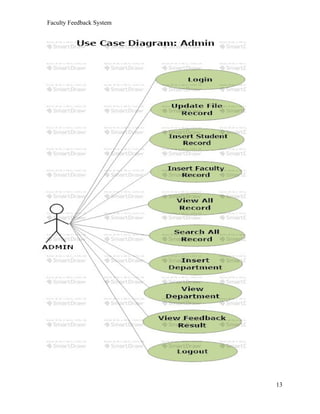
ADMIN MODULE
• Can insert/update/delete/new student (But, not Feedback).
• Can insert/update/delete/new staff member.
• View the final feedback report
STUDENT MODULE
• Give feedback to their respective department staff members.
• Can give comments/Message to the respective staff members
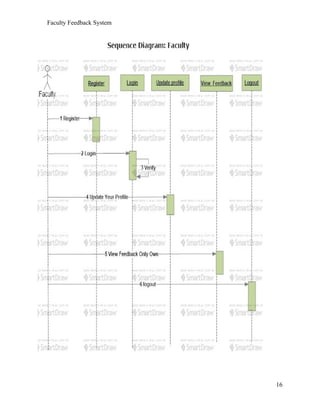
FACULTY MODULE
• Can view their only own comments/message and Rating Criteria given by students.
• Can view total evaluated feedback.
HOD MODULE
• Can view result their respective department.
• Can give Suggestion to Staff member or student according to the particular comments.
• Submit feedback result to the Principal.
2.2 Key Notes
INTODUCTION TO PHP:
The PHP programming language is a server-side HTML embedded scripting language.
The PHP language runs on the server-side. This means that the execution of the scripts are done
on the server where the web-site is hosted. HTML embedded means that you can use PHP
statements (read a piece of PHP code) from within an HTML code. PHP files are returned to the
browser as plain HTML.
The last piece of the sentence – scripting language – is a little harder to explain, but we will give
6
Faculty Feedback System
it a go. A scripting language is a form of programming language that is usually interpreted rather
than compiled. In programming language such as c/c++ you compile the program into an
executable file, before you can execute the program. A program that is written in a scripting
language, is interpreted one command at a time by a command interpreter (Command interpreter
is in most cases an executable written in another language (for instance C/C++) than the scripting
language.) Some other examples of scripting languages are Perl, Phyton, Java and Ruby.
What is PHP?
• PHP stands for PHP: Hypertext Preprocessor.
• As we said before it is a server-side scripting language.
• PHP is free and is an open source software product.
• The PHP scripts are executed on the server.
• PHP supports many databases (MySQL, Sybase, Oracle and many others.)
• PHP runs on different platforms (Unix, Linux, Windows.)
• PHP is compatible with almost all web-servers used today (Apache, IIS, etc.)
• A PHP file can contain plain text, HTML tags and scripts
• The PHP files can have one of the following extensions: php, php3 or phtml.
2.3 Requirement Specification:
To run this project on various platform we need some hardware and software to support this
project.
2.3.1 HARDWARE SPECIFICATION
Processor: Dual core
RAM: 512 mb
Memory: 10 GB
2.3.2 SOFTWARE SPECIFICATION
Technologies: HTML, CSS
Database: MySql
Language: PHP
IDE: Dreamviewer, Notepad++
2.4 System Constraints
2.4.1 User Interface Constraints
Using this portal is fairly simple and intuitive. A user familiar with basic
browser navigation skills should be able to understand all functionality provided by
the portal.
2.4.2 Hardware Constraints
7
Faculty Feedback System
The portal should work on most home desktop and laptop computers.
2.4.3 Software Constraints
The portal is designed to run on Google Chrome, Mozilla Firefox and Internet
Explorer 10.
2.4.4 Data Management Constraints
Portal shall be able to interface with other components according to their
specifications.
2.4.5 Design Standards Compliance
The portal shall be implemented in PHP
3. Project Design:
Software design is an interactive process through which requirements are translated into a
‘Blue Print’ for constructing the software. The design is represented at high level of
abstraction, a level that can be directly translated to specific data, functional and
behavioral requirements. Preliminary design is concerned with the transformation of
requirements into data and software architecture. Detained design focuses on refinements
to the architectural representation that lead to detailed data structure and algorithmic
representation for software.
3.1 Introduction to UML:
UML is a standard language for specifying, visualizing, constructing, and documenting the
artifacts of software systems.
UML was created by Object Management Group (OMG) and UML 1.0 specification draft was
8
Faculty Feedback System
proposed to the OMG in January 1997.
OMG is continuously putting effort to make a truly industry standard.
• UML stands for Unified Modeling Language.
• UML is different from the other common programming languages like C++, Java,
COBOL etc.
• UML is a pictorial language used to make software blue prints.
So UML can be described as a general purpose visual modeling language to visualize, specify,
construct and document software system. Although UML is generally used to model software
systems but it is not limited within this boundary. It is also used to model non software systems
as well like process flow in a manufacturing unit etc.
UML is not a programming language but tools can be used to generate code in various
languages using UML diagrams. UML has a direct relation with object oriented analysis and
design. After some standardization UML is become an OMG (Object Management Group)
standard.
3.2 UML DIAGRAMS:
There are two main types of UML modeling:
3.2.1 STRUCTURALMODELLING:
Structural modeling captures the static features of a system. They
consist of the followings:
• Classes diagrams
• Objects diagrams
• Deployment diagrams
• Package diagrams
• Composite structure diagram
• Component diagram
Structural model represents the framework for the system and this framework is the place
where all other components exist.
9
Faculty Feedback System
3.2.2 BEHAVIORALMODELLING:
Behavioral model describes the interaction in the system. It represents
the interaction among the structural diagrams. Behavioral modeling shows the dynamic nature
of the system. They consist of the following:
• Activity diagrams
• Interaction diagrams
• Use case diagrams
All the above show the dynamic sequence of flow in a system.
4. Project Diagrams:
This project deals with the various software diagrams. These diagrams are as follows:
1. Use Case Diagram
2. Activity Diagram
3. E-R Diagram
4. DFD
5. Sequence Diagram
6. Class Diagram
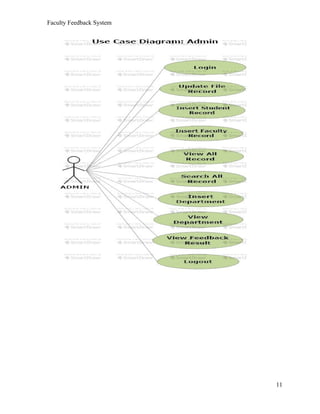
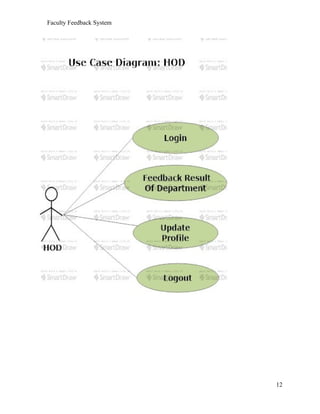
4.1 Use Case Diagram:
Use case diagram consists of use cases and actors and shows the Interaction
between the use cases and actors. Use cases are the function that are to be performed in the
module. An actor could be the end user of the system or the external system.
10
Faculty Feedback System
11
Faculty Feedback System
12
Faculty Feedback System
13
Faculty Feedback System
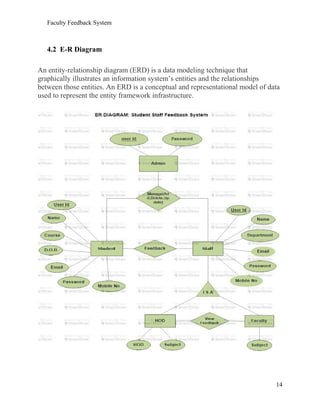
4.2 E-R Diagram
An entity-relationship diagram (ERD) is a data modeling technique that
graphically illustrates an information system’s entities and the relationships
between those entities. An ERD is a conceptual and representational model of data
used to represent the entity framework infrastructure.
14
Faculty Feedback System
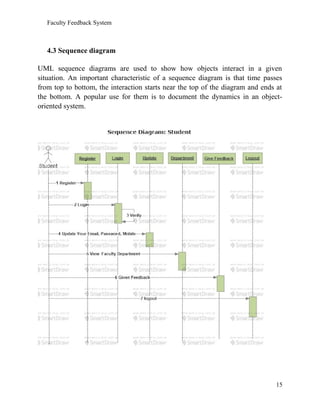
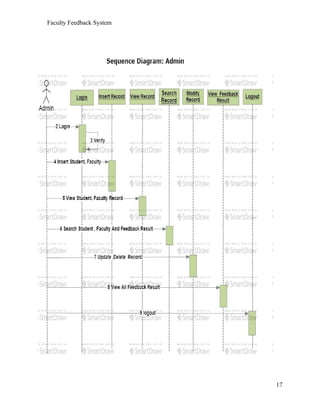
4.3 Sequence diagram
UML sequence diagrams are used to show how objects interact in a given
situation. An important characteristic of a sequence diagram is that time passes
from top to bottom, the interaction starts near the top of the diagram and ends at
the bottom. A popular use for them is to document the dynamics in an object-
oriented system.
15
Faculty Feedback System
16
Faculty Feedback System
17
Faculty Feedback System
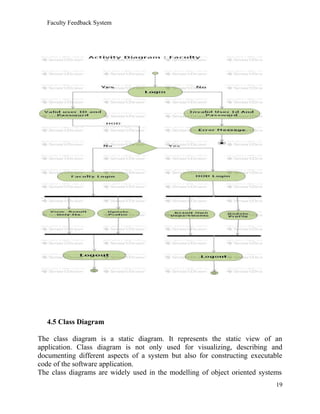
4.4 Activity diagram
Activity diagram is another important diagram in UML to describe dynamic
aspects of the system. Activity diagram is basically a flow chart to represent the
flow form one activity to another activity. The activity can be described as an
operation of the system. So the control flow is drawn from one operation to
another. This flow can be sequential, branched or concurrent.
18
Faculty Feedback System
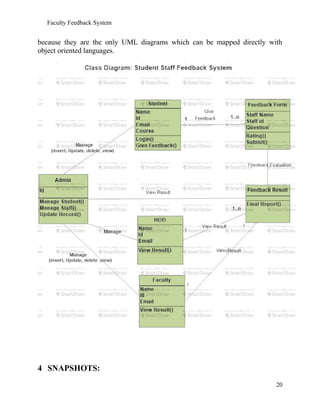
4.5 Class Diagram
The class diagram is a static diagram. It represents the static view of an
application. Class diagram is not only used for visualizing, describing and
documenting different aspects of a system but also for constructing executable
code of the software application.
The class diagrams are widely used in the modelling of object oriented systems
19
Faculty Feedback System
because they are the only UML diagrams which can be mapped directly with
object oriented languages.
4 SNAPSHOTS:
20
Faculty Feedback System
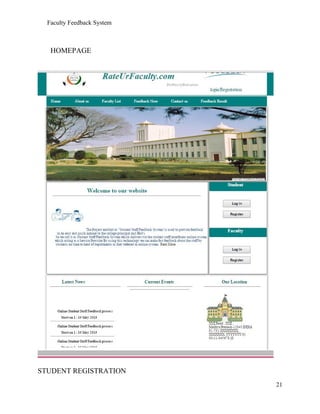
HOMEPAGE
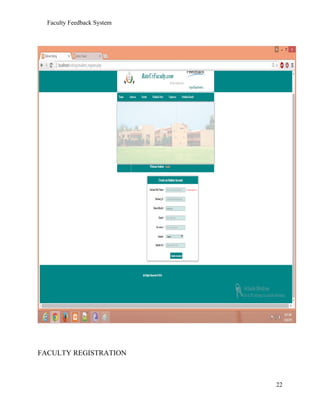
STUDENT REGISTRATION
21
Faculty Feedback System
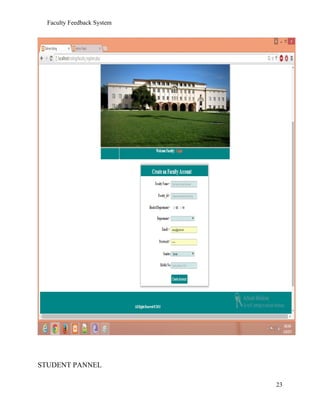
FACULTY REGISTRATION
22
Faculty Feedback System
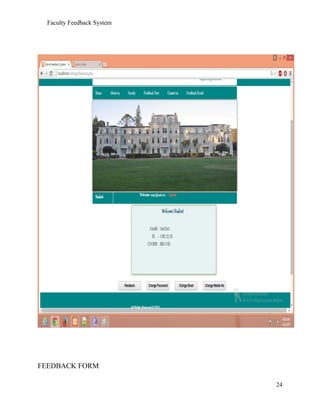
STUDENT PANNEL
23
Faculty Feedback System
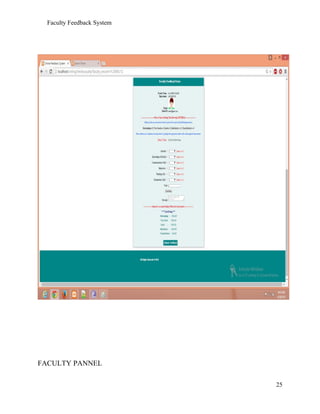
FEEDBACK FORM
24
Faculty Feedback System
FACULTY PANNEL
25
Faculty Feedback System
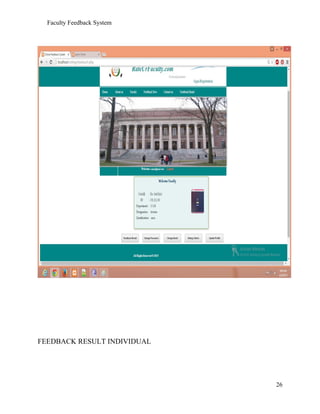
FEEDBACK RESULT INDIVIDUAL
26
Faculty Feedback System
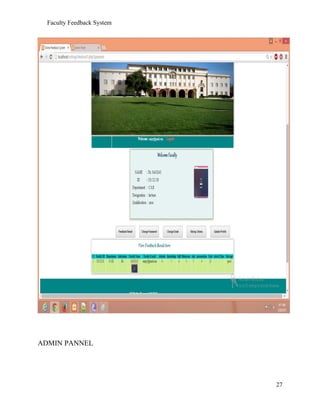
ADMIN PANNEL
27
Faculty Feedback System
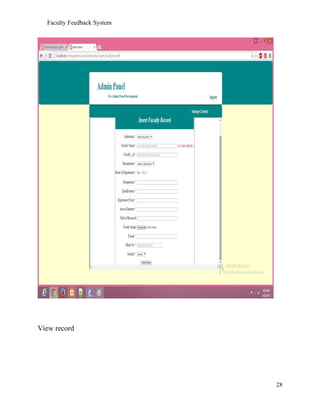
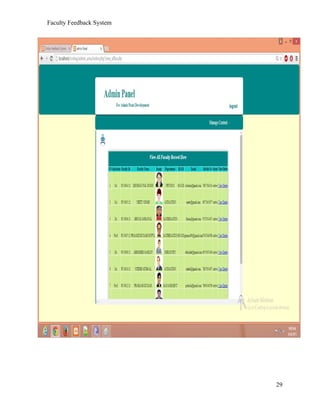
View record
28
Faculty Feedback System
29
Faculty Feedback System
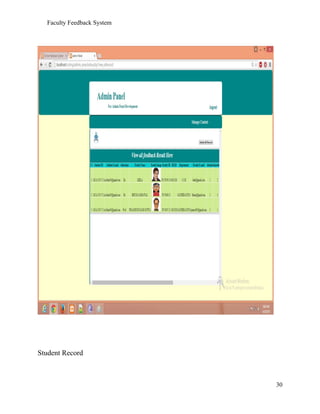
Student Record
30
Faculty Feedback System
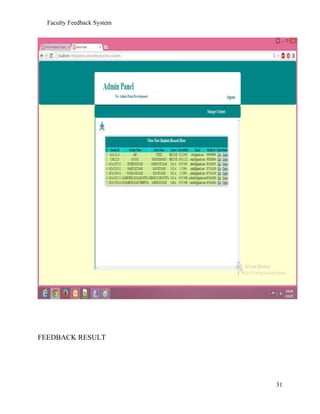
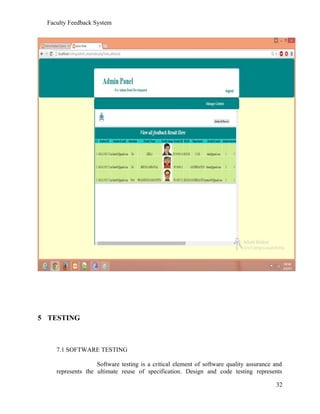
FEEDBACK RESULT
31
Faculty Feedback System
5 TESTING
7.1 SOFTWARE TESTING
Software testing is a critical element of software quality assurance and
represents the ultimate reuse of specification. Design and code testing represents
32
Faculty Feedback System
interesting anomaly for the software during earlier definition and development phase, it
was attempted to build software from an abstract concept to tangible implementation.
The testing phase involves, testing of the development of the system using various
techniques such as White Box Testing, Control Structure Testing.
7.2 TESTING TECHNIQUES
7.2.1 WHITE BOX TESTING
White box testing is a test case design method that uses the control
structure of the procedural design to derive test cases. After performing white box testing
it was identified that:
• The Leave Recording System (LRS) software guarantees that
all independent paths within the modules have been exercised at least once.
• It has been exercised all logical decisions on their true and false sides.
• It was tested to execute all loops at their boundaries and within their Operational bounds
• It was tested for the internal data structures to ensure their validity.
7.2.2 CONTROL STRUCTURE TESTING
The following tests were conducted and it was noted that the BCBS is
performing them well.
• Basic path Testing
• Condition Test
• Data Flow Testing
• Loop Testing
Black box testing methods focuses on the functional requirements of the software by
conducting black box testing using the methods Equivalence
Partitioning Boundary Value Analysis and Cause-Effect-Graphing techniques.
• Functional validity of LRS checked.
• Checked the isolation of the boundaries of a class.
The tolerance of the system for the data rates and data volumes.
7.3 TESTING STRATIGIES
A strategy for software testing must accommodate low-level tests that are
necessary to verify that a small source code segment has been correctly implemented as
33
Faculty Feedback System
well as high level against customer requirements.
7.3.1 UNIT TESTING:
Unit testing focuses verification on the smaller unit of software design such as form. This
is known as form testing. The testing is done individually on each form. Using the unit
test plan, prepared in design phase of the system development as a guide, important
control paths are tested to uncover within the boundary of the module. In this step, the
module is working satisfactorily as a regard to the expected output from the module
7.3.2 INTEGRATION TESTING:
Data can be lost across an interface, one module can have an adverse effect on another
sub function, when combined, may not produce the desired major function. Integration
testing is a systematic technique for constructing the program structure while at the same
time conducting tests to uncover errors associated with the interface. All the modules are
combined in the testing step. Then the entire program is as a whole.
Different integrated test plans like top down integration and bottom up integration are
tested and different errors found in the system are corrected using them. Finally, all the
combined modules are performed well.
7.3.3 SYSTEM TESTING:
Testing the entire system as a whole and checking for its correctness is system testing.
The system is listed for dispensaries between the system and
its original objectives. This project was effective and efficient.
7. Conclusion
The Project “Faculty Feedback system” is designed in order reduce the burden of maintaining
bulk of records of all the students feedback details of who study in an Educational
Institution. Inserting, retrieving and updating the feedback details of a student are easy
when it is compared to the manual feedback and storing. Maintaining the project is also
easy which can is easily understandable. Maintaining the details in the database is
manageable.
34
Faculty Feedback System
8. References
1. Slideshare.com
2. http://www.tutorialspoint.com/uml/uml_modeling_types.htm
3. http://www.w3schools.com/html/default.asp
4. http://www.w3schools.com/css/default.asp
5. http://codepen.io/
35

Project Report of Faculty feedback system

  • 1.
    7CS6 Minor ProjectSoftware Requirements Specification
  • 2.
    Faculty Feedback System FacultyFeedBack System Software Requirements Specification Version - 0.1 28th Nov 2015 Raushan Chaurasiya Database Handling Yash Raj Sharma Frontend Designer Prepared for Minor Project 7CS6 Instructor: Linesh Raja 1
  • 3.
    Faculty Feedback System ABSTRACT Themain aim and objective was to plan and program web application for any domain. We have to apply the best software engineering practice for web application. As a web application developer I was asked to developed an “Faculty Feedback System” using PHP and MySQl. “Faculty Feedback System” This system is generally used by four kinds of users Student, Faculty, Head of departments, Admin. The application should evaluate the answers given by the students based on the feedback (which will be given by a no. 1 – 5) and grade has to be generated to all the staff members of a particular department. These feedback report was checked by the hods. He can view overall grades and view the grades obtained to the lecturers and give this report to the principal and he can give counseling to the college staff. “By using this online system we make it better and quick way.” 2
  • 4.
    Faculty Feedback System RevisionHistory Date Description Author Comments 28th Nov 2015 <Version 0.1> Raushan Kr. Chaurasiya Yash Raj Sharma Document Approval The following Software Requirements Specification has been accepted and approved by the following: Signature Printed Name Title Date Raushan Kr. Chaurasiya Database Handler Yash Raj Sharma Frotend Designer Linesh Raja Sir Instructor 3
  • 5.
    Faculty Feedback System Tableof Contents REVISION HISTORY................................................................................................................................................. 3 DOCUMENT APPROVAL..........................................................................................................................................3 7. CONCLUSION........................................................................................................................................................34 THE PROJECT “FACULTY FEEDBACK SYSTEM” IS DESIGNED IN ORDER REDUCE THE BURDEN OF MAINTAINING BULK OF RECORDS OF ALL THE STUDENTS FEEDBACK DETAILS OF WHO STUDY IN AN EDUCATIONAL INSTITUTION. INSERTING, RETRIEVING AND UPDATING THE FEEDBACK DETAILS OF A STUDENT ARE EASY WHEN IT IS COMPARED TO THE MANUAL FEEDBACK AND STORING. MAINTAINING THE PROJECT IS ALSO EASY WHICH CAN IS EASILY UNDERSTANDABLE. MAINTAINING THE DETAILS IN THE DATABASE IS MANAGEABLE............................................34 1. Introduction We have developed Faculty Feedback System to provide feedback in an easy and quick manner to the college HOD. So we call it as Faculty Feedback System which delivers via student staff interface as online system which acting as Service Provider. By using this technology we can provide fast feedback about the college lecturers by student on time to the head of department s as they referred in online system. This project has four kinds of module student, staff, HOD and admin. The student can give feedback to their respective lecturers. This feedback report is checked by their Head of Department. He can view grade obtained by the lecturers and give this report to the principal for further counseling to the college staff. 1.1 Aim Aim is to provide fast and quick online feedback about the college lecturers and hod by the student on time at anywhere from anyplace by just login from their valid account. 4
  • 6.
    Faculty Feedback System 1.2Objective The main objective was to create a unique and useful “Faculty feedback system” with exceptional quality and service that differentiates it from other feedback system. 1.3 Scope The scope of Faculty Feedback portal is as follows: • The Faculty Feedback portal provides an easier and quicker way to give rating to the colleges staffs. • Student can rate their faculty members according to their teaching style, knowledge, discipline and punctuality at any time from any place. • Through this site data of faculty members and student were managed in quite a simple manner. 1.4 Existing System: Coming to the existing system the feedback is done by manual process. In the existing system students can give feedback about the lecturers by using paper and pen. After giving feedback by every student Papers are collected by the Hod’s and calculate the overall grade for each each lecturer. After that those all grade report is viewed by the principal which is given by the Hod’s. Hence estimating the performance of lecturers and giving counseling to college staff. So, the existing system is carries more time to do a piece of work for this reason. The online system feedback is implemented. This is the major advantage of the existing system for giving feedback about the Lecturers and viewing report of lecturers. 1.5 Proposed System: Here we aimed to design online web application for issuing the feedback about the lecturers by students, this is named as Faculty feedback system. Faculty feedback System to provide feedback in a easy and quick manner to the college lecturers and Hod’s. So we call it as Faculty Feedback System which delivers via the student staff interface as online system which acting as a Service Provider by using this technology we can make fast feedback about the staff by students on time to head of departments as they referred in online system. This project has four kinds of users Student, Staff, Hod’s, and Admin. The student can give feedback in online system provided by college staff. Students and can give feedback about the lecturers. These feedback reports were checked by the Hod’s. He can view overall grades and view the grades obtained to the lecturers and give this report to the principal and he can give counseling to the college staffs compared to the manual system, online system is very simple to use and also understand. 2. Project Analysis: 5
  • 7.
    Faculty Feedback System 2.1Project Description: This system included four modulus which were described below in details: • Admin module • Student module • Faculty module • HOD module The core functionalities that are to be included in the system are the follows:- ADMIN MODULE • Can insert/update/delete/new student (But, not Feedback). • Can insert/update/delete/new staff member. • View the final feedback report STUDENT MODULE • Give feedback to their respective department staff members. • Can give comments/Message to the respective staff members FACULTY MODULE • Can view their only own comments/message and Rating Criteria given by students. • Can view total evaluated feedback. HOD MODULE • Can view result their respective department. • Can give Suggestion to Staff member or student according to the particular comments. • Submit feedback result to the Principal. 2.2 Key Notes INTODUCTION TO PHP: The PHP programming language is a server-side HTML embedded scripting language. The PHP language runs on the server-side. This means that the execution of the scripts are done on the server where the web-site is hosted. HTML embedded means that you can use PHP statements (read a piece of PHP code) from within an HTML code. PHP files are returned to the browser as plain HTML. The last piece of the sentence – scripting language – is a little harder to explain, but we will give 6
  • 8.
    Faculty Feedback System ita go. A scripting language is a form of programming language that is usually interpreted rather than compiled. In programming language such as c/c++ you compile the program into an executable file, before you can execute the program. A program that is written in a scripting language, is interpreted one command at a time by a command interpreter (Command interpreter is in most cases an executable written in another language (for instance C/C++) than the scripting language.) Some other examples of scripting languages are Perl, Phyton, Java and Ruby. What is PHP? • PHP stands for PHP: Hypertext Preprocessor. • As we said before it is a server-side scripting language. • PHP is free and is an open source software product. • The PHP scripts are executed on the server. • PHP supports many databases (MySQL, Sybase, Oracle and many others.) • PHP runs on different platforms (Unix, Linux, Windows.) • PHP is compatible with almost all web-servers used today (Apache, IIS, etc.) • A PHP file can contain plain text, HTML tags and scripts • The PHP files can have one of the following extensions: php, php3 or phtml. 2.3 Requirement Specification: To run this project on various platform we need some hardware and software to support this project. 2.3.1 HARDWARE SPECIFICATION Processor: Dual core RAM: 512 mb Memory: 10 GB 2.3.2 SOFTWARE SPECIFICATION Technologies: HTML, CSS Database: MySql Language: PHP IDE: Dreamviewer, Notepad++ 2.4 System Constraints 2.4.1 User Interface Constraints Using this portal is fairly simple and intuitive. A user familiar with basic browser navigation skills should be able to understand all functionality provided by the portal. 2.4.2 Hardware Constraints 7
  • 9.
    Faculty Feedback System Theportal should work on most home desktop and laptop computers. 2.4.3 Software Constraints The portal is designed to run on Google Chrome, Mozilla Firefox and Internet Explorer 10. 2.4.4 Data Management Constraints Portal shall be able to interface with other components according to their specifications. 2.4.5 Design Standards Compliance The portal shall be implemented in PHP 3. Project Design: Software design is an interactive process through which requirements are translated into a ‘Blue Print’ for constructing the software. The design is represented at high level of abstraction, a level that can be directly translated to specific data, functional and behavioral requirements. Preliminary design is concerned with the transformation of requirements into data and software architecture. Detained design focuses on refinements to the architectural representation that lead to detailed data structure and algorithmic representation for software. 3.1 Introduction to UML: UML is a standard language for specifying, visualizing, constructing, and documenting the artifacts of software systems. UML was created by Object Management Group (OMG) and UML 1.0 specification draft was 8
  • 10.
    Faculty Feedback System proposedto the OMG in January 1997. OMG is continuously putting effort to make a truly industry standard. • UML stands for Unified Modeling Language. • UML is different from the other common programming languages like C++, Java, COBOL etc. • UML is a pictorial language used to make software blue prints. So UML can be described as a general purpose visual modeling language to visualize, specify, construct and document software system. Although UML is generally used to model software systems but it is not limited within this boundary. It is also used to model non software systems as well like process flow in a manufacturing unit etc. UML is not a programming language but tools can be used to generate code in various languages using UML diagrams. UML has a direct relation with object oriented analysis and design. After some standardization UML is become an OMG (Object Management Group) standard. 3.2 UML DIAGRAMS: There are two main types of UML modeling: 3.2.1 STRUCTURALMODELLING: Structural modeling captures the static features of a system. They consist of the followings: • Classes diagrams • Objects diagrams • Deployment diagrams • Package diagrams • Composite structure diagram • Component diagram Structural model represents the framework for the system and this framework is the place where all other components exist. 9
  • 11.
    Faculty Feedback System 3.2.2BEHAVIORALMODELLING: Behavioral model describes the interaction in the system. It represents the interaction among the structural diagrams. Behavioral modeling shows the dynamic nature of the system. They consist of the following: • Activity diagrams • Interaction diagrams • Use case diagrams All the above show the dynamic sequence of flow in a system. 4. Project Diagrams: This project deals with the various software diagrams. These diagrams are as follows: 1. Use Case Diagram 2. Activity Diagram 3. E-R Diagram 4. DFD 5. Sequence Diagram 6. Class Diagram 4.1 Use Case Diagram: Use case diagram consists of use cases and actors and shows the Interaction between the use cases and actors. Use cases are the function that are to be performed in the module. An actor could be the end user of the system or the external system. 10
  • 12.
  • 13.
  • 14.
  • 15.
    Faculty Feedback System 4.2E-R Diagram An entity-relationship diagram (ERD) is a data modeling technique that graphically illustrates an information system’s entities and the relationships between those entities. An ERD is a conceptual and representational model of data used to represent the entity framework infrastructure. 14
  • 16.
    Faculty Feedback System 4.3Sequence diagram UML sequence diagrams are used to show how objects interact in a given situation. An important characteristic of a sequence diagram is that time passes from top to bottom, the interaction starts near the top of the diagram and ends at the bottom. A popular use for them is to document the dynamics in an object- oriented system. 15
  • 17.
  • 18.
  • 19.
    Faculty Feedback System 4.4Activity diagram Activity diagram is another important diagram in UML to describe dynamic aspects of the system. Activity diagram is basically a flow chart to represent the flow form one activity to another activity. The activity can be described as an operation of the system. So the control flow is drawn from one operation to another. This flow can be sequential, branched or concurrent. 18
  • 20.
    Faculty Feedback System 4.5Class Diagram The class diagram is a static diagram. It represents the static view of an application. Class diagram is not only used for visualizing, describing and documenting different aspects of a system but also for constructing executable code of the software application. The class diagrams are widely used in the modelling of object oriented systems 19
  • 21.
    Faculty Feedback System becausethey are the only UML diagrams which can be mapped directly with object oriented languages. 4 SNAPSHOTS: 20
  • 22.
  • 23.
  • 24.
  • 25.
  • 26.
  • 27.
  • 28.
  • 29.
  • 30.
  • 31.
  • 32.
  • 33.
    Faculty Feedback System 5TESTING 7.1 SOFTWARE TESTING Software testing is a critical element of software quality assurance and represents the ultimate reuse of specification. Design and code testing represents 32
  • 34.
    Faculty Feedback System interestinganomaly for the software during earlier definition and development phase, it was attempted to build software from an abstract concept to tangible implementation. The testing phase involves, testing of the development of the system using various techniques such as White Box Testing, Control Structure Testing. 7.2 TESTING TECHNIQUES 7.2.1 WHITE BOX TESTING White box testing is a test case design method that uses the control structure of the procedural design to derive test cases. After performing white box testing it was identified that: • The Leave Recording System (LRS) software guarantees that all independent paths within the modules have been exercised at least once. • It has been exercised all logical decisions on their true and false sides. • It was tested to execute all loops at their boundaries and within their Operational bounds • It was tested for the internal data structures to ensure their validity. 7.2.2 CONTROL STRUCTURE TESTING The following tests were conducted and it was noted that the BCBS is performing them well. • Basic path Testing • Condition Test • Data Flow Testing • Loop Testing Black box testing methods focuses on the functional requirements of the software by conducting black box testing using the methods Equivalence Partitioning Boundary Value Analysis and Cause-Effect-Graphing techniques. • Functional validity of LRS checked. • Checked the isolation of the boundaries of a class. The tolerance of the system for the data rates and data volumes. 7.3 TESTING STRATIGIES A strategy for software testing must accommodate low-level tests that are necessary to verify that a small source code segment has been correctly implemented as 33
  • 35.
    Faculty Feedback System wellas high level against customer requirements. 7.3.1 UNIT TESTING: Unit testing focuses verification on the smaller unit of software design such as form. This is known as form testing. The testing is done individually on each form. Using the unit test plan, prepared in design phase of the system development as a guide, important control paths are tested to uncover within the boundary of the module. In this step, the module is working satisfactorily as a regard to the expected output from the module 7.3.2 INTEGRATION TESTING: Data can be lost across an interface, one module can have an adverse effect on another sub function, when combined, may not produce the desired major function. Integration testing is a systematic technique for constructing the program structure while at the same time conducting tests to uncover errors associated with the interface. All the modules are combined in the testing step. Then the entire program is as a whole. Different integrated test plans like top down integration and bottom up integration are tested and different errors found in the system are corrected using them. Finally, all the combined modules are performed well. 7.3.3 SYSTEM TESTING: Testing the entire system as a whole and checking for its correctness is system testing. The system is listed for dispensaries between the system and its original objectives. This project was effective and efficient. 7. Conclusion The Project “Faculty Feedback system” is designed in order reduce the burden of maintaining bulk of records of all the students feedback details of who study in an Educational Institution. Inserting, retrieving and updating the feedback details of a student are easy when it is compared to the manual feedback and storing. Maintaining the project is also easy which can is easily understandable. Maintaining the details in the database is manageable. 34
  • 36.
    Faculty Feedback System 8.References 1. Slideshare.com 2. http://www.tutorialspoint.com/uml/uml_modeling_types.htm 3. http://www.w3schools.com/html/default.asp 4. http://www.w3schools.com/css/default.asp 5. http://codepen.io/ 35