Upgrade Your Time
How to Perform
HCL Notes 14 Upgrades
Smoothly
November 07th, 2023
Christoph Adler
Head of Solution Consulting
christoph.adler@panagenda.com
Host & Speaker
Femke Goedhart
Product Marketing Manager
& Business Consultant
femke.goedhart@panagenda.com
Guest Speaker
Florian Vogler
CEO
florian.vogler@panagenda.com
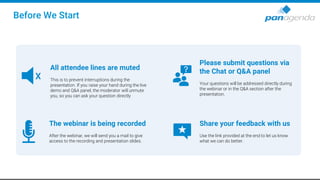
Before We Start
All attendee lines are muted
This is to prevent interruptions during the
presentation. If you raise your hand during the live
demo and Q&A panel, the moderator will unmute
you, so you can ask your question directly
X
The webinar is being recorded
After the webinar, we will send you a mail to give
access to the recording and presentation slides.
Please submit questions via
the Chat or Q&A panel
Your questions will be addressed directly during
the webinar or in the Q&A section after the
presentation.
Share your feedback with us
Use the link provided at the end to let us know
what we can do better.
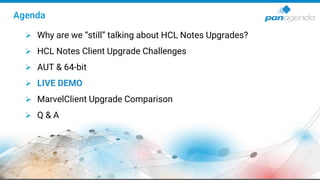
Agenda
➢ Why are we “still” talking about HCL Notes Upgrades?
➢ HCL Notes Client Upgrade Challenges
➢ AUT & 64-bit
➢ LIVE DEMO
➢ MarvelClient Upgrade Comparison
➢ Q & A
Upgrade Your Time
Why are we “still” talking about
HCL Notes Upgrades?
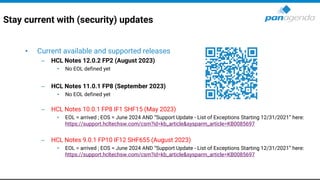
Stay current with (security) updates
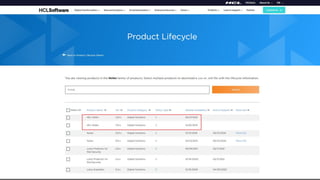
• Current available and supported releases
– HCL Notes 12.0.2 FP2 (August 2023)
• No EOL defined yet
– HCL Notes 11.0.1 FP8 (September 2023)
• No EOL defined yet
– HCL Notes 10.0.1 FP8 IF1 SHF15 (May 2023)
• EOL = arrived ; EOS = June 2024 AND “Support Update - List of Exceptions Starting 12/31/2021” here:
https://support.hcltechsw.com/csm?id=kb_article&sysparm_article=KB0085697
– HCL Notes 9.0.1 FP10 IF12 SHF655 (August 2023)
• EOL = arrived ; EOS = June 2024 AND “Support Update - List of Exceptions Starting 12/31/2021” here:
https://support.hcltechsw.com/csm?id=kb_article&sysparm_article=KB0085697
HCL Notes 14 is coming soon
Launch – Event on December 7th, 2023
Upgrade Your Time
HCL Notes Client
Upgrade Challenges
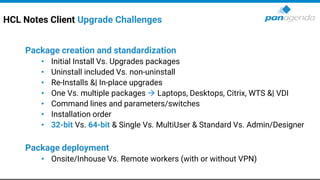
HCL Notes Client Upgrade Challenges
Package creation and standardization
• Initial Install Vs. Upgrades packages
• Uninstall included Vs. non-uninstall
• Re-Installs &| In-place upgrades
• One Vs. multiple packages → Laptops, Desktops, Citrix, WTS &| VDI
• Command lines and parameters/switches
• Installation order
• 32-bit Vs. 64-bit & Single Vs. MultiUser & Standard Vs. Admin/Designer
Package deployment
• Onsite/Inhouse Vs. Remote workers (with or without VPN)
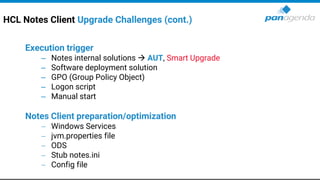
HCL Notes Client Upgrade Challenges (cont.)
Execution trigger
– Notes internal solutions → AUT, Smart Upgrade
– Software deployment solution
– GPO (Group Policy Object)
– Logon script
– Manual start
Notes Client preparation/optimization
− Windows Services
− jvm.properties file
− ODS
− Stub notes.ini
− Config file
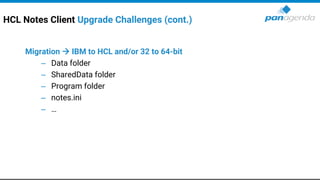
HCL Notes Client Upgrade Challenges (cont.)
Migration → IBM to HCL and/or 32 to 64-bit
– Data folder
– SharedData folder
– Program folder
– notes.ini
– …
Upgrade Your Time
AUT & 64-bit
HCL Notes 64-bit – before we start
• This is the *very condensed version* of a 75 slides presentation
by Julian Robichaux → Webinar planned for January
• Please be aware that when upgrading your Notes clients from 32 to 64 bit
YOU MUST REVIEW (YOUR CODE) AND TEST YOUR APPLICATIONS
(excuse the screaming)
• If you only have plain vanilla apps without any of what we cover next,
you may not have to do anything.
– If you don’t know, see red text above.
– If you are “unable” to review your code/apps, upgrade a few users to
ensure all your apps work as expected before upgrading all your users
(or take a look at panagenda iDNA for Applications)
– Please bear in mind that code may just fail or produce unexpected results silently.
HCL Notes 64-bit – before we start
• We are talking about 32 → 64-bit application upgrades, not operating
system
– Everyone should be on a 64-bit OS for years
• We are talking about Notes Rich clients (Basic/Std) on Windows
– Not Mac, Linux, iOS, Android, Nomad, Nomad Web etc.​
– Sidenote: Moving to Nomad Web comes with other issues
• Primary 64-bit advantages:
– More Memory and CPU registers
– Some organizations have 64-bit only directives, and 32-bit programs seem “old”
– Easier to maintain and support once we all made the switch (for both HCL and you!)
HCL Notes 64-bit – Domino vs. Notes
• Didn’t we figure out all the issues when we switched to 64-bit Domino?
• So many differences…
– UI code
– Eclipse integration
– Third-party libraries and app integrations
– Broader range of API calls (both Notes and Windows)
– Users do much crazier things than admins do
• Client has a lot more code running on a much wider variety of machines
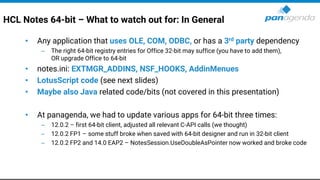
HCL Notes 64-bit – What to watch out for: In General
• Any application that uses OLE, COM, ODBC, or has a 3rd party dependency
– The right 64-bit registry entries for Office 32-bit may suffice (you have to add them),
OR upgrade Office to 64-bit
• notes.ini: EXTMGR_ADDINS, NSF_HOOKS, AddinMenues
• LotusScript code (see next slides)
• Maybe also Java related code/bits (not covered in this presentation)
• At panagenda, we had to update various apps for 64-bit three times:
– 12.0.2 – first 64-bit client, adjusted all relevant C-API calls (we thought)
– 12.0.2 FP1 – some stuff broke when saved with 64-bit designer and run in 32-bit client
– 12.0.2 FP2 and 14.0 EAP2 – NotesSession.UseDoubleAsPointer now worked and broke code
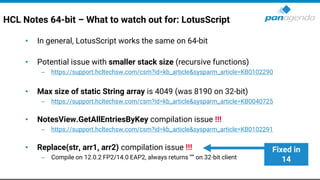
HCL Notes 64-bit – What to watch out for: LotusScript
• In general, LotusScript works the same on 64-bit
• Potential issue with smaller stack size (recursive functions)
– https://support.hcltechsw.com/csm?id=kb_article&sysparm_article=KB0102290
• Max size of static String array is 4049 (was 8190 on 32-bit)
– https://support.hcltechsw.com/csm?id=kb_article&sysparm_article=KB0040725
• NotesView.GetAllEntriesByKey compilation issue !!!
– https://support.hcltechsw.com/csm?id=kb_article&sysparm_article=KB0102291
• Replace(str, arr1, arr2) compilation issue !!!
– Compile on 12.0.2 FP2/14.0 EAP2, always returns “” on 32-bit client
Fixed in
14
HCL Notes 64-bit – What to watch out for: LotusScript
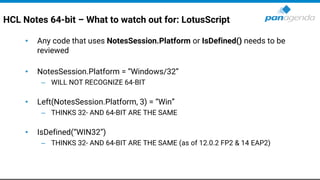
• Any code that uses NotesSession.Platform or IsDefined() needs to be
reviewed
• NotesSession.Platform = “Windows/32”
– WILL NOT RECOGNIZE 64-BIT
• Left(NotesSession.Platform, 3) = “Win”
– THINKS 32- AND 64-BIT ARE THE SAME
• IsDefined(“WIN32”)
– THINKS 32- AND 64-BIT ARE THE SAME (as of 12.0.2 FP2 & 14 EAP2)
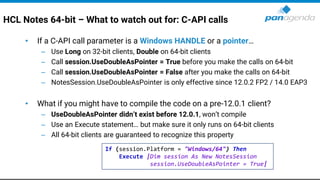
HCL Notes 64-bit – What to watch out for: C-API calls
• If a C-API call parameter is a Windows HANDLE or a pointer…
– Use Long on 32-bit clients, Double on 64-bit clients
– Call session.UseDoubleAsPointer = True before you make the calls on 64-bit
– Call session.UseDoubleAsPointer = False after you make the calls on 64-bit
– NotesSession.UseDoubleAsPointer is only effective since 12.0.2 FP2 / 14.0 EAP3
• What if you might have to compile the code on a pre-12.0.1 client?
– UseDoubleAsPointer didn’t exist before 12.0.1, won’t compile
– Use an Execute statement… but make sure it only runs on 64-bit clients
– All 64-bit clients are guaranteed to recognize this property
If (session.Platform = "Windows/64") Then
Execute |Dim session As New NotesSession
session.UseDoubleAsPointer = True|
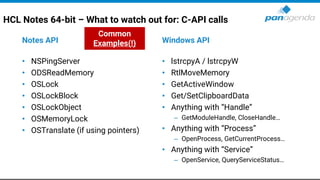
HCL Notes 64-bit – What to watch out for: C-API calls
Notes API
• NSPingServer
• ODSReadMemory
• OSLock
• OSLockBlock
• OSLockObject
• OSMemoryLock
• OSTranslate (if using pointers)
Windows API
• lstrcpyA / lstrcpyW
• RtlMoveMemory
• GetActiveWindow
• Get/SetClipboardData
• Anything with “Handle”
– GetModuleHandle, CloseHandle…
• Anything with “Process”
– OpenProcess, GetCurrentProcess…
• Anything with “Service”
– OpenService, QueryServiceStatus…
Common
Examples(!)
HCL AUT = HCL Notes Auto Update
Why are we talking about AUT when there is MarvelClient Upgrade?
1. Self-interest:
Because we would like to use AUT for local elevation without the server bits
• Today, we support: Corporate Software Deployment, panagenda Upgrade service,
built-in Admin, local Admin, and Domain Admin.
We would LOVE to add HCL Auto Update service as another option.
2. We want to make sure,
that as many companies as possible
upgrade their clients – even if they don’t use MarvelClient.
HCL AUT = HCL Notes Auto Update
Why are we talking about AUT when there is MarvelClient Upgrade?
3. Because we may need your help/vote today and in the future:
• Today (please vote!): https://domino-ideas.hcltechsw.com/ideas/NTS-I-2479
• Tomorrow: we are discussing more ideas with HCL → more ideas to come for voting
4. Not everyone knows AUT (and its current limitations )
• Regarding its current limitations:
• We are discussing more ideas with HCL
• The most important differences are summarized later
• (can’t promise anything)
Together with HCL, we want to make sure that as many companies as possible
can (and do) upgrade their clients easily and successfully
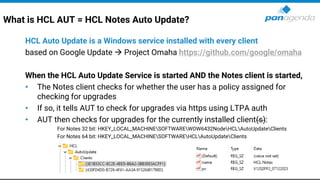
What is HCL AUT = HCL Notes Auto Update?
HCL Auto Update is a Windows service installed with every client
based on Google Update → Project Omaha https://github.com/google/omaha
When the HCL Auto Update Service is started AND the Notes client is started,
• The Notes client checks for whether the user has a policy assigned for
checking for upgrades
• If so, it tells AUT to check for upgrades via https using LTPA auth
• AUT then checks for upgrades for the currently installed client(s):
For Notes 32 bit: HKEY_LOCAL_MACHINESOFTWAREWOW6432NodeHCLAutoUpdateClients
For Notes 64 bit: HKEY_LOCAL_MACHINESOFTWAREHCLAutoUpdateClients
How is HCL AUT set up/configured?
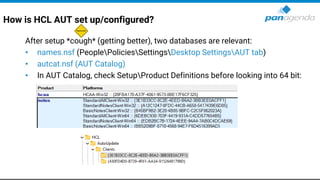
After setup *cough* (getting better), two databases are relevant:
• names.nsf (PeoplePoliciesSettingsDesktop SettingsAUT tab)
• autcat.nsf (AUT Catalog)
• In AUT Catalog, check SetupProduct Definitions before looking into 64 bit:
How is HCL AUT set up/configured?
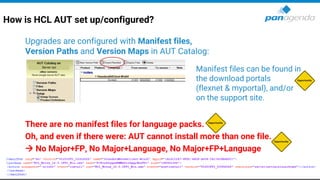
Upgrades are configured with Manifest files,
Version Paths and Version Maps in AUT Catalog:
There are no manifest files for language packs.
Oh, and even if there were: AUT cannot install more than one file.
→ No Major+FP, No Major+Language, No Major+FP+Language
Server xyz
Manifest files can be found in
the download portals
(flexnet & myportal), and/or
on the support site.
How is HCL AUT set up/configured?
Sidenote
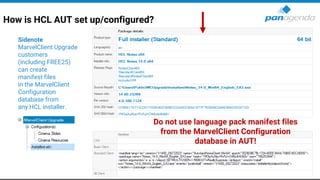
MarvelClient Upgrade
customers
(including FREE25)
can create
manifest files
in the MarvelClient
Configuration
database from
any HCL installer.
Do not use language pack manifest files
from the MarvelClient Configuration
database in AUT!
Back to AUT …
HCL AUT: Important things to know
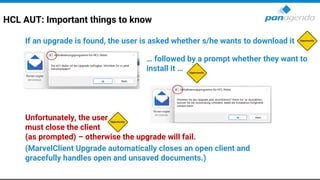
If an upgrade is found, the user is asked whether s/he wants to download it
… followed by a prompt whether they want to
install it …
Unfortunately, the user
must close the client
(as prompted) – otherwise the upgrade will fail.
(MarvelClient Upgrade automatically closes an open client and
gracefully handles open and unsaved documents.)
HCL AUT: Important things to know
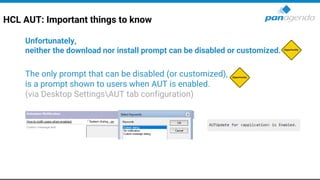
Unfortunately,
neither the download nor install prompt can be disabled or customized.
The only prompt that can be disabled (or customized),
is a prompt shown to users when AUT is enabled.
(via Desktop SettingsAUT tab configuration)
HCL AUT: Important things to know
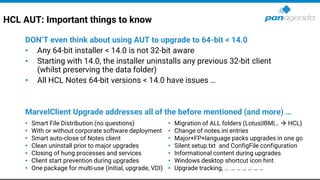
DON’T even think about using AUT to upgrade to 64-bit < 14.0
• Any 64-bit installer < 14.0 is not 32-bit aware
• Starting with 14.0, the installer uninstalls any previous 32-bit client
(whilst preserving the data folder)
• All HCL Notes 64-bit versions < 14.0 have issues …
MarvelClient Upgrade addresses all of the before mentioned (and more) …
• Smart File Distribution (no questions)
• With or without corporate software deployment
• Smart auto-close of Notes client
• Clean uninstall prior to major upgrades
• Closing of hung processes and services
• Client start prevention during upgrades
• One package for multi-use (initial, upgrade, VDI)
• Migration of ALL folders (Lotus|IBM|… → HCL)
• Change of notes.ini entries
• Major+FP+language packs upgrades in one go
• Silent setup.txt and ConfigFile configuration
• Informational content during upgrades
• Windows desktop shortcut icon hint
• Upgrade tracking, ... … … … … … …
Upgrade Your Time
LIVE DEMO
If you are interested to see
a Marvel Client Upgrade configuration from scratch
If you are interested to see
a Marvel Client Upgrade configuration from scratch
Send a mail to
christoph.adler@panagenda.com
Upgrade Your Time
MarvelClient Upgrade
Comparison
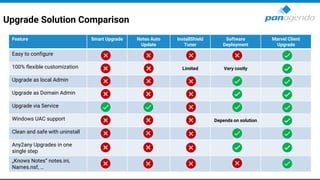
Upgrade Solution Comparison
Feature Smart Upgrade Notes Auto
Update
InstallShield
Tuner
Software
Deployment
Marvel Client
Upgrade
Easy to configure
100% flexible customization Limited Very costly
Upgrade as local Admin
Upgrade as Domain Admin
Upgrade via Service
Windows UAC support Depends on solution
Clean and safe with uninstall
Any2any Upgrades in one
single step
„Knows Notes“ notes.ini,
Names.nsf, …
Upgrade Solution Comparison (cont.)
Feature Smart Upgrade Notes Auto
Update
InstallShield
Tuner
Software
Deployment
Marvel Client
Upgrade
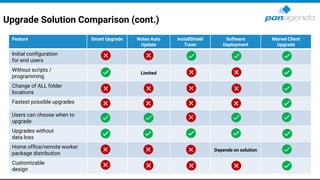
Initial configuration
for end users
Without scripts /
programming
Limited
Change of ALL folder
locations
Fastest possible upgrades
Users can choose when to
upgrade
Upgrades without
data loss
Home office/remote worker
package distribution
Depends on solution
Customizable
design
Upgrade Solution Comparison (cont.)
Feature Smart
Upgrade
Notes Auto
Update
InstallShield
Tuner
Software
Deployment
Marvel Client
Upgrade
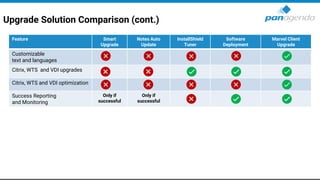
Customizable
text and languages
Citrix, WTS and VDI upgrades
Citrix, WTS and VDI optimization
Success Reporting
and Monitoring
Only if
successful
Only if
successful
Your Feedback Matters to Us
THANK YOU!
THANK YOU!
Q & A
Christoph Adler
Head of Solution Consulting EMEA & HCL Ambassador
panagenda
Register Today >
EXPERT TALKS
W E B I N A R S E R I E S
A Closer Look: HCL Notes 14 and HCL Nomad Web
Everything You Need to Know
About HCL Notes 14
December 12th, 2023 | 10:00 am EST | 4:00 pm CET

How to Perform HCL Notes 14 Upgrades Smoothly

  • 1.
    Upgrade Your Time Howto Perform HCL Notes 14 Upgrades Smoothly November 07th, 2023
  • 2.
    Christoph Adler Head ofSolution Consulting christoph.adler@panagenda.com Host & Speaker Femke Goedhart Product Marketing Manager & Business Consultant femke.goedhart@panagenda.com
  • 3.
  • 4.
    Before We Start Allattendee lines are muted This is to prevent interruptions during the presentation. If you raise your hand during the live demo and Q&A panel, the moderator will unmute you, so you can ask your question directly X The webinar is being recorded After the webinar, we will send you a mail to give access to the recording and presentation slides. Please submit questions via the Chat or Q&A panel Your questions will be addressed directly during the webinar or in the Q&A section after the presentation. Share your feedback with us Use the link provided at the end to let us know what we can do better.
  • 5.
    Agenda ➢ Why arewe “still” talking about HCL Notes Upgrades? ➢ HCL Notes Client Upgrade Challenges ➢ AUT & 64-bit ➢ LIVE DEMO ➢ MarvelClient Upgrade Comparison ➢ Q & A
  • 6.
    Upgrade Your Time Whyare we “still” talking about HCL Notes Upgrades?
  • 7.
    Stay current with(security) updates • Current available and supported releases – HCL Notes 12.0.2 FP2 (August 2023) • No EOL defined yet – HCL Notes 11.0.1 FP8 (September 2023) • No EOL defined yet – HCL Notes 10.0.1 FP8 IF1 SHF15 (May 2023) • EOL = arrived ; EOS = June 2024 AND “Support Update - List of Exceptions Starting 12/31/2021” here: https://support.hcltechsw.com/csm?id=kb_article&sysparm_article=KB0085697 – HCL Notes 9.0.1 FP10 IF12 SHF655 (August 2023) • EOL = arrived ; EOS = June 2024 AND “Support Update - List of Exceptions Starting 12/31/2021” here: https://support.hcltechsw.com/csm?id=kb_article&sysparm_article=KB0085697
  • 9.
    HCL Notes 14is coming soon
  • 10.
    HCL Notes 14is coming soon Launch – Event on December 7th, 2023
  • 11.
    Upgrade Your Time HCLNotes Client Upgrade Challenges
  • 12.
    HCL Notes ClientUpgrade Challenges Package creation and standardization • Initial Install Vs. Upgrades packages • Uninstall included Vs. non-uninstall • Re-Installs &| In-place upgrades • One Vs. multiple packages → Laptops, Desktops, Citrix, WTS &| VDI • Command lines and parameters/switches • Installation order • 32-bit Vs. 64-bit & Single Vs. MultiUser & Standard Vs. Admin/Designer Package deployment • Onsite/Inhouse Vs. Remote workers (with or without VPN)
  • 13.
    HCL Notes ClientUpgrade Challenges (cont.) Execution trigger – Notes internal solutions → AUT, Smart Upgrade – Software deployment solution – GPO (Group Policy Object) – Logon script – Manual start Notes Client preparation/optimization − Windows Services − jvm.properties file − ODS − Stub notes.ini − Config file
  • 14.
    HCL Notes ClientUpgrade Challenges (cont.) Migration → IBM to HCL and/or 32 to 64-bit – Data folder – SharedData folder – Program folder – notes.ini – …
  • 15.
  • 16.
    HCL Notes 64-bit– before we start • This is the *very condensed version* of a 75 slides presentation by Julian Robichaux → Webinar planned for January • Please be aware that when upgrading your Notes clients from 32 to 64 bit YOU MUST REVIEW (YOUR CODE) AND TEST YOUR APPLICATIONS (excuse the screaming) • If you only have plain vanilla apps without any of what we cover next, you may not have to do anything. – If you don’t know, see red text above. – If you are “unable” to review your code/apps, upgrade a few users to ensure all your apps work as expected before upgrading all your users (or take a look at panagenda iDNA for Applications) – Please bear in mind that code may just fail or produce unexpected results silently.
  • 17.
    HCL Notes 64-bit– before we start • We are talking about 32 → 64-bit application upgrades, not operating system – Everyone should be on a 64-bit OS for years • We are talking about Notes Rich clients (Basic/Std) on Windows – Not Mac, Linux, iOS, Android, Nomad, Nomad Web etc.​ – Sidenote: Moving to Nomad Web comes with other issues • Primary 64-bit advantages: – More Memory and CPU registers – Some organizations have 64-bit only directives, and 32-bit programs seem “old” – Easier to maintain and support once we all made the switch (for both HCL and you!)
  • 18.
    HCL Notes 64-bit– Domino vs. Notes • Didn’t we figure out all the issues when we switched to 64-bit Domino? • So many differences… – UI code – Eclipse integration – Third-party libraries and app integrations – Broader range of API calls (both Notes and Windows) – Users do much crazier things than admins do • Client has a lot more code running on a much wider variety of machines
  • 19.
    HCL Notes 64-bit– What to watch out for: In General • Any application that uses OLE, COM, ODBC, or has a 3rd party dependency – The right 64-bit registry entries for Office 32-bit may suffice (you have to add them), OR upgrade Office to 64-bit • notes.ini: EXTMGR_ADDINS, NSF_HOOKS, AddinMenues • LotusScript code (see next slides) • Maybe also Java related code/bits (not covered in this presentation) • At panagenda, we had to update various apps for 64-bit three times: – 12.0.2 – first 64-bit client, adjusted all relevant C-API calls (we thought) – 12.0.2 FP1 – some stuff broke when saved with 64-bit designer and run in 32-bit client – 12.0.2 FP2 and 14.0 EAP2 – NotesSession.UseDoubleAsPointer now worked and broke code
  • 20.
    HCL Notes 64-bit– What to watch out for: LotusScript • In general, LotusScript works the same on 64-bit • Potential issue with smaller stack size (recursive functions) – https://support.hcltechsw.com/csm?id=kb_article&sysparm_article=KB0102290 • Max size of static String array is 4049 (was 8190 on 32-bit) – https://support.hcltechsw.com/csm?id=kb_article&sysparm_article=KB0040725 • NotesView.GetAllEntriesByKey compilation issue !!! – https://support.hcltechsw.com/csm?id=kb_article&sysparm_article=KB0102291 • Replace(str, arr1, arr2) compilation issue !!! – Compile on 12.0.2 FP2/14.0 EAP2, always returns “” on 32-bit client Fixed in 14
  • 21.
    HCL Notes 64-bit– What to watch out for: LotusScript • Any code that uses NotesSession.Platform or IsDefined() needs to be reviewed • NotesSession.Platform = “Windows/32” – WILL NOT RECOGNIZE 64-BIT • Left(NotesSession.Platform, 3) = “Win” – THINKS 32- AND 64-BIT ARE THE SAME • IsDefined(“WIN32”) – THINKS 32- AND 64-BIT ARE THE SAME (as of 12.0.2 FP2 & 14 EAP2)
  • 22.
    HCL Notes 64-bit– What to watch out for: C-API calls • If a C-API call parameter is a Windows HANDLE or a pointer… – Use Long on 32-bit clients, Double on 64-bit clients – Call session.UseDoubleAsPointer = True before you make the calls on 64-bit – Call session.UseDoubleAsPointer = False after you make the calls on 64-bit – NotesSession.UseDoubleAsPointer is only effective since 12.0.2 FP2 / 14.0 EAP3 • What if you might have to compile the code on a pre-12.0.1 client? – UseDoubleAsPointer didn’t exist before 12.0.1, won’t compile – Use an Execute statement… but make sure it only runs on 64-bit clients – All 64-bit clients are guaranteed to recognize this property If (session.Platform = "Windows/64") Then Execute |Dim session As New NotesSession session.UseDoubleAsPointer = True|
  • 23.
    HCL Notes 64-bit– What to watch out for: C-API calls Notes API • NSPingServer • ODSReadMemory • OSLock • OSLockBlock • OSLockObject • OSMemoryLock • OSTranslate (if using pointers) Windows API • lstrcpyA / lstrcpyW • RtlMoveMemory • GetActiveWindow • Get/SetClipboardData • Anything with “Handle” – GetModuleHandle, CloseHandle… • Anything with “Process” – OpenProcess, GetCurrentProcess… • Anything with “Service” – OpenService, QueryServiceStatus… Common Examples(!)
  • 24.
    HCL AUT =HCL Notes Auto Update Why are we talking about AUT when there is MarvelClient Upgrade? 1. Self-interest: Because we would like to use AUT for local elevation without the server bits • Today, we support: Corporate Software Deployment, panagenda Upgrade service, built-in Admin, local Admin, and Domain Admin. We would LOVE to add HCL Auto Update service as another option. 2. We want to make sure, that as many companies as possible upgrade their clients – even if they don’t use MarvelClient.
  • 25.
    HCL AUT =HCL Notes Auto Update Why are we talking about AUT when there is MarvelClient Upgrade? 3. Because we may need your help/vote today and in the future: • Today (please vote!): https://domino-ideas.hcltechsw.com/ideas/NTS-I-2479 • Tomorrow: we are discussing more ideas with HCL → more ideas to come for voting 4. Not everyone knows AUT (and its current limitations ) • Regarding its current limitations: • We are discussing more ideas with HCL • The most important differences are summarized later • (can’t promise anything) Together with HCL, we want to make sure that as many companies as possible can (and do) upgrade their clients easily and successfully
  • 26.
    What is HCLAUT = HCL Notes Auto Update? HCL Auto Update is a Windows service installed with every client based on Google Update → Project Omaha https://github.com/google/omaha When the HCL Auto Update Service is started AND the Notes client is started, • The Notes client checks for whether the user has a policy assigned for checking for upgrades • If so, it tells AUT to check for upgrades via https using LTPA auth • AUT then checks for upgrades for the currently installed client(s): For Notes 32 bit: HKEY_LOCAL_MACHINESOFTWAREWOW6432NodeHCLAutoUpdateClients For Notes 64 bit: HKEY_LOCAL_MACHINESOFTWAREHCLAutoUpdateClients
  • 27.
    How is HCLAUT set up/configured? After setup *cough* (getting better), two databases are relevant: • names.nsf (PeoplePoliciesSettingsDesktop SettingsAUT tab) • autcat.nsf (AUT Catalog) • In AUT Catalog, check SetupProduct Definitions before looking into 64 bit:
  • 28.
    How is HCLAUT set up/configured? Upgrades are configured with Manifest files, Version Paths and Version Maps in AUT Catalog: There are no manifest files for language packs. Oh, and even if there were: AUT cannot install more than one file. → No Major+FP, No Major+Language, No Major+FP+Language Server xyz Manifest files can be found in the download portals (flexnet & myportal), and/or on the support site.
  • 29.
    How is HCLAUT set up/configured? Sidenote MarvelClient Upgrade customers (including FREE25) can create manifest files in the MarvelClient Configuration database from any HCL installer. Do not use language pack manifest files from the MarvelClient Configuration database in AUT!
  • 30.
  • 31.
    HCL AUT: Importantthings to know If an upgrade is found, the user is asked whether s/he wants to download it … followed by a prompt whether they want to install it … Unfortunately, the user must close the client (as prompted) – otherwise the upgrade will fail. (MarvelClient Upgrade automatically closes an open client and gracefully handles open and unsaved documents.)
  • 32.
    HCL AUT: Importantthings to know Unfortunately, neither the download nor install prompt can be disabled or customized. The only prompt that can be disabled (or customized), is a prompt shown to users when AUT is enabled. (via Desktop SettingsAUT tab configuration)
  • 33.
    HCL AUT: Importantthings to know DON’T even think about using AUT to upgrade to 64-bit < 14.0 • Any 64-bit installer < 14.0 is not 32-bit aware • Starting with 14.0, the installer uninstalls any previous 32-bit client (whilst preserving the data folder) • All HCL Notes 64-bit versions < 14.0 have issues … MarvelClient Upgrade addresses all of the before mentioned (and more) … • Smart File Distribution (no questions) • With or without corporate software deployment • Smart auto-close of Notes client • Clean uninstall prior to major upgrades • Closing of hung processes and services • Client start prevention during upgrades • One package for multi-use (initial, upgrade, VDI) • Migration of ALL folders (Lotus|IBM|… → HCL) • Change of notes.ini entries • Major+FP+language packs upgrades in one go • Silent setup.txt and ConfigFile configuration • Informational content during upgrades • Windows desktop shortcut icon hint • Upgrade tracking, ... … … … … … …
  • 34.
  • 35.
    If you areinterested to see a Marvel Client Upgrade configuration from scratch
  • 36.
    If you areinterested to see a Marvel Client Upgrade configuration from scratch Send a mail to christoph.adler@panagenda.com
  • 37.
  • 38.
    Upgrade Solution Comparison FeatureSmart Upgrade Notes Auto Update InstallShield Tuner Software Deployment Marvel Client Upgrade Easy to configure 100% flexible customization Limited Very costly Upgrade as local Admin Upgrade as Domain Admin Upgrade via Service Windows UAC support Depends on solution Clean and safe with uninstall Any2any Upgrades in one single step „Knows Notes“ notes.ini, Names.nsf, …
  • 39.
    Upgrade Solution Comparison(cont.) Feature Smart Upgrade Notes Auto Update InstallShield Tuner Software Deployment Marvel Client Upgrade Initial configuration for end users Without scripts / programming Limited Change of ALL folder locations Fastest possible upgrades Users can choose when to upgrade Upgrades without data loss Home office/remote worker package distribution Depends on solution Customizable design
  • 40.
    Upgrade Solution Comparison(cont.) Feature Smart Upgrade Notes Auto Update InstallShield Tuner Software Deployment Marvel Client Upgrade Customizable text and languages Citrix, WTS and VDI upgrades Citrix, WTS and VDI optimization Success Reporting and Monitoring Only if successful Only if successful
  • 41.
    Your Feedback Mattersto Us THANK YOU! THANK YOU! Q & A
  • 42.
    Christoph Adler Head ofSolution Consulting EMEA & HCL Ambassador panagenda Register Today > EXPERT TALKS W E B I N A R S E R I E S A Closer Look: HCL Notes 14 and HCL Nomad Web Everything You Need to Know About HCL Notes 14 December 12th, 2023 | 10:00 am EST | 4:00 pm CET