For Professionals
-Mashhood Ahmed
Why LinkedIn ?
LinkedIn is all about establishing connections. When you connect
with other professionals in your field, you’re gaining more knowledge
and insight since you’re interacting with colleagues.
• Promotion of your accomplishments.
• Receiving job alerts, mentors and potential business partners or
customers.
• Recommendations from peers, customers and employers add to
credibility. Building your strong image in the industry.
• Your family, friends and acquaintances come to know what you
are really good at. Increasing the chances of personal referrals
and new opportunities.
Course: LinkedIn 101 for Professionals
Course Content:
Professional Display Picture
Profile Headline
Profile Summary
Mentioning Professional Experiences
Skills, Endorsements and Recommendations
Asking for Referrals through LinkedIn
Be Identifiable
Show work samples
Search Engine Optimize your profile
Ask for assistance
Course: LinkedIn 101 for Professionals
Professional Display Picture:
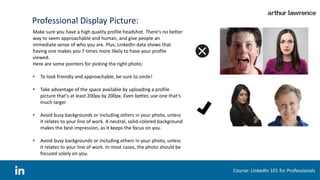
Make sure you have a high quality profile headshot. There's no better
way to seem approachable and human, and give people an
immediate sense of who you are. Plus, LinkedIn data shows that
having one makes you 7 times more likely to have your profile
viewed.
Here are some pointers for picking the right photo:
• To look friendly and approachable, be sure to smile!
• Take advantage of the space available by uploading a profile
picture that's at least 200px by 200px. Even better, use one that's
much larger
• Avoid busy backgrounds or including others in your photo, unless
it relates to your line of work. A neutral, solid-colored background
makes the best impression, as it keeps the focus on you.
• Avoid busy backgrounds or including others in your photo, unless
it relates to your line of work. In most cases, the photo should be
focused solely on you.
Course: LinkedIn 101 for Professionals
Profile Headline:
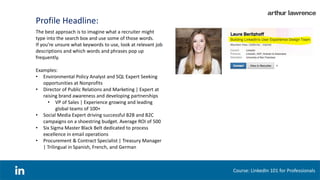
The best approach is to imagine what a recruiter might
type into the search box and use some of those words.
If you’re unsure what keywords to use, look at relevant job
descriptions and which words and phrases pop up
frequently.
Examples:
• Environmental Policy Analyst and SQL Expert Seeking
opportunities at Nonprofits
• Director of Public Relations and Marketing | Expert at
raising brand awareness and developing partnerships
• VP of Sales | Experience growing and leading
global teams of 100+
• Social Media Expert driving successful B2B and B2C
campaigns on a shoestring budget. Average ROI of 500
• Six Sigma Master Black Belt dedicated to process
excellence in email operations
• Procurement & Contract Specialist | Treasury Manager
| Trilingual in Spanish, French, and German
Course: LinkedIn 101 for Professionals
Profile Summary:
A good summary consists of a few brief paragraphs
summarizing your professional background, key
areas of expertise, and any accomplishments
you're particularly proud of.
Check to see if your profile gives you a good sense
of who you are and what you can do for a potential
employer/client.
To maximize readability, consider using a bulleted
list to break up the text. (You can create a bullet by
pressing and holding the Alt or Option key and
typing the numbers 0, 1, 4, and 9. Or just use
hyphens instead.)
Last but not least, the summary is a good place to
account for gaps in their work history and prove
how you've kept your skills fresh.
Course: LinkedIn 101 for Professionals
Mentioning Professional Experiences :
Course: LinkedIn 101 for Professionals
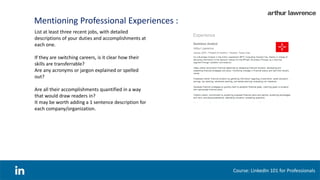
List at least three recent jobs, with detailed
descriptions of your duties and accomplishments at
each one.
If they are switching careers, is it clear how their
skills are transferrable?
Are any acronyms or jargon explained or spelled
out?
Are all their accomplishments quantified in a way
that would draw readers in?
It may be worth adding a 1 sentence description for
each company/organization.
Skills, Endorsements and Recommendations:
Course: LinkedIn 101 for Professionals
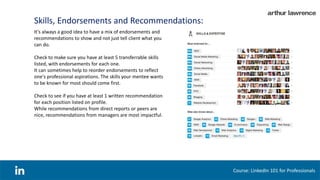
It's always a good idea to have a mix of endorsements and
recommendations to show and not just tell client what you
can do.
Check to make sure you have at least 5 transferrable skills
listed, with endorsements for each one.
It can sometimes help to reorder endorsements to reflect
one's professional aspirations. The skills your mentee wants
to be known for most should come first.
Check to see if you have at least 1 written recommendation
for each position listed on profile.
While recommendations from direct reports or peers are
nice, recommendations from managers are most impactful.
Asking for Referrals through LinkedIn:
Course: LinkedIn 101 for Professionals
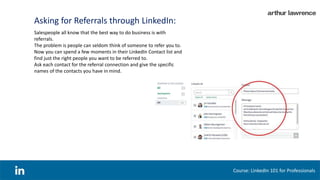
Salespeople all know that the best way to do business is with
referrals.
The problem is people can seldom think of someone to refer you to.
Now you can spend a few moments in their LinkedIn Contact list and
find just the right people you want to be referred to.
Ask each contact for the referral connection and give the specific
names of the contacts you have in mind.
Be Identifiable :
Course: LinkedIn 101 for Professionals
Allow others to see who you are if you view their profile.
To allow this, go into your Settings
(click your thumbnail image in the top right and choose
Privacy & Settings)
and click Select what others see when you've viewed their profile.
Make sure you check off the Your name and headline
(Recommended) option.
Show work samples:
Course: LinkedIn 101 for Professionals
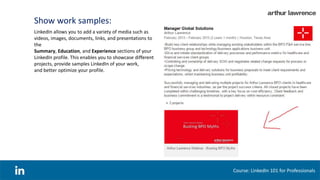
LinkedIn allows you to add a variety of media such as
videos, images, documents, links, and presentations to
the
Summary, Education, and Experience sections of your
LinkedIn profile. This enables you to showcase different
projects, provide samples LinkedIn of your work,
and better optimize your profile.
Search Engine Optimize your profile:
Course: LinkedIn 101 for Professionals
You can also optimize your profile to get found by people searching
LinkedIn for key terms you want to get found for.
Add these keywords to various sections of your profile such as your
headline or in your summary.
Next course:
Course: LinkedIn 101 for Professionals
Achieving Expert Level in LinkedIn
Highlights:
 Optimum Usage of LinkedIn Groups
 Understanding LinkedIn terms and conditions
 Securing your LinkedIn account and Identity
 Mastering search and profile filtration
 Recommendation activity with colleagues
 Understanding content reachability principles
 Understanding copyrights policies
 Understanding benefits of premium account
 Building an exceptional profile in LinkedIn
Thank you !
Course: LinkedIn 101 for Professionals

How to get a proper LinkedIn Profile

  • 1.
  • 2.
    Why LinkedIn ? LinkedInis all about establishing connections. When you connect with other professionals in your field, you’re gaining more knowledge and insight since you’re interacting with colleagues. • Promotion of your accomplishments. • Receiving job alerts, mentors and potential business partners or customers. • Recommendations from peers, customers and employers add to credibility. Building your strong image in the industry. • Your family, friends and acquaintances come to know what you are really good at. Increasing the chances of personal referrals and new opportunities. Course: LinkedIn 101 for Professionals
  • 3.
    Course Content: Professional DisplayPicture Profile Headline Profile Summary Mentioning Professional Experiences Skills, Endorsements and Recommendations Asking for Referrals through LinkedIn Be Identifiable Show work samples Search Engine Optimize your profile Ask for assistance Course: LinkedIn 101 for Professionals
  • 4.
    Professional Display Picture: Makesure you have a high quality profile headshot. There's no better way to seem approachable and human, and give people an immediate sense of who you are. Plus, LinkedIn data shows that having one makes you 7 times more likely to have your profile viewed. Here are some pointers for picking the right photo: • To look friendly and approachable, be sure to smile! • Take advantage of the space available by uploading a profile picture that's at least 200px by 200px. Even better, use one that's much larger • Avoid busy backgrounds or including others in your photo, unless it relates to your line of work. A neutral, solid-colored background makes the best impression, as it keeps the focus on you. • Avoid busy backgrounds or including others in your photo, unless it relates to your line of work. In most cases, the photo should be focused solely on you. Course: LinkedIn 101 for Professionals
  • 5.
    Profile Headline: The bestapproach is to imagine what a recruiter might type into the search box and use some of those words. If you’re unsure what keywords to use, look at relevant job descriptions and which words and phrases pop up frequently. Examples: • Environmental Policy Analyst and SQL Expert Seeking opportunities at Nonprofits • Director of Public Relations and Marketing | Expert at raising brand awareness and developing partnerships • VP of Sales | Experience growing and leading global teams of 100+ • Social Media Expert driving successful B2B and B2C campaigns on a shoestring budget. Average ROI of 500 • Six Sigma Master Black Belt dedicated to process excellence in email operations • Procurement & Contract Specialist | Treasury Manager | Trilingual in Spanish, French, and German Course: LinkedIn 101 for Professionals
  • 6.
    Profile Summary: A goodsummary consists of a few brief paragraphs summarizing your professional background, key areas of expertise, and any accomplishments you're particularly proud of. Check to see if your profile gives you a good sense of who you are and what you can do for a potential employer/client. To maximize readability, consider using a bulleted list to break up the text. (You can create a bullet by pressing and holding the Alt or Option key and typing the numbers 0, 1, 4, and 9. Or just use hyphens instead.) Last but not least, the summary is a good place to account for gaps in their work history and prove how you've kept your skills fresh. Course: LinkedIn 101 for Professionals
  • 7.
    Mentioning Professional Experiences: Course: LinkedIn 101 for Professionals List at least three recent jobs, with detailed descriptions of your duties and accomplishments at each one. If they are switching careers, is it clear how their skills are transferrable? Are any acronyms or jargon explained or spelled out? Are all their accomplishments quantified in a way that would draw readers in? It may be worth adding a 1 sentence description for each company/organization.
  • 8.
    Skills, Endorsements andRecommendations: Course: LinkedIn 101 for Professionals It's always a good idea to have a mix of endorsements and recommendations to show and not just tell client what you can do. Check to make sure you have at least 5 transferrable skills listed, with endorsements for each one. It can sometimes help to reorder endorsements to reflect one's professional aspirations. The skills your mentee wants to be known for most should come first. Check to see if you have at least 1 written recommendation for each position listed on profile. While recommendations from direct reports or peers are nice, recommendations from managers are most impactful.
  • 9.
    Asking for Referralsthrough LinkedIn: Course: LinkedIn 101 for Professionals Salespeople all know that the best way to do business is with referrals. The problem is people can seldom think of someone to refer you to. Now you can spend a few moments in their LinkedIn Contact list and find just the right people you want to be referred to. Ask each contact for the referral connection and give the specific names of the contacts you have in mind.
  • 10.
    Be Identifiable : Course:LinkedIn 101 for Professionals Allow others to see who you are if you view their profile. To allow this, go into your Settings (click your thumbnail image in the top right and choose Privacy & Settings) and click Select what others see when you've viewed their profile. Make sure you check off the Your name and headline (Recommended) option.
  • 11.
    Show work samples: Course:LinkedIn 101 for Professionals LinkedIn allows you to add a variety of media such as videos, images, documents, links, and presentations to the Summary, Education, and Experience sections of your LinkedIn profile. This enables you to showcase different projects, provide samples LinkedIn of your work, and better optimize your profile.
  • 12.
    Search Engine Optimizeyour profile: Course: LinkedIn 101 for Professionals You can also optimize your profile to get found by people searching LinkedIn for key terms you want to get found for. Add these keywords to various sections of your profile such as your headline or in your summary.
  • 13.
    Next course: Course: LinkedIn101 for Professionals Achieving Expert Level in LinkedIn Highlights:  Optimum Usage of LinkedIn Groups  Understanding LinkedIn terms and conditions  Securing your LinkedIn account and Identity  Mastering search and profile filtration  Recommendation activity with colleagues  Understanding content reachability principles  Understanding copyrights policies  Understanding benefits of premium account  Building an exceptional profile in LinkedIn
  • 14.
    Thank you ! Course:LinkedIn 101 for Professionals