Exclusive Road Map For
Dynamics 365 Implementation
Dynamics 365 Implementation Guide
 With the changing technologies, businesses are shifting to cloud-
based business applications that can play a vital role in business
success and growth.
 Microsoft Dynamic 365 is a powerful business application that
comes with the enhanced and latest tools and software for CRM
(Customer Relationship Management) and ERP (Enterprise
Resource Planning).
 Businesses are taking advantage of this complete business suite,
so why not you? If you haven't implemented Dynamics 365 in
your business or organization, here's a guide to Microsoft
Dynamics 365 implementation.
Benefits of Implementing Dynamics 365
 Dynamics 365 offers combined capabilities of CRM
and ERP, and hence, businesses can streamline
internal communication as well as customer
communication.
 It's very easy to use and deploy.
 It helps in reducing the sales cycle by giving
important and useful customer data to the sales team.
 Dynamics 365 is Customizable and scalable. You can
upgrade it anytime as per your organization's needs.
 It analyzes the customer interaction and collects
useful insights that help your business to grab those
customers and overall business growth.
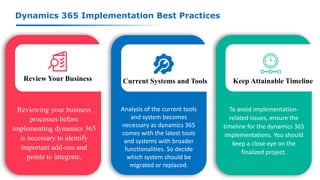
Dynamics 365 Implementation Best Practices
Review Your Business Current Systems and Tools Keep Attainable Timeline
Reviewing your business
processes before
implementing dynamics 365
is necessary to identify
important add-ons and
points to integrate.
Analysis of the current tools
and system becomes
necessary as dynamics 365
comes with the latest tools
and systems with broader
functionalities. So decide
which system should be
migrated or replaced.
To avoid implementation-
related issues, ensure the
timeline for the dynamics 365
implementations. You should
keep a close eye on the
finalized project.
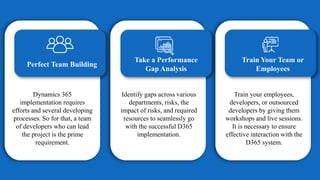
Perfect Team Building
Take a Performance
Gap Analysis
Train Your Team or
Employees
Dynamics 365
implementation requires
efforts and several developing
processes. So for that, a team
of developers who can lead
the project is the prime
requirement.
Identify gaps across various
departments, risks, the
impact of risks, and required
resources to seamlessly go
with the successful D365
implementation.
Train your employees,
developers, or outsourced
developers by giving them
workshops and live sessions.
It is necessary to ensure
effective interaction with the
D365 system.
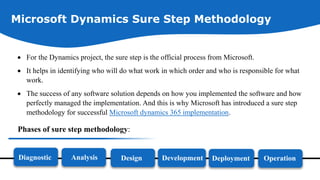
Microsoft Dynamics Sure Step Methodology
 For the Dynamics project, the sure step is the official process from Microsoft.
 It helps in identifying who will do what work in which order and who is responsible for what
work.
 The success of any software solution depends on how you implemented the software and how
perfectly managed the implementation. And this is why Microsoft has introduced a sure step
methodology for successful Microsoft dynamics 365 implementation.
Phases of sure step methodology:
Diagnostic Analysis Design Development Deployment Operation
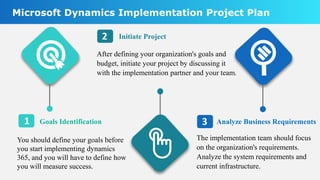
Goals Identification
You should define your goals before
you start implementing dynamics
365, and you will have to define how
you will measure success.
Initiate Project
The implementation team should focus
on the organization's requirements.
Analyze the system requirements and
current infrastructure.
Analyze Business Requirements
Microsoft Dynamics Implementation Project Plan
1
2
3
After defining your organization's goals and
budget, initiate your project by discussing it
with the implementation partner and your team.
4
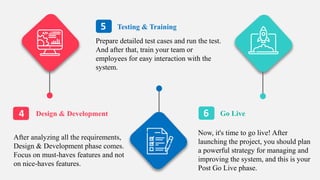
5
6
Design & Development
Testing & Training
Go Live
After analyzing all the requirements,
Design & Development phase comes.
Focus on must-haves features and not
on nice-haves features.
Prepare detailed test cases and run the test.
And after that, train your team or
employees for easy interaction with the
system.
Now, it's time to go live! After
launching the project, you should plan
a powerful strategy for managing and
improving the system, and this is your
Post Go Live phase.
Analyzing Results With Reporting Tools
 Microsoft Dynamics 365 comes with several automated reporting tools
which will give you more information on how you can establish better
interaction with your customer.
 Start analyzing customer interaction and its effect on your business.
 See how you can implement new strategies in order to generate more leads
and sales.
 Understand how effectively you can use the resources.
 You should analyze the ongoing business processes and look for better
improvements. Dynamics 365 have powerful data analysis and reporting
capabilities.
Contact Us
Offshore Software Development Company
NEX SOFTSYS
info@nexsoftsys.com
www.nexsoftsys.com
477 Madison Avenue, 6th floor
NEW YORK - 10022
United States of America
Thank You

How to implement Microsoft Dynamics 365 effectively?

  • 1.
    Exclusive Road MapFor Dynamics 365 Implementation
  • 2.
    Dynamics 365 ImplementationGuide  With the changing technologies, businesses are shifting to cloud- based business applications that can play a vital role in business success and growth.  Microsoft Dynamic 365 is a powerful business application that comes with the enhanced and latest tools and software for CRM (Customer Relationship Management) and ERP (Enterprise Resource Planning).  Businesses are taking advantage of this complete business suite, so why not you? If you haven't implemented Dynamics 365 in your business or organization, here's a guide to Microsoft Dynamics 365 implementation.
  • 3.
    Benefits of ImplementingDynamics 365  Dynamics 365 offers combined capabilities of CRM and ERP, and hence, businesses can streamline internal communication as well as customer communication.  It's very easy to use and deploy.  It helps in reducing the sales cycle by giving important and useful customer data to the sales team.  Dynamics 365 is Customizable and scalable. You can upgrade it anytime as per your organization's needs.  It analyzes the customer interaction and collects useful insights that help your business to grab those customers and overall business growth.
  • 4.
    Dynamics 365 ImplementationBest Practices Review Your Business Current Systems and Tools Keep Attainable Timeline Reviewing your business processes before implementing dynamics 365 is necessary to identify important add-ons and points to integrate. Analysis of the current tools and system becomes necessary as dynamics 365 comes with the latest tools and systems with broader functionalities. So decide which system should be migrated or replaced. To avoid implementation- related issues, ensure the timeline for the dynamics 365 implementations. You should keep a close eye on the finalized project.
  • 5.
    Perfect Team Building Takea Performance Gap Analysis Train Your Team or Employees Dynamics 365 implementation requires efforts and several developing processes. So for that, a team of developers who can lead the project is the prime requirement. Identify gaps across various departments, risks, the impact of risks, and required resources to seamlessly go with the successful D365 implementation. Train your employees, developers, or outsourced developers by giving them workshops and live sessions. It is necessary to ensure effective interaction with the D365 system.
  • 6.
    Microsoft Dynamics SureStep Methodology  For the Dynamics project, the sure step is the official process from Microsoft.  It helps in identifying who will do what work in which order and who is responsible for what work.  The success of any software solution depends on how you implemented the software and how perfectly managed the implementation. And this is why Microsoft has introduced a sure step methodology for successful Microsoft dynamics 365 implementation. Phases of sure step methodology: Diagnostic Analysis Design Development Deployment Operation
  • 7.
    Goals Identification You shoulddefine your goals before you start implementing dynamics 365, and you will have to define how you will measure success. Initiate Project The implementation team should focus on the organization's requirements. Analyze the system requirements and current infrastructure. Analyze Business Requirements Microsoft Dynamics Implementation Project Plan 1 2 3 After defining your organization's goals and budget, initiate your project by discussing it with the implementation partner and your team.
  • 8.
    4 5 6 Design & Development Testing& Training Go Live After analyzing all the requirements, Design & Development phase comes. Focus on must-haves features and not on nice-haves features. Prepare detailed test cases and run the test. And after that, train your team or employees for easy interaction with the system. Now, it's time to go live! After launching the project, you should plan a powerful strategy for managing and improving the system, and this is your Post Go Live phase.
  • 9.
    Analyzing Results WithReporting Tools  Microsoft Dynamics 365 comes with several automated reporting tools which will give you more information on how you can establish better interaction with your customer.  Start analyzing customer interaction and its effect on your business.  See how you can implement new strategies in order to generate more leads and sales.  Understand how effectively you can use the resources.  You should analyze the ongoing business processes and look for better improvements. Dynamics 365 have powerful data analysis and reporting capabilities.
  • 10.
    Contact Us Offshore SoftwareDevelopment Company NEX SOFTSYS info@nexsoftsys.com www.nexsoftsys.com 477 Madison Avenue, 6th floor NEW YORK - 10022 United States of America
  • 11.