

How To
Find the Default Gateway
Default Gateway
• Typically in a TCP/IP network, nodes such as
servers, workstations and network devices each
have a defined default route setting, (pointing to the
default gateway), defining where to send packets
for IP addresses for which they can determine no
specific route. The gateway is by definition a
router.
What is the use of a default
gateway?
• Default gateways provide means for the local
networks to connect to the external network. The
default gateway for connecting to the external
network is usually the address of the external router
port.
What will you use the Default
Gateway IP address for?
• Default gateway’s IP Address can be used to
access the routers GUI/Wizard to adjust the settings
of the home network.
• In short: You will use this access the router login
screen.
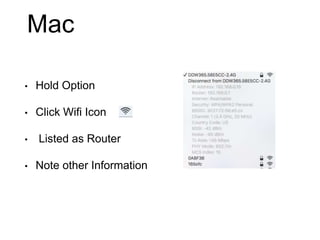
Mac
• Hold Option
• Click Wifi Icon
• Listed as Router
• Note other Information
Other options on mac
• Wifi: Click on wifi symbol -> Open Network
Preferences -> Wi-Fi -> Advanced… -> TCP/IP ->
Router
• Ethernet: Settings -> Network -> Ethernet -> Router
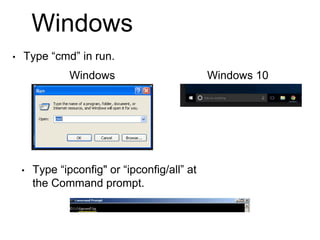
Windows
• Type “cmd” in run.
• Type “ipconfig" or “ipconfig/all” at
the Command prompt.
Windows 10Windows
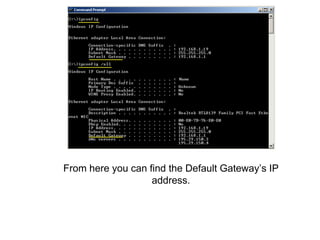
From here you can find the Default Gateway’s IP
address.
Other options for PC
• Windows 7 and up: Right click on network connection
symbol -> Network and Sharing Center -> Click on wifi
name or on Local Area Network -> Click Details ->
IPv4 Default Gateway
• Run -> Cmd -> from the command prompt (C:) type
“Tracert google.com”. Then the first IP listed should
be the default gateway.
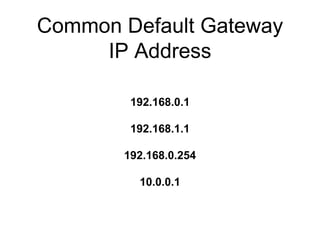
Common Default Gateway
IP Address
192.168.0.1
192.168.1.1
192.168.0.254
10.0.0.1
Resources
http://setuprouter.com
https://www.google.com
http://www.techspot.com/guides/287-default-router-ip-addresse

How To Default Gateway

  • 1.
    How To Find theDefault Gateway
  • 2.
    Default Gateway • Typicallyin a TCP/IP network, nodes such as servers, workstations and network devices each have a defined default route setting, (pointing to the default gateway), defining where to send packets for IP addresses for which they can determine no specific route. The gateway is by definition a router.
  • 3.
    What is theuse of a default gateway? • Default gateways provide means for the local networks to connect to the external network. The default gateway for connecting to the external network is usually the address of the external router port.
  • 4.
    What will youuse the Default Gateway IP address for? • Default gateway’s IP Address can be used to access the routers GUI/Wizard to adjust the settings of the home network. • In short: You will use this access the router login screen.
  • 5.
    Mac • Hold Option •Click Wifi Icon • Listed as Router • Note other Information
  • 6.
    Other options onmac • Wifi: Click on wifi symbol -> Open Network Preferences -> Wi-Fi -> Advanced… -> TCP/IP -> Router • Ethernet: Settings -> Network -> Ethernet -> Router
  • 7.
    Windows • Type “cmd”in run. • Type “ipconfig" or “ipconfig/all” at the Command prompt. Windows 10Windows
  • 8.
    From here youcan find the Default Gateway’s IP address.
  • 9.
    Other options forPC • Windows 7 and up: Right click on network connection symbol -> Network and Sharing Center -> Click on wifi name or on Local Area Network -> Click Details -> IPv4 Default Gateway • Run -> Cmd -> from the command prompt (C:) type “Tracert google.com”. Then the first IP listed should be the default gateway.
  • 10.
    Common Default Gateway IPAddress 192.168.0.1 192.168.1.1 192.168.0.254 10.0.0.1
  • 11.