5 April 2017
Ekaterina Filippova - eKat Communication
www.ekatcommunication.ch
Programme
About me
Reasons for poor ad performance
Levels of promotion control
Overview of Facebook Ads creation process:
1. Choose marketing objectives
2. Target the right audience
3. Select optimal ad placement
4. Select appropriate ad format
5. Select impactful images
6. Write appropriate text
Review of marketing objective formats
Result monitoring and evaluation
Aboutme
13+ years in Switzerland
8 years in American corp in 

European communications department
Master’s in Media & Communications
2,5 years of freelance work in digital communication
English, French & Russian
Aboutme
Entrepreneurs & small businesses
Reasonsforpooradperformance
Your targeting is not accurate
Your ad is not aligned with the marketing funnel stage
Your ad format is not appropriate for your objective
The placement is not optimal
Your visuals are unappealing
Your text is not clear
You don’t have a Call-to-Action (CTA)
Levelsofpromotioncontrol
Post boosting
• Can add CTA, set audience, budget & duration
Levelsofpromotioncontrol
Ads Manager
• Create ad campaigns, set marketing objectives, set
audience, delivery methods, choose different ad
formats etc
• Simpler to use, better for small 

scale and less frequent 

advertisers = small businesses
Levelsofpromotioncontrol
Power Editor
• Essentially same functionality 

as Ads manager with more 

options
• More complicated with more 

features, better for large scale 

advertisers = corporations & 

agencies
FacebookAdscreationprocess
Overview
1.Choosemarketingobjectives
Facebook’s version of marketing funnel
2.Choosetherightaudience
Targeting options
Optionsforchoosingaudience
Option 1: Custom audience
Using existing audience (remarketing):
• Contacts’ email addresses or phone numbers
• Website visitors
• Interactions with Facebook page
Option 2: Lookalike audience
Creating audience similar to existing audience:
• Custom audience
• Facebook fans
Choose countries & matching % (from 1% to 10% of population)
=> Need to have an existing audience of considerable size
(>500-1000 fans)
Optionsforchoosingaudience
Option 3: New audience
Creating audience based on several parameters:
• Locations (include & exclude places, set radius)
• Age
• Gender
• Languages
• Detailed targeting based on:
• Demographics
• Interests
• Behaviours
• Connection type (w/FB page)
=> English-speaking women in canton of Geneva, age 30-45
Detailedtargetingoptions
Demographics
• Education
Source: http://www.wordstream.com/images/facebook-ad-targeting-options-infographic-wordstream-large.jpg
Detailedtargetingoptions
Demographics
• Life events
Source: http://www.wordstream.com/images/facebook-ad-targeting-options-infographic-wordstream-large.jpg
Detailedtargetingoptions
Demographics
• Parents
• Relationship
• Work
Source: http://www.wordstream.com/images/facebook-ad-targeting-options-infographic-wordstream-large.jpg
Detailedtargetingoptions
Demographics

=> With a master’s degree, who recently moved to
Geneva, married with small children between 3 and 8
y.o., working in UN agencies
Source: http://www.wordstream.com/images/facebook-ad-targeting-options-infographic-wordstream-large.jpg
Detailedtargetingoptions
Interests
Source: http://www.wordstream.com/images/facebook-ad-targeting-options-infographic-wordstream-large.jpg
Detailedtargetingoptions
Interests
Source: http://www.wordstream.com/images/facebook-ad-targeting-options-infographic-wordstream-large.jpg
Detailedtargetingoptions
Interests
Source: http://www.wordstream.com/images/facebook-ad-targeting-options-infographic-wordstream-large.jpg
Detailedtargetingoptions
Interests
Detailedtargetingoptions
Interests
Source: http://www.wordstream.com/images/facebook-ad-targeting-options-infographic-wordstream-large.jpg
Detailedtargetingoptions
Interests


=> Who like comedies & romance novels, running, Chinese
food and online shopping
Source: http://www.wordstream.com/images/facebook-ad-targeting-options-infographic-wordstream-large.jpg
Detailedtargetingoptions
Interests targeting - not 100% accurate
=> Who like comedies & romance novels, running,
Chinese food and online shopping
Source: http://www.wordstream.com/images/facebook-ad-targeting-options-infographic-wordstream-large.jpg
Detailedtargetingoptions
Behaviours
• Anniversary
• Digital activities
Source: http://www.wordstream.com/images/facebook-ad-targeting-options-infographic-wordstream-large.jpg
Detailedtargetingoptions
Behaviours
• Expats (+ friends & family of expats)
• Mobile device users
• Travel
Source: http://www.wordstream.com/images/facebook-ad-targeting-options-infographic-wordstream-large.jpg
Detailedtargetingoptions
Behaviours


=> Who is an expat’s wife and a frequent business traveller
Source: http://www.wordstream.com/images/facebook-ad-targeting-options-infographic-wordstream-large.jpg
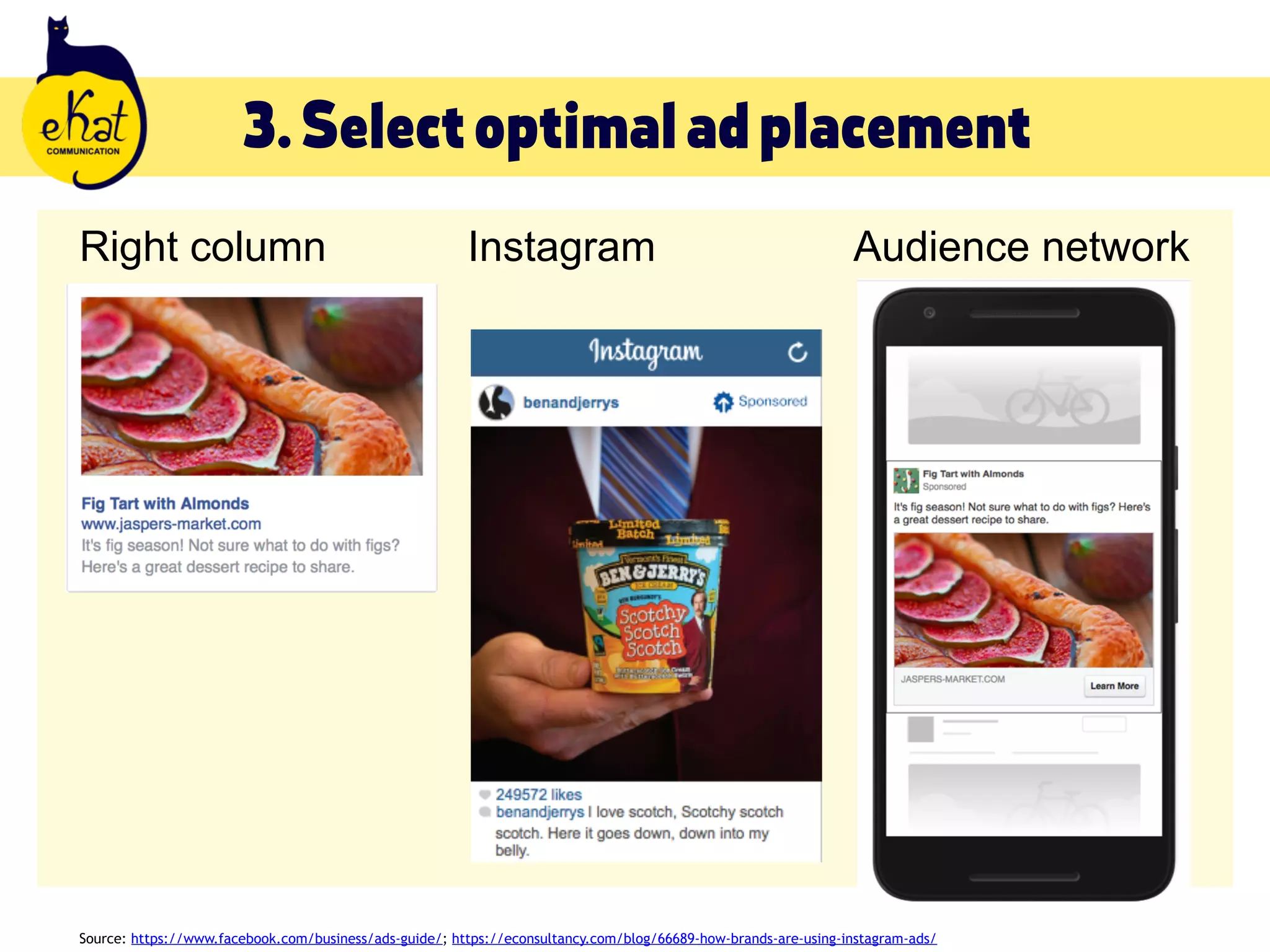
3.Selectoptimaladplacement
Source: https://www.facebook.com/business/ads-guide/; https://econsultancy.com/blog/66689-how-brands-are-using-instagram-ads/
3.Selectoptimaladplacement
Desktop newsfeed Mobile newsfeed
Source: https://www.facebook.com/business/ads-guide/; https://econsultancy.com/blog/66689-how-brands-are-using-instagram-ads/
3.Selectoptimaladplacement
Right column Instagram Audience network
Source: https://www.facebook.com/business/ads-guide/; https://econsultancy.com/blog/66689-how-brands-are-using-instagram-ads/
5.Selectappropriateadformats
Carousel - showcase products/services, tell a story, provide
instructions, share resources
Single image - highlight specific products/services, focus on one
item
Single video - same as single image + animation effect
Slideshow - same as carousel + animation effect
Canvas (on mobile only) - similar to landing page + interactive effect
5.Createimpactfulimages
Minimal text - most important info
Use high-quality proprietary images if possible
Use Creative Commons 0 (CC0) license images (Unsplash,
Pixabay, Life of Pix etc)
Personalise CC0 images w/short text, logo, collage etc
If you add text, use Photoshop or Canva for professional
look
Check recommended photo sizes in pixels
6.Writeappropriatetext
Keep it short - 90 characters
Focus on a single thought
State the benefits
Make them care
Tell audience WHAT to do & WHY
Don’t forget a Call-to-Action!
• Sign up / Register - Call us for a quote - Visit our website -
Read the blog post - Check out the event description - Claim
the offer - Comment to win etc
Source: https://copyhackers.com/2016/06/writing-facebook-ads/
6.Writeappropriatetext
Make them care
Tell audience WHAT to do & WHY
Don’t forget a Call-to-Action!
• Sign up / Register - Call us for a quote - Visit our website -
Read the blog post - Check out the event description - Claim
the offer - Comment to win etc
Source: https://copyhackers.com/2016/06/writing-facebook-ads/
Marketingobjectives
Review
Awarenessobjectives
Brand awareness Local awareness Reach
Audience
choice
Choose any audience Can only choose
location, age & gender
Choose any audience
Optimisation
for
1) Brand awareness
(recommended by FB)
or 2) Reach
N/A 1) Reach
(recommended by FB)
or 2) Impressions
Charged for Impression N/A Impression
Shown to People likely to be
interested
Local population As many people as
possible
Ad formats Carousel, image, video,
slideshow or Canvas
Carousel, image, video
& slideshow
Carousel, image,
video, slideshow or
Canvas
CTA options No button, Contact us,
Learn more, Shop now,
Sign up etc
No button, Call now,
Get directions, Learn
more, Send message,
Save
No button, Contact us,
Learn more, Shop now,
Sign up etc
Trafficobjective
Send audience to website, app or Facebook messenger
Use it to:
• Increase visits to your blog
• Promote specific blog posts
• Promote online & offline events
• Promote e-courses & freebies
• Promote products in your e-shop
• Promote special offers
Trafficobjective
Audience choice Choose any audience
Optimisation for 1) Link clicks (recommended by FB);
2) Impressions;
3) Daily Unique Reach
Charged for 1) Link click;
2) Impression
Shown to People likely to click
Ad formats Carousel, image, video, slideshow, Canvas +
offer
CTA options No button, Apply now, Contact Us, Download, Get
quote, Learn more, Send message, Sign up,
Subscribe, Shop now etc
Adformatspecifics
Adformatspecifics
Createoffer
Createoffer
Engagementobjective
Facebook-only engagement
Use it to:
• Increase interaction with your posts (likes, shares, comments)
• Increase page likes
• Improve online & offline event attendance
• Create special Facebook offers
Engagementobjective
Post engagement Page likes Event responses Offer claims
Audience
choice
Choose any
audience
Choose any
audience
Choose any
audience
Choose any
audience
Optimisation
for
1) Post engagement
(recommended by
FB; 2) Impressions;
3) Daily Unique
Reach
Page likes 1) Event response
(recommended by
FB; 2) Impressions;
3) Post engagement;
4) Daily Unique
Reach
1) Link clicks
(recommended by
FB; 2) Conversions;
3) Post engagement
Charged for 1) Impression; 

2) Post engagement
1) Impression;
2) Page like
Impression 1) Link click;
2) Impression
Shown to People likely to
interact w/post
People likely to like
your page
People likely to show
interest in event
People likely to click
on offer
Ad formats Published posts Image, video,
slideshow
Image, video,
slideshow
Offer
CTA options N/A Like page (default) N/A Get offer (default)
Examples
Post engagement
Examples
Page likes
Examples
Event responses
Examples
Offer claims
Leadgenerationobjective
Collect lead information (name, email address etc) by
offering something of value (freebies, discounts etc)
Use it to:
• Build email list
Can integrate with CRM
Leadgenerationobjective
Audience choice Choose any audience
Optimisation for 1) Leads (recommended by FB);
2) Link clicks
Charged for Impression
Shown to People likely to share their info in exchange for
value
Ad formats Carousel, image, video & slideshow
CTA options Apply now, Download, Get quote, Learn more,
Sign up, Subscribe
Process
Create a lead form
Process
Choose applicable fields
Process
Create an offer in exchange for details
Process
Once the person clicks your offer,

they get redirected to a lead form to

fill out
Process
Check leads on Publishing Tools tab on your page
Conversionsobjective
Send audience to your website, app or Facebook
messenger
Use to:
• Increase visits to your blog
• Promote specific blog posts
• Promote e-courses & freebies
• Promote online & offline events
• Promote products in e-shop
• Promote special offers
NB: needs Facebook Pixel installed on your website
Conversionsobjective
Audience choice Choose any audience
Optimisation for 1) Conversions (recommended by FB; 2)
Impressions; 3) Link clicks; 4) Daily Unique Reach
Charged for Impression
Shown to People likely to take desired action
Ad formats Carousel, image, video, slideshow, Canvas +
offer
CTA options No button, Apply now, Contact Us, Download, Get
quote, Learn more, Send message, Sign up,
Subscribe, Shop now etc
Results
monitoring&evaluation
Performanceindicators
Results
• Link clicks, post engagements, event responses, leads, offer
claims
Reach
Cost per result
• Click, 1000 impressions, engagement
Relevance score (1 to 10)
Howtoimproveyouradresults
Review your targeting
Review marketing funnel stage vs ad objectives
Match ad type to objective
Check your text
Check your visuals
Experiment!
Thankyouforbeinghere!
Ekaterina Filippova
eKat Communication
+41 76 296 8958
contact@ekatcommunication.ch
ekatcommunication.ch
facebook.com/ekatcommunication

How to create effective Facebook Ads