AS Level and A LevelApplied ICTHow Organizations use ICT Part - 1
Just ThinkThe human mind is like a parachute, it works only when openManoj K. CVS Lonavala2
What is an ICT System?	An ICT system is a set-up consisting of hardware, software, data and the people who use them. It commonly includes communications technology, such as the Internet.	ICT and computers are not the same thing.  Computers are the hardware that is often part of an ICT system.	This is why our IGCSE ICT is not just about computers but about how, why and when people use them. It is the power of computers and communications that has allowed ICT systems to become so important. Like any piece of equipment, the important thing about it is what it lets us do.	ICT Systems are used in a number of environments, such as:officesshopsfactoriesaircraftships	They're also used in fields such as:communications
medicine
farming	ICT Systems are everyday and ordinary, yet extraordinary in how they can add extra power to what we do and want to do.Manoj K. CVS Lonavala3
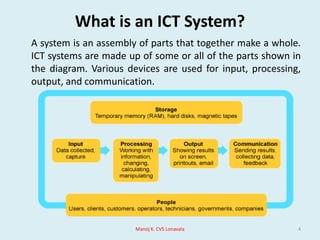
What is an ICT System?A system is an assembly of parts that together make a whole. ICT systems are made up of some or all of the parts shown in the diagram. Various devices are used for input, processing, output, and communication.Manoj K. CVS Lonavala4
The importance of ICT systems	By using ICT systems we are:more productive - we can complete a greater number of tasks in the same time at reduced cost by using computers than we could prior to their invention able to deal with vast amounts of information and process it quickly able to transmit and receive information rapidly Manoj K. CVS Lonavala5
Types of ICT system	The three main types of ICT system to be considered for GCSE are:Information systems- This type of ICT system is focused on managing data and Information.Control systems- These ICT systems mainly control machines.Communications systems- The output of these ICT systems is the successful transport of data from one place to another.Manoj K. CVS Lonavala6
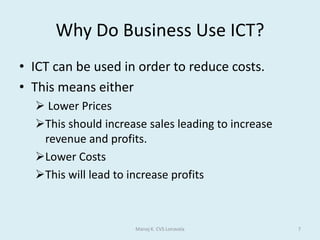
Why Do Business Use ICT?ICT can be used in order to reduce costs.This means either Lower Prices
This should increase sales leading to increase revenue and profits.
Lower Costs
This will lead to increase profitsManoj K. CVS Lonavala7
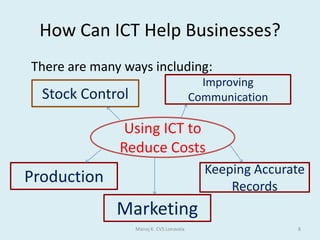
How Can ICT Help Businesses?	There are many ways including:Manoj K. CVS Lonavala8Improving CommunicationStock ControlUsing ICT toReduce CostsKeeping Accurate RecordsProductionMarketing
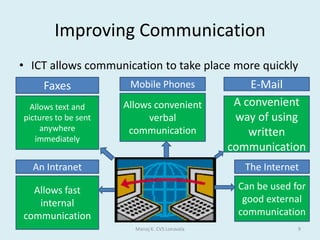
Improving CommunicationICT allows communication to take place more quicklyManoj K. CVS Lonavala9FaxesE-MailMobile PhonesAllows convenient verbal communicationAllows text and pictures to be sent anywhere immediatelyA convenient way of using written communicationThe InternetAn IntranetCan be used for good external communicationAllows fast internal communication
Keeping Accurate RecordsSpreadsheets can be used for financial workThis saves the time and reduce the risks of errorsDatabases can be used to storeStaff Records
Reduce administrative costs
Customer Records
Quicker access to information
Better customer serviceManoj K. CVS Lonavala10
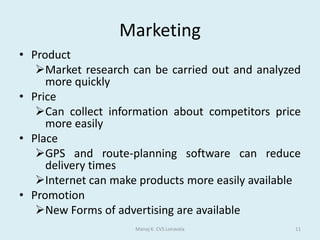
MarketingProductMarket research can be carried out and analyzed more quicklyPriceCan collect information about competitors price more easilyPlaceGPS and route-planning software can reduce delivery times
Internet can make products more easily availablePromotionNew Forms of advertising are availableManoj K. CVS Lonavala11
ProductionICT has helped business improve production using:CAD/CAM and CIM
Automated factories mean that more can be produced in less time
This means that there is less waste
This means a business is more competitive
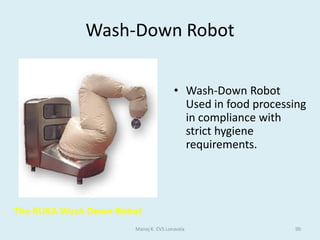
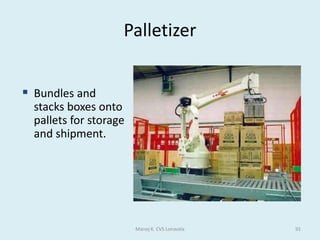
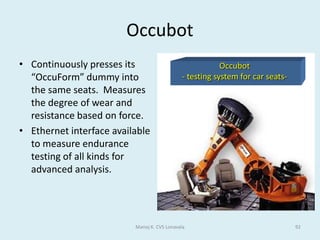
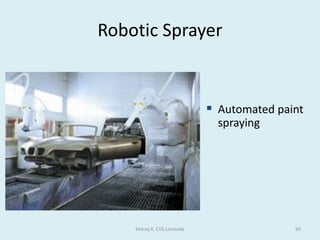
Robotics
Can work 24 hours a day, if necessary
Can do boring jobs
Do not need regular breaks and are usually quicker
They are consistently more accurate
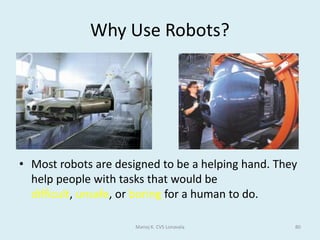
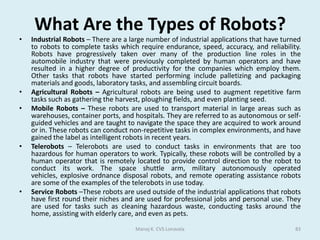
They can work in dangerous situations e.g. Bomb DisposalManoj K. CVS Lonavala12
Stock ControlICT has created the following tools for businesses:Electronic Point of Sale (EPOS)
Database of stock, which is kept up to date using barcodes
Re-ordering is done automatically saving time
This means businesses hold less stock, so saves money
Electronic Data Interchange (EDI)
Sales and stock information is automatically sent to head office
Electronic Fund Transfer at Point of Sale (EFTPOS)
This system allows customers to pay electronically using a card-debit or creditManoj K. CVS Lonavala13
Graphics software	The range of pictures, drawings and images which can be produced by a computer are called graphics. 	The main types of graphics packages are painting, drawing, photo editing and CAD. There may be some cross over between the packages, i.e. certain packages may be suitable for more than one task.Manoj K. CVS Lonavala14
Graphics softwarePainting packages- A painting application allows freehand drawing and colouring, usually with a mouse. Generally the features are: a palette from which the user can choose colours
freehand pens and brushes offering different styles and line thickness
a range of standard shape tools such as rectangles and circles
colour fill tools
spray cans and eraser tools
cut, copy and paste
zoom (to work in finer detail)Manoj K. CVS Lonavala15
Graphics softwareBitmap graphics- Bitmap graphics made with painting packages consist of many tiny dots called pixels. It is possible to edit each individual pixel.	Since the computer has to store information about every single pixel (the colour for example) in the image, the file size of a bitmap graphic is often quite large. Bitmap graphics lose quality when they're resized.Manoj K. CVS Lonavala16
Graphics softwareDrawing packages- Images made with drawing packages consist of lines, shapes and co-ordinates. Drawing packages are also known as vector drawing packages. Generally a drawing package offers many similar features to a painting.Manoj K. CVS Lonavala17Vector graphics are based on mathematical relationships with control points that make up the image, information is not stored about each pixel. These points are connected by lines and curves called vector paths or vectors.
Graphics softwarePhoto editing- Photo editing software allows the user to edit and adjust photographs. Usually these photos come from a digital camera, but they could also be scanned from existing photos. Digital photos are bitmap images.	There is a large range of photo editing software available, eg Adobe Photoshop, Corel Paint Shop Pro, GIMP and Paint.NET.Manoj K. CVS Lonavala18
Graphics softwareFeatures of Photo Editing SoftwareCrop – cut off sides of an image to make it a suitable size or remove unwanted areas.Adjust contrast and brightness.Remove red-eye.Layers - you can have several different elements of the graphic as separate layers. These layers can be made invisible or even deleted at any time.Clone tool – allows the user to clone one part of the picture to another to remove an unwanted element.Special effects – the effects vary from one piece of software to another but usually include: Artistic effects - for example, making a picture look like an oil painting.Geometric effects - for example, making an image appear to be on the surface of a ball.Colour adjustments - for example, turning a photo into grayscale or brightening certain colours.Manoj K. CVS Lonavala19
Graphics softwareComputer Aided Design (CAD)- CAD packages are more sophisticated drawing packages. They are used by engineers, architects and designers to produce detailed design plans and technical drawings. CAD software all the features of standard drawing software but in addition may also offer:greater accuracy (it is possible to work to within 1/72 of an inch)objects and drawings can be created in 2D, 3D, 2D CAD and 3D CADimages can be viewed from any anglepowerful scaling, rotation and reflection optionslibraries of engineering components which can be importedlinks to packages to calculate costs Manoj K. CVS Lonavala20
ImportantA collective name for the range of pictures, images and drawings produced by a computer is graphics.The tiny dots that make up images produced with painting packages are called pixels.Images stored in bitmap format take up a large amount of memory.Images stored in bitmap format lose their quality when resized.Sound clips are NOT a feature commonly found in painting packages.Vector images are made up of lines, shapes and coordinates.CAD stands for Computer Aided Design.CAD packages are used by engineers and architects to produce technical drawings.Manoj K. CVS Lonavala21
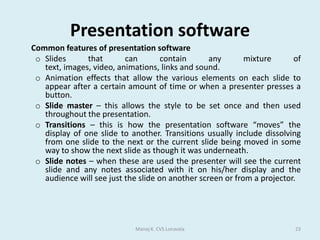
Presentation software	Presentation software is used to create presentations, quizzes, e-learning packages, information points and many other multimedia products.	Most presentation software packages allow you to create your multimedia product using a series of slides. Text, images, video, animations, links and sound can be combined on each slide to create a sophisticated final product.	The most widely used presentation software is Microsoft PowerPoint but there is other presentation software, such as Impress (part of the OpenOffice suite).Manoj K. CVS Lonavala22 Multimedia is the use of several types of media outputs from a computer in order to give the user a richer and more interesting experience
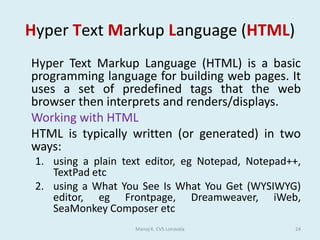
Presentation software	Common features of presentation softwareSlides that can contain any mixture of text, images, video, animations, links and sound.
Animation effects that allow the various elements on each slide to appear after a certain amount of time or when a presenter presses a button.
Slide master – this allows the style to be set once and then used throughout the presentation.
Transitions – this is how the presentation software “moves” the display of one slide to another. Transitions usually include dissolving from one slide to the next or the current slide being moved in some way to show the next slide as though it was underneath.
Slide notes – when these are used the presenter will see the current slide and any notes associated with it on his/her display and the audience will see just the slide on another screen or from a projector.Manoj K. CVS Lonavala23
Hyper Text Markup Language (HTML)	Hyper Text Markup Language (HTML) is a basic programming language for building web pages. It uses a set of predefined tags that the web browser then interprets and renders/displays.Working with HTMLHTML is typically written (or generated) in two ways:using a plain text editor, eg Notepad, Notepad++, TextPad etcusing a What You See Is What You Get (WYSIWYG) editor, egFrontpage, Dreamweaver, iWeb, SeaMonkey Composer etcManoj K. CVS Lonavala24
Hyper Text Markup Language (HTML) Plain text editor	An editor like Notepad offers greater control over the code when compared to a WYSIWYG editor because each and every character that forms the HTML and the resulting web page is hand typed. 	The disadvantage is it’s a slow process.	WYSIWYG editor	The web page is designed, and the content written and styled, using a series of tools. The page can be previewed in the default browser from within the application. This makes building a web page much faster because only a limited knowledge of HTML is needed as it’s automatically generated. However, the code can still be edited by hand.Manoj K. CVS Lonavala25
Hyper Text Markup Language (HTML) Different types of browser	Not all browsers render (display) web pages in the same way. Common browsers include:Internet Explorer
Firefox
Safari
Opera
Chrome	The World Wide Web Consortium (W3C)	W3C is responsible for standardizing HTML and releasing updated specifications that revise existing tags, introduce new tags and identify deprecated tags and should be the first reference point for any matters concerning HTML.Manoj K. CVS Lonavala26
ImportantA web browser (a software application used to locate and display Web pages.) is needed to view web pages.Web pages (A document on the World Wide Web. Every Web page is identified by a unique URL- Uniform Resource Locator ) are written in HTML.WYSIWYG stands for what you see is what you get.HTML stands for Hyper Text Mark-up Language.HTML uses tags to tell the web browser how to display text.Manoj K. CVS Lonavala27
Question	A student has been asked by his headmaster to produce a way of advertising the school to the local public. One option is to use a desktop publishing package to produce a magazine to distribute to every household in the neighborhood. He could also create a presentation to be shown in the local library. Discuss the advantages and disadvantages of each option.Manoj K. CVS Lonavala28Click for answer……..
Applications and Programming Languages	Applications are programs written to carry out a specific task or set of tasks, for example:spreadsheets
word processors
accounting packages
media players
games.Manoj K. CVS Lonavala29
Applications and Programming LanguagesTypes of applications software	Applications come in several different types:Utility programs - examples include virus scanners, disk defragmenters and backup utilities. Generic - general purpose software that is not written for any particular type of business. Examples of this include word processors and spreadsheets.Integrated - a collection of software that has a common set of commands/icons. Usually they include word processors, spreadsheets and graphics software, but they can contain databases as well. They tend to be cheaper than purchasing each application separately. Specific - software written for a defined purpose. Accountancy software is a good example of this that can be bought by anyone. Other Example is Railway Reservation System.Bespoke - bespoke software is written when a company requires a piece of software to perform a very specific task or function and there's no existing software that does what they need. It can be very expensive.Manoj K. CVS Lonavala30 Utility is a program that performs a very specific task, usually related to managing system resources. Operating systems contain a number of utilities for managing disk drives, printers, and other devices. Utilities differ from applications mostly in terms of size, complexity and function. For example, word processors, spreadsheet programs, and database applications are considered applications because they are large programs that perform a variety of functions not directly related to managing computer resources.
Applications and Programming Languages	 Programming languages	A programming language is a specially written code used for writing applications. C++ and Java are examples of programming languages. These are known as high level languages because they have been developed to be a little like a human language.	High level languages are much easier to use than a low level language such as Machine Code, or Assembly Language. The advantage of a low level language is that it runs very fast on the computer.Manoj K. CVS Lonavala31Programming Languages- 1. Machine Language- Machine Friendly		            2. Assembly Language- Machine Friendly		            3. High Level Language- Human/User Friendly
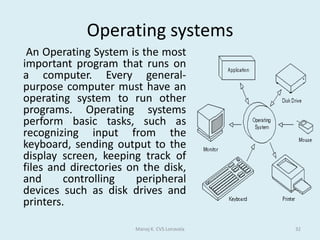
Operating systems	 An Operating System is the most important program that runs on a computer. Every general-purpose computer must have an operating system to run other programs. Operating systems perform basic tasks, such as recognizing input from the keyboard, sending output to the display screen, keeping track of files and directories on the disk, and controlling peripheral devices such as disk drives and printers.Manoj K. CVS Lonavala32
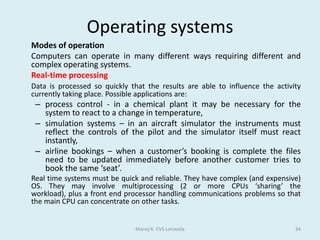
Operating systems	Operating systems provide a software platform on top of which other programs, called applicationprograms, can run. The application programs must be written to run on top of a particular operating system. Your choice of operating system, therefore, determines to a great extent the applications you can run.	In any computer, the operating system:controls the backing store and peripherals such as scanners and printersdeals with the transfer of programs in and out of memoryorganizes the use of memory between programsorganizes processing time between programs and usersmaintains security and access rights of usersdeals with errors and user instructionsallows the user to save files to a backing storeprovides the interface between the user and the computer - for example, Windows Vista and Apple OSX . issues simple error messagesManoj K. CVS Lonavala33The platform defines a standard around which a system can be developed.
Operating systems	Modes of operation	Computers can operate in many different ways requiring different and complex operating systems.Real-time processingData is processed so quickly that the results are able to influence the activity currently taking place. Possible applications are:process control - in a chemical plant it may be necessary for the system to react to a change in temperature,simulation systems – in an aircraft simulator the instruments must reflect the controls of the pilot and the simulator itself must react instantly,airline bookings – when a customer’s booking is complete the files need to be updated immediately before another customer tries to book the same ‘seat’.	Real time systems must be quick and reliable. They have complex (and expensive) OS. They may involve multiprocessing (2 or more CPUs ‘sharing’ the workload), plus a front end processor handling communications problems so that the main CPU can concentrate on other tasks.Manoj K. CVS Lonavala34
Operating systemsMulti-programming	Multi-programming is a method of operating such that several programs appear to be running at once.	The operating system switches jobs in and out of processor time according to priority. For example, while one job is being allocated printer time, another will be being processed in memory. The processor is so fast that it seems that many jobs are being processed at the same time.	Batch processing 	A batch processing system is where programs or data are collected together in a batch and processed in one go. Typically the processing of payrolls, electricity bills, invoices and daily transactions are dealt with this way. 	This method of operation lends itself to jobs with similar inputs, processing and outputs where no human intervention is needed. Jobs are stored in a queue until the computer is ready to deal with them. Often batch processed jobs are done overnight. Manoj K. CVS Lonavala35
Operating systemsInteractive processing	An interactive processing system is where the tasks on the computer system require a continual exchange of information between the user and the computer system. It can be seen as the opposite of batch processing.Multi-tasking	This isn't just about running more than one application at the same time. Multi-tasking allows multiple tasks to run concurrently, taking turns using the resources of the computer.	This can mean running a couple of applications, sending a document to the printer and downloading a web page. Manoj K. CVS Lonavala36
Operating systemsMulti-access or multi-user	Modern personal computers can allow multi-user access. A multi-access (or multi-user) system is one where several users can use the same system together via a LAN-Local Area Network.	The CPU (central processing unit) deals with users in turn; clearly the more users, the slower the response time. Generally, however, the processor is so fast that the response time at the most is a fraction of a second and the user feels they are being dealt with immediately. MultithreadingThe ability of an operating system to execute different parts of a program, called threads, simultaneously. The programmer must carefully design the program in such a way that all the threads can run at the same time without interfering with each other. Manoj K. CVS Lonavala37
ImportantAn operating system can't adjust the bass level on a music file, but it can controls the transfer of data to peripherals such as printersReal-time processing is the best type of operating system when the computer has to react within a guaranteed time to an input.Multi-tasking allows multiple tasks to run at the same time, each taking turns using the resources of the computer.Multi-user will allow a number of users to use the same system at the same time.Multi-user would be needed to allow the students in a class to read a file that the teacher also had open.Batch processing is the processing method where tasks are collected together, stored and then processed in one go at a designated time.Batch processing would be the most appropriate for printing the bank statements ordered by customers each day.Real-time processing would be the best choice to control the braking system on a car.Manoj K. CVS Lonavala38
User Interfaces	A user interface is the method by which the user and the computer exchange information and instructions. There are two main types:Command Line or Character User Interface (CUI)Graphical User Interface (GUI) Manoj K. CVS Lonavala39
User InterfacesCommand-line interfaces	A command-line interface allows the user to interact with the computer by typing in commands-set of instruction. The computer displays a prompt, the user keys in the command and presses enter or return. An example of a common command driven interface is MS-DOS.	Features of a command-line interfaceCommands must be typed correctly and in the right order or the command will not work.
Experienced users who know the commands can work very quickly without having to find their way around menus.
An inexperienced user can sometimes find a command driven program difficult to use because of the number of commands that have to be learnt.Manoj K. CVS Lonavala40
User InterfacesGraphical user interfaces	Graphical user interface is sometimes shortened to GUI. The user chooses an option usually by pointing a mouse at an icon representing that option.	Features of GUIs include: They are much easier to use for beginners.
They enable you to easily exchange information between softwareusing cut and paste or 'drag and drop'.
They use a lot of memory and processing power.Manoj K. CVS Lonavala41
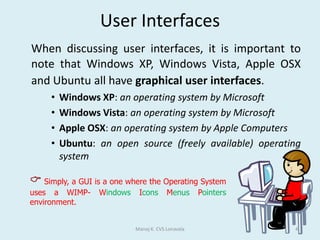
User InterfacesWhen discussing user interfaces, it is important to note that Windows XP, Windows Vista, Apple OSX and Ubuntu all have graphical user interfaces.Windows XP: an operating system by MicrosoftWindows Vista: an operating system by MicrosoftApple OSX: an operating system by Apple ComputersUbuntu: an open source (freely available) operating systemManoj K. CVS Lonavala42Simply, a GUI is a one where the Operating System uses a WIMP- Windows Icons Menus Pointers environment.
User InterfacesGood user interfacesA good user interface should:be attractive and pleasing to the eye allow the user to try out different options easily be easy to useuse suitable colours for key areasuse words that are easy to understand aimed at the type of userhave help documentationIt should also consider the needs of the users.Manoj K. CVS Lonavala43
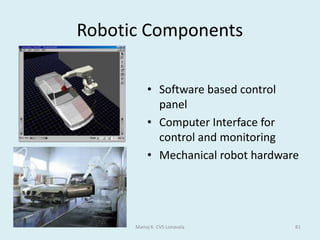
Computer Control	A control system typically comprises of a computer or microprocessor, a control program which handles data from sensors and sends signals to output devices and an interface box to convert signals between the sensors and the processor.Manoj K. CVS Lonavala44microprocessor: an integrated circuit that contains all or most of the individual elements of a central processing unit (CPU)
program: a list of instructions written in a programming language
sensor: an automatic input device that continuously monitors a set of computer controlled parameters, eg a parking sensor detects how close a vehicle is to the nearest object and alerts the driver if the distance falls outside of the specified parameters
processor: shorthand for central processing unit (CPU).Computer Control	The role of computers in controlComputers can respond very rapidly to change.Systems can run 24 hours a day, 365 days a year.Control systems can operate in places that humans would find dangerous or awkward.Outputs are consistent and error free.Computers can process data quickly and machines can operate faster than humans.	Computers are now used to control many types of devices such as:air conditioning and central heating systems in large buildingssecurity systems and burglar alarmsmanufacturing processestraffic lights and pedestrian crossingsManoj K. CVS Lonavala45
Computer Control	The role of sensors in controlSensors are used to measure physical quantities such as temperature, light, pressure, sound, and humidity. They send signals to the processor. For example:A security alarm system may have an infrared sensor which sends a signal when the beam is broken.A heat sensitive sensor in the corner of a room may detect the presence of a person.Temperature sensors could be used to control the heating in a large building.Magnetic sensors are used to detect metal and can be placed in roads to monitor traffic flow.Other physical quantities that can be transmitted directly to the computer's processor include:rainfall/water levelsradiation levelpH leveloxygen levelManoj K. CVS Lonavala46 Data such as pressure, light and temperature is analogue data. Computers can only work with digital data.An interface box or analogue to digital converter (ADC) is needed to convert the analogue data from the sensors into digital data the computer can process.
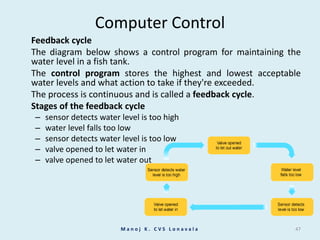
Computer Control	Feedback cycle	The diagram below shows a control program for maintaining the water level in a fish tank.	The control program stores the highest and lowest acceptable water levels and what action to take if they're exceeded.	The process is continuous and is called a feedback cycle.	Stages of the feedback cyclesensor detects water level is too highwater level falls too lowsensor detects water level is too lowvalve opened to let water invalve opened to let water outManoj K. CVS Lonavala47
Computer Control	A computer-controlled greenhouseTo get the best plant growing conditions temperature and humidity (moisture in the air) have to be controlled.	The greenhouse therefore has temperature and humidity sensors linked to a computer, and the computer has a control program storing details of the correct temperature and humidity settings. The greenhouse is fitted with a heater, sprinkler and window motor, also linked to the computer.	If the humidity falls below the values stored in the program, the computer activates the sprinklers and closes the windows. If the temperature falls outside the values stored in the program, the heater is activated by the computer.	The system monitors the conditions night and day with immediate response to any changes. To alter the growing conditions the values in the computer program can of course be changed.Manoj K. CVS Lonavala48
Points to RememberComputers CANNOT make instant decisions when something unusual happens.An interface box is used to convert signals between the sensors and processor.Sensors are used to measure physical quantities such as heat, light and sound.A magnetic sensor is often used to detect a car approaching a traffic light.A temperature sensor would be used in an air conditioning system.A humidity sensor would be used in a public swimming pool.An ADC (analogue to digital convertor) converts analogue data from the sensors into digital data.Central heating and air conditioning control systems often make use of feedback.Manoj K. CVS Lonavala49
A burglar alarm system is used to detect when a burglar has entered a house. Name sensorswhich could be used to detect the burglar’s presence. For each one say how it is used to do this.Sensor Pressure Paddetects weight of burglarLight/Infra Red Sensordetects broken beamContact Sensordetects door /window openingTemperature Sensordetects body heatSound Sensordetects any noise made by burglarManoj K. CVS Lonavala50QUESTIONANSWER
Question/Answer	A gardener wants to use a computer to monitor the growing conditions in his greenhouse.Name three sensors that he will need. Humidity Sensor, Moisture Sensor, Temperature Sensor, pH Sensor and Light Sensor.Explain why computers are unable to read the data directly from these sensors.Sensors produce analogue data / signalComputers work in digital, So computer is unable to understand data generated by the sensors.Manoj K. CVS Lonavala51
Question/AnswerWhat device is needed to enable the computer to read the data? Analogue to digital converter / ADC will convert analogue data generated by sensor into computer understandable digital data.Give two advantages of using a computer to monitor the conditions rather than having it done by humans.Computer readings are more accurate / preciseReadings can be taken more frequently.Readings can be taken any time of day or nightCan produce graphs more quicklyMore reliableManoj K. CVS Lonavala52
AUTOMATED SYSTEMS	An automated system is a system where you provide the INPUT, the machine or computer caries out the PROCESS and provides you with the OUTPUT.	A washing machine is an example of an automated system. Water is put in, together with washing powder and dirty clothes. The machine contains a number of stored programs. By setting the controls of the washing machine, you can select the program you want for the clothes you put in. You do not have to do anything else.	Other examples:Central heating Air conditioningA vending machineManoj K. CVS Lonavala53
AUTOMATED SYSTEMS	There are two types of control which can be used on any automated system -OPEN LOOP and CLOSED LOOP.Open Loop Control Systems	In an open loop control system the processor is instructed to perform a task and it does not stop until it has finished the task. Open loop systems are used for repetitive tasks.	An example would be a system of traffic lights. They follow a pre-programmed set of instructions. The sequence will not change, no matter how many cars are waiting, if none of the bulbs are working or even if a lorry crashes into the lights and breaks them!	Other examples:A toasterA dishwasherManoj K. CVS Lonavala54
AUTOMATED SYSTEMSClosed Loop Control Systems	A closed loop system uses one or more sensors to detect what is going on around it, and change what it is doing depending on the information it gets from the sensors. This method of passing information from a sensor to a control system is called FEEDBACK.	Closed loop systems are used for tasks where different actions have to be performed depending on the feedback from the sensors (like a heater controlled by a thermostat).	For example a closed loop system could be used to control the traffic lights. The lights still follow a pre-programmed sequence, but in the closed loop type of control a sensor detects cars waiting at the junction and passes the information to the control computer which changes the lights. Sometimes the sensor is a loop of wire buried under the road surface.	Other examples:An oven or refrigeratorAn automatic kettleManoj K. CVS Lonavala55
AUTOMATED SYSTEMSThe difference between an open loop and a closed loop system:Closed loop systems use feedback, open loop systems don’t.Open loop systems carry on whatever happens.Closed loop systems examine what is happening and may change what they do in response to that.Advantages of Automation: immediate response when needed.fewer staff are needed to run the process.the system can work all day - every dayit keeps people away from dangerous processes.Disadvantages of Automation :Unemployment may be greater as fewer staff are needed.the initial cost of the system may be expensive.Manoj K. CVS Lonavala56
AUTOMATED SYSTEMS Example : Glass Manufacture	When flat glass is made, it is important that the molten glass is allowed to cool at the proper rate. If it cools too slow or too fast, the glass will be of poor quality with visible defects or it may lack the proper strength.	'Annealing' of glass is the controlled cooling process and is normally done in a special oven. The glass is allowed to cool down to a certain point and then kept at that temperature for a while to allow stresses in the glass to relax, before the final cooling.	This annealing process would be done by a process control system.	Sensors would carefully monitor the temperature in the oven. If the glass is cooling too quickly the computer will send a signal to increase the heating. If the glass is cooling too slowly, the computer will send a signal to activate a cooling fan.Manoj K. CVS Lonavala57
Billing SystemsAn example of a billing system is - electricity payments. Every customer receives an electricity bill which must be paid. 	The electricity company has a large database (master file) of all its customers. The file will also include information such as latest meter readings, how much electricity the customer has used this year, how much has been paid etc... 	At regular intervals, meter readers go round each house to read the electricity meter. The reading is recorded onto pre-printed forms. 	The forms are all collected and input to the computer system. This may be done using OMR or OCR, or by manually keying in the data. 	The data must be validated before it is processed to make sure no 'silly' data is input.	Keyed data will need to be verified to check for transcribing errors.	The electricity bill for each customer is calculated by the computer and printed. These bills will be posted to the customers.	The customer then pays the bill by either sending a cheque or by credit/debit card. Some customers may pay by monthly standing orders or direct debits. Payments received will need to be recorded as transactions on a transaction file and used to update the master file. 	For some billing systems statistical analysis can be done on ...customer usage or spending patterns (eg seasonal variations)paymentsManoj K. CVS Lonavala58
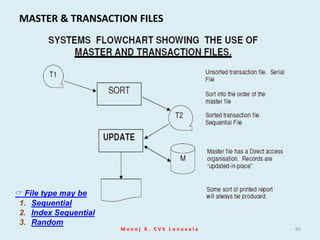
MASTER & TRANSACTION FILESMASTER FILES:Permanent collection of data against which transactions are usually processed.Will contain REFERENCE and DYNAMIC data. Reference data tends to be relatively permanent (occasional or infrequent changes are made: insertion of new records, deletions or alterations) and is processed by AMENDING. Dynamic data is data which changes frequently and is processed by UPDATING.Usually have some order to the way records are stored: use the RECORD KEY.	For example a HOTEL FILE will contain both reference and dynamic data:REFERENCE DATA. Items of data describing the rooms: type, size, number of beds, sea view…, which will rarely change.DYNAMIC DATA. Items of data describing the guest: name, length of stay, special requirements…. Which will change frequently, perhaps every day.	TRANSACTION FILES:Temporary collection of data used to change information on a master file.Contains only that information which is needed to identify a record in the master file and make the necessary changes.The records may not be in any order at all: either SERIAL or SEQUENTIAL ordering is normal.Once used the transaction file may be deleted.	For example a company will hold a PAYROLL file. Each week information about employees will need to be processed. What data would the transaction file contain?	Employee number (to identify the employees record in the master file), weekly pay, days off sick, new employee, employee left the company…..Manoj K. CVS Lonavala59
MASTER & TRANSACTION FILESManoj K. CVS Lonavala60 File type may be  SequentialIndex SequentialRandom
OPERATIONS ON FILESSORTING	To sort a file is to put it into order. The order that is needed will usually be that of the key field (primary Key) – a field which contains a data item unique to that record. Sometimes another field is used to help in sorting out the records. For example, suppose a sports club wants to sort its file of members into alphabetical order of names. The surname field could be the primary key (the field used to sort out the file first) and then – because there might be people with the same surname – use the first name of the member as the secondary key, which would then put people with the same surname into alphabetical order of first name. Another way of describing this sort is to say that the file is sorted into first names within surnames.	It is better to have a field that is short (only a few characters long) or numeric, because sorting will be  quicker.MERGING	At times it may be necessary to join two files together. The two files are merged. For example, may be two sports clubs are joining to form a larger club. The two membership files will need to be merged in order to make a membership file that contains the details of the members from both clubs. But this can only happen if both the membership files have the same record structure: same field layout, same record key….Manoj K. CVS Lonavala61
OPERATIONS ON FILESUPDATING	This is a term that describes keeping a file up-to-date. It is different to maintenance. Updating is done regularly to dynamic data in the record. Every time a product is passed over the scanner at the supermarket the stock file is updated. Every time you take a book from the library the book record is updated.	Often a master file is updated with a sorted transaction file. In this case the transaction file must be in the same order as the master file – key field order.MAINTENANCE	This also means making sure that a file is up-to-date but this time the data being changed will be more static or permanent in nature. The price of a product in a stock file will change – but not every day or week. A student’s telephone number or address may need changing in the school student file. This is not a regular operation.	Maintenance will also include operations on an entire record: insertion and deletion. Adding a completely new record to the file (insertion) – a new student joins the school, a new product goes on sale at the supermarket. Removing an old record (deletion) – a student leaves the school, a product is not sold anymore.Manoj K. CVS Lonavala62
Databases and Data CaptureA database is a way of storing information in an organised, logical way. Before setting up a database the record structure must be decided to make best use of the memory and backing store and to make searching and report creation easier. When designing a database it is important to choose the correct data type and primary key, which is used to uniquely identify the record.Manoj K. CVS Lonavala63Why use a database?Databases can store very large numbers of records efficiently (they take up little space).
It is very quick and easy to find information.
It is easy to add new data and to edit or delete old data.
Data can be searched easily.
Data can be sorted-arranged easily.
Data can be imported into other applications, for example a mail-merge.
More than one person can access the same database at the same time - multi-access
Security may be better than in paper files.Points to RememberFile type may be  Sequential- A sequential file is one in which the records have been stored in the order in which they have occurred. They have not been sorted into any particular order.
Index Sequential- An indexed sequential file is a sequential file (i.e. sorted into order of a key field) which has an index. Indexed sequential files are important for applications where data needs to be accessed sequentially AND randomly using the index.
Random- Refers to the ability to access data at random. A random file would have to be stored on a direct access backing storage medium e.g. magnetic disc, CD, DVD.A D.B.M.S. (DataBase Management System) is a complex software system which is responsible for the following functions :Data storage, retrieval and update. The DBMS must allow the users to store informationrun searches and retrieve informationchange and update information.Managing facilities for sharing a database. eg The DBMS has to ensure that problems do not arise when two users access the same record at the same time and try to change it! Usually done using record-locking.Backup and recovery The DBMS should provide the ability to recover the database in the event of system failure.Security The DBMS must handle password allocation and checking, and the data that a user is allowed to access.Manoj K. CVS Lonavala64Operations on Files
Expert SystemsAn expert system is a knowledge-based system which attempts to replace a human 'expert' in a particular field. The system will consist ofa large database of knowledge facilities for searching the knowledge database a set of rules for making deductions from the data (inference engine)	Example	A medical diagnosis  expert system (e.g. MYCIN) would have information about diseases and their symptoms, the drugs used in treatments etc.	A patient is asked by a doctor about symptoms and the replies are input to the expert system. The computer searches its database, uses its rules and makes suggestions about the disease and its treatments. Sometimes probabilities are assigned to diagnoses.	The computer does not take the place of the doctor but can be used to help the doctor make decisions.Manoj K. CVS Lonavala65
Expert Systems	Advantages.The computer can store far more information than a human. The computer does not 'forget' or make mistakes. Data can be kept up-to-date. The expert system is always available 24 hours a day and will never 'retire'. The system can be used at a distance over a network.	DisadvantagesWell we don't want to do the experts out of jobs! Lacks the 'human touch'!Manoj K. CVS Lonavala66
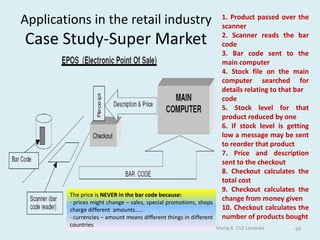
Applications in the retail industryCase Study-Super MarketAll goods in a supermarket have barcodes printed on them.  	When a customer pays for the goods, each item's barcode is passed over a laser scanner built into the POS (Point-of-Sale) terminal. This reads the bar code and sends it to the main computer. The computer stores a database containing information about all the products the supermarket sells. The computer sends the price and the description of the item back to the POS terminal.	The price is added to the customer's bill.	The price and the description are displayed on a small monitor. They also get printed onto the customer's receipt.	The computer will also note that one of this item has been sold and will reduce the stock level on file. The computer always knows exactly how many of each item is in the supermarket. This is called automatic stock-taking.Manoj K. CVS Lonavala67
Applications in the retail industryCase Study-Super MarketAt the end of each day, the computer sends out requests for more of those items which are running low.  	The customer can pay the bill using EFTPOS (Electronic Fund Transfer at Point of Sale). A credit card (or debit card) is swiped through a card reader to read the customer's bank account details. These details and the amount of the bill are sent through the telephone system to the bank's computer system. The correct amount of money is transferred by the computer system from the customer's account to the supermarket's account. 	Some supermarkets offer a loyalty scheme. Each customer has a Loyalty card which has a magnetic strip. The card is swiped each time the customer buys goods and 'points' are awarded. The customer can use these points for discounts or vouchers.Manoj K. CVS Lonavala68
Applications in the retail industryCase Study-Super MarketManoj K. CVS Lonavala691. Product passed over the scanner2. Scanner reads the bar code3. Bar code sent to the main computer4. Stock file on the main computer searched for details relating to that barcode5. Stock level for that product reduced by one6. If stock level is getting low a message may be sent to reorder that product7. Price and description sent to the checkout8. Checkout calculates the total cost9. Checkout calculates the change from money given10. Checkout calculates the number of products boughtThe price is NEVER in the bar code because:· prices might change – sales, special promotions, shops charge different  amounts…..· currencies – amount means different things in different countries
Q. Many people are now using the Internet for banking, shopping, booking holidays and theatretickets. Discuss this development and its effect on the general public.AdvantagesLess danger of muggingSaves time rather than queuingDon’t have to waste time travelling to shops / banks / theatres etc.Disabled people don’t have to travel / leave homeDon’t have to spend money on travelling expenses Greater choice of goods / seatsCan shop when shops / bank are closedcan book tickets when theatres are closedLess traffic pollutionManoj K. CVS Lonavala70	DisadvantagesLack of socializing / social contacts
Customers must have a computer and basic computer skills
Hackers may intercept data / defraud customer
Deprived of personal touch
Phone bills can increase
Without broadband other family members cannot use the phone
Cannot see / feel goods in reality
More vulnerable to phishing
Lack of exercise
May not get the exact goods they orderedBased on above facts conclude your answer in your words.
Many banks now allow their customers to manage their accounts on-line. Discuss thisdevelopment. In your answer give the advantages and disadvantages to the bank as well as theadvantages and disadvantages to the customer.BankAdvantages:fewer workers needed - less wagesfewer branches needed - less rentalworkers can be less qualified - lower wagesDisadvantages:customer dissatisfaction - lose businessinitial large expenditure on redundanciesinitial large expenditure on retrainingManoj K. CVS Lonavala71CustomerAdvantages: don’t have to spend money on traveling to the bank
 don’t have to spend time traveling to the bank
 easier to transfer money from one account to anotherDisadvantages: hackers could hack into your account
 loss of personal touch
 cannot withdraw money Write answer in your words, See the Advantages and Disadvantages .
Medical & Hospital SystemsComputer system are used in several quite different ways within doctor's surgeries and hospitals..Manoj K. CVS Lonavala72
Monitoring of PatientsWhen a patient is in hospital, they often require close monitoring. It is not possible for a doctor or nurse to monitor patients continuously, 24 hours a day, so computerized monitors are used instead.Sensors are attached to the patient. Sensors are used to monitor:Pulse rate (heart beats per minute)TemperatureBreathing rate (breathes per minute)Blood oxygen levelsBlood pressure	The sensors feed information back to a computer which processes the data:Data is checked for any problems (e.g. pulse rate too low/high)Data is logged so that it can be checked laterSeveral outputs from the computer system let hospital staff the patient's condition: A large display / monitor shows graphs of pulse, breathing, etc.A loud buzzer / alarm can be sounded if there is a problem to attract the attention of a nurse/doctorA small printer can produce a hard-copy of the dataThe data from several patients can be fed back to a central nursing station so that the nursing staff can see exactly what is happening in the ward. Manoj K. CVS Lonavala73
Robotic SurgeryRobotics technology is now being utilized in the field of medicine because it offers the high precision and control that minimally invasive procedures require. Robotics are now being used in gallbladder surgery, heartburn and gastroesophageal reflux correction and endoscope positioning. In the future, the applications of this technology will encompass closed-chest beating-heart surgery.	Advantages of Robotic SurgeryLess Personnel Required: Because the surgical robots could take over the job of some of the people inside the operating room, future surgeries will require fewer personnel yet still be able to perform a more effective and safer surgery.Surgery at a Distance: With improvements in telecommunications and speed of data transfer, robotic surgery can even be done from a distance. This means that the surgeon could perform the operation even though he is in another city or even another country far from the patient.Reduced Trauma and Faster Patient Recovery: Because robotic surgery would allow for operations needing only small incisions on the patient's body, the rate of patients' recovery would be accelerated. This would translate to less pain during and after the operation as well as less risks and complications for the patient.Manoj K. CVS Lonavala74
Diagnosis of Illness- Body Scanners	CT scanners and MRI scanners allow doctors to investigate what is happening inside a patient's body without intrusive surgery.	The complex signals that come back from these huge machines are picked up by sensors and fed into a computer. The computer processes the data, then outputs full-colour images, sometimes in 3D, for the doctor, giving views of the patient's body.Manoj K. CVS Lonavala75
Diagnosis of Illness- Expert SystemsExpert systems allow medical staff with limited medical knowledge (e.g. nurses) to get advice from a computer 'expert‘. They essentially work by:Medical staff inputs patient's symptoms (or answers questions about them)The expert system's search engine searches the knowledge base (a collection of medical knowledge) to find possible diagnosesThe system outputs a list of possible diagnoses, and treatmentsManoj K. CVS Lonavala76

How organizations use ICT

  • 1.
    AS Level andA LevelApplied ICTHow Organizations use ICT Part - 1
  • 2.
    Just ThinkThe humanmind is like a parachute, it works only when openManoj K. CVS Lonavala2
  • 3.
    What is anICT System? An ICT system is a set-up consisting of hardware, software, data and the people who use them. It commonly includes communications technology, such as the Internet. ICT and computers are not the same thing. Computers are the hardware that is often part of an ICT system. This is why our IGCSE ICT is not just about computers but about how, why and when people use them. It is the power of computers and communications that has allowed ICT systems to become so important. Like any piece of equipment, the important thing about it is what it lets us do. ICT Systems are used in a number of environments, such as:officesshopsfactoriesaircraftships They're also used in fields such as:communications
  • 4.
  • 5.
    farming ICT Systems areeveryday and ordinary, yet extraordinary in how they can add extra power to what we do and want to do.Manoj K. CVS Lonavala3
  • 6.
    What is anICT System?A system is an assembly of parts that together make a whole. ICT systems are made up of some or all of the parts shown in the diagram. Various devices are used for input, processing, output, and communication.Manoj K. CVS Lonavala4
  • 7.
    The importance ofICT systems By using ICT systems we are:more productive - we can complete a greater number of tasks in the same time at reduced cost by using computers than we could prior to their invention able to deal with vast amounts of information and process it quickly able to transmit and receive information rapidly Manoj K. CVS Lonavala5
  • 8.
    Types of ICTsystem The three main types of ICT system to be considered for GCSE are:Information systems- This type of ICT system is focused on managing data and Information.Control systems- These ICT systems mainly control machines.Communications systems- The output of these ICT systems is the successful transport of data from one place to another.Manoj K. CVS Lonavala6
  • 9.
    Why Do BusinessUse ICT?ICT can be used in order to reduce costs.This means either Lower Prices
  • 10.
    This should increasesales leading to increase revenue and profits.
  • 11.
  • 12.
    This will leadto increase profitsManoj K. CVS Lonavala7
  • 13.
    How Can ICTHelp Businesses? There are many ways including:Manoj K. CVS Lonavala8Improving CommunicationStock ControlUsing ICT toReduce CostsKeeping Accurate RecordsProductionMarketing
  • 14.
    Improving CommunicationICT allowscommunication to take place more quicklyManoj K. CVS Lonavala9FaxesE-MailMobile PhonesAllows convenient verbal communicationAllows text and pictures to be sent anywhere immediatelyA convenient way of using written communicationThe InternetAn IntranetCan be used for good external communicationAllows fast internal communication
  • 15.
    Keeping Accurate RecordsSpreadsheetscan be used for financial workThis saves the time and reduce the risks of errorsDatabases can be used to storeStaff Records
  • 16.
  • 17.
  • 18.
  • 19.
  • 20.
    MarketingProductMarket research canbe carried out and analyzed more quicklyPriceCan collect information about competitors price more easilyPlaceGPS and route-planning software can reduce delivery times
  • 21.
    Internet can makeproducts more easily availablePromotionNew Forms of advertising are availableManoj K. CVS Lonavala11
  • 22.
    ProductionICT has helpedbusiness improve production using:CAD/CAM and CIM
  • 23.
    Automated factories meanthat more can be produced in less time
  • 24.
    This means thatthere is less waste
  • 25.
    This means abusiness is more competitive
  • 26.
  • 27.
    Can work 24hours a day, if necessary
  • 28.
  • 29.
    Do not needregular breaks and are usually quicker
  • 30.
  • 31.
    They can workin dangerous situations e.g. Bomb DisposalManoj K. CVS Lonavala12
  • 32.
    Stock ControlICT hascreated the following tools for businesses:Electronic Point of Sale (EPOS)
  • 33.
    Database of stock,which is kept up to date using barcodes
  • 34.
    Re-ordering is doneautomatically saving time
  • 35.
    This means businesseshold less stock, so saves money
  • 36.
  • 37.
    Sales and stockinformation is automatically sent to head office
  • 38.
    Electronic Fund Transferat Point of Sale (EFTPOS)
  • 39.
    This system allowscustomers to pay electronically using a card-debit or creditManoj K. CVS Lonavala13
  • 40.
    Graphics software The rangeof pictures, drawings and images which can be produced by a computer are called graphics. The main types of graphics packages are painting, drawing, photo editing and CAD. There may be some cross over between the packages, i.e. certain packages may be suitable for more than one task.Manoj K. CVS Lonavala14
  • 41.
    Graphics softwarePainting packages-A painting application allows freehand drawing and colouring, usually with a mouse. Generally the features are: a palette from which the user can choose colours
  • 42.
    freehand pens andbrushes offering different styles and line thickness
  • 43.
    a range ofstandard shape tools such as rectangles and circles
  • 44.
  • 45.
    spray cans anderaser tools
  • 46.
  • 47.
    zoom (to workin finer detail)Manoj K. CVS Lonavala15
  • 48.
    Graphics softwareBitmap graphics-Bitmap graphics made with painting packages consist of many tiny dots called pixels. It is possible to edit each individual pixel. Since the computer has to store information about every single pixel (the colour for example) in the image, the file size of a bitmap graphic is often quite large. Bitmap graphics lose quality when they're resized.Manoj K. CVS Lonavala16
  • 49.
    Graphics softwareDrawing packages-Images made with drawing packages consist of lines, shapes and co-ordinates. Drawing packages are also known as vector drawing packages. Generally a drawing package offers many similar features to a painting.Manoj K. CVS Lonavala17Vector graphics are based on mathematical relationships with control points that make up the image, information is not stored about each pixel. These points are connected by lines and curves called vector paths or vectors.
  • 50.
    Graphics softwarePhoto editing-Photo editing software allows the user to edit and adjust photographs. Usually these photos come from a digital camera, but they could also be scanned from existing photos. Digital photos are bitmap images. There is a large range of photo editing software available, eg Adobe Photoshop, Corel Paint Shop Pro, GIMP and Paint.NET.Manoj K. CVS Lonavala18
  • 51.
    Graphics softwareFeatures ofPhoto Editing SoftwareCrop – cut off sides of an image to make it a suitable size or remove unwanted areas.Adjust contrast and brightness.Remove red-eye.Layers - you can have several different elements of the graphic as separate layers. These layers can be made invisible or even deleted at any time.Clone tool – allows the user to clone one part of the picture to another to remove an unwanted element.Special effects – the effects vary from one piece of software to another but usually include: Artistic effects - for example, making a picture look like an oil painting.Geometric effects - for example, making an image appear to be on the surface of a ball.Colour adjustments - for example, turning a photo into grayscale or brightening certain colours.Manoj K. CVS Lonavala19
  • 52.
    Graphics softwareComputer AidedDesign (CAD)- CAD packages are more sophisticated drawing packages. They are used by engineers, architects and designers to produce detailed design plans and technical drawings. CAD software all the features of standard drawing software but in addition may also offer:greater accuracy (it is possible to work to within 1/72 of an inch)objects and drawings can be created in 2D, 3D, 2D CAD and 3D CADimages can be viewed from any anglepowerful scaling, rotation and reflection optionslibraries of engineering components which can be importedlinks to packages to calculate costs Manoj K. CVS Lonavala20
  • 53.
    ImportantA collective namefor the range of pictures, images and drawings produced by a computer is graphics.The tiny dots that make up images produced with painting packages are called pixels.Images stored in bitmap format take up a large amount of memory.Images stored in bitmap format lose their quality when resized.Sound clips are NOT a feature commonly found in painting packages.Vector images are made up of lines, shapes and coordinates.CAD stands for Computer Aided Design.CAD packages are used by engineers and architects to produce technical drawings.Manoj K. CVS Lonavala21
  • 54.
    Presentation software Presentation softwareis used to create presentations, quizzes, e-learning packages, information points and many other multimedia products. Most presentation software packages allow you to create your multimedia product using a series of slides. Text, images, video, animations, links and sound can be combined on each slide to create a sophisticated final product. The most widely used presentation software is Microsoft PowerPoint but there is other presentation software, such as Impress (part of the OpenOffice suite).Manoj K. CVS Lonavala22 Multimedia is the use of several types of media outputs from a computer in order to give the user a richer and more interesting experience
  • 55.
    Presentation software Common featuresof presentation softwareSlides that can contain any mixture of text, images, video, animations, links and sound.
  • 56.
    Animation effects thatallow the various elements on each slide to appear after a certain amount of time or when a presenter presses a button.
  • 57.
    Slide master –this allows the style to be set once and then used throughout the presentation.
  • 58.
    Transitions – thisis how the presentation software “moves” the display of one slide to another. Transitions usually include dissolving from one slide to the next or the current slide being moved in some way to show the next slide as though it was underneath.
  • 59.
    Slide notes –when these are used the presenter will see the current slide and any notes associated with it on his/her display and the audience will see just the slide on another screen or from a projector.Manoj K. CVS Lonavala23
  • 60.
    Hyper Text MarkupLanguage (HTML) Hyper Text Markup Language (HTML) is a basic programming language for building web pages. It uses a set of predefined tags that the web browser then interprets and renders/displays.Working with HTMLHTML is typically written (or generated) in two ways:using a plain text editor, eg Notepad, Notepad++, TextPad etcusing a What You See Is What You Get (WYSIWYG) editor, egFrontpage, Dreamweaver, iWeb, SeaMonkey Composer etcManoj K. CVS Lonavala24
  • 61.
    Hyper Text MarkupLanguage (HTML) Plain text editor An editor like Notepad offers greater control over the code when compared to a WYSIWYG editor because each and every character that forms the HTML and the resulting web page is hand typed. The disadvantage is it’s a slow process. WYSIWYG editor The web page is designed, and the content written and styled, using a series of tools. The page can be previewed in the default browser from within the application. This makes building a web page much faster because only a limited knowledge of HTML is needed as it’s automatically generated. However, the code can still be edited by hand.Manoj K. CVS Lonavala25
  • 62.
    Hyper Text MarkupLanguage (HTML) Different types of browser Not all browsers render (display) web pages in the same way. Common browsers include:Internet Explorer
  • 63.
  • 64.
  • 65.
  • 66.
    Chrome The World WideWeb Consortium (W3C) W3C is responsible for standardizing HTML and releasing updated specifications that revise existing tags, introduce new tags and identify deprecated tags and should be the first reference point for any matters concerning HTML.Manoj K. CVS Lonavala26
  • 67.
    ImportantA web browser(a software application used to locate and display Web pages.) is needed to view web pages.Web pages (A document on the World Wide Web. Every Web page is identified by a unique URL- Uniform Resource Locator ) are written in HTML.WYSIWYG stands for what you see is what you get.HTML stands for Hyper Text Mark-up Language.HTML uses tags to tell the web browser how to display text.Manoj K. CVS Lonavala27
  • 68.
    Question A student hasbeen asked by his headmaster to produce a way of advertising the school to the local public. One option is to use a desktop publishing package to produce a magazine to distribute to every household in the neighborhood. He could also create a presentation to be shown in the local library. Discuss the advantages and disadvantages of each option.Manoj K. CVS Lonavala28Click for answer……..
  • 69.
    Applications and ProgrammingLanguages Applications are programs written to carry out a specific task or set of tasks, for example:spreadsheets
  • 70.
  • 71.
  • 72.
  • 73.
  • 74.
    Applications and ProgrammingLanguagesTypes of applications software Applications come in several different types:Utility programs - examples include virus scanners, disk defragmenters and backup utilities. Generic - general purpose software that is not written for any particular type of business. Examples of this include word processors and spreadsheets.Integrated - a collection of software that has a common set of commands/icons. Usually they include word processors, spreadsheets and graphics software, but they can contain databases as well. They tend to be cheaper than purchasing each application separately. Specific - software written for a defined purpose. Accountancy software is a good example of this that can be bought by anyone. Other Example is Railway Reservation System.Bespoke - bespoke software is written when a company requires a piece of software to perform a very specific task or function and there's no existing software that does what they need. It can be very expensive.Manoj K. CVS Lonavala30 Utility is a program that performs a very specific task, usually related to managing system resources. Operating systems contain a number of utilities for managing disk drives, printers, and other devices. Utilities differ from applications mostly in terms of size, complexity and function. For example, word processors, spreadsheet programs, and database applications are considered applications because they are large programs that perform a variety of functions not directly related to managing computer resources.
  • 75.
    Applications and ProgrammingLanguages Programming languages A programming language is a specially written code used for writing applications. C++ and Java are examples of programming languages. These are known as high level languages because they have been developed to be a little like a human language. High level languages are much easier to use than a low level language such as Machine Code, or Assembly Language. The advantage of a low level language is that it runs very fast on the computer.Manoj K. CVS Lonavala31Programming Languages- 1. Machine Language- Machine Friendly 2. Assembly Language- Machine Friendly 3. High Level Language- Human/User Friendly
  • 76.
    Operating systems AnOperating System is the most important program that runs on a computer. Every general-purpose computer must have an operating system to run other programs. Operating systems perform basic tasks, such as recognizing input from the keyboard, sending output to the display screen, keeping track of files and directories on the disk, and controlling peripheral devices such as disk drives and printers.Manoj K. CVS Lonavala32
  • 77.
    Operating systems Operating systemsprovide a software platform on top of which other programs, called applicationprograms, can run. The application programs must be written to run on top of a particular operating system. Your choice of operating system, therefore, determines to a great extent the applications you can run. In any computer, the operating system:controls the backing store and peripherals such as scanners and printersdeals with the transfer of programs in and out of memoryorganizes the use of memory between programsorganizes processing time between programs and usersmaintains security and access rights of usersdeals with errors and user instructionsallows the user to save files to a backing storeprovides the interface between the user and the computer - for example, Windows Vista and Apple OSX . issues simple error messagesManoj K. CVS Lonavala33The platform defines a standard around which a system can be developed.
  • 78.
    Operating systems Modes ofoperation Computers can operate in many different ways requiring different and complex operating systems.Real-time processingData is processed so quickly that the results are able to influence the activity currently taking place. Possible applications are:process control - in a chemical plant it may be necessary for the system to react to a change in temperature,simulation systems – in an aircraft simulator the instruments must reflect the controls of the pilot and the simulator itself must react instantly,airline bookings – when a customer’s booking is complete the files need to be updated immediately before another customer tries to book the same ‘seat’. Real time systems must be quick and reliable. They have complex (and expensive) OS. They may involve multiprocessing (2 or more CPUs ‘sharing’ the workload), plus a front end processor handling communications problems so that the main CPU can concentrate on other tasks.Manoj K. CVS Lonavala34
  • 79.
    Operating systemsMulti-programming Multi-programming isa method of operating such that several programs appear to be running at once. The operating system switches jobs in and out of processor time according to priority. For example, while one job is being allocated printer time, another will be being processed in memory. The processor is so fast that it seems that many jobs are being processed at the same time. Batch processing A batch processing system is where programs or data are collected together in a batch and processed in one go. Typically the processing of payrolls, electricity bills, invoices and daily transactions are dealt with this way. This method of operation lends itself to jobs with similar inputs, processing and outputs where no human intervention is needed. Jobs are stored in a queue until the computer is ready to deal with them. Often batch processed jobs are done overnight. Manoj K. CVS Lonavala35
  • 80.
    Operating systemsInteractive processing Aninteractive processing system is where the tasks on the computer system require a continual exchange of information between the user and the computer system. It can be seen as the opposite of batch processing.Multi-tasking This isn't just about running more than one application at the same time. Multi-tasking allows multiple tasks to run concurrently, taking turns using the resources of the computer. This can mean running a couple of applications, sending a document to the printer and downloading a web page. Manoj K. CVS Lonavala36
  • 81.
    Operating systemsMulti-access ormulti-user Modern personal computers can allow multi-user access. A multi-access (or multi-user) system is one where several users can use the same system together via a LAN-Local Area Network. The CPU (central processing unit) deals with users in turn; clearly the more users, the slower the response time. Generally, however, the processor is so fast that the response time at the most is a fraction of a second and the user feels they are being dealt with immediately. MultithreadingThe ability of an operating system to execute different parts of a program, called threads, simultaneously. The programmer must carefully design the program in such a way that all the threads can run at the same time without interfering with each other. Manoj K. CVS Lonavala37
  • 82.
    ImportantAn operating systemcan't adjust the bass level on a music file, but it can controls the transfer of data to peripherals such as printersReal-time processing is the best type of operating system when the computer has to react within a guaranteed time to an input.Multi-tasking allows multiple tasks to run at the same time, each taking turns using the resources of the computer.Multi-user will allow a number of users to use the same system at the same time.Multi-user would be needed to allow the students in a class to read a file that the teacher also had open.Batch processing is the processing method where tasks are collected together, stored and then processed in one go at a designated time.Batch processing would be the most appropriate for printing the bank statements ordered by customers each day.Real-time processing would be the best choice to control the braking system on a car.Manoj K. CVS Lonavala38
  • 83.
    User Interfaces A userinterface is the method by which the user and the computer exchange information and instructions. There are two main types:Command Line or Character User Interface (CUI)Graphical User Interface (GUI) Manoj K. CVS Lonavala39
  • 84.
    User InterfacesCommand-line interfaces Acommand-line interface allows the user to interact with the computer by typing in commands-set of instruction. The computer displays a prompt, the user keys in the command and presses enter or return. An example of a common command driven interface is MS-DOS. Features of a command-line interfaceCommands must be typed correctly and in the right order or the command will not work.
  • 85.
    Experienced users whoknow the commands can work very quickly without having to find their way around menus.
  • 86.
    An inexperienced usercan sometimes find a command driven program difficult to use because of the number of commands that have to be learnt.Manoj K. CVS Lonavala40
  • 87.
    User InterfacesGraphical userinterfaces Graphical user interface is sometimes shortened to GUI. The user chooses an option usually by pointing a mouse at an icon representing that option. Features of GUIs include: They are much easier to use for beginners.
  • 88.
    They enable youto easily exchange information between softwareusing cut and paste or 'drag and drop'.
  • 89.
    They use alot of memory and processing power.Manoj K. CVS Lonavala41
  • 90.
    User InterfacesWhen discussinguser interfaces, it is important to note that Windows XP, Windows Vista, Apple OSX and Ubuntu all have graphical user interfaces.Windows XP: an operating system by MicrosoftWindows Vista: an operating system by MicrosoftApple OSX: an operating system by Apple ComputersUbuntu: an open source (freely available) operating systemManoj K. CVS Lonavala42Simply, a GUI is a one where the Operating System uses a WIMP- Windows Icons Menus Pointers environment.
  • 91.
    User InterfacesGood userinterfacesA good user interface should:be attractive and pleasing to the eye allow the user to try out different options easily be easy to useuse suitable colours for key areasuse words that are easy to understand aimed at the type of userhave help documentationIt should also consider the needs of the users.Manoj K. CVS Lonavala43
  • 92.
    Computer Control A controlsystem typically comprises of a computer or microprocessor, a control program which handles data from sensors and sends signals to output devices and an interface box to convert signals between the sensors and the processor.Manoj K. CVS Lonavala44microprocessor: an integrated circuit that contains all or most of the individual elements of a central processing unit (CPU)
  • 93.
    program: a listof instructions written in a programming language
  • 94.
    sensor: an automaticinput device that continuously monitors a set of computer controlled parameters, eg a parking sensor detects how close a vehicle is to the nearest object and alerts the driver if the distance falls outside of the specified parameters
  • 95.
    processor: shorthand forcentral processing unit (CPU).Computer Control The role of computers in controlComputers can respond very rapidly to change.Systems can run 24 hours a day, 365 days a year.Control systems can operate in places that humans would find dangerous or awkward.Outputs are consistent and error free.Computers can process data quickly and machines can operate faster than humans. Computers are now used to control many types of devices such as:air conditioning and central heating systems in large buildingssecurity systems and burglar alarmsmanufacturing processestraffic lights and pedestrian crossingsManoj K. CVS Lonavala45
  • 96.
    Computer Control The roleof sensors in controlSensors are used to measure physical quantities such as temperature, light, pressure, sound, and humidity. They send signals to the processor. For example:A security alarm system may have an infrared sensor which sends a signal when the beam is broken.A heat sensitive sensor in the corner of a room may detect the presence of a person.Temperature sensors could be used to control the heating in a large building.Magnetic sensors are used to detect metal and can be placed in roads to monitor traffic flow.Other physical quantities that can be transmitted directly to the computer's processor include:rainfall/water levelsradiation levelpH leveloxygen levelManoj K. CVS Lonavala46 Data such as pressure, light and temperature is analogue data. Computers can only work with digital data.An interface box or analogue to digital converter (ADC) is needed to convert the analogue data from the sensors into digital data the computer can process.
  • 97.
    Computer Control Feedback cycle Thediagram below shows a control program for maintaining the water level in a fish tank. The control program stores the highest and lowest acceptable water levels and what action to take if they're exceeded. The process is continuous and is called a feedback cycle. Stages of the feedback cyclesensor detects water level is too highwater level falls too lowsensor detects water level is too lowvalve opened to let water invalve opened to let water outManoj K. CVS Lonavala47
  • 98.
    Computer Control A computer-controlledgreenhouseTo get the best plant growing conditions temperature and humidity (moisture in the air) have to be controlled. The greenhouse therefore has temperature and humidity sensors linked to a computer, and the computer has a control program storing details of the correct temperature and humidity settings. The greenhouse is fitted with a heater, sprinkler and window motor, also linked to the computer. If the humidity falls below the values stored in the program, the computer activates the sprinklers and closes the windows. If the temperature falls outside the values stored in the program, the heater is activated by the computer. The system monitors the conditions night and day with immediate response to any changes. To alter the growing conditions the values in the computer program can of course be changed.Manoj K. CVS Lonavala48
  • 99.
    Points to RememberComputersCANNOT make instant decisions when something unusual happens.An interface box is used to convert signals between the sensors and processor.Sensors are used to measure physical quantities such as heat, light and sound.A magnetic sensor is often used to detect a car approaching a traffic light.A temperature sensor would be used in an air conditioning system.A humidity sensor would be used in a public swimming pool.An ADC (analogue to digital convertor) converts analogue data from the sensors into digital data.Central heating and air conditioning control systems often make use of feedback.Manoj K. CVS Lonavala49
  • 100.
    A burglar alarmsystem is used to detect when a burglar has entered a house. Name sensorswhich could be used to detect the burglar’s presence. For each one say how it is used to do this.Sensor Pressure Paddetects weight of burglarLight/Infra Red Sensordetects broken beamContact Sensordetects door /window openingTemperature Sensordetects body heatSound Sensordetects any noise made by burglarManoj K. CVS Lonavala50QUESTIONANSWER
  • 101.
    Question/Answer A gardener wantsto use a computer to monitor the growing conditions in his greenhouse.Name three sensors that he will need. Humidity Sensor, Moisture Sensor, Temperature Sensor, pH Sensor and Light Sensor.Explain why computers are unable to read the data directly from these sensors.Sensors produce analogue data / signalComputers work in digital, So computer is unable to understand data generated by the sensors.Manoj K. CVS Lonavala51
  • 102.
    Question/AnswerWhat device isneeded to enable the computer to read the data? Analogue to digital converter / ADC will convert analogue data generated by sensor into computer understandable digital data.Give two advantages of using a computer to monitor the conditions rather than having it done by humans.Computer readings are more accurate / preciseReadings can be taken more frequently.Readings can be taken any time of day or nightCan produce graphs more quicklyMore reliableManoj K. CVS Lonavala52
  • 103.
    AUTOMATED SYSTEMS An automatedsystem is a system where you provide the INPUT, the machine or computer caries out the PROCESS and provides you with the OUTPUT. A washing machine is an example of an automated system. Water is put in, together with washing powder and dirty clothes. The machine contains a number of stored programs. By setting the controls of the washing machine, you can select the program you want for the clothes you put in. You do not have to do anything else. Other examples:Central heating Air conditioningA vending machineManoj K. CVS Lonavala53
  • 104.
    AUTOMATED SYSTEMS There aretwo types of control which can be used on any automated system -OPEN LOOP and CLOSED LOOP.Open Loop Control Systems In an open loop control system the processor is instructed to perform a task and it does not stop until it has finished the task. Open loop systems are used for repetitive tasks. An example would be a system of traffic lights. They follow a pre-programmed set of instructions. The sequence will not change, no matter how many cars are waiting, if none of the bulbs are working or even if a lorry crashes into the lights and breaks them! Other examples:A toasterA dishwasherManoj K. CVS Lonavala54
  • 105.
    AUTOMATED SYSTEMSClosed LoopControl Systems A closed loop system uses one or more sensors to detect what is going on around it, and change what it is doing depending on the information it gets from the sensors. This method of passing information from a sensor to a control system is called FEEDBACK. Closed loop systems are used for tasks where different actions have to be performed depending on the feedback from the sensors (like a heater controlled by a thermostat). For example a closed loop system could be used to control the traffic lights. The lights still follow a pre-programmed sequence, but in the closed loop type of control a sensor detects cars waiting at the junction and passes the information to the control computer which changes the lights. Sometimes the sensor is a loop of wire buried under the road surface. Other examples:An oven or refrigeratorAn automatic kettleManoj K. CVS Lonavala55
  • 106.
    AUTOMATED SYSTEMSThe differencebetween an open loop and a closed loop system:Closed loop systems use feedback, open loop systems don’t.Open loop systems carry on whatever happens.Closed loop systems examine what is happening and may change what they do in response to that.Advantages of Automation: immediate response when needed.fewer staff are needed to run the process.the system can work all day - every dayit keeps people away from dangerous processes.Disadvantages of Automation :Unemployment may be greater as fewer staff are needed.the initial cost of the system may be expensive.Manoj K. CVS Lonavala56
  • 107.
    AUTOMATED SYSTEMS Example: Glass Manufacture When flat glass is made, it is important that the molten glass is allowed to cool at the proper rate. If it cools too slow or too fast, the glass will be of poor quality with visible defects or it may lack the proper strength. 'Annealing' of glass is the controlled cooling process and is normally done in a special oven. The glass is allowed to cool down to a certain point and then kept at that temperature for a while to allow stresses in the glass to relax, before the final cooling. This annealing process would be done by a process control system. Sensors would carefully monitor the temperature in the oven. If the glass is cooling too quickly the computer will send a signal to increase the heating. If the glass is cooling too slowly, the computer will send a signal to activate a cooling fan.Manoj K. CVS Lonavala57
  • 108.
    Billing SystemsAn exampleof a billing system is - electricity payments. Every customer receives an electricity bill which must be paid. The electricity company has a large database (master file) of all its customers. The file will also include information such as latest meter readings, how much electricity the customer has used this year, how much has been paid etc... At regular intervals, meter readers go round each house to read the electricity meter. The reading is recorded onto pre-printed forms. The forms are all collected and input to the computer system. This may be done using OMR or OCR, or by manually keying in the data. The data must be validated before it is processed to make sure no 'silly' data is input. Keyed data will need to be verified to check for transcribing errors. The electricity bill for each customer is calculated by the computer and printed. These bills will be posted to the customers. The customer then pays the bill by either sending a cheque or by credit/debit card. Some customers may pay by monthly standing orders or direct debits. Payments received will need to be recorded as transactions on a transaction file and used to update the master file.  For some billing systems statistical analysis can be done on ...customer usage or spending patterns (eg seasonal variations)paymentsManoj K. CVS Lonavala58
  • 109.
    MASTER & TRANSACTIONFILESMASTER FILES:Permanent collection of data against which transactions are usually processed.Will contain REFERENCE and DYNAMIC data. Reference data tends to be relatively permanent (occasional or infrequent changes are made: insertion of new records, deletions or alterations) and is processed by AMENDING. Dynamic data is data which changes frequently and is processed by UPDATING.Usually have some order to the way records are stored: use the RECORD KEY. For example a HOTEL FILE will contain both reference and dynamic data:REFERENCE DATA. Items of data describing the rooms: type, size, number of beds, sea view…, which will rarely change.DYNAMIC DATA. Items of data describing the guest: name, length of stay, special requirements…. Which will change frequently, perhaps every day. TRANSACTION FILES:Temporary collection of data used to change information on a master file.Contains only that information which is needed to identify a record in the master file and make the necessary changes.The records may not be in any order at all: either SERIAL or SEQUENTIAL ordering is normal.Once used the transaction file may be deleted. For example a company will hold a PAYROLL file. Each week information about employees will need to be processed. What data would the transaction file contain? Employee number (to identify the employees record in the master file), weekly pay, days off sick, new employee, employee left the company…..Manoj K. CVS Lonavala59
  • 110.
    MASTER & TRANSACTIONFILESManoj K. CVS Lonavala60 File type may be SequentialIndex SequentialRandom
  • 111.
    OPERATIONS ON FILESSORTING Tosort a file is to put it into order. The order that is needed will usually be that of the key field (primary Key) – a field which contains a data item unique to that record. Sometimes another field is used to help in sorting out the records. For example, suppose a sports club wants to sort its file of members into alphabetical order of names. The surname field could be the primary key (the field used to sort out the file first) and then – because there might be people with the same surname – use the first name of the member as the secondary key, which would then put people with the same surname into alphabetical order of first name. Another way of describing this sort is to say that the file is sorted into first names within surnames. It is better to have a field that is short (only a few characters long) or numeric, because sorting will be quicker.MERGING At times it may be necessary to join two files together. The two files are merged. For example, may be two sports clubs are joining to form a larger club. The two membership files will need to be merged in order to make a membership file that contains the details of the members from both clubs. But this can only happen if both the membership files have the same record structure: same field layout, same record key….Manoj K. CVS Lonavala61
  • 112.
    OPERATIONS ON FILESUPDATING Thisis a term that describes keeping a file up-to-date. It is different to maintenance. Updating is done regularly to dynamic data in the record. Every time a product is passed over the scanner at the supermarket the stock file is updated. Every time you take a book from the library the book record is updated. Often a master file is updated with a sorted transaction file. In this case the transaction file must be in the same order as the master file – key field order.MAINTENANCE This also means making sure that a file is up-to-date but this time the data being changed will be more static or permanent in nature. The price of a product in a stock file will change – but not every day or week. A student’s telephone number or address may need changing in the school student file. This is not a regular operation. Maintenance will also include operations on an entire record: insertion and deletion. Adding a completely new record to the file (insertion) – a new student joins the school, a new product goes on sale at the supermarket. Removing an old record (deletion) – a student leaves the school, a product is not sold anymore.Manoj K. CVS Lonavala62
  • 113.
    Databases and DataCaptureA database is a way of storing information in an organised, logical way. Before setting up a database the record structure must be decided to make best use of the memory and backing store and to make searching and report creation easier. When designing a database it is important to choose the correct data type and primary key, which is used to uniquely identify the record.Manoj K. CVS Lonavala63Why use a database?Databases can store very large numbers of records efficiently (they take up little space).
  • 114.
    It is veryquick and easy to find information.
  • 115.
    It is easyto add new data and to edit or delete old data.
  • 116.
    Data can besearched easily.
  • 117.
    Data can besorted-arranged easily.
  • 118.
    Data can beimported into other applications, for example a mail-merge.
  • 119.
    More than oneperson can access the same database at the same time - multi-access
  • 120.
    Security may bebetter than in paper files.Points to RememberFile type may be Sequential- A sequential file is one in which the records have been stored in the order in which they have occurred. They have not been sorted into any particular order.
  • 121.
    Index Sequential- Anindexed sequential file is a sequential file (i.e. sorted into order of a key field) which has an index. Indexed sequential files are important for applications where data needs to be accessed sequentially AND randomly using the index.
  • 122.
    Random- Refers tothe ability to access data at random. A random file would have to be stored on a direct access backing storage medium e.g. magnetic disc, CD, DVD.A D.B.M.S. (DataBase Management System) is a complex software system which is responsible for the following functions :Data storage, retrieval and update. The DBMS must allow the users to store informationrun searches and retrieve informationchange and update information.Managing facilities for sharing a database. eg The DBMS has to ensure that problems do not arise when two users access the same record at the same time and try to change it! Usually done using record-locking.Backup and recovery The DBMS should provide the ability to recover the database in the event of system failure.Security The DBMS must handle password allocation and checking, and the data that a user is allowed to access.Manoj K. CVS Lonavala64Operations on Files
  • 123.
    Expert SystemsAn expertsystem is a knowledge-based system which attempts to replace a human 'expert' in a particular field. The system will consist ofa large database of knowledge facilities for searching the knowledge database a set of rules for making deductions from the data (inference engine) Example A medical diagnosis  expert system (e.g. MYCIN) would have information about diseases and their symptoms, the drugs used in treatments etc. A patient is asked by a doctor about symptoms and the replies are input to the expert system. The computer searches its database, uses its rules and makes suggestions about the disease and its treatments. Sometimes probabilities are assigned to diagnoses. The computer does not take the place of the doctor but can be used to help the doctor make decisions.Manoj K. CVS Lonavala65
  • 124.
    Expert Systems Advantages.The computercan store far more information than a human. The computer does not 'forget' or make mistakes. Data can be kept up-to-date. The expert system is always available 24 hours a day and will never 'retire'. The system can be used at a distance over a network. DisadvantagesWell we don't want to do the experts out of jobs! Lacks the 'human touch'!Manoj K. CVS Lonavala66
  • 125.
    Applications in theretail industryCase Study-Super MarketAll goods in a supermarket have barcodes printed on them.   When a customer pays for the goods, each item's barcode is passed over a laser scanner built into the POS (Point-of-Sale) terminal. This reads the bar code and sends it to the main computer. The computer stores a database containing information about all the products the supermarket sells. The computer sends the price and the description of the item back to the POS terminal. The price is added to the customer's bill. The price and the description are displayed on a small monitor. They also get printed onto the customer's receipt. The computer will also note that one of this item has been sold and will reduce the stock level on file. The computer always knows exactly how many of each item is in the supermarket. This is called automatic stock-taking.Manoj K. CVS Lonavala67
  • 126.
    Applications in theretail industryCase Study-Super MarketAt the end of each day, the computer sends out requests for more of those items which are running low.  The customer can pay the bill using EFTPOS (Electronic Fund Transfer at Point of Sale). A credit card (or debit card) is swiped through a card reader to read the customer's bank account details. These details and the amount of the bill are sent through the telephone system to the bank's computer system. The correct amount of money is transferred by the computer system from the customer's account to the supermarket's account.  Some supermarkets offer a loyalty scheme. Each customer has a Loyalty card which has a magnetic strip. The card is swiped each time the customer buys goods and 'points' are awarded. The customer can use these points for discounts or vouchers.Manoj K. CVS Lonavala68
  • 127.
    Applications in theretail industryCase Study-Super MarketManoj K. CVS Lonavala691. Product passed over the scanner2. Scanner reads the bar code3. Bar code sent to the main computer4. Stock file on the main computer searched for details relating to that barcode5. Stock level for that product reduced by one6. If stock level is getting low a message may be sent to reorder that product7. Price and description sent to the checkout8. Checkout calculates the total cost9. Checkout calculates the change from money given10. Checkout calculates the number of products boughtThe price is NEVER in the bar code because:· prices might change – sales, special promotions, shops charge different amounts…..· currencies – amount means different things in different countries
  • 128.
    Q. Many peopleare now using the Internet for banking, shopping, booking holidays and theatretickets. Discuss this development and its effect on the general public.AdvantagesLess danger of muggingSaves time rather than queuingDon’t have to waste time travelling to shops / banks / theatres etc.Disabled people don’t have to travel / leave homeDon’t have to spend money on travelling expenses Greater choice of goods / seatsCan shop when shops / bank are closedcan book tickets when theatres are closedLess traffic pollutionManoj K. CVS Lonavala70 DisadvantagesLack of socializing / social contacts
  • 129.
    Customers must havea computer and basic computer skills
  • 130.
    Hackers may interceptdata / defraud customer
  • 131.
  • 132.
  • 133.
    Without broadband otherfamily members cannot use the phone
  • 134.
    Cannot see /feel goods in reality
  • 135.
  • 136.
  • 137.
    May not getthe exact goods they orderedBased on above facts conclude your answer in your words.
  • 138.
    Many banks nowallow their customers to manage their accounts on-line. Discuss thisdevelopment. In your answer give the advantages and disadvantages to the bank as well as theadvantages and disadvantages to the customer.BankAdvantages:fewer workers needed - less wagesfewer branches needed - less rentalworkers can be less qualified - lower wagesDisadvantages:customer dissatisfaction - lose businessinitial large expenditure on redundanciesinitial large expenditure on retrainingManoj K. CVS Lonavala71CustomerAdvantages: don’t have to spend money on traveling to the bank
  • 139.
    don’t haveto spend time traveling to the bank
  • 140.
    easier totransfer money from one account to anotherDisadvantages: hackers could hack into your account
  • 141.
    loss ofpersonal touch
  • 142.
    cannot withdrawmoney Write answer in your words, See the Advantages and Disadvantages .
  • 143.
    Medical & HospitalSystemsComputer system are used in several quite different ways within doctor's surgeries and hospitals..Manoj K. CVS Lonavala72
  • 144.
    Monitoring of PatientsWhena patient is in hospital, they often require close monitoring. It is not possible for a doctor or nurse to monitor patients continuously, 24 hours a day, so computerized monitors are used instead.Sensors are attached to the patient. Sensors are used to monitor:Pulse rate (heart beats per minute)TemperatureBreathing rate (breathes per minute)Blood oxygen levelsBlood pressure The sensors feed information back to a computer which processes the data:Data is checked for any problems (e.g. pulse rate too low/high)Data is logged so that it can be checked laterSeveral outputs from the computer system let hospital staff the patient's condition: A large display / monitor shows graphs of pulse, breathing, etc.A loud buzzer / alarm can be sounded if there is a problem to attract the attention of a nurse/doctorA small printer can produce a hard-copy of the dataThe data from several patients can be fed back to a central nursing station so that the nursing staff can see exactly what is happening in the ward. Manoj K. CVS Lonavala73
  • 145.
    Robotic SurgeryRobotics technologyis now being utilized in the field of medicine because it offers the high precision and control that minimally invasive procedures require. Robotics are now being used in gallbladder surgery, heartburn and gastroesophageal reflux correction and endoscope positioning. In the future, the applications of this technology will encompass closed-chest beating-heart surgery. Advantages of Robotic SurgeryLess Personnel Required: Because the surgical robots could take over the job of some of the people inside the operating room, future surgeries will require fewer personnel yet still be able to perform a more effective and safer surgery.Surgery at a Distance: With improvements in telecommunications and speed of data transfer, robotic surgery can even be done from a distance. This means that the surgeon could perform the operation even though he is in another city or even another country far from the patient.Reduced Trauma and Faster Patient Recovery: Because robotic surgery would allow for operations needing only small incisions on the patient's body, the rate of patients' recovery would be accelerated. This would translate to less pain during and after the operation as well as less risks and complications for the patient.Manoj K. CVS Lonavala74
  • 146.
    Diagnosis of Illness-Body Scanners CT scanners and MRI scanners allow doctors to investigate what is happening inside a patient's body without intrusive surgery. The complex signals that come back from these huge machines are picked up by sensors and fed into a computer. The computer processes the data, then outputs full-colour images, sometimes in 3D, for the doctor, giving views of the patient's body.Manoj K. CVS Lonavala75
  • 147.
    Diagnosis of Illness-Expert SystemsExpert systems allow medical staff with limited medical knowledge (e.g. nurses) to get advice from a computer 'expert‘. They essentially work by:Medical staff inputs patient's symptoms (or answers questions about them)The expert system's search engine searches the knowledge base (a collection of medical knowledge) to find possible diagnosesThe system outputs a list of possible diagnoses, and treatmentsManoj K. CVS Lonavala76