Alan Eardley
Who am I?
• Lead SharePoint Technical Architect at CPS
• Developer, DBA, Business Analyst, Project Manager, Architect
• SQL Server 7.0 - 2012
• SharePoint 2003 – 2013 & 365
• @Al_Eardley
• Alan.Eardley@Outlook.com
What will I cover?
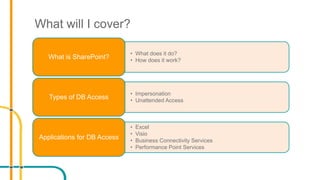
• What does it do?
• How does it work?
What is SharePoint?
• Impersonation
• Unattended Access
Types of DB Access
• Excel
• Visio
• Business Connectivity Services
• Performance Point Services
Applications for DB Access
What is SharePoint?
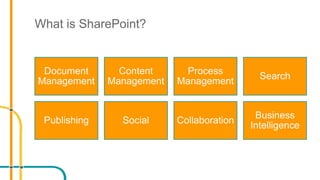
Document
Management
Content
Management
Process
Management
Search
Publishing Social Collaboration
Business
Intelligence
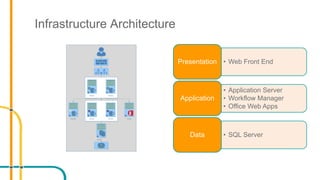
Infrastructure Architecture
SPWFE01 SPWFE02
SPAPP01 SPAPP02 OWA01SPWFM01
SQLC01
• Web Front EndPresentation
• Application Server
• Workflow Manager
• Office Web Apps
Application
• SQL ServerData
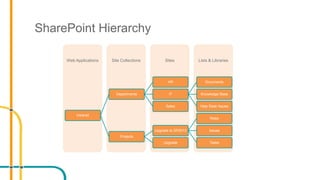
SharePoint Hierarchy
Lists & LibrariesSitesSite CollectionsWeb Applications
Intranet
Departments
HR
IT
Documents
Knowledge Base
Help Desk IssuesSales
Projects
Upgrade to SP2013
Risks
Issues
TasksUpgrade
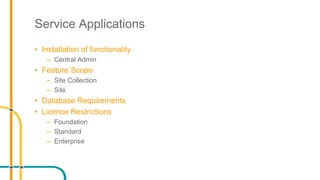
Service Applications
• Installation of functionality
– Central Admin
• Feature Scope
– Site Collection
– Site
• Database Requirements
• Licence Restrictions
– Foundation
– Standard
– Enterprise
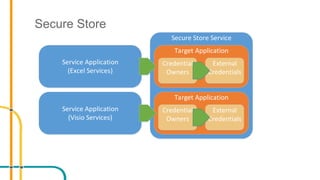
Secure Store
Secure Store Service
Target Application
Credential
Owners
External
Credentials
Target Application
Credential
Owners
External
Credentials
Service Application
(Excel Services)
Service Application
(Visio Services)
Secure Store Service
• Allows mappings between users and specific credentials
• Used for
– Access to Line of Business applications
– Access to external data sources
• Each credential has specific permissions
• Flexible format of credentials
– Windows
– SQL
– Other
Secure Store Service
• Connection Types
– Many to One
• All users can map to the same credentials
– One to One
• Each individual user of SharePoint can map to specific credentials for an application
• Fields
– Can create multiple field with different descriptions:
• Generic
• Username
• Password
• PIN
• Key
• Certificate
Demo
Excel Services
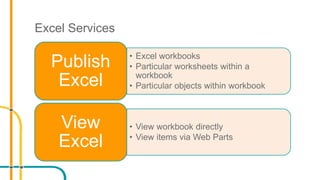
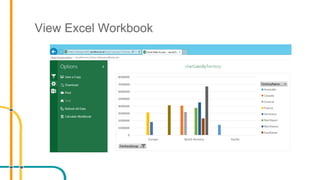
• Excel workbooks
• Particular worksheets within a
workbook
• Particular objects within workbook
Publish
Excel
• View workbook directly
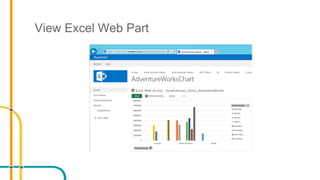
• View items via Web Parts
View
Excel
External Connections
• Create an Office Data connection
• Upload it to a Trusted Connection location in SharePoint
• Create a spreadsheet using the connection in SharePoint
View Excel Workbook
View Excel Web Part
Demo
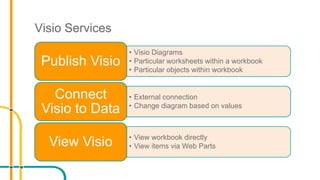
Visio Services
• Visio Diagrams
• Particular worksheets within a workbook
• Particular objects within workbook
Publish Visio
• External connection
• Change diagram based on values
Connect
Visio to Data
• View workbook directly
• View items via Web PartsView Visio
Demo
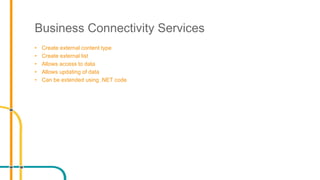
Business Connectivity Services
• Create external content type
• Create external list
• Allows access to data
• Allows updating of data
• Can be extended using .NET code
Demo
Performance Point Services
• Access to different data
– Relational Tables
– Multidimensional Analysis Services Cubes
– Excel
– Reporting Services
• Display Data
– Dashboards
– Reports
– Charts
• Decomposition Tree
– Requires Silverlight
Demo
Summary
• Secure Store
• Excel Services
• Business Connectivity Services
• Performance Point Services
Contact Details
• Twitter: @Al_Eardley
• E-mail: Alan.Eardley@Outlook.com
• LinkedIn: http://uk.linkedin.com/in/aleardley
Thank – you
Twitter: @Al_Eardley
E-mail: Alan.Eardley@Outlook.com
LinkedIn:http://uk.linkedin.com/in/aleardley
Links
• Best practices for SQL Server in a SharePoint Server farm
• Install SQL Server BI Features with SharePoint 2013 (SQL Server 2012
SP1)

How does SharePoint access data

  • 1.
  • 2.
    Who am I? •Lead SharePoint Technical Architect at CPS • Developer, DBA, Business Analyst, Project Manager, Architect • SQL Server 7.0 - 2012 • SharePoint 2003 – 2013 & 365 • @Al_Eardley • Alan.Eardley@Outlook.com
  • 3.
    What will Icover? • What does it do? • How does it work? What is SharePoint? • Impersonation • Unattended Access Types of DB Access • Excel • Visio • Business Connectivity Services • Performance Point Services Applications for DB Access
  • 4.
  • 5.
    Infrastructure Architecture SPWFE01 SPWFE02 SPAPP01SPAPP02 OWA01SPWFM01 SQLC01 • Web Front EndPresentation • Application Server • Workflow Manager • Office Web Apps Application • SQL ServerData
  • 6.
    SharePoint Hierarchy Lists &LibrariesSitesSite CollectionsWeb Applications Intranet Departments HR IT Documents Knowledge Base Help Desk IssuesSales Projects Upgrade to SP2013 Risks Issues TasksUpgrade
  • 7.
    Service Applications • Installationof functionality – Central Admin • Feature Scope – Site Collection – Site • Database Requirements • Licence Restrictions – Foundation – Standard – Enterprise
  • 8.
    Secure Store Secure StoreService Target Application Credential Owners External Credentials Target Application Credential Owners External Credentials Service Application (Excel Services) Service Application (Visio Services)
  • 9.
    Secure Store Service •Allows mappings between users and specific credentials • Used for – Access to Line of Business applications – Access to external data sources • Each credential has specific permissions • Flexible format of credentials – Windows – SQL – Other
  • 10.
    Secure Store Service •Connection Types – Many to One • All users can map to the same credentials – One to One • Each individual user of SharePoint can map to specific credentials for an application • Fields – Can create multiple field with different descriptions: • Generic • Username • Password • PIN • Key • Certificate
  • 11.
  • 12.
    Excel Services • Excelworkbooks • Particular worksheets within a workbook • Particular objects within workbook Publish Excel • View workbook directly • View items via Web Parts View Excel
  • 13.
    External Connections • Createan Office Data connection • Upload it to a Trusted Connection location in SharePoint • Create a spreadsheet using the connection in SharePoint
  • 14.
  • 15.
  • 16.
  • 17.
    Visio Services • VisioDiagrams • Particular worksheets within a workbook • Particular objects within workbook Publish Visio • External connection • Change diagram based on values Connect Visio to Data • View workbook directly • View items via Web PartsView Visio
  • 18.
  • 19.
    Business Connectivity Services •Create external content type • Create external list • Allows access to data • Allows updating of data • Can be extended using .NET code
  • 20.
  • 21.
    Performance Point Services •Access to different data – Relational Tables – Multidimensional Analysis Services Cubes – Excel – Reporting Services • Display Data – Dashboards – Reports – Charts • Decomposition Tree – Requires Silverlight
  • 22.
  • 23.
    Summary • Secure Store •Excel Services • Business Connectivity Services • Performance Point Services
  • 24.
    Contact Details • Twitter:@Al_Eardley • E-mail: Alan.Eardley@Outlook.com • LinkedIn: http://uk.linkedin.com/in/aleardley
  • 25.
    Thank – you Twitter:@Al_Eardley E-mail: Alan.Eardley@Outlook.com LinkedIn:http://uk.linkedin.com/in/aleardley
  • 26.
    Links • Best practicesfor SQL Server in a SharePoint Server farm • Install SQL Server BI Features with SharePoint 2013 (SQL Server 2012 SP1)

Editor's Notes

  • #2 Open VM Open IE Open Dashboard Designer Open SSMS Open Excel
  • #7 Web Application – a web site that contains at least one site collection Site Collection – a container for sites and functionality configuration Site – a container of lists and libraries and functionality configuration List – a container of list items Library – a container of documents
  • #8 Service applications provide functionality that can be used by the sites within a SharePoint Farm. They are installed through Central Admin E.g. Secure Store Service Excel Services Visio Services PerformancePoint Services