Adobe
Audition
You can start two ways. You must be in "edit view"
                                        where you can either "file>open>*select file*" or just
                                        record. The tracks, whether they be imported or
                                        recorded, will all appear in a list on the side of the
                                        screen.


Picture Reference-http://www.freedownloadsplace.com/Images/Adobe-Audition-2.0-build-5307.1-742.htm
If you go into "multi-track view" then you can drag
                                        and drop them in a specific order. Here you can listen
                                        back to your file all as one. The arrow with the cross
                                        underneath it allows you to drag your files to the
                                        place you want.


Picture Reference-http://www.freedownloadsplace.com/Images/Adobe-Audition-2.0-build-5307.1-742.htm
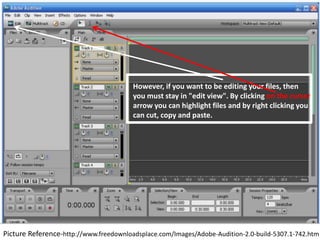
However, if you want to be editing your files, then
                                        you must stay in "edit view". By clicking on the cursor
                                        arrow you can highlight files and by right clicking you
                                        can cut, copy and paste.


Picture Reference-http://www.freedownloadsplace.com/Images/Adobe-Audition-2.0-build-5307.1-742.htm

How do you use adobe audition

  • 1.
  • 2.
    You can starttwo ways. You must be in "edit view" where you can either "file>open>*select file*" or just record. The tracks, whether they be imported or recorded, will all appear in a list on the side of the screen. Picture Reference-http://www.freedownloadsplace.com/Images/Adobe-Audition-2.0-build-5307.1-742.htm
  • 3.
    If you gointo "multi-track view" then you can drag and drop them in a specific order. Here you can listen back to your file all as one. The arrow with the cross underneath it allows you to drag your files to the place you want. Picture Reference-http://www.freedownloadsplace.com/Images/Adobe-Audition-2.0-build-5307.1-742.htm
  • 4.
    However, if youwant to be editing your files, then you must stay in "edit view". By clicking on the cursor arrow you can highlight files and by right clicking you can cut, copy and paste. Picture Reference-http://www.freedownloadsplace.com/Images/Adobe-Audition-2.0-build-5307.1-742.htm