How to Use Audacity
• It’s easy to use and is free to download
– Download is available at
http://audacity.sourceforge.net
How to Use Audacity
Before you think about recording, you should
optimize your system to improve the
recordings.
Some of these optimizations include:
Turning off unnecessary applications
Shutting off unnecessary services
Disable indexing
Constantly defragment your hard drive
Turn off system sound
Control sound card latency
Use a second drive for media storage
How to Use Audacity
• After the program is downloaded, you can
start using it immediately.
• You have the option to create a desktop
shortcut when you install the program,
which you should do. It will allow you to
open the program more easily.
How to Use Audacity
Audacity is a trademark of Dominic Mazzoni ®
How to Use Audacity
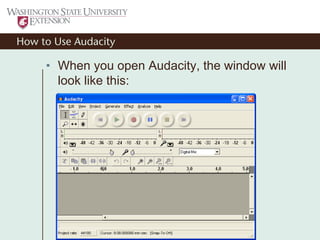
• When you open Audacity, the window will
look like this:
How to Use Audacity
• The first step is to make sure that your
recording device selector reads
“Microphone.”
How to Use Audacity
• The first step is to make sure that your
recording device selector reads
“Microphone.”
How to Use Audacity
• The first step is to make sure that your
recording device selector reads
“Microphone.”
How to Use Audacity
• Next, you will want to make sure your
preferences are set correctly.
How to Use Audacity
• Go to the “Edit” menu and find Preferences
at the bottom of the menu.
How to Use Audacity
• Go to the “Edit” menu and find Preferences
at the bottom of the menu.
How to Use Audacity
You will see this:
How to Use Audacity
Make sure that both your playback and
recording device is the sound card that your
computer uses.
Keep the “Channels” setting in the
“Recordings” box set to “1 (Mono).”
Even though you may think Stereo will
sound better, it won’t.
Recording in stereo will simply duplicate
your track and make it sound like an echo
chamber.
If you are going to record with two
microphones, then switch the “Channels”
setting to “2 (Stereo).”
How to Use Audacity
• Now, switch to the “Quality” tab in the
“Audacity Preferences” window. You will
see this:
How to Use Audacity
• The only setting in this tab that should be
changed is your “Default Sample Format.”
Change it from “32-bit float” to “16-bit.”
How to Use Audacity
• The only setting in this tab that should be
changed is your “Default Sample Format.”
Change it from “32-bit float” to “16-bit.”
How to Use Audacity
• The only setting in this tab that should be
changed is your “Default Sample Format.”
Change it from “32-bit float” to “16-bit.”
How to Use Audacity
• Next, move to the “File Formats” tab.
How to Use Audacity
• Make sure that the “Uncompressed Export
Format” shows “WAV (Microsoft 16 bit
PCM).”
How to Use Audacity
Now you’re set up to record audio!
First, you will need to turn on microphone
monitoring.
How to Use Audacity
To do this, simply click on the microphone
icon in the toolbar.
How to Use Audacity
• To start recording, all you have to do is click
the “Record Button,” which is the one with
the Red Circle on toolbar.
How to Use Audacity
When you start recording, a new sound track
will appear on the screen. It will look like
this:
How to Use Audacity
• Once you’ve got your audio recorded,
simply hit the “Stop” button in the toolbar,
which is the one with the yellow square.
How to Use Audacity
• Once you’ve got your audio recorded,
simply hit the “Stop” button in the toolbar,
which is the one with the yellow square.
How to Use Audacity
• Once you’re done recording, you can edit
the sound file.
How to Use Audacity
• You can click and drag across any part of
the sound file to edit.
How to Use Audacity
• You can click and drag across any part of
the sound file to edit.
How to Use Audacity
• To delete a section, you can do it a few
different ways:
• You can use the Edit menu to select “Cut.”
How to Use Audacity
• You can use the keyboard shortcut “Control
+ X.”
• Or, you can simply hit the “Delete” button on
the keyboard.
• Finally, you can use the “Cut” button in the
middle of the tool bar, which has a picture of
scissors on it.
How to Use Audacity
How to Use Audacity
• Just like most other programs, there are two
or three ways to do just about everything.
• There is a keyboard shortcut to just about
operation.
How to Use Audacity
• List of Keyboard Shortcuts:
– Menu Shortcuts (Press “Alt” key)
• File = F
• Edit = E
• View = V
• Generate = G
• Effect = C
• Analyze = A
• Help = H
How to Use Audacity
• List of Keyboard Shortcuts:
– In File Menu
• New = “Ctrl + N”
• Open = “Ctrl + O”
• Close = “Ctrl + W”
• Save Project = “Ctrl + S”
How to Use Audacity
• List of Keyboard Shortcuts:
– In Edit Menu
• Undo = “Ctrl + Z”
• Redo = “Ctrl +Y”
• Cut = “Ctrl + X”
• Copy = “Ctrl + C”
• Paste = “Ctrl + V”
• Trim = “Ctrl + T”
• Delete = “Ctrl + D”
• Preferences = “Ctrl + P”
How to Use Audacity
• List of Keyboard Shortcuts:
– In View Menu
• Zoom In = “Ctrl + 1”
• Zoom Normal = “Ctrl + 2”
• Zoom Out = “Ctrl + 3”
• Fit in Window = “Ctrl + F”
• Fit Vertically = “Ctrl + Shift + F”
• Zoom to Selection = “Ctrl + E”
How to Use Audacity
• List of Keyboard Shortcuts:
– In Project Menu
• Import Audio = “Ctrl + I”
• Add Label at Selection = “Ctrl + B”
How to Use Audacity
• There are six different icons in the top left
corner of the window. Here’s what they do:
How to Use Audacity
• Selection Tool: Allows you to click on any
point of your window and set a mark.
– Once you set a mark an icon with a
finger pointing to the mark will appear.
– You can use this tool to then create a
region by clicking and dragging.
How to Use Audacity
• Next is the Envelope Tool, which will create
various kinds of fades in your sound file.
How to Use Audacity
• The last one on the top is called the “Draw
Tool.”
– With this feature, you can change the
sound level of any piece of audio in you
file.
– You do have to zoom in as close as you
can to the waveform to use the tool.
How to Use Audacity
How to Use Audacity
• The first tool of the bottom row is the “Zoom
Tool.”
How to Use Audacity
• The next tool is called the “Time Shift Tool.”
– It allows you to move the entire track.
– It should mostly be used in the editing
process when an area is already highlighted.
How to Use Audacity
• The final tool is called “Multi-Tool Mode.”
– In this mode, you can use all five tools
when you as you need.
How to Use Audacity
• One other important feature is the ability to
use multiple tracks.
– If you are going to record all of your
tracks yourself, simply hit record, and
Audacity automatically creates a new
track.
– If you need to import a track, you can
create a new track by selecting “New
Audio Track” from the “Project” menu.
How to Use Audacity
• To Import a file, choose “Import Audio” from
the “Project” menu.
– Once you’ve done that, select the file you
want to import from the dialog menu.
How to Use Audacity
Many of the options in the “Effects” menu are not
going to be necessary for you, as most of them
are for mastering music, but some will be of use:
Amplify: Bumps up the audio level
Equalization: Can make sound file louder or
softer using your command
Fade In/Fade Out
Noise Reduction: This will partially remove any
background hissing or noise you don’t want
Normalize: Will make the sound a uniform
volume
How to Use Audacity
• To save the project, use the “File” menu
and choose “Save Project.”
How to Use Audacity
• To save the project, use the “File” menu
and choose “Save Project.”

Audacity

  • 1.
    How to UseAudacity • It’s easy to use and is free to download – Download is available at http://audacity.sourceforge.net
  • 2.
    How to UseAudacity Before you think about recording, you should optimize your system to improve the recordings. Some of these optimizations include: Turning off unnecessary applications Shutting off unnecessary services Disable indexing Constantly defragment your hard drive Turn off system sound Control sound card latency Use a second drive for media storage
  • 3.
    How to UseAudacity • After the program is downloaded, you can start using it immediately. • You have the option to create a desktop shortcut when you install the program, which you should do. It will allow you to open the program more easily.
  • 4.
    How to UseAudacity Audacity is a trademark of Dominic Mazzoni ®
  • 5.
    How to UseAudacity • When you open Audacity, the window will look like this:
  • 6.
    How to UseAudacity • The first step is to make sure that your recording device selector reads “Microphone.”
  • 7.
    How to UseAudacity • The first step is to make sure that your recording device selector reads “Microphone.”
  • 8.
    How to UseAudacity • The first step is to make sure that your recording device selector reads “Microphone.”
  • 9.
    How to UseAudacity • Next, you will want to make sure your preferences are set correctly.
  • 10.
    How to UseAudacity • Go to the “Edit” menu and find Preferences at the bottom of the menu.
  • 11.
    How to UseAudacity • Go to the “Edit” menu and find Preferences at the bottom of the menu.
  • 12.
    How to UseAudacity You will see this:
  • 13.
    How to UseAudacity Make sure that both your playback and recording device is the sound card that your computer uses. Keep the “Channels” setting in the “Recordings” box set to “1 (Mono).” Even though you may think Stereo will sound better, it won’t. Recording in stereo will simply duplicate your track and make it sound like an echo chamber. If you are going to record with two microphones, then switch the “Channels” setting to “2 (Stereo).”
  • 14.
    How to UseAudacity • Now, switch to the “Quality” tab in the “Audacity Preferences” window. You will see this:
  • 15.
    How to UseAudacity • The only setting in this tab that should be changed is your “Default Sample Format.” Change it from “32-bit float” to “16-bit.”
  • 16.
    How to UseAudacity • The only setting in this tab that should be changed is your “Default Sample Format.” Change it from “32-bit float” to “16-bit.”
  • 17.
    How to UseAudacity • The only setting in this tab that should be changed is your “Default Sample Format.” Change it from “32-bit float” to “16-bit.”
  • 18.
    How to UseAudacity • Next, move to the “File Formats” tab.
  • 19.
    How to UseAudacity • Make sure that the “Uncompressed Export Format” shows “WAV (Microsoft 16 bit PCM).”
  • 20.
    How to UseAudacity Now you’re set up to record audio! First, you will need to turn on microphone monitoring.
  • 21.
    How to UseAudacity To do this, simply click on the microphone icon in the toolbar.
  • 22.
    How to UseAudacity • To start recording, all you have to do is click the “Record Button,” which is the one with the Red Circle on toolbar.
  • 23.
    How to UseAudacity When you start recording, a new sound track will appear on the screen. It will look like this:
  • 24.
    How to UseAudacity • Once you’ve got your audio recorded, simply hit the “Stop” button in the toolbar, which is the one with the yellow square.
  • 25.
    How to UseAudacity • Once you’ve got your audio recorded, simply hit the “Stop” button in the toolbar, which is the one with the yellow square.
  • 26.
    How to UseAudacity • Once you’re done recording, you can edit the sound file.
  • 27.
    How to UseAudacity • You can click and drag across any part of the sound file to edit.
  • 28.
    How to UseAudacity • You can click and drag across any part of the sound file to edit.
  • 29.
    How to UseAudacity • To delete a section, you can do it a few different ways: • You can use the Edit menu to select “Cut.”
  • 31.
    How to UseAudacity • You can use the keyboard shortcut “Control + X.” • Or, you can simply hit the “Delete” button on the keyboard. • Finally, you can use the “Cut” button in the middle of the tool bar, which has a picture of scissors on it.
  • 32.
    How to UseAudacity
  • 33.
    How to UseAudacity • Just like most other programs, there are two or three ways to do just about everything. • There is a keyboard shortcut to just about operation.
  • 34.
    How to UseAudacity • List of Keyboard Shortcuts: – Menu Shortcuts (Press “Alt” key) • File = F • Edit = E • View = V • Generate = G • Effect = C • Analyze = A • Help = H
  • 35.
    How to UseAudacity • List of Keyboard Shortcuts: – In File Menu • New = “Ctrl + N” • Open = “Ctrl + O” • Close = “Ctrl + W” • Save Project = “Ctrl + S”
  • 36.
    How to UseAudacity • List of Keyboard Shortcuts: – In Edit Menu • Undo = “Ctrl + Z” • Redo = “Ctrl +Y” • Cut = “Ctrl + X” • Copy = “Ctrl + C” • Paste = “Ctrl + V” • Trim = “Ctrl + T” • Delete = “Ctrl + D” • Preferences = “Ctrl + P”
  • 37.
    How to UseAudacity • List of Keyboard Shortcuts: – In View Menu • Zoom In = “Ctrl + 1” • Zoom Normal = “Ctrl + 2” • Zoom Out = “Ctrl + 3” • Fit in Window = “Ctrl + F” • Fit Vertically = “Ctrl + Shift + F” • Zoom to Selection = “Ctrl + E”
  • 38.
    How to UseAudacity • List of Keyboard Shortcuts: – In Project Menu • Import Audio = “Ctrl + I” • Add Label at Selection = “Ctrl + B”
  • 39.
    How to UseAudacity • There are six different icons in the top left corner of the window. Here’s what they do:
  • 40.
    How to UseAudacity • Selection Tool: Allows you to click on any point of your window and set a mark. – Once you set a mark an icon with a finger pointing to the mark will appear. – You can use this tool to then create a region by clicking and dragging.
  • 41.
    How to UseAudacity • Next is the Envelope Tool, which will create various kinds of fades in your sound file.
  • 42.
    How to UseAudacity • The last one on the top is called the “Draw Tool.” – With this feature, you can change the sound level of any piece of audio in you file. – You do have to zoom in as close as you can to the waveform to use the tool.
  • 43.
    How to UseAudacity
  • 44.
    How to UseAudacity • The first tool of the bottom row is the “Zoom Tool.”
  • 45.
    How to UseAudacity • The next tool is called the “Time Shift Tool.” – It allows you to move the entire track. – It should mostly be used in the editing process when an area is already highlighted.
  • 46.
    How to UseAudacity • The final tool is called “Multi-Tool Mode.” – In this mode, you can use all five tools when you as you need.
  • 47.
    How to UseAudacity • One other important feature is the ability to use multiple tracks. – If you are going to record all of your tracks yourself, simply hit record, and Audacity automatically creates a new track. – If you need to import a track, you can create a new track by selecting “New Audio Track” from the “Project” menu.
  • 51.
    How to UseAudacity • To Import a file, choose “Import Audio” from the “Project” menu. – Once you’ve done that, select the file you want to import from the dialog menu.
  • 52.
    How to UseAudacity Many of the options in the “Effects” menu are not going to be necessary for you, as most of them are for mastering music, but some will be of use: Amplify: Bumps up the audio level Equalization: Can make sound file louder or softer using your command Fade In/Fade Out Noise Reduction: This will partially remove any background hissing or noise you don’t want Normalize: Will make the sound a uniform volume
  • 53.
    How to UseAudacity • To save the project, use the “File” menu and choose “Save Project.”
  • 54.
    How to UseAudacity • To save the project, use the “File” menu and choose “Save Project.”