Automated Scaling of Microservice Stacks 

for
JavaEE Applications
by Ihor Kolodyuk
Few words about me …
Driving technology direction at Jelastic
Like to solve unsolvable problems
Checking technology concepts on practice
Why I am here?
I want to talk to you about:
General autoscaling concept for JavaEE applications
Real use cases. Real issues. Tricky things
My goals are:
Save your time if you decide you need to scale your app
Share our own experience
I just deploy my application to Docker, set a number of replicas and
… have it running … bla bla bla … super easy! Done!
The myth
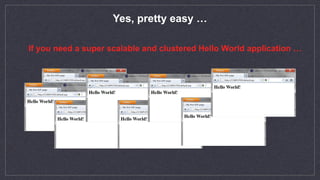
Yes, pretty easy …

If you need a super scalable and clustered Hello World application …
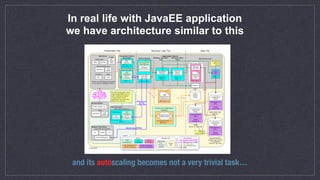
In real life with JavaEE application
we have architecture similar to this
and its autoscaling becomes not a very trivial task…
The truth
Legacy Application
Scalable Cluster
Autoscalable Cluster
Theoretical part
At least 3 key things to make your
applications scalable
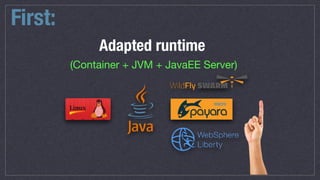
First:
Adapted runtime
(Container + JVM + JavaEE Server)
micro
Preferably, thin versions of application servers
YES!NO!
micro
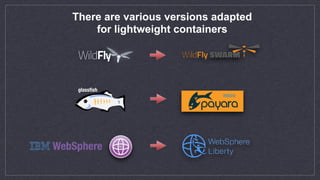
glassfish
There are various versions adapted
for lightweight containers
Any specific reason to use
VMs for microservices?
NO!
Well…it might be, but …
What should we use instead?
YES!
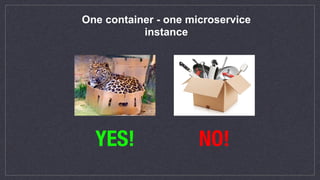
One container - one microservice
instance
YES! NO!
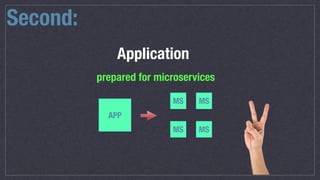
Second:
Application
prepared for microservices
APP
MS
MS MS
MS
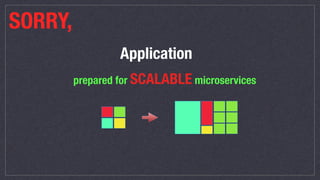
SORRY,
Application
prepared for SCALABLE microservices
Next few slides can be a bit boring for those
who know…
BUT
Still important!!!!!!
Ideal scaling and decomposition
horizontal
vertical
topology
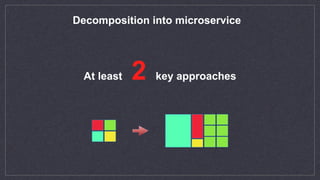
Decomposition into microservice
At least 2 key approaches
Logical division
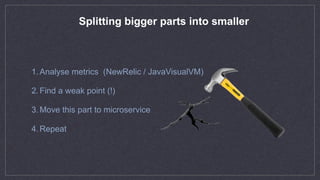
Splitting bigger parts into smaller
1.Analyse metrics (NewRelic / JavaVisualVM)
2.Find a weak point (!)
3.Move this part to microservice
4.Repeat
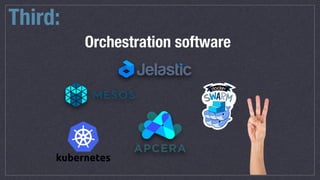
Third:
Orchestration software
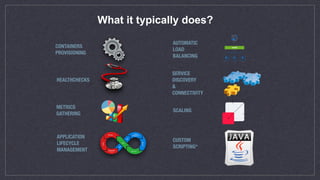
What it typically does?
CONTAINERS

PROVISIONING
HEALTHCHECKS
METRICS

GATHERING
APPLICATION 

LIFECYCLE

MANAGEMENT
SCALING
AUTOMATIC 

LOAD

BALANCING
SERVICE

DISCOVERY

&

CONNECTIVITY
CUSTOM
SCRIPTING*
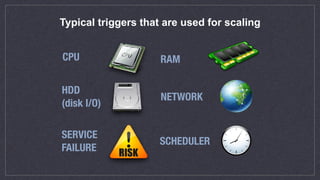
Typical triggers that are used for scaling
CPU RAM
HDD

(disk I/O)
NETWORK
SERVICE

FAILURE
SCHEDULER
Practical part
Tricky things
Typical issues
Examples 

Tricky thing #1
In which direction to scale?
horizontal
vertical
topology
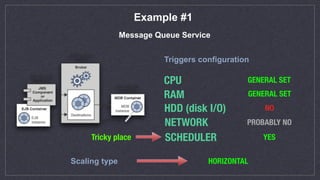
Example #1
Message Queue Service
Triggers configuration
CPU
RAM
HDD (disk I/O)
NETWORK
SCHEDULER YES
NO
PROBABLY NO
GENERAL SET
GENERAL SET
Scaling type HORIZONTAL
Tricky place
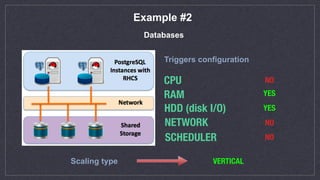
Example #2
Databases
CPU
RAM
HDD (disk I/O)
NETWORK
SCHEDULER
YES
VERTICAL
NO
NO
NO
Scaling type
Triggers configuration
YES
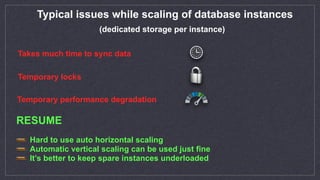
Typical issues while scaling of database instances
Takes much time to sync data
Temporary locks
Temporary performance degradation
Hard to use auto horizontal scaling
Automatic vertical scaling can be used just fine
It’s better to keep spare instances underloaded
(dedicated storage per instance)
RESUME
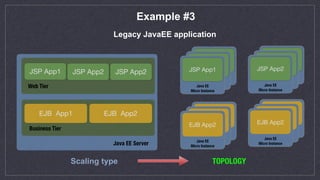
Example #3
Legacy JavaEE application
TOPOLOGY
Java EE Server
Business Tier
Web Tier
JSP App1 JSP App2 JSP App2
EJB App1 EJB App2
Java EE 

Micro Instance
JSP App1
Java EE 

Micro Instance
JSP App1
Java EE 

Micro Instance
JSP App1
Java EE 

Micro Instance
JSP App1
Java EE 

Micro Instance
JSP App1
Java EE 

Micro Instance
JSP App2
Java EE 

Micro Instance
JSP App1
Java EE 

Micro Instance
JSP App1
Java EE 

Micro Instance
EJB App2
Java EE 

Micro Instance
JSP App1
Java EE 

Micro Instance
JSP App1
Java EE 

Micro Instance
EJB App2
Scaling type
Tricky thing #2
Events subscription
Usually, just spinning up an extra instance is NOTenough
Example #1
Typical ScaleIn/ScaleOut events and cases
onAfterScaleOut[nodeGroup:ejb-app1] {
“call”: “registerNodeInMonitoringSystem”,
“call”: “addMemberToHazelcast”,
“call”: “call3rdPartyApiService”
}
onAfterScaleIn[nodeGroup:jsp-app2] {
“call”: “removeNodeFromMonitoringSystem”,
“call”: “removeMemberFromHazelcast”
}
THE FULL WORKING AND MORE COMPLEX CODE EXAMPLE CAN BE FOUND HERE
Example #2
2. Get auth keys by instance before joining DAS
onBeforeStartService[nodeGroup:instance] {
“cmd”: “/root/scripts/pullAccessKeys.sh ${token}”
}
THE FULL WORKING AND MORE COMPLEX CODE EXAMPLE CAN BE FOUND HERE
1. Decrypt encrypted volume, that was attached on-fly
onAfterVolumeAttached[nodeGroup:instance] {
“call”: “decryptVolume”
}
3. Deprovision node from DAS if cluster was shrinked
onAfterScaleOut[nodeGroup:das] {
“cmd”: “./asadmin_proxy remove ${instance[@last].ip}”
}
Tricky thing #3
Proper triggers configuration
This tuning is a long process, so be patient
Typical problem #1
Changing the value in one place can be reflected in other places
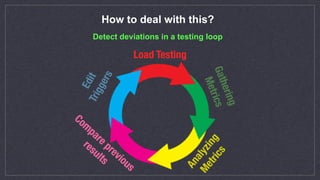
How to deal with this?
Load Testing
Gathering

Metrics
Detect deviations in a testing loop
Analyzing

Metrics
Edit
Triggers
Com
pare previous 

results
Typical problem #2
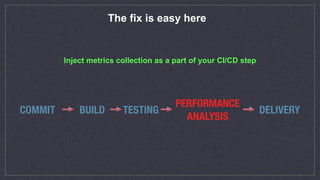
The triggers can become outdated with new code
The fix is easy here
Inject metrics collection as a part of your CI/CD step
COMMIT BUILD TESTING
PERFORMANCE

ANALYSIS
DELIVERY
Tricky thing #4
Getting rid of spare things
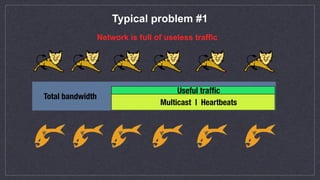
Typical problem #1
Network is full of useless traffic
Total bandwidth
Multicast | Heartbeats
Useful traffic
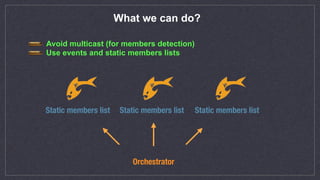
What we can do?
Avoid multicast (for members detection)
Use events and static members lists
Static members list Static members list Static members list
Orchestrator
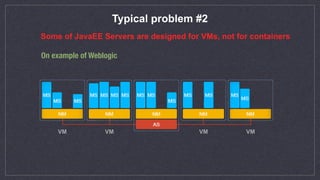
Typical problem #2
Some of JavaEE Servers are designed for VMs, not for containers
On example of Weblogic
VM VM VM VM
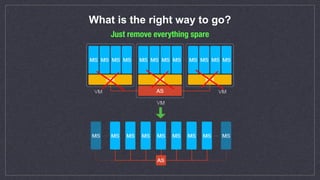
What is the right way to go?
Just remove everything spare
LIVE demo comes here
QUESTIONS
CONTACTS
http://jelastic.com ihor.kolodyuk@jelastic.com

JEEconf 2017

  • 1.
    Automated Scaling ofMicroservice Stacks 
 for JavaEE Applications by Ihor Kolodyuk
  • 2.
    Few words aboutme … Driving technology direction at Jelastic Like to solve unsolvable problems Checking technology concepts on practice
  • 3.
    Why I amhere? I want to talk to you about: General autoscaling concept for JavaEE applications Real use cases. Real issues. Tricky things My goals are: Save your time if you decide you need to scale your app Share our own experience
  • 4.
    I just deploymy application to Docker, set a number of replicas and … have it running … bla bla bla … super easy! Done! The myth
  • 5.
    Yes, pretty easy…
 If you need a super scalable and clustered Hello World application …
  • 6.
    In real lifewith JavaEE application we have architecture similar to this and its autoscaling becomes not a very trivial task…
  • 7.
    The truth Legacy Application ScalableCluster Autoscalable Cluster
  • 8.
  • 9.
    At least 3key things to make your applications scalable
  • 10.
    First: Adapted runtime (Container +JVM + JavaEE Server) micro
  • 11.
    Preferably, thin versionsof application servers YES!NO!
  • 12.
    micro glassfish There are variousversions adapted for lightweight containers
  • 13.
    Any specific reasonto use VMs for microservices? NO!
  • 14.
  • 15.
    What should weuse instead? YES!
  • 16.
    One container -one microservice instance YES! NO!
  • 17.
  • 18.
  • 19.
    Next few slidescan be a bit boring for those who know… BUT Still important!!!!!!
  • 20.
    Ideal scaling anddecomposition horizontal vertical topology
  • 21.
    Decomposition into microservice Atleast 2 key approaches
  • 22.
  • 23.
    Splitting bigger partsinto smaller 1.Analyse metrics (NewRelic / JavaVisualVM) 2.Find a weak point (!) 3.Move this part to microservice 4.Repeat
  • 24.
  • 25.
    What it typicallydoes? CONTAINERS
 PROVISIONING HEALTHCHECKS METRICS
 GATHERING APPLICATION 
 LIFECYCLE
 MANAGEMENT SCALING AUTOMATIC 
 LOAD
 BALANCING SERVICE
 DISCOVERY
 &
 CONNECTIVITY CUSTOM SCRIPTING*
  • 26.
    Typical triggers thatare used for scaling CPU RAM HDD
 (disk I/O) NETWORK SERVICE
 FAILURE SCHEDULER
  • 27.
  • 28.
    Tricky thing #1 Inwhich direction to scale? horizontal vertical topology
  • 29.
    Example #1 Message QueueService Triggers configuration CPU RAM HDD (disk I/O) NETWORK SCHEDULER YES NO PROBABLY NO GENERAL SET GENERAL SET Scaling type HORIZONTAL Tricky place
  • 30.
    Example #2 Databases CPU RAM HDD (diskI/O) NETWORK SCHEDULER YES VERTICAL NO NO NO Scaling type Triggers configuration YES
  • 31.
    Typical issues whilescaling of database instances Takes much time to sync data Temporary locks Temporary performance degradation Hard to use auto horizontal scaling Automatic vertical scaling can be used just fine It’s better to keep spare instances underloaded (dedicated storage per instance) RESUME
  • 32.
    Example #3 Legacy JavaEEapplication TOPOLOGY Java EE Server Business Tier Web Tier JSP App1 JSP App2 JSP App2 EJB App1 EJB App2 Java EE 
 Micro Instance JSP App1 Java EE 
 Micro Instance JSP App1 Java EE 
 Micro Instance JSP App1 Java EE 
 Micro Instance JSP App1 Java EE 
 Micro Instance JSP App1 Java EE 
 Micro Instance JSP App2 Java EE 
 Micro Instance JSP App1 Java EE 
 Micro Instance JSP App1 Java EE 
 Micro Instance EJB App2 Java EE 
 Micro Instance JSP App1 Java EE 
 Micro Instance JSP App1 Java EE 
 Micro Instance EJB App2 Scaling type
  • 33.
    Tricky thing #2 Eventssubscription Usually, just spinning up an extra instance is NOTenough
  • 34.
    Example #1 Typical ScaleIn/ScaleOutevents and cases onAfterScaleOut[nodeGroup:ejb-app1] { “call”: “registerNodeInMonitoringSystem”, “call”: “addMemberToHazelcast”, “call”: “call3rdPartyApiService” } onAfterScaleIn[nodeGroup:jsp-app2] { “call”: “removeNodeFromMonitoringSystem”, “call”: “removeMemberFromHazelcast” } THE FULL WORKING AND MORE COMPLEX CODE EXAMPLE CAN BE FOUND HERE
  • 35.
    Example #2 2. Getauth keys by instance before joining DAS onBeforeStartService[nodeGroup:instance] { “cmd”: “/root/scripts/pullAccessKeys.sh ${token}” } THE FULL WORKING AND MORE COMPLEX CODE EXAMPLE CAN BE FOUND HERE 1. Decrypt encrypted volume, that was attached on-fly onAfterVolumeAttached[nodeGroup:instance] { “call”: “decryptVolume” } 3. Deprovision node from DAS if cluster was shrinked onAfterScaleOut[nodeGroup:das] { “cmd”: “./asadmin_proxy remove ${instance[@last].ip}” }
  • 36.
    Tricky thing #3 Propertriggers configuration This tuning is a long process, so be patient
  • 37.
    Typical problem #1 Changingthe value in one place can be reflected in other places
  • 38.
    How to dealwith this? Load Testing Gathering
 Metrics Detect deviations in a testing loop Analyzing
 Metrics Edit
Triggers Com pare previous 
 results
  • 39.
    Typical problem #2 Thetriggers can become outdated with new code
  • 40.
    The fix iseasy here Inject metrics collection as a part of your CI/CD step COMMIT BUILD TESTING PERFORMANCE
 ANALYSIS DELIVERY
  • 41.
    Tricky thing #4 Gettingrid of spare things
  • 42.
    Typical problem #1 Networkis full of useless traffic Total bandwidth Multicast | Heartbeats Useful traffic
  • 43.
    What we cando? Avoid multicast (for members detection) Use events and static members lists Static members list Static members list Static members list Orchestrator
  • 44.
    Typical problem #2 Someof JavaEE Servers are designed for VMs, not for containers On example of Weblogic VM VM VM VM
  • 45.
    What is theright way to go? Just remove everything spare
  • 46.
  • 47.
  • 48.