5834-2
                                                      Wireless Key Transmitter
                                 INSTALLATION AND SETUP GUIDE
GENERAL INFORMATION
The 5834-2 key transmitter is a portable wireless transmitter for use only with wireless alarm systems that support 5800
Series receivers (ex. VISTA series, LYNX PLUS, LYNX Touch).
• Buttons are typically used for arming and disarming, but can be programmed for any appropriate zone response.
• A button must be pressed and held until the LED begins to flash to activate a button function. This press and hold feature
  minimizes the possibility of accidental transmissions.
• The factory-installed replaceable lithium battery provides power for up to five (5) years.
• The 5834-2 transmitter provides up to three (3) functions.
Using a Button: To activate a programmed function, press and hold the appropriate key(s) until the LED begins to flash.
                • Serial #1 functions activate when the respective button is held down until the LED flashes.
                • Serial #2 function activates when the respective buttons are pressed at the same time and held down
                  until the LED flashes.

PROGRAMMING
                                                                                       SERIAL #2
For complete details on how to program the transmitter at                               LOOP 1
                                                                    SERIAL #1                            SERIAL #1
the control panel, see the control unit's Installation                LOOP 3                             LOOP 2
Instructions. When programming, note the following:
• Each 5834-2 transmitter has two unique serial numbers
   assigned during manufacture.
• Each button on the unit also has a distinct "loop"
   number (refer to the Loop Numbers diagram) that you
   must program into the control panel during installation.
• Assign each button to an individual zone and designate
   the Input Type as "BR" (Button Type).
• When prompted for the serial number, press and
   release the appropriate button twice, or, manually enter
   the serial number at the keypad.
                                                                                                             5834-011-V1
  NOTE: Serial #2 is one (1) digit higher than serial #1,
  which is printed on the rear of the transmitter.                 Loop Numbers for the 5834-2 Keyfob Buttons

ASSIGNING A WIRELESS KEY TO A USER
• On most control panels, if the wireless key is assigned to arm and disarm the system, you must assign it to a user in
  order for it to operate. This is accomplished through User Code programming at the control panel. See the control
  panel’s Installation and Setup Guide for specific instructions on programming User Codes.
  The table below summarizes the procedures.
• If programming arming and disarming functions on both serial numbers, each serial number must be assigned to a
  separate user.
On Vista 32/40/50/50P/100 and up                               On Vista-20P/15P/10P, VISTA-21iP, and variants
You must assign a user to the button in order for it to operate. You must assign a user to the button in order for it to
To assign a user number to the Arm/Disarm button:                operate, and must enter a sequence of keystrokes as
1. Enter [4-digit User Code] + [8] + [User No.] + [new User described below.
   Code].                                                        NOTE: There is a two-second timeout for keystroke
2. Answer Yes or No to the “Open/Close Report ?” question. commands on Vista P series panels, therefore you must
3. Answer Yes to the “RF Button ?” question.                     enter the keystrokes as quickly as possible.
4. Enter the zone number assigned to the button.                 1. Enter [4-digit Master Code] + [8] + [User Number] +
5. Keypad display shows summary of user information.                [# 4] + [two digit zone number] assigned to the fob.
6. Test all functions for proper operation.                      2. Test all functions for proper operation.
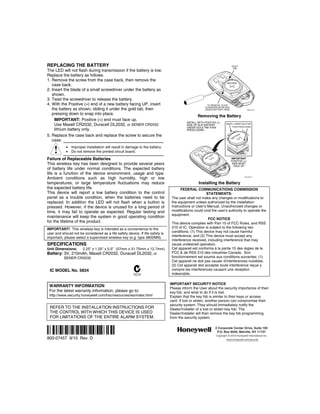
REPLACING THE BATTERY                                                                                                         GOLD
                                                                                                                               TAB
The LED will not flash during transmission if the battery is low.
Replace the battery as follows.
1. Remove the screw from the case back, then remove the
                                                                                                                          BATTERY
   case back.
2. Insert the blade of a small screwdriver under the battery as
   shown.
3. Twist the screwdriver to release the battery.
4. With the Positive (+) end of a new battery facing UP, insert                                        TO REMOVE, SLIDE
                                                                                                      SCREWDRIVER BLADE
   the battery as shown, sliding it under the gold tab, then                                          UNDER BATTERY HERE                     5834-004-V0


   pressing down to snap into place.
                                                                                                 Removing the Battery
     IMPORTANT: Positive (+) end must face up.
                                                                                         INSTALL WITH POSITIVE (+)
     Use Maxell CR2032, Duracell DL2032, or SENER CR2032                                 SIDE UP. SLIP BATTERY
                                                                                                                         INSTALL UNDER GOLD TAB
                                                                                                                               THEN PRESS DOWN
                                                                                         UNDER GOLD TAB THEN
     lithium battery only.                                                               PRESS DOWN

5. Replace the case back and replace the screw to secure the                                                                    TT
                                                                                                                                   ER
                                                                                                                                     Y
                                                                                                                              BA
   case.
            • Improper installation will result in damage to the battery.
            • Do not remove the printed circuit board.
                                                                                                             Y
                                                                                                           ER
                                                                                                         TT
Failure of Replaceable Batteries                                                                       BA                     IMPORTANT
                                                                                                                              POSITIVE (+)
This wireless key has been designed to provide several years                                                                   SIDE MUST
                                                                                                                                FACE UP
of battery life under normal conditions. The expected battery
life is a function of the device environment, usage and type.
Ambient conditions such as high humidity, high or low                                                                                    5834-005-V0


temperatures, or large temperature fluctuations may reduce                                       Installing the Battery
the expected battery life.                                                            FEDERAL COMMUNICATIONS COMMISSION
This device will report a low battery condition to the control                                         STATEMENTS:
panel as a trouble condition, when the batteries need to be                     The user shall not make any changes or modifications to
replaced. In addition the LED will not flash when a button is                   the equipment unless authorized by the installation
pressed. However, if the device is unused for a long period of                  Instructions or User's Manual. Unauthorized changes or
time, it may fail to operate as expected. Regular testing and                   modifications could void the user's authority to operate the
                                                                                equipment.
maintenance will keep the system in good operating condition                                            FCC NOTICE
for the lifetime of the product.                                                This device complies with Part 15 of FCC Rules, and RSS
IMPORTANT! This wireless key is intended as a convenience to the                210 of IC. Operation is subject to the following two
user and should not be considered as a life safety device. If life safety is    conditions: (1) This device may not cause harmful
important, please select a supervised wireless key (e.g. type 5802MN).          interference, and (2) This device must accept any
                                                                                interference received, including interference that may
SPECIFICATIONS                                                                  cause undesired operation.
Unit Dimensions:       2.25" x 1.25" x 0.5" (57mm x 31.75mm x 12.7mm)           Cet appareil est conforme à la partie 15 des règles de la
Battery: 3V, 210mAh, Maxell CR2032, Duracell DL2032, or                         FCC & de RSS 210 des industries Canada. Son
          SENER CR2032                                                          fonctionnement est soumis aux conditions suivantes: (1)
                                                                                Cet appareil ne doit pas causer d'interferences nuisibles.
                                                                                (2) Cet appareil doit accepter toute interference reçue y
 IC MODEL No. 5834                                                              compris les interferences causant une reception
                                                                                indesirable.

                                                                               IMPORTANT SECURITY NOTICE
 WARRANTY INFORMATION
                                                                               Please inform the User about the security importance of their
 For the latest warranty information, please go to:                            key fob, and what to do if it is lost.
 http://www.security.honeywell.com/hsc/resources/wa/index.html                 Explain that the key fob is similar to their keys or access
                                                                               card. If lost or stolen, another person can compromise their
                                                                               security system. They should immediately notify the
 REFER TO THE INSTALLATION INSTRUCTIONS FOR                                    Dealer/Installer of a lost or stolen key fob. The
 THE CONTROL WITH WHICH THIS DEVICE IS USED                                    Dealer/Installer will then remove the key fob programming
 FOR LIMITATIONS OF THE ENTIRE ALARM SYSTEM.                                   from the security system.


Ê800-07457bŠ                                                                                                     2 Corporate Center Drive, Suite 100
                                                                                                                  P.O. Box 9040, Melville, NY 11747
                                                                                                                 Copyright © 2010 Honeywell International Inc.
800-07457 9/10 Rev. D                                                                                                     www.honeywell.com/security

Honeywell 5834-2-install-guide

  • 1.
    5834-2 Wireless Key Transmitter INSTALLATION AND SETUP GUIDE GENERAL INFORMATION The 5834-2 key transmitter is a portable wireless transmitter for use only with wireless alarm systems that support 5800 Series receivers (ex. VISTA series, LYNX PLUS, LYNX Touch). • Buttons are typically used for arming and disarming, but can be programmed for any appropriate zone response. • A button must be pressed and held until the LED begins to flash to activate a button function. This press and hold feature minimizes the possibility of accidental transmissions. • The factory-installed replaceable lithium battery provides power for up to five (5) years. • The 5834-2 transmitter provides up to three (3) functions. Using a Button: To activate a programmed function, press and hold the appropriate key(s) until the LED begins to flash. • Serial #1 functions activate when the respective button is held down until the LED flashes. • Serial #2 function activates when the respective buttons are pressed at the same time and held down until the LED flashes. PROGRAMMING SERIAL #2 For complete details on how to program the transmitter at LOOP 1 SERIAL #1 SERIAL #1 the control panel, see the control unit's Installation LOOP 3 LOOP 2 Instructions. When programming, note the following: • Each 5834-2 transmitter has two unique serial numbers assigned during manufacture. • Each button on the unit also has a distinct "loop" number (refer to the Loop Numbers diagram) that you must program into the control panel during installation. • Assign each button to an individual zone and designate the Input Type as "BR" (Button Type). • When prompted for the serial number, press and release the appropriate button twice, or, manually enter the serial number at the keypad. 5834-011-V1 NOTE: Serial #2 is one (1) digit higher than serial #1, which is printed on the rear of the transmitter. Loop Numbers for the 5834-2 Keyfob Buttons ASSIGNING A WIRELESS KEY TO A USER • On most control panels, if the wireless key is assigned to arm and disarm the system, you must assign it to a user in order for it to operate. This is accomplished through User Code programming at the control panel. See the control panel’s Installation and Setup Guide for specific instructions on programming User Codes. The table below summarizes the procedures. • If programming arming and disarming functions on both serial numbers, each serial number must be assigned to a separate user. On Vista 32/40/50/50P/100 and up On Vista-20P/15P/10P, VISTA-21iP, and variants You must assign a user to the button in order for it to operate. You must assign a user to the button in order for it to To assign a user number to the Arm/Disarm button: operate, and must enter a sequence of keystrokes as 1. Enter [4-digit User Code] + [8] + [User No.] + [new User described below. Code]. NOTE: There is a two-second timeout for keystroke 2. Answer Yes or No to the “Open/Close Report ?” question. commands on Vista P series panels, therefore you must 3. Answer Yes to the “RF Button ?” question. enter the keystrokes as quickly as possible. 4. Enter the zone number assigned to the button. 1. Enter [4-digit Master Code] + [8] + [User Number] + 5. Keypad display shows summary of user information. [# 4] + [two digit zone number] assigned to the fob. 6. Test all functions for proper operation. 2. Test all functions for proper operation.
  • 2.
    REPLACING THE BATTERY GOLD TAB The LED will not flash during transmission if the battery is low. Replace the battery as follows. 1. Remove the screw from the case back, then remove the BATTERY case back. 2. Insert the blade of a small screwdriver under the battery as shown. 3. Twist the screwdriver to release the battery. 4. With the Positive (+) end of a new battery facing UP, insert TO REMOVE, SLIDE SCREWDRIVER BLADE the battery as shown, sliding it under the gold tab, then UNDER BATTERY HERE 5834-004-V0 pressing down to snap into place. Removing the Battery IMPORTANT: Positive (+) end must face up. INSTALL WITH POSITIVE (+) Use Maxell CR2032, Duracell DL2032, or SENER CR2032 SIDE UP. SLIP BATTERY INSTALL UNDER GOLD TAB THEN PRESS DOWN UNDER GOLD TAB THEN lithium battery only. PRESS DOWN 5. Replace the case back and replace the screw to secure the TT ER Y BA case. • Improper installation will result in damage to the battery. • Do not remove the printed circuit board. Y ER TT Failure of Replaceable Batteries BA IMPORTANT POSITIVE (+) This wireless key has been designed to provide several years SIDE MUST FACE UP of battery life under normal conditions. The expected battery life is a function of the device environment, usage and type. Ambient conditions such as high humidity, high or low 5834-005-V0 temperatures, or large temperature fluctuations may reduce Installing the Battery the expected battery life. FEDERAL COMMUNICATIONS COMMISSION This device will report a low battery condition to the control STATEMENTS: panel as a trouble condition, when the batteries need to be The user shall not make any changes or modifications to replaced. In addition the LED will not flash when a button is the equipment unless authorized by the installation pressed. However, if the device is unused for a long period of Instructions or User's Manual. Unauthorized changes or time, it may fail to operate as expected. Regular testing and modifications could void the user's authority to operate the equipment. maintenance will keep the system in good operating condition FCC NOTICE for the lifetime of the product. This device complies with Part 15 of FCC Rules, and RSS IMPORTANT! This wireless key is intended as a convenience to the 210 of IC. Operation is subject to the following two user and should not be considered as a life safety device. If life safety is conditions: (1) This device may not cause harmful important, please select a supervised wireless key (e.g. type 5802MN). interference, and (2) This device must accept any interference received, including interference that may SPECIFICATIONS cause undesired operation. Unit Dimensions: 2.25" x 1.25" x 0.5" (57mm x 31.75mm x 12.7mm) Cet appareil est conforme à la partie 15 des règles de la Battery: 3V, 210mAh, Maxell CR2032, Duracell DL2032, or FCC & de RSS 210 des industries Canada. Son SENER CR2032 fonctionnement est soumis aux conditions suivantes: (1) Cet appareil ne doit pas causer d'interferences nuisibles. (2) Cet appareil doit accepter toute interference reçue y IC MODEL No. 5834 compris les interferences causant une reception indesirable. IMPORTANT SECURITY NOTICE WARRANTY INFORMATION Please inform the User about the security importance of their For the latest warranty information, please go to: key fob, and what to do if it is lost. http://www.security.honeywell.com/hsc/resources/wa/index.html Explain that the key fob is similar to their keys or access card. If lost or stolen, another person can compromise their security system. They should immediately notify the REFER TO THE INSTALLATION INSTRUCTIONS FOR Dealer/Installer of a lost or stolen key fob. The THE CONTROL WITH WHICH THIS DEVICE IS USED Dealer/Installer will then remove the key fob programming FOR LIMITATIONS OF THE ENTIRE ALARM SYSTEM. from the security system. Ê800-07457bŠ 2 Corporate Center Drive, Suite 100 P.O. Box 9040, Melville, NY 11747 Copyright © 2010 Honeywell International Inc. 800-07457 9/10 Rev. D www.honeywell.com/security