K3635V3 9/04 Rev. A

                                                                                                                                        ADEMCO 5804BDV
                                                                            TWO-WAY WIRELESS KEY WITH VOICE STATUS
                                               INSTALLATION INSTRUCTIONS
General Information                                                                          To Install / Replace Batteries
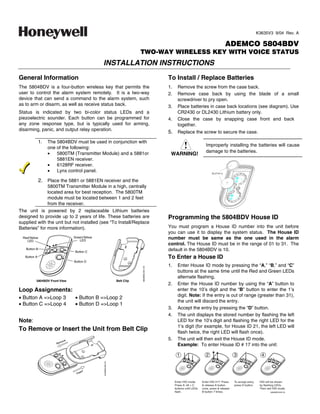
The 5804BDV is a four-button wireless key that permits the                                   1.     Remove the screw from the case back.
user to control the alarm system remotely. It is a two-way                                   2.     Remove case back by using the blade of a small
device that can send a command to the alarm system, such                                            screwdriver to pry open.
as to arm or disarm, as well as receive status back.                                         3.     Place batteries in case back locations (see diagram). Use
Status is indicated by two bi-color status LEDs and a                                               CR2430 or DL2430 Lithium battery only.
piezoelectric sounder. Each button can be programmed for                                     4.     Close the case by snapping case front and back
any zone response type, but is typically used for arming,                                           together.
disarming, panic, and output relay operation.
                                                                                             5. Replace the screw to secure the case.
               1.   The 5804BDV must be used in conjunction with
                                                                                                                        Improperly installing the batteries will cause
                    one of the following:
                    •   5800TM (Transmitter Module) and a 5881or                                                         damage to the batteries.
                                                                                              WARNING!
                        5881EN receiver.
                    •   6128RF receiver.
                    •   Lynx control panel.

               2. Place the 5881 or 5881EN receiver and the
                    5800TM Transmitter Module in a high, centrally
                    located area for best reception. The 5800TM
                    module must be located between 1 and 2 feet
                    from the receiver.
The unit is powered by 2 replaceable Lithium batteries
designed to provide up to 2 years of life. These batteries are                               Programming the 5804BDV House ID
supplied with the unit but not installed (see “To Install/Replace
Batteries” for more information).                                                            You must program a House ID number into the unit before
                                                                                             you can use it to display the system status. The House ID
  Red/Yellow                    Green/Yellow                                                 number must be same as the one used in the alarm
    LED                             LED
                                                                                             control. The House ID must be in the range of 01 to 31. The
    Button B
                                Button C
                                                                                             default in the 5804BDV is 10.
   Button A                                                                                  To Enter a House ID
                                Button D
                                                                                             1.     Enter House ID mode by pressing the “A,” “B,” and “C”
                                                                            5804BDV-001-V0


                                                                                                    buttons at the same time until the Red and Green LEDs
                                                                                                    alternate flashing.
          5804BDV Front View                                    Belt Clip
                                                                                             2.     Enter the House ID number by using the “A” button to
Loop Assignments:                                                                                   enter the 10’s digit and the “B” button to enter the 1’s
                                                                                                    digit. Note: If the entry is out of range (greater than 31),
• Button A =Loop 3             • Button B =Loop 2
                                                                                                    the unit will discard the entry.
• Button C =Loop 4             • Button D =Loop 1
                                                                                             3.     Accept the entry by pressing the “D” button.
                                                                                             4.     The unit displays the stored number by flashing the left
Note:                                                                                               LED for the 10’s digit and flashing the right LED for the
                                                                                                    1’s digit (for example, for House ID 21, the left LED will
To Remove or Insert the Unit from Belt Clip                                                         flash twice, the right LED will flash once).
                                                                                             5.     The unit will then exit the House ID mode.
                                                                                                    Example: To enter House ID # 17 into the unit:

                                                                                                   1                      2                    3                    4
                                               5404BDV-002-V0


                                                                                                  Enter HID mode:      Enter HID #17: Press    To accept entry,    HID will be shown
                                                                                                  Press A +B + C        release A button      press D button.     by flashing LEDs.
                                                                                                  buttons until LEDs   once, press  release                       Then exit HID mode.
                                                                                                  flash.               B button 7 times.                                  5804BDV-004-V0
To View the House ID                                                     2. Answer Yes or No to the “Open/Close Report?” question.
                                                                         3. Answer Yes to the “RF Button?” question.
1. Enter House ID mode as described in step 1 (previous
   page).                                                                4. Enter the zone number assigned to the Arm/Disarm
                                                                            button. The keypad will show the summary of user
2. Depress the “D” button to view.
                                                                            information on its display.
3. The unit will display the stored number as described in               5. Test the Arm/Disarm button to make sure it operates
     step 4 (previous page). The unit will then exit House ID               correctly.
     mode.
Programming a House ID in the Alarm                                      Adjusting Volume Level
Control                                                                  This unit is shipped with the volume set to the lowest level. To
                                                                         adjust the volume, proceed as follows:
•    On VISTA-40, 50P, 100, and above, use Device
                                                                         1. Enter the Volume Level Programming mode by pressing
     Programming mode to enable the RF receiver and enter
                                                                             and holding the “A”, “B”, and “D” buttons simultaneously
     the House ID number.
                                                                             until the unit’s red and green LEDs flash alternately.
•    On VIA-30PSE, VISTA-20SE, and below, go to field ✶24                    Note that if no button is pressed for 5 seconds the unit
     and enter the House ID number.                                          will automatically shut down and no change to the volume
Programming the Buttons                                                      level is made.
Each 5804BDV is assigned a unique serial number during                       a. Press the “A” button for low volume level, or
manufacture. Each button on the unit also has a unique                       b. Press the “B” button for medium volume level, or
“loop” number that must be programmed into the alarm control                 c. Press the “C” button for maximum volume level. The
during installation. Assign each button to an individual zone                      word “Alarm” will be heard at the volume level
number and program the Input Type as “BR” (Button Type                             selected.
RF) by entering “5” in the control’s Zone Programming mode.              2. Press the “D” to accept.
Then, input the serial number by one of the following                              Volume level affects the life of the battery. Use low
methods:                                                                           volume for maximum battery life.
•    Transmit twice from the device by pressing one of the
     buttons when prompted for the serial number.
                                                                         Operating the Buttons
•    Enter the serial number manually through the keypad.
•    Enter the serial number through V-LINK or Compass                   To Activate a Function
     downloader software as applicable.                                  To activate a programmed function, press and hold the
Be sure to include the loop number of each button during                 associated button down until the yellow LED flashes; then
programming (see loop assignments on previous page).                     release it.

NOTE: Do not use the 5804BDV for 24-hour silent alarm, as
                                                                         To Request System Status
the unit itself is not silent.                                           Because the 5804BDV is a two-way device, users can check
Button C                                                                 the system status before arming or disarming their system. To
                                                                         check system status, press and release any button
If you choose not to use the “C” button, you must do the
                                                                         momentarily. The yellow LED will flash after you release the
following to avoid a “Check” condition when the button is
                                                                         button. After a second or two, the 5804BDV will display the
accidentally pressed:
                                                                         system status information using a combination of LED and
1. Assign this button to a zone.                                         sounder activity (see the System Status Indications Table). If
2. After the serial number has been programmed, re-enter                 5804BDV does not receive system status information from the
     Zone Programming for that zone.                                     panel for approximately 5 seconds, it will shut itself down. It
3.   At the “Zone Type” prompt, enter 00 and press [✶].                  will also shut itself down if there is no button activity within 5
      a) On VIA-30 controls and below, the system will ask               seconds of receiving a status update.
          whether you want to permanently delete that zone.                              This device may not receive the system
          Enter 0 (No). This will cause the system to retain the
          serial number, but render the button inactive.                                status properly if it operates within a few feet
                                                                                         of the 5881 RF receiver.
      b) On VISTA-40 and above, continue to press [✶] until               WARNING!
          you see the “Enter Zone No?” prompt again. At this
          point, Press 00 and [✶]. Then press ✶99 to exit
          Program mode.
On VISTA-40 and Above
If a button is assigned to zone type 20 (Arm Stay), 21 (Arm
Away), or 22 (Disarm), you must assign a user to the button in
order for it to operate.
To assign a user number to the Arm/Disarm button:
1. Enter [4-digit User Code] + 8 + [User No.] + [4-digit new
    User Code].

                                                                   –2–
System Status Indications Table
         LED              LED Condition                                  Speech                               System Status
  Red                      On Steady             System Armed Away                            Armed Away or Maximum
                                                 System Armed Stay                            Armed Stay or Instant
                           Flashing              Fire Fire Zone (Faulted Zone)                Fire Alarm in progress
                                                 Alarm Alarm Zone (Faulted Zone)              Armed, Burglary Alarm in progress
                                                 Alarm Alarm Zone (Faulted Zone)              Alarm Memory
  Green                    On Steady             System Disarmed Ready To Arm                 Disarmed, Ready to Arm
                           Flashing              System Disarmed Not Ready To Arm System Not Ready, Zones Faulted
  Yellow (Right)           Flashing              ––                                           Indicates RF transmission
  Red  Green              Alternately           ––                                           In Enter House ID Mode
                           Flashing
                                                                                              In Set Volume Level Mode
  N/A                      N/A                   System AC Loss                               AC Loss Condition
                                                 Low Battery                                  Low Battery Condition


Multiple Button Operations                                                         Low-Battery Indication
                                                                                   When the unit goes into a low battery condition, the yellow
                                                                                   LED will not flash when a button is pressed. Change both
                   The 5804BDV should not be used for 24-hour
                    silent alarm, as the unit itself is not silent.
                                                                                   batteries immediately. Refer to instructions in “To
 WARNING!                                                                          Install/Replace Batteries” paragraph on first page.

The 5804BDV can generate the same responses as keypad                              Specifications
panic key pairs of [✶] + [#] and [✶] + [1] by depressing “A” + “C”                 Physical:      Belt Clip:   4.1H x 2.2”W x 0.8”D
and “B” + “D” button pairs, respectively.                                                         Transmitter:   3.9”H x 2.0”W x 0.69”D
You must depress the button pair for at least 2 seconds for the                    Battery:       Maxell CR2430 or Duracell DL2430
5804BDV to recognize the button pair command. These button
pairs allow the user to activate panic, fire, and medical alarms
depending on control panel programming.

A + C Button Pair                B + D Button Pair


                                                        5804BDV-005-V0


     FOR LIMITATIONS OF THE ENTIRE ALARM SYSTEM, REFER TO THE INSTALLATION INSTRUCTIONS FOR THE
     CONTROL WITH WHICH THIS DEVICE IS USED.


                                                                 FCC STATEMENT
     This device complies with Part 15 of the FCC rules. Operation is subject to the following two conditions: (1)
     This device may not cause harmful interference, and (2) This device must accept any interference received,
     including interference that may cause undesired operation.
                                                                FCC ID.CFS8DL5804BDV


                                                                             –3–
FEDERAL COMMUNICATIONS COMMISSION (FCC) Part 15 STATEMENT
  This equipment has been tested to FCC requirements and has been found acceptable for use. The FCC requires the following statement
  for your information:
  This equipment generates and uses radio frequency energy and if not installed and used properly, that is, in strict accordance with the
  manufacturer's instructions, may cause interference to radio and television reception. It has been type tested and found to comply with the
  limits for a Class B computing device in accordance with the specifications in Part 15 of FCC Rules, which are designed to provide
  reasonable protection against such interference in a residential installation. However, there is no guarantee that interference will not occur
  in a particular installation. If this equipment does cause interference to radio or television reception, which can be determined by turning the
  equipment off and on, the user is encouraged to try to correct the interference by one or more of the following measures:
  •       If using an indoor antenna, have a quality outdoor antenna installed.
  •       Reorient the receiving antenna until interference is reduced or eliminated.
  •       Move the radio or television receiver away from the receiver/control.
  •       Move the antenna leads away from any wire runs to the receiver/control.
  •       Plug the receiver/control into a different outlet so that it and the radio or television receiver are on different branch circuits.
  If necessary, the user should consult the dealer or an experienced radio/television technician for additional suggestions. The user or
  installer may find the following booklet prepared by the Federal Communications Commission helpful: Interference Handbook.
  This booklet is available from the U.S. Government Printing Office, Washington, DC 20402.
  The user shall not make any changes or modifications to the equipment unless authorized by the Installation Instructions or User's Manual.
  Unauthorized changes or modifications could void the user's authority to operate the equipment.

                                                             LIMITED WARRANTY

Honeywell International Inc., acting through its Security  Custom Electronics business (Seller) 165 Eileen Way, Syosset, New York 11791,
warrants its product(s) to be in conformance with its own plans and specifications and to be free from defects in materials and workmanship
under normal use and service for 24 months from the date stamp control on the product(s) or, for product(s) not having a manufacturer’s date
stamp, for 12 months from date of original purchase unless the installation instructions or catalog sets forth a shorter period, in which case the
shorter period shall apply. Seller's obligation shall be limited to repairing or replacing, at its option, free of charge for materials or labor, any
product(s) which is proved not in compliance with Seller's specifications or proves defective in materials or workmanship under normal use and
service. Seller shall have no obligation under this Limited Warranty or otherwise if the product(s) is altered or improperly repaired or serviced by
anyone other than Honeywell factory service. Connection of any device(s) to a communicating bus of a Honeywell security system (e.g., keypad
bus, polling loop) other than those manufactured or approved by Honeywell shall void this warranty. For warranty service, return product(s)
transportation prepaid, to Honeywell Factory Service, 165 Eileen Way, Syosset, New York 11791.

THERE ARE NO WARRANTIES, EXPRESS OR IMPLIED, OF MERCHANTABILITY, OR FITNESS FOR A PARTICULAR PURPOSE OR
OTHERWISE, WHICH EXTEND BEYOND THE DESCRIPTION ON THE FACE HEREOF. IN NO CASE SHALL SELLER BE LIABLE TO
ANYONE FOR ANY CONSEQUENTIAL OR INCIDENTAL DAMAGES FOR BREACH OF THIS OR ANY OTHER WARRANTY, EXPRESS OR
IMPLIED, OR UPON ANY OTHER BASIS OF LIABILITY WHATSOEVER, EVEN IF THE LOSS OR DAMAGE IS CAUSED BY THE SELLER'S
OWN NEGLIGENCE OR FAULT.
Seller does not represent that the product(s) it sells may not be compromised or circumvented; that the product(s) will prevent any personal
injury or property loss by burglary, robbery, fire or otherwise; or that the product(s) will in all cases provide adequate warning or protection.
Customer understands that a properly installed and maintained alarm system may only reduce the risk of a burglary, robbery, fire, or other
events occurring without providing an alarm, but it is not insurance or a guarantee that such will not occur or that there will be no personal injury
or property loss as a result. CONSEQUENTLY, SELLER SHALL HAVE NO LIABILITY FOR ANY PERSONAL INJURY, PROPERTY DAMAGE
OR OTHER LOSS BASED ON A CLAIM THAT THE PRODUCT(S) FAILED TO GIVE WARNING. HOWEVER, IF SELLER IS HELD LIABLE,
WHETHER DIRECTLY OR INDIRECTLY, FOR ANY LOSS OR DAMAGE ARISING UNDER THIS LIMITED WARRANTY OR OTHERWISE,
REGARDLESS OF CAUSE OR ORIGIN, SELLER'S MAXIMUM LIABILITY SHALL NOT IN ANY CASE EXCEED THE PURCHASE PRICE OF
THE PRODUCT(S), WHICH SHALL BE THE COMPLETE AND EXCLUSIVE REMEDY AGAINST SELLER.

This warranty replaces any previous warranties and is the only warranty made by Seller on this product(s). No increase or alteration, written or
verbal, of the obligations of this Limited Warranty is authorized.


                                            165 Eileen Way, Syosset, New York 11791
                                                 Copyright © 2004 Honeywell International Inc.

                                                           www.honeywell.com/security


ÊK3635V3aŠ
K3635V3 9/04 Rev. A

Honeywell 5804bdv-install-guide

  • 1.
    K3635V3 9/04 Rev.A ADEMCO 5804BDV TWO-WAY WIRELESS KEY WITH VOICE STATUS INSTALLATION INSTRUCTIONS General Information To Install / Replace Batteries The 5804BDV is a four-button wireless key that permits the 1. Remove the screw from the case back. user to control the alarm system remotely. It is a two-way 2. Remove case back by using the blade of a small device that can send a command to the alarm system, such screwdriver to pry open. as to arm or disarm, as well as receive status back. 3. Place batteries in case back locations (see diagram). Use Status is indicated by two bi-color status LEDs and a CR2430 or DL2430 Lithium battery only. piezoelectric sounder. Each button can be programmed for 4. Close the case by snapping case front and back any zone response type, but is typically used for arming, together. disarming, panic, and output relay operation. 5. Replace the screw to secure the case. 1. The 5804BDV must be used in conjunction with Improperly installing the batteries will cause one of the following: • 5800TM (Transmitter Module) and a 5881or damage to the batteries. WARNING! 5881EN receiver. • 6128RF receiver. • Lynx control panel. 2. Place the 5881 or 5881EN receiver and the 5800TM Transmitter Module in a high, centrally located area for best reception. The 5800TM module must be located between 1 and 2 feet from the receiver. The unit is powered by 2 replaceable Lithium batteries designed to provide up to 2 years of life. These batteries are Programming the 5804BDV House ID supplied with the unit but not installed (see “To Install/Replace Batteries” for more information). You must program a House ID number into the unit before you can use it to display the system status. The House ID Red/Yellow Green/Yellow number must be same as the one used in the alarm LED LED control. The House ID must be in the range of 01 to 31. The Button B Button C default in the 5804BDV is 10. Button A To Enter a House ID Button D 1. Enter House ID mode by pressing the “A,” “B,” and “C” 5804BDV-001-V0 buttons at the same time until the Red and Green LEDs alternate flashing. 5804BDV Front View Belt Clip 2. Enter the House ID number by using the “A” button to Loop Assignments: enter the 10’s digit and the “B” button to enter the 1’s digit. Note: If the entry is out of range (greater than 31), • Button A =Loop 3 • Button B =Loop 2 the unit will discard the entry. • Button C =Loop 4 • Button D =Loop 1 3. Accept the entry by pressing the “D” button. 4. The unit displays the stored number by flashing the left Note: LED for the 10’s digit and flashing the right LED for the 1’s digit (for example, for House ID 21, the left LED will To Remove or Insert the Unit from Belt Clip flash twice, the right LED will flash once). 5. The unit will then exit the House ID mode. Example: To enter House ID # 17 into the unit: 1 2 3 4 5404BDV-002-V0 Enter HID mode: Enter HID #17: Press To accept entry, HID will be shown Press A +B + C release A button press D button. by flashing LEDs. buttons until LEDs once, press release Then exit HID mode. flash. B button 7 times. 5804BDV-004-V0
  • 2.
    To View theHouse ID 2. Answer Yes or No to the “Open/Close Report?” question. 3. Answer Yes to the “RF Button?” question. 1. Enter House ID mode as described in step 1 (previous page). 4. Enter the zone number assigned to the Arm/Disarm button. The keypad will show the summary of user 2. Depress the “D” button to view. information on its display. 3. The unit will display the stored number as described in 5. Test the Arm/Disarm button to make sure it operates step 4 (previous page). The unit will then exit House ID correctly. mode. Programming a House ID in the Alarm Adjusting Volume Level Control This unit is shipped with the volume set to the lowest level. To adjust the volume, proceed as follows: • On VISTA-40, 50P, 100, and above, use Device 1. Enter the Volume Level Programming mode by pressing Programming mode to enable the RF receiver and enter and holding the “A”, “B”, and “D” buttons simultaneously the House ID number. until the unit’s red and green LEDs flash alternately. • On VIA-30PSE, VISTA-20SE, and below, go to field ✶24 Note that if no button is pressed for 5 seconds the unit and enter the House ID number. will automatically shut down and no change to the volume Programming the Buttons level is made. Each 5804BDV is assigned a unique serial number during a. Press the “A” button for low volume level, or manufacture. Each button on the unit also has a unique b. Press the “B” button for medium volume level, or “loop” number that must be programmed into the alarm control c. Press the “C” button for maximum volume level. The during installation. Assign each button to an individual zone word “Alarm” will be heard at the volume level number and program the Input Type as “BR” (Button Type selected. RF) by entering “5” in the control’s Zone Programming mode. 2. Press the “D” to accept. Then, input the serial number by one of the following Volume level affects the life of the battery. Use low methods: volume for maximum battery life. • Transmit twice from the device by pressing one of the buttons when prompted for the serial number. Operating the Buttons • Enter the serial number manually through the keypad. • Enter the serial number through V-LINK or Compass To Activate a Function downloader software as applicable. To activate a programmed function, press and hold the Be sure to include the loop number of each button during associated button down until the yellow LED flashes; then programming (see loop assignments on previous page). release it. NOTE: Do not use the 5804BDV for 24-hour silent alarm, as To Request System Status the unit itself is not silent. Because the 5804BDV is a two-way device, users can check Button C the system status before arming or disarming their system. To check system status, press and release any button If you choose not to use the “C” button, you must do the momentarily. The yellow LED will flash after you release the following to avoid a “Check” condition when the button is button. After a second or two, the 5804BDV will display the accidentally pressed: system status information using a combination of LED and 1. Assign this button to a zone. sounder activity (see the System Status Indications Table). If 2. After the serial number has been programmed, re-enter 5804BDV does not receive system status information from the Zone Programming for that zone. panel for approximately 5 seconds, it will shut itself down. It 3. At the “Zone Type” prompt, enter 00 and press [✶]. will also shut itself down if there is no button activity within 5 a) On VIA-30 controls and below, the system will ask seconds of receiving a status update. whether you want to permanently delete that zone. This device may not receive the system Enter 0 (No). This will cause the system to retain the serial number, but render the button inactive. status properly if it operates within a few feet of the 5881 RF receiver. b) On VISTA-40 and above, continue to press [✶] until WARNING! you see the “Enter Zone No?” prompt again. At this point, Press 00 and [✶]. Then press ✶99 to exit Program mode. On VISTA-40 and Above If a button is assigned to zone type 20 (Arm Stay), 21 (Arm Away), or 22 (Disarm), you must assign a user to the button in order for it to operate. To assign a user number to the Arm/Disarm button: 1. Enter [4-digit User Code] + 8 + [User No.] + [4-digit new User Code]. –2–
  • 3.
    System Status IndicationsTable LED LED Condition Speech System Status Red On Steady System Armed Away Armed Away or Maximum System Armed Stay Armed Stay or Instant Flashing Fire Fire Zone (Faulted Zone) Fire Alarm in progress Alarm Alarm Zone (Faulted Zone) Armed, Burglary Alarm in progress Alarm Alarm Zone (Faulted Zone) Alarm Memory Green On Steady System Disarmed Ready To Arm Disarmed, Ready to Arm Flashing System Disarmed Not Ready To Arm System Not Ready, Zones Faulted Yellow (Right) Flashing –– Indicates RF transmission Red Green Alternately –– In Enter House ID Mode Flashing In Set Volume Level Mode N/A N/A System AC Loss AC Loss Condition Low Battery Low Battery Condition Multiple Button Operations Low-Battery Indication When the unit goes into a low battery condition, the yellow LED will not flash when a button is pressed. Change both The 5804BDV should not be used for 24-hour silent alarm, as the unit itself is not silent. batteries immediately. Refer to instructions in “To WARNING! Install/Replace Batteries” paragraph on first page. The 5804BDV can generate the same responses as keypad Specifications panic key pairs of [✶] + [#] and [✶] + [1] by depressing “A” + “C” Physical: Belt Clip: 4.1H x 2.2”W x 0.8”D and “B” + “D” button pairs, respectively. Transmitter: 3.9”H x 2.0”W x 0.69”D You must depress the button pair for at least 2 seconds for the Battery: Maxell CR2430 or Duracell DL2430 5804BDV to recognize the button pair command. These button pairs allow the user to activate panic, fire, and medical alarms depending on control panel programming. A + C Button Pair B + D Button Pair 5804BDV-005-V0 FOR LIMITATIONS OF THE ENTIRE ALARM SYSTEM, REFER TO THE INSTALLATION INSTRUCTIONS FOR THE CONTROL WITH WHICH THIS DEVICE IS USED. FCC STATEMENT This device complies with Part 15 of the FCC rules. Operation is subject to the following two conditions: (1) This device may not cause harmful interference, and (2) This device must accept any interference received, including interference that may cause undesired operation. FCC ID.CFS8DL5804BDV –3–
  • 4.
    FEDERAL COMMUNICATIONS COMMISSION(FCC) Part 15 STATEMENT This equipment has been tested to FCC requirements and has been found acceptable for use. The FCC requires the following statement for your information: This equipment generates and uses radio frequency energy and if not installed and used properly, that is, in strict accordance with the manufacturer's instructions, may cause interference to radio and television reception. It has been type tested and found to comply with the limits for a Class B computing device in accordance with the specifications in Part 15 of FCC Rules, which are designed to provide reasonable protection against such interference in a residential installation. However, there is no guarantee that interference will not occur in a particular installation. If this equipment does cause interference to radio or television reception, which can be determined by turning the equipment off and on, the user is encouraged to try to correct the interference by one or more of the following measures: • If using an indoor antenna, have a quality outdoor antenna installed. • Reorient the receiving antenna until interference is reduced or eliminated. • Move the radio or television receiver away from the receiver/control. • Move the antenna leads away from any wire runs to the receiver/control. • Plug the receiver/control into a different outlet so that it and the radio or television receiver are on different branch circuits. If necessary, the user should consult the dealer or an experienced radio/television technician for additional suggestions. The user or installer may find the following booklet prepared by the Federal Communications Commission helpful: Interference Handbook. This booklet is available from the U.S. Government Printing Office, Washington, DC 20402. The user shall not make any changes or modifications to the equipment unless authorized by the Installation Instructions or User's Manual. Unauthorized changes or modifications could void the user's authority to operate the equipment. LIMITED WARRANTY Honeywell International Inc., acting through its Security Custom Electronics business (Seller) 165 Eileen Way, Syosset, New York 11791, warrants its product(s) to be in conformance with its own plans and specifications and to be free from defects in materials and workmanship under normal use and service for 24 months from the date stamp control on the product(s) or, for product(s) not having a manufacturer’s date stamp, for 12 months from date of original purchase unless the installation instructions or catalog sets forth a shorter period, in which case the shorter period shall apply. Seller's obligation shall be limited to repairing or replacing, at its option, free of charge for materials or labor, any product(s) which is proved not in compliance with Seller's specifications or proves defective in materials or workmanship under normal use and service. Seller shall have no obligation under this Limited Warranty or otherwise if the product(s) is altered or improperly repaired or serviced by anyone other than Honeywell factory service. Connection of any device(s) to a communicating bus of a Honeywell security system (e.g., keypad bus, polling loop) other than those manufactured or approved by Honeywell shall void this warranty. For warranty service, return product(s) transportation prepaid, to Honeywell Factory Service, 165 Eileen Way, Syosset, New York 11791. THERE ARE NO WARRANTIES, EXPRESS OR IMPLIED, OF MERCHANTABILITY, OR FITNESS FOR A PARTICULAR PURPOSE OR OTHERWISE, WHICH EXTEND BEYOND THE DESCRIPTION ON THE FACE HEREOF. IN NO CASE SHALL SELLER BE LIABLE TO ANYONE FOR ANY CONSEQUENTIAL OR INCIDENTAL DAMAGES FOR BREACH OF THIS OR ANY OTHER WARRANTY, EXPRESS OR IMPLIED, OR UPON ANY OTHER BASIS OF LIABILITY WHATSOEVER, EVEN IF THE LOSS OR DAMAGE IS CAUSED BY THE SELLER'S OWN NEGLIGENCE OR FAULT. Seller does not represent that the product(s) it sells may not be compromised or circumvented; that the product(s) will prevent any personal injury or property loss by burglary, robbery, fire or otherwise; or that the product(s) will in all cases provide adequate warning or protection. Customer understands that a properly installed and maintained alarm system may only reduce the risk of a burglary, robbery, fire, or other events occurring without providing an alarm, but it is not insurance or a guarantee that such will not occur or that there will be no personal injury or property loss as a result. CONSEQUENTLY, SELLER SHALL HAVE NO LIABILITY FOR ANY PERSONAL INJURY, PROPERTY DAMAGE OR OTHER LOSS BASED ON A CLAIM THAT THE PRODUCT(S) FAILED TO GIVE WARNING. HOWEVER, IF SELLER IS HELD LIABLE, WHETHER DIRECTLY OR INDIRECTLY, FOR ANY LOSS OR DAMAGE ARISING UNDER THIS LIMITED WARRANTY OR OTHERWISE, REGARDLESS OF CAUSE OR ORIGIN, SELLER'S MAXIMUM LIABILITY SHALL NOT IN ANY CASE EXCEED THE PURCHASE PRICE OF THE PRODUCT(S), WHICH SHALL BE THE COMPLETE AND EXCLUSIVE REMEDY AGAINST SELLER. This warranty replaces any previous warranties and is the only warranty made by Seller on this product(s). No increase or alteration, written or verbal, of the obligations of this Limited Warranty is authorized. 165 Eileen Way, Syosset, New York 11791 Copyright © 2004 Honeywell International Inc. www.honeywell.com/security ÊK3635V3aŠ K3635V3 9/04 Rev. A