K4842-1V3 6/06 Rev. B

                                                          ADEMCO 6164/6164US KEYPAD
                                                                  With Built-in 4-Zone Expander and Relay
                                        Installation and Setup Guide
GENERAL INFORMATION                                                    ZONES–INPUTS
The 6164/6164US is a general-purpose keypad that                       The four 2K EOLR zones have 300mS response. A local
provides four 2K EOLR zones and one form-C relay. The                  programming option allows selecting conventional EOLR
general features of the 6164/6164US can be used with any               type or double-balanced type for all zones as a group.
ADEMCO control panel that supports the 6160 keypad. To                 Each double-balanced zone type supports up to 10
utilize zone/relay features of the 6164/6164US, the control            sensors. Four 2K EOL resistors are furnished, as well as
panel must be capable of supporting the 4229 ECP                       four additional 2K resistors for use when double-balanced
expander module. Depending on the keypad option                        zones are used.
selected, the zones can either be configured as EOLR or                       Do not use the zones on this keypad for commercial
double-balanced supervised zones. Check the control                           fire applications.
panel’s Installation Guide for the supervision type(s)
supported.                                                             RELAY OUTPUTS
                                                                       One Form-C relay provides contacts rated 1A, 24V AC/DC.
          The internal     relay   is   not   intended    for   UL
          installations.                                               CASE TAMPER
                                                                       An on-board tamper switch detects removal of case front
KEYPAD DISPLAYS AND LEDS                                               from case back, and removal of the case back from its
The 6164/6164US has the following features:                            mounting surface. A local programming option allows you
                                                                       to disable the detection of a tamper condition.
• Large backlit, 2-line, 32-character alphanumeric LCD.
                                                                       For tamper protection, an additional mounting screw
• 16 large telephone-style backlit keys located behind a               must be used in the case back, as shown in Figure 2.
  decorative door that swings down to provide access to
  the keys.                                                            When the 6164/6164US keypad is used in the addressable
                                                                       mode, it will report a tamper condition to the control
The following table shows the LEDs and their functions:                panel as a 4229 case tamper when the zone/relay feature
 LED               Function                                            is enabled, or as a general keypad tamper when the
 ARMED (Red)       Lights when the system is armed in any mode.
                                                                       zone/relay feature is disabled.
 READY (Green)     Lights when the system is ready to be armed.                On newer control panels (e.g., Vista-20P and Vista-
  CPU (Yellow)*    Lights when CPU failure is detected.                        12/48 series) the tamper will be reported using the
* 6164 Keypad only                                                             ECP address assigned to the Zone Expander. Note
                                                                               that the tamper feature will function only if the zone
FUNCTION KEYS AND LABELS                                                       expander has been enabled; Zone 96 can then be
The A, B, C and D keys are designed for use as “panic”                         used as a keypad panic.
keys (e.g., fire, police, personal emergency, etc.) or for                     The 6164/6164US will not support general keypad
single button arming functions as programmed in the                            tamper reporting when set to the non-addressable
control panel.                                                                 mode (keypad address 31). In the non-addressable
          The A, B, C, and D keys must be pressed and                          mode, tamper will be reported as if it were a “C”
          held down for at least two seconds to activate                       function key/zone 96. Program this zone as a Type 5
          their programmed panic functions.                                    Tamper Zone Type for proper reporting. Also, not all
                                                                               control panels support general keypad tamper
A set of adhesive labels with typical panic symbols is                         reporting. Check with the control panel’s
provided. Place the appropriate label in the indented area                     instructions. If the tamper is enabled, Zone 96
on each key, so that the user can easily identify each key’s                   cannot be used as a keypad panic.
function.
                                                                       MOUNTING AND WIRING
BUILT-IN SPEAKER                                                       The 6164/6164US has terminal blocks for connection to
The built-in speaker has the following functions:                      keypad power and data wires, sensors/contacts zone
                                                                       wires, and relay contact wires. Removing the keypad’s
• Produces warning sounds during alarm and trouble
                                                                       case back accesses these terminal blocks.
  conditions, and also during entry/exit delay periods.
• Provides acknowledgment tones when keys are pressed,                 The 6164/6164US can be surface mounted directly to
  and confirmation tones for successful command entries.               walls, or to a single- or double-gang U.S. style electrical
                                                                       box. Follow these steps to mount and wire the keypad:
1. Push the two case release snaps at the bottom of the                                                             Wiring Table
   keypad with the blade of a medium screwdriver (this                                     Keypad                       Control Panel                   Color
   will push in the release snap), then pull that side of the                       LG        Data Out                  Data In                         Green
   case back away. Insert the screwdriver in the side of                            −         GND                       − Aux Pwr                       Black
   the keypad (between the front and back case) and                                 +         +12VDC                    + Aux Pwr                       Red
   gently twist to release the side locking tab. Repeat for                         MY        Data In                   Data Out                        Yellow
   the other side. Refer to Figure 1 for location of the case
   back release snaps and locking tabs.                                        5. Connect the wires for the four 2K EOLR zones to the
                                                                                  six screw terminals on keypad PC board as shown in
                                                                                  Figure 3 and as follows:

                                                                                  Keypad                      Wired Zone
   ARMED


    READY


    CPU


                                                                                  Z1                          + Zone 1
                                                       LOCKING
                                                         TAB
                                                                                                              - Zone 1 and Zone 2 return
  TO REMOVE REAR COVER
  PUSH IN THE TWO MOUNTING
                                                                                  Z2                          + Zone 2
  SNAPS LOCATED ALONG THE
  BOTTOM OF THE KEYPAD
  AND LIFT COVER UP.                                                              Z3                + Zone 3
                                                                                                     - Zone 3 and Zone 4 return
  NOTE:
  THE 6164US IS NOT        MOUNTING                                              Z4                 + Zone 4
  EQUIPPED WITH A          RELEASE
  CPU LED                   SNAPS                          6164-003-V6         Note: There is a common ground for zones 1 and 2, and
                                                                                     one for zones 3 and 4.
                    Figure 1. Removing the Case Back
                                                                               6. Connect the zone contact’s wires (door strike, etc.) to
2. Mount the case back to a wall or to an electrical box                          the three relay terminals marked NC, NO, and C as
   using the 25mm-long self-tapping screws supplied                               shown in Figure 3 and as follows:
   (anchors for drywall are not supplied).
                                                                                  Keypad                      Relay
              If you wish to tamper-protect the keypad for
                                                                                  NO                          N.O. contact
              removal from the wall, use an additional
              mounting screw in the tamper hole in the case                       C                           Pole contact (common)
              back (see Figure 2 for location).                                   NC                          N.C. contact
3. Pass the four power/data wires, wires for up to four                                                       -
   zones, and two or three relay contact wires through                                                        OPTIONAL
                                                                                                                                         CONVENTIONAL
   the opening in the case back. If surface wiring is being                                      DOUBLE BALANCED                         EOLR

   used, wiring may be routed through the top or the                                                   2K                     2K


   bottom left-side breakout in the case back. See Figure                                              TAMPER
                                                                                                                                                    [Y] DATA IN

                                                                                          2K
   2. The breakouts must be punched out using a                                                      CONTACTS
                                                                                                                              N.O.
                                                                                                                                                    [+] +12VDC IN
   screwdriver before mounting the case back. If desired,
   wires may be strain-relieved to the wire tie point on                                  2K
                                                                                                       TAMPER
                                                                                                     CONTACTS
                                                                                                                             N.C.                   [-] GROUND (-12V)

   the inside of the case back with a tie wrap (not
                                                                                                                                                    [G] DATA OUT
   supplied).
                                       BREAKOUT FOR
                                      SURFACE WIRING                                     N.O.

                                                                                            C.

                                                                                          N.C.


             WIRE
              TIE
            POINT                                                                                                                        Y +    G
                                                                                                        Z1                          Z4
                                                                                                        Z2                          Z3

      USE AN
                                                                                                              (Z1      (Z3
  ADDITIONAL                                                                                                   &        &
   MOUNTING                                                                                                   Z2)      Z4)
                                                                                                                                                                    6164-005-V2


      SCREW
      HERE IF
   BACK CASE
    TAMPER IS
  TO BE USED                                                                                           Figure 3. Wiring Details
                                                                               7. Reattach the keypad to the mounted case back.
   BREAKOUT
         FOR                                                                      Attach the top of the keypad first, and then press the
    SURFACE                                                                       bottom section down until it snaps into place
      WIRING
                                        MOUNTING                                  securely.
                                         HOLES            6164-02-V0
                                                                               8. Peel off the protective film on the LED and keypad
                Figure 2. Wiring Entry (Case Back)                                labels.

4. Connect the power/data wires to the four screw                              SETTING THE KEYPAD OPTIONS
   terminals on the keypad’s PC board marked as shown                          The 6164/6164US allows eight items to be programmed
   in Figure 3 and as follows:                                                 via local keypad programming mode:

                                                                         -2-
• Keypad address              • Tamper enable
• Zone expander enable        • Display option
                                                                                ZONE TYPE
• Zone expander address       • Sound option                                    EOLR [1=DBALAN]
                                                                                        DBALAN]
• Zone type                   • Language option
                                                                               Either conventional EOL resistor supervised zones or
These settings are maintained even when keypad power is                        double-balanced zones (see Fig. 3) may be selected
removed.                                                                       (default = conventional EOLR). Consult the panel’s
        The keypad options may only be programmed within 60                    installation guide for proper zone type selection. Use
        seconds of applying power. After that, they are not                    the [✱] key to advance to the Tamper option.
        accessible for editing or viewing. The Address can still be
        viewed by holding down the 1 and 3 keys for approximately           6. By pressing the [1] key, you can toggle the Tamper
        three (3) seconds. To re-enter programming mode, remove                Enable option (default = OFF).
        and reapply power and proceed as follows:
Perform the following steps to change the keypad options.
                                                                                TAMPER
1. Enter the keypad's local program mode within 60                              OFF [1 = ON]
    seconds of power-up by pressing and holding down the                       Refer to the control panel’s installation guide to see if
    [1] and [3] keys at the same time for 3 seconds. The                       the tamper feature is supported. Use the [✱] key to
    current keypad address will be displayed with the                          advance to the LCD display option.
    cursor under the "tens" digit.
                                                                            7. By pressing either the [1], [2], or [3] keys you can
    CON ADDRESS = 31                                                           select the LCD display option.

                                                                                     DISPLAY
2. If the current keypad address setting is acceptable (the
   default = 31), press the [✱] key to advance to the Zone
                                                                                1=ON 2=KEY 3=DIS
   Expander Enable field and go to step 3.
                                                                               Option 1:   The display is always active.
   To change the current keypad address, first reset the
   current address to “00” as follows: press [0] to clear the                  Option 2:   The display and LEDs are blanked until a
   “tens” digits. The cursor will move to the “ones” digit                                 key is pressed, then displays for 45
   position. Press [0] again to clear the “ones” digit. The                                seconds after the last key was pressed.
   cursor will move back to the “tens” digit position. Now                     Option 3: The display and LEDs are blanked 45
   set the desired keypad address as follows:                                              seconds after the panel is armed and
   Enter the proper “tens” digit for the keypad’s address.                                 remains blanked until the panel is
   The cursor will move to the “ones” digit. Enter the                                     disarmed (default = 1).
   proper “ones” digit for the keypad’s address. Press the                     Use the [✱] key to advance to the Sounds option.
   [✱] key to store the displayed address and to advance                    8. By pressing the [1] key, you can toggle the Sounds
   to the Zone Expander Enable field.                                          option (default = ALL SOUNDS).
3. By pressing the [1] key, you can toggle the Zone
   Expander Enable option (default = OFF).                                             SOUNDS
    ZONE EXPANDER                                                                   ALL [1=ALARM]
    OFF [1 = ON]                                                               a. To produce all sounds set the option to ALL
                                                                                  SOUNDS.
   a. To use zone contacts or relay, set the option to ON.                     b. To produce only key click and alarm sounds set the
      Use the [✱] key to advance to the next option. The                          option to ALARM.
      Zone Expander Address field will appear. Go to                           Use the [✱] key to advance to the Language option.
      step 4.
   b. To use the 6164/6164US as regular keypad, set the                              Use only English as the language for UL installations.
      option to OFF. Use the [✱] key to advance to the
      next option. The Tamper field will appear. Go to
                                                                            9. For languages other than English enter [*]. For
      step 6.
                                                                               English language press [#]. This will also store the
4. Set the Expander zone address in the same way as the                        displayed settings and exit from the local programming
   keypad address.                                                             mode.
    EXP ADDRESS = 01                                                               LANGUAGE?
                                                                                * = YES # = NO
Consult the control panel’s installation guide to select the
                                                                               Press [#] to advance to each of the listed languages.
correct address (default = 01). Use the [✱] key to advance
to the Zone Type option.                                                       Place the cursor placed to the left of the selected
                                                                               language and press [✱] to continue with the selected
            In order to use the built-in zones and relay, the panel            language prompts.
            must be programmed in the same way as for a 4229
           module.                                                               DEU ENG ESP FR
5. By pressing the [1] key, you can toggle the Zone Type
   option.                                                                          IT NL RUS

                                                                      -3-
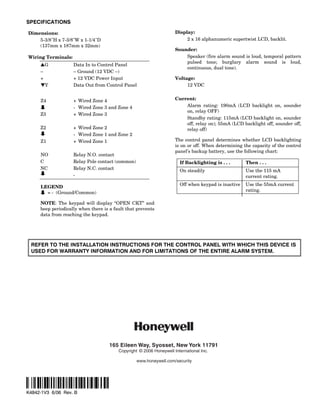
SPECIFICATIONS

Dimensions:                                                          Display:
    5-3/8H x 7-3/8W x 1-1/4D                                           2 x 16 alphanumeric supertwist LCD, backlit.
    (137mm x 187mm x 32mm)
                                                                     Sounder:
Wiring Terminals:                                                        Speaker (fire alarm sound is loud, temporal pattern
                                                                         pulsed tone; burglary alarm sound is loud,
     LG             Data In to Control Panel
                                                                         continuous, dual tone).
     –              – Ground (12 VDC –)
     +              + 12 VDC Power Input                             Voltage:
     MY             Data Out from Control Panel                           12 VDC


     Z4             + Wired Zone 4                                   Current:
                    - Wired Zone 3 and Zone 4                            Alarm rating: 190mA (LCD backlight on, sounder
                                                                         on, relay OFF)
     Z3             + Wired Zone 3
                                                                         Standby rating: 115mA (LCD backlight on, sounder
                                                                         off, relay on); 55mA (LCD backlight off, sounder off,
     Z2             + Wired Zone 2                                       relay off)
                    - Wired Zone 1 and Zone 2
     Z1             + Wired Zone 1                                   The control panel determines whether LCD backlighting
                                                                     is on or off. When determining the capacity of the control
                                                                     panel’s backup battery, use the following chart:
     NO             Relay N.O. contact
     C              Relay Pole contact (common)                        If Backlighting is . . .      Then . . .
     NC             Relay N.C. contact                                 On steadily                   Use the 115 mA
                    -                                                                                current rating.
                                                                       Off when keypad is inactive   Use the 55mA current
     LEGEND
                                                                                                     rating.
       = - (Ground/Common)

     NOTE: The keypad will display “OPEN CKT” and
     beep periodically when there is a fault that prevents
     data from reaching the keypad.


 REFER TO THE INSTALLATION INSTRUCTIONS FOR THE CONTROL PANEL WITH WHICH THIS DEVICE IS
 USED FOR WARRANTY INFORMATION AND FOR LIMITATIONS OF THE ENTIRE ALARM SYSTEM.


                                     165 Eileen Way, Syosset, New York 11791
                                         Copyright © 2006 Honeywell International Inc.

                                                  www.honeywell.com/security


‡K4842-1V3Ê
K4842-1V3 6/06 Rev. B

Honeywell 6164 us-install-guide

  • 1.
    K4842-1V3 6/06 Rev.B ADEMCO 6164/6164US KEYPAD With Built-in 4-Zone Expander and Relay Installation and Setup Guide GENERAL INFORMATION ZONES–INPUTS The 6164/6164US is a general-purpose keypad that The four 2K EOLR zones have 300mS response. A local provides four 2K EOLR zones and one form-C relay. The programming option allows selecting conventional EOLR general features of the 6164/6164US can be used with any type or double-balanced type for all zones as a group. ADEMCO control panel that supports the 6160 keypad. To Each double-balanced zone type supports up to 10 utilize zone/relay features of the 6164/6164US, the control sensors. Four 2K EOL resistors are furnished, as well as panel must be capable of supporting the 4229 ECP four additional 2K resistors for use when double-balanced expander module. Depending on the keypad option zones are used. selected, the zones can either be configured as EOLR or Do not use the zones on this keypad for commercial double-balanced supervised zones. Check the control fire applications. panel’s Installation Guide for the supervision type(s) supported. RELAY OUTPUTS One Form-C relay provides contacts rated 1A, 24V AC/DC. The internal relay is not intended for UL installations. CASE TAMPER An on-board tamper switch detects removal of case front KEYPAD DISPLAYS AND LEDS from case back, and removal of the case back from its The 6164/6164US has the following features: mounting surface. A local programming option allows you to disable the detection of a tamper condition. • Large backlit, 2-line, 32-character alphanumeric LCD. For tamper protection, an additional mounting screw • 16 large telephone-style backlit keys located behind a must be used in the case back, as shown in Figure 2. decorative door that swings down to provide access to the keys. When the 6164/6164US keypad is used in the addressable mode, it will report a tamper condition to the control The following table shows the LEDs and their functions: panel as a 4229 case tamper when the zone/relay feature LED Function is enabled, or as a general keypad tamper when the ARMED (Red) Lights when the system is armed in any mode. zone/relay feature is disabled. READY (Green) Lights when the system is ready to be armed. On newer control panels (e.g., Vista-20P and Vista- CPU (Yellow)* Lights when CPU failure is detected. 12/48 series) the tamper will be reported using the * 6164 Keypad only ECP address assigned to the Zone Expander. Note that the tamper feature will function only if the zone FUNCTION KEYS AND LABELS expander has been enabled; Zone 96 can then be The A, B, C and D keys are designed for use as “panic” used as a keypad panic. keys (e.g., fire, police, personal emergency, etc.) or for The 6164/6164US will not support general keypad single button arming functions as programmed in the tamper reporting when set to the non-addressable control panel. mode (keypad address 31). In the non-addressable The A, B, C, and D keys must be pressed and mode, tamper will be reported as if it were a “C” held down for at least two seconds to activate function key/zone 96. Program this zone as a Type 5 their programmed panic functions. Tamper Zone Type for proper reporting. Also, not all control panels support general keypad tamper A set of adhesive labels with typical panic symbols is reporting. Check with the control panel’s provided. Place the appropriate label in the indented area instructions. If the tamper is enabled, Zone 96 on each key, so that the user can easily identify each key’s cannot be used as a keypad panic. function. MOUNTING AND WIRING BUILT-IN SPEAKER The 6164/6164US has terminal blocks for connection to The built-in speaker has the following functions: keypad power and data wires, sensors/contacts zone wires, and relay contact wires. Removing the keypad’s • Produces warning sounds during alarm and trouble case back accesses these terminal blocks. conditions, and also during entry/exit delay periods. • Provides acknowledgment tones when keys are pressed, The 6164/6164US can be surface mounted directly to and confirmation tones for successful command entries. walls, or to a single- or double-gang U.S. style electrical box. Follow these steps to mount and wire the keypad:
  • 2.
    1. Push thetwo case release snaps at the bottom of the Wiring Table keypad with the blade of a medium screwdriver (this Keypad Control Panel Color will push in the release snap), then pull that side of the LG Data Out Data In Green case back away. Insert the screwdriver in the side of − GND − Aux Pwr Black the keypad (between the front and back case) and + +12VDC + Aux Pwr Red gently twist to release the side locking tab. Repeat for MY Data In Data Out Yellow the other side. Refer to Figure 1 for location of the case back release snaps and locking tabs. 5. Connect the wires for the four 2K EOLR zones to the six screw terminals on keypad PC board as shown in Figure 3 and as follows: Keypad Wired Zone ARMED READY CPU Z1 + Zone 1 LOCKING TAB - Zone 1 and Zone 2 return TO REMOVE REAR COVER PUSH IN THE TWO MOUNTING Z2 + Zone 2 SNAPS LOCATED ALONG THE BOTTOM OF THE KEYPAD AND LIFT COVER UP. Z3 + Zone 3 - Zone 3 and Zone 4 return NOTE: THE 6164US IS NOT MOUNTING Z4 + Zone 4 EQUIPPED WITH A RELEASE CPU LED SNAPS 6164-003-V6 Note: There is a common ground for zones 1 and 2, and one for zones 3 and 4. Figure 1. Removing the Case Back 6. Connect the zone contact’s wires (door strike, etc.) to 2. Mount the case back to a wall or to an electrical box the three relay terminals marked NC, NO, and C as using the 25mm-long self-tapping screws supplied shown in Figure 3 and as follows: (anchors for drywall are not supplied). Keypad Relay If you wish to tamper-protect the keypad for NO N.O. contact removal from the wall, use an additional mounting screw in the tamper hole in the case C Pole contact (common) back (see Figure 2 for location). NC N.C. contact 3. Pass the four power/data wires, wires for up to four - zones, and two or three relay contact wires through OPTIONAL CONVENTIONAL the opening in the case back. If surface wiring is being DOUBLE BALANCED EOLR used, wiring may be routed through the top or the 2K 2K bottom left-side breakout in the case back. See Figure TAMPER [Y] DATA IN 2K 2. The breakouts must be punched out using a CONTACTS N.O. [+] +12VDC IN screwdriver before mounting the case back. If desired, wires may be strain-relieved to the wire tie point on 2K TAMPER CONTACTS N.C. [-] GROUND (-12V) the inside of the case back with a tie wrap (not [G] DATA OUT supplied). BREAKOUT FOR SURFACE WIRING N.O. C. N.C. WIRE TIE POINT Y + G Z1 Z4 Z2 Z3 USE AN (Z1 (Z3 ADDITIONAL & & MOUNTING Z2) Z4) 6164-005-V2 SCREW HERE IF BACK CASE TAMPER IS TO BE USED Figure 3. Wiring Details 7. Reattach the keypad to the mounted case back. BREAKOUT FOR Attach the top of the keypad first, and then press the SURFACE bottom section down until it snaps into place WIRING MOUNTING securely. HOLES 6164-02-V0 8. Peel off the protective film on the LED and keypad Figure 2. Wiring Entry (Case Back) labels. 4. Connect the power/data wires to the four screw SETTING THE KEYPAD OPTIONS terminals on the keypad’s PC board marked as shown The 6164/6164US allows eight items to be programmed in Figure 3 and as follows: via local keypad programming mode: -2-
  • 3.
    • Keypad address • Tamper enable • Zone expander enable • Display option ZONE TYPE • Zone expander address • Sound option EOLR [1=DBALAN] DBALAN] • Zone type • Language option Either conventional EOL resistor supervised zones or These settings are maintained even when keypad power is double-balanced zones (see Fig. 3) may be selected removed. (default = conventional EOLR). Consult the panel’s The keypad options may only be programmed within 60 installation guide for proper zone type selection. Use seconds of applying power. After that, they are not the [✱] key to advance to the Tamper option. accessible for editing or viewing. The Address can still be viewed by holding down the 1 and 3 keys for approximately 6. By pressing the [1] key, you can toggle the Tamper three (3) seconds. To re-enter programming mode, remove Enable option (default = OFF). and reapply power and proceed as follows: Perform the following steps to change the keypad options. TAMPER 1. Enter the keypad's local program mode within 60 OFF [1 = ON] seconds of power-up by pressing and holding down the Refer to the control panel’s installation guide to see if [1] and [3] keys at the same time for 3 seconds. The the tamper feature is supported. Use the [✱] key to current keypad address will be displayed with the advance to the LCD display option. cursor under the "tens" digit. 7. By pressing either the [1], [2], or [3] keys you can CON ADDRESS = 31 select the LCD display option. DISPLAY 2. If the current keypad address setting is acceptable (the default = 31), press the [✱] key to advance to the Zone 1=ON 2=KEY 3=DIS Expander Enable field and go to step 3. Option 1: The display is always active. To change the current keypad address, first reset the current address to “00” as follows: press [0] to clear the Option 2: The display and LEDs are blanked until a “tens” digits. The cursor will move to the “ones” digit key is pressed, then displays for 45 position. Press [0] again to clear the “ones” digit. The seconds after the last key was pressed. cursor will move back to the “tens” digit position. Now Option 3: The display and LEDs are blanked 45 set the desired keypad address as follows: seconds after the panel is armed and Enter the proper “tens” digit for the keypad’s address. remains blanked until the panel is The cursor will move to the “ones” digit. Enter the disarmed (default = 1). proper “ones” digit for the keypad’s address. Press the Use the [✱] key to advance to the Sounds option. [✱] key to store the displayed address and to advance 8. By pressing the [1] key, you can toggle the Sounds to the Zone Expander Enable field. option (default = ALL SOUNDS). 3. By pressing the [1] key, you can toggle the Zone Expander Enable option (default = OFF). SOUNDS ZONE EXPANDER ALL [1=ALARM] OFF [1 = ON] a. To produce all sounds set the option to ALL SOUNDS. a. To use zone contacts or relay, set the option to ON. b. To produce only key click and alarm sounds set the Use the [✱] key to advance to the next option. The option to ALARM. Zone Expander Address field will appear. Go to Use the [✱] key to advance to the Language option. step 4. b. To use the 6164/6164US as regular keypad, set the Use only English as the language for UL installations. option to OFF. Use the [✱] key to advance to the next option. The Tamper field will appear. Go to 9. For languages other than English enter [*]. For step 6. English language press [#]. This will also store the 4. Set the Expander zone address in the same way as the displayed settings and exit from the local programming keypad address. mode. EXP ADDRESS = 01 LANGUAGE? * = YES # = NO Consult the control panel’s installation guide to select the Press [#] to advance to each of the listed languages. correct address (default = 01). Use the [✱] key to advance to the Zone Type option. Place the cursor placed to the left of the selected language and press [✱] to continue with the selected In order to use the built-in zones and relay, the panel language prompts. must be programmed in the same way as for a 4229 module. DEU ENG ESP FR 5. By pressing the [1] key, you can toggle the Zone Type option. IT NL RUS -3-
  • 4.
    SPECIFICATIONS Dimensions: Display: 5-3/8H x 7-3/8W x 1-1/4D 2 x 16 alphanumeric supertwist LCD, backlit. (137mm x 187mm x 32mm) Sounder: Wiring Terminals: Speaker (fire alarm sound is loud, temporal pattern pulsed tone; burglary alarm sound is loud, LG Data In to Control Panel continuous, dual tone). – – Ground (12 VDC –) + + 12 VDC Power Input Voltage: MY Data Out from Control Panel 12 VDC Z4 + Wired Zone 4 Current: - Wired Zone 3 and Zone 4 Alarm rating: 190mA (LCD backlight on, sounder on, relay OFF) Z3 + Wired Zone 3 Standby rating: 115mA (LCD backlight on, sounder off, relay on); 55mA (LCD backlight off, sounder off, Z2 + Wired Zone 2 relay off) - Wired Zone 1 and Zone 2 Z1 + Wired Zone 1 The control panel determines whether LCD backlighting is on or off. When determining the capacity of the control panel’s backup battery, use the following chart: NO Relay N.O. contact C Relay Pole contact (common) If Backlighting is . . . Then . . . NC Relay N.C. contact On steadily Use the 115 mA - current rating. Off when keypad is inactive Use the 55mA current LEGEND rating. = - (Ground/Common) NOTE: The keypad will display “OPEN CKT” and beep periodically when there is a fault that prevents data from reaching the keypad. REFER TO THE INSTALLATION INSTRUCTIONS FOR THE CONTROL PANEL WITH WHICH THIS DEVICE IS USED FOR WARRANTY INFORMATION AND FOR LIMITATIONS OF THE ENTIRE ALARM SYSTEM. 165 Eileen Way, Syosset, New York 11791 Copyright © 2006 Honeywell International Inc. www.honeywell.com/security ‡K4842-1V3Ê K4842-1V3 6/06 Rev. B