800-04965 8/09 Rev. B


                                                                                                                           ADEMCO CE3
                                                                                                                       Code Encryptor 3
                                      INSTALLATION AND SETUP GUIDE
GENERAL INFORMATION
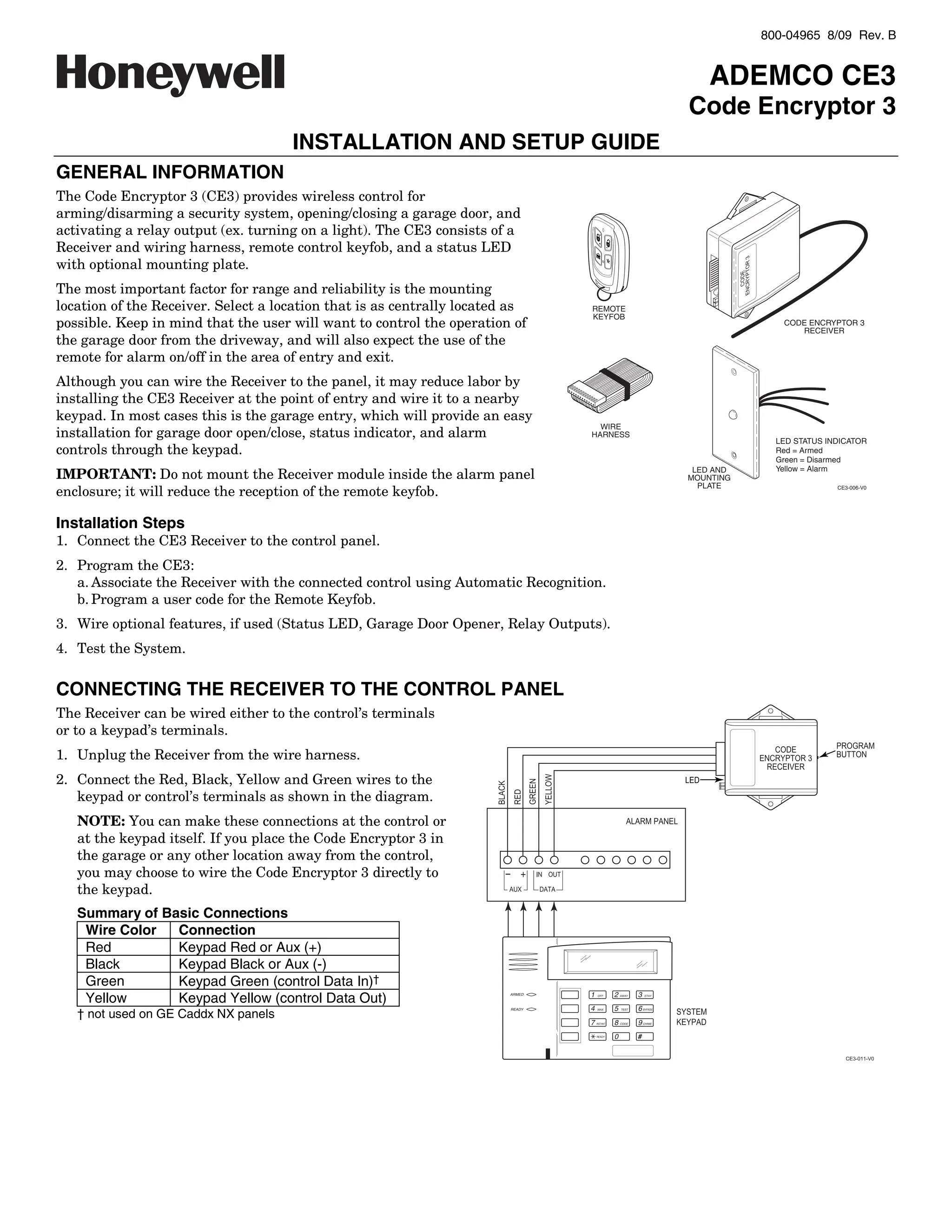
The Code Encryptor 3 (CE3) provides wireless control for
arming/disarming a security system, opening/closing a garage door, and
activating a relay output (ex. turning on a light). The CE3 consists of a
Receiver and wiring harness, remote control keyfob, and a status LED
with optional mounting plate.
The most important factor for range and reliability is the mounting
location of the Receiver. Select a location that is as centrally located as      REMOTE
                                                                                 KEYFOB
possible. Keep in mind that the user will want to control the operation of                                                           CODE ENCRYPTOR 3
                                                                                                                                        RECEIVER
the garage door from the driveway, and will also expect the use of the
remote for alarm on/off in the area of entry and exit.
Although you can wire the Receiver to the panel, it may reduce labor by
installing the CE3 Receiver at the point of entry and wire it to a nearby
keypad. In most cases this is the garage entry, which will provide an easy
                                                                                   WIRE
installation for garage door open/close, status indicator, and alarm             HARNESS
                                                                                                                                    LED STATUS INDICATOR
controls through the keypad.                                                                                                        Red = Armed
                                                                                                                                    Green = Disarmed
                                                                                                                                    Yellow = Alarm
IMPORTANT: Do not mount the Receiver module inside the alarm panel                                                      LED AND
                                                                                                                       MOUNTING
                                                                                                                         PLATE
enclosure; it will reduce the reception of the remote keyfob.                                                                                    CE3-006-V0


Installation Steps
1. Connect the CE3 Receiver to the control panel.
2. Program the CE3:
   a. Associate the Receiver with the connected control using Automatic Recognition.
   b. Program a user code for the Remote Keyfob.
3. Wire optional features, if used (Status LED, Garage Door Opener, Relay Outputs).
4. Test the System.


CONNECTING THE RECEIVER TO THE CONTROL PANEL
The Receiver can be wired either to the control’s terminals
or to a keypad’s terminals.
1. Unplug the Receiver from the wire harness.
2. Connect the Red, Black, Yellow and Green wires to the
   keypad or control’s terminals as shown in the diagram.
   NOTE: You can make these connections at the control or
   at the keypad itself. If you place the Code Encryptor 3 in
   the garage or any other location away from the control,
   you may choose to wire the Code Encryptor 3 directly to
   the keypad.
   Summary of Basic Connections
    Wire Color  Connection
    Red         Keypad Red or Aux (+)
    Black       Keypad Black or Aux (-)
    Green       Keypad Green (control Data In)†
    Yellow      Keypad Yellow (control Data Out)                        ARMED    1    OFF      2   AWAY   3   STAY


                                                                                 4             5          6
   † not used on GE Caddx NX panels
                                                                        READY        MAX           TEST       BYPASS


                                                                                 7   INSTANT   8   CODE   9   CHIME


                                                                                     READY     0          #
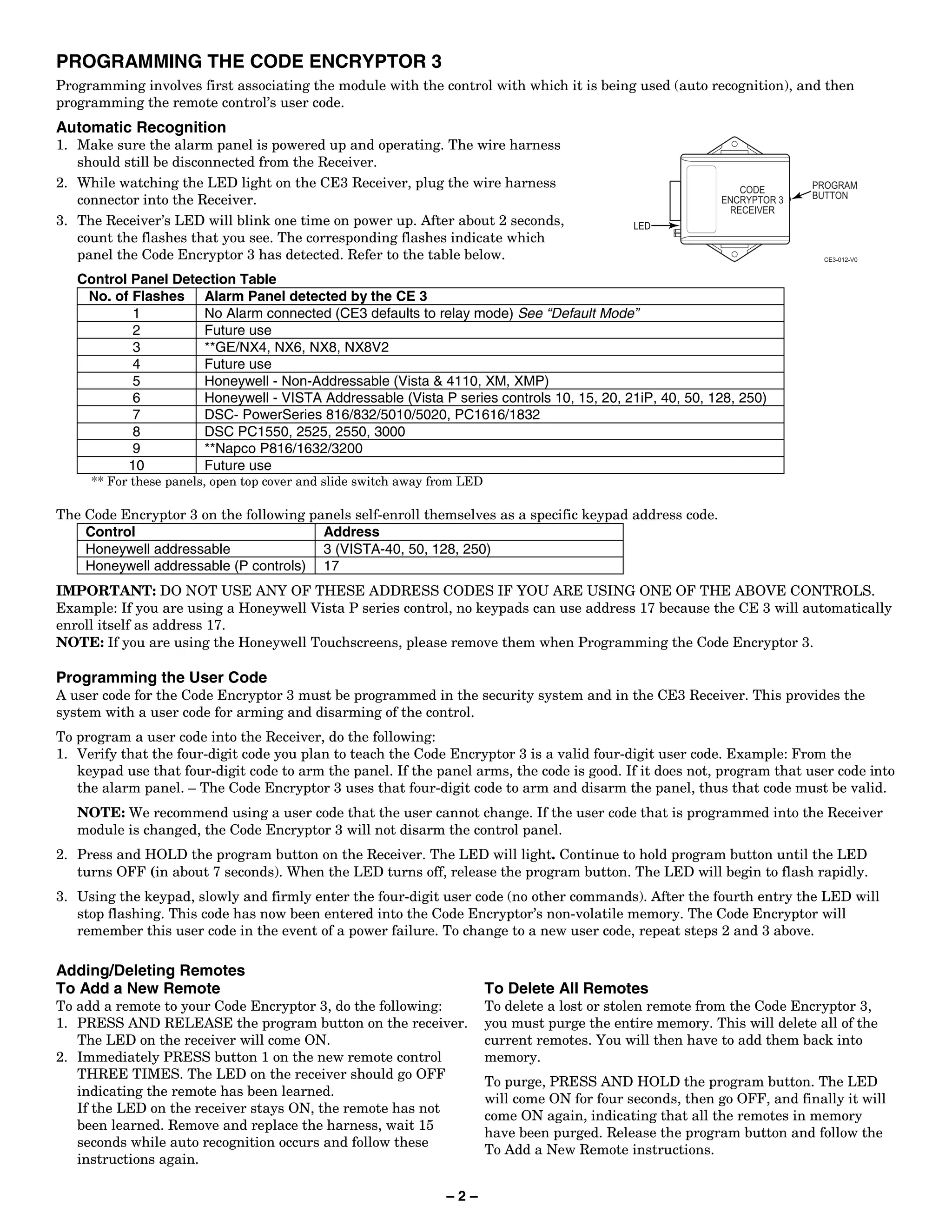
PROGRAMMING THE CODE ENCRYPTOR 3
Programming involves first associating the module with the control with which it is being used (auto recognition), and then
programming the remote control’s user code.
Automatic Recognition
1. Make sure the alarm panel is powered up and operating. The wire harness
   should still be disconnected from the Receiver.
2. While watching the LED light on the CE3 Receiver, plug the wire harness
   connector into the Receiver.
3. The Receiver’s LED will blink one time on power up. After about 2 seconds,
   count the flashes that you see. The corresponding flashes indicate which
   panel the Code Encryptor 3 has detected. Refer to the table below.
   Control Panel Detection Table
    No. of Flashes Alarm Panel detected by the CE 3
           1         No Alarm connected (CE3 defaults to relay mode) See “Default Mode”
           2         Future use
           3         **GE/NX4, NX6, NX8, NX8V2
           4         Future use
           5         Honeywell - Non-Addressable (Vista & 4110, XM, XMP)
           6         Honeywell - VISTA Addressable (Vista P series controls 10, 15, 20, 21iP, 40, 50, 128, 250)
           7         DSC- PowerSeries 816/832/5010/5020, PC1616/1832
           8         DSC PC1550, 2525, 2550, 3000
           9         **Napco P816/1632/3200
          10         Future use
     ** For these panels, open top cover and slide switch away from LED

The Code Encryptor 3 on the following panels self-enroll themselves as a specific keypad address code.
    Control                             Address
    Honeywell addressable               3 (VISTA-40, 50, 128, 250)
    Honeywell addressable (P controls) 17
IMPORTANT: DO NOT USE ANY OF THESE ADDRESS CODES IF YOU ARE USING ONE OF THE ABOVE CONTROLS.
Example: If you are using a Honeywell Vista P series control, no keypads can use address 17 because the CE 3 will automatically
enroll itself as address 17.
NOTE: If you are using the Honeywell Touchscreens, please remove them when Programming the Code Encryptor 3.

Programming the User Code
A user code for the Code Encryptor 3 must be programmed in the security system and in the CE3 Receiver. This provides the
system with a user code for arming and disarming of the control.
To program a user code into the Receiver, do the following:
1. Verify that the four-digit code you plan to teach the Code Encryptor 3 is a valid four-digit user code. Example: From the
   keypad use that four-digit code to arm the panel. If the panel arms, the code is good. If it does not, program that user code into
   the alarm panel. – The Code Encryptor 3 uses that four-digit code to arm and disarm the panel, thus that code must be valid.
   NOTE: We recommend using a user code that the user cannot change. If the user code that is programmed into the Receiver
   module is changed, the Code Encryptor 3 will not disarm the control panel.
2. Press and HOLD the program button on the Receiver. The LED will light. Continue to hold program button until the LED
   turns OFF (in about 7 seconds). When the LED turns off, release the program button. The LED will begin to flash rapidly.
3. Using the keypad, slowly and firmly enter the four-digit user code (no other commands). After the fourth entry the LED will
   stop flashing. This code has now been entered into the Code Encryptor’s non-volatile memory. The Code Encryptor will
   remember this user code in the event of a power failure. To change to a new user code, repeat steps 2 and 3 above.

Adding/Deleting Remotes
To Add a New Remote                                                       To Delete All Remotes
To add a remote to your Code Encryptor 3, do the following:               To delete a lost or stolen remote from the Code Encryptor 3,
1. PRESS AND RELEASE the program button on the receiver.                  you must purge the entire memory. This will delete all of the
   The LED on the receiver will come ON.                                  current remotes. You will then have to add them back into
2. Immediately PRESS button 1 on the new remote control                   memory.
   THREE TIMES. The LED on the receiver should go OFF
                                                                          To purge, PRESS AND HOLD the program button. The LED
   indicating the remote has been learned.
                                                                          will come ON for four seconds, then go OFF, and finally it will
   If the LED on the receiver stays ON, the remote has not
                                                                          come ON again, indicating that all the remotes in memory
   been learned. Remove and replace the harness, wait 15
                                                                          have been purged. Release the program button and follow the
   seconds while auto recognition occurs and follow these
                                                                          To Add a New Remote instructions.
   instructions again.

                                                                –2–
WIRING FOR OPTIONAL FEATURES AND APPLICATIONS
   Summary of Harness Wire Functions
     Purpose           Wire Color        Function
                       Red               Keypad Red or Aux (+12VDC)
     Keypad            Black             Keypad Black or Aux (–)
     Connections       Green             Keypad Green (control Data In); Not Used on GE Caddx NX panels
                       Yellow            Keypad Yellow (control Data Out)
                       Purple            LED Status Light Purple wire (Red light)
     LED Status
                       White/Purple      LED Status Light white/purple (Green light)
                       Blue/Green        Channel 4 N/C (5amp)
     Relay Output
                       Brown/White       Channel 4 N/O (5amp)
     Button
                       Brown             Channel 4 Common (5amp)
     Garage Door       White             Channel 3 Common (Garage Door Pushbutton)
     Opener            Red/White         Channel 3 N/O relay (Garage Door Pushbutton)
     Entry/Exit zone   Gray              Channel 1 (-) momentary output

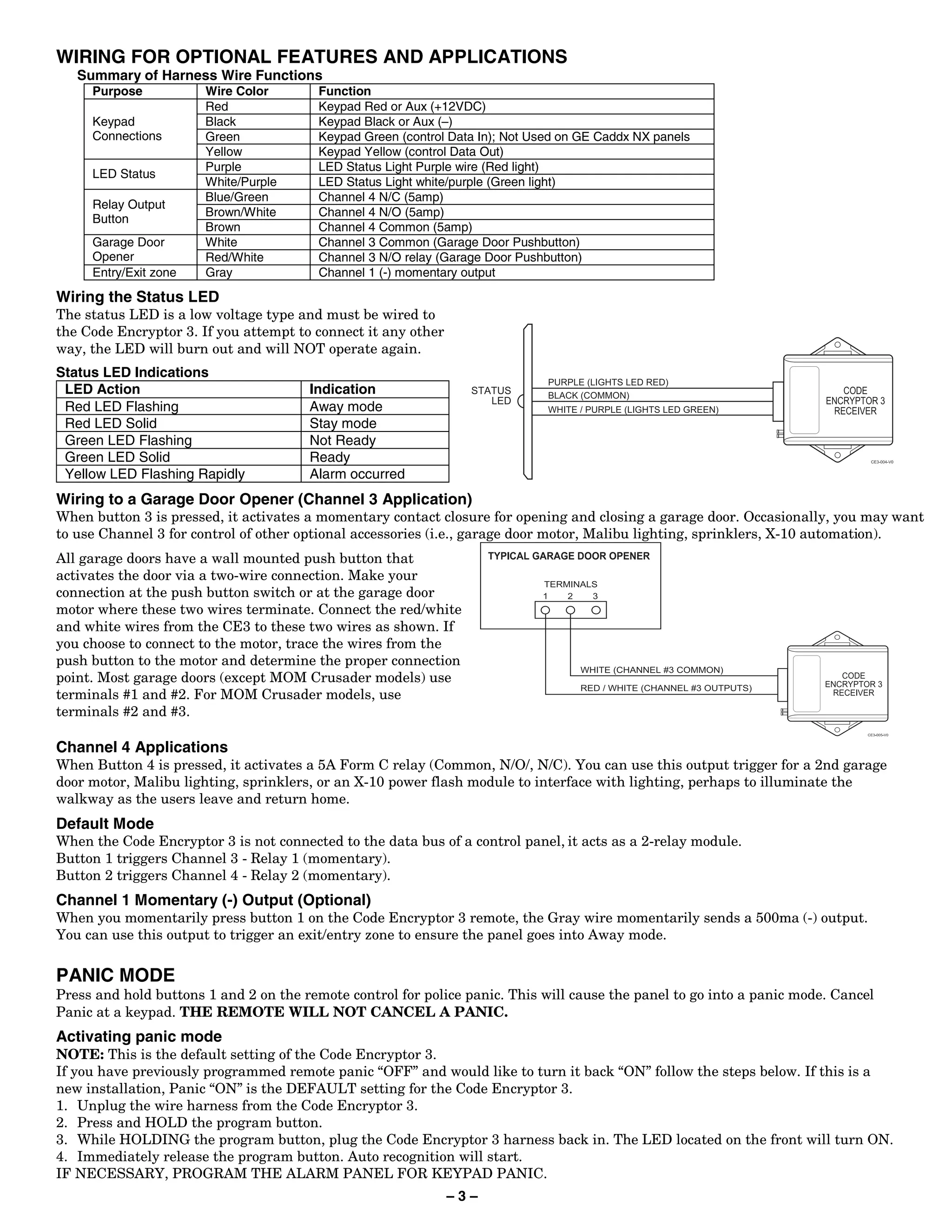
Wiring the Status LED
The status LED is a low voltage type and must be wired to
the Code Encryptor 3. If you attempt to connect it any other
way, the LED will burn out and will NOT operate again.
Status LED Indications
 LED Action                            Indication
 Red LED Flashing                      Away mode
 Red LED Solid                         Stay mode
 Green LED Flashing                    Not Ready
 Green LED Solid                       Ready
 Yellow LED Flashing Rapidly           Alarm occurred
Wiring to a Garage Door Opener (Channel 3 Application)
When button 3 is pressed, it activates a momentary contact closure for opening and closing a garage door. Occasionally, you may want
to use Channel 3 for control of other optional accessories (i.e., garage door motor, Malibu lighting, sprinklers, X-10 automation).
All garage doors have a wall mounted push button that
activates the door via a two-wire connection. Make your
connection at the push button switch or at the garage door
motor where these two wires terminate. Connect the red/white
and white wires from the CE3 to these two wires as shown. If
you choose to connect to the motor, trace the wires from the
push button to the motor and determine the proper connection
point. Most garage doors (except MOM Crusader models) use
terminals #1 and #2. For MOM Crusader models, use
terminals #2 and #3.

Channel 4 Applications
When Button 4 is pressed, it activates a 5A Form C relay (Common, N/O/, N/C). You can use this output trigger for a 2nd garage
door motor, Malibu lighting, sprinklers, or an X-10 power flash module to interface with lighting, perhaps to illuminate the
walkway as the users leave and return home.
Default Mode
When the Code Encryptor 3 is not connected to the data bus of a control panel, it acts as a 2-relay module.
Button 1 triggers Channel 3 - Relay 1 (momentary).
Button 2 triggers Channel 4 - Relay 2 (momentary).
Channel 1 Momentary (-) Output (Optional)
When you momentarily press button 1 on the Code Encryptor 3 remote, the Gray wire momentarily sends a 500ma (-) output.
You can use this output to trigger an exit/entry zone to ensure the panel goes into Away mode.


PANIC MODE
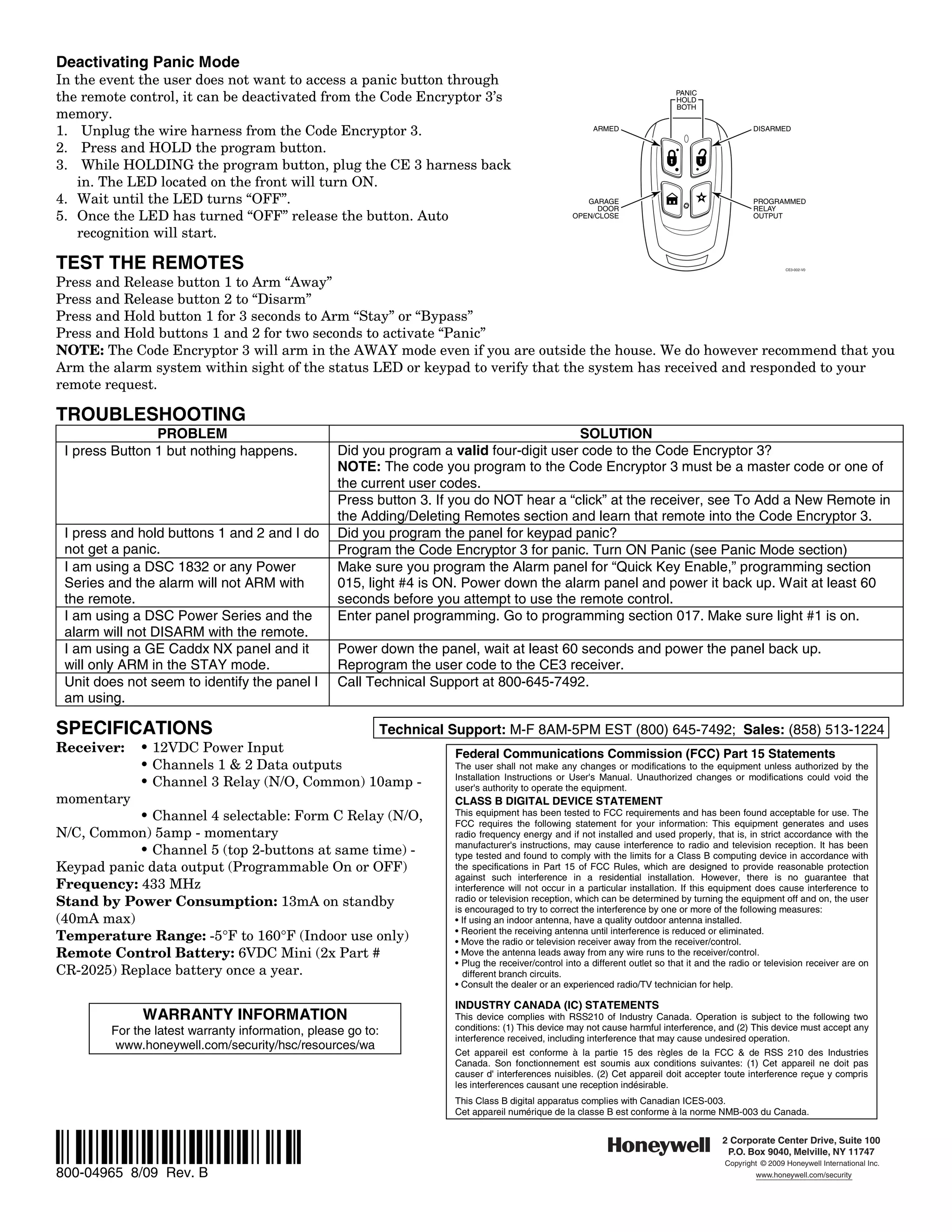
Press and hold buttons 1 and 2 on the remote control for police panic. This will cause the panel to go into a panic mode. Cancel
Panic at a keypad. THE REMOTE WILL NOT CANCEL A PANIC.
Activating panic mode
NOTE: This is the default setting of the Code Encryptor 3.
If you have previously programmed remote panic “OFF” and would like to turn it back “ON” follow the steps below. If this is a
new installation, Panic “ON” is the DEFAULT setting for the Code Encryptor 3.
1. Unplug the wire harness from the Code Encryptor 3.
2. Press and HOLD the program button.
3. While HOLDING the program button, plug the Code Encryptor 3 harness back in. The LED located on the front will turn ON.
4. Immediately release the program button. Auto recognition will start.
IF NECESSARY, PROGRAM THE ALARM PANEL FOR KEYPAD PANIC.
                                                               –3–
Deactivating Panic Mode
In the event the user does not want to access a panic button through
the remote control, it can be deactivated from the Code Encryptor 3’s                                                           PANIC
                                                                                                                                HOLD
                                                                                                                                BOTH
memory.
1. Unplug the wire harness from the Code Encryptor 3.                                                      ARMED                                     DISARMED

2. Press and HOLD the program button.
3. While HOLDING the program button, plug the CE 3 harness back
    in. The LED located on the front will turn ON.
4. Wait until the LED turns “OFF”.                                                                       GARAGE                                      PROGRAMMED
                                                                                                            DOOR                                     RELAY
5. Once the LED has turned “OFF” release the button. Auto                                             OPEN/CLOSE                                     OUTPUT

    recognition will start.

TEST THE REMOTES                                                                                                                                              CE3-002-V0


Press and Release button 1 to Arm “Away”
Press and Release button 2 to “Disarm”
Press and Hold button 1 for 3 seconds to Arm “Stay” or “Bypass”
Press and Hold buttons 1 and 2 for two seconds to activate “Panic”
NOTE: The Code Encryptor 3 will arm in the AWAY mode even if you are outside the house. We do however recommend that you
Arm the alarm system within sight of the status LED or keypad to verify that the system has received and responded to your
remote request.

TROUBLESHOOTING
                PROBLEM                                                                  SOLUTION
 I press Button 1 but nothing happens.            Did you program a valid four-digit user code to the Code Encryptor 3?
                                                  NOTE: The code you program to the Code Encryptor 3 must be a master code or one of
                                                  the current user codes.
                                                  Press button 3. If you do NOT hear a “click” at the receiver, see To Add a New Remote in
                                                  the Adding/Deleting Remotes section and learn that remote into the Code Encryptor 3.
 I press and hold buttons 1 and 2 and I do        Did you program the panel for keypad panic?
 not get a panic.                                 Program the Code Encryptor 3 for panic. Turn ON Panic (see Panic Mode section)
 I am using a DSC 1832 or any Power               Make sure you program the Alarm panel for “Quick Key Enable,” programming section
 Series and the alarm will not ARM with           015, light #4 is ON. Power down the alarm panel and power it back up. Wait at least 60
 the remote.                                      seconds before you attempt to use the remote control.
 I am using a DSC Power Series and the            Enter panel programming. Go to programming section 017. Make sure light #1 is on.
 alarm will not DISARM with the remote.
 I am using a GE Caddx NX panel and it            Power down the panel, wait at least 60 seconds and power the panel back up.
 will only ARM in the STAY mode.                  Reprogram the user code to the CE3 receiver.
 Unit does not seem to identify the panel I       Call Technical Support at 800-645-7492.
 am using.

SPECIFICATIONS                                Technical Support: M-F 8AM-5PM EST (800) 645-7492; Sales: (858) 513-1224
Receiver:    • 12VDC Power Input                         Federal Communications Commission (FCC) Part 15 Statements
             • Channels 1 & 2 Data outputs               The user shall not make any changes or modifications to the equipment unless authorized by the
                                                         Installation Instructions or User's Manual. Unauthorized changes or modifications could void the
             • Channel 3 Relay (N/O, Common) 10amp -     user's authority to operate the equipment.
momentary                                                               CLASS B DIGITAL DEVICE STATEMENT
           • Channel 4 selectable: Form C Relay (N/O,                   This equipment has been tested to FCC requirements and has been found acceptable for use. The
                                                                        FCC requires the following statement for your information: This equipment generates and uses
N/C, Common) 5amp - momentary                                           radio frequency energy and if not installed and used properly, that is, in strict accordance with the
                                                                        manufacturer's instructions, may cause interference to radio and television reception. It has been
           • Channel 5 (top 2-buttons at same time) -                   type tested and found to comply with the limits for a Class B computing device in accordance with
Keypad panic data output (Programmable On or OFF)                       the specifications in Part 15 of FCC Rules, which are designed to provide reasonable protection
                                                                        against such interference in a residential installation. However, there is no guarantee that
Frequency: 433 MHz                                                      interference will not occur in a particular installation. If this equipment does cause interference to
Stand by Power Consumption: 13mA on standby                             radio or television reception, which can be determined by turning the equipment off and on, the user
                                                                        is encouraged to try to correct the interference by one or more of the following measures:
(40mA max)                                                              • If using an indoor antenna, have a quality outdoor antenna installed.
                                                                        • Reorient the receiving antenna until interference is reduced or eliminated.
Temperature Range: -5°F to 160°F (Indoor use only)                      • Move the radio or television receiver away from the receiver/control.
Remote Control Battery: 6VDC Mini (2x Part #                            • Move the antenna leads away from any wire runs to the receiver/control.
                                                                        • Plug the receiver/control into a different outlet so that it and the radio or television receiver are on
CR-2025) Replace battery once a year.                                     different branch circuits.
                                                                        • Consult the dealer or an experienced radio/TV technician for help.

                                                                        INDUSTRY CANADA (IC) STATEMENTS
             WARRANTY INFORMATION                                       This device complies with RSS210 of Industry Canada. Operation is subject to the following two
        For the latest warranty information, please go to:              conditions: (1) This device may not cause harmful interference, and (2) This device must accept any
                                                                        interference received, including interference that may cause undesired operation.
         www.honeywell.com/security/hsc/resources/wa
                                                                        Cet appareil est conforme à la partie 15 des règles de la FCC & de RSS 210 des Industries
                                                                        Canada. Son fonctionnement est soumis aux conditions suivantes: (1) Cet appareil ne doit pas
                                                                        causer d' interferences nuisibles. (2) Cet appareil doit accepter toute interference reçue y compris
                                                                        les interferences causant une reception indésirable.
                                                                        This Class B digital apparatus complies with Canadian ICES-003.
                                                                        Cet appareil numérique de la classe B est conforme à la norme NMB-003 du Canada.


Ê800-04965iŠ                                                                                                                                2 Corporate Center Drive, Suite 100
                                                                                                                                             P.O. Box 9040, Melville, NY 11747
                                                                                                                                             Copyright © 2009 Honeywell International Inc.
800-04965 8/09 Rev. B                                                                                                                                 www.honeywell.com/security

Honeywell ce3-install-guide

  • 1.
    800-04965 8/09 Rev.B ADEMCO CE3 Code Encryptor 3 INSTALLATION AND SETUP GUIDE GENERAL INFORMATION The Code Encryptor 3 (CE3) provides wireless control for arming/disarming a security system, opening/closing a garage door, and activating a relay output (ex. turning on a light). The CE3 consists of a Receiver and wiring harness, remote control keyfob, and a status LED with optional mounting plate. The most important factor for range and reliability is the mounting location of the Receiver. Select a location that is as centrally located as REMOTE KEYFOB possible. Keep in mind that the user will want to control the operation of CODE ENCRYPTOR 3 RECEIVER the garage door from the driveway, and will also expect the use of the remote for alarm on/off in the area of entry and exit. Although you can wire the Receiver to the panel, it may reduce labor by installing the CE3 Receiver at the point of entry and wire it to a nearby keypad. In most cases this is the garage entry, which will provide an easy WIRE installation for garage door open/close, status indicator, and alarm HARNESS LED STATUS INDICATOR controls through the keypad. Red = Armed Green = Disarmed Yellow = Alarm IMPORTANT: Do not mount the Receiver module inside the alarm panel LED AND MOUNTING PLATE enclosure; it will reduce the reception of the remote keyfob. CE3-006-V0 Installation Steps 1. Connect the CE3 Receiver to the control panel. 2. Program the CE3: a. Associate the Receiver with the connected control using Automatic Recognition. b. Program a user code for the Remote Keyfob. 3. Wire optional features, if used (Status LED, Garage Door Opener, Relay Outputs). 4. Test the System. CONNECTING THE RECEIVER TO THE CONTROL PANEL The Receiver can be wired either to the control’s terminals or to a keypad’s terminals. 1. Unplug the Receiver from the wire harness. 2. Connect the Red, Black, Yellow and Green wires to the keypad or control’s terminals as shown in the diagram. NOTE: You can make these connections at the control or at the keypad itself. If you place the Code Encryptor 3 in the garage or any other location away from the control, you may choose to wire the Code Encryptor 3 directly to the keypad. Summary of Basic Connections Wire Color Connection Red Keypad Red or Aux (+) Black Keypad Black or Aux (-) Green Keypad Green (control Data In)† Yellow Keypad Yellow (control Data Out) ARMED 1 OFF 2 AWAY 3 STAY 4 5 6 † not used on GE Caddx NX panels READY MAX TEST BYPASS 7 INSTANT 8 CODE 9 CHIME READY 0 #
  • 2.
    PROGRAMMING THE CODEENCRYPTOR 3 Programming involves first associating the module with the control with which it is being used (auto recognition), and then programming the remote control’s user code. Automatic Recognition 1. Make sure the alarm panel is powered up and operating. The wire harness should still be disconnected from the Receiver. 2. While watching the LED light on the CE3 Receiver, plug the wire harness connector into the Receiver. 3. The Receiver’s LED will blink one time on power up. After about 2 seconds, count the flashes that you see. The corresponding flashes indicate which panel the Code Encryptor 3 has detected. Refer to the table below. Control Panel Detection Table No. of Flashes Alarm Panel detected by the CE 3 1 No Alarm connected (CE3 defaults to relay mode) See “Default Mode” 2 Future use 3 **GE/NX4, NX6, NX8, NX8V2 4 Future use 5 Honeywell - Non-Addressable (Vista & 4110, XM, XMP) 6 Honeywell - VISTA Addressable (Vista P series controls 10, 15, 20, 21iP, 40, 50, 128, 250) 7 DSC- PowerSeries 816/832/5010/5020, PC1616/1832 8 DSC PC1550, 2525, 2550, 3000 9 **Napco P816/1632/3200 10 Future use ** For these panels, open top cover and slide switch away from LED The Code Encryptor 3 on the following panels self-enroll themselves as a specific keypad address code. Control Address Honeywell addressable 3 (VISTA-40, 50, 128, 250) Honeywell addressable (P controls) 17 IMPORTANT: DO NOT USE ANY OF THESE ADDRESS CODES IF YOU ARE USING ONE OF THE ABOVE CONTROLS. Example: If you are using a Honeywell Vista P series control, no keypads can use address 17 because the CE 3 will automatically enroll itself as address 17. NOTE: If you are using the Honeywell Touchscreens, please remove them when Programming the Code Encryptor 3. Programming the User Code A user code for the Code Encryptor 3 must be programmed in the security system and in the CE3 Receiver. This provides the system with a user code for arming and disarming of the control. To program a user code into the Receiver, do the following: 1. Verify that the four-digit code you plan to teach the Code Encryptor 3 is a valid four-digit user code. Example: From the keypad use that four-digit code to arm the panel. If the panel arms, the code is good. If it does not, program that user code into the alarm panel. – The Code Encryptor 3 uses that four-digit code to arm and disarm the panel, thus that code must be valid. NOTE: We recommend using a user code that the user cannot change. If the user code that is programmed into the Receiver module is changed, the Code Encryptor 3 will not disarm the control panel. 2. Press and HOLD the program button on the Receiver. The LED will light. Continue to hold program button until the LED turns OFF (in about 7 seconds). When the LED turns off, release the program button. The LED will begin to flash rapidly. 3. Using the keypad, slowly and firmly enter the four-digit user code (no other commands). After the fourth entry the LED will stop flashing. This code has now been entered into the Code Encryptor’s non-volatile memory. The Code Encryptor will remember this user code in the event of a power failure. To change to a new user code, repeat steps 2 and 3 above. Adding/Deleting Remotes To Add a New Remote To Delete All Remotes To add a remote to your Code Encryptor 3, do the following: To delete a lost or stolen remote from the Code Encryptor 3, 1. PRESS AND RELEASE the program button on the receiver. you must purge the entire memory. This will delete all of the The LED on the receiver will come ON. current remotes. You will then have to add them back into 2. Immediately PRESS button 1 on the new remote control memory. THREE TIMES. The LED on the receiver should go OFF To purge, PRESS AND HOLD the program button. The LED indicating the remote has been learned. will come ON for four seconds, then go OFF, and finally it will If the LED on the receiver stays ON, the remote has not come ON again, indicating that all the remotes in memory been learned. Remove and replace the harness, wait 15 have been purged. Release the program button and follow the seconds while auto recognition occurs and follow these To Add a New Remote instructions. instructions again. –2–
  • 3.
    WIRING FOR OPTIONALFEATURES AND APPLICATIONS Summary of Harness Wire Functions Purpose Wire Color Function Red Keypad Red or Aux (+12VDC) Keypad Black Keypad Black or Aux (–) Connections Green Keypad Green (control Data In); Not Used on GE Caddx NX panels Yellow Keypad Yellow (control Data Out) Purple LED Status Light Purple wire (Red light) LED Status White/Purple LED Status Light white/purple (Green light) Blue/Green Channel 4 N/C (5amp) Relay Output Brown/White Channel 4 N/O (5amp) Button Brown Channel 4 Common (5amp) Garage Door White Channel 3 Common (Garage Door Pushbutton) Opener Red/White Channel 3 N/O relay (Garage Door Pushbutton) Entry/Exit zone Gray Channel 1 (-) momentary output Wiring the Status LED The status LED is a low voltage type and must be wired to the Code Encryptor 3. If you attempt to connect it any other way, the LED will burn out and will NOT operate again. Status LED Indications LED Action Indication Red LED Flashing Away mode Red LED Solid Stay mode Green LED Flashing Not Ready Green LED Solid Ready Yellow LED Flashing Rapidly Alarm occurred Wiring to a Garage Door Opener (Channel 3 Application) When button 3 is pressed, it activates a momentary contact closure for opening and closing a garage door. Occasionally, you may want to use Channel 3 for control of other optional accessories (i.e., garage door motor, Malibu lighting, sprinklers, X-10 automation). All garage doors have a wall mounted push button that activates the door via a two-wire connection. Make your connection at the push button switch or at the garage door motor where these two wires terminate. Connect the red/white and white wires from the CE3 to these two wires as shown. If you choose to connect to the motor, trace the wires from the push button to the motor and determine the proper connection point. Most garage doors (except MOM Crusader models) use terminals #1 and #2. For MOM Crusader models, use terminals #2 and #3. Channel 4 Applications When Button 4 is pressed, it activates a 5A Form C relay (Common, N/O/, N/C). You can use this output trigger for a 2nd garage door motor, Malibu lighting, sprinklers, or an X-10 power flash module to interface with lighting, perhaps to illuminate the walkway as the users leave and return home. Default Mode When the Code Encryptor 3 is not connected to the data bus of a control panel, it acts as a 2-relay module. Button 1 triggers Channel 3 - Relay 1 (momentary). Button 2 triggers Channel 4 - Relay 2 (momentary). Channel 1 Momentary (-) Output (Optional) When you momentarily press button 1 on the Code Encryptor 3 remote, the Gray wire momentarily sends a 500ma (-) output. You can use this output to trigger an exit/entry zone to ensure the panel goes into Away mode. PANIC MODE Press and hold buttons 1 and 2 on the remote control for police panic. This will cause the panel to go into a panic mode. Cancel Panic at a keypad. THE REMOTE WILL NOT CANCEL A PANIC. Activating panic mode NOTE: This is the default setting of the Code Encryptor 3. If you have previously programmed remote panic “OFF” and would like to turn it back “ON” follow the steps below. If this is a new installation, Panic “ON” is the DEFAULT setting for the Code Encryptor 3. 1. Unplug the wire harness from the Code Encryptor 3. 2. Press and HOLD the program button. 3. While HOLDING the program button, plug the Code Encryptor 3 harness back in. The LED located on the front will turn ON. 4. Immediately release the program button. Auto recognition will start. IF NECESSARY, PROGRAM THE ALARM PANEL FOR KEYPAD PANIC. –3–
  • 4.
    Deactivating Panic Mode Inthe event the user does not want to access a panic button through the remote control, it can be deactivated from the Code Encryptor 3’s PANIC HOLD BOTH memory. 1. Unplug the wire harness from the Code Encryptor 3. ARMED DISARMED 2. Press and HOLD the program button. 3. While HOLDING the program button, plug the CE 3 harness back in. The LED located on the front will turn ON. 4. Wait until the LED turns “OFF”. GARAGE PROGRAMMED DOOR RELAY 5. Once the LED has turned “OFF” release the button. Auto OPEN/CLOSE OUTPUT recognition will start. TEST THE REMOTES CE3-002-V0 Press and Release button 1 to Arm “Away” Press and Release button 2 to “Disarm” Press and Hold button 1 for 3 seconds to Arm “Stay” or “Bypass” Press and Hold buttons 1 and 2 for two seconds to activate “Panic” NOTE: The Code Encryptor 3 will arm in the AWAY mode even if you are outside the house. We do however recommend that you Arm the alarm system within sight of the status LED or keypad to verify that the system has received and responded to your remote request. TROUBLESHOOTING PROBLEM SOLUTION I press Button 1 but nothing happens. Did you program a valid four-digit user code to the Code Encryptor 3? NOTE: The code you program to the Code Encryptor 3 must be a master code or one of the current user codes. Press button 3. If you do NOT hear a “click” at the receiver, see To Add a New Remote in the Adding/Deleting Remotes section and learn that remote into the Code Encryptor 3. I press and hold buttons 1 and 2 and I do Did you program the panel for keypad panic? not get a panic. Program the Code Encryptor 3 for panic. Turn ON Panic (see Panic Mode section) I am using a DSC 1832 or any Power Make sure you program the Alarm panel for “Quick Key Enable,” programming section Series and the alarm will not ARM with 015, light #4 is ON. Power down the alarm panel and power it back up. Wait at least 60 the remote. seconds before you attempt to use the remote control. I am using a DSC Power Series and the Enter panel programming. Go to programming section 017. Make sure light #1 is on. alarm will not DISARM with the remote. I am using a GE Caddx NX panel and it Power down the panel, wait at least 60 seconds and power the panel back up. will only ARM in the STAY mode. Reprogram the user code to the CE3 receiver. Unit does not seem to identify the panel I Call Technical Support at 800-645-7492. am using. SPECIFICATIONS Technical Support: M-F 8AM-5PM EST (800) 645-7492; Sales: (858) 513-1224 Receiver: • 12VDC Power Input Federal Communications Commission (FCC) Part 15 Statements • Channels 1 & 2 Data outputs The user shall not make any changes or modifications to the equipment unless authorized by the Installation Instructions or User's Manual. Unauthorized changes or modifications could void the • Channel 3 Relay (N/O, Common) 10amp - user's authority to operate the equipment. momentary CLASS B DIGITAL DEVICE STATEMENT • Channel 4 selectable: Form C Relay (N/O, This equipment has been tested to FCC requirements and has been found acceptable for use. The FCC requires the following statement for your information: This equipment generates and uses N/C, Common) 5amp - momentary radio frequency energy and if not installed and used properly, that is, in strict accordance with the manufacturer's instructions, may cause interference to radio and television reception. It has been • Channel 5 (top 2-buttons at same time) - type tested and found to comply with the limits for a Class B computing device in accordance with Keypad panic data output (Programmable On or OFF) the specifications in Part 15 of FCC Rules, which are designed to provide reasonable protection against such interference in a residential installation. However, there is no guarantee that Frequency: 433 MHz interference will not occur in a particular installation. If this equipment does cause interference to Stand by Power Consumption: 13mA on standby radio or television reception, which can be determined by turning the equipment off and on, the user is encouraged to try to correct the interference by one or more of the following measures: (40mA max) • If using an indoor antenna, have a quality outdoor antenna installed. • Reorient the receiving antenna until interference is reduced or eliminated. Temperature Range: -5°F to 160°F (Indoor use only) • Move the radio or television receiver away from the receiver/control. Remote Control Battery: 6VDC Mini (2x Part # • Move the antenna leads away from any wire runs to the receiver/control. • Plug the receiver/control into a different outlet so that it and the radio or television receiver are on CR-2025) Replace battery once a year. different branch circuits. • Consult the dealer or an experienced radio/TV technician for help. INDUSTRY CANADA (IC) STATEMENTS WARRANTY INFORMATION This device complies with RSS210 of Industry Canada. Operation is subject to the following two For the latest warranty information, please go to: conditions: (1) This device may not cause harmful interference, and (2) This device must accept any interference received, including interference that may cause undesired operation. www.honeywell.com/security/hsc/resources/wa Cet appareil est conforme à la partie 15 des règles de la FCC & de RSS 210 des Industries Canada. Son fonctionnement est soumis aux conditions suivantes: (1) Cet appareil ne doit pas causer d' interferences nuisibles. (2) Cet appareil doit accepter toute interference reçue y compris les interferences causant une reception indésirable. This Class B digital apparatus complies with Canadian ICES-003. Cet appareil numérique de la classe B est conforme à la norme NMB-003 du Canada. Ê800-04965iŠ 2 Corporate Center Drive, Suite 100 P.O. Box 9040, Melville, NY 11747 Copyright © 2009 Honeywell International Inc. 800-04965 8/09 Rev. B www.honeywell.com/security