High Performance JavaScriptNicholas C. Zakas| nczonline.net
Who's this guy?Co-Creator csslint.netContributor,Creator of YUI TestEx-tech leadYahoo!AuthorLead AuthorContributorLead Author
@slicknet(complaints: @brendaneich)
Does JavaScript performance matter?
All browsers now haveoptimizing JavaScript enginesTracemonkey/JaegarMonkey(3.5+)V8(all)Nitro(4+)Chakra(9+)Karakan(10.5+)
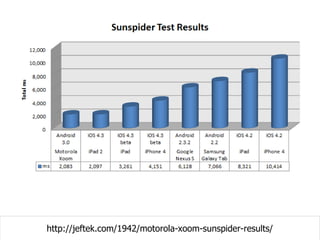
http://ie.microsoft.com/testdrive/benchmarks/sunspider/default.html
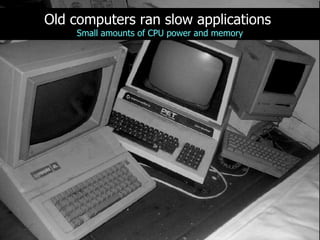
Old computers ran slow applicationsSmall amounts of CPU power and memory
New computers are generally faster butslow applications still existMore CPU + more memory = less disciplined application development
Oh yeah, one more thing
It's still possible to write slow JavaScript
JavaScript performancedirectlyaffects user experience
The UI Threadaka Browser Event Loop
The browser UI thread is responsible forboth UI updates and JavaScript executionOnly one can happen at a time
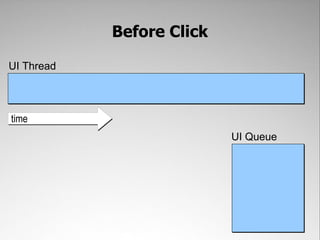
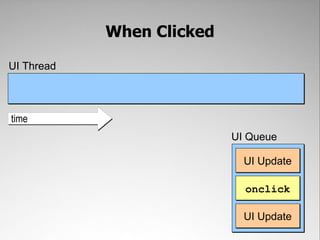
Jobs for UI updates and JavaScript executionare added to a UI queueEach job must wait in line for its turn to execute
<button id="btn" style="font-size: 30px; padding: 0.5em 1em">Click Me</button><script type="text/javascript">window.onload = function(){   document.getElementById("btn").onclick = function(){//do something   };};</script>
Before ClickUI ThreadtimeUI Queue
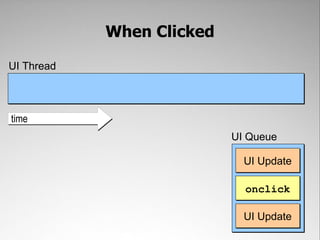
When ClickedUI ThreadtimeUI QueueUI UpdateonclickUI Update
When ClickedUI ThreadUI UpdatetimeUI QueueonclickDraw down stateUI Update
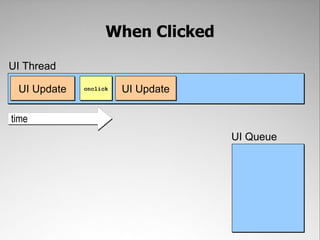
When ClickedUI ThreadonclickUI UpdatetimeUI QueueUI Update
When ClickedUI ThreadonclickUI UpdateUI UpdatetimeUI QueueDraw up state
No UI updates while JavaScript is executing
JavaScript May Cause UI Update<button id="btn" style="font-size: 30px; padding: 0.5em 1em">Click Me</button><script type="text/javascript">window.onload = function(){   document.getElementById("btn").onclick = function(){       var div = document.createElement(“div”);       div.className = “tip”;       div.innerHTML = “You clicked me!”;       document.body.appendChild(div);   };};</script>
A UI update must use the latest info available
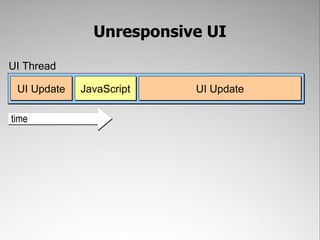
Long-running JavaScript=Unresponsive UI
Responsive UIUI ThreadJavaScriptUI UpdateUI Updatetime
Unresponsive UIUI ThreadJavaScriptUI UpdateUI Updatetime
The longer JavaScript runs,the worse the user experience
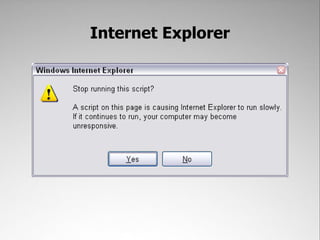
The runaway script timer prevents JavaScriptfrom running for too longEach browser imposes its own limit (except Opera)
Internet Explorer
Firefox
Safari
Chrome
Runaway Script Timer LimitsInternet Explorer: 5 million statementsFirefox: 10 secondsSafari: 5 secondsChrome: Unknown, hooks into normal crash control mechanismOpera: none
How Long Is Too Long?“0.1 second [100ms] is about the limit for having the user feel that the system is reacting instantaneously, meaning that no special feedback is necessary except to display the result.”- Jakob Nielsen
Translation:No single JavaScript job should execute for more than 100ms to ensure a responsive UI
Recommendation:Limit JavaScript execution to no more than 50msmeasured on IE6 :)
Does JIT compiling help?
Interpreted JavaScriptUI ThreadInterprettime
JITed JavaScript (1st Run)UI ThreadCompileExecutetime
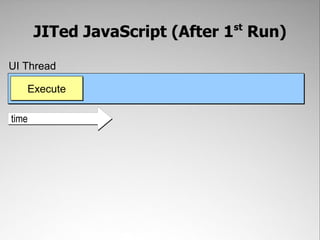
JITed JavaScript (After 1st Run)UI ThreadExecutetime
Loadtime TechniquesDon't let JavaScript interfere with page load performance
During page load, JavaScript takes more time on the UI thread
<!doctype html><html><head>    <title>Example</title></head><body>    <p>Hello world!</p><script src="foo.js"></script>    <p>See ya!</p></body></html>
ResultUI ThreadJavaScriptUI UpdateUI Updatetime
ResultUI Threadfoo.jsSee ya!Hello world!time
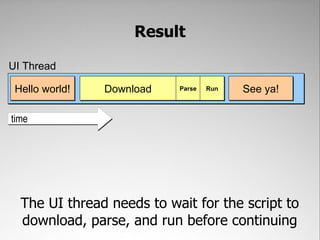
ResultUI ThreadDownloadSee ya!Hello world!ParseRuntimeThe UI thread needs to wait for the script todownload, parse, and run before continuing
ResultUI ThreadDownloadSee ya!Hello world!ParseRunVariableConstantDownload time takes the longest and is variable
Translation:The page doesn't render while JavaScript is downloading, parsing, or executing during page load
<!doctype html><html><head>    <title>Example</title></head><body><script src="foo.js"></script>    <p>Hello world!</p><script src="bar.js"></script>    <p>See ya!</p><script src="baz.js"></script>    <p>Uh oh!</p></body></html>
ResultUI ThreadJavaScriptUI UpdateUI UpdateJavaScriptJavaScripttimeThe more scripts to download in between UIupdates, the longer the page takes to render
Technique #1: Put scripts at the bottom
<!doctype html><html><head>    <title>Example</title></head><body>    <p>Hello world!</p>    <p>See ya!</p><script src="foo.js"></script></body></html>
Put Scripts at BottomUI ThreadJavaScriptUI UpdateUI UpdateJavaScriptJavaScripttimeEven if there are multiple scripts, the pagerenders quickly
Technique #2: Combine JavaScript files
<!doctype html><html><head>    <title>Example</title></head><body>    <p>Hello world!</p>    <p>See ya!</p><script src="foo.js"></script>    <script src="bar.js"></script>    <script src="baz.js"></script></body></html>
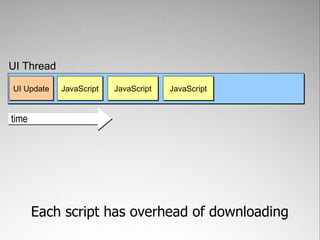
UI ThreadJavaScriptUI UpdateJavaScriptJavaScripttimeEach script has overhead of downloading
UI ThreadJavaScriptUI UpdatetimeCombining all of the files limits the networkoverhead and gets scripts onto the page faster
<!doctype html><html><head>    <title>Example</title></head><body>    <p>Hello world!</p>    <p>See ya!</p>   <script src="foo-and-bar-and-baz.js"></script></body></html>
Technique #3: Load scripts dynamically
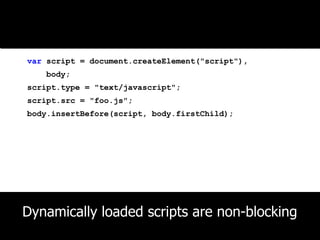
Basic Techniquevar script = document.createElement("script"),    body;script.type = "text/javascript";script.src = "foo.js";body.insertBefore(script, body.firstChild);Dynamically loaded scripts are non-blocking
Downloads no longer block the UI thread
<!doctype html><html><head>    <title>Example</title></head><body>    <p>Hello world!</p><script src="foo.js"></script>    <p>See ya!</p></body></html>
Using HTML <script>UI ThreadDownloadSee ya!Hello world!ParseRuntime
<!doctype html><html><head>    <title>Example</title></head><body>    <p>Hello world!</p>    <script>    var script = document.createElement("script"),        body = document.body;    script.type = "text/javascript";    script.src = "foo.js";    body.insertBefore(script, body.firstChild);    </script>    <p>See ya!</p><!-- more content --></body></html>
Using Dynamic ScriptsUI ThreadSee ya!Hello world!UI UpdateRuntimeDownloadParseOnly code execution happens on the UI thread,which means less blocking of UI updates
function loadScript(url, callback){var script = document.createElement("script"),    body = document.body;script.type = "text/javascript";if (script.readyState){  //IE <= 8    script.onreadystatechange = function(){if (script.readyState == "loaded" ||                script.readyState == "complete"){            script.onreadystatechange = null;            callback();        }    };} else {  //Others    script.onload = function(){        callback();    };}script.src = url;body.insertBefore(script, body.firstChild);}
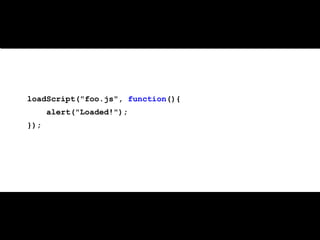
UsageloadScript("foo.js", function(){    alert("Loaded!");});
Timing Note:Script execution begins immediately after download and parse – timing of execution is not guaranteed
Technique #4: Defer scripts
<!doctype html><html><head>    <title>Example</title></head><body>    <p>Hello world!</p><script defer src="foo.js"></script>    <p>See ya!</p>    <!-- even more markup --></body></html>
Support for <script defer>?5.03.57.04.0
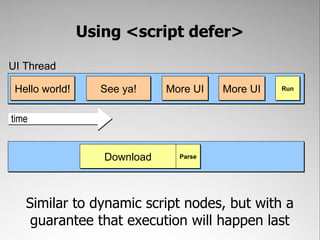
Deferred scripts begin to download immediately, but don't execute until all UI updates complete
Using <script defer>UI ThreadSee ya!Hello world!More UIRunMore UItimeDownloadParseSimilar to dynamic script nodes, but with aguarantee that execution will happen last
Timing Note:Although scripts always execute after UI updates complete, the order of multiple <script defer> scripts is not guaranteed across browsers
Technique #5: Asynchronous scripts
<!doctype html><html><head>    <title>Example</title></head><body>    <p>Hello world!</p><script async src="foo.js"></script>    <p>See ya!</p>    <!-- even more markup --></body></html>
Support for <script async>?5.03.67.010
Asynchronous scripts behave a lot like dynamic scripts
Using <script async>UI ThreadSee ya!Hello world!UI UpdateRuntimeDownloadParseDownload begins immediately and execution isslotted in at first available spot
Note:Order of execution is explicitly not preserved for asynchronous scripts
Runtime TechniquesWays to ensure JavaScript doesn't run away
function processArray(items, process, callback){for (var i=0,len=items.length; i < len; i++){        process(items[i]);    }    callback();}
Technique #1: Timers
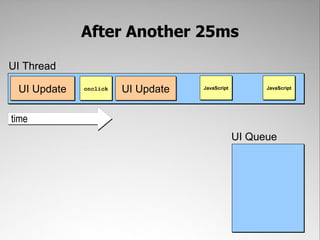
//create a new timer and delay by 500mssetTimeout(function(){//code to execute here}, 500);setTimeout() schedules a function to be added to the UI queue after a delay
function timedProcessArray(items, process, callback){//create a clone of the original  var todo = items.concat();    setTimeout(function(){var start = +new Date();do {            process(todo.shift());        } while (todo.length > 0 &&             (+new Date() - start < 50));if (todo.length > 0){            setTimeout(arguments.callee, 25);        } else {            callback(items);        }    }, 25);}
When ClickedUI ThreadtimeUI QueueUI UpdateonclickUI Update
When ClickedUI ThreadUI UpdatetimeUI QueueonclickUI Update
When ClickedUI ThreadonclickUI UpdatetimeUI QueueUI Update
When ClickedUI ThreadUI UpdateUI UpdateonclicktimeUI Queue
After 25msUI ThreadUI UpdateUI UpdateonclicktimeUI QueueJavaScript
After 25msUI ThreadJavaScriptUI UpdateUI UpdateonclicktimeUI Queue
After Another 25msUI ThreadJavaScriptUI UpdateUI UpdateonclicktimeUI QueueJavaScript
After Another 25msUI ThreadJavaScriptJavaScriptUI UpdateUI UpdateonclicktimeUI Queue
Technique #2: Script YieldingNEW!
//delay a function until after UI updates are donesetImmediate(function(){//code to execute here});setImmediate() adds code to the UI queue after pending UI updates are finished
Support for Script Yielding????10msSetIntermediate()
functionyieldingProcessArray(items, process, callback){//create a clone of the originalvartodo = items.concat();setImmediate(function(){var start = +new Date();do {            process(todo.shift());        } while (todo.length > 0 &&             (+new Date() - start < 50));if (todo.length > 0){setImmediate(arguments.callee);        } else {            callback(items);        }});}
When ClickedUI ThreadtimeUI QueueUI UpdateonclickUI Update
When ClickedUI ThreadUI UpdatetimeUI QueueonclickUI Update
When ClickedUI ThreadonclickUI UpdatetimeUI QueueUI Update
When ClickedUI ThreadUI UpdateUI UpdateonclicktimeUI Queue
After Last UI UpdateUI ThreadUI UpdateUI UpdateonclicktimeUI QueueJavaScript
After Last UI UpdateUI ThreadJavaScriptUI UpdateUI UpdateonclicktimeUI Queue
No Other UI UpdatesUI ThreadJavaScriptUI UpdateUI UpdateonclicktimeUI QueueJavaScript
No Other UI UpdatesUI ThreadJavaScriptJavaScriptUI UpdateUI UpdateonclicktimeUI Queue
Technique #3: Web Workers
Support for Web Workers10.64.03.54.010
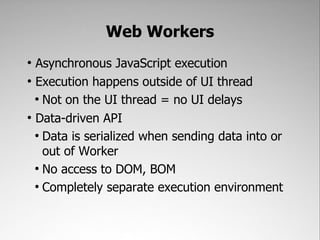
Web WorkersAsynchronous JavaScript executionExecution happens outside the UI threadDoesn’t block UI updatesData-Driven APIData is serialized going into and out of the workerNo access to DOM or BOMSeparate execution environment
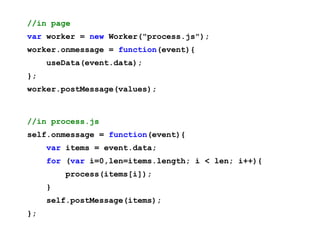
//in pagevar worker = new Worker("process.js");worker.onmessage = function(event){    useData(event.data);};worker.postMessage(values);//in process.jsself.onmessage = function(event){var items = event.data;for (var i=0,len=items.length; i < len; i++){        process(items[i]);    }    self.postMessage(items);};
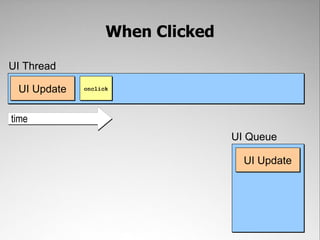
When ClickedUI ThreadtimeUI QueueUI UpdateonclickUI Update
When ClickedUI ThreadUI UpdatetimeUI QueueonclickUI Update
When ClickedUI ThreadonclickUI UpdatetimeUI QueueUI Update
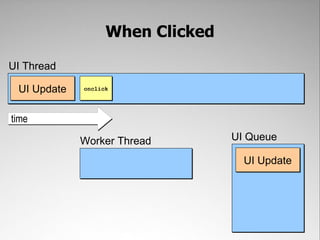
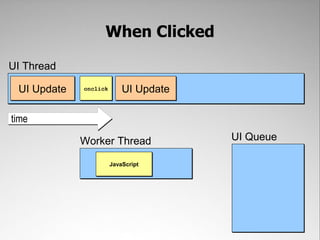
When ClickedUI ThreadonclickUI UpdatetimeUI QueueWorker ThreadUI Update
When ClickedUI ThreadUI UpdateUI UpdateonclicktimeUI QueueWorker ThreadJavaScript
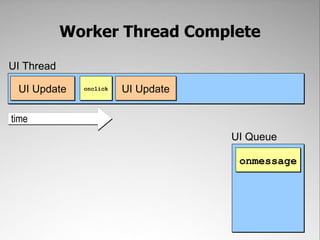
Worker Thread CompleteUI ThreadUI UpdateUI UpdateonclicktimeUI Queueonmessage
Worker Thread CompleteUI ThreadonmessageUI UpdateUI UpdateonclicktimeUI Queue
Repaint and ReflowHidden performance costs of common operations
Long UI updates=Unresponsive UI
Unresponsive UIUI ThreadJavaScriptUI UpdateUI Updatetime
JavaScript can cause long UI updates by triggeringrepaint and reflow
A repaint occurs when a visual change doesn'trequire recalculation of layoutChanges to visibility, colors (text/background), background images, etc.
Repaint<button id="btn" style="font-size: 30px; padding: 0.5em 1em">Click Me</button><script type="text/javascript">window.onload = function(){   document.getElementById("btn").onclick = function(){       this.style.color = "#ff0";   };};</script>Repaint!
A reflowoccurs when a visual changerequires a change in layoutInitial page load ▪ browser resize ▪ DOM structure change ▪ layout style changelayout information retrieved
Reflow<button id="btn" style="font-size: 30px; padding: 0.5em 1em">Click Me</button><script type="text/javascript">window.onload = function(){   document.getElementById("btn").onclick = function(){       var div = document.createElement(“div”);       div.className = “tip”;       div.innerHTML = “You clicked me!”;       document.body.appendChild(div);   };};</script>Reflow!
Repaints and reflows are queued up as JavaScript executesand then executed in order
Reflowvar list = document.getElementsByClassName("items")[0],    i, item;for (i=0; i < 10; i++){    item = document.createElement("li");    item.innerHTML = "Item #" + i;list.appendChild(item);}Reflow x 10!
Limiting repaints/reflows improves overall performance
Technique #1Perform DOM manipulations off-document
Off-Document OperationsFast because there's no repaint/reflowTechniques:Remove element from the document, make changes, insert back into documentSet element's display to “none”, make changes, set display back to defaultBuild up DOM changes on a DocumentFragment then apply all at once
DocumentFragmentA document-like objectNot visually representedConsidered to be owned by the document from which it was createdWhen passed to appendChild(), appends all of its children rather than itself
DocumentFragmentvar list = document.getElementsByClassName("items")[0],    fragment = document.createDocumentFragment(),    i, item;for (i=0; i < 10; i++){    item = document.createElement("li");    item.innerHTML = "Item #" + i;    fragment.appendChild(item);}list.appendChild(fragment);1 Reflow
Technique #2Group Style Changes
Repaint!Reflow!element.style.color = "red";element.style.height = "100px";element.style.fontSize = "25px";element.style.backgroundColor = "white";Reflow!Repaint!
Grouping Style Changes.active {    color: red;    height: 100px;    fontSize: 25px;    background-color: white;}element.className = "active";Reflow!
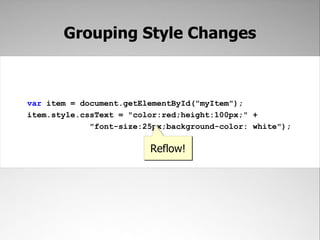
Grouping Style Changesvar item = document.getElementById("myItem");item.style.cssText = "color:red;height:100px;" +             "font-size:25px;background-color: white");Reflow!
Technique #3Avoid Accidental Reflow
Accidental Reflowelement.style.width= "100px";var width = element.offsetWidth;Reflow!
What to do? Minimize access to layout informationoffsetTop, offsetLeft, offsetWidth, offsetHeightscrollTop, scrollLeft, scrollWidth, scrollHeightclientTop, clientLeft, clientWidth, clientHeightMost computed styles If a value is used more than once, store in local variable
Does hardware acceleration help?
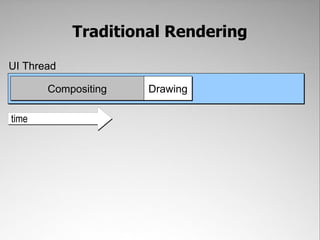
Traditional RenderingUI ThreadCompositingDrawingtime
Hardware AccelerationUI ThreadPrepWaittimeRendering infoSignal completeCompositingDrawingGPU
Recap
The browser UI thread is responsible forboth UI updates and JavaScript executionOnly one can happen at a time
Responsive UIUI ThreadJavaScriptUI UpdateUI Updatetime

High Performance JavaScript 2011

Editor's Notes

  • #2 Over the past couple of years, we&apos;ve seen JavaScript development earn recognition as a true discipline. The idea that you should architect your code, use patterns and good programming practices has really elevated the role of the front end engineer. In my opinion, part of this elevation has been the adoption of what has traditionally been considered back end methodologies. We now focus on performance and algorithms, there&apos;s unit testing for JavaScript, and so much more. One of the areas that I&apos;ve seen a much slower than adoption that I&apos;d like is in the area of error handling.How many people have an error handling strategy for their backend? How many have dashboards that display problems with uptime and performance? How many have anything similar for the front end?Typically, the front end has been this black hole of information. You may get a few customer reports here and there, but you have no information about what&apos;s going on, how often it&apos;s occurring, or how many people have been affected.
  • #161 So what have we talked about? Maintainable JavaScript is made up of four components.First is Code Conventions that describe the format of the code you’re writing.Second is Loose Coupling – keeping HTML, JavaScript, and CSS on separate layers and keeping application logic out of event handlers.Third is Programming Practices that ensure your code is readable and easily debugged.Fourth is creating a Build Process