Visibility is Key when Defending the Enterprise - Hide & Seek
- Keeping the wolf from 1000 doors….
Eoin Keary
CEO/Founder – edgescan.com
OWASP Global Board Member 2009-2015
OWASP Project Leader & Contributor
OWASP Person of the year 2015 & 2016
Wolves? Doors? What?
Wolves = Bad Guys / Hackers
Doors = Your stuff
How to protect 1000’s of doors from wolves continuously and what
can go wrong…
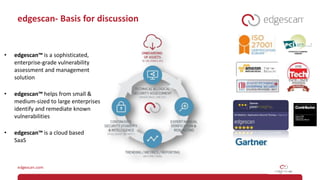
edgescan- Basis for discussion
• edgescan™ is a sophisticated,
enterprise-grade vulnerability
assessment and management
solution
• edgescan™ helps from small &
medium-sized to large enterprises
identify and remediate known
vulnerabilities
• edgescan™ is a cloud based
SaaS
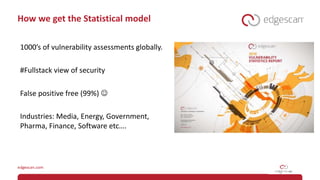
How we get the Statistical model
1000’s of vulnerability assessments globally.
#Fullstack view of security
False positive free (99%) 
Industries: Media, Energy, Government,
Pharma, Finance, Software etc….
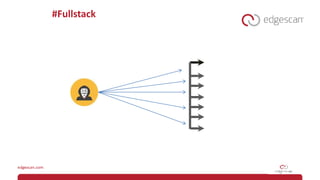
#Fullstack
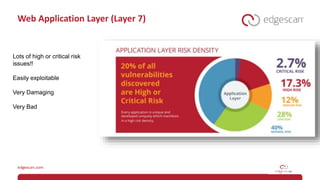
Web Application Layer (Layer 7)
Lots of high or critical risk
issues!!
Easily exploitable
Very Damaging
Very Bad
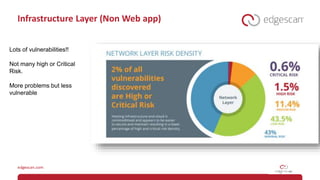
Infrastructure Layer (Non Web app)
Lots of vulnerabilities!!
Not many high or Critical
Risk.
More problems but less
vulnerable
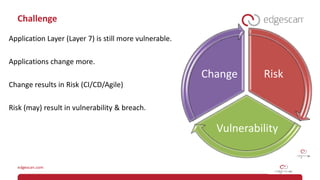
Challenge
Application Layer (Layer 7) is still more vulnerable.
Applications change more.
Change results in Risk (CI/CD/Agile)
Risk (may) result in vulnerability & breach.
Risk
Vulnerability
Change
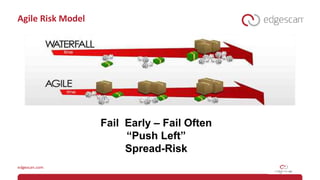
Agile Risk Model
Fail Early – Fail Often
“Push Left”
Spread-Risk
Continuous Security
“Keeping pace” with development.
Assisting secure deployment.
Catching bugs early – Push Left.
Help ensure “change” is secure.
How do we manage enterprise cybersecurity?
100’s or 1000’s of web applications
1000’s Perimeter / Internal servers
Cloud environments – Spin-up/down
Network Devices, Firewalls, IoT etc
Accuracy/Information/Context
The “Anti-Scale”- Problems with
Automation
Risk Context
Business Context
Accuracy
Information Vs Data
Human Decisions and Intel
Technical constraints
-> Chokepoints
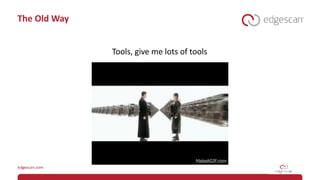
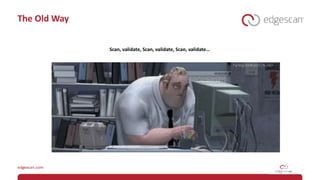
The Old Way
Tools, give me lots of tools
The Old Way
Scan, validate, Scan, validate, Scan, validate…
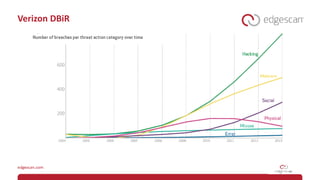
Verizon DBiR
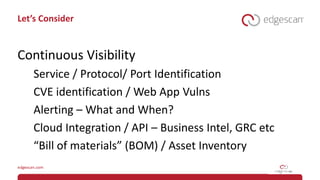
Let’s Consider
Continuous Visibility
Service / Protocol/ Port Identification
CVE identification / Web App Vulns
Alerting – What and When?
Cloud Integration / API – Business Intel, GRC etc
“Bill of materials” (BOM) / Asset Inventory
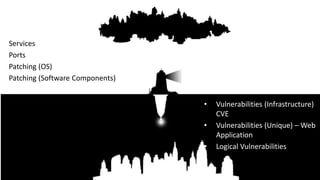
Visibility
Services
Ports
Patching (OS)
Patching (Software Components)
• Vulnerabilities (Infrastructure)
CVE
• Vulnerabilities (Unique) – Web
Application
• Logical Vulnerabilities
Securing 1000 Doors
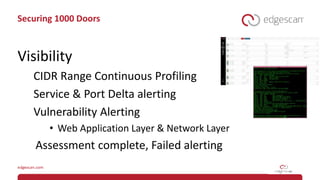
Visibility
CIDR Range Continuous Profiling
Service & Port Delta alerting
Vulnerability Alerting
• Web Application Layer & Network Layer
Assessment complete, Failed alerting
Securing 1000 Doors
Automatic Discovery
CIDR Range Assessment Not Individual IP’s
• 24, 16 etc….
Automatic Detection of new Hosts - Alert
Automatic Assessment of new Hosts
Automatic Web Application/API Assessment
Automation
“Using Automation may result in too much Data and not
enough intelligence. – White Noise”
We need both Scale and Accuracy.
Securing 1000 Doors
Delta and “Memory”
Alert on Change
• New vulnerabilities (not previously discovered)
• Closed Vulnerabilities (fixed?)
“Remember” false positives & Risk Accepted Vulns
• Reduce Noise
• Vulnerability Intelligence
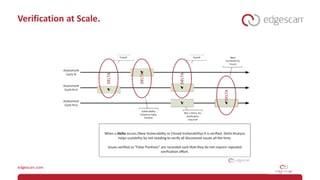
Verification at Scale.
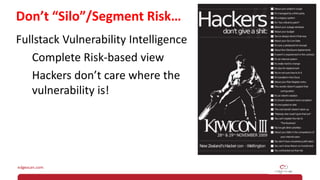
Don’t “Silo”/Segment Risk…
Fullstack Vulnerability Intelligence
Complete Risk-based view
Hackers don’t care where the
vulnerability is!
#Pitfall – Bad Security Metrics
Vulnerabilities may only need to be reported
once - “Singleton”
Only one instance reported
High Volume “Low Risk” issues “break” metrics.
Why…..
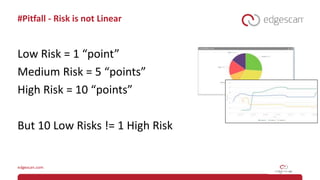
#Pitfall - Risk is not Linear
Low Risk = 1 “point”
Medium Risk = 5 “points”
High Risk = 10 “points”
But 10 Low Risks != 1 High Risk
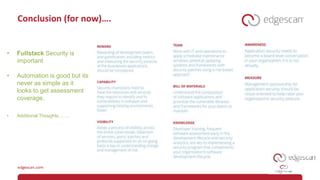
Conclusion (for now)….
• Fullstack Security is
important
• Automation is good but its
never as simple as it
looks to get assessment
coverage.
• Additional Thoughts…….
Other Technical Pitfalls with Automation
Pitfall Explanation Solution
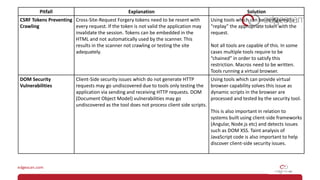
CSRF Tokens Preventing
Crawling
Cross-Site-Request Forgery tokens need to be resent with
every request. If the token is not valid the application may
invalidate the session. Tokens can be embedded in the
HTML and not automatically used by the scanner. This
results in the scanner not crawling or testing the site
adequately.
Using tools which can be configured to
“replay” the appropriate token with the
request.
Not all tools are capable of this. In some
cases multiple tools require to be
“chained” in order to satisfy this
restriction. Macros need to be written.
Tools running a virtual browser.
DOM Security
Vulnerabilities
Client-Side security issues which do not generate HTTP
requests may go undiscovered due to tools only testing the
application via sending and receiving HTTP requests. DOM
(Document Object Model) vulnerabilities may go
undiscovered as the tool does not process client side scripts.
Using tools which can provide virtual
browser capability solves this issue as
dynamic scripts in the browser are
processed and tested by the security tool.
This is also important in relation to
systems built using client-side frameworks
(Angular, Node.js etc) and detects issues
such as DOM XSS. Taint analysis of
JavaScript code is also important to help
discover client-side security issues.
Pitfall Explanation Solution
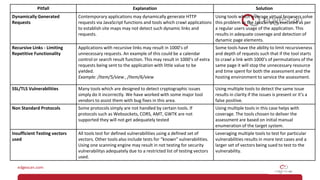
Dynamically Generated
Requests
Contemporary applications may dynamically generate HTTP
requests via JavaScript functions and tools which crawl applications
to establish site maps may not detect such dynamic links and
requests.
Using tools which leverage virtual browsers solve
this problem as the JavaScript is executed as per
a regular users usage of the application. This
results in adequate coverage and detection of
dynamic page elements.
Recursive Links - Limiting
Repetitive Functionality
Applications with recursive links may result in 1000’s of
unnecessary requests. An example of this could be a calendar
control or search result function. This may result in 1000’s of extra
requests being sent to the application with little value to be
yielded.
Example: /Item/5/view , /Item/6/view
Some tools have the ability to limit recursiveness
and depth of requests such that if the tool starts
to crawl a link with 1000’s of permutations of the
same page it will stop the unnecessary resource
and time spent for both the assessment and the
hosting environment to service the assessment.
SSL/TLS Vulnerabilities Many tools which are designed to detect cryptographic issues
simply do it incorrectly. We have worked with some major tool
vendors to assist them with bug fixes in this area.
Using multiple tools to detect the same issue
results in clarity if the issues is present or it’s a
false positive.
Non Standard Protocols Some protocols simply are not handled by certain tools. If
protocols such as Websockets, CORS, AMT, GWTK are not
supported they will not get adequately tested
Using multiple tools in this case helps with
coverage. The tools chosen to deliver the
assessment are based on initial manual
enumeration of the target system.
Insufficient Testing vectors
used
All tools test for defined vulnerabilities using a defined set of
vectors. Other tools also include tests for “known” vulnerabilities.
Using one scanning engine may result in not testing for security
vulnerabilitys adequately due to a restricted list of testing vectors
used.
Leveraging multiple tools to test for particular
vulnerabilities results in more test cases and a
larger set of vectors being sued to test to the
vulnerability.
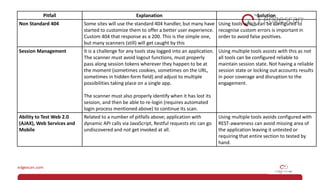
Pitfall Explanation Solution
Non Standard 404 Some sites will use the standard 404 handler, but many have
started to customize them to offer a better user experience.
Custom 404 that response as a 200. This is the simple one,
but many scanners (still) will get caught by this
Using tools which can be configured to
recognise custom errors is important in
order to avoid false positives.
Session Management It is a challenge for any tools stay logged into an application.
The scanner must avoid logout functions, must properly
pass along session tokens wherever they happen to be at
the moment (sometimes cookies, sometimes on the URL,
sometimes in hidden form field) and adjust to multiple
possibilities taking place on a single app.
The scanner must also properly identify when it has lost its
session, and then be able to re-login (requires automated
login process mentioned above) to continue its scan.
Using multiple tools assists with this as not
all tools can be configured reliable to
maintain session state. Not having a reliable
session state or locking out accounts results
in poor coverage and disruption to the
engagement.
Ability to Test Web 2.0
(AJAX), Web Services and
Mobile
Related to a number of pitfalls above; application with
dynamic API calls via JavaScript, Restful requests etc can go
undiscovered and not get invoked at all.
Using multiple tools avoids configured with
REST-awareness can avoid missing area of
the application leaving it untested or
requiring that entire section to tested by
hand.
THANK YOU
@eoinkeary
www.edgescan.com

Hide and seek - Attack Surface Management and continuous assessment.

  • 1.
    Visibility is Keywhen Defending the Enterprise - Hide & Seek - Keeping the wolf from 1000 doors….
  • 2.
    Eoin Keary CEO/Founder –edgescan.com OWASP Global Board Member 2009-2015 OWASP Project Leader & Contributor OWASP Person of the year 2015 & 2016
  • 3.
    Wolves? Doors? What? Wolves= Bad Guys / Hackers Doors = Your stuff How to protect 1000’s of doors from wolves continuously and what can go wrong…
  • 4.
    edgescan- Basis fordiscussion • edgescan™ is a sophisticated, enterprise-grade vulnerability assessment and management solution • edgescan™ helps from small & medium-sized to large enterprises identify and remediate known vulnerabilities • edgescan™ is a cloud based SaaS
  • 5.
    How we getthe Statistical model 1000’s of vulnerability assessments globally. #Fullstack view of security False positive free (99%)  Industries: Media, Energy, Government, Pharma, Finance, Software etc….
  • 6.
  • 7.
    Web Application Layer(Layer 7) Lots of high or critical risk issues!! Easily exploitable Very Damaging Very Bad
  • 8.
    Infrastructure Layer (NonWeb app) Lots of vulnerabilities!! Not many high or Critical Risk. More problems but less vulnerable
  • 9.
    Challenge Application Layer (Layer7) is still more vulnerable. Applications change more. Change results in Risk (CI/CD/Agile) Risk (may) result in vulnerability & breach. Risk Vulnerability Change
  • 10.
    Agile Risk Model FailEarly – Fail Often “Push Left” Spread-Risk
  • 11.
    Continuous Security “Keeping pace”with development. Assisting secure deployment. Catching bugs early – Push Left. Help ensure “change” is secure.
  • 12.
    How do wemanage enterprise cybersecurity? 100’s or 1000’s of web applications 1000’s Perimeter / Internal servers Cloud environments – Spin-up/down Network Devices, Firewalls, IoT etc
  • 13.
    Accuracy/Information/Context The “Anti-Scale”- Problemswith Automation Risk Context Business Context Accuracy Information Vs Data Human Decisions and Intel Technical constraints -> Chokepoints
  • 14.
    The Old Way Tools,give me lots of tools
  • 15.
    The Old Way Scan,validate, Scan, validate, Scan, validate…
  • 16.
  • 17.
    Let’s Consider Continuous Visibility Service/ Protocol/ Port Identification CVE identification / Web App Vulns Alerting – What and When? Cloud Integration / API – Business Intel, GRC etc “Bill of materials” (BOM) / Asset Inventory
  • 18.
    Visibility Services Ports Patching (OS) Patching (SoftwareComponents) • Vulnerabilities (Infrastructure) CVE • Vulnerabilities (Unique) – Web Application • Logical Vulnerabilities
  • 19.
    Securing 1000 Doors Visibility CIDRRange Continuous Profiling Service & Port Delta alerting Vulnerability Alerting • Web Application Layer & Network Layer Assessment complete, Failed alerting
  • 20.
    Securing 1000 Doors AutomaticDiscovery CIDR Range Assessment Not Individual IP’s • 24, 16 etc…. Automatic Detection of new Hosts - Alert Automatic Assessment of new Hosts Automatic Web Application/API Assessment
  • 21.
    Automation “Using Automation mayresult in too much Data and not enough intelligence. – White Noise” We need both Scale and Accuracy.
  • 22.
    Securing 1000 Doors Deltaand “Memory” Alert on Change • New vulnerabilities (not previously discovered) • Closed Vulnerabilities (fixed?) “Remember” false positives & Risk Accepted Vulns • Reduce Noise • Vulnerability Intelligence
  • 23.
  • 24.
    Don’t “Silo”/Segment Risk… FullstackVulnerability Intelligence Complete Risk-based view Hackers don’t care where the vulnerability is!
  • 25.
    #Pitfall – BadSecurity Metrics Vulnerabilities may only need to be reported once - “Singleton” Only one instance reported High Volume “Low Risk” issues “break” metrics. Why…..
  • 26.
    #Pitfall - Riskis not Linear Low Risk = 1 “point” Medium Risk = 5 “points” High Risk = 10 “points” But 10 Low Risks != 1 High Risk
  • 27.
    Conclusion (for now)…. •Fullstack Security is important • Automation is good but its never as simple as it looks to get assessment coverage. • Additional Thoughts…….
  • 28.
    Other Technical Pitfallswith Automation
  • 29.
    Pitfall Explanation Solution CSRFTokens Preventing Crawling Cross-Site-Request Forgery tokens need to be resent with every request. If the token is not valid the application may invalidate the session. Tokens can be embedded in the HTML and not automatically used by the scanner. This results in the scanner not crawling or testing the site adequately. Using tools which can be configured to “replay” the appropriate token with the request. Not all tools are capable of this. In some cases multiple tools require to be “chained” in order to satisfy this restriction. Macros need to be written. Tools running a virtual browser. DOM Security Vulnerabilities Client-Side security issues which do not generate HTTP requests may go undiscovered due to tools only testing the application via sending and receiving HTTP requests. DOM (Document Object Model) vulnerabilities may go undiscovered as the tool does not process client side scripts. Using tools which can provide virtual browser capability solves this issue as dynamic scripts in the browser are processed and tested by the security tool. This is also important in relation to systems built using client-side frameworks (Angular, Node.js etc) and detects issues such as DOM XSS. Taint analysis of JavaScript code is also important to help discover client-side security issues.
  • 30.
    Pitfall Explanation Solution DynamicallyGenerated Requests Contemporary applications may dynamically generate HTTP requests via JavaScript functions and tools which crawl applications to establish site maps may not detect such dynamic links and requests. Using tools which leverage virtual browsers solve this problem as the JavaScript is executed as per a regular users usage of the application. This results in adequate coverage and detection of dynamic page elements. Recursive Links - Limiting Repetitive Functionality Applications with recursive links may result in 1000’s of unnecessary requests. An example of this could be a calendar control or search result function. This may result in 1000’s of extra requests being sent to the application with little value to be yielded. Example: /Item/5/view , /Item/6/view Some tools have the ability to limit recursiveness and depth of requests such that if the tool starts to crawl a link with 1000’s of permutations of the same page it will stop the unnecessary resource and time spent for both the assessment and the hosting environment to service the assessment. SSL/TLS Vulnerabilities Many tools which are designed to detect cryptographic issues simply do it incorrectly. We have worked with some major tool vendors to assist them with bug fixes in this area. Using multiple tools to detect the same issue results in clarity if the issues is present or it’s a false positive. Non Standard Protocols Some protocols simply are not handled by certain tools. If protocols such as Websockets, CORS, AMT, GWTK are not supported they will not get adequately tested Using multiple tools in this case helps with coverage. The tools chosen to deliver the assessment are based on initial manual enumeration of the target system. Insufficient Testing vectors used All tools test for defined vulnerabilities using a defined set of vectors. Other tools also include tests for “known” vulnerabilities. Using one scanning engine may result in not testing for security vulnerabilitys adequately due to a restricted list of testing vectors used. Leveraging multiple tools to test for particular vulnerabilities results in more test cases and a larger set of vectors being sued to test to the vulnerability.
  • 31.
    Pitfall Explanation Solution NonStandard 404 Some sites will use the standard 404 handler, but many have started to customize them to offer a better user experience. Custom 404 that response as a 200. This is the simple one, but many scanners (still) will get caught by this Using tools which can be configured to recognise custom errors is important in order to avoid false positives. Session Management It is a challenge for any tools stay logged into an application. The scanner must avoid logout functions, must properly pass along session tokens wherever they happen to be at the moment (sometimes cookies, sometimes on the URL, sometimes in hidden form field) and adjust to multiple possibilities taking place on a single app. The scanner must also properly identify when it has lost its session, and then be able to re-login (requires automated login process mentioned above) to continue its scan. Using multiple tools assists with this as not all tools can be configured reliable to maintain session state. Not having a reliable session state or locking out accounts results in poor coverage and disruption to the engagement. Ability to Test Web 2.0 (AJAX), Web Services and Mobile Related to a number of pitfalls above; application with dynamic API calls via JavaScript, Restful requests etc can go undiscovered and not get invoked at all. Using multiple tools avoids configured with REST-awareness can avoid missing area of the application leaving it untested or requiring that entire section to tested by hand.
  • 32.

Editor's Notes

  • #6 Ek – client side security. Threats and risks
  • #8 Threats and risks