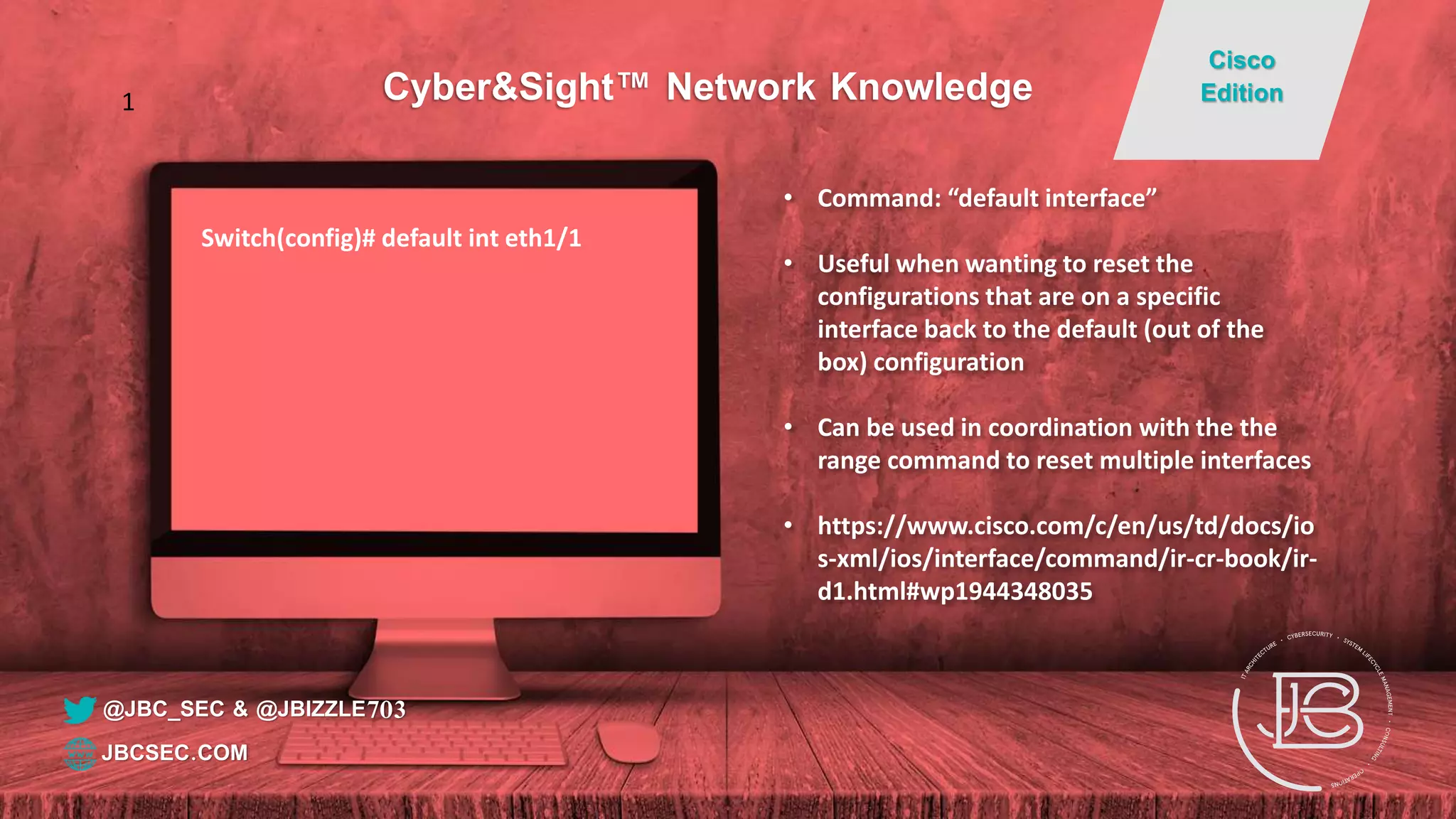
Switch(config)# default int eth1/1
• Command: “default interface”
• Useful when wanting to reset the
configurations that are on a specific
interface back to the default (out of the
box) configuration
• Can be used in coordination with the the
range command to reset multiple interfaces
• https://www.cisco.com/c/en/us/td/docs/io
s-xml/ios/interface/command/ir-cr-book/ir-
d1.html#wp1944348035
@JBC_SEC & @JBIZZLE703
Cyber&Sight™ Network Knowledge
Cisco
Edition
JBCSEC.COM
1
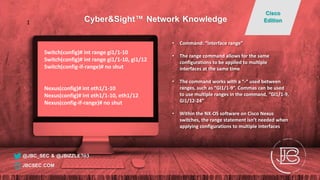
Switch(config)# int range gi1/1-10
Switch(config)# int range gi1/1-10, gi1/12
Switch(config-if-range)# no shut
Nexus(config)# int eth1/1-10
Nexus(config)# int eth1/1-10, eth1/12
Nexus(config-if-range)# no shut
• Command: “interface range”
• The range command allows for the same
configurations to be applied to multiple
interfaces at the same time
• The command works with a “-“ used between
ranges, such as “GI1/1-9”. Commas can be used
to use multiple ranges in the command, “GI1/1-9,
Gi1/12-24”
• Within the NX-OS software on Cisco Nexus
switches, the range statement isn’t needed when
applying configurations to multiple interfaces
@JBC_SEC & @JBIZZLE703
Cyber&Sight™ Network Knowledge
Cisco
Edition
JBCSEC.COM
1
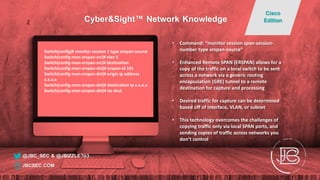
Switch(config)# monitor session 1 type erspan-source
Switch(config-mon-erspan-src)# vlan 5
Switch(config-mon-erspan-src)# destination
Switch(config-mon-erspan-dst)# erspan-id 101
Switch(config-mon-erspan-dst)# origin ip address
x.x.x.x
Switch(config-mon-erspan-dst)# destination ip x.x.x.x
Switch(config-mon-erspan-dst)# no shut
• Command: “monitor session span-session-
number type erspan-source”
• Enhanced Remote SPAN (ERSPAN) allows for a
copy of the traffic on a local switch to be sent
across a network via a generic routing
encapsulation (GRE) tunnel to a remote
destination for capture and processing
• Desired traffic for capture can be determined
based off of interface, VLAN, or subnet
• This technology overcomes the challenges of
copying traffic only via local SPAN ports, and
sending copies of traffic across networks you
don’t control
@JBC_SEC & @JBIZZLE703
Cyber&Sight™ Network Knowledge
Cisco
Edition
JBCSEC.COM
2
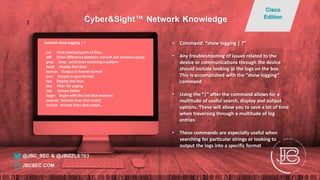
Switch# show logging | ?
cut Print selected parts of lines.
diff Show difference between current and previous egrep
grep Grep - print lines matching a pattern
head Display first lines
human Output in human format
json Output in json format
last Display last lines
less Filter for paging
sed Stream Editor
begin Begin with the line that matches
exclude Exclude lines that match
include Include lines that match…
• Command: “show logging | ?”
• Any troubleshooting of issues related to the
device or communications through the device
should include looking at the logs on the box.
This is accomplished with the “show logging”
command
• Using the “|” after the command allows for a
multitude of useful search, display and output
options. These will allow you to save a lot of time
when traversing through a multitude of log
entries
• These commands are especially useful when
searching for particular strings or looking to
output the logs into a specific format
@JBC_SEC & @JBIZZLE703
Cyber&Sight™ Network Knowledge
Cisco
Edition
JBCSEC.COM
1
Switch# show run | section aaa
logging level aaa 6
aaa group server radius RADIUS
server 192.168.100.4
server 192.168.100.5
use-vrf management
aaa authentication login default group RADIUS local
aaa authentication login console group RADIUS local
aaa accounting default group RADIUS local
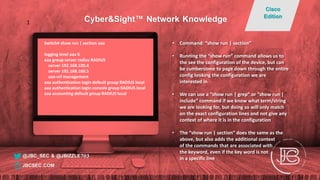
• Command: “show run | section”
• Running the “show run” command allows us to
the see the configuration of the device, but can
be cumbersome to page down through the entire
config looking the configuration we are
interested in
• We can use a “show run | grep” or “show run |
include” command if we know what term/string
we are looking for, but doing so will only match
on the exact configuration lines and not give any
context of where it is in the configuration
• The “show run | section” does the same as the
above, but also adds the additional context
of the commands that are associated with
the keyword, even if the key word is not
in a specific line@JBC_SEC & @JBIZZLE703
Cyber&Sight™ Network Knowledge
Cisco
Edition
JBCSEC.COM
1
Switch(config)# int eth1/1
Switch(config-if)# switchport trunk allowed vlan add ?
<1-4094> VLAN IDs of the allowed VLANs when this port
in trunking mode
Switch(config-if)# switchport trunk allowed vlan add 10
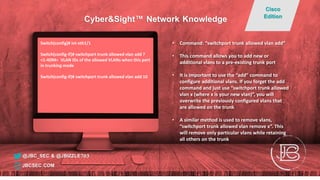
• Command: “switchport trunk allowed vlan add”
• This command allows you to add new or
additional vlans to a pre-existing trunk port
• It is important to use the “add” command to
configure additional vlans. If you forget the add
command and just use “switchport trunk allowed
vlan x (where x is your new vlan)”, you will
overwrite the previously configured vlans that
are allowed on the trunk
• A similar method is used to remove vlans,
“switchport trunk allowed vlan remove x”. This
will remove only particular vlans while retaining
all others on the trunk
@JBC_SEC & @JBIZZLE703
Cyber&Sight™ Network Knowledge
Cisco
Edition
JBCSEC.COM
Switch# sh start | in host
hostname Switch
Switch(config)# host Switch_Run
Switch_Run# show archive config differences
Contextual ConfigDiffs:
+hostname Switch
-hostname Switch_Run
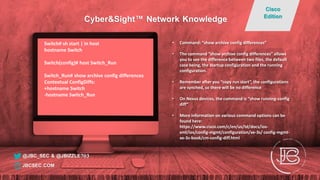
• Command: “show archive config differences”
• The command “show archive config differences” allows
you to see the difference between two files, the default
case being, the startup configuration and the running
configuration.
• Remember after you “copy run start”, the configurations
are synched, so there will be no difference
• On Nexus devices, the command is “show running-config
diff”
• More information on various command options can be
found here:
https://www.cisco.com/c/en/us/td/docs/ios-
xml/ios/config-mgmt/configuration/xe-3s/ config-mgmt-
xe-3s-book/cm-config-diff.html
@JBC_SEC & @JBIZZLE703
Cyber&Sight™ Network Knowledge
Cisco
Edition
JBCSEC.COM
Switch# show interface | include Ether|Desc|error
Ethernet1/1 is down (Administratively down)
Hardware: 1000/10000 Ethernet, address: 0000.0000.a2a8 (bia
0000.0000.a2a8)
Description: Empty
EtherType is 0x8100
0 input error 0 short frame 0 overrun 0 underrun 0 ignored
0 output error 0 collision 0 deferred 0 late collision
Ethernet1/2 is down (Administratively down)
Hardware: 1000/10000 Ethernet, address: 0000.0000.a2a9 (bia
0000.0000.a2a9)
Description: Empty
EtherType is 0x8100
0 input error 0 short frame 0 overrun 0 underrun 0 ignored
0 output error 0 collision 0 deferred 0 late collision
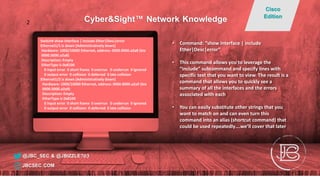
• Command: “show interface | include
Ether|Desc|error”
• This command allows you to leverage the
“include” subcommand and specify lines with
specific text that you want to view. The result is a
command that allows you to quickly see a
summary of all the interfaces and the errors
associated with each
• You can easily substitute other strings that you
want to match on and can even turn this
command into an alias (shortcut command) that
could be used repeatedly….we’ll cover that later
@JBC_SEC & @JBIZZLE703
Cyber&Sight™ Network Knowledge
Cisco
Edition
JBCSEC.COM
2
Switch(config)# interface Ethernet1/3
Switch(config-if)# description Uplink to RTR1 GI2/2/1
Switch(config-if)# no cdp enable
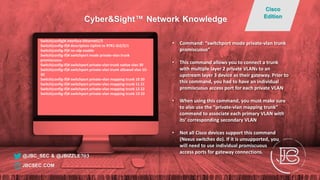
Switch(config-if)# switchport mode private-vlan trunk
promiscuous
Switch(config-if)# switchport private-vlan trunk native vlan 30
Switch(config-if)# switchport private-vlan trunk allowed vlan 10-
30
Switch(config-if)# switchport private-vlan mapping trunk 10 20
Switch(config-if)# switchport private-vlan mapping trunk 11 21
Switch(config-if)# switchport private-vlan mapping trunk 12 22
Switch(config-if)# switchport private-vlan mapping trunk 13 23
• Command: “switchport mode private-vlan trunk
promiscuous”
• This command allows you to connect a trunk
with multiple layer 2 private VLANs to an
upstream layer 3 device as their gateway. Prior to
this command, you had to have an individual
promiscuous access port for each private VLAN
• When using this command, you must make sure
to also use the “private-vlan mapping trunk”
command to associate each primary VLAN with
its’ corresponding secondary VLAN
• Not all Cisco devices support this command
(Nexus switches do). If it is unsupported, you
will need to use individual promiscuous
access ports for gateway connections.
@JBC_SEC & @JBIZZLE703
Cyber&Sight™ Network Knowledge
Cisco
Edition
JBCSEC.COM
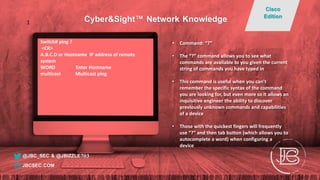
Switch# ping ?
<CR>
A.B.C.D or Hostname IP address of remote
system
WORD Enter Hostname
multicast Multicast ping
• Command: “?”
• The “?” command allows you to see what
commands are available to you given the current
string of commands you have typed in
• This command is useful when you can’t
remember the specific syntax of the command
you are looking for, but even more so it allows an
inquisitive engineer the ability to discover
previously unknown commands and capabilities
of a device
• Those with the quickest fingers will frequently
use “?” and then tab button (which allows you to
autocomplete a word) when configuring a
device
@JBC_SEC & @JBIZZLE703
Cyber&Sight™ Network Knowledge
Cisco
Edition
JBCSEC.COM
1
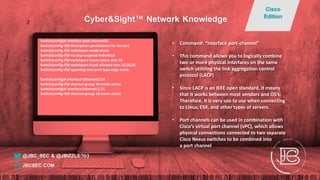
Switch(config)# interface port-channel10
Switch(config-if)# description portchannel for Server1
Switch(config-if)# switchport mode trunk
Switch(config-if)# no lacp suspend-individual
Switch(config-if)# switchport trunk native vlan 30
Switch(config-if)# switchport trunk allowed vlan 10,20,25
Switch(config-if)# spanning-tree port type edge trunk
Switch(config)# interface Ethernet1/14
Switch(config-if)# channel-group 10 mode active
Switch(config)# interface Ethernet1/15
Switch(config-if)# channel-group 10 mode active
• Command: “interface port-channel”
• This command allows you to logically combine
two or more physical interfaces on the same
switch utilizing the link aggregation control
protocol (LACP)
• Since LACP is an IEEE open standard, it means
that it works between most vendors and OS’s.
Therefore, it is very use to use when connecting
to Linux, ESX, and other types of servers.
• Port channels can be used in combination with
Cisco’s virtual port channel (vPC), which allows
physical connections connected to two separate
Cisco Nexus switches to be combined into
a port channel
@JBC_SEC & @JBIZZLE703
Cyber&Sight™ Network Knowledge
Cisco
Edition
JBCSEC.COM
2
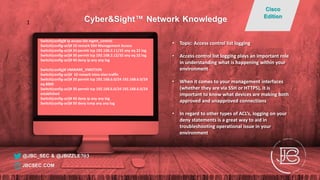
Switch(config)# ip access-list mgmt_control
Switch(config-acl)# 10 remark SSH Management Access
Switch(config-acl)# 20 permit tcp 192.168.2.11/32 any eq 22 log
Switch(config-acl)# 30 permit tcp 192.168.2.12/32 any eq 22 log
Switch(config-acl)# 40 deny ip any any log
Switch(config)# VMWARE_VMOTION
Switch(config-acl)# 10 remark intra-vlan traffic
Switch(config-acl)# 20 permit tcp 192.168.6.0/24 192.168.6.0/24
eq 8000
Switch(config-acl)# 30 permit tcp 192.168.6.0/24 192.168.6.0/24
established
Switch(config-acl)# 40 deny ip any any log
Switch(config-acl)# 50 deny icmp any any log
• Topic: Access control list logging
• Access control list logging plays an important role
in understanding what is happening within your
environment
• When it comes to your management interfaces
(whether they are via SSH or HTTPS), it is
important to know what devices are making both
approved and unapproved connections
• In regard to other types of ACL’s, logging on your
deny statements is a great way to aid in
troubleshooting operational issue in your
environment
@JBC_SEC & @JBIZZLE703
Cyber&Sight™ Network Knowledge
Cisco
Edition
JBCSEC.COM
1
Switch#who
Line User Host(s) Idle Location
* 2 vty 0 admin1 idle 00:00:00 192.168.2.11
Interface User Mode Idle Peer Address
Switch# show users
NAME LINE TIME IDLE PID COMMENT
admin1 pts/0 Nov 7 18:17 . 13078 (192.168.2.11) session=ssh *
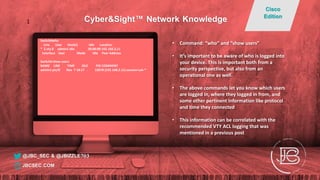
• Command: “who” and “show users”
• It’s important to be aware of who is logged into
your device. This is important both from a
security perspective, but also from an
operational one as well.
• The above commands let you know which users
are logged in, where they logged in from, and
some other pertinent information like protocol
and time they connected
• This information can be correlated with the
recommended VTY ACL logging that was
mentioned in a previous post
@JBC_SEC & @JBIZZLE703
Cyber&Sight™ Network Knowledge
Cisco
Edition
JBCSEC.COM
1
Nexus(config)# ntp source-interface mgmt0
Nexus(config)# logging server 192.168.2.14 6 use-
vrf management
Nexus(config)# ip radius source-interface mgmt0
Switch(config)# ip ssh source-interface Vlan10
Switch(config)# ip radius source-interface Vlan10
Switch(config)# ntp source Vlan10
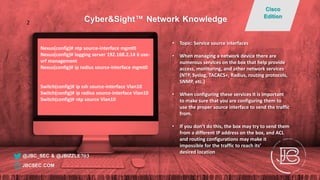
• Topic: Service source interfaces
• When managing a network device there are
numerous services on the box that help provide
access, monitoring, and other network services
(NTP, Syslog, TACACS+, Radius, routing protocols,
SNMP, etc.)
• When configuring these services it is important
to make sure that you are configuring them to
use the proper source interface to send the traffic
from.
• If you don’t do this, the box may try to send them
from a different IP address on the box, and ACL
and routing configurations may make it
impossible for the traffic to reach its’
desired location
@JBC_SEC & @JBIZZLE703
Cyber&Sight™ Network Knowledge
Cisco
Edition
JBCSEC.COM
2
Switch(config)# privilege exec level 7 show
startup-config
Switch(config)# privilege exec level 7 show
logging
Switch(config)# privilege exec level 7 show
• Command: “privilege exec level”
• Allows you to set the specific commands that an exec
level can run. By default, the three privilege levels on a
Cisco device:
• Level 0 – Basic commands (disable, enable, exit,
help, and logout)
• Level 1 – Includes all commands available at the
User EXEC command mode
• Level 15 – Includes all commands available at the
Privileged EXEC command mode
• The remaining levels (2-14) are customizable. The
assignment of specific accounts to a specific level can be
done in the local configuration or on your AAA server
• This is very helpful if you want to set up read-only
accounts or limit the types of configurations certain
admin groups can implement
@JBC_SEC & @JBIZZLE703
Cyber&Sight™ Network Knowledge
Cisco
Edition
JBCSEC.COM
2
Switch# show history
show ip route
show ntp
show ntp associations
show int trunk
show history
• Command: “show history”
• Allows you to see previous commands that you
have entered on the device
• By default shows last 10 commands, but can be
modified with the “terminal history size
NUMBER” command
• You can also use the up and down arrows to
show previous commands that were entered
• “Show history all” will show the previous
command history as well as the reload
information of the device
@JBC_SEC & @JBIZZLE703
Cyber&Sight™ Network Knowledge
Cisco
Edition
JBCSEC.COM
1
Switch# test cable-diagnostics tdr interface gi
1/1/1
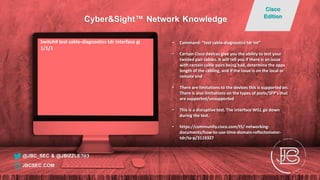
• Command: “test cable-diagnostics tdr int”
• Certain Cisco devices give you the ability to test your
twisted pair cables. It will tell you if there is an issue
with certain cable pairs being bad, determine the appx
length of the cabling, and if the issue is on the local or
remote end
• There are limitations to the devices this is supported on.
There is also limitations on the types of ports/SFP’s that
are supported/unsupported
• This is a disruptive test. The interface WILL go down
during the test.
• https://community.cisco.com/t5/ networking-
documents/how-to-use-time-domain-reflectometer-
tdr/ta-p/3119327
@JBC_SEC & @JBIZZLE703
Cyber&Sight™ Network Knowledge
Cisco
Edition
JBCSEC.COM
Switch# show control-plane host open-ports
Active internet connections (servers and established)
Prot Local Address Foreign Address Service State
tcp *:22 *:0 SSH LISTEN
tcp *:22 192.168.1.205:5385 SSH ESTABLIS
udp *:61165 *:0 IP SNMP LISTEN
udp *:60892 10.94.0.20:514 Syslog ESTABLIS
udp *:49 10.94.0.5:0 TACACS service LISTEN
udp *:52645 192.168.1.238:514 Syslog ESTABLIS
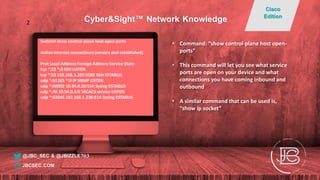
• Command: “show control-plane host open-
ports”
• This command will let you see what service
ports are open on your device and what
connections you have coming inbound and
outbound
• A similar command that can be used is,
“show ip socket”
@JBC_SEC & @JBIZZLE703
Cyber&Sight™ Network Knowledge
Cisco
Edition
JBCSEC.COM
2
Switch# show int trunk
--------------------------------------------------------------------------------
Port Native Status Port Vlan Channel
--------------------------------------------------------------------------------
Eth1/13 3020 trnk-bndl Po13
--------------------------------------------------------------------------------
Port Vlans Allowed on Trunk
--------------------------------------------------------------------------------
Eth1/13 112,201,312,401
--------------------------------------------------------------------------------
Port Vlans Err-disabled on Trunk
--------------------------------------------------------------------------------
Eth1/13 none
--------------------------------------------------------------------------------
Port STP Forwarding
--------------------------------------------------------------------------------
Eth1/13 112,201,312,401
--------------------------------------------------------------------------------
Port Vlans in spanning tree forwarding state and not pruned
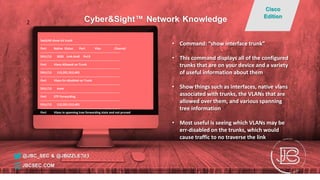
• Command: “show interface trunk”
• This command displays all of the configured
trunks that are on your device and a variety
of useful information about them
• Show things such as interfaces, native vlans
associated with trunks, the VLANs that are
allowed over them, and various spanning
tree information
• Most useful is seeing which VLANs may be
err-disabled on the trunks, which would
cause traffic to no traverse the link
@JBC_SEC & @JBIZZLE703
Cyber&Sight™ Network Knowledge
Cisco
Edition
JBCSEC.COM
2
Nexus# show int eth1/47 transceiver details
Ethernet1/47
transceiver is present
type is 10Gbase-SR
part number is xxxx-xxxxx-xxx
serial number is xxxxxx
nominal bitrate is 10350 MBit/sec
Link length supported for 50/125um OM2 fiber is 82 m
Link length supported for 62.5/125um fiber is 26 m
Link length supported for 50/125um OM3 fiber is 300 m
….
SFP Detail Diagnostics Information (internal calibration)
----------------------------------------------------------------------------
Current Alarms Warnings
Measurement High Low High Low
----------------------------------------------------------------------------
Temperature 30.40 C 75.00 C -5.00 C 70.00 C 0.00 C
Voltage 3.31 V 3.63 V 2.97 V 3.46 V 3.13 V
Current 0.00 mA -- 10.50 mA 2.50 mA 10.50 mA 2.50 mA
Tx Power N/A 1.69 dBm -11.30 dBm -1.30 dBm -7.30 dBm
Rx Power N/A 1.99 dBm -13.97 dBm -1.00 dBm -9.91 dBm
Transmit Fault Count = 0
----------------------------------------------------------------------------
Note: ++ high-alarm; + high-warning; -- low-alarm; - low-warning
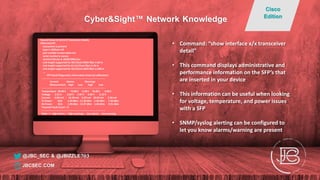
• Command: “show interface x/x transceiver
detail”
• This command displays administrative and
performance information on the SFP’s that
are inserted in your device
• This information can be useful when looking
for voltage, temperature, and power issues
with a SFP
• SNMP/syslog alerting can be configured to
let you know alarms/warning are present
@JBC_SEC & @JBIZZLE703
Cyber&Sight™ Network Knowledge
Cisco
Edition
JBCSEC.COM
Switch(config)# interface Gi1/1
Switch(config-if)# switchport port-security
violation restrict
Switch(config-if)# switchport port-security mac-
address sticky
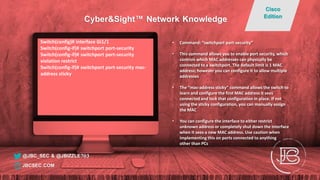
• Command: “switchport port-security”
• This command allows you to enable port security, which
controls which MAC addresses can physically be
connected to a switchport. The default limit is 1 MAC
address; however you can configure it to allow multiple
addresses
• The “mac-address sticky” command allows the switch to
learn and configure the first MAC address it sees
connected and lock that configuration in place. If not
using the sticky configuration, you can manually assign
the MAC
• You can configure the interface to either restrict
unknown address or completely shut down the interface
when it sees a new MAC address. Use caution when
implementing this on ports connected to anything
other than PCs
@JBC_SEC & @JBIZZLE703
Cyber&Sight™ Network Knowledge
Cisco
Edition
JBCSEC.COM
Switch(config)# login on-failure log
Switch(config)# login on-success log
• Command: “login on-failure log” and “login on-success
log”
• These commands are used to have the device create log
entries whenever there is a successful or failed login
attempt on any interface on the device
• When sending these logs to a syslog server, they are
categorized as Informational
• Be aware that some Cisco devices do not show the
username in the log for security reasons (you could look
at your AAA server logs to find the username)
• Nexus switches log failed login attempts by default, but
in order to see successful log in attempts, you must
change increase the logging level of the authpriv to 5,
“logging level authpriv 5"
@JBC_SEC & @JBIZZLE703
Cyber&Sight™ Network Knowledge
Cisco
Edition
JBCSEC.COM
1
Switch(config)# vlan 12
Switch(config-vlan)# name Workstations
Switch(config-vlan)# private-vlan primary
Switch(config-vlan)# private-vlan association 31
Switch(config-vlan)# vlan 31
Switch(config-vlan)# name VLAN_12_PVLAN
Switch(config-vlan)# private-vlan isolated
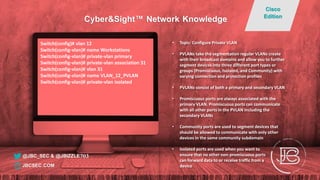
• Topic: Configure Private VLAN
• PVLANs take the segmentation regular VLANs create
with their broadcast domains and allow you to further
segment devices into three different port types or
groups (Promiscuous, Isolated, and Community) with
varying connection and protection profiles
• PVLANs consist of both a primary and secondary VLAN
• Promiscuous ports are always associated with the
primary VLAN. Promiscuous ports can communicate
with all other ports in the PVLAN including the
secondary VLANs
• Community ports are used to segment devices that
should be allowed to communicate with only other
devices in the same community subdomain
• Isolated ports are used when you want to
ensure that no other non-promiscuous ports
can forward data to or receive traffic from a
device
@JBC_SEC & @JBIZZLE703
Cyber&Sight™ Network Knowledge
Cisco
Edition
JBCSEC.COM
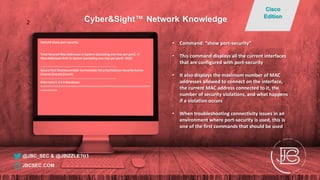
Switch# show port-security
Total Secured Mac Addresses in System (excluding one mac per port) : 0
Max Addresses limit in System (excluding one mac per port) : 8192
----------------------------------------------------------------------------
Secure Port MaxSecureAddr CurrentAddr SecurityViolation Security Action
(Count) (Count) (Count)
----------------------------------------------------------------------------
Ethernet1/1 3 0 0 Shutdown
==================================================================
==========
• Command: “show port-security”
• This command displays all the current interfaces
that are configured with port-security
• It also displays the maximum number of MAC
addresses allowed to connect on the interface,
the current MAC address connected to it, the
number of security violations, and what happens
if a violation occurs
• When troubleshooting connectivity issues in an
environment where port-security is used, this is
one of the first commands that should be used
@JBC_SEC & @JBIZZLE703
Cyber&Sight™ Network Knowledge
Cisco
Edition
JBCSEC.COM
2
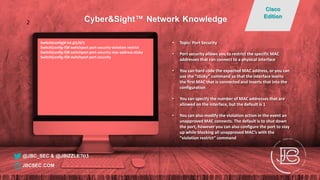
Switch(config)# int gi1/0/1
Switch(config-if)# switchport port-security violation restrict
Switch(config-if)# switchport port-security mac-address sticky
Switch(config-if)# switchport port-security
• Topic: Port Security
• Port security allows you to restrict the specific MAC
addresses that can connect to a physical interface
• You can hard code the expected MAC address, or you can
use the “sticky” command so that the interface learns
the first MAC that is connected and inserts that into the
configuration
• You can specify the number of MAC addresses that are
allowed on the interface, but the default is 1
• You can also modify the violation action in the event an
unapproved MAC connects. The default is to shut down
the port, however you can also configure the port to stay
up while blocking all unapproved MAC’s with the
“violation restrict” command
@JBC_SEC & @JBIZZLE703
Cyber&Sight™ Network Knowledge
Cisco
Edition
JBCSEC.COM
2
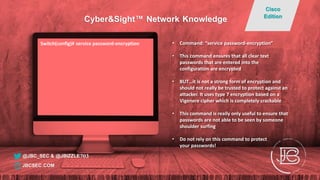
Switch(config)# service password-encryption • Command: “service password-encryption”
• This command ensures that all clear text
passwords that are entered into the
configuration are encrypted
• BUT…it is not a strong form of encryption and
should not really be trusted to protect against an
attacker. It uses type 7 encryption based on a
Vigenere cipher which is completely crackable
• This command is really only useful to ensure that
passwords are not able to be seen by someone
shoulder surfing
• Do not rely on this command to protect
your passwords!
@JBC_SEC & @JBIZZLE703
Cyber&Sight™ Network Knowledge
Cisco
Edition
JBCSEC.COM
Switch(config)# ip route 0.0.0.0 0.0.0.0 10.1.1.1
Switch(config)# ip route 0.0.0.0 0.0.0.0 10.2.2.1 10
• Topic: Weighted Static Routes
• In some instances it makes sense to have a
secondary path for a static route. This may be
necessary to overcome some type of physical
layer failure with two paths coming off of the
same device
• This makes sense if there are given limitations on
said network device such as: not having a license
for advanced routing capabilities or the ability to
implement SLA
• The number at the end of the statement (in this
case 10) is used to add an administrative weight
to the route, making it less preferred than
the first. If the physical interface that the
10.1.1.X network is on goes down, the
second route takes over as the default
route
@JBC_SEC & @JBIZZLE703
Cyber&Sight™ Network Knowledge
Cisco
Edition
JBCSEC.COM
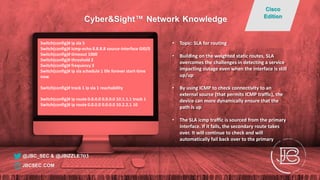
Switch(config)# ip sla 5
Switch(config)# icmp-echo 8.8.8.8 source-interface GI0/0
Switch(config)# timeout 1000
Switch(config)# threshold 2
Switch(config)# frequency 3
Switch(config)# ip sla schedule 1 life forever start-time
now
Switch(config)# track 1 ip sla 1 reachability
Switch(config)# ip route 0.0.0.0 0.0.0.0 10.1.1.1 track 1
Switch(config)# ip route 0.0.0.0 0.0.0.0 10.2.2.1 10
• Topic: SLA for routing
• Building on the weighted static routes, SLA
overcomes the challenges in detecting a service
impacting outage even when the interface is still
up/up
• By using ICMP to check connectivity to an
external source (that permits ICMP traffic), the
device can more dynamically ensure that the
path is up
• The SLA icmp traffic is sourced from the primary
interface. If it fails, the secondary route takes
over. It will continue to check and will
automatically fail back over to the primary
@JBC_SEC & @JBIZZLE703
Cyber&Sight™ Network Knowledge
Cisco
Edition
JBCSEC.COM
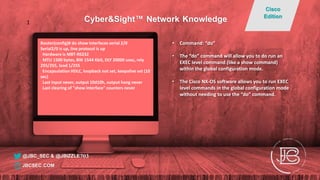
Router(config)# do show interfaces serial 2/0
Serial2/0 is up, line protocol is up
Hardware is M8T-RS232
MTU 1500 bytes, BW 1544 Kbit, DLY 20000 usec, rely
255/255, load 1/255
Encapsulation HDLC, loopback not set, keepalive set (10
sec)
Last input never, output 10d10h, output hang never
Last clearing of "show interface" counters never
• Command: “do”
• The “do” command will allow you to do run an
EXEC level command (like a show command)
within the global configuration mode.
• The Cisco NX-OS software allows you to run EXEC
level commands in the global configuration mode
without needing to use the “do” command.
@JBC_SEC & @JBIZZLE703
Cyber&Sight™ Network Knowledge
Cisco
Edition
JBCSEC.COM
1
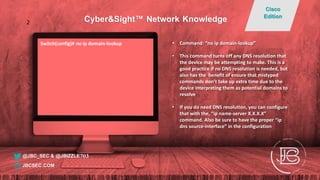
Switch(config)# no ip domain-lookup • Command: “no ip domain-lookup”
• This command turns off any DNS resolution that
the device may be attempting to make. This is a
good practice if no DNS resolution is needed, but
also has the benefit of ensure that mistyped
commands don’t take up extra time due to the
device interpreting them as potential domains to
resolve
• If you do need DNS resolution, you can configure
that with the, “ip name-server X.X.X.X”
command. Also be sure to have the proper “ip
dns source-interface” in the configuration
@JBC_SEC & @JBIZZLE703
Cyber&Sight™ Network Knowledge
Cisco
Edition
JBCSEC.COM
2
Switch#sh ip route
Codes: L - local, C - connected, S - static, R - RIP, M - mobile, B - BGP
D - EIGRP, EX - EIGRP external, O - OSPF, IA - OSPF inter area
N1 - OSPF NSSA external type 1, N2 - OSPF NSSA external type 2
E1 - OSPF external type 1, E2 - OSPF external type 2
i - IS-IS, su - IS-IS summary, L1 - IS-IS level-1, L2 - IS-IS level-2
ia - IS-IS inter area, * - candidate default, U - per-user static route
o - ODR, P - periodic downloaded static route, + - replicated route
Gateway of last resort is not set
4.0.0.0/32 is subnetted, 1 subnets
D 4.4.4.4 [90/158720] via 10.1.5.1, 00:17:32, FastEthernet0/10
5.0.0.0/32 is subnetted, 1 subnets
D 5.5.5.5 [90/161280] via 10.1.5.1, 0017:32, FastEthernet0/10
6.0.0.0/32 is subnetted, 1 subnets
C 6.6.6.6 is directly connected, Loopback0
10.0.0.0/8 is variably subnetted, 4 subnets, 2 masks
• Command: “show ip route”
• This command shows all the routes that the
device knows and is using to send traffic to
different destinations
• It also identifies information including directly
connected routes vs routes that it has learned via
other means, the protocols that it has learned
these routes from and the administrative
distance (ranking for protocols) and the metric
(ranking within the protocol)
• If you are having communication issues, this is
one of the first places to go when
troubleshooting to verify that you do have
a valid route to your destination.
@JBC_SEC & @JBIZZLE703
Cyber&Sight™ Network Knowledge
Cisco
Edition
JBCSEC.COM

Helpful Cisco Tips and Tricks for New Network Engineers

  • 1.
    Switch(config)# default inteth1/1 • Command: “default interface” • Useful when wanting to reset the configurations that are on a specific interface back to the default (out of the box) configuration • Can be used in coordination with the the range command to reset multiple interfaces • https://www.cisco.com/c/en/us/td/docs/io s-xml/ios/interface/command/ir-cr-book/ir- d1.html#wp1944348035 @JBC_SEC & @JBIZZLE703 Cyber&Sight™ Network Knowledge Cisco Edition JBCSEC.COM 1
  • 2.
    Switch(config)# int rangegi1/1-10 Switch(config)# int range gi1/1-10, gi1/12 Switch(config-if-range)# no shut Nexus(config)# int eth1/1-10 Nexus(config)# int eth1/1-10, eth1/12 Nexus(config-if-range)# no shut • Command: “interface range” • The range command allows for the same configurations to be applied to multiple interfaces at the same time • The command works with a “-“ used between ranges, such as “GI1/1-9”. Commas can be used to use multiple ranges in the command, “GI1/1-9, Gi1/12-24” • Within the NX-OS software on Cisco Nexus switches, the range statement isn’t needed when applying configurations to multiple interfaces @JBC_SEC & @JBIZZLE703 Cyber&Sight™ Network Knowledge Cisco Edition JBCSEC.COM 1
  • 3.
    Switch(config)# monitor session1 type erspan-source Switch(config-mon-erspan-src)# vlan 5 Switch(config-mon-erspan-src)# destination Switch(config-mon-erspan-dst)# erspan-id 101 Switch(config-mon-erspan-dst)# origin ip address x.x.x.x Switch(config-mon-erspan-dst)# destination ip x.x.x.x Switch(config-mon-erspan-dst)# no shut • Command: “monitor session span-session- number type erspan-source” • Enhanced Remote SPAN (ERSPAN) allows for a copy of the traffic on a local switch to be sent across a network via a generic routing encapsulation (GRE) tunnel to a remote destination for capture and processing • Desired traffic for capture can be determined based off of interface, VLAN, or subnet • This technology overcomes the challenges of copying traffic only via local SPAN ports, and sending copies of traffic across networks you don’t control @JBC_SEC & @JBIZZLE703 Cyber&Sight™ Network Knowledge Cisco Edition JBCSEC.COM 2
  • 4.
    Switch# show logging| ? cut Print selected parts of lines. diff Show difference between current and previous egrep grep Grep - print lines matching a pattern head Display first lines human Output in human format json Output in json format last Display last lines less Filter for paging sed Stream Editor begin Begin with the line that matches exclude Exclude lines that match include Include lines that match… • Command: “show logging | ?” • Any troubleshooting of issues related to the device or communications through the device should include looking at the logs on the box. This is accomplished with the “show logging” command • Using the “|” after the command allows for a multitude of useful search, display and output options. These will allow you to save a lot of time when traversing through a multitude of log entries • These commands are especially useful when searching for particular strings or looking to output the logs into a specific format @JBC_SEC & @JBIZZLE703 Cyber&Sight™ Network Knowledge Cisco Edition JBCSEC.COM 1
  • 5.
    Switch# show run| section aaa logging level aaa 6 aaa group server radius RADIUS server 192.168.100.4 server 192.168.100.5 use-vrf management aaa authentication login default group RADIUS local aaa authentication login console group RADIUS local aaa accounting default group RADIUS local • Command: “show run | section” • Running the “show run” command allows us to the see the configuration of the device, but can be cumbersome to page down through the entire config looking the configuration we are interested in • We can use a “show run | grep” or “show run | include” command if we know what term/string we are looking for, but doing so will only match on the exact configuration lines and not give any context of where it is in the configuration • The “show run | section” does the same as the above, but also adds the additional context of the commands that are associated with the keyword, even if the key word is not in a specific line@JBC_SEC & @JBIZZLE703 Cyber&Sight™ Network Knowledge Cisco Edition JBCSEC.COM 1
  • 6.
    Switch(config)# int eth1/1 Switch(config-if)#switchport trunk allowed vlan add ? <1-4094> VLAN IDs of the allowed VLANs when this port in trunking mode Switch(config-if)# switchport trunk allowed vlan add 10 • Command: “switchport trunk allowed vlan add” • This command allows you to add new or additional vlans to a pre-existing trunk port • It is important to use the “add” command to configure additional vlans. If you forget the add command and just use “switchport trunk allowed vlan x (where x is your new vlan)”, you will overwrite the previously configured vlans that are allowed on the trunk • A similar method is used to remove vlans, “switchport trunk allowed vlan remove x”. This will remove only particular vlans while retaining all others on the trunk @JBC_SEC & @JBIZZLE703 Cyber&Sight™ Network Knowledge Cisco Edition JBCSEC.COM
  • 7.
    Switch# sh start| in host hostname Switch Switch(config)# host Switch_Run Switch_Run# show archive config differences Contextual ConfigDiffs: +hostname Switch -hostname Switch_Run • Command: “show archive config differences” • The command “show archive config differences” allows you to see the difference between two files, the default case being, the startup configuration and the running configuration. • Remember after you “copy run start”, the configurations are synched, so there will be no difference • On Nexus devices, the command is “show running-config diff” • More information on various command options can be found here: https://www.cisco.com/c/en/us/td/docs/ios- xml/ios/config-mgmt/configuration/xe-3s/ config-mgmt- xe-3s-book/cm-config-diff.html @JBC_SEC & @JBIZZLE703 Cyber&Sight™ Network Knowledge Cisco Edition JBCSEC.COM
  • 8.
    Switch# show interface| include Ether|Desc|error Ethernet1/1 is down (Administratively down) Hardware: 1000/10000 Ethernet, address: 0000.0000.a2a8 (bia 0000.0000.a2a8) Description: Empty EtherType is 0x8100 0 input error 0 short frame 0 overrun 0 underrun 0 ignored 0 output error 0 collision 0 deferred 0 late collision Ethernet1/2 is down (Administratively down) Hardware: 1000/10000 Ethernet, address: 0000.0000.a2a9 (bia 0000.0000.a2a9) Description: Empty EtherType is 0x8100 0 input error 0 short frame 0 overrun 0 underrun 0 ignored 0 output error 0 collision 0 deferred 0 late collision • Command: “show interface | include Ether|Desc|error” • This command allows you to leverage the “include” subcommand and specify lines with specific text that you want to view. The result is a command that allows you to quickly see a summary of all the interfaces and the errors associated with each • You can easily substitute other strings that you want to match on and can even turn this command into an alias (shortcut command) that could be used repeatedly….we’ll cover that later @JBC_SEC & @JBIZZLE703 Cyber&Sight™ Network Knowledge Cisco Edition JBCSEC.COM 2
  • 9.
    Switch(config)# interface Ethernet1/3 Switch(config-if)#description Uplink to RTR1 GI2/2/1 Switch(config-if)# no cdp enable Switch(config-if)# switchport mode private-vlan trunk promiscuous Switch(config-if)# switchport private-vlan trunk native vlan 30 Switch(config-if)# switchport private-vlan trunk allowed vlan 10- 30 Switch(config-if)# switchport private-vlan mapping trunk 10 20 Switch(config-if)# switchport private-vlan mapping trunk 11 21 Switch(config-if)# switchport private-vlan mapping trunk 12 22 Switch(config-if)# switchport private-vlan mapping trunk 13 23 • Command: “switchport mode private-vlan trunk promiscuous” • This command allows you to connect a trunk with multiple layer 2 private VLANs to an upstream layer 3 device as their gateway. Prior to this command, you had to have an individual promiscuous access port for each private VLAN • When using this command, you must make sure to also use the “private-vlan mapping trunk” command to associate each primary VLAN with its’ corresponding secondary VLAN • Not all Cisco devices support this command (Nexus switches do). If it is unsupported, you will need to use individual promiscuous access ports for gateway connections. @JBC_SEC & @JBIZZLE703 Cyber&Sight™ Network Knowledge Cisco Edition JBCSEC.COM
  • 10.
    Switch# ping ? <CR> A.B.C.Dor Hostname IP address of remote system WORD Enter Hostname multicast Multicast ping • Command: “?” • The “?” command allows you to see what commands are available to you given the current string of commands you have typed in • This command is useful when you can’t remember the specific syntax of the command you are looking for, but even more so it allows an inquisitive engineer the ability to discover previously unknown commands and capabilities of a device • Those with the quickest fingers will frequently use “?” and then tab button (which allows you to autocomplete a word) when configuring a device @JBC_SEC & @JBIZZLE703 Cyber&Sight™ Network Knowledge Cisco Edition JBCSEC.COM 1
  • 11.
    Switch(config)# interface port-channel10 Switch(config-if)#description portchannel for Server1 Switch(config-if)# switchport mode trunk Switch(config-if)# no lacp suspend-individual Switch(config-if)# switchport trunk native vlan 30 Switch(config-if)# switchport trunk allowed vlan 10,20,25 Switch(config-if)# spanning-tree port type edge trunk Switch(config)# interface Ethernet1/14 Switch(config-if)# channel-group 10 mode active Switch(config)# interface Ethernet1/15 Switch(config-if)# channel-group 10 mode active • Command: “interface port-channel” • This command allows you to logically combine two or more physical interfaces on the same switch utilizing the link aggregation control protocol (LACP) • Since LACP is an IEEE open standard, it means that it works between most vendors and OS’s. Therefore, it is very use to use when connecting to Linux, ESX, and other types of servers. • Port channels can be used in combination with Cisco’s virtual port channel (vPC), which allows physical connections connected to two separate Cisco Nexus switches to be combined into a port channel @JBC_SEC & @JBIZZLE703 Cyber&Sight™ Network Knowledge Cisco Edition JBCSEC.COM 2
  • 12.
    Switch(config)# ip access-listmgmt_control Switch(config-acl)# 10 remark SSH Management Access Switch(config-acl)# 20 permit tcp 192.168.2.11/32 any eq 22 log Switch(config-acl)# 30 permit tcp 192.168.2.12/32 any eq 22 log Switch(config-acl)# 40 deny ip any any log Switch(config)# VMWARE_VMOTION Switch(config-acl)# 10 remark intra-vlan traffic Switch(config-acl)# 20 permit tcp 192.168.6.0/24 192.168.6.0/24 eq 8000 Switch(config-acl)# 30 permit tcp 192.168.6.0/24 192.168.6.0/24 established Switch(config-acl)# 40 deny ip any any log Switch(config-acl)# 50 deny icmp any any log • Topic: Access control list logging • Access control list logging plays an important role in understanding what is happening within your environment • When it comes to your management interfaces (whether they are via SSH or HTTPS), it is important to know what devices are making both approved and unapproved connections • In regard to other types of ACL’s, logging on your deny statements is a great way to aid in troubleshooting operational issue in your environment @JBC_SEC & @JBIZZLE703 Cyber&Sight™ Network Knowledge Cisco Edition JBCSEC.COM 1
  • 13.
    Switch#who Line User Host(s)Idle Location * 2 vty 0 admin1 idle 00:00:00 192.168.2.11 Interface User Mode Idle Peer Address Switch# show users NAME LINE TIME IDLE PID COMMENT admin1 pts/0 Nov 7 18:17 . 13078 (192.168.2.11) session=ssh * • Command: “who” and “show users” • It’s important to be aware of who is logged into your device. This is important both from a security perspective, but also from an operational one as well. • The above commands let you know which users are logged in, where they logged in from, and some other pertinent information like protocol and time they connected • This information can be correlated with the recommended VTY ACL logging that was mentioned in a previous post @JBC_SEC & @JBIZZLE703 Cyber&Sight™ Network Knowledge Cisco Edition JBCSEC.COM 1
  • 14.
    Nexus(config)# ntp source-interfacemgmt0 Nexus(config)# logging server 192.168.2.14 6 use- vrf management Nexus(config)# ip radius source-interface mgmt0 Switch(config)# ip ssh source-interface Vlan10 Switch(config)# ip radius source-interface Vlan10 Switch(config)# ntp source Vlan10 • Topic: Service source interfaces • When managing a network device there are numerous services on the box that help provide access, monitoring, and other network services (NTP, Syslog, TACACS+, Radius, routing protocols, SNMP, etc.) • When configuring these services it is important to make sure that you are configuring them to use the proper source interface to send the traffic from. • If you don’t do this, the box may try to send them from a different IP address on the box, and ACL and routing configurations may make it impossible for the traffic to reach its’ desired location @JBC_SEC & @JBIZZLE703 Cyber&Sight™ Network Knowledge Cisco Edition JBCSEC.COM 2
  • 15.
    Switch(config)# privilege execlevel 7 show startup-config Switch(config)# privilege exec level 7 show logging Switch(config)# privilege exec level 7 show • Command: “privilege exec level” • Allows you to set the specific commands that an exec level can run. By default, the three privilege levels on a Cisco device: • Level 0 – Basic commands (disable, enable, exit, help, and logout) • Level 1 – Includes all commands available at the User EXEC command mode • Level 15 – Includes all commands available at the Privileged EXEC command mode • The remaining levels (2-14) are customizable. The assignment of specific accounts to a specific level can be done in the local configuration or on your AAA server • This is very helpful if you want to set up read-only accounts or limit the types of configurations certain admin groups can implement @JBC_SEC & @JBIZZLE703 Cyber&Sight™ Network Knowledge Cisco Edition JBCSEC.COM 2
  • 16.
    Switch# show history showip route show ntp show ntp associations show int trunk show history • Command: “show history” • Allows you to see previous commands that you have entered on the device • By default shows last 10 commands, but can be modified with the “terminal history size NUMBER” command • You can also use the up and down arrows to show previous commands that were entered • “Show history all” will show the previous command history as well as the reload information of the device @JBC_SEC & @JBIZZLE703 Cyber&Sight™ Network Knowledge Cisco Edition JBCSEC.COM 1
  • 17.
    Switch# test cable-diagnosticstdr interface gi 1/1/1 • Command: “test cable-diagnostics tdr int” • Certain Cisco devices give you the ability to test your twisted pair cables. It will tell you if there is an issue with certain cable pairs being bad, determine the appx length of the cabling, and if the issue is on the local or remote end • There are limitations to the devices this is supported on. There is also limitations on the types of ports/SFP’s that are supported/unsupported • This is a disruptive test. The interface WILL go down during the test. • https://community.cisco.com/t5/ networking- documents/how-to-use-time-domain-reflectometer- tdr/ta-p/3119327 @JBC_SEC & @JBIZZLE703 Cyber&Sight™ Network Knowledge Cisco Edition JBCSEC.COM
  • 18.
    Switch# show control-planehost open-ports Active internet connections (servers and established) Prot Local Address Foreign Address Service State tcp *:22 *:0 SSH LISTEN tcp *:22 192.168.1.205:5385 SSH ESTABLIS udp *:61165 *:0 IP SNMP LISTEN udp *:60892 10.94.0.20:514 Syslog ESTABLIS udp *:49 10.94.0.5:0 TACACS service LISTEN udp *:52645 192.168.1.238:514 Syslog ESTABLIS • Command: “show control-plane host open- ports” • This command will let you see what service ports are open on your device and what connections you have coming inbound and outbound • A similar command that can be used is, “show ip socket” @JBC_SEC & @JBIZZLE703 Cyber&Sight™ Network Knowledge Cisco Edition JBCSEC.COM 2
  • 19.
    Switch# show inttrunk -------------------------------------------------------------------------------- Port Native Status Port Vlan Channel -------------------------------------------------------------------------------- Eth1/13 3020 trnk-bndl Po13 -------------------------------------------------------------------------------- Port Vlans Allowed on Trunk -------------------------------------------------------------------------------- Eth1/13 112,201,312,401 -------------------------------------------------------------------------------- Port Vlans Err-disabled on Trunk -------------------------------------------------------------------------------- Eth1/13 none -------------------------------------------------------------------------------- Port STP Forwarding -------------------------------------------------------------------------------- Eth1/13 112,201,312,401 -------------------------------------------------------------------------------- Port Vlans in spanning tree forwarding state and not pruned • Command: “show interface trunk” • This command displays all of the configured trunks that are on your device and a variety of useful information about them • Show things such as interfaces, native vlans associated with trunks, the VLANs that are allowed over them, and various spanning tree information • Most useful is seeing which VLANs may be err-disabled on the trunks, which would cause traffic to no traverse the link @JBC_SEC & @JBIZZLE703 Cyber&Sight™ Network Knowledge Cisco Edition JBCSEC.COM 2
  • 20.
    Nexus# show inteth1/47 transceiver details Ethernet1/47 transceiver is present type is 10Gbase-SR part number is xxxx-xxxxx-xxx serial number is xxxxxx nominal bitrate is 10350 MBit/sec Link length supported for 50/125um OM2 fiber is 82 m Link length supported for 62.5/125um fiber is 26 m Link length supported for 50/125um OM3 fiber is 300 m …. SFP Detail Diagnostics Information (internal calibration) ---------------------------------------------------------------------------- Current Alarms Warnings Measurement High Low High Low ---------------------------------------------------------------------------- Temperature 30.40 C 75.00 C -5.00 C 70.00 C 0.00 C Voltage 3.31 V 3.63 V 2.97 V 3.46 V 3.13 V Current 0.00 mA -- 10.50 mA 2.50 mA 10.50 mA 2.50 mA Tx Power N/A 1.69 dBm -11.30 dBm -1.30 dBm -7.30 dBm Rx Power N/A 1.99 dBm -13.97 dBm -1.00 dBm -9.91 dBm Transmit Fault Count = 0 ---------------------------------------------------------------------------- Note: ++ high-alarm; + high-warning; -- low-alarm; - low-warning • Command: “show interface x/x transceiver detail” • This command displays administrative and performance information on the SFP’s that are inserted in your device • This information can be useful when looking for voltage, temperature, and power issues with a SFP • SNMP/syslog alerting can be configured to let you know alarms/warning are present @JBC_SEC & @JBIZZLE703 Cyber&Sight™ Network Knowledge Cisco Edition JBCSEC.COM
  • 21.
    Switch(config)# interface Gi1/1 Switch(config-if)#switchport port-security Switch(config-if)# switchport port-security violation restrict Switch(config-if)# switchport port-security mac- address sticky • Command: “switchport port-security” • This command allows you to enable port security, which controls which MAC addresses can physically be connected to a switchport. The default limit is 1 MAC address; however you can configure it to allow multiple addresses • The “mac-address sticky” command allows the switch to learn and configure the first MAC address it sees connected and lock that configuration in place. If not using the sticky configuration, you can manually assign the MAC • You can configure the interface to either restrict unknown address or completely shut down the interface when it sees a new MAC address. Use caution when implementing this on ports connected to anything other than PCs @JBC_SEC & @JBIZZLE703 Cyber&Sight™ Network Knowledge Cisco Edition JBCSEC.COM
  • 22.
    Switch(config)# login on-failurelog Switch(config)# login on-success log • Command: “login on-failure log” and “login on-success log” • These commands are used to have the device create log entries whenever there is a successful or failed login attempt on any interface on the device • When sending these logs to a syslog server, they are categorized as Informational • Be aware that some Cisco devices do not show the username in the log for security reasons (you could look at your AAA server logs to find the username) • Nexus switches log failed login attempts by default, but in order to see successful log in attempts, you must change increase the logging level of the authpriv to 5, “logging level authpriv 5" @JBC_SEC & @JBIZZLE703 Cyber&Sight™ Network Knowledge Cisco Edition JBCSEC.COM 1
  • 23.
    Switch(config)# vlan 12 Switch(config-vlan)#name Workstations Switch(config-vlan)# private-vlan primary Switch(config-vlan)# private-vlan association 31 Switch(config-vlan)# vlan 31 Switch(config-vlan)# name VLAN_12_PVLAN Switch(config-vlan)# private-vlan isolated • Topic: Configure Private VLAN • PVLANs take the segmentation regular VLANs create with their broadcast domains and allow you to further segment devices into three different port types or groups (Promiscuous, Isolated, and Community) with varying connection and protection profiles • PVLANs consist of both a primary and secondary VLAN • Promiscuous ports are always associated with the primary VLAN. Promiscuous ports can communicate with all other ports in the PVLAN including the secondary VLANs • Community ports are used to segment devices that should be allowed to communicate with only other devices in the same community subdomain • Isolated ports are used when you want to ensure that no other non-promiscuous ports can forward data to or receive traffic from a device @JBC_SEC & @JBIZZLE703 Cyber&Sight™ Network Knowledge Cisco Edition JBCSEC.COM
  • 24.
    Switch# show port-security TotalSecured Mac Addresses in System (excluding one mac per port) : 0 Max Addresses limit in System (excluding one mac per port) : 8192 ---------------------------------------------------------------------------- Secure Port MaxSecureAddr CurrentAddr SecurityViolation Security Action (Count) (Count) (Count) ---------------------------------------------------------------------------- Ethernet1/1 3 0 0 Shutdown ================================================================== ========== • Command: “show port-security” • This command displays all the current interfaces that are configured with port-security • It also displays the maximum number of MAC addresses allowed to connect on the interface, the current MAC address connected to it, the number of security violations, and what happens if a violation occurs • When troubleshooting connectivity issues in an environment where port-security is used, this is one of the first commands that should be used @JBC_SEC & @JBIZZLE703 Cyber&Sight™ Network Knowledge Cisco Edition JBCSEC.COM 2
  • 25.
    Switch(config)# int gi1/0/1 Switch(config-if)#switchport port-security violation restrict Switch(config-if)# switchport port-security mac-address sticky Switch(config-if)# switchport port-security • Topic: Port Security • Port security allows you to restrict the specific MAC addresses that can connect to a physical interface • You can hard code the expected MAC address, or you can use the “sticky” command so that the interface learns the first MAC that is connected and inserts that into the configuration • You can specify the number of MAC addresses that are allowed on the interface, but the default is 1 • You can also modify the violation action in the event an unapproved MAC connects. The default is to shut down the port, however you can also configure the port to stay up while blocking all unapproved MAC’s with the “violation restrict” command @JBC_SEC & @JBIZZLE703 Cyber&Sight™ Network Knowledge Cisco Edition JBCSEC.COM 2
  • 26.
    Switch(config)# service password-encryption• Command: “service password-encryption” • This command ensures that all clear text passwords that are entered into the configuration are encrypted • BUT…it is not a strong form of encryption and should not really be trusted to protect against an attacker. It uses type 7 encryption based on a Vigenere cipher which is completely crackable • This command is really only useful to ensure that passwords are not able to be seen by someone shoulder surfing • Do not rely on this command to protect your passwords! @JBC_SEC & @JBIZZLE703 Cyber&Sight™ Network Knowledge Cisco Edition JBCSEC.COM
  • 27.
    Switch(config)# ip route0.0.0.0 0.0.0.0 10.1.1.1 Switch(config)# ip route 0.0.0.0 0.0.0.0 10.2.2.1 10 • Topic: Weighted Static Routes • In some instances it makes sense to have a secondary path for a static route. This may be necessary to overcome some type of physical layer failure with two paths coming off of the same device • This makes sense if there are given limitations on said network device such as: not having a license for advanced routing capabilities or the ability to implement SLA • The number at the end of the statement (in this case 10) is used to add an administrative weight to the route, making it less preferred than the first. If the physical interface that the 10.1.1.X network is on goes down, the second route takes over as the default route @JBC_SEC & @JBIZZLE703 Cyber&Sight™ Network Knowledge Cisco Edition JBCSEC.COM
  • 28.
    Switch(config)# ip sla5 Switch(config)# icmp-echo 8.8.8.8 source-interface GI0/0 Switch(config)# timeout 1000 Switch(config)# threshold 2 Switch(config)# frequency 3 Switch(config)# ip sla schedule 1 life forever start-time now Switch(config)# track 1 ip sla 1 reachability Switch(config)# ip route 0.0.0.0 0.0.0.0 10.1.1.1 track 1 Switch(config)# ip route 0.0.0.0 0.0.0.0 10.2.2.1 10 • Topic: SLA for routing • Building on the weighted static routes, SLA overcomes the challenges in detecting a service impacting outage even when the interface is still up/up • By using ICMP to check connectivity to an external source (that permits ICMP traffic), the device can more dynamically ensure that the path is up • The SLA icmp traffic is sourced from the primary interface. If it fails, the secondary route takes over. It will continue to check and will automatically fail back over to the primary @JBC_SEC & @JBIZZLE703 Cyber&Sight™ Network Knowledge Cisco Edition JBCSEC.COM
  • 29.
    Router(config)# do showinterfaces serial 2/0 Serial2/0 is up, line protocol is up Hardware is M8T-RS232 MTU 1500 bytes, BW 1544 Kbit, DLY 20000 usec, rely 255/255, load 1/255 Encapsulation HDLC, loopback not set, keepalive set (10 sec) Last input never, output 10d10h, output hang never Last clearing of "show interface" counters never • Command: “do” • The “do” command will allow you to do run an EXEC level command (like a show command) within the global configuration mode. • The Cisco NX-OS software allows you to run EXEC level commands in the global configuration mode without needing to use the “do” command. @JBC_SEC & @JBIZZLE703 Cyber&Sight™ Network Knowledge Cisco Edition JBCSEC.COM 1
  • 30.
    Switch(config)# no ipdomain-lookup • Command: “no ip domain-lookup” • This command turns off any DNS resolution that the device may be attempting to make. This is a good practice if no DNS resolution is needed, but also has the benefit of ensure that mistyped commands don’t take up extra time due to the device interpreting them as potential domains to resolve • If you do need DNS resolution, you can configure that with the, “ip name-server X.X.X.X” command. Also be sure to have the proper “ip dns source-interface” in the configuration @JBC_SEC & @JBIZZLE703 Cyber&Sight™ Network Knowledge Cisco Edition JBCSEC.COM 2
  • 31.
    Switch#sh ip route Codes:L - local, C - connected, S - static, R - RIP, M - mobile, B - BGP D - EIGRP, EX - EIGRP external, O - OSPF, IA - OSPF inter area N1 - OSPF NSSA external type 1, N2 - OSPF NSSA external type 2 E1 - OSPF external type 1, E2 - OSPF external type 2 i - IS-IS, su - IS-IS summary, L1 - IS-IS level-1, L2 - IS-IS level-2 ia - IS-IS inter area, * - candidate default, U - per-user static route o - ODR, P - periodic downloaded static route, + - replicated route Gateway of last resort is not set 4.0.0.0/32 is subnetted, 1 subnets D 4.4.4.4 [90/158720] via 10.1.5.1, 00:17:32, FastEthernet0/10 5.0.0.0/32 is subnetted, 1 subnets D 5.5.5.5 [90/161280] via 10.1.5.1, 0017:32, FastEthernet0/10 6.0.0.0/32 is subnetted, 1 subnets C 6.6.6.6 is directly connected, Loopback0 10.0.0.0/8 is variably subnetted, 4 subnets, 2 masks • Command: “show ip route” • This command shows all the routes that the device knows and is using to send traffic to different destinations • It also identifies information including directly connected routes vs routes that it has learned via other means, the protocols that it has learned these routes from and the administrative distance (ranking for protocols) and the metric (ranking within the protocol) • If you are having communication issues, this is one of the first places to go when troubleshooting to verify that you do have a valid route to your destination. @JBC_SEC & @JBIZZLE703 Cyber&Sight™ Network Knowledge Cisco Edition JBCSEC.COM