 Web Accessibility – An Introduction
    What?
    Who?
    Why?
 Principles
 Testing Tools
 Code

- Ramya Sethuraman, 2012
What is Web Accessibility?

Web accessibility means that people with
disabilities can use the Web. More
specifically, Web accessibility means that people
with disabilities can
perceive, understand, navigate, and interact with
the Web, and that they can contribute to the Web.
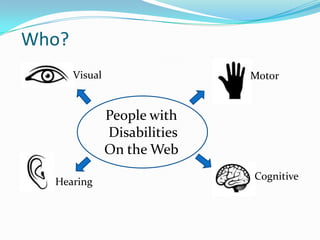
Who?
       Visual                  Motor


                People with
                Disabilities
                On the Web
                               Cognitive
  Hearing
Visual
 Text size and images
 Settings for fonts, contrast and colors
 Using a screen reader
Hearing
 Transcripts
 Captions
 Subtitles
Cognitive
 Complex page layouts
 Moving, blinking, flickering content
 Page structure and context
Motor
 Keyboard access
 Timed forms
 Consistent Navigation & Structure
Why?
Equal opportunity for people with disabilities
Older users/mobile devices in public places
Customer base
Laws & Regulations
Good will.
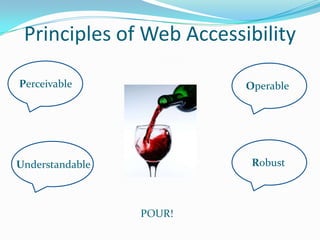
Principles of Web Accessibility

Perceivable               Operable


Understandable             Robust


                 POUR!
Manual Testing
   Validate HTML
   Large fonts
   Style sheets/High Contrast Modes
   Alt text for images
   Audio/Video presentations
   Table headers
   Forms
   Links
   Keyboard access
   Headings, skip navigation
   Frames
Testing tools (among many others)
 W3C markup validation service
 Web Accessibility Toolbar for IE
 Firefox Accessibility Extension
 WAVE toolbar for Firefox
 Screen Readers – Jaws, NVDA, VoiceOver
 Inspect32
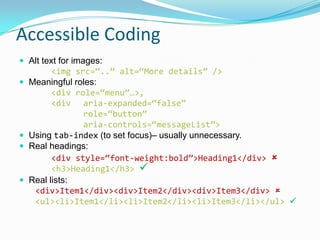
Accessible Coding
 Alt text for images:
          <img src=“..” alt=“More details” />
   Meaningful roles:
          <div role=“menu”…>,
          <div aria-expanded=“false”
                 role=“button”
                 aria-controls=“messageList”>
   Using tab-index (to set focus)– usually unnecessary.
   Real headings:
          <div style=“font-weight:bold”>Heading1</div> 
          <h3>Heading1</h3> 
   Real lists:
     <div>Item1</div><div>Item2</div><div>Item3</div> 
     <ul><li>Item1</li><li>Item2</li><li>Item3</li></ul> 
“The power of the Web is in its universality. Access by
everyone regardless of disability is an essential aspect.”

-- Tim Berners-Lee, W3C Director and inventor of the
World Wide Web

Web Accessibility

  • 1.
     Web Accessibility– An Introduction  What?  Who?  Why?  Principles  Testing Tools  Code - Ramya Sethuraman, 2012
  • 2.
    What is WebAccessibility? Web accessibility means that people with disabilities can use the Web. More specifically, Web accessibility means that people with disabilities can perceive, understand, navigate, and interact with the Web, and that they can contribute to the Web.
  • 3.
    Who? Visual Motor People with Disabilities On the Web Cognitive Hearing
  • 4.
    Visual  Text sizeand images  Settings for fonts, contrast and colors  Using a screen reader
  • 5.
  • 6.
    Cognitive  Complex pagelayouts  Moving, blinking, flickering content  Page structure and context
  • 7.
    Motor  Keyboard access Timed forms  Consistent Navigation & Structure
  • 8.
    Why? Equal opportunity forpeople with disabilities Older users/mobile devices in public places Customer base Laws & Regulations Good will.
  • 9.
    Principles of WebAccessibility Perceivable Operable Understandable Robust POUR!
  • 10.
    Manual Testing  Validate HTML  Large fonts  Style sheets/High Contrast Modes  Alt text for images  Audio/Video presentations  Table headers  Forms  Links  Keyboard access  Headings, skip navigation  Frames
  • 11.
    Testing tools (amongmany others)  W3C markup validation service  Web Accessibility Toolbar for IE  Firefox Accessibility Extension  WAVE toolbar for Firefox  Screen Readers – Jaws, NVDA, VoiceOver  Inspect32
  • 12.
    Accessible Coding  Alttext for images: <img src=“..” alt=“More details” />  Meaningful roles: <div role=“menu”…>, <div aria-expanded=“false” role=“button” aria-controls=“messageList”>  Using tab-index (to set focus)– usually unnecessary.  Real headings: <div style=“font-weight:bold”>Heading1</div>  <h3>Heading1</h3>   Real lists: <div>Item1</div><div>Item2</div><div>Item3</div>  <ul><li>Item1</li><li>Item2</li><li>Item3</li></ul> 
  • 13.
    “The power ofthe Web is in its universality. Access by everyone regardless of disability is an essential aspect.” -- Tim Berners-Lee, W3C Director and inventor of the World Wide Web

Editor's Notes

  • #3 Web accessibility means that people with disabilities can use the Web. More specifically, Web accessibility means that people with disabilities can perceive, understand, navigate, and interact with the Web, and that they can contribute to the Web. 
  • #4 Visual – color blindness, low vision, blindness, Cognitive – ADHD, learning disability, memory impairment, seizures Motor – Arthritis, tremors, paralysis
  • #5 Some people with low vision will change the settings in their operating system and/or browser to not only enlarge the text, but to increase the contrast of the text in relation to the background. People may set their own font and background colors. Color-blind people will be unable to understand content denoted by color alone. Users that are blind use a screen reader and a keyboard to interact with content on the screen.
  • #6 Transcripts allow anyone that cannot access content from web audio or video to read a text transcript instead. Transcripts do not have to be verbatim accounts of the spoken word in a video. Captions are synchronized text versions of the spoken word. Subtitles may be used by those who can hear, but not necessarily understand the language.
  • #7 For complex page layouts, which are hard to comprehend for people with cognitive disabilities, add structure to the documents using headings and lists, provide search options and options to suppress distractions like moving content on the screen. Provide alternate ways of navigation and supplemental content to allow user to reestablish context.
  • #8 People with motor disabilities may not be able to use a mouse, may take longer for actions to be completed online. Inconsistent navigation, tabbing order, layout form barriers to people with motor disabilities.
  • #10 From WCAG 2.0 Guidelines: http://www.w3.org/TR/WCAG/#guidelines
  • #12 Other great tools: http://www.glendathegood.com/blog/?p=730