B Y M . M O T L H A L A
HEALTH AND SAFETY
IN COMPUTING
Definition - Ergonomics
 The applied science of equipment design, as for the
workplace, intended to maximize productivity by
reducing operator fatigue and discomfort
 Design factors, as for the workplace, intended to
maximize productivity by minimizing operator
fatigue and discomfort
 is the science of refining the design of products to
optimize them for human use.
…Definition - Ergonomics
 The scientific study of people and their
working conditions, especially done in order
to improve effectiveness
 E.g.: The ergonomics of the
new office furniture have reduced eyestrain and
back problems among the computer users
 It relates to the way in which the workplace is
designed to take into account the way people
work and the effect of the work environment
on productivity and efficiency.
Impacts of Computer use on our health
 Using computers for a long time, in bad
postures, and in unfavorable lighting can
cause several ailments associated with such.
They include
 Musculoskeletal problems
 Eye strain
Musculoskeletal Disorder (MSD)
MSDs are injuries and disorders that affect the
human body’s movement or musculoskeletal
system (i.e. muscles, tendons, ligaments, nerves,
discs, blood vessels, etc.).
Common MSDs include
 Carpal Tunnel Syndrome
 Tendonitis
 Ligament Sprain
 Tension Neck Syndrome
 Mechanical Back Syndrome
 Radial Tunnel Syndrome
 Trigger Finger / Thumb
 e.t.c.
Carpal Tunnel Syndrome
 Carpal tunnel syndrome is numbness, tingling,
weakness, and other problems in your hand because
of pressure on the median nerve in your wrist.
 Carpal tunnel syndrome is an irritation of the
median nerve in the wrist that leads to numbness,
tingling, pain, and weakness in the hand.
 The median nerve and several tendons run from your
forearm to your hand through a small space in your
wrist called the carpal tunnel
 Pressure on the median nerve causes carpal tunnel
syndrome
Tendonitis
 Tendonitis is inflammation of a tendon
 Tendons are bands of strong connective tissue
that attach muscle to bone
 Tendonitis is usually a type of overuse injury;
the tendon is repeatedly strained until tiny
tears form
 Sites that are prone to tendonitis include the
shoulder, wrist, knee, shin and heel
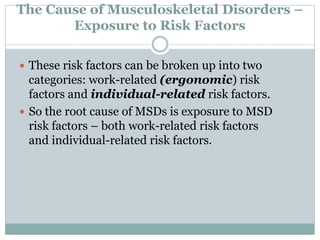
The Cause of Musculoskeletal Disorders –
Exposure to Risk Factors
 These risk factors can be broken up into two
categories: work-related (ergonomic) risk
factors and individual-related risk factors.
 So the root cause of MSDs is exposure to MSD
risk factors – both work-related risk factors
and individual-related risk factors.
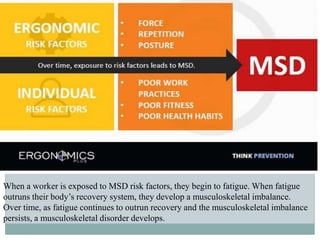
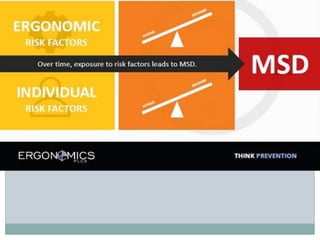
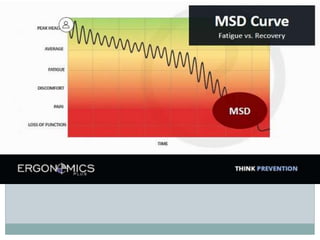
When a worker is exposed to MSD risk factors, they begin to fatigue. When fatigue
outruns their body’s recovery system, they develop a musculoskeletal imbalance.
Over time, as fatigue continues to outrun recovery and the musculoskeletal imbalance
persists, a musculoskeletal disorder develops.
Avoiding Musculoskeletal problems
 Taking regular breaks from working at your computer
- a few minutes at least once an hour
 Alternating work tasks
 Regular stretching to relax your body
 Using equipment such as footrests, wrist rests and
document holders if you need to
 Keeping your mouse and keyboard at the same level
 Avoiding gripping your mouse too tightly - hold the
mouse lightly and click gently
 Familiarize yourself with keyboard shortcuts for
applications you regularly use (to avoid overusing the
mouse)
Eye Strain
 Computer users can experience a number of
symptoms related to vision including:
 Visual fatigue
 Blurred or double vision
 Burning and watering eyes
 Headaches and frequent changes in prescription
glasses
Avoiding Eyestrain
 Precautions that can be taken to avoid
eyestrain include:
 Exercising the eyes by periodically focusing on objects
at varying distances
 Blinking regularly
 Adjusting the screen height / seating so that when
sitting comfortably your eyes are in line with the top of
the monitor screen
 Adjusting the brightness control on your monitor for
comfort
 Adjusting the contrast on your monitor to make the
characters distinct from the background
…Avoiding Eyestrain
 Positioning monitors to avoid glare (e.g. not
directly in front of windows)
 Keeping your monitor the screen clean
 Keeping the screen and document holder (if
you use one) at the same distance from your
eyes
 Servicing, repairing or replacing monitors
that flicker or have inadequate clarity
 Regular eye testing - do this at least once
every 2 years and more frequently if
necessary
Computers and Environment
 e-Trash
 Energy saving
Environment - e-Trash
Keep the following in mind
 Print less
 Buy environmentally products
 Be sensitive about how e-trash is disposed
 Save paper by using Print Preview and the
duplex printing option of your printer
Energy Saving
 Some guidelines for saving energy
 Switch of the computer if you are not going to use it
for a prolonged period of time
 Turn off the computer screen/monitor if you are not
using the computer for a while and use the settings on
your computer to turn off the screen automatically
after a period of non-use
 You can also put a computer in sleep/hibernate mode
Rules and Regulations for a Computer Lab
 What are they?
Employees’ Obligations/regulations
 What is the role that the employee should play?
Reference
 http://whatis.techtarget.com/definition/ergo
nomics

Health and Safety in Computing.ppt

  • 1.
    B Y M. M O T L H A L A HEALTH AND SAFETY IN COMPUTING
  • 2.
    Definition - Ergonomics The applied science of equipment design, as for the workplace, intended to maximize productivity by reducing operator fatigue and discomfort  Design factors, as for the workplace, intended to maximize productivity by minimizing operator fatigue and discomfort  is the science of refining the design of products to optimize them for human use.
  • 3.
    …Definition - Ergonomics The scientific study of people and their working conditions, especially done in order to improve effectiveness  E.g.: The ergonomics of the new office furniture have reduced eyestrain and back problems among the computer users  It relates to the way in which the workplace is designed to take into account the way people work and the effect of the work environment on productivity and efficiency.
  • 4.
    Impacts of Computeruse on our health  Using computers for a long time, in bad postures, and in unfavorable lighting can cause several ailments associated with such. They include  Musculoskeletal problems  Eye strain
  • 5.
    Musculoskeletal Disorder (MSD) MSDsare injuries and disorders that affect the human body’s movement or musculoskeletal system (i.e. muscles, tendons, ligaments, nerves, discs, blood vessels, etc.). Common MSDs include  Carpal Tunnel Syndrome  Tendonitis  Ligament Sprain  Tension Neck Syndrome  Mechanical Back Syndrome  Radial Tunnel Syndrome  Trigger Finger / Thumb  e.t.c.
  • 6.
    Carpal Tunnel Syndrome Carpal tunnel syndrome is numbness, tingling, weakness, and other problems in your hand because of pressure on the median nerve in your wrist.  Carpal tunnel syndrome is an irritation of the median nerve in the wrist that leads to numbness, tingling, pain, and weakness in the hand.  The median nerve and several tendons run from your forearm to your hand through a small space in your wrist called the carpal tunnel  Pressure on the median nerve causes carpal tunnel syndrome
  • 7.
    Tendonitis  Tendonitis isinflammation of a tendon  Tendons are bands of strong connective tissue that attach muscle to bone  Tendonitis is usually a type of overuse injury; the tendon is repeatedly strained until tiny tears form  Sites that are prone to tendonitis include the shoulder, wrist, knee, shin and heel
  • 8.
    The Cause ofMusculoskeletal Disorders – Exposure to Risk Factors  These risk factors can be broken up into two categories: work-related (ergonomic) risk factors and individual-related risk factors.  So the root cause of MSDs is exposure to MSD risk factors – both work-related risk factors and individual-related risk factors.
  • 9.
    When a workeris exposed to MSD risk factors, they begin to fatigue. When fatigue outruns their body’s recovery system, they develop a musculoskeletal imbalance. Over time, as fatigue continues to outrun recovery and the musculoskeletal imbalance persists, a musculoskeletal disorder develops.
  • 12.
    Avoiding Musculoskeletal problems Taking regular breaks from working at your computer - a few minutes at least once an hour  Alternating work tasks  Regular stretching to relax your body  Using equipment such as footrests, wrist rests and document holders if you need to  Keeping your mouse and keyboard at the same level  Avoiding gripping your mouse too tightly - hold the mouse lightly and click gently  Familiarize yourself with keyboard shortcuts for applications you regularly use (to avoid overusing the mouse)
  • 13.
    Eye Strain  Computerusers can experience a number of symptoms related to vision including:  Visual fatigue  Blurred or double vision  Burning and watering eyes  Headaches and frequent changes in prescription glasses
  • 14.
    Avoiding Eyestrain  Precautionsthat can be taken to avoid eyestrain include:  Exercising the eyes by periodically focusing on objects at varying distances  Blinking regularly  Adjusting the screen height / seating so that when sitting comfortably your eyes are in line with the top of the monitor screen  Adjusting the brightness control on your monitor for comfort  Adjusting the contrast on your monitor to make the characters distinct from the background
  • 15.
    …Avoiding Eyestrain  Positioningmonitors to avoid glare (e.g. not directly in front of windows)  Keeping your monitor the screen clean  Keeping the screen and document holder (if you use one) at the same distance from your eyes  Servicing, repairing or replacing monitors that flicker or have inadequate clarity  Regular eye testing - do this at least once every 2 years and more frequently if necessary
  • 16.
    Computers and Environment e-Trash  Energy saving
  • 17.
    Environment - e-Trash Keepthe following in mind  Print less  Buy environmentally products  Be sensitive about how e-trash is disposed  Save paper by using Print Preview and the duplex printing option of your printer
  • 18.
    Energy Saving  Someguidelines for saving energy  Switch of the computer if you are not going to use it for a prolonged period of time  Turn off the computer screen/monitor if you are not using the computer for a while and use the settings on your computer to turn off the screen automatically after a period of non-use  You can also put a computer in sleep/hibernate mode
  • 19.
    Rules and Regulationsfor a Computer Lab  What are they?
  • 20.
    Employees’ Obligations/regulations  Whatis the role that the employee should play?
  • 21.

Editor's Notes

  • #3 Human characteristics, such as height, weight, and proportions are considered, as well as information about human hearing, sight, temperature preferences, and so on. Ergonomics is sometimes known as human factors engineering. Computers and related products, such as computer desks and chairs, are frequently the focus of ergonomic design. A great number of people use these products for extended periods of time -- such as the typical work day. If these products are poorly designed or improperly adjusted for human use, the person using them may suffer unnecessary fatigue, stress, and even injury.
  • #4 It also includes good practices when working on a computer. For example lighting, posture, and positioning of equipment. The outcome of an ergonomically designed workplace is not only improved safety and comfort for the user, but also improved efficiency. It makes use of ergonomically friendly designed hardware and furniture. User habits and procedures are also taken into account and addressed.
  • #8 Symptoms of tendonitis The symptoms of tendonitis can include:Pain Swelling Stiffness and restricted mobility at the affected joint Muscle weakness The skin over the affected area may feel warm to the touch. Causes of tendonitis Some of the common causes of tendonitis can include: Overuse of the tendons by repetitive actions. Awkward positions that are maintained for a long time. Being obese, which puts excessive pressure on the tendons of the legs.
  • #10 Work Related Factors High task repetition. Many work tasks and cycles are repetitive in nature, and are frequently controlled by hourly or daily production targets and work processes. High task repetition, when combined with other risks factors such high force and/or awkward postures, can contribute to the formation of MSD. A job is considered highly repetitive if the cycle time is 30 seconds or less. Forceful exertions. Many work tasks require high force loads on the human body. Muscle effort increases in response to high force requirements, increasing associated fatigue which can lead to MSD. Repetitive or sustained awkward postures. Awkward postures place excessive force on joints and overload the muscles and tendons around the effected joint. Joints of the body are most efficient when they operate closest to the mid-range motion of the joint. Risk of MSD is increased when joints are worked outside of this mid-range repetitively or for sustained periods of time without adequate recovery time. Individual Risk Factors Poor work practices. Workers who use poor work practices, body mechanics and lifting techniques are introducing unnecessary risk factors that can contribute to MSDs. These poor practices create unnecessary stress on their bodies that increases fatigue and decreases their body’s ability to properly recover. Poor overall health habits. Workers who smoke, drink excessively, are obese, or exhibit numerous other poor health habits are putting themselves at risk for not only musculoskeletal disorders, but also for other chronic diseases that will shorten their life and health span. Poor rest and recovery. MSDs develop when fatigue outruns the workers recovery system, causing a musculoskeletal imbalance. Workers who do not get adequate rest and recovery put themselves at higher risk. Poor nutrition, fitness and hydration. For a country as developed as the United States, an alarming number of people are malnourished, dehydrated and at such a poor level of physical fitness that climbing one flight of stairs puts many people out of breath. Workers who do not take care of their bodies are putting themselves at a higher risk of developing musculoskeletal and chronic health problems.
  • #14 Computer work hasn't been proven to cause permanent eye damage, but the temporary discomfort that may occur can reduce productivity, cause lost work time and reduce job satisfaction. Eye problems are usually the result of visual fatigue or glare from bright windows or strong light sources, light reflecting off the display screen or poor display screen contrast.
  • #17 Green computing, also called green technology, is the environmentally responsible use of computers and related resources. e-Trash Computer hardware and components that are no longer usable end up as e-trash, often a toxic waste product Old (and new) computers, computer batteries, toner cartridges contain toxins that are released into the environment In many developed countries e-trash is crushed into a powder and metals such as gold and lead extracted from the powder Energy Saving You should know about computer energy saving options A desktop computer running with all its peripherals on can raise the temperature of a room by 5 degrees if used continually and it could consume about 300 watts of electricity per hour. This will in turn cause an air-conditioner to consume more energy Energy, especially electricity, increasingly becoming a scarce resource as worldwide demand exceeds the available supply more regularly
  • #18  Print less – Less paper and less ink are consumed that way putting less strain on the scarce resources needed to produce printing paper and toner cartridges Buy environmentally friendly, especially e-products that can be recycled, if they are available Be sensitive. Ask if your own or your company’s e-trash ands up at a proper recycle unit
  • #19  Hibernate – causes devices such as the hard drive and screen to enter a dormant state in which they consume no power. A further advantage is that you can activate password protection together with these modes and thus increase your data security