HAROUGE OIL
OPERATIONS
Continuing the Journey from the Mind to the Heart
Working with Computers
BE SAFE !
BE SAFE !
Welcome
Registration & Sign In
No Smoking
Restrooms
Class Schedule - Breaks
Switch Off Mobile Phones
BE SAFE !
Welcome
Introductions
Name
Position – Job Title
Tell us about yourself
What do you know about
Working with Computers ?
BE SAFE !
Introduction
HSE for SUPERVISORS
MODULE 10
ERGONOMICS
Working with Computers
BE SAFE !
Introduction
Policies and Procedure Guide
• HOO LP&E MEE/01/O/0061/AC
Occupational health Reporting Procedure
• HOO LP&E MEE/01/O/0042/AC
Health, Safety & Environment Reporting Procedure
• HOO LP&E MEE/01/O/0048/AC
Hazard & Incident Notification and Investigation Procedure
BE SAFE !
Ergonomics
Ergonomics is an engineering discipline that
addresses the effect work environments
and tasks have on the employees.
Ergonomics involves workstation set-up and
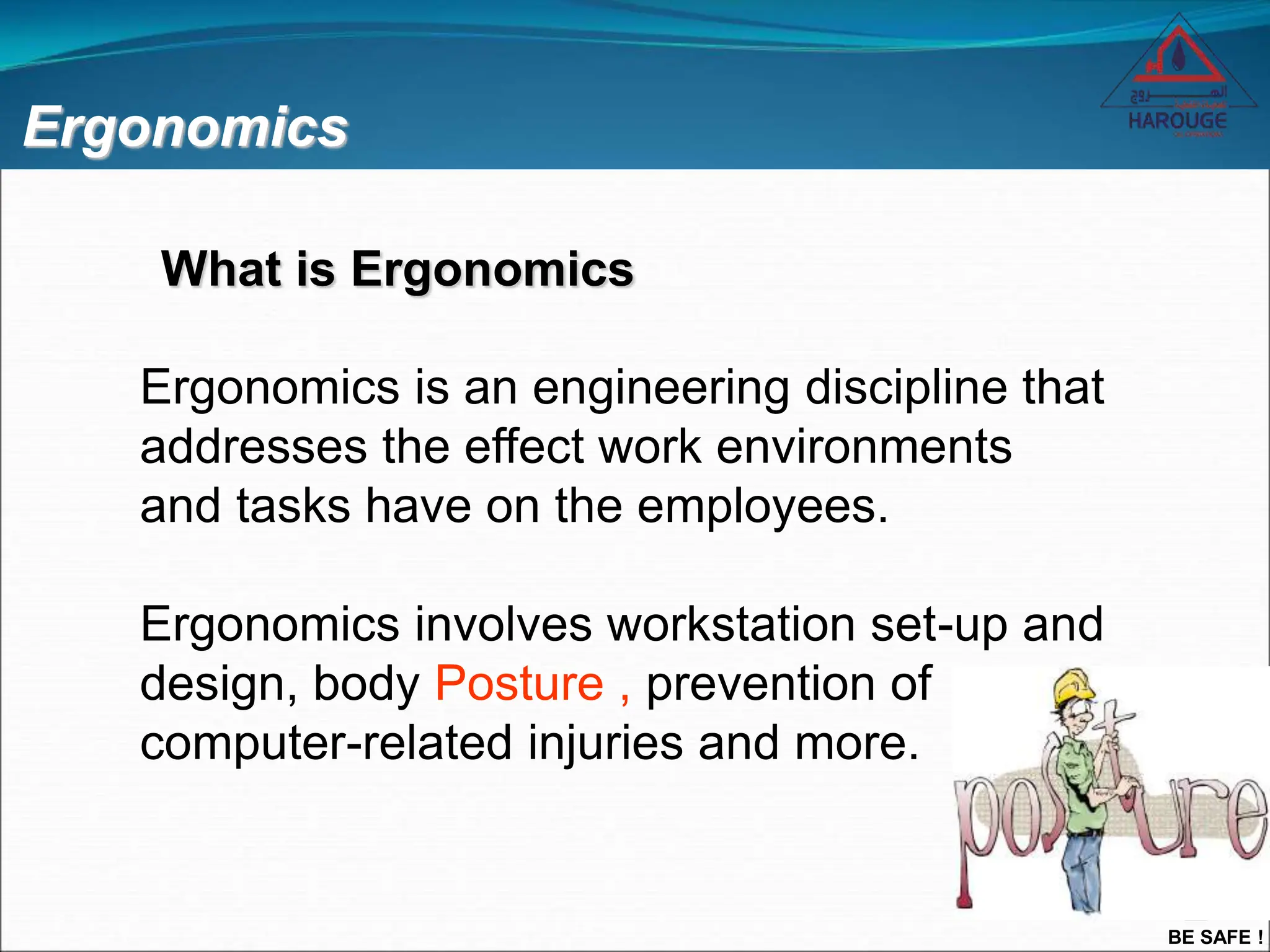
design, body Posture , prevention of
computer-related injuries and more.
What is Ergonomics
BE SAFE !
Objectives
Upon completion of the presentation the
participants should be able to:
 Understand the word Workplace Ergonomics
 Identify Work-related Musculoskeletal Disorders
(WMSDs) and Upper Limb Disorders (ULD)
 Describe the manner in which WMSDs and ULDs
develop
 List the means of preventing WMSDs and ULDs
BE SAFE !
What is the difference between
• VDU (Visual Display Unit)
• VDT (Visual Display Terminal)
• A Monitor
• DSE (Display Screen Equipment)
There isn’t one
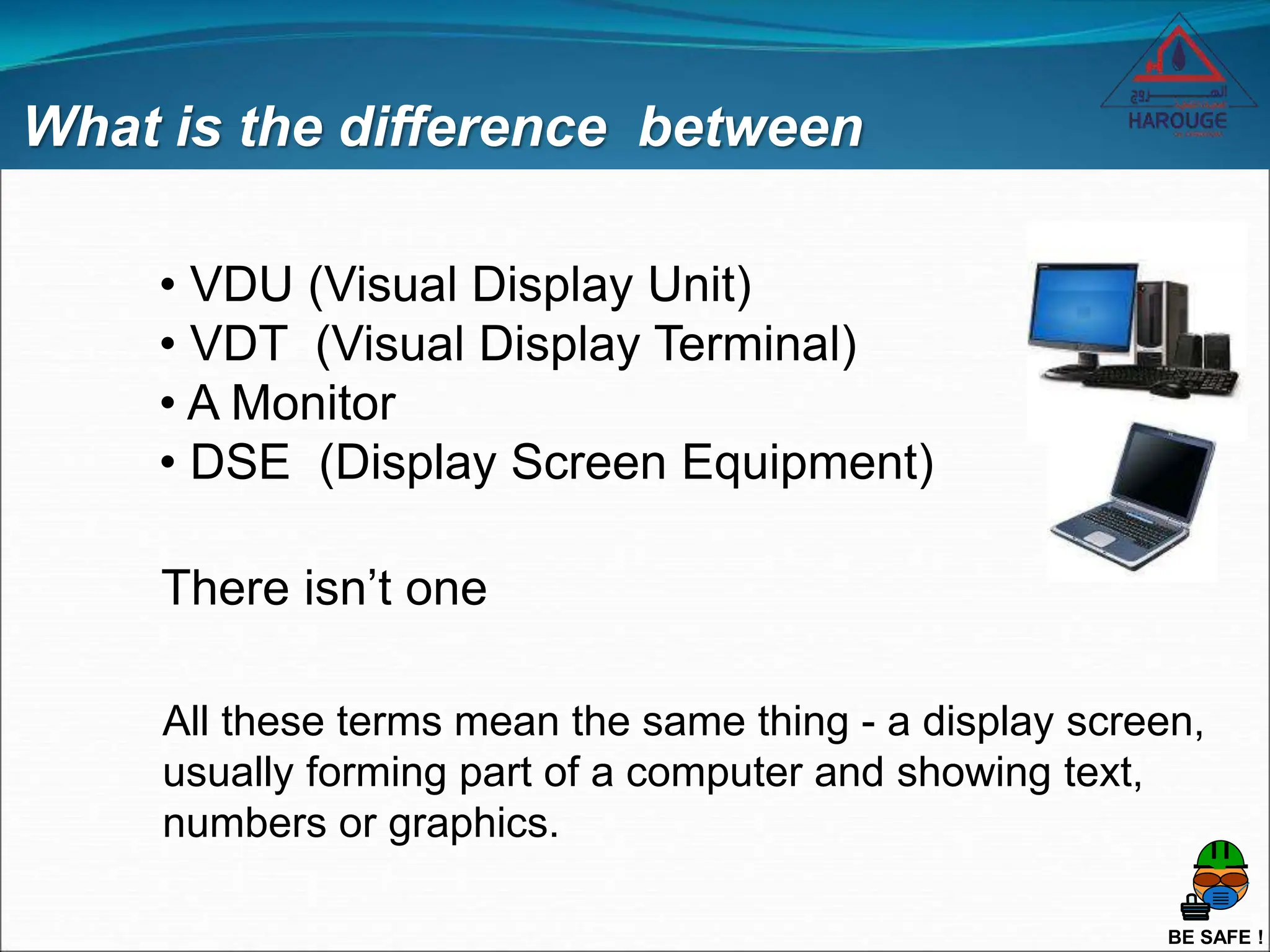
All these terms mean the same thing - a display screen,
usually forming part of a computer and showing text,
numbers or graphics.
BE SAFE !
Doe’s my VDU affect my health
VDU have been blamed – often wrongly for a wide range of health
problems.
In fact, only a small proportion of VDUs users suffer ill health as a
result of their work.
Where problems do occur, they are generally caused by the way in
which VDUs are being used, rather than the VDUs themselves.
So problems can be avoided by good workplace and job design, and
by the way you use your VDU and Workstation.
Am i at Risk
BE SAFE !
Are aches and pains caused by VDUs
Doe’s my VDU affect my health
Some users may get aches and pains in their hands, wrists, arms,
neck, shoulders or back especially after long periods of uninterrupted
VDU work.
These are called
Work-related Musculoskeletal Disorders (WNSDs)
Upper limb Disorders (ULD)
Repetitive Strain Injury (RSI)
Sometimes those mentioned above are caused by Stress
BE SAFE !
Doe’s my VDU affect my health
How can I avoid these aches, pains and disorders.
Reduce Stress
Good Workplace Design
Taking Frequent Short Breaks
Prevention is Easiest Action Taken
Making Adjustments to Suit Your Needs
Employers can help overcome stress by providing the right Training, and Designing
Systems and Tasks to match the abilities of the people who work them.
BE SAFE !
Can work with VDUs affect eyesight
Extensive research has found, No evidence that VDUs
can cause disease or permanent damage to the eyes.
But long spells of VDU work can lead to:
• Tired Eyes
• Discomfort
• Problems with Contact Lens
• Problems with Bifocal Spectacles
BE SAFE !
Can VDU work cause Headaches
Headaches may result from several different
situations that occur with VDU work.
• Screen Glare;
• Poor Image Quality;
• A need for different spectacles;
• Stress from the pace of work;
• Anxiety about new technology;
• Reading the screen for long periods without a break;
• Poor posture; or
• A combination of these.
Many of these things can easily be put right once the cause of the
problem has been found.
BE SAFE !
Other problems working with VDUs
Long spells without breaks
Harmful Radiation
Pregnancy
Skins Disorders
Triggering Epileptic Fits
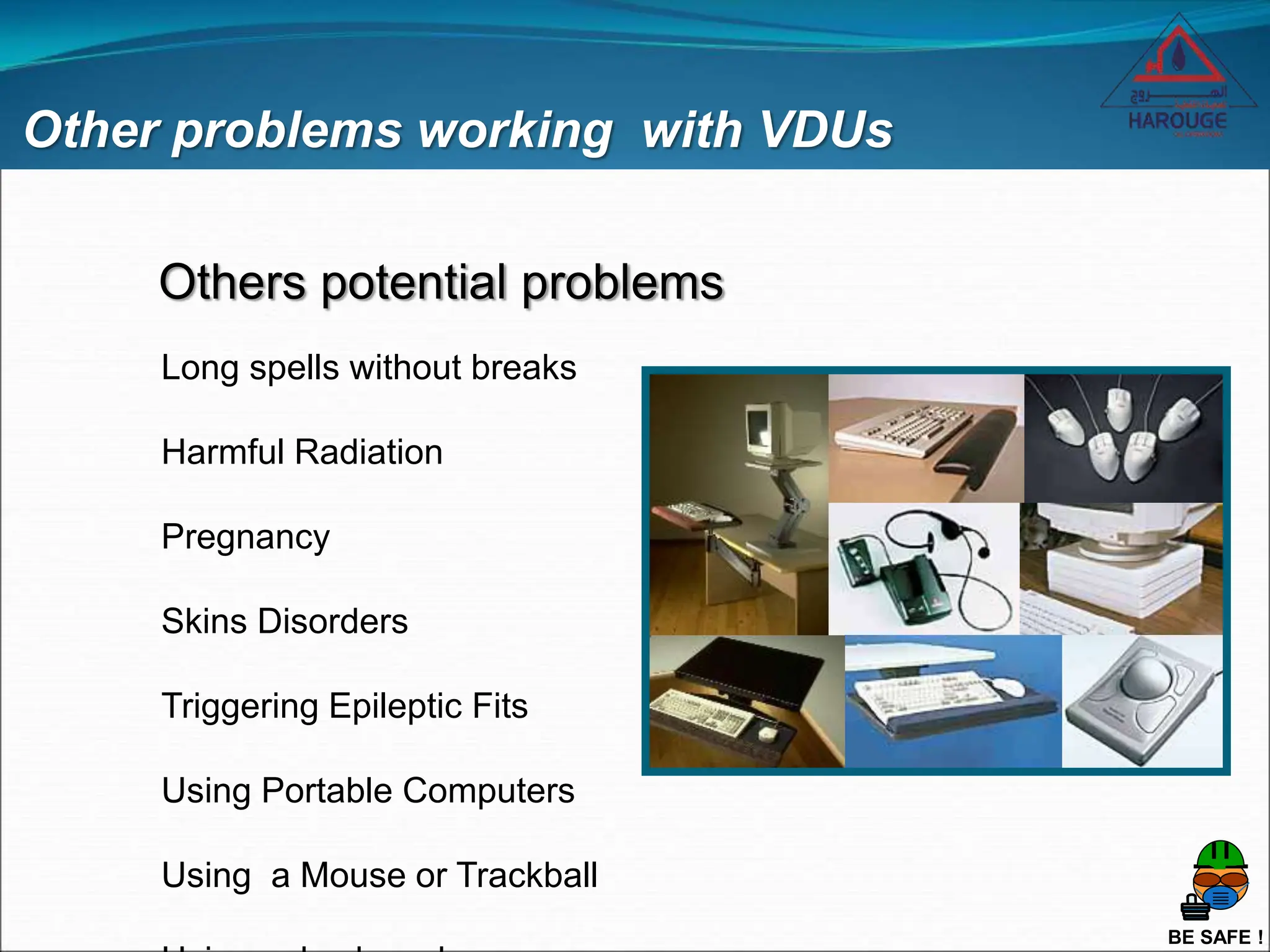
Using Portable Computers
Using a Mouse or Trackball
Others potential problems
BE SAFE !
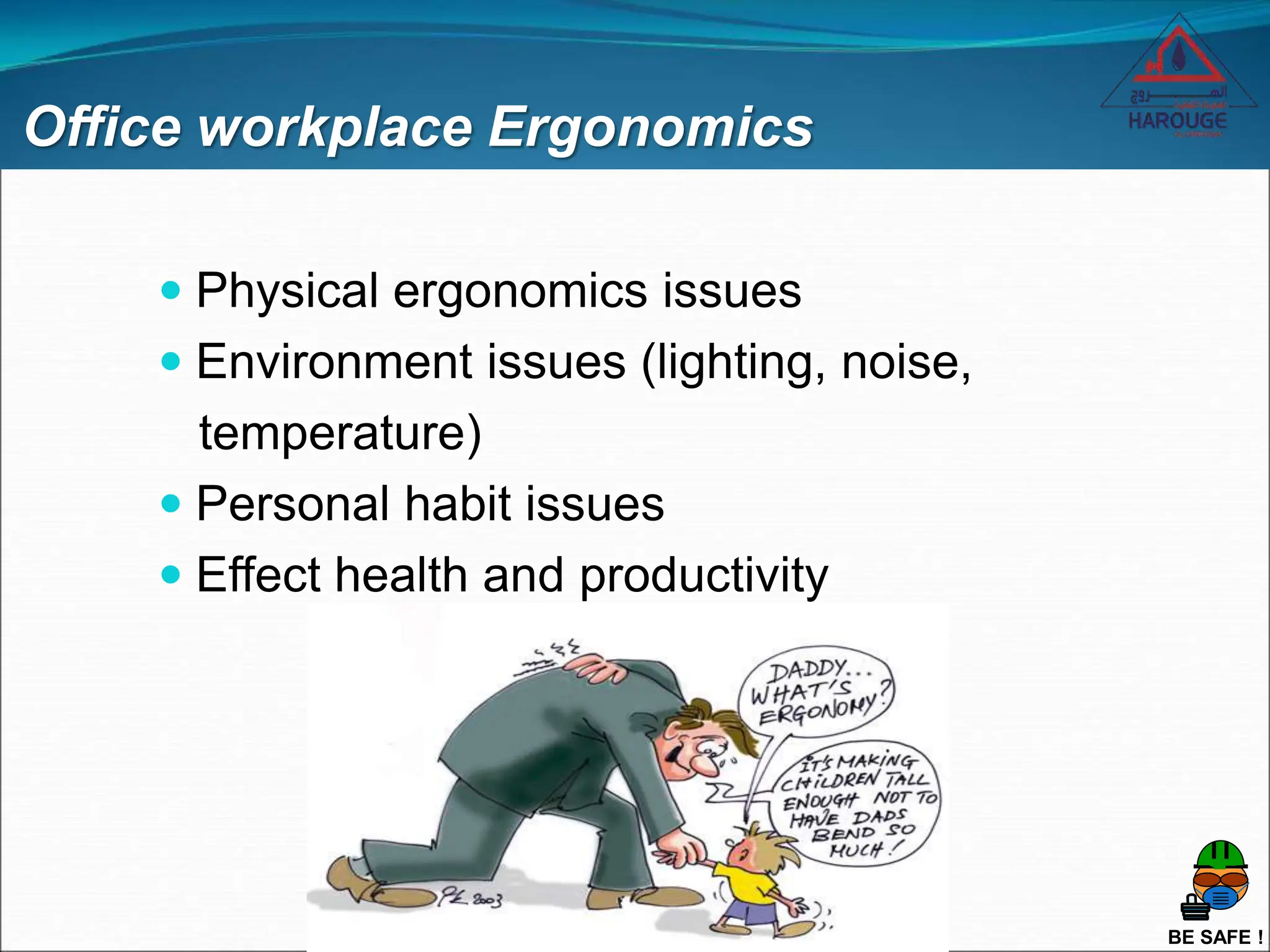
Office workplace Ergonomics
 Physical ergonomics issues
 Environment issues (lighting, noise,
temperature)
 Personal habit issues
 Effect health and productivity
BE SAFE !
Workplace Musculoskeletal Disorders
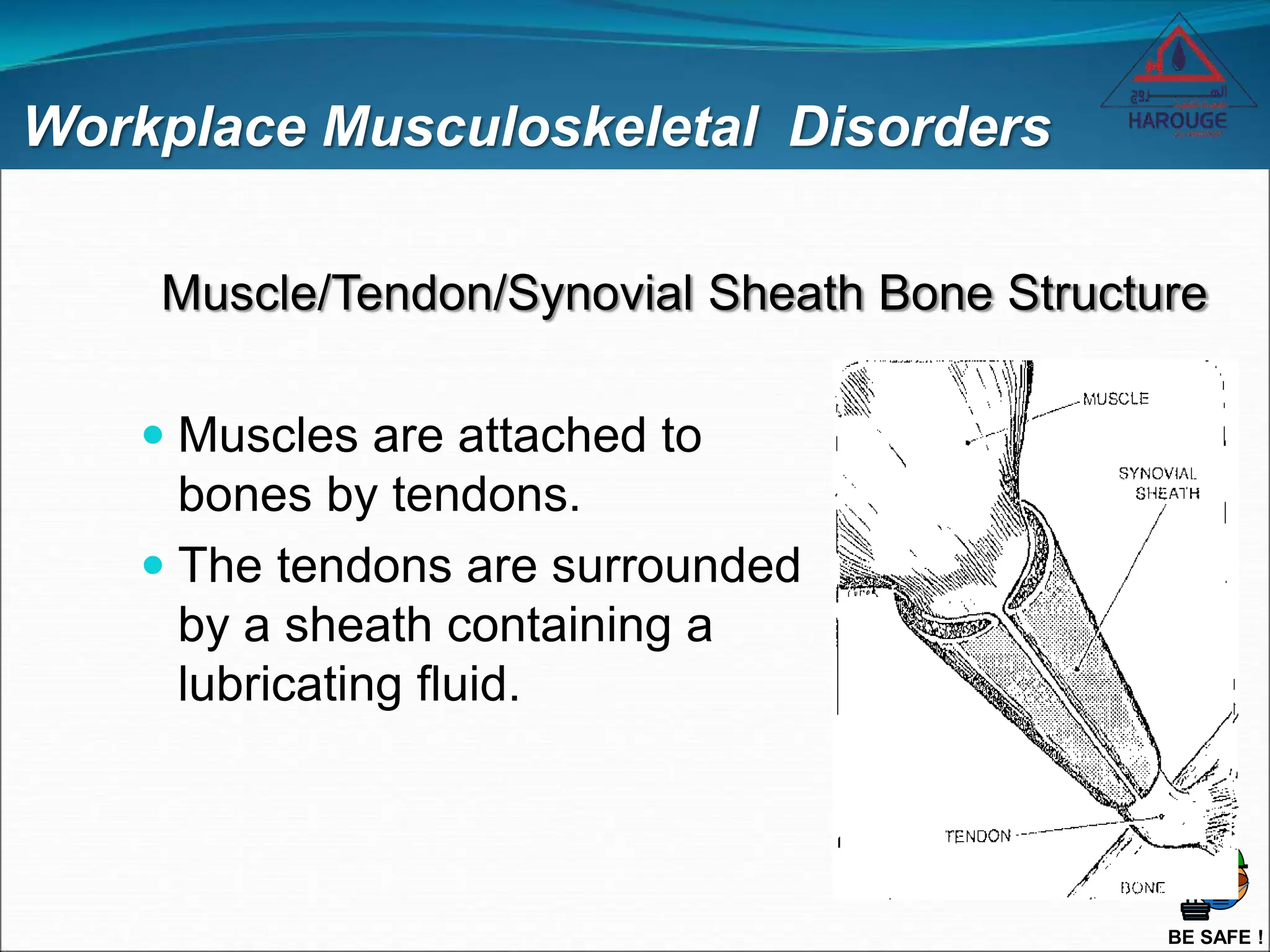
 Muscles are attached to
bones by tendons.
 The tendons are surrounded
by a sheath containing a
lubricating fluid.
Muscle/Tendon/Synovial Sheath Bone Structure
BE SAFE !
Workplace Musculoskeletal Disorders
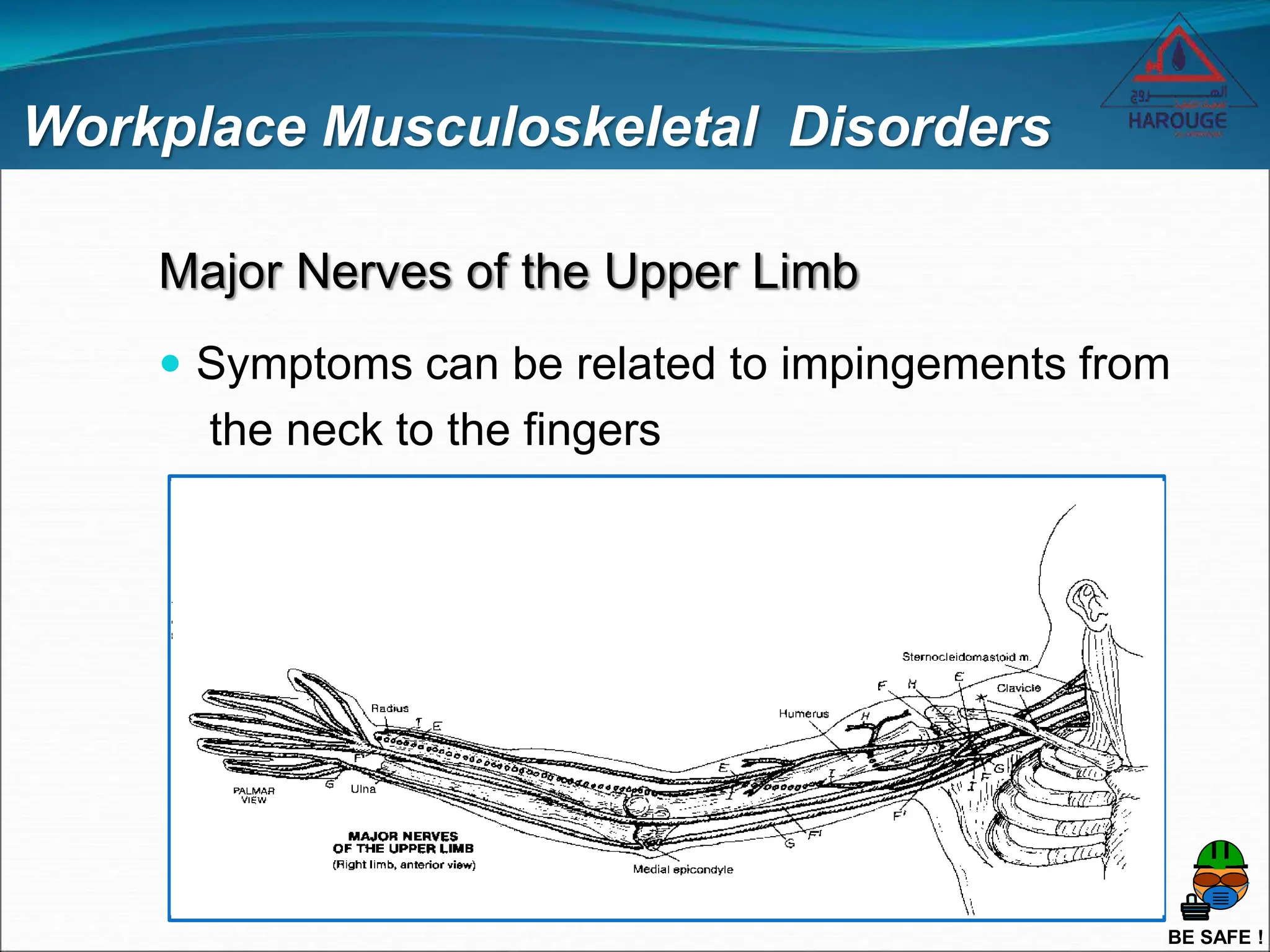
Major Nerves of the Upper Limb
 Symptoms can be related to impingements from
the neck to the fingers
BE SAFE !
Workplace Musculoskeletal Disorders
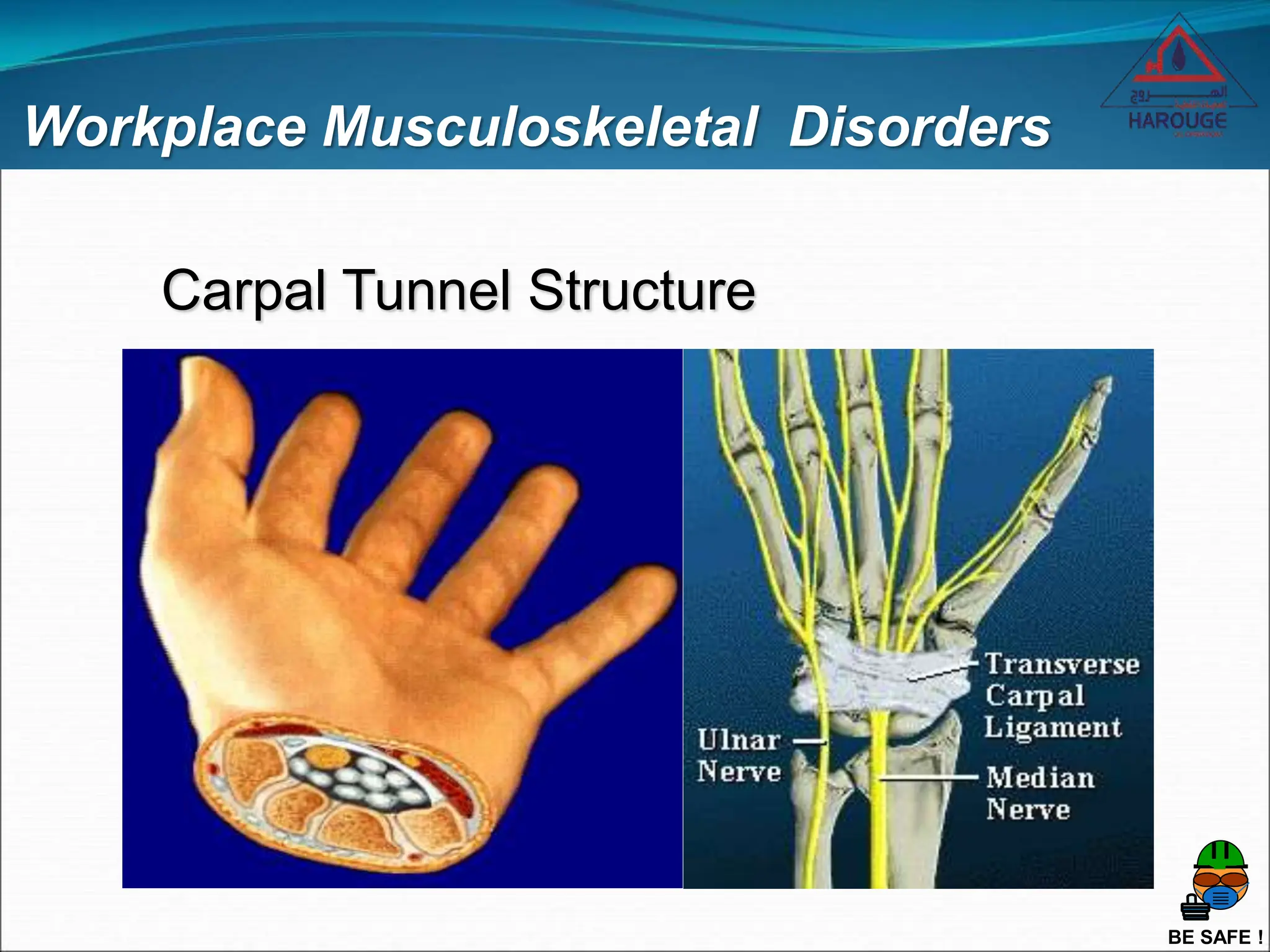
Carpal Tunnel Structure
BE SAFE !
Workplace Musculoskeletal Disorders
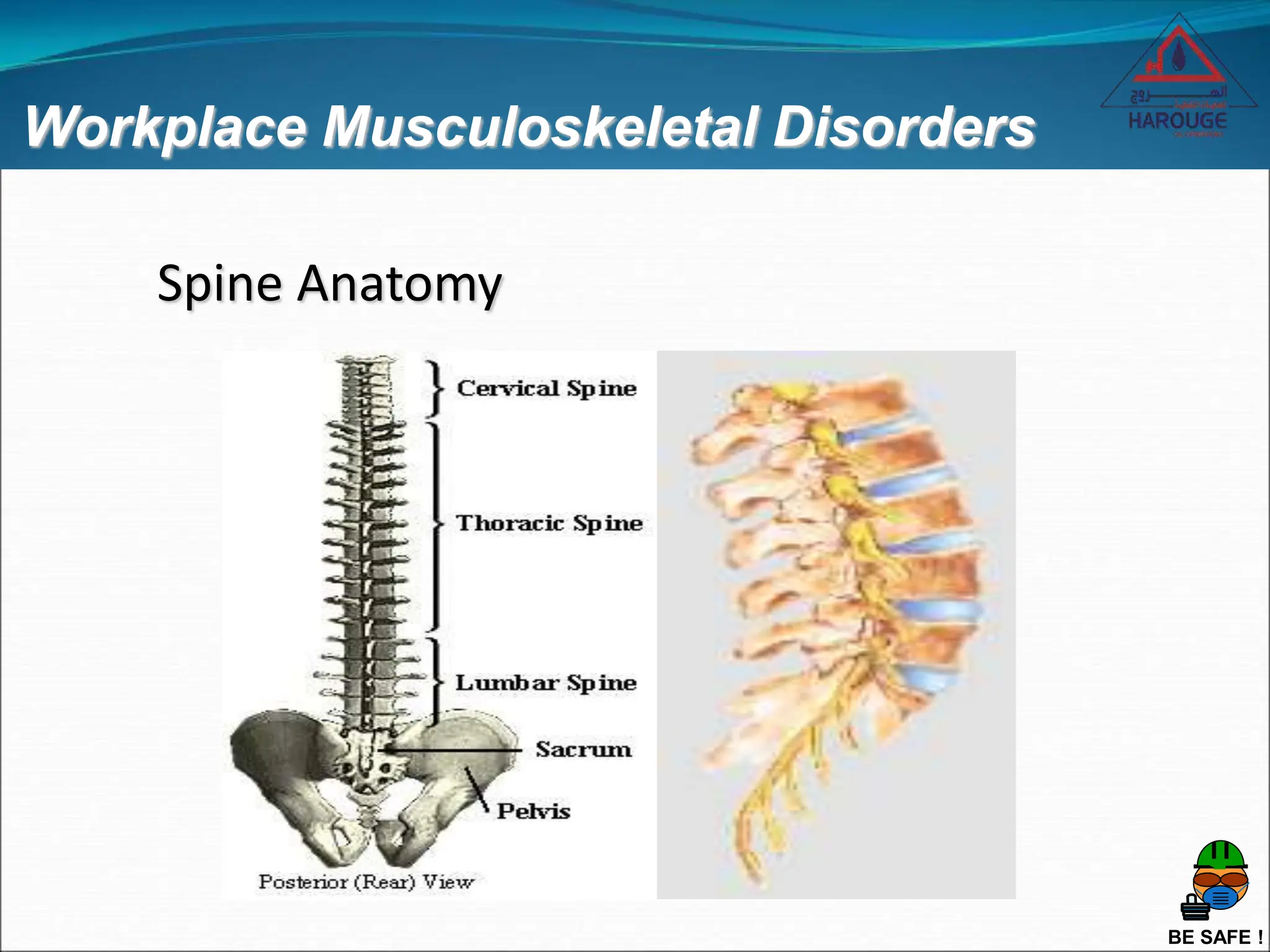
Spine Anatomy
BE SAFE !
Workplace Musculoskeletal Disorders
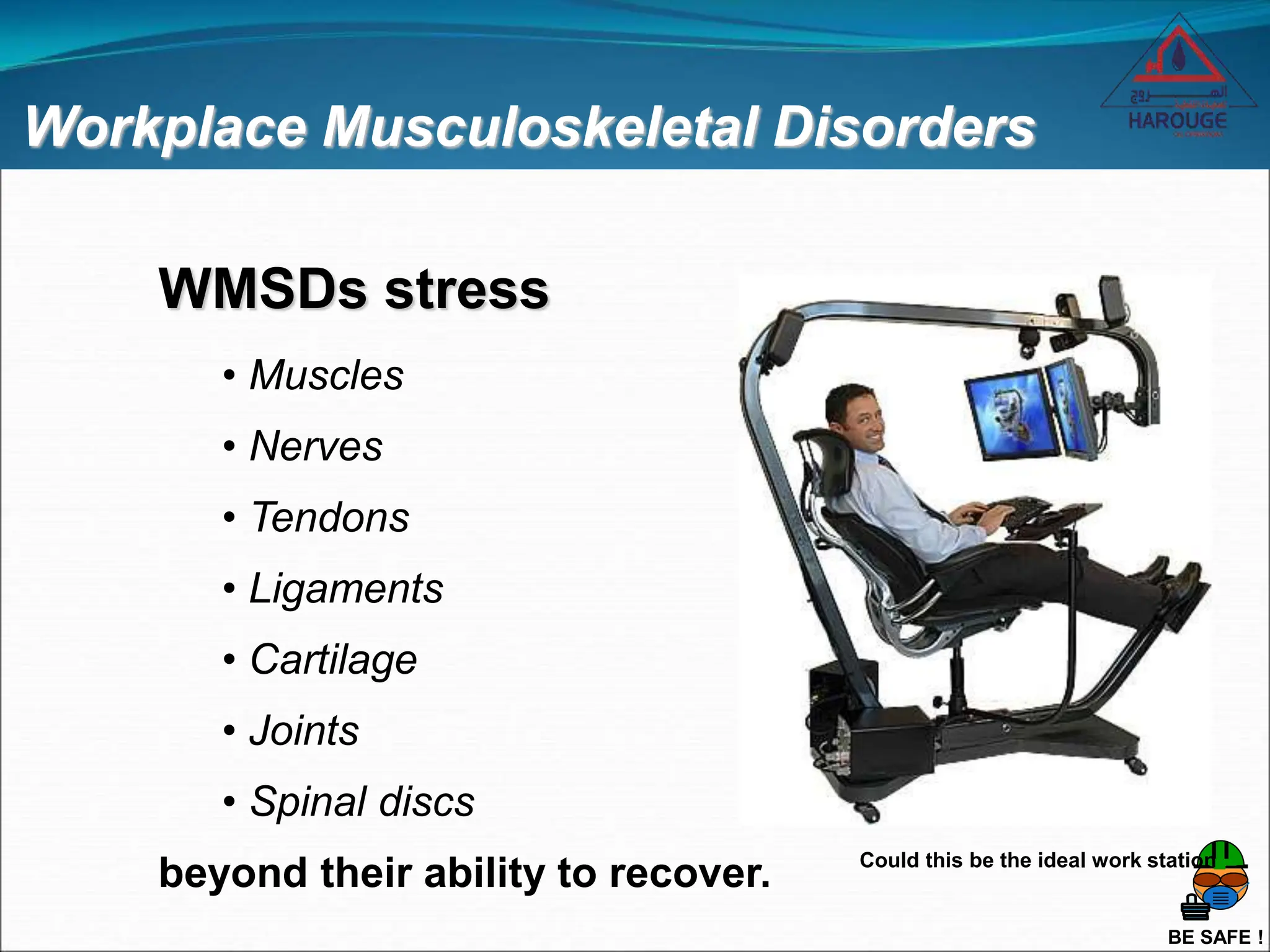
WMSDs stress
• Muscles
• Nerves
• Tendons
• Ligaments
• Cartilage
• Joints
• Spinal discs
beyond their ability to recover. Could this be the ideal work station
BE SAFE !
Workplace Musculoskeletal Disorders
SYMPTOMS of WMSDs
 Fatigue or lack of endurance
 Weakness in the hands or forearms
 Lack of control and coordination
 Pain
 Tingling, numbness, or loss of sensation
 Raised bumps
 Occur in stages
 Early notification is extremely important!!!
BE SAFE !
Workplace Musculoskeletal Disorders
Troubleshooting Office WMSD Pain
 Consult an eye care professional annually
 Reduce glare
 Move monitor and hard copy directly in front of you
 Use a headset or speaker phone
 Move mouse closer and next to keyboard
 Adjust keyboard height and tilt
BE SAFE !
Workplace Musculoskeletal Disorders
 Stop leaning on elbows or pad hard surfaces
 TAKE BREAKS!!!
 Use wide grips on pens
 Perform stretching exercises
 Participate in a wellness/fitness program
 Appropriate chair and other hardware
Troubleshooting Office WMSD Pain
BE SAFE !
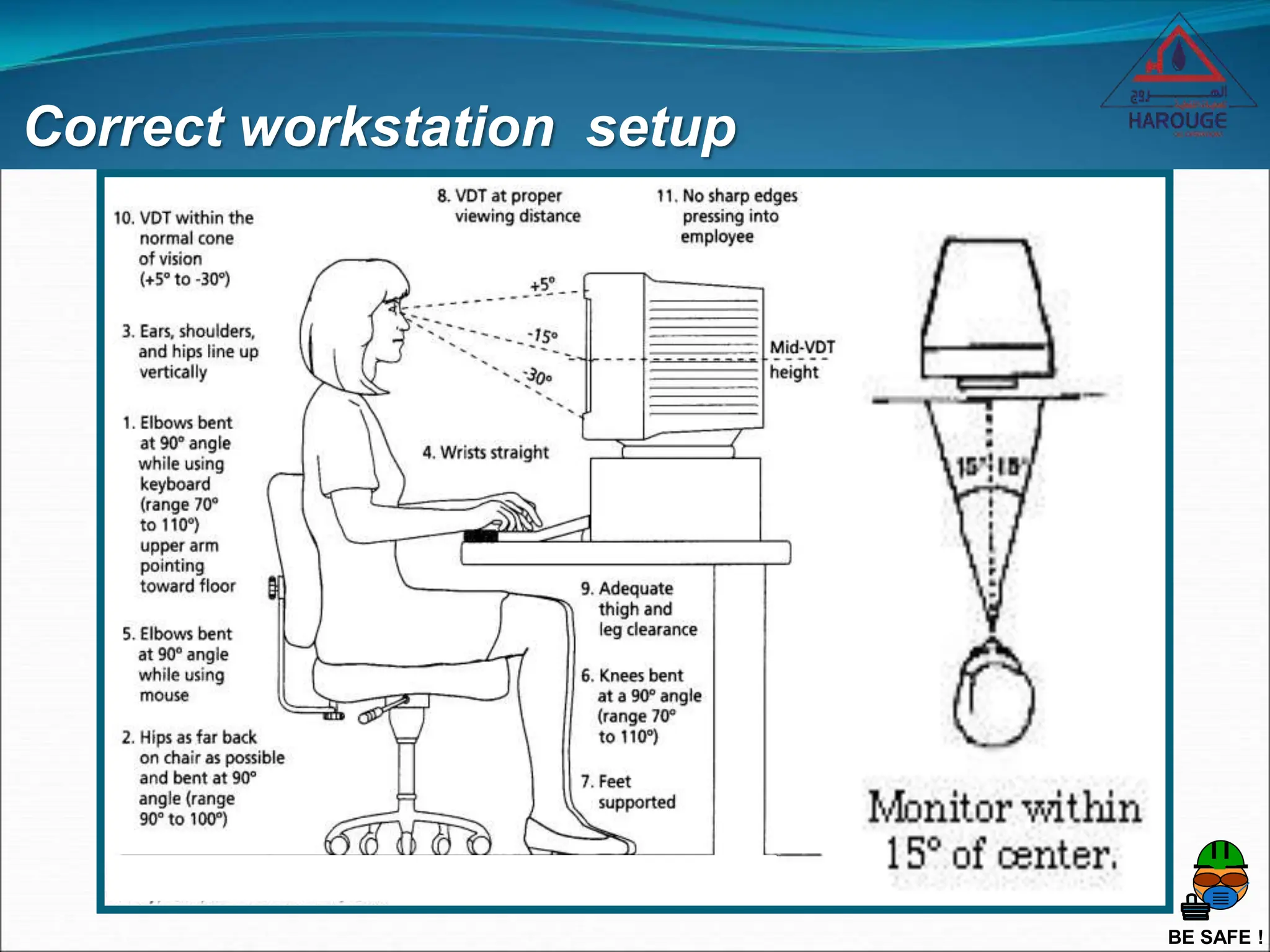
Correct workstation setup
BE SAFE !
Correct workstation setup
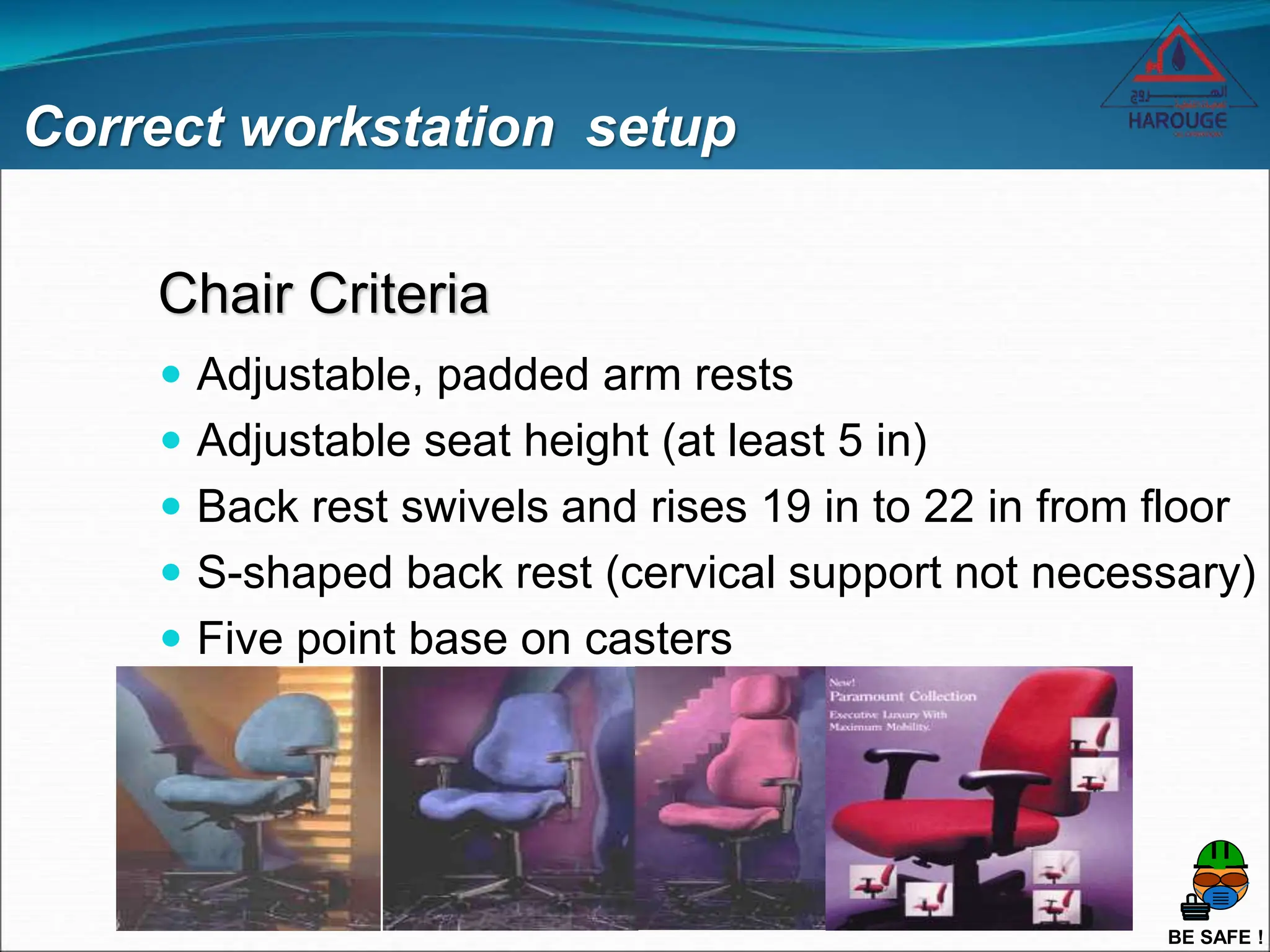
Chair Criteria
 Adjustable, padded arm rests
 Adjustable seat height (at least 5 in)
 Back rest swivels and rises 19 in to 22 in from floor
 S-shaped back rest (cervical support not necessary)
 Five point base on casters
BE SAFE !
Reducing Back Pain While Sitting
 Do not cross legs
 2 hours of sitting requires a 5 to 10 minute
standing break
 Remove large wallets from back pocket
 Sit close to your work
 Provide a well-designed chair
 Place feet comfortably on the floor or footrest
Correct workstation setup
BE SAFE !
Orientation and Start Up
Thank You!!!
Please remember, save yourself for the
important things in life.

S19b Working with Computers.ppt

  • 1.
    HAROUGE OIL OPERATIONS Continuing theJourney from the Mind to the Heart Working with Computers BE SAFE !
  • 2.
    BE SAFE ! Welcome Registration& Sign In No Smoking Restrooms Class Schedule - Breaks Switch Off Mobile Phones
  • 3.
    BE SAFE ! Welcome Introductions Name Position– Job Title Tell us about yourself What do you know about Working with Computers ?
  • 4.
    BE SAFE ! Introduction HSEfor SUPERVISORS MODULE 10 ERGONOMICS Working with Computers
  • 5.
    BE SAFE ! Introduction Policiesand Procedure Guide • HOO LP&E MEE/01/O/0061/AC Occupational health Reporting Procedure • HOO LP&E MEE/01/O/0042/AC Health, Safety & Environment Reporting Procedure • HOO LP&E MEE/01/O/0048/AC Hazard & Incident Notification and Investigation Procedure
  • 6.
    BE SAFE ! Ergonomics Ergonomicsis an engineering discipline that addresses the effect work environments and tasks have on the employees. Ergonomics involves workstation set-up and design, body Posture , prevention of computer-related injuries and more. What is Ergonomics
  • 7.
    BE SAFE ! Objectives Uponcompletion of the presentation the participants should be able to:  Understand the word Workplace Ergonomics  Identify Work-related Musculoskeletal Disorders (WMSDs) and Upper Limb Disorders (ULD)  Describe the manner in which WMSDs and ULDs develop  List the means of preventing WMSDs and ULDs
  • 8.
    BE SAFE ! Whatis the difference between • VDU (Visual Display Unit) • VDT (Visual Display Terminal) • A Monitor • DSE (Display Screen Equipment) There isn’t one All these terms mean the same thing - a display screen, usually forming part of a computer and showing text, numbers or graphics.
  • 9.
    BE SAFE ! Doe’smy VDU affect my health VDU have been blamed – often wrongly for a wide range of health problems. In fact, only a small proportion of VDUs users suffer ill health as a result of their work. Where problems do occur, they are generally caused by the way in which VDUs are being used, rather than the VDUs themselves. So problems can be avoided by good workplace and job design, and by the way you use your VDU and Workstation. Am i at Risk
  • 10.
    BE SAFE ! Areaches and pains caused by VDUs Doe’s my VDU affect my health Some users may get aches and pains in their hands, wrists, arms, neck, shoulders or back especially after long periods of uninterrupted VDU work. These are called Work-related Musculoskeletal Disorders (WNSDs) Upper limb Disorders (ULD) Repetitive Strain Injury (RSI) Sometimes those mentioned above are caused by Stress
  • 11.
    BE SAFE ! Doe’smy VDU affect my health How can I avoid these aches, pains and disorders. Reduce Stress Good Workplace Design Taking Frequent Short Breaks Prevention is Easiest Action Taken Making Adjustments to Suit Your Needs Employers can help overcome stress by providing the right Training, and Designing Systems and Tasks to match the abilities of the people who work them.
  • 12.
    BE SAFE ! Canwork with VDUs affect eyesight Extensive research has found, No evidence that VDUs can cause disease or permanent damage to the eyes. But long spells of VDU work can lead to: • Tired Eyes • Discomfort • Problems with Contact Lens • Problems with Bifocal Spectacles
  • 13.
    BE SAFE ! CanVDU work cause Headaches Headaches may result from several different situations that occur with VDU work. • Screen Glare; • Poor Image Quality; • A need for different spectacles; • Stress from the pace of work; • Anxiety about new technology; • Reading the screen for long periods without a break; • Poor posture; or • A combination of these. Many of these things can easily be put right once the cause of the problem has been found.
  • 14.
    BE SAFE ! Otherproblems working with VDUs Long spells without breaks Harmful Radiation Pregnancy Skins Disorders Triggering Epileptic Fits Using Portable Computers Using a Mouse or Trackball Others potential problems
  • 15.
    BE SAFE ! Officeworkplace Ergonomics  Physical ergonomics issues  Environment issues (lighting, noise, temperature)  Personal habit issues  Effect health and productivity
  • 16.
    BE SAFE ! WorkplaceMusculoskeletal Disorders  Muscles are attached to bones by tendons.  The tendons are surrounded by a sheath containing a lubricating fluid. Muscle/Tendon/Synovial Sheath Bone Structure
  • 17.
    BE SAFE ! WorkplaceMusculoskeletal Disorders Major Nerves of the Upper Limb  Symptoms can be related to impingements from the neck to the fingers
  • 18.
    BE SAFE ! WorkplaceMusculoskeletal Disorders Carpal Tunnel Structure
  • 19.
    BE SAFE ! WorkplaceMusculoskeletal Disorders Spine Anatomy
  • 20.
    BE SAFE ! WorkplaceMusculoskeletal Disorders WMSDs stress • Muscles • Nerves • Tendons • Ligaments • Cartilage • Joints • Spinal discs beyond their ability to recover. Could this be the ideal work station
  • 21.
    BE SAFE ! WorkplaceMusculoskeletal Disorders SYMPTOMS of WMSDs  Fatigue or lack of endurance  Weakness in the hands or forearms  Lack of control and coordination  Pain  Tingling, numbness, or loss of sensation  Raised bumps  Occur in stages  Early notification is extremely important!!!
  • 22.
    BE SAFE ! WorkplaceMusculoskeletal Disorders Troubleshooting Office WMSD Pain  Consult an eye care professional annually  Reduce glare  Move monitor and hard copy directly in front of you  Use a headset or speaker phone  Move mouse closer and next to keyboard  Adjust keyboard height and tilt
  • 23.
    BE SAFE ! WorkplaceMusculoskeletal Disorders  Stop leaning on elbows or pad hard surfaces  TAKE BREAKS!!!  Use wide grips on pens  Perform stretching exercises  Participate in a wellness/fitness program  Appropriate chair and other hardware Troubleshooting Office WMSD Pain
  • 24.
    BE SAFE ! Correctworkstation setup
  • 25.
    BE SAFE ! Correctworkstation setup Chair Criteria  Adjustable, padded arm rests  Adjustable seat height (at least 5 in)  Back rest swivels and rises 19 in to 22 in from floor  S-shaped back rest (cervical support not necessary)  Five point base on casters
  • 26.
    BE SAFE ! ReducingBack Pain While Sitting  Do not cross legs  2 hours of sitting requires a 5 to 10 minute standing break  Remove large wallets from back pocket  Sit close to your work  Provide a well-designed chair  Place feet comfortably on the floor or footrest Correct workstation setup
  • 27.
    BE SAFE ! Orientationand Start Up Thank You!!! Please remember, save yourself for the important things in life.

Editor's Notes

  • #2 1 Upon completion of this course, the instructor is responsible for making certain that this training is entered in the appropriate training database Introductory Remarks The course is a general overview of ergonomic issues in the office environment. Participants will learn how to identify common ergonomic problems in the office environment and methods to correct these problems. Instructor Preparation - Must have a basic understanding of ergonomics Time Requirements - 2 hours Facilities – Requires classroom Equipment Overhead projector and screen or PC and one gun-projector Flip chart and markers Materials & Supplies One set of instructor notes for each instructor One set of transparencies (if not given electronically Copy of slides for each student
  • #7 5 Explain the definition of Ergonomics, Ref Workstation, design, posture, computer related injuries.
  • #8 The objectives for this presentation are to provide you with the information and understanding of ergonomics, musculoskeletal disorders, upper limb disorders and the necessary to empower you to prevent them. There are certainly aspects to these disorders that the company should own and work with you to prevent. However, the very nature of these disorders require that you be an active participant in their prevention.
  • #9 7 Explain the difference between the different types of display screens.
  • #16 There are several aspects to ergonomics in the office. We focus mostly on physical ergonomics and environmental issues and how they impact your health and productivity. In addition, there are personal habits we each engage in at the office that either reduce or increase the likelihood of a WMSD.
  • #17 This is the area at which most WMSDs occur. The reason is that this is the place where the body movement occurs. You have several instances of this throughout your body. As you can see, the tendon is really just an extension of the muscle. WMSDs occur when either a micro-trauma debt occurs in the tendon or in the synovial fluid. In either case, the tissue (tendon or synovial fluid) will become inflamed and swell. This swelling causes WMSD symptoms in the tissue itself as well as on surrounding tissues including any nerves that might be impacted by the swelling tissue, often called “impinged”. The muscles can also swell due to overuse and cause WMSD symptoms, though this usually temporary.
  • #18 There are three major nerve roots that go from the vertebrae in your neck, known as cervical vertebrae, through the thoracic outlet, down your upper arm, around your elbow, through your forearm, and into the hand. The main one is the median nerve. This nerve “feeds” your thumb and first two fingers (pointing and middle). It goes through the carpal tunnel. The ulnar nerve feeds the third and fourth finger (ring and little) and does not go through the carpal tunnel. The radial nerve feeds the back of the hand. It is important to note that there are several points along away, over 100 identified places, where these nerves can become impinged. The interesting things about nerves is that when they are impinged, you will feel the symptoms at the ends of the nerves, i.e., the fingers. Therefore, numbness and tingling in the fingers does not automatically mean you have carpal tunnel syndrome.
  • #19 The carpal tunnel has become infamous of late. However, it is important to note that most carpal tunnel syndrome (CTS) cases are not resulting from typing but from industrial or field environments, home/hobby related activities, heredity, and general lifestyle. The carpal tunnel is formed by the transverse carpal ligament arching over the small bones in the wrist. There are nine tendons (two flexor tendons per finger plus one for the thumb) that go through this hole whose diameter on average is the same as a nickel. In addition there are several blood vessels and finally the median nerve (shown as big brown spot at the base of the thumb). The ulnar nerve is the small brown spot over the ligament at the base of the third finger. CTS results from the tendons or synovial fluid surrounding them swelling and impinging the median nerve. The ulnar nerve can become impinged here as well, usually from direct mechanical stress such as resting it on the edge of the desk.
  • #20 It is important to recognize that back injuries are often the result of cumulative trauma. The most common cause of back injury is under use or inappropriate use. The back is an incredible structure, but it is easily abused. For example, sitting is very difficult on the spine and tissues of the lower back. As illustrated, the spine consists of several bones (vertebrae) separated by shock absorbing discs. These discs are like sponges and require movement to get nutrient-bearing fluids into the disc. Sitting causes stresses and reduces that movement. Other problems for the back include poor biomechanics, lack of exercise, smoking, and weight gain.
  • #22 It is important to understand and recognize the symptoms of WMSDs, both to ensure you provide early notification, but also to allow for a determination of where to intervene. For example, if the symptoms are pain in your shoulder or neck, that may require a different intervention than if the symptoms are numbness and tingling in your fingers. The most common symptoms reported are pain, numbness and tingling. This is due to the swelling of the tissues and eventual impingement of the nearby nerves. However, other symptoms are common as well, but are not usually recognized. These include a weakness of the affected joint, i.e., dropping things. Fatigue is often the first symptom, but usually ignored or assumed to be due to something else. Also, if CTS is allowed to progress, the thenar muscle (the big bulge on the palm of your hand at the base of the thumb) can begin to atrophy.
  • #23 22 One tool for avoiding WMSDs is to listen to your body. It will usually tell you when something is not working right. For most people though, understanding those signals and then reacting both appropriately and timely is difficult. To help ensure an appropriate response, here are a few troubleshooting tools. The way to use these tools is to look around at your workplace and see if these improvements can be made. Then, try the suggested changes for a few weeks and see if it resolves your symptoms.
  • #25 23 This shows the general arrangement of a computer workstation including some ranges of physical dimensions. These ranges are based upon 75% of the working population. Therefore, people who are taller or shorter than 3/4 of the population will not fit within these ranges. In addition, this slide depicts the monitor at a specific, relative height and location. However, of all the dimensions of a computer workstation, this one is most variable. There is no rule of thumb, i.e., locate the top of the monitor at eye height. The location of the monitor will depend on the person’s focal length, vision correction and other factors. Therefore, the best rule of thumb is to ensure that the head is not tilted up or down and the person is looking straight ahead. This should fit most people.
  • #26 24 The chair is an important piece of equipment in your job. Chairs are expensive and not always will people need a new one. However, providing an appropriately designed chair contributes strongly to people’s health, productivity, comfort, morale, and the reduction of WMSD risk. There are certain criteria to ensure a proper chair design, but most “ergonomic” chairs include the basic features. What is really important is that you purchase a chair that fits you and is comfortable for you. The only way to ensure this is to try it out first at a retailer or purchase through someone that will allow you to return it.
  • #27 25 Since office environments still include a great deal of sitting, it is important to recognize that there are certain recommendations for reducing back pain while sitting. One important note is that sitting is hard on the spine. In fact, the spine can stand still for about 1.5 hours without overtiring, but can only sit for one hour without needing to be exercised. It is very important for continued back health that you get up out of the chair every couple of hours, the more frequently the better, and move around.