ALEŠ LICHTENBERG
HCL Sametime V11 – installation tips
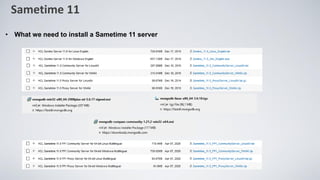
• What we need to install a Sametime 11 server
Sametime 11
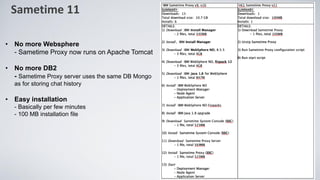
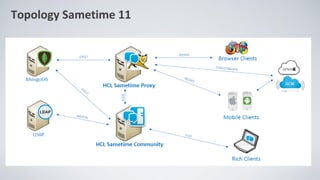
• No more Websphere
- Sametime Proxy now runs on Apache Tomcat
• No more DB2
- Sametime Proxy server uses the same DB Mongo
as for storing chat history
• Easy installation
- Basically per few minutes
- 100 MB installation file
Sametime 11
Topology Sametime 11
Sametime 11
➢Hardware a Software requirements
Minimum hardware
✓ 4 core, 8GB RAM, 200 GB Hard disk
Supported Linux versions
✓ RHEL/CentOS 7.4+ and 8
✓ SUSE 12 and 15
Supported Windows Versions
✓ Windows 2016 and 2019
Pre-Requisites
✓ MongoDB 3.6.x
✓ Domino 11
Sametime 11 – deployment
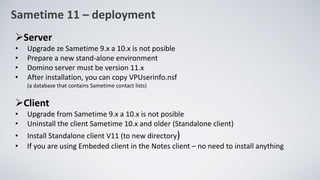
➢Server
• Upgrade ze Sametime 9.x a 10.x is not posible
• Prepare a new stand-alone environment
• Domino server must be version 11.x
• After installation, you can copy VPUserinfo.nsf
(a database that contains Sametime contact lists)
➢Client
• Upgrade from Sametime 9.x a 10.x is not posible
• Uninstall the client Sametime 10.x and older (Standalone client)
• Install Standalone client V11 (to new directory)
• If you are using Embeded client in the Notes client – no need to install anything
Sametime 11 – deployment
➢Installation and configuration MongoDB
➢Installation Domino V11
➢Installation Sametime Community Server V11
➢Installation Sametime Proxy
I recommended using PQDN everywhere instead of IP address
• This will prevent, for example, the problem of an empty chat in the web client or mobile phone
or a problem with the client's connection to the ST server
HCL Sametime 11 Administration and Installation Guide (including FP1)
https://support.hcltechsw.com/sys_attachment.do?sys_id=3a24d4fc1b201458c1f9759d1e4bcbdf
Moved and updated to documentation at the beginning of June:
https://hclpnpsupport.hcltech.com/nav_to.do?uri=%2Fkb_view.do%3Fsys_kb_id%3Dd55eb1901b115c54086dcbfc0a4bcb30
Sametime 11 – deployment
➢Installation and configuration MongoDB
• Saving chat history
• Supported version Mongo 3.6.x
• The configuration steps are the same for Linux and Windows
• ATTENTION: MongoDB 3.6.x does not support SUSE 15, Mongo must run eg on SUSE 12 or CentOS 7 or 8. Support for
MongoDB 4.2 (which is supported on SUSE 15) is planned in the next release of Sametime
• Installation instuctions:
CentOs / Rhel
https://docs.mongodb.com/v3.6/tutorial/install-mongodb-on-red-hat/
SUSE
https://docs.mongodb.com/v3.6/tutorial/install-mongodb-on-suse/
Windows
https://docs.mongodb.com/v3.6/tutorial/install-mongodb-on-windows
• Setup cannot create a autorun service, it must be created manualy
https://support.hcltechsw.com/csm?id=kb_article&sysparm_article=KB0078330
• Correct string for service registration
sc.exe create MongoDB binPath= ""C:Program FilesMongoDBServer3.6binmongod.exe" --service --config="C:Program FilesMongoDBServer3.6mongod.cfg"" DisplayName= "MongoDB" start= "auto"
➢ !!! Be careful when copying commands and configuration lines from the manual (spaces, slashes)
Sametime 11 – deployment
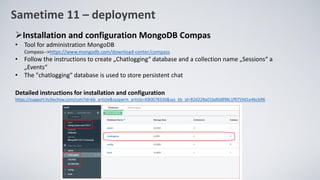
➢Installation and configuration MongoDB Compas
• Tool for administration MongoDB
Compass-->https://www.mongodb.com/download-center/compass
• Follow the instructions to create „Chatlogging“ database and a collection name „Sessions“ a
„Events“
• The "chatlogging" database is used to store persistent chat
Detailed instructions for installation and configuration
https://support.hcltechsw.com/csm?id=kb_article&sysparm_article=KB0078330&sys_kb_id=82d228a01bd0d898c1f9759d1e4bcb96
Sametime 11 – deployment
➢Installation and configuration Sametime Community server
• Prerequisite installed Domino 11
• One installation package for all types of licenses
• Depending on the license, select Standard or Limited
(can be subsequently changed in sametime.ini: „ST_BRANDING_INFO“
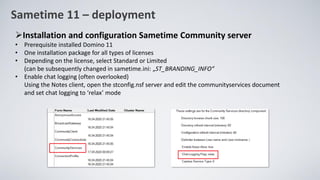
• Enable chat logging (often overlooked)
Using the Notes client, open the stconfig.nsf server and edit the communityservices document
and set chat logging to ‘relax’ mode
Sametime 11 – deployment
➢Installation and configuration Sametimy Community server
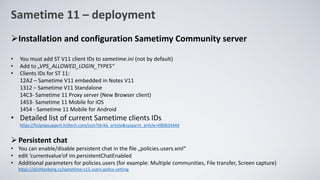
• You must add ST V11 client IDs to sametime.ini (not by default)
• Add to „VPS_ALLOWED_LOGIN_TYPES“
• Clients IDs for ST 11:
12A2 – Sametime V11 embedded in Notes V11
1312 – Sametime V11 Standalone
14C3- Sametime 11 Proxy server (New Browser client)
1453- Sametime 11 Mobile for iOS
1454 - Sametime 11 Mobile for Android
• Detailed list of current Sametime clients IDs
https://hclpnpsupport.hcltech.com/csm?id=kb_article&sysparm_article=KB0024444
➢Persistent chat
• You can enable/disable persistent chat in the file „policies.users.xml“
• edit ‘currentvalue’of im.persistentChatEnabled
• Additional parameters for policies.users (for example: Multiple communities, File transfer, Screen capture)
https://alichtenberg.cz/sametime-v11-users-policy-setting
Sametime 11 – deployment
➢Installation and configuration Sametimy Community server
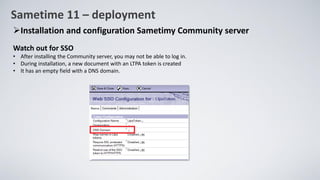
Watch out for SSO
• After installing the Community server, you may not be able to log in.
• During installation, a new document with an LTPA token is created
• It has an empty field with a DNS domain.
Sametime 11 – deployment
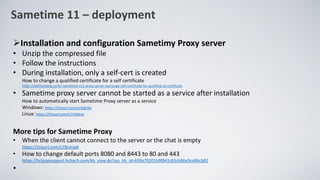
➢Installation and configuration Sametimy Proxy server
• Unzip the compressed file
• Follow the instructions
• During installation, only a self-cert is created
How to change a qualified certificate for a self certificate
https://alichtenberg.cz/hcl-sametime-v11-proxy-server-exchange-self-certificate-for-qualified-ssl-certificate
• Sametime proxy server cannot be started as a service after installation
How to automatically start Sametime Proxy server as a service
Windows: https://tinyurl.com/ycfzgnby
Linux: https://tinyurl.com/y7nh9ece
More tips for Sametime Proxy
• When the client cannot connect to the server or the chat is empty
https://tinyurl.com/y78omja6
• How to change default ports 8080 and 8443 to 80 and 443
https://hclpnpsupport.hcltech.com/kb_view.do?sys_kb_id=659a70201b9f841c83cb86e9cd4bcb82
•
Sametime 11 – deployment
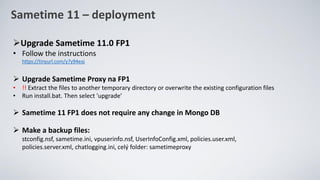
➢Upgrade Sametime 11.0 FP1
• Follow the instructions
https://tinyurl.com/y7y94eaj
➢ Upgrade Sametime Proxy na FP1
• !! Extract the files to another temporary directory or overwrite the existing configuration files
• Run install.bat. Then select 'upgrade'
➢ Sametime 11 FP1 does not require any change in Mongo DB
➢ Make a backup files:
stconfig.nsf, sametime.ini, vpuserinfo.nsf, UserInfoConfig.xml, policies.user.xml,
policies.server.xml, chatlogging.ini, celý folder: sametimeproxy
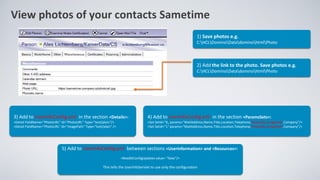
View photos of your contacts Sametime
1) Save photos e.g.
C:HCLDominoDatadominohtmlPhoto
3) Add to UserInfoConfig.xml in the section <Details>:
<Detail FieldName="PhotoURL" Id="PhotoURL" Type="text/plain"/>
<Detail FieldName="PhotoURL" Id="ImagePath" Type="text/plain" />
4) Add to UserInfoConfig.xml in the section <ParamsSets>:
<Set SetId="0„ params="MailAddress,Name,Title,Location,Telephone,PhotoURL,ImagePath,Company"/>
<Set SetId="1" params="MailAddress,Name,Title,Location,Telephone,PhotoURL,ImagePath,Company"/>
5) Add to UserInfoConfig.xml between sections <UserInformation> and <Resources>:
<ReadStConfigUpdates value= “false”/>
This tells the UserInfoServlet to use only the configuration
2) Add the link to the photo. Save photos e.g.
C:HCLDominoDatadominohtmlPhoto
Sametime 11 – deployment
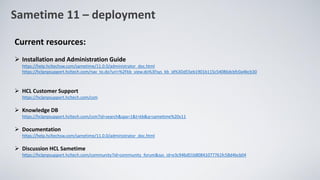
Current resources:
➢ Installation and Administration Guide
https://help.hcltechsw.com/sametime/11.0.0/administrator_doc.html
https://hclpnpsupport.hcltech.com/nav_to.do?uri=%2Fkb_view.do%3Fsys_kb_id%3Dd55eb1901b115c54086dcbfc0a4bcb30
➢ HCL Customer Support
https://hclpnpsupport.hcltech.com/csm
➢ Knowledge DB
https://hclpnpsupport.hcltech.com/csm?id=search&spa=1&t=kb&q=sametime%20v11
➢ Documentation
https://help.hcltechsw.com/sametime/11.0.0/administrator_doc.html
➢ Discussion HCL Sametime
https://hclpnpsupport.hcltech.com/community?id=community_forum&sys_id=e3c946d01b80841077761fc58d4bcb04
Thanks
ALEŠ LICHTENBERG
twitter: @a_lichtenberg
blog: www.alichtenberg.cz
KAISER DATA
www.kaiser.cz
a.lichtenberg@kaiser.cz

HCL Sametime V11 installation - tips

  • 1.
    ALEŠ LICHTENBERG HCL SametimeV11 – installation tips
  • 2.
    • What weneed to install a Sametime 11 server Sametime 11
  • 3.
    • No moreWebsphere - Sametime Proxy now runs on Apache Tomcat • No more DB2 - Sametime Proxy server uses the same DB Mongo as for storing chat history • Easy installation - Basically per few minutes - 100 MB installation file Sametime 11
  • 4.
  • 5.
    Sametime 11 ➢Hardware aSoftware requirements Minimum hardware ✓ 4 core, 8GB RAM, 200 GB Hard disk Supported Linux versions ✓ RHEL/CentOS 7.4+ and 8 ✓ SUSE 12 and 15 Supported Windows Versions ✓ Windows 2016 and 2019 Pre-Requisites ✓ MongoDB 3.6.x ✓ Domino 11
  • 6.
    Sametime 11 –deployment ➢Server • Upgrade ze Sametime 9.x a 10.x is not posible • Prepare a new stand-alone environment • Domino server must be version 11.x • After installation, you can copy VPUserinfo.nsf (a database that contains Sametime contact lists) ➢Client • Upgrade from Sametime 9.x a 10.x is not posible • Uninstall the client Sametime 10.x and older (Standalone client) • Install Standalone client V11 (to new directory) • If you are using Embeded client in the Notes client – no need to install anything
  • 7.
    Sametime 11 –deployment ➢Installation and configuration MongoDB ➢Installation Domino V11 ➢Installation Sametime Community Server V11 ➢Installation Sametime Proxy I recommended using PQDN everywhere instead of IP address • This will prevent, for example, the problem of an empty chat in the web client or mobile phone or a problem with the client's connection to the ST server HCL Sametime 11 Administration and Installation Guide (including FP1) https://support.hcltechsw.com/sys_attachment.do?sys_id=3a24d4fc1b201458c1f9759d1e4bcbdf Moved and updated to documentation at the beginning of June: https://hclpnpsupport.hcltech.com/nav_to.do?uri=%2Fkb_view.do%3Fsys_kb_id%3Dd55eb1901b115c54086dcbfc0a4bcb30
  • 8.
    Sametime 11 –deployment ➢Installation and configuration MongoDB • Saving chat history • Supported version Mongo 3.6.x • The configuration steps are the same for Linux and Windows • ATTENTION: MongoDB 3.6.x does not support SUSE 15, Mongo must run eg on SUSE 12 or CentOS 7 or 8. Support for MongoDB 4.2 (which is supported on SUSE 15) is planned in the next release of Sametime • Installation instuctions: CentOs / Rhel https://docs.mongodb.com/v3.6/tutorial/install-mongodb-on-red-hat/ SUSE https://docs.mongodb.com/v3.6/tutorial/install-mongodb-on-suse/ Windows https://docs.mongodb.com/v3.6/tutorial/install-mongodb-on-windows • Setup cannot create a autorun service, it must be created manualy https://support.hcltechsw.com/csm?id=kb_article&sysparm_article=KB0078330 • Correct string for service registration sc.exe create MongoDB binPath= ""C:Program FilesMongoDBServer3.6binmongod.exe" --service --config="C:Program FilesMongoDBServer3.6mongod.cfg"" DisplayName= "MongoDB" start= "auto" ➢ !!! Be careful when copying commands and configuration lines from the manual (spaces, slashes)
  • 9.
    Sametime 11 –deployment ➢Installation and configuration MongoDB Compas • Tool for administration MongoDB Compass-->https://www.mongodb.com/download-center/compass • Follow the instructions to create „Chatlogging“ database and a collection name „Sessions“ a „Events“ • The "chatlogging" database is used to store persistent chat Detailed instructions for installation and configuration https://support.hcltechsw.com/csm?id=kb_article&sysparm_article=KB0078330&sys_kb_id=82d228a01bd0d898c1f9759d1e4bcb96
  • 10.
    Sametime 11 –deployment ➢Installation and configuration Sametime Community server • Prerequisite installed Domino 11 • One installation package for all types of licenses • Depending on the license, select Standard or Limited (can be subsequently changed in sametime.ini: „ST_BRANDING_INFO“ • Enable chat logging (often overlooked) Using the Notes client, open the stconfig.nsf server and edit the communityservices document and set chat logging to ‘relax’ mode
  • 11.
    Sametime 11 –deployment ➢Installation and configuration Sametimy Community server • You must add ST V11 client IDs to sametime.ini (not by default) • Add to „VPS_ALLOWED_LOGIN_TYPES“ • Clients IDs for ST 11: 12A2 – Sametime V11 embedded in Notes V11 1312 – Sametime V11 Standalone 14C3- Sametime 11 Proxy server (New Browser client) 1453- Sametime 11 Mobile for iOS 1454 - Sametime 11 Mobile for Android • Detailed list of current Sametime clients IDs https://hclpnpsupport.hcltech.com/csm?id=kb_article&sysparm_article=KB0024444 ➢Persistent chat • You can enable/disable persistent chat in the file „policies.users.xml“ • edit ‘currentvalue’of im.persistentChatEnabled • Additional parameters for policies.users (for example: Multiple communities, File transfer, Screen capture) https://alichtenberg.cz/sametime-v11-users-policy-setting
  • 12.
    Sametime 11 –deployment ➢Installation and configuration Sametimy Community server Watch out for SSO • After installing the Community server, you may not be able to log in. • During installation, a new document with an LTPA token is created • It has an empty field with a DNS domain.
  • 13.
    Sametime 11 –deployment ➢Installation and configuration Sametimy Proxy server • Unzip the compressed file • Follow the instructions • During installation, only a self-cert is created How to change a qualified certificate for a self certificate https://alichtenberg.cz/hcl-sametime-v11-proxy-server-exchange-self-certificate-for-qualified-ssl-certificate • Sametime proxy server cannot be started as a service after installation How to automatically start Sametime Proxy server as a service Windows: https://tinyurl.com/ycfzgnby Linux: https://tinyurl.com/y7nh9ece More tips for Sametime Proxy • When the client cannot connect to the server or the chat is empty https://tinyurl.com/y78omja6 • How to change default ports 8080 and 8443 to 80 and 443 https://hclpnpsupport.hcltech.com/kb_view.do?sys_kb_id=659a70201b9f841c83cb86e9cd4bcb82 •
  • 14.
    Sametime 11 –deployment ➢Upgrade Sametime 11.0 FP1 • Follow the instructions https://tinyurl.com/y7y94eaj ➢ Upgrade Sametime Proxy na FP1 • !! Extract the files to another temporary directory or overwrite the existing configuration files • Run install.bat. Then select 'upgrade' ➢ Sametime 11 FP1 does not require any change in Mongo DB ➢ Make a backup files: stconfig.nsf, sametime.ini, vpuserinfo.nsf, UserInfoConfig.xml, policies.user.xml, policies.server.xml, chatlogging.ini, celý folder: sametimeproxy
  • 15.
    View photos ofyour contacts Sametime 1) Save photos e.g. C:HCLDominoDatadominohtmlPhoto 3) Add to UserInfoConfig.xml in the section <Details>: <Detail FieldName="PhotoURL" Id="PhotoURL" Type="text/plain"/> <Detail FieldName="PhotoURL" Id="ImagePath" Type="text/plain" /> 4) Add to UserInfoConfig.xml in the section <ParamsSets>: <Set SetId="0„ params="MailAddress,Name,Title,Location,Telephone,PhotoURL,ImagePath,Company"/> <Set SetId="1" params="MailAddress,Name,Title,Location,Telephone,PhotoURL,ImagePath,Company"/> 5) Add to UserInfoConfig.xml between sections <UserInformation> and <Resources>: <ReadStConfigUpdates value= “false”/> This tells the UserInfoServlet to use only the configuration 2) Add the link to the photo. Save photos e.g. C:HCLDominoDatadominohtmlPhoto
  • 16.
    Sametime 11 –deployment Current resources: ➢ Installation and Administration Guide https://help.hcltechsw.com/sametime/11.0.0/administrator_doc.html https://hclpnpsupport.hcltech.com/nav_to.do?uri=%2Fkb_view.do%3Fsys_kb_id%3Dd55eb1901b115c54086dcbfc0a4bcb30 ➢ HCL Customer Support https://hclpnpsupport.hcltech.com/csm ➢ Knowledge DB https://hclpnpsupport.hcltech.com/csm?id=search&spa=1&t=kb&q=sametime%20v11 ➢ Documentation https://help.hcltechsw.com/sametime/11.0.0/administrator_doc.html ➢ Discussion HCL Sametime https://hclpnpsupport.hcltech.com/community?id=community_forum&sys_id=e3c946d01b80841077761fc58d4bcb04
  • 17.
    Thanks ALEŠ LICHTENBERG twitter: @a_lichtenberg blog:www.alichtenberg.cz KAISER DATA www.kaiser.cz a.lichtenberg@kaiser.cz