VERITAS Cluster Server for
UNIX, Implementing Local
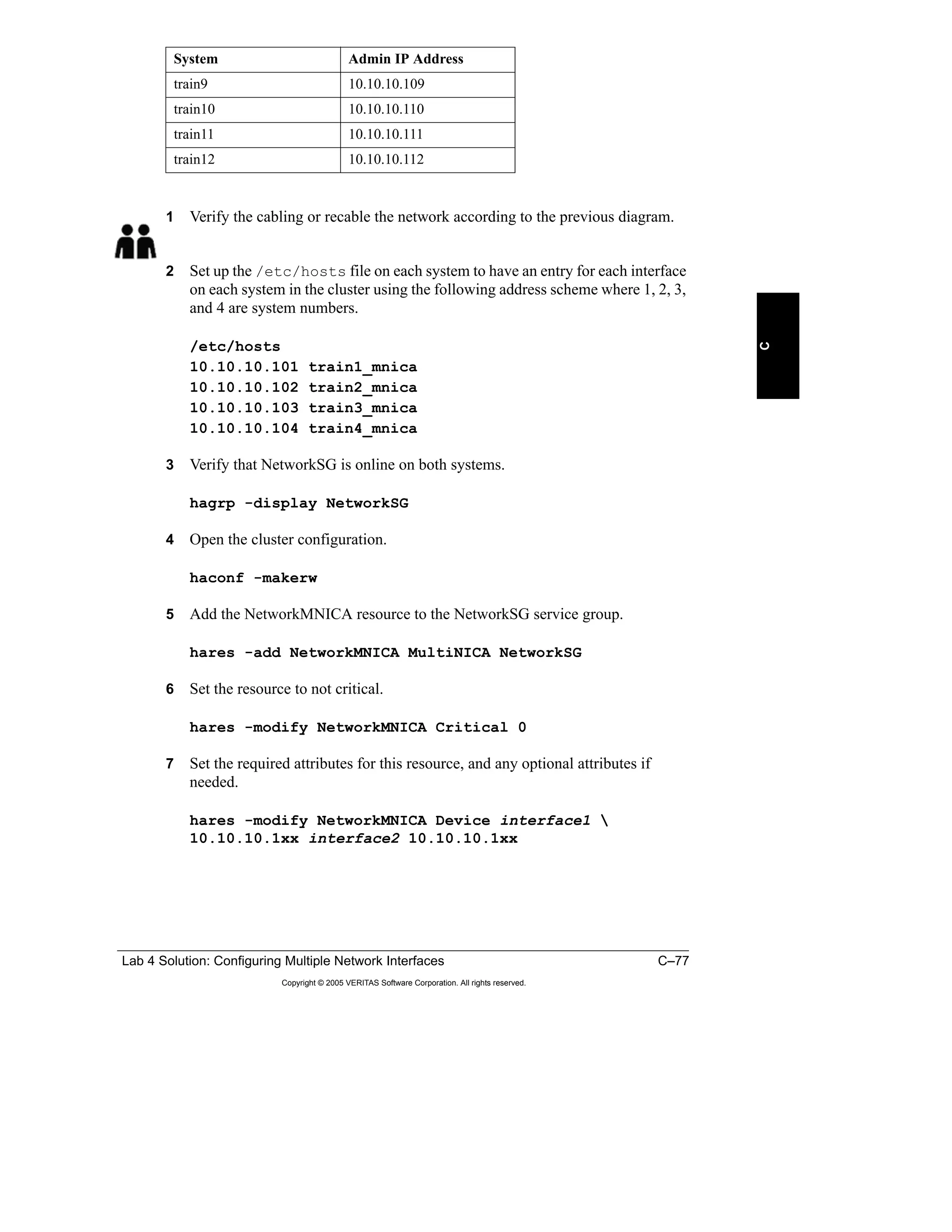
Clusters
HA-VCS-410-101A-2-10-SRT (100-002148)
COURSE DEVELOPERS
Bilge Gerrits
Siobhan Seeger
Dawn Walker
LEAD SUBJECT MATTER
EXPERTS
Geoff Bergren
Connie Economou
Paul Johnston
Dave Rogers
Pete Toemmes
Jim Senicka
TECHNICAL
CONTRIBUTORS AND
REVIEWERS
Billie Bachra
Barbara Ceran
Gene Henriksen
Bob Lucas
Disclaimer
The information contained in this publication is subject to change without
notice. VERITAS Software Corporation makes no warranty of any kind
with regard to this guide, including, but not limited to, the implied
warranties of merchantability and fitness for a particular purpose.
VERITAS Software Corporation shall not be liable for errors contained
herein or for incidental or consequential damages in connection with the
furnishing, performance, or use of this manual.
Copyright
Copyright © 2005 VERITAS Software Corporation. All rights reserved.
No part of the contents of this training material may be reproduced in any
form or by any means or be used for the purposes of training or education
without the written permission of VERITAS Software Corporation.
Trademark Notice
VERITAS, the VERITAS logo, and VERITAS FirstWatch, VERITAS
Cluster Server, VERITAS File System, VERITAS Volume Manager,
VERITAS NetBackup, and VERITAS HSM are registered trademarks of
VERITAS Software Corporation. Other product names mentioned herein
may be trademarks and/or registered trademarks of their respective
companies.
VERITAS Cluster Server for UNIX, Implementing Local Clusters
Participant Guide
April 2005 Release
VERITAS Software Corporation
350 Ellis Street
Mountain View, CA 94043
Phone 650–527–8000
www.veritas.com
Table of Contents i
Copyright © 2005 VERITAS Software Corporation. All rights reserved.
Course Introduction
VERITAS Cluster Server Curriculum ................................................................ Intro-2
Course Prerequisites......................................................................................... Intro-3
Course Objectives............................................................................................. Intro-4
Lesson 1: Workshop: Reconfiguring Cluster Membership
Introduction ............................................................................................................. 1-2
Workshop Overview................................................................................................ 1-4
Task 1: Removing a System from a Running VCS Cluster..................................... 1-5
Objective................................................................................................................... 1-5
Assumptions.............................................................................................................. 1-5
Procedure for Removing a System from a Running VCS Cluster............................ 1-6
Solution to Class Discussion 1: Removing a System ............................................... 1-9
Commands Required to Complete Task 1 .............................................................. 1-11
Solution to Class Discussion 1: Commands for Removing a System .................... 1-14
Lab Exercise: Task 1—Removing a System from a Running Cluster.................... 1-18
Task 2: Adding a New System to a Running VCS Cluster.................................... 1-19
Objective................................................................................................................. 1-19
Assumptions............................................................................................................ 1-19
Procedure to Add a New System to a Running VCS Cluster ................................. 1-20
Solution to Class Discussion 2: Adding a System.................................................. 1-23
Commands Required to Complete Task 2 .............................................................. 1-25
Solution to Class Discussion 2: Commands for Adding a System......................... 1-28
Lab Exercise: Task 2—Adding a New System to a Running Cluster .................... 1-32
Task 3: Merging Two Running VCS Clusters........................................................ 1-33
Objective................................................................................................................. 1-33
Assumptions............................................................................................................ 1-33
Procedure to Merge Two VCS Clusters.................................................................. 1-34
Solution to Class Discussion 3: Merging Two Running Clusters .......................... 1-37
Commands Required to Complete Task 3 .............................................................. 1-39
Solution to Class Discussion 3: Commands to Merge Clusters.............................. 1-42
Lab Exercise: Task 3—Merging Two Running VCS Clusters............................... 1-46
Lab 1: Reconfiguring Cluster Membership............................................................ 1-48
Lesson 2: Service Group Interactions
Introduction ............................................................................................................. 2-2
Common Application Relationships ........................................................................ 2-4
Online on the Same System...................................................................................... 2-4
Online Anywhere in the Cluster ............................................................................... 2-5
Online on Different Systems..................................................................................... 2-6
Offline on the Same System ..................................................................................... 2-7
Service Group Dependency Definition .................................................................... 2-8
Startup Behavior Summary....................................................................................... 2-8
Failover Behavior Summary..................................................................................... 2-9
Table of Contents
ii VERITAS Cluster Server for UNIX, Implementing Local Clusters
Copyright © 2005 VERITAS Software Corporation. All rights reserved.
Service Group Dependency Examples ................................................................. 2-10
Online Local Dependency...................................................................................... 2-10
Online Global Dependency.................................................................................... 2-14
Online Remote Dependency .................................................................................. 2-16
Offline Local Dependency ..................................................................................... 2-18
Configuring Service Group Dependencies............................................................ 2-19
Service Group Dependency Rules ......................................................................... 2-19
Creating Service Group Dependencies .................................................................. 2-20
Removing Service Group Dependencies ............................................................... 2-20
Alternative Methods of Controlling Interactions..................................................... 2-21
Limitations of Service Group Dependencies ......................................................... 2-21
Using Resources to Control Service Group Interactions ....................................... 2-22
Using Triggers to Control Service Group Interactions .......................................... 2-24
Lab 2: Service Group Dependencies .................................................................... 2-26
Lesson 3: Workload Management
Introduction ............................................................................................................. 3-2
Startup Rules and Policies...................................................................................... 3-4
Rules for Automatic Service Group Startup ............................................................. 3-4
Automatic Startup Policies........................................................................................ 3-5
Failover Rules and Policies................................................................................... 3-10
Rules for Automatic Service Group Failover......................................................... 3-10
Failover Policies...................................................................................................... 3-11
Integrating Dynamic Load Calculations ................................................................ 3-15
Controlling Overloaded Systems........................................................................... 3-16
The LoadWarning Trigger ..................................................................................... 3-16
Example Script....................................................................................................... 3-17
Additional Startup and Failover Controls............................................................... 3-18
Limits and Prerequisites......................................................................................... 3-18
Selecting a Target System...................................................................................... 3-19
Combining Capacity and Limits ............................................................................ 3-20
Configuring Startup and Failover Policies............................................................. 3-21
Setting Load and Capacity ..................................................................................... 3-21
Setting Limits and Prerequisites............................................................................. 3-22
Using the Simulator............................................................................................... 3-24
Modeling Workload Management ......................................................................... 3-24
Lab 3: Testing Workload Management ................................................................. 3-26
Lesson 4: Alternate Storage and Network Configurations
Introduction ............................................................................................................. 4-2
Alternative Storage and Network Configurations .................................................... 4-4
The Disk Resource and Agent on Solaris ................................................................. 4-5
The DiskReservation Resource and Agent on Solaris .............................................. 4-5
The LVMVolumeGroup Agent on AIX.................................................................... 4-6
LVM Setup on HP-UX.............................................................................................. 4-7
The LVMVolumeGroup Resource and Agent on HP-UX........................................ 4-8
LVMLogicalVolume Resource and Agent on HP-UX ............................................. 4-9
Table of Contents iii
Copyright © 2005 VERITAS Software Corporation. All rights reserved.
LVMCombo Resource and Agent on HP-UX .......................................................... 4-9
The DiskReservation Resource and Agent on Linux.............................................. 4-10
Alternative Network Configurations....................................................................... 4-11
Network Resources Overview ................................................................................ 4-13
Additional Network Resources.............................................................................. 4-14
The MultiNICA Resource and Agent ..................................................................... 4-14
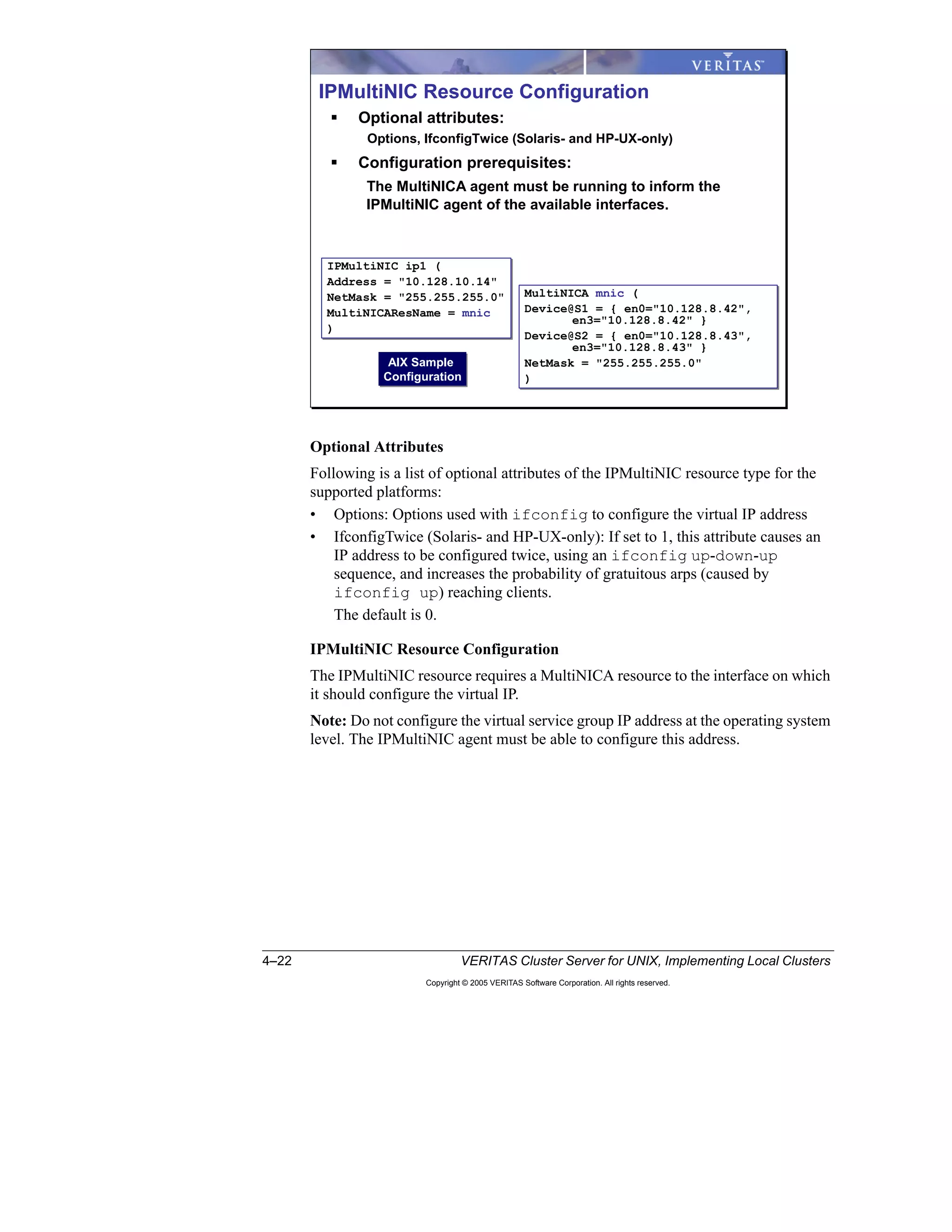
MultiNICA Resource Configuration....................................................................... 4-17
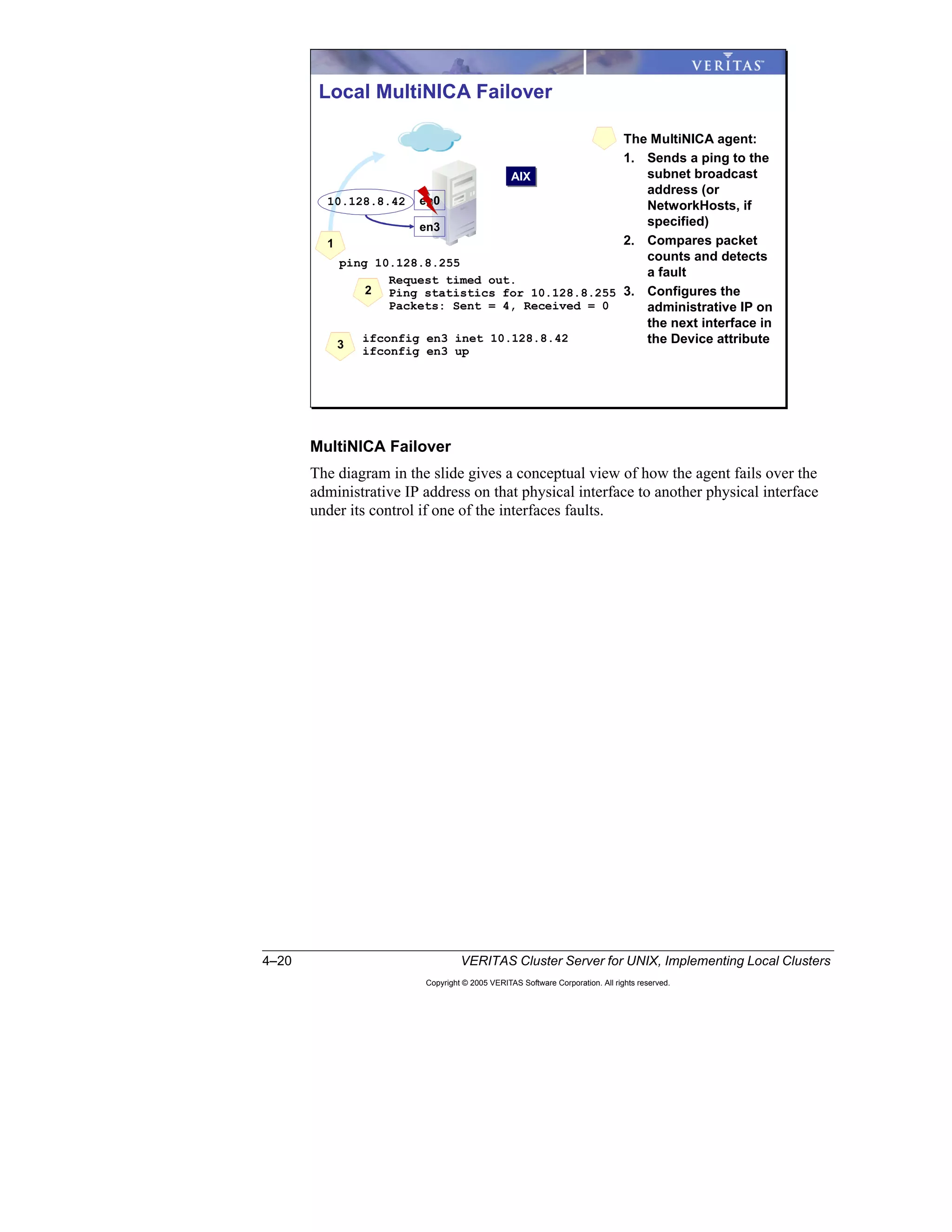
MultiNICA Failover................................................................................................ 4-20
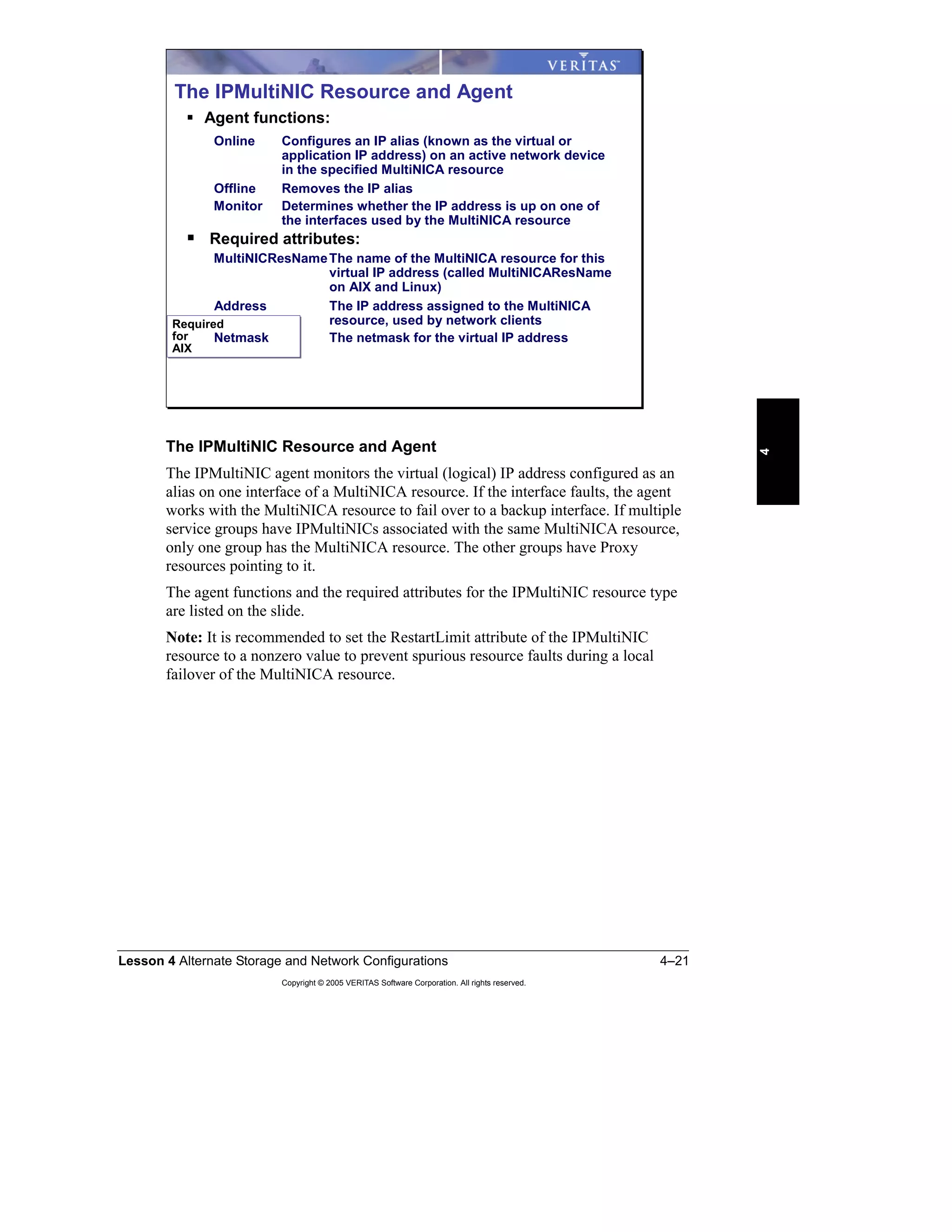
The IPMultiNIC Resource and Agent..................................................................... 4-21
IPMultiNIC Failover............................................................................................... 4-25
Additional Network Design Requirements............................................................. 4-26
MultiNICB and IPMultiNICB ................................................................................ 4-26
How the MultiNICB Agent Operates ..................................................................... 4-27
The MultiNICB Resource and Agent ..................................................................... 4-29
The IPMultiNICB Resource and Agent.................................................................. 4-36
Configuring IPMultiNICB...................................................................................... 4-37
The MultiNICB Trigger.......................................................................................... 4-39
Example MultiNIC Setup....................................................................................... 4-40
Comparing MultiNICA and MultiNICB................................................................. 4-41
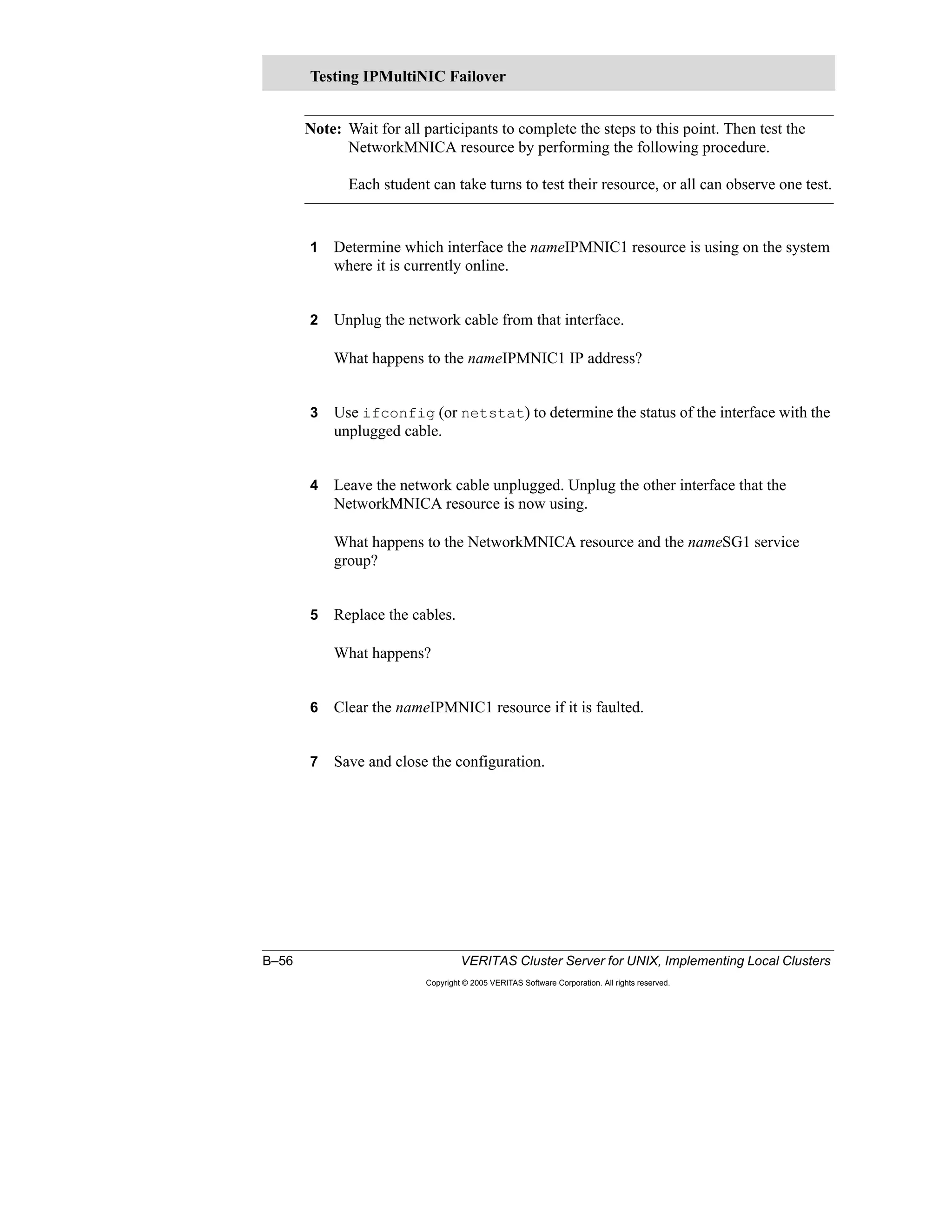
Testing Local Interface Failover............................................................................. 4-42
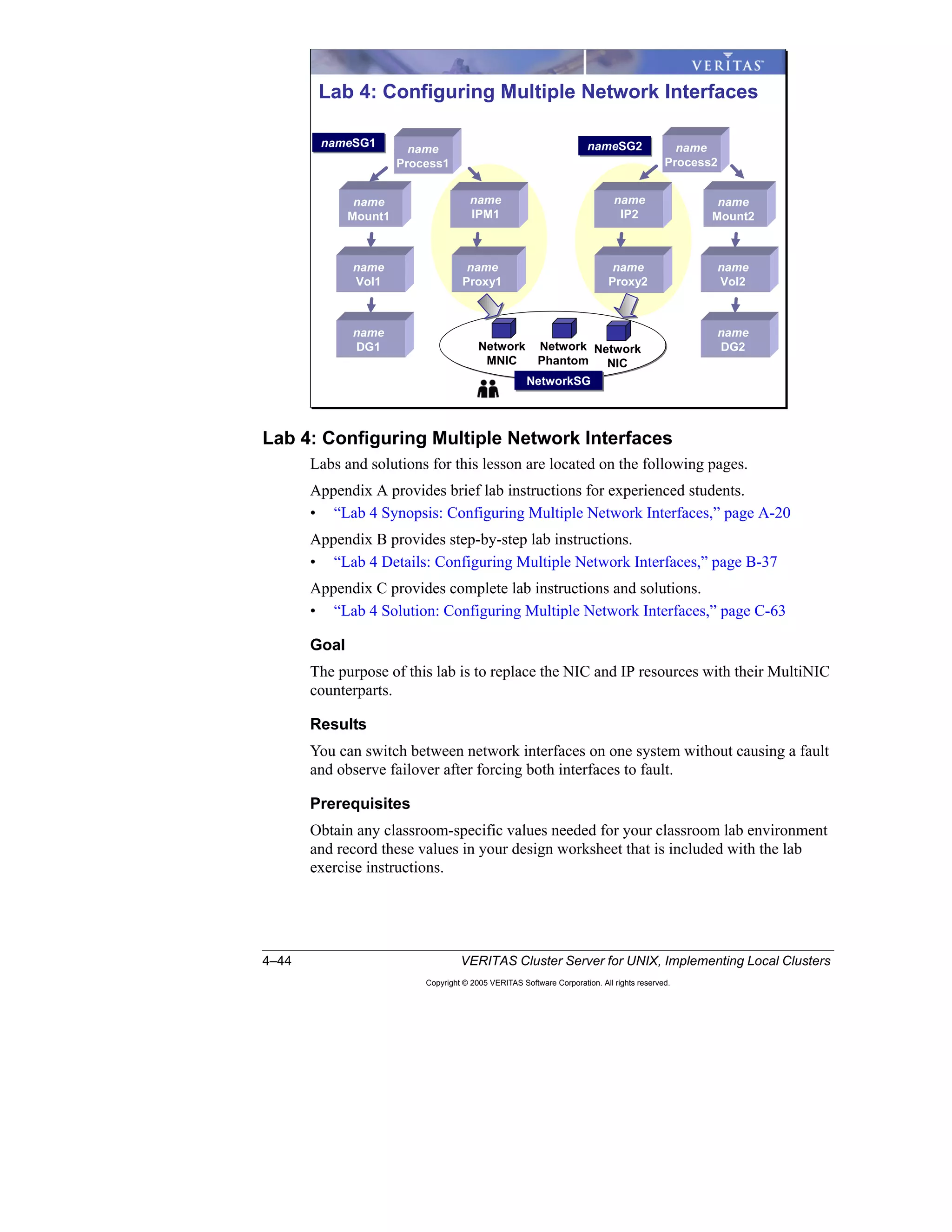
Lab 4: Configuring Multiple Network Interfaces .................................................... 4-44
Lesson 5: Maintaining VCS
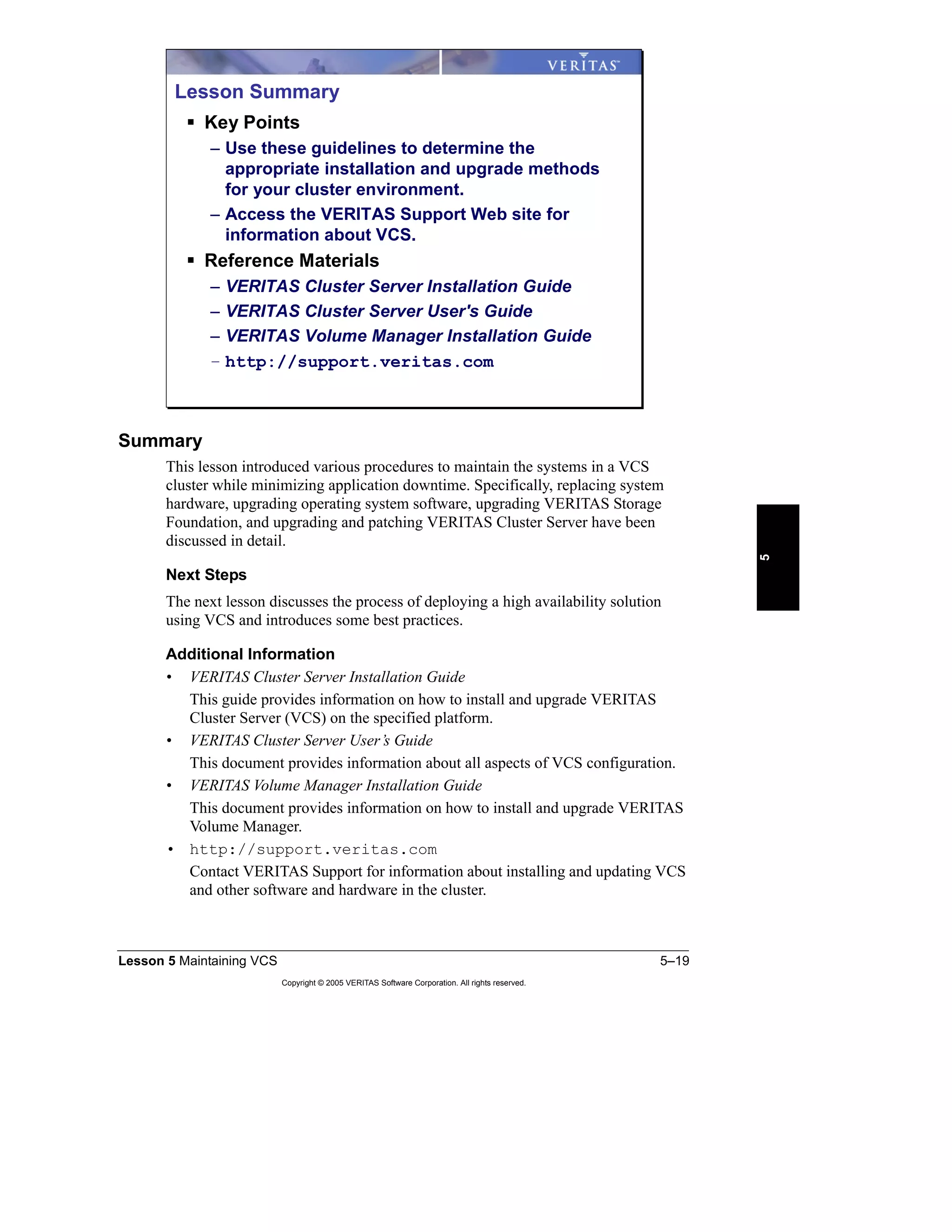
Introduction ............................................................................................................. 5-2
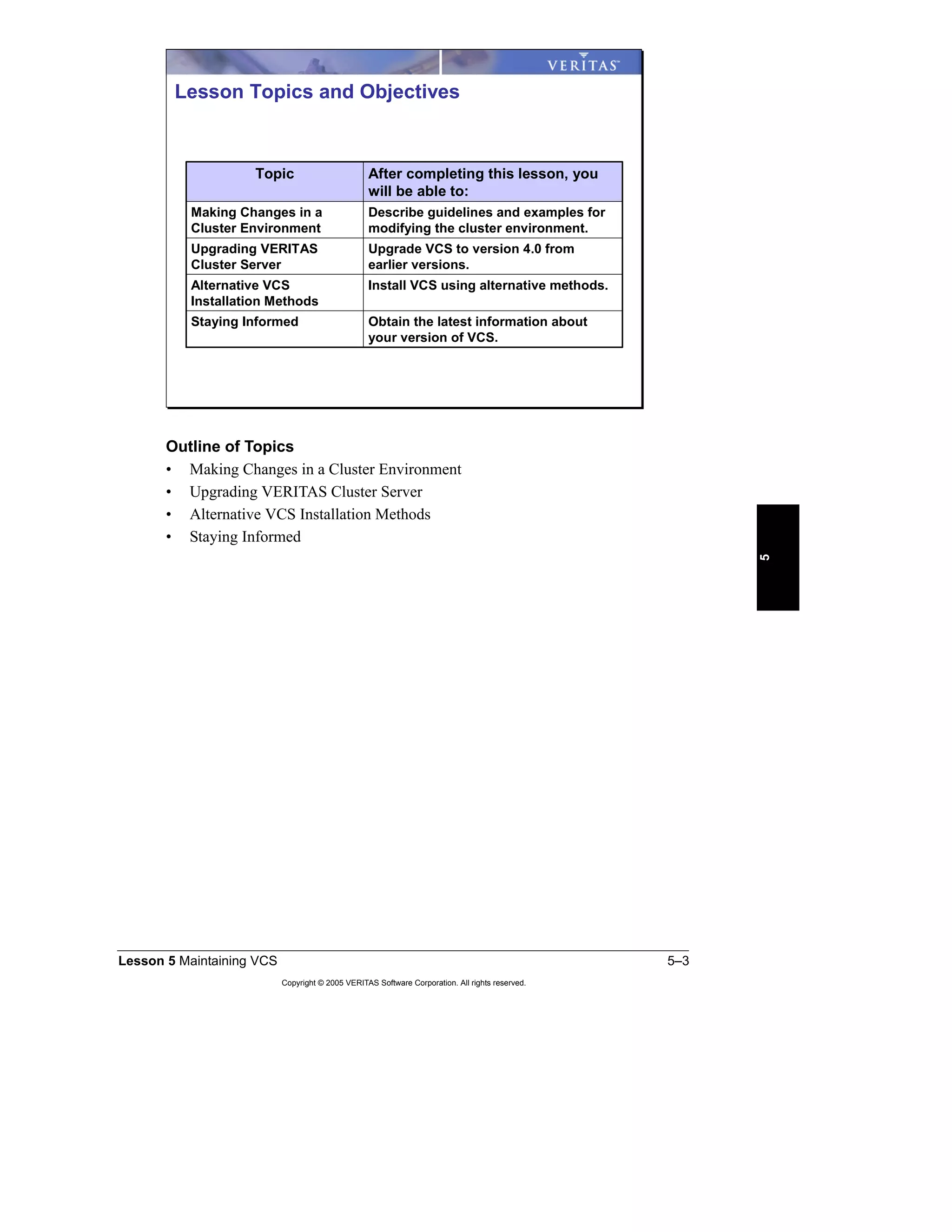
Making Changes in a Cluster Environment............................................................. 5-4
Replacing a System................................................................................................... 5-4
Preparing for Software and Hardware Upgrades...................................................... 5-5
Operating System Upgrade Example........................................................................ 5-6
Performing a Rolling Upgrade in a Running Cluster................................................ 5-7
Upgrading VERITAS Cluster Server ....................................................................... 5-8
Preparing for a VCS Upgrade................................................................................... 5-8
Upgrading to VCS 4.x from VCS 1.3—3.5.............................................................. 5-9
Upgrading from VCS QuickStart to VCS 4.x......................................................... 5-10
Other Upgrade Considerations................................................................................ 5-11
Alternative VCS Installation Methods.................................................................... 5-12
Options to the installvcs Utility .............................................................................. 5-12
Options and Features of the installvcs Utility......................................................... 5-12
Manual Installation Procedure................................................................................ 5-14
Licensing VCS........................................................................................................ 5-16
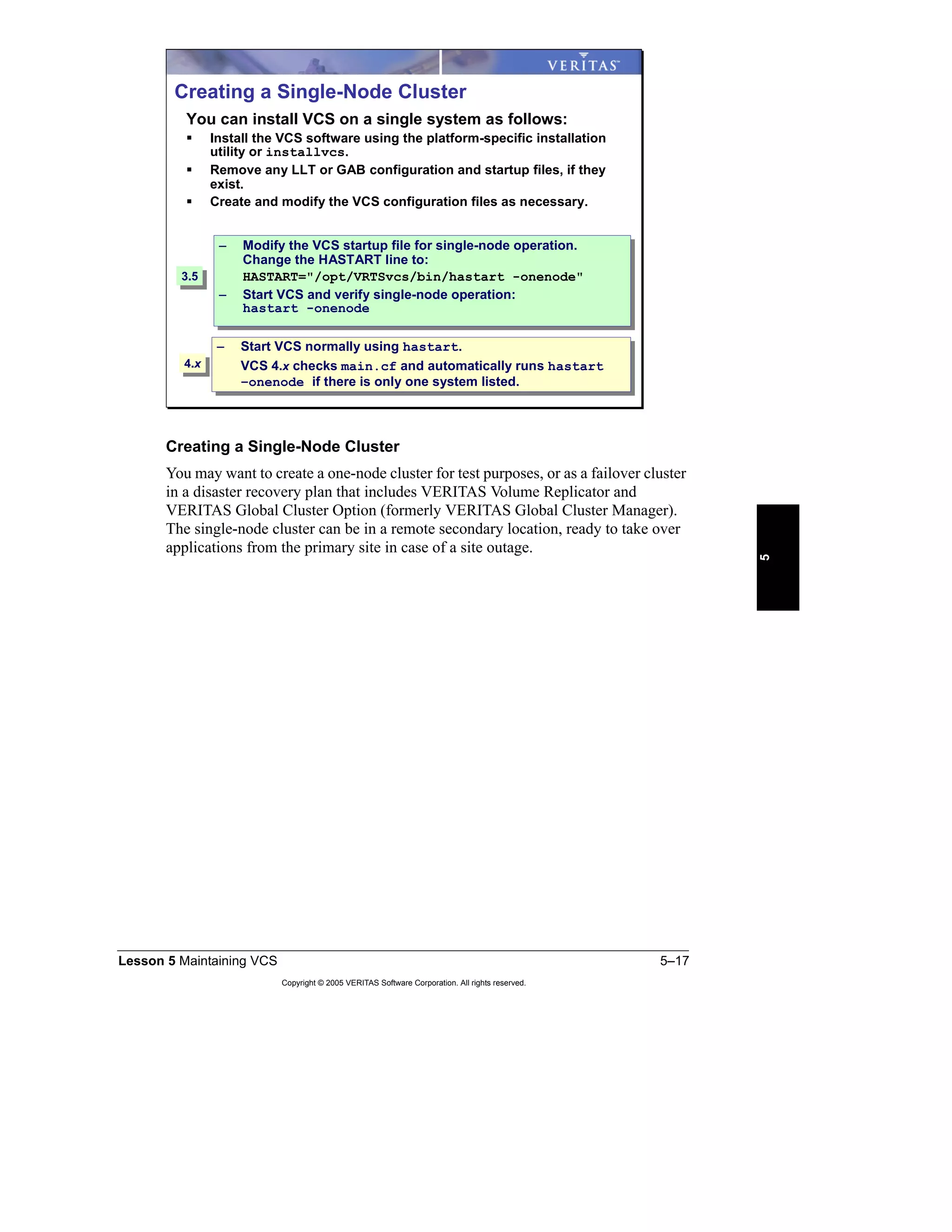
Creating a Single-Node Cluster .............................................................................. 5-17
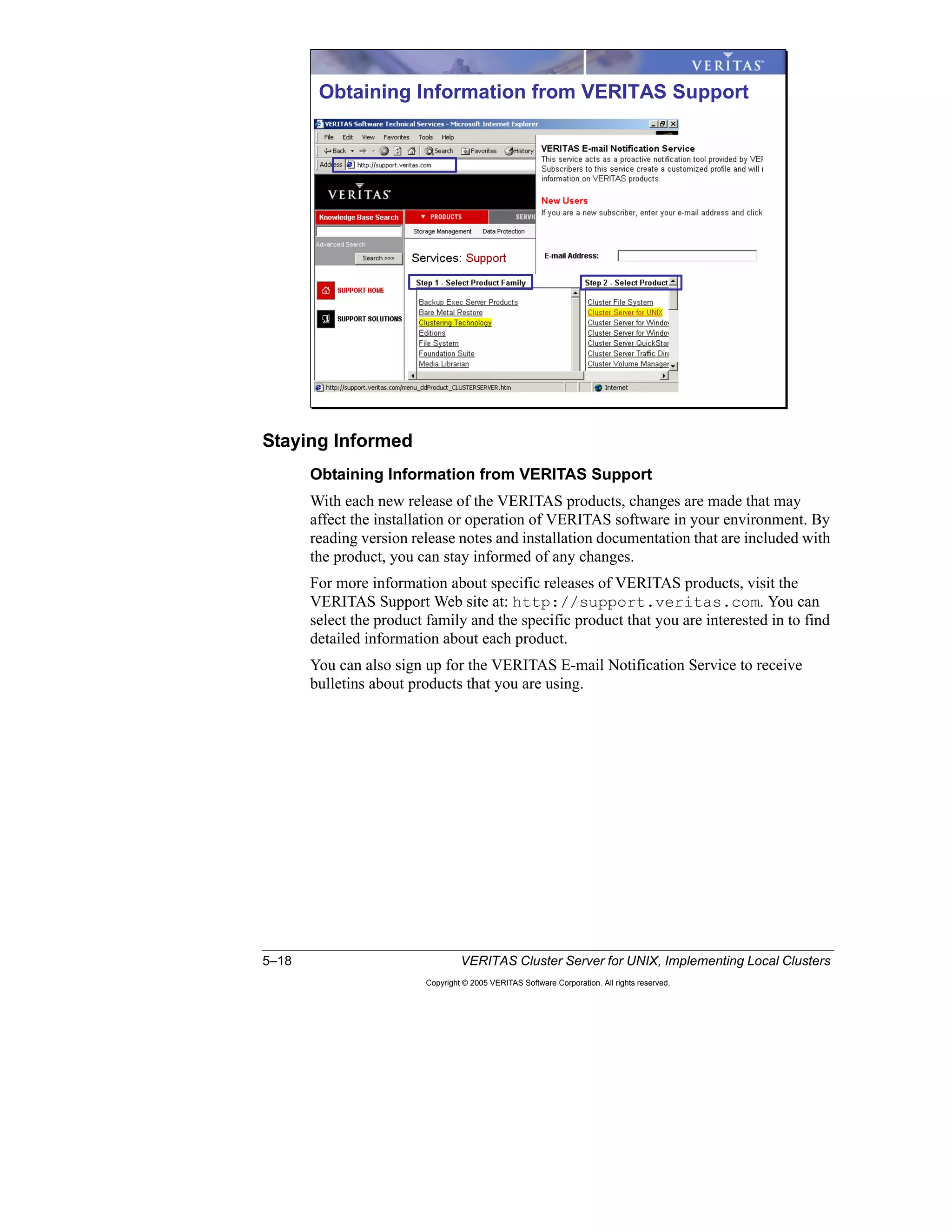
Staying Informed................................................................................................... 5-18
Obtaining Information from VERITAS Support.................................................... 5-18
Lesson 6: Validating VCS Implementation
Introduction ............................................................................................................. 6-2
VCS Best Practices Review.................................................................................... 6-4
Cluster Interconnect.................................................................................................. 6-4
iv VERITAS Cluster Server for UNIX, Implementing Local Clusters
Copyright © 2005 VERITAS Software Corporation. All rights reserved.
Shared Storage .......................................................................................................... 6-5
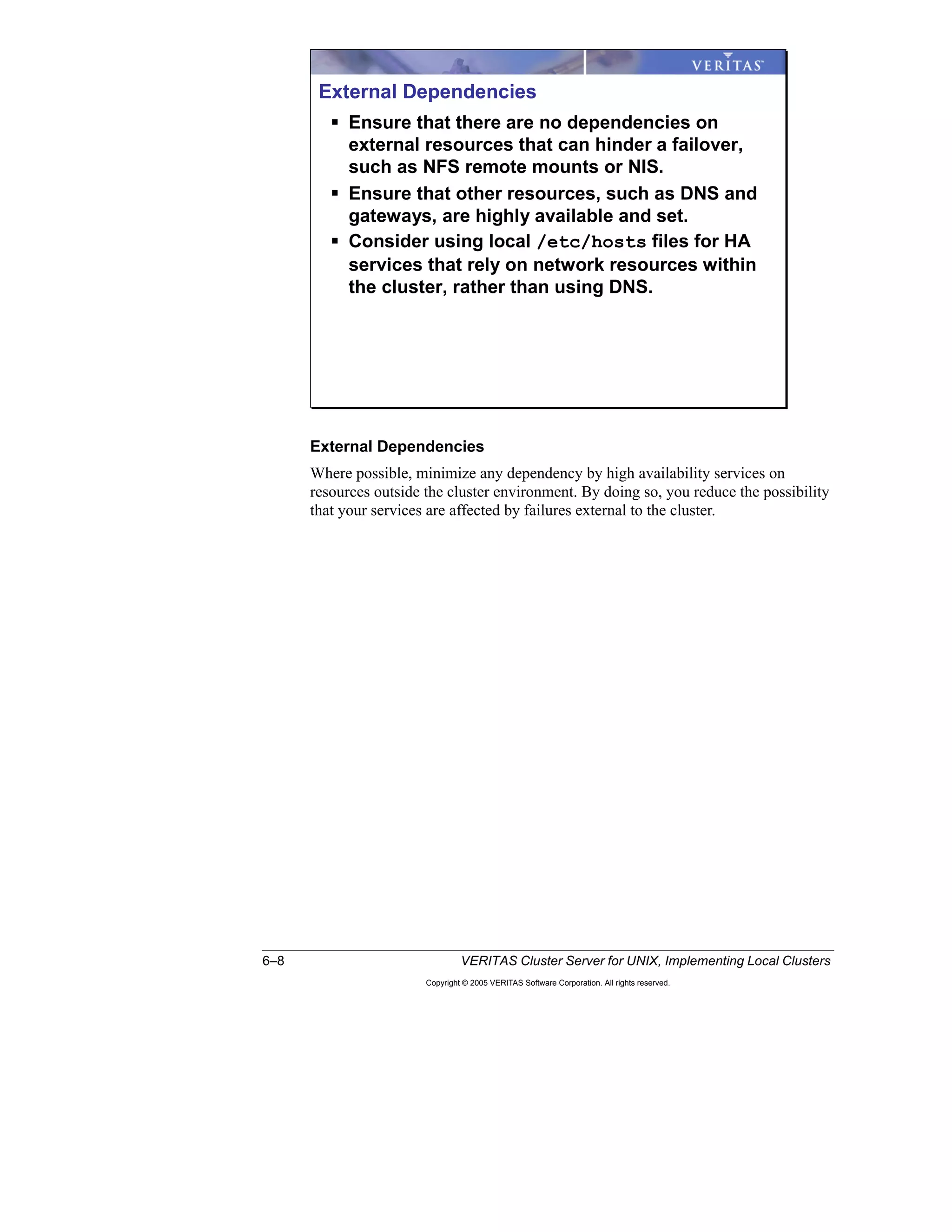
Public Network.......................................................................................................... 6-6
Failover Configuration.............................................................................................. 6-7
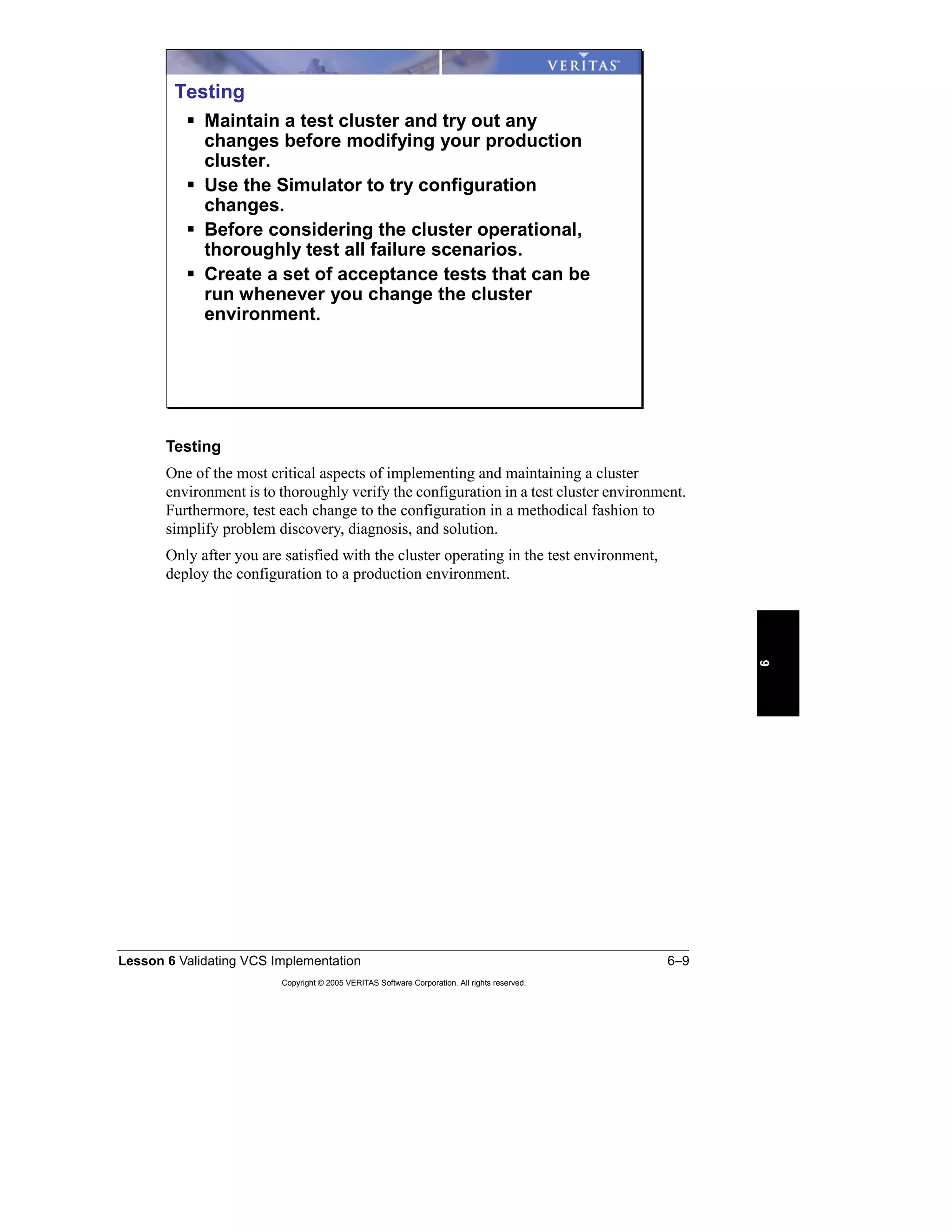
External Dependencies.............................................................................................. 6-8
Testing....................................................................................................................... 6-9
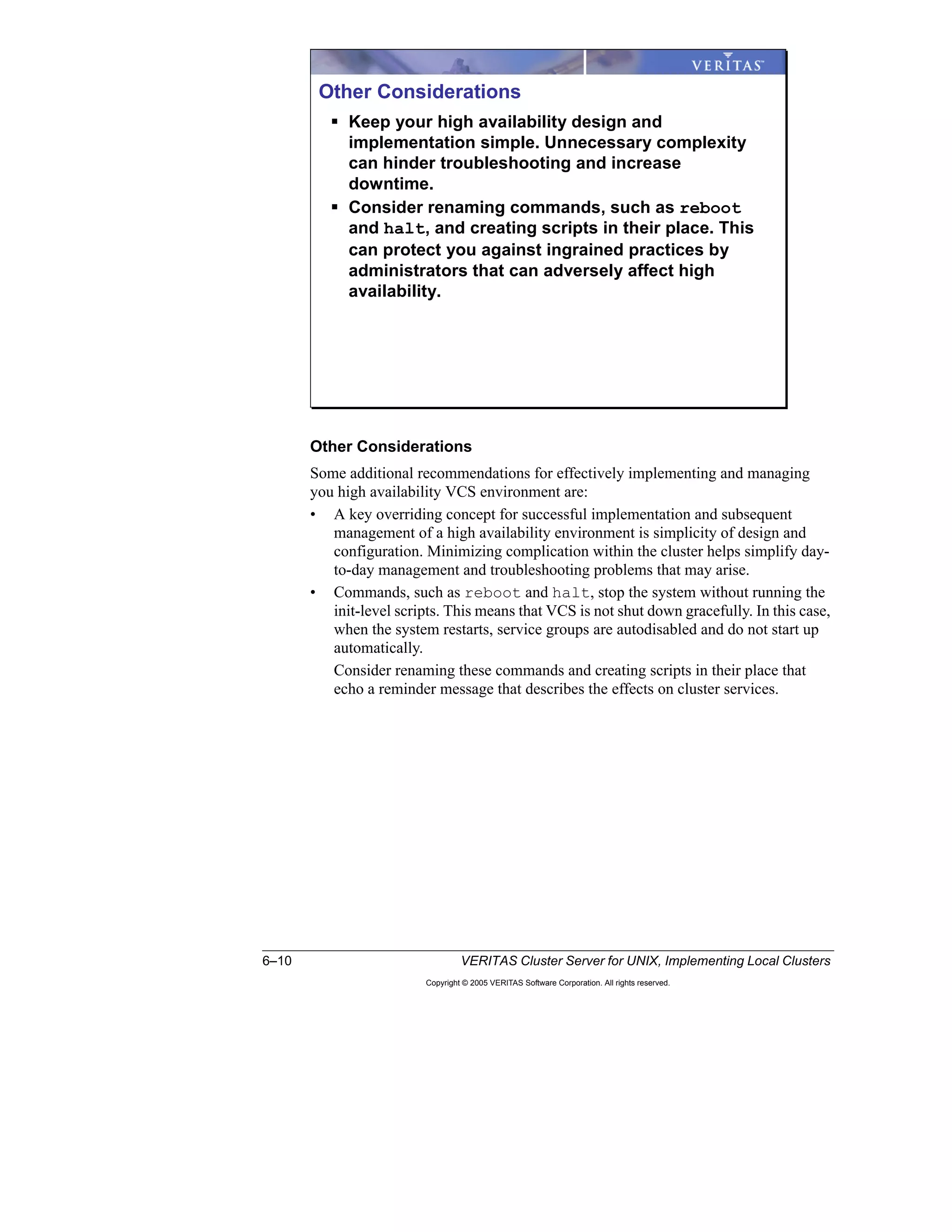
Other Considerations.............................................................................................. 6-10
Solution Acceptance Testing ................................................................................ 6-11
Examples of Solution Acceptance Testing ............................................................ 6-12
Knowledge Transfer.............................................................................................. 6-13
System and Network Administration..................................................................... 6-13
Application Administration.................................................................................... 6-14
The Implementation Report ................................................................................... 6-15
High Availability Solutions..................................................................................... 6-16
Local Cluster with Shared Storage......................................................................... 6-16
Campus or Metropolitan Shared Storage Cluster................................................... 6-17
Replicated Data Cluster (RDC).............................................................................. 6-18
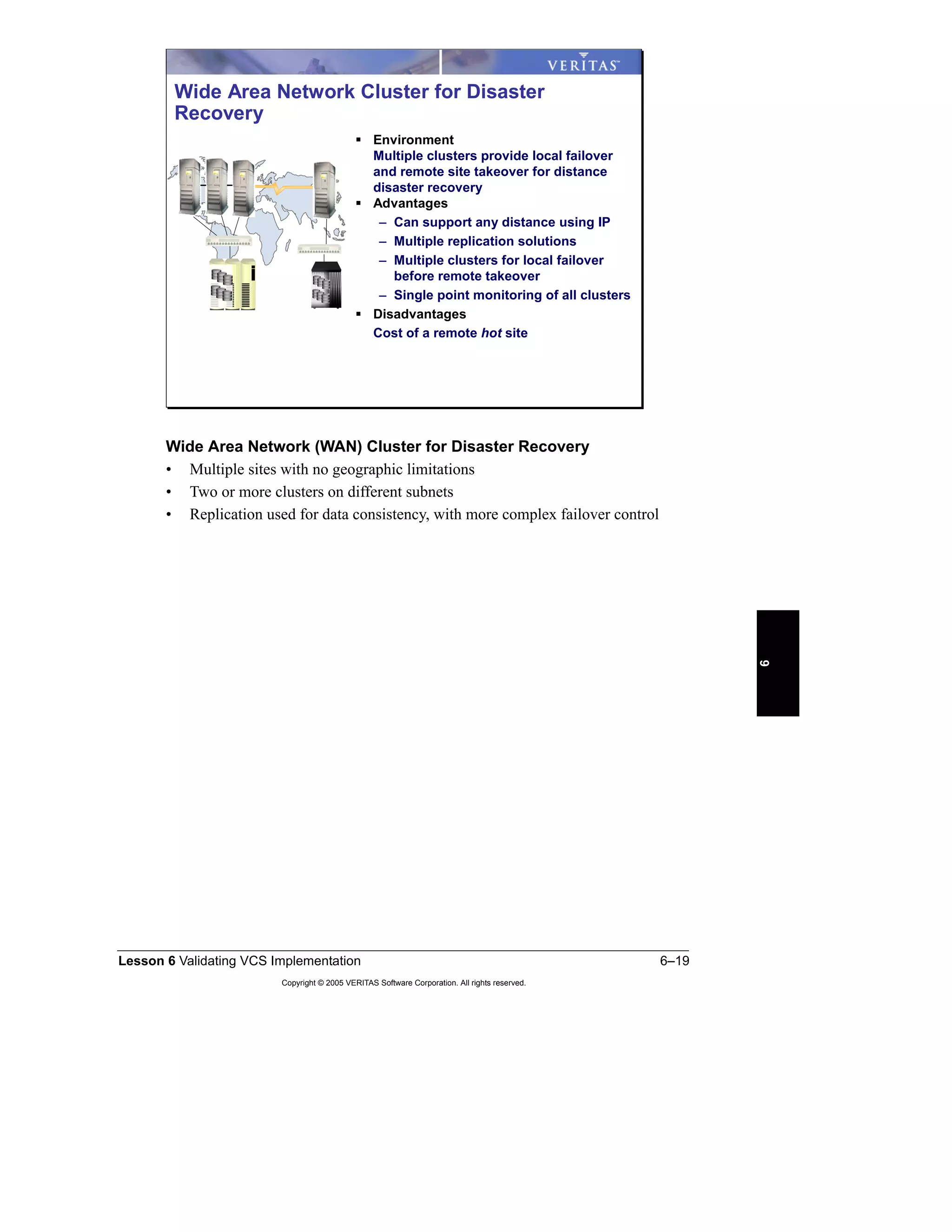
Wide Area Network (WAN) Cluster for Disaster Recovery ................................. 6-19
High Availability References................................................................................. 6-20
VERITAS High Availability Curriculum .............................................................. 6-22
Appendix A: Lab Synopses
Lab 1 Synopsis: Reconfiguring Cluster Membership .............................................. A-2
Lab 2 Synopsis: Service Group Dependencies....................................................... A-7
Lab 3 Synopsis: Testing Workload Management.................................................. A-14
Lab 4 Synopsis: Configuring Multiple Network Interfaces..................................... A-20
Appendix B: Lab Details
Lab 1 Details: Reconfiguring Cluster Membership.................................................. B-3
Lab 2 Details: Service Group Dependencies ........................................................ B-17
Lab 3 Details: Testing Workload Management ..................................................... B-29
Lab 4 Details: Configuring Multiple Network Interfaces ........................................ B-37
Appendix C: Lab Solutions
Lab Solution 1: Reconfiguring Cluster Membership................................................ C-3
Lab 2 Solution: Service Group Dependencies ...................................................... C-25
Lab 3 Solution: Testing Workload Management ................................................... C-45
Lab 4 Solution: Configuring Multiple Network Interfaces ...................................... C-63
Appendix D: Job Aids
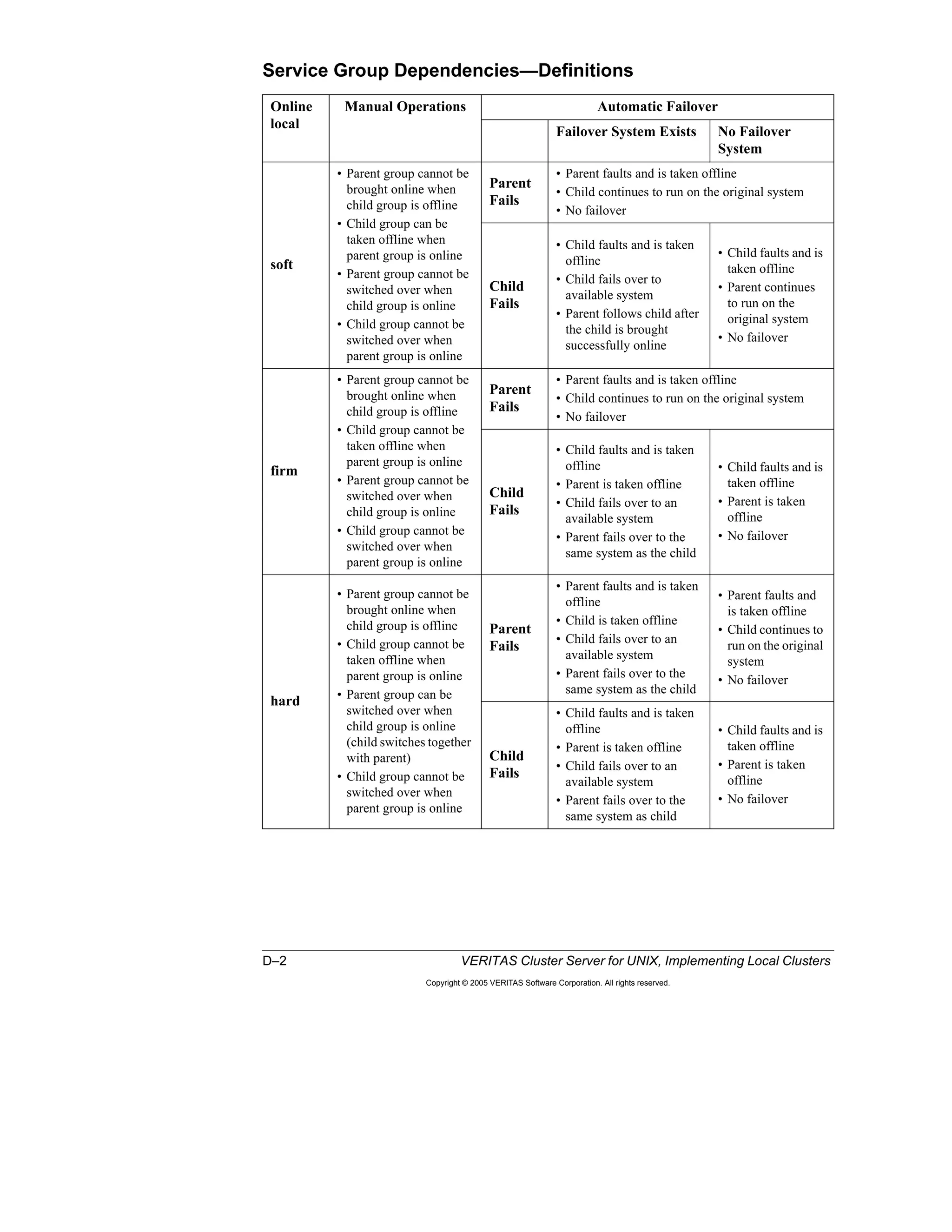
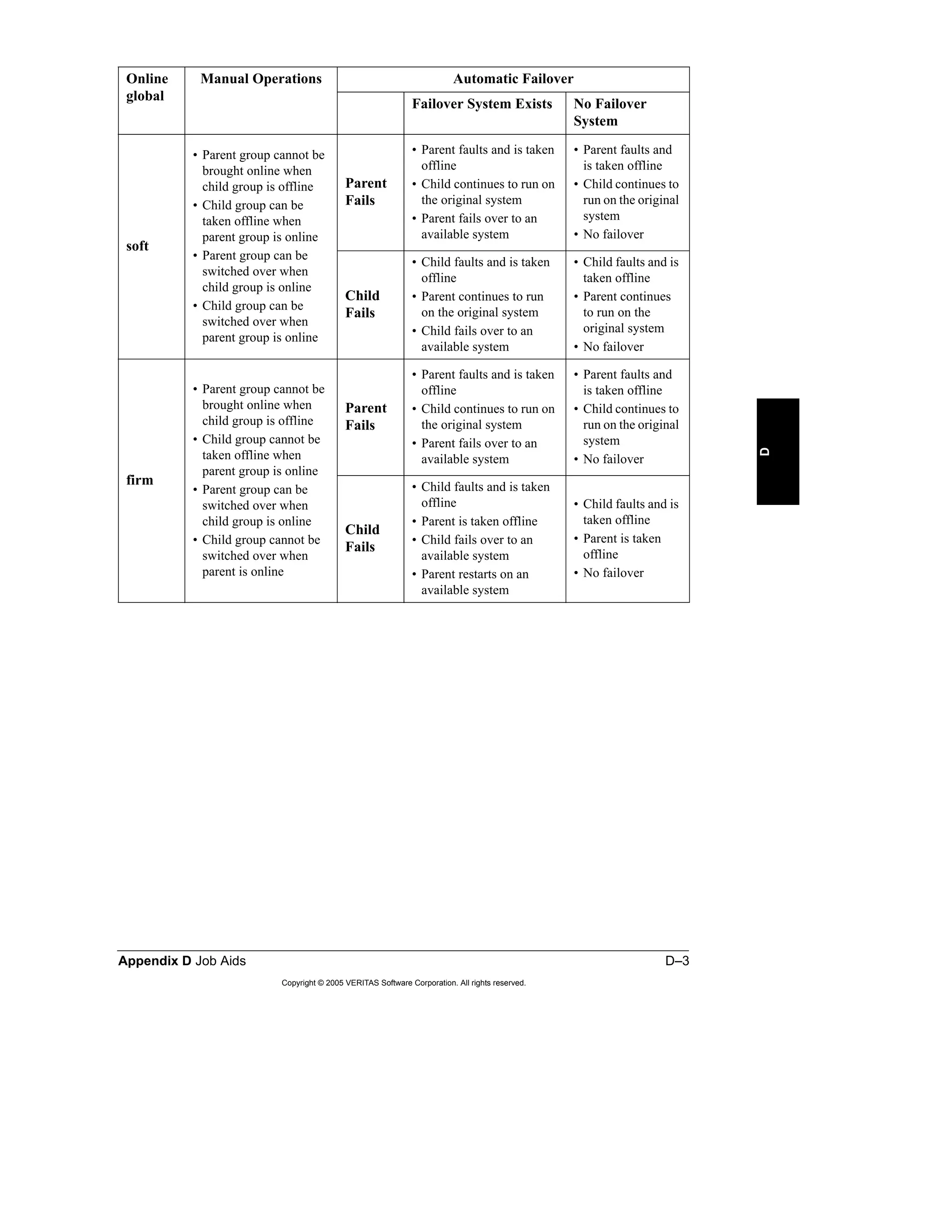
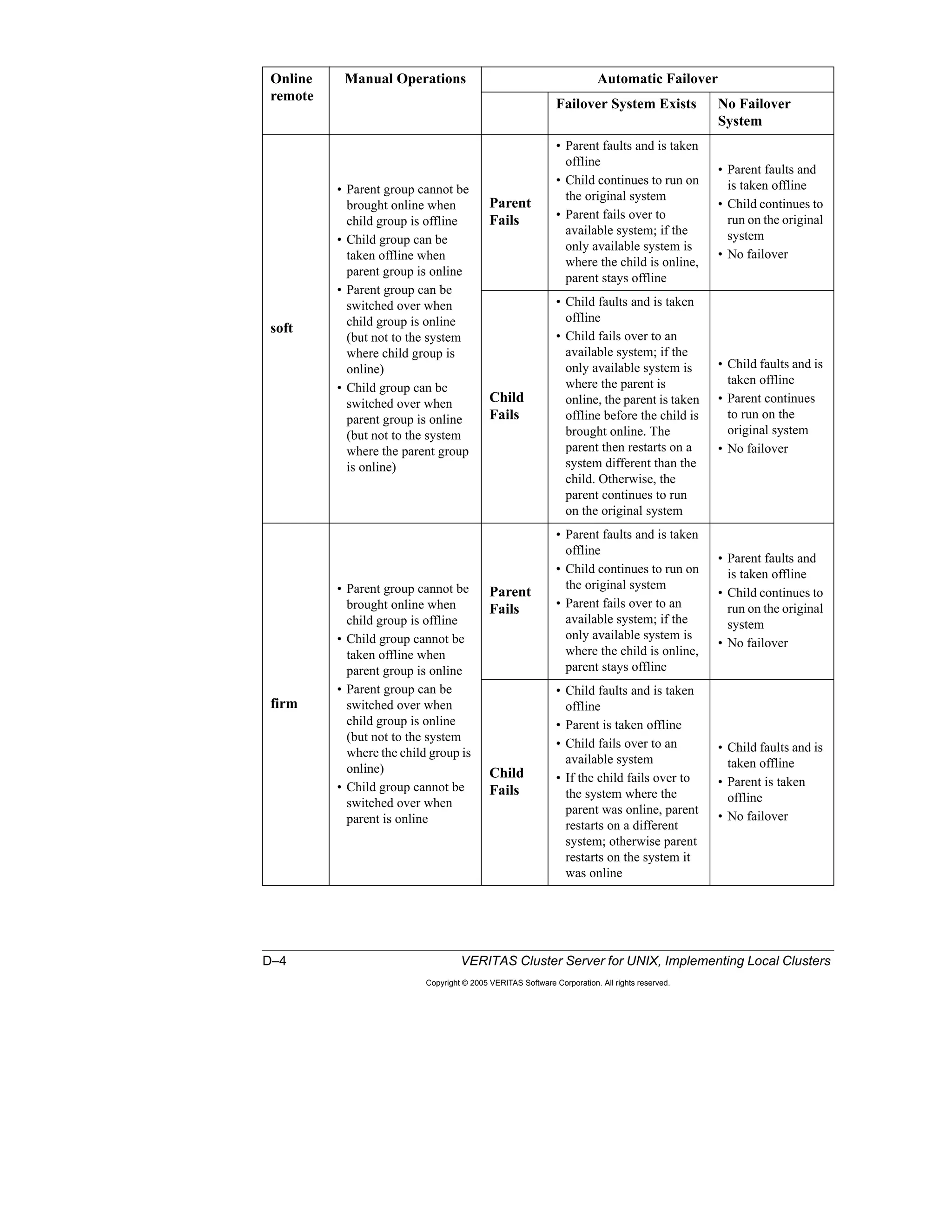
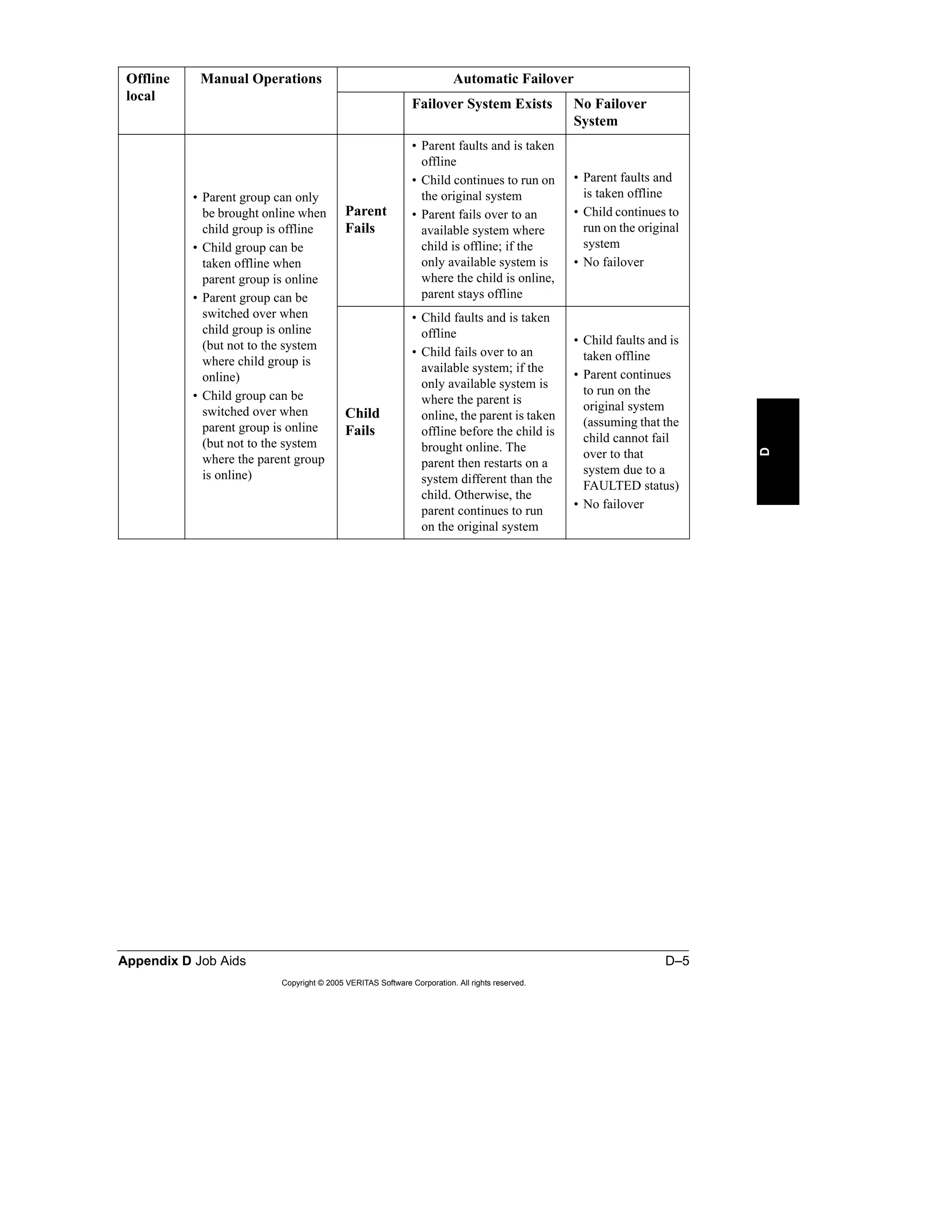
Service Group Dependencies—Definitions............................................................. D-2
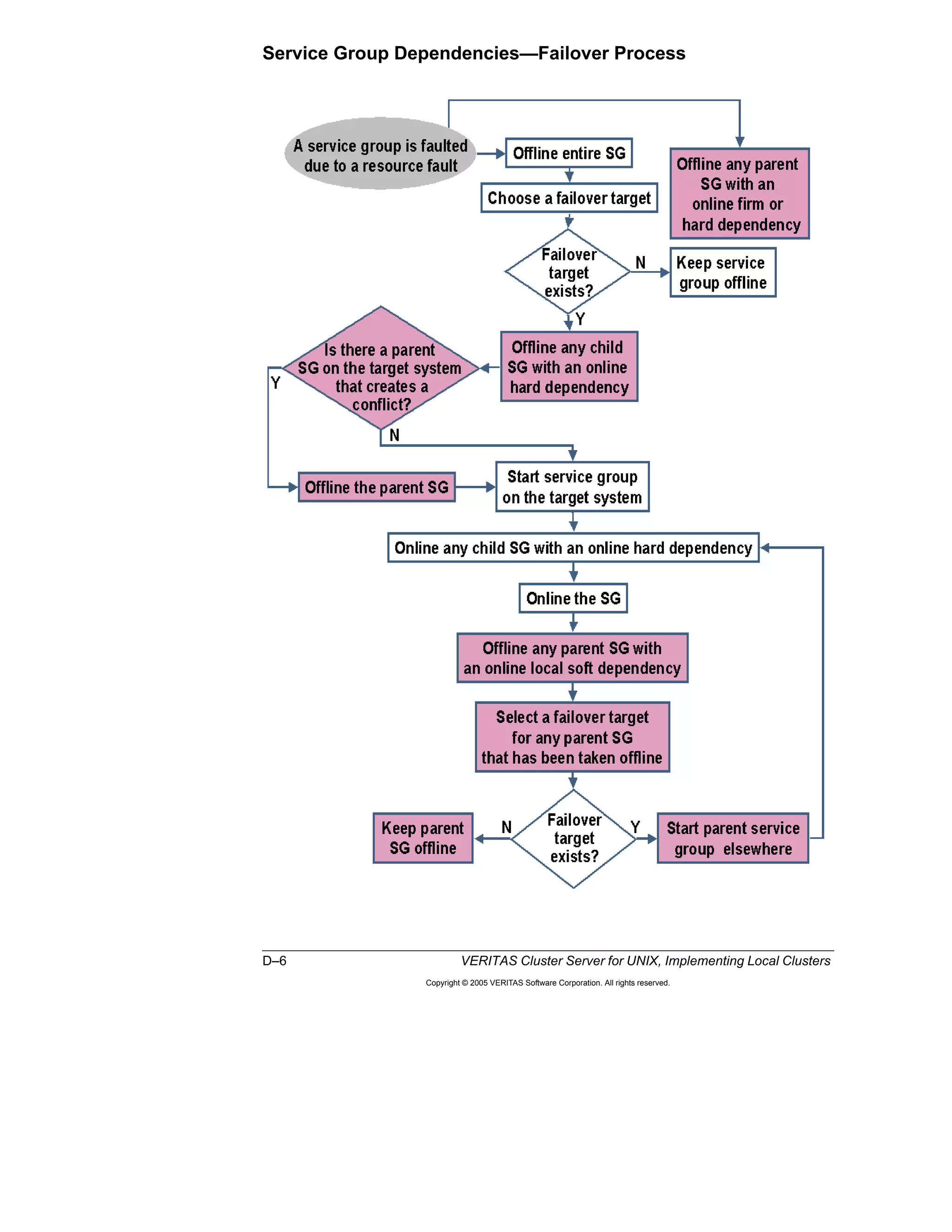
Service Group Dependencies—Failover Process................................................... D-6
Appendix E: Design Worksheet: Template
Index
Course Introduction
Intro–2 VERITAS Cluster Server for UNIX, Implementing Local Clusters
Copyright © 2005 VERITAS Software Corporation. All rights reserved.
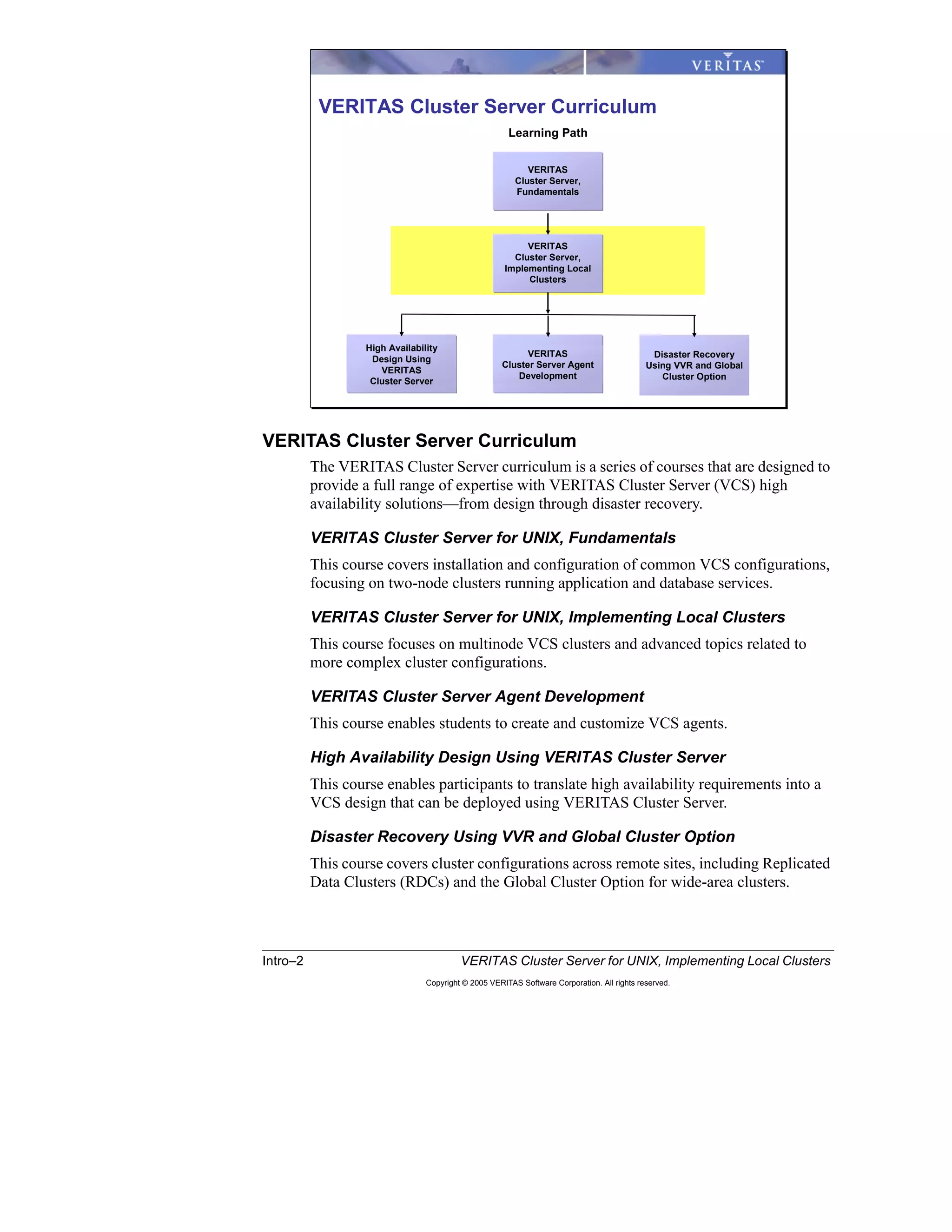
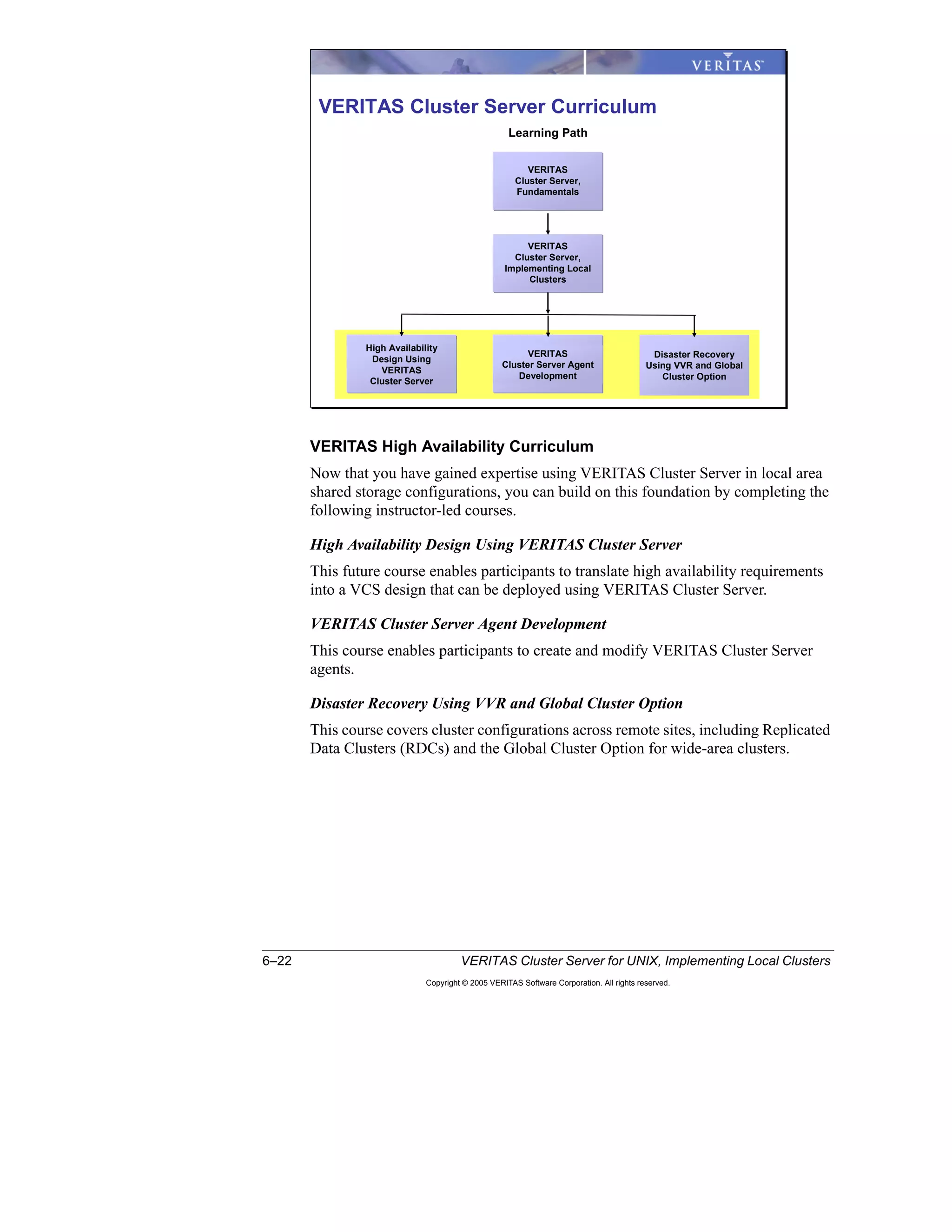
VERITAS Cluster Server Curriculum
The VERITAS Cluster Server curriculum is a series of courses that are designed to
provide a full range of expertise with VERITAS Cluster Server (VCS) high
availability solutions—from design through disaster recovery.
VERITAS Cluster Server for UNIX, Fundamentals
This course covers installation and configuration of common VCS configurations,
focusing on two-node clusters running application and database services.
VERITAS Cluster Server for UNIX, Implementing Local Clusters
This course focuses on multinode VCS clusters and advanced topics related to
more complex cluster configurations.
VERITAS Cluster Server Agent Development
This course enables students to create and customize VCS agents.
High Availability Design Using VERITAS Cluster Server
This course enables participants to translate high availability requirements into a
VCS design that can be deployed using VERITAS Cluster Server.
Disaster Recovery Using VVR and Global Cluster Option
This course covers cluster configurations across remote sites, including Replicated
Data Clusters (RDCs) and the Global Cluster Option for wide-area clusters.
Learning Path
VERITAS
Cluster Server,
Implementing Local
Clusters
Disaster Recovery
Using VVR and Global
Cluster Option
High Availability
Design Using
VERITAS
Cluster Server
VERITAS
Cluster Server,
Fundamentals
VERITAS Cluster Server Curriculum
VERITAS
Cluster Server Agent
Development
Course Introduction Intro–3
Copyright © 2005 VERITAS Software Corporation. All rights reserved.
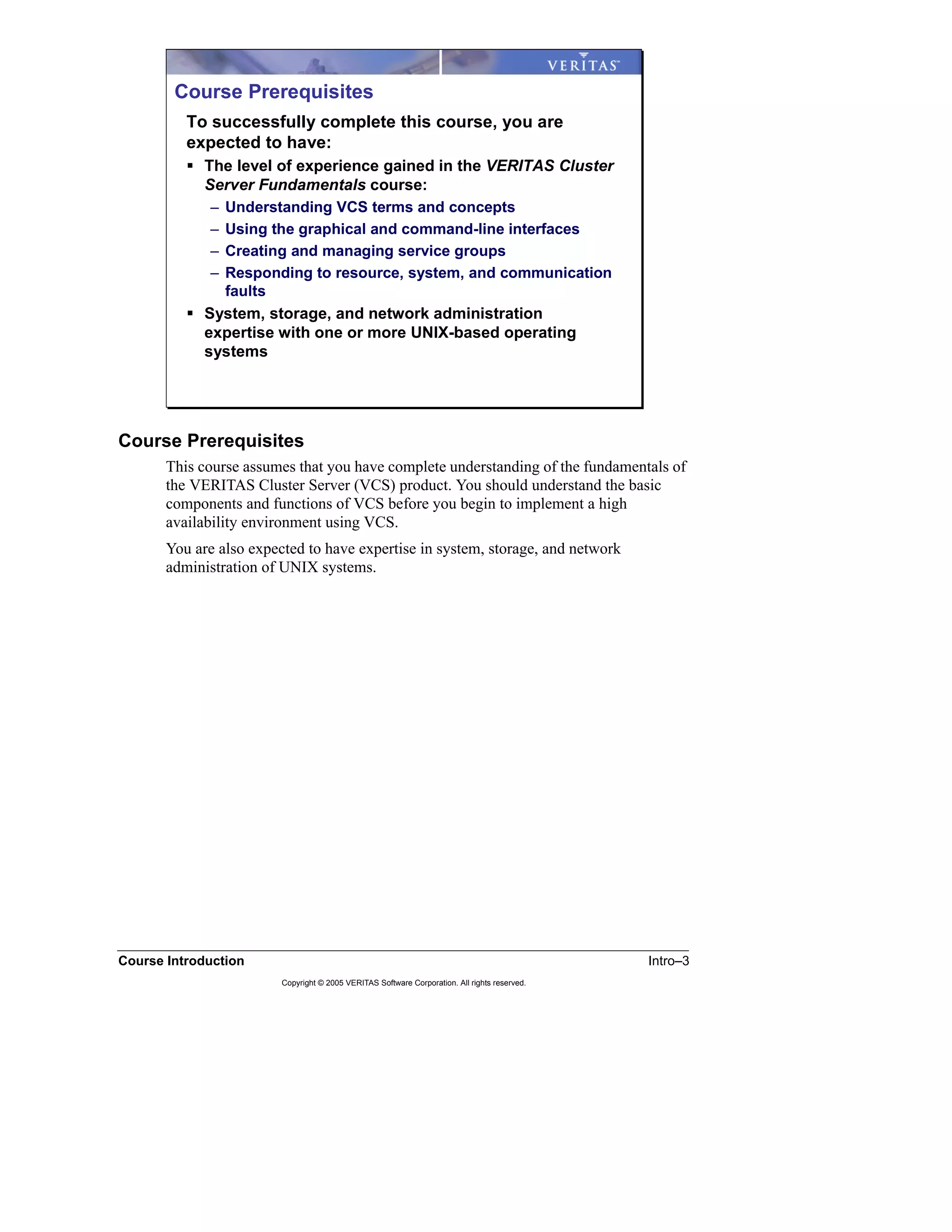
Course Prerequisites
This course assumes that you have complete understanding of the fundamentals of
the VERITAS Cluster Server (VCS) product. You should understand the basic
components and functions of VCS before you begin to implement a high
availability environment using VCS.
You are also expected to have expertise in system, storage, and network
administration of UNIX systems.
Course Prerequisites
To successfully complete this course, you are
expected to have:
The level of experience gained in the VERITAS Cluster
Server Fundamentals course:
– Understanding VCS terms and concepts
– Using the graphical and command-line interfaces
– Creating and managing service groups
– Responding to resource, system, and communication
faults
System, storage, and network administration
expertise with one or more UNIX-based operating
systems
Intro–4 VERITAS Cluster Server for UNIX, Implementing Local Clusters
Copyright © 2005 VERITAS Software Corporation. All rights reserved.
Course Objectives
In the VERITAS Cluster Server Implementing Local Clusters course, you are given
a high availability design to implement in the classroom environment using
VERITAS Cluster Server.
The course simulates the job tasks that you perform to configure advanced cluster
features. Lessons build upon each other, exhibiting the processes and
recommended best practices that you can apply to implementing any design
cluster.
The core material focuses on the most common cluster implementations. Other
cluster configurations emphasizing additional VCS capabilities are provided to
illustrate the power and flexibility of VERITAS Cluster Server.
Course Objectives
After completing the VERITAS Cluster Server
Implementing Local Clusters course, you will be
able to:
Reconfigure cluster membership to add and remove
systems from a cluster.
Configure dependencies between service groups.
Manage workload among cluster systems.
Implement alternative storage and network
configurations.
Perform common maintenance tasks.
Validate your cluster implementation.
Course Introduction Intro–5
Copyright © 2005 VERITAS Software Corporation. All rights reserved.
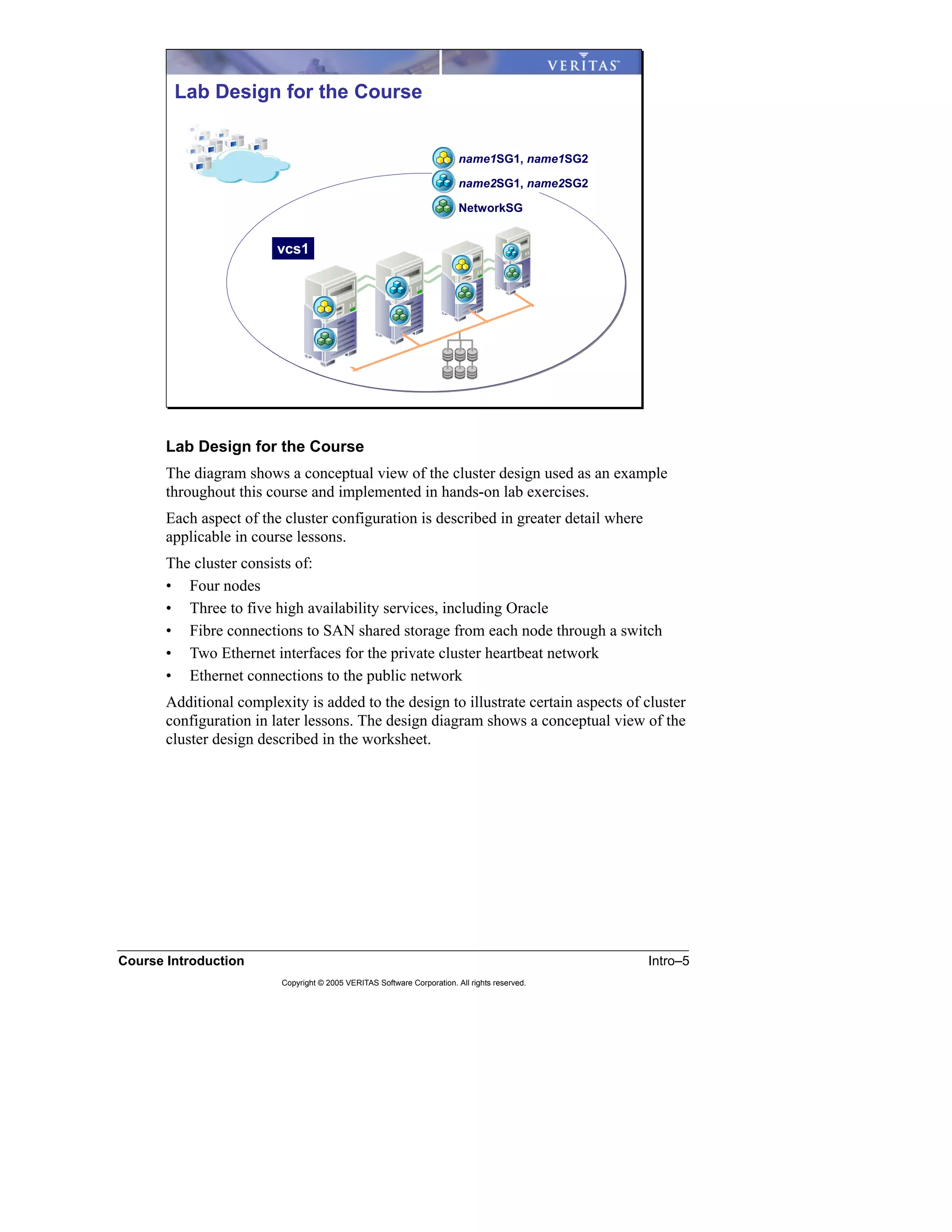
Lab Design for the Course
The diagram shows a conceptual view of the cluster design used as an example
throughout this course and implemented in hands-on lab exercises.
Each aspect of the cluster configuration is described in greater detail where
applicable in course lessons.
The cluster consists of:
• Four nodes
• Three to five high availability services, including Oracle
• Fibre connections to SAN shared storage from each node through a switch
• Two Ethernet interfaces for the private cluster heartbeat network
• Ethernet connections to the public network
Additional complexity is added to the design to illustrate certain aspects of cluster
configuration in later lessons. The design diagram shows a conceptual view of the
cluster design described in the worksheet.
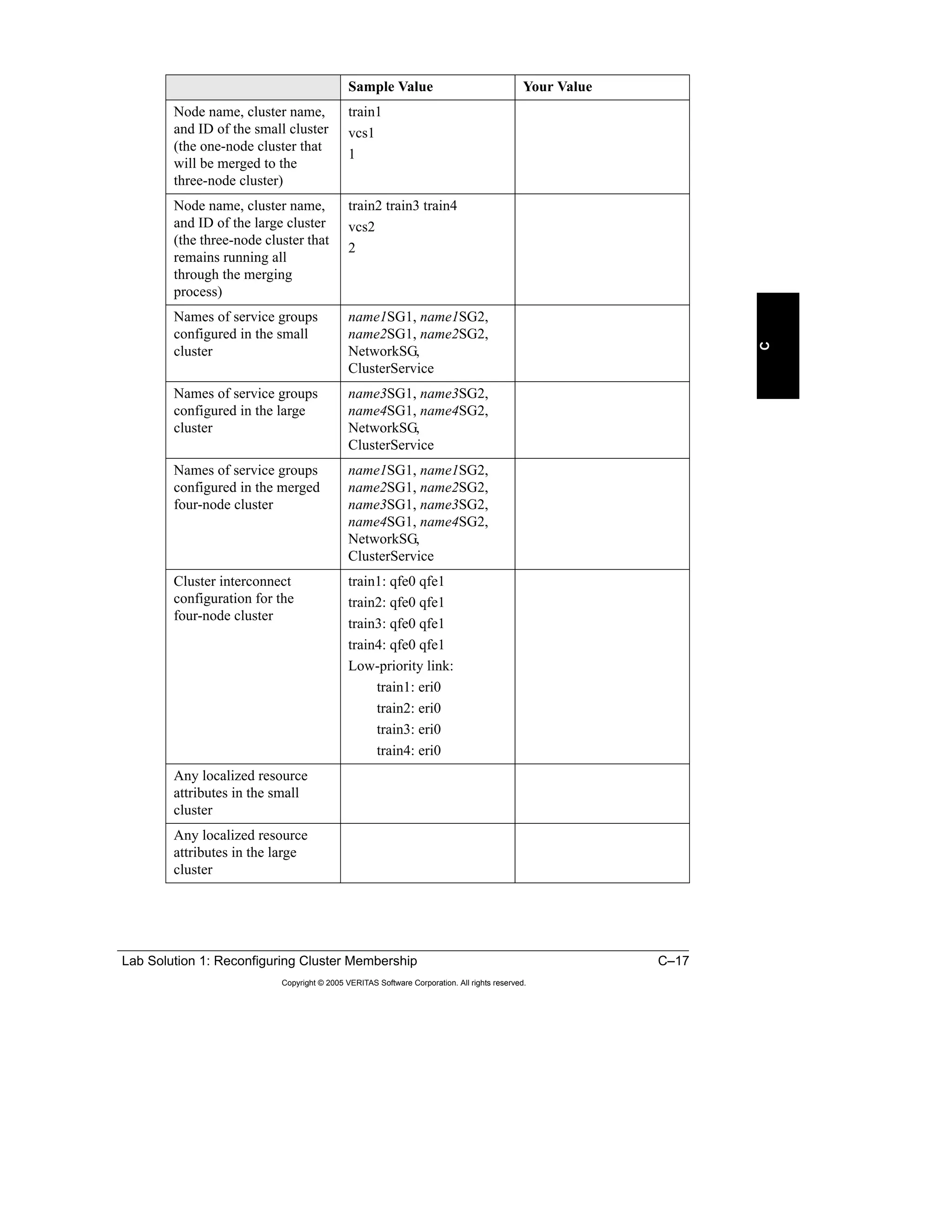
Lab Design for the Course
vcs1
name1SG1, name1SG2
name2SG1, name2SG2
NetworkSG
Intro–6 VERITAS Cluster Server for UNIX, Implementing Local Clusters
Copyright © 2005 VERITAS Software Corporation. All rights reserved.
Course Overview
This training provides comprehensive instruction on the deployment of advanced
features of VERITAS Cluster Server (VCS). The course focuses on multinode
VCS clusters and advanced topics related to more complex cluster configurations,
such as service group dependencies and workload management.
Course Overview
Lesson 1: Reconfiguring Cluster Membership
Lesson 2: Service Group Interactions
Lesson 3: Workload Management
Lesson 4: Storage and Network Alternatives
Lesson 5: Maintaining VCS
Lesson 6: Validating VCS Implementation
Lesson 1
Workshop: Reconfiguring Cluster
Membership
1–2 VERITAS Cluster Server for UNIX, Implementing Local Clusters
Copyright © 2005 VERITAS Software Corporation. All rights reserved.
Introduction
Overview
This lesson is a workshop to teach you to think through impacts of changing the
cluster configuration while maximizing the application services availability and
plan accordingly. The workshop also provides the means of reviewing everything
you have learned so far about VCS clusters.
Importance
To maintain existing VCS clusters and clustered application services, you may be
required to add or remove systems to and from existing VCS clusters or merge
clusters to consolidate servers. You need to have a very good understanding of how
VCS works and how the configuration changes impact the application services
availability before you can plan and execute these changes in a cluster.
Lesson Introduction
Lesson 1: Reconfiguring Cluster Membership
Lesson 2: Service Group Interactions
Lesson 3: Workload Management
Lesson 4: Storage and Network Alternatives
Lesson 5: Maintaining VCS
Lesson 6: Validating VCS Implementation
Lesson 1 Workshop: Reconfiguring Cluster Membership 1–3
Copyright © 2005 VERITAS Software Corporation. All rights reserved.
1
Outline of Topics
• Task 1: Removing a System
• Task 2: Adding a System
• Task 3: Merging Two Running VCS Clusters
Labs and solutions are located on the following pages.
“Lab 1 Synopsis: Reconfiguring Cluster Membership,” page A-2
“Lab 1 Details: Reconfiguring Cluster Membership,” page B-3
“Lab Solution 1: Reconfiguring Cluster Membership,” page C-3
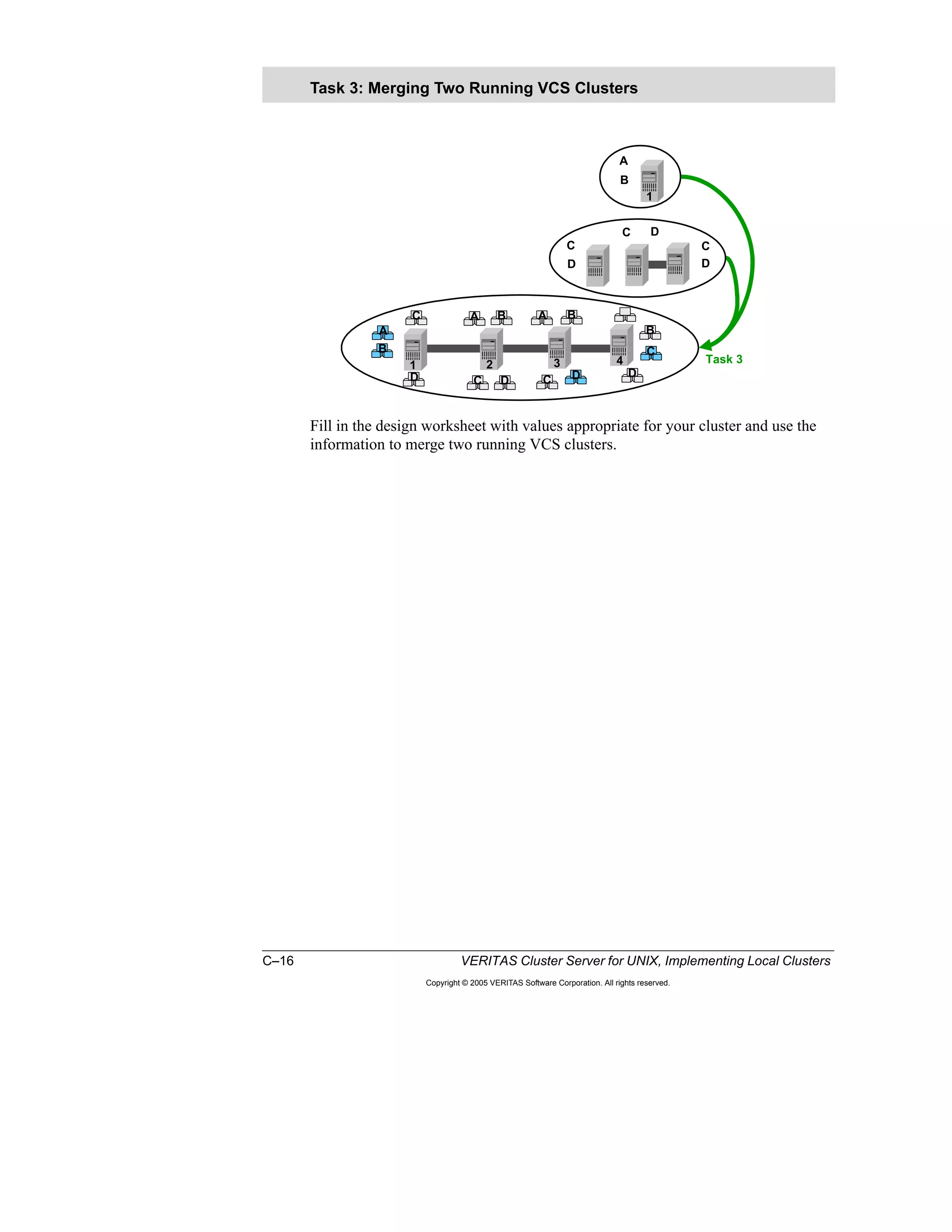
Merge two running VCS clusters.Task 3: Merging Two
Running Clusters
Add a new system to a running VCS
cluster.
Task 2: Adding a System
Remove a system from a running
cluster.
Task 1: Removing a
System
After completing this lesson, you
will be able to:
Topic
Lesson Topics and Objectives
1–4 VERITAS Cluster Server for UNIX, Implementing Local Clusters
Copyright © 2005 VERITAS Software Corporation. All rights reserved.
Workshop Overview
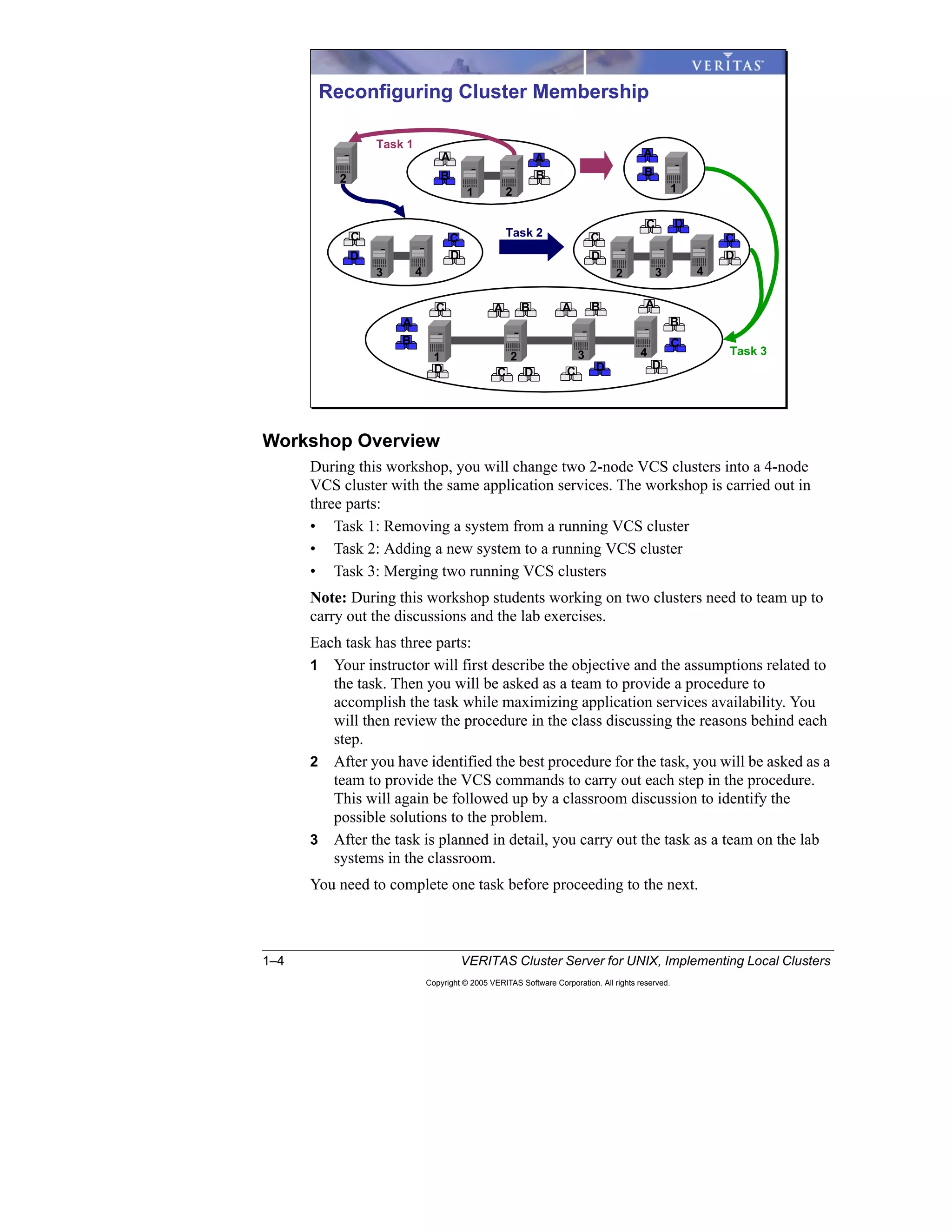
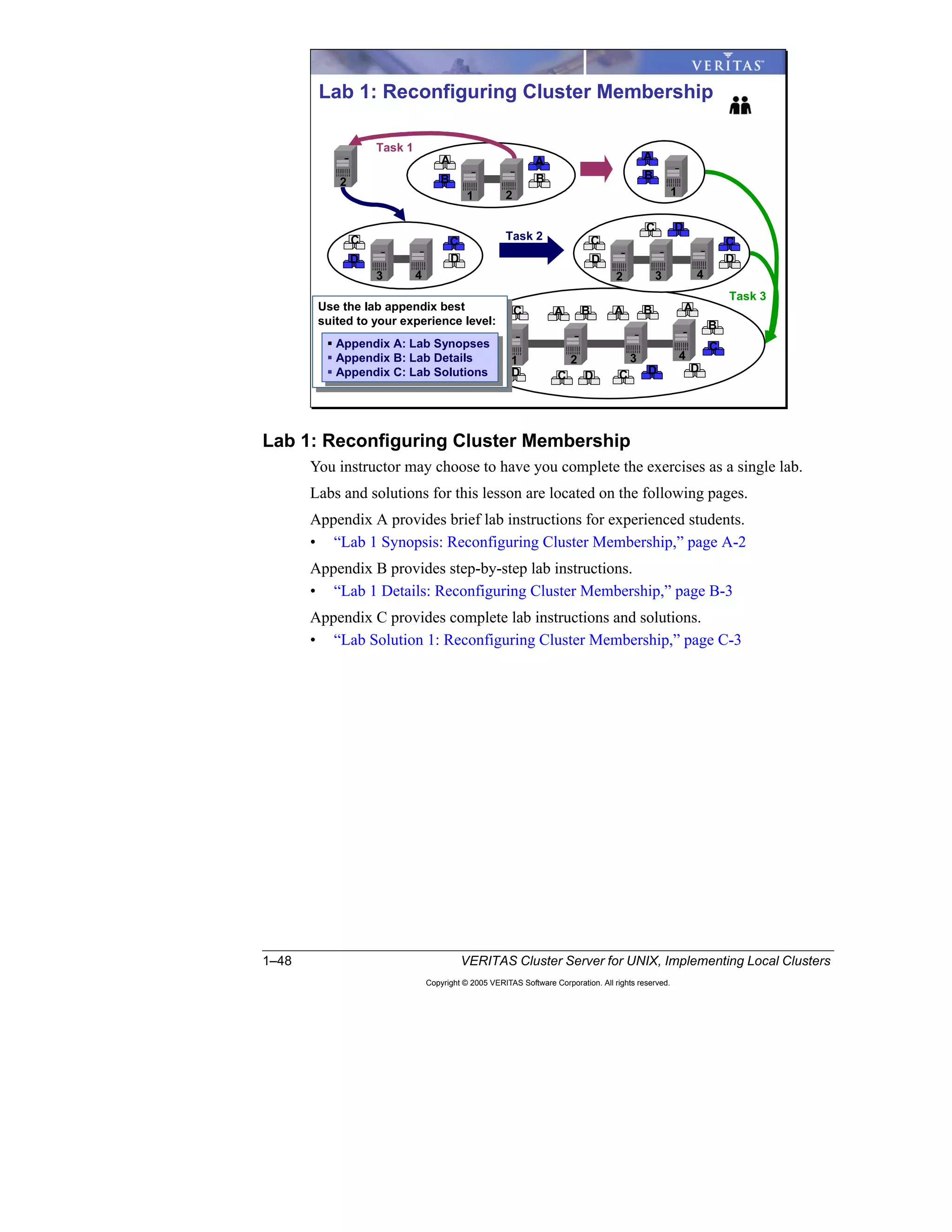
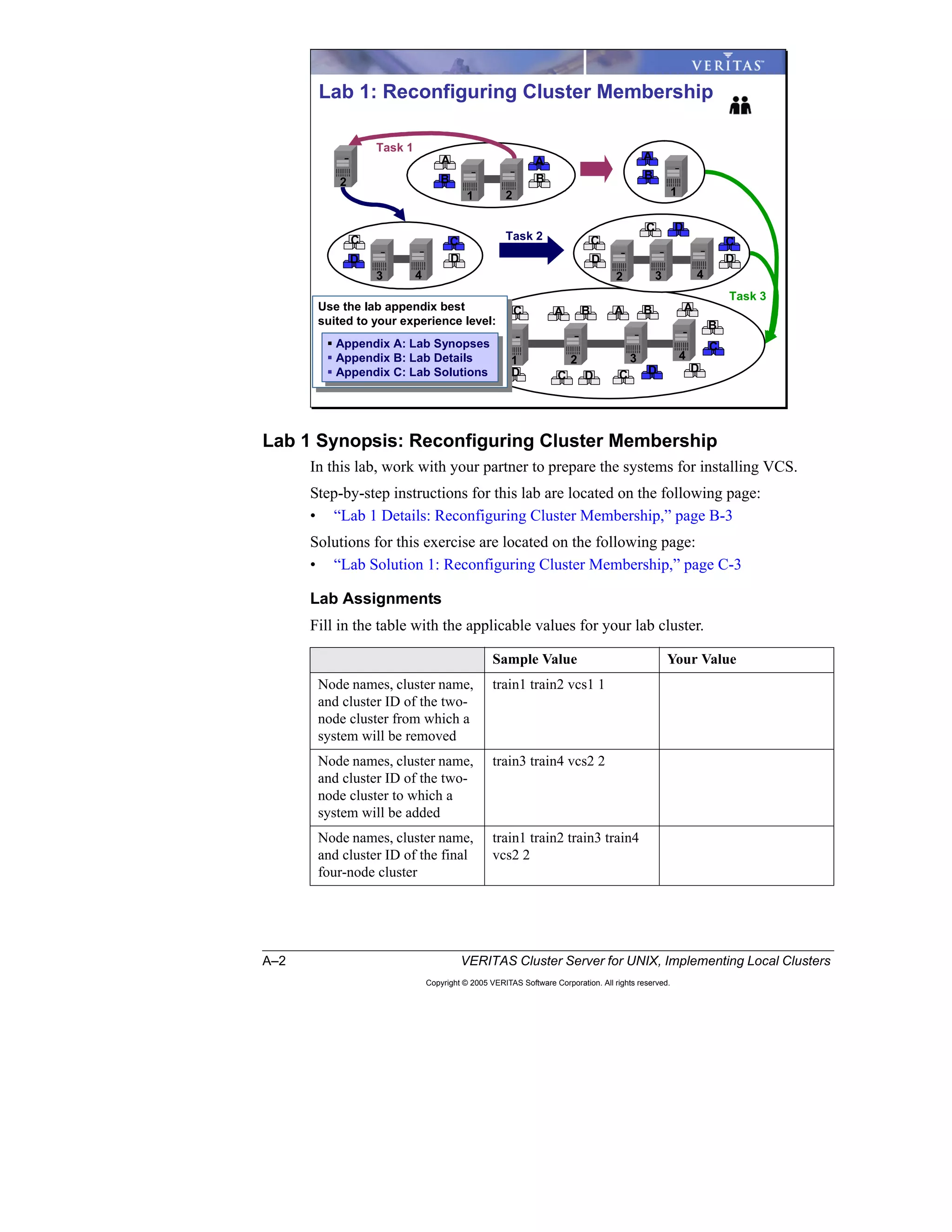
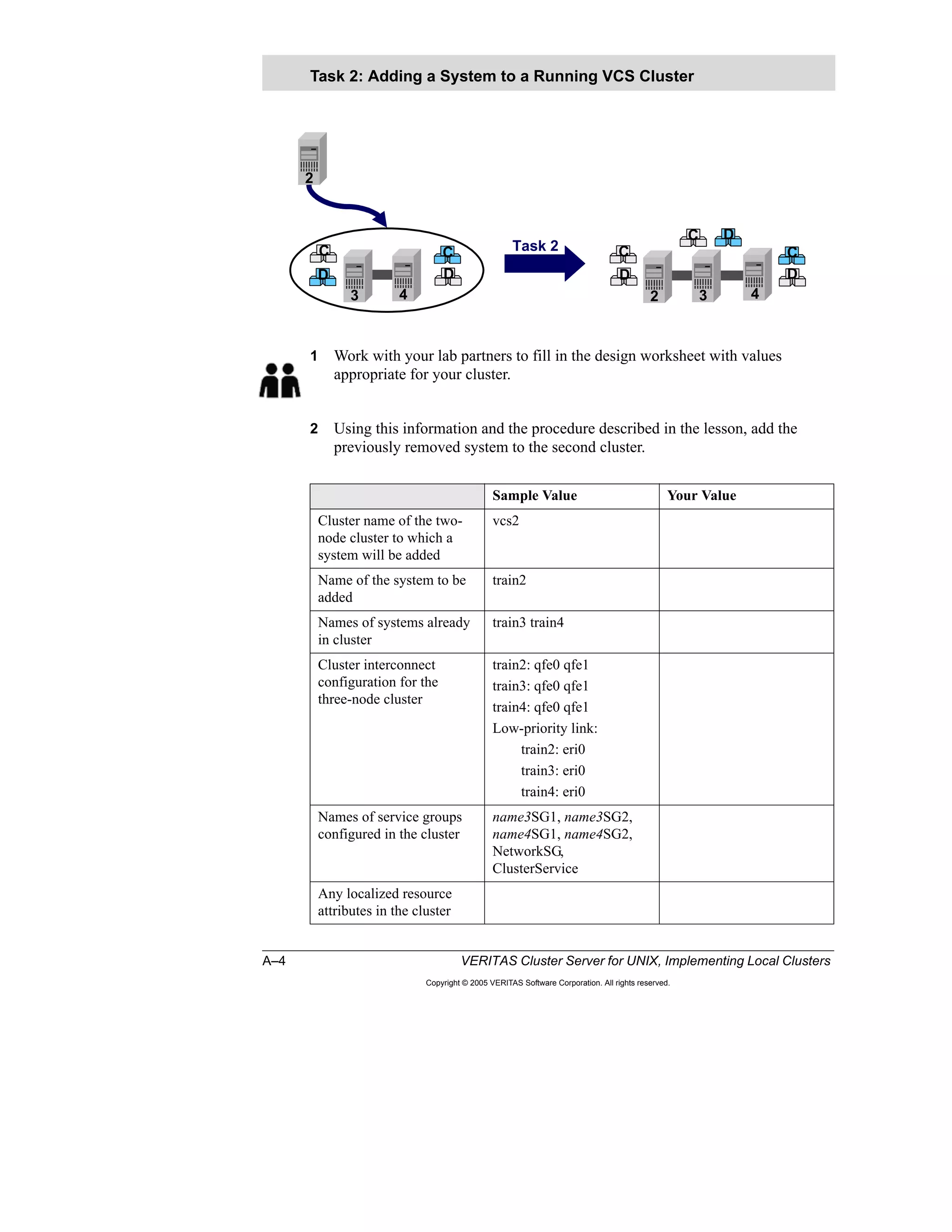
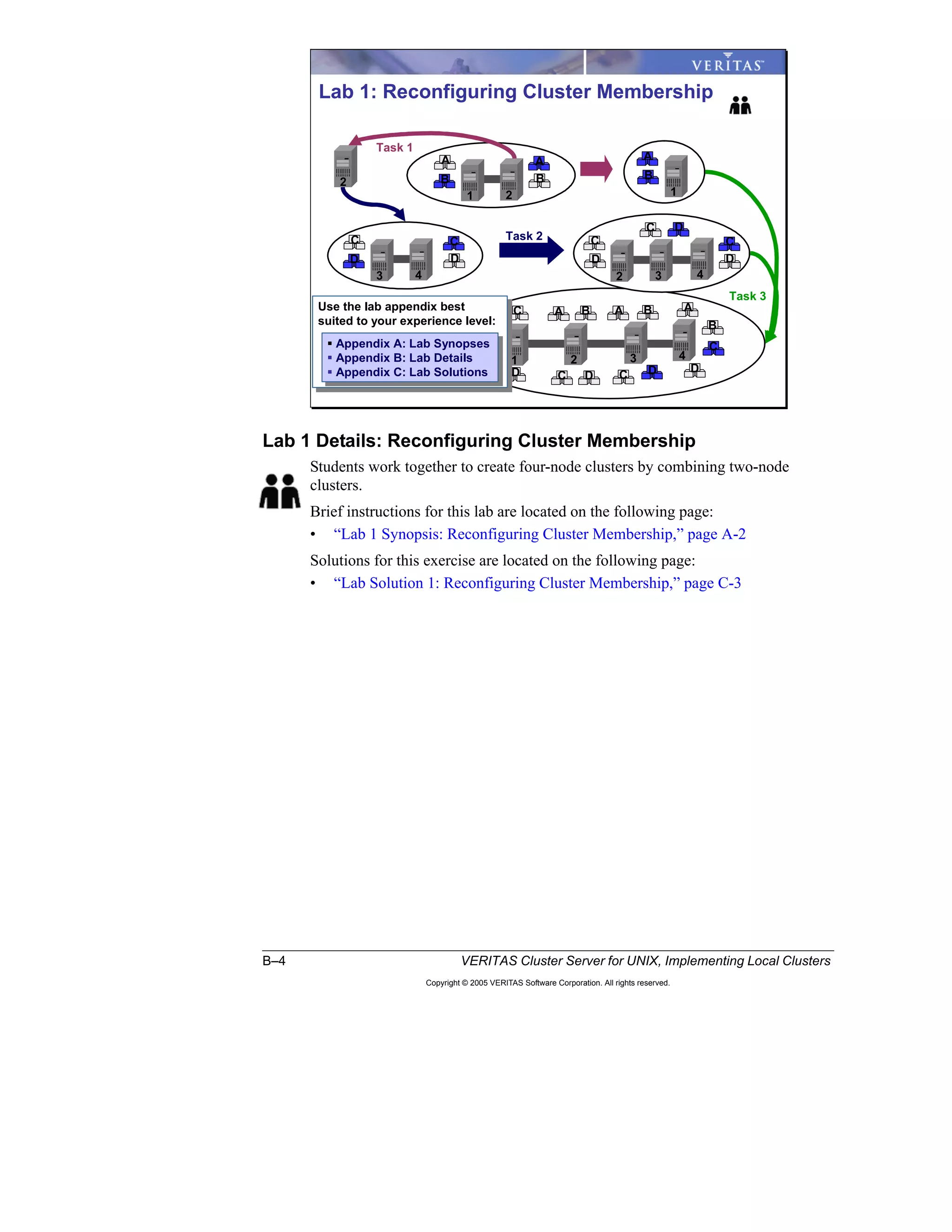
During this workshop, you will change two 2-node VCS clusters into a 4-node
VCS cluster with the same application services. The workshop is carried out in
three parts:
• Task 1: Removing a system from a running VCS cluster
• Task 2: Adding a new system to a running VCS cluster
• Task 3: Merging two running VCS clusters
Note: During this workshop students working on two clusters need to team up to
carry out the discussions and the lab exercises.
Each task has three parts:
1 Your instructor will first describe the objective and the assumptions related to
the task. Then you will be asked as a team to provide a procedure to
accomplish the task while maximizing application services availability. You
will then review the procedure in the class discussing the reasons behind each
step.
2 After you have identified the best procedure for the task, you will be asked as a
team to provide the VCS commands to carry out each step in the procedure.
This will again be followed up by a classroom discussion to identify the
possible solutions to the problem.
3 After the task is planned in detail, you carry out the task as a team on the lab
systems in the classroom.
You need to complete one task before proceeding to the next.
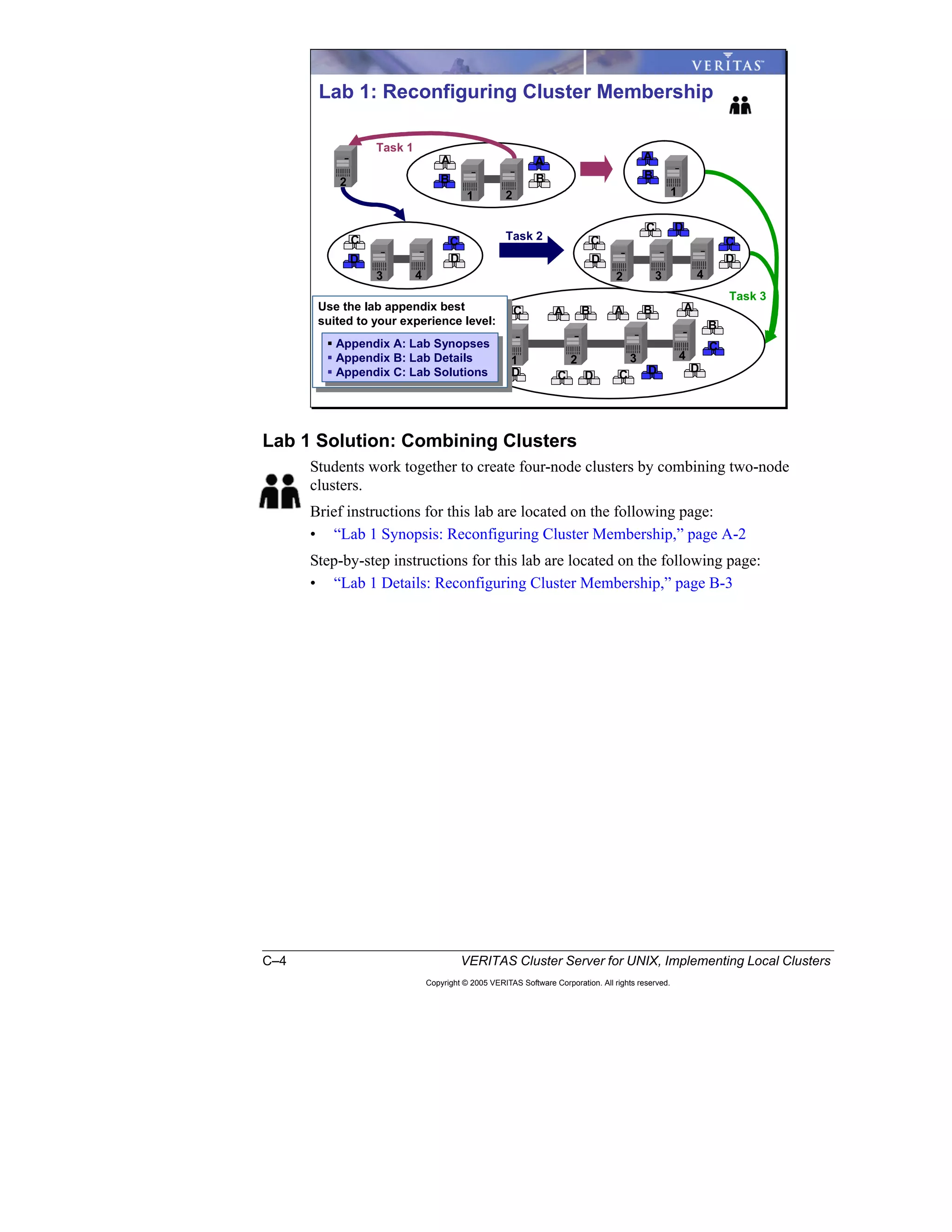
Reconfiguring Cluster Membership
B
A A
B B
A
D
C C
D
C
C D
C
D
B
B
C DD
1 2
3 4 3 4
4
2
2
2
1
1 3
DC
B
B
C
D
AA
Task 1
Task 2
Task 3
D
A
C A
Lesson 1 Workshop: Reconfiguring Cluster Membership 1–5
Copyright © 2005 VERITAS Software Corporation. All rights reserved.
1
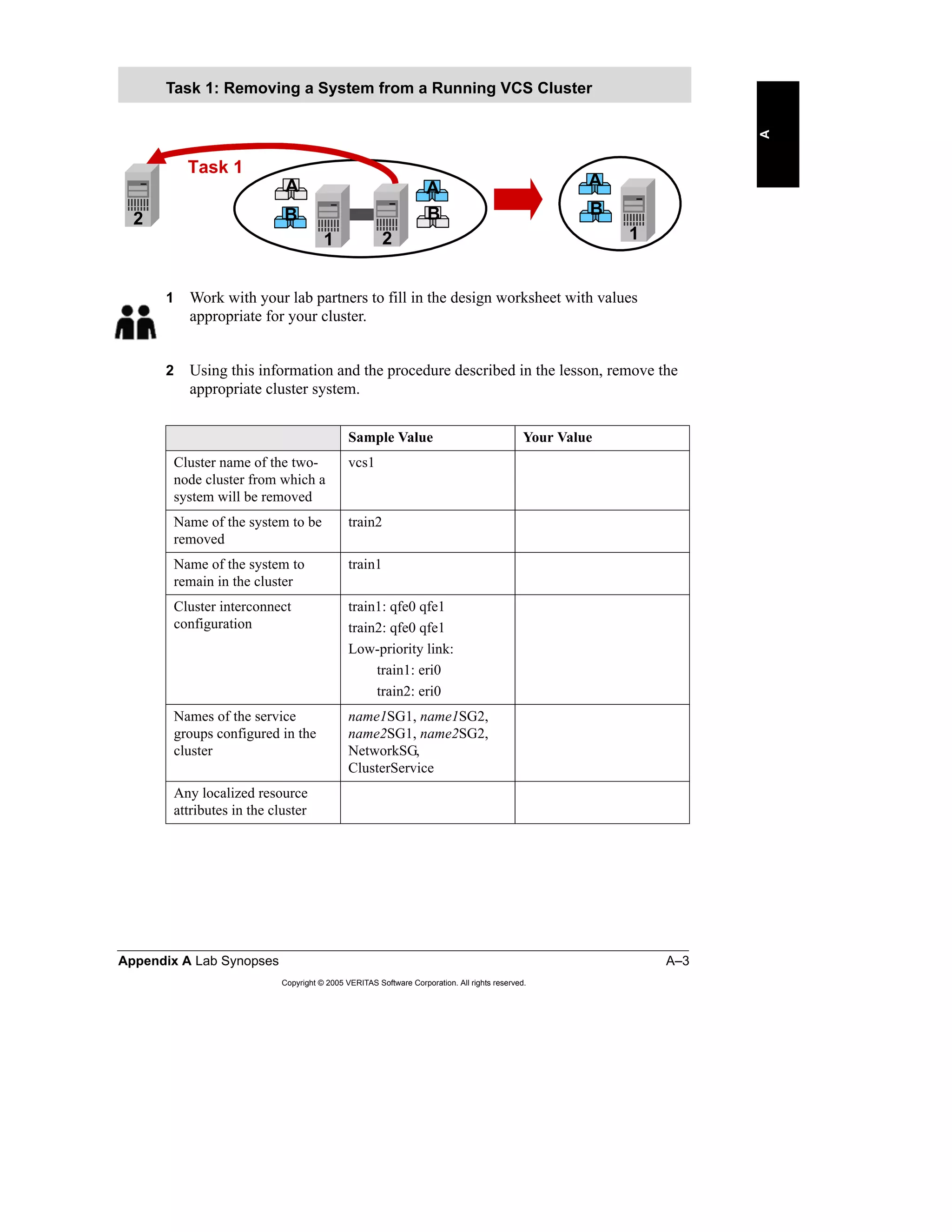
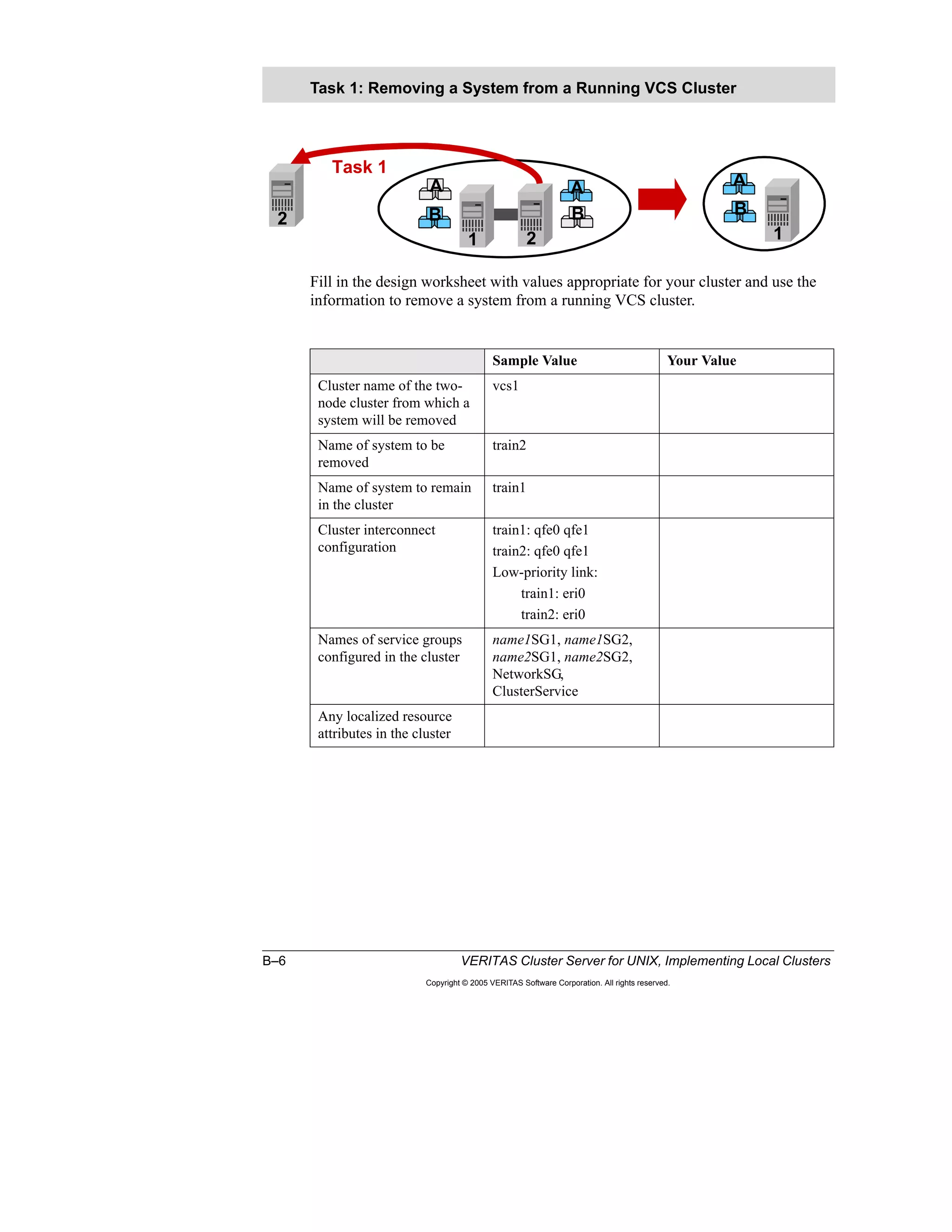
Task 1: Removing a System from a Running VCS Cluster
Objective
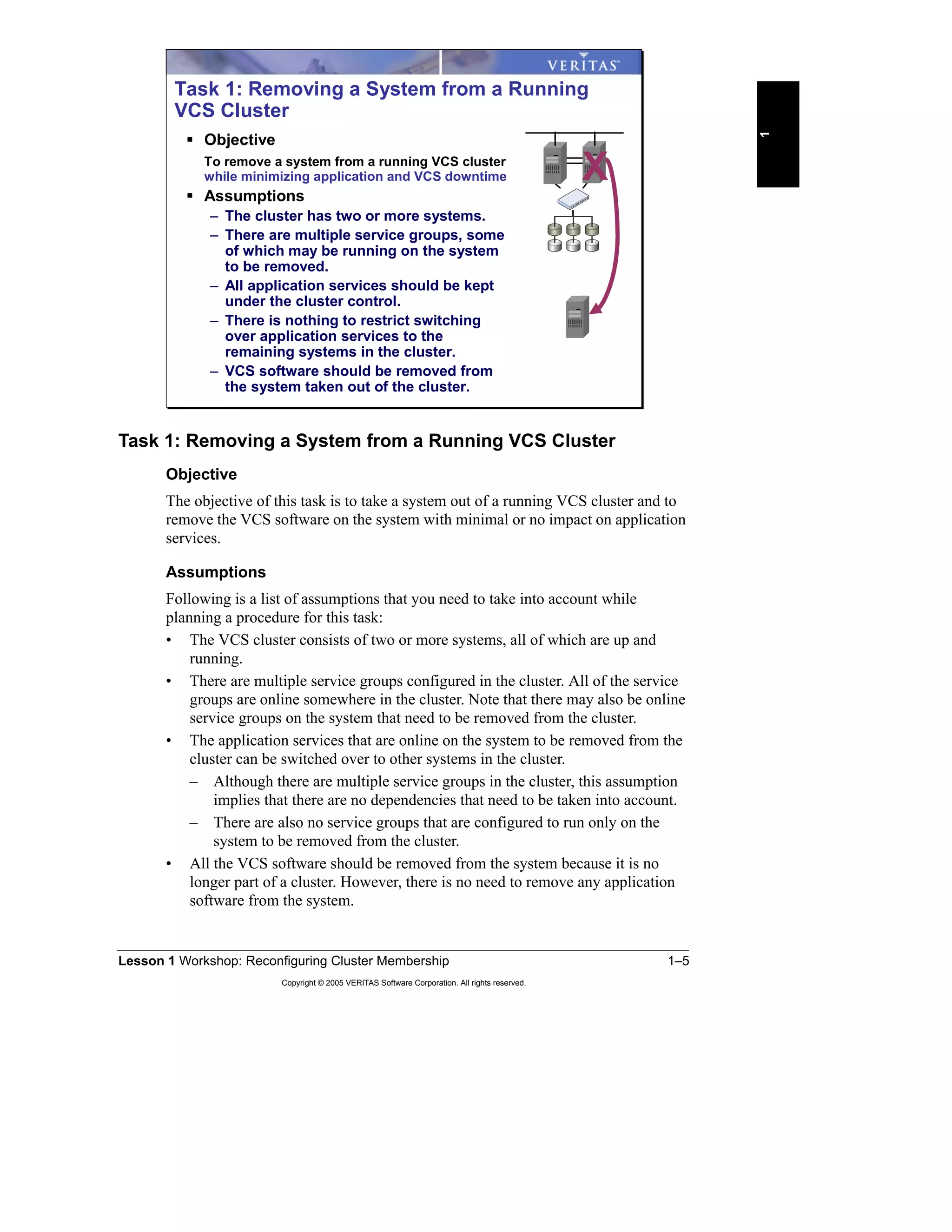
The objective of this task is to take a system out of a running VCS cluster and to
remove the VCS software on the system with minimal or no impact on application
services.
Assumptions
Following is a list of assumptions that you need to take into account while
planning a procedure for this task:
• The VCS cluster consists of two or more systems, all of which are up and
running.
• There are multiple service groups configured in the cluster. All of the service
groups are online somewhere in the cluster. Note that there may also be online
service groups on the system that need to be removed from the cluster.
• The application services that are online on the system to be removed from the
cluster can be switched over to other systems in the cluster.
– Although there are multiple service groups in the cluster, this assumption
implies that there are no dependencies that need to be taken into account.
– There are also no service groups that are configured to run only on the
system to be removed from the cluster.
• All the VCS software should be removed from the system because it is no
longer part of a cluster. However, there is no need to remove any application
software from the system.
Task 1: Removing a System from a Running
VCS Cluster
Objective
To remove a system from a running VCS cluster
while minimizing application and VCS downtime
Assumptions
– The cluster has two or more systems.
– There are multiple service groups, some
of which may be running on the system
to be removed.
– All application services should be kept
under the cluster control.
– There is nothing to restrict switching
over application services to the
remaining systems in the cluster.
– VCS software should be removed from
the system taken out of the cluster.
X
1–6 VERITAS Cluster Server for UNIX, Implementing Local Clusters
Copyright © 2005 VERITAS Software Corporation. All rights reserved.
Procedure for Removing a System from a Running VCS Cluster
Discuss with your class or team the steps required to carry out Task 1. For each
step, decide how the application services availability would be impacted. Note that
there may not be a single answer to this question. Therefore, state your reasons for
choosing a step in a specific order using the Notes area of your worksheet. Also, in
the Notes area, document any assumptions that you are making that have not been
explained as part of the task.
Use the worksheet on the following page to provide the steps required for Task 1.
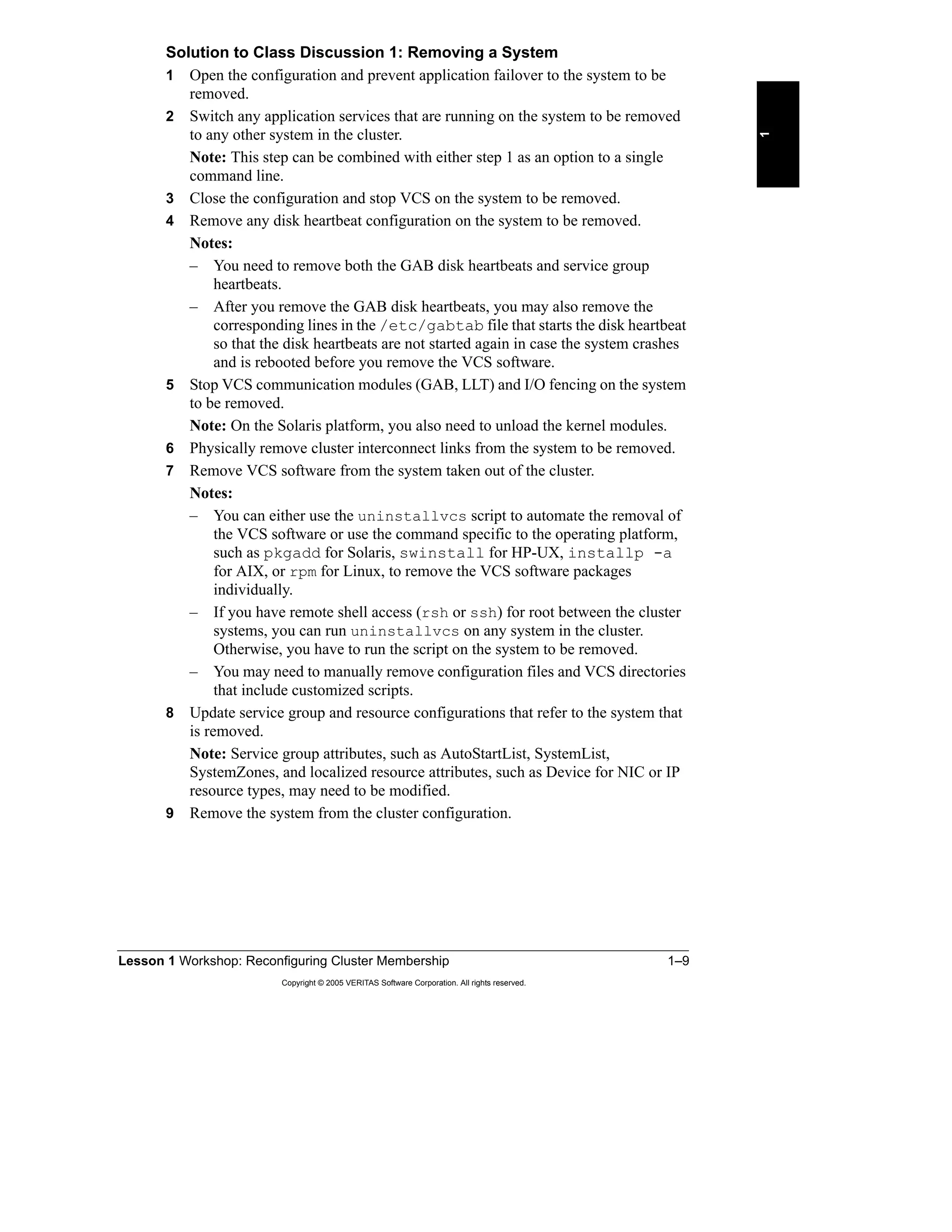
Classroom Discussion for Task 1
Your instructor either groups students into teams or
leads a class discussion for this task.
For team-based exercises:
Each group of four students, working on two clusters, forms a
team to discuss the steps required to carry out task 1 as outlined
on the previous slide.
After all the teams are ready with their proposed procedures,
have a classroom discussion to identify the best way of
removing a system from a running VCS cluster, providing the
reasons for each step.
Note: At this point, you do not need to provide
the commands to carry out each step.
Note: At this point, you do not need to provide
the commands to carry out each step.
X
Lesson 1 Workshop: Reconfiguring Cluster Membership 1–7
Copyright © 2005 VERITAS Software Corporation. All rights reserved.
1
Procedure for Task 1 proposed by your team or class:
Steps Description Impact on
application
availability
Notes
1–8 VERITAS Cluster Server for UNIX, Implementing Local Clusters
Copyright © 2005 VERITAS Software Corporation. All rights reserved.
Use the following worksheet to document the procedure agreed upon in the
classroom.
Final procedure for Task 1 agreed upon as a result of classroom discussions:
Steps Description Impact on
application
availability
Notes
Lesson 1 Workshop: Reconfiguring Cluster Membership 1–9
Copyright © 2005 VERITAS Software Corporation. All rights reserved.
1
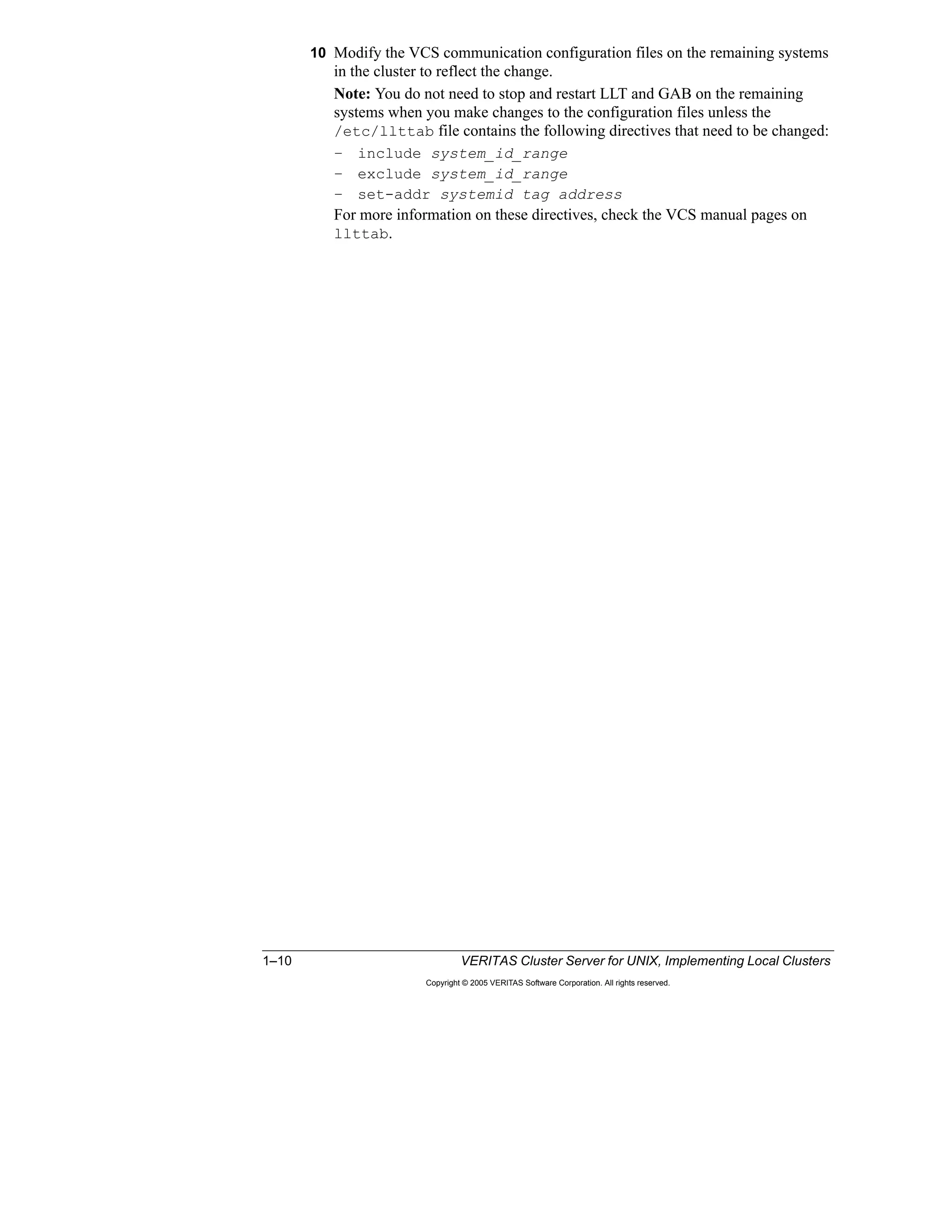
Solution to Class Discussion 1: Removing a System
1 Open the configuration and prevent application failover to the system to be
removed.
2 Switch any application services that are running on the system to be removed
to any other system in the cluster.
Note: This step can be combined with either step 1 as an option to a single
command line.
3 Close the configuration and stop VCS on the system to be removed.
4 Remove any disk heartbeat configuration on the system to be removed.
Notes:
– You need to remove both the GAB disk heartbeats and service group
heartbeats.
– After you remove the GAB disk heartbeats, you may also remove the
corresponding lines in the /etc/gabtab file that starts the disk heartbeat
so that the disk heartbeats are not started again in case the system crashes
and is rebooted before you remove the VCS software.
5 Stop VCS communication modules (GAB, LLT) and I/O fencing on the system
to be removed.
Note: On the Solaris platform, you also need to unload the kernel modules.
6 Physically remove cluster interconnect links from the system to be removed.
7 Remove VCS software from the system taken out of the cluster.
Notes:
– You can either use the uninstallvcs script to automate the removal of
the VCS software or use the command specific to the operating platform,
such as pkgadd for Solaris, swinstall for HP-UX, installp -a
for AIX, or rpm for Linux, to remove the VCS software packages
individually.
– If you have remote shell access (rsh or ssh) for root between the cluster
systems, you can run uninstallvcs on any system in the cluster.
Otherwise, you have to run the script on the system to be removed.
– You may need to manually remove configuration files and VCS directories
that include customized scripts.
8 Update service group and resource configurations that refer to the system that
is removed.
Note: Service group attributes, such as AutoStartList, SystemList,
SystemZones, and localized resource attributes, such as Device for NIC or IP
resource types, may need to be modified.
9 Remove the system from the cluster configuration.
1–10 VERITAS Cluster Server for UNIX, Implementing Local Clusters
Copyright © 2005 VERITAS Software Corporation. All rights reserved.
10 Modify the VCS communication configuration files on the remaining systems
in the cluster to reflect the change.
Note: You do not need to stop and restart LLT and GAB on the remaining
systems when you make changes to the configuration files unless the
/etc/llttab file contains the following directives that need to be changed:
– include system_id_range
– exclude system_id_range
– set-addr systemid tag address
For more information on these directives, check the VCS manual pages on
llttab.
Lesson 1 Workshop: Reconfiguring Cluster Membership 1–11
Copyright © 2005 VERITAS Software Corporation. All rights reserved.
1
Commands Required to Complete Task 1
After you have agreed on the steps required to accomplish Task 1, determine
which VCS commands are used to carry out each step in the procedure. You will
first work as a team to propose a solution, and then discuss each step in the
classroom. Note that there may be multiple methods to carry out each step.
You can use the Participant Guide, VCS manual pages, the VERITAS Cluster
Server User’s Guide, and the VERITAS Cluster Server Installation Guide as
sources of information. If there are topics that you do not feel comfortable with,
ask your instructor to discuss them in detail during the classroom discussion.
Use the worksheet on the following page to provide the commands required for
Task 1.
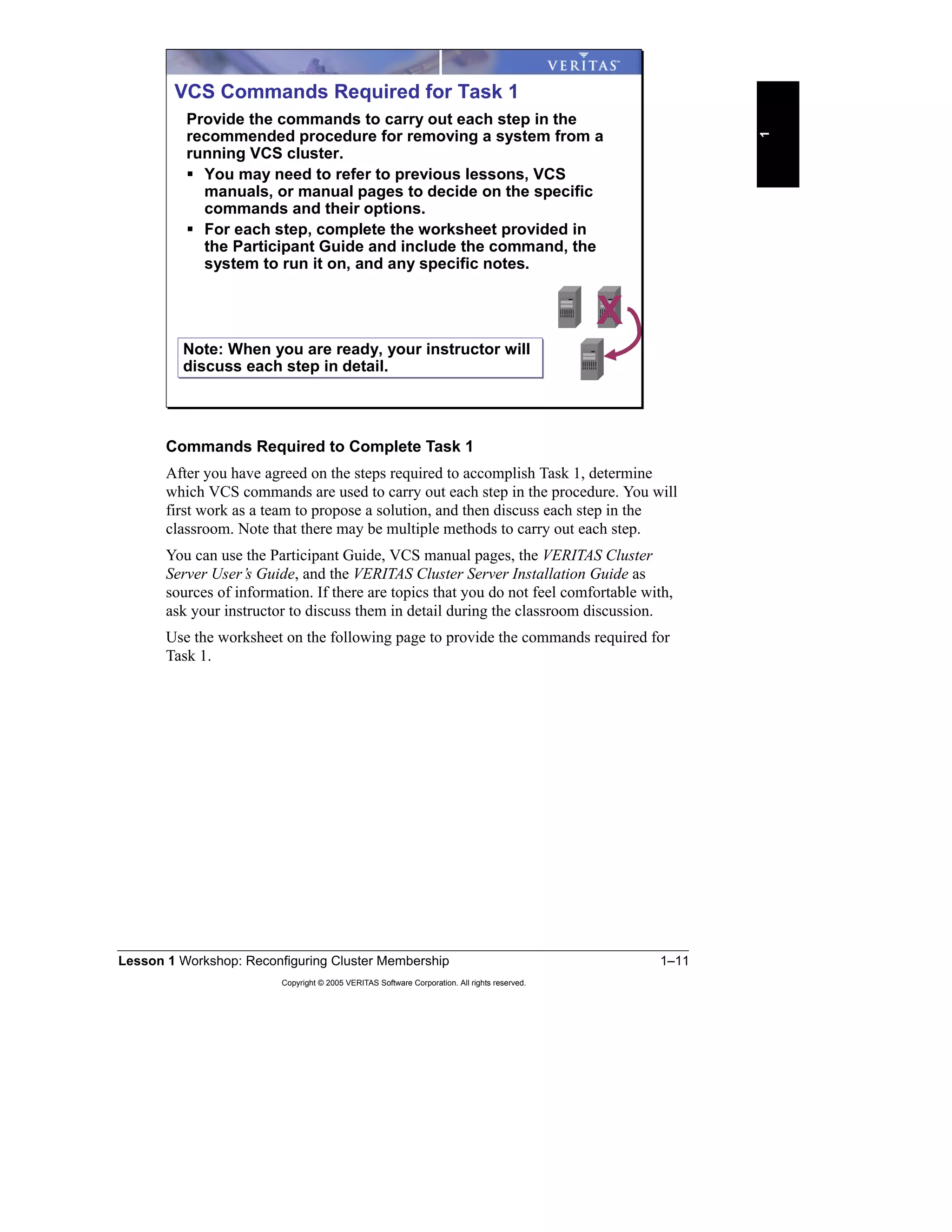
VCS Commands Required for Task 1
Provide the commands to carry out each step in the
recommended procedure for removing a system from a
running VCS cluster.
You may need to refer to previous lessons, VCS
manuals, or manual pages to decide on the specific
commands and their options.
For each step, complete the worksheet provided in
the Participant Guide and include the command, the
system to run it on, and any specific notes.
X
Note: When you are ready, your instructor will
discuss each step in detail.
Note: When you are ready, your instructor will
discuss each step in detail.
1–12 VERITAS Cluster Server for UNIX, Implementing Local Clusters
Copyright © 2005 VERITAS Software Corporation. All rights reserved.
Commands for Task 1 proposed by your team:
Order of
Execution
VCS Command to Use System on
which to
run the
command
Notes
Lesson 1 Workshop: Reconfiguring Cluster Membership 1–13
Copyright © 2005 VERITAS Software Corporation. All rights reserved.
1
Use the following worksheet to document any differences to your proposal.
Commands for Task 1 agreed upon in the classroom:
Order of
Execution
VCS Command to Use System on
which to
run the
command
Notes
1–14 VERITAS Cluster Server for UNIX, Implementing Local Clusters
Copyright © 2005 VERITAS Software Corporation. All rights reserved.
Solution to Class Discussion 1: Commands for Removing a System
1 Open the configuration and prevent application failover to the system to be
removed, persisting through VCS restarts.
haconf -makerw
hasys -freeze -persistent -evacuate train2
2 Switch any application services that are running on the system to be removed
to any other system in the cluster.
Note: You can combine this step with step 1 as an option to a single command
line.
This step has been combined with step 1.
3 Close the configuration and stop VCS on the system to be removed.
haconf -dump -makero
hastop -sys train2
Note: You can accomplish steps 1-3 using the following commands:
haconf -makerw
hasys -freeze train2
haconf -dump -makero
hastop -sys train2 -evacuate
4 Remove any disk heartbeat configuration on the system to be removed.
Notes:
– Remove both the GAB disk heartbeats and service group heartbeats.
– After you remove the GAB disk heartbeats, also remove the corresponding
lines in the /etc/gabtab file that starts the disk heartbeat so that the disk
heartbeats are not started again in case the system crashes and is rebooted
before you remove the VCS software.
gabdiskhb -l
gabdiskhb –d devicename -s start
gabdiskx -l
gabdiskx -d devicename -s start
Also, remove the lines starting with gabdiskhb -a in the /etc/gabtab
file.
Lesson 1 Workshop: Reconfiguring Cluster Membership 1–15
Copyright © 2005 VERITAS Software Corporation. All rights reserved.
1
5 Stop VCS communication modules (GAB, LLT) and fencing on the system to
be removed.
Note: On the Solaris platform, unload the kernel modules.
On the system to be removed, train2 in this example:
/etc/init.d/vxfen stop (if fencing is configured)
gabconfig -U
lltconfig -U
Solaris Only
modinfo | grep gab
modunload -i gab_id
modinfo | grep llt
modunload -i llt_id
modunload | grep vxfen
modinfo -i fen_ID
6 Physically remove cluster interconnect links from the system to be removed.
7 Remove VCS software from the system taken out of the cluster. For purposes
of this lab, you do not need to remove the software because this system is put
back in the cluster later.
Notes:
– You can either use the uninstallvcs script to automate the removal of
the VCS software or use the command specific to the operating platform,
such as pkgadd for Solaris, swinstall for HP-UX, installp -a
for AIX, or rpm for Linux, to remove the VCS software packages
individually.
– If you have remote shell access (rsh or ssh) for root between the cluster
systems, you can run uninstallvcs on any system in the cluster.
Otherwise, you have to run the script on the system to be removed.
– You may need to manually remove configuration files and VCS directories
that include customized scripts.
WARNING: When using the uninstallvcs script, you are prompted to
remove software from all cluster systems. Do not accept the default of Y or
you will inadvertently remove VCS from all cluster systems.
cd /opt/VRTSvcs/install
./uninstallvcs
1–16 VERITAS Cluster Server for UNIX, Implementing Local Clusters
Copyright © 2005 VERITAS Software Corporation. All rights reserved.
After the script completes, remove any remaining files related to VCS on
train2:
rm /etc/vxfendg
rm /etc/vxfentab
rm /etc/llttab
rm /etc/llthosts
rm /etc/gabtab
rm -r /opt/VRTSvcs
rm -r /etc/VRTSvcs
...
8 Update service group and resource configurations that refer to the system that
is removed.
Note: Service group attributes, such as AutoStartList, SystemList,
SystemZones, and localized resource attributes, such as Device for NIC or IP
resource types, may need to be modified.
On the system remaining in the cluster, train1 in this example:
haconf -makerw
For all service groups that have train2 in their AutoStartList or
SystemList:
hagrp -modify groupname AutoStartList –delete train2
hagrp -modify groupname SystemList –delete train2
9 Remove the system from the cluster configuration.
hasys -delete train2
When you have completed the modifications:
haconf -dump -makero
10 Modify the VCS communication configuration files on the remaining systems
in the cluster to reflect the change.
– Edit /etc/llthosts on all the systems remaining in the cluster (train1
in this example) to remove the line corresponding to the removed system
(train2 in this example).
– Edit /etc/gabtab on all the systems remaining in the cluster (train1 in
this example) to reduce the –n option to gabconfig by 1.
Lesson 1 Workshop: Reconfiguring Cluster Membership 1–17
Copyright © 2005 VERITAS Software Corporation. All rights reserved.
1
Note: You do not need to stop and restart LLT and GAB on the remaining
systems when you make changes to the configuration files unless the
/etc/llttab file contains the following directives that need to be changed:
– include system_id_range
– exclude system_id_range
– set-addr systemid tag address
For more information on these directives, check the VCS manual pages on
llttab.
1–18 VERITAS Cluster Server for UNIX, Implementing Local Clusters
Copyright © 2005 VERITAS Software Corporation. All rights reserved.
Lab Exercise: Task 1—Removing a System from a Running Cluster
Complete this exercise now, or at the end of the lesson, as directed by your
instructor. One person from each team carries out the commands discussed in the
classroom to accomplish Task 1.
For detailed lab steps and solutions for the classroom lab environment, see the
following sections of Appendix A, B or C.
“Task 1: Removing a System from a Running VCS Cluster,” page A-3
“Task 1: Removing a System from a Running VCS Cluster,” page B-6
“Task 1: Removing a System from a Running VCS Cluster,” page C-6
At the end of this lab exercise, you should end up with:
• One system without any VCS software on it
Note: For purposes of the lab exercises, do not remove the VCS software.
• A one-node cluster that is up and running with three service groups online
• A two-node cluster that is up and running with three service groups online
This cluster should not be affected while performing Task 1 on the other
cluster.
Lab Exercise: Task 1—Removing a System
from a Running Cluster
Complete this exercise now or at the end of the
lesson, as directed by your instructor.
One person from each team executes the
commands discussed in the classroom to
accomplish Task 1.
See Appendix A, B, or C for detailed steps and
classroom-specific information.
XUse the lab appendix best
suited to your experience level:
Use the lab appendix best
suited to your experience level:
Appendix A: Lab Synopses
Appendix B: Lab Details
Appendix C: Lab Solutions
Appendix A: Lab Synopses
Appendix B: Lab Details
Appendix C: Lab Solutions
Lesson 1 Workshop: Reconfiguring Cluster Membership 1–19
Copyright © 2005 VERITAS Software Corporation. All rights reserved.
1
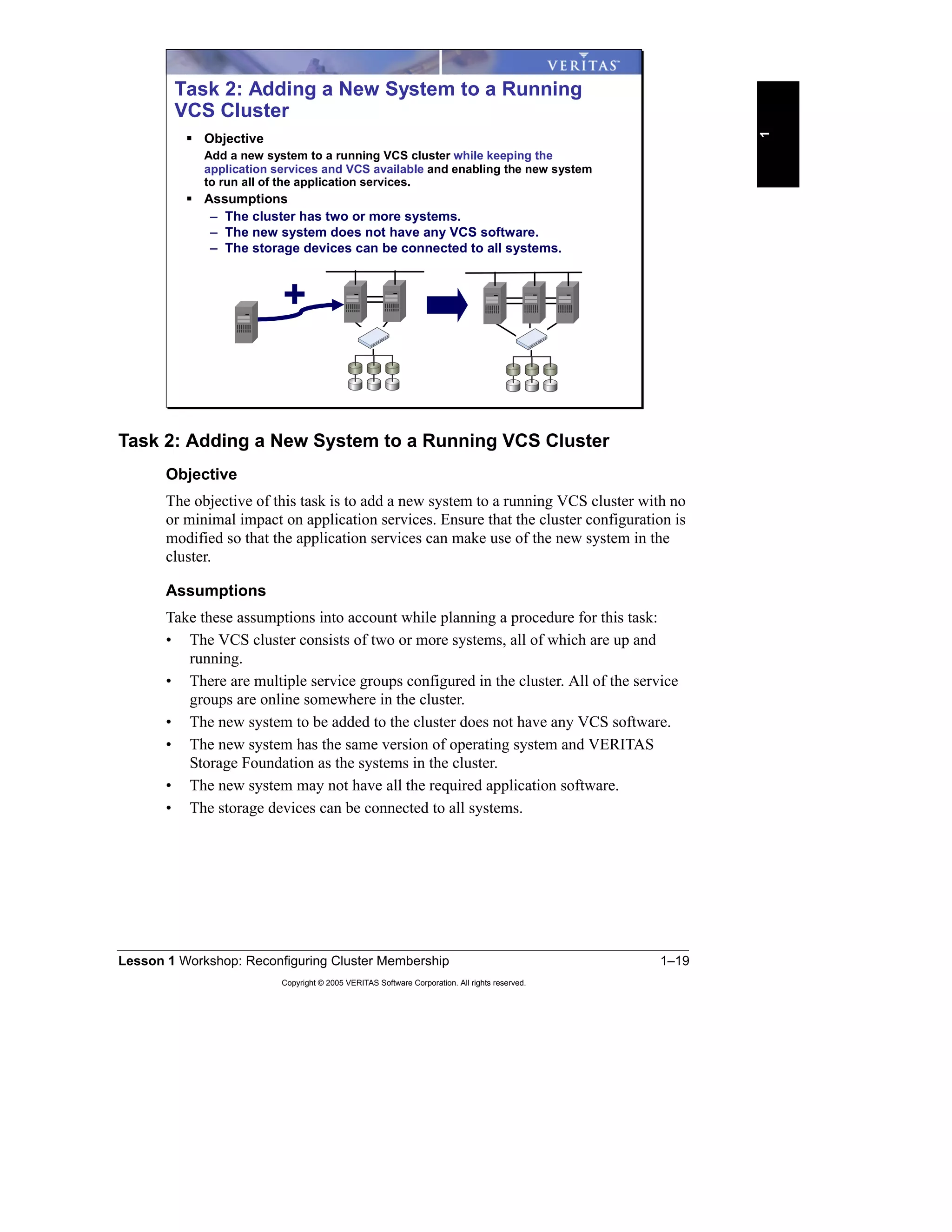
Task 2: Adding a New System to a Running VCS Cluster
Objective
The objective of this task is to add a new system to a running VCS cluster with no
or minimal impact on application services. Ensure that the cluster configuration is
modified so that the application services can make use of the new system in the
cluster.
Assumptions
Take these assumptions into account while planning a procedure for this task:
• The VCS cluster consists of two or more systems, all of which are up and
running.
• There are multiple service groups configured in the cluster. All of the service
groups are online somewhere in the cluster.
• The new system to be added to the cluster does not have any VCS software.
• The new system has the same version of operating system and VERITAS
Storage Foundation as the systems in the cluster.
• The new system may not have all the required application software.
• The storage devices can be connected to all systems.
Task 2: Adding a New System to a Running
VCS Cluster
Objective
Add a new system to a running VCS cluster while keeping the
application services and VCS available and enabling the new system
to run all of the application services.
Assumptions
– The cluster has two or more systems.
– The new system does not have any VCS software.
– The storage devices can be connected to all systems.
+
1–20 VERITAS Cluster Server for UNIX, Implementing Local Clusters
Copyright © 2005 VERITAS Software Corporation. All rights reserved.
Procedure to Add a New System to a Running VCS Cluster
Discuss with your team or class the steps required to carry out Task 2. For each
step, decide how the application services availability would be impacted. Note that
there may not be a single answer to this question. Therefore, state your reasons for
choosing a step in a specific order using the Notes area of your worksheet. Also, in
the Notes area, document any assumptions that you are making that have not been
explained as part of the task.
Use the worksheet on the following page to provide the steps required for Task 2.
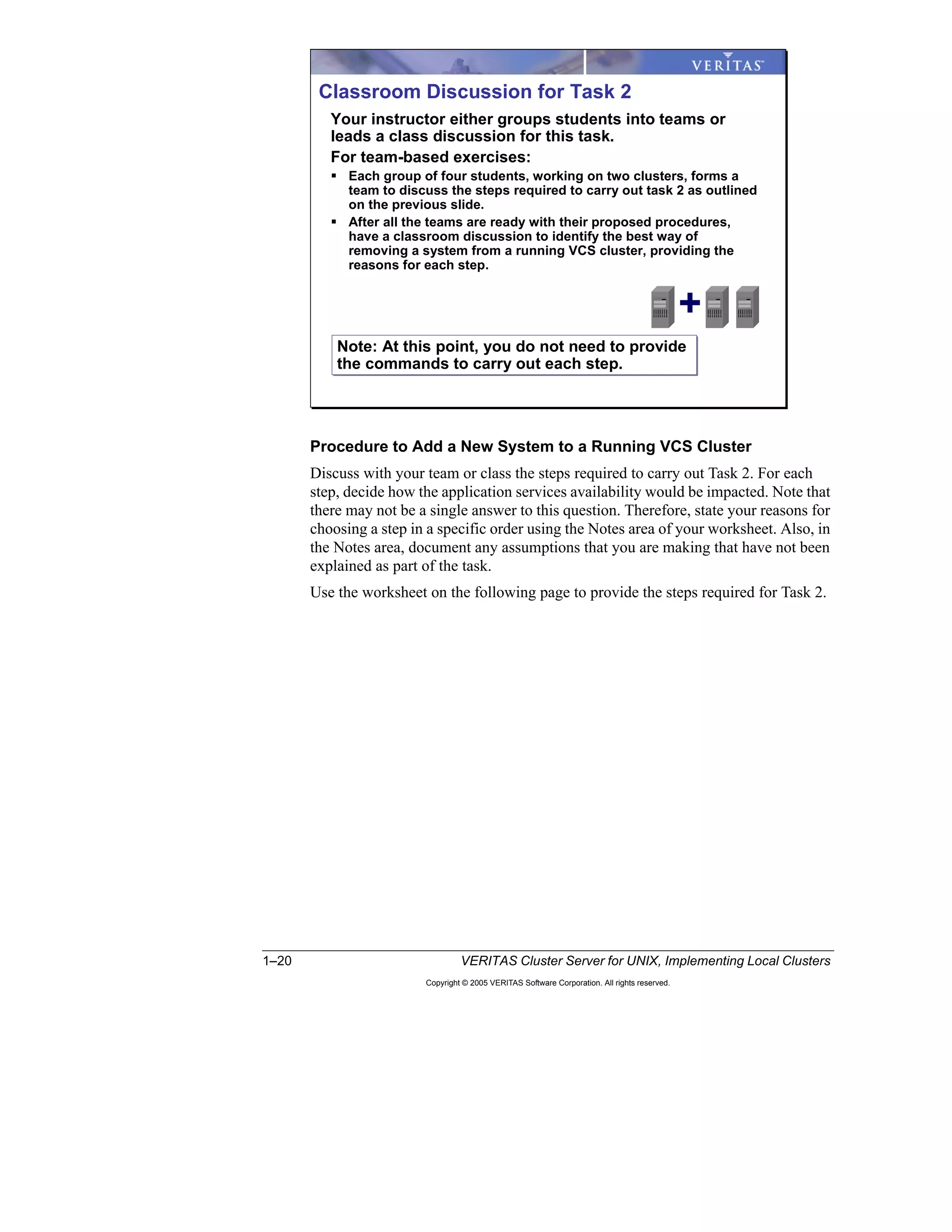
Classroom Discussion for Task 2
Your instructor either groups students into teams or
leads a class discussion for this task.
For team-based exercises:
Each group of four students, working on two clusters, forms a
team to discuss the steps required to carry out task 2 as outlined
on the previous slide.
After all the teams are ready with their proposed procedures,
have a classroom discussion to identify the best way of
removing a system from a running VCS cluster, providing the
reasons for each step.
Note: At this point, you do not need to provide
the commands to carry out each step.
Note: At this point, you do not need to provide
the commands to carry out each step.
+
Lesson 1 Workshop: Reconfiguring Cluster Membership 1–21
Copyright © 2005 VERITAS Software Corporation. All rights reserved.
1
Procedure for Task 2 proposed by your team:
Steps Description Impact on
application
availability
Notes
1–22 VERITAS Cluster Server for UNIX, Implementing Local Clusters
Copyright © 2005 VERITAS Software Corporation. All rights reserved.
Use the following worksheet to document the procedure agreed upon by the class.
Final procedure for Task 2 agreed upon as a result of classroom discussions:
Steps Description Impact on
application
availability
Notes
Lesson 1 Workshop: Reconfiguring Cluster Membership 1–23
Copyright © 2005 VERITAS Software Corporation. All rights reserved.
1
Solution to Class Discussion 2: Adding a System
1 Install any necessary application software on the new system.
2 Configure any application resources necessary to support clustered
applications on the new system.
Note: The new system should be capable of running the application services in
the cluster it is about to join. Preparing application resources may include:
– Creating user accounts
– Copying application configuration files
– Creating mount points
– Verifying shared storage access
– Checking NFS major and minor numbers
3 Physically cable cluster interconnect links.
Note: If the original cluster is a two-node cluster with crossover cables for the
cluster interconnect, change to hubs or switches before you can add another
node. Ensure that the cluster interconnect is not completely disconnected while
you are carrying out the changes.
4 Install VCS.
Notes:
– You can either use the installvcs script with the -installonly
option to automate the installation of the VCS software or use the
command specific to the operating platform, such as pkgadd for Solaris,
swinstall for HP-UX, installp -a for AIX, or rpm for Linux, to
install the VCS software packages individually.
– If you are installing packages manually:
› Follow the package dependencies. For the correct order, refer to the
VERITAS Cluster Server Installation Guide.
› After the packages are installed, license VCS on the new system using
the /opt/VRTSvcs/install/licensevcs command.
a Start the installation.
b Specify the name of the new system to the script (train2 in this example).
c After the script has completed, create the communication configuration
files on the new system.
5 Configure VCS communication modules (GAB, LLT) on the new system.
6 Configure fencing on the new system, if used in the cluster.
1–24 VERITAS Cluster Server for UNIX, Implementing Local Clusters
Copyright © 2005 VERITAS Software Corporation. All rights reserved.
7 Update VCS communication configuration (GAB, LLT) on the existing
systems.
Note: You do not need to stop and restart LLT and GAB on the existing
systems in the cluster when you make changes to the configuration files unless
the /etc/llttab file contains the following directives that need to be
changed:
– include system_id_range
– exclude system_id_range
– set-addr systemid tag address
For more information on these directives, check the VCS manual pages on
llttab.
8 Install any VCS Enterprise agents required on the new system.
9 Copy any triggers, custom agents, scripts, and so on from existing cluster
systems to the new cluster system.
10 Start cluster services on the new system and verify cluster membership.
11 Update service group and resource configuration to use the new system.
Note: Service group attributes, such as SystemList, AutoStartList,
SystemZones, and localized resource attributes, such as Device for NIC or IP
resource types, may need to be modified.
12 Verify updates to the configuration by switching the application services to the
new system.
Lesson 1 Workshop: Reconfiguring Cluster Membership 1–25
Copyright © 2005 VERITAS Software Corporation. All rights reserved.
1
Commands Required to Complete Task 2
After you have agreed on the steps required to accomplish Task 2, you need to
determine which VCS commands are required to perform each step in the
procedure. You will first work as a team to propose a solution, and then discuss
each step in the classroom. Note that there may be multiple methods to carry out
each step.
You can use the participants guide, VCS manual pages, the VERITAS Cluster
Server User’s Guide, and the VERITAS Cluster Server Installation Guide as
sources of information. If there are topics that you do not understand well, ask
your instructor to discuss them in detail during the classroom discussion.
Use the worksheet on the following page to provide the commands required for
Task 2.
VCS Commands Required for Task 2
Provide the commands to perform each step in the
recommended procedure for adding a system to a
running VCS cluster.
You may need to refer to previous lessons, VCS
manuals, or manual pages to decide on the specific
commands and their options.
For each step, complete the worksheet provided in
the participants guide by providing the command, the
system to run it on, and any specific notes.
+
Note: When you are ready, your instructor will
discuss each step in detail.
Note: When you are ready, your instructor will
discuss each step in detail.
1–26 VERITAS Cluster Server for UNIX, Implementing Local Clusters
Copyright © 2005 VERITAS Software Corporation. All rights reserved.
Commands for Task 2 proposed by your team:
Order of
Execution
VCS Command to Use System on
which to
run the
command
Notes
Lesson 1 Workshop: Reconfiguring Cluster Membership 1–27
Copyright © 2005 VERITAS Software Corporation. All rights reserved.
1
Use the following worksheet to document any differences to your proposal.
Commands for Task 2 agreed upon in the classroom:
Order of
Execution
VCS Command to Use System on
which to
run the
command
Notes
1–28 VERITAS Cluster Server for UNIX, Implementing Local Clusters
Copyright © 2005 VERITAS Software Corporation. All rights reserved.
Solution to Class Discussion 2: Commands for Adding a System
1 Install any necessary application software on the new system.
2 Configure any application resources necessary to support clustered
applications on the new system.
Note: The new system should be capable of running the application services in
the cluster it is about to join. Preparing application resources may include:
– Creating user accounts
– Copying application configuration files
– Creating mount points
– Verifying shared storage access
– Checking NFS major and minor numbers
3 Physically cable cluster interconnect links.
Note: If the original cluster is a two-node cluster with crossover cables for the
cluster interconnect, change to hubs or switches before you can add another
node. Ensure that the cluster interconnect is not completely disconnected while
you are carrying out the changes.
4 Install VCS and configure VCS communication modules (GAB, LLT) on the
new system. If you skipped the removal step in the previous section, you do
not need to install VCS on this system.
Notes:
– You can either use the installvcs script with the -installonly
option to automate the installation of the VCS software or use the
command specific to the operating platform, such as pkgadd for Solaris,
swinstall for HP-UX, installp -a for AIX, or rpm for Linux, to
install the VCS software packages individually.
– If you are installing packages manually:
› Follow the package dependencies. For the correct order, refer to the
VERITAS Cluster Server Installation Guide.
› After the packages are installed, license VCS on the new system using
the /opt/VRTSvcs/install/licensevcs command.
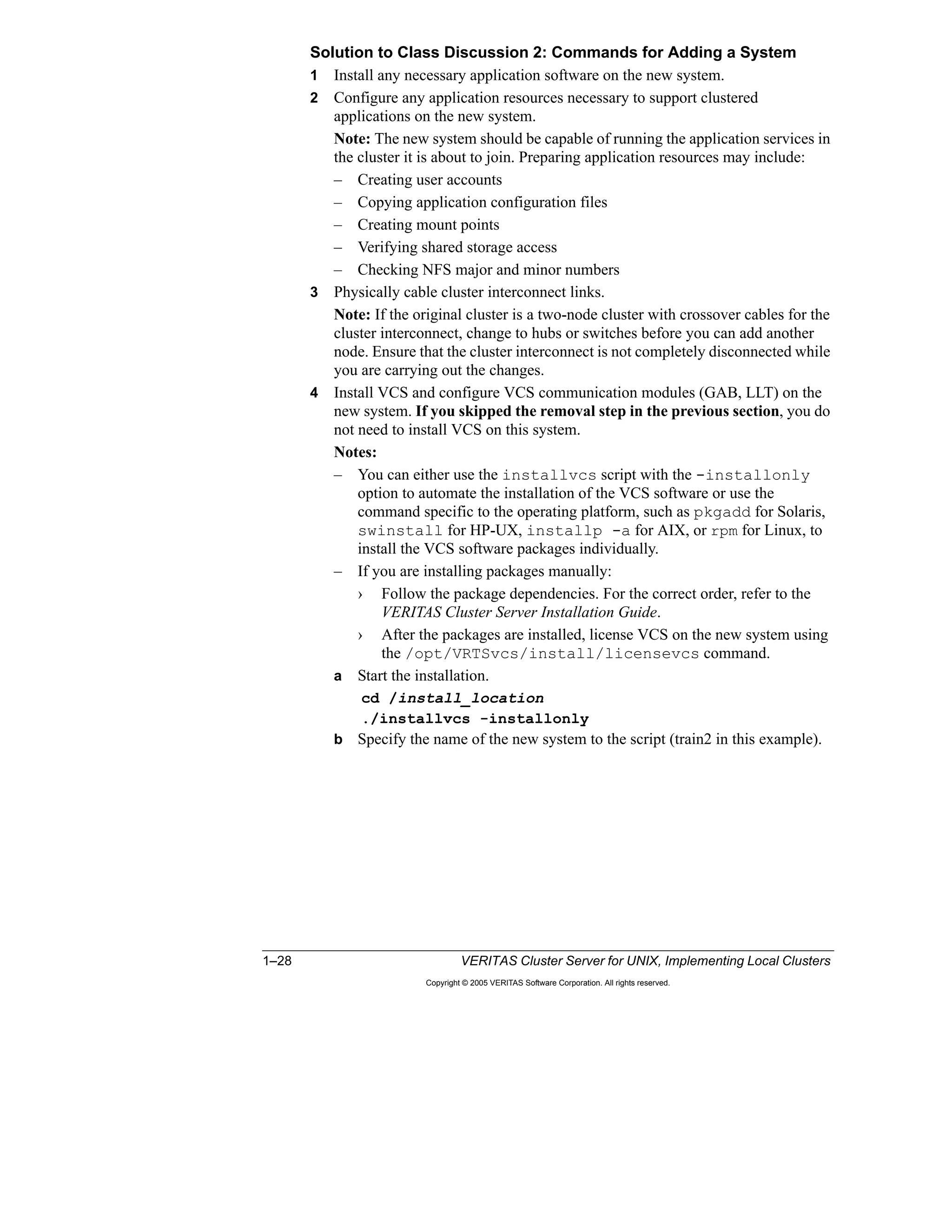
a Start the installation.
cd /install_location
./installvcs -installonly
b Specify the name of the new system to the script (train2 in this example).
Lesson 1 Workshop: Reconfiguring Cluster Membership 1–29
Copyright © 2005 VERITAS Software Corporation. All rights reserved.
1
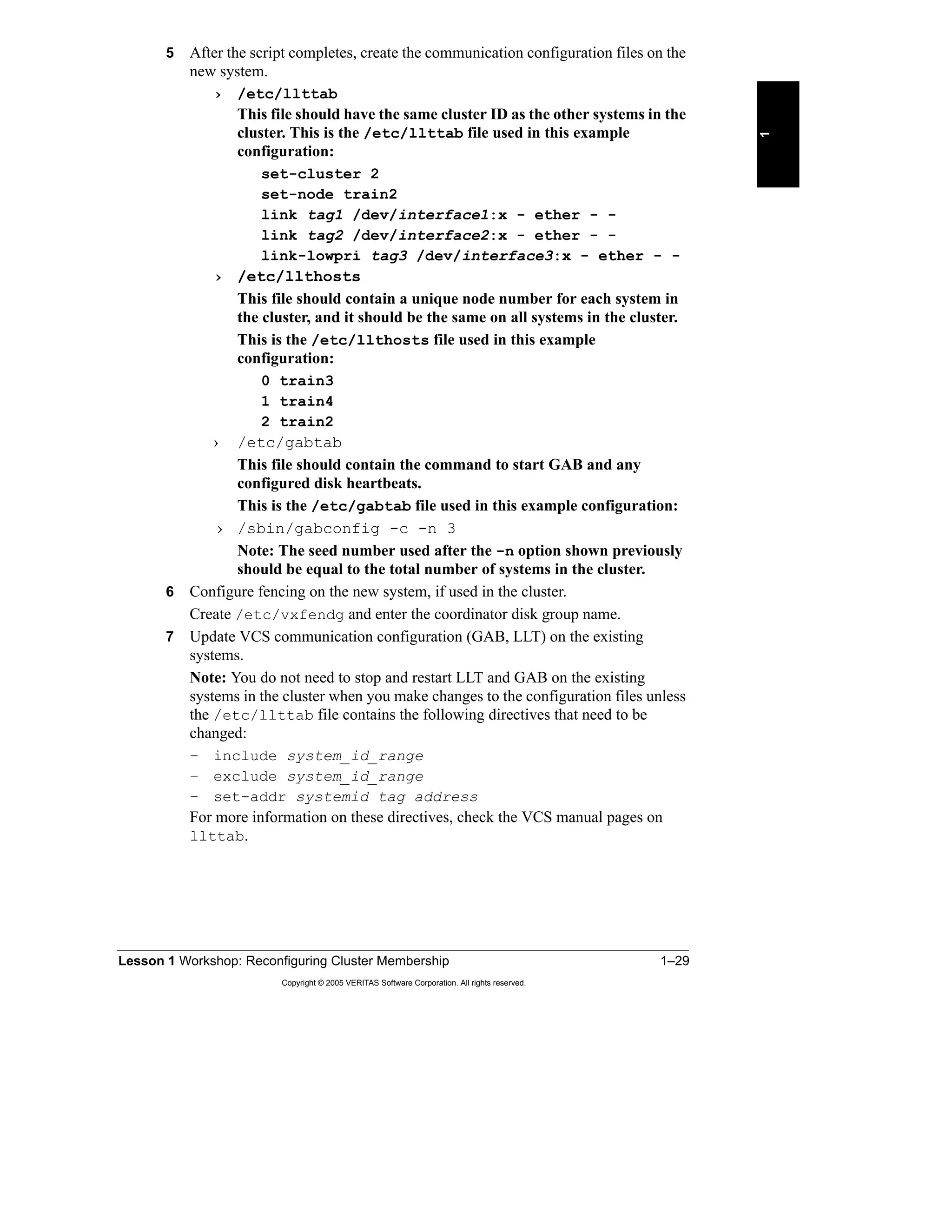
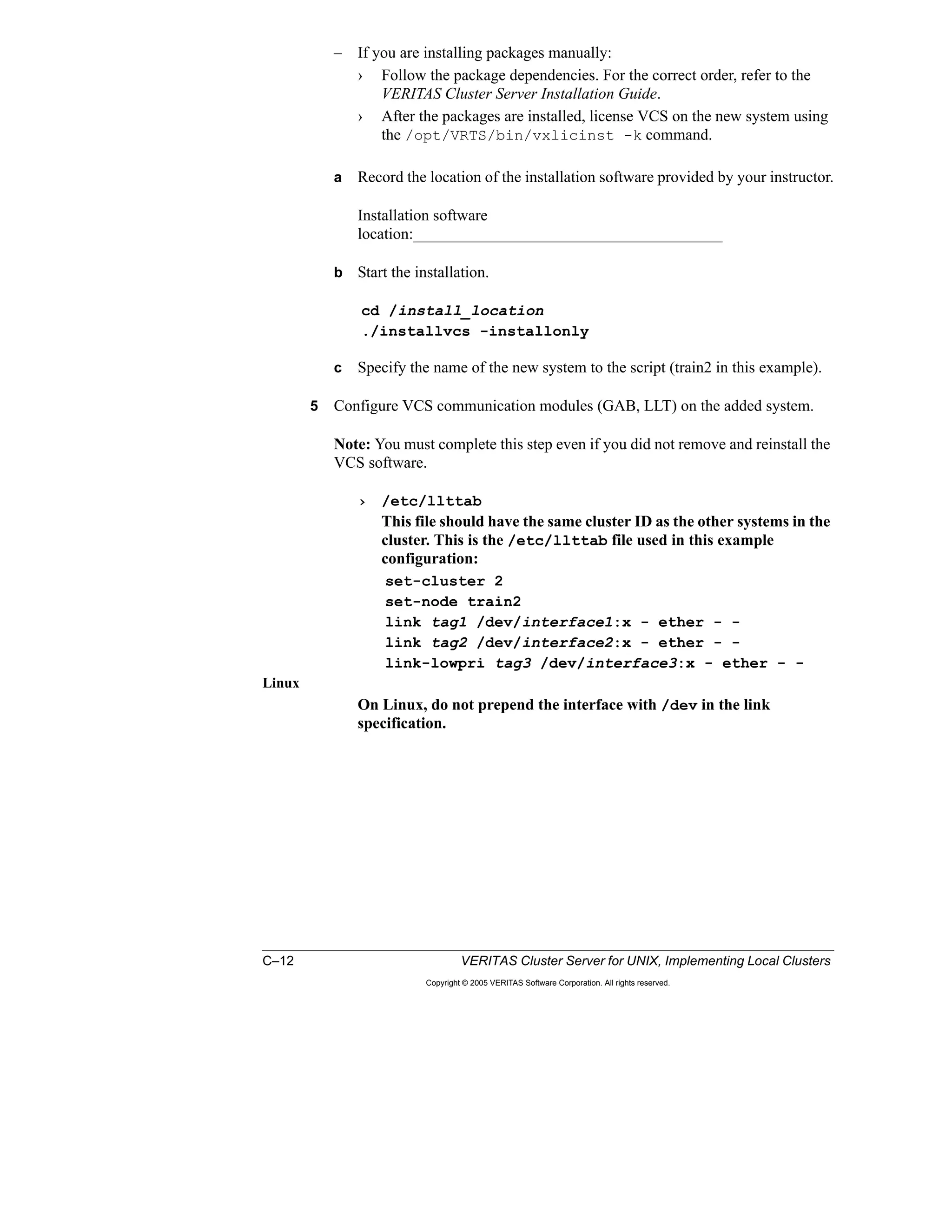
5 After the script completes, create the communication configuration files on the
new system.
› /etc/llttab
This file should have the same cluster ID as the other systems in the
cluster. This is the /etc/llttab file used in this example
configuration:
set-cluster 2
set-node train2
link tag1 /dev/interface1:x - ether - -
link tag2 /dev/interface2:x - ether - -
link-lowpri tag3 /dev/interface3:x - ether - -
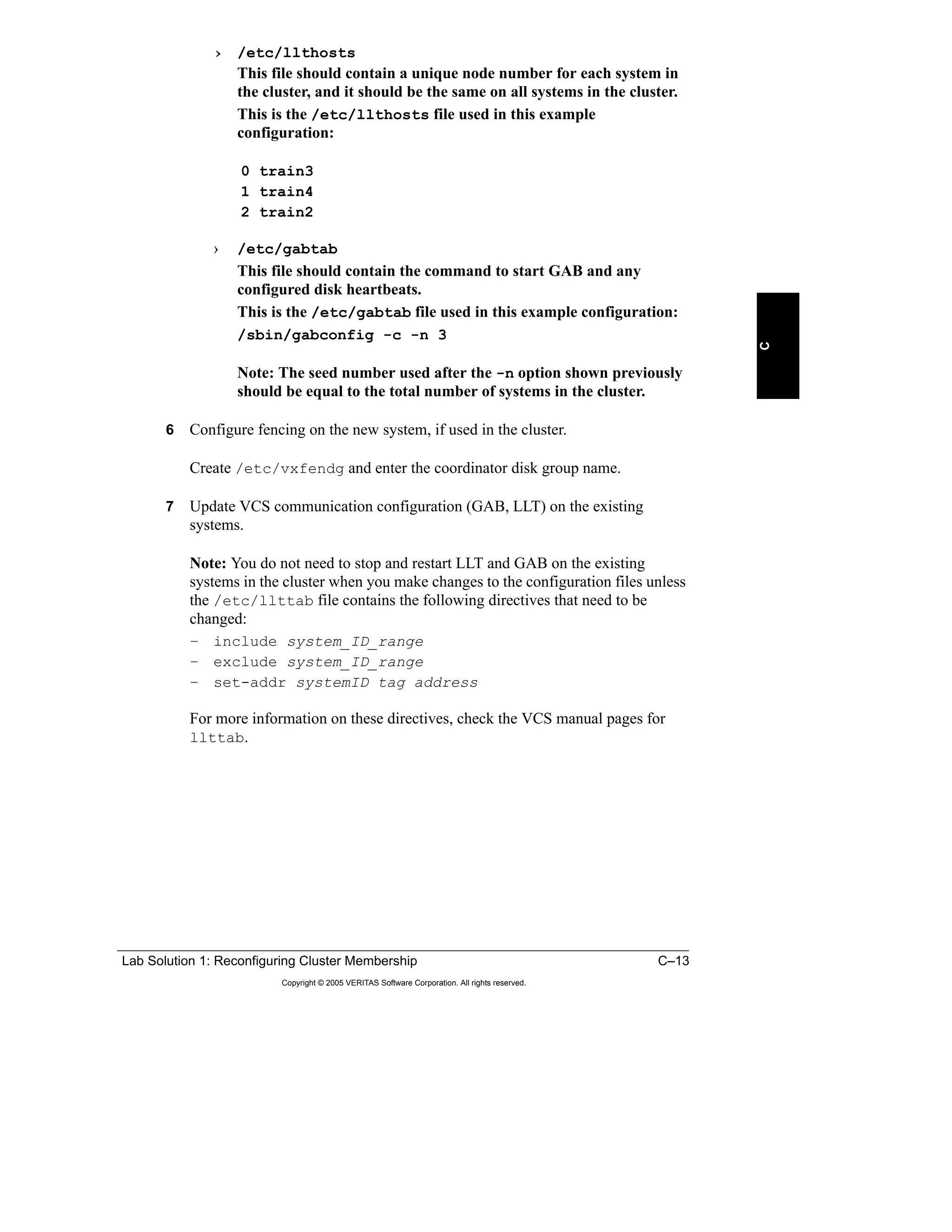
› /etc/llthosts
This file should contain a unique node number for each system in
the cluster, and it should be the same on all systems in the cluster.
This is the /etc/llthosts file used in this example
configuration:
0 train3
1 train4
2 train2
› /etc/gabtab
This file should contain the command to start GAB and any
configured disk heartbeats.
This is the /etc/gabtab file used in this example configuration:
› /sbin/gabconfig -c -n 3
Note: The seed number used after the -n option shown previously
should be equal to the total number of systems in the cluster.
6 Configure fencing on the new system, if used in the cluster.
Create /etc/vxfendg and enter the coordinator disk group name.
7 Update VCS communication configuration (GAB, LLT) on the existing
systems.
Note: You do not need to stop and restart LLT and GAB on the existing
systems in the cluster when you make changes to the configuration files unless
the /etc/llttab file contains the following directives that need to be
changed:
– include system_id_range
– exclude system_id_range
– set-addr systemid tag address
For more information on these directives, check the VCS manual pages on
llttab.
1–30 VERITAS Cluster Server for UNIX, Implementing Local Clusters
Copyright © 2005 VERITAS Software Corporation. All rights reserved.
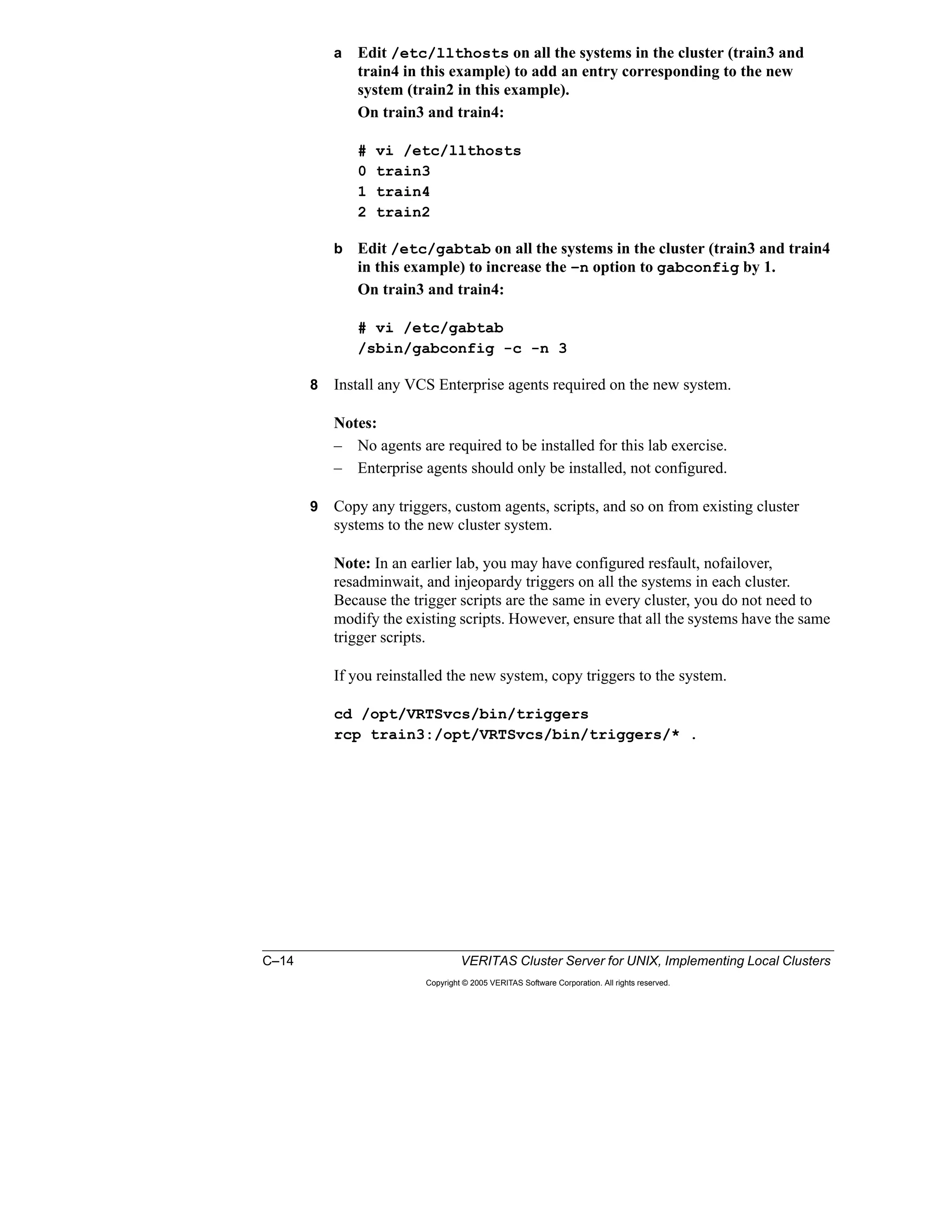
a Edit /etc/llthosts on all the systems in the cluster (train3 and
train4 in this example) to add an entry corresponding to the new
system (train2 in this example).
On train3 and train4:
# vi /etc/llthosts
0 train3
1 train4
2 train2
b Edit /etc/gabtab on all the systems in the cluster (train3 and train4
in this example) to increase the –n option to gabconfig by 1.
On train3 and train4:
# vi /etc/gabtab
/sbin/gabconfig -c -n 3
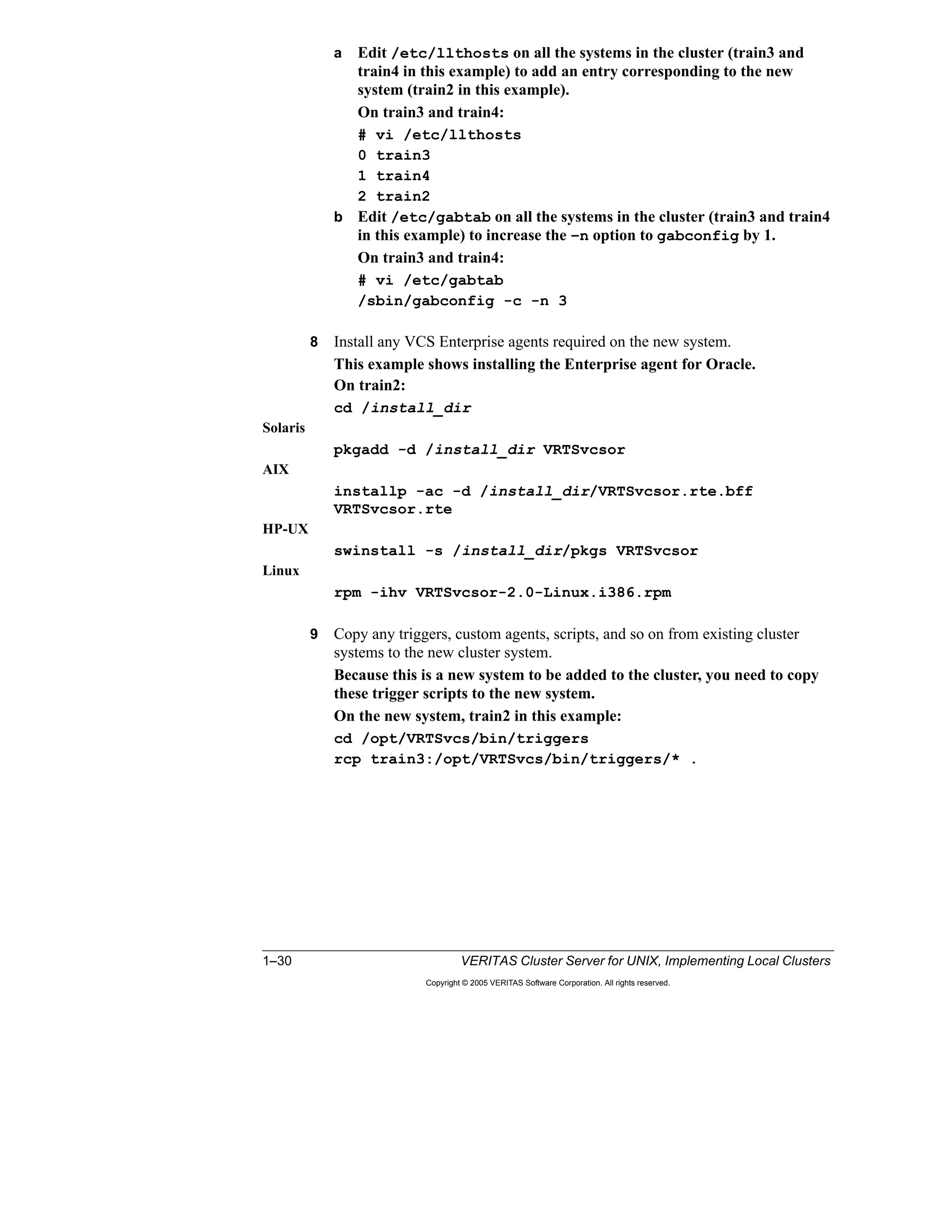
8 Install any VCS Enterprise agents required on the new system.
This example shows installing the Enterprise agent for Oracle.
On train2:
cd /install_dir
Solaris
pkgadd -d /install_dir VRTSvcsor
AIX
installp -ac -d /install_dir/VRTSvcsor.rte.bff
VRTSvcsor.rte
HP-UX
swinstall -s /install_dir/pkgs VRTSvcsor
Linux
rpm -ihv VRTSvcsor-2.0-Linux.i386.rpm
9 Copy any triggers, custom agents, scripts, and so on from existing cluster
systems to the new cluster system.
Because this is a new system to be added to the cluster, you need to copy
these trigger scripts to the new system.
On the new system, train2 in this example:
cd /opt/VRTSvcs/bin/triggers
rcp train3:/opt/VRTSvcs/bin/triggers/* .
Lesson 1 Workshop: Reconfiguring Cluster Membership 1–31
Copyright © 2005 VERITAS Software Corporation. All rights reserved.
1
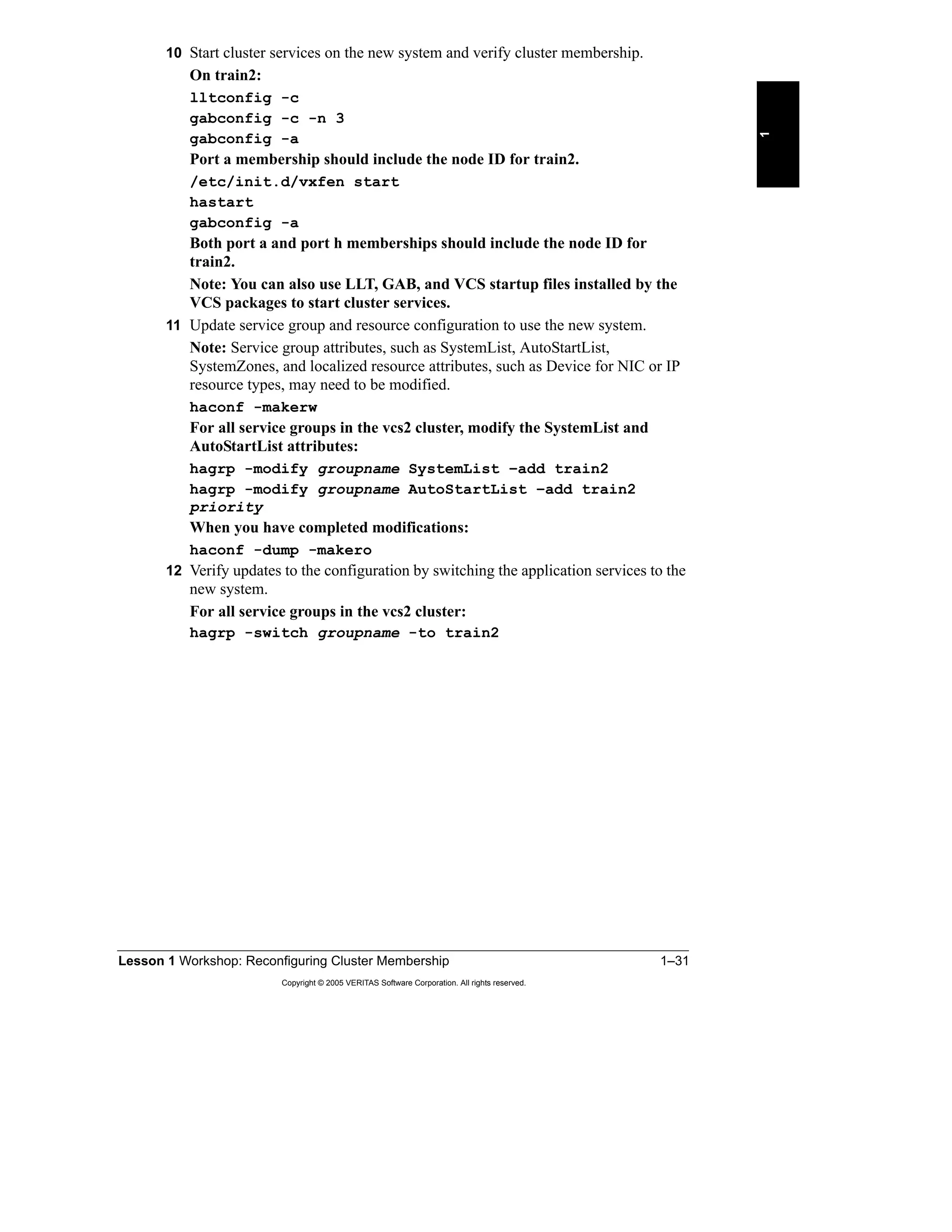
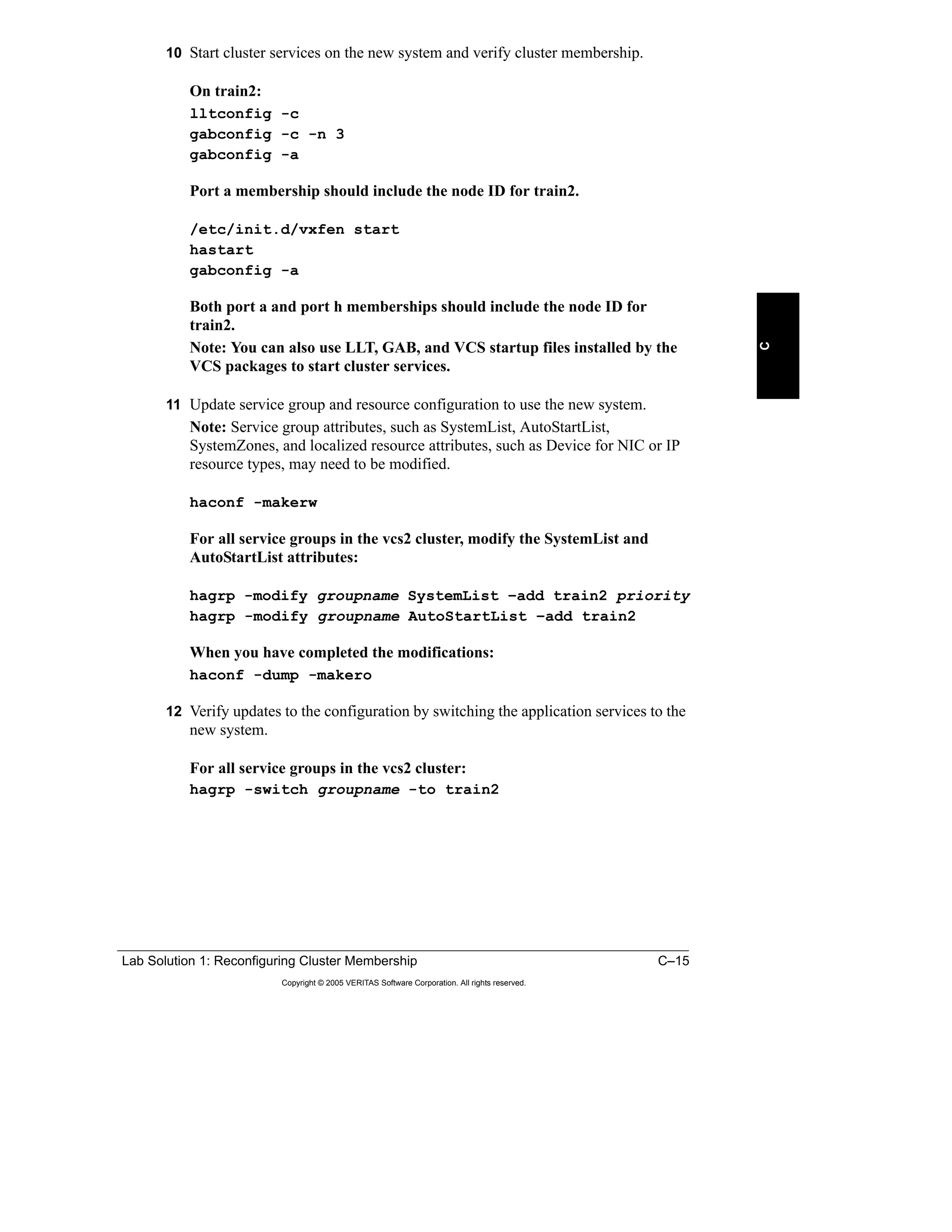
10 Start cluster services on the new system and verify cluster membership.
On train2:
lltconfig -c
gabconfig -c -n 3
gabconfig -a
Port a membership should include the node ID for train2.
/etc/init.d/vxfen start
hastart
gabconfig -a
Both port a and port h memberships should include the node ID for
train2.
Note: You can also use LLT, GAB, and VCS startup files installed by the
VCS packages to start cluster services.
11 Update service group and resource configuration to use the new system.
Note: Service group attributes, such as SystemList, AutoStartList,
SystemZones, and localized resource attributes, such as Device for NIC or IP
resource types, may need to be modified.
haconf -makerw
For all service groups in the vcs2 cluster, modify the SystemList and
AutoStartList attributes:
hagrp -modify groupname SystemList –add train2
hagrp -modify groupname AutoStartList –add train2
priority
When you have completed modifications:
haconf -dump -makero
12 Verify updates to the configuration by switching the application services to the
new system.
For all service groups in the vcs2 cluster:
hagrp -switch groupname -to train2
1–32 VERITAS Cluster Server for UNIX, Implementing Local Clusters
Copyright © 2005 VERITAS Software Corporation. All rights reserved.
Lab Exercise: Task 2—Adding a New System to a Running Cluster
Before starting the discussion about Task 3, one person from each team executes
the commands discussed in the classroom to accomplish Task 2.
For detailed lab steps and solutions for the classroom lab environment, see the
following sections of Appendix A, B, or C.
“Task 2: Adding a System to a Running VCS Cluster,” page A-4
“Task 2: Adding a System to a Running VCS Cluster,” page B-9
“Task 2: Adding a System to a Running VCS Cluster,” page C-10
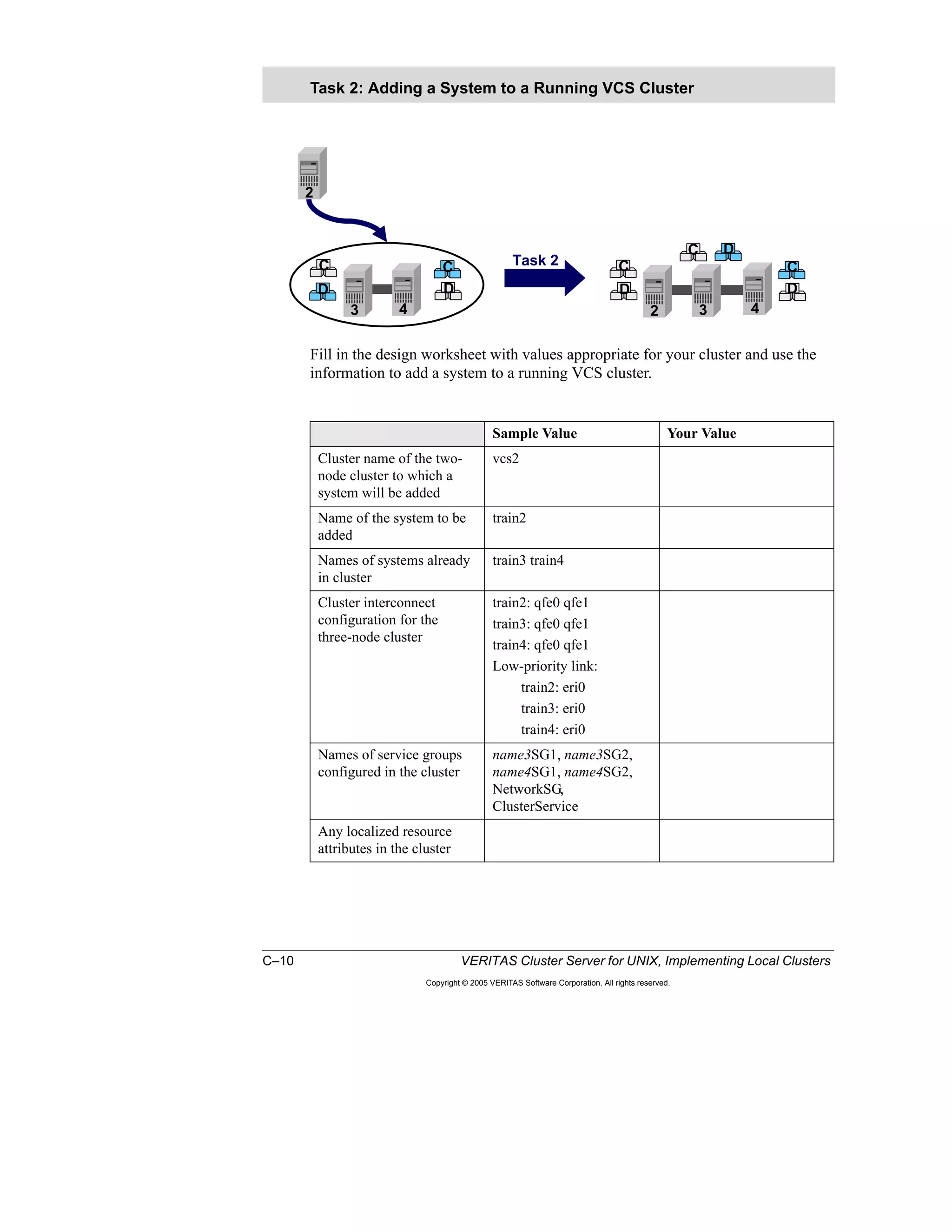
At the end of this lab exercise, you should end up with:
• A one-node cluster that is up and running with three service groups online
There should be no changes in this cluster after Task 2.
• A three-node cluster that is up and running with three service groups online
All the systems should be capable of running all the service groups after Task
2.
Lab Exercise: Task 2—Adding a New System
to a Running Cluster
Complete this exercise now or at the end of the
lesson, as directed by your instructor.
One person from each team executes the
commands discussed in the classroom to
accomplish Task 2.
See Appendix A, B, or C for detailed steps and
classroom-specific information.
+
Lesson 1 Workshop: Reconfiguring Cluster Membership 1–33
Copyright © 2005 VERITAS Software Corporation. All rights reserved.
1
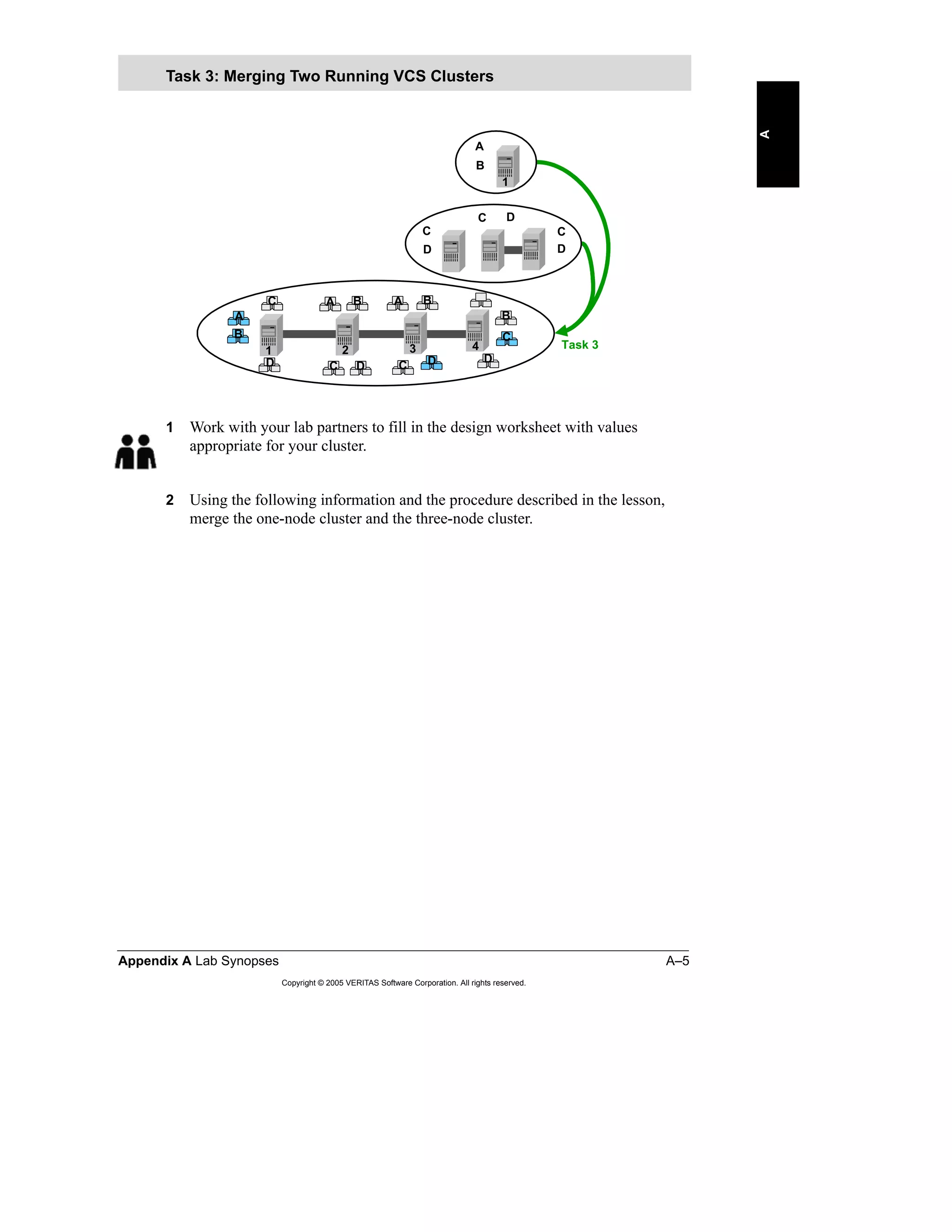
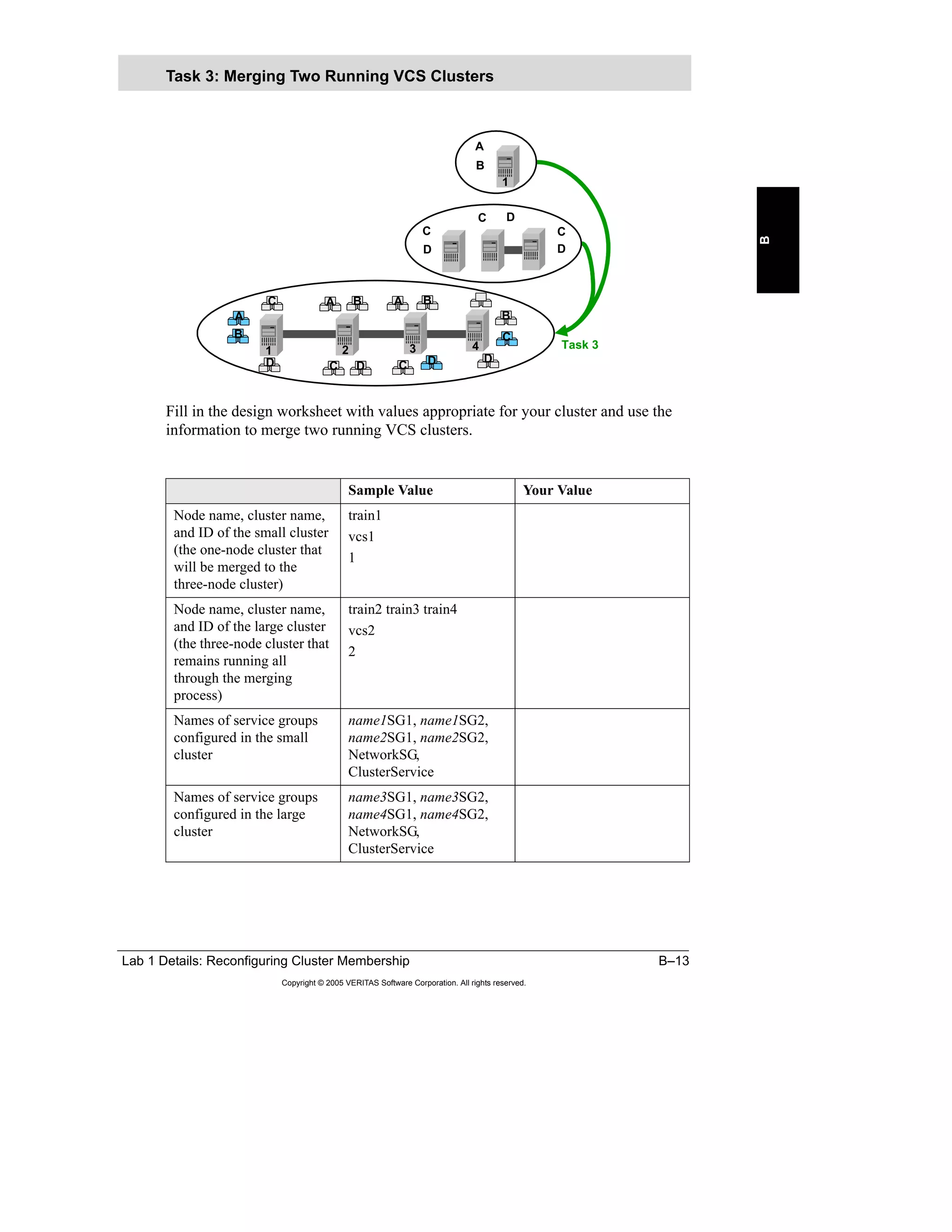
Task 3: Merging Two Running VCS Clusters
Objective
The objective of this task is to merge two running VCS clusters with no or minimal
impact on application services. Also, ensure that the cluster configuration is
modified so that the application services can make use of the systems from both
clusters.
Assumptions
Following is a list of assumptions that you need to take into account while
planning a procedure for this task:
• All the systems in both clusters are up and running.
• There are multiple service groups configured in both clusters. All of the service
groups are online somewhere in the cluster.
• All the systems have the same version of operating system and VERITAS
Storage Foundation.
• The clusters do not necessarily have the same application services software.
• New application software can be installed on the systems to support
application services of the other cluster.
• The storage devices can be connected to all systems.
• The cluster interconnects of both clusters are isolated before the merge.
For this example, you can assume that a one-node cluster is merged with a three-
node cluster as in this lab environment.
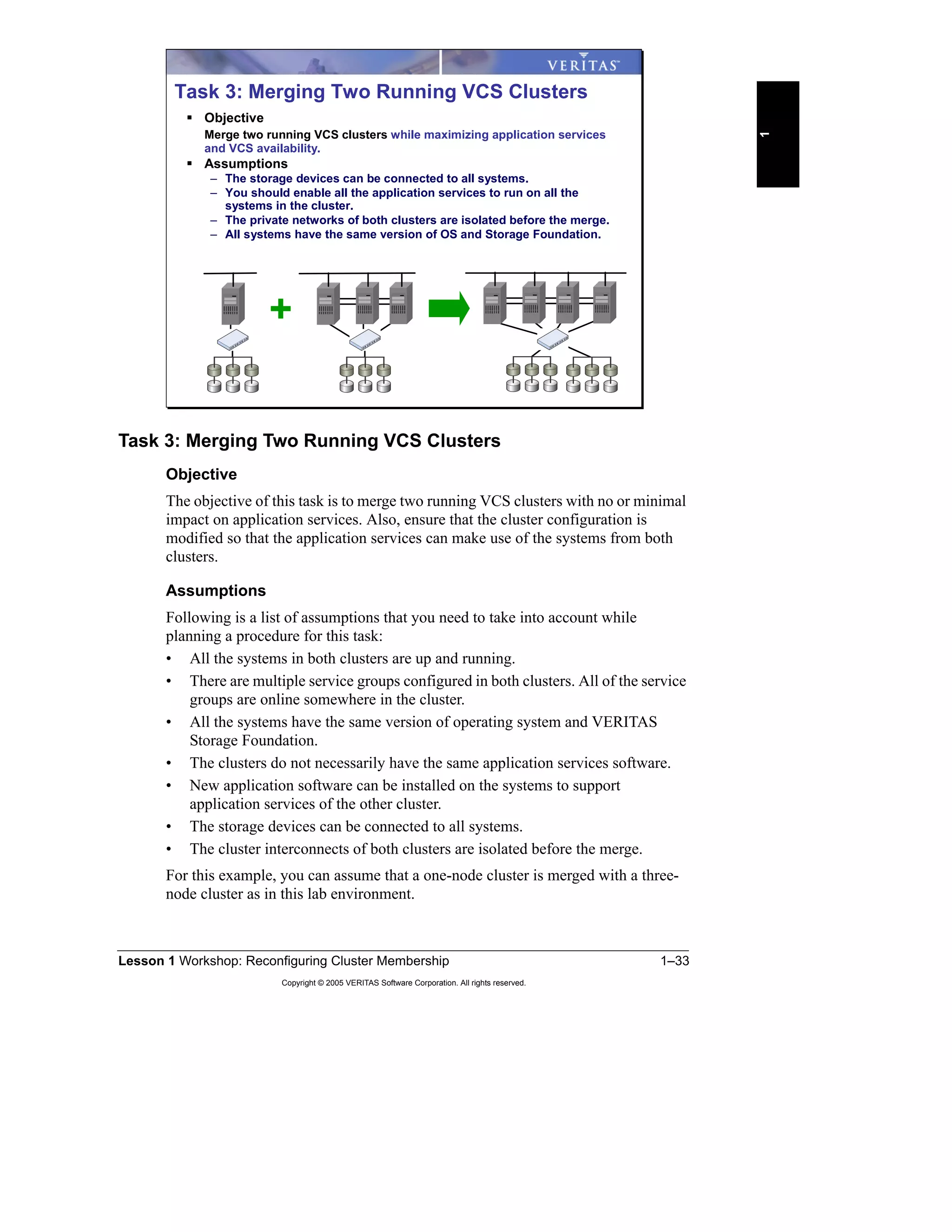
Task 3: Merging Two Running VCS Clusters
Objective
Merge two running VCS clusters while maximizing application services
and VCS availability.
Assumptions
– The storage devices can be connected to all systems.
– You should enable all the application services to run on all the
systems in the cluster.
– The private networks of both clusters are isolated before the merge.
– All systems have the same version of OS and Storage Foundation.
+
1–34 VERITAS Cluster Server for UNIX, Implementing Local Clusters
Copyright © 2005 VERITAS Software Corporation. All rights reserved.
Procedure to Merge Two VCS Clusters
Discuss with your team the steps required to carry out Task 3. For each step,
decide how the application services availability would be impacted. Note that there
may not be a single answer to this question. Therefore, state your reasons for
choosing a step in a specific order using the Notes area of your worksheet. Also, in
the Notes area, document any assumptions that you are making that have not been
explained as part of the task.
Use the worksheet on the following page to provide the steps required for Task 3.
Classroom Discussion for Task 3
Note: At this point, you do not need to provide
the commands to carry out each step.
Note: At this point, you do not need to provide
the commands to carry out each step.
Your instructor either groups students into teams or
leads a class discussion for this task.
For team-based exercises:
Each group of four students, working on two clusters,
forms a team to discuss the steps required to carry out
task 3 as outlined on the previous slide.
After all the teams are ready with their proposed
procedures, have a classroom discussion to identify the
best way of removing a system from a running VCS
cluster, providing the reasons for each step.
+
Lesson 1 Workshop: Reconfiguring Cluster Membership 1–35
Copyright © 2005 VERITAS Software Corporation. All rights reserved.
1
Procedure for Task 3 proposed by your team:
Steps Description Impact on
application
availability
Notes
1–36 VERITAS Cluster Server for UNIX, Implementing Local Clusters
Copyright © 2005 VERITAS Software Corporation. All rights reserved.
Use the following worksheet to document the procedure agreed upon by the class.
Final procedure for Task 3 agreed upon as a result of classroom discussions:
Steps Description Impact on
application
availability
Notes
Lesson 1 Workshop: Reconfiguring Cluster Membership 1–37
Copyright © 2005 VERITAS Software Corporation. All rights reserved.
1
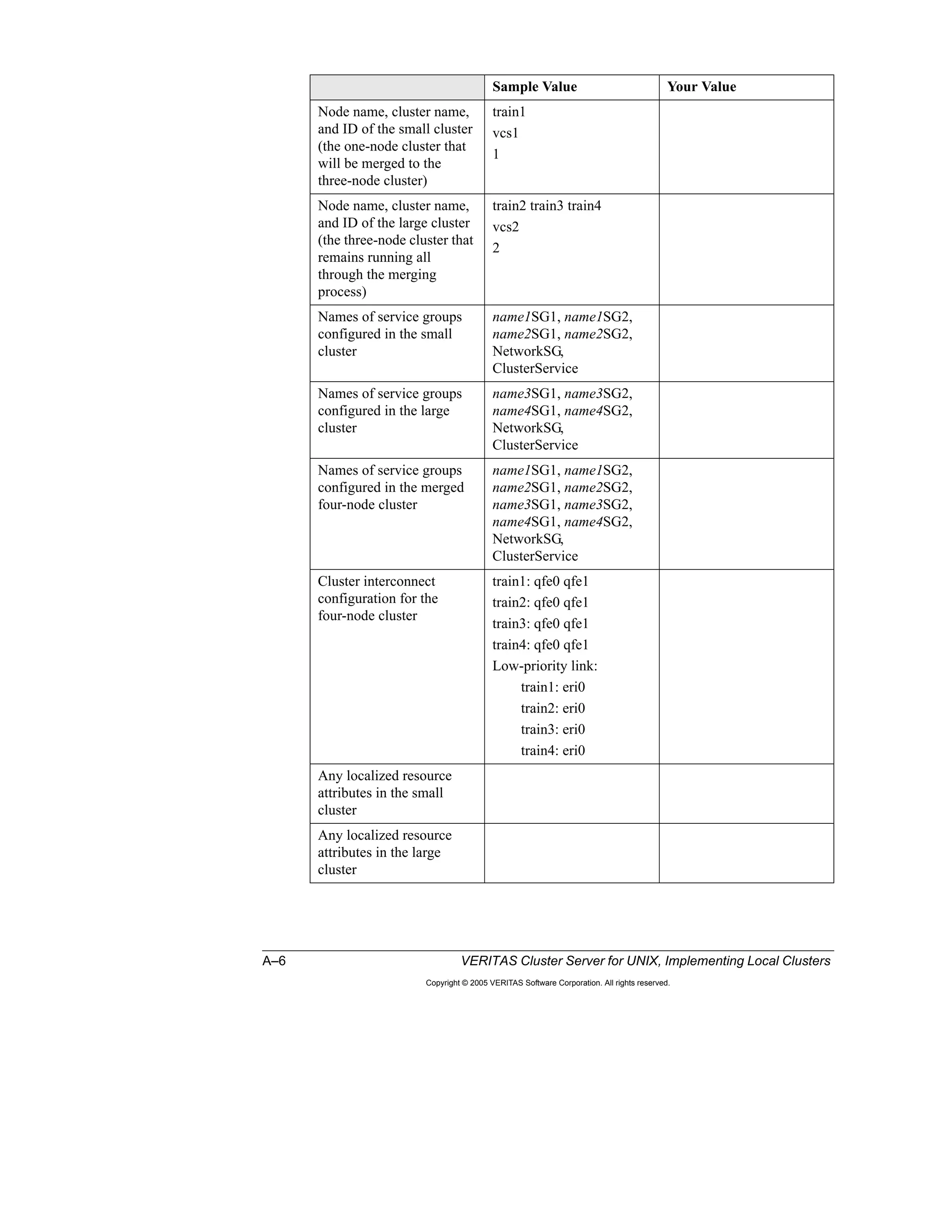
Solution to Class Discussion 3: Merging Two Running Clusters
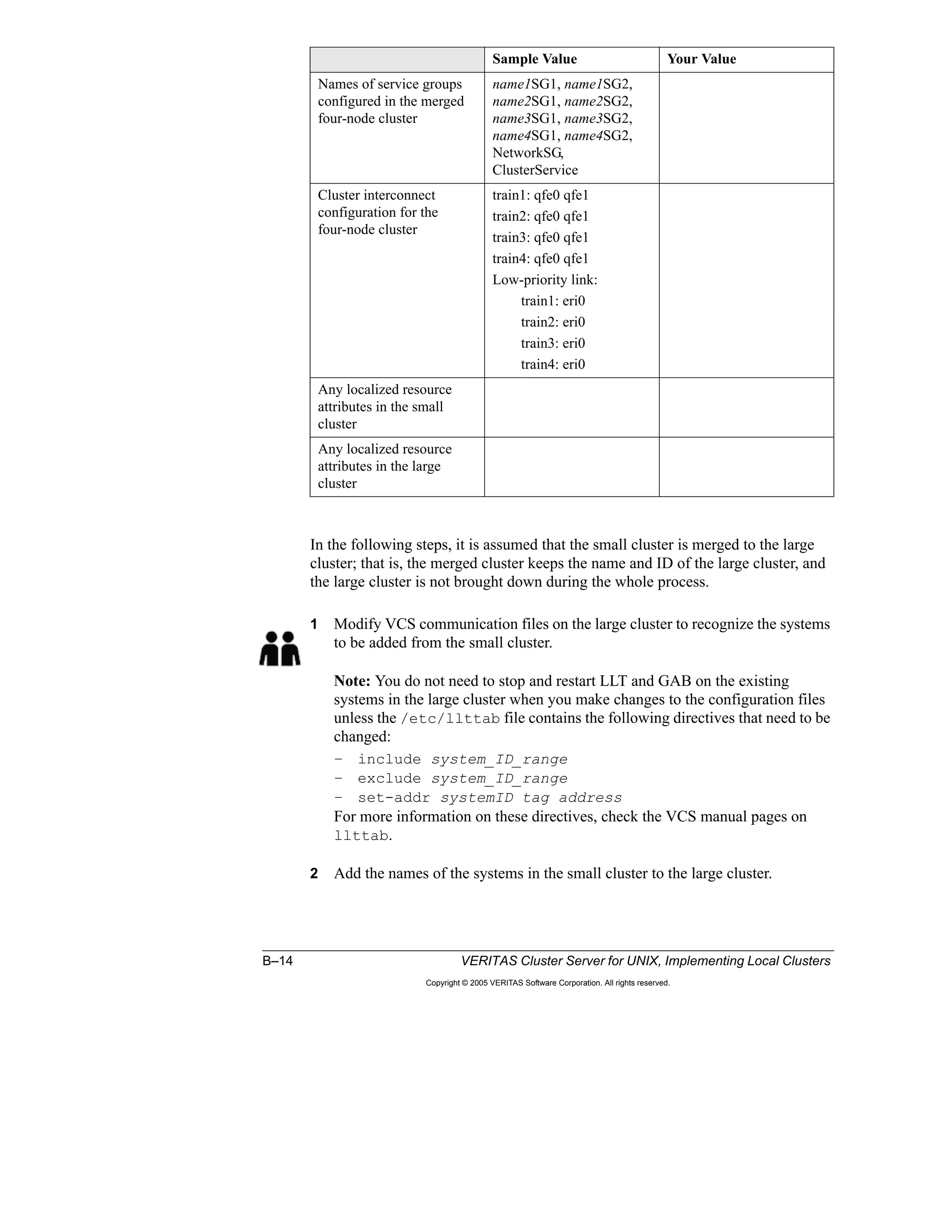
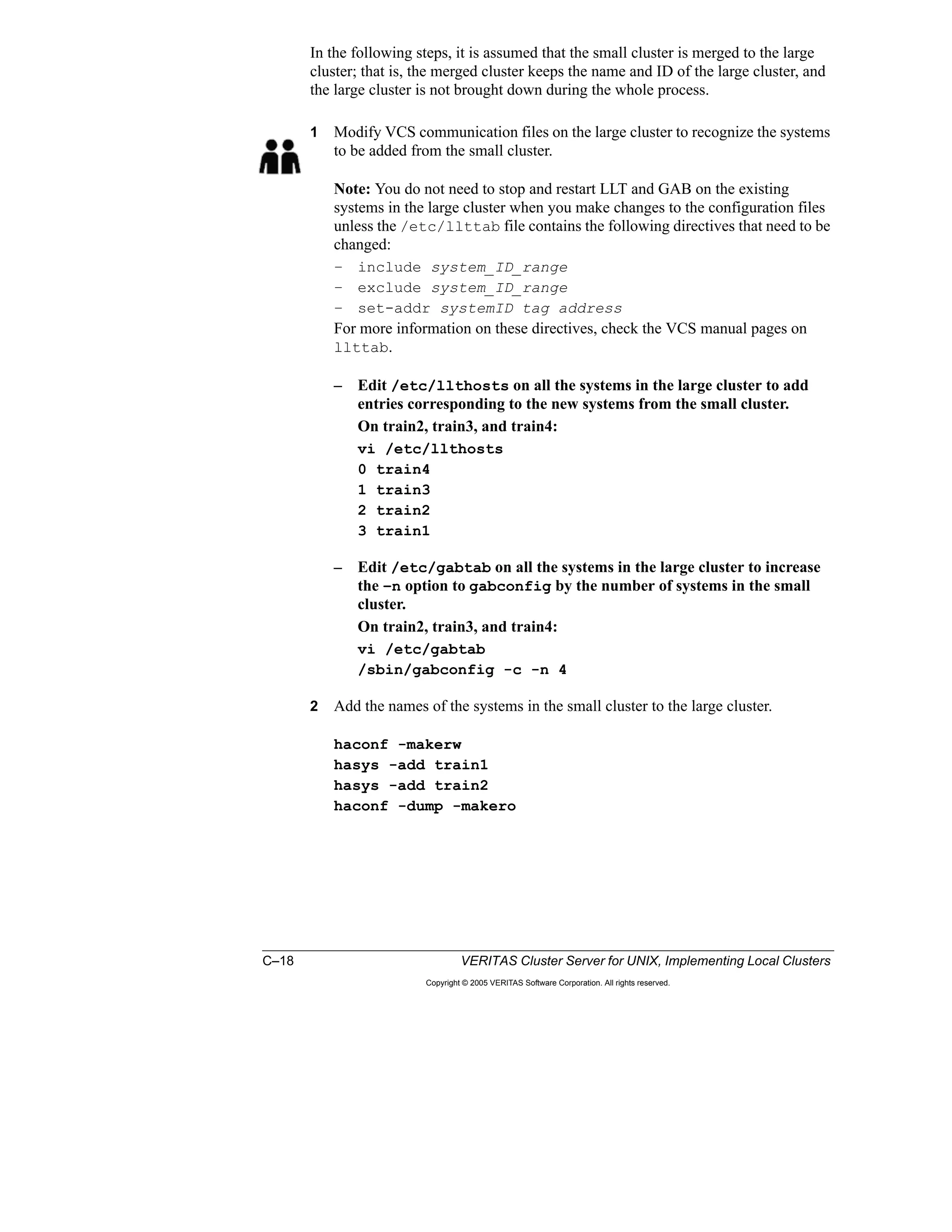
In the following steps, it is assumed that the small (first) cluster is merged to the
larger (second) cluster. That is, the merged cluster keeps the name and ID of the
second cluster, and the second cluster is not brought down during the whole
process.
1 Modify VCS communication files on the second cluster to recognize the
systems to be added from the first cluster.
Note: You do not need to stop and restart LLT and GAB on the existing
systems in the second cluster when you make changes to the configuration files
unless the /etc/llttab file contains the following directives that need to be
changed:
– include system_id_range
– exclude system_id_range
– set-addr systemid tag address
For more information on these directives, check the VCS manual pages on
llttab.
2 Add the names of the systems in the first cluster to the second cluster.
3 Install and configure any additional application software required to support
the merged configuration on all systems.
Notes:
– Installing applications in a VCS cluster would require freezing systems.
This step may also involve switching application services and rebooting
systems depending on the application installed.
– All the systems should be capable of running the application services when
the clusters are merged. Preparing application resources may include:
› Creating user accounts
› Copying application configuration files
› Creating mount points
› Verifying shared storage access
4 Install any additional VCS Enterprise agents on each system.
Note: Enterprise agents should only be installed, not configured.
5 Copy any additional custom agents to all systems.
Note: Custom agents should only be installed, not configured.
6 Extract service group configuration from the small cluster, so you can add it to
the larger cluster configuration without stopping VCS.
7 Copy or merge any existing trigger scripts on all systems.
Notes:
– The extent of this step depends on the contents of the trigger scripts.
Because the trigger scripts are in use on the existing cluster systems, it is
recommended to merge the scripts on a temporary directory.
– Depending on the changes required, it may be necessary to stop cluster
services on the systems before copying the merged trigger scripts.
1–38 VERITAS Cluster Server for UNIX, Implementing Local Clusters
Copyright © 2005 VERITAS Software Corporation. All rights reserved.
8 Stop cluster services (VCS, fencing, GAB, and LLT) on the systems in the first
cluster.
Note: Leave application services running on the systems.
9 Reconfigure VCS communication modules on the systems in the first cluster
and physically connect cluster interconnects.
10 Start cluster services (LLT, GAB, fencing, and VCS) on the systems in the first
cluster and verify cluster memberships.
11 Update service group and resource configuration to use all the systems.
Note: Service group attributes, such as AutoStartList, SystemList,
SystemZones, and localized resource attributes, such as Device for NIC or IP
resource types, may need to be modified.
12 Verify updates to the configuration by switching application services between
the systems in the merged cluster.
Lesson 1 Workshop: Reconfiguring Cluster Membership 1–39
Copyright © 2005 VERITAS Software Corporation. All rights reserved.
1
Commands Required to Complete Task 3
After you have agreed on the steps required to accomplish Task 3, determine the
VCS commands required to perform each step in the procedure. You will first
work as a team to propose a solution, and then discuss each step in the classroom.
Note that there may be multiple methods to carry out each step.
You can use the participants guide, VCS manual pages, the VERITAS Cluster
Server User’s Guide, and the VERITAS Cluster Server Installation Guide as
sources of information. If there are topics that you do not understand, ask your
instructor to discuss them in detail during the classroom discussion.
Use the worksheet on the following page to provide the commands required for
Task 3.
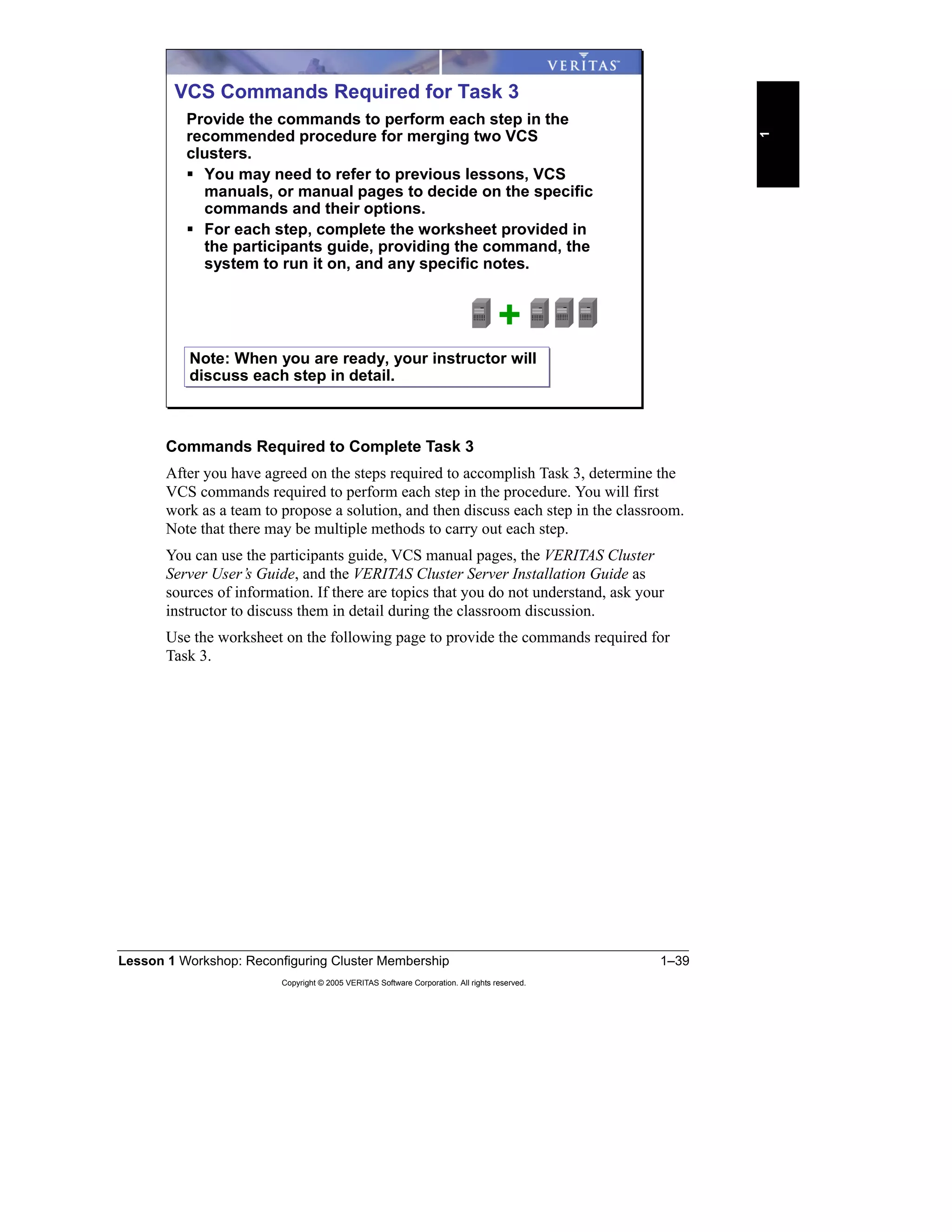
VCS Commands Required for Task 3
Provide the commands to perform each step in the
recommended procedure for merging two VCS
clusters.
You may need to refer to previous lessons, VCS
manuals, or manual pages to decide on the specific
commands and their options.
For each step, complete the worksheet provided in
the participants guide, providing the command, the
system to run it on, and any specific notes.
+
Note: When you are ready, your instructor will
discuss each step in detail.
Note: When you are ready, your instructor will
discuss each step in detail.
1–40 VERITAS Cluster Server for UNIX, Implementing Local Clusters
Copyright © 2005 VERITAS Software Corporation. All rights reserved.
Commands for Task 3 proposed by your team:
Order of
Execution
VCS Command to Use System on
which to
run the
command
Notes
Lesson 1 Workshop: Reconfiguring Cluster Membership 1–41
Copyright © 2005 VERITAS Software Corporation. All rights reserved.
1
Use the following worksheet to document any differences to your proposal.
Commands for Task 3 agreed upon in the classroom:
Order of
Execution
VCS Command to Use System on
which to
run the
command
Notes
1–42 VERITAS Cluster Server for UNIX, Implementing Local Clusters
Copyright © 2005 VERITAS Software Corporation. All rights reserved.
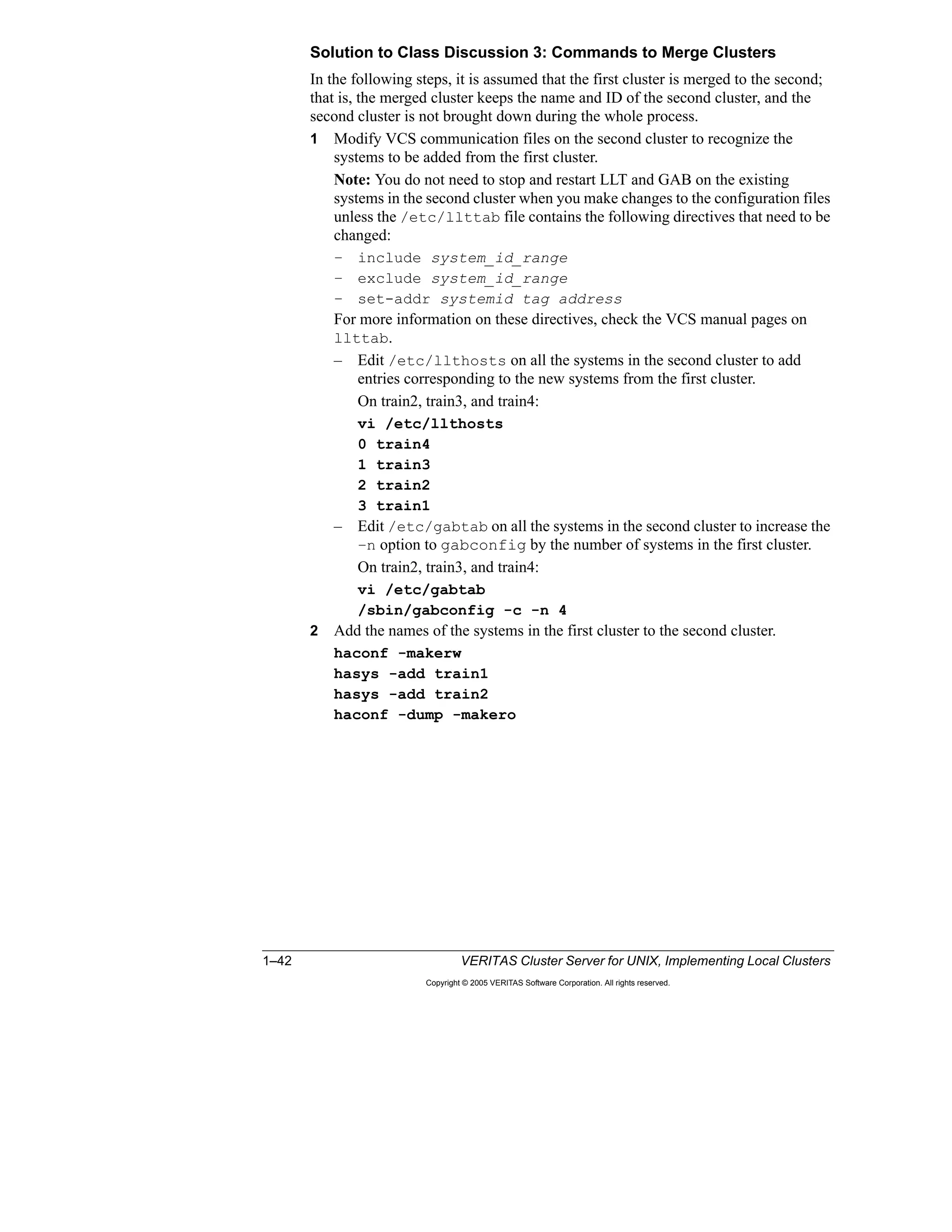
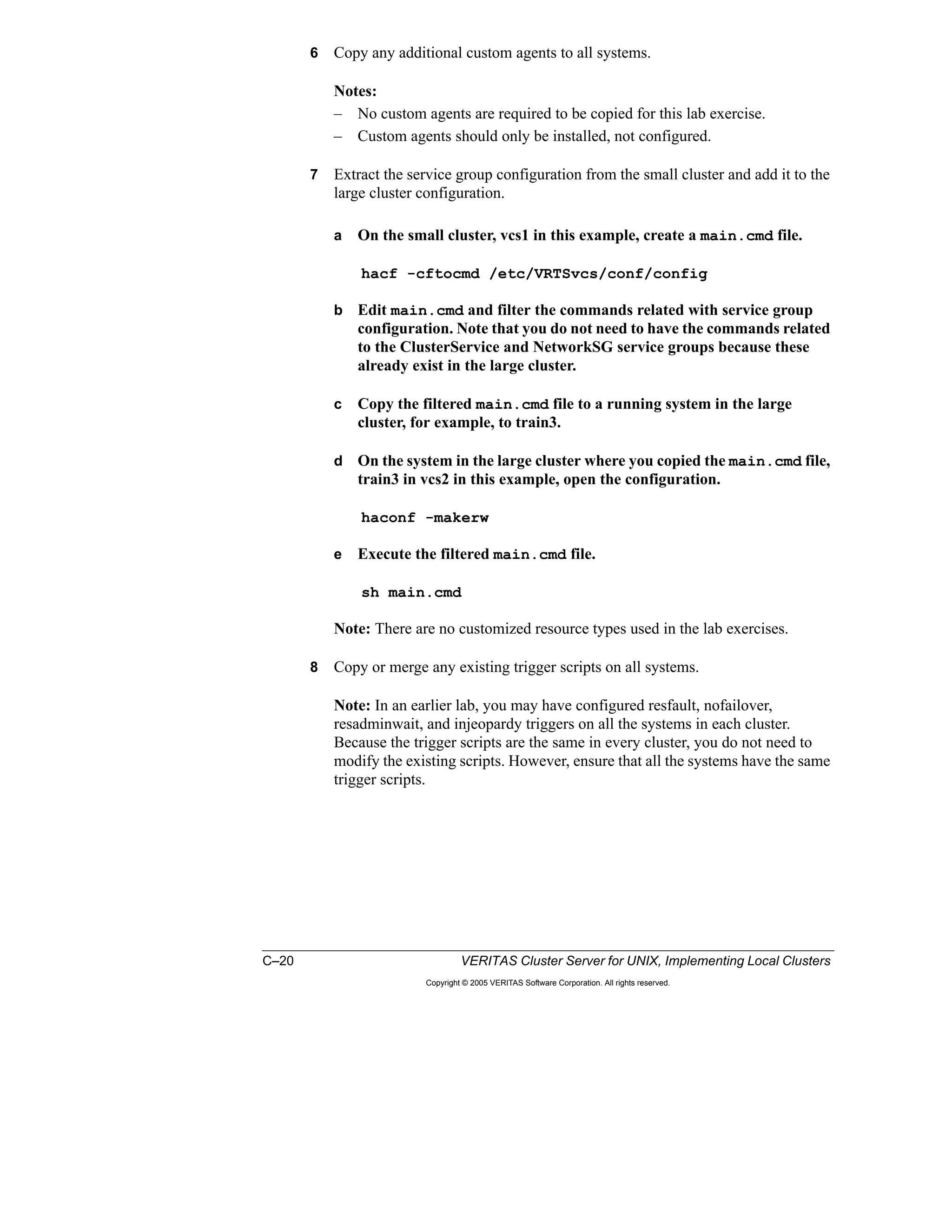
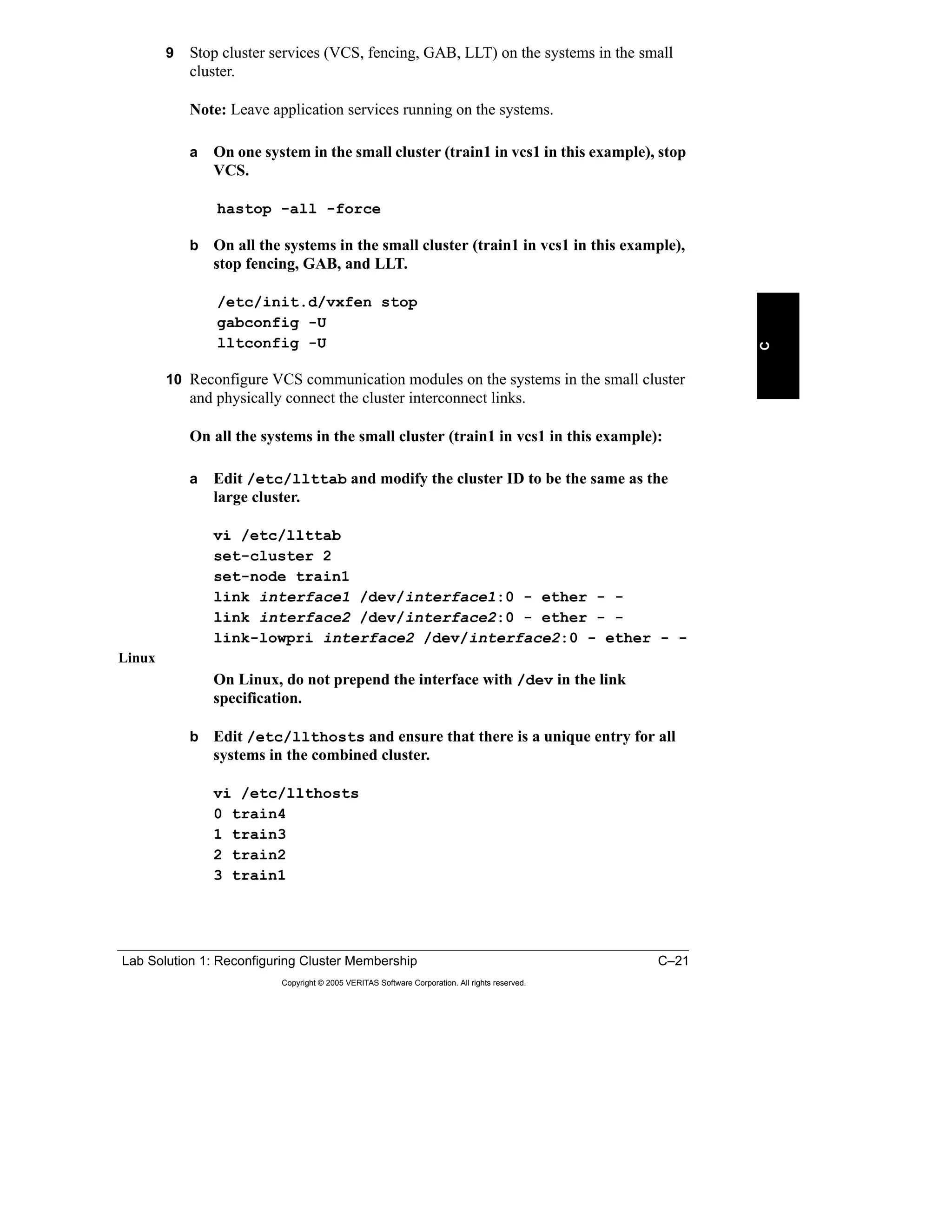
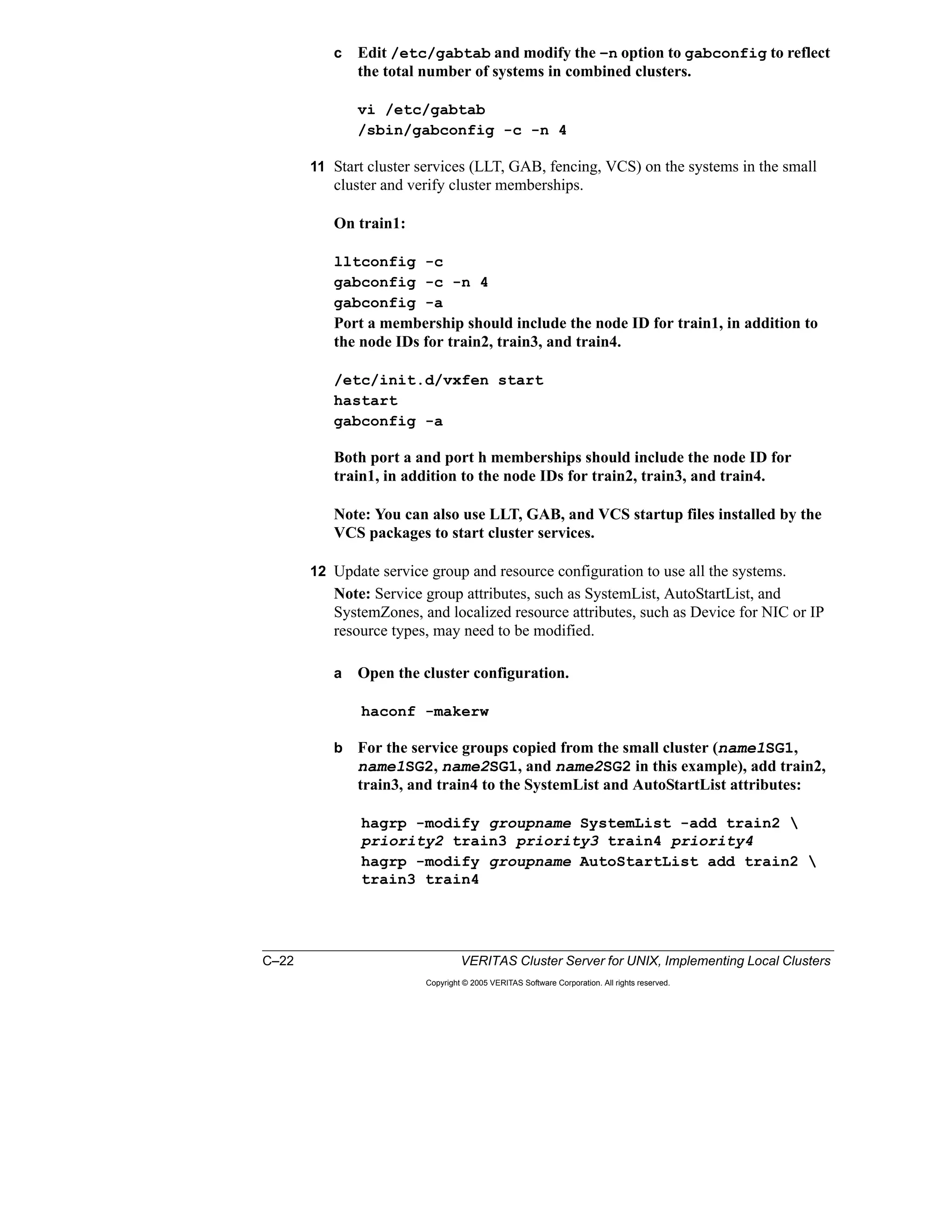
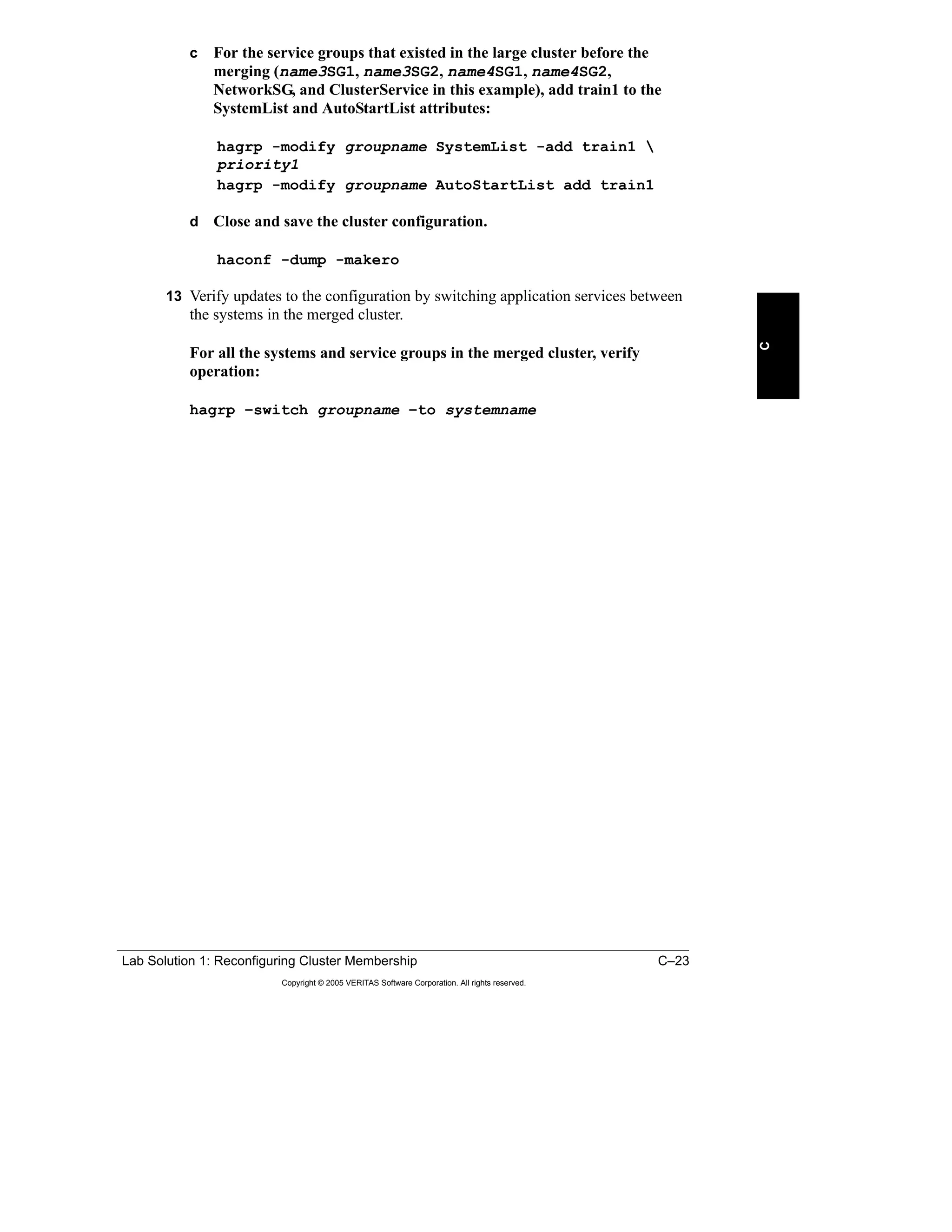
Solution to Class Discussion 3: Commands to Merge Clusters
In the following steps, it is assumed that the first cluster is merged to the second;
that is, the merged cluster keeps the name and ID of the second cluster, and the
second cluster is not brought down during the whole process.
1 Modify VCS communication files on the second cluster to recognize the
systems to be added from the first cluster.
Note: You do not need to stop and restart LLT and GAB on the existing
systems in the second cluster when you make changes to the configuration files
unless the /etc/llttab file contains the following directives that need to be
changed:
– include system_id_range
– exclude system_id_range
– set-addr systemid tag address
For more information on these directives, check the VCS manual pages on
llttab.
– Edit /etc/llthosts on all the systems in the second cluster to add
entries corresponding to the new systems from the first cluster.
On train2, train3, and train4:
vi /etc/llthosts
0 train4
1 train3
2 train2
3 train1
– Edit /etc/gabtab on all the systems in the second cluster to increase the
–n option to gabconfig by the number of systems in the first cluster.
On train2, train3, and train4:
vi /etc/gabtab
/sbin/gabconfig -c -n 4
2 Add the names of the systems in the first cluster to the second cluster.
haconf -makerw
hasys -add train1
hasys -add train2
haconf -dump -makero
Lesson 1 Workshop: Reconfiguring Cluster Membership 1–43
Copyright © 2005 VERITAS Software Corporation. All rights reserved.
1
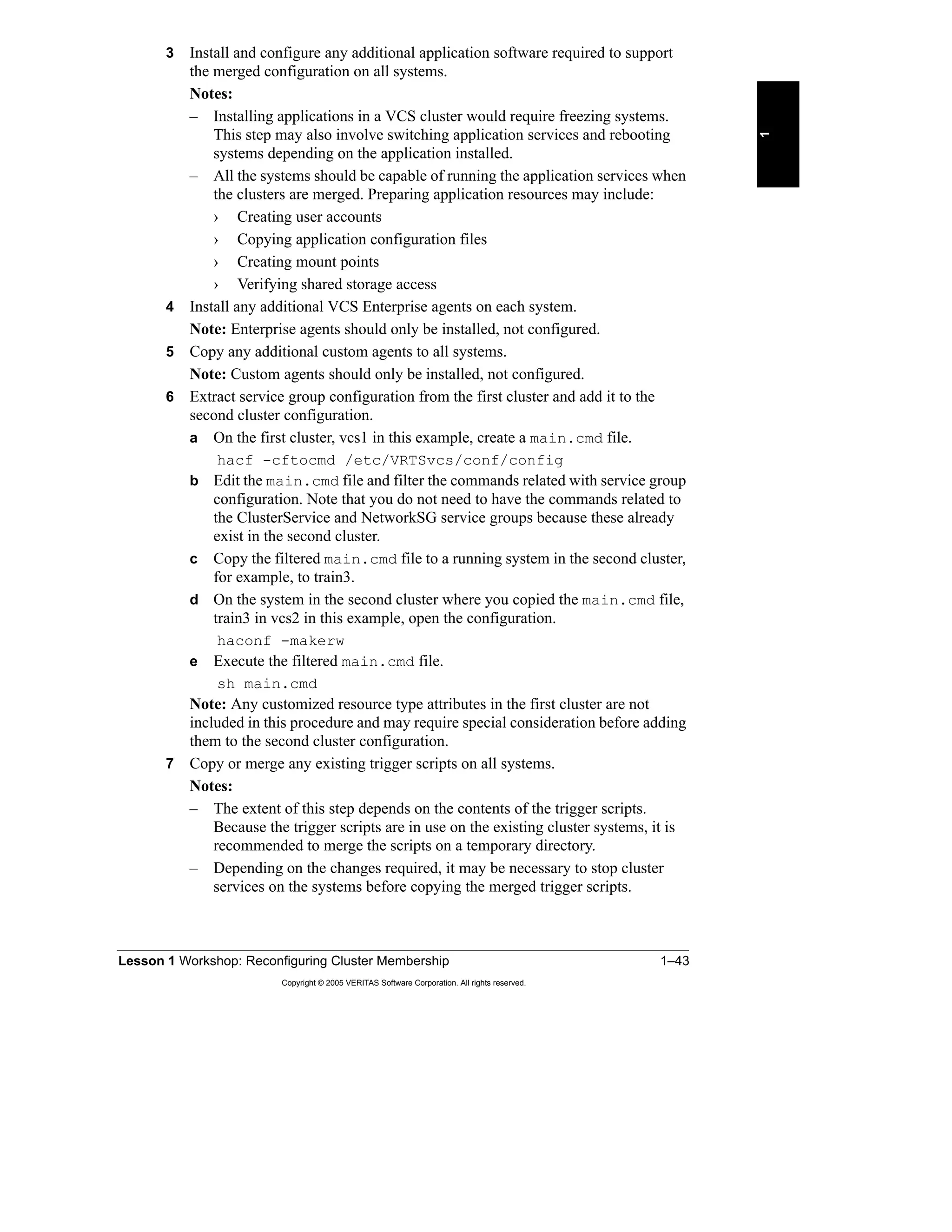
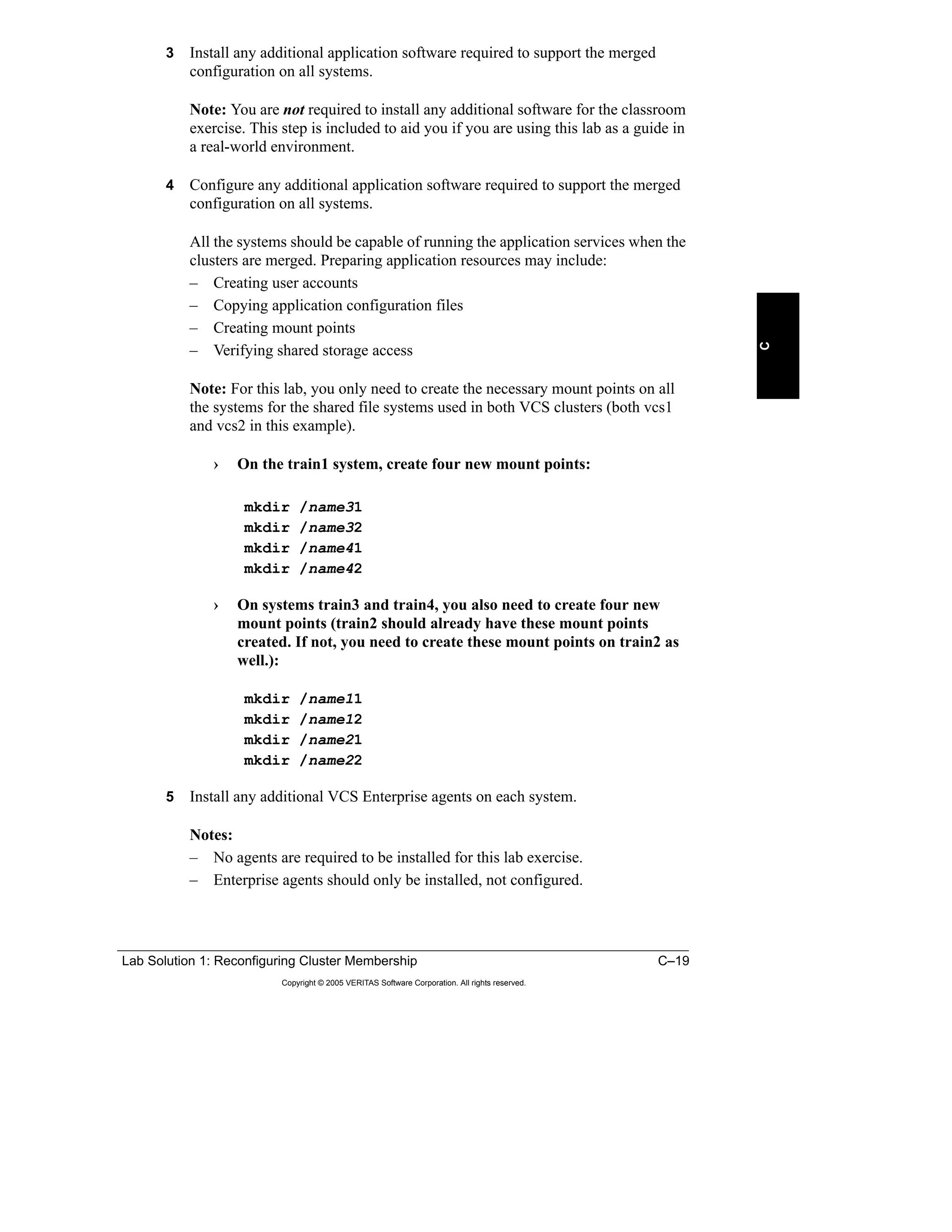
3 Install and configure any additional application software required to support
the merged configuration on all systems.
Notes:
– Installing applications in a VCS cluster would require freezing systems.
This step may also involve switching application services and rebooting
systems depending on the application installed.
– All the systems should be capable of running the application services when
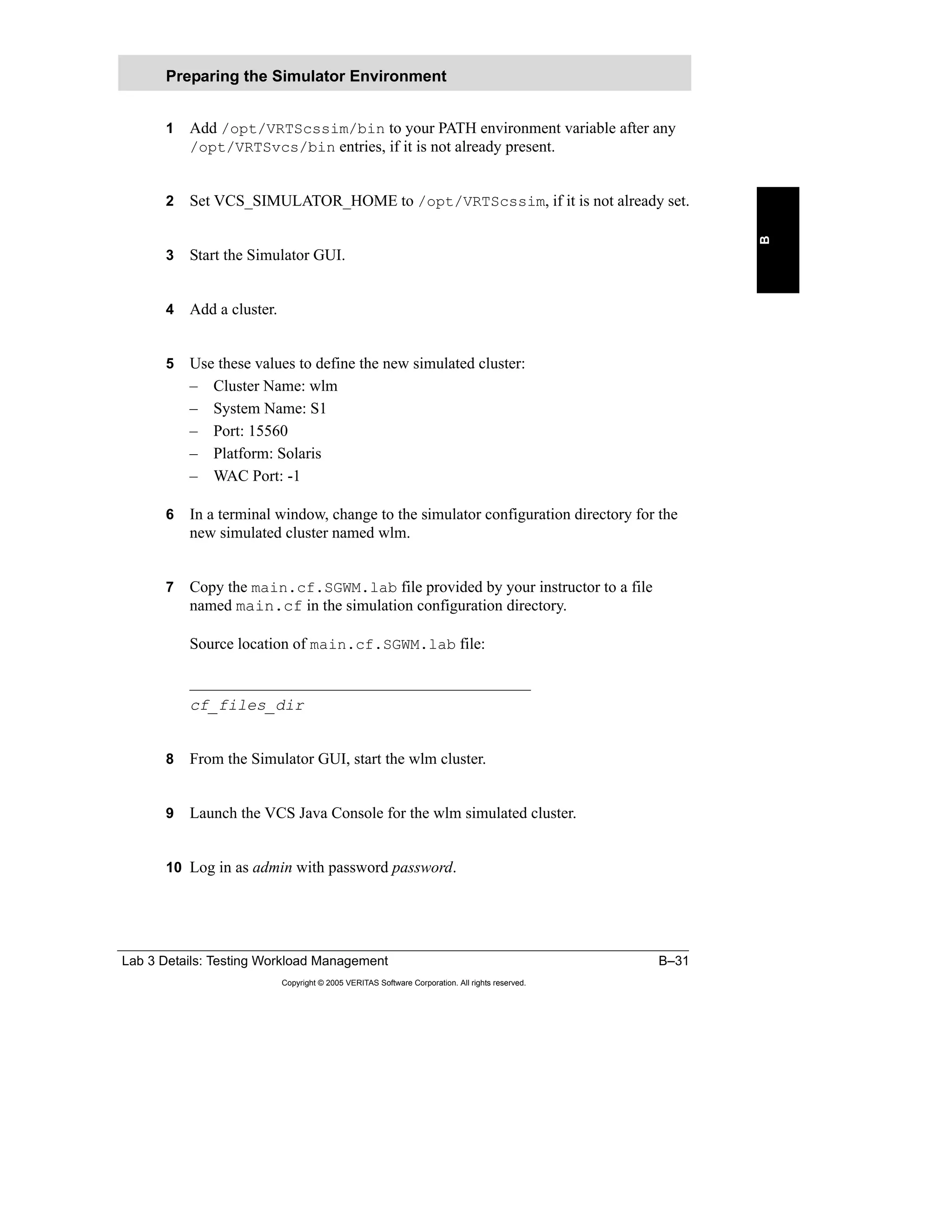
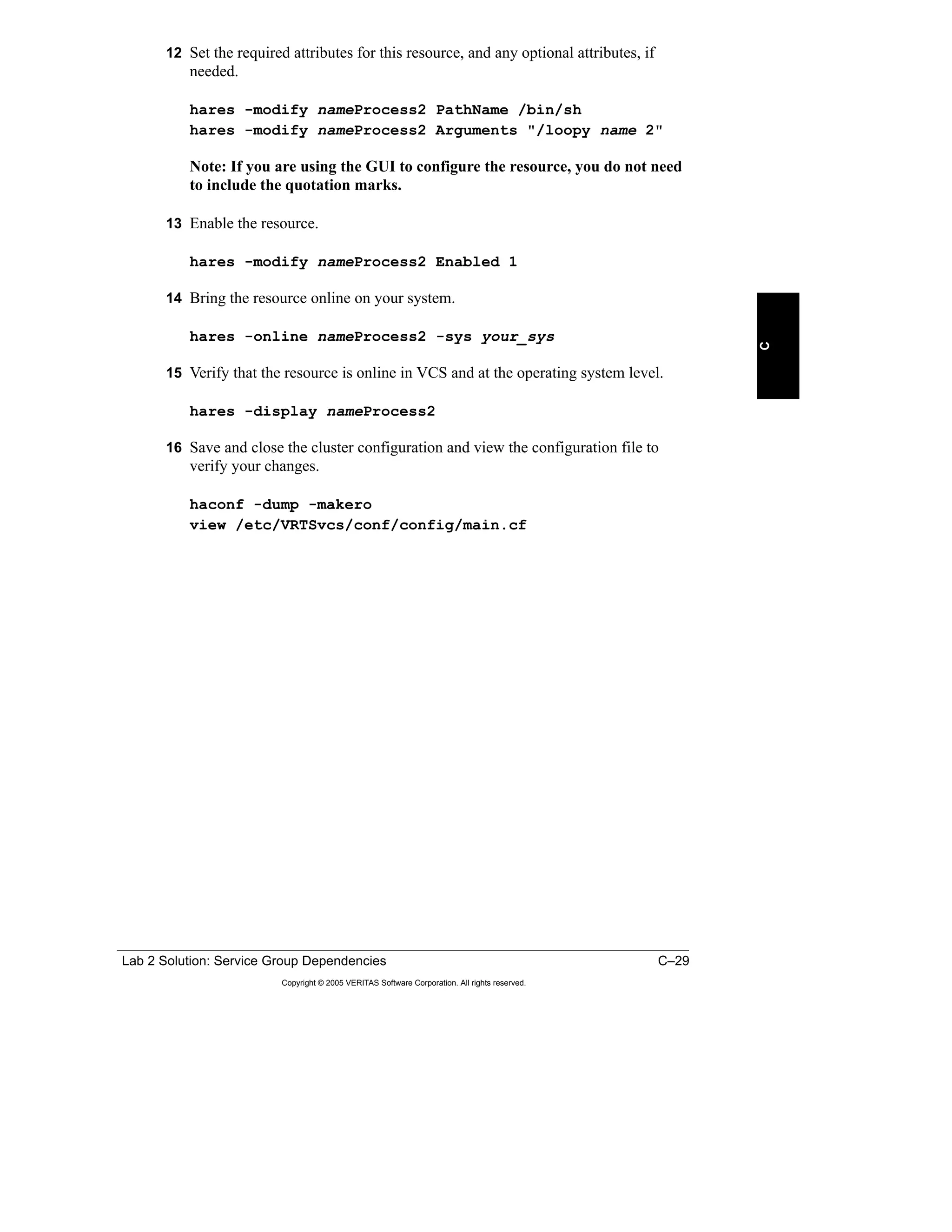
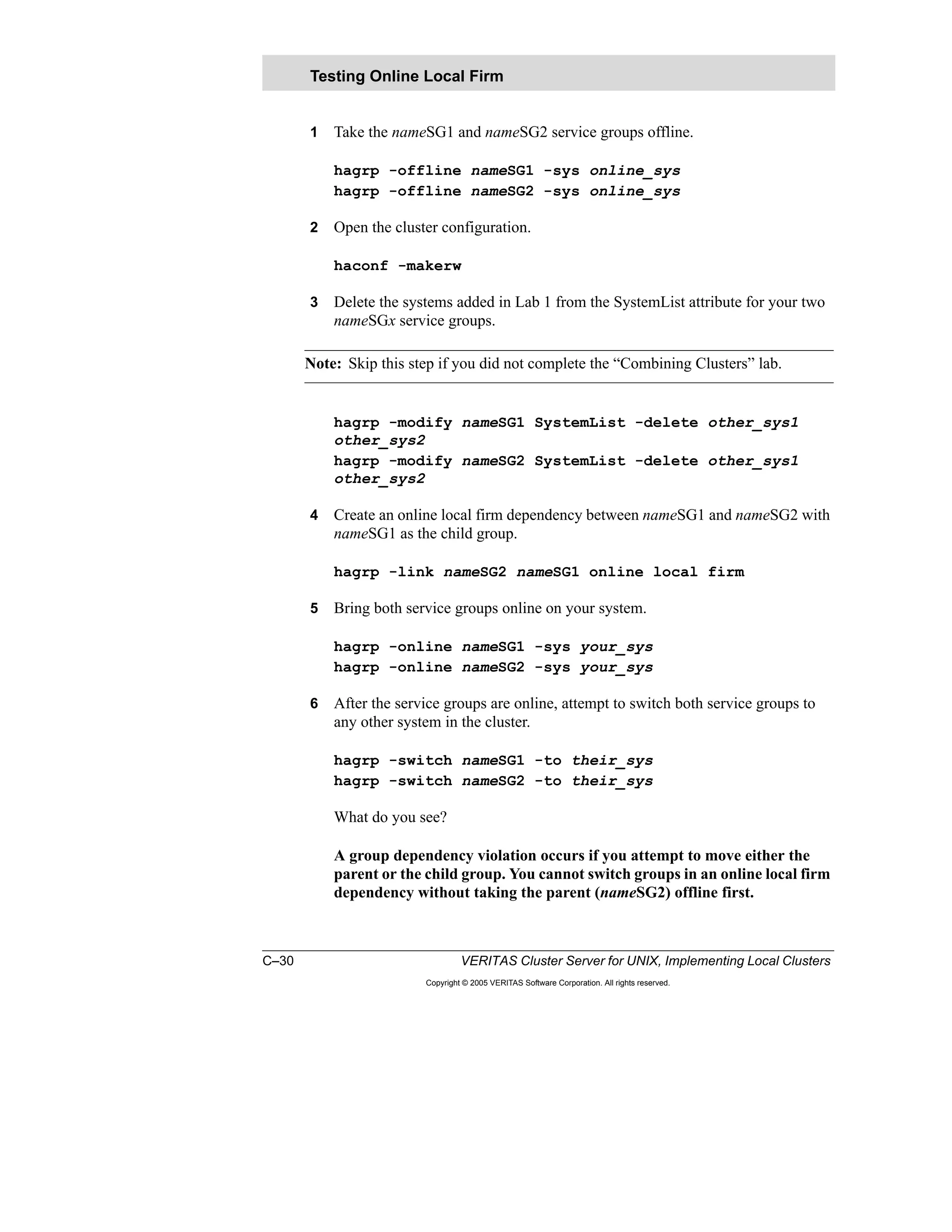
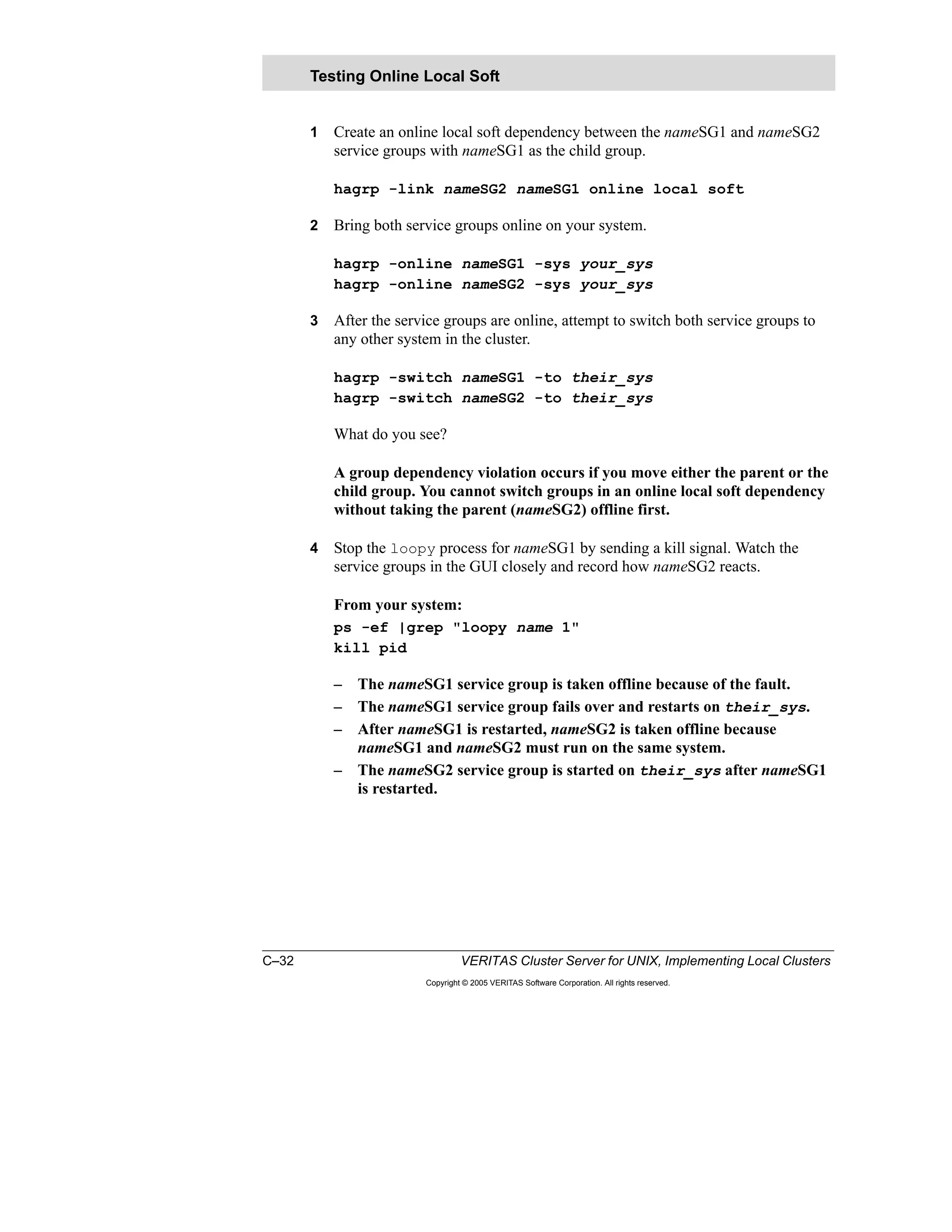
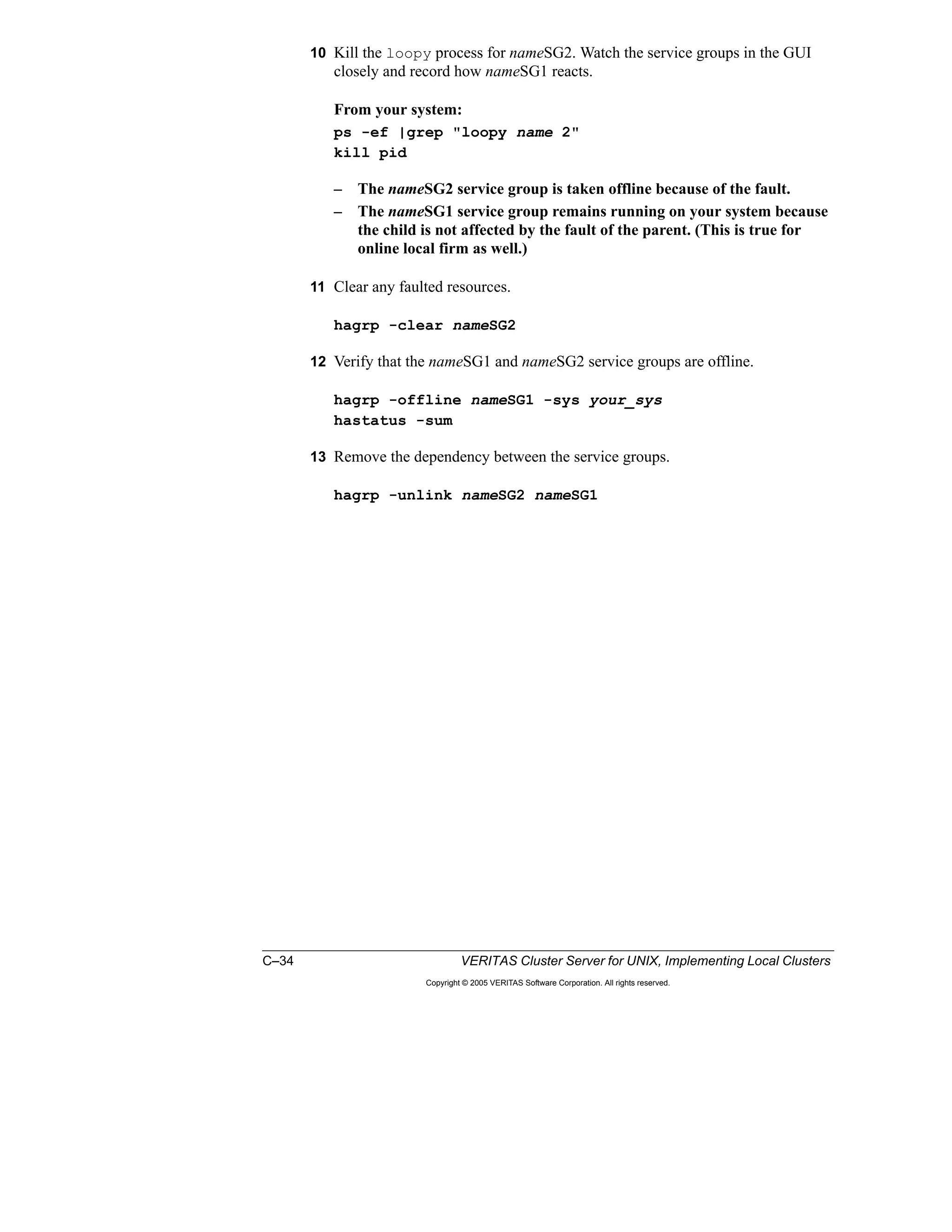
the clusters are merged. Preparing application resources may include:
› Creating user accounts
› Copying application configuration files
› Creating mount points
› Verifying shared storage access
4 Install any additional VCS Enterprise agents on each system.
Note: Enterprise agents should only be installed, not configured.
5 Copy any additional custom agents to all systems.
Note: Custom agents should only be installed, not configured.
6 Extract service group configuration from the first cluster and add it to the
second cluster configuration.
a On the first cluster, vcs1 in this example, create a main.cmd file.
hacf -cftocmd /etc/VRTSvcs/conf/config
b Edit the main.cmd file and filter the commands related with service group
configuration. Note that you do not need to have the commands related to
the ClusterService and NetworkSG service groups because these already
exist in the second cluster.
c Copy the filtered main.cmd file to a running system in the second cluster,
for example, to train3.
d On the system in the second cluster where you copied the main.cmd file,
train3 in vcs2 in this example, open the configuration.
haconf -makerw
e Execute the filtered main.cmd file.
sh main.cmd
Note: Any customized resource type attributes in the first cluster are not
included in this procedure and may require special consideration before adding
them to the second cluster configuration.
7 Copy or merge any existing trigger scripts on all systems.
Notes:
– The extent of this step depends on the contents of the trigger scripts.
Because the trigger scripts are in use on the existing cluster systems, it is
recommended to merge the scripts on a temporary directory.
– Depending on the changes required, it may be necessary to stop cluster
services on the systems before copying the merged trigger scripts.
1–44 VERITAS Cluster Server for UNIX, Implementing Local Clusters
Copyright © 2005 VERITAS Software Corporation. All rights reserved.
8 Stop cluster services (VCS, fencing, GAB, and LLT) on the systems in the first
cluster.
Note: Leave application services running on the systems.
a On one system in the first cluster (train1 in vcs1 in this example), stop
VCS.
hastop -all -force
b On all the systems in the first cluster (train1 in vcs1 in this example), stop
fencing, and then stop GAB and LLT.
/etc/init.d/vxfen stop
gabconfig -U
lltconfig -U
9 Reconfigure VCS communication modules on the systems in the first cluster
and physically connect cluster interconnects.
On all the systems in the first cluster (train1 in vcs1 in this example):
a Edit /etc/llttab and modify the cluster ID to be the same as the
second cluster.
# vi /etc/llttab
set-cluster 2
set-node train1
link interface1 /dev/interface1:0 - ether - -
link interface2 /dev/interface2:0 - ether - -
link-lowpri interface2 /dev/interface2:0 - ether - -
b Edit /etc/llthosts and ensure that there is a unique entry for all
systems in the combined cluster.
# vi /etc/llthosts
0 train4
1 train3
2 train2
3 train1
c Edit /etc/gabtab and modify the –n option to gabconfig to reflect
the total number of systems in combined clusters.
vi /etc/gabtab
/sbin/gabconfig -c -n 4
Lesson 1 Workshop: Reconfiguring Cluster Membership 1–45
Copyright © 2005 VERITAS Software Corporation. All rights reserved.
1
10 Start cluster services (LLT, GAB, fencing, and VCS) on the systems in the first
cluster and verify cluster memberships.
On train1:
lltconfig -c
gabconfig -c -n 4
gabconfig -a
The port a membership should include the node ID for train1, in addition to the
node IDs for train2, train3, and train4.
/etc/init.d/vxfen start
hastart
gabconfig -a
Both port a and port h memberships should include the node ID for train1 in
addition to the node IDs for train2, train3, and train4.
Note: You can also use LLT, GAB, and VCS startup files installed by the VCS
packages to start cluster services.
11 Update service group and resource configuration to use all the systems.
Note: Service group attributes, such as AutoStartList, SystemList,
SystemZones, and localized resource attributes, such as Device for NIC or IP
resource types, may need to be modified.
a Open the cluster configuration.
haconf -makerw
b For the service groups copied from the first cluster, add train2, train3, and
train4 to the SystemList and AutoStartList attributes:
hagrp -modify groupname SystemList -add train2 
priority2 train3 priority3 train4 priority4
hagrp -modify groupname AutoStartList add train2 
train3 train4
c For the service groups that existed in the second cluster before the merging,
add train1 to the SystemList and AutoStartList attributes:
hagrp -modify groupname SystemList -add train1 
priority1
hagrp -modify groupname AutoStartList add train1
d Close and save the cluster configuration.
haconf -dump -makero
12 Verify updates to the configuration by switching application services between
the systems in the merged cluster.
For all the systems and service groups in the merged cluster, verify operation:
hagrp –switch groupname –to systemname
1–46 VERITAS Cluster Server for UNIX, Implementing Local Clusters
Copyright © 2005 VERITAS Software Corporation. All rights reserved.
Lab Exercise: Task 3—Merging Two Running VCS Clusters
To complete the workshop, one person from each team executes the commands
discussed in the classroom to accomplish Task 3.
For detailed lab steps and solutions for the classroom lab environment, see the
following sections of Appendix A, B, or C.
“Task 3: Merging Two Running VCS Clusters,” page A-5
“Task 3: Merging Two Running VCS Clusters,” page B-13
“Task 3: Merging Two Running VCS Clusters,” page C-16
At the end of this lab exercise, you should have a four-node cluster that is up and
running with six application service groups online. All the systems should be
capable of running all the application services after Task 3 is completed.
Lab Exercise: Task 3—Merging Two Running
VCS Clusters
Complete this exercise now or at the end of the
lesson, as directed by your instructor.
One person from each team executes the
commands discussed in the classroom to
accomplish Task 3.
See Appendix A, B, or C for detailed steps and
classroom-specific information.
+
Lesson 1 Workshop: Reconfiguring Cluster Membership 1–47
Copyright © 2005 VERITAS Software Corporation. All rights reserved.
1
Summary
This workshop introduced procedures to add and remove systems to and from a
running VCS cluster and to merge two VCS clusters. In doing so, this workshop
reviewed the concepts related to how VCS operates, how the configuration
changes in VCS communications, and how the cluster configuration impacts the
application services’ availability.
Next Steps
The next lesson describes how the relationships between application services can
be controlled under VCS in a multinode and multiple application services
environment. This lesson also shows the impact of these controls during service
group failovers.
Additional Resources
• VERITAS Cluster Server Installation Guide
This guide provides information on how to install VERITAS Cluster Server
(VCS) on the specified platform.
• VERITAS Cluster Server User’s Guide
This document provides information about all aspects of VCS configuration.
Lesson Summary
Key Points
– You can minimize downtime when
reconfiguring cluster members.
– Use the procedures in this lesson as
guidelines for adding or removing cluster
systems.
Reference Materials
– VERITAS Cluster Server Installation Guide
– VERITAS Cluster Server User's Guide
1–48 VERITAS Cluster Server for UNIX, Implementing Local Clusters
Copyright © 2005 VERITAS Software Corporation. All rights reserved.
Lab 1: Reconfiguring Cluster Membership
You instructor may choose to have you complete the exercises as a single lab.
Labs and solutions for this lesson are located on the following pages.
Appendix A provides brief lab instructions for experienced students.
• “Lab 1 Synopsis: Reconfiguring Cluster Membership,” page A-2
Appendix B provides step-by-step lab instructions.
• “Lab 1 Details: Reconfiguring Cluster Membership,” page B-3
Appendix C provides complete lab instructions and solutions.
• “Lab Solution 1: Reconfiguring Cluster Membership,” page C-3
Lab 1: Reconfiguring Cluster Membership
B
A A
B B
A
D
C C
D
C
C D
C
D
B
B
C DD
1 2
3 4 3 4
4
2
2
2
1
1 3
DC
B
B
C
D
AA
Task 1
Task 2
Task 3
D
A
C AUse the lab appendix best
suited to your experience level:
Use the lab appendix best
suited to your experience level:
Appendix A: Lab Synopses
Appendix B: Lab Details
Appendix C: Lab Solutions
Appendix A: Lab Synopses
Appendix B: Lab Details
Appendix C: Lab Solutions
Lesson 2
Service Group Interactions
2–2 VERITAS Cluster Server for UNIX, Implementing Local Clusters
Copyright © 2005 VERITAS Software Corporation. All rights reserved.
Introduction
Overview
This lesson describes how to configure VCS to control the interactions between
application services. In this lesson, you learn how to implement service group
dependencies and use resources and triggers to control the startup and failover
behavior of service groups.
Importance
In order to effectively implement dependencies between applications in your
cluster, you need to use a methodology for translating application requirements to
VCS service group dependency rules. By analyzing and implementing service
group dependencies, you can factor performance, security, and organizational
requirements into your cluster environment.
Lesson Introduction
Lesson 1: Reconfiguring Cluster Membership
Lesson 2: Service Group Interactions
Lesson 3: Workload Management
Lesson 4: Storage and Network Alternatives
Lesson 5: Maintaining VCS
Lesson 6: Validating VCS Implementation
Lesson 2 Service Group Interactions 2–3
Copyright © 2005 VERITAS Software Corporation. All rights reserved.
2
Outline of Topics
• Common Application Relationships
• Service Group Dependency Definition
• Service Group Dependency Examples
• Configuring Service Group Dependencies
• Alternative Methods of Controlling Interactions
Configure alternative methods for
controlling service group interactions.
Alternative Methods of
Controlling Interactions
Configure service group dependencies.Configuring Service
Group Dependencies
Describe example uses of service
group dependencies.
Service Group
Dependency Examples
Define service group dependencies.Service Group
Dependency Definition
Describe common example application
relationships.
Common Application
Relationships
After completing this lesson, you
will be able to:
Topic
Lesson Topics and Objectives
2–4 VERITAS Cluster Server for UNIX, Implementing Local Clusters
Copyright © 2005 VERITAS Software Corporation. All rights reserved.
Common Application Relationships
Several examples of application relationships are shown to illustrate common
scenarios where service group dependencies are useful for managing services.
Online on the Same System
In this type of relationship, services must run on the same system due to some set
of constraints. In the example in the slide, App1 and DB1 communicate using
shared memory and therefore must run on the same system. If a fault occurs, they
must both be moved to the same system.
Online on the Same System
Example criteria:
App1 uses shared
memory to communicate
with DB1.
Both must be online on
the same system to
provide the service.
DB1 must come online
first.
If either faults (or the
system), they must fail
over to the same system.
App1App1
DB1DB1
Lesson 2 Service Group Interactions 2–5
Copyright © 2005 VERITAS Software Corporation. All rights reserved.
2
Online Anywhere in the Cluster
This example shows an application and database that must be running somewhere
in the cluster in order to provide a service. They do not need to run on the same
system, but they can, if necessary. For example, if multiple servers were down,
DB2 and App2 could run on the remaining server.
Online Anywhere in the Cluster
Example criteria:
App2 communicates with
DB2 using TCP/IP.
Both must be online to
provide the service.
They do not have to be
online on the same
system.
DB2 must be running
before App2 starts.
App2App2
DB2DB2
2–6 VERITAS Cluster Server for UNIX, Implementing Local Clusters
Copyright © 2005 VERITAS Software Corporation. All rights reserved.
Online on Different Systems
In this example, both the database and the Web server must be online, but they
cannot run on the same system. For example, the combined resource requirements
of each application may exceed the capacity of the systems, and you want to
ensure that they run on separate systems.
WebWeb
DB3DB3
Online on Different Systems
Example criteria:
The Web server requires
DB3 to be online first.
Both must be online to
provide the service.
The Web and DB3 cannot
run on the same system,
due to system usage
constraints.
If Web faults, DB3 should
continue to run.
Lesson 2 Service Group Interactions 2–7
Copyright © 2005 VERITAS Software Corporation. All rights reserved.
2
Offline on the Same System
One example relationship is where you have a test version of an application and
want to ensure that it does not interfere with the production version. You want to
give the production application precedence over the test version for all operations,
including manual offline, online, switch, and failover.
Offline on the Same System
Example criteria:
One node is used for a
test version of the
service.
Test and Prod cannot be
online on the same
system.
Prod always has priority.
Test should be shut down
if Prod faults and needs
to fail over to that system.
TestTest
ProdProd
2–8 VERITAS Cluster Server for UNIX, Implementing Local Clusters
Copyright © 2005 VERITAS Software Corporation. All rights reserved.
Service Group Dependency Definition
You can set up dependencies between service groups to enforce rules for how VCS
manages relationships between application services.
There are four basic criteria for defining how services interact when using service
group dependencies.
• A service group can require another group to be online or offline in order to
start and run.
• You can specify where the groups must be online or offline.
• You can determine the startup order for service groups by designating one
group the child (comes online first) and another a parent. In VCS, parent
groups depend on child groups. If service group B requires service group A to
be online in order to start then B is the parent and A is the child.
• Failover behavior of linked service groups is specified by designating the
relationship soft, firm, or hard. These types determine what happens when a
fault occurs in the parent or child group.
Startup Behavior Summary
For all online dependencies, the child group must be online in order for the parent
to start. A location of local, global, or remote determines where the parent can
come online relative to where the child is online.
For offline local, the child group must be offline on the local system for the parent
to come online.
Service Group Dependencies
You can use service group dependencies to specify
most application relationships according to these four
criteria:
– Category: Online or offline
– Location: Local, remote, or global
– Startup behavior: Parent or child
– Failover behavior: Soft, firm, or hard
You can specify combinations of these characteristics
to determine how dependencies affect service group
behavior, as shown in a series of examples in this
lesson.
Lesson 2 Service Group Interactions 2–9
Copyright © 2005 VERITAS Software Corporation. All rights reserved.
2
Failover Behavior Summary
These general properties apply to failover behavior for linked service groups:
• Target systems are determined by the system list of the service group and the
failover policy in a way that should not conflict with the existing service group
dependencies.
• If a target system exists, but there is a dependency violation between the
service group and a parent service group, the parent service group is migrated
to another system to accommodate the child service group that is failing over.
• If conflicts between a child service group and a parent service group arise, the
child service group is given priority.
• If there is no system available for failover, the service group remains offline,
and no further attempt is made to bring it online.
• If the parent service group faults and fails over, the child service group is not
taken offline or failed over except for online local hard dependencies.
Examples are provided in the next section. A complete description of both failover
behavior and manual operations for each type of dependency is provided in the job
aid.
Failover Behavior Summary
Types apply to online dependencies and define online,
offline, and failover operations:
Soft:
The parent can stay online when the child faults.
Firm:
– The parent must be taken offline when the child faults.
– When the child is brought online on another system,
the parent is brought online.
Hard:
– The child and parent fail over together to the same
system when either the child or the parent faults.
– Hard applies only to an online local dependency.
– This is allowed only between a single parent and a
single child.
2–10 VERITAS Cluster Server for UNIX, Implementing Local Clusters
Copyright © 2005 VERITAS Software Corporation. All rights reserved.
Service Group Dependency Examples
A set of animations are used to show how service group dependencies affect
failover when different kinds of faults occur.
The following sections provide illustrations and summaries of these examples. A
complete description of startup and failover behavior for each type of dependency
is provided as a job aid in Appendix D.
Online Local Dependency
In an online local dependency, a child service group must be online on a system
before a parent service group can come online on the same system.
Online Local Soft
A link configured as online local soft designates that the parent group stays online
while the child group fails over, and then migrates to follow the child.
• Online Local Soft: The child faults.
Failover behavior examples:
Firm:
– Child faults: Parent follows
child
– Parent faults: Child
continues to run
Hard: Same as Firm except
when parent faults:
– Child is failed over
– Parent then started on the
same system
Online Local Dependency
App1App1
DB1DB1
Startup behavior:
Child must be online
Parent can come online on
only on the same system
AnimationSlides
Lesson 2 Service Group Interactions 2–11
Copyright © 2005 VERITAS Software Corporation. All rights reserved.
2
If a child group in an online local soft dependency faults, the parent service
group is migrated to another system only after the child group successfully
fails over to that system. If the child group cannot fail over, the parent group is
left online.
• Online Local Soft: The parent faults.
If the parent group in an online local soft dependency faults, it stays offline,
and the child group remains online.
Online Local Firm
A link configured as online local firm designates that the parent group is taken
offline when the child group faults. After the child group fails over, the parent is
migrated to that system.
• Online Local Firm: The child faults.
If a child group in an online local firm dependency faults, the parent service
group is taken offline on that system. The child group fails over and comes
online on another system. The parent group is then started on the system where
the child group is now running. If the child group cannot fail over, the parent
group is taken offline and stays offline.
2–12 VERITAS Cluster Server for UNIX, Implementing Local Clusters
Copyright © 2005 VERITAS Software Corporation. All rights reserved.
• Online Local Firm: The parent faults.
If a parent group in an online local firm dependency faults, the parent service
group is taken offline and stays offline.
• Online Local Firm: The system faults.
If a system faults, the child group in an online local firm dependency fails over
to another system, and the parent is brought online on the same system.
Lesson 2 Service Group Interactions 2–13
Copyright © 2005 VERITAS Software Corporation. All rights reserved.
2
Online Local Hard
Starting with VCS 4.0, online local dependencies can also be formed as hard
dependencies. A hard dependency indicates that the child and the parent service
groups fail over together to the same system when either the child or the parent
faults. Prior to VCS 4.0, trigger scripts had to be used to cause a fault in the parent
service group to initiate a failover of the child service group. With the introduction
of hard dependencies, there is no longer a need to use triggers for this purpose.
Hard dependencies are allowed only between a single parent and a single child.
• Online Local Hard: The child faults.
If the child group in an online local hard dependency faults, the parent group is
taken offline. The child is failed over to an available system. The parent group
is then started on the system where the child group is running. The parent
service group remains offline if the parent service group cannot fail over.
• Online Local Hard: The parent faults.
If the parent service group in an online local hard dependency faults, the child
group is failed over to another system. The parent group is then started on the
system where the child group is running. The child service group remains
online if the parent service group cannot fail over.
2–14 VERITAS Cluster Server for UNIX, Implementing Local Clusters
Copyright © 2005 VERITAS Software Corporation. All rights reserved.
Online Global Dependency
In an online global dependency, a child service group must be online on a system
before the parent service group can come online on any system in the cluster,
including the system where the child is running.
Online Global Soft
A link configured as online global soft designates that the parent service group
remains online when the child service group faults. The issue of whether the child
service group can fail over to another system or not does not impact the parent
service group.
• Online Global Soft: The child faults.
If the child group in an online global soft dependency faults, the parent
continues to run on the original system, and the child fails over to an available
system.
• Online Global Soft: The parent faults.
If the parent group in an online global soft dependency faults, the child
continues to run on the original system, and the parent fails over to an available
system.
App2App2
DB3DB3
Online Global Dependency
Failover behavior example for
online global firm:
Child faults and is taken offline
Parent group is taken offline
Child fails over to an available
system
Parent restarts on an available
system
Startup behavior:
Child must be online
Parent can come online on any
system
AnimationSlides
Lesson 2 Service Group Interactions 2–15
Copyright © 2005 VERITAS Software Corporation. All rights reserved.
2
Online Global Firm
A link configured as online global firm designates that the parent service group is
taken offline when the child service group faults. When the child service group
fails over to another system, the parent is migrated to an available system. The
child and parent can be running on the same or different systems after the failover.
• Online Global Firm: The child faults.
The child faults and is taken offline. The parent group is taken offline. The
child fails over to an available system, and the parent fails over to an available
system.
• Online Global Firm: The parent faults.
If the parent group in an online global firm dependency faults, the child
continues to run on the original system, and the parent fails over to an available
system.
2–16 VERITAS Cluster Server for UNIX, Implementing Local Clusters
Copyright © 2005 VERITAS Software Corporation. All rights reserved.
Online Remote Dependency
In an online remote dependency, a child service group must be online on a remote
system before the parent service group can come online on the local system.
Online Remote Soft
An online remote soft dependency designates that the parent service group remains
online when the child service group faults, as long as the child service group
chooses another system to fail over to. If the child service group chooses to fail
over to the system where the parent was online, the parent service group is
migrated to any other available system.
WebWeb
DB3DB3
Online Remote Dependency
Startup behavior:
Child must be online
Parent can come online only
on a remote system
Failover behavior example for
online remote soft:
The child faults and fails over
to an available system.
If the only available system is
where the parent is online, the
parent is taken offline before
the child is brought online.
The parent then restarts on a
system different than the child.
Otherwise, the parent
continues to run on the
original system.
AnimationSlides
Lesson 2 Service Group Interactions 2–17
Copyright © 2005 VERITAS Software Corporation. All rights reserved.
2
• Online Remote Soft: The child faults.
The child group faults and fails over to an available system. If the only
available system has the parent running, the parent is taken offline before the
child is brought online. The parent then restarts on a different system. If the
parent is online on a system that is not selected for child group failover, the
parent continues to run on the original system.
• Online Remote Soft: The parent faults.
The parent group faults and is taken offline. The child group continues to run
on the original system. The parent group fails over to an available system. If
the only available system is running the child group, the parent stays offline.
Online Remote Firm
A link configured as online remote firm is similar to online global firm, with the
exception that the parent service group is brought online on any system other than
the system on which the child service group was brought online.
• Online Remote Firm: The child faults.
The child group faults and is taken offline. The parent group is taken offline.
The child fails over to an available system. If the child fails over to the system
where the parent was online, the parent restarts on a different system;
otherwise, the parent restarts on the system where it was online.
• Online Remote Firm: The parent faults.
The parent group faults and is taken offline. The child group continues to run
on the original system. The parent fails over to an available system. If the only
available system is where the child is online, the parent stays offline.
2–18 VERITAS Cluster Server for UNIX, Implementing Local Clusters
Copyright © 2005 VERITAS Software Corporation. All rights reserved.
Offline Local Dependency
In an offline local dependency, the parent service group can be started only if the
child service group is offline on the local system. Similarly, the child can only be
started if the parent is offline on the local system. This prevents conflicting
applications from running on the same system.
• Offline Local Dependency: The child faults.
The child group faults and fails over to an available system. If the only
available system is where the parent is online, the parent is taken offline before
the child is brought online. The parent then restarts on a system different than
the child’s system. Otherwise, the parent continues to run on the original
system.
• Offline Local Dependency: The parent faults.
The parent faults and is taken offline. The child continues to run on the original
system. The parent fails over to an available system where the child is offline.
If the only available system has the child is online, the parent stays offline.
Offline Local Dependency
TestTest
ProdProd
Startup behavior:
Child can come online anywhere
the parent is offline
Parent can come online only
where child is offline
Failover behavior example
when the child faults:
The child fails over to an
available system.
If the only available system is
where the parent is online, the
parent is taken offline before
the child is brought online.
The parent then restarts on a
system different than the child;
otherwise, the parent
continues to run.
AnimationSlides
Lesson 2 Service Group Interactions 2–19
Copyright © 2005 VERITAS Software Corporation. All rights reserved.
2
Configuring Service Group Dependencies
Service Group Dependency Rules
You can use service group dependencies to implement parent/child relationships
between applications. Before using service group dependencies to implement the
relationships between multiple application services, you need to have a good
understanding of the rules governing these dependencies:
• Service groups can have multiple parent service groups.
This means that an application service can have multiple other application
services depending on it.
• A service group can have only one child service group.
This means that an application service can be dependent on only one other
application service.
• A group dependency tree can be no more than three levels deep.
• Service groups cannot have cyclical dependencies.
Service Group Dependency Rules
These rules determine how you
specify dependencies:
Child has priority
Multiple parents
Only one child
Maximum of
three levels
No cyclical dependencies
2–20 VERITAS Cluster Server for UNIX, Implementing Local Clusters
Copyright © 2005 VERITAS Software Corporation. All rights reserved.
Creating Service Group Dependencies
You can create service group dependencies from the command-line interface using
the hagrp command or through the Cluster Manager. To create a dependency,
link the groups and specify the relationship (dependency) type, indicating whether
it is soft, firm, or hard.
If not specified, service group dependencies are firm by default.
To configure service group dependencies using the Cluster Manager, you can
either right-click the parent service group and select Link to display the Link
Service Groups view that is shown on the slide, or you can use the Service Group
View.
Removing Service Group Dependencies
You can remove service group dependencies from the command-line interface
(CLI) or the Cluster Manager. You do not need to specify the type of dependency
while removing it, because only one dependency is allowed between two service
groups.
Creating Service Group Dependencies
hagrp –link Parent Child online local firmhagrp –link Parent Child online local firm
Group G1 (
…
)
…
requires group G2 online local firm
…
Group G1 (
…
)
…
requires group G2 online local firm
…
main.cfmain.cf
Resource dependencies
Resource definitions
Service group attributes
Lesson 2 Service Group Interactions 2–21
Copyright © 2005 VERITAS Software Corporation. All rights reserved.
2
Alternative Methods of Controlling Interactions
Limitations of Service Group Dependencies
The example scenario described in the slide cannot be implemented using only
service group dependencies. You cannot create a link from the application service
group to the NFS service group if you have a link from the application service to
the database, because a parent service group can only have one child.
When service group dependency rules prevent you from implementing the types of
dependencies that you require in your cluster environment, you can use resources
or triggers to define relationships between service groups.
Limitations of Service Group Dependencies
Consider these requirements:
These services need to be
online at the same time:
– App needs DB to be online.
– Web needs NFS to be online.
These services should not be
online on the same system at
the same time:
– Application and database
– Application and NFS service
NFSDB
App Web
Online
Global
Offline
Local
Online
Remote
The App service group cannot have
two child service groups.
The App service group cannot have
two child service groups.!
2–22 VERITAS Cluster Server for UNIX, Implementing Local Clusters
Copyright © 2005 VERITAS Software Corporation. All rights reserved.
Using Resources to Control Service Group Interactions
Another method for controlling the interactions between service groups is to
configure special resources that indicate whether the service group is online or
offline on a system.
VCS provides several resource types, such as FileOnOff and ElifNone, that can be
used to create dependencies.
This example demonstrates how resources can be used to prevent service groups
from coming online on the same system:
• S1 has a service group, App, which contains an ElifNone resource. An
ElifNone resource is considered online only if the specified file is absent. In
this case, the ElifNone resource is online only if /tmp/NFSon does not exist.
• S2 has a service group, NFS, which contains a FileOnOff resource. This
resource creates the /tmp/NFSon file when it is brought online.
• Both the ElifNone and FileOnOff resources are critical, and all other resources
in the respective service groups are dependent on them. If the resources fault,
the service group fails over.
When operating on different systems, each service group can be online at the same
time, because these resources have no interactions.
Using Resources to Control Service Group
Interactions
S1 S2
R3
R4
FileOnOff
/tmp /tmp
NFSon
R1
R2
ElifNone
App App
NFSNFS
ElifNone
X
ElifNone
Lesson 2 Service Group Interactions 2–23
Copyright © 2005 VERITAS Software Corporation. All rights reserved.
2
If NFS fails over to S1, /tmp/NFSon is created on S1 when the FileOnOff
resource is brought online.
The ElifNone resource faults when it detects the presence of /tmp/NFSon.
Because this resource is critical and all other resources are parent (dependent)
resources, App is taken offline.
Make the MonitorInterval and the OfflineMonitorInterval short (about five to ten
seconds) for the ElifNone resource type. This enables the parent service group to
fail over to the empty system in a timely manner. The fault is cleared on the
ElifNone resource when it is monitored, because this is a persistent resource.
Faulted resources are monitored periodically according to the value of the
OfflineMonitorInterval attribute.
Example of Offline Local Dependency Using
Resources
S1 S2
R3
R4
FileOnOff
/tmp /tmp
NFSon
App App
NFS
NFS
R1
R2
ElifNone
App
ElifNone
ElifNone
X
2–24 VERITAS Cluster Server for UNIX, Implementing Local Clusters
Copyright © 2005 VERITAS Software Corporation. All rights reserved.
Using Triggers to Control Service Group Interactions
VCS provides several event triggers that can be used to enforce service group
relationships, including:
• PreOnline: VCS runs the preonline script before bringing a service group
online.
The PreOnline trigger must be enabled for each applicable service group by
setting the PreOnline service group attribute. For example, to enable the
PreOnline trigger for GroupA, type:
hagrp -modify GroupB PreOnline 1
• PostOnline: The postonline script is run after a service group is brought
online.
• PostOffline: The postoffline script is run after a service group is taken
offline.
PostOnline and PostOffline are enabled automatically if the script is present in the
$VCS_HOME/bin/triggers directory. Be sure to copy triggers to all systems
in the cluster. When present, these triggers apply to all service groups.
Consider implementing triggers only after investigating whether VCS native
facilities can be used to configure the desired behavior. Triggers add complexity,
requiring programming skills as opposed to simply configuring VCS objects and
attributes.
Using Triggers to Control Service Group
Interactions
PreOnline
Runs the preonline script before bringing the
service group online
PostOnline
Runs the postonline script after bringing a
service group online
PostOffline
Runs the postoffline script after taking a
service group offline
Lesson 2 Service Group Interactions 2–25
Copyright © 2005 VERITAS Software Corporation. All rights reserved.
2
Summary
This lesson covered service group dependencies. In this lesson, you learned how to
translate business rules to VCS service group dependency rules. You also learned
how to implement service group dependencies with resources and triggers.
Next Steps
The next lesson introduces failover policies and discusses how VCS chooses a
failover target.
Additional Resources
• VERITAS Cluster Server User’s Guide
This document describes VCS service group dependency types and rules. This
guide also provides detailed descriptions of resources and triggers, in addition
to information about service groups and failover behavior.
• Appendix D, “Job Aids”
This appendix includes a table containing a complete description of service
group behavior for each dependency case.
Lesson Summary
Key Points
– You can use service group dependencies to
control interactions among applications.
– You can also use triggers and specialized
resources to manage application relationships.
Reference Materials
– VERITAS Cluster Server User's Guide
– Appendix D, "Job Aids"
2–26 VERITAS Cluster Server for UNIX, Implementing Local Clusters
Copyright © 2005 VERITAS Software Corporation. All rights reserved.
Lab 2: Service Group Dependencies
Labs and solutions for this lesson are located on the following pages.
Appendix A provides brief lab instructions for experienced students.
• “Lab 2 Synopsis: Service Group Dependencies,” page A-7
Appendix B provides step-by-step lab instructions.
• “Lab 2 Details: Service Group Dependencies,” page B-17
Appendix C provides complete lab instructions and solutions.
• “Lab 2 Solution: Service Group Dependencies,” page C-25
Goal
The purpose of this lab is to configure service group dependencies and observe the
effects on manual and failover operations.
Results
Each student’s service groups have been configured in a series of service group
dependencies. After completing the testing, the dependencies are removed, and
each student’s service groups should be running on their own system.
Prerequisites
Obtain any classroom-specific values needed for your classroom lab environment
and record these values in your design worksheet included with the lab exercise
instructions.
Lab 2: Service Group Dependencies
ParentParent
ChildChild
Online
Local
Online
Local
Online
Global
Online
Global
Offline
Local
Offline
Local
nameSG2
nameSG1
Appendix A: Lab Synopses
Appendix B: Lab Details
Appendix C: Lab Solutions
Appendix A: Lab Synopses
Appendix B: Lab Details
Appendix C: Lab Solutions
Lesson 3
Workload Management
3–2 VERITAS Cluster Server for UNIX, Implementing Local Clusters
Copyright © 2005 VERITAS Software Corporation. All rights reserved.
Introduction
Overview
This lesson describes in detail the Service Group Workload Management (SGWM)
feature used for choosing a system to run a service group both at startup and during
a failover. SGWM enables system administrators to control where the service
groups are started in a multinode cluster environment.
Importance
Understanding and controlling how VCS chooses a system to start up a service
group and select a failover target when it detects a fault is crucial in designing and
configuring multinode clusters with multiple application services.
Lesson Introduction
Lesson 1: Reconfiguring Cluster Membership
Lesson 2: Service Group Interactions
Lesson 3: Workload Management
Lesson 4: Storage and Network Alternatives
Lesson 5: Maintaining VCS
Lesson 6: Validating VCS Implementation
Lesson 3 Workload Management 3–3
Copyright © 2005 VERITAS Software Corporation. All rights reserved.
3
Outline of Topics
• Startup Rules and Policies
• Failover Rules and Policies
• Controlling Overloaded Systems
• Additional Startup and Failover Controls
• Configuring Startup and Failover Policies
• Using the Simulator
Apply additional controls for startup
and failover.
Additional Startup and
Failover Controls
Use the Simulator to model workload
management.
Using the Simulator
Configure startup and failover policies.Configuring Startup and
Failover Policies
Configure policies to control
overloaded systems.
Controlling Overloaded
Systems
Describe the rules and policies for
service group failover.
Failover Rules and
Policies
Describe the rules and policies for
service group startup.
Startup Rules and Policies
After completing this lesson, you
will be able to:
Topic
Lesson Topics and Objectives
3–4 VERITAS Cluster Server for UNIX, Implementing Local Clusters
Copyright © 2005 VERITAS Software Corporation. All rights reserved.
Startup Rules and Policies
Rules for Automatic Service Group Startup
The following conditions should be satisfied for a service group to be
automatically started:
• The service group AutoStart attribute must be set to the default value of 1. If
this attribute is changed to 0, VCS leaves the service group offline and waits
for an administrative command to be issued to bring the service group online.
• The service group definition must have at least one system in its AutoStartList
attribute.
• All of the systems in the service group’s SystemList must be in RUNNING
state so that the service group can be probed on all systems on which it can run.
If there are systems on which the service group can run that have not joined the
cluster yet, VCS autodisables the service group until it is probed on all the
systems.
The startup system for the service group is chosen as follows:
1 A subset of systems included in the AutoStartList attribute are selected.
a Frozen systems are eliminated.
b Systems where the service group has a FAULTED status are eliminated.
c Systems that do not meet the service group requirements are eliminated, as
described in detail later in the lesson.
2 The target system is chosen from this list based on the startup policy defined
for the service group.
Rules for Automatic Service Group Startup
The service group must have its AutoStart attribute
set to 1 (default value).
The service group must have a nonempty
AutoStartList attribute consisting of the systems
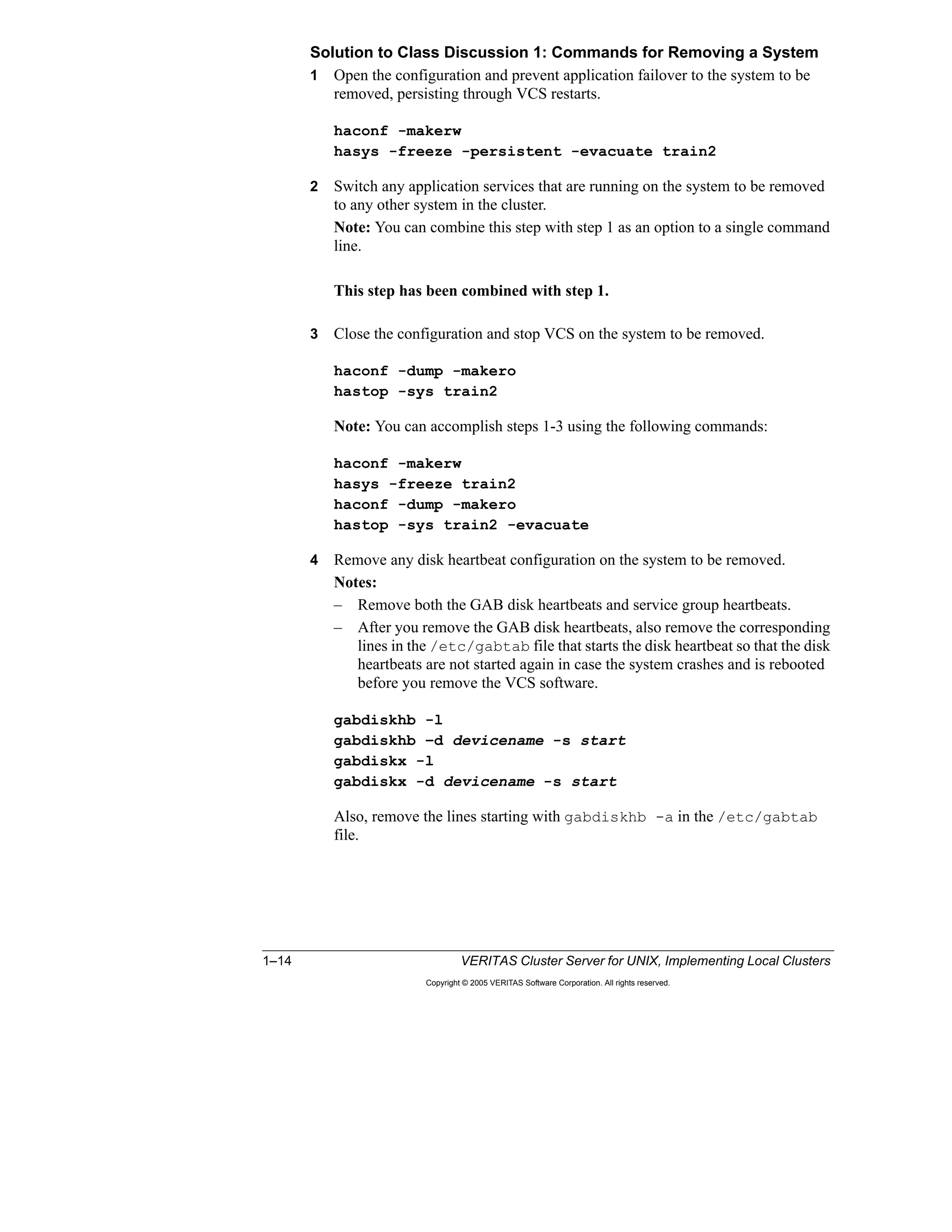
where it can be started.
All the systems that the service group can run on
must be up and running.
The startup system is selected as follows:
– A subset of systems that meet the service group
requirements from among the systems in the AutoStartList
is created first (described later in detail).
– Frozen systems and systems where the service group has a
FAULTED status are eliminated from the list.
– The target system is selected based on the startup policy of
the service group.
Lesson 3 Workload Management 3–5
Copyright © 2005 VERITAS Software Corporation. All rights reserved.
3
Automatic Startup Policies
You can set the AutoStartPolicy attribute of a service group to one of these three
values:
• Order: Systems are chosen in the order in which they are defined in the
AutoStartList attribute. This is the default policy for every service group.
• Priority: The system with the lowest priority number in SystemList is selected.
Note that this system should also be listed in AutoStartList.
• Load: The system with the highest available capacity is selected.
These policies are described in more detail in the following pages.
To configure the AutoStartPolicy attribute of a service group, execute:
hagrp -modify groupname AutoStartPolicy policy
where possible values for policy are Order, Priority, and Load. You can
also set this attribute using the Cluster Manager GUI.
Note: The configuration must be open to change service group attributes.
Automatic Startup Policies
The AutoStartPolicy attribute specifies how a
target system is selected:
– Order: The first available system according to the
order in AutoStartList is selected (default).
– Priority: The system with the lowest priority
number in SystemList is selected.
– Load: The system with the greatest available
capacity is selected.
Example configuration:
hagrp –modify groupname AutoStartPolicy Load
Detailed examples are provided on the next set of
pages.
3–6 VERITAS Cluster Server for UNIX, Implementing Local Clusters
Copyright © 2005 VERITAS Software Corporation. All rights reserved.
AutoStartPolicy=Order
When the AutoStartPolicy attribute of a service group is set to the default value of
Order, the first system available in AutoStartList is selected to bring the service
group online. The priority numbers in SystemList are ignored.
In the example shown on the slide, the AP1 service group is brought online on
SVR1, although it is the system with the highest priority number in SystemList.
Similarly, the AP2 service group is brought online on SVR2, and the DB service
group is brought online on SVR3 because these are the first systems listed in the
AutoStartList attributes of the corresponding service groups.
Note: Because Order is the default value for the AutoStartPolicy attribute, it is not
required to be listed in the service group definitions in the main.cf file.
AutoStartPolicy=Order
The first available system in
AutoStartList is selected.
The first available system in
AutoStartList is selected.
Animation
Lesson 3 Workload Management 3–7
Copyright © 2005 VERITAS Software Corporation. All rights reserved.
3
AutoStartPolicy=Priority
When the AutoStartPolicy attribute of a service group is set to Priority, the system
with the lowest priority number in the SystemList that also appears in the
AutoStartList is selected as the target system during start-up. In this case, the order
of systems in the AutoStartList is ignored.
The same example service groups are now modified to use the Priority
AutoStartPolicy, as shown on the slide. In this example, the AP1 service group is
brought online on SVR3, which has the lowest priority number in SystemList,
although it appears as the last system in AutoStartList. Similarly, the AP2 service
group is brought online on SVR1 (with priority number 0), and the DB service
group is brought online on SVR2 (with priority number 1).
Note how the startup systems have changed for the service groups by changing
AutoStartPolicy, although the SystemList and AutoStartList attributes are the same
for these two examples.
AutoStartPolicy=Priority
The lowest-numbered
system in SystemList is
selected.
The lowest-numbered
system in SystemList is
selected.
Animation
3–8 VERITAS Cluster Server for UNIX, Implementing Local Clusters
Copyright © 2005 VERITAS Software Corporation. All rights reserved.
AutoStartPolicy=Load
When AutoStartPolicy is set to Load, VCS determines the target system based on
the existing workload of each system listed in the AutoStartList attribute and the
load that is added by the service group.
These attributes control load-based start-up:
• Capacity is a user-defined system attribute that contains a value representing
the total amount of load that the system can handle.
• Load is a user-defined service group attribute that defines the amount of
capacity required to run the service group.
• AvailableCapacity is a system attribute maintained by VCS that quantifies the
remaining available system load.
In the example displayed on the slide, the design criteria specifies that three
servers have Capacity set to 300. SRV1 is selected as the target system for starting
SG4 because it has the highest AvailableCapacity value of 200.
Determine Load and Capacity
You must determine a value for Load for each service group. This value is based
on how much of the system capacity is required to run the application service that
is managed by the service group.
When a service group is brought online, the value of its Load attribute is subtracted
from the system Capacity value, and AvailableCapacity is updated to reflect the
difference.
AutoStartPolicy=Load
The system with
the greatest
AvailableCapacity
value is selected.
The system with
the greatest
AvailableCapacity
value is selected.
Animation
Lesson 3 Workload Management 3–9
Copyright © 2005 VERITAS Software Corporation. All rights reserved.
3
Note: Both the Capacity attribute of a system and the Load attribute of a service
group are static user-defined attributes based on your design criteria.
How a Service Group Starts Up
When the cluster initially starts up, the following events take place with service
groups using Load AutoStartPolicy:
1 Service groups are placed in an AutoStart queue in the order that probing is
completed for each service group. Decisions for each service group are made
serially, but the actual startup of service groups takes place in parallel.
2 For each service group in the AutoStart queue, VCS selects a subset of
potential systems from the AutoStartList, as follows:
a Frozen systems are eliminated.
b Systems where the service group has a FAULTED status are eliminated.
c Systems that do not meet the service group requirements are eliminated.
This topic is explained in detail later in the lesson.
3 From this list, the target system with the highest value for AvailableCapacity is
chosen. If there are multiple systems with the same AvailableCapacity, the first
one canonically is selected.
4 VCS then recalculates the new AvailableCapacity value for that target system
by subtracting the Load of the service group from the system’s current
AvailableCapacity value before proceeding with other service groups in the
queue.
Note: In the case that no system has a high enough AvailableCapacity value for a
service group load, the service group is still started on the system with the highest
value for AvailableCapacity, even if the resulting AvailableCapacity value is zero
or a negative number.
3–10 VERITAS Cluster Server for UNIX, Implementing Local Clusters
Copyright © 2005 VERITAS Software Corporation. All rights reserved.
Failover Rules and Policies
Rules for Automatic Service Group Failover
The following conditions must be satisfied for a service group to be automatically
failed over after a fault:
• The service group must contain a critical resource, and that resource must fault
or be a parent of a faulted resource.
• The service group AutoFailOver attribute must be set to the default value of 1.
If this attribute is changed to 0, VCS leaves the service group offline and waits
for an administrative command to be issued to bring the service group online.
• The service group cannot be frozen.
• At least one of the systems in the service group’s SystemList attribute must be
in RUNNING state.
The failover system for the service group is chosen as follows:
• A subset of systems included in the SystemList attribute are selected.
• Frozen systems are eliminated and systems where the service group has a
FAULTED status are eliminated.
• Systems that do not meet the service group requirements are eliminated, as
described in detail later in the lesson.
• The target system is chosen from this list based on the failover policy defined
for the service group.
Rules for Automatic Service Group Failover
The service group must have a critical resource.
The service group AutoFailOver attribute must be set to
1, and ManageFaults must be set to All (default values).
The service group cannot be frozen.
At least one system in the service group’s SystemList
attribute must be up and running.
The failover system is selected as follows:
– A subset of systems that meet the service group
requirements from among the systems in the SystemList is
created first (described later in detail).
– Frozen systems and systems where the service group has a
FAULTED status are eliminated from the list.
– Systems that do not meeting service group requirements
are eliminated.
– The target system is selected based on the failover policy of
the service group.
Lesson 3 Workload Management 3–11
Copyright © 2005 VERITAS Software Corporation. All rights reserved.
3
Failover Policies
VCS supports a variety of policies that determine how a system is selected when
service groups must migrate due to faults. The policy is configured by setting the
FailOverPolicy attribute to one of these values:
• Priority: The system with the lowest priority number is preferred for failover
(default).
• RoundRobin: The system with the least number of active service groups is
selected for failover.
• Load: The system with the highest value of the AvailableCapacity system
attribute is selected for failover.
Policies are discussed in more detail in the following pages.
Failover Policies
The FailOverPolicy attribute specifies how a
target system is selected:
– Priority: The system with the lowest priority
number in the list is selected (default).
– RoundRobin: The system with the least
number of active service groups is selected.
– Load: The system with greatest available
capacity is selected.
Example configuration:
hagrp –modify groupname FailOverPolicy Load
Detailed examples are provided on the next set of
pages.
3–12 VERITAS Cluster Server for UNIX, Implementing Local Clusters
Copyright © 2005 VERITAS Software Corporation. All rights reserved.
FailOverPolicy=Priority
When FailOverPolicy is set to Priority, VCS selects the system with the lowest
assigned value from the SystemList attribute.
For example, the DB service group has three systems configured in the SystemList
attribute and the same order for AutoStartList values:
SystemList = {SVR3=0, SVR1=1, SVR2=2}
AutoStartList = {SVR3, SVR1, SVR2}
The DB service group is initially started on SVR3 because it is the first system in
AutoStartList. If DB faults on SVR3, VCS selects SVR1 as the failover target
because it has the lowest priority value for the remaining available systems.
Priority policy is the default behavior and is ideal for simple two-node clusters or
small clusters with few service groups.
FailOverPolicy=Priority
The lowest-
numbered system
in SystemList is
selected.
The lowest-
numbered system
in SystemList is
selected.
Animation
Lesson 3 Workload Management 3–13
Copyright © 2005 VERITAS Software Corporation. All rights reserved.
3
FailOverPolicy=RoundRobin
The RoundRobin policy selects the system running the fewest service groups as
the failover target.
The round robin policy is ideal for large clusters running many service groups with
essentially the same server load characteristics (for example, similar databases or
applications).
Consider these properties of the RoundRobin policy:
• Only systems listed in the SystemList attribute for the service group are
considered when VCS selects a failover target for all failover policies,
including RoundRobin.
• A service group that is in the process of being brought online is not considered
an active service group until it is completely online.
Ties are determined by the order of systems in the SystemList attribute. For
example, if two failover target systems have the same number of service groups
running, the system listed first in the SystemList attribute is selected for failover.
FailOverPolicy=RoundRobin
The system with
the fewest running
service groups is
selected.
The system with
the fewest running
service groups is
selected.
Animation
3–14 VERITAS Cluster Server for UNIX, Implementing Local Clusters
Copyright © 2005 VERITAS Software Corporation. All rights reserved.
FailOverPolicy=Load
When FailOverPolicy is set to Load, VCS determines the target system based on
the existing workload of each system listed in the SystemList attribute and the load
that is added by the service group.
These attributes control load-based failover:
• Capacity is a system attribute that contains a value representing the total
amount of load that the system can handle.
• Load is a service group attribute that defines the amount of capacity required to
run the service group.
• AvailableCapacity is a system attribute maintained by VCS that quantifies the
remaining available system load.
In the example displayed in the slide, three servers have Capacity set to 300, and
the fourth is set to 150. Each service group has a fixed load defined by the user,
which is subtracted from the system capacity to find the AvailableCapacity value
of a system.
When failover occurs, VCS checks the value of AvailableCapacity on each
potential target—each system in the SystemList attribute for the service group—
and starts the service group on the system with the highest value.
Note: In the event that no system has a high enough AvailableCapacity value for a
service group load, the service group still fails over to the system with the highest
value for AvailableCapacity, even if the resulting AvailableCapacity value is zero
or a negative number.
FailOverPolicy=Load
The system with the greatest
AvailableCapacity is selected.
The system with the greatest
AvailableCapacity is selected. Animation
Lesson 3 Workload Management 3–15
Copyright © 2005 VERITAS Software Corporation. All rights reserved.
3
Integrating Dynamic Load Calculations
The load-based startup and failover examples in earlier sections were based on
static values of load. That is, the Capacity value of each system and the Load value
for each service group are fixed user-defined values.
The VCS workload balancing mechanism can be integrated with other software
programs, such as Precise, that calculate system load to support failover based on a
dynamically set value.
If the DynamicLoad attribute is set for a system, VCS calculates
AvailableCapacity by subtracting the value of DynamicLoad from Capacity. In this
case, the Load values of service groups are not used to determine
AvailableCapacity.
The DynamicLoad value must be set by the load-estimation software using the
hasys command. For example:
hasys -load Svr1 90
This command sets DynamicLoad to the value of 90. If Capacity is 300 then
AvailableCapacity is calculated to be 210 no matter what the Load values of the
service groups online on the system are.
Note: If your third-party load-estimation software provides a value that represents
the percentage of system load, you must consider the value of Capacity when
setting the load. For example, if Capacity is 300 and the load-estimation software
determines that the system is 30 percent loaded, you must set the load to 90.
Integrating Dynamic Load Calculations
You can control VCS startup and failover based
on dynamic load by integrating with load-
monitoring software, such as Precise.
1. External software monitors CPU usage.
2. External software sets the DynamicLoad attribute
according to the system Capacity value using
hasys –load system value.
Example:
The Capacity attribute is set to 300 (static value).
Monitoring software determines that CPU usage
is 30 percent.
External software sets the DynamicLoad
attribute to 90 (30 percent of 300).
Example:
The Capacity attribute is set to 300 (static value).
Monitoring software determines that CPU usage
is 30 percent.
External software sets the DynamicLoad
attribute to 90 (30 percent of 300).
3–16 VERITAS Cluster Server for UNIX, Implementing Local Clusters
Copyright © 2005 VERITAS Software Corporation. All rights reserved.
Controlling Overloaded Systems
The LoadWarning Trigger
You can configure the LoadWarning trigger to provide notification that a system
has sustained a predetermined load level for a specified period of time.
To configure the LoadWarning trigger:
• Create a loadwarning script in the /opt/VRTSvcs/bin/triggers
directory. You can copy the sample trigger script from /opt/VRTSvcs/
bin/sample_triggers as a starting point, and then modify it according
to your requirements.
See the example script that follows.
• Set the LoadWarning attributes for the system:
– Capacity: Load capacity for the system
– LoadWarningLevel: The level at which load has reached a critical limit;
expressed as a percentage of the Capacity attribute
Default is 80 percent.
– LoadTimeThreshold: Length of time, in seconds, that a system must
remain at, or above, LoadWarningLevel before the trigger is run
Default is 600 seconds.
The LoadWarning Trigger
You can configure the LoadWarning trigger to run when
a system has been running at a specified percentage of
the Capacity level for a specified period of time.
To configure the trigger:
– Copy the sample loadwarning script into
/opt/VRTSvcs/bin/triggers.
– Modify the script to perform some action.
– Set system attributes.
This example configuration causes VCS to run the
trigger if the Svr4 system runs at 90 percent of
capacity for ten minutes.
System Svr4 (
Capacity=150
LoadWarningLevel=90
LoadTimeThreshold=600
)
System Svr4 (
Capacity=150
LoadWarningLevel=90
LoadTimeThreshold=600
)
Lesson 3 Workload Management 3–17
Copyright © 2005 VERITAS Software Corporation. All rights reserved.
3
Example Script
A portion of the sample script, /opt/VRTSvcs/bin/sample_triggers/
loadwarning, is shown to illustrate how you can provide a basic operator
warning. You can customize this script to perform other actions, such as switching
or shutting down service groups.
# @(#)/opt/VRTSvcs/bin/triggers/loadwarning
@recipients=("username@servername.com");
#
$msgfile="/tmp/loadwarning";
`echo system = $ARGV[0], available capacity = $ARGV[1] >
$msgfile`;
foreach $recipient (@recipients) {
## Must have elm setup to run this.
`elm -s loadwarning $recipient < $msgfile`;
}
`rm $msgfile`;
exit
3–18 VERITAS Cluster Server for UNIX, Implementing Local Clusters
Copyright © 2005 VERITAS Software Corporation. All rights reserved.
Additional Startup and Failover Controls
Limits and Prerequisites
VCS enables you to define the available resources on each system and the
corresponding requirements for these resources for each service group. Shared
memory, semaphores, and the number of processors are all examples of resources
that can be defined on a system.
Note: The resources that you define are arbitrary—they do not need to correspond
to physical or software resources. You then define the corresponding prerequisites
for a service group to come online on a system.
In a multinode, multiapplication services environment, VCS keeps track of the
available resources on a system by subtracting the resources already in use by
service groups online on each system from the maximum capacity for that
resource. When a new service group is brought online, VCS checks these available
resources against service group prerequisites; the service group cannot be brought
online on a system that does not have enough available resources to support the
application services.
Limits and Prerequisites
Lesson 3 Workload Management 3–19
Copyright © 2005 VERITAS Software Corporation. All rights reserved.
3
System Limits
The Limits system attribute is used to define the resources and the corresponding
capacity of each system for that resource. You can use any keyword for a resource
as long as you use the same keyword on all systems and service groups.
The example values displayed in the slide are set as follows:
• On the first two systems, the Limits attribute setting in main.cf is:
Limits = { CPUs=12, Mem=512 }
• On the second two systems, the Limits attribute setting in main.cf is:
Limits = { CPUs=6, Mem=256 }
Service Group Prerequisites
Prerequisites is a service group attribute that defines the set of resources needed to
run the service group. These values correspond to the Limits system attribute and
are set by the Prerequisites service group attribute. This main.cf configuration
corresponds to the SG1 service group in the diagram:
Prerequisites = { CPUs=6, Mem=256 }
Current Limits
CurrentLimits is an attribute maintained by VCS that contains the value of the
remaining available resources for a system. For example, if the limit for Mem is
512 and the SG1 service group is online with a Mem prerequisite of 256, the
CurrentLimits setting for Mem is 256:
CurrentLimits = { CPUs=6, Mem=256 }
Selecting a Target System
Prerequisites are used to determine a subset of eligible systems on which a service
group can be started during failover or startup. When a list of eligible systems is
created, had then follows the configured policy for auto-start or failover.
Note: A value of 0 is assumed for systems that do not have some or all of the
resources defined in their Limits attribute. Similarly, a value of 0 is assumed for
service groups that do not have some or all of the resources defined in their
Prerequisites attribute.
3–20 VERITAS Cluster Server for UNIX, Implementing Local Clusters
Copyright © 2005 VERITAS Software Corporation. All rights reserved.
Combining Capacity and Limits
Capacity and Limits can be combined to determine appropriate startup and failover
behavior for service groups.
When used together, VCS uses this process to determine the target:
1 Prerequisites and Limits are checked to determine a subset of systems that are
potential targets.
2 The Capacity and Load attributes are used to determine which system has the
highest AvailableCapacity. value
3 When multiple systems have the same AvailableCapacity value, the system
listed first in SystemList is selected.
System Limits are hard values, meaning that if a system does not meet the
requirements specified in the Prerequisites attribute for a service group, the service
group cannot be started on that system.
Capacity is a soft limit, meaning that the system with the highest value for
AvailableCapacity is selected, even if the resulting available capacity is a negative
number.
Combining Capacity and Limits
Lesson 3 Workload Management 3–21
Copyright © 2005 VERITAS Software Corporation. All rights reserved.
3
Configuring Startup and Failover Policies
Setting Load and Capacity
You can use the VCS GUI or command-line interface to set the Capacity system
attribute and the Load service group attribute.
To set Capacity from the command-line interface, use the hasys -modify
command as shown in the following example:
hasys -modify S1 Capacity 300
To set Load from the CLI, use the hagrp -modify command as shown in the
following example:
hagrp -modify G1 Load 75
Setting Load and Capacity
hasys –modify S1 Capacity 300hasys –modify S1 Capacity 300
hagrp –modify G1 Load 75hagrp –modify G1 Load 75
System S1 (
Capacity = 300
)
System S1 (
Capacity = 300
)
main.cfmain.cf
group G1 (
SystemList = { S1 = 1, S2 = 2 }
AutoStartList = { S1, S2 }
AutoStartPolicy = Load
Load = 75
)
group G1 (
SystemList = { S1 = 1, S2 = 2 }
AutoStartList = { S1, S2 }
AutoStartPolicy = Load
Load = 75
) main.cfmain.cf
3–22 VERITAS Cluster Server for UNIX, Implementing Local Clusters
Copyright © 2005 VERITAS Software Corporation. All rights reserved.
Setting Limits and Prerequisites
You can use the VCS GUI or command-line interface to set the Limits system
attribute and the Prerequisites service group attribute.
To set Limits from the command-line interface, use the hasys -modify
command as shown in the following example:
hasys -modify S1 Limits Processors 2 Mem 512
To set Prerequisites from the CLI, use the hagrp -modify command as shown
in the following example:
hagrp -modify G1 Prerequisites Processors 1 Mem 50
Notes:
• To be able to set these attributes, open the VCS configuration to enable
read/write mode and ensure that the service groups that are already online on a
system do not violate the restrictions.
• The order that the resources are defined within the Limits or Prerequisites
attributes is not important.
Setting Limits and Prerequisites
hasys –modify S1 Limits Processors 2 Mem 512hasys –modify S1 Limits Processors 2 Mem 512
System S1 (
Limits = { Processors = 2, Mem = 512 }
)
System S1 (
Limits = { Processors = 2, Mem = 512 }
)
main.cfmain.cf
hagrp –modify G1 Prerequisites Processors 1 Mem 50hagrp –modify G1 Prerequisites Processors 1 Mem 50
group G1 (
…
Prerequisites = { Processors = 1, Mem = 50 }
)
group G1 (
…
Prerequisites = { Processors = 1, Mem = 50 }
)
main.cfmain.cf
Lesson 3 Workload Management 3–23
Copyright © 2005 VERITAS Software Corporation. All rights reserved.
3
• To change an existing Limits or Prerequisites attribute, such as adding a new
resource, removing a resource, or updating a resource definition, use the
-add, -delete, or -update keywords, respectively, with the hasys
-modify or hagrp -modify commands as shown in the following
examples:
– The command
hasys -modify S1 Limits -add Semaphores 10
changes the S1 Limits attribute to
Limits = { Processors=2, Mem=512, Semaphores=10 }
– The command
hasys -modify S1 Limits -update Processors 4
changes the S1 Limits attribute to
Limits = { Processors=4, Mem=512, Semaphores=10 }
– The command
hasys -modify S1 Limits -delete Mem
changes the S1 Limits attribute to
Limits = { Processors=4, Sempahores=10 }
3–24 VERITAS Cluster Server for UNIX, Implementing Local Clusters
Copyright © 2005 VERITAS Software Corporation. All rights reserved.
Using the Simulator
Modeling Workload Management
The VCS Simulator is a good tool for modeling the behavior that you require
before making changes to the running configuration. This enables you to fully
understand the implications and the effects of different workload management
configurations.
Modeling Workload Management
You can use the Simulator to
create and test workload
management scenarios before
deploying the configuration in a
running cluster. For example:
Copy the real main.cf file
into the Simulator directory.
Set up the workload
management configuration.
Test all startup and failover
scenarios.
Copy the Simulator main.cf
file back to the cluster
config directory.
Restart the cluster using the
new configuration.
Lesson 3 Workload Management 3–25
Copyright © 2005 VERITAS Software Corporation. All rights reserved.
3
Summary
This lesson described in detail how VCS chooses a system on which to run a
service group, both at startup and during failover. This lesson introduced Service
Group Workload Management to enable the VCS administrators to configure VCS
behavior. The lesson also showed methods to integrate dynamic load calculations
with VCS and to control overloaded systems.
Next Steps
The next lesson describes alternate storage and network configurations, including
local NIC failover and integration of third-party volume management software.
Additional Resources
VERITAS Cluster Server User’s Guide
This document describes VCS Service Group Workload Management. The guide
also provides detailed descriptions of resources and triggers, in addition to
information about service groups and failover behavior.
Lesson Summary
Key Points
– Workload management policies provide fine-
grained control of service group startup and
failover.
– You can use the Simulator to model behavior
before you implement policies in the cluster.
Reference Materials
VERITAS Cluster Server User's Guide
3–26 VERITAS Cluster Server for UNIX, Implementing Local Clusters
Copyright © 2005 VERITAS Software Corporation. All rights reserved.
Lab 3: Testing Workload Management
Labs and solutions for this lesson are located on the following pages.
Appendix A provides brief lab instructions for experienced students.
• “Lab 3 Synopsis: Testing Workload Management,” page A-14
Appendix B provides step-by-step lab instructions.
• “Lab 3 Details: Testing Workload Management,” page B-29
Appendix C provides complete lab instructions and solutions.
• “Lab 3 Solution: Testing Workload Management,” page C-45
Goal
The purpose of this lab is to use the Simulator with a preconfigured main.cf file
and observe the effects of workload management on manual and failover
operations.
Prerequisites
Obtain any classroom-specific values needed for your classroom lab environment
and record these values in your design worksheet included with the lab exercise
instructions.
Results
Document the effects of workload management in the lab appendix.
Lab 3: Testing Workload Management
Simulator config file location:_________________________________________
Copy to:___________________________________________
Simulator config file location:_________________________________________
Copy to:___________________________________________
Appendix A: Lab Synopses
Appendix B: Lab Details
Appendix C: Lab Solutions
Appendix A: Lab Synopses
Appendix B: Lab Details
Appendix C: Lab Solutions
Lesson 4
Alternate Storage and Network
Configurations
4–2 VERITAS Cluster Server for UNIX, Implementing Local Clusters
Copyright © 2005 VERITAS Software Corporation. All rights reserved.
Introduction
Overview
This lesson describes how you can integrate different types of volume
management software within your cluster configuration, as well as the use of raw
disks. You also learn how to configure alternative network resources that enable
local NIC failover.
Importance
The alternate storage and network configurations discussed in this lesson are
examples to show you the flexibility that VCS provides. More specifically, one of
the examples discusses how to avoid failover due to networking problems using
multiple interfaces on a system.
Lesson Introduction
Lesson 1: Reconfiguring Cluster Membership
Lesson 2: Service Group Interactions
Lesson 3: Workload Management
Lesson 4: Storage and Network Alternatives
Lesson 5: Maintaining VCS
Lesson 6: Validating VCS Implementation
Lesson 4 Alternate Storage and Network Configurations 4–3
Copyright © 2005 VERITAS Software Corporation. All rights reserved.
4
Outline of Topics
• Alternative Storage and Network Configurations
• Additional Network Resources
• Additional Network Design Requirements
• Example MultiNIC Setup
Describe additional network design
requirements for Solaris.
Additional Network
Design Requirements
Describe an example MultiNIC setup in
VCS.
Example MultiNIC Setup
Configure additional VCS network
resources.
Additional Network
Resources
Implement storage and network
configuration alternatives.
Alternative Storage and
Network Configurations
After completing this lesson, you
will be able to:
Topic
Lesson Topics and Objectives
4–4 VERITAS Cluster Server for UNIX, Implementing Local Clusters
Copyright © 2005 VERITAS Software Corporation. All rights reserved.
Alternative Storage and Network Configurations
VCS provides the following bundled resource types as an alternative to using
VERITAS Volume Manager for storage:
• Solaris: Disk and DiskReservation resource type and agent
• AIX: LVMVolumeGroup resource type and agent
• HP-UX: LVMVolumeGroup, LVMLogicalVolume, or LVMCombo resource
types and agents
• Linux: DiskReservation
Before placing the corresponding storage resource under VCS control, you need to
prepare the storage component as follows:
1 Create the physical resource on one system.
2 Verify the functionality on the first system.
3 Stop the resource on the first system.
4 Migrate the resource to the next system in the cluster.
5 Verify functionality on the next system.
6 Stop the resource.
7 Repeat steps 4-6 until all the systems in the cluster are tested.
The following pages describe the resource types that you can use on each platform
in detail.
Alternative Storage Configurations
Bundled resource types for raw disk or third-party
volume management software supported by VCS:
Solaris: Disk, DiskReservation
AIX: LVMVolumeGroup
HP-UX: LVMVolumeGroup, LVMLogicalVolume, or
LVMCombo
Linux: DiskReservation
Solaris HP-UXAIX Linux
Create a physical
resource on one system.
Other system
in cluster?
Done
Verify accessibility
on the first system.
Verify accessibilty.
N
Y
Lesson 4 Alternate Storage and Network Configurations 4–5
Copyright © 2005 VERITAS Software Corporation. All rights reserved.
4
Solaris
The Disk Resource and Agent on Solaris
The Disk agent monitors a disk partition. Because disks are persistent resources,
the Disk agent does not bring disk resources online or take them offline.
Agent Functions
• Online: None
• Offline: None
• Monitor: Determines if the disk is accessible by attempting to read data from
the specified UNIX device
Required Attributes
Partition: UNIX partition device name
Note: The Partition attribute is specified with the full path beginning with a slash
(/). Otherwise, the given name is assumed to reside in /dev/rdsk.
There are no optional attributes for this resource type.
Configuration Prerequisites
You must create the disk partition in UNIX using the format command.
Sample Configuration
Disk myNFSDisk {
Partition=c1t0d0s0
}
The DiskReservation Resource and Agent on Solaris
The DiskReservation agent puts a SCSI-II reservation on the specified disks.
Functions
• Online: Brings the resource online after reserving the specified disks
• Offline: Releases the reservation
• Monitor: Checks the accessibility and reservation status of the specified disks
Required Attributes
Disks: The list of raw disk devices specified with absolute or relative path names
Optional Attributes
FailFast, ConfigPercentage, ProbeInterval
Configuration Prerequisites
• Verify that the device path to the disk is recognized by all systems sharing the
disk.
4–6 VERITAS Cluster Server for UNIX, Implementing Local Clusters
Copyright © 2005 VERITAS Software Corporation. All rights reserved.
• Do not use disks configured as resources of type DiskReservation for disk
heartbeats.
• Disable the Reset SCSI Bus at IC Initialization option from the SCSI Select
utility.
Sample Configuration
DiskReservation DR (
Disks = {c0t2d0s2, c1t2d0s2, c2t2d0s2 }
FailFast = 1
ConfigPercentage = 80
ProbeInterval = 6
)
AIX
The LVMVolumeGroup Agent on AIX
Agent Functions
• Online: Activates the LVM volume group
• Offline: Deactivates the LVM volume group
• Monitor: Checks if the volume group is available using the vgdisplay
command
• Clean: Terminates ongoing actions associated with a resource (perhaps
forcibly)
Required Attributes
• Disks: The list of disks underneath the volume group
• MajorNumber: The integer that represents the major number of the volume
group
• VolumeGroup: The name of the LVM volume group
Optional Attributes
ImportvgOpt, VaryonvgOpt, and SyncODM
Configuration Prerequisites
• The volume group and all of its logical volumes should already be configured.
• The volume group should be imported but not activated on all systems in the
cluster.
Sample Configuration
system sysA
system sysB
Lesson 4 Alternate Storage and Network Configurations 4–7
Copyright © 2005 VERITAS Software Corporation. All rights reserved.
4
group lvmgroup (
SystemList = { sysA, sysB }
AutoStartList = { sysA }
LVMVG lvmvg_vg1 (
VolumeGroup = vg1
MajorNumber = 50
Disks = { hdisk22, hdisk23, hdisk45}
)
LVMVG lvmvg_vg2 (
VolumeGroup = vg2
MajorNumber = 51
Disks@sysA = { hdisk37, hdisk38, hdisk39}
Disks@sysB = { hdisk61, hdisk62, hdisk63}
ImportvgOpt = "f"
)
HP-UX
LVM Setup on HP-UX
On all systems in the cluster:
• The volume groups and volumes that are on the shared disk array are
controlled by the HA software. Therefore, you need to prevent each system
from activating these volumes automatically during bootup. To do this, edit the
/etc/lvmrc file:
– Set AUTO_VG_ACTIVATE to 0.
– Verify that there is a line in the /etc/lvmrc file in the
custom_vg_activation() function that activates the vg00 volume
group. Add lines to start volume groups that are not part of the HA
environment in the custom_vg_activation() function:
/sbin/vgchange –a y /dev/vgaa
• Each system should have the device nodes for the volume groups on shared
devices. Create a device for volume groups:
mkdir /dev/vgnn
mknod /dev/vgnn/group c 64 0x0m0000
The same minor number (m) has to be used for NFS. By default, this value
must be in the range of 1-9.
• Do not create entries in /etc/fstab or /etc/exports for the mount
points that will be part of the HA environment. The file systems in the HA
environment will be mounted and shared by VCS. Therefore, the system
should not mount or share these file systems during system boot.
4–8 VERITAS Cluster Server for UNIX, Implementing Local Clusters
Copyright © 2005 VERITAS Software Corporation. All rights reserved.
On one of the systems in the cluster:
• Configure volume groups, logical volumes, and file systems.
• Deactivate volume groups:
vgexport –p –s –m /tmp/mapfile /dev/vgnn
rcp /tmp/mapfile othersystems:/tmp/mapfile
On each system in the cluster:
• Import and activate the volume groups:
vgimport –s –m /tmp/mapfile /dev/vgnn
vgchange –a y /dev/vgnn
• Create mount points and test.
• Deactivate volume groups.
Note: Create the volume groups, volumes, and file systems on the shared disk
array on only one of the systems in the cluster. However, you need to verify that
they can be manually moved from one system to the other by exporting and
importing the volume groups on the other systems. Note that you need to create the
volume group directory and the group file on each system before importing the
volume group. At the end of the verification, ensure that the volume groups on the
shared storage array are deactivated on all the systems in the cluster.
There are three resource types that can be used to manage LVM volume groups
and logical volumes: LVMVolumeGroup, LVMLogicalVolume, and LVMCombo.
The LVMVolumeGroup Resource and Agent on HP-UX
Agent Functions
• Online: Activates the LVM volume group
• Offline: Deactivates the LVM volume group
• Monitor: Checks if the volume group is available using the vgdisplay
command
Required Attributes
VolumeGroup: The name of the LVM volume group
There are no optional attributes for this resource type.
Configuration Prerequisites
• The volume group and all of its logical volumes should already be configured.
• The volume group should be imported but not activated on all systems in the
cluster.
Sample Configuration
LVMVolumeGroup MyNFSVolumeGroup (
VolumeGroup = vg01
)
Lesson 4 Alternate Storage and Network Configurations 4–9
Copyright © 2005 VERITAS Software Corporation. All rights reserved.
4
LVMLogicalVolume Resource and Agent on HP-UX
Agent Functions
• Online: Activates the LVM logical volume
• Offline: Deactivates the LVM logical volume
• Monitor: Determines if the logical volume is available by performing a read
I/O on the raw logical volume
Required Attributes
• LogicalVolume: The name of the LVM logical volume
• VolumeGroup: The name of the LVM volume group
There are no optional attributes for this resource type.
Configuration Prerequisites
• Configure the LVM volume group and the logical volume.
• Configure the VCS LVMVolumeGroup resource on which this logical volume
depends.
Sample Configuration
LVMLogicalVolume MyNFSLVolume (
LogicalVolume = lvol1
VolumeGroup = vg01
)
LVMCombo Resource and Agent on HP-UX
Agent Functions
• Online: Activates the LVM volume group and its volumes
• Offline: Deactivates the LVM volume group
• Monitor: Checks if the volume group and all of its logical volumes are
available
Required Attributes
• VolumeGroup: The name of the LVM volume group
• LogicalVolumes: The list of logical volumes
There are no optional attributes for this resource type.
Configuration Prerequisites
• The volume group and its volumes should be configured.
• The volume group should be imported but not activated on all systems in the
cluster.
4–10 VERITAS Cluster Server for UNIX, Implementing Local Clusters
Copyright © 2005 VERITAS Software Corporation. All rights reserved.
Sample Configuration
LVMCombo MyNFSVolumeGroup (
VolumeGroup = vg01
LogicalVolumes = { lvol1, lvol2 }
)
Linux
The DiskReservation Resource and Agent on Linux
The DiskReservation agent puts a SCSI-II reservation on the specified disks.
Functions
• Online: Brings the resource online after reserving the specified disks
• Offline: Releases reservation
• Monitor: Checks the accessibility and reservation status of the specified disks
Required Attributes
Disks: The list of raw disk devices specified with absolute or relative path names
Optional Attributes
FailFast, ConfigPercentage, ProbeInterval
Configuration Prerequisites
• Verify that the device path to the disk is recognized by all systems sharing the
disk.
• Do not use disks configured as resources of type DiskReservation for disk
heartbeats.
• Disable the Reset SCSI Bus at IC Initialization option from the SCSI Select
utility.
Sample Configuration
DiskReservation diskres1 (
Disks = {"/dev/sdc"}
FailFast = 1
)
Lesson 4 Alternate Storage and Network Configurations 4–11
Copyright © 2005 VERITAS Software Corporation. All rights reserved.
4
Alternative Network Configurations
Local Network Interface Failover
In a client-server environment using TCP/IP, applications often connect to cluster
resources using an IP address. VCS provides IP and NIC resources to manage an
IP address and network interface.
With this type of high availability network design, a problem with the network or
IP address causes service groups to fail over to other systems. This means that the
applications and all required resources are taken offline on the system where the
fault occurred and are then brought online on another system. If no other systems
are available for failover then users experience a service downtime until the
problem with the network connection or IP address is corrected.
With the availability of inexpensive network adapters, it is common to have many
network interfaces on each system. By allocating more than one network interface
to a service group, you can potentially avoid failover of the entire service group if
the interface fails. By moving the IP address on the failed interface to another
interface on the local system, you can minimize downtime.
VCS provides this type of local failover with the MultiNICA and IPMultiNIC
resources. On the Solaris an AIX platforms, there are alternative resource types
called MultiNICB and IPMultiNICB with additional features that can be used to
address the same design requirement. Both resource types are discussed in detail
later in this section.
Local Network Interface Failover
You can configure VCS to fail application IP
addresses over to a local network interface before
failing over to another system.
port1
port2
port5
port4
port3
S1
port1
port2
port5
port4
port3
S2
MultiNICA
or MultiNICB (Solaris- and AIX-only)
10.10.198.2
10.10.198.2
4–12 VERITAS Cluster Server for UNIX, Implementing Local Clusters
Copyright © 2005 VERITAS Software Corporation. All rights reserved.
Advantages of Local Interface Failover
Local interface failover can drastically reduce service interruptions to the clients.
Some applications have time-consuming shutdown and startup processes that
result in substantial downtime when the application fails over from one system to
another.
Failover between local interfaces can be completely transparent to users for some
applications.
Using multiple networks also makes it possible to eliminate any switch or hub
failures causing service group failover as long as the multiple interfaces on the
system are connected to separate hubs or switches.
Lesson 4 Alternate Storage and Network Configurations 4–13
Copyright © 2005 VERITAS Software Corporation. All rights reserved.
4
Network Resources Overview
The MultiNICA agent is capable of monitoring multiple network interfaces and if
one of these interfaces faults, VCS fails over the IP address defined by the
IPMultiNIC resource to the next available public network adapter.
The IPMultiNIC and MultiNICA resources provide essentially the same service as
the IP and NIC resources, but monitor multiple interfaces instead of a single
interface. The dependency between these resources is the same as the dependency
between IP and NIC resources.
On the Solaris platform, the MultiNICB and IPMultiNICB agents provide the
same functionality as the MultiNICA and IPMultiNIC agents with many additional
features, such as:
• Support for the Solaris IP multipathing daemon
• Support for trunked network interfaces on Solaris
• Support for faster failover
• Support for active/active interfaces
• Support for manual failback
With the MultiNICB agent, the logical IP addresses are failed back when the
original physical interface comes up after a failure .
Note: This lesson provides detailed information about MultiNICB and
IPMultiNICB on Solaris only. For AIX-specific information, see the
VERITAS Cluster Server for AIX Bundled Agents Reference Guide.
Network Resources Overview
The IP and NIC relationship correlates to the
the IPMultiNIC and MultiNICA relationship, or
the IPMultiNICB and MultiNICB relationship.
The IP and NIC relationship correlates to the
the IPMultiNIC and MultiNICA relationship, or
the IPMultiNICB and MultiNICB relationship.
NIC
IP
MultiNICA
IPMultiNIC
Manages virtual
IP addresses
Manages virtual
IP addresses
Manages multiple
interfaces
Manages multiple
interfaces
MultiNICB
IPMultiNICB
Solaris and
AIX only
4–14 VERITAS Cluster Server for UNIX, Implementing Local Clusters
Copyright © 2005 VERITAS Software Corporation. All rights reserved.
Additional Network Resources
The MultiNICA Resource and Agent
The MultiNICA agent monitors specified network interfaces and moves the
administrative IP address among them in the event of failure. The agent functions
and the required attributes for the MultiNICA resource type are listed on the slide.
Key Points
• The MultiNICA resource is marked online if the agent can ping at least one
host in the list provided by NetworkHosts. If NetworkHosts is not specified,
Monitor broadcasts to the subnet of the administrative IP address on the
interface. Monitor counts the number of packets passing through the device
before and after the address is pinged. If the count decreases or remains the
same, the resource is marked as offline.
• Do not use other systems in the cluster as part of NetworkHosts. NetworkHosts
normally contains devices that are always available on the network, such as
routers, hubs, or switches.
• When configuring the NetworkHosts attribute, you are recommended to use
the IP addresses rather than the host names to remove dependency on the DNS.
Required
for
AIX, Linux
Required
for
AIX, Linux
Required
for
HP-UX
Required
for
HP-UX
The MultiNICA Resource and Agent
Agent functions:
Online None
Offline None
Monitor Monitor uses ping to connect to hosts in
NetworkHosts. If NetworkHosts is not specified, it
broadcasts to the network address.
Required attributes:
Device The list of network interfaces and a unique
administrative IP address for each system
that is assigned to the active device
NetworkHosts The list of IP addresses on the network
that are pinged to test the network
connection
NetMask The network mask for the base IP address
Lesson 4 Alternate Storage and Network Configurations 4–15
Copyright © 2005 VERITAS Software Corporation. All rights reserved.
4
Optional Attributes
Following is a list of optional attributes of the MultiNICA resource type for the
supported platforms:
• HandshakeInterval (not used on Linux): Used to compute the number of times
that the monitor pings after migrating to a new NIC
The value should be set to a multiple of 10. The default value is 90.
Note: This attribute determines how long it takes to detect a failed interface
and therefore affects failover time. The value must be greater than 50.
Otherwise, the value is ignored, and the default of 90 is used.
• Options: The options used with ifconfig to configure the administrative IP
address
• RouteOptions: The string to add a route when configuring an interface
This string contains the three values: destination gateway metric. No
routes are added if this string is set to NULL.
• PingOptimize (not used on HP-UX): The number of monitor cycles used to
detect if the configured interface is inactive
A value of 1 optimizes broadcast pings and requires two monitor cycles. A
value of 0 performs a broadcast ping during each monitor cycle and detects the
inactive interface within the cycle. The default is 1.
• IfconfigTwice (Solaris- and HP-UX-only): If set to 1, this attribute causes an
IP address to be configured twice, using an ifconfig up-down-up sequence,
and increases the probability of gratuitous arps (caused by ifconfig up)
reaching clients.
The default is 0.
• ArpDelay (Solaris- and HP-UX-only): The number of seconds to sleep
between configuring an interface and sending out a broadcast to inform the
routers of the administrative IP address
The default is 1 second.
• RetestInterval (Solaris-only): The number of seconds to sleep between retests
of a newly configured interface
The default is 5.
Note: A lower value results in faster local (interface-to-interface) failover.
• BroadcastAddr (AIX-only): Broadcast address for the base IP address on the
interface
Note: This attribute is required on AIX if the agent has to use the broadcast
address for the interface.
• Domain (AIX-only): Domain name
Note: This attribute is required on AIX if a domain name is used.
• Gateway (AIX-only): The IP address of the default gateway
Note: This attribute is required on AIX if a default gateway is used.
• NameServerAddr (AIX-only): The IP address of the name server
Note: This attribute is required on AIX if a name server is used.
4–16 VERITAS Cluster Server for UNIX, Implementing Local Clusters
Copyright © 2005 VERITAS Software Corporation. All rights reserved.
• FailoverInterval (Linux-only): The interval, in seconds, to wait to check if the
NIC is active during failover
During this interval, ping requests are sent out to determine if the NIC is
active. If the NIC is not active, the next NIC in the Device list is tested.
The default is 60 seconds.
• FailoverPingCount (Linux-only): The number of times to send ping requests
during the FailoverInterval
The default is 4.
• AgentDebug (Linux-only): If set to 1, this flag causes the agent to log
additional debug messages.
The default is 0.
Lesson 4 Alternate Storage and Network Configurations 4–17
Copyright © 2005 VERITAS Software Corporation. All rights reserved.
4
MultiNICA Resource Configuration
The slide displays how you need to prepare the physical resource before you put it
under VCS control using the MultiNICA resource type.
The resource type definition in the types.cf file displays the default values for
MultiNICA optional attributes. Refer to the VERITAS Cluster Server Bundled
Agents Reference Guide for more information on the MultiNICA resource type.
Here are some sample configurations for the MultiNICA resource on various
platforms:
Solaris
MultiNICA mnic_sol (
Device@S1 = { le0 = "10.128.8.42",
qfe3 = "10.128.8.42" }
Device@S2 = { le0 = "10.128.8.43",
qfe3 = "10.128.8.43" }
NetMask = "255.255.255.0"
ArpDelay = 5
Options = "trailers"
)
MultiNICA Resource Configuration
Configuration prerequisites:
- NICs on the same system must be on the same
network segment.
- Configure an administrative IP address for one of
the network interfaces for each system.
MultiNICA mnic (
Device@S1 = { en3="10.128.8.42",
en4="10.128.8.42" }
Device@S2 = { en3="10.128.8.43",
en4="10.128.8.43" }
NetMask = "255.255.255.0“
NameServerAddr = "10.130.8.1“
…
)
AIX Sample
Configuration
AIX Sample
Configuration
4–18 VERITAS Cluster Server for UNIX, Implementing Local Clusters
Copyright © 2005 VERITAS Software Corporation. All rights reserved.
AIX
MultiNICA mnic_aix (
Device@S1 = { en0 = "10.128.8.42",
en3 = "10.128.8.42" }
Device@S2 = { en0 = "10.128.8.43",
en3 = "10.128.8.43" }
NetMask = "255.255.255.0"
NameServerAddr = "10.128.1.100"
Gateway = "10.128.8.1"
Domain = "veritas.com"
BroadcastAddr = "10.128.8.255"
Options = "mtu m"
)
HP-UX
MultiNICA mnic_hp (
Device@S1 = { lan0 = "10.128.8.42",
lan3 = "10.128.8.42" }
Device@S2 = { lan0 = "10.128.8.43",
lan3 = "10.128.8.43" }
NetMask = "255.255.255.0"
Options = "arp"
RouteOptions@S1 = "default 10.128.8.42 0"
RouteOptions@S2 = "default 10.128.8.43 0"
NetWorkHosts = { "10.128.8.44", "10.128.8.50" }
)
Linux
MultiNICA mnic_lnx (
Device@S1 = { eth0 = "10.128.8.42",
eth1 = "10.128.8.42" }
Device@S2 = { eth0 = "10.128.8.43",
eth2 = "10.128.8.43" }
NetMask = "255.255.250.0"
NetworkHosts = { "10.128.8.44", "10.128.8.50" }
)
Lesson 4 Alternate Storage and Network Configurations 4–19
Copyright © 2005 VERITAS Software Corporation. All rights reserved.
4
Configuring Local Attributes
MultiNICA is configured similarly to any other resource using hares commands.
However, you need to specify different IP addresses for the Device attribute so that
each system has a unique administrative IP address for the local network interface.
An attribute whose value applies to all systems is global in scope. An attribute
whose value applies on a per-system basis is local in scope. By default, all
attributes are global. Some attributes can be localized to enable you to specify
different values for different systems. These specifications are required when
configuring MultiNICA to specify unique administrative IP addresses for each
system.
Localizing the attribute means that each system in the service group’s SystemList
has a value assigned to it. The value is initially set the same for each system—the
value that was configured before the localization. After an attribute is localized,
you can modify the values to be unique for different systems.
Localizing MultiNIC Attributes
Localize the Device attribute to set a unique
administrative IP address for each system.
hares –local mnic Device
hares –modify mnic Device en0 10.128.8.42 –sys S1
hares –local mnic Device
hares –modify mnic Device en0 10.128.8.42 –sys S1
10.128.8.42
mnic
4–20 VERITAS Cluster Server for UNIX, Implementing Local Clusters
Copyright © 2005 VERITAS Software Corporation. All rights reserved.
MultiNICA Failover
The diagram in the slide gives a conceptual view of how the agent fails over the
administrative IP address on that physical interface to another physical interface
under its control if one of the interfaces faults.
Local MultiNICA Failover
The MultiNICA agent:
1. Sends a ping to the
subnet broadcast
address (or
NetworkHosts, if
specified)
2. Compares packet
counts and detects
a fault
3. Configures the
administrative IP on
the next interface in
the Device attribute
10.128.8.42
ping 10.128.8.255
en0
en3
Request timed out.
Ping statistics for 10.128.8.255
Packets: Sent = 4, Received = 0
ifconfig en3 inet 10.128.8.42
ifconfig en3 up
AIXAIX
1
2
3
Lesson 4 Alternate Storage and Network Configurations 4–21
Copyright © 2005 VERITAS Software Corporation. All rights reserved.
4
The IPMultiNIC Resource and Agent
The IPMultiNIC agent monitors the virtual (logical) IP address configured as an
alias on one interface of a MultiNICA resource. If the interface faults, the agent
works with the MultiNICA resource to fail over to a backup interface. If multiple
service groups have IPMultiNICs associated with the same MultiNICA resource,
only one group has the MultiNICA resource. The other groups have Proxy
resources pointing to it.
The agent functions and the required attributes for the IPMultiNIC resource type
are listed on the slide.
Note: It is recommended to set the RestartLimit attribute of the IPMultiNIC
resource to a nonzero value to prevent spurious resource faults during a local
failover of the MultiNICA resource.
Required
for
AIX
Required
for
AIX
The IPMultiNIC Resource and Agent
Agent functions:
Online Configures an IP alias (known as the virtual or
application IP address) on an active network device
in the specified MultiNICA resource
Offline Removes the IP alias
Monitor Determines whether the IP address is up on one of
the interfaces used by the MultiNICA resource
Required attributes:
MultiNICResNameThe name of the MultiNICA resource for this
virtual IP address (called MultiNICAResName
on AIX and Linux)
Address The IP address assigned to the MultiNICA
resource, used by network clients
Netmask The netmask for the virtual IP address
4–22 VERITAS Cluster Server for UNIX, Implementing Local Clusters
Copyright © 2005 VERITAS Software Corporation. All rights reserved.
Optional Attributes
Following is a list of optional attributes of the IPMultiNIC resource type for the
supported platforms:
• Options: Options used with ifconfig to configure the virtual IP address
• IfconfigTwice (Solaris- and HP-UX-only): If set to 1, this attribute causes an
IP address to be configured twice, using an ifconfig up-down-up
sequence, and increases the probability of gratuitous arps (caused by
ifconfig up) reaching clients.
The default is 0.
IPMultiNIC Resource Configuration
The IPMultiNIC resource requires a MultiNICA resource to the interface on which
it should configure the virtual IP.
Note: Do not configure the virtual service group IP address at the operating system
level. The IPMultiNIC agent must be able to configure this address.
IPMultiNIC Resource Configuration
Optional attributes:
Options, IfconfigTwice (Solaris- and HP-UX-only)
Configuration prerequisites:
The MultiNICA agent must be running to inform the
IPMultiNIC agent of the available interfaces.
IPMultiNIC ip1 (
Address = "10.128.10.14"
NetMask = "255.255.255.0"
MultiNICAResName = mnic
)
IPMultiNIC ip1 (
Address = "10.128.10.14"
NetMask = "255.255.255.0"
MultiNICAResName = mnic
)
MultiNICA mnic (
Device@S1 = { en0="10.128.8.42",
en3="10.128.8.42" }
Device@S2 = { en0="10.128.8.43",
en3="10.128.8.43" }
NetMask = "255.255.255.0"
)
MultiNICA mnic (
Device@S1 = { en0="10.128.8.42",
en3="10.128.8.42" }
Device@S2 = { en0="10.128.8.43",
en3="10.128.8.43" }
NetMask = "255.255.255.0"
)
AIX Sample
Configuration
AIX Sample
Configuration
Lesson 4 Alternate Storage and Network Configurations 4–23
Copyright © 2005 VERITAS Software Corporation. All rights reserved.
4
Following are some sample configurations for the IPMultiNIC resource on the
supported platforms:
Solaris
MultiNICA mnic_sol (
Device@S1 = { le0 = "10.128.8.42",
qfe3 = "10.128.8.42" }
Device@S2 = { le0 = "10.128.8.43",
qfe3 = "10.128.8.43" }
NetMask = "255.255.255.0"
ArpDelay = 5
Options = "trailers"
)
IPMultiNIC ip_sol (
Address = "10.128.10.14"
NetMask = "255.255.255.0"
MultiNICResName = mnic_sol
Options = "trailers"
)
ip_sol requires mnic_sol
AIX
MultiNICA mnic_aix (
Device@S1 = { en0 = "10.128.8.42",
en3 = "10.128.8.42" }
Device@S2 = { en0 = "10.128.8.43",
en3 = "10.128.8.43" }
NetMask = "255.255.255.0"
NameServerAddr = "10.128.1.100"
Gateway = "10.128.8.1"
Domain = "veritas.com"
BroadcastAddr = "10.128.8.255"
Options = "mtu m"
)
IPMultiNIC ip_aix (
Address = "10.128.10.14"
NetMask = "255.255.255.0"
MultiNICAResName = mnic_aix
Options = "mtu m"
)
ip_aix requires mnic_aix
4–24 VERITAS Cluster Server for UNIX, Implementing Local Clusters
Copyright © 2005 VERITAS Software Corporation. All rights reserved.
HP-UX
MultiNICA mnic_hp (
Device@S1 = { lan0 = "10.128.8.42",
lan3 = "10.128.8.42" }
Device@S2 = { lan0 = "10.128.8.43",
lan3 = "10.128.8.43" }
NetMask = "255.255.255.0"
Options = "arp"
RouteOptions@S1 = "default 10.128.8.42 0"
RouteOptions@S2 = "default 10.128.8.43 0"
NetWorkHosts = { "10.128.8.44", "10.128.8.50" }
)
IPMultiNIC ip_hp (
Address = "10.128.10.14"
NetMask = "255.255.255.0"
MultiNICResName = mnic_hp
Options = "arp"
)
ip_hp requires mnic_hp
Linux
MultiNICA mnic_lnx (
Device@S1 = { eth0 = "10.128.8.42",
eth1 = "10.128.8.42" }
Device@S2 = { eth0 = "10.128.8.43",
eth2 = "10.128.8.43" }
NetMask = "255.255.250.0"
NetworkHosts = { "10.128.8.44", "10.128.8.50" }
)
IPMultiNIC ip_lnx (
Address = "10.128.10.14"
MultiNICAResName = mnic_lnx
NetMask = "255.255.250.0"
)
ip_lnx requires mnic_lnx
Lesson 4 Alternate Storage and Network Configurations 4–25
Copyright © 2005 VERITAS Software Corporation. All rights reserved.
4
IPMultiNIC Failover
The diagram gives a conceptual view of what happens when all network interfaces
that are part of the MultiNICA configuration fault. In this example, en0 fails first,
and the MultiNICA agent brings up the administrative IP address on en3. Then
en3 fails, and the MultiNICA resource faults. The service group containing the
MultiNICA and IPMultiNIC resources faults on the first system and fails over to
the other system.
The MultiNICA is brought online first, and the agent brings up a unique
administrative IP address on en0. Next, the IPMultiNIC resource is brought
online, and the agent brings up the virtual IP address on en0.
IPMultiNIC Failover
en0
en3
10.128.8.42 AIXAIX
1
en0
en3
2
10.10.23.45
3
1. IPMultiNIC brings up the virtual IP address on S1.
ifconfig en0 inet 10.10.23.45 alias
2. en0 fails and MultiNICA agent moves the admin IP to en3.
ifconfig en3 inet 10.128.8.42
ifconfig en3 up
3. en3 fails. The service group with MultiNICA and IPMultiNIC fails over to S2.
4. MultiNICA comes online on S2 and brings up the admin IP; IPMultiNIC comes
online next and brings up the virtual IP.
ifconfig en0 inet 10.128.8.43
ifconfig en0 up
ifconfig en0 inet 10.10.23.45 alias
10.128.8.43
10.10.23.45
4
4–26 VERITAS Cluster Server for UNIX, Implementing Local Clusters
Copyright © 2005 VERITAS Software Corporation. All rights reserved.
Additional Network Design Requirements
MultiNICB and IPMultiNICB
These additional agents are supported on VCS versions for Solaris and AIX.
Solaris support is described in detail in the lesson. For AIX configuration
information, see the VERITAS Cluster Server 4.0 for AIX Bundled Agents
Reference Guide.
Solaris-Specific Capabilities
Solaris provides an IP multipathing daemon (mpathd) that can be used to provide
local interface failover for network resources at the OS level. IP multipathing also
balances outbound traffic between working interfaces.
Solaris also has the capability to use several network interfaces as a single
connection that has a bandwidth equal to the sum of individual interfaces. This
capability is known as trunking. Trunking is an add-on feature that balances both
inbound and outbound traffic.
Both of these features can be used to provide the redundancy of multiple network
interfaces for a specific application IP. The MultiNICA and IPMultiNIC resources
do not support these features. VERITAS provides MultiNICB and IPMultiNICB
resource types for use with multipathing or trunking on Solaris only.
MultiNICB and IPMultiNICB
On Solaris, these agents support:
The multipathing daemon for networking
Trunked network interfaces
Local interface failover times less than 30
seconds
MultiNICB / IPMultiNICB
For AIX-specific support of MultiNICB and IPMultiNICB, see the
VERITAS Cluster Server for AIX Bundled Agents Reference Guide
For AIX-specific support of MultiNICB and IPMultiNICB, see the
VERITAS Cluster Server for AIX Bundled Agents Reference Guide
Lesson 4 Alternate Storage and Network Configurations 4–27
Copyright © 2005 VERITAS Software Corporation. All rights reserved.
4
How the MultiNICB Agent Operates
The MultiNICB agent monitors the specified interfaces differently, depending on
whether the resource is configured in base or multipathing (mpathd) modes.
In base mode, you can configure one or a combination of monitoring methods. In
base mode, the agent can:
• Use system calls to query the interface device driver and check the link status.
Using system calls is the fastest way to check interfaces, but this method only
detects failures caused by cable disconnections.
• Send ICMP packets to a network host.
You can configure the MultiNICB resource to have the agent check status by
sending ICMP pings to determine if the interfaces are working. You can use
this method in conjunction with link status checking.
• Send an ICMP broadcast and use the first responding IP address as the network
host for future ICMP echo requests.
Note: AIX supports only base mode for MultiNICB.
On Solaris 8 and later, you can configure MultiNICB to work with the IP
multipathing daemon. In this situation, MultiNICB functionality is limited to
monitoring the FAILED flag on physical interfaces and monitoring mpathd.
In both cases, MultiNICB writes the status of each interface to an export
information file, which can be read by other agents (such as IPMultiNICB) or
commands (such as haipswitch).
MultiNICB Modes
The MultiNICB agent monitors interfaces using
different methods based on whether Solaris IP
multipathing is used.
Base mode:
– Uses system calls to query the interface device driver
– Sends ICMP echo request packets to a network host
– Broadcasts an ICMP echo and uses the first reply as a
network host
mpathd mode:
– Checks the multipathing daemon (in.mpathd) for the
FAILED flag
– Monitors the in.mpathd daemon
Only base mode is supported on AIX.Only base mode is supported on AIX.
4–28 VERITAS Cluster Server for UNIX, Implementing Local Clusters
Copyright © 2005 VERITAS Software Corporation. All rights reserved.
MultiNICB Failover
If one of the physical interfaces under MultiNICB control goes down, the agent
fails over the logical IP addresses on that physical interface to another physical
interface under its control.
When the MultiNICB resource is set to multipathing (mpathd) mode, the agent
writes the status of each interface to an internal export information structure and
takes no other action when a failed status is returned from the mpathd daemon.
The multipathing daemon migrates the logical IP addresses.
MultiNICB Failover
If a MultiNICB interface fails, the agent:
In base mode:
– Fails over all logical IP addresses configured on
that interface to another physical interface under
its control
– Writes the status to an internal export information
structure that is read by IPMultiNICB
In mpathd mode:
– Writes the failed status from the mpathd daemon to
the export structure
– Takes no other action; mpathd migrates logical IP
addresses
Lesson 4 Alternate Storage and Network Configurations 4–29
Copyright © 2005 VERITAS Software Corporation. All rights reserved.
4
The MultiNICB Resource and Agent
The agent functions and the required attributes for the MultiNICB resource type
are listed on the slide.
Key Points
These are the key points of MultiNICB operation:
• Monitor functionality depends on the operating mode of the MultiNICB agent.
• In both modes, the interface status information is written to a file.
• After a failover, if the original interface becomes operational again, the virtual
IP addresses are failed back.
• When a MultiNICB resource is enabled, the agent expects all physical
interfaces under the resource to be plumbed and configured with the test IP
addresses by the OS.
MultiNICB has only one required attribute: Device. This attribute specifies the list
of interfaces, and optionally their aliases, that are controlled by the resource. An
example configuration is shown in a later section.
The MultiNICB Resource and Agent
Agent functions:
Open Allocates an internal structure for resource
information
Close Frees the internal structure for resource
information
Monitor Checks the status using one or more of the
configured methods, writes interface status
information to an the internal structure that is
read by IPMultiNICB, and fails over (and back)
logical (virtual) IP addresses among configured
interfaces
Required attributes:
Device The list of network interfaces and optionally
their aliases, that can be used by IPMultiNICB
4–30 VERITAS Cluster Server for UNIX, Implementing Local Clusters
Copyright © 2005 VERITAS Software Corporation. All rights reserved.
MultiNICB Optional Attributes
Two optional attributes are used to set the mode:
• MpathdCommand: The path to the mpathd executable that stops or restarts
mpathd
The default is /sbin/in.mpathd.
• UseMpathd: When this attribute is set to 1, MultiNICB restarts mpathd if it is
not running already. This setting is allowed only on Solaris 8, 9, or 10 systems.
If this attribute is set to 0, in.mpathd is stopped. All MultiNICB resources
on the same system must have the same value for this attribute. The default is
0.
mpathd Mode Optional Attributes
• ConfigCheck: If set to 1, MultiNICB checks the interface configuration. The
default is 1.
• MpathdRestart: If set to 1, MultiNICB attempts to restart mpathd. The default
is 1.
MultiNICB Optional Attributes
Setting the mode:
UseMpathd Starts or stops mpathd (1,0); when set to 0,
based mode is specified
MpathdCommandSets the path to mpathd executable
mpathd mode:
ConfigCheck When set, agent makes these checks:
? All interfaces are in the same subnet and
service group.
? No other interfaces are on this subnet.
? nofailover and deprecated flags are set
on test IP addresses.
MpathdRestart Attempts to restart mpathd
Solaris 8, 9, 10 onlySolaris 8, 9, 10 only
Lesson 4 Alternate Storage and Network Configurations 4–31
Copyright © 2005 VERITAS Software Corporation. All rights reserved.
4
Base Mode Optional Attributes
• Failback: If set to 1, MultiNICB fails virtual IP addresses back to original
physical interfaces, if possible. The default is 0.
• IgnoreLinkStatus: When this attribute is set to 1, driver-reported status is
ignored. This attribute must be set when using trunked interfaces. The default
is 1.
• LinkTestRatio: Determines the monitor cycles to which packets are sent and
checks driver-reported link status
For example, when this attribute is set to 3 (default), the agent sends a packet
to test the interface every third monitor cycle. At all other monitor cycles, the
link is tested by checking the link status reported by the device driver.
• NoBroadcast: Prevents the agent from broadcasting
The default is 0—broadcasts are allowed.
• DefaultRouter: Adds the specified default route when the resource is brought
online and removes the default route when the resource is taken offline
The default is 0.0.0.0.
• NetworkHosts: The IP addresses used to monitor the interfaces
These addresses must be directly accessible on the LAN. The default is null.
• NetworkTimeout: The amount of time that the agent waits for responses from
network hosts
The default is 100 milliseconds.
MultiNICB Base Mode Optional Attributes
Key base mode optional attributes:
– Failback Fails virtual IP addresses back to
original physical interfaces, if
possible
– IgnoreLinkStatus Ignores driver-report status—must
be set when using trunked
interfaces
– NetworkHosts The list of IP addresses directly
accessible on the LAN used to
monitor the interfaces
– NoBroadcast Useful if ICMP ping is disallowed for
security, for example
See the VERITAS Cluster Server Bundled Agents
Reference Guide for a complete description of all
optional attributes.
4–32 VERITAS Cluster Server for UNIX, Implementing Local Clusters
Copyright © 2005 VERITAS Software Corporation. All rights reserved.
• OnlineTestRepeatCount, OfflineTestRepeatCount: The number of times an
interface is tested if the status changes
For every repetition of the test, the next system in NetworkHosts is selected in
a round-robin manner. A greater value prevents spurious changes, but it also
increases the response time.
The default is 3.
The resource type definition in the types.cf file displays the default values for
MultiNICB attributes:
type MultiNICB (
static int MonitorInterval = 10
static int OfflineMonitorInterval = 60
static int MonitorTimeout = 60
static int Operations = None
static str ArgList[] = { UseMpathd,MpathdCommand,
ConfigCheck,MpathdRestart,Device,NetworkHosts,
LinkTestRatio,IgnoreLinkStatus,NetworkTimeout,
OnlineTestRepeatCount,OfflineTestRepeatCount,
NoBroadcast,DefaultRouter,Failback }
int UseMpathd = 0
str MpathdCommand = "/sbin/in.mpathd"
int ConfigCheck = 1
int MpathdRestart = 1
str Device{}
str NetworkHosts[]
int LinkTestRatio = 1
int IgnoreLinkStatus = 1
int NetworkTimeout = 100
int OnlineTestRepeatCount = 3
int OfflineTestRepeatCount = 3
int NoBroadcast = 0
str DefaultRouter = "0.0.0.0"
int Failback = 0
)
Lesson 4 Alternate Storage and Network Configurations 4–33
Copyright © 2005 VERITAS Software Corporation. All rights reserved.
4
MultiNICB Configuration Prerequisites
You must ensure that all the requirements are met for the MultiNICB agent to
function properly. In addition to the general requirements listed in the slide, check
these operating system-specific requirements:
• For Solaris 6 and Solaris 7, disable IP interface groups by using the command:
ndd -set /dev/ip ip_enable_group_ifs 0
• For Solaris 8 and later:
– Use Solaris 8 release 10/00 or later.
– To use MultiNICB with multipathing:
› Read the IP Network Multipathing Administration Guide from Sun.
› Set the nofailover and deprecated flags for the test IP
addresses at boot time.
› Verify that the /etc/default/mpathd file includes the line:
TRACK_INTERFACES_ONLY_WITH_GROUPS=yes
MultiNICB Configuration Prerequisites
Configuration prerequisites:
A unique MAC address is required for each interface.
Interfaces are plumbed and configured with a test IP
address at boot time.
Test IP addresses must be on a single subnet, which
must be used only for the MultiNICB resource.
If using multipathing (Solaris 8 and later only):
– Set UseMpathd to 1.
– Set /etc/default/mpathd:
TRACK_INTERFACES_ONLY_WITH_GROUPS=yes
4–34 VERITAS Cluster Server for UNIX, Implementing Local Clusters
Copyright © 2005 VERITAS Software Corporation. All rights reserved.
Sample Interface Configuration
Before configuring MultiNICB:
• Ensure that each interface has a unique MAC address.
• Modify or create the /etc/hostname.interface files for each interface
to ensure that the interfaces are plumbed and given IP addresses during boot.
For Solaris 8 and later, set the deprecated and nofailover flags. In the
example given on the slide, S1-qfe3 and S1-qfe4 are the host names
corresponding to the test IP addresses assigned to the qfe3 and qfe4
interfaces on the S1 system, respectively. The corresponding test IP addresses
are shown in the /etc/hosts file.
• Either reboot or manually configure the interfaces.
Note: If you change the local-mac-address? eeprom parameter, you
must reboot the systems.
Sample Interface Configuration
Display and set MAC addresses of all MultiNICB interfaces:
eeprom
eeprom local-mac-address?=true
Configure interfaces on each system (Solaris 8 and later):
/etc/hostname.qfe3:
S1-qfe3 netmask + broadcast + deprecated –failover up
/etc/hostname.qfe4:
S1-qfe4 netmask + broadcast + deprecated –failover up
/etc/hosts:
10.10.1.3 S1-qfe3
10.10.1.4 S1-qfe4
10.10.2.3 S2-qfe3
10.10.2.4 S2-qfe4
Reboot all systems if you set local-mac-address? to true.
Otherwise, you can configure interfaces manually using
ifconfig and avoid rebooting.
Test IP Addresses
Lesson 4 Alternate Storage and Network Configurations 4–35
Copyright © 2005 VERITAS Software Corporation. All rights reserved.
4
Sample MultiNICB Configuration
The example shows a MultiNICB configuration with two interfaces specified:
qfe3 and qfe4.
The IPMultiNICB agent uses one of these interfaces to configure an IP alias
(virtual IP address) when it is brought online. If an interface alias number is
specified with the interface, IPMultiNICB selects the interface that corresponds to
the number set in its DeviceChoice attribute (described in the “Configuring
IPMultiNICB” section).
Sample MultiNICB Configuration
Example MultiNICB configuration:
hares -modify webSGMNICB Device qfe3 0 qfe4 1
Example main.cf file with interfaces and aliases:
MultiNICB webSGMNICB (
Device = { qfe3=0, qfe4=1 }
NetworkHosts = {”10.10.1.1”, ”10.10.2.2”}
)
The number paired with the interface is used by the
IPMultiNICB resource to determine which interface
to select to bring up the virtual IP address.
10.10.1.3 qfe3
qfe410.10.1.4
qfe3
qfe4
10.10.2.3
10.10.2.4
Test IPs
4–36 VERITAS Cluster Server for UNIX, Implementing Local Clusters
Copyright © 2005 VERITAS Software Corporation. All rights reserved.
The IPMultiNICB Resource and Agent
The IPMultiNICB agent monitors a virtual (logical) IP address configured as an
alias on one of the interfaces of a MultiNICB resource. If the physical interface on
which the logical IP address is configured is marked DOWN by the MultiNICB
agent, or a FAILED flag is set on the interface (for Solaris 8), the resource is
reported OFFLINE. If multiple service groups have IPMultiNICB resources
associated with the same MultiNICB resource, only one group has the MultiNICB
resource. The other groups will have a proxy resource pointing to the MultiNICB
resource.
The agent functions and the required attributes for the IPMultiNICB resource type
are listed on the slide.
The IPMultiNICB Resource and Agent
Agent functions:
Online Configures an IP alias (known as the virtual or
application IP address) on an active network device in
the specified MultiNICB resource
Offline Removes the IP alias
Monitor Determines whether the IP address is up by checking the
export information file written by the MultiNICB resource
Required attributes:
BaseResName The name of the MultiNICB resource for
this virtual IP address
Address The virtual IP address assigned to the MultiNICB
resource, used by network clients
Netmask The netmask for the virtual IP address
Lesson 4 Alternate Storage and Network Configurations 4–37
Copyright © 2005 VERITAS Software Corporation. All rights reserved.
4
Configuring IPMultiNICB
Optional Attributes
The optional attribute, DeviceChoice, indicates the preferred physical interface on
which to bring the logical IP address online. Specify the device name or interface
alias as listed in the Device attribute of the MultiNICB resource.
This example shows DeviceChoice set to an interface:
DeviceChoice = "qfe3"
In the next example, DeviceChoice is set to an interface alias:
DeviceChoice = "1"
In the second case, MultiNICB brings a logical address online on the qfe4
(assuming that MultiNICB specifies qfe4=1).
Using an alias is advantageous when you have large numbers of virtual IP
addresses. For example, if you have 50 virtual IP addresses and you want all of
them to try qfe4, you can set Device={qfe3=0, qfe4=1} and
DeviceChoice=1. In the event you need to replace the qfe4 interface, you do
not need to change DeviceChoice for each of the 50 IPMultiNICB resources. The
default for DeviceChoice is 0.
IPMultiNICB oraMNICB (
BaseResName = webSGMNICB
Address = “10.10.10.21"
NetMask = "255.0.0.0"
DeviceChoice = "1"
)
IPMultiNICB oraMNICB (
BaseResName = webSGMNICB
Address = “10.10.10.21"
NetMask = "255.0.0.0"
DeviceChoice = "1"
)
Configuring IPMultiNICB
Configuration prerequisites:
– The MultiNICB agent must be running to inform the
IPMultiNICB agent of the available interfaces.
– Only one VCS IP agent (IPMultiNICB, IPMultiNIC, or IP) can
control each logical IP address.
Optional attribute:
DeviceChoice The device name or interface alias on
which to bring the logical IP address online
MultiNICB webSGMNICB (
Device = {qfe3=0, qfe4=1}
)
MultiNICB webSGMNICB (
Device = {qfe3=0, qfe4=1}
)
IPMultiNICB appMNICB (
BaseResName = webSGMNICB
Address = “10.10.10.21"
NetMask = "255.0.0.0"
DeviceChoice = "1"
)
IPMultiNICB appMNICB (
BaseResName = webSGMNICB
Address = “10.10.10.21"
NetMask = "255.0.0.0"
DeviceChoice = "1"
)
IPMultiNICB nfsIPMNICB (
BaseResName = webSGMNICB
Address = “10.10.10.21"
NetMask = "255.0.0.0"
DeviceChoice = "1"
)
IPMultiNICB nfsIPMNICB (
BaseResName = webSGMNICB
Address = “10.10.10.21"
NetMask = "255.0.0.0"
DeviceChoice = "1"
)
IPMultiNICB webSGIPMNICB (
BaseResName = webSGMNICB
Address = “10.10.10.21"
NetMask = "255.0.0.0"
DeviceChoice = "1"
)
IPMultiNICB webSGIPMNICB (
BaseResName = webSGMNICB
Address = “10.10.10.21"
NetMask = "255.0.0.0"
DeviceChoice = "1"
)
4–38 VERITAS Cluster Server for UNIX, Implementing Local Clusters
Copyright © 2005 VERITAS Software Corporation. All rights reserved.
Switching Between Interfaces
You can use the haipswitch command to manually migrate the logical IP
address from one interface to another when you use the MultiNICB and
IPMultiNICB resources.
The syntax is:
haipswitch MultiNICB_resname IPMultiNICB_resname 
ip_addr netmask from to
haipswitch -s MultiNICB_resname
In the first form, the command performs the following tasks:
1 Checks that both from and to interfaces are associated with the specified
MultiNICB resource and that the interface is working
If the interface is not working, the command aborts the operation.
2 Removes the IP address on the from logical interface
3 Configures the IP address on the to logical interface
4 Erases previous failover information created by MultiNICB for this logical IP
address
In the second form, the command shows the status of the interfaces for the
specified MultiNICB resource.
This command is useful for switching back to a fixed interface after a failover. For
example, if the IP address is normally on a 1Gb Ethernet interface and it fails over
to a 100Mb interface, you can switch it back to the higher bandwidth interface
when it is fixed.
Switching Between Interfaces
You can use the haipswitch command to move the
IP addresses:
haipswitch MultiNICB_resname IPMultiNICB_resname 
ip_addr netmask from_interface to_interface
The command is located in the directory:
/opt/VRTSvcs/bin/IPMultiNICB
You can also check the status of the resource using
haipswitch in this form:
haipswitch -s MultiNICB_resname
Lesson 4 Alternate Storage and Network Configurations 4–39
Copyright © 2005 VERITAS Software Corporation. All rights reserved.
4
The MultiNICB Trigger
VCS provides a trigger named multinicb_postchange to notify you when
MultiNICB resources change state. This trigger can be used to alert you to
problems with network interfaces that are managed by the MultiNICB agent.
When an interface fails, VCS does not fault the MultiNICB resource until there are
no longer any working interfaces defined in the Device attribute. Although the log
indicates when VCS fails an IP address between interfaces, the ResFault trigger is
not run. If you configure multinicb_postchange, you receive active
notification of changes occurring in the MultiNICB configuration.
The MultiNICB Trigger
You can configure a trigger to notify you of
changes in the state of MultiNICB resources.
The trigger is invoked at the first monitor cycle
and during state transitions.
The trigger script must be named
multinicb_postchange.
The script must be located in:
/opt/VRTSvcs/bin/triggers/multinicb
A sample script is provided.
4–40 VERITAS Cluster Server for UNIX, Implementing Local Clusters
Copyright © 2005 VERITAS Software Corporation. All rights reserved.
Example MultiNIC Setup
Cluster Interconnect
On each system, two interfaces from different network cards are used by LLT for
VCS communication. These interfaces may be connected by crossover cables or
by means of a network hub or switch for each link.
Base IP Addresses
The network interfaces used for the MultiNICA or MultiNICB resources (ports 3
and 4 on the slide) should be configured with the specified base IP addresses by
the operating system during system startup. These base IP addresses are not used
by applications. The addresses are used by VCS resources to check the network
connectivity. Note that if you use MultiNICA, you need only one base IP address
per system. However, if you use MultiNICB, you need one base IP address per
interface.
NIC and IP Resources
The network interface shown as port2 is used by an IP and a NIC resource. This
interface also has an administrative IP address configured by the operating system
during system startup.
MultiNICA and IPMultiNIC, or MultiNICB and IPMultiNICB
The network interfaces shown as port3 and port4 are used by VCS for local
interface failover. These interfaces are connected to separate hubs to eliminate
single points of failure. The only single point of failure for the MultiNICA or
MultiNICB resource is the quad Ethernet card on the system. You can also use
interfaces on separate network cards to eliminate this single point of failure.
Example MultiNIC Setup
Hub 1
port0
port1
192.168.27.101 port2
10.10.1.3 port3
Wall
port0
System2
port2 192.168.27.102
port3 10.10.2.3
Hub 2
Wall
System1
Heartbeat
MultiNIC IP
NIC IP
To Wall
port4 port4
port1
Required for MultiNICB only
(10.10.1.4) (10.10.2.4)
Lesson 4 Alternate Storage and Network Configurations 4–41
Copyright © 2005 VERITAS Software Corporation. All rights reserved.
4
Comparing MultiNICA and MultiNICB
Advantages of Using MultiNICA and IPMultiNIC
• Physical interfaces can be plumbed as needed by the agent, supporting an
active/passive configuration.
• MultiNICA requires only one base IP address for the set of interfaces under its
control. This address can also be used as the administrative IP address for the
system.
• MultiNICA does not require all interfaces to be part of a single IP subnet.
Advantages of Using MultiNICB and IPMultiNICB
• All interfaces under a particular MultiNICB resource are always configured
and have test IP addresses to speed failover.
• MultiNICB failover is many times faster than that of MultiNICA.
• Support for single and multiple interfaces eliminates the need for separate pairs
of NIC and IP, or MultiNICA and IPMultiNIC, for these interfaces.
• MultiNICB and IPMultiNICB support failback of IP addresses.
• MultiNICB and IPMultiNICB support manual movement of IP addresses
between working interfaces under the same MultiNICB resource without
changing the VCS configuration or disabling resources.
MultiNICB and IPMultiNICB support IP multipathing, interface groups, and
trunked ge and qfe interfaces.
Comparing MultiNICA and MultiNICB
MultiNICA and IPMultiNIC:
– Supports active/passive
– Requires only one base IP
– Does not require a single IP subnet
MultiNICB and IPMultiNICB:
– Requires an IP address for each interface
– Fails over faster and supports failback and
migration
– Supports single and multiple interfaces
– Supports IP multipathing and trunking
– Solaris-only
4–42 VERITAS Cluster Server for UNIX, Implementing Local Clusters
Copyright © 2005 VERITAS Software Corporation. All rights reserved.
Testing Local Interface Failover
Test the interface using the procedure shown in the slide. This enables you to
determine where the virtual IP address is configured as different interfaces are
faulted.
Note: To detect faults with the network interface faster, you may want to decrease
the monitor interval for the MultiNICA (or MultiNICB) resource type:
hatype -modify MultiNICA MonitorInterval 15
However, this has a potential impact on network traffic that results from
monitoring MultiNICA resources. The monitor function pings one or more hosts
on the network for every cycle.
Note: The MonitorInterval attribute indicates how often the Monitor script should
run. After the Monitor script starts, other parameters control how many times that
the target hosts are pinged and how long the detection of a failure takes. To
minimize the time that it takes to detect that an interface is disconnected, reduce
the HandshakeInterval attribute of the MultiNICA resource type:
hatype -modify MultiNICA HandshakeInterval 60
Testing Local Interface Failover
1. Bring the resources online.
2. Use netstat to determine where the
IPMultiNIC/IPMultiNICB IP address is configured.
3. Unplug the network cable from the network interface
hosting the IP address.
4. Observe the log and the output of netstat or
ifconfig to verify that the administrative and
virtual IP addresses have migrated to another
network interface.
5. Unplug the cables from all interfaces.
6. Observe the virtual IP address fail over to the other
system.
Lesson 4 Alternate Storage and Network Configurations 4–43
Copyright © 2005 VERITAS Software Corporation. All rights reserved.
4
Summary
This lesson described several sample design requirements related to the storage
and network components of an application service, and it provided solutions for
the sample designs using VCS resources and attributes. In particular, this lesson
described the VCS resources related to third-party volume management software
and local NIC failover.
Next Steps
The next lesson describes common maintenance procedures you perform in a
cluster environment.
Additional Resources
• VERITAS Cluster Server Bundled Agents Reference Guide
This document provides important reference information for the VCS agents
bundled with VERITAS Cluster Server.
• VERITAS Cluster Server User’s Guide
This guide explains important VCS concepts, including the relationship
between service groups, resources, and attributes, and how a cluster operates.
This guide also introduces the core VCS processes.
• IP Network Multipathing Administration Guide
This guide is provided by Sun as a reference for implementing IP multipathing.
Lesson Summary
Key Points
– VCS includes agents to manage storage
resources on different UNIX platforms.
– You can configure multiple network interfaces
for local failover to increase high availability.
Reference Materials
– VERITAS Cluster Server Bundled Agents
Reference Guide
– VERITAS Cluster Server User's Guide
– Sun IP Network Multipathing Administration
Guide
4–44 VERITAS Cluster Server for UNIX, Implementing Local Clusters
Copyright © 2005 VERITAS Software Corporation. All rights reserved.
Lab 4: Configuring Multiple Network Interfaces
Labs and solutions for this lesson are located on the following pages.
Appendix A provides brief lab instructions for experienced students.
• “Lab 4 Synopsis: Configuring Multiple Network Interfaces,” page A-20
Appendix B provides step-by-step lab instructions.
• “Lab 4 Details: Configuring Multiple Network Interfaces,” page B-37
Appendix C provides complete lab instructions and solutions.
• “Lab 4 Solution: Configuring Multiple Network Interfaces,” page C-63
Goal
The purpose of this lab is to replace the NIC and IP resources with their MultiNIC
counterparts.
Results
You can switch between network interfaces on one system without causing a fault
and observe failover after forcing both interfaces to fault.
Prerequisites
Obtain any classroom-specific values needed for your classroom lab environment
and record these values in your design worksheet that is included with the lab
exercise instructions.
Lab 4: Configuring Multiple Network Interfaces
name
Process2
AppVol
App
DG
name
Proxy2
name
IP2
name
DG2
name
Vol2
name
Mount2
name
Process1
name
DG1
name
Vol1
name
Mount1
name
Proxy1
name
IPM1
Network
MNIC
Network
Phantom
nameSG1nameSG1 nameSG2nameSG2
NetworkSGNetworkSG
Network
NIC
Lesson 5
Maintaining VCS
5–2 VERITAS Cluster Server for UNIX, Implementing Local Clusters
Copyright © 2005 VERITAS Software Corporation. All rights reserved.
Introduction
Overview
This lesson describes how to maintain a VCS cluster. Specifically, this lesson
shows how to replace hardware, upgrade the operating system, and upgrade
software in a VCS cluster.
Importance
A good high availability design should take into account planned downtime as
much as unplanned downtime. In today’s rapidly changing technical environment,
it is important to know how you can minimize downtime due to the maintenance of
hardware and software resources after you have your cluster up and running.
Lesson Introduction
Lesson 1: Reconfiguring Cluster Membership
Lesson 2: Service Group Interactions
Lesson 3: Workload Management
Lesson 4: Storage and Network Alternatives
Lesson 5: Maintaining VCS
Lesson 6: Validating VCS Implementation
Lesson 5 Maintaining VCS 5–3
Copyright © 2005 VERITAS Software Corporation. All rights reserved.
5
Outline of Topics
• Making Changes in a Cluster Environment
• Upgrading VERITAS Cluster Server
• Alternative VCS Installation Methods
• Staying Informed
Obtain the latest information about
your version of VCS.
Staying Informed
Install VCS using alternative methods.Alternative VCS
Installation Methods
Upgrade VCS to version 4.0 from
earlier versions.
Upgrading VERITAS
Cluster Server
Describe guidelines and examples for
modifying the cluster environment.
Making Changes in a
Cluster Environment
After completing this lesson, you
will be able to:
Topic
Lesson Topics and Objectives
5–4 VERITAS Cluster Server for UNIX, Implementing Local Clusters
Copyright © 2005 VERITAS Software Corporation. All rights reserved.
Making Changes in a Cluster Environment
Replacing a System
Cluster systems may need to be replaced for one of these reasons:
• A system experiences hardware problems and needs to be replaced.
• A system needs to be replaced for performance reasons.
To replace a running system, see the “Workshop: Reconfiguring Cluster
Membership” lesson.
Note: Changing the hardware machine type may have an impact on the validity of
the existing VCS license. You may need to apply for a new VCS license before
replacing the system. Contact VERITAS technical support before making any
changes.
Replacing a System
When you must replace a cluster system, consider:
Changes in system type may impact VCS licensing.
Check with VERITAS support.
Although not a strict requirement, you are
recommended to use the same operating system
version on the new system as the other systems in
the cluster.
The new system should have the same version of any
VERITAS products that are in use on the other
systems in the cluster.
Changes in device names may have an impact on the
existing VCS configuration. For example, device name
changes may affect the network interfaces used by
VCS resources.
Lesson 5 Maintaining VCS 5–5
Copyright © 2005 VERITAS Software Corporation. All rights reserved.
5
Preparing for Software and Hardware Upgrades
When planning to upgrade any component in the cluster, consider how the upgrade
process will impact service availability and how that impact can be minimized.
First, verify that the component, such as an application, is supported by VCS and,
if applicable, the Enterprise agent.
It is also important to have a recent backup of both the systems and the user data
before you make any major changes on the systems in the cluster.
If possible, always test any upgrade procedure on nonproduction systems before
making changes in a running cluster.
Preparing for Software and Hardware Upgrades
Identify the configuration tasks that you can
perform prior to the upgrade to minimize
downtime.
– User accounts
– Application configuration files
– Mount points
– System or network configuration files
Ensure that you have a recent backup of the
systems and the user data.
If available, implement changes in a test cluster
first.
5–6 VERITAS Cluster Server for UNIX, Implementing Local Clusters
Copyright © 2005 VERITAS Software Corporation. All rights reserved.
Operating System Upgrade Example
Before making changes or upgrading an operating system, verify the compatibility
of the planned changes with the running VCS version. If there are
incompatibilities, you may need to upgrade VCS at the same time as upgrading the
operating system.
To install an operating system update that does not require a reboot on the systems
in a cluster, you can minimize the downtime of VCS-controlled applications using
this procedure:
1 Freeze the system to be updated persistently. This prevents applications from
failing over to this system while maintenance is being performed.
2 Switch any online applications to other systems.
3 Install the update.
4 Unfreeze the system.
5 Switch applications back to the newly updated system. Test to ensure that the
applications run properly on the updated system.
6 If the update has caused problems, switch the applications back to a system
that has not been updated.
7 If the applications run properly on the updated system, continue updating other
systems in the cluster by following steps 1-6 for each system.
8 Migrate applications to the appropriate system.
Operating System Upgrade Example
Web RequestsWeb Requests
Web ServerWeb Server
Operating System UpgradeOperating System Upgrade
Freeze
Lesson 5 Maintaining VCS 5–7
Copyright © 2005 VERITAS Software Corporation. All rights reserved.
5
Performing a Rolling Upgrade in a Running Cluster
Some applications support rolling upgrades. That is, you can run one version of the
application on one system and a different version on another system. This enables
you to move the application service to another system and keep it running while
you upgrade the first system.
Rolling Upgrade Example: VxVM
VERITAS Volume Manager is an example of a product that enables you to
perform rolling upgrades.
The diagram in the slide shows a general procedure for performing rolling
upgrades in a cluster that can be applied to upgrading any application that supports
rolling upgrades. This procedure applies to upgrades requiring a system reboot.
For the specific upgrade procedure for your release of Volume Manager, refer to
the VERITAS Volume Manager Installation Guide.
Notes:
• Because some of these procedures require the complete removal of the
VERITAS Volume Manager packages as well as multiple reboots, you need to
stop VCS completely on the system while carrying out the upgrade procedure.
• Upgrading VxVM does not automatically upgrade the disk group versions.
You can continue to use the disk group created with an older version. However,
any new features may not be available for the disk group until you carry out a
manual upgrade of the disk group version. Upgrade the disk group version only
after you upgrade VxVM on all the systems in the cluster. After you upgrade
the disk group version, older versions of VxVM cannot import it.
Rolling Upgrade Example: VxVM
More systems
to upgrade?
Move groups to appropriate systems:
hagrp -switch mySG -to S1
Close the configuration:
haconf -dump -makero
Freeze and evacuate the system:
hasys -freeze –persistent 
-evacuate S1
Save the configuration
and stop VCS on the system:
haconf –dump –makero
hastop -sys S1
Perform the VxVM upgrade
according to the Release Notes.
Unfreeze the system:
haconf –makerw
hasys –unfreeze 
–persistent S1
Open the configuration:
haconf -makerw
Done
N
Y
If desired, upgrade the disk group
version on the system where the disk
group is imported:
vxdg upgrade dgname
5–8 VERITAS Cluster Server for UNIX, Implementing Local Clusters
Copyright © 2005 VERITAS Software Corporation. All rights reserved.
Upgrading VERITAS Cluster Server
Preparing for a VCS Upgrade
If you already have a VCS cluster runningthat is using an earlier version of VCS
(prior to 4.x), you can upgrade the software while preserving your current cluster
configuration. However, VCS does not support rolling upgrades. That is, you
cannot run one version of VCS on one system and a different version on another
system in the cluster.
While upgrading VCS, your applications can continue to run, but they are not
protected from failure. Consider which tasks you can perform in advance of the
actual upgrade procedure to minimize the interval while VCS is not running and
your applications are not highly available.
With any software upgrade, the first step should be to back up your existing VCS
configuration. Then, contact VERITAS to determine whether there are any
situations that require special procedures. Although the procedure to upgrade to
VCS version 4.x is provided in this lesson, you must check the release notes before
attempting to upgrade. The release notes provide the most up-to-date information
on how to upgrade from an earlier version of software.
If you have a large cluster with many different service groups, consider automating
certain parts of the upgrade procedure, such as freezing and unfreezing service
groups.
If possible, test the upgrade procedure on a nonproduction environment first.
Preparing for a VCS Upgrade
Determine which tasks you can perform in
advance to minimize VCS downtime.
Back up the VCS configuration (hasnap or
hagetcf).
Contact VERITAS Technical Support.
Acquire the new VCS software.
Obtain VCS licenses, if necessary.
Read the release notes.
Consider automating tasks with scripts.
Deploy on a test cluster first.
Lesson 5 Maintaining VCS 5–9
Copyright © 2005 VERITAS Software Corporation. All rights reserved.
5
Upgrading to VCS 4.x from VCS 1.3—3.5
When you run installvcs on cluster systems that run VCS version 1.3.0, 2.0,
or 3.5, you are guided through an upgrade procedure.
• For VCS 2.0 and 3.5, before starting the actual installation, the utility updates
the cluster configuration (including the ClusterService group and the
types.cf file) to match version 4.x.
• For VCS 1.3.0, you must configure the ClusterService group manually. Refer
to the VERITAS Cluster Server Installation Guide. After stopping VCS on all
systems and uninstalling the previous version, installvcs installs and
starts VCS version 4.x.
In a secure environment, run the installvcs utility on each system to upgrade
a cluster to VCS 4.x. On the first system, the utility updates the configuration and
stops the cluster before upgrading the system. On the other systems, the utility
uninstalls the previous version and installs VCS 4.x. After the final system is
upgraded and started, the upgrade is complete.
You must upgrade VCS versions prior to 1.3.0 manually using the procedures
listed in the VERITAS Cluster Server Installation Guide.
Upgrading to VCS 4.x from VCS 1.3? 3.5
Use the installvcs utility to automatically
upgrade VCS.
The installvcs utility updates the version 2.0 and
3.5 cluster configuration to match version 4.x,
including the ClusterService group and types.cf.
You must configure the ClusterService group
manually if you are upgrading to version 4.x from
version 1.3.0.
To upgrade VCS in a secure environment, run
installvcs on each cluster system.
5–10 VERITAS Cluster Server for UNIX, Implementing Local Clusters
Copyright © 2005 VERITAS Software Corporation. All rights reserved.
Upgrading from VCS QuickStart to VCS 4.x
Use the installvcs -qstovcs option to upgrade systems running VCS
QuickStart version 2.0, 3.5, or 4.0 to VCS 4.x. During the upgrade procedure, you
must add a VCS license key to the systems. After the systems are properly
licensed, the utility modifies the configuration, stops VCS QuickStart, removes the
packages for VCS QuickStart (which include the Configuration Wizards and the
Web GUI), and adds the VCS packages for documentation and the Web GUI.
When restarted, the cluster runs VCS enabled with full functionality.
Lesson 5 Maintaining VCS 5–11
Copyright © 2005 VERITAS Software Corporation. All rights reserved.
5
Other Upgrade Considerations
You may need to upgrade other VCS components, as follows:
• Configure fencing, if supported in your environment. Fencing is supported in
VCS 4.x with VxVM 4.x and shared storage devices with SCSI-3 persistent
reservations.
• Check whether any Enterprise agents have new versions and upgrade them, if
necessary. These agents may have bug fixes or new features of benefit to your
cluster environment.
• Upgrade the Java Console, if necessary. For example, earlier versions of the
Java Console cannot run on VCS 4.x.
• Although you can use uninstallvcs to automate portions of the upgrade
process, you may need to also perform some manual configuration to ensure
that customizations are carried forward.
Other Upgrade Considerations
Manually configure fencing when upgrading
to VCS 4.x if shared storage supports SCSI-3
persistent reservations.
Check for new Enterprise agents and upgrade
them, if appropriate.
Upgrade the Java Console, if necessary.
Reapply any customizations, if necessary,
such as triggers or modifications to agents.
5–12 VERITAS Cluster Server for UNIX, Implementing Local Clusters
Copyright © 2005 VERITAS Software Corporation. All rights reserved.
Alternative VCS Installation Methods
Options to the installvcs Utility
VCS provides an installation utility (installvcs) to install the software on all
the systems in the cluster and perform initial cluster configuration.
You can also install the software using the operating system command to add
software packages individually on each system in the cluster. However, if you
install the packages individually, you also need to complete the initial VCS
configuration manually by creating the required configuration files.
The manual installation method is described later in this lesson.
Options and Features of the installvcs Utility
Using installvcs in a Secure Environment
In some Enterprise environments, ssh or rsh communication is not allowed
between systems. If the installvcs utility detects communication problems, it
prompts you to confirm that it should continue the installation only on the systems
with which it can communicate (most often this is just the local system). A
response file (/opt/VRTS/install/logs/
installvcsdate_time.response) is created that can then be copied to the
other systems. You can then use the -responsefile option to install and
configure VCS on the other systems using the values from the response file.
Alternative VCS Installation Methods
The installvcs utility supports several options for
installing VCS:
– Automated installation on all cluster systems,
including configuration and startup (default)
– Installation in a secure environment by way of the
unattended installation feature:
-responsefile
– Installation without configuration: -installonly
– Configuration without installation: -configure
You can also manually install VCS using the
operating system command for adding software
packages.
Lesson 5 Maintaining VCS 5–13
Copyright © 2005 VERITAS Software Corporation. All rights reserved.
5
You can also use this option to perform unattended installation. You can manually
assign values to variables in the installvcsdate_time.response file based
on your installation environment. This information is passed to the installvcs
script.
Note: Until VCS is installed and started on all systems in the cluster, an error
message is displayed when VCS is started.
Using installvcs to Install Without Configuration
You can install the VCS packages on a system before they are ready for cluster
configuration using the -installonly option. The installation program licenses
and installs VCS on the systems without creating any VCS configuration files.
Using installvcs to Configure Without Installation
If you installed VCS without configuration, use the -configure option to
configure VCS. The installvcs utility prompts for cluster information and
creates VCS configuration files without performing installation of VCS packages.
Upgrading VCS
When you run installvcs on cluster systems that run VCS 2.0 or VCS 3.5, the
utility guides you through an upgrade procedure.
5–14 VERITAS Cluster Server for UNIX, Implementing Local Clusters
Copyright © 2005 VERITAS Software Corporation. All rights reserved.
Manual Installation Procedure
Using the manual installation method individually on each system is appropriate
when:
• You are installing a single VCS package.
• You are installing VCS to a single system.
• You do not have remote root access to other systems in the cluster.
The VCS installation procedure using the operating system installation utility, such
as pkgadd on Solaris, requires administrator access to each system in the cluster.
The installation steps are as follows:
1 Install VCS packages using the appropriate operating system installation
utility.
2 License the software using vxlicinst.
3 Configure the files /etc/llttab, /etc/llthosts, and /etc/gabtab
on each system.
4 Configure fencing, if supported in your environment.
5 Configure /etc/VRTSvcs/conf/config/main.cf on one system in
the cluster.
6 Manually start LLT, GAB, and HAD to bring the cluster up without any
services.
7 Configure high availability services.
Manual Installation Procedure
StartStart Install VCS packages using the
platform-specific install utility.
Install VCS packages using the
platform-specific install utility.
Enter license keys using
vxlicinst.
Enter license keys using
vxlicinst.
Configure main.cf.Configure main.cf.
Start LLT, GAB, fencing, and then
HAD.
Start LLT, GAB, fencing, and then
HAD.
Configure other services.Configure other services.
Configure the cluster interconnect.Configure the cluster interconnect.
Configure fencing, if used.Configure fencing, if used.
DoneDone
Lesson 5 Maintaining VCS 5–15
Copyright © 2005 VERITAS Software Corporation. All rights reserved.
5
Notes:
• Start the cluster on the system with the main.cf file that you have created.
Then start VCS on the remaining systems. Because the systems share an in-
memory copy of main.cf, the original copy is shared with the other systems
and copied to their local disks.
• Install Cluster Manager (the VCS Java-based graphical user interface
package), VRTScscm, after VCS is installed.
5–16 VERITAS Cluster Server for UNIX, Implementing Local Clusters
Copyright © 2005 VERITAS Software Corporation. All rights reserved.
Licensing VCS
VCS is a licensed product. Each system requires a license key to run VCS. If VCS
is installed manually, or if you are upgrading from a demo to permanent license:
1 Shut down VCS and keep applications running.
hastop -all -force
2 Run the vxlicinst utility on each system.
vxlicinst -k XXXX-XXXX-XXXX-XXXX
3 Restart VCS on each system.
hastart
Checking License Information
VERITAS provides a utility to display license information, vxlicrep. Executing
this command displays the product licensed, the type of license (demo or
permanent), and the license key. If the license is a “demo,” an expiration date is
also displayed.
To use the vxlicrep utility to display license information:
vxlicrep
Licensing VCS
There are two cases in which a VCS license may need
to be added or updated using vxlicinst:
VCS is installed manually.
A demo license is upgraded to a demo extension or a
permanent license.
To install a license:
1. Stop VCS.
2. Run vxlicinst on each system:
vxlicinst -k key
3. Restart VCS on each system.
To display licenses of all VERITAS products, use
the vxlicrep command.
Lesson 5 Maintaining VCS 5–17
Copyright © 2005 VERITAS Software Corporation. All rights reserved.
5
Creating a Single-Node Cluster
You may want to create a one-node cluster for test purposes, or as a failover cluster
in a disaster recovery plan that includes VERITAS Volume Replicator and
VERITAS Global Cluster Option (formerly VERITAS Global Cluster Manager).
The single-node cluster can be in a remote secondary location, ready to take over
applications from the primary site in case of a site outage.
Creating a Single-Node Cluster
You can install VCS on a single system as follows:
Install the VCS software using the platform-specific installation
utility or installvcs.
Remove any LLT or GAB configuration and startup files, if they
exist.
Create and modify the VCS configuration files as necessary.
– Modify the VCS startup file for single-node operation.
Change the HASTART line to:
HASTART="/opt/VRTSvcs/bin/hastart -onenode"
– Start VCS and verify single-node operation:
hastart -onenode
– Modify the VCS startup file for single-node operation.
Change the HASTART line to:
HASTART="/opt/VRTSvcs/bin/hastart -onenode"
– Start VCS and verify single-node operation:
hastart -onenode
– Start VCS normally using hastart.
VCS 4.x checks main.cf and automatically runs hastart
–onenode if there is only one system listed.
– Start VCS normally using hastart.
VCS 4.x checks main.cf and automatically runs hastart
–onenode if there is only one system listed.
3.53.5
4.x4.x
5–18 VERITAS Cluster Server for UNIX, Implementing Local Clusters
Copyright © 2005 VERITAS Software Corporation. All rights reserved.
Staying Informed
Obtaining Information from VERITAS Support
With each new release of the VERITAS products, changes are made that may
affect the installation or operation of VERITAS software in your environment. By
reading version release notes and installation documentation that are included with
the product, you can stay informed of any changes.
For more information about specific releases of VERITAS products, visit the
VERITAS Support Web site at: http://support.veritas.com. You can
select the product family and the specific product that you are interested in to find
detailed information about each product.
You can also sign up for the VERITAS E-mail Notification Service to receive
bulletins about products that you are using.
Obtaining Information from VERITAS Support
Lesson 5 Maintaining VCS 5–19
Copyright © 2005 VERITAS Software Corporation. All rights reserved.
5
Summary
This lesson introduced various procedures to maintain the systems in a VCS
cluster while minimizing application downtime. Specifically, replacing system
hardware, upgrading operating system software, upgrading VERITAS Storage
Foundation, and upgrading and patching VERITAS Cluster Server have been
discussed in detail.
Next Steps
The next lesson discusses the process of deploying a high availability solution
using VCS and introduces some best practices.
Additional Information
• VERITAS Cluster Server Installation Guide
This guide provides information on how to install and upgrade VERITAS
Cluster Server (VCS) on the specified platform.
• VERITAS Cluster Server User’s Guide
This document provides information about all aspects of VCS configuration.
• VERITAS Volume Manager Installation Guide
This document provides information on how to install and upgrade VERITAS
Volume Manager.
• http://support.veritas.com
Contact VERITAS Support for information about installing and updating VCS
and other software and hardware in the cluster.
Lesson Summary
Key Points
– Use these guidelines to determine the
appropriate installation and upgrade methods
for your cluster environment.
– Access the VERITAS Support Web site for
information about VCS.
Reference Materials
– VERITAS Cluster Server Installation Guide
– VERITAS Cluster Server User's Guide
– VERITAS Volume Manager Installation Guide
– http://support.veritas.com
5–20 VERITAS Cluster Server for UNIX, Implementing Local Clusters
Copyright © 2005 VERITAS Software Corporation. All rights reserved.
Lesson 6
Validating VCS Implementation
6–2 VERITAS Cluster Server for UNIX, Implementing Local Clusters
Copyright © 2005 VERITAS Software Corporation. All rights reserved.
Introduction
Overview
This lesson provides a review of best practices discussed throughout the course.
The lesson concludes with a discussion of verifying that the implementation of
your high availability environment meets your design criteria.
Importance
By verifying that your site is properly implemented and configured according to
best practices, you ensure the success of your high availability solution.
Lesson Introduction
Lesson 1: Reconfiguring Cluster Membership
Lesson 2: Service Group Interactions
Lesson 3: Workload Management
Lesson 4: Storage and Network Alternatives
Lesson 5: Maintaining VCS
Lesson 6: Validating VCS Implementation
Lesson 6 Validating VCS Implementation 6–3
Copyright © 2005 VERITAS Software Corporation. All rights reserved.
6
Outline of Topics
• VCS Best Practices Review
• Solution Acceptance Testing
• Knowledge Transfer
• High Availability Solutions
Describe other high availability
solutions and information references.
High Availability Solutions
Transfer knowledge to other
administrative staff.
Knowledge Transfer
Plan for solution acceptance testing.Solution Acceptance
Testing
Describe best practice
recommendations for VCS.
VCS Best Practices
Review
After completing this lesson, you
will be able to:
Topic
Lesson Topics and Objectives
6–4 VERITAS Cluster Server for UNIX, Implementing Local Clusters
Copyright © 2005 VERITAS Software Corporation. All rights reserved.
VCS Best Practices Review
This section provides a review of best practices for optimal configuration of a high
availability environment using VCS. These best practice recommendations have
been described throughout this course; they are summarized here as a review and
reference tool. You can use this information to review your cluster configuration,
and then perform the final testing, verification, and knowledge transfer activities to
conclude the deployment phase of the high availability implementation project.
Cluster Interconnect
The more robust your cluster interconnect, the less risk you have of downtime due
to failures or a split brain condition.
If you are using fencing in your cluster, you have no risk of a split brain condition
occurring. In this case, failure of the cluster interconnect results only in downtime
while systems reboot and applications fail over. Having redundant links for the
cluster interconnect to maintain the cluster membership ensures the highest
availability of service.
For clusters that do not use fencing, robustness of the cluster interconnect is
critical. Configure at least two Ethernet networks with completely separate
interconnects to minimize the risk that all links can fail simultaneously. Also,
configure a low-priority link on the public or administrative interface. The
performance impact is imperceptible when the Ethernet interconnect is
functioning, and the added level of protection is highly recommended.
Note: Do not configure multiple low-priority links on the same public network.
LLT will report lost and delayed heartbeats in this case.
Cluster Interconnect
Configure two Ethernet LLT links with separate
infrastructures for the cluster interconnect.
Ensure that there are no single points of failure.
– Do not place both LLT links on interfaces on
the same card.
– Use redundant hubs or switches.
Ensure that no routers are in the heartbeat path.
Configure a low-priority link on the public
network for additional redundancy.
Lesson 6 Validating VCS Implementation 6–5
Copyright © 2005 VERITAS Software Corporation. All rights reserved.
6
Shared Storage
In addition to the recommendations listed in the slide, consider using similar or
identical hardware configurations for systems and storage devices in the cluster.
Although not a requirement, this simplifies administration and management.
Note: You may require different licenses for VERITAS products depending on the
type of systems used in the cluster.
Shared Storage
Configure redundant interfaces to redundant shared
storage arrays.
Shared disks on a SAN must reside in the same zone
as all nodes in the cluster.
Use a volume manager and file system that enable
you to make changes to a running configuration.
Mirror all data used within the HA environment across
storage arrays.
Ensure that all cluster data is included in the backup
scheme and periodically test restoration.
6–6 VERITAS Cluster Server for UNIX, Implementing Local Clusters
Copyright © 2005 VERITAS Software Corporation. All rights reserved.
Public Network
Hardware redundancy for the public network maximizes high availability for
application services requiring network access. While a configuration with only one
public network connection for each cluster system still provides high availability,
loss of that connection incurs downtime while the application service fails over to
another system.
To further reduce the possibility of downtime, configure multiple interfaces to the
public network on each system, each with its own infrastructure, including hubs,
switches, and interface cards.
Public Network
A dedicated administrative IP address must be
allocated to each node of the cluster.
This address must not be failed over to any other
node.
One or more IP addresses should be allocated for
each service group requiring client access.
DNS entries should map to the application (virtual) IP
addresses for the cluster.
When specifying NetworkHosts for the NIC resource,
specify more than one highly available IP addresses.
Do not specify localhost.
The highly available IP addresses should be noted in
the hosts file.
Lesson 6 Validating VCS Implementation 6–7
Copyright © 2005 VERITAS Software Corporation. All rights reserved.
6
Failover Configuration
Be sure to review each resource to determine whether it is critical enough to the
service to cause failover in the event of a fault. Be aware that all resources are set
to Critical by default when initially created.
Also, ensure that you understand how each resource and service group attribute
affects failover. You can use the VCS Simulator to model how to apply attribute
values to determine failover behavior before you implement them in a running
cluster.
Failover Configuration
Ensure that each resource required to provide a
service is marked as Critical to enable automatic
failover in the event of a fault.
If a resource should not cause failover if it faults, be
sure to set Critical to 0. When you initially configure
resources, they are set to Critical by default.
Use appropriate resource and service group
attributes, such as RestartLimit, ManageFaults, and
FaultPropagation, to refine failover behavior.
6–8 VERITAS Cluster Server for UNIX, Implementing Local Clusters
Copyright © 2005 VERITAS Software Corporation. All rights reserved.
External Dependencies
Where possible, minimize any dependency by high availability services on
resources outside the cluster environment. By doing so, you reduce the possibility
that your services are affected by failures external to the cluster.
External Dependencies
Ensure that there are no dependencies on
external resources that can hinder a failover,
such as NFS remote mounts or NIS.
Ensure that other resources, such as DNS and
gateways, are highly available and set.
Consider using local /etc/hosts files for HA
services that rely on network resources within
the cluster, rather than using DNS.
Lesson 6 Validating VCS Implementation 6–9
Copyright © 2005 VERITAS Software Corporation. All rights reserved.
6
Testing
One of the most critical aspects of implementing and maintaining a cluster
environment is to thoroughly verify the configuration in a test cluster environment.
Furthermore, test each change to the configuration in a methodical fashion to
simplify problem discovery, diagnosis, and solution.
Only after you are satisfied with the cluster operating in the test environment,
deploy the configuration to a production environment.
Testing
Maintain a test cluster and try out any
changes before modifying your production
cluster.
Use the Simulator to try configuration
changes.
Before considering the cluster operational,
thoroughly test all failure scenarios.
Create a set of acceptance tests that can be
run whenever you change the cluster
environment.
6–10 VERITAS Cluster Server for UNIX, Implementing Local Clusters
Copyright © 2005 VERITAS Software Corporation. All rights reserved.
Other Considerations
Some additional recommendations for effectively implementing and managing
you high availability VCS environment are:
• A key overriding concept for successful implementation and subsequent
management of a high availability environment is simplicity of design and
configuration. Minimizing complication within the cluster helps simplify day-
to-day management and troubleshooting problems that may arise.
• Commands, such as reboot and halt, stop the system without running the
init-level scripts. This means that VCS is not shut down gracefully. In this case,
when the system restarts, service groups are autodisabled and do not start up
automatically.
Consider renaming these commands and creating scripts in their place that
echo a reminder message that describes the effects on cluster services.
Other Considerations
Keep your high availability design and
implementation simple. Unnecessary complexity
can hinder troubleshooting and increase
downtime.
Consider renaming commands, such as reboot
and halt, and creating scripts in their place. This
can protect you against ingrained practices by
administrators that can adversely affect high
availability.
Lesson 6 Validating VCS Implementation 6–11
Copyright © 2005 VERITAS Software Corporation. All rights reserved.
6
Solution Acceptance Testing
Up to this point, the deployment phase should have been completed according to
the plan resulting from the design phase. After completing the deployment phase,
perform solution acceptance testing to ensure that the cluster configuration meets
the requirements established at project initiation. Involve critical staff who will be
involved in maintaining the cluster and the highly available application services in
the acceptance testing process, if possible. Doing so helps ensure a smooth
transition from deployment to maintenance.
Solution-Level Acceptance Testing
Part of an implementation plan
Demonstrates that the HA solution meets
users’ requirements
Solution-oriented, but includes individual
feature testing
Recommended that you have predefined
tests
Executed at the final stage of the
implementation
6–12 VERITAS Cluster Server for UNIX, Implementing Local Clusters
Copyright © 2005 VERITAS Software Corporation. All rights reserved.
Examples of Solution Acceptance Testing
VERITAS recommends that you develop a solution acceptance test plan. The
example in the slide shows items to check to confirm that there are no single points
of failure in the HA environment.
A test plan of this nature, at minimum, documents the criteria that the system test
must meet in order to ensure that the deployment was successful and complete.
Note: The solution acceptance test recommendations described here should be
inclusive, and not exclusive, of other appropriate tests that you may decide
to run.
Examples of Solution Acceptance Testing
Solution-level testing:
Demonstrate major HA capabilities, such as:
- Manual and automatic application failover
- Loss of public network connections
- Server failure
- Cluster interconnect failure
Goal
Verify and demonstrate that the high availability
solution is working correctly and satisfies the design
requirements.
Success
Complete the tests demonstrating expected results.
Lesson 6 Validating VCS Implementation 6–13
Copyright © 2005 VERITAS Software Corporation. All rights reserved.
6
Knowledge Transfer
Knowledge transfer can be divided into product functionality and administration
considerations.
If the IT staff who will maintain the cluster are participating in the solution
acceptance testing as is strongly recommended then this time can be used to
explain how VERITAS products—individually and integrated—function in the
HA environment.
Note: Knowledge transfer is not a substitute for formal instructor-led classes or
Web-based training. Knowledge transfer focuses on communicating the
specific details of the implementation and its effects on application services.
System and Network Administration
The installation of a high availability solution that includes VERITAS Cluster
Server has implications on the administration and maintenance of the servers in the
cluster. For example, to maintain high availability, VCS nodes should not have any
dependencies on systems outside of the cluster.
Network administrators need to understand the impact of losing network
communications in the cluster and also the impact of configuring a low-priority
link on the public network.
System and Network Administrators
Do system administrators understand that clustered
systems should not rely on services outside the
cluster?
– The cluster node should not be an NIS client of a server
outside of the cluster.
– The cluster node should not be an NFS client.
Do network administrators understand the impact of
bringing the network down?
Potential for causing network partitions and split brain
Do network administrators understand the effect of
having a low-priority cluster interconnect link on the
public network?
6–14 VERITAS Cluster Server for UNIX, Implementing Local Clusters
Copyright © 2005 VERITAS Software Corporation. All rights reserved.
Application Administration
Application and database administration are also affected by the implementation of
an HA solution. Upgrade and maintenance procedures for applications vary
depending on whether the binaries are placed on local or shared storage. Also,
because applications are now under VCS control, startup and shutdown scripts
need to be either removed or renamed in the run control directories. If application
data is stored on file systems, those file systems need to be removed or commented
out of the file system table.
For example, if an Oracle administrator is performing hot backups on an Oracle
database under VCS control, the administrator needs to be aware that, by default,
even though VCS fails over the instance, Oracle will not be able to open the
database and therefore availability will be compromised. Setting the
AutoEndBkup attribute of the Oracle resource tells Oracle to take the database
table spaces out of backup mode before attempting to start the instance.
Application Administrators
Do DBAs understand the impact of VCS on their
environment?
Application binaries and control files
Shared versus local storage
– Vendor-dependent
– Maintenance ease
Application shutdown
Use the service group and system freeze option.
Oracle-specific
– Instance failure during hot backup may prevent the
instance from coming online on a failover node.
– VCS can be configured to take table spaces out of
backup mode.
Lesson 6 Validating VCS Implementation 6–15
Copyright © 2005 VERITAS Software Corporation. All rights reserved.
6
The Implementation Report
VERITAS recommends that you keep a daily log to describe the progress of the
implementation and document any known problems or issues that arise. You can
use the log to compile a summary or detailed implementation report as part of the
transition to the staff who will maintain the cluster when deployment is complete.
The Implementation Report
Daily activity log
Document the entire deployment process.
Periodic reporting
Provide interim reporting if appropriate for the
duration of the deployment.
Project handoff document
– Include the solution acceptance testing report.
– Summarize daily log or periodic reports, if
completed.
– Large reports may warrant an overview section
providing the net result with the details inside.
6–16 VERITAS Cluster Server for UNIX, Implementing Local Clusters
Copyright © 2005 VERITAS Software Corporation. All rights reserved.
High Availability Solutions
VCS can be used in a variety of solutions, ranging from local high availability
clusters to multisite wide area disaster recovery configurations.
These solutions are described in more detail throughout this section.
Local Cluster with Shared Storage
This configuration was covered by this course material in detail.
• Single site on one campus
• Single cluster architecture
• SAN or dual-initiated shared storage
Local Clustering with Shared Storage
LAN
Environment
– One cluster located at a single site
– Redundant servers, networks, and
storage for applications and
databases
Advantages
– Minimal downtime for applications
and databases
– Redundant components
eliminating single points of failure
– Application and database
migration
Disadvantages
Data center or site can be a single
point of failure in a disaster
Lesson 6 Validating VCS Implementation 6–17
Copyright © 2005 VERITAS Software Corporation. All rights reserved.
6
Campus or Metropolitan Shared Storage Cluster
• Two different sites within close proximity to each other
• Single cluster architecture, but stretched across farther distance, subject to
latency constraints
• Instead of a single storage array, data is mirrored between arrays with
VERITAS Storage Foundation (formerly named Volume Manager).
Campus/Stretch Cluster
Environment
– A single cluster stretched over multiple
locations, connected through a single subnet
and fibre channel SAN
– Storage mirrored between cluster nodes at each
location
Advantages
– Provides local high availability within each site
and protection against site failure
– Servers placed in multiple sites
– Cost-effective solution? no need for replication
– Quick recovery
– Allows for data center expansion
– Leverages the existing infrastructure
Disadvantages
– Cost? requires a SAN infrastructure
– Distance limitations
6–18 VERITAS Cluster Server for UNIX, Implementing Local Clusters
Copyright © 2005 VERITAS Software Corporation. All rights reserved.
Replicated Data Cluster (RDC)
• Two different sites within close proximity to each other, stretched across
farther distance
• Replication used for data consistency instead of Storage Foundation mirroring
Replicated Data Cluster
Environment
– One cluster? with a minimum of two servers; one
server at each location, for replicated storage
– Cluster stretches between multiple buildings, data
centers, or sites connected by way of Ethernet (IP)
Advantages
– Can use IP rather than SAN (with VVR)
– Cost? does not require a SAN infrastructure
– Protection against disasters local to a building,
data center, or site
– Leverages the existing Ethernet connection
Disadvantages
– A more complex solution
– Synchronous replication required
Lesson 6 Validating VCS Implementation 6–19
Copyright © 2005 VERITAS Software Corporation. All rights reserved.
6
Wide Area Network (WAN) Cluster for Disaster Recovery
• Multiple sites with no geographic limitations
• Two or more clusters on different subnets
• Replication used for data consistency, with more complex failover control
Wide Area Network Cluster for Disaster
Recovery
Environment
Multiple clusters provide local failover
and remote site takeover for distance
disaster recovery
Advantages
– Can support any distance using IP
– Multiple replication solutions
– Multiple clusters for local failover
before remote takeover
– Single point monitoring of all clusters
Disadvantages
Cost of a remote hot site
6–20 VERITAS Cluster Server for UNIX, Implementing Local Clusters
Copyright © 2005 VERITAS Software Corporation. All rights reserved.
High Availability References
Use these references as resources for building a complete understanding of high
availability environments within your organization.
• The Resilient Enterprise: Recovering Information Services from Disasters
The Resilient Enterprise explains the nature of disasters and their impacts on
enterprises, organizing and training recovery teams, acquiring and
provisioning recovery sites, and responding to disasters.
• Blueprints for High Availability: Designing Resilient Distributed Systems
Provides the tools to deploy a system with a step-by-step guide through the
building of a network that runs with high availability, resiliency, and
predictability
• High Availability Design, Techniques, and Processes
A best practice guide on how to create systems that will be easier to maintain,
including anticipating and preventing problems, and defining ongoing
availability strategies that account for business change
• Designing Storage Area Networks
The text offers practical guidelines for using diverse SAN technologies to
solve existing networking problems in large-scale corporate networks. With
this book you learn how the technologies work and how to organize their
components into an effective, scalable design.
High Availability References
The Resilient Enterprise: Recovering Information Services
from Disasters by Evan Marcus and Paul Massiglia
Blueprints for High Availability: Designing Resilient
Distributed Systems by Evan Marcus and Hal Stern
High Availability Design, Techniques, and Processes by
Floyd Piedad and Michael Hawkins
Designing Storage Area Networks by Tom Clark
Storage Area Network Essentials: A Complete Guide to
Understanding and Implementing SANs (VERITAS Series)
by Richard Barker and Paul Massiglia
VERITAS High Availability Fundamentals Web-based
training
Lesson 6 Validating VCS Implementation 6–21
Copyright © 2005 VERITAS Software Corporation. All rights reserved.
6
• Storage Area Network Essentials: A Complete Guide to Understanding and
Implementing SANs (VERITAS Series)
Identifies the properties, architectural concepts, technologies, benefits, and
pitfalls of storage area networks (SANs)
The authors explain the fibre channel interconnect technology and which
software components are necessary for building a storage network; they also
describe strategies for moving an enterprise from server-centric computing
with local storage to a storage-centric information processing environment in
which the central resource is universally accessible data.
• VERITAS High Availability Fundamentals Web-based training
This course gives an overview of high availability concepts and ideas. The
course goes on to demonstrate the role of VERITAS products in realizing high
availability to reduce downtime and enhance the value of business investments
in technology.
6–22 VERITAS Cluster Server for UNIX, Implementing Local Clusters
Copyright © 2005 VERITAS Software Corporation. All rights reserved.
VERITAS High Availability Curriculum
Now that you have gained expertise using VERITAS Cluster Server in local area
shared storage configurations, you can build on this foundation by completing the
following instructor-led courses.
High Availability Design Using VERITAS Cluster Server
This future course enables participants to translate high availability requirements
into a VCS design that can be deployed using VERITAS Cluster Server.
VERITAS Cluster Server Agent Development
This course enables participants to create and modify VERITAS Cluster Server
agents.
Disaster Recovery Using VVR and Global Cluster Option
This course covers cluster configurations across remote sites, including Replicated
Data Clusters (RDCs) and the Global Cluster Option for wide-area clusters.
Learning Path
VERITAS
Cluster Server,
Implementing Local
Clusters
Disaster Recovery
Using VVR and Global
Cluster Option
High Availability
Design Using
VERITAS
Cluster Server
VERITAS
Cluster Server,
Fundamentals
VERITAS Cluster Server Curriculum
VERITAS
Cluster Server Agent
Development
Lesson 6 Validating VCS Implementation 6–23
Copyright © 2005 VERITAS Software Corporation. All rights reserved.
6
Summary
This lesson described how to verify that the deployment of your high availability
environment meets your design criteria.
Additional Resources
• VERITAS Cluster Server User’s Guide
This guide provides detailed information on procedures and concepts for
configuring and managing VCS clusters.
• http://www.veritas.com/products
From the Products link on the VERITAS Web site, you can find information
about all high availability and disaster recovery solutions offered by
VERITAS.
Lesson Summary
Key Points
– Follow best-practice guidelines when
implementing VCS.
– You can extend your cluster to provide a range
of disaster recovery solutions.
Reference Materials
– VERITAS Cluster Server User's Guide
– http://www.veritas.com/products
6–24 VERITAS Cluster Server for UNIX, Implementing Local Clusters
Copyright © 2005 VERITAS Software Corporation. All rights reserved.
Appendix A
Lab Synopses
A–2 VERITAS Cluster Server for UNIX, Implementing Local Clusters
Copyright © 2005 VERITAS Software Corporation. All rights reserved.
Lab 1 Synopsis: Reconfiguring Cluster Membership
In this lab, work with your partner to prepare the systems for installing VCS.
Step-by-step instructions for this lab are located on the following page:
• “Lab 1 Details: Reconfiguring Cluster Membership,” page B-3
Solutions for this exercise are located on the following page:
• “Lab Solution 1: Reconfiguring Cluster Membership,” page C-3
Lab Assignments
Fill in the table with the applicable values for your lab cluster.
Sample Value Your Value
Node names, cluster name,
and cluster ID of the two-
node cluster from which a
system will be removed
train1 train2 vcs1 1
Node names, cluster name,
and cluster ID of the two-
node cluster to which a
system will be added
train3 train4 vcs2 2
Node names, cluster name,
and cluster ID of the final
four-node cluster
train1 train2 train3 train4
vcs2 2
Lab 1: Reconfiguring Cluster Membership
B
A A
B B
A
D
C C
D
C
C D
C
D
B
B
C DD
1 2
3 4 3 4
4
2
2
2
1
1 3
DC
B
B
C
D
AA
Task 1
Task 2
Task 3
D
A
C AUse the lab appendix best
suited to your experience level:
Use the lab appendix best
suited to your experience level:
Appendix A: Lab Synopses
Appendix B: Lab Details
Appendix C: Lab Solutions
Appendix A: Lab Synopses
Appendix B: Lab Details
Appendix C: Lab Solutions
Appendix A Lab Synopses A–3
Copyright © 2005 VERITAS Software Corporation. All rights reserved.
A
1 Work with your lab partners to fill in the design worksheet with values
appropriate for your cluster.
2 Using this information and the procedure described in the lesson, remove the
appropriate cluster system.
Task 1: Removing a System from a Running VCS Cluster
Sample Value Your Value
Cluster name of the two-
node cluster from which a
system will be removed
vcs1
Name of the system to be
removed
train2
Name of the system to
remain in the cluster
train1
Cluster interconnect
configuration
train1: qfe0 qfe1
train2: qfe0 qfe1
Low-priority link:
train1: eri0
train2: eri0
Names of the service
groups configured in the
cluster
name1SG1, name1SG2,
name2SG1, name2SG2,
NetworkSG,
ClusterService
Any localized resource
attributes in the cluster
B
A A
B B
A
1 2
2
1
Task 1
A–4 VERITAS Cluster Server for UNIX, Implementing Local Clusters
Copyright © 2005 VERITAS Software Corporation. All rights reserved.
1 Work with your lab partners to fill in the design worksheet with values
appropriate for your cluster.
2 Using this information and the procedure described in the lesson, add the
previously removed system to the second cluster.
Task 2: Adding a System to a Running VCS Cluster
Sample Value Your Value
Cluster name of the two-
node cluster to which a
system will be added
vcs2
Name of the system to be
added
train2
Names of systems already
in cluster
train3 train4
Cluster interconnect
configuration for the
three-node cluster
train2: qfe0 qfe1
train3: qfe0 qfe1
train4: qfe0 qfe1
Low-priority link:
train2: eri0
train3: eri0
train4: eri0
Names of service groups
configured in the cluster
name3SG1, name3SG2,
name4SG1, name4SG2,
NetworkSG,
ClusterService
Any localized resource
attributes in the cluster
D
C C
D
C
C D
C
D
3 4 3 4
2
2
Task 2
D
Appendix A Lab Synopses A–5
Copyright © 2005 VERITAS Software Corporation. All rights reserved.
A
1 Work with your lab partners to fill in the design worksheet with values
appropriate for your cluster.
2 Using the following information and the procedure described in the lesson,
merge the one-node cluster and the three-node cluster.
Task 3: Merging Two Running VCS Clusters
B
A
C
C D
C
D
B
B
C DD
42
1
1 3
DC
B
B
C
D
A
Task 3
D
A
C A
A–6 VERITAS Cluster Server for UNIX, Implementing Local Clusters
Copyright © 2005 VERITAS Software Corporation. All rights reserved.
Sample Value Your Value
Node name, cluster name,
and ID of the small cluster
(the one-node cluster that
will be merged to the
three-node cluster)
train1
vcs1
1
Node name, cluster name,
and ID of the large cluster
(the three-node cluster that
remains running all
through the merging
process)
train2 train3 train4
vcs2
2
Names of service groups
configured in the small
cluster
name1SG1, name1SG2,
name2SG1, name2SG2,
NetworkSG,
ClusterService
Names of service groups
configured in the large
cluster
name3SG1, name3SG2,
name4SG1, name4SG2,
NetworkSG,
ClusterService
Names of service groups
configured in the merged
four-node cluster
name1SG1, name1SG2,
name2SG1, name2SG2,
name3SG1, name3SG2,
name4SG1, name4SG2,
NetworkSG,
ClusterService
Cluster interconnect
configuration for the
four-node cluster
train1: qfe0 qfe1
train2: qfe0 qfe1
train3: qfe0 qfe1
train4: qfe0 qfe1
Low-priority link:
train1: eri0
train2: eri0
train3: eri0
train4: eri0
Any localized resource
attributes in the small
cluster
Any localized resource
attributes in the large
cluster
Appendix A Lab Synopses A–7
Copyright © 2005 VERITAS Software Corporation. All rights reserved.
A
Lab 2 Synopsis: Service Group Dependencies
Students work separately to configure and test service group dependencies.
Step-by-step instructions for this lab are located on the following page:
• “Lab 2 Details: Service Group Dependencies,” page B-17
Solutions for this exercise are located on the following page:
• “Lab 2 Solution: Service Group Dependencies,” page C-25
If you already have a nameSG2 service group, skip this section.
1 Verify that nameSG1 is online on your local system.
Preparing Service Groups
Lab 2: Service Group Dependencies
ParentParent
ChildChild
Online
Local
Online
Local
Online
Global
Online
Global
Offline
Local
Offline
Local
nameSG2
nameSG1
Appendix A: Lab Synopses
Appendix B: Lab Details
Appendix C: Lab Solutions
Appendix A: Lab Synopses
Appendix B: Lab Details
Appendix C: Lab Solutions
A–8 VERITAS Cluster Server for UNIX, Implementing Local Clusters
Copyright © 2005 VERITAS Software Corporation. All rights reserved.
2 Create a service group using the values for your cluster.
3 Copy the loopy script to the / directory on both systems that were in the
original two-node cluster.
4 Create a nameProcess2 resource using the appropriate values in your worksheet
and bring the resource online.
5 Save and close the cluster configuration.
Service Group Definition Sample Value Your Value
Group nameSG2
Required Attributes
FailOverPolicy Priority
SystemList train1=0 train2=1
Optional Attributes
AutoStartList train1
Resource Definition Sample Value Your Value
Service Group nameSG2
Resource Name nameProcess2
Resource Type Process
Required Attributes
PathName /bin/sh
Arguments /loopy name 2
Critical? No (0)
Enabled? Yes (1)
Appendix A Lab Synopses A–9
Copyright © 2005 VERITAS Software Corporation. All rights reserved.
A
1 Take the nameSG1 and nameSG2 service groups offline and delete the two
nameSGx service groups added in Lab 1 from SystemList for both groups.
Note: Skip this step if you did not complete the “Combining Clusters” lab.
2 Create an online local firm dependency between nameSG1 and nameSG2 with
nameSG1 as the child group.
3 Bring both service groups online on your system. Describe what happens in
each of these cases.
a Attempt to switch both service groups to any other system in the cluster.
b Stop the loopy process for nameSG1 on your_sys. Watch the service
groups in the GUI closely and record how nameSG2 reacts.
c Stop the loopy process for nameSG1 on their_sys. Watch the service
groups in the GUI closely and record how nameSG2 reacts.
4 Clear any faulted resources and verify that both service groups are offline.
5 Remove the dependency between the service groups.
1 Create an online local soft dependency between the nameSG1 and nameSG2
service groups with nameSG1 as the child group.
2 Bring both service groups online on your system. Describe what happens in
each of these cases.
a Attempt to switch both service groups to any other system in the cluster.
Testing Online Local Firm
Testing Online Local Soft
A–10 VERITAS Cluster Server for UNIX, Implementing Local Clusters
Copyright © 2005 VERITAS Software Corporation. All rights reserved.
b Stop the loopy process for nameSG1 on your_sys. Watch the service
groups in the GUI closely and record how nameSG2 reacts.
c Stop the loopy process for nameSG1 on their_sys. Watch the service
groups in the GUI closely and record how nameSG2 reacts.
3 Describe the differences you observed between the online local firm and online
local soft service group dependencies.
4 Clear any faulted resources.
5 Verify that the nameSG1 and nameSG2 service groups are offline.
6 Bring the nameSG1 and nameSG2 service groups online on your system.
7 Kill the loopy process for nameSG2. Watch the service groups in the GUI
closely and record how nameSG1 reacts.
8 Clear any faulted resources and verify that both service groups are offline.
9 Remove the dependency between the service groups.
Note: Skip this section if you are using a version of VCS earlier than 4.0. Hard
dependencies are only supported in VCS 4.0 and later versions.
1 Create an online local hard dependency between the nameSG1 and nameSG2
service groups with nameSG1 as the child group.
2 Bring both service groups online on your system. Describe what happens in
each of these cases.
a Attempt to switch both service groups to any other system in the cluster.
b Stop the loopy process for nameSG1 on your_sys. Watch the service
groups in the GUI closely and record how nameSG2 reacts.
Testing Online Local Hard
Appendix A Lab Synopses A–11
Copyright © 2005 VERITAS Software Corporation. All rights reserved.
A
c Stop the loopy process for nameSG1 on their_sys. Watch the service
groups in the GUI closely and record how nameSG2 reacts.
3 Describe the differences you observed between the online local firm/soft and
online local hard service group dependencies?
4 Clear any faulted resources and verify that both service groups are offline.
5 Remove the dependency between the service groups.
1 Create an online global firm dependency between nameSG2 and nameSG1
with nameSG1 as the child group.
2 Bring both service groups online on your system. Describe what happens in
each of these cases.
a Attempt to switch both service groups to any other system in the cluster.
b Stop the loopy process for nameSG1 on your_sys. Watch the service
groups in the GUI closely and record how nameSG2 reacts.
c Stop the loopy process for nameSG1 on their_sys. Watch the service
groups in the GUI closely and record how nameSG2 reacts.
3 Clear any faulted resources and verify that both service groups are offline.
4 Remove the dependency between the service groups.
1 Create an online global soft dependency between the nameSG2 and nameSG1
service groups with nameSG1 as the child group.
Testing Online Global Firm Dependencies
Testing Online Global Soft Dependencies
A–12 VERITAS Cluster Server for UNIX, Implementing Local Clusters
Copyright © 2005 VERITAS Software Corporation. All rights reserved.
2 Bring both service groups online on your system. Describe what happens in
each of these cases.
a Attempt to switch both service groups to any other system in the cluster.
b Stop the loopy process for nameSG1 on your_sys. Watch the service
groups in the GUI closely and record how nameSG2 reacts.
c Stop the loopy process for nameSG1 on their_sys. Watch the service
groups in the GUI closely and record how nameSG2 reacts.
3 Describe the differences you observed between the online global firm and
online local soft service group dependencies.
4 Clear any faulted resources and verify that both service groups are offline.
5 Remove the dependency between the service groups.
1 Create a service group dependency between nameSG1 and nameSG2 such that,
if the nameSG1 fails over to the same system running nameSG2, nameSG2 is
shut down. There is no dependency that requires nameSG2 to be running for
nameSG1 or nameSG1 to be running for nameSG2.
2 Bring the service groups online on different systems.
3 Stop the loopy process for nameSG2 by sending a kill signal. Record what
happens to the service groups.
4 Clear the faulted resource and restart the service groups on different systems.
5 Stop the loopy process for nameSG1 on their_sys. Record what happens
to the service groups.
6 Clear any faulted resources and verify that both service groups are offline.
Testing Offline Local Dependency
Appendix A Lab Synopses A–13
Copyright © 2005 VERITAS Software Corporation. All rights reserved.
A
7 Remove the dependency between the service groups.
8 When all lab participants have completed the lab exercise, save and close the
cluster configuration.
Implement the behavior of an offline local dependency using the FileOnOff and
ElifNone resource types to detect when the service groups are running on the same
system.
Hint: Set MonitorInterval and the OfflineMonitorInterval for the ElifNone
resource type to 5 seconds.
Remove these resources after the test.
Optional Lab: Using FileOnOff and ElifNone
A–14 VERITAS Cluster Server for UNIX, Implementing Local Clusters
Copyright © 2005 VERITAS Software Corporation. All rights reserved.
Lab 3 Synopsis: Testing Workload Management
In this lab, work with your lab partner to install VCS on both systems.
Step-by-step instructions for this lab are located on the following page:
• “Lab 3 Details: Testing Workload Management,” page B-29
Solutions for this exercise are located on the following page:
• “Lab 3 Solution: Testing Workload Management,” page C-45
1 Add /opt/VRTScssim/bin to your PATH environment variable after any
/opt/VRTSvcs/bin entries, if it is not already present.
2 Set VCS_SIMULATOR_HOME to /opt/VRTScssim, if it is not already set.
3 Use the Simulator GUI to add a cluster using these values:
– Cluster Name: wlm
– System Name: S1
– Port: 15560
– Platform: Solaris
– WAC Port: -1
Preparing the Simulator Environment
Lab 3: Testing Workload Management
Simulator config file location:_________________________________________
Copy to:___________________________________________
Simulator config file location:_________________________________________
Copy to:___________________________________________
Appendix A: Lab Synopses
Appendix B: Lab Details
Appendix C: Lab Solutions
Appendix A: Lab Synopses
Appendix B: Lab Details
Appendix C: Lab Solutions
Appendix A Lab Synopses A–15
Copyright © 2005 VERITAS Software Corporation. All rights reserved.
A
4 Copy the main.cf.SGWM.lab file provided by your instructor to a file
named main.cf in the simulation configuration directory.
Source location of the main.cf.SGWM.lab file:
___________________________________________
cf_files_dir
5 From the Simulator GUI, start the wlm cluster and launch the VCS Java
Console for the wlm simulated cluster.
6 Log in as admin with password password.
Notice the cluster name is now VCS. This is the cluster name specified in the
new main.cf file you copied into the config directory.
7 Verify that the configuration matches the description shown in the table.
8 In the terminal window you opened previously, set the VCS_SIM_PORT
environment variable to 15560.
Note: Use this terminal window for all subsequent commands.
Service Group SystemList AutoStartList
A1 S1 1 S2 2 S3 3 S4 4 S1
A2 S1 1 S2 2 S3 3 S4 4 S1
B1 S1 4 S2 1 S3 2 S4 3 S2
B2 S1 4 S2 1 S3 2 S4 3 S2
C1 S1 3 S2 4 S3 1 S4 2 S3
C2 S1 3 S2 4 S3 1 S4 2 S3
D1 S1 2 S2 3 S3 4 S4 1 S4
D2 S1 2 S2 3 S3 4 S4 1 S4
A–16 VERITAS Cluster Server for UNIX, Implementing Local Clusters
Copyright © 2005 VERITAS Software Corporation. All rights reserved.
1 Verify that the failover policy of all service groups is Priority.
2 Verify that all service groups are online on these systems:
3 If the A1 service group faults, where should it fail over? Verify the failover by
faulting a critical resource in the A1 service group.
4 If A1 faults again, without clearing the previous fault, where should it fail
over? Verify the failover by faulting a critical resource in A1.
5 Clear the existing faults in A1. Then, fault a critical resource in A1. Where
should the service group fail to now?
6 Clear the existing fault in the A1 service group.
Testing Priority Failover Policy
System S1 S2 S3 S4
Groups A1 B1 C1 D1
A2 B2 C2 D2
Appendix A Lab Synopses A–17
Copyright © 2005 VERITAS Software Corporation. All rights reserved.
A
1 Set the failover policy to load for the eight service groups.
2 Set the Load attribute for each service group based on the following chart.
3 Set S1 and S2 Capacity to 200. Set S3 and S4 Capacity to 100. (This is the
default value.)
4 The current status of online service groups should look like this:
5 If A1 faults, where should if fail over? Fault a critical resource in A1 to
observe.
Load Failover Policy
Group Load
A1 75
A2 75
B1 75
B2 75
C1 50
C2 50
D1 50
D2 50
System S1 S2 S3 S4
Groups A1 B1 C1 D1
A2 B2 C2 D2
Available
Capacity
50 50 0 0
A–18 VERITAS Cluster Server for UNIX, Implementing Local Clusters
Copyright © 2005 VERITAS Software Corporation. All rights reserved.
6 The current status of online service groups should look like this:
7 If the S2 system fails, where should those service groups fail over? Select the
S2 system in Cluster Manager and power it off.
8 The current status of online service groups should look like this:
9 Power up the S2 system in the Simulator, clear all faults, and return the service
groups to their startup locations.
10 The current status of online service groups should look like this:
System S1 S2 S3 S4
Groups B1 C1 D1
A2 B2 C2 D2
A1
Available
Capacity
125 -25 0 0
System S1 S2 S3 S4
Groups B1 C1 D1
B2 C2 D2
A2 A1
Available
Capacity
-25 200 -75 0
System S1 S2 S3 S4
Groups A1 B1 C1 D1
A2 B2 C2 D2
Available
Capacity
50 50 0 0
Appendix A Lab Synopses A–19
Copyright © 2005 VERITAS Software Corporation. All rights reserved.
A
Leave the load settings as they are but use the Prerequisites and Limits so no more
than three service groups of A1, A2, B1, or B2 can run on a system at any one
time.
1 Set Limit for each system to ABGroup 3.
2 Set Prerequisites for the A1, A2, B1, and B2 service groups to be 1 ABGroup.
3 Power off S1 in the Simulator. Where do the A1 and A2 service groups fail
over?
4 Power off S2 in the Simulator. Where do the A1, A2, B1, and B2 service
groups fail over?
5 Power off S3 in the Simulator. Where do the A1, A2, B1, B2, C1, and C2
service groups fail over?
6 Close the configuration, log off from the GUI, and stop the wlm cluster.
Prerequisites and Limits
A–20 VERITAS Cluster Server for UNIX, Implementing Local Clusters
Copyright © 2005 VERITAS Software Corporation. All rights reserved.
Lab 4 Synopsis: Configuring Multiple Network Interfaces
This lab uses the VERITAS Cluster Server 4.0 Simulator and the VCS 4.0 Cluster
Manager GUI. You are provided a preconfigured main.cf file to learn about
managing the cluster.
Step-by-step instructions for this lab are located on the following page:
• “Lab 4 Details: Configuring Multiple Network Interfaces,” page B-37
Solutions for this exercise are located on the following page:
• “Lab 4 Solution: Configuring Multiple Network Interfaces,” page C-63
Solaris
Students work together initially to modify the NetworkSG service group to replace
the NIC resource with a MultiNICB resource. Then, students work separately to
modify their own nameSG1 service group to replace the IP type resource with an
IPMultiNICB resource.
Mobile
The mobile equipment in your classroom may not support this lab exercise.
AIX, HP-UX, Linux
Skip to the MultiNICA and IPMultiNICA section. Here, students work together
initially to modify the NetworkSG service group to replace the NIC resource with
a MultiNICA resource. Then, students work separately to modify their own service
group to replace the IP type resource with an IPMultiNIC resource.
Virtual Academy
Skip this lab if you are working in the Virtual Academy.
Lab 4: Configuring Multiple Network Interfaces
name
Process2
AppVol
App
DG
name
Proxy2
name
IP2
name
DG2
name
Vol2
name
Mount2
name
Process1
name
DG1
name
Vol1
name
Mount1
name
Proxy1
name
IPM1
Network
MNIC
Network
Phantom
nameSG1nameSG1 nameSG2nameSG2
NetworkSGNetworkSG
Network
NIC
Appendix A Lab Synopses A–21
Copyright © 2005 VERITAS Software Corporation. All rights reserved.
A
Network Cabling—All Platforms
Note: The MultiNICB lab requires another IP on the 10.x.x.x network to be present
outside of the cluster. Normally, other students’ clusters will suffice for this
requirement. However, if there are no other clusters with the 10.x.x.x
network defined yet, the trainer system can be used.
Your instructor can bring up a virtual IP of 10.10.10.1 on the public network
interface on the trainer system, or another classroom system.
1 Verify the cabling or recable the network according to the previous diagram.
2 Set up base IP addresses for the interfaces used by the MultiNICB resource.
Preparing Networking
Sys A Sys B Sys C Sys D
Crossover (1)
Private network when 4 node cluster (8)
Counts for 4 node clusters
Public network when 4 node cluster (4)
Classroom network
MultiNIC/VVR/GCO (8)
Private nets
Public Net
0123 0123 0123 01230 0 0 0
A–22 VERITAS Cluster Server for UNIX, Implementing Local Clusters
Copyright © 2005 VERITAS Software Corporation. All rights reserved.
a Set up the /etc/hosts file on each system to have an entry for each
interface on each system using the following address scheme where W, X,
Y, and Z are system numbers.
b Set up /etc/hostname.interface files on all systems to enable these
IP addresses to be started at boot time. Use the following syntax:
c Check the local-mac-address? eeprom setting; ensure that it is set to
true on each system. If not, change this setting to true.
d Reboot all systems for the addresses and the eeprom setting to take effect.
Do this is such a way to keep the services highly available.
/etc/hosts
10.10.W.2 trainW_qfe2
10.10.W.3 trainW_qfe3
10.10.X.2 trainX_qfe2
10.10.X.3 trainX_qfe3
10.10.Y.2 trainY_qfe2
10.10.Y.3 trainY_qfe3
10.10.Z.2 trainZ_qfe2
10.10.Z.3 trainZ_qfe3
Appendix A Lab Synopses A–23
Copyright © 2005 VERITAS Software Corporation. All rights reserved.
A
Working with your lab partner, use the values in the table to configure a
MultiNICB resource to the NetworkSG service group.
Optional mpathd Configuration
You may configure MultiNICB to use mpathd mode as shown in the following
steps.
1 Obtain the IP addresses for the /etc/defaultrouter file from you
instructor.
__________________________ __________________________
2 Modify the /etc/defaultrouter on each system substituting the IP
addresses provided within LINE1 and LINE2.
LINE1: route add host 192.168.xx.x -reject 127.0.0.1
LINE2: route add default 192.168.xx.1
3 Set TRACK_INTERFACES_ONLY_WITH_GROUP to yes in /etc/
default/mpathd.
4 Set the UseMpathd attribute for NetworkNMICB to 1 and set the
MpathdCommand attribute to /sbin/in.mpathd -a.
Configuring MultiNICB
Resource Definition Sample Value Your Value
Service Group NetworkSG
Resource Name NetworkMNICB
Resource Type MultiNICB
Required Attributes
Device qfe2
qfe3
Critical? No (0)
Enabled? Yes (1)
A–24 VERITAS Cluster Server for UNIX, Implementing Local Clusters
Copyright © 2005 VERITAS Software Corporation. All rights reserved.
In this portion of the lab, work separately to modify the Proxy resource in your
nameSG1 service group to reference the MultiNICB resource.
Reconfiguring Proxy
Resource Definition Sample Value Your Value
Service Group nameSG1
Resource Name nameProxy1
Resource Type Proxy
Required Attributes
TargetResName NetworkMNICB
Critical? No (0)
Enabled? Yes (1)
Appendix A Lab Synopses A–25
Copyright © 2005 VERITAS Software Corporation. All rights reserved.
A
Create an IPMultiNICB resource in the nameSG1 service group.
Configuring IPMultiNICB
Resource Definition Sample Value Your Value
Service Group NetworkSG
Resource Name nameIPMNICB1
Resource Type IPMultiNICB
Required Attributes
BaseResName NetworkMNICB
Netmask 255.255.255.0
Address See the table that follows.
Critical? No (0)
Enabled? Yes (1)
train1 192.168.xxx.51
train2 192.168.xxx.52
train3 192.168.xxx.53
train4 192.168.xxx.54
train5 192.168.xxx.55
train6 192.168.xxx.56
train7 192.168.xxx.57
train8 192.168.xxx.58
train9 192.168.xxx.59
train10 192.168.xxx.60
train11 192.168.xxx.61
train12 192.168.xxx.62
A–26 VERITAS Cluster Server for UNIX, Implementing Local Clusters
Copyright © 2005 VERITAS Software Corporation. All rights reserved.
1 Link the nameIPMNICB1 resource to the nameProxy1 resource.
2 Switch the nameSG1 service group between the systems to test its resources on
each system. Verify that the IP address specified in the nameIPMNICB1
resource switches with the service group.
3 Set the new resource to critical (nameIPMNICB1).
4 Save the cluster configuration.
Note: Wait for all participants to complete the steps to this point. Then, test the
NetworkMNICB resource by performing the following procedure.
Each student can take turns to test their resource, or all can observe one test.
1 Determine which interface the nameIPMNICB1 resource is using on the
system where it is currently online.
2 Unplug the network cable from that interface.
What happens to the nameIPMNICB1 IP address?
3 Determine the status of the interface with the unplugged cable.
4 Leave the network cable unplugged. Unplug the other interface that the
NetworkMNICB resource is now using.
What happens to the NetworkMNICB resource and the nameSG1 service
group?
Linking and Testing IPMultiNICB
Testing IPMultiNICB Failover
Appendix A Lab Synopses A–27
Copyright © 2005 VERITAS Software Corporation. All rights reserved.
A
5 Replace the cables.
What happens?
6 Clear the nameIPMNICB1 resource if it is faulted.
7 Save and close the configuration.
Note: Only complete this lab if you are working on an AIX, HP-UX, or Linux
system in your classroom.
Work together using the values in the table to create a MultiNICA resource.
Alternate Lab: Configuring MultiNICA and IPMultiNIC
Resource Definition Sample Value Your Value
Service Group NetworkSG
Resource Name NetworkMNICA
Resource Type MultiNICA
Required Attributes
Device
(See the table that
follows for admin
IPs.)
AIX: en3, en4
HP-UX: lan3, lan4
Linux: eth3, eth4
NetworkHosts
(HP-UX only)
192.168.xx.xxx (See the
instructor.)
NetMask (AIX,
Linux only)
255.255.255.0
Critical? No (0)
Enabled? Yes (1)
A–28 VERITAS Cluster Server for UNIX, Implementing Local Clusters
Copyright © 2005 VERITAS Software Corporation. All rights reserved.
1 Verify the cabling or recable the network according to the previous diagram.
2 Set up the /etc/hosts file on each system to have an entry for each interface
on each system in the cluster using the following address scheme where 1, 2, 3,
and 4 are system numbers.
/etc/hosts
10.10.10.101 train1_mnica
10.10.10.102 train2_ mnica
10.10.10.103 train3_ mnica
10.10.10.104 train4_ mnica
System Admin IP Address
train1 10.10.10.101
train2 10.10.10.102
train3 10.10.10.103
train4 10.10.10.104
train4 10.10.10.105
train6 10.10.10.106
train7 10.10.10.107
train8 10.10.10.108
train9 10.10.10.109
train10 10.10.10.110
train11 10.10.10.111
train12 10.10.10.112
Appendix A Lab Synopses A–29
Copyright © 2005 VERITAS Software Corporation. All rights reserved.
A
3 Working together. add the NetworkMNICA resource to the NetworkSG service
group.
4 Save the cluster configuration.
Resource Definition Sample Value Your Value
Service Group NetworkSG
Resource Name NetworkMNICA
Resource Type MultiNICA
Required Attributes
Device
(See the table that
follows for admin
IPs.)
AIX: en3, en4
HP-UX: lan3, lan4
Linux: eth3, eth4
NetworkHosts
(HP-UX only)
192.168.xx.xxx (See the
instructor.)
NetMask (AIX,
Linux only)
255.255.255.0
Critical? No (0)
Enabled? Yes (1)
System Admin IP Address
train1 10.10.10.101
train2 10.10.10.102
train3 10.10.10.103
train4 10.10.10.104
train4 10.10.10.105
train6 10.10.10.106
train7 10.10.10.107
train8 10.10.10.108
train9 10.10.10.109
train10 10.10.10.110
train11 10.10.10.111
train12 10.10.10.112
A–30 VERITAS Cluster Server for UNIX, Implementing Local Clusters
Copyright © 2005 VERITAS Software Corporation. All rights reserved.
In this portion of the lab, modify the Proxy resource in the nameSG1 service group
to reference the MultiNICA resource and remove the IP resource.
Reconfiguring Proxy
Resource Definition Sample Value Your Value
Service Group nameSG1
Resource Name nameProxy1
Resource Type Proxy
Required Attributes
TargetResName NetworkMNICA
Critical? No (0)
Enabled? Yes (1)
Appendix A Lab Synopses A–31
Copyright © 2005 VERITAS Software Corporation. All rights reserved.
A
Each student works separately to create an IPMultiNIC resource in their own
nameSG1 service group using the values in the table.
Configuring IPMultiNIC
Resource Definition Sample Value Your Value
Service Group nameSG1
Resource Name nameIPMNIC1
Resource Type IPMultiNIC
Required Attributes
MultiNICResName NetworkMNICA
Address See the table that follows.
NetMask (HP-
UX, Linux only)
255.255.255.0
Critical? No (0)
Enabled? Yes (1)
System Address
train1 192.168.xxx.51
train2 192.168.xxx.52
train3 192.168.xxx.53
train4 192.168.xxx.54
train4 192.168.xxx.55
train6 192.168.xxx.56
train7 192.168.xxx.57
train8 192.168.xxx.58
train9 192.168.xxx.59
train10 192.168.xxx.60
train11 192.168.xxx.61
train12 192.168.xxx.62
A–32 VERITAS Cluster Server for UNIX, Implementing Local Clusters
Copyright © 2005 VERITAS Software Corporation. All rights reserved.
1 Link the nameIPMNIC1 resource to the nameProxy1 resource.
2 If present, link the nameProcess1 or nameApp1 resource to nameIPMNIC1.
3 Switch the nameSG1 service group between the systems to test its resources on
each system. Verify that the IP address specified in the nameIPMNIC1
resource switches with the service group.
4 Set the new resource to critical (nameIPMNIC1).
5 Save the cluster configuration.
Linking IPMultiNIC
Appendix A Lab Synopses A–33
Copyright © 2005 VERITAS Software Corporation. All rights reserved.
A
Note: Wait for all participants to complete the steps to this point. Then, test the
NetworkMNICA resource by performing the following procedure.
Each student can take turns to test their resource, or all can observe one test.
1 Determine which interface the nameIPMNIC1 resource is using on the system
where it is currently online.
2 Unplug the network cable from that interface.
What happens to the nameIPMNIC1 IP address?
3 Determine the status of the interface with the unplugged cable.
4 Leave the network cable unplugged. Unplug the other interface that the
NetworkMNICA resource is now using.
What happens to the NetworkMNICA resource and the nameSG1 service
group?
5 Replace the cables.
What happens?
6 Clear the nameIPMNIC1 resource if it is faulted.
7 Save and close the configuration.
Testing IPMultiNIC Failover
A–34 VERITAS Cluster Server for UNIX, Implementing Local Clusters
Copyright © 2005 VERITAS Software Corporation. All rights reserved.
Appendix B
Lab Details
B–2 VERITAS Cluster Server for UNIX, Implementing Local Clusters
Copyright © 2005 VERITAS Software Corporation. All rights reserved.
Lab 1 Details: Reconfiguring Cluster Membership B–3
Copyright © 2005 VERITAS Software Corporation. All rights reserved.
B
Lab 1 Details: Reconfiguring Cluster
Membership
B–4 VERITAS Cluster Server for UNIX, Implementing Local Clusters
Copyright © 2005 VERITAS Software Corporation. All rights reserved.
Lab 1 Details: Reconfiguring Cluster Membership
Students work together to create four-node clusters by combining two-node
clusters.
Brief instructions for this lab are located on the following page:
• “Lab 1 Synopsis: Reconfiguring Cluster Membership,” page A-2
Solutions for this exercise are located on the following page:
• “Lab Solution 1: Reconfiguring Cluster Membership,” page C-3
Lab 1: Reconfiguring Cluster Membership
B
A A
B B
A
D
C C
D
C
C D
C
D
B
B
C DD
1 2
3 4 3 4
4
2
2
2
1
1 3
DC
B
B
C
D
AA
Task 1
Task 2
Task 3
D
A
C AUse the lab appendix best
suited to your experience level:
Use the lab appendix best
suited to your experience level:
Appendix A: Lab Synopses
Appendix B: Lab Details
Appendix C: Lab Solutions
Appendix A: Lab Synopses
Appendix B: Lab Details
Appendix C: Lab Solutions
Lab 1 Details: Reconfiguring Cluster Membership B–5
Copyright © 2005 VERITAS Software Corporation. All rights reserved.
B
Lab Assignments
Fill in the table with the applicable values for your lab cluster.
Sample Value Your Value
Node names, cluster name,
and cluster ID of the two-
node cluster from which a
system will be removed
train1 train2 vcs1 1
Node names, cluster name,
and cluster ID of the two-
node cluster to which a
system will be added
train3 train4 vcs2 2
Node names, cluster name,
and cluster ID of the final
four-node cluster
train1 train2 train3 train4
vcs2 2
B–6 VERITAS Cluster Server for UNIX, Implementing Local Clusters
Copyright © 2005 VERITAS Software Corporation. All rights reserved.
Fill in the design worksheet with values appropriate for your cluster and use the
information to remove a system from a running VCS cluster.
Task 1: Removing a System from a Running VCS Cluster
Sample Value Your Value
Cluster name of the two-
node cluster from which a
system will be removed
vcs1
Name of system to be
removed
train2
Name of system to remain
in the cluster
train1
Cluster interconnect
configuration
train1: qfe0 qfe1
train2: qfe0 qfe1
Low-priority link:
train1: eri0
train2: eri0
Names of service groups
configured in the cluster
name1SG1, name1SG2,
name2SG1, name2SG2,
NetworkSG,
ClusterService
Any localized resource
attributes in the cluster
B
A A
B B
A
1 2
2
1
Task 1
Lab 1 Details: Reconfiguring Cluster Membership B–7
Copyright © 2005 VERITAS Software Corporation. All rights reserved.
B
1 Prevent application failover to the system to be removed.
2 Switch any application services that are running on the system to be removed
to any other system in the cluster.
Note: This step can be combined with either step 1 or step 3 as an option to a
single command line.
3 Stop VCS on the system to be removed.
4 Remove any disk heartbeat configuration on the system to be removed.
Note: No disk heartbeats are configured in the classroom. This step is included
as a reminder in the event you use this lab in a real-world environment.
5 Stop VCS communication modules (GAB and LLT) and I/O fencing on the
system to be removed.
Note: On Solaris platform, you also need to unload the kernel modules.
6 Physically remove cluster interconnect links from the system to be removed.
7 Remove VCS software from the system taken out of the cluster.
Note: For purposes of this lab, you do not need to remove the software
because this system is put back in the cluster later. This step is included in case
you use this lab as a guide to removing a system from a cluster in a real-world
environment.
8 Update service group and resource configurations that refer to the system that
is removed.
Note: Service group attributes, such as AutoStartList, SystemList,
SystemZones, and localized resource attributes, such as Device for NIC or IP
resource types, may need to be modified.
9 Remove the system from the cluster configuration.
10 Save the cluster configuration.
11 Modify the VCS communication configuration files on the remaining systems
in the cluster to reflect the change.
B–8 VERITAS Cluster Server for UNIX, Implementing Local Clusters
Copyright © 2005 VERITAS Software Corporation. All rights reserved.
– Edit /etc/llthosts on all the systems remaining in the cluster (train1
in this example) to remove the line corresponding to the removed system
(train2 in this example).
– Edit /etc/gabtab on all the systems remaining in the cluster (train1 in
this example) to reduce the –n option to gabconfig by 1.
Note: You do not need to stop and restart LLT and GAB on the remaining
systems when you make changes to the configuration files unless the
/etc/llttab file contains the following directives that need to be changed:
– include system_ID_range
– exclude system_ID_range
– set-addr systemID tag address
For more information on these directives, see the VCS manual pages on
llttab.
Lab 1 Details: Reconfiguring Cluster Membership B–9
Copyright © 2005 VERITAS Software Corporation. All rights reserved.
B
Fill in the design worksheet with values appropriate for your cluster and use the
information to add a system to a running VCS cluster.
Task 2: Adding a System to a Running VCS Cluster
Sample Value Your Value
Cluster name of the two-
node cluster to which a
system will be added
vcs2
Name of system to be
added
train2
Names of systems already
in cluster
train3 train4
Cluster interconnect
configuration for the
three-node cluster
train2: qfe0 qfe1
train3: qfe0 qfe1
train4: qfe0 qfe1
Low-priority link:
train2: eri0
train3: eri0
train4: eri0
Names of service groups
configured in the cluster
name3SG1, name3SG2,
name4SG1, name4SG2,
NetworkSG,
ClusterService
Any localized resource
attributes in the cluster
D
C C
D
C
C D
C
D
3 4 3 4
2
2
Task 2
D
B–10 VERITAS Cluster Server for UNIX, Implementing Local Clusters
Copyright © 2005 VERITAS Software Corporation. All rights reserved.
1 Install any necessary application software on the new system.
Note: In the classroom, you do not need to install any other set of application
binaries on your system for this lab.
2 Configure any application resources necessary to support clustered
applications on the new system.
Note: The new system should be capable of running the application services in
the cluster it is about to join. Preparing application resources may include:
– Creating user accounts
– Copying application configuration files
– Creating mount points
– Verifying shared storage access
– Checking NFS major and minor numbers
Note: For this lab, you only need to create the necessary mount points on all
the systems for the shared file systems used in the running VCS clusters (vcs2
in this example).
3 Physically cable cluster interconnect links.
Note: If the original cluster is a two-node cluster with crossover cables for
cluster interconnect, you need to change to hubs or switches before you can
add another node. Ensure that the cluster interconnect is not completely
disconnected while you are carrying out the changes.
4 Install VCS on the new system. If you skipped the removal step in the
previous section as recommended, you do not need to install VCS on this
system.
Notes:
– You can either use the installvcs script with the -installonly
option to automate the installation of the VCS software or use the
command specific to the operating platform, such as pkgadd for Solaris,
swinstall for HP-UX, installp -a for AIX, or rpm for Linux, to
install the VCS software packages individually.
– If you are installing packages manually:
› Follow the package dependencies. For the correct order, refer to the
VERITAS Cluster Server Installation Guide.
› After the packages are installed, license VCS on the new system using
the /opt/VRTS/bin/vxlicinst -k command.
Lab 1 Details: Reconfiguring Cluster Membership B–11
Copyright © 2005 VERITAS Software Corporation. All rights reserved.
B
a Record the location of the installation software provided by your instructor.
Installation software location:
____________________________________________________
b Start the installation.
c Specify the name of the new system to the script (train2 in this example).
5 Configure VCS communication modules (GAB, LLT) on the added system.
Note: You must complete this step even if you did not remove and reinstall the
VCS software.
6 Configure fencing on the new system, if used in the cluster.
7 Update VCS communication configuration (GAB, LLT) on the existing
systems.
Note: You do not need to stop and restart LLT and GAB on the existing
systems in the cluster when you make changes to the configuration files unless
the /etc/llttab file contains the following directives that need to be
changed:
– include system_ID_range
– exclude system_ID_range
– set-addr systemID tag address
For more information on these directives, check the VCS manual pages on
llttab.
8 Install any VCS Enterprise agents required on the new system.
Notes:
– No agents are required to be installed for this lab exercise.
– Enterprise agents should only be installed, not configured.
B–12 VERITAS Cluster Server for UNIX, Implementing Local Clusters
Copyright © 2005 VERITAS Software Corporation. All rights reserved.
9 Copy any triggers, custom agents, scripts, and so on from existing cluster
systems to the new cluster system.
Note: In an earlier lab, you may have configured resfault, nofailover,
resadminwait, and injeopardy triggers on all the systems in each cluster.
Because the trigger scripts are the same in every cluster, you do not need to
modify the existing scripts. However, ensure that all the systems have the same
trigger scripts.
If you reinstalled the new system, copy triggers to the system.
10 Start cluster services on the new system and verify cluster membership.
11 Update service group and resource configuration to use the new system.
Note: Service group attributes, such as SystemList, AutoStartList,
SystemZones, and localized resource attributes, such as Device for NIC or IP
resource types, may need to be modified.
12 Verify updates to the configuration by switching the application services to the
new system.
Lab 1 Details: Reconfiguring Cluster Membership B–13
Copyright © 2005 VERITAS Software Corporation. All rights reserved.
B
Fill in the design worksheet with values appropriate for your cluster and use the
information to merge two running VCS clusters.
Task 3: Merging Two Running VCS Clusters
Sample Value Your Value
Node name, cluster name,
and ID of the small cluster
(the one-node cluster that
will be merged to the
three-node cluster)
train1
vcs1
1
Node name, cluster name,
and ID of the large cluster
(the three-node cluster that
remains running all
through the merging
process)
train2 train3 train4
vcs2
2
Names of service groups
configured in the small
cluster
name1SG1, name1SG2,
name2SG1, name2SG2,
NetworkSG,
ClusterService
Names of service groups
configured in the large
cluster
name3SG1, name3SG2,
name4SG1, name4SG2,
NetworkSG,
ClusterService
B
A
C
C D
C
D
B
B
C DD
42
1
1 3
DC
B
B
C
D
A
Task 3
D
A
C A
B–14 VERITAS Cluster Server for UNIX, Implementing Local Clusters
Copyright © 2005 VERITAS Software Corporation. All rights reserved.
In the following steps, it is assumed that the small cluster is merged to the large
cluster; that is, the merged cluster keeps the name and ID of the large cluster, and
the large cluster is not brought down during the whole process.
1 Modify VCS communication files on the large cluster to recognize the systems
to be added from the small cluster.
Note: You do not need to stop and restart LLT and GAB on the existing
systems in the large cluster when you make changes to the configuration files
unless the /etc/llttab file contains the following directives that need to be
changed:
– include system_ID_range
– exclude system_ID_range
– set-addr systemID tag address
For more information on these directives, check the VCS manual pages on
llttab.
2 Add the names of the systems in the small cluster to the large cluster.
Names of service groups
configured in the merged
four-node cluster
name1SG1, name1SG2,
name2SG1, name2SG2,
name3SG1, name3SG2,
name4SG1, name4SG2,
NetworkSG,
ClusterService
Cluster interconnect
configuration for the
four-node cluster
train1: qfe0 qfe1
train2: qfe0 qfe1
train3: qfe0 qfe1
train4: qfe0 qfe1
Low-priority link:
train1: eri0
train2: eri0
train3: eri0
train4: eri0
Any localized resource
attributes in the small
cluster
Any localized resource
attributes in the large
cluster
Sample Value Your Value
Lab 1 Details: Reconfiguring Cluster Membership B–15
Copyright © 2005 VERITAS Software Corporation. All rights reserved.
B
3 Install any additional application software required to support the merged
configuration on all systems.
Note: You are not required to install any additional software for the classroom
exercise. This step is included to aid you if you are using this lab as a guide in
a real-world environment.
4 Configure any additional application software required to support the merged
configuration on all systems.
All the systems should be capable of running the application services when the
clusters are merged. Preparing application resources may include:
– Creating user accounts
– Copying application configuration files
– Creating mount points
– Verifying shared storage access
Note: For this lab, you only need to create the necessary mount points on all
the systems for the shared file systems used in both VCS clusters (both vcs1
and vcs2 in this example).
5 Install any additional VCS Enterprise agents on each system.
Notes:
– No agents are required to be installed for this lab exercise.
– Enterprise agents should only be installed, not configured.
6 Copy any additional custom agents to all systems.
Notes:
– No custom agents are required to be copied for this lab exercise.
– Custom agents should only be installed, not configured.
7 Extract the service group configuration from the small cluster and add it to the
large cluster configuration.
8 Copy or merge any existing trigger scripts on all systems.
Note: In an earlier lab, you may have configured resfault, nofailover,
resadminwait, and injeopardy triggers on all the systems in each cluster.
Because the trigger scripts are the same in every cluster, you do not need to
modify the existing scripts. However, ensure that all the systems have the same
trigger scripts.
B–16 VERITAS Cluster Server for UNIX, Implementing Local Clusters
Copyright © 2005 VERITAS Software Corporation. All rights reserved.
9 Stop cluster services (VCS, fencing, GAB, LLT) on the systems in the small
cluster.
Note: Leave application services running on the systems.
10 Reconfigure VCS communication modules on the systems in the small cluster
and physically connect the cluster interconnect links.
11 Start cluster services (LLT, GAB, fencing, VCS) on the systems in the small
cluster and verify cluster memberships.
12 Update service group and resource configuration to use all the systems.
Note: Service group attributes, such as SystemList, AutoStartList, and
SystemZones, and localized resource attributes, such as Device for NIC or IP
resource types, may need to be modified.
13 Verify updates to the configuration by switching application services between
the systems in the merged cluster.
Lab 2 Details: Service Group Dependencies B–17
Copyright © 2005 VERITAS Software Corporation. All rights reserved.
B
Lab 2 Details: Service Group
Dependencies
B–18 VERITAS Cluster Server for UNIX, Implementing Local Clusters
Copyright © 2005 VERITAS Software Corporation. All rights reserved.
Lab 2 Details: Service Group Dependencies
Students work separately to configure and test service group dependencies.
Brief instructions for this lab are located on the following page:
• “Lab 2 Synopsis: Service Group Dependencies,” page A-7
Solutions for this exercise are located on the following page:
• “Lab 2 Solution: Service Group Dependencies,” page C-25
Lab 2: Service Group Dependencies
ParentParent
ChildChild
Online
Local
Online
Local
Online
Global
Online
Global
Offline
Local
Offline
Local
nameSG2
nameSG1
Appendix A: Lab Synopses
Appendix B: Lab Details
Appendix C: Lab Solutions
Appendix A: Lab Synopses
Appendix B: Lab Details
Appendix C: Lab Solutions
Lab 2 Details: Service Group Dependencies B–19
Copyright © 2005 VERITAS Software Corporation. All rights reserved.
B
If you already have both a nameSG1 and nameSG2 service group, skip this section.
1 Verify that nameSG1 is online on your local system.
2 Copy the loopy script to the / directory on both systems that were in the
original two-node cluster.
3 Record the values for your service group in the worksheet.
4 Open the cluster configuration.
5 Create the service group using either the GUI or CLI.
6 Modify the SystemList attribute to add the original two systems in your cluster.
7 Modify the AutoStartList attribute to allow the service group to start on your
system.
8 Verify that the service group can autostart and that it is a failover service group.
9 Save and close the cluster configuration and view the configuration file to
verify your changes.
Note: In the GUI, the Close configuration action also saves the configuration.
Preparing Service Groups
Service Group Definition Sample Value Your Value
Group nameSG2
Required Attributes
FailOverPolicy Priority
SystemList train1=0 train2=1
Optional Attributes
AutoStartList train1
B–20 VERITAS Cluster Server for UNIX, Implementing Local Clusters
Copyright © 2005 VERITAS Software Corporation. All rights reserved.
10 Create a nameProcess2 resource using the appropriate values in your
worksheet.
11 Set the resource to not critical.
12 Set the required attributes for this resource, and any optional attributes, if
needed.
13 Enable the resource.
14 Bring the resource online on your system.
15 Verify that the resource is online in VCS and at the operating system level.
16 Save and close the cluster configuration and view the configuration file to
verify your changes.
Resource Definition Sample Value Your Value
Service Group nameSG2
Resource Name nameProcess2
Resource Type Process
Required Attributes
PathName /bin/sh
Optional Attributes
Arguments /name2/loopy name 2
Critical? No (0)
Enabled? Yes (1)
Lab 2 Details: Service Group Dependencies B–21
Copyright © 2005 VERITAS Software Corporation. All rights reserved.
B
1 Take the nameSG1 and nameSG2 service groups offline.
2 Open the cluster configuration.
3 Delete the systems added in Lab 1 from the SystemList attribute for your two
nameSGx service groups.
Note: Skip this step if you did not complete the “Combining Clusters” lab.
4 Create an online local firm dependency between nameSG1 and nameSG2 with
nameSG1 as the child group.
5 Bring both service groups online on your system.
6 After the service groups are online, attempt to switch both service groups to
any other system in the cluster.
What do you see?
7 Stop the loopy process for nameSG1 on your_sys by sending a kill signal.
Watch the service groups in the GUI closely and record how nameSG2 reacts.
8 Stop the loopy process for nameSG1 on their_sys by sending a kill signal
on that system. Watch the service groups in the GUI closely and record how
nameSG2 reacts.
9 Clear any faulted resources.
10 Verify that the nameSG1 and nameSG2 service groups are offline.
11 Remove the dependency between the service groups.
Testing Online Local Firm
B–22 VERITAS Cluster Server for UNIX, Implementing Local Clusters
Copyright © 2005 VERITAS Software Corporation. All rights reserved.
1 Create an online local soft dependency between the nameSG1 and nameSG2
service groups with nameSG1 as the child group.
2 Bring both service groups online on your system.
3 After the service groups are online, attempt to switch both service groups to
any other system in the cluster.
What do you see?
4 Stop the loopy process for nameSG1 by sending a kill signal. Watch the
service groups in the GUI closely and record how nameSG2 reacts.
5 Stop the loopy process for nameSG1 on their system by sending a kill signal.
Watch the service groups in the GUI closely and record how the nameSG2
service group reacts.
6 Describe the differences you observe between the online local firm and online
local soft service group dependencies.
7 Clear any faulted resources.
8 Verify that the nameSG1 and nameSG2 service groups are offline.
9 Bring the nameSG1 and nameSG2 service groups online on your system.
10 Kill the loopy process for nameSG2. Watch the service groups in the GUI
closely and record how nameSG1 reacts.
11 Clear any faulted resources.
Testing Online Local Soft
Lab 2 Details: Service Group Dependencies B–23
Copyright © 2005 VERITAS Software Corporation. All rights reserved.
B
12 Verify that the nameSG1 and nameSG2 service groups are offline.
13 Remove the dependency between the service groups.
B–24 VERITAS Cluster Server for UNIX, Implementing Local Clusters
Copyright © 2005 VERITAS Software Corporation. All rights reserved.
Note: Skip this section if you are using a version of VCS earlier than 4.0. Hard
dependencies are only supported in VCS 4.0 and later versions.
1 Create an online local hard dependency between the nameSG1 and nameSG2
service groups with nameSG1 as the child group.
2 Bring both groups online on your system, if they are not already online.
3 After the service groups are online, attempt to switch both service groups to
any other system in the cluster.
What do you see?
4 Stop the loopy process for nameSG2 by sending a kill signal. Watch the
service groups in the GUI closely and record how nameSG1 reacts.
5 Stop the loopy process for nameSG2 on their system by sending the kill
signal. Watch the service groups in the GUI and record how nameSG1 reacts.
6 Which differences were observed between the online local firm/soft and online
local hard service group dependencies?
7 Clear any faulted resources.
8 Verify that the nameSG1 and nameSG2 service groups are offline.
9 Remove the dependency between the service groups.
Testing Online Local Hard
Lab 2 Details: Service Group Dependencies B–25
Copyright © 2005 VERITAS Software Corporation. All rights reserved.
B
1 Create an online global firm dependency between nameSG2 and nameSG1,
with nameSG1 as the child group.
2 Bring both service groups online on your system.
3 After the service groups are online, attempt to switch either service group to
any other system in the cluster.
What do you see?
4 Stop the loopy process for the nameSG1 by sending a kill signal. Watch the
service groups in the GUI closely and record how nameSG2 reacts.
5 Stop the loopy process for nameSG1 on their system by sending a kill signal.
Watch the service groups in the GUI closely and record how nameSG2 reacts.
6 Clear any faulted resources.
7 Verify that both service groups are offline.
8 Remove the dependency between the service groups.
Testing Online Global Firm Dependencies
B–26 VERITAS Cluster Server for UNIX, Implementing Local Clusters
Copyright © 2005 VERITAS Software Corporation. All rights reserved.
1 Create an online global soft dependency between the nameSG2 and nameSG1
service groups with nameSG1 as the child group.
2 Bring both service groups online on your system.
3 After the service groups are online, attempt to switch either service group to
their system.
What do you see?
4 Switch the service group to your system.
5 Stop the loopy process for nameSG1 by sending the kill signal. Watch the
service groups in the GUI closely and record how nameSG2 reacts.
6 Stop the loopy process for nameSG1 on their system by sending the kill
signal. Watch the service groups in the GUI closely and record how nameSG2
reacts.
7 What differences were observed between the online global firm and online
local soft service group dependencies?
8 Clear any faulted resources.
9 Verify that both service groups are offline.
10 Remove the dependency between the service groups.
Testing Online Global Soft Dependencies
Lab 2 Details: Service Group Dependencies B–27
Copyright © 2005 VERITAS Software Corporation. All rights reserved.
B
1 Create a service group dependency between nameSG1 and nameSG2 such that,
if the nameSG1 fails over to the same system running nameSG2, nameSG2 is
shut down. There is no dependency that requires nameSG2 to be running for
nameSG1 or nameSG1 to be running for nameSG2.
2 Bring the service groups online on different systems.
3 Stop the loopy process for the nameSG2 by sending a kill signal. Record
what happens to the service groups.
4 Clear the faulted resource and restart the service groups on different systems.
5 Stop the loopy process for nameSG1 on their_sys by sending the kill
signal. Record what happens to the service groups.
6 Clear any faulted resources.
7 Verify that both service groups are offline.
8 Remove the dependency between the service groups.
9 When all lab participants have completed the lab exercise, save and close the
cluster configuration.
Testing Offline Local Dependency
B–28 VERITAS Cluster Server for UNIX, Implementing Local Clusters
Copyright © 2005 VERITAS Software Corporation. All rights reserved.
Implement the behavior of an offline local dependency using the FileOnOff and
ElifNone resource types to detect when the service groups are running on the same
system.
Hint: Set MonitorInterval and the OfflineMonitorInterval for the ElifNone
resource type to 5 seconds.
Remove these resources after the test.
Optional Lab: Using FileOnOff and ElifNone
Lab 3 Details: Testing Workload Management B–29
Copyright © 2005 VERITAS Software Corporation. All rights reserved.
B
Lab 3 Details: Testing Workload
Management
B–30 VERITAS Cluster Server for UNIX, Implementing Local Clusters
Copyright © 2005 VERITAS Software Corporation. All rights reserved.
Lab 3 Details: Testing Workload Management
Students work separately to configure and test workload management using the
simulator.
Brief instructions for this lab are located on the following page:
• “Lab 3 Synopsis: Testing Workload Management,” page A-14
Solutions for this exercise are located on the following page:
• “Lab 3 Solution: Testing Workload Management,” page C-45
Lab 3: Testing Workload Management
Simulator config file location:_________________________________________
Copy to:___________________________________________
Simulator config file location:_________________________________________
Copy to:___________________________________________
Appendix A: Lab Synopses
Appendix B: Lab Details
Appendix C: Lab Solutions
Appendix A: Lab Synopses
Appendix B: Lab Details
Appendix C: Lab Solutions
Lab 3 Details: Testing Workload Management B–31
Copyright © 2005 VERITAS Software Corporation. All rights reserved.
B
1 Add /opt/VRTScssim/bin to your PATH environment variable after any
/opt/VRTSvcs/bin entries, if it is not already present.
2 Set VCS_SIMULATOR_HOME to /opt/VRTScssim, if it is not already set.
3 Start the Simulator GUI.
4 Add a cluster.
5 Use these values to define the new simulated cluster:
– Cluster Name: wlm
– System Name: S1
– Port: 15560
– Platform: Solaris
– WAC Port: -1
6 In a terminal window, change to the simulator configuration directory for the
new simulated cluster named wlm.
7 Copy the main.cf.SGWM.lab file provided by your instructor to a file
named main.cf in the simulation configuration directory.
Source location of main.cf.SGWM.lab file:
___________________________________________
cf_files_dir
8 From the Simulator GUI, start the wlm cluster.
9 Launch the VCS Java Console for the wlm simulated cluster.
10 Log in as admin with password password.
Preparing the Simulator Environment
B–32 VERITAS Cluster Server for UNIX, Implementing Local Clusters
Copyright © 2005 VERITAS Software Corporation. All rights reserved.
11 Notice the cluster name is now VCS. This is the cluster name specified in the
new main.cf file you copied into the config directory.
12 Verify that the configuration matches the description shown in the table.
There should be eight failover service groups and the ClusterService group
running on four systems in the cluster. Two service groups should be running
on each system (as per the AutoStartList attribute). Verify your configuration
against this chart:
13 In the terminal window you opened previously, set the VCS_SIM_PORT
environment variable to 15560.
Note: Use this terminal window for all subsequent commands.
Service Group SystemList AutoStartList
A1 S1 1 S2 2 S3 3 S4 4 S1
A2 S1 1 S2 2 S3 3 S4 4 S1
B1 S1 4 S2 1 S3 2 S4 3 S2
B2 S1 4 S2 1 S3 2 S4 3 S2
C1 S1 3 S2 4 S3 1 S4 2 S3
C2 S1 3 S2 4 S3 1 S4 2 S3
D1 S1 2 S2 3 S3 4 S4 1 S4
D2 S1 2 S2 3 S3 4 S4 1 S4
Lab 3 Details: Testing Workload Management B–33
Copyright © 2005 VERITAS Software Corporation. All rights reserved.
B
1 Verify that the failover policy of all service groups is Priority.
2 Verify that all service groups are online on these systems:
3 If the A1 service group faults, where should it fail over? Verify the failover by
faulting a critical resource in the A1 service group.
4 If A1 faults again, without clearing the previous fault, where should it fail
over? Verify the failover by faulting a critical resource in the A1 service group.
5 Clear the existing faults in the A1 service group. Then, fault a critical resource
in the A1 service group. Where should the service group fail to now?
6 Clear the existing fault in the A1 service group.
Testing Priority Failover Policy
System S1 S2 S3 S4
Groups A1 B1 C1 D1
A2 B2 C2 D2
B–34 VERITAS Cluster Server for UNIX, Implementing Local Clusters
Copyright © 2005 VERITAS Software Corporation. All rights reserved.
1 Set the failover policy to load for the eight service groups.
2 Set the Load attribute for each service group based on the following chart.
3 Set S1 and S2 Capacity to 200. Set S3 and S4 Capacity to 100. (This is the
default value.)
4 The current status of online service groups should look like this:
5 If the A1 service group faults, where should if fail over? Fault a critical
resource in A1.
Load Failover Policy
Group Load
A1 75
A2 75
B1 75
B2 75
C1 50
C2 50
D1 50
D2 50
System S1 S2 S3 S4
Groups A1 B1 C1 D1
A2 B2 C2 D2
Available
Capacity
50 50 0 0
Lab 3 Details: Testing Workload Management B–35
Copyright © 2005 VERITAS Software Corporation. All rights reserved.
B
6 The current status of online service groups should look like this:
7 If the S2 system fails, where should those service groups fail over? Select the
S2 system in Cluster Manager and power it off.
8 The current status of online service groups should look like this:
9 Power up the S2 system in the Simulator, clear all faults, and return the service
groups to their startup locations.
10 The current status of online service groups should look like this:
System S1 S2 S3 S4
Groups B1 C1 D1
A2 B2 C2 D2
A1
Available
Capacity
125 -25 0 0
System S1 S2 S3 S4
Groups B1 C1 D1
B2 C2 D2
A2 A1
Available
Capacity
-25 200 -75 0
System S1 S2 S3 S4
Groups A1 B1 C1 D1
A2 B2 C2 D2
Available
Capacity
50 50 0 0
B–36 VERITAS Cluster Server for UNIX, Implementing Local Clusters
Copyright © 2005 VERITAS Software Corporation. All rights reserved.
Leave the load settings, but use the Prerequisites and Limits so no more than three
service groups of A1, A2, B1, or B2 can run on a system at any one time.
1 Set Limit for each system to ABGroup 3.
2 Set Prerequisites for service groups A1, A2, B1, and B2 to be 1 ABGroup.
3 Power off S1 in the Simulator. Where do the A1 and A2 service groups fail
over?
4 Power off S2 in the Simulator. Where do the A1, A2, B1, and B2 service
groups fail over?
5 Power off S3 in the Simulator. Where do the A1, A2, B1, B2, C1, and C2
service groups fail over?
6 Save and close the cluster configuration.
7 Log off from the Cluster Manager.
8 Stop the wlm cluster.
Prerequisites and Limits
Lab 4 Details: Configuring Multiple Network Interfaces B–37
Copyright © 2005 VERITAS Software Corporation. All rights reserved.
B
Lab 4 Details: Configuring Multiple
Network Interfaces
B–38 VERITAS Cluster Server for UNIX, Implementing Local Clusters
Copyright © 2005 VERITAS Software Corporation. All rights reserved.
Lab 4 Details: Configuring Multiple Network Interfaces
The purpose of this lab is to replace the NIC and IP resources with their MultiNIC
counterparts. Students work together in some portions of this lab and separately in
others.
Brief instructions for this lab are located on the following page:
• “Lab 4 Synopsis: Configuring Multiple Network Interfaces,” page A-20
Solutions for this exercise are located on the following page:
• “Lab 4 Solution: Configuring Multiple Network Interfaces,” page C-63
Solaris
Students work together initially to modify the NetworkSG service group to replace
the NIC resource with a MultiNICB resource. Then, students work separately to
modify their own nameSG1 service group to replace the IP type resource with an
IPMultiNICB resource.
Mobile
The mobile equipment in your classroom may not support this lab exercise.
AIX, HP-UX, Linux
Skip to the MultiNICA and IPMultiNICA section. Here, students work together
initially to modify the NetworkSG service group to replace the NIC resource with
a MultiNICA resource. Then, students work separately to modify their own service
group to replace the IP type resource with an IPMultiNIC resource.
Virtual Academy
Skip this lab if you are working in the Virtual Academy.
Lab 4: Configuring Multiple Network Interfaces
name
Process2
AppVol
App
DG
name
Proxy2
name
IP2
name
DG2
name
Vol2
name
Mount2
name
Process1
name
DG1
name
Vol1
name
Mount1
name
Proxy1
name
IPM1
Network
MNIC
Network
Phantom
nameSG1nameSG1 nameSG2nameSG2
NetworkSGNetworkSG
Network
NIC
Lab 4 Details: Configuring Multiple Network Interfaces B–39
Copyright © 2005 VERITAS Software Corporation. All rights reserved.
B
Network Cabling—All Platforms
Note: The MultiNICB lab requires another IP on the 10.x.x.x network to be present
outside of the cluster. Normally, other students’ clusters will suffice for this
requirement. However, if there are no other clusters with the 10.x.x.x
network defined yet, the trainer system can be used.
Your instructor can bring up a virtual IP of 10.10.10.1 on the public network
interface on the trainer system, or another classroom system.
Sys A Sys B Sys C Sys D
Crossover (1)
Private network when 4 node cluster (8)
Counts for 4 node clusters
Public network when 4 node cluster (4)
Classroom network
MultiNIC/VVR/GCO (8)
Private nets
Public Net
0123 0123 0123 01230 0 0 0
B–40 VERITAS Cluster Server for UNIX, Implementing Local Clusters
Copyright © 2005 VERITAS Software Corporation. All rights reserved.
1 Verify the cabling or recable the network according to the previous diagram.
2 Set up base IP addresses for the interfaces used by the MultiNICB resource.
a Set up the /etc/hosts file on each system to have an entry for each
interface on each system using the following address scheme where W, X,
Y, and Z are system numbers.
The following example shows you how the /etc/hosts file looks for the
cluster containing systems train11, train12, train13, and train14.
Preparing Networking
/etc/hosts
10.10.W.2 trainW_qfe2
10.10.W.3 trainW_qfe3
10.10.X.2 trainX_qfe2
10.10.X.3 trainX_qfe3
10.10.Y.2 trainY_qfe2
10.10.Y.3 trainY_qfe3
10.10.Z.2 trainZ_qfe2
10.10.Z.3 trainZ_qfe3
/etc/hosts
10.10.11.2 train11_qfe2
10.10.11.3 train11_qfe3
10.10.12.2 train12_qfe2
10.10.12.3 train12_qfe3
10.10.13.2 train13_qfe2
10.10.13.3 train13_qfe3
10.10.14.2 train14_qfe2
10.10.14.3 train14_qfe3
Lab 4 Details: Configuring Multiple Network Interfaces B–41
Copyright © 2005 VERITAS Software Corporation. All rights reserved.
B
b Set up /etc/hostname.interface files on all systems to enable these
IP addresses to be started at boot time. Use the following syntax:
/etc/hostname.qfe2
trainX_qfe2 netmask + broadcast + deprecated
-failover up
/etc/hostname.qfe3
trainX_qfe3 netmask + broadcast + deprecated
-failover up
c Check the local-mac-address? eeprom setting; ensure that it is set to
true on each system. If not, change this setting to true.
d Reboot all systems for the addresses and the eeprom setting to take effect.
Do this is such a way to keep the services highly available.
B–42 VERITAS Cluster Server for UNIX, Implementing Local Clusters
Copyright © 2005 VERITAS Software Corporation. All rights reserved.
Use the values in the table to configure a MultiNICB resource.
1 Open the cluster configuration.
2 Add the resource to the NetworkSG service group.
3 Set the resource to not critical.
4 Set the required attributes for this resource, and any optional attributes if
needed.
5 Enable the resource.
6 Verify that the resource is online in VCS and at the operating system level.
7 Set the resource to critical.
8 Save the cluster configuration and view the configuration file to verify your
changes.
Configuring MultiNICB
Resource Definition Sample Value Your Value
Service Group NetworkSG
Resource Name NetworkMNICB
Resource Type MultiNICB
Required Attributes
Device qfe2
qfe3
Critical? No (0)
Enabled? Yes (1)
Lab 4 Details: Configuring Multiple Network Interfaces B–43
Copyright © 2005 VERITAS Software Corporation. All rights reserved.
B
Optional mpathd Configuration
9 You may configure MultiNICB to use mpathd mode as shown in the
following steps.
a Obtain the IP addresses for the /etc/defaultrouter file from you
instructor.
__________________________ __________________________
b Modify the /etc/defaultrouter on each system substituting the IP
addresses provided within LINE1 and LINE2.
LINE1: route add host 192.168.xx.x -reject 127.0.0.1
LINE2: route add default 192.168.xx.1
c Set TRACK_INTERFACES_ONLY_WITH_GROUP to yes in /etc/
default/mpathd.
d Set the UseMpathd attribute for NetworkNMICB to 1.
e Set the MpathdCommand attribute to /sbin/in.mpath.
f Save the cluster configuration.
B–44 VERITAS Cluster Server for UNIX, Implementing Local Clusters
Copyright © 2005 VERITAS Software Corporation. All rights reserved.
In this portion of the lab, work separately to modify the Proxy resource in your
nameSG1 service group to reference the MultiNICB resource.
1 Take the nameIP1 resource and all resources above it offline in the nameSG1
service group.
2 Disable the nameProxy1 resource.
3 Edit the nameProxy1 resource and change its target resource name to
NetworkMNICB.
4 Enable the nameProxy1 resource.
5 Delete the nameIP1 resource.
Reconfiguring Proxy
Resource Definition Sample Value Your Value
Service Group nameSG1
Resource Name nameProxy1
Resource Type Proxy
Required Attributes
TargetResName NetworkMNICB
Critical? No (0)
Enabled? Yes (1)
Lab 4 Details: Configuring Multiple Network Interfaces B–45
Copyright © 2005 VERITAS Software Corporation. All rights reserved.
B
Create an IPMultiNICB resource in the nameSG1 service group.
Configuring IPMultiNICB
Resource Definition Sample Value Your Value
Service Group NetworkSG
Resource Name nameIPMNICB1
Resource Type IPMultiNICB
Required Attributes
BaseResName NetworkMNICB
Netmask 255.255.255.0
Address See the table that follows.
Critical? No (0)
Enabled? Yes (1)
train1 192.168.xxx.51
train2 192.168.xxx.52
train3 192.168.xxx.53
train4 192.168.xxx.54
train5 192.168.xxx.55
train6 192.168.xxx.56
train7 192.168.xxx.57
train8 192.168.xxx.58
train9 192.168.xxx.59
train10 192.168.xxx.60
train11 192.168.xxx.61
train12 192.168.xxx.62
B–46 VERITAS Cluster Server for UNIX, Implementing Local Clusters
Copyright © 2005 VERITAS Software Corporation. All rights reserved.
1 Add the resource to the service group.
2 Set the resource to not critical.
3 Set the required attributes for this resource, and any optional attributes if
needed.
4 Enable the resource.
5 Bring the resource online on your system.
6 Verify that the resource is online in VCS and at the operating system level.
7 Save the cluster configuration.
Lab 4 Details: Configuring Multiple Network Interfaces B–47
Copyright © 2005 VERITAS Software Corporation. All rights reserved.
B
1 Link the nameIPMNICB1 resource to the nameProxy1 resource.
2 Switch the nameSG1 service group between the systems to test its resources on
each system. Verify that the IP address specified in the nameIPMNICB1
resource switches with the service group.
3 Set the new resource to critical (nameIPMNICB1).
4 Save the cluster configuration.
Linking and Testing IPMultiNICB
B–48 VERITAS Cluster Server for UNIX, Implementing Local Clusters
Copyright © 2005 VERITAS Software Corporation. All rights reserved.
Note: Wait for all participants to complete the steps to this point. Then, test the
NetworkMNICB resource by performing the following procedure.
Each student can take turns to test their resource, or all can observe one test.
1 Determine which interface the nameIPMNICB1 resource is using on the
system where it is currently online.
2 Unplug the network cable from that interface.
What happens to the nameIPMNICB1 IP address?
3 Use ifconfig to determine the status of the interface with the unplugged
cable.
4 Leave the network cable unplugged. Unplug the other interface that the
NetworkMNICB resource is now using.
What happens to the NetworkMNICB resource and the nameSG1 service
group?
5 Replace the cables.
What happens?
6 Clear the nameIPMNICB1 resource if it is faulted.
7 Save and close the configuration.
Testing IPMultiNICB Failover
Lab 4 Details: Configuring Multiple Network Interfaces B–49
Copyright © 2005 VERITAS Software Corporation. All rights reserved.
B
Note: Only complete this lab if you are working on an AIX, HP-UX, or Linux
system in your classroom.
Work together using the values in the table to create a MultiNICA resource.
Alternate Lab: Configuring MultiNICA and IPMultiNIC
Resource Definition Sample Value Your Value
Service Group NetworkSG
Resource Name NetworkMNICA
Resource Type MultiNICA
Required Attributes
Device
(See the table that
follows for admin
IPs.)
AIX: en3, en4
HP-UX: lan3, lan4
Linux: eth3, eth4
NetworkHosts
(HP-UX only)
192.168.xx.xxx (See the
instructor.)
NetMask (AIX,
Linux only)
255.255.255.0
Critical? No (0)
Enabled? Yes (1)
System Admin IP Address
train1 10.10.10.101
train2 10.10.10.102
train3 10.10.10.103
train4 10.10.10.104
train4 10.10.10.105
train6 10.10.10.106
train7 10.10.10.107
train8 10.10.10.108
B–50 VERITAS Cluster Server for UNIX, Implementing Local Clusters
Copyright © 2005 VERITAS Software Corporation. All rights reserved.
train9 10.10.10.109
train10 10.10.10.110
train11 10.10.10.111
train12 10.10.10.112
System Admin IP Address
Lab 4 Details: Configuring Multiple Network Interfaces B–51
Copyright © 2005 VERITAS Software Corporation. All rights reserved.
B
1 Verify the cabling or recable the network according to the previous diagram.
2 Set up the /etc/hosts file on each system to have an entry for each interface
on each system in the cluster using the following address scheme where 1, 2, 3,
and 4 are system numbers.
/etc/hosts
10.10.10.101 train1_mnica
10.10.10.102 train2_ mnica
10.10.10.103 train3_ mnica
10.10.10.104 train4_ mnica
3 Verify that NetworkSG is online on both systems.
4 Open the cluster configuration.
5 Add the NetworkMNICA resource to the NetworkSG service group.
6 Set the resource to not critical.
7 Set the required attributes for this resource, and any optional attributes if
needed.
8 Enable the resource.
9 Verify that the resource is online in VCS and at the operating system level.
10 Make the resource critical.
11 Save the cluster configuration and view the configuration file to verify your
changes.
B–52 VERITAS Cluster Server for UNIX, Implementing Local Clusters
Copyright © 2005 VERITAS Software Corporation. All rights reserved.
In this portion of the lab, modify the Proxy resource in the nameSG1 service group
to reference the MultiNICA resource.
1 Take the nameIP1 resource and all resources above it offline in the nameSG1
service group.
2 Disable the nameProxy1 resource.
3 Edit the nameProxy1 resource and change its target resource name to
NetworkMNICA.
4 Enable the nameProxy1 resource.
5 Delete the nameIP1 resource.
Reconfiguring Proxy
Resource Definition Sample Value Your Value
Service Group nameSG1
Resource Name nameProxy1
Resource Type Proxy
Required Attributes
TargetResName NetworkMNICA
Critical? No (0)
Enabled? Yes (1)
Lab 4 Details: Configuring Multiple Network Interfaces B–53
Copyright © 2005 VERITAS Software Corporation. All rights reserved.
B
Each student works separately to create an IPMultiNIC resource in their own
nameSG1 service group using the values in the table.
Configuring IPMultiNIC
Resource Definition Sample Value Your Value
Service Group nameSG1
Resource Name nameIPMNIC1
Resource Type IPMultiNIC
Required Attributes
MultiNICResName NetworkMNICA
Address See the table that follows.
NetMask (HP-
UX, Linux only)
255.255.255.0
Critical? No (0)
Enabled? Yes (1)
System Address
train1 192.168.xxx.51
train2 192.168.xxx.52
train3 192.168.xxx.53
train4 192.168.xxx.54
train4 192.168.xxx.55
train6 192.168.xxx.56
train7 192.168.xxx.57
train8 192.168.xxx.58
train9 192.168.xxx.59
train10 192.168.xxx.60
train11 192.168.xxx.61
train12 192.168.xxx.62
B–54 VERITAS Cluster Server for UNIX, Implementing Local Clusters
Copyright © 2005 VERITAS Software Corporation. All rights reserved.
1 Add the resource to the service group.
2 Set the resource to not critical.
3 Set the required attributes for this resource, and any optional attributes if
needed.
4 Enable the resource.
5 Bring the resource online on your system.
6 Verify that the resource is online in VCS and at the operating system level.
7 Save the cluster configuration.
Lab 4 Details: Configuring Multiple Network Interfaces B–55
Copyright © 2005 VERITAS Software Corporation. All rights reserved.
B
1 Link the nameIPMNIC1 resource to the nameProxy1 resource.
2 If present, link the nameProcess1 or nameApp1 resource to nameIPMNIC1.
3 Switch the nameSG1 service group between the systems to test its resources on
each system. Verify that the IP address specified in the nameIPMNIC1
resource switches with the service group.
4 Set the new resource to critical (nameIPMNIC1).
5 Save the cluster configuration.
Linking IPMultiNIC
B–56 VERITAS Cluster Server for UNIX, Implementing Local Clusters
Copyright © 2005 VERITAS Software Corporation. All rights reserved.
Note: Wait for all participants to complete the steps to this point. Then test the
NetworkMNICA resource by performing the following procedure.
Each student can take turns to test their resource, or all can observe one test.
1 Determine which interface the nameIPMNIC1 resource is using on the system
where it is currently online.
2 Unplug the network cable from that interface.
What happens to the nameIPMNIC1 IP address?
3 Use ifconfig (or netstat) to determine the status of the interface with the
unplugged cable.
4 Leave the network cable unplugged. Unplug the other interface that the
NetworkMNICA resource is now using.
What happens to the NetworkMNICA resource and the nameSG1 service
group?
5 Replace the cables.
What happens?
6 Clear the nameIPMNIC1 resource if it is faulted.
7 Save and close the configuration.
Testing IPMultiNIC Failover
Appendix C
Lab Solutions
C–2 VERITAS Cluster Server for UNIX, Implementing Local Clusters
Copyright © 2005 VERITAS Software Corporation. All rights reserved.
Lab Solution 1: Reconfiguring Cluster Membership C–3
Copyright © 2005 VERITAS Software Corporation. All rights reserved.
C
Lab Solution 1: Reconfiguring Cluster
Membership
C–4 VERITAS Cluster Server for UNIX, Implementing Local Clusters
Copyright © 2005 VERITAS Software Corporation. All rights reserved.
Lab 1 Solution: Combining Clusters
Students work together to create four-node clusters by combining two-node
clusters.
Brief instructions for this lab are located on the following page:
• “Lab 1 Synopsis: Reconfiguring Cluster Membership,” page A-2
Step-by-step instructions for this lab are located on the following page:
• “Lab 1 Details: Reconfiguring Cluster Membership,” page B-3
Lab 1: Reconfiguring Cluster Membership
B
A A
B B
A
D
C C
D
C
C D
C
D
B
B
C DD
1 2
3 4 3 4
4
2
2
2
1
1 3
DC
B
B
C
D
AA
Task 1
Task 2
Task 3
D
A
C AUse the lab appendix best
suited to your experience level:
Use the lab appendix best
suited to your experience level:
Appendix A: Lab Synopses
Appendix B: Lab Details
Appendix C: Lab Solutions
Appendix A: Lab Synopses
Appendix B: Lab Details
Appendix C: Lab Solutions
Lab Solution 1: Reconfiguring Cluster Membership C–5
Copyright © 2005 VERITAS Software Corporation. All rights reserved.
C
Lab Assignments
Fill in the table with the applicable values for your lab cluster.
Sample Value Your Value
Node names, cluster name,
and cluster ID of the two-
node cluster from which a
system will be removed
train1 train2 vcs1 1
Node names, cluster name,
and cluster ID of the two-
node cluster to which a
system will be added
train3 train4 vcs2 2
Node names, cluster name,
and cluster ID of the final
four-node cluster
train1 train2 train3 train4
vcs2 2
C–6 VERITAS Cluster Server for UNIX, Implementing Local Clusters
Copyright © 2005 VERITAS Software Corporation. All rights reserved.
Fill in the design worksheet with values appropriate for your cluster and use the
information to remove a system from a running VCS cluster.
Task 1: Removing a System from a Running VCS Cluster
Sample Value Your Value
Cluster name of the two-
node cluster from which a
system will be removed
vcs1
Name of the system to be
removed
train2
Name of the system to
remain in the cluster
train1
Cluster interconnect
configuration
train1: qfe0 qfe1
train2: qfe0 qfe1
Low-priority link:
train1: eri0
train2: eri0
Names of the service
groups configured in the
cluster
name1SG1, name1SG2,
name2SG1, name2SG2,
NetworkSG,
ClusterService
Any localized resource
attributes in the cluster
B
A A
B B
A
1 2
2
1
Task 1
Lab Solution 1: Reconfiguring Cluster Membership C–7
Copyright © 2005 VERITAS Software Corporation. All rights reserved.
C
1 Prevent application failover to the system to be removed, persisting through
VCS restarts.
hasys -freeze -persistent -evacuate train2
2 Switch any application services that are running on the system to be removed
to any other system in the cluster.
Note: This step can be combined with either step 1 or step 3 as an option to a
single command line.
This step has been combined with step 1.
3 Stop VCS on the system to be removed.
hastop -sys train2
Note: Steps 1-3 can also be accomplished using the following commands:
hasys -freeze train2
hastop -sys train2 -evacuate
4 Remove any disk heartbeat configurations on the system to be removed.
Note: No disk heartbeats are configured in the classroom. This step is included
as a reminder in the event you use this lab in a real-world environment.
5 Stop VCS communication modules (GAB and LLT) and I/O fencing on the
system to be removed.
Note: On the Solaris platform, you also need to unload the kernel modules.
On the system to be removed, train2 in this example:
/etc/init.d/vxfen stop (if fencing is configured)
gabconfig -U
lltconfig -U
Solaris Only
modinfo | grep gab
modunload -i gab_ID
modinfo | grep llt
modunload -i llt_ID
modunload | grep vxfen
modinfo -i fen_ID
C–8 VERITAS Cluster Server for UNIX, Implementing Local Clusters
Copyright © 2005 VERITAS Software Corporation. All rights reserved.
6 Physically remove cluster interconnect links from the system to be removed.
7 Remove VCS software from the system taken out of the cluster.
Note: For purposes of this lab, you do not need to remove the software
because this system is put back in the cluster later. This step is included in case
you use this lab as a guide to removing a system from a cluster in a real-world
environment.
8 Update service group and resource configurations that refer to the system that
is removed.
Note: Service group attributes, such as AutoStartList, SystemList,
SystemZones, and localized resource attributes, such as Device for NIC or IP
resource types, may need to be modified.
On the system remaining in the cluster, train1 in this example:
haconf -makerw
For all service groups that have train2 in their SystemList and
AutoStartList attributes:
hagrp -modify groupname AutoStartList –delete train2
hagrp -modify groupname SystemList –delete train2
9 Remove the system from the cluster configuration.
hasys -delete train2
10 Save the cluster configuration.
haconf -dump -makero
Lab Solution 1: Reconfiguring Cluster Membership C–9
Copyright © 2005 VERITAS Software Corporation. All rights reserved.
C
11 Modify the VCS communication configuration files on the remaining systems
in the cluster to reflect the change.
– Edit /etc/llthosts on all the systems remaining in the cluster (train1
in this example) to remove the line corresponding to the removed system
(train2 in this example).
– Edit /etc/gabtab on all the systems remaining in the cluster (train1 in
this example) to reduce the –n option to gabconfig by 1.
Note: You do not need to stop and restart LLT and GAB on the remaining
systems when you make changes to the configuration files unless the
/etc/llttab file contains the following directives that need to be changed:
– include system_ID_range
– exclude system_ID_range
– set-addr systemID tag address
For more information on these directives, see the VCS manual pages on
llttab.
C–10 VERITAS Cluster Server for UNIX, Implementing Local Clusters
Copyright © 2005 VERITAS Software Corporation. All rights reserved.
Fill in the design worksheet with values appropriate for your cluster and use the
information to add a system to a running VCS cluster.
Task 2: Adding a System to a Running VCS Cluster
Sample Value Your Value
Cluster name of the two-
node cluster to which a
system will be added
vcs2
Name of the system to be
added
train2
Names of systems already
in cluster
train3 train4
Cluster interconnect
configuration for the
three-node cluster
train2: qfe0 qfe1
train3: qfe0 qfe1
train4: qfe0 qfe1
Low-priority link:
train2: eri0
train3: eri0
train4: eri0
Names of service groups
configured in the cluster
name3SG1, name3SG2,
name4SG1, name4SG2,
NetworkSG,
ClusterService
Any localized resource
attributes in the cluster
D
C C
D
C
C D
C
D
3 4 3 4
2
2
Task 2
D
Lab Solution 1: Reconfiguring Cluster Membership C–11
Copyright © 2005 VERITAS Software Corporation. All rights reserved.
C
1 Install any necessary application software on the new system.
Note: In the classroom, you do not need to install any other set of application
binaries on your system for this lab.
2 Configure any application resources necessary to support clustered
applications on the new system.
Note: The new system should be capable of running the application services in
the cluster it is about to join. Preparing application resources may include:
– Creating user accounts
– Copying application configuration files
– Creating mount points
– Verifying shared storage access
– Checking NFS major and minor numbers
Note: For this lab, you only need to create the necessary mount points on all
the systems for the shared file systems used in the running VCS clusters (vcs2
in this example).
Create four new mount points:
mkdir /name31
mkdir /name32
mkdir /name41
mkdir /name42
3 Physically cable cluster interconnect links.
Note: If the original cluster is a two-node cluster with crossover cables for the
cluster interconnect, you need to change to hubs or switches before you can
add another node. Ensure that the cluster interconnect is not completely
disconnected while you are carrying out the changes.
4 Install VCS on the new system. If you skipped the removal step in the
previous section as recommended, you do not need to install VCS on this
system.
Notes:
– You can either use the installvcs script with the -installonly
option to automate the installation of the VCS software or use the
command specific to the operating platform, such as pkgadd for Solaris,
swinstall for HP-UX, installp -a for AIX, or rpm for Linux, to
install the VCS software packages individually.
C–12 VERITAS Cluster Server for UNIX, Implementing Local Clusters
Copyright © 2005 VERITAS Software Corporation. All rights reserved.
– If you are installing packages manually:
› Follow the package dependencies. For the correct order, refer to the
VERITAS Cluster Server Installation Guide.
› After the packages are installed, license VCS on the new system using
the /opt/VRTS/bin/vxlicinst -k command.
a Record the location of the installation software provided by your instructor.
Installation software
location:_______________________________________
b Start the installation.
cd /install_location
./installvcs -installonly
c Specify the name of the new system to the script (train2 in this example).
5 Configure VCS communication modules (GAB, LLT) on the added system.
Note: You must complete this step even if you did not remove and reinstall the
VCS software.
› /etc/llttab
This file should have the same cluster ID as the other systems in the
cluster. This is the /etc/llttab file used in this example
configuration:
set-cluster 2
set-node train2
link tag1 /dev/interface1:x - ether - -
link tag2 /dev/interface2:x - ether - -
link-lowpri tag3 /dev/interface3:x - ether - -
Linux
On Linux, do not prepend the interface with /dev in the link
specification.
Lab Solution 1: Reconfiguring Cluster Membership C–13
Copyright © 2005 VERITAS Software Corporation. All rights reserved.
C
› /etc/llthosts
This file should contain a unique node number for each system in
the cluster, and it should be the same on all systems in the cluster.
This is the /etc/llthosts file used in this example
configuration:
0 train3
1 train4
2 train2
› /etc/gabtab
This file should contain the command to start GAB and any
configured disk heartbeats.
This is the /etc/gabtab file used in this example configuration:
/sbin/gabconfig -c -n 3
Note: The seed number used after the -n option shown previously
should be equal to the total number of systems in the cluster.
6 Configure fencing on the new system, if used in the cluster.
Create /etc/vxfendg and enter the coordinator disk group name.
7 Update VCS communication configuration (GAB, LLT) on the existing
systems.
Note: You do not need to stop and restart LLT and GAB on the existing
systems in the cluster when you make changes to the configuration files unless
the /etc/llttab file contains the following directives that need to be
changed:
– include system_ID_range
– exclude system_ID_range
– set-addr systemID tag address
For more information on these directives, check the VCS manual pages for
llttab.
C–14 VERITAS Cluster Server for UNIX, Implementing Local Clusters
Copyright © 2005 VERITAS Software Corporation. All rights reserved.
a Edit /etc/llthosts on all the systems in the cluster (train3 and
train4 in this example) to add an entry corresponding to the new
system (train2 in this example).
On train3 and train4:
# vi /etc/llthosts
0 train3
1 train4
2 train2
b Edit /etc/gabtab on all the systems in the cluster (train3 and train4
in this example) to increase the –n option to gabconfig by 1.
On train3 and train4:
# vi /etc/gabtab
/sbin/gabconfig -c -n 3
8 Install any VCS Enterprise agents required on the new system.
Notes:
– No agents are required to be installed for this lab exercise.
– Enterprise agents should only be installed, not configured.
9 Copy any triggers, custom agents, scripts, and so on from existing cluster
systems to the new cluster system.
Note: In an earlier lab, you may have configured resfault, nofailover,
resadminwait, and injeopardy triggers on all the systems in each cluster.
Because the trigger scripts are the same in every cluster, you do not need to
modify the existing scripts. However, ensure that all the systems have the same
trigger scripts.
If you reinstalled the new system, copy triggers to the system.
cd /opt/VRTSvcs/bin/triggers
rcp train3:/opt/VRTSvcs/bin/triggers/* .
Lab Solution 1: Reconfiguring Cluster Membership C–15
Copyright © 2005 VERITAS Software Corporation. All rights reserved.
C
10 Start cluster services on the new system and verify cluster membership.
On train2:
lltconfig -c
gabconfig -c -n 3
gabconfig -a
Port a membership should include the node ID for train2.
/etc/init.d/vxfen start
hastart
gabconfig -a
Both port a and port h memberships should include the node ID for
train2.
Note: You can also use LLT, GAB, and VCS startup files installed by the
VCS packages to start cluster services.
11 Update service group and resource configuration to use the new system.
Note: Service group attributes, such as SystemList, AutoStartList,
SystemZones, and localized resource attributes, such as Device for NIC or IP
resource types, may need to be modified.
haconf -makerw
For all service groups in the vcs2 cluster, modify the SystemList and
AutoStartList attributes:
hagrp -modify groupname SystemList –add train2 priority
hagrp -modify groupname AutoStartList –add train2
When you have completed the modifications:
haconf -dump -makero
12 Verify updates to the configuration by switching the application services to the
new system.
For all service groups in the vcs2 cluster:
hagrp -switch groupname -to train2
C–16 VERITAS Cluster Server for UNIX, Implementing Local Clusters
Copyright © 2005 VERITAS Software Corporation. All rights reserved.
Fill in the design worksheet with values appropriate for your cluster and use the
information to merge two running VCS clusters.
Task 3: Merging Two Running VCS Clusters
B
A
C
C D
C
D
B
B
C DD
42
1
1 3
DC
B
B
C
D
A
Task 3
D
A
C A
Lab Solution 1: Reconfiguring Cluster Membership C–17
Copyright © 2005 VERITAS Software Corporation. All rights reserved.
C
Sample Value Your Value
Node name, cluster name,
and ID of the small cluster
(the one-node cluster that
will be merged to the
three-node cluster)
train1
vcs1
1
Node name, cluster name,
and ID of the large cluster
(the three-node cluster that
remains running all
through the merging
process)
train2 train3 train4
vcs2
2
Names of service groups
configured in the small
cluster
name1SG1, name1SG2,
name2SG1, name2SG2,
NetworkSG,
ClusterService
Names of service groups
configured in the large
cluster
name3SG1, name3SG2,
name4SG1, name4SG2,
NetworkSG,
ClusterService
Names of service groups
configured in the merged
four-node cluster
name1SG1, name1SG2,
name2SG1, name2SG2,
name3SG1, name3SG2,
name4SG1, name4SG2,
NetworkSG,
ClusterService
Cluster interconnect
configuration for the
four-node cluster
train1: qfe0 qfe1
train2: qfe0 qfe1
train3: qfe0 qfe1
train4: qfe0 qfe1
Low-priority link:
train1: eri0
train2: eri0
train3: eri0
train4: eri0
Any localized resource
attributes in the small
cluster
Any localized resource
attributes in the large
cluster
C–18 VERITAS Cluster Server for UNIX, Implementing Local Clusters
Copyright © 2005 VERITAS Software Corporation. All rights reserved.
In the following steps, it is assumed that the small cluster is merged to the large
cluster; that is, the merged cluster keeps the name and ID of the large cluster, and
the large cluster is not brought down during the whole process.
1 Modify VCS communication files on the large cluster to recognize the systems
to be added from the small cluster.
Note: You do not need to stop and restart LLT and GAB on the existing
systems in the large cluster when you make changes to the configuration files
unless the /etc/llttab file contains the following directives that need to be
changed:
– include system_ID_range
– exclude system_ID_range
– set-addr systemID tag address
For more information on these directives, check the VCS manual pages on
llttab.
– Edit /etc/llthosts on all the systems in the large cluster to add
entries corresponding to the new systems from the small cluster.
On train2, train3, and train4:
vi /etc/llthosts
0 train4
1 train3
2 train2
3 train1
– Edit /etc/gabtab on all the systems in the large cluster to increase
the –n option to gabconfig by the number of systems in the small
cluster.
On train2, train3, and train4:
vi /etc/gabtab
/sbin/gabconfig -c -n 4
2 Add the names of the systems in the small cluster to the large cluster.
haconf -makerw
hasys -add train1
hasys -add train2
haconf -dump -makero
Lab Solution 1: Reconfiguring Cluster Membership C–19
Copyright © 2005 VERITAS Software Corporation. All rights reserved.
C
3 Install any additional application software required to support the merged
configuration on all systems.
Note: You are not required to install any additional software for the classroom
exercise. This step is included to aid you if you are using this lab as a guide in
a real-world environment.
4 Configure any additional application software required to support the merged
configuration on all systems.
All the systems should be capable of running the application services when the
clusters are merged. Preparing application resources may include:
– Creating user accounts
– Copying application configuration files
– Creating mount points
– Verifying shared storage access
Note: For this lab, you only need to create the necessary mount points on all
the systems for the shared file systems used in both VCS clusters (both vcs1
and vcs2 in this example).
› On the train1 system, create four new mount points:
mkdir /name31
mkdir /name32
mkdir /name41
mkdir /name42
› On systems train3 and train4, you also need to create four new
mount points (train2 should already have these mount points
created. If not, you need to create these mount points on train2 as
well.):
mkdir /name11
mkdir /name12
mkdir /name21
mkdir /name22
5 Install any additional VCS Enterprise agents on each system.
Notes:
– No agents are required to be installed for this lab exercise.
– Enterprise agents should only be installed, not configured.
C–20 VERITAS Cluster Server for UNIX, Implementing Local Clusters
Copyright © 2005 VERITAS Software Corporation. All rights reserved.
6 Copy any additional custom agents to all systems.
Notes:
– No custom agents are required to be copied for this lab exercise.
– Custom agents should only be installed, not configured.
7 Extract the service group configuration from the small cluster and add it to the
large cluster configuration.
a On the small cluster, vcs1 in this example, create a main.cmd file.
hacf -cftocmd /etc/VRTSvcs/conf/config
b Edit main.cmd and filter the commands related with service group
configuration. Note that you do not need to have the commands related
to the ClusterService and NetworkSG service groups because these
already exist in the large cluster.
c Copy the filtered main.cmd file to a running system in the large
cluster, for example, to train3.
d On the system in the large cluster where you copied the main.cmd file,
train3 in vcs2 in this example, open the configuration.
haconf -makerw
e Execute the filtered main.cmd file.
sh main.cmd
Note: There are no customized resource types used in the lab exercises.
8 Copy or merge any existing trigger scripts on all systems.
Note: In an earlier lab, you may have configured resfault, nofailover,
resadminwait, and injeopardy triggers on all the systems in each cluster.
Because the trigger scripts are the same in every cluster, you do not need to
modify the existing scripts. However, ensure that all the systems have the same
trigger scripts.
Lab Solution 1: Reconfiguring Cluster Membership C–21
Copyright © 2005 VERITAS Software Corporation. All rights reserved.
C
9 Stop cluster services (VCS, fencing, GAB, LLT) on the systems in the small
cluster.
Note: Leave application services running on the systems.
a On one system in the small cluster (train1 in vcs1 in this example), stop
VCS.
hastop -all -force
b On all the systems in the small cluster (train1 in vcs1 in this example),
stop fencing, GAB, and LLT.
/etc/init.d/vxfen stop
gabconfig -U
lltconfig -U
10 Reconfigure VCS communication modules on the systems in the small cluster
and physically connect the cluster interconnect links.
On all the systems in the small cluster (train1 in vcs1 in this example):
a Edit /etc/llttab and modify the cluster ID to be the same as the
large cluster.
vi /etc/llttab
set-cluster 2
set-node train1
link interface1 /dev/interface1:0 - ether - -
link interface2 /dev/interface2:0 - ether - -
link-lowpri interface2 /dev/interface2:0 - ether - -
Linux
On Linux, do not prepend the interface with /dev in the link
specification.
b Edit /etc/llthosts and ensure that there is a unique entry for all
systems in the combined cluster.
vi /etc/llthosts
0 train4
1 train3
2 train2
3 train1
C–22 VERITAS Cluster Server for UNIX, Implementing Local Clusters
Copyright © 2005 VERITAS Software Corporation. All rights reserved.
c Edit /etc/gabtab and modify the –n option to gabconfig to reflect
the total number of systems in combined clusters.
vi /etc/gabtab
/sbin/gabconfig -c -n 4
11 Start cluster services (LLT, GAB, fencing, VCS) on the systems in the small
cluster and verify cluster memberships.
On train1:
lltconfig -c
gabconfig -c -n 4
gabconfig -a
Port a membership should include the node ID for train1, in addition to
the node IDs for train2, train3, and train4.
/etc/init.d/vxfen start
hastart
gabconfig -a
Both port a and port h memberships should include the node ID for
train1, in addition to the node IDs for train2, train3, and train4.
Note: You can also use LLT, GAB, and VCS startup files installed by the
VCS packages to start cluster services.
12 Update service group and resource configuration to use all the systems.
Note: Service group attributes, such as SystemList, AutoStartList, and
SystemZones, and localized resource attributes, such as Device for NIC or IP
resource types, may need to be modified.
a Open the cluster configuration.
haconf -makerw
b For the service groups copied from the small cluster (name1SG1,
name1SG2, name2SG1, and name2SG2 in this example), add train2,
train3, and train4 to the SystemList and AutoStartList attributes:
hagrp -modify groupname SystemList -add train2 
priority2 train3 priority3 train4 priority4
hagrp -modify groupname AutoStartList add train2 
train3 train4
Lab Solution 1: Reconfiguring Cluster Membership C–23
Copyright © 2005 VERITAS Software Corporation. All rights reserved.
C
c For the service groups that existed in the large cluster before the
merging (name3SG1, name3SG2, name4SG1, name4SG2,
NetworkSG, and ClusterService in this example), add train1 to the
SystemList and AutoStartList attributes:
hagrp -modify groupname SystemList -add train1 
priority1
hagrp -modify groupname AutoStartList add train1
d Close and save the cluster configuration.
haconf -dump -makero
13 Verify updates to the configuration by switching application services between
the systems in the merged cluster.
For all the systems and service groups in the merged cluster, verify
operation:
hagrp –switch groupname –to systemname
C–24 VERITAS Cluster Server for UNIX, Implementing Local Clusters
Copyright © 2005 VERITAS Software Corporation. All rights reserved.
Lab 2 Solution: Service Group Dependencies C–25
Copyright © 2005 VERITAS Software Corporation. All rights reserved.
C
Lab 2 Solution: Service Group
Dependencies
C–26 VERITAS Cluster Server for UNIX, Implementing Local Clusters
Copyright © 2005 VERITAS Software Corporation. All rights reserved.
Lab 2 Solution: Service Group Dependencies
Students work separately to configure and test service group dependencies.
Brief instructions for this lab are located on the following page:
• “Lab 2 Synopsis: Service Group Dependencies,” page A-7
Step-by-step instructions for this lab are located on the following page:
• “Lab 2 Details: Service Group Dependencies,” page B-17
Note: If you already have a nameSG2 service group, skip this section.
1 Verify that nameSG1 is online on your local system.
hastatus -sum
hagrp -online nameSG1 -sys your_sys
or
hagrp -switch nameSG1 -to your_sys
Preparing Service Groups
Lab 2: Service Group Dependencies
ParentParent
ChildChild
Online
Local
Online
Local
Online
Global
Online
Global
Offline
Local
Offline
Local
nameSG2
nameSG1
Appendix A: Lab Synopses
Appendix B: Lab Details
Appendix C: Lab Solutions
Appendix A: Lab Synopses
Appendix B: Lab Details
Appendix C: Lab Solutions
Lab 2 Solution: Service Group Dependencies C–27
Copyright © 2005 VERITAS Software Corporation. All rights reserved.
C
2 Copy the loopy script to the / directory on both systems that were in the
original two-node cluster.
All
cp /name1/loopy /loopy
Solaris, AIX, HP-UX
rcp /name1/loopy their_sys:/
Linux
scp /name1/loopy their_sys:/
3 Record the values for your service group in the worksheet.
4 Open the cluster configuration.
haconf -makerw
5 Create the service group using either the GUI or CLI.
hagrp -add nameSG2
6 Modify the SystemList attribute to add the original two systems in your cluster.
hagrp -modify nameSG2 SystemList -add your_sys 0
their_sys 1
Service Group Definition Sample Value Your Value
Group nameSG2
Required Attributes
FailOverPolicy Priority
SystemList train1=0 train2=1
Optional Attributes
AutoStartList train1
C–28 VERITAS Cluster Server for UNIX, Implementing Local Clusters
Copyright © 2005 VERITAS Software Corporation. All rights reserved.
7 Modify the AutoStartList attribute to allow the service group to start on your
system.
hagrp -modify nameSG2 AutoStartList your_sys
8 Verify that the service group can auto start and that it is a failover service
group.
hagrp -display nameSG2
9 Save and close the cluster configuration and view the configuration file to
verify your changes.
Note: In the GUI, the Close configuration action saves the configuration
automatically.
haconf -dump -makero
view /etc/VRTSvcs/conf/config/main.cf
10 Create a nameProcess2 resource using the appropriate values in your
worksheet.
hares -add nameProcess2 Process nameSG2
11 Set the resource to not critical.
hares -modify nameProcess2 Critical 0
Resource Definition Sample Value Your Value
Service Group nameSG2
Resource Name nameProcess2
Resource Type Process
Required Attributes
PathName /bin/sh
Optional Attributes
Arguments /name2/loopy name 2
Critical? No (0)
Enabled? Yes (1)
Lab 2 Solution: Service Group Dependencies C–29
Copyright © 2005 VERITAS Software Corporation. All rights reserved.
C
12 Set the required attributes for this resource, and any optional attributes, if
needed.
hares -modify nameProcess2 PathName /bin/sh
hares -modify nameProcess2 Arguments "/loopy name 2"
Note: If you are using the GUI to configure the resource, you do not need
to include the quotation marks.
13 Enable the resource.
hares -modify nameProcess2 Enabled 1
14 Bring the resource online on your system.
hares -online nameProcess2 -sys your_sys
15 Verify that the resource is online in VCS and at the operating system level.
hares -display nameProcess2
16 Save and close the cluster configuration and view the configuration file to
verify your changes.
haconf -dump -makero
view /etc/VRTSvcs/conf/config/main.cf
C–30 VERITAS Cluster Server for UNIX, Implementing Local Clusters
Copyright © 2005 VERITAS Software Corporation. All rights reserved.
1 Take the nameSG1 and nameSG2 service groups offline.
hagrp -offline nameSG1 -sys online_sys
hagrp -offline nameSG2 -sys online_sys
2 Open the cluster configuration.
haconf -makerw
3 Delete the systems added in Lab 1 from the SystemList attribute for your two
nameSGx service groups.
Note: Skip this step if you did not complete the “Combining Clusters” lab.
hagrp -modify nameSG1 SystemList -delete other_sys1
other_sys2
hagrp -modify nameSG2 SystemList -delete other_sys1
other_sys2
4 Create an online local firm dependency between nameSG1 and nameSG2 with
nameSG1 as the child group.
hagrp -link nameSG2 nameSG1 online local firm
5 Bring both service groups online on your system.
hagrp -online nameSG1 -sys your_sys
hagrp -online nameSG2 -sys your_sys
6 After the service groups are online, attempt to switch both service groups to
any other system in the cluster.
hagrp -switch nameSG1 -to their_sys
hagrp -switch nameSG2 -to their_sys
What do you see?
A group dependency violation occurs if you attempt to move either the
parent or the child group. You cannot switch groups in an online local firm
dependency without taking the parent (nameSG2) offline first.
Testing Online Local Firm
Lab 2 Solution: Service Group Dependencies C–31
Copyright © 2005 VERITAS Software Corporation. All rights reserved.
C
7 Stop the loopy process for nameSG1 on your_sys by sending a kill signal.
Watch the service groups in the GUI closely and record how nameSG2 reacts.
From your system, type:
ps -ef |grep "loopy name 1"
kill pid
– The nameSG1 service group is taken offline because of the fault.
– The nameSG2 service group is taken offline because it depends on
nameSG1.
– The nameSG1 service group fails over and restarts on their_sys.
– The nameSG2 service group is started on their_sys after nameSG1
is restarted.
8 Stop the loopy process for nameSG1 on their_sys by sending a kill signal
on that system. Watch the service groups in the GUI closely and record how
nameSG2 reacts.
From their system, type:
ps -ef |grep "loopy name 1"
kill pid
– The nameSG1 service group is taken offline because of the fault.
– The nameSG2 service group is taken offline because it depends on
nameSG1.
– The nameSG1 service group is faulted on all systems in SystemList and
cannot fail over.
– The nameSG2 service group remains offline because it depends on
nameSG1.
9 Clear any faulted resources.
hagrp -clear nameSG1
10 Verify that the nameSG1 and nameSG2 service groups are offline.
hastatus -sum
11 Remove the dependency between the service groups.
hagrp -unlink nameSG2 nameSG1
C–32 VERITAS Cluster Server for UNIX, Implementing Local Clusters
Copyright © 2005 VERITAS Software Corporation. All rights reserved.
1 Create an online local soft dependency between the nameSG1 and nameSG2
service groups with nameSG1 as the child group.
hagrp -link nameSG2 nameSG1 online local soft
2 Bring both service groups online on your system.
hagrp -online nameSG1 -sys your_sys
hagrp -online nameSG2 -sys your_sys
3 After the service groups are online, attempt to switch both service groups to
any other system in the cluster.
hagrp -switch nameSG1 -to their_sys
hagrp -switch nameSG2 -to their_sys
What do you see?
A group dependency violation occurs if you move either the parent or the
child group. You cannot switch groups in an online local soft dependency
without taking the parent (nameSG2) offline first.
4 Stop the loopy process for nameSG1 by sending a kill signal. Watch the
service groups in the GUI closely and record how nameSG2 reacts.
From your system:
ps -ef |grep "loopy name 1"
kill pid
– The nameSG1 service group is taken offline because of the fault.
– The nameSG1 service group fails over and restarts on their_sys.
– After nameSG1 is restarted, nameSG2 is taken offline because
nameSG1 and nameSG2 must run on the same system.
– The nameSG2 service group is started on their_sys after nameSG1
is restarted.
Testing Online Local Soft
Lab 2 Solution: Service Group Dependencies C–33
Copyright © 2005 VERITAS Software Corporation. All rights reserved.
C
5 Stop the loopy process for nameSG1 on their system by sending a kill signal.
Watch the service groups in the GUI closely and record how the nameSG2
service group reacts.
From their system:
ps -ef |grep "loopy name 1"
kill pid
– The nameSG1 service group is taken offline because of the fault.
– The nameSG1 service group has no other available system and
remains offline.
– The nameSG2 service group continues to run.
6 Describe the differences you observe between the online local firm and online
local soft service group dependencies.
– Firm: If nameSG1 is taken offline, so is nameSG2.
– Soft: The nameSG2 service group is allowed to continue to run until
nameSG1 is brought online somewhere else. Then, nameSG2 must
follow nameSG1.
7 Clear any faulted resources.
hagrp -clear nameSG1
8 Verify that the nameSG1 and nameSG2 service groups are offline.
hagrp -offline nameSG2 -sys their_sys
hastatus -sum
9 Bring the nameSG1 and nameSG2 service groups online on your system.
hagrp -online nameSG1 -sys your_sys
hagrp -online nameSG2 -sys your_sys
C–34 VERITAS Cluster Server for UNIX, Implementing Local Clusters
Copyright © 2005 VERITAS Software Corporation. All rights reserved.
10 Kill the loopy process for nameSG2. Watch the service groups in the GUI
closely and record how nameSG1 reacts.
From your system:
ps -ef |grep "loopy name 2"
kill pid
– The nameSG2 service group is taken offline because of the fault.
– The nameSG1 service group remains running on your system because
the child is not affected by the fault of the parent. (This is true for
online local firm as well.)
11 Clear any faulted resources.
hagrp -clear nameSG2
12 Verify that the nameSG1 and nameSG2 service groups are offline.
hagrp -offline nameSG1 -sys your_sys
hastatus -sum
13 Remove the dependency between the service groups.
hagrp -unlink nameSG2 nameSG1
Lab 2 Solution: Service Group Dependencies C–35
Copyright © 2005 VERITAS Software Corporation. All rights reserved.
C
Note: Skip this section if you are using a version of VCS earlier than 4.0. Hard
dependencies are only supported in VCS 4.0 and later versions.
1 Create an online local hard dependency between the nameSG1 and nameSG2
service groups with nameSG1 as the child group.
hagrp -link nameSG2 nameSG1 online local hard
2 Bring both groups online on your system, if they are not already online.
hagrp -switch nameSG2 -to your_sys
hastatus -sum
3 After the service groups are online, attempt to switch both service groups to
any other system in the cluster.
hagrp -switch nameSG1 -to their_sys
What do you see?
A group dependency violation occurs if you switched the child without the
parent.
hagrp -switch nameSG2 -to their_sys
The parent group can be switched and moves the child with a hard
dependency rule.
4 Stop the loopy process for nameSG2 by sending a kill signal. Watch the
service groups in the GUI closely and record how nameSG1 reacts.
From your system:
ps -ef |grep "loopy name 2"
kill pid
– The nameSG2 service group is taken offline because of the fault.
– If a failover target exists (which it does in this case) then nameSG1 is
taken offline because of the hard dependency rule; if the parent faults
(and there is a failover target), take the child offline.
Testing Online Local Hard
C–36 VERITAS Cluster Server for UNIX, Implementing Local Clusters
Copyright © 2005 VERITAS Software Corporation. All rights reserved.
– The nameSG1 service group is brought online on their system.
– The nameSG2 service group is started on their_sys after nameSG1
is restarted.
5 Stop the loopy process for nameSG2 on their system by sending the kill
signal. Watch the service groups in the GUI and record how nameSG1 reacts.
From their system:
ps -ef |grep "loopy name 2"
kill pid
– The nameSG2 service group is taken offline because of the fault.
– The nameSG2 service group has no failover targets, so nameSG1
remains online on the original system.
6 Which differences were observed between the online local firm/soft and online
local hard service group dependencies?
– Firm/Soft: The parent failing does not cause the child to fail over.
– Hard: The parent failing can cause the child to fail over.
7 Clear any faulted resources.
hagrp -clear nameSG2
8 Verify that the nameSG1 and nameSG2 service groups are offline.
hagrp -offline nameSG1 -sys their_sys
hastatus -sum
9 Remove the dependency between the service groups.
hagrp -unlink nameSG2 nameSG1
Lab 2 Solution: Service Group Dependencies C–37
Copyright © 2005 VERITAS Software Corporation. All rights reserved.
C
1 Create an online global firm dependency between nameSG2 and nameSG1,
with nameSG1 as the child group.
hagrp -link nameSG2 nameSG1 online global firm
2 Bring both service groups online on your system.
hagrp -online nameSG1 -sys your_sys
hagrp -online nameSG2 -sys your_sys
3 After the service groups are online, attempt to switch either service group to
any other system in the cluster.
hagrp -switch nameSG1 -to their_sys
hagrp -switch nameSG2 -to their_sys
What do you see?
– The nameSG1 service group can not switch because nameSG2 requires
it to stay online.
– The nameSG2 service group can switch; nameSG1 does not depend on
it.
4 Stop the loopy process for nameSG1 by sending a kill signal. Watch the
service groups in the GUI closely and record how nameSG2 reacts.
From your system:
ps -ef |grep "loopy name 1"
kill pid
– The nameSG1 service group is taken offline because of the fault.
– The nameSG2 service group is taken offline because it depends on
nameSG1.
– The nameSG1 service group fails over to their system.
– The nameSG2 service group restarts after nameSG1 is online.
Testing Online Global Firm Dependencies
C–38 VERITAS Cluster Server for UNIX, Implementing Local Clusters
Copyright © 2005 VERITAS Software Corporation. All rights reserved.
5 Stop the loopy process for nameSG1 on their system by sending a kill signal.
Watch the service groups in the GUI closely and record how nameSG2 reacts.
From their system:
ps -ef |grep "loopy name 1"
kill pid
– The nameSG1 service group is taken offline because of the fault.
– The nameSG2 service group is taken offline because it depends on
nameSG1.
– The nameSG1 service group is faulted on all systems and remains
offline.
– The nameSG2 service group can not start without nameSG1.
6 Clear any faulted resources.
hagrp -clear nameSG1
7 Verify that both service groups are offline.
hastatus -sum
8 Remove the dependency between the service groups.
hagrp -unlink nameSG2 nameSG1
Lab 2 Solution: Service Group Dependencies C–39
Copyright © 2005 VERITAS Software Corporation. All rights reserved.
C
1 Create an online global soft dependency between the nameSG2 and nameSG1
service groups with nameSG1 as the child group.
hagrp -link nameSG2 nameSG1 online global soft
2 Bring both service groups online on your system.
hagrp -online nameSG1 -sys your_sys
hagrp -online nameSG2 -sys your_sys
3 After the service groups are online, attempt to switch either service group to
their system in the cluster.
hagrp -switch nameSG1 -to their_sys
hagrp -switch nameSG2 -to their_sys
What do you see?
Either group can be switched because the parent does not need the child
running after it has started.
4 Switch the service group to your system.
hagrp -switch nameSGx -to your_sys
5 Stop the loopy process for nameSG1 by sending the kill signal. Watch the
service groups in the GUI closely and record how nameSG2 reacts.
From your system:
ps -ef |grep "loopy name 1"
kill pid
– The nameSG1 service group fails over to their system.
– The nameSG2 service group stays running where it was.
Testing Online Global Soft Dependencies
C–40 VERITAS Cluster Server for UNIX, Implementing Local Clusters
Copyright © 2005 VERITAS Software Corporation. All rights reserved.
6 Stop the loopy process for nameSG1 on their system by sending the kill
signal. Watch the service groups in the GUI closely and record how nameSG2
reacts.
From their system:
ps -ef |grep "loopy name 1"
kill pid
– The nameSG1 service group is faulted on all systems and is offline.
– The nameSG2 service group stays running where it was.
7 Which differences were observed between the online global firm and online
local soft service group dependencies?
The nameSG2 service group stays running when nameSG1 faults with a
soft dependency.
8 Clear any faulted resources.
hagrp -clear nameSG1
9 Verify that both service groups are offline.
hastatus -sum
10 Remove the dependency between the service groups.
hagrp -unlink nameSG2 nameSG1
Lab 2 Solution: Service Group Dependencies C–41
Copyright © 2005 VERITAS Software Corporation. All rights reserved.
C
1 Create a service group dependency between nameSG1 and nameSG2 such that,
if nameSG1 fails over to the same system running nameSG2, nameSG2 is shut
down. There is no dependency that requires nameSG2 to be running for
nameSG1 or nameSG1 to be running for nameSG2.
hagrp -link nameSG2 nameSG1 offline local
2 Bring the service groups online on different systems.
hagrp -online nameSG2 -sys your_sys
hagrp -online nameSG1 -sys their_sys
3 Stop the loopy process for nameSG2 by sending a kill signal. Record what
happens to the service groups.
From your system:
ps -ef | grep "loopy name 2"
kill pid
The nameSG2 service group should have nowhere to fail over, and it
should remain offline.
4 Clear the faulted resource and restart the service groups on different systems.
hagrp -clear nameSG2
hagrp -online nameSG2 -sys your_sys
5 Stop the loopy process for nameSG1 on their_sys by sending the kill
signal. Record what happens to the service groups.
From their system, type:
ps -ef | grep "loopy name 1"
kill pid
– The nameSG1 service group fails on their system, failing over to your
system.
– The nameSG1 service group forces nameSG2 offline on your system.
– The nameSG2 service group is brought online on their system.
Testing Offline Local Dependency
C–42 VERITAS Cluster Server for UNIX, Implementing Local Clusters
Copyright © 2005 VERITAS Software Corporation. All rights reserved.
6 Clear any faulted resources.
hagrp -clear nameSG1
7 Verify that both service groups are offline.
hagrp -offline nameSG2 -sys their_sys
hastatus -sum
8 Remove the dependency between the service groups.
hagrp -unlink nameSG2 nameSG1
9 When all lab participants have completed the lab exercise, save and close the
cluster configuration.
haconf -dump -makero
Lab 2 Solution: Service Group Dependencies C–43
Copyright © 2005 VERITAS Software Corporation. All rights reserved.
C
Implement the behavior of an offline local dependency using the FileOnOff and
ElifNone resource types to detect when the service groups are running on the same
system.
Hint: Set MonitorInterval and the OfflineMonitorInterval for the ElifNone
resource type to 5 seconds.
Remove these resources after the test.
hares -add nameElifNone2 ElifNone nameSG2
hares -modify nameElifNone2 PathName /tmp/TwoisHere
hares -modify nameElifNone2 Enabled 1
hares -link nameDG2 nameElifnon2
hares -add nameFileOnOff1 FileOnOff nameSG1
hares -modify nameFileOnOff1 PathName /tmp/TwoisHere
hares -modify nameFileOnOff1 Enabled 1
hares -link nameDG1 nameFileOnOff1
hatype -modify ElifNone MonitorInterval 5
hatype -modify ElifNone OfflineMonitorInterval 5
hagrp -online nameSG2 -sys your_sys
hagrp -online nameSG1 -sys their_sys
hagrp -switch nameSG1 -to your_sys
hagrp -offline nameSG1 -sys your_sys
hagrp -offline nameSG2 -sys their_sys
hares -unlink nameDG1 nameFileOnOff1
hares -unlink nameDG2 nameElifNone2
hares -delete nameElifNone2
hares -delete nameFileOnOff1
Optional Lab: Using FileOnOff and ElifNone
C–44 VERITAS Cluster Server for UNIX, Implementing Local Clusters
Copyright © 2005 VERITAS Software Corporation. All rights reserved.
Lab 3 Solution: Testing Workload Management C–45
Copyright © 2005 VERITAS Software Corporation. All rights reserved.
C
Lab 3 Solution: Testing Workload
Management
C–46 VERITAS Cluster Server for UNIX, Implementing Local Clusters
Copyright © 2005 VERITAS Software Corporation. All rights reserved.
Lab 2 Solution: Testing Workload Management
Students work separately to configure and test workload management using the
Simulator.
Brief instructions for this lab are located on the following page:
• “Lab 3 Synopsis: Testing Workload Management,” page A-14
Step-by-step instructions for this lab are located on the following page:
• “Lab 3 Details: Testing Workload Management,” page B-29
Lab 3: Testing Workload Management
Simulator config file location:_________________________________________
Copy to:___________________________________________
Simulator config file location:_________________________________________
Copy to:___________________________________________
Appendix A: Lab Synopses
Appendix B: Lab Details
Appendix C: Lab Solutions
Appendix A: Lab Synopses
Appendix B: Lab Details
Appendix C: Lab Solutions
Lab 3 Solution: Testing Workload Management C–47
Copyright © 2005 VERITAS Software Corporation. All rights reserved.
C
1 Add /opt/VRTScssim/bin to your PATH environment variable after any
/opt/VRTSvcs/bin entries, if it is not already present.
PATH=$PATH:/opt/VRTScssim
export PATH
2 Set VCS_SIMULATOR_HOME to /opt/VRTScssim, if it is not already set.
VCS_SIMULATOR_HOME=/opt/VRTScssim
export VCS_SIMULATOR_HOME
3 Start the Simulator GUI.
hasimgui &
Preparing the Simulator Environment
C–48 VERITAS Cluster Server for UNIX, Implementing Local Clusters
Copyright © 2005 VERITAS Software Corporation. All rights reserved.
4 Add a cluster.
Click Add Cluster.
5 Use these values to define the new simulated cluster:
– Cluster Name: wlm
– System Name: S1
– Port: 15560
– Platform: Solaris
– WAC Port: -1
6 In a terminal window, change to the simulator configuration directory for the
new simulated cluster named wlm.
cd /opt/VRTScssim/wlm/conf/config
Lab 3 Solution: Testing Workload Management C–49
Copyright © 2005 VERITAS Software Corporation. All rights reserved.
C
7 Copy the main.cf.SGWM.lab file provided by your instructor to a file
named main.cf in the simulation configuration directory.
Source location of main.cf.SGWM.lab file:
___________________________________________
cf_files_dir
cp cf_files_dir/main.cf.SGWM.lab /opt/VRTScssim/wlm/
conf/config/main.cf
8 From the Simulator GUI, start the wlm cluster.
Select wlm under Cluster Name.
Click Start Cluster.
C–50 VERITAS Cluster Server for UNIX, Implementing Local Clusters
Copyright © 2005 VERITAS Software Corporation. All rights reserved.
9 Launch the VCS Java Console for the wlm simulated cluster.
Select wlm under Cluster Name.
Click Launch Console.
10 Log in as admin with password password.
Lab 3 Solution: Testing Workload Management C–51
Copyright © 2005 VERITAS Software Corporation. All rights reserved.
C
11 Notice the cluster name is now VCS. This is the cluster name specified in the
new main.cf file you copied into the config directory.
12 Verify that the configuration matches the description shown in the table.
There should be eight failover service groups and the ClusterService group
running on four systems in the cluster. Two service groups should be running
on each system (as per the AutoStartList attribute). Verify your configuration
against this chart:
Service Group SystemList AutoStartList
A1 S1 1 S2 2 S3 3 S4 4 S1
A2 S1 1 S2 2 S3 3 S4 4 S1
B1 S1 4 S2 1 S3 2 S4 3 S2
B2 S1 4 S2 1 S3 2 S4 3 S2
C1 S1 3 S2 4 S3 1 S4 2 S3
C2 S1 3 S2 4 S3 1 S4 2 S3
D1 S1 2 S2 3 S3 4 S4 1 S4
D2 S1 2 S2 3 S3 4 S4 1 S4
C–52 VERITAS Cluster Server for UNIX, Implementing Local Clusters
Copyright © 2005 VERITAS Software Corporation. All rights reserved.
13 In the terminal window you opened previously, set the VCS_SIM_PORT
environment variable to 15560.
Note: Use this terminal window for all subsequent commands.
VCS_SIM_PORT=15560
export VCS_SIM_PORT
Lab 3 Solution: Testing Workload Management C–53
Copyright © 2005 VERITAS Software Corporation. All rights reserved.
C
1 Verify that the failover policy of all service groups is Priority.
hasim -grp -display -all -attribute FailOverPolicy
2 Verify that all service groups are online on these systems:
View the status in the Cluster Manager.
3 If the A1 service group faults, where should it fail over? Verify the failover by
faulting a critical resource in the A1 service group.
Right-click a resource and select Fault.
A1 should fail over to S2.
4 If A1 faults again, without clearing the previous fault, where should it fail
over? Verify the failover by faulting a critical resource in the A1 service group.
Right-click a resource and select Fault.
A1 should fail over to S3.
5 Clear the existing faults in the A1 service group. Then, fault a critical resource
in the A1 service group. Where should the service group fail to now?
Right-click A1 and select Clear Fault—>Auto.
Right-click a resource and select Fault.
A1 should fail over to S1.
6 Clear the existing fault in the A1 service group.
Right-click A1 and select Clear Fault—>Auto.
Testing Priority Failover Policy
System S1 S2 S3 S4
Groups A1 B1 C1 D1
A2 B2 C2 D2
C–54 VERITAS Cluster Server for UNIX, Implementing Local Clusters
Copyright © 2005 VERITAS Software Corporation. All rights reserved.
1 Set the failover policy to load for the eight service groups.
Select each service group from the object tree.
From the Properties tab, change the FailOverPolicy attribute to Load.
2 Set the Load attribute for each service group based on the following chart.
Load Failover Policy
Group Load
A1 75
A2 75
B1 75
B2 75
C1 50
C2 50
D1 50
D2 50
Lab 3 Solution: Testing Workload Management C–55
Copyright © 2005 VERITAS Software Corporation. All rights reserved.
C
Select each service group from the object tree.
From the Properties tab, select Show All Attributes and change the Load
attribute.
3 Set S1 and S2 Capacity to 200. Set S3 and S4 Capacity to 100 (the default
value).
Click the System icon at the top of the left panel to show the system object
tree.
Select each system from the object tree.
From the Properties tab, select Show all attributes and change the
Capacity attribute.
C–56 VERITAS Cluster Server for UNIX, Implementing Local Clusters
Copyright © 2005 VERITAS Software Corporation. All rights reserved.
4 The current status of online service groups should look like this:
Check the status from Cluster Manager (Cluster Status view).
Use the CLI:
hasim -sys -display -attribute AvailableCapacity
5 If the A1 service group faults, where should it fail over? Fault a critical
resource in the A1 service group to observe.
Right-click a resource and select Fault.
A1 should fail over to S2.
6 The current status of online service groups should look like this:
Check the status from Cluster Manager (Cluster Status view).
Use the CLI:
hasim -sys -display -attribute AvailableCapacity
System S1 S2 S3 S4
Groups A1 B1 C1 D1
A2 B2 C2 D2
Available
Capacity
50 50 0 0
System S1 S2 S3 S4
Groups B1 C1 D1
A2 B2 C2 D2
A1
Available
Capacity
125 -25 0 0
Lab 3 Solution: Testing Workload Management C–57
Copyright © 2005 VERITAS Software Corporation. All rights reserved.
C
7 If the S2 system fails, where should those service groups fail over? Select the
S2 system in Cluster Manager and power it off.
Right-click S2 and select Power off.
B1 should fail over to S1.
B2 should fail over to S1.
A1 should fail over to S3.
8 The current status of online service groups should look like this:
Check the status from Cluster Manager (Cluster Status view).
Use the CLI:
hasim -sys -display -attribute AvailableCapacity
9 Power up the S2 system in the Simulator, clear all faults, and return the service
groups to their startup locations.
Right-click S2 and select Up.
Right-click A1 and select Clear Fault—>Auto.
Right-click A1 and select Switch To—>S1.
Right-click B1 and select Switch To—>S2.
Right-click B2 and select Switch To—>S2.
System S1 S2 S3 S4
Groups B1 C1 D1
B2 C2 D2
A2 A1
Available
Capacity
-25 200 -75 0
C–58 VERITAS Cluster Server for UNIX, Implementing Local Clusters
Copyright © 2005 VERITAS Software Corporation. All rights reserved.
10 The current status of online service groups should look like this:
Check the status from Cluster Manager (Cluster Status view).
Use the CLI:
hasim -sys -display -attribute AvailableCapacity
System S1 S2 S3 S4
Groups A1 B1 C1 D1
A2 B2 C2 D2
Available
Capacity
50 50 0 0
Lab 3 Solution: Testing Workload Management C–59
Copyright © 2005 VERITAS Software Corporation. All rights reserved.
C
Leave the load settings as they are but use the Prerequisites and Limits so no more
than three service groups of A1, A2, B1, or B2 can run on a system at any one
time.
1 Set Limits for each system to ABGroup 3.
Select the S1 system.
From the Properties tab, click Show all Attributes.
Select the Limits attribute and click Edit.
Click the plus button.
Click the Key field and enter: ABGroup.
Click the Value field and enter: 3.
Repeat steps for S2, S3, and S4. Enter the same limit on each system.
Prerequisites and Limits
C–60 VERITAS Cluster Server for UNIX, Implementing Local Clusters
Copyright © 2005 VERITAS Software Corporation. All rights reserved.
Lab 3 Solution: Testing Workload Management C–61
Copyright © 2005 VERITAS Software Corporation. All rights reserved.
C
2 Set Prerequisites for service groups A1, A2, B1, and B2 to be 1 ABGroup.
Select the A1 group.
From the Properties tab, click Show all Attributes.
Select the Prerequisites attribute and click Edit.
Click the plus button.
Click the Key field and enter: ABGroup.
Click the Value field and enter: 1.
Repeat steps for the A2, B1, and B2 groups. Enter the same prerequisites
for these four groups.
3 Power off S1 in the Simulator. Where do the A1 and A2 service groups fail
over?
Right-click S1 and select Power off.
A1 should fail over to S2.
A2 should fail over to S3 because the limit is reached on S2.
4 Power off S2 in the Simulator. Where do the A1, A2, B1, and B2 service
groups fail over?
Right-click S2 and select Power off.
A1 should fail over to S4.
B1 should fail over to S3.
B2 should fail over to S4.
These failovers occur based on the Load values.
5 Power off S3 in the Simulator. Where do the A1, A2, B1, B2, C1, and C2
service groups fail over?
Right-click S3 and select Power off.
All service groups fail over to S4 except B1. B1 is the last group to attempt
to fail over to S4, which has a prerequisite. A1, A2, B1, and B2 can run on
the same system. B1 stays offline.
6 Save and close the cluster configuration.
Select File—>Close configuration.
C–62 VERITAS Cluster Server for UNIX, Implementing Local Clusters
Copyright © 2005 VERITAS Software Corporation. All rights reserved.
7 Log off from the GUI.
Select File—>Log Out.
8 Stop the wlm cluster.
From the Simulator Java Console, select Stop Cluster.
Lab 4 Solution: Configuring Multiple Network Interfaces C–63
Copyright © 2005 VERITAS Software Corporation. All rights reserved.
C
Lab 4 Solution: Configuring Multiple
Network Interfaces
C–64 VERITAS Cluster Server for UNIX, Implementing Local Clusters
Copyright © 2005 VERITAS Software Corporation. All rights reserved.
Lab 4 Solution: Configuring Multiple Network Interfaces
The purpose of this lab is to replace the NIC and IP resources with their MultiNIC
counterparts. Students work together in some portions of this lab and separately in
others.
Brief instructions for this lab are located on the following page:
• “Lab 4 Synopsis: Configuring Multiple Network Interfaces,” page A-20
Step-by-step instructions for this lab are located on the following page:
• “Lab 4 Details: Configuring Multiple Network Interfaces,” page B-37
Solaris
Students work together initially to modify the NetworkSG service group to replace
the NIC resource with a MultiNICB resource. Then, students work separately to
modify their own nameSG1 service group to replace the IP type resource with an
IPMultiNICB resource.
Mobile
The mobile equipment in your classroom may not support this lab exercise.
AIX, HP-UX, Linux
Skip to the MultiNICA and IPMultiNICA section. Here, students work together
initially to modify the NetworkSG service group to replace the NIC resource with
a MultiNICA resource. Then, students work separately to modify their own service
group to replace the IP type resource with an IPMultiNIC resource.
Virtual Academy
Skip this lab if you are working in the Virtual Academy.
Lab 4: Configuring Multiple Network Interfaces
name
Process2
AppVol
App
DG
name
Proxy2
name
IP2
name
DG2
name
Vol2
name
Mount2
name
Process1
name
DG1
name
Vol1
name
Mount1
name
Proxy1
name
IPM1
Network
MNIC
Network
Phantom
nameSG1nameSG1 nameSG2nameSG2
NetworkSGNetworkSG
Network
NIC
Lab 4 Solution: Configuring Multiple Network Interfaces C–65
Copyright © 2005 VERITAS Software Corporation. All rights reserved.
C
Network Cabling—All Platforms
Note: The MultiNICB lab requires another IP on the 10.x.x.x network to be present
outside of the cluster. Normally, other students’ clusters will suffice for this
requirement. However, if there are no other clusters with the 10.x.x.x
network defined yet, the trainer system can be used.
Your instructor can bring up a virtual IP of 10.10.10.1 on the public network
interface on the trainer system, or another classroom system.
Sys A Sys B Sys C Sys D
Crossover (1)
Private network when 4 node cluster (8)
Counts for 4 node clusters
Public network when 4 node cluster (4)
Classroom network
MultiNIC/VVR/GCO (8)
Private nets
Public Net
0123 0123 0123 01230 0 0 0
C–66 VERITAS Cluster Server for UNIX, Implementing Local Clusters
Copyright © 2005 VERITAS Software Corporation. All rights reserved.
1 Verify the cabling or recable the network according to the previous diagram.
2 Set up base IP addresses for the interfaces used by the MultiNICB resource.
a Set up the /etc/hosts file on each system to have an entry for each
interface on each system using the following address scheme where W, X,
Y, and Z are system numbers.
The following example shows you how the /etc/hosts file looks for the
cluster containing systems train11, train12, train13, and train14.
Preparing Networking
/etc/hosts
10.10.W.2 trainW_qfe2
10.10.W.3 trainW_qfe3
10.10.X.2 trainX_qfe2
10.10.X.3 trainX_qfe3
10.10.Y.2 trainY_qfe2
10.10.Y.3 trainY_qfe3
10.10.Z.2 trainZ_qfe2
10.10.Z.3 trainZ_qfe3
/etc/hosts
10.10.11.2 train11_qfe2
10.10.11.3 train11_qfe3
10.10.12.2 train12_qfe2
10.10.12.3 train12_qfe3
10.10.13.2 train13_qfe2
10.10.13.3 train13_qfe3
10.10.14.2 train14_qfe2
10.10.14.3 train14_qfe3
Lab 4 Solution: Configuring Multiple Network Interfaces C–67
Copyright © 2005 VERITAS Software Corporation. All rights reserved.
C
b Set up /etc/hostname.interface files on all systems to enable these
IP addresses to be started at boot time. Use the following syntax:
/etc/hostname.qfe2
trainX_qfe2 netmask + broadcast + deprecated
-failover up
/etc/hostname.qfe3
trainX_qfe3 netmask + broadcast + deprecated
-failover up
c Check the local-mac-address? eeprom setting. Ensure that it is set to
true on each system. If not, change this setting to true.
eeprom |grep local-mac-address?
eeprom local-mac-address?=true
d Reboot all systems for the addresses and the eeprom setting to take effect.
Do this is such a way to keep the services highly available.
C–68 VERITAS Cluster Server for UNIX, Implementing Local Clusters
Copyright © 2005 VERITAS Software Corporation. All rights reserved.
Use the values in the table to configure a MultiNICB resource.
1 Open the cluster configuration.
haconf -makerw
2 Add the resource to the NetworkSG service group.
hares -add NetworkMNICB MultiNICB NetworkSG
3 Set the resource to not critical.
hares -modify NetworkMNICB Critical 0
4 Set the required attributes for this resource, and any optional attributes if
needed.
hares -modify NetworkMNICB Device interface1 0
interface2 1
5 Enable the resource.
hares -modify NetworkMNICB Enabled 1
6 Verify that the resource is online in VCS and at the operating system level.
hares -display NetworkMNICB
ifconfig -a
Configuring MultiNICB
Resource Definition Sample Value Your Value
Service Group NetworkSG
Resource Name NetworkMNICB
Resource Type MultiNICB
Required Attributes
Device qfe2
qfe3
Critical? No (0)
Enabled? Yes (1)
Lab 4 Solution: Configuring Multiple Network Interfaces C–69
Copyright © 2005 VERITAS Software Corporation. All rights reserved.
C
7 Set the resource to critical.
hares -modify NetworkMNICB Critical 1
8 Save the cluster configuration and view the configuration file to verify your
changes.
haconf -dump
Optional mpathd Configuration
9 You may configure MultiNICB to use mpathd mode as shown in the
following steps.
a Obtain the IP addresses for the /etc/defaultrouter file from you
instructor.
__________________________ __________________________
b Modify the /etc/defaultrouter on each system substituting the IP
addresses provided within LINE1 and LINE2.
LINE1: route add host 192.168.xx.x -reject 127.0.0.1
LINE2: route add default 192.168.xx.1
c Set TRACK_INTERFACES_ONLY_WITH_GROUP to yes in /etc/
default/mpathd.
TRACK_INTERFACES_ONLY_WITH_GROUP=yes
d Set the UseMpathd attribute for NetworkNMICB to 1.
hares -modify NetworkMNICB UseMpathd 1
e Set the MpathdCommand attribute to /sbin/in.mpathd.
hares -modify NetworkMNICB MpathdCommand 
/sbin/in.mpathd
f Save the cluster configuration.
haconf -dump
C–70 VERITAS Cluster Server for UNIX, Implementing Local Clusters
Copyright © 2005 VERITAS Software Corporation. All rights reserved.
In this portion of the lab, work separately to modify the Proxy resource in your
nameSG1 service group to reference the MultiNICB resource.
1 Take the nameIP1 resource and all resources above it offline in the nameSG1
service group.
hares -dep nameIP1
hares -offline nameApp1 -sys system
hares -offline nameIP1 -sys system
2 Disable the nameProxy1 resource.
hares -modify nameProxy1 Enabled 0
3 Edit the nameProxy1 resource and change its target resource name to
NetworkMNICB.
hares -modify nameProxy1 TargetResName NetworkMNICB
4 Enable the nameProxy1 resource.
hares -modify nameProxy1 Enabled 1
5 Delete the nameIP1 resource.
hares -delete nameIP1
Reconfiguring Proxy
Resource Definition Sample Value Your Value
Service Group nameSG1
Resource Name nameProxy1
Resource Type Proxy
Required Attributes
TargetResName NetworkMNICB
Critical? No (0)
Enabled? Yes (1)
Lab 4 Solution: Configuring Multiple Network Interfaces C–71
Copyright © 2005 VERITAS Software Corporation. All rights reserved.
C
Create an IPMultiNICB resource in the nameSG1 service group.
Configuring IPMultiNICB
Resource Definition Sample Value Your Value
Service Group NetworkSG
Resource Name nameIPMNICB1
Resource Type IPMultiNICB
Required Attributes
BaseResName NetworkMNICB
Netmask 255.255.255.0
Address See the table that follows.
Critical? No (0)
Enabled? Yes (1)
train1 192.168.xxx.51
train2 192.168.xxx.52
train3 192.168.xxx.53
train4 192.168.xxx.54
train5 192.168.xxx.55
train6 192.168.xxx.56
train7 192.168.xxx.57
train8 192.168.xxx.58
train9 192.168.xxx.59
train10 192.168.xxx.60
train11 192.168.xxx.61
train12 192.168.xxx.62
C–72 VERITAS Cluster Server for UNIX, Implementing Local Clusters
Copyright © 2005 VERITAS Software Corporation. All rights reserved.
1 Add the resource to the service group.
hares -add nameIPMNICB1 IPMultiNICB nameSG1
2 Set the resource to not critical.
hares -modify nameIPMNICB1 Critical 0
3 Set the required attributes for this resource, and any optional attributes if
needed.
hares -modify nameIPMNICB1 Address IP_address
hares -modify nameIPMNICB1 BaseResName NetworkMNICB
hares -modify nameIPMNICB1 NetMask 255.255.255.0
4 Enable the resource.
hares -modify nameIPMNICB1 Enabled 1
5 Bring the resource online on your system.
hares -online nameIPMNICB1 -sys your_system
6 Verify that the resource is online in VCS and at the operating system level.
hares -display nameIPMNICB1
ifconfig -a
7 Save the cluster configuration.
haconf -dump
Lab 4 Solution: Configuring Multiple Network Interfaces C–73
Copyright © 2005 VERITAS Software Corporation. All rights reserved.
C
1 Link the nameIPMNICB1 resource to the nameProxy1 resource.
hares -link nameIPMNICB1 nameProxy1
hares -link nameIPMNICB1 nameShare1
2 Switch the nameSG1 service group between the systems to test its resources on
each system. Verify that the IP address specified in the nameIPMNICB1
resource switches with the service group.
hagrp -switch nameSG1 -to their_sys
hagrp -switch nameSG1 -to your_sys
(other systems if available)
3 Set the new resource to critical (nameIPMNICB1).
hares -modify nameIPMNICB1 Critical 1
4 Save the cluster configuration.
haconf -dump
Linking and Testing IPMultiNICB
C–74 VERITAS Cluster Server for UNIX, Implementing Local Clusters
Copyright © 2005 VERITAS Software Corporation. All rights reserved.
Note: Wait for all participants to complete the steps to this point. Then, test the
NetworkMNICB resource by performing the following procedure. Each
student can take turns to test their resource, or all can observe one test.
1 Determine which interface the nameIPMNICB1 resource is using on the
system where it is currently online.
ifconfig -a
2 Unplug the network cable from that interface.
What happens to the nameIPMNICB1 IP address?
The nameIPMNICB1 IP address should move to the other interface on the
same system.
3 Use ifconfig to determine the status of the interface with the unplugged
cable.
The interface should have a failed flag.
4 Leave the network cable unplugged. Unplug the other interface that the
NetworkMNICB resource is now using.
What happens to the NetworkMNICB resource and the nameSG1 service
group?
The NetworkMNICB resource should fault on the system with the cables
removed; nameSG1 should fail over to the system still connected to the
network.
5 Replace the cables.
What happens?
The NetworkMNICB resource should clear and be brought online again;
nameIPMNICB1 should remain faulted.
Testing IPMultiNICB Failover
Lab 4 Solution: Configuring Multiple Network Interfaces C–75
Copyright © 2005 VERITAS Software Corporation. All rights reserved.
C
6 Clear the nameIPMNICB1 resource if it is faulted.
hares -clear nameIPMNICB1
7 Save and close the configuration.
haconf -dump -makero
C–76 VERITAS Cluster Server for UNIX, Implementing Local Clusters
Copyright © 2005 VERITAS Software Corporation. All rights reserved.
Note: Only complete this lab if you are working on an AIX, HP-UX, or Linux
system in your classroom.
Work together using the values in the table to create a MultiNICA resource.
Alternate Lab: Configuring MultiNICA and IPMultiNIC
Resource Definition Sample Value Your Value
Service Group NetworkSG
Resource Name NetworkMNICA
Resource Type MultiNICA
Required Attributes
Device
(See the table that
follows for admin
IPs.)
AIX: en3, en4
HP-UX: lan3, lan4
Linux: eth3, eth4
NetworkHosts
(HP-UX only)
192.168.xx.xxx (See the
instructor.)
NetMask (AIX,
Linux only)
255.255.255.0
Critical? No (0)
Enabled? Yes (1)
System Admin IP Address
train1 10.10.10.101
train2 10.10.10.102
train3 10.10.10.103
train4 10.10.10.104
train4 10.10.10.105
train6 10.10.10.106
train7 10.10.10.107
train8 10.10.10.108
Lab 4 Solution: Configuring Multiple Network Interfaces C–77
Copyright © 2005 VERITAS Software Corporation. All rights reserved.
C
1 Verify the cabling or recable the network according to the previous diagram.
2 Set up the /etc/hosts file on each system to have an entry for each interface
on each system in the cluster using the following address scheme where 1, 2, 3,
and 4 are system numbers.
/etc/hosts
10.10.10.101 train1_mnica
10.10.10.102 train2_mnica
10.10.10.103 train3_mnica
10.10.10.104 train4_mnica
3 Verify that NetworkSG is online on both systems.
hagrp -display NetworkSG
4 Open the cluster configuration.
haconf -makerw
5 Add the NetworkMNICA resource to the NetworkSG service group.
hares -add NetworkMNICA MultiNICA NetworkSG
6 Set the resource to not critical.
hares -modify NetworkMNICA Critical 0
7 Set the required attributes for this resource, and any optional attributes if
needed.
hares -modify NetworkMNICA Device interface1 
10.10.10.1xx interface2 10.10.10.1xx
train9 10.10.10.109
train10 10.10.10.110
train11 10.10.10.111
train12 10.10.10.112
System Admin IP Address
C–78 VERITAS Cluster Server for UNIX, Implementing Local Clusters
Copyright © 2005 VERITAS Software Corporation. All rights reserved.
8 Enable the resource.
hares -modify NetworkMNICA Enabled 1
9 Verify that the resource is online in VCS and at the operating system level.
hares -display NetworkMNICA
ifconfig -a
HP-UX
netstat -in
10 Make the resource critical.
hares -modify NetworkMNICA Critical 1
11 Save the cluster configuration and view the configuration file to verify your
changes.
haconf -dump
Lab 4 Solution: Configuring Multiple Network Interfaces C–79
Copyright © 2005 VERITAS Software Corporation. All rights reserved.
C
In this portion of the lab, modify the Proxy resource in the nameSG1 service group
to reference the MultiNICA resource.
1 Take the nameIP1 resource and all resources above it offline in the nameSG1
service group.
hares -dep nameIP1
hares -offline nameApp1 -sys system
hares -offline nameIP1 -sys system
2 Disable the nameProxy1 resource.
hares -modify nameProxy1 Enabled 0
3 Edit the nameProxy1 resource and change its target resource name to
NetworkMNICA.
hares -modify nameProxy1 TargetResName NetworkMNICA
4 Enable the nameProxy1 resource.
hares -modify nameProxy1 Enabled 1
5 Delete the nameIP1 resource.
hares -delete nameIP1
Reconfiguring Proxy
Resource Definition Sample Value Your Value
Service Group nameSG1
Resource Name nameProxy1
Resource Type Proxy
Required Attributes
TargetResName NetworkMNICA
Critical? No (0)
Enabled? Yes (1)
C–80 VERITAS Cluster Server for UNIX, Implementing Local Clusters
Copyright © 2005 VERITAS Software Corporation. All rights reserved.
Each student works separately to create an IPMultiNIC resource in their own
nameSG1 service group using the values in the table.
Configuring IPMultiNIC
Resource Definition Sample Value Your Value
Service Group nameSG1
Resource Name nameIPMNIC1
Resource Type IPMultiNIC
Required Attributes
MultiNICResName NetworkMNICA
Address See the table that follows.
NetMask (HP-
UX, Linux only)
255.255.255.0
Critical? No (0)
Enabled? Yes (1)
System Virtual Address
train1 192.168.xxx.51
train2 192.168.xxx.52
train3 192.168.xxx.53
train4 192.168.xxx.54
train4 192.168.xxx.55
train6 192.168.xxx.56
train7 192.168.xxx.57
train8 192.168.xxx.58
train9 192.168.xxx.59
train10 192.168.xxx.60
train11 192.168.xxx.61
train12 192.168.xxx.62
Lab 4 Solution: Configuring Multiple Network Interfaces C–81
Copyright © 2005 VERITAS Software Corporation. All rights reserved.
C
1 Add the resource to the service group.
hares -add nameIPMNIC1 IPMultiNIC nameSG1
2 Set the resource to not critical.
hares -modify nameIPMNIC1 Critical 0
3 Set the required attributes for this resource, and any optional attributes if
needed.
hares -modify nameIPMNIC1 Address IP_address
hares -modify nameIPMNIC1 MultiNICResName NetworkMNICA
hares -modify nameIPMNIC1 NetMask 255.255.255.0
4 Enable the resource.
hares -modify nameIPMNIC1 Enabled 1
5 Bring the resource online on your system.
hares -online nameIPMNIC1 -sys your_system
6 Verify that the resource is online in VCS and at the operating system level.
hares -display nameIPMNIC1
ifconfig -a
HP-UX
netstat -in
7 Save the cluster configuration.
haconf -dump
C–82 VERITAS Cluster Server for UNIX, Implementing Local Clusters
Copyright © 2005 VERITAS Software Corporation. All rights reserved.
1 Link the nameIPMNIC1 resource to the nameProxy1 resource.
hares -link nameIPMNIC1 nameProxy1
2 If present, link the nameProcess1 or nameApp1 resource to nameIPMNIC1.
hares -link nameIPMNIC1 nameProcess1|App1
3 Switch the nameSG1 service group between the systems to test its resources on
each system. Verify that the IP address specified in the nameIPMNIC1
resource switches with the service group.
hagrp -switch nameSG1 -to their_sys
hagrp -switch nameSG1 -to your_sys
(other systems if available)
4 Set the new resource to critical (nameIPMNIC1).
hares -modify nameIPMNIC1 Critical 1
5 Save the cluster configuration.
haconf -dump
Linking IPMultiNIC
Lab 4 Solution: Configuring Multiple Network Interfaces C–83
Copyright © 2005 VERITAS Software Corporation. All rights reserved.
C
Note: Wait for all participants to complete the steps to this point. Then, test the
NetworkMNICA resource by performing the following procedure. (Each
student can take turns to test their resource, or all can observe one test.)
1 Determine which interface the nameIPMNIC1 resource is using on the system
where it is currently online.
ifconfig -a
HP-UX
netstat -in
2 Unplug the network cable from that interface.
What happens to the nameIPMNIC1 IP address?
The nameIPMNIC1 IP address should move to the other interface on the
same system.
3 Use ifconfig (or netstat) to determine the status of the interface with the
unplugged cable.
ifconfig -a
HP-UX
netstat -in
The base IP address and virtual IP addresses move to the other interfaces.
4 Leave the network cable unplugged. Unplug the other interface that the
NetworkMNICA resource is now using.
What happens to the NetworkMNICA resource and the nameSG1 service
group?
The NetworkMNICA resource should fault on the system with the cables
removed; nameSG1 should fail over to the system still connected to the
network.
Testing IPMultiNIC Failover
C–84 VERITAS Cluster Server for UNIX, Implementing Local Clusters
Copyright © 2005 VERITAS Software Corporation. All rights reserved.
5 Replace the cables.
What happens?
The NetworkMNICA resource should clear and be brought online again;
nameIPMNIC1 should remain faulted.
6 Clear the nameIPMNIC1 resource if it is faulted.
hares -clear nameIPMNIC1
7 Save and close the configuration.
haconf -dump -makero
Appendix D
Job Aids
D–2 VERITAS Cluster Server for UNIX, Implementing Local Clusters
Copyright © 2005 VERITAS Software Corporation. All rights reserved.
Service Group Dependencies—Definitions
Online
local
Manual Operations Automatic Failover
Failover System Exists No Failover
System
soft
• Parent group cannot be
brought online when
child group is offline
• Child group can be
taken offline when
parent group is online
• Parent group cannot be
switched over when
child group is online
• Child group cannot be
switched over when
parent group is online
Parent
Fails
• Parent faults and is taken offline
• Child continues to run on the original system
• No failover
Child
Fails
• Child faults and is taken
offline
• Child fails over to
available system
• Parent follows child after
the child is brought
successfully online
• Child faults and is
taken offline
• Parent continues
to run on the
original system
• No failover
firm
• Parent group cannot be
brought online when
child group is offline
• Child group cannot be
taken offline when
parent group is online
• Parent group cannot be
switched over when
child group is online
• Child group cannot be
switched over when
parent group is online
Parent
Fails
• Parent faults and is taken offline
• Child continues to run on the original system
• No failover
Child
Fails
• Child faults and is taken
offline
• Parent is taken offline
• Child fails over to an
available system
• Parent fails over to the
same system as the child
• Child faults and is
taken offline
• Parent is taken
offline
• No failover
hard
• Parent group cannot be
brought online when
child group is offline
• Child group cannot be
taken offline when
parent group is online
• Parent group can be
switched over when
child group is online
(child switches together
with parent)
• Child group cannot be
switched over when
parent group is online
Parent
Fails
• Parent faults and is taken
offline
• Child is taken offline
• Child fails over to an
available system
• Parent fails over to the
same system as the child
• Parent faults and
is taken offline
• Child continues to
run on the original
system
• No failover
Child
Fails
• Child faults and is taken
offline
• Parent is taken offline
• Child fails over to an
available system
• Parent fails over to the
same system as child
• Child faults and is
taken offline
• Parent is taken
offline
• No failover
Appendix D Job Aids D–3
Copyright © 2005 VERITAS Software Corporation. All rights reserved.
D
Online
global
Manual Operations Automatic Failover
Failover System Exists No Failover
System
soft
• Parent group cannot be
brought online when
child group is offline
• Child group can be
taken offline when
parent group is online
• Parent group can be
switched over when
child group is online
• Child group can be
switched over when
parent group is online
Parent
Fails
• Parent faults and is taken
offline
• Child continues to run on
the original system
• Parent fails over to an
available system
• Parent faults and
is taken offline
• Child continues to
run on the original
system
• No failover
Child
Fails
• Child faults and is taken
offline
• Parent continues to run
on the original system
• Child fails over to an
available system
• Child faults and is
taken offline
• Parent continues
to run on the
original system
• No failover
firm
• Parent group cannot be
brought online when
child group is offline
• Child group cannot be
taken offline when
parent group is online
• Parent group can be
switched over when
child group is online
• Child group cannot be
switched over when
parent is online
Parent
Fails
• Parent faults and is taken
offline
• Child continues to run on
the original system
• Parent fails over to an
available system
• Parent faults and
is taken offline
• Child continues to
run on the original
system
• No failover
Child
Fails
• Child faults and is taken
offline
• Parent is taken offline
• Child fails over to an
available system
• Parent restarts on an
available system
• Child faults and is
taken offline
• Parent is taken
offline
• No failover
D–4 VERITAS Cluster Server for UNIX, Implementing Local Clusters
Copyright © 2005 VERITAS Software Corporation. All rights reserved.
Online
remote
Manual Operations Automatic Failover
Failover System Exists No Failover
System
soft
• Parent group cannot be
brought online when
child group is offline
• Child group can be
taken offline when
parent group is online
• Parent group can be
switched over when
child group is online
(but not to the system
where child group is
online)
• Child group can be
switched over when
parent group is online
(but not to the system
where the parent group
is online)
Parent
Fails
• Parent faults and is taken
offline
• Child continues to run on
the original system
• Parent fails over to
available system; if the
only available system is
where the child is online,
parent stays offline
• Parent faults and
is taken offline
• Child continues to
run on the original
system
• No failover
Child
Fails
• Child faults and is taken
offline
• Child fails over to an
available system; if the
only available system is
where the parent is
online, the parent is taken
offline before the child is
brought online. The
parent then restarts on a
system different than the
child. Otherwise, the
parent continues to run
on the original system
• Child faults and is
taken offline
• Parent continues
to run on the
original system
• No failover
firm
• Parent group cannot be
brought online when
child group is offline
• Child group cannot be
taken offline when
parent group is online
• Parent group can be
switched over when
child group is online
(but not to the system
where the child group is
online)
• Child group cannot be
switched over when
parent is online
Parent
Fails
• Parent faults and is taken
offline
• Child continues to run on
the original system
• Parent fails over to an
available system; if the
only available system is
where the child is online,
parent stays offline
• Parent faults and
is taken offline
• Child continues to
run on the original
system
• No failover
Child
Fails
• Child faults and is taken
offline
• Parent is taken offline
• Child fails over to an
available system
• If the child fails over to
the system where the
parent was online, parent
restarts on a different
system; otherwise parent
restarts on the system it
was online
• Child faults and is
taken offline
• Parent is taken
offline
• No failover
Appendix D Job Aids D–5
Copyright © 2005 VERITAS Software Corporation. All rights reserved.
D
Offline
local
Manual Operations Automatic Failover
Failover System Exists No Failover
System
• Parent group can only
be brought online when
child group is offline
• Child group can be
taken offline when
parent group is online
• Parent group can be
switched over when
child group is online
(but not to the system
where child group is
online)
• Child group can be
switched over when
parent group is online
(but not to the system
where the parent group
is online)
Parent
Fails
• Parent faults and is taken
offline
• Child continues to run on
the original system
• Parent fails over to an
available system where
child is offline; if the
only available system is
where the child is online,
parent stays offline
• Parent faults and
is taken offline
• Child continues to
run on the original
system
• No failover
Child
Fails
• Child faults and is taken
offline
• Child fails over to an
available system; if the
only available system is
where the parent is
online, the parent is taken
offline before the child is
brought online. The
parent then restarts on a
system different than the
child. Otherwise, the
parent continues to run
on the original system
• Child faults and is
taken offline
• Parent continues
to run on the
original system
(assuming that the
child cannot fail
over to that
system due to a
FAULTED status)
• No failover
D–6 VERITAS Cluster Server for UNIX, Implementing Local Clusters
Copyright © 2005 VERITAS Software Corporation. All rights reserved.
Service Group Dependencies—Failover Process
Appendix D Job Aids D–7
Copyright © 2005 VERITAS Software Corporation. All rights reserved.
D
The following steps describe what happens when a service group in a service
group dependency relationship is faulted due to a critical resource fault:
1 The entire service group is taken offline due to the critical resource fault
together with any of its parent service groups that have an online firm or hard
dependency (online local firm, online global firm, online remote firm, or
online local hard).
2 Then a failover target is chosen from the SystemList of the service group based
on the failover policy and the restrictions brought by the service group
dependencies. Note that if the faulted service group is also the parent service
group in a service group dependency relationship, the service group
dependency has an impact on the choice of a target system. For example, if the
faulted service group has an online local (firm or soft) dependency with a child
service group that is online only on that system, no failover targets are
available.
3 If there are no other systems the service group can fail over to, both the child
service group and all of the parents that were already taken offline remain
offline.
4 If there is a failover target, then VCS takes any child service group with an
online local hard dependency offline.
5 VCS then checks if there are any conflicting parent service groups that are
already online on the target system. These service groups can be parent service
groups that are linked with an offline local dependency or online remote soft
dependency. In either case, the parent service group is taken offline to enable
the child service group to start on that system.
6 If there is any child service group with an online local hard dependency, first
the child service group and then the service group that initiated the failover are
brought online.
7 After the service group is brought online successfully on the target system,
VCS takes any parent service groups offline that have an online local soft
dependency to the failed-over child.
8 Finally, VCS selects a failover target for any parent service groups that may
have been taken offline during steps 1, 5, or 7 and brings the parent service
group online on an available system.
9 If there are no target systems available to fail over the parent service group that
has been taken offline, the parent service group remains offline.
D–8 VERITAS Cluster Server for UNIX, Implementing Local Clusters
Copyright © 2005 VERITAS Software Corporation. All rights reserved.
Appendix E
Design Worksheet: Template
E–10 VERITAS Cluster Server for UNIX, Implementing Local Clusters
Copyright © 2005 VERITAS Software Corporation. All rights reserved.
Cluster Interconnect Configuration
First system:
/etc/VRTSvcs/comms/llttab Sample Value Your Value
set-node
(host name)
set-cluster
(number in host name of odd
system)
link
link
/etc/VRTSvcs/comms/llthosts Sample Value Your Value
/etc/VRTSvcs/comms/sysname Sample Value Your Value
Appendix E Design Worksheet: Template E–11
Copyright © 2005 VERITAS Software Corporation. All rights reserved.
E
Second system:
Cluster Configuration (main.cf)
/etc/VRTSvcs/comms/llttab Sample Value Your Value
set-node
set-cluster
link
link
/etc/VRTSvcs/comms/llthosts Sample Value Your Value
/etc/VRTSvcs/comms/sysname Sample Value Your Value
Types Definition Sample Value Your Value
Include types.cf
Cluster Definition Sample Value Your Value
Cluster
Required Attributes
UserNames
E–12 VERITAS Cluster Server for UNIX, Implementing Local Clusters
Copyright © 2005 VERITAS Software Corporation. All rights reserved.
ClusterAddress
Administrators
Optional Attributes
CounterInterval
System Definition Sample Value Your Value
System
System
Appendix E Design Worksheet: Template E–13
Copyright © 2005 VERITAS Software Corporation. All rights reserved.
E
Service Group Definition Sample Value Your Value
Group
Required Attributes
FailoverPolicy
SystemList
Optional Attributes
AutoStartList
OnlineRetryLimit
E–14 VERITAS Cluster Server for UNIX, Implementing Local Clusters
Copyright © 2005 VERITAS Software Corporation. All rights reserved.
Resource Definition Sample Value Your Value
Service Group
Resource Name
Resource Type
Required Attributes
Optional Attributes
Critical?
Enabled?
Appendix E Design Worksheet: Template E–15
Copyright © 2005 VERITAS Software Corporation. All rights reserved.
E
Resource Definition Sample Value Your Value
Service Group
Resource Name
Resource Type
Required Attributes
Optional Attributes
Critical?
Enabled?
E–16 VERITAS Cluster Server for UNIX, Implementing Local Clusters
Copyright © 2005 VERITAS Software Corporation. All rights reserved.
Resource Definition Sample Value Your Value
Service Group
Resource Name
Resource Type
Required Attributes
Optional Attributes
Critical?
Enabled?
Appendix E Design Worksheet: Template E–17
Copyright © 2005 VERITAS Software Corporation. All rights reserved.
E
Resource Definition Sample Value Your Value
Service Group
Resource Name
Resource Type
Required Attributes
Optional Attributes
Critical?
Enabled?
E–18 VERITAS Cluster Server for UNIX, Implementing Local Clusters
Copyright © 2005 VERITAS Software Corporation. All rights reserved.
Resource Dependency Definition
Service Group
Parent Resource Requires Child Resource
Index-1
Copyright © 2005 VERITAS Software Corporation. All rights reserved.
A
acceptance test 6-11
adding systems 1-19
administrator 6-14
agent
Disk 4-5
DiskReservation 4-5, 4-10
IPMultiNIC 4-21
IPMultiNICB 4-36
LVMCombo 4-9
LVMLogicalVolume 4-9
LVMVolumeGroup 4-6, 4-8
MultiNICA 4-14
MultiNICB 4-27, 4-29
AIX, LVMVolumeGroup 4-6
application relationships, examples 2-4
attribute
AutoFailOver 3-10
AutoStart 3-4
AutoStartList 3-4
AutoStartPolicy 3-5
Capacity 3-14
CurrentLimits 3-19
DynamicLoad 3-15
Load 3-14
LoadTimeThreshold 3-16
LoadWarningLevel 3-16
Prerequisites 3-19
SystemList 3-4
autodisable 3-4
AutoFailOver attribute 3-10
automatic startup
policy 3-5
AutoStart 3-4
AutoStartList attribute 3-4
AutoStartPolicy
attribute 3-5
Load 3-8
Order 3-6
Priority 3-7
AvailableCapacity attribute failover policy 3-
14
B
base IP address 4-40
best practice
cluster interconnect 6-4
commands 6-10
external dependencies 6-8
failover 6-7
knowledge transfer 6-13
network 6-6
simplicity 6-10
storage 6-5
test 6-9
C
Capacity attribute failover policy 3-14
child
offline local fault 2-18
online global firm fault 2-15
online global soft fault 2-14
online local firm fault 2-11
online local soft fault 2-10
online remote firm fault 2-17
online remote soft fault 2-17
service group 2-8
cluster
adding a system 1-19
design sample Intro-5
maintenance 6-13
merging 1-33
replacing a system 5-4
single node 5-17
testing 6-9
cluster interconnect best practice 6-4
communication files, modifying 1-37
configure
IPMultiNIC 4-22
MultiNICA 4-17
MultiNICB 4-33
Critical attribute 6-7
critical, resource 6-7
CurrentLimits 3-19
Index
Index-2 VERITAS Cluster Server for UNIX, Implementing Local Clusters
Copyright © 2005 VERITAS Software Corporation. All rights reserved.
D
dependency
external 6-8
offline local 2-18
online global 2-14
online local 2-10
online remote 2-16
service group 2-8
service group configuration 2-19
using resources 2-22
design
cluster 6-22
network 4-26
sample Intro-5
disaster recovery 5-17, 6-22
disk group, upgrade 5-7
Disk, agent 4-5
DiskReservation 4-10
downtime, minimize 4-11
dynamic load balancing 3-15
DynamicLoad 3-15
E
ElifNone, controlling service groups 2-22
enterprise agent, upgrade 5-11
event triggers 2-24
F
failover
best practice 6-7
between local network interfaces 4-11, 4-12
configure policy 3-21
critical resource 6-7
IPMultiNIC 4-25
MultiNICA 4-20
MultiNICB 4-28
network 4-11
policy 3-11
service group 3-10
service group dependency 2-9
system selection 3-10
FailOverPolicy
attribute definition 3-11
Load 3-14
Priority 3-12
RoundRobin 3-13
fault
offline local dependency 2-18
online global firm dependency 2-15
online local firm 2-12
online local firm dependency 2-11
online local hard dependency 2-13
online local soft dependency 2-10
online remote firm dependency 2-17
fencing, VCS upgrade 5-11
FileOnOff, controlling service groups 2-22
G
Global Cluster Option 6-22
H
haipswitch command 4-38
hardware, upgrade 5-5
high availability, reference 6-16, 6-20
HP-UX
LVMCombo 4-9
LVMLogicalVolume 4-9
LVMVolumeGroup 4-8
HP-UX, LVM setup 4-7
I
install
manual 5-14
manual procedure 5-14
package 5-14
remote root access 5-14
secure 5-12
single system 5-14
VCS 5-12
installvcs command 5-12
interface alias 4-35
IP alias 4-35
IPMultiNIC
advantages 4-41
configure 4-22
VERITAS Cluster Server for UNIX, Implementing Local Clusters Index-3
Copyright © 2005 VERITAS Software Corporation. All rights reserved.
definition 4-21
failover 4-25
optional attributes 4-22
IPMultiNICB 4-36
advantages 4-41
configuration prerequisites 4-37
configure 4-37
defined 4-26
optional attributes 4-37
required attributes 4-36
J
Java Console, upgrade 5-11
K
key. See license. 5-16
L
license
checking 5-16
replace system 5-4
system 6-5
VCS 5-16
Limits attribute 3-18
link, service group dependency 2-20
Linux, DiskReservation 4-10
Load attribute, failover policy 3-14
load balancing, dynamic 3-15
Load, failover policy 3-11
LoadTimeThreshold 3-16
LoadWarning trigger 3-16
LoadWarningLevel 3-16
local, attribute 4-19
LVM setup 4-7
LVMCombo 4-9
LVMLogicalVolume 4-9
LVMVolumeGroup 4-6, 4-8
M
maintenance 6-13
manual
install methods 5-14
install procedure 5-14
merging clusters 1-33
modify communication files 1-37
mpathd 4-27
MultiNICA
advantages 4-41
configure 4-17
definition 4-14
example configuration 4-40
failover 4-20
testing 4-42
MultiNICB
advantages 4-41
agent 4-29
configuration prerequisites 4-33
defined 4-26
example configuration 4-40
failover 4-28
modes 4-27
optional attributes 4-30
required attributes 4-29
resource type 4-29
sample interface configuration 4-34
sample resource configuration 4-35
switch network interfaces 4-38
testing 4-42
trigger 4-39
N
network
best practice 6-6
design 4-26
failure 4-11
multiple interfaces 4-11
O
offline local
definition 2-18
dependency 2-18
using resources 2-23
online global firm 2-15
online global soft 2-14
Index-4 VERITAS Cluster Server for UNIX, Implementing Local Clusters
Copyright © 2005 VERITAS Software Corporation. All rights reserved.
online global, definition 2-14
online local firm 2-11
online local hard 2-13
online local soft 2-10
online local, definition 2-10
online remote 2-16
online remote firm 2-17
online remote soft 2-16
operating system upgrade 5-6
overload, controlling 3-16
P
package, install 5-14
parent
offline local fault 2-18
online global firm fault 2-15
online global soft fault 2-14
online local firm fault 2-12
online local hard fault 2-13
online local soft fault 2-11
online remote firm fault 2-17
online remote soft fault 2-17
service group 2-8
policy
failover 3-11
service group startup 3-4
PostOffline trigger 2-24
PostOnline trigger 2-24
PreOnline trigger 2-24
Prerequisites attribute 3-18
primary site 5-17
Priority, failover policy 3-11
probe, service group startup 3-4
R
RDC 6-22
references for high availability 6-20
removing, system 1-5
replace, system 5-4
Replicated Data Cluster 6-22
report 6-15
resource
controlling service groups 2-22
IPMultiNIC 4-21
network-related 4-14
resource type
DiskReservation 4-5, 4-10
IPMultiNICB 4-36
LVMCombo 4-9
LVMLogicalVolume 4-9
LVMVolumeGroup 4-6, 4-8
MultiNICA 4-14
MultiNICB 4-29
rolling upgrade 5-7
RoundRobin, failover policy 3-11
S
SCSI-II reservation 4-5
secondary site 5-17
service group
automatic startup 3-4
AutoStartPolicy 3-5
controlling with triggers 2-24
dependency 2-8
dependency configuration 2-20
dynamic load balancing 3-15
startup policy 3-4
startup rules 3-4
workload management 3-2
service group dependency
configure 2-19
definition 2-8
examples 2-10
limitations 2-21
offline local 2-18
online global 2-14
online local 2-10
online local firm 2-11
online local soft 2-10
online remote 2-16
rules 2-19
using resources 2-22
SGWM 3-2
simulator
model failover 6-7
model workload 3-24
single node cluster 5-17
VERITAS Cluster Server for UNIX, Implementing Local Clusters Index-5
Copyright © 2005 VERITAS Software Corporation. All rights reserved.
software upgrade 5-5
Solaris
Disk 4-5
DiskReservation 4-5
network 4-26
startup
configure policy 3-21
policy 3-4
service group 3-4
system selection 3-4
storage
alternative configurations 4-4
best practice 6-5
switch, network interfaces 4-38
system
adding to a cluster 1-19
removing from a cluster 1-5
replace 5-4
SystemList attribute 3-4
T
test
acceptance 6-11
best practice 6-9
examples 6-12
Test, MultiNIC 4-42
trigger
controlling service groups 2-24
LoadWarning 3-16
MultiNICB 4-39
PostOffline 2-24
PostOnline 2-24
PreOnline 2-24
trunking, defined 4-26
U
uninstallvcs command 5-11
upgrade
enterprise agent 5-11
Java Console 5-11
license 5-8
operating system 5-6
rolling 5-7
software and hardware 5-5
VCS 5-8
VERITAS notification 5-18
VxVM disk group 5-7
V
VCS
design sample Intro-5
install 5-12
license 5-4, 5-16
upgrade 5-8
VERITAS Global Cluster Option 5-17
VERITAS Volume Replicator 5-17
VERITAS, product information 5-18
virtual IP address, IPMultiNICB 4-35
vxlicrep command 5-16
VxVM
fencing 5-11
upgrade 5-7
W
workload management, service group 3-2
workload, AutoStartPolicy 3-8
Index-6 VERITAS Cluster Server for UNIX, Implementing Local Clusters
Copyright © 2005 VERITAS Software Corporation. All rights reserved.

havcs-410-101 a-2-10-srt-pg_4

  • 1.
    VERITAS Cluster Serverfor UNIX, Implementing Local Clusters HA-VCS-410-101A-2-10-SRT (100-002148)
  • 2.
    COURSE DEVELOPERS Bilge Gerrits SiobhanSeeger Dawn Walker LEAD SUBJECT MATTER EXPERTS Geoff Bergren Connie Economou Paul Johnston Dave Rogers Pete Toemmes Jim Senicka TECHNICAL CONTRIBUTORS AND REVIEWERS Billie Bachra Barbara Ceran Gene Henriksen Bob Lucas Disclaimer The information contained in this publication is subject to change without notice. VERITAS Software Corporation makes no warranty of any kind with regard to this guide, including, but not limited to, the implied warranties of merchantability and fitness for a particular purpose. VERITAS Software Corporation shall not be liable for errors contained herein or for incidental or consequential damages in connection with the furnishing, performance, or use of this manual. Copyright Copyright © 2005 VERITAS Software Corporation. All rights reserved. No part of the contents of this training material may be reproduced in any form or by any means or be used for the purposes of training or education without the written permission of VERITAS Software Corporation. Trademark Notice VERITAS, the VERITAS logo, and VERITAS FirstWatch, VERITAS Cluster Server, VERITAS File System, VERITAS Volume Manager, VERITAS NetBackup, and VERITAS HSM are registered trademarks of VERITAS Software Corporation. Other product names mentioned herein may be trademarks and/or registered trademarks of their respective companies. VERITAS Cluster Server for UNIX, Implementing Local Clusters Participant Guide April 2005 Release VERITAS Software Corporation 350 Ellis Street Mountain View, CA 94043 Phone 650–527–8000 www.veritas.com
  • 3.
    Table of Contentsi Copyright © 2005 VERITAS Software Corporation. All rights reserved. Course Introduction VERITAS Cluster Server Curriculum ................................................................ Intro-2 Course Prerequisites......................................................................................... Intro-3 Course Objectives............................................................................................. Intro-4 Lesson 1: Workshop: Reconfiguring Cluster Membership Introduction ............................................................................................................. 1-2 Workshop Overview................................................................................................ 1-4 Task 1: Removing a System from a Running VCS Cluster..................................... 1-5 Objective................................................................................................................... 1-5 Assumptions.............................................................................................................. 1-5 Procedure for Removing a System from a Running VCS Cluster............................ 1-6 Solution to Class Discussion 1: Removing a System ............................................... 1-9 Commands Required to Complete Task 1 .............................................................. 1-11 Solution to Class Discussion 1: Commands for Removing a System .................... 1-14 Lab Exercise: Task 1—Removing a System from a Running Cluster.................... 1-18 Task 2: Adding a New System to a Running VCS Cluster.................................... 1-19 Objective................................................................................................................. 1-19 Assumptions............................................................................................................ 1-19 Procedure to Add a New System to a Running VCS Cluster ................................. 1-20 Solution to Class Discussion 2: Adding a System.................................................. 1-23 Commands Required to Complete Task 2 .............................................................. 1-25 Solution to Class Discussion 2: Commands for Adding a System......................... 1-28 Lab Exercise: Task 2—Adding a New System to a Running Cluster .................... 1-32 Task 3: Merging Two Running VCS Clusters........................................................ 1-33 Objective................................................................................................................. 1-33 Assumptions............................................................................................................ 1-33 Procedure to Merge Two VCS Clusters.................................................................. 1-34 Solution to Class Discussion 3: Merging Two Running Clusters .......................... 1-37 Commands Required to Complete Task 3 .............................................................. 1-39 Solution to Class Discussion 3: Commands to Merge Clusters.............................. 1-42 Lab Exercise: Task 3—Merging Two Running VCS Clusters............................... 1-46 Lab 1: Reconfiguring Cluster Membership............................................................ 1-48 Lesson 2: Service Group Interactions Introduction ............................................................................................................. 2-2 Common Application Relationships ........................................................................ 2-4 Online on the Same System...................................................................................... 2-4 Online Anywhere in the Cluster ............................................................................... 2-5 Online on Different Systems..................................................................................... 2-6 Offline on the Same System ..................................................................................... 2-7 Service Group Dependency Definition .................................................................... 2-8 Startup Behavior Summary....................................................................................... 2-8 Failover Behavior Summary..................................................................................... 2-9 Table of Contents
  • 4.
    ii VERITAS ClusterServer for UNIX, Implementing Local Clusters Copyright © 2005 VERITAS Software Corporation. All rights reserved. Service Group Dependency Examples ................................................................. 2-10 Online Local Dependency...................................................................................... 2-10 Online Global Dependency.................................................................................... 2-14 Online Remote Dependency .................................................................................. 2-16 Offline Local Dependency ..................................................................................... 2-18 Configuring Service Group Dependencies............................................................ 2-19 Service Group Dependency Rules ......................................................................... 2-19 Creating Service Group Dependencies .................................................................. 2-20 Removing Service Group Dependencies ............................................................... 2-20 Alternative Methods of Controlling Interactions..................................................... 2-21 Limitations of Service Group Dependencies ......................................................... 2-21 Using Resources to Control Service Group Interactions ....................................... 2-22 Using Triggers to Control Service Group Interactions .......................................... 2-24 Lab 2: Service Group Dependencies .................................................................... 2-26 Lesson 3: Workload Management Introduction ............................................................................................................. 3-2 Startup Rules and Policies...................................................................................... 3-4 Rules for Automatic Service Group Startup ............................................................. 3-4 Automatic Startup Policies........................................................................................ 3-5 Failover Rules and Policies................................................................................... 3-10 Rules for Automatic Service Group Failover......................................................... 3-10 Failover Policies...................................................................................................... 3-11 Integrating Dynamic Load Calculations ................................................................ 3-15 Controlling Overloaded Systems........................................................................... 3-16 The LoadWarning Trigger ..................................................................................... 3-16 Example Script....................................................................................................... 3-17 Additional Startup and Failover Controls............................................................... 3-18 Limits and Prerequisites......................................................................................... 3-18 Selecting a Target System...................................................................................... 3-19 Combining Capacity and Limits ............................................................................ 3-20 Configuring Startup and Failover Policies............................................................. 3-21 Setting Load and Capacity ..................................................................................... 3-21 Setting Limits and Prerequisites............................................................................. 3-22 Using the Simulator............................................................................................... 3-24 Modeling Workload Management ......................................................................... 3-24 Lab 3: Testing Workload Management ................................................................. 3-26 Lesson 4: Alternate Storage and Network Configurations Introduction ............................................................................................................. 4-2 Alternative Storage and Network Configurations .................................................... 4-4 The Disk Resource and Agent on Solaris ................................................................. 4-5 The DiskReservation Resource and Agent on Solaris .............................................. 4-5 The LVMVolumeGroup Agent on AIX.................................................................... 4-6 LVM Setup on HP-UX.............................................................................................. 4-7 The LVMVolumeGroup Resource and Agent on HP-UX........................................ 4-8 LVMLogicalVolume Resource and Agent on HP-UX ............................................. 4-9
  • 5.
    Table of Contentsiii Copyright © 2005 VERITAS Software Corporation. All rights reserved. LVMCombo Resource and Agent on HP-UX .......................................................... 4-9 The DiskReservation Resource and Agent on Linux.............................................. 4-10 Alternative Network Configurations....................................................................... 4-11 Network Resources Overview ................................................................................ 4-13 Additional Network Resources.............................................................................. 4-14 The MultiNICA Resource and Agent ..................................................................... 4-14 MultiNICA Resource Configuration....................................................................... 4-17 MultiNICA Failover................................................................................................ 4-20 The IPMultiNIC Resource and Agent..................................................................... 4-21 IPMultiNIC Failover............................................................................................... 4-25 Additional Network Design Requirements............................................................. 4-26 MultiNICB and IPMultiNICB ................................................................................ 4-26 How the MultiNICB Agent Operates ..................................................................... 4-27 The MultiNICB Resource and Agent ..................................................................... 4-29 The IPMultiNICB Resource and Agent.................................................................. 4-36 Configuring IPMultiNICB...................................................................................... 4-37 The MultiNICB Trigger.......................................................................................... 4-39 Example MultiNIC Setup....................................................................................... 4-40 Comparing MultiNICA and MultiNICB................................................................. 4-41 Testing Local Interface Failover............................................................................. 4-42 Lab 4: Configuring Multiple Network Interfaces .................................................... 4-44 Lesson 5: Maintaining VCS Introduction ............................................................................................................. 5-2 Making Changes in a Cluster Environment............................................................. 5-4 Replacing a System................................................................................................... 5-4 Preparing for Software and Hardware Upgrades...................................................... 5-5 Operating System Upgrade Example........................................................................ 5-6 Performing a Rolling Upgrade in a Running Cluster................................................ 5-7 Upgrading VERITAS Cluster Server ....................................................................... 5-8 Preparing for a VCS Upgrade................................................................................... 5-8 Upgrading to VCS 4.x from VCS 1.3—3.5.............................................................. 5-9 Upgrading from VCS QuickStart to VCS 4.x......................................................... 5-10 Other Upgrade Considerations................................................................................ 5-11 Alternative VCS Installation Methods.................................................................... 5-12 Options to the installvcs Utility .............................................................................. 5-12 Options and Features of the installvcs Utility......................................................... 5-12 Manual Installation Procedure................................................................................ 5-14 Licensing VCS........................................................................................................ 5-16 Creating a Single-Node Cluster .............................................................................. 5-17 Staying Informed................................................................................................... 5-18 Obtaining Information from VERITAS Support.................................................... 5-18 Lesson 6: Validating VCS Implementation Introduction ............................................................................................................. 6-2 VCS Best Practices Review.................................................................................... 6-4 Cluster Interconnect.................................................................................................. 6-4
  • 6.
    iv VERITAS ClusterServer for UNIX, Implementing Local Clusters Copyright © 2005 VERITAS Software Corporation. All rights reserved. Shared Storage .......................................................................................................... 6-5 Public Network.......................................................................................................... 6-6 Failover Configuration.............................................................................................. 6-7 External Dependencies.............................................................................................. 6-8 Testing....................................................................................................................... 6-9 Other Considerations.............................................................................................. 6-10 Solution Acceptance Testing ................................................................................ 6-11 Examples of Solution Acceptance Testing ............................................................ 6-12 Knowledge Transfer.............................................................................................. 6-13 System and Network Administration..................................................................... 6-13 Application Administration.................................................................................... 6-14 The Implementation Report ................................................................................... 6-15 High Availability Solutions..................................................................................... 6-16 Local Cluster with Shared Storage......................................................................... 6-16 Campus or Metropolitan Shared Storage Cluster................................................... 6-17 Replicated Data Cluster (RDC).............................................................................. 6-18 Wide Area Network (WAN) Cluster for Disaster Recovery ................................. 6-19 High Availability References................................................................................. 6-20 VERITAS High Availability Curriculum .............................................................. 6-22 Appendix A: Lab Synopses Lab 1 Synopsis: Reconfiguring Cluster Membership .............................................. A-2 Lab 2 Synopsis: Service Group Dependencies....................................................... A-7 Lab 3 Synopsis: Testing Workload Management.................................................. A-14 Lab 4 Synopsis: Configuring Multiple Network Interfaces..................................... A-20 Appendix B: Lab Details Lab 1 Details: Reconfiguring Cluster Membership.................................................. B-3 Lab 2 Details: Service Group Dependencies ........................................................ B-17 Lab 3 Details: Testing Workload Management ..................................................... B-29 Lab 4 Details: Configuring Multiple Network Interfaces ........................................ B-37 Appendix C: Lab Solutions Lab Solution 1: Reconfiguring Cluster Membership................................................ C-3 Lab 2 Solution: Service Group Dependencies ...................................................... C-25 Lab 3 Solution: Testing Workload Management ................................................... C-45 Lab 4 Solution: Configuring Multiple Network Interfaces ...................................... C-63 Appendix D: Job Aids Service Group Dependencies—Definitions............................................................. D-2 Service Group Dependencies—Failover Process................................................... D-6 Appendix E: Design Worksheet: Template Index
  • 7.
  • 8.
    Intro–2 VERITAS ClusterServer for UNIX, Implementing Local Clusters Copyright © 2005 VERITAS Software Corporation. All rights reserved. VERITAS Cluster Server Curriculum The VERITAS Cluster Server curriculum is a series of courses that are designed to provide a full range of expertise with VERITAS Cluster Server (VCS) high availability solutions—from design through disaster recovery. VERITAS Cluster Server for UNIX, Fundamentals This course covers installation and configuration of common VCS configurations, focusing on two-node clusters running application and database services. VERITAS Cluster Server for UNIX, Implementing Local Clusters This course focuses on multinode VCS clusters and advanced topics related to more complex cluster configurations. VERITAS Cluster Server Agent Development This course enables students to create and customize VCS agents. High Availability Design Using VERITAS Cluster Server This course enables participants to translate high availability requirements into a VCS design that can be deployed using VERITAS Cluster Server. Disaster Recovery Using VVR and Global Cluster Option This course covers cluster configurations across remote sites, including Replicated Data Clusters (RDCs) and the Global Cluster Option for wide-area clusters. Learning Path VERITAS Cluster Server, Implementing Local Clusters Disaster Recovery Using VVR and Global Cluster Option High Availability Design Using VERITAS Cluster Server VERITAS Cluster Server, Fundamentals VERITAS Cluster Server Curriculum VERITAS Cluster Server Agent Development
  • 9.
    Course Introduction Intro–3 Copyright© 2005 VERITAS Software Corporation. All rights reserved. Course Prerequisites This course assumes that you have complete understanding of the fundamentals of the VERITAS Cluster Server (VCS) product. You should understand the basic components and functions of VCS before you begin to implement a high availability environment using VCS. You are also expected to have expertise in system, storage, and network administration of UNIX systems. Course Prerequisites To successfully complete this course, you are expected to have: The level of experience gained in the VERITAS Cluster Server Fundamentals course: – Understanding VCS terms and concepts – Using the graphical and command-line interfaces – Creating and managing service groups – Responding to resource, system, and communication faults System, storage, and network administration expertise with one or more UNIX-based operating systems
  • 10.
    Intro–4 VERITAS ClusterServer for UNIX, Implementing Local Clusters Copyright © 2005 VERITAS Software Corporation. All rights reserved. Course Objectives In the VERITAS Cluster Server Implementing Local Clusters course, you are given a high availability design to implement in the classroom environment using VERITAS Cluster Server. The course simulates the job tasks that you perform to configure advanced cluster features. Lessons build upon each other, exhibiting the processes and recommended best practices that you can apply to implementing any design cluster. The core material focuses on the most common cluster implementations. Other cluster configurations emphasizing additional VCS capabilities are provided to illustrate the power and flexibility of VERITAS Cluster Server. Course Objectives After completing the VERITAS Cluster Server Implementing Local Clusters course, you will be able to: Reconfigure cluster membership to add and remove systems from a cluster. Configure dependencies between service groups. Manage workload among cluster systems. Implement alternative storage and network configurations. Perform common maintenance tasks. Validate your cluster implementation.
  • 11.
    Course Introduction Intro–5 Copyright© 2005 VERITAS Software Corporation. All rights reserved. Lab Design for the Course The diagram shows a conceptual view of the cluster design used as an example throughout this course and implemented in hands-on lab exercises. Each aspect of the cluster configuration is described in greater detail where applicable in course lessons. The cluster consists of: • Four nodes • Three to five high availability services, including Oracle • Fibre connections to SAN shared storage from each node through a switch • Two Ethernet interfaces for the private cluster heartbeat network • Ethernet connections to the public network Additional complexity is added to the design to illustrate certain aspects of cluster configuration in later lessons. The design diagram shows a conceptual view of the cluster design described in the worksheet. Lab Design for the Course vcs1 name1SG1, name1SG2 name2SG1, name2SG2 NetworkSG
  • 12.
    Intro–6 VERITAS ClusterServer for UNIX, Implementing Local Clusters Copyright © 2005 VERITAS Software Corporation. All rights reserved. Course Overview This training provides comprehensive instruction on the deployment of advanced features of VERITAS Cluster Server (VCS). The course focuses on multinode VCS clusters and advanced topics related to more complex cluster configurations, such as service group dependencies and workload management. Course Overview Lesson 1: Reconfiguring Cluster Membership Lesson 2: Service Group Interactions Lesson 3: Workload Management Lesson 4: Storage and Network Alternatives Lesson 5: Maintaining VCS Lesson 6: Validating VCS Implementation
  • 13.
  • 14.
    1–2 VERITAS ClusterServer for UNIX, Implementing Local Clusters Copyright © 2005 VERITAS Software Corporation. All rights reserved. Introduction Overview This lesson is a workshop to teach you to think through impacts of changing the cluster configuration while maximizing the application services availability and plan accordingly. The workshop also provides the means of reviewing everything you have learned so far about VCS clusters. Importance To maintain existing VCS clusters and clustered application services, you may be required to add or remove systems to and from existing VCS clusters or merge clusters to consolidate servers. You need to have a very good understanding of how VCS works and how the configuration changes impact the application services availability before you can plan and execute these changes in a cluster. Lesson Introduction Lesson 1: Reconfiguring Cluster Membership Lesson 2: Service Group Interactions Lesson 3: Workload Management Lesson 4: Storage and Network Alternatives Lesson 5: Maintaining VCS Lesson 6: Validating VCS Implementation
  • 15.
    Lesson 1 Workshop:Reconfiguring Cluster Membership 1–3 Copyright © 2005 VERITAS Software Corporation. All rights reserved. 1 Outline of Topics • Task 1: Removing a System • Task 2: Adding a System • Task 3: Merging Two Running VCS Clusters Labs and solutions are located on the following pages. “Lab 1 Synopsis: Reconfiguring Cluster Membership,” page A-2 “Lab 1 Details: Reconfiguring Cluster Membership,” page B-3 “Lab Solution 1: Reconfiguring Cluster Membership,” page C-3 Merge two running VCS clusters.Task 3: Merging Two Running Clusters Add a new system to a running VCS cluster. Task 2: Adding a System Remove a system from a running cluster. Task 1: Removing a System After completing this lesson, you will be able to: Topic Lesson Topics and Objectives
  • 16.
    1–4 VERITAS ClusterServer for UNIX, Implementing Local Clusters Copyright © 2005 VERITAS Software Corporation. All rights reserved. Workshop Overview During this workshop, you will change two 2-node VCS clusters into a 4-node VCS cluster with the same application services. The workshop is carried out in three parts: • Task 1: Removing a system from a running VCS cluster • Task 2: Adding a new system to a running VCS cluster • Task 3: Merging two running VCS clusters Note: During this workshop students working on two clusters need to team up to carry out the discussions and the lab exercises. Each task has three parts: 1 Your instructor will first describe the objective and the assumptions related to the task. Then you will be asked as a team to provide a procedure to accomplish the task while maximizing application services availability. You will then review the procedure in the class discussing the reasons behind each step. 2 After you have identified the best procedure for the task, you will be asked as a team to provide the VCS commands to carry out each step in the procedure. This will again be followed up by a classroom discussion to identify the possible solutions to the problem. 3 After the task is planned in detail, you carry out the task as a team on the lab systems in the classroom. You need to complete one task before proceeding to the next. Reconfiguring Cluster Membership B A A B B A D C C D C C D C D B B C DD 1 2 3 4 3 4 4 2 2 2 1 1 3 DC B B C D AA Task 1 Task 2 Task 3 D A C A
  • 17.
    Lesson 1 Workshop:Reconfiguring Cluster Membership 1–5 Copyright © 2005 VERITAS Software Corporation. All rights reserved. 1 Task 1: Removing a System from a Running VCS Cluster Objective The objective of this task is to take a system out of a running VCS cluster and to remove the VCS software on the system with minimal or no impact on application services. Assumptions Following is a list of assumptions that you need to take into account while planning a procedure for this task: • The VCS cluster consists of two or more systems, all of which are up and running. • There are multiple service groups configured in the cluster. All of the service groups are online somewhere in the cluster. Note that there may also be online service groups on the system that need to be removed from the cluster. • The application services that are online on the system to be removed from the cluster can be switched over to other systems in the cluster. – Although there are multiple service groups in the cluster, this assumption implies that there are no dependencies that need to be taken into account. – There are also no service groups that are configured to run only on the system to be removed from the cluster. • All the VCS software should be removed from the system because it is no longer part of a cluster. However, there is no need to remove any application software from the system. Task 1: Removing a System from a Running VCS Cluster Objective To remove a system from a running VCS cluster while minimizing application and VCS downtime Assumptions – The cluster has two or more systems. – There are multiple service groups, some of which may be running on the system to be removed. – All application services should be kept under the cluster control. – There is nothing to restrict switching over application services to the remaining systems in the cluster. – VCS software should be removed from the system taken out of the cluster. X
  • 18.
    1–6 VERITAS ClusterServer for UNIX, Implementing Local Clusters Copyright © 2005 VERITAS Software Corporation. All rights reserved. Procedure for Removing a System from a Running VCS Cluster Discuss with your class or team the steps required to carry out Task 1. For each step, decide how the application services availability would be impacted. Note that there may not be a single answer to this question. Therefore, state your reasons for choosing a step in a specific order using the Notes area of your worksheet. Also, in the Notes area, document any assumptions that you are making that have not been explained as part of the task. Use the worksheet on the following page to provide the steps required for Task 1. Classroom Discussion for Task 1 Your instructor either groups students into teams or leads a class discussion for this task. For team-based exercises: Each group of four students, working on two clusters, forms a team to discuss the steps required to carry out task 1 as outlined on the previous slide. After all the teams are ready with their proposed procedures, have a classroom discussion to identify the best way of removing a system from a running VCS cluster, providing the reasons for each step. Note: At this point, you do not need to provide the commands to carry out each step. Note: At this point, you do not need to provide the commands to carry out each step. X
  • 19.
    Lesson 1 Workshop:Reconfiguring Cluster Membership 1–7 Copyright © 2005 VERITAS Software Corporation. All rights reserved. 1 Procedure for Task 1 proposed by your team or class: Steps Description Impact on application availability Notes
  • 20.
    1–8 VERITAS ClusterServer for UNIX, Implementing Local Clusters Copyright © 2005 VERITAS Software Corporation. All rights reserved. Use the following worksheet to document the procedure agreed upon in the classroom. Final procedure for Task 1 agreed upon as a result of classroom discussions: Steps Description Impact on application availability Notes
  • 21.
    Lesson 1 Workshop:Reconfiguring Cluster Membership 1–9 Copyright © 2005 VERITAS Software Corporation. All rights reserved. 1 Solution to Class Discussion 1: Removing a System 1 Open the configuration and prevent application failover to the system to be removed. 2 Switch any application services that are running on the system to be removed to any other system in the cluster. Note: This step can be combined with either step 1 as an option to a single command line. 3 Close the configuration and stop VCS on the system to be removed. 4 Remove any disk heartbeat configuration on the system to be removed. Notes: – You need to remove both the GAB disk heartbeats and service group heartbeats. – After you remove the GAB disk heartbeats, you may also remove the corresponding lines in the /etc/gabtab file that starts the disk heartbeat so that the disk heartbeats are not started again in case the system crashes and is rebooted before you remove the VCS software. 5 Stop VCS communication modules (GAB, LLT) and I/O fencing on the system to be removed. Note: On the Solaris platform, you also need to unload the kernel modules. 6 Physically remove cluster interconnect links from the system to be removed. 7 Remove VCS software from the system taken out of the cluster. Notes: – You can either use the uninstallvcs script to automate the removal of the VCS software or use the command specific to the operating platform, such as pkgadd for Solaris, swinstall for HP-UX, installp -a for AIX, or rpm for Linux, to remove the VCS software packages individually. – If you have remote shell access (rsh or ssh) for root between the cluster systems, you can run uninstallvcs on any system in the cluster. Otherwise, you have to run the script on the system to be removed. – You may need to manually remove configuration files and VCS directories that include customized scripts. 8 Update service group and resource configurations that refer to the system that is removed. Note: Service group attributes, such as AutoStartList, SystemList, SystemZones, and localized resource attributes, such as Device for NIC or IP resource types, may need to be modified. 9 Remove the system from the cluster configuration.
  • 22.
    1–10 VERITAS ClusterServer for UNIX, Implementing Local Clusters Copyright © 2005 VERITAS Software Corporation. All rights reserved. 10 Modify the VCS communication configuration files on the remaining systems in the cluster to reflect the change. Note: You do not need to stop and restart LLT and GAB on the remaining systems when you make changes to the configuration files unless the /etc/llttab file contains the following directives that need to be changed: – include system_id_range – exclude system_id_range – set-addr systemid tag address For more information on these directives, check the VCS manual pages on llttab.
  • 23.
    Lesson 1 Workshop:Reconfiguring Cluster Membership 1–11 Copyright © 2005 VERITAS Software Corporation. All rights reserved. 1 Commands Required to Complete Task 1 After you have agreed on the steps required to accomplish Task 1, determine which VCS commands are used to carry out each step in the procedure. You will first work as a team to propose a solution, and then discuss each step in the classroom. Note that there may be multiple methods to carry out each step. You can use the Participant Guide, VCS manual pages, the VERITAS Cluster Server User’s Guide, and the VERITAS Cluster Server Installation Guide as sources of information. If there are topics that you do not feel comfortable with, ask your instructor to discuss them in detail during the classroom discussion. Use the worksheet on the following page to provide the commands required for Task 1. VCS Commands Required for Task 1 Provide the commands to carry out each step in the recommended procedure for removing a system from a running VCS cluster. You may need to refer to previous lessons, VCS manuals, or manual pages to decide on the specific commands and their options. For each step, complete the worksheet provided in the Participant Guide and include the command, the system to run it on, and any specific notes. X Note: When you are ready, your instructor will discuss each step in detail. Note: When you are ready, your instructor will discuss each step in detail.
  • 24.
    1–12 VERITAS ClusterServer for UNIX, Implementing Local Clusters Copyright © 2005 VERITAS Software Corporation. All rights reserved. Commands for Task 1 proposed by your team: Order of Execution VCS Command to Use System on which to run the command Notes
  • 25.
    Lesson 1 Workshop:Reconfiguring Cluster Membership 1–13 Copyright © 2005 VERITAS Software Corporation. All rights reserved. 1 Use the following worksheet to document any differences to your proposal. Commands for Task 1 agreed upon in the classroom: Order of Execution VCS Command to Use System on which to run the command Notes
  • 26.
    1–14 VERITAS ClusterServer for UNIX, Implementing Local Clusters Copyright © 2005 VERITAS Software Corporation. All rights reserved. Solution to Class Discussion 1: Commands for Removing a System 1 Open the configuration and prevent application failover to the system to be removed, persisting through VCS restarts. haconf -makerw hasys -freeze -persistent -evacuate train2 2 Switch any application services that are running on the system to be removed to any other system in the cluster. Note: You can combine this step with step 1 as an option to a single command line. This step has been combined with step 1. 3 Close the configuration and stop VCS on the system to be removed. haconf -dump -makero hastop -sys train2 Note: You can accomplish steps 1-3 using the following commands: haconf -makerw hasys -freeze train2 haconf -dump -makero hastop -sys train2 -evacuate 4 Remove any disk heartbeat configuration on the system to be removed. Notes: – Remove both the GAB disk heartbeats and service group heartbeats. – After you remove the GAB disk heartbeats, also remove the corresponding lines in the /etc/gabtab file that starts the disk heartbeat so that the disk heartbeats are not started again in case the system crashes and is rebooted before you remove the VCS software. gabdiskhb -l gabdiskhb –d devicename -s start gabdiskx -l gabdiskx -d devicename -s start Also, remove the lines starting with gabdiskhb -a in the /etc/gabtab file.
  • 27.
    Lesson 1 Workshop:Reconfiguring Cluster Membership 1–15 Copyright © 2005 VERITAS Software Corporation. All rights reserved. 1 5 Stop VCS communication modules (GAB, LLT) and fencing on the system to be removed. Note: On the Solaris platform, unload the kernel modules. On the system to be removed, train2 in this example: /etc/init.d/vxfen stop (if fencing is configured) gabconfig -U lltconfig -U Solaris Only modinfo | grep gab modunload -i gab_id modinfo | grep llt modunload -i llt_id modunload | grep vxfen modinfo -i fen_ID 6 Physically remove cluster interconnect links from the system to be removed. 7 Remove VCS software from the system taken out of the cluster. For purposes of this lab, you do not need to remove the software because this system is put back in the cluster later. Notes: – You can either use the uninstallvcs script to automate the removal of the VCS software or use the command specific to the operating platform, such as pkgadd for Solaris, swinstall for HP-UX, installp -a for AIX, or rpm for Linux, to remove the VCS software packages individually. – If you have remote shell access (rsh or ssh) for root between the cluster systems, you can run uninstallvcs on any system in the cluster. Otherwise, you have to run the script on the system to be removed. – You may need to manually remove configuration files and VCS directories that include customized scripts. WARNING: When using the uninstallvcs script, you are prompted to remove software from all cluster systems. Do not accept the default of Y or you will inadvertently remove VCS from all cluster systems. cd /opt/VRTSvcs/install ./uninstallvcs
  • 28.
    1–16 VERITAS ClusterServer for UNIX, Implementing Local Clusters Copyright © 2005 VERITAS Software Corporation. All rights reserved. After the script completes, remove any remaining files related to VCS on train2: rm /etc/vxfendg rm /etc/vxfentab rm /etc/llttab rm /etc/llthosts rm /etc/gabtab rm -r /opt/VRTSvcs rm -r /etc/VRTSvcs ... 8 Update service group and resource configurations that refer to the system that is removed. Note: Service group attributes, such as AutoStartList, SystemList, SystemZones, and localized resource attributes, such as Device for NIC or IP resource types, may need to be modified. On the system remaining in the cluster, train1 in this example: haconf -makerw For all service groups that have train2 in their AutoStartList or SystemList: hagrp -modify groupname AutoStartList –delete train2 hagrp -modify groupname SystemList –delete train2 9 Remove the system from the cluster configuration. hasys -delete train2 When you have completed the modifications: haconf -dump -makero 10 Modify the VCS communication configuration files on the remaining systems in the cluster to reflect the change. – Edit /etc/llthosts on all the systems remaining in the cluster (train1 in this example) to remove the line corresponding to the removed system (train2 in this example). – Edit /etc/gabtab on all the systems remaining in the cluster (train1 in this example) to reduce the –n option to gabconfig by 1.
  • 29.
    Lesson 1 Workshop:Reconfiguring Cluster Membership 1–17 Copyright © 2005 VERITAS Software Corporation. All rights reserved. 1 Note: You do not need to stop and restart LLT and GAB on the remaining systems when you make changes to the configuration files unless the /etc/llttab file contains the following directives that need to be changed: – include system_id_range – exclude system_id_range – set-addr systemid tag address For more information on these directives, check the VCS manual pages on llttab.
  • 30.
    1–18 VERITAS ClusterServer for UNIX, Implementing Local Clusters Copyright © 2005 VERITAS Software Corporation. All rights reserved. Lab Exercise: Task 1—Removing a System from a Running Cluster Complete this exercise now, or at the end of the lesson, as directed by your instructor. One person from each team carries out the commands discussed in the classroom to accomplish Task 1. For detailed lab steps and solutions for the classroom lab environment, see the following sections of Appendix A, B or C. “Task 1: Removing a System from a Running VCS Cluster,” page A-3 “Task 1: Removing a System from a Running VCS Cluster,” page B-6 “Task 1: Removing a System from a Running VCS Cluster,” page C-6 At the end of this lab exercise, you should end up with: • One system without any VCS software on it Note: For purposes of the lab exercises, do not remove the VCS software. • A one-node cluster that is up and running with three service groups online • A two-node cluster that is up and running with three service groups online This cluster should not be affected while performing Task 1 on the other cluster. Lab Exercise: Task 1—Removing a System from a Running Cluster Complete this exercise now or at the end of the lesson, as directed by your instructor. One person from each team executes the commands discussed in the classroom to accomplish Task 1. See Appendix A, B, or C for detailed steps and classroom-specific information. XUse the lab appendix best suited to your experience level: Use the lab appendix best suited to your experience level: Appendix A: Lab Synopses Appendix B: Lab Details Appendix C: Lab Solutions Appendix A: Lab Synopses Appendix B: Lab Details Appendix C: Lab Solutions
  • 31.
    Lesson 1 Workshop:Reconfiguring Cluster Membership 1–19 Copyright © 2005 VERITAS Software Corporation. All rights reserved. 1 Task 2: Adding a New System to a Running VCS Cluster Objective The objective of this task is to add a new system to a running VCS cluster with no or minimal impact on application services. Ensure that the cluster configuration is modified so that the application services can make use of the new system in the cluster. Assumptions Take these assumptions into account while planning a procedure for this task: • The VCS cluster consists of two or more systems, all of which are up and running. • There are multiple service groups configured in the cluster. All of the service groups are online somewhere in the cluster. • The new system to be added to the cluster does not have any VCS software. • The new system has the same version of operating system and VERITAS Storage Foundation as the systems in the cluster. • The new system may not have all the required application software. • The storage devices can be connected to all systems. Task 2: Adding a New System to a Running VCS Cluster Objective Add a new system to a running VCS cluster while keeping the application services and VCS available and enabling the new system to run all of the application services. Assumptions – The cluster has two or more systems. – The new system does not have any VCS software. – The storage devices can be connected to all systems. +
  • 32.
    1–20 VERITAS ClusterServer for UNIX, Implementing Local Clusters Copyright © 2005 VERITAS Software Corporation. All rights reserved. Procedure to Add a New System to a Running VCS Cluster Discuss with your team or class the steps required to carry out Task 2. For each step, decide how the application services availability would be impacted. Note that there may not be a single answer to this question. Therefore, state your reasons for choosing a step in a specific order using the Notes area of your worksheet. Also, in the Notes area, document any assumptions that you are making that have not been explained as part of the task. Use the worksheet on the following page to provide the steps required for Task 2. Classroom Discussion for Task 2 Your instructor either groups students into teams or leads a class discussion for this task. For team-based exercises: Each group of four students, working on two clusters, forms a team to discuss the steps required to carry out task 2 as outlined on the previous slide. After all the teams are ready with their proposed procedures, have a classroom discussion to identify the best way of removing a system from a running VCS cluster, providing the reasons for each step. Note: At this point, you do not need to provide the commands to carry out each step. Note: At this point, you do not need to provide the commands to carry out each step. +
  • 33.
    Lesson 1 Workshop:Reconfiguring Cluster Membership 1–21 Copyright © 2005 VERITAS Software Corporation. All rights reserved. 1 Procedure for Task 2 proposed by your team: Steps Description Impact on application availability Notes
  • 34.
    1–22 VERITAS ClusterServer for UNIX, Implementing Local Clusters Copyright © 2005 VERITAS Software Corporation. All rights reserved. Use the following worksheet to document the procedure agreed upon by the class. Final procedure for Task 2 agreed upon as a result of classroom discussions: Steps Description Impact on application availability Notes
  • 35.
    Lesson 1 Workshop:Reconfiguring Cluster Membership 1–23 Copyright © 2005 VERITAS Software Corporation. All rights reserved. 1 Solution to Class Discussion 2: Adding a System 1 Install any necessary application software on the new system. 2 Configure any application resources necessary to support clustered applications on the new system. Note: The new system should be capable of running the application services in the cluster it is about to join. Preparing application resources may include: – Creating user accounts – Copying application configuration files – Creating mount points – Verifying shared storage access – Checking NFS major and minor numbers 3 Physically cable cluster interconnect links. Note: If the original cluster is a two-node cluster with crossover cables for the cluster interconnect, change to hubs or switches before you can add another node. Ensure that the cluster interconnect is not completely disconnected while you are carrying out the changes. 4 Install VCS. Notes: – You can either use the installvcs script with the -installonly option to automate the installation of the VCS software or use the command specific to the operating platform, such as pkgadd for Solaris, swinstall for HP-UX, installp -a for AIX, or rpm for Linux, to install the VCS software packages individually. – If you are installing packages manually: › Follow the package dependencies. For the correct order, refer to the VERITAS Cluster Server Installation Guide. › After the packages are installed, license VCS on the new system using the /opt/VRTSvcs/install/licensevcs command. a Start the installation. b Specify the name of the new system to the script (train2 in this example). c After the script has completed, create the communication configuration files on the new system. 5 Configure VCS communication modules (GAB, LLT) on the new system. 6 Configure fencing on the new system, if used in the cluster.
  • 36.
    1–24 VERITAS ClusterServer for UNIX, Implementing Local Clusters Copyright © 2005 VERITAS Software Corporation. All rights reserved. 7 Update VCS communication configuration (GAB, LLT) on the existing systems. Note: You do not need to stop and restart LLT and GAB on the existing systems in the cluster when you make changes to the configuration files unless the /etc/llttab file contains the following directives that need to be changed: – include system_id_range – exclude system_id_range – set-addr systemid tag address For more information on these directives, check the VCS manual pages on llttab. 8 Install any VCS Enterprise agents required on the new system. 9 Copy any triggers, custom agents, scripts, and so on from existing cluster systems to the new cluster system. 10 Start cluster services on the new system and verify cluster membership. 11 Update service group and resource configuration to use the new system. Note: Service group attributes, such as SystemList, AutoStartList, SystemZones, and localized resource attributes, such as Device for NIC or IP resource types, may need to be modified. 12 Verify updates to the configuration by switching the application services to the new system.
  • 37.
    Lesson 1 Workshop:Reconfiguring Cluster Membership 1–25 Copyright © 2005 VERITAS Software Corporation. All rights reserved. 1 Commands Required to Complete Task 2 After you have agreed on the steps required to accomplish Task 2, you need to determine which VCS commands are required to perform each step in the procedure. You will first work as a team to propose a solution, and then discuss each step in the classroom. Note that there may be multiple methods to carry out each step. You can use the participants guide, VCS manual pages, the VERITAS Cluster Server User’s Guide, and the VERITAS Cluster Server Installation Guide as sources of information. If there are topics that you do not understand well, ask your instructor to discuss them in detail during the classroom discussion. Use the worksheet on the following page to provide the commands required for Task 2. VCS Commands Required for Task 2 Provide the commands to perform each step in the recommended procedure for adding a system to a running VCS cluster. You may need to refer to previous lessons, VCS manuals, or manual pages to decide on the specific commands and their options. For each step, complete the worksheet provided in the participants guide by providing the command, the system to run it on, and any specific notes. + Note: When you are ready, your instructor will discuss each step in detail. Note: When you are ready, your instructor will discuss each step in detail.
  • 38.
    1–26 VERITAS ClusterServer for UNIX, Implementing Local Clusters Copyright © 2005 VERITAS Software Corporation. All rights reserved. Commands for Task 2 proposed by your team: Order of Execution VCS Command to Use System on which to run the command Notes
  • 39.
    Lesson 1 Workshop:Reconfiguring Cluster Membership 1–27 Copyright © 2005 VERITAS Software Corporation. All rights reserved. 1 Use the following worksheet to document any differences to your proposal. Commands for Task 2 agreed upon in the classroom: Order of Execution VCS Command to Use System on which to run the command Notes
  • 40.
    1–28 VERITAS ClusterServer for UNIX, Implementing Local Clusters Copyright © 2005 VERITAS Software Corporation. All rights reserved. Solution to Class Discussion 2: Commands for Adding a System 1 Install any necessary application software on the new system. 2 Configure any application resources necessary to support clustered applications on the new system. Note: The new system should be capable of running the application services in the cluster it is about to join. Preparing application resources may include: – Creating user accounts – Copying application configuration files – Creating mount points – Verifying shared storage access – Checking NFS major and minor numbers 3 Physically cable cluster interconnect links. Note: If the original cluster is a two-node cluster with crossover cables for the cluster interconnect, change to hubs or switches before you can add another node. Ensure that the cluster interconnect is not completely disconnected while you are carrying out the changes. 4 Install VCS and configure VCS communication modules (GAB, LLT) on the new system. If you skipped the removal step in the previous section, you do not need to install VCS on this system. Notes: – You can either use the installvcs script with the -installonly option to automate the installation of the VCS software or use the command specific to the operating platform, such as pkgadd for Solaris, swinstall for HP-UX, installp -a for AIX, or rpm for Linux, to install the VCS software packages individually. – If you are installing packages manually: › Follow the package dependencies. For the correct order, refer to the VERITAS Cluster Server Installation Guide. › After the packages are installed, license VCS on the new system using the /opt/VRTSvcs/install/licensevcs command. a Start the installation. cd /install_location ./installvcs -installonly b Specify the name of the new system to the script (train2 in this example).
  • 41.
    Lesson 1 Workshop:Reconfiguring Cluster Membership 1–29 Copyright © 2005 VERITAS Software Corporation. All rights reserved. 1 5 After the script completes, create the communication configuration files on the new system. › /etc/llttab This file should have the same cluster ID as the other systems in the cluster. This is the /etc/llttab file used in this example configuration: set-cluster 2 set-node train2 link tag1 /dev/interface1:x - ether - - link tag2 /dev/interface2:x - ether - - link-lowpri tag3 /dev/interface3:x - ether - - › /etc/llthosts This file should contain a unique node number for each system in the cluster, and it should be the same on all systems in the cluster. This is the /etc/llthosts file used in this example configuration: 0 train3 1 train4 2 train2 › /etc/gabtab This file should contain the command to start GAB and any configured disk heartbeats. This is the /etc/gabtab file used in this example configuration: › /sbin/gabconfig -c -n 3 Note: The seed number used after the -n option shown previously should be equal to the total number of systems in the cluster. 6 Configure fencing on the new system, if used in the cluster. Create /etc/vxfendg and enter the coordinator disk group name. 7 Update VCS communication configuration (GAB, LLT) on the existing systems. Note: You do not need to stop and restart LLT and GAB on the existing systems in the cluster when you make changes to the configuration files unless the /etc/llttab file contains the following directives that need to be changed: – include system_id_range – exclude system_id_range – set-addr systemid tag address For more information on these directives, check the VCS manual pages on llttab.
  • 42.
    1–30 VERITAS ClusterServer for UNIX, Implementing Local Clusters Copyright © 2005 VERITAS Software Corporation. All rights reserved. a Edit /etc/llthosts on all the systems in the cluster (train3 and train4 in this example) to add an entry corresponding to the new system (train2 in this example). On train3 and train4: # vi /etc/llthosts 0 train3 1 train4 2 train2 b Edit /etc/gabtab on all the systems in the cluster (train3 and train4 in this example) to increase the –n option to gabconfig by 1. On train3 and train4: # vi /etc/gabtab /sbin/gabconfig -c -n 3 8 Install any VCS Enterprise agents required on the new system. This example shows installing the Enterprise agent for Oracle. On train2: cd /install_dir Solaris pkgadd -d /install_dir VRTSvcsor AIX installp -ac -d /install_dir/VRTSvcsor.rte.bff VRTSvcsor.rte HP-UX swinstall -s /install_dir/pkgs VRTSvcsor Linux rpm -ihv VRTSvcsor-2.0-Linux.i386.rpm 9 Copy any triggers, custom agents, scripts, and so on from existing cluster systems to the new cluster system. Because this is a new system to be added to the cluster, you need to copy these trigger scripts to the new system. On the new system, train2 in this example: cd /opt/VRTSvcs/bin/triggers rcp train3:/opt/VRTSvcs/bin/triggers/* .
  • 43.
    Lesson 1 Workshop:Reconfiguring Cluster Membership 1–31 Copyright © 2005 VERITAS Software Corporation. All rights reserved. 1 10 Start cluster services on the new system and verify cluster membership. On train2: lltconfig -c gabconfig -c -n 3 gabconfig -a Port a membership should include the node ID for train2. /etc/init.d/vxfen start hastart gabconfig -a Both port a and port h memberships should include the node ID for train2. Note: You can also use LLT, GAB, and VCS startup files installed by the VCS packages to start cluster services. 11 Update service group and resource configuration to use the new system. Note: Service group attributes, such as SystemList, AutoStartList, SystemZones, and localized resource attributes, such as Device for NIC or IP resource types, may need to be modified. haconf -makerw For all service groups in the vcs2 cluster, modify the SystemList and AutoStartList attributes: hagrp -modify groupname SystemList –add train2 hagrp -modify groupname AutoStartList –add train2 priority When you have completed modifications: haconf -dump -makero 12 Verify updates to the configuration by switching the application services to the new system. For all service groups in the vcs2 cluster: hagrp -switch groupname -to train2
  • 44.
    1–32 VERITAS ClusterServer for UNIX, Implementing Local Clusters Copyright © 2005 VERITAS Software Corporation. All rights reserved. Lab Exercise: Task 2—Adding a New System to a Running Cluster Before starting the discussion about Task 3, one person from each team executes the commands discussed in the classroom to accomplish Task 2. For detailed lab steps and solutions for the classroom lab environment, see the following sections of Appendix A, B, or C. “Task 2: Adding a System to a Running VCS Cluster,” page A-4 “Task 2: Adding a System to a Running VCS Cluster,” page B-9 “Task 2: Adding a System to a Running VCS Cluster,” page C-10 At the end of this lab exercise, you should end up with: • A one-node cluster that is up and running with three service groups online There should be no changes in this cluster after Task 2. • A three-node cluster that is up and running with three service groups online All the systems should be capable of running all the service groups after Task 2. Lab Exercise: Task 2—Adding a New System to a Running Cluster Complete this exercise now or at the end of the lesson, as directed by your instructor. One person from each team executes the commands discussed in the classroom to accomplish Task 2. See Appendix A, B, or C for detailed steps and classroom-specific information. +
  • 45.
    Lesson 1 Workshop:Reconfiguring Cluster Membership 1–33 Copyright © 2005 VERITAS Software Corporation. All rights reserved. 1 Task 3: Merging Two Running VCS Clusters Objective The objective of this task is to merge two running VCS clusters with no or minimal impact on application services. Also, ensure that the cluster configuration is modified so that the application services can make use of the systems from both clusters. Assumptions Following is a list of assumptions that you need to take into account while planning a procedure for this task: • All the systems in both clusters are up and running. • There are multiple service groups configured in both clusters. All of the service groups are online somewhere in the cluster. • All the systems have the same version of operating system and VERITAS Storage Foundation. • The clusters do not necessarily have the same application services software. • New application software can be installed on the systems to support application services of the other cluster. • The storage devices can be connected to all systems. • The cluster interconnects of both clusters are isolated before the merge. For this example, you can assume that a one-node cluster is merged with a three- node cluster as in this lab environment. Task 3: Merging Two Running VCS Clusters Objective Merge two running VCS clusters while maximizing application services and VCS availability. Assumptions – The storage devices can be connected to all systems. – You should enable all the application services to run on all the systems in the cluster. – The private networks of both clusters are isolated before the merge. – All systems have the same version of OS and Storage Foundation. +
  • 46.
    1–34 VERITAS ClusterServer for UNIX, Implementing Local Clusters Copyright © 2005 VERITAS Software Corporation. All rights reserved. Procedure to Merge Two VCS Clusters Discuss with your team the steps required to carry out Task 3. For each step, decide how the application services availability would be impacted. Note that there may not be a single answer to this question. Therefore, state your reasons for choosing a step in a specific order using the Notes area of your worksheet. Also, in the Notes area, document any assumptions that you are making that have not been explained as part of the task. Use the worksheet on the following page to provide the steps required for Task 3. Classroom Discussion for Task 3 Note: At this point, you do not need to provide the commands to carry out each step. Note: At this point, you do not need to provide the commands to carry out each step. Your instructor either groups students into teams or leads a class discussion for this task. For team-based exercises: Each group of four students, working on two clusters, forms a team to discuss the steps required to carry out task 3 as outlined on the previous slide. After all the teams are ready with their proposed procedures, have a classroom discussion to identify the best way of removing a system from a running VCS cluster, providing the reasons for each step. +
  • 47.
    Lesson 1 Workshop:Reconfiguring Cluster Membership 1–35 Copyright © 2005 VERITAS Software Corporation. All rights reserved. 1 Procedure for Task 3 proposed by your team: Steps Description Impact on application availability Notes
  • 48.
    1–36 VERITAS ClusterServer for UNIX, Implementing Local Clusters Copyright © 2005 VERITAS Software Corporation. All rights reserved. Use the following worksheet to document the procedure agreed upon by the class. Final procedure for Task 3 agreed upon as a result of classroom discussions: Steps Description Impact on application availability Notes
  • 49.
    Lesson 1 Workshop:Reconfiguring Cluster Membership 1–37 Copyright © 2005 VERITAS Software Corporation. All rights reserved. 1 Solution to Class Discussion 3: Merging Two Running Clusters In the following steps, it is assumed that the small (first) cluster is merged to the larger (second) cluster. That is, the merged cluster keeps the name and ID of the second cluster, and the second cluster is not brought down during the whole process. 1 Modify VCS communication files on the second cluster to recognize the systems to be added from the first cluster. Note: You do not need to stop and restart LLT and GAB on the existing systems in the second cluster when you make changes to the configuration files unless the /etc/llttab file contains the following directives that need to be changed: – include system_id_range – exclude system_id_range – set-addr systemid tag address For more information on these directives, check the VCS manual pages on llttab. 2 Add the names of the systems in the first cluster to the second cluster. 3 Install and configure any additional application software required to support the merged configuration on all systems. Notes: – Installing applications in a VCS cluster would require freezing systems. This step may also involve switching application services and rebooting systems depending on the application installed. – All the systems should be capable of running the application services when the clusters are merged. Preparing application resources may include: › Creating user accounts › Copying application configuration files › Creating mount points › Verifying shared storage access 4 Install any additional VCS Enterprise agents on each system. Note: Enterprise agents should only be installed, not configured. 5 Copy any additional custom agents to all systems. Note: Custom agents should only be installed, not configured. 6 Extract service group configuration from the small cluster, so you can add it to the larger cluster configuration without stopping VCS. 7 Copy or merge any existing trigger scripts on all systems. Notes: – The extent of this step depends on the contents of the trigger scripts. Because the trigger scripts are in use on the existing cluster systems, it is recommended to merge the scripts on a temporary directory. – Depending on the changes required, it may be necessary to stop cluster services on the systems before copying the merged trigger scripts.
  • 50.
    1–38 VERITAS ClusterServer for UNIX, Implementing Local Clusters Copyright © 2005 VERITAS Software Corporation. All rights reserved. 8 Stop cluster services (VCS, fencing, GAB, and LLT) on the systems in the first cluster. Note: Leave application services running on the systems. 9 Reconfigure VCS communication modules on the systems in the first cluster and physically connect cluster interconnects. 10 Start cluster services (LLT, GAB, fencing, and VCS) on the systems in the first cluster and verify cluster memberships. 11 Update service group and resource configuration to use all the systems. Note: Service group attributes, such as AutoStartList, SystemList, SystemZones, and localized resource attributes, such as Device for NIC or IP resource types, may need to be modified. 12 Verify updates to the configuration by switching application services between the systems in the merged cluster.
  • 51.
    Lesson 1 Workshop:Reconfiguring Cluster Membership 1–39 Copyright © 2005 VERITAS Software Corporation. All rights reserved. 1 Commands Required to Complete Task 3 After you have agreed on the steps required to accomplish Task 3, determine the VCS commands required to perform each step in the procedure. You will first work as a team to propose a solution, and then discuss each step in the classroom. Note that there may be multiple methods to carry out each step. You can use the participants guide, VCS manual pages, the VERITAS Cluster Server User’s Guide, and the VERITAS Cluster Server Installation Guide as sources of information. If there are topics that you do not understand, ask your instructor to discuss them in detail during the classroom discussion. Use the worksheet on the following page to provide the commands required for Task 3. VCS Commands Required for Task 3 Provide the commands to perform each step in the recommended procedure for merging two VCS clusters. You may need to refer to previous lessons, VCS manuals, or manual pages to decide on the specific commands and their options. For each step, complete the worksheet provided in the participants guide, providing the command, the system to run it on, and any specific notes. + Note: When you are ready, your instructor will discuss each step in detail. Note: When you are ready, your instructor will discuss each step in detail.
  • 52.
    1–40 VERITAS ClusterServer for UNIX, Implementing Local Clusters Copyright © 2005 VERITAS Software Corporation. All rights reserved. Commands for Task 3 proposed by your team: Order of Execution VCS Command to Use System on which to run the command Notes
  • 53.
    Lesson 1 Workshop:Reconfiguring Cluster Membership 1–41 Copyright © 2005 VERITAS Software Corporation. All rights reserved. 1 Use the following worksheet to document any differences to your proposal. Commands for Task 3 agreed upon in the classroom: Order of Execution VCS Command to Use System on which to run the command Notes
  • 54.
    1–42 VERITAS ClusterServer for UNIX, Implementing Local Clusters Copyright © 2005 VERITAS Software Corporation. All rights reserved. Solution to Class Discussion 3: Commands to Merge Clusters In the following steps, it is assumed that the first cluster is merged to the second; that is, the merged cluster keeps the name and ID of the second cluster, and the second cluster is not brought down during the whole process. 1 Modify VCS communication files on the second cluster to recognize the systems to be added from the first cluster. Note: You do not need to stop and restart LLT and GAB on the existing systems in the second cluster when you make changes to the configuration files unless the /etc/llttab file contains the following directives that need to be changed: – include system_id_range – exclude system_id_range – set-addr systemid tag address For more information on these directives, check the VCS manual pages on llttab. – Edit /etc/llthosts on all the systems in the second cluster to add entries corresponding to the new systems from the first cluster. On train2, train3, and train4: vi /etc/llthosts 0 train4 1 train3 2 train2 3 train1 – Edit /etc/gabtab on all the systems in the second cluster to increase the –n option to gabconfig by the number of systems in the first cluster. On train2, train3, and train4: vi /etc/gabtab /sbin/gabconfig -c -n 4 2 Add the names of the systems in the first cluster to the second cluster. haconf -makerw hasys -add train1 hasys -add train2 haconf -dump -makero
  • 55.
    Lesson 1 Workshop:Reconfiguring Cluster Membership 1–43 Copyright © 2005 VERITAS Software Corporation. All rights reserved. 1 3 Install and configure any additional application software required to support the merged configuration on all systems. Notes: – Installing applications in a VCS cluster would require freezing systems. This step may also involve switching application services and rebooting systems depending on the application installed. – All the systems should be capable of running the application services when the clusters are merged. Preparing application resources may include: › Creating user accounts › Copying application configuration files › Creating mount points › Verifying shared storage access 4 Install any additional VCS Enterprise agents on each system. Note: Enterprise agents should only be installed, not configured. 5 Copy any additional custom agents to all systems. Note: Custom agents should only be installed, not configured. 6 Extract service group configuration from the first cluster and add it to the second cluster configuration. a On the first cluster, vcs1 in this example, create a main.cmd file. hacf -cftocmd /etc/VRTSvcs/conf/config b Edit the main.cmd file and filter the commands related with service group configuration. Note that you do not need to have the commands related to the ClusterService and NetworkSG service groups because these already exist in the second cluster. c Copy the filtered main.cmd file to a running system in the second cluster, for example, to train3. d On the system in the second cluster where you copied the main.cmd file, train3 in vcs2 in this example, open the configuration. haconf -makerw e Execute the filtered main.cmd file. sh main.cmd Note: Any customized resource type attributes in the first cluster are not included in this procedure and may require special consideration before adding them to the second cluster configuration. 7 Copy or merge any existing trigger scripts on all systems. Notes: – The extent of this step depends on the contents of the trigger scripts. Because the trigger scripts are in use on the existing cluster systems, it is recommended to merge the scripts on a temporary directory. – Depending on the changes required, it may be necessary to stop cluster services on the systems before copying the merged trigger scripts.
  • 56.
    1–44 VERITAS ClusterServer for UNIX, Implementing Local Clusters Copyright © 2005 VERITAS Software Corporation. All rights reserved. 8 Stop cluster services (VCS, fencing, GAB, and LLT) on the systems in the first cluster. Note: Leave application services running on the systems. a On one system in the first cluster (train1 in vcs1 in this example), stop VCS. hastop -all -force b On all the systems in the first cluster (train1 in vcs1 in this example), stop fencing, and then stop GAB and LLT. /etc/init.d/vxfen stop gabconfig -U lltconfig -U 9 Reconfigure VCS communication modules on the systems in the first cluster and physically connect cluster interconnects. On all the systems in the first cluster (train1 in vcs1 in this example): a Edit /etc/llttab and modify the cluster ID to be the same as the second cluster. # vi /etc/llttab set-cluster 2 set-node train1 link interface1 /dev/interface1:0 - ether - - link interface2 /dev/interface2:0 - ether - - link-lowpri interface2 /dev/interface2:0 - ether - - b Edit /etc/llthosts and ensure that there is a unique entry for all systems in the combined cluster. # vi /etc/llthosts 0 train4 1 train3 2 train2 3 train1 c Edit /etc/gabtab and modify the –n option to gabconfig to reflect the total number of systems in combined clusters. vi /etc/gabtab /sbin/gabconfig -c -n 4
  • 57.
    Lesson 1 Workshop:Reconfiguring Cluster Membership 1–45 Copyright © 2005 VERITAS Software Corporation. All rights reserved. 1 10 Start cluster services (LLT, GAB, fencing, and VCS) on the systems in the first cluster and verify cluster memberships. On train1: lltconfig -c gabconfig -c -n 4 gabconfig -a The port a membership should include the node ID for train1, in addition to the node IDs for train2, train3, and train4. /etc/init.d/vxfen start hastart gabconfig -a Both port a and port h memberships should include the node ID for train1 in addition to the node IDs for train2, train3, and train4. Note: You can also use LLT, GAB, and VCS startup files installed by the VCS packages to start cluster services. 11 Update service group and resource configuration to use all the systems. Note: Service group attributes, such as AutoStartList, SystemList, SystemZones, and localized resource attributes, such as Device for NIC or IP resource types, may need to be modified. a Open the cluster configuration. haconf -makerw b For the service groups copied from the first cluster, add train2, train3, and train4 to the SystemList and AutoStartList attributes: hagrp -modify groupname SystemList -add train2 priority2 train3 priority3 train4 priority4 hagrp -modify groupname AutoStartList add train2 train3 train4 c For the service groups that existed in the second cluster before the merging, add train1 to the SystemList and AutoStartList attributes: hagrp -modify groupname SystemList -add train1 priority1 hagrp -modify groupname AutoStartList add train1 d Close and save the cluster configuration. haconf -dump -makero 12 Verify updates to the configuration by switching application services between the systems in the merged cluster. For all the systems and service groups in the merged cluster, verify operation: hagrp –switch groupname –to systemname
  • 58.
    1–46 VERITAS ClusterServer for UNIX, Implementing Local Clusters Copyright © 2005 VERITAS Software Corporation. All rights reserved. Lab Exercise: Task 3—Merging Two Running VCS Clusters To complete the workshop, one person from each team executes the commands discussed in the classroom to accomplish Task 3. For detailed lab steps and solutions for the classroom lab environment, see the following sections of Appendix A, B, or C. “Task 3: Merging Two Running VCS Clusters,” page A-5 “Task 3: Merging Two Running VCS Clusters,” page B-13 “Task 3: Merging Two Running VCS Clusters,” page C-16 At the end of this lab exercise, you should have a four-node cluster that is up and running with six application service groups online. All the systems should be capable of running all the application services after Task 3 is completed. Lab Exercise: Task 3—Merging Two Running VCS Clusters Complete this exercise now or at the end of the lesson, as directed by your instructor. One person from each team executes the commands discussed in the classroom to accomplish Task 3. See Appendix A, B, or C for detailed steps and classroom-specific information. +
  • 59.
    Lesson 1 Workshop:Reconfiguring Cluster Membership 1–47 Copyright © 2005 VERITAS Software Corporation. All rights reserved. 1 Summary This workshop introduced procedures to add and remove systems to and from a running VCS cluster and to merge two VCS clusters. In doing so, this workshop reviewed the concepts related to how VCS operates, how the configuration changes in VCS communications, and how the cluster configuration impacts the application services’ availability. Next Steps The next lesson describes how the relationships between application services can be controlled under VCS in a multinode and multiple application services environment. This lesson also shows the impact of these controls during service group failovers. Additional Resources • VERITAS Cluster Server Installation Guide This guide provides information on how to install VERITAS Cluster Server (VCS) on the specified platform. • VERITAS Cluster Server User’s Guide This document provides information about all aspects of VCS configuration. Lesson Summary Key Points – You can minimize downtime when reconfiguring cluster members. – Use the procedures in this lesson as guidelines for adding or removing cluster systems. Reference Materials – VERITAS Cluster Server Installation Guide – VERITAS Cluster Server User's Guide
  • 60.
    1–48 VERITAS ClusterServer for UNIX, Implementing Local Clusters Copyright © 2005 VERITAS Software Corporation. All rights reserved. Lab 1: Reconfiguring Cluster Membership You instructor may choose to have you complete the exercises as a single lab. Labs and solutions for this lesson are located on the following pages. Appendix A provides brief lab instructions for experienced students. • “Lab 1 Synopsis: Reconfiguring Cluster Membership,” page A-2 Appendix B provides step-by-step lab instructions. • “Lab 1 Details: Reconfiguring Cluster Membership,” page B-3 Appendix C provides complete lab instructions and solutions. • “Lab Solution 1: Reconfiguring Cluster Membership,” page C-3 Lab 1: Reconfiguring Cluster Membership B A A B B A D C C D C C D C D B B C DD 1 2 3 4 3 4 4 2 2 2 1 1 3 DC B B C D AA Task 1 Task 2 Task 3 D A C AUse the lab appendix best suited to your experience level: Use the lab appendix best suited to your experience level: Appendix A: Lab Synopses Appendix B: Lab Details Appendix C: Lab Solutions Appendix A: Lab Synopses Appendix B: Lab Details Appendix C: Lab Solutions
  • 61.
  • 62.
    2–2 VERITAS ClusterServer for UNIX, Implementing Local Clusters Copyright © 2005 VERITAS Software Corporation. All rights reserved. Introduction Overview This lesson describes how to configure VCS to control the interactions between application services. In this lesson, you learn how to implement service group dependencies and use resources and triggers to control the startup and failover behavior of service groups. Importance In order to effectively implement dependencies between applications in your cluster, you need to use a methodology for translating application requirements to VCS service group dependency rules. By analyzing and implementing service group dependencies, you can factor performance, security, and organizational requirements into your cluster environment. Lesson Introduction Lesson 1: Reconfiguring Cluster Membership Lesson 2: Service Group Interactions Lesson 3: Workload Management Lesson 4: Storage and Network Alternatives Lesson 5: Maintaining VCS Lesson 6: Validating VCS Implementation
  • 63.
    Lesson 2 ServiceGroup Interactions 2–3 Copyright © 2005 VERITAS Software Corporation. All rights reserved. 2 Outline of Topics • Common Application Relationships • Service Group Dependency Definition • Service Group Dependency Examples • Configuring Service Group Dependencies • Alternative Methods of Controlling Interactions Configure alternative methods for controlling service group interactions. Alternative Methods of Controlling Interactions Configure service group dependencies.Configuring Service Group Dependencies Describe example uses of service group dependencies. Service Group Dependency Examples Define service group dependencies.Service Group Dependency Definition Describe common example application relationships. Common Application Relationships After completing this lesson, you will be able to: Topic Lesson Topics and Objectives
  • 64.
    2–4 VERITAS ClusterServer for UNIX, Implementing Local Clusters Copyright © 2005 VERITAS Software Corporation. All rights reserved. Common Application Relationships Several examples of application relationships are shown to illustrate common scenarios where service group dependencies are useful for managing services. Online on the Same System In this type of relationship, services must run on the same system due to some set of constraints. In the example in the slide, App1 and DB1 communicate using shared memory and therefore must run on the same system. If a fault occurs, they must both be moved to the same system. Online on the Same System Example criteria: App1 uses shared memory to communicate with DB1. Both must be online on the same system to provide the service. DB1 must come online first. If either faults (or the system), they must fail over to the same system. App1App1 DB1DB1
  • 65.
    Lesson 2 ServiceGroup Interactions 2–5 Copyright © 2005 VERITAS Software Corporation. All rights reserved. 2 Online Anywhere in the Cluster This example shows an application and database that must be running somewhere in the cluster in order to provide a service. They do not need to run on the same system, but they can, if necessary. For example, if multiple servers were down, DB2 and App2 could run on the remaining server. Online Anywhere in the Cluster Example criteria: App2 communicates with DB2 using TCP/IP. Both must be online to provide the service. They do not have to be online on the same system. DB2 must be running before App2 starts. App2App2 DB2DB2
  • 66.
    2–6 VERITAS ClusterServer for UNIX, Implementing Local Clusters Copyright © 2005 VERITAS Software Corporation. All rights reserved. Online on Different Systems In this example, both the database and the Web server must be online, but they cannot run on the same system. For example, the combined resource requirements of each application may exceed the capacity of the systems, and you want to ensure that they run on separate systems. WebWeb DB3DB3 Online on Different Systems Example criteria: The Web server requires DB3 to be online first. Both must be online to provide the service. The Web and DB3 cannot run on the same system, due to system usage constraints. If Web faults, DB3 should continue to run.
  • 67.
    Lesson 2 ServiceGroup Interactions 2–7 Copyright © 2005 VERITAS Software Corporation. All rights reserved. 2 Offline on the Same System One example relationship is where you have a test version of an application and want to ensure that it does not interfere with the production version. You want to give the production application precedence over the test version for all operations, including manual offline, online, switch, and failover. Offline on the Same System Example criteria: One node is used for a test version of the service. Test and Prod cannot be online on the same system. Prod always has priority. Test should be shut down if Prod faults and needs to fail over to that system. TestTest ProdProd
  • 68.
    2–8 VERITAS ClusterServer for UNIX, Implementing Local Clusters Copyright © 2005 VERITAS Software Corporation. All rights reserved. Service Group Dependency Definition You can set up dependencies between service groups to enforce rules for how VCS manages relationships between application services. There are four basic criteria for defining how services interact when using service group dependencies. • A service group can require another group to be online or offline in order to start and run. • You can specify where the groups must be online or offline. • You can determine the startup order for service groups by designating one group the child (comes online first) and another a parent. In VCS, parent groups depend on child groups. If service group B requires service group A to be online in order to start then B is the parent and A is the child. • Failover behavior of linked service groups is specified by designating the relationship soft, firm, or hard. These types determine what happens when a fault occurs in the parent or child group. Startup Behavior Summary For all online dependencies, the child group must be online in order for the parent to start. A location of local, global, or remote determines where the parent can come online relative to where the child is online. For offline local, the child group must be offline on the local system for the parent to come online. Service Group Dependencies You can use service group dependencies to specify most application relationships according to these four criteria: – Category: Online or offline – Location: Local, remote, or global – Startup behavior: Parent or child – Failover behavior: Soft, firm, or hard You can specify combinations of these characteristics to determine how dependencies affect service group behavior, as shown in a series of examples in this lesson.
  • 69.
    Lesson 2 ServiceGroup Interactions 2–9 Copyright © 2005 VERITAS Software Corporation. All rights reserved. 2 Failover Behavior Summary These general properties apply to failover behavior for linked service groups: • Target systems are determined by the system list of the service group and the failover policy in a way that should not conflict with the existing service group dependencies. • If a target system exists, but there is a dependency violation between the service group and a parent service group, the parent service group is migrated to another system to accommodate the child service group that is failing over. • If conflicts between a child service group and a parent service group arise, the child service group is given priority. • If there is no system available for failover, the service group remains offline, and no further attempt is made to bring it online. • If the parent service group faults and fails over, the child service group is not taken offline or failed over except for online local hard dependencies. Examples are provided in the next section. A complete description of both failover behavior and manual operations for each type of dependency is provided in the job aid. Failover Behavior Summary Types apply to online dependencies and define online, offline, and failover operations: Soft: The parent can stay online when the child faults. Firm: – The parent must be taken offline when the child faults. – When the child is brought online on another system, the parent is brought online. Hard: – The child and parent fail over together to the same system when either the child or the parent faults. – Hard applies only to an online local dependency. – This is allowed only between a single parent and a single child.
  • 70.
    2–10 VERITAS ClusterServer for UNIX, Implementing Local Clusters Copyright © 2005 VERITAS Software Corporation. All rights reserved. Service Group Dependency Examples A set of animations are used to show how service group dependencies affect failover when different kinds of faults occur. The following sections provide illustrations and summaries of these examples. A complete description of startup and failover behavior for each type of dependency is provided as a job aid in Appendix D. Online Local Dependency In an online local dependency, a child service group must be online on a system before a parent service group can come online on the same system. Online Local Soft A link configured as online local soft designates that the parent group stays online while the child group fails over, and then migrates to follow the child. • Online Local Soft: The child faults. Failover behavior examples: Firm: – Child faults: Parent follows child – Parent faults: Child continues to run Hard: Same as Firm except when parent faults: – Child is failed over – Parent then started on the same system Online Local Dependency App1App1 DB1DB1 Startup behavior: Child must be online Parent can come online on only on the same system AnimationSlides
  • 71.
    Lesson 2 ServiceGroup Interactions 2–11 Copyright © 2005 VERITAS Software Corporation. All rights reserved. 2 If a child group in an online local soft dependency faults, the parent service group is migrated to another system only after the child group successfully fails over to that system. If the child group cannot fail over, the parent group is left online. • Online Local Soft: The parent faults. If the parent group in an online local soft dependency faults, it stays offline, and the child group remains online. Online Local Firm A link configured as online local firm designates that the parent group is taken offline when the child group faults. After the child group fails over, the parent is migrated to that system. • Online Local Firm: The child faults. If a child group in an online local firm dependency faults, the parent service group is taken offline on that system. The child group fails over and comes online on another system. The parent group is then started on the system where the child group is now running. If the child group cannot fail over, the parent group is taken offline and stays offline.
  • 72.
    2–12 VERITAS ClusterServer for UNIX, Implementing Local Clusters Copyright © 2005 VERITAS Software Corporation. All rights reserved. • Online Local Firm: The parent faults. If a parent group in an online local firm dependency faults, the parent service group is taken offline and stays offline. • Online Local Firm: The system faults. If a system faults, the child group in an online local firm dependency fails over to another system, and the parent is brought online on the same system.
  • 73.
    Lesson 2 ServiceGroup Interactions 2–13 Copyright © 2005 VERITAS Software Corporation. All rights reserved. 2 Online Local Hard Starting with VCS 4.0, online local dependencies can also be formed as hard dependencies. A hard dependency indicates that the child and the parent service groups fail over together to the same system when either the child or the parent faults. Prior to VCS 4.0, trigger scripts had to be used to cause a fault in the parent service group to initiate a failover of the child service group. With the introduction of hard dependencies, there is no longer a need to use triggers for this purpose. Hard dependencies are allowed only between a single parent and a single child. • Online Local Hard: The child faults. If the child group in an online local hard dependency faults, the parent group is taken offline. The child is failed over to an available system. The parent group is then started on the system where the child group is running. The parent service group remains offline if the parent service group cannot fail over. • Online Local Hard: The parent faults. If the parent service group in an online local hard dependency faults, the child group is failed over to another system. The parent group is then started on the system where the child group is running. The child service group remains online if the parent service group cannot fail over.
  • 74.
    2–14 VERITAS ClusterServer for UNIX, Implementing Local Clusters Copyright © 2005 VERITAS Software Corporation. All rights reserved. Online Global Dependency In an online global dependency, a child service group must be online on a system before the parent service group can come online on any system in the cluster, including the system where the child is running. Online Global Soft A link configured as online global soft designates that the parent service group remains online when the child service group faults. The issue of whether the child service group can fail over to another system or not does not impact the parent service group. • Online Global Soft: The child faults. If the child group in an online global soft dependency faults, the parent continues to run on the original system, and the child fails over to an available system. • Online Global Soft: The parent faults. If the parent group in an online global soft dependency faults, the child continues to run on the original system, and the parent fails over to an available system. App2App2 DB3DB3 Online Global Dependency Failover behavior example for online global firm: Child faults and is taken offline Parent group is taken offline Child fails over to an available system Parent restarts on an available system Startup behavior: Child must be online Parent can come online on any system AnimationSlides
  • 75.
    Lesson 2 ServiceGroup Interactions 2–15 Copyright © 2005 VERITAS Software Corporation. All rights reserved. 2 Online Global Firm A link configured as online global firm designates that the parent service group is taken offline when the child service group faults. When the child service group fails over to another system, the parent is migrated to an available system. The child and parent can be running on the same or different systems after the failover. • Online Global Firm: The child faults. The child faults and is taken offline. The parent group is taken offline. The child fails over to an available system, and the parent fails over to an available system. • Online Global Firm: The parent faults. If the parent group in an online global firm dependency faults, the child continues to run on the original system, and the parent fails over to an available system.
  • 76.
    2–16 VERITAS ClusterServer for UNIX, Implementing Local Clusters Copyright © 2005 VERITAS Software Corporation. All rights reserved. Online Remote Dependency In an online remote dependency, a child service group must be online on a remote system before the parent service group can come online on the local system. Online Remote Soft An online remote soft dependency designates that the parent service group remains online when the child service group faults, as long as the child service group chooses another system to fail over to. If the child service group chooses to fail over to the system where the parent was online, the parent service group is migrated to any other available system. WebWeb DB3DB3 Online Remote Dependency Startup behavior: Child must be online Parent can come online only on a remote system Failover behavior example for online remote soft: The child faults and fails over to an available system. If the only available system is where the parent is online, the parent is taken offline before the child is brought online. The parent then restarts on a system different than the child. Otherwise, the parent continues to run on the original system. AnimationSlides
  • 77.
    Lesson 2 ServiceGroup Interactions 2–17 Copyright © 2005 VERITAS Software Corporation. All rights reserved. 2 • Online Remote Soft: The child faults. The child group faults and fails over to an available system. If the only available system has the parent running, the parent is taken offline before the child is brought online. The parent then restarts on a different system. If the parent is online on a system that is not selected for child group failover, the parent continues to run on the original system. • Online Remote Soft: The parent faults. The parent group faults and is taken offline. The child group continues to run on the original system. The parent group fails over to an available system. If the only available system is running the child group, the parent stays offline. Online Remote Firm A link configured as online remote firm is similar to online global firm, with the exception that the parent service group is brought online on any system other than the system on which the child service group was brought online. • Online Remote Firm: The child faults. The child group faults and is taken offline. The parent group is taken offline. The child fails over to an available system. If the child fails over to the system where the parent was online, the parent restarts on a different system; otherwise, the parent restarts on the system where it was online. • Online Remote Firm: The parent faults. The parent group faults and is taken offline. The child group continues to run on the original system. The parent fails over to an available system. If the only available system is where the child is online, the parent stays offline.
  • 78.
    2–18 VERITAS ClusterServer for UNIX, Implementing Local Clusters Copyright © 2005 VERITAS Software Corporation. All rights reserved. Offline Local Dependency In an offline local dependency, the parent service group can be started only if the child service group is offline on the local system. Similarly, the child can only be started if the parent is offline on the local system. This prevents conflicting applications from running on the same system. • Offline Local Dependency: The child faults. The child group faults and fails over to an available system. If the only available system is where the parent is online, the parent is taken offline before the child is brought online. The parent then restarts on a system different than the child’s system. Otherwise, the parent continues to run on the original system. • Offline Local Dependency: The parent faults. The parent faults and is taken offline. The child continues to run on the original system. The parent fails over to an available system where the child is offline. If the only available system has the child is online, the parent stays offline. Offline Local Dependency TestTest ProdProd Startup behavior: Child can come online anywhere the parent is offline Parent can come online only where child is offline Failover behavior example when the child faults: The child fails over to an available system. If the only available system is where the parent is online, the parent is taken offline before the child is brought online. The parent then restarts on a system different than the child; otherwise, the parent continues to run. AnimationSlides
  • 79.
    Lesson 2 ServiceGroup Interactions 2–19 Copyright © 2005 VERITAS Software Corporation. All rights reserved. 2 Configuring Service Group Dependencies Service Group Dependency Rules You can use service group dependencies to implement parent/child relationships between applications. Before using service group dependencies to implement the relationships between multiple application services, you need to have a good understanding of the rules governing these dependencies: • Service groups can have multiple parent service groups. This means that an application service can have multiple other application services depending on it. • A service group can have only one child service group. This means that an application service can be dependent on only one other application service. • A group dependency tree can be no more than three levels deep. • Service groups cannot have cyclical dependencies. Service Group Dependency Rules These rules determine how you specify dependencies: Child has priority Multiple parents Only one child Maximum of three levels No cyclical dependencies
  • 80.
    2–20 VERITAS ClusterServer for UNIX, Implementing Local Clusters Copyright © 2005 VERITAS Software Corporation. All rights reserved. Creating Service Group Dependencies You can create service group dependencies from the command-line interface using the hagrp command or through the Cluster Manager. To create a dependency, link the groups and specify the relationship (dependency) type, indicating whether it is soft, firm, or hard. If not specified, service group dependencies are firm by default. To configure service group dependencies using the Cluster Manager, you can either right-click the parent service group and select Link to display the Link Service Groups view that is shown on the slide, or you can use the Service Group View. Removing Service Group Dependencies You can remove service group dependencies from the command-line interface (CLI) or the Cluster Manager. You do not need to specify the type of dependency while removing it, because only one dependency is allowed between two service groups. Creating Service Group Dependencies hagrp –link Parent Child online local firmhagrp –link Parent Child online local firm Group G1 ( … ) … requires group G2 online local firm … Group G1 ( … ) … requires group G2 online local firm … main.cfmain.cf Resource dependencies Resource definitions Service group attributes
  • 81.
    Lesson 2 ServiceGroup Interactions 2–21 Copyright © 2005 VERITAS Software Corporation. All rights reserved. 2 Alternative Methods of Controlling Interactions Limitations of Service Group Dependencies The example scenario described in the slide cannot be implemented using only service group dependencies. You cannot create a link from the application service group to the NFS service group if you have a link from the application service to the database, because a parent service group can only have one child. When service group dependency rules prevent you from implementing the types of dependencies that you require in your cluster environment, you can use resources or triggers to define relationships between service groups. Limitations of Service Group Dependencies Consider these requirements: These services need to be online at the same time: – App needs DB to be online. – Web needs NFS to be online. These services should not be online on the same system at the same time: – Application and database – Application and NFS service NFSDB App Web Online Global Offline Local Online Remote The App service group cannot have two child service groups. The App service group cannot have two child service groups.!
  • 82.
    2–22 VERITAS ClusterServer for UNIX, Implementing Local Clusters Copyright © 2005 VERITAS Software Corporation. All rights reserved. Using Resources to Control Service Group Interactions Another method for controlling the interactions between service groups is to configure special resources that indicate whether the service group is online or offline on a system. VCS provides several resource types, such as FileOnOff and ElifNone, that can be used to create dependencies. This example demonstrates how resources can be used to prevent service groups from coming online on the same system: • S1 has a service group, App, which contains an ElifNone resource. An ElifNone resource is considered online only if the specified file is absent. In this case, the ElifNone resource is online only if /tmp/NFSon does not exist. • S2 has a service group, NFS, which contains a FileOnOff resource. This resource creates the /tmp/NFSon file when it is brought online. • Both the ElifNone and FileOnOff resources are critical, and all other resources in the respective service groups are dependent on them. If the resources fault, the service group fails over. When operating on different systems, each service group can be online at the same time, because these resources have no interactions. Using Resources to Control Service Group Interactions S1 S2 R3 R4 FileOnOff /tmp /tmp NFSon R1 R2 ElifNone App App NFSNFS ElifNone X ElifNone
  • 83.
    Lesson 2 ServiceGroup Interactions 2–23 Copyright © 2005 VERITAS Software Corporation. All rights reserved. 2 If NFS fails over to S1, /tmp/NFSon is created on S1 when the FileOnOff resource is brought online. The ElifNone resource faults when it detects the presence of /tmp/NFSon. Because this resource is critical and all other resources are parent (dependent) resources, App is taken offline. Make the MonitorInterval and the OfflineMonitorInterval short (about five to ten seconds) for the ElifNone resource type. This enables the parent service group to fail over to the empty system in a timely manner. The fault is cleared on the ElifNone resource when it is monitored, because this is a persistent resource. Faulted resources are monitored periodically according to the value of the OfflineMonitorInterval attribute. Example of Offline Local Dependency Using Resources S1 S2 R3 R4 FileOnOff /tmp /tmp NFSon App App NFS NFS R1 R2 ElifNone App ElifNone ElifNone X
  • 84.
    2–24 VERITAS ClusterServer for UNIX, Implementing Local Clusters Copyright © 2005 VERITAS Software Corporation. All rights reserved. Using Triggers to Control Service Group Interactions VCS provides several event triggers that can be used to enforce service group relationships, including: • PreOnline: VCS runs the preonline script before bringing a service group online. The PreOnline trigger must be enabled for each applicable service group by setting the PreOnline service group attribute. For example, to enable the PreOnline trigger for GroupA, type: hagrp -modify GroupB PreOnline 1 • PostOnline: The postonline script is run after a service group is brought online. • PostOffline: The postoffline script is run after a service group is taken offline. PostOnline and PostOffline are enabled automatically if the script is present in the $VCS_HOME/bin/triggers directory. Be sure to copy triggers to all systems in the cluster. When present, these triggers apply to all service groups. Consider implementing triggers only after investigating whether VCS native facilities can be used to configure the desired behavior. Triggers add complexity, requiring programming skills as opposed to simply configuring VCS objects and attributes. Using Triggers to Control Service Group Interactions PreOnline Runs the preonline script before bringing the service group online PostOnline Runs the postonline script after bringing a service group online PostOffline Runs the postoffline script after taking a service group offline
  • 85.
    Lesson 2 ServiceGroup Interactions 2–25 Copyright © 2005 VERITAS Software Corporation. All rights reserved. 2 Summary This lesson covered service group dependencies. In this lesson, you learned how to translate business rules to VCS service group dependency rules. You also learned how to implement service group dependencies with resources and triggers. Next Steps The next lesson introduces failover policies and discusses how VCS chooses a failover target. Additional Resources • VERITAS Cluster Server User’s Guide This document describes VCS service group dependency types and rules. This guide also provides detailed descriptions of resources and triggers, in addition to information about service groups and failover behavior. • Appendix D, “Job Aids” This appendix includes a table containing a complete description of service group behavior for each dependency case. Lesson Summary Key Points – You can use service group dependencies to control interactions among applications. – You can also use triggers and specialized resources to manage application relationships. Reference Materials – VERITAS Cluster Server User's Guide – Appendix D, "Job Aids"
  • 86.
    2–26 VERITAS ClusterServer for UNIX, Implementing Local Clusters Copyright © 2005 VERITAS Software Corporation. All rights reserved. Lab 2: Service Group Dependencies Labs and solutions for this lesson are located on the following pages. Appendix A provides brief lab instructions for experienced students. • “Lab 2 Synopsis: Service Group Dependencies,” page A-7 Appendix B provides step-by-step lab instructions. • “Lab 2 Details: Service Group Dependencies,” page B-17 Appendix C provides complete lab instructions and solutions. • “Lab 2 Solution: Service Group Dependencies,” page C-25 Goal The purpose of this lab is to configure service group dependencies and observe the effects on manual and failover operations. Results Each student’s service groups have been configured in a series of service group dependencies. After completing the testing, the dependencies are removed, and each student’s service groups should be running on their own system. Prerequisites Obtain any classroom-specific values needed for your classroom lab environment and record these values in your design worksheet included with the lab exercise instructions. Lab 2: Service Group Dependencies ParentParent ChildChild Online Local Online Local Online Global Online Global Offline Local Offline Local nameSG2 nameSG1 Appendix A: Lab Synopses Appendix B: Lab Details Appendix C: Lab Solutions Appendix A: Lab Synopses Appendix B: Lab Details Appendix C: Lab Solutions
  • 87.
  • 88.
    3–2 VERITAS ClusterServer for UNIX, Implementing Local Clusters Copyright © 2005 VERITAS Software Corporation. All rights reserved. Introduction Overview This lesson describes in detail the Service Group Workload Management (SGWM) feature used for choosing a system to run a service group both at startup and during a failover. SGWM enables system administrators to control where the service groups are started in a multinode cluster environment. Importance Understanding and controlling how VCS chooses a system to start up a service group and select a failover target when it detects a fault is crucial in designing and configuring multinode clusters with multiple application services. Lesson Introduction Lesson 1: Reconfiguring Cluster Membership Lesson 2: Service Group Interactions Lesson 3: Workload Management Lesson 4: Storage and Network Alternatives Lesson 5: Maintaining VCS Lesson 6: Validating VCS Implementation
  • 89.
    Lesson 3 WorkloadManagement 3–3 Copyright © 2005 VERITAS Software Corporation. All rights reserved. 3 Outline of Topics • Startup Rules and Policies • Failover Rules and Policies • Controlling Overloaded Systems • Additional Startup and Failover Controls • Configuring Startup and Failover Policies • Using the Simulator Apply additional controls for startup and failover. Additional Startup and Failover Controls Use the Simulator to model workload management. Using the Simulator Configure startup and failover policies.Configuring Startup and Failover Policies Configure policies to control overloaded systems. Controlling Overloaded Systems Describe the rules and policies for service group failover. Failover Rules and Policies Describe the rules and policies for service group startup. Startup Rules and Policies After completing this lesson, you will be able to: Topic Lesson Topics and Objectives
  • 90.
    3–4 VERITAS ClusterServer for UNIX, Implementing Local Clusters Copyright © 2005 VERITAS Software Corporation. All rights reserved. Startup Rules and Policies Rules for Automatic Service Group Startup The following conditions should be satisfied for a service group to be automatically started: • The service group AutoStart attribute must be set to the default value of 1. If this attribute is changed to 0, VCS leaves the service group offline and waits for an administrative command to be issued to bring the service group online. • The service group definition must have at least one system in its AutoStartList attribute. • All of the systems in the service group’s SystemList must be in RUNNING state so that the service group can be probed on all systems on which it can run. If there are systems on which the service group can run that have not joined the cluster yet, VCS autodisables the service group until it is probed on all the systems. The startup system for the service group is chosen as follows: 1 A subset of systems included in the AutoStartList attribute are selected. a Frozen systems are eliminated. b Systems where the service group has a FAULTED status are eliminated. c Systems that do not meet the service group requirements are eliminated, as described in detail later in the lesson. 2 The target system is chosen from this list based on the startup policy defined for the service group. Rules for Automatic Service Group Startup The service group must have its AutoStart attribute set to 1 (default value). The service group must have a nonempty AutoStartList attribute consisting of the systems where it can be started. All the systems that the service group can run on must be up and running. The startup system is selected as follows: – A subset of systems that meet the service group requirements from among the systems in the AutoStartList is created first (described later in detail). – Frozen systems and systems where the service group has a FAULTED status are eliminated from the list. – The target system is selected based on the startup policy of the service group.
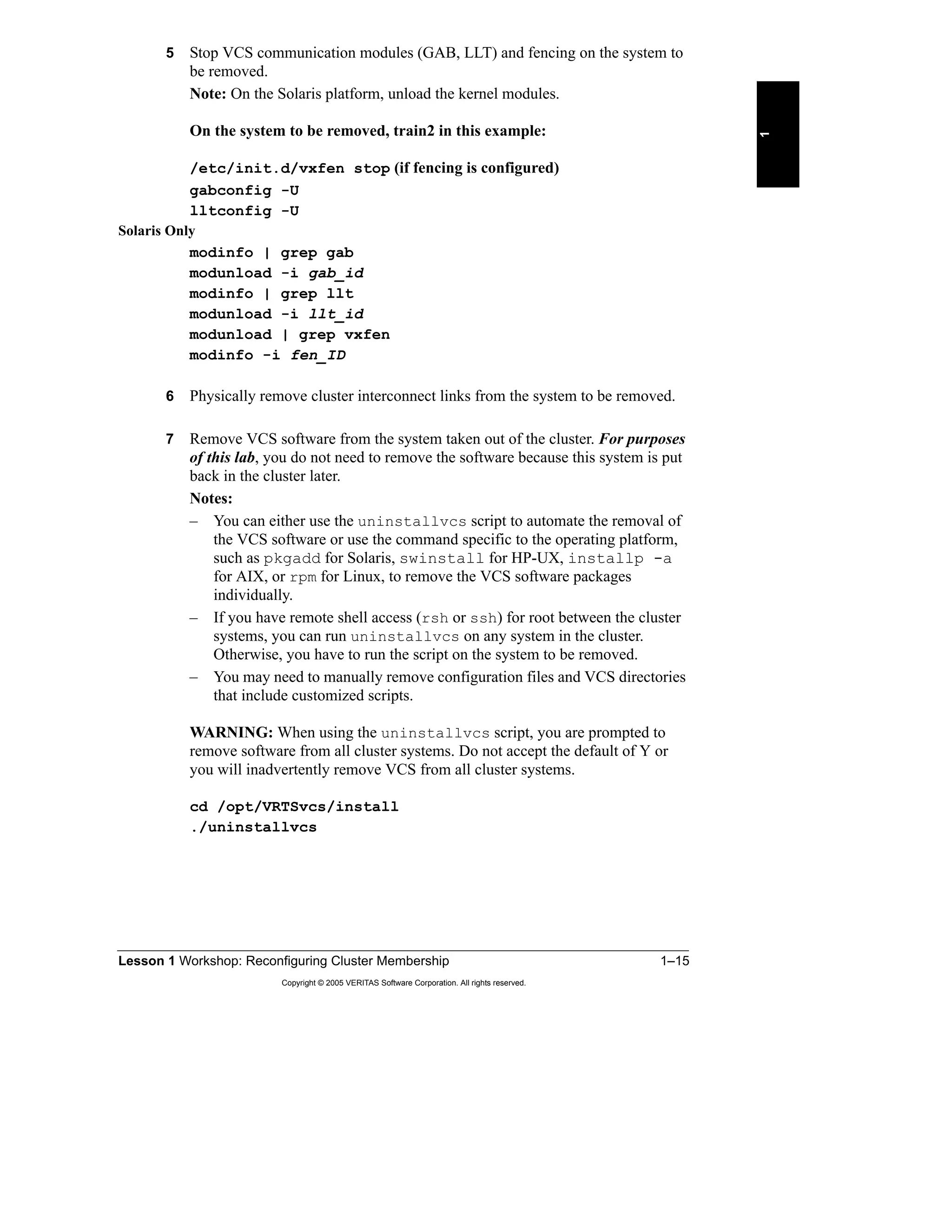
  • 91.
    Lesson 3 WorkloadManagement 3–5 Copyright © 2005 VERITAS Software Corporation. All rights reserved. 3 Automatic Startup Policies You can set the AutoStartPolicy attribute of a service group to one of these three values: • Order: Systems are chosen in the order in which they are defined in the AutoStartList attribute. This is the default policy for every service group. • Priority: The system with the lowest priority number in SystemList is selected. Note that this system should also be listed in AutoStartList. • Load: The system with the highest available capacity is selected. These policies are described in more detail in the following pages. To configure the AutoStartPolicy attribute of a service group, execute: hagrp -modify groupname AutoStartPolicy policy where possible values for policy are Order, Priority, and Load. You can also set this attribute using the Cluster Manager GUI. Note: The configuration must be open to change service group attributes. Automatic Startup Policies The AutoStartPolicy attribute specifies how a target system is selected: – Order: The first available system according to the order in AutoStartList is selected (default). – Priority: The system with the lowest priority number in SystemList is selected. – Load: The system with the greatest available capacity is selected. Example configuration: hagrp –modify groupname AutoStartPolicy Load Detailed examples are provided on the next set of pages.
  • 92.
    3–6 VERITAS ClusterServer for UNIX, Implementing Local Clusters Copyright © 2005 VERITAS Software Corporation. All rights reserved. AutoStartPolicy=Order When the AutoStartPolicy attribute of a service group is set to the default value of Order, the first system available in AutoStartList is selected to bring the service group online. The priority numbers in SystemList are ignored. In the example shown on the slide, the AP1 service group is brought online on SVR1, although it is the system with the highest priority number in SystemList. Similarly, the AP2 service group is brought online on SVR2, and the DB service group is brought online on SVR3 because these are the first systems listed in the AutoStartList attributes of the corresponding service groups. Note: Because Order is the default value for the AutoStartPolicy attribute, it is not required to be listed in the service group definitions in the main.cf file. AutoStartPolicy=Order The first available system in AutoStartList is selected. The first available system in AutoStartList is selected. Animation
  • 93.
    Lesson 3 WorkloadManagement 3–7 Copyright © 2005 VERITAS Software Corporation. All rights reserved. 3 AutoStartPolicy=Priority When the AutoStartPolicy attribute of a service group is set to Priority, the system with the lowest priority number in the SystemList that also appears in the AutoStartList is selected as the target system during start-up. In this case, the order of systems in the AutoStartList is ignored. The same example service groups are now modified to use the Priority AutoStartPolicy, as shown on the slide. In this example, the AP1 service group is brought online on SVR3, which has the lowest priority number in SystemList, although it appears as the last system in AutoStartList. Similarly, the AP2 service group is brought online on SVR1 (with priority number 0), and the DB service group is brought online on SVR2 (with priority number 1). Note how the startup systems have changed for the service groups by changing AutoStartPolicy, although the SystemList and AutoStartList attributes are the same for these two examples. AutoStartPolicy=Priority The lowest-numbered system in SystemList is selected. The lowest-numbered system in SystemList is selected. Animation
  • 94.
    3–8 VERITAS ClusterServer for UNIX, Implementing Local Clusters Copyright © 2005 VERITAS Software Corporation. All rights reserved. AutoStartPolicy=Load When AutoStartPolicy is set to Load, VCS determines the target system based on the existing workload of each system listed in the AutoStartList attribute and the load that is added by the service group. These attributes control load-based start-up: • Capacity is a user-defined system attribute that contains a value representing the total amount of load that the system can handle. • Load is a user-defined service group attribute that defines the amount of capacity required to run the service group. • AvailableCapacity is a system attribute maintained by VCS that quantifies the remaining available system load. In the example displayed on the slide, the design criteria specifies that three servers have Capacity set to 300. SRV1 is selected as the target system for starting SG4 because it has the highest AvailableCapacity value of 200. Determine Load and Capacity You must determine a value for Load for each service group. This value is based on how much of the system capacity is required to run the application service that is managed by the service group. When a service group is brought online, the value of its Load attribute is subtracted from the system Capacity value, and AvailableCapacity is updated to reflect the difference. AutoStartPolicy=Load The system with the greatest AvailableCapacity value is selected. The system with the greatest AvailableCapacity value is selected. Animation
  • 95.
    Lesson 3 WorkloadManagement 3–9 Copyright © 2005 VERITAS Software Corporation. All rights reserved. 3 Note: Both the Capacity attribute of a system and the Load attribute of a service group are static user-defined attributes based on your design criteria. How a Service Group Starts Up When the cluster initially starts up, the following events take place with service groups using Load AutoStartPolicy: 1 Service groups are placed in an AutoStart queue in the order that probing is completed for each service group. Decisions for each service group are made serially, but the actual startup of service groups takes place in parallel. 2 For each service group in the AutoStart queue, VCS selects a subset of potential systems from the AutoStartList, as follows: a Frozen systems are eliminated. b Systems where the service group has a FAULTED status are eliminated. c Systems that do not meet the service group requirements are eliminated. This topic is explained in detail later in the lesson. 3 From this list, the target system with the highest value for AvailableCapacity is chosen. If there are multiple systems with the same AvailableCapacity, the first one canonically is selected. 4 VCS then recalculates the new AvailableCapacity value for that target system by subtracting the Load of the service group from the system’s current AvailableCapacity value before proceeding with other service groups in the queue. Note: In the case that no system has a high enough AvailableCapacity value for a service group load, the service group is still started on the system with the highest value for AvailableCapacity, even if the resulting AvailableCapacity value is zero or a negative number.
  • 96.
    3–10 VERITAS ClusterServer for UNIX, Implementing Local Clusters Copyright © 2005 VERITAS Software Corporation. All rights reserved. Failover Rules and Policies Rules for Automatic Service Group Failover The following conditions must be satisfied for a service group to be automatically failed over after a fault: • The service group must contain a critical resource, and that resource must fault or be a parent of a faulted resource. • The service group AutoFailOver attribute must be set to the default value of 1. If this attribute is changed to 0, VCS leaves the service group offline and waits for an administrative command to be issued to bring the service group online. • The service group cannot be frozen. • At least one of the systems in the service group’s SystemList attribute must be in RUNNING state. The failover system for the service group is chosen as follows: • A subset of systems included in the SystemList attribute are selected. • Frozen systems are eliminated and systems where the service group has a FAULTED status are eliminated. • Systems that do not meet the service group requirements are eliminated, as described in detail later in the lesson. • The target system is chosen from this list based on the failover policy defined for the service group. Rules for Automatic Service Group Failover The service group must have a critical resource. The service group AutoFailOver attribute must be set to 1, and ManageFaults must be set to All (default values). The service group cannot be frozen. At least one system in the service group’s SystemList attribute must be up and running. The failover system is selected as follows: – A subset of systems that meet the service group requirements from among the systems in the SystemList is created first (described later in detail). – Frozen systems and systems where the service group has a FAULTED status are eliminated from the list. – Systems that do not meeting service group requirements are eliminated. – The target system is selected based on the failover policy of the service group.
  • 97.
    Lesson 3 WorkloadManagement 3–11 Copyright © 2005 VERITAS Software Corporation. All rights reserved. 3 Failover Policies VCS supports a variety of policies that determine how a system is selected when service groups must migrate due to faults. The policy is configured by setting the FailOverPolicy attribute to one of these values: • Priority: The system with the lowest priority number is preferred for failover (default). • RoundRobin: The system with the least number of active service groups is selected for failover. • Load: The system with the highest value of the AvailableCapacity system attribute is selected for failover. Policies are discussed in more detail in the following pages. Failover Policies The FailOverPolicy attribute specifies how a target system is selected: – Priority: The system with the lowest priority number in the list is selected (default). – RoundRobin: The system with the least number of active service groups is selected. – Load: The system with greatest available capacity is selected. Example configuration: hagrp –modify groupname FailOverPolicy Load Detailed examples are provided on the next set of pages.
  • 98.
    3–12 VERITAS ClusterServer for UNIX, Implementing Local Clusters Copyright © 2005 VERITAS Software Corporation. All rights reserved. FailOverPolicy=Priority When FailOverPolicy is set to Priority, VCS selects the system with the lowest assigned value from the SystemList attribute. For example, the DB service group has three systems configured in the SystemList attribute and the same order for AutoStartList values: SystemList = {SVR3=0, SVR1=1, SVR2=2} AutoStartList = {SVR3, SVR1, SVR2} The DB service group is initially started on SVR3 because it is the first system in AutoStartList. If DB faults on SVR3, VCS selects SVR1 as the failover target because it has the lowest priority value for the remaining available systems. Priority policy is the default behavior and is ideal for simple two-node clusters or small clusters with few service groups. FailOverPolicy=Priority The lowest- numbered system in SystemList is selected. The lowest- numbered system in SystemList is selected. Animation
  • 99.
    Lesson 3 WorkloadManagement 3–13 Copyright © 2005 VERITAS Software Corporation. All rights reserved. 3 FailOverPolicy=RoundRobin The RoundRobin policy selects the system running the fewest service groups as the failover target. The round robin policy is ideal for large clusters running many service groups with essentially the same server load characteristics (for example, similar databases or applications). Consider these properties of the RoundRobin policy: • Only systems listed in the SystemList attribute for the service group are considered when VCS selects a failover target for all failover policies, including RoundRobin. • A service group that is in the process of being brought online is not considered an active service group until it is completely online. Ties are determined by the order of systems in the SystemList attribute. For example, if two failover target systems have the same number of service groups running, the system listed first in the SystemList attribute is selected for failover. FailOverPolicy=RoundRobin The system with the fewest running service groups is selected. The system with the fewest running service groups is selected. Animation
  • 100.
    3–14 VERITAS ClusterServer for UNIX, Implementing Local Clusters Copyright © 2005 VERITAS Software Corporation. All rights reserved. FailOverPolicy=Load When FailOverPolicy is set to Load, VCS determines the target system based on the existing workload of each system listed in the SystemList attribute and the load that is added by the service group. These attributes control load-based failover: • Capacity is a system attribute that contains a value representing the total amount of load that the system can handle. • Load is a service group attribute that defines the amount of capacity required to run the service group. • AvailableCapacity is a system attribute maintained by VCS that quantifies the remaining available system load. In the example displayed in the slide, three servers have Capacity set to 300, and the fourth is set to 150. Each service group has a fixed load defined by the user, which is subtracted from the system capacity to find the AvailableCapacity value of a system. When failover occurs, VCS checks the value of AvailableCapacity on each potential target—each system in the SystemList attribute for the service group— and starts the service group on the system with the highest value. Note: In the event that no system has a high enough AvailableCapacity value for a service group load, the service group still fails over to the system with the highest value for AvailableCapacity, even if the resulting AvailableCapacity value is zero or a negative number. FailOverPolicy=Load The system with the greatest AvailableCapacity is selected. The system with the greatest AvailableCapacity is selected. Animation
  • 101.
    Lesson 3 WorkloadManagement 3–15 Copyright © 2005 VERITAS Software Corporation. All rights reserved. 3 Integrating Dynamic Load Calculations The load-based startup and failover examples in earlier sections were based on static values of load. That is, the Capacity value of each system and the Load value for each service group are fixed user-defined values. The VCS workload balancing mechanism can be integrated with other software programs, such as Precise, that calculate system load to support failover based on a dynamically set value. If the DynamicLoad attribute is set for a system, VCS calculates AvailableCapacity by subtracting the value of DynamicLoad from Capacity. In this case, the Load values of service groups are not used to determine AvailableCapacity. The DynamicLoad value must be set by the load-estimation software using the hasys command. For example: hasys -load Svr1 90 This command sets DynamicLoad to the value of 90. If Capacity is 300 then AvailableCapacity is calculated to be 210 no matter what the Load values of the service groups online on the system are. Note: If your third-party load-estimation software provides a value that represents the percentage of system load, you must consider the value of Capacity when setting the load. For example, if Capacity is 300 and the load-estimation software determines that the system is 30 percent loaded, you must set the load to 90. Integrating Dynamic Load Calculations You can control VCS startup and failover based on dynamic load by integrating with load- monitoring software, such as Precise. 1. External software monitors CPU usage. 2. External software sets the DynamicLoad attribute according to the system Capacity value using hasys –load system value. Example: The Capacity attribute is set to 300 (static value). Monitoring software determines that CPU usage is 30 percent. External software sets the DynamicLoad attribute to 90 (30 percent of 300). Example: The Capacity attribute is set to 300 (static value). Monitoring software determines that CPU usage is 30 percent. External software sets the DynamicLoad attribute to 90 (30 percent of 300).
  • 102.
    3–16 VERITAS ClusterServer for UNIX, Implementing Local Clusters Copyright © 2005 VERITAS Software Corporation. All rights reserved. Controlling Overloaded Systems The LoadWarning Trigger You can configure the LoadWarning trigger to provide notification that a system has sustained a predetermined load level for a specified period of time. To configure the LoadWarning trigger: • Create a loadwarning script in the /opt/VRTSvcs/bin/triggers directory. You can copy the sample trigger script from /opt/VRTSvcs/ bin/sample_triggers as a starting point, and then modify it according to your requirements. See the example script that follows. • Set the LoadWarning attributes for the system: – Capacity: Load capacity for the system – LoadWarningLevel: The level at which load has reached a critical limit; expressed as a percentage of the Capacity attribute Default is 80 percent. – LoadTimeThreshold: Length of time, in seconds, that a system must remain at, or above, LoadWarningLevel before the trigger is run Default is 600 seconds. The LoadWarning Trigger You can configure the LoadWarning trigger to run when a system has been running at a specified percentage of the Capacity level for a specified period of time. To configure the trigger: – Copy the sample loadwarning script into /opt/VRTSvcs/bin/triggers. – Modify the script to perform some action. – Set system attributes. This example configuration causes VCS to run the trigger if the Svr4 system runs at 90 percent of capacity for ten minutes. System Svr4 ( Capacity=150 LoadWarningLevel=90 LoadTimeThreshold=600 ) System Svr4 ( Capacity=150 LoadWarningLevel=90 LoadTimeThreshold=600 )
  • 103.
    Lesson 3 WorkloadManagement 3–17 Copyright © 2005 VERITAS Software Corporation. All rights reserved. 3 Example Script A portion of the sample script, /opt/VRTSvcs/bin/sample_triggers/ loadwarning, is shown to illustrate how you can provide a basic operator warning. You can customize this script to perform other actions, such as switching or shutting down service groups. # @(#)/opt/VRTSvcs/bin/triggers/loadwarning @recipients=("username@servername.com"); # $msgfile="/tmp/loadwarning"; `echo system = $ARGV[0], available capacity = $ARGV[1] > $msgfile`; foreach $recipient (@recipients) { ## Must have elm setup to run this. `elm -s loadwarning $recipient < $msgfile`; } `rm $msgfile`; exit
  • 104.
    3–18 VERITAS ClusterServer for UNIX, Implementing Local Clusters Copyright © 2005 VERITAS Software Corporation. All rights reserved. Additional Startup and Failover Controls Limits and Prerequisites VCS enables you to define the available resources on each system and the corresponding requirements for these resources for each service group. Shared memory, semaphores, and the number of processors are all examples of resources that can be defined on a system. Note: The resources that you define are arbitrary—they do not need to correspond to physical or software resources. You then define the corresponding prerequisites for a service group to come online on a system. In a multinode, multiapplication services environment, VCS keeps track of the available resources on a system by subtracting the resources already in use by service groups online on each system from the maximum capacity for that resource. When a new service group is brought online, VCS checks these available resources against service group prerequisites; the service group cannot be brought online on a system that does not have enough available resources to support the application services. Limits and Prerequisites
  • 105.
    Lesson 3 WorkloadManagement 3–19 Copyright © 2005 VERITAS Software Corporation. All rights reserved. 3 System Limits The Limits system attribute is used to define the resources and the corresponding capacity of each system for that resource. You can use any keyword for a resource as long as you use the same keyword on all systems and service groups. The example values displayed in the slide are set as follows: • On the first two systems, the Limits attribute setting in main.cf is: Limits = { CPUs=12, Mem=512 } • On the second two systems, the Limits attribute setting in main.cf is: Limits = { CPUs=6, Mem=256 } Service Group Prerequisites Prerequisites is a service group attribute that defines the set of resources needed to run the service group. These values correspond to the Limits system attribute and are set by the Prerequisites service group attribute. This main.cf configuration corresponds to the SG1 service group in the diagram: Prerequisites = { CPUs=6, Mem=256 } Current Limits CurrentLimits is an attribute maintained by VCS that contains the value of the remaining available resources for a system. For example, if the limit for Mem is 512 and the SG1 service group is online with a Mem prerequisite of 256, the CurrentLimits setting for Mem is 256: CurrentLimits = { CPUs=6, Mem=256 } Selecting a Target System Prerequisites are used to determine a subset of eligible systems on which a service group can be started during failover or startup. When a list of eligible systems is created, had then follows the configured policy for auto-start or failover. Note: A value of 0 is assumed for systems that do not have some or all of the resources defined in their Limits attribute. Similarly, a value of 0 is assumed for service groups that do not have some or all of the resources defined in their Prerequisites attribute.
  • 106.
    3–20 VERITAS ClusterServer for UNIX, Implementing Local Clusters Copyright © 2005 VERITAS Software Corporation. All rights reserved. Combining Capacity and Limits Capacity and Limits can be combined to determine appropriate startup and failover behavior for service groups. When used together, VCS uses this process to determine the target: 1 Prerequisites and Limits are checked to determine a subset of systems that are potential targets. 2 The Capacity and Load attributes are used to determine which system has the highest AvailableCapacity. value 3 When multiple systems have the same AvailableCapacity value, the system listed first in SystemList is selected. System Limits are hard values, meaning that if a system does not meet the requirements specified in the Prerequisites attribute for a service group, the service group cannot be started on that system. Capacity is a soft limit, meaning that the system with the highest value for AvailableCapacity is selected, even if the resulting available capacity is a negative number. Combining Capacity and Limits
  • 107.
    Lesson 3 WorkloadManagement 3–21 Copyright © 2005 VERITAS Software Corporation. All rights reserved. 3 Configuring Startup and Failover Policies Setting Load and Capacity You can use the VCS GUI or command-line interface to set the Capacity system attribute and the Load service group attribute. To set Capacity from the command-line interface, use the hasys -modify command as shown in the following example: hasys -modify S1 Capacity 300 To set Load from the CLI, use the hagrp -modify command as shown in the following example: hagrp -modify G1 Load 75 Setting Load and Capacity hasys –modify S1 Capacity 300hasys –modify S1 Capacity 300 hagrp –modify G1 Load 75hagrp –modify G1 Load 75 System S1 ( Capacity = 300 ) System S1 ( Capacity = 300 ) main.cfmain.cf group G1 ( SystemList = { S1 = 1, S2 = 2 } AutoStartList = { S1, S2 } AutoStartPolicy = Load Load = 75 ) group G1 ( SystemList = { S1 = 1, S2 = 2 } AutoStartList = { S1, S2 } AutoStartPolicy = Load Load = 75 ) main.cfmain.cf
  • 108.
    3–22 VERITAS ClusterServer for UNIX, Implementing Local Clusters Copyright © 2005 VERITAS Software Corporation. All rights reserved. Setting Limits and Prerequisites You can use the VCS GUI or command-line interface to set the Limits system attribute and the Prerequisites service group attribute. To set Limits from the command-line interface, use the hasys -modify command as shown in the following example: hasys -modify S1 Limits Processors 2 Mem 512 To set Prerequisites from the CLI, use the hagrp -modify command as shown in the following example: hagrp -modify G1 Prerequisites Processors 1 Mem 50 Notes: • To be able to set these attributes, open the VCS configuration to enable read/write mode and ensure that the service groups that are already online on a system do not violate the restrictions. • The order that the resources are defined within the Limits or Prerequisites attributes is not important. Setting Limits and Prerequisites hasys –modify S1 Limits Processors 2 Mem 512hasys –modify S1 Limits Processors 2 Mem 512 System S1 ( Limits = { Processors = 2, Mem = 512 } ) System S1 ( Limits = { Processors = 2, Mem = 512 } ) main.cfmain.cf hagrp –modify G1 Prerequisites Processors 1 Mem 50hagrp –modify G1 Prerequisites Processors 1 Mem 50 group G1 ( … Prerequisites = { Processors = 1, Mem = 50 } ) group G1 ( … Prerequisites = { Processors = 1, Mem = 50 } ) main.cfmain.cf
  • 109.
    Lesson 3 WorkloadManagement 3–23 Copyright © 2005 VERITAS Software Corporation. All rights reserved. 3 • To change an existing Limits or Prerequisites attribute, such as adding a new resource, removing a resource, or updating a resource definition, use the -add, -delete, or -update keywords, respectively, with the hasys -modify or hagrp -modify commands as shown in the following examples: – The command hasys -modify S1 Limits -add Semaphores 10 changes the S1 Limits attribute to Limits = { Processors=2, Mem=512, Semaphores=10 } – The command hasys -modify S1 Limits -update Processors 4 changes the S1 Limits attribute to Limits = { Processors=4, Mem=512, Semaphores=10 } – The command hasys -modify S1 Limits -delete Mem changes the S1 Limits attribute to Limits = { Processors=4, Sempahores=10 }
  • 110.
    3–24 VERITAS ClusterServer for UNIX, Implementing Local Clusters Copyright © 2005 VERITAS Software Corporation. All rights reserved. Using the Simulator Modeling Workload Management The VCS Simulator is a good tool for modeling the behavior that you require before making changes to the running configuration. This enables you to fully understand the implications and the effects of different workload management configurations. Modeling Workload Management You can use the Simulator to create and test workload management scenarios before deploying the configuration in a running cluster. For example: Copy the real main.cf file into the Simulator directory. Set up the workload management configuration. Test all startup and failover scenarios. Copy the Simulator main.cf file back to the cluster config directory. Restart the cluster using the new configuration.
  • 111.
    Lesson 3 WorkloadManagement 3–25 Copyright © 2005 VERITAS Software Corporation. All rights reserved. 3 Summary This lesson described in detail how VCS chooses a system on which to run a service group, both at startup and during failover. This lesson introduced Service Group Workload Management to enable the VCS administrators to configure VCS behavior. The lesson also showed methods to integrate dynamic load calculations with VCS and to control overloaded systems. Next Steps The next lesson describes alternate storage and network configurations, including local NIC failover and integration of third-party volume management software. Additional Resources VERITAS Cluster Server User’s Guide This document describes VCS Service Group Workload Management. The guide also provides detailed descriptions of resources and triggers, in addition to information about service groups and failover behavior. Lesson Summary Key Points – Workload management policies provide fine- grained control of service group startup and failover. – You can use the Simulator to model behavior before you implement policies in the cluster. Reference Materials VERITAS Cluster Server User's Guide
  • 112.
    3–26 VERITAS ClusterServer for UNIX, Implementing Local Clusters Copyright © 2005 VERITAS Software Corporation. All rights reserved. Lab 3: Testing Workload Management Labs and solutions for this lesson are located on the following pages. Appendix A provides brief lab instructions for experienced students. • “Lab 3 Synopsis: Testing Workload Management,” page A-14 Appendix B provides step-by-step lab instructions. • “Lab 3 Details: Testing Workload Management,” page B-29 Appendix C provides complete lab instructions and solutions. • “Lab 3 Solution: Testing Workload Management,” page C-45 Goal The purpose of this lab is to use the Simulator with a preconfigured main.cf file and observe the effects of workload management on manual and failover operations. Prerequisites Obtain any classroom-specific values needed for your classroom lab environment and record these values in your design worksheet included with the lab exercise instructions. Results Document the effects of workload management in the lab appendix. Lab 3: Testing Workload Management Simulator config file location:_________________________________________ Copy to:___________________________________________ Simulator config file location:_________________________________________ Copy to:___________________________________________ Appendix A: Lab Synopses Appendix B: Lab Details Appendix C: Lab Solutions Appendix A: Lab Synopses Appendix B: Lab Details Appendix C: Lab Solutions
  • 113.
    Lesson 4 Alternate Storageand Network Configurations
  • 114.
    4–2 VERITAS ClusterServer for UNIX, Implementing Local Clusters Copyright © 2005 VERITAS Software Corporation. All rights reserved. Introduction Overview This lesson describes how you can integrate different types of volume management software within your cluster configuration, as well as the use of raw disks. You also learn how to configure alternative network resources that enable local NIC failover. Importance The alternate storage and network configurations discussed in this lesson are examples to show you the flexibility that VCS provides. More specifically, one of the examples discusses how to avoid failover due to networking problems using multiple interfaces on a system. Lesson Introduction Lesson 1: Reconfiguring Cluster Membership Lesson 2: Service Group Interactions Lesson 3: Workload Management Lesson 4: Storage and Network Alternatives Lesson 5: Maintaining VCS Lesson 6: Validating VCS Implementation
  • 115.
    Lesson 4 AlternateStorage and Network Configurations 4–3 Copyright © 2005 VERITAS Software Corporation. All rights reserved. 4 Outline of Topics • Alternative Storage and Network Configurations • Additional Network Resources • Additional Network Design Requirements • Example MultiNIC Setup Describe additional network design requirements for Solaris. Additional Network Design Requirements Describe an example MultiNIC setup in VCS. Example MultiNIC Setup Configure additional VCS network resources. Additional Network Resources Implement storage and network configuration alternatives. Alternative Storage and Network Configurations After completing this lesson, you will be able to: Topic Lesson Topics and Objectives
  • 116.
    4–4 VERITAS ClusterServer for UNIX, Implementing Local Clusters Copyright © 2005 VERITAS Software Corporation. All rights reserved. Alternative Storage and Network Configurations VCS provides the following bundled resource types as an alternative to using VERITAS Volume Manager for storage: • Solaris: Disk and DiskReservation resource type and agent • AIX: LVMVolumeGroup resource type and agent • HP-UX: LVMVolumeGroup, LVMLogicalVolume, or LVMCombo resource types and agents • Linux: DiskReservation Before placing the corresponding storage resource under VCS control, you need to prepare the storage component as follows: 1 Create the physical resource on one system. 2 Verify the functionality on the first system. 3 Stop the resource on the first system. 4 Migrate the resource to the next system in the cluster. 5 Verify functionality on the next system. 6 Stop the resource. 7 Repeat steps 4-6 until all the systems in the cluster are tested. The following pages describe the resource types that you can use on each platform in detail. Alternative Storage Configurations Bundled resource types for raw disk or third-party volume management software supported by VCS: Solaris: Disk, DiskReservation AIX: LVMVolumeGroup HP-UX: LVMVolumeGroup, LVMLogicalVolume, or LVMCombo Linux: DiskReservation Solaris HP-UXAIX Linux Create a physical resource on one system. Other system in cluster? Done Verify accessibility on the first system. Verify accessibilty. N Y
  • 117.
    Lesson 4 AlternateStorage and Network Configurations 4–5 Copyright © 2005 VERITAS Software Corporation. All rights reserved. 4 Solaris The Disk Resource and Agent on Solaris The Disk agent monitors a disk partition. Because disks are persistent resources, the Disk agent does not bring disk resources online or take them offline. Agent Functions • Online: None • Offline: None • Monitor: Determines if the disk is accessible by attempting to read data from the specified UNIX device Required Attributes Partition: UNIX partition device name Note: The Partition attribute is specified with the full path beginning with a slash (/). Otherwise, the given name is assumed to reside in /dev/rdsk. There are no optional attributes for this resource type. Configuration Prerequisites You must create the disk partition in UNIX using the format command. Sample Configuration Disk myNFSDisk { Partition=c1t0d0s0 } The DiskReservation Resource and Agent on Solaris The DiskReservation agent puts a SCSI-II reservation on the specified disks. Functions • Online: Brings the resource online after reserving the specified disks • Offline: Releases the reservation • Monitor: Checks the accessibility and reservation status of the specified disks Required Attributes Disks: The list of raw disk devices specified with absolute or relative path names Optional Attributes FailFast, ConfigPercentage, ProbeInterval Configuration Prerequisites • Verify that the device path to the disk is recognized by all systems sharing the disk.
  • 118.
    4–6 VERITAS ClusterServer for UNIX, Implementing Local Clusters Copyright © 2005 VERITAS Software Corporation. All rights reserved. • Do not use disks configured as resources of type DiskReservation for disk heartbeats. • Disable the Reset SCSI Bus at IC Initialization option from the SCSI Select utility. Sample Configuration DiskReservation DR ( Disks = {c0t2d0s2, c1t2d0s2, c2t2d0s2 } FailFast = 1 ConfigPercentage = 80 ProbeInterval = 6 ) AIX The LVMVolumeGroup Agent on AIX Agent Functions • Online: Activates the LVM volume group • Offline: Deactivates the LVM volume group • Monitor: Checks if the volume group is available using the vgdisplay command • Clean: Terminates ongoing actions associated with a resource (perhaps forcibly) Required Attributes • Disks: The list of disks underneath the volume group • MajorNumber: The integer that represents the major number of the volume group • VolumeGroup: The name of the LVM volume group Optional Attributes ImportvgOpt, VaryonvgOpt, and SyncODM Configuration Prerequisites • The volume group and all of its logical volumes should already be configured. • The volume group should be imported but not activated on all systems in the cluster. Sample Configuration system sysA system sysB
  • 119.
    Lesson 4 AlternateStorage and Network Configurations 4–7 Copyright © 2005 VERITAS Software Corporation. All rights reserved. 4 group lvmgroup ( SystemList = { sysA, sysB } AutoStartList = { sysA } LVMVG lvmvg_vg1 ( VolumeGroup = vg1 MajorNumber = 50 Disks = { hdisk22, hdisk23, hdisk45} ) LVMVG lvmvg_vg2 ( VolumeGroup = vg2 MajorNumber = 51 Disks@sysA = { hdisk37, hdisk38, hdisk39} Disks@sysB = { hdisk61, hdisk62, hdisk63} ImportvgOpt = "f" ) HP-UX LVM Setup on HP-UX On all systems in the cluster: • The volume groups and volumes that are on the shared disk array are controlled by the HA software. Therefore, you need to prevent each system from activating these volumes automatically during bootup. To do this, edit the /etc/lvmrc file: – Set AUTO_VG_ACTIVATE to 0. – Verify that there is a line in the /etc/lvmrc file in the custom_vg_activation() function that activates the vg00 volume group. Add lines to start volume groups that are not part of the HA environment in the custom_vg_activation() function: /sbin/vgchange –a y /dev/vgaa • Each system should have the device nodes for the volume groups on shared devices. Create a device for volume groups: mkdir /dev/vgnn mknod /dev/vgnn/group c 64 0x0m0000 The same minor number (m) has to be used for NFS. By default, this value must be in the range of 1-9. • Do not create entries in /etc/fstab or /etc/exports for the mount points that will be part of the HA environment. The file systems in the HA environment will be mounted and shared by VCS. Therefore, the system should not mount or share these file systems during system boot.
  • 120.
    4–8 VERITAS ClusterServer for UNIX, Implementing Local Clusters Copyright © 2005 VERITAS Software Corporation. All rights reserved. On one of the systems in the cluster: • Configure volume groups, logical volumes, and file systems. • Deactivate volume groups: vgexport –p –s –m /tmp/mapfile /dev/vgnn rcp /tmp/mapfile othersystems:/tmp/mapfile On each system in the cluster: • Import and activate the volume groups: vgimport –s –m /tmp/mapfile /dev/vgnn vgchange –a y /dev/vgnn • Create mount points and test. • Deactivate volume groups. Note: Create the volume groups, volumes, and file systems on the shared disk array on only one of the systems in the cluster. However, you need to verify that they can be manually moved from one system to the other by exporting and importing the volume groups on the other systems. Note that you need to create the volume group directory and the group file on each system before importing the volume group. At the end of the verification, ensure that the volume groups on the shared storage array are deactivated on all the systems in the cluster. There are three resource types that can be used to manage LVM volume groups and logical volumes: LVMVolumeGroup, LVMLogicalVolume, and LVMCombo. The LVMVolumeGroup Resource and Agent on HP-UX Agent Functions • Online: Activates the LVM volume group • Offline: Deactivates the LVM volume group • Monitor: Checks if the volume group is available using the vgdisplay command Required Attributes VolumeGroup: The name of the LVM volume group There are no optional attributes for this resource type. Configuration Prerequisites • The volume group and all of its logical volumes should already be configured. • The volume group should be imported but not activated on all systems in the cluster. Sample Configuration LVMVolumeGroup MyNFSVolumeGroup ( VolumeGroup = vg01 )
  • 121.
    Lesson 4 AlternateStorage and Network Configurations 4–9 Copyright © 2005 VERITAS Software Corporation. All rights reserved. 4 LVMLogicalVolume Resource and Agent on HP-UX Agent Functions • Online: Activates the LVM logical volume • Offline: Deactivates the LVM logical volume • Monitor: Determines if the logical volume is available by performing a read I/O on the raw logical volume Required Attributes • LogicalVolume: The name of the LVM logical volume • VolumeGroup: The name of the LVM volume group There are no optional attributes for this resource type. Configuration Prerequisites • Configure the LVM volume group and the logical volume. • Configure the VCS LVMVolumeGroup resource on which this logical volume depends. Sample Configuration LVMLogicalVolume MyNFSLVolume ( LogicalVolume = lvol1 VolumeGroup = vg01 ) LVMCombo Resource and Agent on HP-UX Agent Functions • Online: Activates the LVM volume group and its volumes • Offline: Deactivates the LVM volume group • Monitor: Checks if the volume group and all of its logical volumes are available Required Attributes • VolumeGroup: The name of the LVM volume group • LogicalVolumes: The list of logical volumes There are no optional attributes for this resource type. Configuration Prerequisites • The volume group and its volumes should be configured. • The volume group should be imported but not activated on all systems in the cluster.
  • 122.
    4–10 VERITAS ClusterServer for UNIX, Implementing Local Clusters Copyright © 2005 VERITAS Software Corporation. All rights reserved. Sample Configuration LVMCombo MyNFSVolumeGroup ( VolumeGroup = vg01 LogicalVolumes = { lvol1, lvol2 } ) Linux The DiskReservation Resource and Agent on Linux The DiskReservation agent puts a SCSI-II reservation on the specified disks. Functions • Online: Brings the resource online after reserving the specified disks • Offline: Releases reservation • Monitor: Checks the accessibility and reservation status of the specified disks Required Attributes Disks: The list of raw disk devices specified with absolute or relative path names Optional Attributes FailFast, ConfigPercentage, ProbeInterval Configuration Prerequisites • Verify that the device path to the disk is recognized by all systems sharing the disk. • Do not use disks configured as resources of type DiskReservation for disk heartbeats. • Disable the Reset SCSI Bus at IC Initialization option from the SCSI Select utility. Sample Configuration DiskReservation diskres1 ( Disks = {"/dev/sdc"} FailFast = 1 )
  • 123.
    Lesson 4 AlternateStorage and Network Configurations 4–11 Copyright © 2005 VERITAS Software Corporation. All rights reserved. 4 Alternative Network Configurations Local Network Interface Failover In a client-server environment using TCP/IP, applications often connect to cluster resources using an IP address. VCS provides IP and NIC resources to manage an IP address and network interface. With this type of high availability network design, a problem with the network or IP address causes service groups to fail over to other systems. This means that the applications and all required resources are taken offline on the system where the fault occurred and are then brought online on another system. If no other systems are available for failover then users experience a service downtime until the problem with the network connection or IP address is corrected. With the availability of inexpensive network adapters, it is common to have many network interfaces on each system. By allocating more than one network interface to a service group, you can potentially avoid failover of the entire service group if the interface fails. By moving the IP address on the failed interface to another interface on the local system, you can minimize downtime. VCS provides this type of local failover with the MultiNICA and IPMultiNIC resources. On the Solaris an AIX platforms, there are alternative resource types called MultiNICB and IPMultiNICB with additional features that can be used to address the same design requirement. Both resource types are discussed in detail later in this section. Local Network Interface Failover You can configure VCS to fail application IP addresses over to a local network interface before failing over to another system. port1 port2 port5 port4 port3 S1 port1 port2 port5 port4 port3 S2 MultiNICA or MultiNICB (Solaris- and AIX-only) 10.10.198.2 10.10.198.2
  • 124.
    4–12 VERITAS ClusterServer for UNIX, Implementing Local Clusters Copyright © 2005 VERITAS Software Corporation. All rights reserved. Advantages of Local Interface Failover Local interface failover can drastically reduce service interruptions to the clients. Some applications have time-consuming shutdown and startup processes that result in substantial downtime when the application fails over from one system to another. Failover between local interfaces can be completely transparent to users for some applications. Using multiple networks also makes it possible to eliminate any switch or hub failures causing service group failover as long as the multiple interfaces on the system are connected to separate hubs or switches.
  • 125.
    Lesson 4 AlternateStorage and Network Configurations 4–13 Copyright © 2005 VERITAS Software Corporation. All rights reserved. 4 Network Resources Overview The MultiNICA agent is capable of monitoring multiple network interfaces and if one of these interfaces faults, VCS fails over the IP address defined by the IPMultiNIC resource to the next available public network adapter. The IPMultiNIC and MultiNICA resources provide essentially the same service as the IP and NIC resources, but monitor multiple interfaces instead of a single interface. The dependency between these resources is the same as the dependency between IP and NIC resources. On the Solaris platform, the MultiNICB and IPMultiNICB agents provide the same functionality as the MultiNICA and IPMultiNIC agents with many additional features, such as: • Support for the Solaris IP multipathing daemon • Support for trunked network interfaces on Solaris • Support for faster failover • Support for active/active interfaces • Support for manual failback With the MultiNICB agent, the logical IP addresses are failed back when the original physical interface comes up after a failure . Note: This lesson provides detailed information about MultiNICB and IPMultiNICB on Solaris only. For AIX-specific information, see the VERITAS Cluster Server for AIX Bundled Agents Reference Guide. Network Resources Overview The IP and NIC relationship correlates to the the IPMultiNIC and MultiNICA relationship, or the IPMultiNICB and MultiNICB relationship. The IP and NIC relationship correlates to the the IPMultiNIC and MultiNICA relationship, or the IPMultiNICB and MultiNICB relationship. NIC IP MultiNICA IPMultiNIC Manages virtual IP addresses Manages virtual IP addresses Manages multiple interfaces Manages multiple interfaces MultiNICB IPMultiNICB Solaris and AIX only
  • 126.
    4–14 VERITAS ClusterServer for UNIX, Implementing Local Clusters Copyright © 2005 VERITAS Software Corporation. All rights reserved. Additional Network Resources The MultiNICA Resource and Agent The MultiNICA agent monitors specified network interfaces and moves the administrative IP address among them in the event of failure. The agent functions and the required attributes for the MultiNICA resource type are listed on the slide. Key Points • The MultiNICA resource is marked online if the agent can ping at least one host in the list provided by NetworkHosts. If NetworkHosts is not specified, Monitor broadcasts to the subnet of the administrative IP address on the interface. Monitor counts the number of packets passing through the device before and after the address is pinged. If the count decreases or remains the same, the resource is marked as offline. • Do not use other systems in the cluster as part of NetworkHosts. NetworkHosts normally contains devices that are always available on the network, such as routers, hubs, or switches. • When configuring the NetworkHosts attribute, you are recommended to use the IP addresses rather than the host names to remove dependency on the DNS. Required for AIX, Linux Required for AIX, Linux Required for HP-UX Required for HP-UX The MultiNICA Resource and Agent Agent functions: Online None Offline None Monitor Monitor uses ping to connect to hosts in NetworkHosts. If NetworkHosts is not specified, it broadcasts to the network address. Required attributes: Device The list of network interfaces and a unique administrative IP address for each system that is assigned to the active device NetworkHosts The list of IP addresses on the network that are pinged to test the network connection NetMask The network mask for the base IP address
  • 127.
    Lesson 4 AlternateStorage and Network Configurations 4–15 Copyright © 2005 VERITAS Software Corporation. All rights reserved. 4 Optional Attributes Following is a list of optional attributes of the MultiNICA resource type for the supported platforms: • HandshakeInterval (not used on Linux): Used to compute the number of times that the monitor pings after migrating to a new NIC The value should be set to a multiple of 10. The default value is 90. Note: This attribute determines how long it takes to detect a failed interface and therefore affects failover time. The value must be greater than 50. Otherwise, the value is ignored, and the default of 90 is used. • Options: The options used with ifconfig to configure the administrative IP address • RouteOptions: The string to add a route when configuring an interface This string contains the three values: destination gateway metric. No routes are added if this string is set to NULL. • PingOptimize (not used on HP-UX): The number of monitor cycles used to detect if the configured interface is inactive A value of 1 optimizes broadcast pings and requires two monitor cycles. A value of 0 performs a broadcast ping during each monitor cycle and detects the inactive interface within the cycle. The default is 1. • IfconfigTwice (Solaris- and HP-UX-only): If set to 1, this attribute causes an IP address to be configured twice, using an ifconfig up-down-up sequence, and increases the probability of gratuitous arps (caused by ifconfig up) reaching clients. The default is 0. • ArpDelay (Solaris- and HP-UX-only): The number of seconds to sleep between configuring an interface and sending out a broadcast to inform the routers of the administrative IP address The default is 1 second. • RetestInterval (Solaris-only): The number of seconds to sleep between retests of a newly configured interface The default is 5. Note: A lower value results in faster local (interface-to-interface) failover. • BroadcastAddr (AIX-only): Broadcast address for the base IP address on the interface Note: This attribute is required on AIX if the agent has to use the broadcast address for the interface. • Domain (AIX-only): Domain name Note: This attribute is required on AIX if a domain name is used. • Gateway (AIX-only): The IP address of the default gateway Note: This attribute is required on AIX if a default gateway is used. • NameServerAddr (AIX-only): The IP address of the name server Note: This attribute is required on AIX if a name server is used.
  • 128.
    4–16 VERITAS ClusterServer for UNIX, Implementing Local Clusters Copyright © 2005 VERITAS Software Corporation. All rights reserved. • FailoverInterval (Linux-only): The interval, in seconds, to wait to check if the NIC is active during failover During this interval, ping requests are sent out to determine if the NIC is active. If the NIC is not active, the next NIC in the Device list is tested. The default is 60 seconds. • FailoverPingCount (Linux-only): The number of times to send ping requests during the FailoverInterval The default is 4. • AgentDebug (Linux-only): If set to 1, this flag causes the agent to log additional debug messages. The default is 0.
  • 129.
    Lesson 4 AlternateStorage and Network Configurations 4–17 Copyright © 2005 VERITAS Software Corporation. All rights reserved. 4 MultiNICA Resource Configuration The slide displays how you need to prepare the physical resource before you put it under VCS control using the MultiNICA resource type. The resource type definition in the types.cf file displays the default values for MultiNICA optional attributes. Refer to the VERITAS Cluster Server Bundled Agents Reference Guide for more information on the MultiNICA resource type. Here are some sample configurations for the MultiNICA resource on various platforms: Solaris MultiNICA mnic_sol ( Device@S1 = { le0 = "10.128.8.42", qfe3 = "10.128.8.42" } Device@S2 = { le0 = "10.128.8.43", qfe3 = "10.128.8.43" } NetMask = "255.255.255.0" ArpDelay = 5 Options = "trailers" ) MultiNICA Resource Configuration Configuration prerequisites: - NICs on the same system must be on the same network segment. - Configure an administrative IP address for one of the network interfaces for each system. MultiNICA mnic ( Device@S1 = { en3="10.128.8.42", en4="10.128.8.42" } Device@S2 = { en3="10.128.8.43", en4="10.128.8.43" } NetMask = "255.255.255.0“ NameServerAddr = "10.130.8.1“ … ) AIX Sample Configuration AIX Sample Configuration
  • 130.
    4–18 VERITAS ClusterServer for UNIX, Implementing Local Clusters Copyright © 2005 VERITAS Software Corporation. All rights reserved. AIX MultiNICA mnic_aix ( Device@S1 = { en0 = "10.128.8.42", en3 = "10.128.8.42" } Device@S2 = { en0 = "10.128.8.43", en3 = "10.128.8.43" } NetMask = "255.255.255.0" NameServerAddr = "10.128.1.100" Gateway = "10.128.8.1" Domain = "veritas.com" BroadcastAddr = "10.128.8.255" Options = "mtu m" ) HP-UX MultiNICA mnic_hp ( Device@S1 = { lan0 = "10.128.8.42", lan3 = "10.128.8.42" } Device@S2 = { lan0 = "10.128.8.43", lan3 = "10.128.8.43" } NetMask = "255.255.255.0" Options = "arp" RouteOptions@S1 = "default 10.128.8.42 0" RouteOptions@S2 = "default 10.128.8.43 0" NetWorkHosts = { "10.128.8.44", "10.128.8.50" } ) Linux MultiNICA mnic_lnx ( Device@S1 = { eth0 = "10.128.8.42", eth1 = "10.128.8.42" } Device@S2 = { eth0 = "10.128.8.43", eth2 = "10.128.8.43" } NetMask = "255.255.250.0" NetworkHosts = { "10.128.8.44", "10.128.8.50" } )
  • 131.
    Lesson 4 AlternateStorage and Network Configurations 4–19 Copyright © 2005 VERITAS Software Corporation. All rights reserved. 4 Configuring Local Attributes MultiNICA is configured similarly to any other resource using hares commands. However, you need to specify different IP addresses for the Device attribute so that each system has a unique administrative IP address for the local network interface. An attribute whose value applies to all systems is global in scope. An attribute whose value applies on a per-system basis is local in scope. By default, all attributes are global. Some attributes can be localized to enable you to specify different values for different systems. These specifications are required when configuring MultiNICA to specify unique administrative IP addresses for each system. Localizing the attribute means that each system in the service group’s SystemList has a value assigned to it. The value is initially set the same for each system—the value that was configured before the localization. After an attribute is localized, you can modify the values to be unique for different systems. Localizing MultiNIC Attributes Localize the Device attribute to set a unique administrative IP address for each system. hares –local mnic Device hares –modify mnic Device en0 10.128.8.42 –sys S1 hares –local mnic Device hares –modify mnic Device en0 10.128.8.42 –sys S1 10.128.8.42 mnic
  • 132.
    4–20 VERITAS ClusterServer for UNIX, Implementing Local Clusters Copyright © 2005 VERITAS Software Corporation. All rights reserved. MultiNICA Failover The diagram in the slide gives a conceptual view of how the agent fails over the administrative IP address on that physical interface to another physical interface under its control if one of the interfaces faults. Local MultiNICA Failover The MultiNICA agent: 1. Sends a ping to the subnet broadcast address (or NetworkHosts, if specified) 2. Compares packet counts and detects a fault 3. Configures the administrative IP on the next interface in the Device attribute 10.128.8.42 ping 10.128.8.255 en0 en3 Request timed out. Ping statistics for 10.128.8.255 Packets: Sent = 4, Received = 0 ifconfig en3 inet 10.128.8.42 ifconfig en3 up AIXAIX 1 2 3
  • 133.
    Lesson 4 AlternateStorage and Network Configurations 4–21 Copyright © 2005 VERITAS Software Corporation. All rights reserved. 4 The IPMultiNIC Resource and Agent The IPMultiNIC agent monitors the virtual (logical) IP address configured as an alias on one interface of a MultiNICA resource. If the interface faults, the agent works with the MultiNICA resource to fail over to a backup interface. If multiple service groups have IPMultiNICs associated with the same MultiNICA resource, only one group has the MultiNICA resource. The other groups have Proxy resources pointing to it. The agent functions and the required attributes for the IPMultiNIC resource type are listed on the slide. Note: It is recommended to set the RestartLimit attribute of the IPMultiNIC resource to a nonzero value to prevent spurious resource faults during a local failover of the MultiNICA resource. Required for AIX Required for AIX The IPMultiNIC Resource and Agent Agent functions: Online Configures an IP alias (known as the virtual or application IP address) on an active network device in the specified MultiNICA resource Offline Removes the IP alias Monitor Determines whether the IP address is up on one of the interfaces used by the MultiNICA resource Required attributes: MultiNICResNameThe name of the MultiNICA resource for this virtual IP address (called MultiNICAResName on AIX and Linux) Address The IP address assigned to the MultiNICA resource, used by network clients Netmask The netmask for the virtual IP address
  • 134.
    4–22 VERITAS ClusterServer for UNIX, Implementing Local Clusters Copyright © 2005 VERITAS Software Corporation. All rights reserved. Optional Attributes Following is a list of optional attributes of the IPMultiNIC resource type for the supported platforms: • Options: Options used with ifconfig to configure the virtual IP address • IfconfigTwice (Solaris- and HP-UX-only): If set to 1, this attribute causes an IP address to be configured twice, using an ifconfig up-down-up sequence, and increases the probability of gratuitous arps (caused by ifconfig up) reaching clients. The default is 0. IPMultiNIC Resource Configuration The IPMultiNIC resource requires a MultiNICA resource to the interface on which it should configure the virtual IP. Note: Do not configure the virtual service group IP address at the operating system level. The IPMultiNIC agent must be able to configure this address. IPMultiNIC Resource Configuration Optional attributes: Options, IfconfigTwice (Solaris- and HP-UX-only) Configuration prerequisites: The MultiNICA agent must be running to inform the IPMultiNIC agent of the available interfaces. IPMultiNIC ip1 ( Address = "10.128.10.14" NetMask = "255.255.255.0" MultiNICAResName = mnic ) IPMultiNIC ip1 ( Address = "10.128.10.14" NetMask = "255.255.255.0" MultiNICAResName = mnic ) MultiNICA mnic ( Device@S1 = { en0="10.128.8.42", en3="10.128.8.42" } Device@S2 = { en0="10.128.8.43", en3="10.128.8.43" } NetMask = "255.255.255.0" ) MultiNICA mnic ( Device@S1 = { en0="10.128.8.42", en3="10.128.8.42" } Device@S2 = { en0="10.128.8.43", en3="10.128.8.43" } NetMask = "255.255.255.0" ) AIX Sample Configuration AIX Sample Configuration
  • 135.
    Lesson 4 AlternateStorage and Network Configurations 4–23 Copyright © 2005 VERITAS Software Corporation. All rights reserved. 4 Following are some sample configurations for the IPMultiNIC resource on the supported platforms: Solaris MultiNICA mnic_sol ( Device@S1 = { le0 = "10.128.8.42", qfe3 = "10.128.8.42" } Device@S2 = { le0 = "10.128.8.43", qfe3 = "10.128.8.43" } NetMask = "255.255.255.0" ArpDelay = 5 Options = "trailers" ) IPMultiNIC ip_sol ( Address = "10.128.10.14" NetMask = "255.255.255.0" MultiNICResName = mnic_sol Options = "trailers" ) ip_sol requires mnic_sol AIX MultiNICA mnic_aix ( Device@S1 = { en0 = "10.128.8.42", en3 = "10.128.8.42" } Device@S2 = { en0 = "10.128.8.43", en3 = "10.128.8.43" } NetMask = "255.255.255.0" NameServerAddr = "10.128.1.100" Gateway = "10.128.8.1" Domain = "veritas.com" BroadcastAddr = "10.128.8.255" Options = "mtu m" ) IPMultiNIC ip_aix ( Address = "10.128.10.14" NetMask = "255.255.255.0" MultiNICAResName = mnic_aix Options = "mtu m" ) ip_aix requires mnic_aix
  • 136.
    4–24 VERITAS ClusterServer for UNIX, Implementing Local Clusters Copyright © 2005 VERITAS Software Corporation. All rights reserved. HP-UX MultiNICA mnic_hp ( Device@S1 = { lan0 = "10.128.8.42", lan3 = "10.128.8.42" } Device@S2 = { lan0 = "10.128.8.43", lan3 = "10.128.8.43" } NetMask = "255.255.255.0" Options = "arp" RouteOptions@S1 = "default 10.128.8.42 0" RouteOptions@S2 = "default 10.128.8.43 0" NetWorkHosts = { "10.128.8.44", "10.128.8.50" } ) IPMultiNIC ip_hp ( Address = "10.128.10.14" NetMask = "255.255.255.0" MultiNICResName = mnic_hp Options = "arp" ) ip_hp requires mnic_hp Linux MultiNICA mnic_lnx ( Device@S1 = { eth0 = "10.128.8.42", eth1 = "10.128.8.42" } Device@S2 = { eth0 = "10.128.8.43", eth2 = "10.128.8.43" } NetMask = "255.255.250.0" NetworkHosts = { "10.128.8.44", "10.128.8.50" } ) IPMultiNIC ip_lnx ( Address = "10.128.10.14" MultiNICAResName = mnic_lnx NetMask = "255.255.250.0" ) ip_lnx requires mnic_lnx
  • 137.
    Lesson 4 AlternateStorage and Network Configurations 4–25 Copyright © 2005 VERITAS Software Corporation. All rights reserved. 4 IPMultiNIC Failover The diagram gives a conceptual view of what happens when all network interfaces that are part of the MultiNICA configuration fault. In this example, en0 fails first, and the MultiNICA agent brings up the administrative IP address on en3. Then en3 fails, and the MultiNICA resource faults. The service group containing the MultiNICA and IPMultiNIC resources faults on the first system and fails over to the other system. The MultiNICA is brought online first, and the agent brings up a unique administrative IP address on en0. Next, the IPMultiNIC resource is brought online, and the agent brings up the virtual IP address on en0. IPMultiNIC Failover en0 en3 10.128.8.42 AIXAIX 1 en0 en3 2 10.10.23.45 3 1. IPMultiNIC brings up the virtual IP address on S1. ifconfig en0 inet 10.10.23.45 alias 2. en0 fails and MultiNICA agent moves the admin IP to en3. ifconfig en3 inet 10.128.8.42 ifconfig en3 up 3. en3 fails. The service group with MultiNICA and IPMultiNIC fails over to S2. 4. MultiNICA comes online on S2 and brings up the admin IP; IPMultiNIC comes online next and brings up the virtual IP. ifconfig en0 inet 10.128.8.43 ifconfig en0 up ifconfig en0 inet 10.10.23.45 alias 10.128.8.43 10.10.23.45 4
  • 138.
    4–26 VERITAS ClusterServer for UNIX, Implementing Local Clusters Copyright © 2005 VERITAS Software Corporation. All rights reserved. Additional Network Design Requirements MultiNICB and IPMultiNICB These additional agents are supported on VCS versions for Solaris and AIX. Solaris support is described in detail in the lesson. For AIX configuration information, see the VERITAS Cluster Server 4.0 for AIX Bundled Agents Reference Guide. Solaris-Specific Capabilities Solaris provides an IP multipathing daemon (mpathd) that can be used to provide local interface failover for network resources at the OS level. IP multipathing also balances outbound traffic between working interfaces. Solaris also has the capability to use several network interfaces as a single connection that has a bandwidth equal to the sum of individual interfaces. This capability is known as trunking. Trunking is an add-on feature that balances both inbound and outbound traffic. Both of these features can be used to provide the redundancy of multiple network interfaces for a specific application IP. The MultiNICA and IPMultiNIC resources do not support these features. VERITAS provides MultiNICB and IPMultiNICB resource types for use with multipathing or trunking on Solaris only. MultiNICB and IPMultiNICB On Solaris, these agents support: The multipathing daemon for networking Trunked network interfaces Local interface failover times less than 30 seconds MultiNICB / IPMultiNICB For AIX-specific support of MultiNICB and IPMultiNICB, see the VERITAS Cluster Server for AIX Bundled Agents Reference Guide For AIX-specific support of MultiNICB and IPMultiNICB, see the VERITAS Cluster Server for AIX Bundled Agents Reference Guide
  • 139.
    Lesson 4 AlternateStorage and Network Configurations 4–27 Copyright © 2005 VERITAS Software Corporation. All rights reserved. 4 How the MultiNICB Agent Operates The MultiNICB agent monitors the specified interfaces differently, depending on whether the resource is configured in base or multipathing (mpathd) modes. In base mode, you can configure one or a combination of monitoring methods. In base mode, the agent can: • Use system calls to query the interface device driver and check the link status. Using system calls is the fastest way to check interfaces, but this method only detects failures caused by cable disconnections. • Send ICMP packets to a network host. You can configure the MultiNICB resource to have the agent check status by sending ICMP pings to determine if the interfaces are working. You can use this method in conjunction with link status checking. • Send an ICMP broadcast and use the first responding IP address as the network host for future ICMP echo requests. Note: AIX supports only base mode for MultiNICB. On Solaris 8 and later, you can configure MultiNICB to work with the IP multipathing daemon. In this situation, MultiNICB functionality is limited to monitoring the FAILED flag on physical interfaces and monitoring mpathd. In both cases, MultiNICB writes the status of each interface to an export information file, which can be read by other agents (such as IPMultiNICB) or commands (such as haipswitch). MultiNICB Modes The MultiNICB agent monitors interfaces using different methods based on whether Solaris IP multipathing is used. Base mode: – Uses system calls to query the interface device driver – Sends ICMP echo request packets to a network host – Broadcasts an ICMP echo and uses the first reply as a network host mpathd mode: – Checks the multipathing daemon (in.mpathd) for the FAILED flag – Monitors the in.mpathd daemon Only base mode is supported on AIX.Only base mode is supported on AIX.
  • 140.
    4–28 VERITAS ClusterServer for UNIX, Implementing Local Clusters Copyright © 2005 VERITAS Software Corporation. All rights reserved. MultiNICB Failover If one of the physical interfaces under MultiNICB control goes down, the agent fails over the logical IP addresses on that physical interface to another physical interface under its control. When the MultiNICB resource is set to multipathing (mpathd) mode, the agent writes the status of each interface to an internal export information structure and takes no other action when a failed status is returned from the mpathd daemon. The multipathing daemon migrates the logical IP addresses. MultiNICB Failover If a MultiNICB interface fails, the agent: In base mode: – Fails over all logical IP addresses configured on that interface to another physical interface under its control – Writes the status to an internal export information structure that is read by IPMultiNICB In mpathd mode: – Writes the failed status from the mpathd daemon to the export structure – Takes no other action; mpathd migrates logical IP addresses
  • 141.
    Lesson 4 AlternateStorage and Network Configurations 4–29 Copyright © 2005 VERITAS Software Corporation. All rights reserved. 4 The MultiNICB Resource and Agent The agent functions and the required attributes for the MultiNICB resource type are listed on the slide. Key Points These are the key points of MultiNICB operation: • Monitor functionality depends on the operating mode of the MultiNICB agent. • In both modes, the interface status information is written to a file. • After a failover, if the original interface becomes operational again, the virtual IP addresses are failed back. • When a MultiNICB resource is enabled, the agent expects all physical interfaces under the resource to be plumbed and configured with the test IP addresses by the OS. MultiNICB has only one required attribute: Device. This attribute specifies the list of interfaces, and optionally their aliases, that are controlled by the resource. An example configuration is shown in a later section. The MultiNICB Resource and Agent Agent functions: Open Allocates an internal structure for resource information Close Frees the internal structure for resource information Monitor Checks the status using one or more of the configured methods, writes interface status information to an the internal structure that is read by IPMultiNICB, and fails over (and back) logical (virtual) IP addresses among configured interfaces Required attributes: Device The list of network interfaces and optionally their aliases, that can be used by IPMultiNICB
  • 142.
    4–30 VERITAS ClusterServer for UNIX, Implementing Local Clusters Copyright © 2005 VERITAS Software Corporation. All rights reserved. MultiNICB Optional Attributes Two optional attributes are used to set the mode: • MpathdCommand: The path to the mpathd executable that stops or restarts mpathd The default is /sbin/in.mpathd. • UseMpathd: When this attribute is set to 1, MultiNICB restarts mpathd if it is not running already. This setting is allowed only on Solaris 8, 9, or 10 systems. If this attribute is set to 0, in.mpathd is stopped. All MultiNICB resources on the same system must have the same value for this attribute. The default is 0. mpathd Mode Optional Attributes • ConfigCheck: If set to 1, MultiNICB checks the interface configuration. The default is 1. • MpathdRestart: If set to 1, MultiNICB attempts to restart mpathd. The default is 1. MultiNICB Optional Attributes Setting the mode: UseMpathd Starts or stops mpathd (1,0); when set to 0, based mode is specified MpathdCommandSets the path to mpathd executable mpathd mode: ConfigCheck When set, agent makes these checks: ? All interfaces are in the same subnet and service group. ? No other interfaces are on this subnet. ? nofailover and deprecated flags are set on test IP addresses. MpathdRestart Attempts to restart mpathd Solaris 8, 9, 10 onlySolaris 8, 9, 10 only
  • 143.
    Lesson 4 AlternateStorage and Network Configurations 4–31 Copyright © 2005 VERITAS Software Corporation. All rights reserved. 4 Base Mode Optional Attributes • Failback: If set to 1, MultiNICB fails virtual IP addresses back to original physical interfaces, if possible. The default is 0. • IgnoreLinkStatus: When this attribute is set to 1, driver-reported status is ignored. This attribute must be set when using trunked interfaces. The default is 1. • LinkTestRatio: Determines the monitor cycles to which packets are sent and checks driver-reported link status For example, when this attribute is set to 3 (default), the agent sends a packet to test the interface every third monitor cycle. At all other monitor cycles, the link is tested by checking the link status reported by the device driver. • NoBroadcast: Prevents the agent from broadcasting The default is 0—broadcasts are allowed. • DefaultRouter: Adds the specified default route when the resource is brought online and removes the default route when the resource is taken offline The default is 0.0.0.0. • NetworkHosts: The IP addresses used to monitor the interfaces These addresses must be directly accessible on the LAN. The default is null. • NetworkTimeout: The amount of time that the agent waits for responses from network hosts The default is 100 milliseconds. MultiNICB Base Mode Optional Attributes Key base mode optional attributes: – Failback Fails virtual IP addresses back to original physical interfaces, if possible – IgnoreLinkStatus Ignores driver-report status—must be set when using trunked interfaces – NetworkHosts The list of IP addresses directly accessible on the LAN used to monitor the interfaces – NoBroadcast Useful if ICMP ping is disallowed for security, for example See the VERITAS Cluster Server Bundled Agents Reference Guide for a complete description of all optional attributes.
  • 144.
    4–32 VERITAS ClusterServer for UNIX, Implementing Local Clusters Copyright © 2005 VERITAS Software Corporation. All rights reserved. • OnlineTestRepeatCount, OfflineTestRepeatCount: The number of times an interface is tested if the status changes For every repetition of the test, the next system in NetworkHosts is selected in a round-robin manner. A greater value prevents spurious changes, but it also increases the response time. The default is 3. The resource type definition in the types.cf file displays the default values for MultiNICB attributes: type MultiNICB ( static int MonitorInterval = 10 static int OfflineMonitorInterval = 60 static int MonitorTimeout = 60 static int Operations = None static str ArgList[] = { UseMpathd,MpathdCommand, ConfigCheck,MpathdRestart,Device,NetworkHosts, LinkTestRatio,IgnoreLinkStatus,NetworkTimeout, OnlineTestRepeatCount,OfflineTestRepeatCount, NoBroadcast,DefaultRouter,Failback } int UseMpathd = 0 str MpathdCommand = "/sbin/in.mpathd" int ConfigCheck = 1 int MpathdRestart = 1 str Device{} str NetworkHosts[] int LinkTestRatio = 1 int IgnoreLinkStatus = 1 int NetworkTimeout = 100 int OnlineTestRepeatCount = 3 int OfflineTestRepeatCount = 3 int NoBroadcast = 0 str DefaultRouter = "0.0.0.0" int Failback = 0 )
  • 145.
    Lesson 4 AlternateStorage and Network Configurations 4–33 Copyright © 2005 VERITAS Software Corporation. All rights reserved. 4 MultiNICB Configuration Prerequisites You must ensure that all the requirements are met for the MultiNICB agent to function properly. In addition to the general requirements listed in the slide, check these operating system-specific requirements: • For Solaris 6 and Solaris 7, disable IP interface groups by using the command: ndd -set /dev/ip ip_enable_group_ifs 0 • For Solaris 8 and later: – Use Solaris 8 release 10/00 or later. – To use MultiNICB with multipathing: › Read the IP Network Multipathing Administration Guide from Sun. › Set the nofailover and deprecated flags for the test IP addresses at boot time. › Verify that the /etc/default/mpathd file includes the line: TRACK_INTERFACES_ONLY_WITH_GROUPS=yes MultiNICB Configuration Prerequisites Configuration prerequisites: A unique MAC address is required for each interface. Interfaces are plumbed and configured with a test IP address at boot time. Test IP addresses must be on a single subnet, which must be used only for the MultiNICB resource. If using multipathing (Solaris 8 and later only): – Set UseMpathd to 1. – Set /etc/default/mpathd: TRACK_INTERFACES_ONLY_WITH_GROUPS=yes
  • 146.
    4–34 VERITAS ClusterServer for UNIX, Implementing Local Clusters Copyright © 2005 VERITAS Software Corporation. All rights reserved. Sample Interface Configuration Before configuring MultiNICB: • Ensure that each interface has a unique MAC address. • Modify or create the /etc/hostname.interface files for each interface to ensure that the interfaces are plumbed and given IP addresses during boot. For Solaris 8 and later, set the deprecated and nofailover flags. In the example given on the slide, S1-qfe3 and S1-qfe4 are the host names corresponding to the test IP addresses assigned to the qfe3 and qfe4 interfaces on the S1 system, respectively. The corresponding test IP addresses are shown in the /etc/hosts file. • Either reboot or manually configure the interfaces. Note: If you change the local-mac-address? eeprom parameter, you must reboot the systems. Sample Interface Configuration Display and set MAC addresses of all MultiNICB interfaces: eeprom eeprom local-mac-address?=true Configure interfaces on each system (Solaris 8 and later): /etc/hostname.qfe3: S1-qfe3 netmask + broadcast + deprecated –failover up /etc/hostname.qfe4: S1-qfe4 netmask + broadcast + deprecated –failover up /etc/hosts: 10.10.1.3 S1-qfe3 10.10.1.4 S1-qfe4 10.10.2.3 S2-qfe3 10.10.2.4 S2-qfe4 Reboot all systems if you set local-mac-address? to true. Otherwise, you can configure interfaces manually using ifconfig and avoid rebooting. Test IP Addresses
  • 147.
    Lesson 4 AlternateStorage and Network Configurations 4–35 Copyright © 2005 VERITAS Software Corporation. All rights reserved. 4 Sample MultiNICB Configuration The example shows a MultiNICB configuration with two interfaces specified: qfe3 and qfe4. The IPMultiNICB agent uses one of these interfaces to configure an IP alias (virtual IP address) when it is brought online. If an interface alias number is specified with the interface, IPMultiNICB selects the interface that corresponds to the number set in its DeviceChoice attribute (described in the “Configuring IPMultiNICB” section). Sample MultiNICB Configuration Example MultiNICB configuration: hares -modify webSGMNICB Device qfe3 0 qfe4 1 Example main.cf file with interfaces and aliases: MultiNICB webSGMNICB ( Device = { qfe3=0, qfe4=1 } NetworkHosts = {”10.10.1.1”, ”10.10.2.2”} ) The number paired with the interface is used by the IPMultiNICB resource to determine which interface to select to bring up the virtual IP address. 10.10.1.3 qfe3 qfe410.10.1.4 qfe3 qfe4 10.10.2.3 10.10.2.4 Test IPs
  • 148.
    4–36 VERITAS ClusterServer for UNIX, Implementing Local Clusters Copyright © 2005 VERITAS Software Corporation. All rights reserved. The IPMultiNICB Resource and Agent The IPMultiNICB agent monitors a virtual (logical) IP address configured as an alias on one of the interfaces of a MultiNICB resource. If the physical interface on which the logical IP address is configured is marked DOWN by the MultiNICB agent, or a FAILED flag is set on the interface (for Solaris 8), the resource is reported OFFLINE. If multiple service groups have IPMultiNICB resources associated with the same MultiNICB resource, only one group has the MultiNICB resource. The other groups will have a proxy resource pointing to the MultiNICB resource. The agent functions and the required attributes for the IPMultiNICB resource type are listed on the slide. The IPMultiNICB Resource and Agent Agent functions: Online Configures an IP alias (known as the virtual or application IP address) on an active network device in the specified MultiNICB resource Offline Removes the IP alias Monitor Determines whether the IP address is up by checking the export information file written by the MultiNICB resource Required attributes: BaseResName The name of the MultiNICB resource for this virtual IP address Address The virtual IP address assigned to the MultiNICB resource, used by network clients Netmask The netmask for the virtual IP address
  • 149.
    Lesson 4 AlternateStorage and Network Configurations 4–37 Copyright © 2005 VERITAS Software Corporation. All rights reserved. 4 Configuring IPMultiNICB Optional Attributes The optional attribute, DeviceChoice, indicates the preferred physical interface on which to bring the logical IP address online. Specify the device name or interface alias as listed in the Device attribute of the MultiNICB resource. This example shows DeviceChoice set to an interface: DeviceChoice = "qfe3" In the next example, DeviceChoice is set to an interface alias: DeviceChoice = "1" In the second case, MultiNICB brings a logical address online on the qfe4 (assuming that MultiNICB specifies qfe4=1). Using an alias is advantageous when you have large numbers of virtual IP addresses. For example, if you have 50 virtual IP addresses and you want all of them to try qfe4, you can set Device={qfe3=0, qfe4=1} and DeviceChoice=1. In the event you need to replace the qfe4 interface, you do not need to change DeviceChoice for each of the 50 IPMultiNICB resources. The default for DeviceChoice is 0. IPMultiNICB oraMNICB ( BaseResName = webSGMNICB Address = “10.10.10.21" NetMask = "255.0.0.0" DeviceChoice = "1" ) IPMultiNICB oraMNICB ( BaseResName = webSGMNICB Address = “10.10.10.21" NetMask = "255.0.0.0" DeviceChoice = "1" ) Configuring IPMultiNICB Configuration prerequisites: – The MultiNICB agent must be running to inform the IPMultiNICB agent of the available interfaces. – Only one VCS IP agent (IPMultiNICB, IPMultiNIC, or IP) can control each logical IP address. Optional attribute: DeviceChoice The device name or interface alias on which to bring the logical IP address online MultiNICB webSGMNICB ( Device = {qfe3=0, qfe4=1} ) MultiNICB webSGMNICB ( Device = {qfe3=0, qfe4=1} ) IPMultiNICB appMNICB ( BaseResName = webSGMNICB Address = “10.10.10.21" NetMask = "255.0.0.0" DeviceChoice = "1" ) IPMultiNICB appMNICB ( BaseResName = webSGMNICB Address = “10.10.10.21" NetMask = "255.0.0.0" DeviceChoice = "1" ) IPMultiNICB nfsIPMNICB ( BaseResName = webSGMNICB Address = “10.10.10.21" NetMask = "255.0.0.0" DeviceChoice = "1" ) IPMultiNICB nfsIPMNICB ( BaseResName = webSGMNICB Address = “10.10.10.21" NetMask = "255.0.0.0" DeviceChoice = "1" ) IPMultiNICB webSGIPMNICB ( BaseResName = webSGMNICB Address = “10.10.10.21" NetMask = "255.0.0.0" DeviceChoice = "1" ) IPMultiNICB webSGIPMNICB ( BaseResName = webSGMNICB Address = “10.10.10.21" NetMask = "255.0.0.0" DeviceChoice = "1" )
  • 150.
    4–38 VERITAS ClusterServer for UNIX, Implementing Local Clusters Copyright © 2005 VERITAS Software Corporation. All rights reserved. Switching Between Interfaces You can use the haipswitch command to manually migrate the logical IP address from one interface to another when you use the MultiNICB and IPMultiNICB resources. The syntax is: haipswitch MultiNICB_resname IPMultiNICB_resname ip_addr netmask from to haipswitch -s MultiNICB_resname In the first form, the command performs the following tasks: 1 Checks that both from and to interfaces are associated with the specified MultiNICB resource and that the interface is working If the interface is not working, the command aborts the operation. 2 Removes the IP address on the from logical interface 3 Configures the IP address on the to logical interface 4 Erases previous failover information created by MultiNICB for this logical IP address In the second form, the command shows the status of the interfaces for the specified MultiNICB resource. This command is useful for switching back to a fixed interface after a failover. For example, if the IP address is normally on a 1Gb Ethernet interface and it fails over to a 100Mb interface, you can switch it back to the higher bandwidth interface when it is fixed. Switching Between Interfaces You can use the haipswitch command to move the IP addresses: haipswitch MultiNICB_resname IPMultiNICB_resname ip_addr netmask from_interface to_interface The command is located in the directory: /opt/VRTSvcs/bin/IPMultiNICB You can also check the status of the resource using haipswitch in this form: haipswitch -s MultiNICB_resname
  • 151.
    Lesson 4 AlternateStorage and Network Configurations 4–39 Copyright © 2005 VERITAS Software Corporation. All rights reserved. 4 The MultiNICB Trigger VCS provides a trigger named multinicb_postchange to notify you when MultiNICB resources change state. This trigger can be used to alert you to problems with network interfaces that are managed by the MultiNICB agent. When an interface fails, VCS does not fault the MultiNICB resource until there are no longer any working interfaces defined in the Device attribute. Although the log indicates when VCS fails an IP address between interfaces, the ResFault trigger is not run. If you configure multinicb_postchange, you receive active notification of changes occurring in the MultiNICB configuration. The MultiNICB Trigger You can configure a trigger to notify you of changes in the state of MultiNICB resources. The trigger is invoked at the first monitor cycle and during state transitions. The trigger script must be named multinicb_postchange. The script must be located in: /opt/VRTSvcs/bin/triggers/multinicb A sample script is provided.
  • 152.
    4–40 VERITAS ClusterServer for UNIX, Implementing Local Clusters Copyright © 2005 VERITAS Software Corporation. All rights reserved. Example MultiNIC Setup Cluster Interconnect On each system, two interfaces from different network cards are used by LLT for VCS communication. These interfaces may be connected by crossover cables or by means of a network hub or switch for each link. Base IP Addresses The network interfaces used for the MultiNICA or MultiNICB resources (ports 3 and 4 on the slide) should be configured with the specified base IP addresses by the operating system during system startup. These base IP addresses are not used by applications. The addresses are used by VCS resources to check the network connectivity. Note that if you use MultiNICA, you need only one base IP address per system. However, if you use MultiNICB, you need one base IP address per interface. NIC and IP Resources The network interface shown as port2 is used by an IP and a NIC resource. This interface also has an administrative IP address configured by the operating system during system startup. MultiNICA and IPMultiNIC, or MultiNICB and IPMultiNICB The network interfaces shown as port3 and port4 are used by VCS for local interface failover. These interfaces are connected to separate hubs to eliminate single points of failure. The only single point of failure for the MultiNICA or MultiNICB resource is the quad Ethernet card on the system. You can also use interfaces on separate network cards to eliminate this single point of failure. Example MultiNIC Setup Hub 1 port0 port1 192.168.27.101 port2 10.10.1.3 port3 Wall port0 System2 port2 192.168.27.102 port3 10.10.2.3 Hub 2 Wall System1 Heartbeat MultiNIC IP NIC IP To Wall port4 port4 port1 Required for MultiNICB only (10.10.1.4) (10.10.2.4)
  • 153.
    Lesson 4 AlternateStorage and Network Configurations 4–41 Copyright © 2005 VERITAS Software Corporation. All rights reserved. 4 Comparing MultiNICA and MultiNICB Advantages of Using MultiNICA and IPMultiNIC • Physical interfaces can be plumbed as needed by the agent, supporting an active/passive configuration. • MultiNICA requires only one base IP address for the set of interfaces under its control. This address can also be used as the administrative IP address for the system. • MultiNICA does not require all interfaces to be part of a single IP subnet. Advantages of Using MultiNICB and IPMultiNICB • All interfaces under a particular MultiNICB resource are always configured and have test IP addresses to speed failover. • MultiNICB failover is many times faster than that of MultiNICA. • Support for single and multiple interfaces eliminates the need for separate pairs of NIC and IP, or MultiNICA and IPMultiNIC, for these interfaces. • MultiNICB and IPMultiNICB support failback of IP addresses. • MultiNICB and IPMultiNICB support manual movement of IP addresses between working interfaces under the same MultiNICB resource without changing the VCS configuration or disabling resources. MultiNICB and IPMultiNICB support IP multipathing, interface groups, and trunked ge and qfe interfaces. Comparing MultiNICA and MultiNICB MultiNICA and IPMultiNIC: – Supports active/passive – Requires only one base IP – Does not require a single IP subnet MultiNICB and IPMultiNICB: – Requires an IP address for each interface – Fails over faster and supports failback and migration – Supports single and multiple interfaces – Supports IP multipathing and trunking – Solaris-only
  • 154.
    4–42 VERITAS ClusterServer for UNIX, Implementing Local Clusters Copyright © 2005 VERITAS Software Corporation. All rights reserved. Testing Local Interface Failover Test the interface using the procedure shown in the slide. This enables you to determine where the virtual IP address is configured as different interfaces are faulted. Note: To detect faults with the network interface faster, you may want to decrease the monitor interval for the MultiNICA (or MultiNICB) resource type: hatype -modify MultiNICA MonitorInterval 15 However, this has a potential impact on network traffic that results from monitoring MultiNICA resources. The monitor function pings one or more hosts on the network for every cycle. Note: The MonitorInterval attribute indicates how often the Monitor script should run. After the Monitor script starts, other parameters control how many times that the target hosts are pinged and how long the detection of a failure takes. To minimize the time that it takes to detect that an interface is disconnected, reduce the HandshakeInterval attribute of the MultiNICA resource type: hatype -modify MultiNICA HandshakeInterval 60 Testing Local Interface Failover 1. Bring the resources online. 2. Use netstat to determine where the IPMultiNIC/IPMultiNICB IP address is configured. 3. Unplug the network cable from the network interface hosting the IP address. 4. Observe the log and the output of netstat or ifconfig to verify that the administrative and virtual IP addresses have migrated to another network interface. 5. Unplug the cables from all interfaces. 6. Observe the virtual IP address fail over to the other system.
  • 155.
    Lesson 4 AlternateStorage and Network Configurations 4–43 Copyright © 2005 VERITAS Software Corporation. All rights reserved. 4 Summary This lesson described several sample design requirements related to the storage and network components of an application service, and it provided solutions for the sample designs using VCS resources and attributes. In particular, this lesson described the VCS resources related to third-party volume management software and local NIC failover. Next Steps The next lesson describes common maintenance procedures you perform in a cluster environment. Additional Resources • VERITAS Cluster Server Bundled Agents Reference Guide This document provides important reference information for the VCS agents bundled with VERITAS Cluster Server. • VERITAS Cluster Server User’s Guide This guide explains important VCS concepts, including the relationship between service groups, resources, and attributes, and how a cluster operates. This guide also introduces the core VCS processes. • IP Network Multipathing Administration Guide This guide is provided by Sun as a reference for implementing IP multipathing. Lesson Summary Key Points – VCS includes agents to manage storage resources on different UNIX platforms. – You can configure multiple network interfaces for local failover to increase high availability. Reference Materials – VERITAS Cluster Server Bundled Agents Reference Guide – VERITAS Cluster Server User's Guide – Sun IP Network Multipathing Administration Guide
  • 156.
    4–44 VERITAS ClusterServer for UNIX, Implementing Local Clusters Copyright © 2005 VERITAS Software Corporation. All rights reserved. Lab 4: Configuring Multiple Network Interfaces Labs and solutions for this lesson are located on the following pages. Appendix A provides brief lab instructions for experienced students. • “Lab 4 Synopsis: Configuring Multiple Network Interfaces,” page A-20 Appendix B provides step-by-step lab instructions. • “Lab 4 Details: Configuring Multiple Network Interfaces,” page B-37 Appendix C provides complete lab instructions and solutions. • “Lab 4 Solution: Configuring Multiple Network Interfaces,” page C-63 Goal The purpose of this lab is to replace the NIC and IP resources with their MultiNIC counterparts. Results You can switch between network interfaces on one system without causing a fault and observe failover after forcing both interfaces to fault. Prerequisites Obtain any classroom-specific values needed for your classroom lab environment and record these values in your design worksheet that is included with the lab exercise instructions. Lab 4: Configuring Multiple Network Interfaces name Process2 AppVol App DG name Proxy2 name IP2 name DG2 name Vol2 name Mount2 name Process1 name DG1 name Vol1 name Mount1 name Proxy1 name IPM1 Network MNIC Network Phantom nameSG1nameSG1 nameSG2nameSG2 NetworkSGNetworkSG Network NIC
  • 157.
  • 158.
    5–2 VERITAS ClusterServer for UNIX, Implementing Local Clusters Copyright © 2005 VERITAS Software Corporation. All rights reserved. Introduction Overview This lesson describes how to maintain a VCS cluster. Specifically, this lesson shows how to replace hardware, upgrade the operating system, and upgrade software in a VCS cluster. Importance A good high availability design should take into account planned downtime as much as unplanned downtime. In today’s rapidly changing technical environment, it is important to know how you can minimize downtime due to the maintenance of hardware and software resources after you have your cluster up and running. Lesson Introduction Lesson 1: Reconfiguring Cluster Membership Lesson 2: Service Group Interactions Lesson 3: Workload Management Lesson 4: Storage and Network Alternatives Lesson 5: Maintaining VCS Lesson 6: Validating VCS Implementation
  • 159.
    Lesson 5 MaintainingVCS 5–3 Copyright © 2005 VERITAS Software Corporation. All rights reserved. 5 Outline of Topics • Making Changes in a Cluster Environment • Upgrading VERITAS Cluster Server • Alternative VCS Installation Methods • Staying Informed Obtain the latest information about your version of VCS. Staying Informed Install VCS using alternative methods.Alternative VCS Installation Methods Upgrade VCS to version 4.0 from earlier versions. Upgrading VERITAS Cluster Server Describe guidelines and examples for modifying the cluster environment. Making Changes in a Cluster Environment After completing this lesson, you will be able to: Topic Lesson Topics and Objectives
  • 160.
    5–4 VERITAS ClusterServer for UNIX, Implementing Local Clusters Copyright © 2005 VERITAS Software Corporation. All rights reserved. Making Changes in a Cluster Environment Replacing a System Cluster systems may need to be replaced for one of these reasons: • A system experiences hardware problems and needs to be replaced. • A system needs to be replaced for performance reasons. To replace a running system, see the “Workshop: Reconfiguring Cluster Membership” lesson. Note: Changing the hardware machine type may have an impact on the validity of the existing VCS license. You may need to apply for a new VCS license before replacing the system. Contact VERITAS technical support before making any changes. Replacing a System When you must replace a cluster system, consider: Changes in system type may impact VCS licensing. Check with VERITAS support. Although not a strict requirement, you are recommended to use the same operating system version on the new system as the other systems in the cluster. The new system should have the same version of any VERITAS products that are in use on the other systems in the cluster. Changes in device names may have an impact on the existing VCS configuration. For example, device name changes may affect the network interfaces used by VCS resources.
  • 161.
    Lesson 5 MaintainingVCS 5–5 Copyright © 2005 VERITAS Software Corporation. All rights reserved. 5 Preparing for Software and Hardware Upgrades When planning to upgrade any component in the cluster, consider how the upgrade process will impact service availability and how that impact can be minimized. First, verify that the component, such as an application, is supported by VCS and, if applicable, the Enterprise agent. It is also important to have a recent backup of both the systems and the user data before you make any major changes on the systems in the cluster. If possible, always test any upgrade procedure on nonproduction systems before making changes in a running cluster. Preparing for Software and Hardware Upgrades Identify the configuration tasks that you can perform prior to the upgrade to minimize downtime. – User accounts – Application configuration files – Mount points – System or network configuration files Ensure that you have a recent backup of the systems and the user data. If available, implement changes in a test cluster first.
  • 162.
    5–6 VERITAS ClusterServer for UNIX, Implementing Local Clusters Copyright © 2005 VERITAS Software Corporation. All rights reserved. Operating System Upgrade Example Before making changes or upgrading an operating system, verify the compatibility of the planned changes with the running VCS version. If there are incompatibilities, you may need to upgrade VCS at the same time as upgrading the operating system. To install an operating system update that does not require a reboot on the systems in a cluster, you can minimize the downtime of VCS-controlled applications using this procedure: 1 Freeze the system to be updated persistently. This prevents applications from failing over to this system while maintenance is being performed. 2 Switch any online applications to other systems. 3 Install the update. 4 Unfreeze the system. 5 Switch applications back to the newly updated system. Test to ensure that the applications run properly on the updated system. 6 If the update has caused problems, switch the applications back to a system that has not been updated. 7 If the applications run properly on the updated system, continue updating other systems in the cluster by following steps 1-6 for each system. 8 Migrate applications to the appropriate system. Operating System Upgrade Example Web RequestsWeb Requests Web ServerWeb Server Operating System UpgradeOperating System Upgrade Freeze
  • 163.
    Lesson 5 MaintainingVCS 5–7 Copyright © 2005 VERITAS Software Corporation. All rights reserved. 5 Performing a Rolling Upgrade in a Running Cluster Some applications support rolling upgrades. That is, you can run one version of the application on one system and a different version on another system. This enables you to move the application service to another system and keep it running while you upgrade the first system. Rolling Upgrade Example: VxVM VERITAS Volume Manager is an example of a product that enables you to perform rolling upgrades. The diagram in the slide shows a general procedure for performing rolling upgrades in a cluster that can be applied to upgrading any application that supports rolling upgrades. This procedure applies to upgrades requiring a system reboot. For the specific upgrade procedure for your release of Volume Manager, refer to the VERITAS Volume Manager Installation Guide. Notes: • Because some of these procedures require the complete removal of the VERITAS Volume Manager packages as well as multiple reboots, you need to stop VCS completely on the system while carrying out the upgrade procedure. • Upgrading VxVM does not automatically upgrade the disk group versions. You can continue to use the disk group created with an older version. However, any new features may not be available for the disk group until you carry out a manual upgrade of the disk group version. Upgrade the disk group version only after you upgrade VxVM on all the systems in the cluster. After you upgrade the disk group version, older versions of VxVM cannot import it. Rolling Upgrade Example: VxVM More systems to upgrade? Move groups to appropriate systems: hagrp -switch mySG -to S1 Close the configuration: haconf -dump -makero Freeze and evacuate the system: hasys -freeze –persistent -evacuate S1 Save the configuration and stop VCS on the system: haconf –dump –makero hastop -sys S1 Perform the VxVM upgrade according to the Release Notes. Unfreeze the system: haconf –makerw hasys –unfreeze –persistent S1 Open the configuration: haconf -makerw Done N Y If desired, upgrade the disk group version on the system where the disk group is imported: vxdg upgrade dgname
  • 164.
    5–8 VERITAS ClusterServer for UNIX, Implementing Local Clusters Copyright © 2005 VERITAS Software Corporation. All rights reserved. Upgrading VERITAS Cluster Server Preparing for a VCS Upgrade If you already have a VCS cluster runningthat is using an earlier version of VCS (prior to 4.x), you can upgrade the software while preserving your current cluster configuration. However, VCS does not support rolling upgrades. That is, you cannot run one version of VCS on one system and a different version on another system in the cluster. While upgrading VCS, your applications can continue to run, but they are not protected from failure. Consider which tasks you can perform in advance of the actual upgrade procedure to minimize the interval while VCS is not running and your applications are not highly available. With any software upgrade, the first step should be to back up your existing VCS configuration. Then, contact VERITAS to determine whether there are any situations that require special procedures. Although the procedure to upgrade to VCS version 4.x is provided in this lesson, you must check the release notes before attempting to upgrade. The release notes provide the most up-to-date information on how to upgrade from an earlier version of software. If you have a large cluster with many different service groups, consider automating certain parts of the upgrade procedure, such as freezing and unfreezing service groups. If possible, test the upgrade procedure on a nonproduction environment first. Preparing for a VCS Upgrade Determine which tasks you can perform in advance to minimize VCS downtime. Back up the VCS configuration (hasnap or hagetcf). Contact VERITAS Technical Support. Acquire the new VCS software. Obtain VCS licenses, if necessary. Read the release notes. Consider automating tasks with scripts. Deploy on a test cluster first.
  • 165.
    Lesson 5 MaintainingVCS 5–9 Copyright © 2005 VERITAS Software Corporation. All rights reserved. 5 Upgrading to VCS 4.x from VCS 1.3—3.5 When you run installvcs on cluster systems that run VCS version 1.3.0, 2.0, or 3.5, you are guided through an upgrade procedure. • For VCS 2.0 and 3.5, before starting the actual installation, the utility updates the cluster configuration (including the ClusterService group and the types.cf file) to match version 4.x. • For VCS 1.3.0, you must configure the ClusterService group manually. Refer to the VERITAS Cluster Server Installation Guide. After stopping VCS on all systems and uninstalling the previous version, installvcs installs and starts VCS version 4.x. In a secure environment, run the installvcs utility on each system to upgrade a cluster to VCS 4.x. On the first system, the utility updates the configuration and stops the cluster before upgrading the system. On the other systems, the utility uninstalls the previous version and installs VCS 4.x. After the final system is upgraded and started, the upgrade is complete. You must upgrade VCS versions prior to 1.3.0 manually using the procedures listed in the VERITAS Cluster Server Installation Guide. Upgrading to VCS 4.x from VCS 1.3? 3.5 Use the installvcs utility to automatically upgrade VCS. The installvcs utility updates the version 2.0 and 3.5 cluster configuration to match version 4.x, including the ClusterService group and types.cf. You must configure the ClusterService group manually if you are upgrading to version 4.x from version 1.3.0. To upgrade VCS in a secure environment, run installvcs on each cluster system.
  • 166.
    5–10 VERITAS ClusterServer for UNIX, Implementing Local Clusters Copyright © 2005 VERITAS Software Corporation. All rights reserved. Upgrading from VCS QuickStart to VCS 4.x Use the installvcs -qstovcs option to upgrade systems running VCS QuickStart version 2.0, 3.5, or 4.0 to VCS 4.x. During the upgrade procedure, you must add a VCS license key to the systems. After the systems are properly licensed, the utility modifies the configuration, stops VCS QuickStart, removes the packages for VCS QuickStart (which include the Configuration Wizards and the Web GUI), and adds the VCS packages for documentation and the Web GUI. When restarted, the cluster runs VCS enabled with full functionality.
  • 167.
    Lesson 5 MaintainingVCS 5–11 Copyright © 2005 VERITAS Software Corporation. All rights reserved. 5 Other Upgrade Considerations You may need to upgrade other VCS components, as follows: • Configure fencing, if supported in your environment. Fencing is supported in VCS 4.x with VxVM 4.x and shared storage devices with SCSI-3 persistent reservations. • Check whether any Enterprise agents have new versions and upgrade them, if necessary. These agents may have bug fixes or new features of benefit to your cluster environment. • Upgrade the Java Console, if necessary. For example, earlier versions of the Java Console cannot run on VCS 4.x. • Although you can use uninstallvcs to automate portions of the upgrade process, you may need to also perform some manual configuration to ensure that customizations are carried forward. Other Upgrade Considerations Manually configure fencing when upgrading to VCS 4.x if shared storage supports SCSI-3 persistent reservations. Check for new Enterprise agents and upgrade them, if appropriate. Upgrade the Java Console, if necessary. Reapply any customizations, if necessary, such as triggers or modifications to agents.
  • 168.
    5–12 VERITAS ClusterServer for UNIX, Implementing Local Clusters Copyright © 2005 VERITAS Software Corporation. All rights reserved. Alternative VCS Installation Methods Options to the installvcs Utility VCS provides an installation utility (installvcs) to install the software on all the systems in the cluster and perform initial cluster configuration. You can also install the software using the operating system command to add software packages individually on each system in the cluster. However, if you install the packages individually, you also need to complete the initial VCS configuration manually by creating the required configuration files. The manual installation method is described later in this lesson. Options and Features of the installvcs Utility Using installvcs in a Secure Environment In some Enterprise environments, ssh or rsh communication is not allowed between systems. If the installvcs utility detects communication problems, it prompts you to confirm that it should continue the installation only on the systems with which it can communicate (most often this is just the local system). A response file (/opt/VRTS/install/logs/ installvcsdate_time.response) is created that can then be copied to the other systems. You can then use the -responsefile option to install and configure VCS on the other systems using the values from the response file. Alternative VCS Installation Methods The installvcs utility supports several options for installing VCS: – Automated installation on all cluster systems, including configuration and startup (default) – Installation in a secure environment by way of the unattended installation feature: -responsefile – Installation without configuration: -installonly – Configuration without installation: -configure You can also manually install VCS using the operating system command for adding software packages.
  • 169.
    Lesson 5 MaintainingVCS 5–13 Copyright © 2005 VERITAS Software Corporation. All rights reserved. 5 You can also use this option to perform unattended installation. You can manually assign values to variables in the installvcsdate_time.response file based on your installation environment. This information is passed to the installvcs script. Note: Until VCS is installed and started on all systems in the cluster, an error message is displayed when VCS is started. Using installvcs to Install Without Configuration You can install the VCS packages on a system before they are ready for cluster configuration using the -installonly option. The installation program licenses and installs VCS on the systems without creating any VCS configuration files. Using installvcs to Configure Without Installation If you installed VCS without configuration, use the -configure option to configure VCS. The installvcs utility prompts for cluster information and creates VCS configuration files without performing installation of VCS packages. Upgrading VCS When you run installvcs on cluster systems that run VCS 2.0 or VCS 3.5, the utility guides you through an upgrade procedure.
  • 170.
    5–14 VERITAS ClusterServer for UNIX, Implementing Local Clusters Copyright © 2005 VERITAS Software Corporation. All rights reserved. Manual Installation Procedure Using the manual installation method individually on each system is appropriate when: • You are installing a single VCS package. • You are installing VCS to a single system. • You do not have remote root access to other systems in the cluster. The VCS installation procedure using the operating system installation utility, such as pkgadd on Solaris, requires administrator access to each system in the cluster. The installation steps are as follows: 1 Install VCS packages using the appropriate operating system installation utility. 2 License the software using vxlicinst. 3 Configure the files /etc/llttab, /etc/llthosts, and /etc/gabtab on each system. 4 Configure fencing, if supported in your environment. 5 Configure /etc/VRTSvcs/conf/config/main.cf on one system in the cluster. 6 Manually start LLT, GAB, and HAD to bring the cluster up without any services. 7 Configure high availability services. Manual Installation Procedure StartStart Install VCS packages using the platform-specific install utility. Install VCS packages using the platform-specific install utility. Enter license keys using vxlicinst. Enter license keys using vxlicinst. Configure main.cf.Configure main.cf. Start LLT, GAB, fencing, and then HAD. Start LLT, GAB, fencing, and then HAD. Configure other services.Configure other services. Configure the cluster interconnect.Configure the cluster interconnect. Configure fencing, if used.Configure fencing, if used. DoneDone
  • 171.
    Lesson 5 MaintainingVCS 5–15 Copyright © 2005 VERITAS Software Corporation. All rights reserved. 5 Notes: • Start the cluster on the system with the main.cf file that you have created. Then start VCS on the remaining systems. Because the systems share an in- memory copy of main.cf, the original copy is shared with the other systems and copied to their local disks. • Install Cluster Manager (the VCS Java-based graphical user interface package), VRTScscm, after VCS is installed.
  • 172.
    5–16 VERITAS ClusterServer for UNIX, Implementing Local Clusters Copyright © 2005 VERITAS Software Corporation. All rights reserved. Licensing VCS VCS is a licensed product. Each system requires a license key to run VCS. If VCS is installed manually, or if you are upgrading from a demo to permanent license: 1 Shut down VCS and keep applications running. hastop -all -force 2 Run the vxlicinst utility on each system. vxlicinst -k XXXX-XXXX-XXXX-XXXX 3 Restart VCS on each system. hastart Checking License Information VERITAS provides a utility to display license information, vxlicrep. Executing this command displays the product licensed, the type of license (demo or permanent), and the license key. If the license is a “demo,” an expiration date is also displayed. To use the vxlicrep utility to display license information: vxlicrep Licensing VCS There are two cases in which a VCS license may need to be added or updated using vxlicinst: VCS is installed manually. A demo license is upgraded to a demo extension or a permanent license. To install a license: 1. Stop VCS. 2. Run vxlicinst on each system: vxlicinst -k key 3. Restart VCS on each system. To display licenses of all VERITAS products, use the vxlicrep command.
  • 173.
    Lesson 5 MaintainingVCS 5–17 Copyright © 2005 VERITAS Software Corporation. All rights reserved. 5 Creating a Single-Node Cluster You may want to create a one-node cluster for test purposes, or as a failover cluster in a disaster recovery plan that includes VERITAS Volume Replicator and VERITAS Global Cluster Option (formerly VERITAS Global Cluster Manager). The single-node cluster can be in a remote secondary location, ready to take over applications from the primary site in case of a site outage. Creating a Single-Node Cluster You can install VCS on a single system as follows: Install the VCS software using the platform-specific installation utility or installvcs. Remove any LLT or GAB configuration and startup files, if they exist. Create and modify the VCS configuration files as necessary. – Modify the VCS startup file for single-node operation. Change the HASTART line to: HASTART="/opt/VRTSvcs/bin/hastart -onenode" – Start VCS and verify single-node operation: hastart -onenode – Modify the VCS startup file for single-node operation. Change the HASTART line to: HASTART="/opt/VRTSvcs/bin/hastart -onenode" – Start VCS and verify single-node operation: hastart -onenode – Start VCS normally using hastart. VCS 4.x checks main.cf and automatically runs hastart –onenode if there is only one system listed. – Start VCS normally using hastart. VCS 4.x checks main.cf and automatically runs hastart –onenode if there is only one system listed. 3.53.5 4.x4.x
  • 174.
    5–18 VERITAS ClusterServer for UNIX, Implementing Local Clusters Copyright © 2005 VERITAS Software Corporation. All rights reserved. Staying Informed Obtaining Information from VERITAS Support With each new release of the VERITAS products, changes are made that may affect the installation or operation of VERITAS software in your environment. By reading version release notes and installation documentation that are included with the product, you can stay informed of any changes. For more information about specific releases of VERITAS products, visit the VERITAS Support Web site at: http://support.veritas.com. You can select the product family and the specific product that you are interested in to find detailed information about each product. You can also sign up for the VERITAS E-mail Notification Service to receive bulletins about products that you are using. Obtaining Information from VERITAS Support
  • 175.
    Lesson 5 MaintainingVCS 5–19 Copyright © 2005 VERITAS Software Corporation. All rights reserved. 5 Summary This lesson introduced various procedures to maintain the systems in a VCS cluster while minimizing application downtime. Specifically, replacing system hardware, upgrading operating system software, upgrading VERITAS Storage Foundation, and upgrading and patching VERITAS Cluster Server have been discussed in detail. Next Steps The next lesson discusses the process of deploying a high availability solution using VCS and introduces some best practices. Additional Information • VERITAS Cluster Server Installation Guide This guide provides information on how to install and upgrade VERITAS Cluster Server (VCS) on the specified platform. • VERITAS Cluster Server User’s Guide This document provides information about all aspects of VCS configuration. • VERITAS Volume Manager Installation Guide This document provides information on how to install and upgrade VERITAS Volume Manager. • http://support.veritas.com Contact VERITAS Support for information about installing and updating VCS and other software and hardware in the cluster. Lesson Summary Key Points – Use these guidelines to determine the appropriate installation and upgrade methods for your cluster environment. – Access the VERITAS Support Web site for information about VCS. Reference Materials – VERITAS Cluster Server Installation Guide – VERITAS Cluster Server User's Guide – VERITAS Volume Manager Installation Guide – http://support.veritas.com
  • 176.
    5–20 VERITAS ClusterServer for UNIX, Implementing Local Clusters Copyright © 2005 VERITAS Software Corporation. All rights reserved.
  • 177.
  • 178.
    6–2 VERITAS ClusterServer for UNIX, Implementing Local Clusters Copyright © 2005 VERITAS Software Corporation. All rights reserved. Introduction Overview This lesson provides a review of best practices discussed throughout the course. The lesson concludes with a discussion of verifying that the implementation of your high availability environment meets your design criteria. Importance By verifying that your site is properly implemented and configured according to best practices, you ensure the success of your high availability solution. Lesson Introduction Lesson 1: Reconfiguring Cluster Membership Lesson 2: Service Group Interactions Lesson 3: Workload Management Lesson 4: Storage and Network Alternatives Lesson 5: Maintaining VCS Lesson 6: Validating VCS Implementation
  • 179.
    Lesson 6 ValidatingVCS Implementation 6–3 Copyright © 2005 VERITAS Software Corporation. All rights reserved. 6 Outline of Topics • VCS Best Practices Review • Solution Acceptance Testing • Knowledge Transfer • High Availability Solutions Describe other high availability solutions and information references. High Availability Solutions Transfer knowledge to other administrative staff. Knowledge Transfer Plan for solution acceptance testing.Solution Acceptance Testing Describe best practice recommendations for VCS. VCS Best Practices Review After completing this lesson, you will be able to: Topic Lesson Topics and Objectives
  • 180.
    6–4 VERITAS ClusterServer for UNIX, Implementing Local Clusters Copyright © 2005 VERITAS Software Corporation. All rights reserved. VCS Best Practices Review This section provides a review of best practices for optimal configuration of a high availability environment using VCS. These best practice recommendations have been described throughout this course; they are summarized here as a review and reference tool. You can use this information to review your cluster configuration, and then perform the final testing, verification, and knowledge transfer activities to conclude the deployment phase of the high availability implementation project. Cluster Interconnect The more robust your cluster interconnect, the less risk you have of downtime due to failures or a split brain condition. If you are using fencing in your cluster, you have no risk of a split brain condition occurring. In this case, failure of the cluster interconnect results only in downtime while systems reboot and applications fail over. Having redundant links for the cluster interconnect to maintain the cluster membership ensures the highest availability of service. For clusters that do not use fencing, robustness of the cluster interconnect is critical. Configure at least two Ethernet networks with completely separate interconnects to minimize the risk that all links can fail simultaneously. Also, configure a low-priority link on the public or administrative interface. The performance impact is imperceptible when the Ethernet interconnect is functioning, and the added level of protection is highly recommended. Note: Do not configure multiple low-priority links on the same public network. LLT will report lost and delayed heartbeats in this case. Cluster Interconnect Configure two Ethernet LLT links with separate infrastructures for the cluster interconnect. Ensure that there are no single points of failure. – Do not place both LLT links on interfaces on the same card. – Use redundant hubs or switches. Ensure that no routers are in the heartbeat path. Configure a low-priority link on the public network for additional redundancy.
  • 181.
    Lesson 6 ValidatingVCS Implementation 6–5 Copyright © 2005 VERITAS Software Corporation. All rights reserved. 6 Shared Storage In addition to the recommendations listed in the slide, consider using similar or identical hardware configurations for systems and storage devices in the cluster. Although not a requirement, this simplifies administration and management. Note: You may require different licenses for VERITAS products depending on the type of systems used in the cluster. Shared Storage Configure redundant interfaces to redundant shared storage arrays. Shared disks on a SAN must reside in the same zone as all nodes in the cluster. Use a volume manager and file system that enable you to make changes to a running configuration. Mirror all data used within the HA environment across storage arrays. Ensure that all cluster data is included in the backup scheme and periodically test restoration.
  • 182.
    6–6 VERITAS ClusterServer for UNIX, Implementing Local Clusters Copyright © 2005 VERITAS Software Corporation. All rights reserved. Public Network Hardware redundancy for the public network maximizes high availability for application services requiring network access. While a configuration with only one public network connection for each cluster system still provides high availability, loss of that connection incurs downtime while the application service fails over to another system. To further reduce the possibility of downtime, configure multiple interfaces to the public network on each system, each with its own infrastructure, including hubs, switches, and interface cards. Public Network A dedicated administrative IP address must be allocated to each node of the cluster. This address must not be failed over to any other node. One or more IP addresses should be allocated for each service group requiring client access. DNS entries should map to the application (virtual) IP addresses for the cluster. When specifying NetworkHosts for the NIC resource, specify more than one highly available IP addresses. Do not specify localhost. The highly available IP addresses should be noted in the hosts file.
  • 183.
    Lesson 6 ValidatingVCS Implementation 6–7 Copyright © 2005 VERITAS Software Corporation. All rights reserved. 6 Failover Configuration Be sure to review each resource to determine whether it is critical enough to the service to cause failover in the event of a fault. Be aware that all resources are set to Critical by default when initially created. Also, ensure that you understand how each resource and service group attribute affects failover. You can use the VCS Simulator to model how to apply attribute values to determine failover behavior before you implement them in a running cluster. Failover Configuration Ensure that each resource required to provide a service is marked as Critical to enable automatic failover in the event of a fault. If a resource should not cause failover if it faults, be sure to set Critical to 0. When you initially configure resources, they are set to Critical by default. Use appropriate resource and service group attributes, such as RestartLimit, ManageFaults, and FaultPropagation, to refine failover behavior.
  • 184.
    6–8 VERITAS ClusterServer for UNIX, Implementing Local Clusters Copyright © 2005 VERITAS Software Corporation. All rights reserved. External Dependencies Where possible, minimize any dependency by high availability services on resources outside the cluster environment. By doing so, you reduce the possibility that your services are affected by failures external to the cluster. External Dependencies Ensure that there are no dependencies on external resources that can hinder a failover, such as NFS remote mounts or NIS. Ensure that other resources, such as DNS and gateways, are highly available and set. Consider using local /etc/hosts files for HA services that rely on network resources within the cluster, rather than using DNS.
  • 185.
    Lesson 6 ValidatingVCS Implementation 6–9 Copyright © 2005 VERITAS Software Corporation. All rights reserved. 6 Testing One of the most critical aspects of implementing and maintaining a cluster environment is to thoroughly verify the configuration in a test cluster environment. Furthermore, test each change to the configuration in a methodical fashion to simplify problem discovery, diagnosis, and solution. Only after you are satisfied with the cluster operating in the test environment, deploy the configuration to a production environment. Testing Maintain a test cluster and try out any changes before modifying your production cluster. Use the Simulator to try configuration changes. Before considering the cluster operational, thoroughly test all failure scenarios. Create a set of acceptance tests that can be run whenever you change the cluster environment.
  • 186.
    6–10 VERITAS ClusterServer for UNIX, Implementing Local Clusters Copyright © 2005 VERITAS Software Corporation. All rights reserved. Other Considerations Some additional recommendations for effectively implementing and managing you high availability VCS environment are: • A key overriding concept for successful implementation and subsequent management of a high availability environment is simplicity of design and configuration. Minimizing complication within the cluster helps simplify day- to-day management and troubleshooting problems that may arise. • Commands, such as reboot and halt, stop the system without running the init-level scripts. This means that VCS is not shut down gracefully. In this case, when the system restarts, service groups are autodisabled and do not start up automatically. Consider renaming these commands and creating scripts in their place that echo a reminder message that describes the effects on cluster services. Other Considerations Keep your high availability design and implementation simple. Unnecessary complexity can hinder troubleshooting and increase downtime. Consider renaming commands, such as reboot and halt, and creating scripts in their place. This can protect you against ingrained practices by administrators that can adversely affect high availability.
  • 187.
    Lesson 6 ValidatingVCS Implementation 6–11 Copyright © 2005 VERITAS Software Corporation. All rights reserved. 6 Solution Acceptance Testing Up to this point, the deployment phase should have been completed according to the plan resulting from the design phase. After completing the deployment phase, perform solution acceptance testing to ensure that the cluster configuration meets the requirements established at project initiation. Involve critical staff who will be involved in maintaining the cluster and the highly available application services in the acceptance testing process, if possible. Doing so helps ensure a smooth transition from deployment to maintenance. Solution-Level Acceptance Testing Part of an implementation plan Demonstrates that the HA solution meets users’ requirements Solution-oriented, but includes individual feature testing Recommended that you have predefined tests Executed at the final stage of the implementation
  • 188.
    6–12 VERITAS ClusterServer for UNIX, Implementing Local Clusters Copyright © 2005 VERITAS Software Corporation. All rights reserved. Examples of Solution Acceptance Testing VERITAS recommends that you develop a solution acceptance test plan. The example in the slide shows items to check to confirm that there are no single points of failure in the HA environment. A test plan of this nature, at minimum, documents the criteria that the system test must meet in order to ensure that the deployment was successful and complete. Note: The solution acceptance test recommendations described here should be inclusive, and not exclusive, of other appropriate tests that you may decide to run. Examples of Solution Acceptance Testing Solution-level testing: Demonstrate major HA capabilities, such as: - Manual and automatic application failover - Loss of public network connections - Server failure - Cluster interconnect failure Goal Verify and demonstrate that the high availability solution is working correctly and satisfies the design requirements. Success Complete the tests demonstrating expected results.
  • 189.
    Lesson 6 ValidatingVCS Implementation 6–13 Copyright © 2005 VERITAS Software Corporation. All rights reserved. 6 Knowledge Transfer Knowledge transfer can be divided into product functionality and administration considerations. If the IT staff who will maintain the cluster are participating in the solution acceptance testing as is strongly recommended then this time can be used to explain how VERITAS products—individually and integrated—function in the HA environment. Note: Knowledge transfer is not a substitute for formal instructor-led classes or Web-based training. Knowledge transfer focuses on communicating the specific details of the implementation and its effects on application services. System and Network Administration The installation of a high availability solution that includes VERITAS Cluster Server has implications on the administration and maintenance of the servers in the cluster. For example, to maintain high availability, VCS nodes should not have any dependencies on systems outside of the cluster. Network administrators need to understand the impact of losing network communications in the cluster and also the impact of configuring a low-priority link on the public network. System and Network Administrators Do system administrators understand that clustered systems should not rely on services outside the cluster? – The cluster node should not be an NIS client of a server outside of the cluster. – The cluster node should not be an NFS client. Do network administrators understand the impact of bringing the network down? Potential for causing network partitions and split brain Do network administrators understand the effect of having a low-priority cluster interconnect link on the public network?
  • 190.
    6–14 VERITAS ClusterServer for UNIX, Implementing Local Clusters Copyright © 2005 VERITAS Software Corporation. All rights reserved. Application Administration Application and database administration are also affected by the implementation of an HA solution. Upgrade and maintenance procedures for applications vary depending on whether the binaries are placed on local or shared storage. Also, because applications are now under VCS control, startup and shutdown scripts need to be either removed or renamed in the run control directories. If application data is stored on file systems, those file systems need to be removed or commented out of the file system table. For example, if an Oracle administrator is performing hot backups on an Oracle database under VCS control, the administrator needs to be aware that, by default, even though VCS fails over the instance, Oracle will not be able to open the database and therefore availability will be compromised. Setting the AutoEndBkup attribute of the Oracle resource tells Oracle to take the database table spaces out of backup mode before attempting to start the instance. Application Administrators Do DBAs understand the impact of VCS on their environment? Application binaries and control files Shared versus local storage – Vendor-dependent – Maintenance ease Application shutdown Use the service group and system freeze option. Oracle-specific – Instance failure during hot backup may prevent the instance from coming online on a failover node. – VCS can be configured to take table spaces out of backup mode.
  • 191.
    Lesson 6 ValidatingVCS Implementation 6–15 Copyright © 2005 VERITAS Software Corporation. All rights reserved. 6 The Implementation Report VERITAS recommends that you keep a daily log to describe the progress of the implementation and document any known problems or issues that arise. You can use the log to compile a summary or detailed implementation report as part of the transition to the staff who will maintain the cluster when deployment is complete. The Implementation Report Daily activity log Document the entire deployment process. Periodic reporting Provide interim reporting if appropriate for the duration of the deployment. Project handoff document – Include the solution acceptance testing report. – Summarize daily log or periodic reports, if completed. – Large reports may warrant an overview section providing the net result with the details inside.
  • 192.
    6–16 VERITAS ClusterServer for UNIX, Implementing Local Clusters Copyright © 2005 VERITAS Software Corporation. All rights reserved. High Availability Solutions VCS can be used in a variety of solutions, ranging from local high availability clusters to multisite wide area disaster recovery configurations. These solutions are described in more detail throughout this section. Local Cluster with Shared Storage This configuration was covered by this course material in detail. • Single site on one campus • Single cluster architecture • SAN or dual-initiated shared storage Local Clustering with Shared Storage LAN Environment – One cluster located at a single site – Redundant servers, networks, and storage for applications and databases Advantages – Minimal downtime for applications and databases – Redundant components eliminating single points of failure – Application and database migration Disadvantages Data center or site can be a single point of failure in a disaster
  • 193.
    Lesson 6 ValidatingVCS Implementation 6–17 Copyright © 2005 VERITAS Software Corporation. All rights reserved. 6 Campus or Metropolitan Shared Storage Cluster • Two different sites within close proximity to each other • Single cluster architecture, but stretched across farther distance, subject to latency constraints • Instead of a single storage array, data is mirrored between arrays with VERITAS Storage Foundation (formerly named Volume Manager). Campus/Stretch Cluster Environment – A single cluster stretched over multiple locations, connected through a single subnet and fibre channel SAN – Storage mirrored between cluster nodes at each location Advantages – Provides local high availability within each site and protection against site failure – Servers placed in multiple sites – Cost-effective solution? no need for replication – Quick recovery – Allows for data center expansion – Leverages the existing infrastructure Disadvantages – Cost? requires a SAN infrastructure – Distance limitations
  • 194.
    6–18 VERITAS ClusterServer for UNIX, Implementing Local Clusters Copyright © 2005 VERITAS Software Corporation. All rights reserved. Replicated Data Cluster (RDC) • Two different sites within close proximity to each other, stretched across farther distance • Replication used for data consistency instead of Storage Foundation mirroring Replicated Data Cluster Environment – One cluster? with a minimum of two servers; one server at each location, for replicated storage – Cluster stretches between multiple buildings, data centers, or sites connected by way of Ethernet (IP) Advantages – Can use IP rather than SAN (with VVR) – Cost? does not require a SAN infrastructure – Protection against disasters local to a building, data center, or site – Leverages the existing Ethernet connection Disadvantages – A more complex solution – Synchronous replication required
  • 195.
    Lesson 6 ValidatingVCS Implementation 6–19 Copyright © 2005 VERITAS Software Corporation. All rights reserved. 6 Wide Area Network (WAN) Cluster for Disaster Recovery • Multiple sites with no geographic limitations • Two or more clusters on different subnets • Replication used for data consistency, with more complex failover control Wide Area Network Cluster for Disaster Recovery Environment Multiple clusters provide local failover and remote site takeover for distance disaster recovery Advantages – Can support any distance using IP – Multiple replication solutions – Multiple clusters for local failover before remote takeover – Single point monitoring of all clusters Disadvantages Cost of a remote hot site

  • 196.
    6–20 VERITAS ClusterServer for UNIX, Implementing Local Clusters Copyright © 2005 VERITAS Software Corporation. All rights reserved. High Availability References Use these references as resources for building a complete understanding of high availability environments within your organization. • The Resilient Enterprise: Recovering Information Services from Disasters The Resilient Enterprise explains the nature of disasters and their impacts on enterprises, organizing and training recovery teams, acquiring and provisioning recovery sites, and responding to disasters. • Blueprints for High Availability: Designing Resilient Distributed Systems Provides the tools to deploy a system with a step-by-step guide through the building of a network that runs with high availability, resiliency, and predictability • High Availability Design, Techniques, and Processes A best practice guide on how to create systems that will be easier to maintain, including anticipating and preventing problems, and defining ongoing availability strategies that account for business change • Designing Storage Area Networks The text offers practical guidelines for using diverse SAN technologies to solve existing networking problems in large-scale corporate networks. With this book you learn how the technologies work and how to organize their components into an effective, scalable design. High Availability References The Resilient Enterprise: Recovering Information Services from Disasters by Evan Marcus and Paul Massiglia Blueprints for High Availability: Designing Resilient Distributed Systems by Evan Marcus and Hal Stern High Availability Design, Techniques, and Processes by Floyd Piedad and Michael Hawkins Designing Storage Area Networks by Tom Clark Storage Area Network Essentials: A Complete Guide to Understanding and Implementing SANs (VERITAS Series) by Richard Barker and Paul Massiglia VERITAS High Availability Fundamentals Web-based training
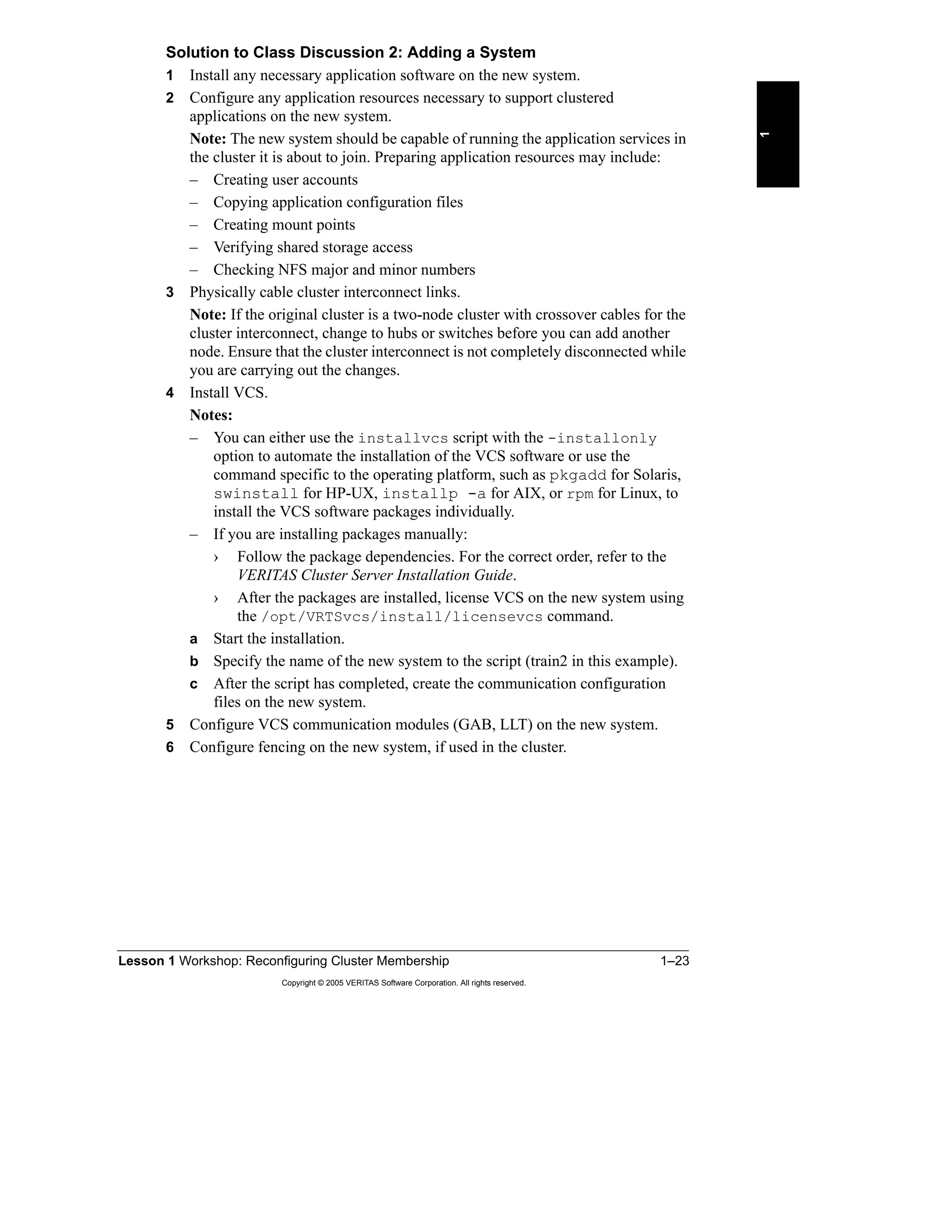
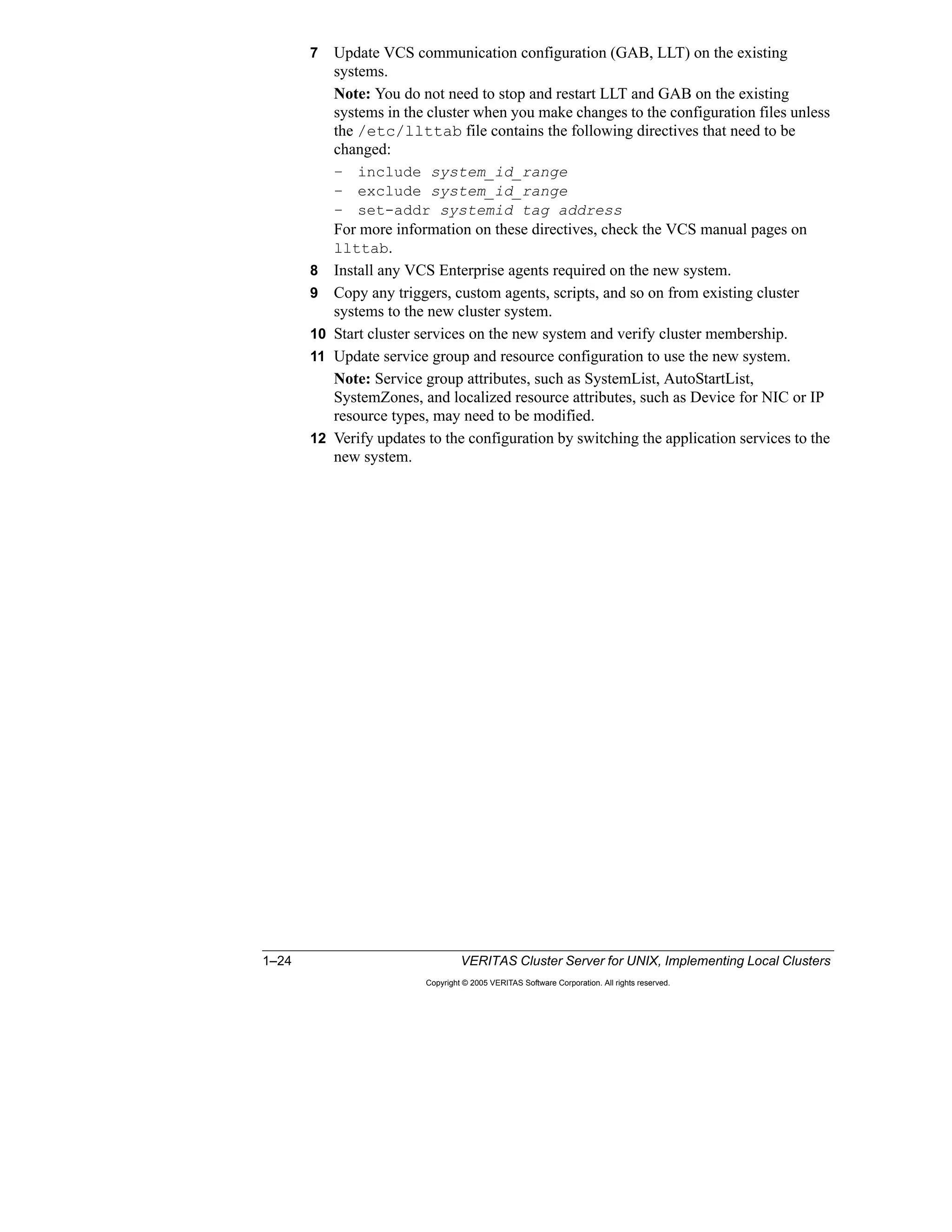
  • 197.
    Lesson 6 ValidatingVCS Implementation 6–21 Copyright © 2005 VERITAS Software Corporation. All rights reserved. 6 • Storage Area Network Essentials: A Complete Guide to Understanding and Implementing SANs (VERITAS Series) Identifies the properties, architectural concepts, technologies, benefits, and pitfalls of storage area networks (SANs) The authors explain the fibre channel interconnect technology and which software components are necessary for building a storage network; they also describe strategies for moving an enterprise from server-centric computing with local storage to a storage-centric information processing environment in which the central resource is universally accessible data. • VERITAS High Availability Fundamentals Web-based training This course gives an overview of high availability concepts and ideas. The course goes on to demonstrate the role of VERITAS products in realizing high availability to reduce downtime and enhance the value of business investments in technology.
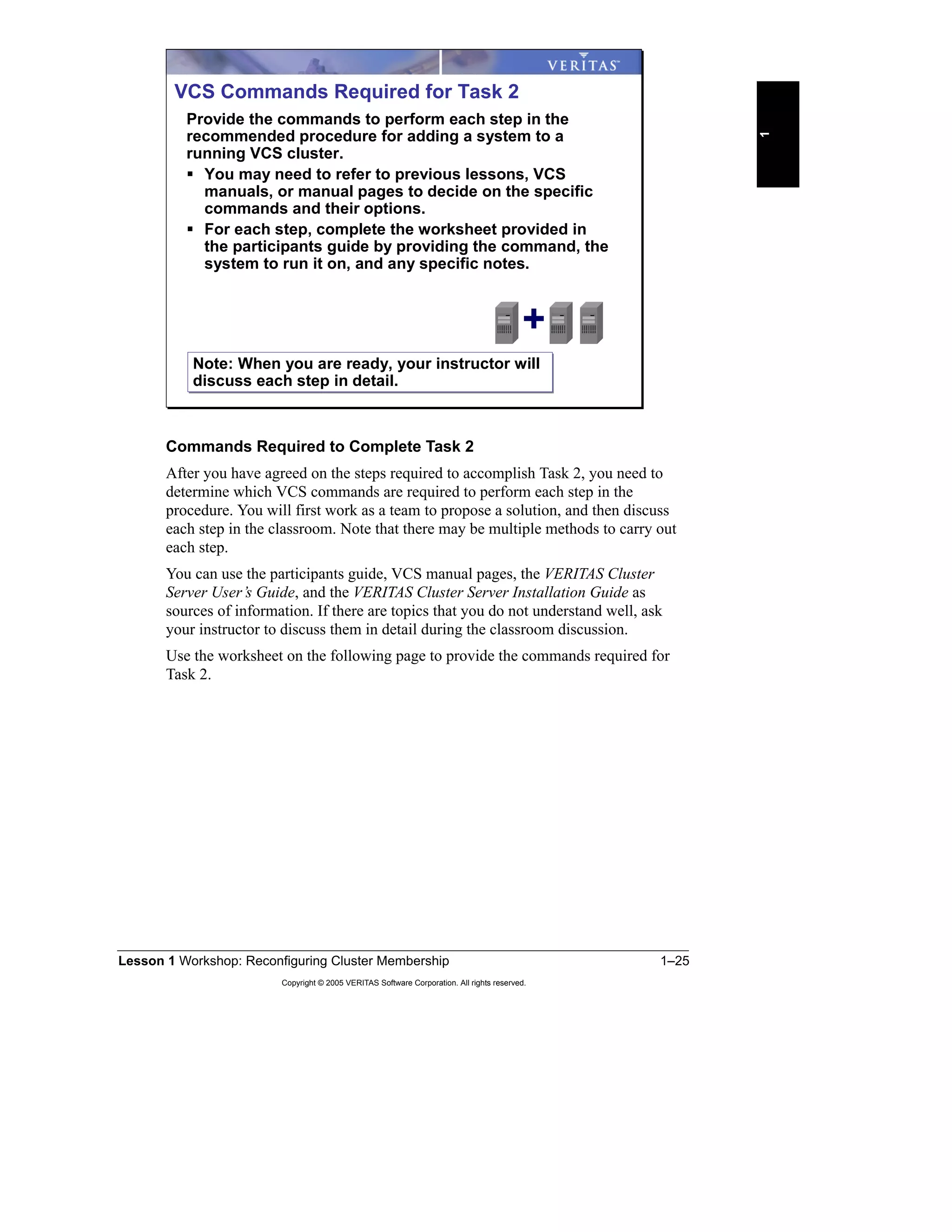


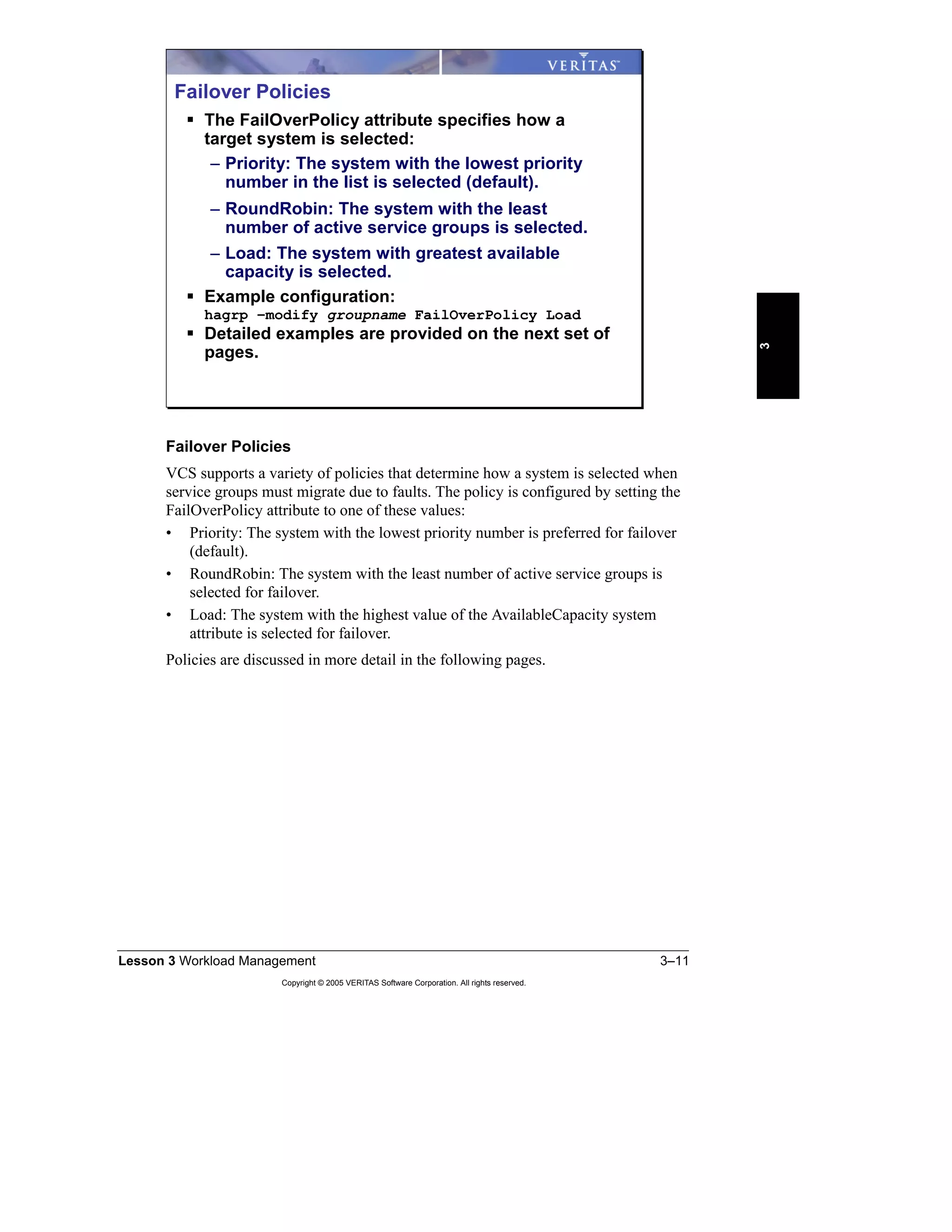
  • 198.
    6–22 VERITAS ClusterServer for UNIX, Implementing Local Clusters Copyright © 2005 VERITAS Software Corporation. All rights reserved. VERITAS High Availability Curriculum Now that you have gained expertise using VERITAS Cluster Server in local area shared storage configurations, you can build on this foundation by completing the following instructor-led courses. High Availability Design Using VERITAS Cluster Server This future course enables participants to translate high availability requirements into a VCS design that can be deployed using VERITAS Cluster Server. VERITAS Cluster Server Agent Development This course enables participants to create and modify VERITAS Cluster Server agents. Disaster Recovery Using VVR and Global Cluster Option This course covers cluster configurations across remote sites, including Replicated Data Clusters (RDCs) and the Global Cluster Option for wide-area clusters. Learning Path VERITAS Cluster Server, Implementing Local Clusters Disaster Recovery Using VVR and Global Cluster Option High Availability Design Using VERITAS Cluster Server VERITAS Cluster Server, Fundamentals VERITAS Cluster Server Curriculum VERITAS Cluster Server Agent Development
  • 199.
    Lesson 6 ValidatingVCS Implementation 6–23 Copyright © 2005 VERITAS Software Corporation. All rights reserved. 6 Summary This lesson described how to verify that the deployment of your high availability environment meets your design criteria. Additional Resources • VERITAS Cluster Server User’s Guide This guide provides detailed information on procedures and concepts for configuring and managing VCS clusters. • http://www.veritas.com/products From the Products link on the VERITAS Web site, you can find information about all high availability and disaster recovery solutions offered by VERITAS. Lesson Summary Key Points – Follow best-practice guidelines when implementing VCS. – You can extend your cluster to provide a range of disaster recovery solutions. Reference Materials – VERITAS Cluster Server User's Guide – http://www.veritas.com/products
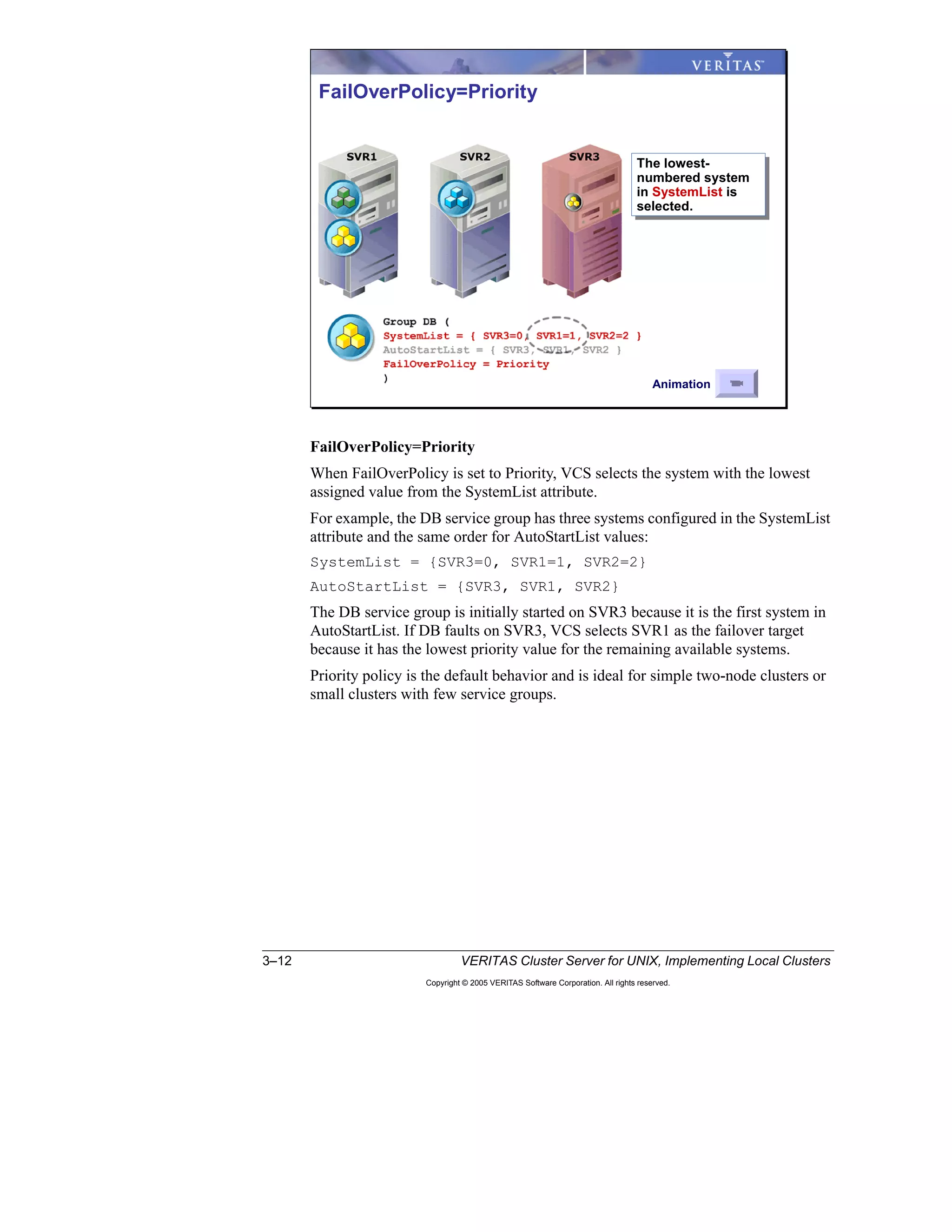
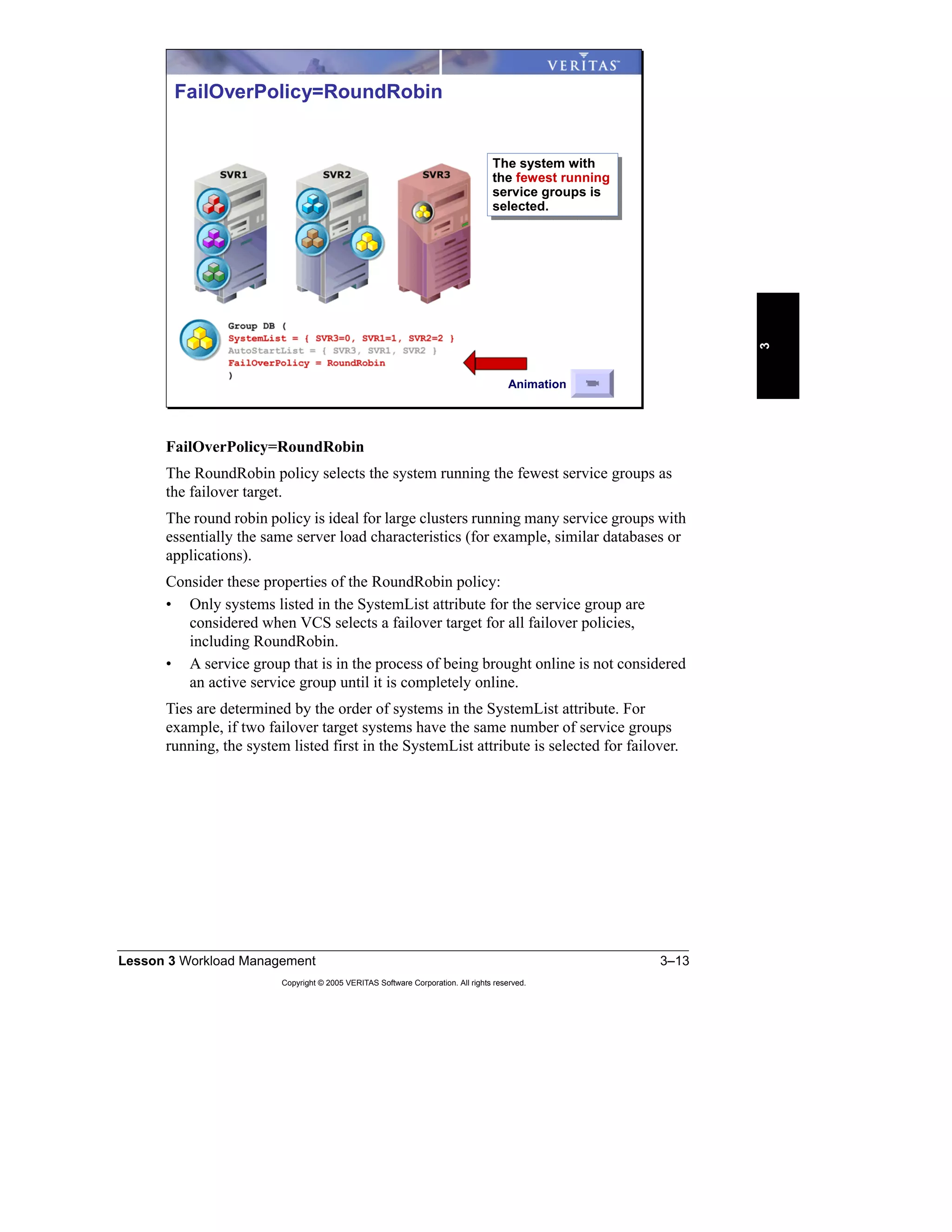
  • 200.
    6–24 VERITAS ClusterServer for UNIX, Implementing Local Clusters Copyright © 2005 VERITAS Software Corporation. All rights reserved.
  • 201.
  • 202.
    A–2 VERITAS ClusterServer for UNIX, Implementing Local Clusters Copyright © 2005 VERITAS Software Corporation. All rights reserved. Lab 1 Synopsis: Reconfiguring Cluster Membership In this lab, work with your partner to prepare the systems for installing VCS. Step-by-step instructions for this lab are located on the following page: • “Lab 1 Details: Reconfiguring Cluster Membership,” page B-3 Solutions for this exercise are located on the following page: • “Lab Solution 1: Reconfiguring Cluster Membership,” page C-3 Lab Assignments Fill in the table with the applicable values for your lab cluster. Sample Value Your Value Node names, cluster name, and cluster ID of the two- node cluster from which a system will be removed train1 train2 vcs1 1 Node names, cluster name, and cluster ID of the two- node cluster to which a system will be added train3 train4 vcs2 2 Node names, cluster name, and cluster ID of the final four-node cluster train1 train2 train3 train4 vcs2 2 Lab 1: Reconfiguring Cluster Membership B A A B B A D C C D C C D C D B B C DD 1 2 3 4 3 4 4 2 2 2 1 1 3 DC B B C D AA Task 1 Task 2 Task 3 D A C AUse the lab appendix best suited to your experience level: Use the lab appendix best suited to your experience level: Appendix A: Lab Synopses Appendix B: Lab Details Appendix C: Lab Solutions Appendix A: Lab Synopses Appendix B: Lab Details Appendix C: Lab Solutions
  • 203.
    Appendix A LabSynopses A–3 Copyright © 2005 VERITAS Software Corporation. All rights reserved. A 1 Work with your lab partners to fill in the design worksheet with values appropriate for your cluster. 2 Using this information and the procedure described in the lesson, remove the appropriate cluster system. Task 1: Removing a System from a Running VCS Cluster Sample Value Your Value Cluster name of the two- node cluster from which a system will be removed vcs1 Name of the system to be removed train2 Name of the system to remain in the cluster train1 Cluster interconnect configuration train1: qfe0 qfe1 train2: qfe0 qfe1 Low-priority link: train1: eri0 train2: eri0 Names of the service groups configured in the cluster name1SG1, name1SG2, name2SG1, name2SG2, NetworkSG, ClusterService Any localized resource attributes in the cluster B A A B B A 1 2 2 1 Task 1
  • 204.
    A–4 VERITAS ClusterServer for UNIX, Implementing Local Clusters Copyright © 2005 VERITAS Software Corporation. All rights reserved. 1 Work with your lab partners to fill in the design worksheet with values appropriate for your cluster. 2 Using this information and the procedure described in the lesson, add the previously removed system to the second cluster. Task 2: Adding a System to a Running VCS Cluster Sample Value Your Value Cluster name of the two- node cluster to which a system will be added vcs2 Name of the system to be added train2 Names of systems already in cluster train3 train4 Cluster interconnect configuration for the three-node cluster train2: qfe0 qfe1 train3: qfe0 qfe1 train4: qfe0 qfe1 Low-priority link: train2: eri0 train3: eri0 train4: eri0 Names of service groups configured in the cluster name3SG1, name3SG2, name4SG1, name4SG2, NetworkSG, ClusterService Any localized resource attributes in the cluster D C C D C C D C D 3 4 3 4 2 2 Task 2 D
  • 205.
    Appendix A LabSynopses A–5 Copyright © 2005 VERITAS Software Corporation. All rights reserved. A 1 Work with your lab partners to fill in the design worksheet with values appropriate for your cluster. 2 Using the following information and the procedure described in the lesson, merge the one-node cluster and the three-node cluster. Task 3: Merging Two Running VCS Clusters B A C C D C D B B C DD 42 1 1 3 DC B B C D A Task 3 D A C A
  • 206.
    A–6 VERITAS ClusterServer for UNIX, Implementing Local Clusters Copyright © 2005 VERITAS Software Corporation. All rights reserved. Sample Value Your Value Node name, cluster name, and ID of the small cluster (the one-node cluster that will be merged to the three-node cluster) train1 vcs1 1 Node name, cluster name, and ID of the large cluster (the three-node cluster that remains running all through the merging process) train2 train3 train4 vcs2 2 Names of service groups configured in the small cluster name1SG1, name1SG2, name2SG1, name2SG2, NetworkSG, ClusterService Names of service groups configured in the large cluster name3SG1, name3SG2, name4SG1, name4SG2, NetworkSG, ClusterService Names of service groups configured in the merged four-node cluster name1SG1, name1SG2, name2SG1, name2SG2, name3SG1, name3SG2, name4SG1, name4SG2, NetworkSG, ClusterService Cluster interconnect configuration for the four-node cluster train1: qfe0 qfe1 train2: qfe0 qfe1 train3: qfe0 qfe1 train4: qfe0 qfe1 Low-priority link: train1: eri0 train2: eri0 train3: eri0 train4: eri0 Any localized resource attributes in the small cluster Any localized resource attributes in the large cluster
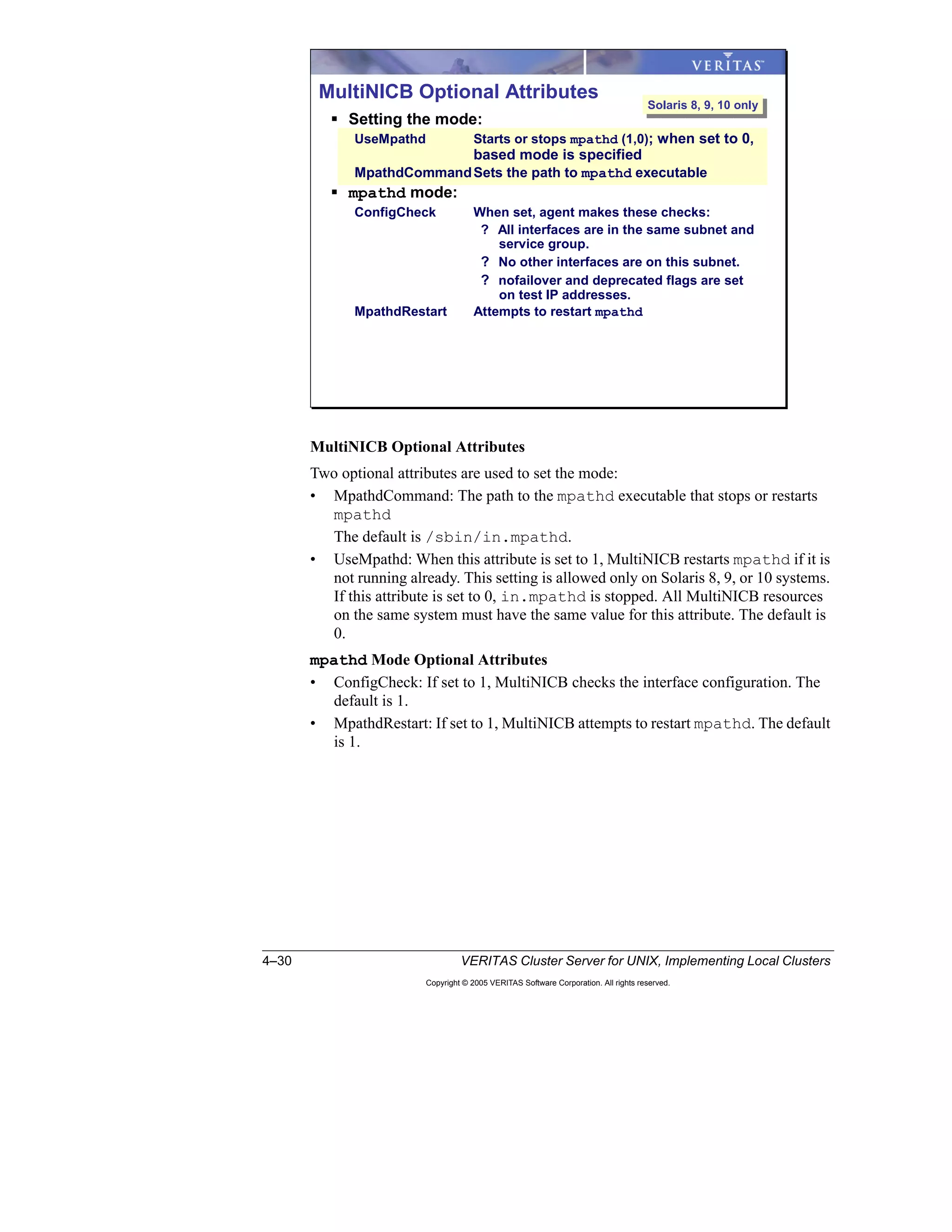
  • 207.
    Appendix A LabSynopses A–7 Copyright © 2005 VERITAS Software Corporation. All rights reserved. A Lab 2 Synopsis: Service Group Dependencies Students work separately to configure and test service group dependencies. Step-by-step instructions for this lab are located on the following page: • “Lab 2 Details: Service Group Dependencies,” page B-17 Solutions for this exercise are located on the following page: • “Lab 2 Solution: Service Group Dependencies,” page C-25 If you already have a nameSG2 service group, skip this section. 1 Verify that nameSG1 is online on your local system. Preparing Service Groups Lab 2: Service Group Dependencies ParentParent ChildChild Online Local Online Local Online Global Online Global Offline Local Offline Local nameSG2 nameSG1 Appendix A: Lab Synopses Appendix B: Lab Details Appendix C: Lab Solutions Appendix A: Lab Synopses Appendix B: Lab Details Appendix C: Lab Solutions
  • 208.
    A–8 VERITAS ClusterServer for UNIX, Implementing Local Clusters Copyright © 2005 VERITAS Software Corporation. All rights reserved. 2 Create a service group using the values for your cluster. 3 Copy the loopy script to the / directory on both systems that were in the original two-node cluster. 4 Create a nameProcess2 resource using the appropriate values in your worksheet and bring the resource online. 5 Save and close the cluster configuration. Service Group Definition Sample Value Your Value Group nameSG2 Required Attributes FailOverPolicy Priority SystemList train1=0 train2=1 Optional Attributes AutoStartList train1 Resource Definition Sample Value Your Value Service Group nameSG2 Resource Name nameProcess2 Resource Type Process Required Attributes PathName /bin/sh Arguments /loopy name 2 Critical? No (0) Enabled? Yes (1)
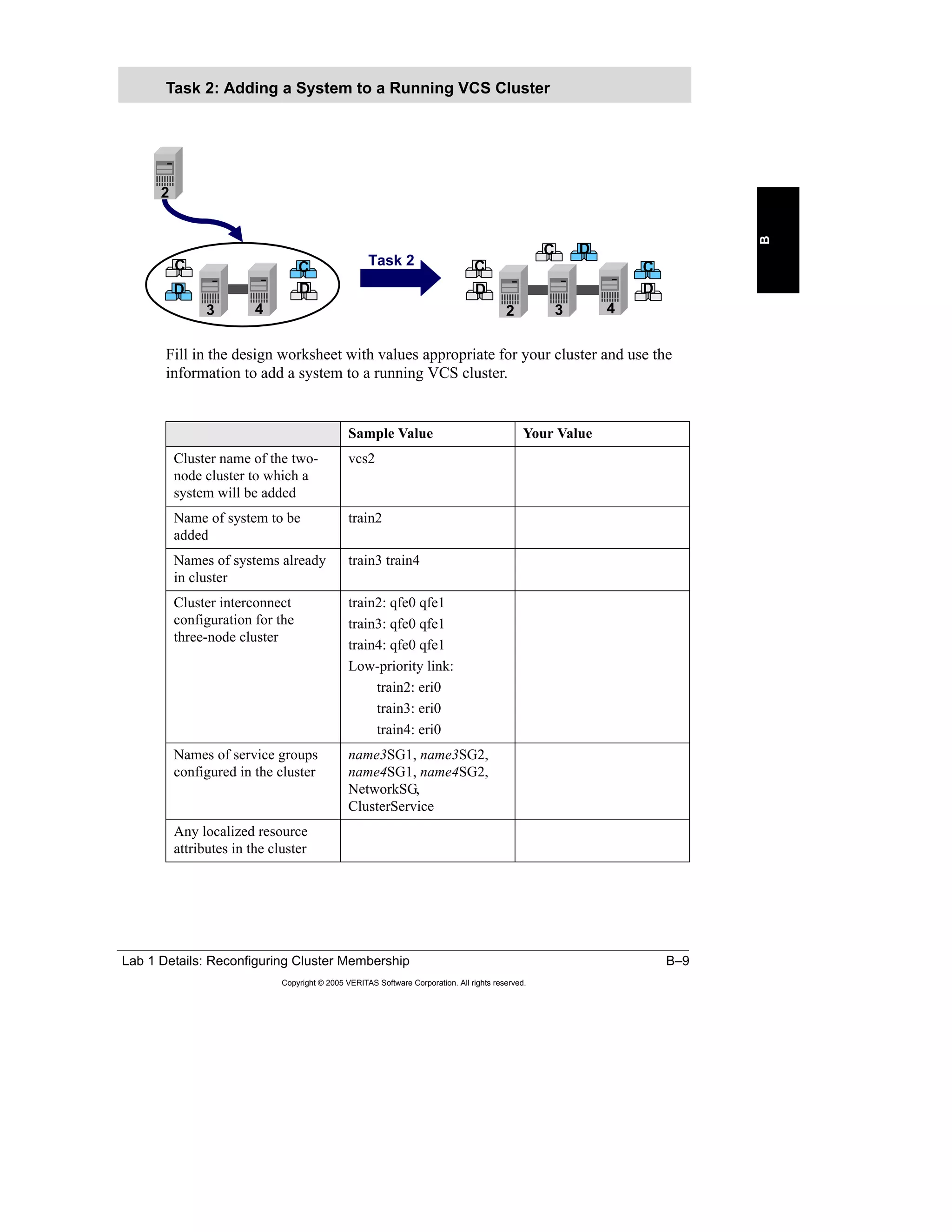
  • 209.
    Appendix A LabSynopses A–9 Copyright © 2005 VERITAS Software Corporation. All rights reserved. A 1 Take the nameSG1 and nameSG2 service groups offline and delete the two nameSGx service groups added in Lab 1 from SystemList for both groups. Note: Skip this step if you did not complete the “Combining Clusters” lab. 2 Create an online local firm dependency between nameSG1 and nameSG2 with nameSG1 as the child group. 3 Bring both service groups online on your system. Describe what happens in each of these cases. a Attempt to switch both service groups to any other system in the cluster. b Stop the loopy process for nameSG1 on your_sys. Watch the service groups in the GUI closely and record how nameSG2 reacts. c Stop the loopy process for nameSG1 on their_sys. Watch the service groups in the GUI closely and record how nameSG2 reacts. 4 Clear any faulted resources and verify that both service groups are offline. 5 Remove the dependency between the service groups. 1 Create an online local soft dependency between the nameSG1 and nameSG2 service groups with nameSG1 as the child group. 2 Bring both service groups online on your system. Describe what happens in each of these cases. a Attempt to switch both service groups to any other system in the cluster. Testing Online Local Firm Testing Online Local Soft
  • 210.
    A–10 VERITAS ClusterServer for UNIX, Implementing Local Clusters Copyright © 2005 VERITAS Software Corporation. All rights reserved. b Stop the loopy process for nameSG1 on your_sys. Watch the service groups in the GUI closely and record how nameSG2 reacts. c Stop the loopy process for nameSG1 on their_sys. Watch the service groups in the GUI closely and record how nameSG2 reacts. 3 Describe the differences you observed between the online local firm and online local soft service group dependencies. 4 Clear any faulted resources. 5 Verify that the nameSG1 and nameSG2 service groups are offline. 6 Bring the nameSG1 and nameSG2 service groups online on your system. 7 Kill the loopy process for nameSG2. Watch the service groups in the GUI closely and record how nameSG1 reacts. 8 Clear any faulted resources and verify that both service groups are offline. 9 Remove the dependency between the service groups. Note: Skip this section if you are using a version of VCS earlier than 4.0. Hard dependencies are only supported in VCS 4.0 and later versions. 1 Create an online local hard dependency between the nameSG1 and nameSG2 service groups with nameSG1 as the child group. 2 Bring both service groups online on your system. Describe what happens in each of these cases. a Attempt to switch both service groups to any other system in the cluster. b Stop the loopy process for nameSG1 on your_sys. Watch the service groups in the GUI closely and record how nameSG2 reacts. Testing Online Local Hard
  • 211.
    Appendix A LabSynopses A–11 Copyright © 2005 VERITAS Software Corporation. All rights reserved. A c Stop the loopy process for nameSG1 on their_sys. Watch the service groups in the GUI closely and record how nameSG2 reacts. 3 Describe the differences you observed between the online local firm/soft and online local hard service group dependencies? 4 Clear any faulted resources and verify that both service groups are offline. 5 Remove the dependency between the service groups. 1 Create an online global firm dependency between nameSG2 and nameSG1 with nameSG1 as the child group. 2 Bring both service groups online on your system. Describe what happens in each of these cases. a Attempt to switch both service groups to any other system in the cluster. b Stop the loopy process for nameSG1 on your_sys. Watch the service groups in the GUI closely and record how nameSG2 reacts. c Stop the loopy process for nameSG1 on their_sys. Watch the service groups in the GUI closely and record how nameSG2 reacts. 3 Clear any faulted resources and verify that both service groups are offline. 4 Remove the dependency between the service groups. 1 Create an online global soft dependency between the nameSG2 and nameSG1 service groups with nameSG1 as the child group. Testing Online Global Firm Dependencies Testing Online Global Soft Dependencies
  • 212.
    A–12 VERITAS ClusterServer for UNIX, Implementing Local Clusters Copyright © 2005 VERITAS Software Corporation. All rights reserved. 2 Bring both service groups online on your system. Describe what happens in each of these cases. a Attempt to switch both service groups to any other system in the cluster. b Stop the loopy process for nameSG1 on your_sys. Watch the service groups in the GUI closely and record how nameSG2 reacts. c Stop the loopy process for nameSG1 on their_sys. Watch the service groups in the GUI closely and record how nameSG2 reacts. 3 Describe the differences you observed between the online global firm and online local soft service group dependencies. 4 Clear any faulted resources and verify that both service groups are offline. 5 Remove the dependency between the service groups. 1 Create a service group dependency between nameSG1 and nameSG2 such that, if the nameSG1 fails over to the same system running nameSG2, nameSG2 is shut down. There is no dependency that requires nameSG2 to be running for nameSG1 or nameSG1 to be running for nameSG2. 2 Bring the service groups online on different systems. 3 Stop the loopy process for nameSG2 by sending a kill signal. Record what happens to the service groups. 4 Clear the faulted resource and restart the service groups on different systems. 5 Stop the loopy process for nameSG1 on their_sys. Record what happens to the service groups. 6 Clear any faulted resources and verify that both service groups are offline. Testing Offline Local Dependency
  • 213.
    Appendix A LabSynopses A–13 Copyright © 2005 VERITAS Software Corporation. All rights reserved. A 7 Remove the dependency between the service groups. 8 When all lab participants have completed the lab exercise, save and close the cluster configuration. Implement the behavior of an offline local dependency using the FileOnOff and ElifNone resource types to detect when the service groups are running on the same system. Hint: Set MonitorInterval and the OfflineMonitorInterval for the ElifNone resource type to 5 seconds. Remove these resources after the test. Optional Lab: Using FileOnOff and ElifNone
  • 214.
    A–14 VERITAS ClusterServer for UNIX, Implementing Local Clusters Copyright © 2005 VERITAS Software Corporation. All rights reserved. Lab 3 Synopsis: Testing Workload Management In this lab, work with your lab partner to install VCS on both systems. Step-by-step instructions for this lab are located on the following page: • “Lab 3 Details: Testing Workload Management,” page B-29 Solutions for this exercise are located on the following page: • “Lab 3 Solution: Testing Workload Management,” page C-45 1 Add /opt/VRTScssim/bin to your PATH environment variable after any /opt/VRTSvcs/bin entries, if it is not already present. 2 Set VCS_SIMULATOR_HOME to /opt/VRTScssim, if it is not already set. 3 Use the Simulator GUI to add a cluster using these values: – Cluster Name: wlm – System Name: S1 – Port: 15560 – Platform: Solaris – WAC Port: -1 Preparing the Simulator Environment Lab 3: Testing Workload Management Simulator config file location:_________________________________________ Copy to:___________________________________________ Simulator config file location:_________________________________________ Copy to:___________________________________________ Appendix A: Lab Synopses Appendix B: Lab Details Appendix C: Lab Solutions Appendix A: Lab Synopses Appendix B: Lab Details Appendix C: Lab Solutions
  • 215.
    Appendix A LabSynopses A–15 Copyright © 2005 VERITAS Software Corporation. All rights reserved. A 4 Copy the main.cf.SGWM.lab file provided by your instructor to a file named main.cf in the simulation configuration directory. Source location of the main.cf.SGWM.lab file: ___________________________________________ cf_files_dir 5 From the Simulator GUI, start the wlm cluster and launch the VCS Java Console for the wlm simulated cluster. 6 Log in as admin with password password. Notice the cluster name is now VCS. This is the cluster name specified in the new main.cf file you copied into the config directory. 7 Verify that the configuration matches the description shown in the table. 8 In the terminal window you opened previously, set the VCS_SIM_PORT environment variable to 15560. Note: Use this terminal window for all subsequent commands. Service Group SystemList AutoStartList A1 S1 1 S2 2 S3 3 S4 4 S1 A2 S1 1 S2 2 S3 3 S4 4 S1 B1 S1 4 S2 1 S3 2 S4 3 S2 B2 S1 4 S2 1 S3 2 S4 3 S2 C1 S1 3 S2 4 S3 1 S4 2 S3 C2 S1 3 S2 4 S3 1 S4 2 S3 D1 S1 2 S2 3 S3 4 S4 1 S4 D2 S1 2 S2 3 S3 4 S4 1 S4
  • 216.
    A–16 VERITAS ClusterServer for UNIX, Implementing Local Clusters Copyright © 2005 VERITAS Software Corporation. All rights reserved. 1 Verify that the failover policy of all service groups is Priority. 2 Verify that all service groups are online on these systems: 3 If the A1 service group faults, where should it fail over? Verify the failover by faulting a critical resource in the A1 service group. 4 If A1 faults again, without clearing the previous fault, where should it fail over? Verify the failover by faulting a critical resource in A1. 5 Clear the existing faults in A1. Then, fault a critical resource in A1. Where should the service group fail to now? 6 Clear the existing fault in the A1 service group. Testing Priority Failover Policy System S1 S2 S3 S4 Groups A1 B1 C1 D1 A2 B2 C2 D2
  • 217.
    Appendix A LabSynopses A–17 Copyright © 2005 VERITAS Software Corporation. All rights reserved. A 1 Set the failover policy to load for the eight service groups. 2 Set the Load attribute for each service group based on the following chart. 3 Set S1 and S2 Capacity to 200. Set S3 and S4 Capacity to 100. (This is the default value.) 4 The current status of online service groups should look like this: 5 If A1 faults, where should if fail over? Fault a critical resource in A1 to observe. Load Failover Policy Group Load A1 75 A2 75 B1 75 B2 75 C1 50 C2 50 D1 50 D2 50 System S1 S2 S3 S4 Groups A1 B1 C1 D1 A2 B2 C2 D2 Available Capacity 50 50 0 0
  • 218.
    A–18 VERITAS ClusterServer for UNIX, Implementing Local Clusters Copyright © 2005 VERITAS Software Corporation. All rights reserved. 6 The current status of online service groups should look like this: 7 If the S2 system fails, where should those service groups fail over? Select the S2 system in Cluster Manager and power it off. 8 The current status of online service groups should look like this: 9 Power up the S2 system in the Simulator, clear all faults, and return the service groups to their startup locations. 10 The current status of online service groups should look like this: System S1 S2 S3 S4 Groups B1 C1 D1 A2 B2 C2 D2 A1 Available Capacity 125 -25 0 0 System S1 S2 S3 S4 Groups B1 C1 D1 B2 C2 D2 A2 A1 Available Capacity -25 200 -75 0 System S1 S2 S3 S4 Groups A1 B1 C1 D1 A2 B2 C2 D2 Available Capacity 50 50 0 0
  • 219.
    Appendix A LabSynopses A–19 Copyright © 2005 VERITAS Software Corporation. All rights reserved. A Leave the load settings as they are but use the Prerequisites and Limits so no more than three service groups of A1, A2, B1, or B2 can run on a system at any one time. 1 Set Limit for each system to ABGroup 3. 2 Set Prerequisites for the A1, A2, B1, and B2 service groups to be 1 ABGroup. 3 Power off S1 in the Simulator. Where do the A1 and A2 service groups fail over? 4 Power off S2 in the Simulator. Where do the A1, A2, B1, and B2 service groups fail over? 5 Power off S3 in the Simulator. Where do the A1, A2, B1, B2, C1, and C2 service groups fail over? 6 Close the configuration, log off from the GUI, and stop the wlm cluster. Prerequisites and Limits
  • 220.
    A–20 VERITAS ClusterServer for UNIX, Implementing Local Clusters Copyright © 2005 VERITAS Software Corporation. All rights reserved. Lab 4 Synopsis: Configuring Multiple Network Interfaces This lab uses the VERITAS Cluster Server 4.0 Simulator and the VCS 4.0 Cluster Manager GUI. You are provided a preconfigured main.cf file to learn about managing the cluster. Step-by-step instructions for this lab are located on the following page: • “Lab 4 Details: Configuring Multiple Network Interfaces,” page B-37 Solutions for this exercise are located on the following page: • “Lab 4 Solution: Configuring Multiple Network Interfaces,” page C-63 Solaris Students work together initially to modify the NetworkSG service group to replace the NIC resource with a MultiNICB resource. Then, students work separately to modify their own nameSG1 service group to replace the IP type resource with an IPMultiNICB resource. Mobile The mobile equipment in your classroom may not support this lab exercise. AIX, HP-UX, Linux Skip to the MultiNICA and IPMultiNICA section. Here, students work together initially to modify the NetworkSG service group to replace the NIC resource with a MultiNICA resource. Then, students work separately to modify their own service group to replace the IP type resource with an IPMultiNIC resource. Virtual Academy Skip this lab if you are working in the Virtual Academy. Lab 4: Configuring Multiple Network Interfaces name Process2 AppVol App DG name Proxy2 name IP2 name DG2 name Vol2 name Mount2 name Process1 name DG1 name Vol1 name Mount1 name Proxy1 name IPM1 Network MNIC Network Phantom nameSG1nameSG1 nameSG2nameSG2 NetworkSGNetworkSG Network NIC
  • 221.
    Appendix A LabSynopses A–21 Copyright © 2005 VERITAS Software Corporation. All rights reserved. A Network Cabling—All Platforms Note: The MultiNICB lab requires another IP on the 10.x.x.x network to be present outside of the cluster. Normally, other students’ clusters will suffice for this requirement. However, if there are no other clusters with the 10.x.x.x network defined yet, the trainer system can be used. Your instructor can bring up a virtual IP of 10.10.10.1 on the public network interface on the trainer system, or another classroom system. 1 Verify the cabling or recable the network according to the previous diagram. 2 Set up base IP addresses for the interfaces used by the MultiNICB resource. Preparing Networking Sys A Sys B Sys C Sys D Crossover (1) Private network when 4 node cluster (8) Counts for 4 node clusters Public network when 4 node cluster (4) Classroom network MultiNIC/VVR/GCO (8) Private nets Public Net 0123 0123 0123 01230 0 0 0
  • 222.
    A–22 VERITAS ClusterServer for UNIX, Implementing Local Clusters Copyright © 2005 VERITAS Software Corporation. All rights reserved. a Set up the /etc/hosts file on each system to have an entry for each interface on each system using the following address scheme where W, X, Y, and Z are system numbers. b Set up /etc/hostname.interface files on all systems to enable these IP addresses to be started at boot time. Use the following syntax: c Check the local-mac-address? eeprom setting; ensure that it is set to true on each system. If not, change this setting to true. d Reboot all systems for the addresses and the eeprom setting to take effect. Do this is such a way to keep the services highly available. /etc/hosts 10.10.W.2 trainW_qfe2 10.10.W.3 trainW_qfe3 10.10.X.2 trainX_qfe2 10.10.X.3 trainX_qfe3 10.10.Y.2 trainY_qfe2 10.10.Y.3 trainY_qfe3 10.10.Z.2 trainZ_qfe2 10.10.Z.3 trainZ_qfe3
  • 223.
    Appendix A LabSynopses A–23 Copyright © 2005 VERITAS Software Corporation. All rights reserved. A Working with your lab partner, use the values in the table to configure a MultiNICB resource to the NetworkSG service group. Optional mpathd Configuration You may configure MultiNICB to use mpathd mode as shown in the following steps. 1 Obtain the IP addresses for the /etc/defaultrouter file from you instructor. __________________________ __________________________ 2 Modify the /etc/defaultrouter on each system substituting the IP addresses provided within LINE1 and LINE2. LINE1: route add host 192.168.xx.x -reject 127.0.0.1 LINE2: route add default 192.168.xx.1 3 Set TRACK_INTERFACES_ONLY_WITH_GROUP to yes in /etc/ default/mpathd. 4 Set the UseMpathd attribute for NetworkNMICB to 1 and set the MpathdCommand attribute to /sbin/in.mpathd -a. Configuring MultiNICB Resource Definition Sample Value Your Value Service Group NetworkSG Resource Name NetworkMNICB Resource Type MultiNICB Required Attributes Device qfe2 qfe3 Critical? No (0) Enabled? Yes (1)
  • 224.
    A–24 VERITAS ClusterServer for UNIX, Implementing Local Clusters Copyright © 2005 VERITAS Software Corporation. All rights reserved. In this portion of the lab, work separately to modify the Proxy resource in your nameSG1 service group to reference the MultiNICB resource. Reconfiguring Proxy Resource Definition Sample Value Your Value Service Group nameSG1 Resource Name nameProxy1 Resource Type Proxy Required Attributes TargetResName NetworkMNICB Critical? No (0) Enabled? Yes (1)
  • 225.
    Appendix A LabSynopses A–25 Copyright © 2005 VERITAS Software Corporation. All rights reserved. A Create an IPMultiNICB resource in the nameSG1 service group. Configuring IPMultiNICB Resource Definition Sample Value Your Value Service Group NetworkSG Resource Name nameIPMNICB1 Resource Type IPMultiNICB Required Attributes BaseResName NetworkMNICB Netmask 255.255.255.0 Address See the table that follows. Critical? No (0) Enabled? Yes (1) train1 192.168.xxx.51 train2 192.168.xxx.52 train3 192.168.xxx.53 train4 192.168.xxx.54 train5 192.168.xxx.55 train6 192.168.xxx.56 train7 192.168.xxx.57 train8 192.168.xxx.58 train9 192.168.xxx.59 train10 192.168.xxx.60 train11 192.168.xxx.61 train12 192.168.xxx.62
  • 226.
    A–26 VERITAS ClusterServer for UNIX, Implementing Local Clusters Copyright © 2005 VERITAS Software Corporation. All rights reserved. 1 Link the nameIPMNICB1 resource to the nameProxy1 resource. 2 Switch the nameSG1 service group between the systems to test its resources on each system. Verify that the IP address specified in the nameIPMNICB1 resource switches with the service group. 3 Set the new resource to critical (nameIPMNICB1). 4 Save the cluster configuration. Note: Wait for all participants to complete the steps to this point. Then, test the NetworkMNICB resource by performing the following procedure. Each student can take turns to test their resource, or all can observe one test. 1 Determine which interface the nameIPMNICB1 resource is using on the system where it is currently online. 2 Unplug the network cable from that interface. What happens to the nameIPMNICB1 IP address? 3 Determine the status of the interface with the unplugged cable. 4 Leave the network cable unplugged. Unplug the other interface that the NetworkMNICB resource is now using. What happens to the NetworkMNICB resource and the nameSG1 service group? Linking and Testing IPMultiNICB Testing IPMultiNICB Failover
  • 227.
    Appendix A LabSynopses A–27 Copyright © 2005 VERITAS Software Corporation. All rights reserved. A 5 Replace the cables. What happens? 6 Clear the nameIPMNICB1 resource if it is faulted. 7 Save and close the configuration. Note: Only complete this lab if you are working on an AIX, HP-UX, or Linux system in your classroom. Work together using the values in the table to create a MultiNICA resource. Alternate Lab: Configuring MultiNICA and IPMultiNIC Resource Definition Sample Value Your Value Service Group NetworkSG Resource Name NetworkMNICA Resource Type MultiNICA Required Attributes Device (See the table that follows for admin IPs.) AIX: en3, en4 HP-UX: lan3, lan4 Linux: eth3, eth4 NetworkHosts (HP-UX only) 192.168.xx.xxx (See the instructor.) NetMask (AIX, Linux only) 255.255.255.0 Critical? No (0) Enabled? Yes (1)
  • 228.
    A–28 VERITAS ClusterServer for UNIX, Implementing Local Clusters Copyright © 2005 VERITAS Software Corporation. All rights reserved. 1 Verify the cabling or recable the network according to the previous diagram. 2 Set up the /etc/hosts file on each system to have an entry for each interface on each system in the cluster using the following address scheme where 1, 2, 3, and 4 are system numbers. /etc/hosts 10.10.10.101 train1_mnica 10.10.10.102 train2_ mnica 10.10.10.103 train3_ mnica 10.10.10.104 train4_ mnica System Admin IP Address train1 10.10.10.101 train2 10.10.10.102 train3 10.10.10.103 train4 10.10.10.104 train4 10.10.10.105 train6 10.10.10.106 train7 10.10.10.107 train8 10.10.10.108 train9 10.10.10.109 train10 10.10.10.110 train11 10.10.10.111 train12 10.10.10.112
  • 229.
    Appendix A LabSynopses A–29 Copyright © 2005 VERITAS Software Corporation. All rights reserved. A 3 Working together. add the NetworkMNICA resource to the NetworkSG service group. 4 Save the cluster configuration. Resource Definition Sample Value Your Value Service Group NetworkSG Resource Name NetworkMNICA Resource Type MultiNICA Required Attributes Device (See the table that follows for admin IPs.) AIX: en3, en4 HP-UX: lan3, lan4 Linux: eth3, eth4 NetworkHosts (HP-UX only) 192.168.xx.xxx (See the instructor.) NetMask (AIX, Linux only) 255.255.255.0 Critical? No (0) Enabled? Yes (1) System Admin IP Address train1 10.10.10.101 train2 10.10.10.102 train3 10.10.10.103 train4 10.10.10.104 train4 10.10.10.105 train6 10.10.10.106 train7 10.10.10.107 train8 10.10.10.108 train9 10.10.10.109 train10 10.10.10.110 train11 10.10.10.111 train12 10.10.10.112
  • 230.
    A–30 VERITAS ClusterServer for UNIX, Implementing Local Clusters Copyright © 2005 VERITAS Software Corporation. All rights reserved. In this portion of the lab, modify the Proxy resource in the nameSG1 service group to reference the MultiNICA resource and remove the IP resource. Reconfiguring Proxy Resource Definition Sample Value Your Value Service Group nameSG1 Resource Name nameProxy1 Resource Type Proxy Required Attributes TargetResName NetworkMNICA Critical? No (0) Enabled? Yes (1)
  • 231.
    Appendix A LabSynopses A–31 Copyright © 2005 VERITAS Software Corporation. All rights reserved. A Each student works separately to create an IPMultiNIC resource in their own nameSG1 service group using the values in the table. Configuring IPMultiNIC Resource Definition Sample Value Your Value Service Group nameSG1 Resource Name nameIPMNIC1 Resource Type IPMultiNIC Required Attributes MultiNICResName NetworkMNICA Address See the table that follows. NetMask (HP- UX, Linux only) 255.255.255.0 Critical? No (0) Enabled? Yes (1) System Address train1 192.168.xxx.51 train2 192.168.xxx.52 train3 192.168.xxx.53 train4 192.168.xxx.54 train4 192.168.xxx.55 train6 192.168.xxx.56 train7 192.168.xxx.57 train8 192.168.xxx.58 train9 192.168.xxx.59 train10 192.168.xxx.60 train11 192.168.xxx.61 train12 192.168.xxx.62
  • 232.
    A–32 VERITAS ClusterServer for UNIX, Implementing Local Clusters Copyright © 2005 VERITAS Software Corporation. All rights reserved. 1 Link the nameIPMNIC1 resource to the nameProxy1 resource. 2 If present, link the nameProcess1 or nameApp1 resource to nameIPMNIC1. 3 Switch the nameSG1 service group between the systems to test its resources on each system. Verify that the IP address specified in the nameIPMNIC1 resource switches with the service group. 4 Set the new resource to critical (nameIPMNIC1). 5 Save the cluster configuration. Linking IPMultiNIC
  • 233.
    Appendix A LabSynopses A–33 Copyright © 2005 VERITAS Software Corporation. All rights reserved. A Note: Wait for all participants to complete the steps to this point. Then, test the NetworkMNICA resource by performing the following procedure. Each student can take turns to test their resource, or all can observe one test. 1 Determine which interface the nameIPMNIC1 resource is using on the system where it is currently online. 2 Unplug the network cable from that interface. What happens to the nameIPMNIC1 IP address? 3 Determine the status of the interface with the unplugged cable. 4 Leave the network cable unplugged. Unplug the other interface that the NetworkMNICA resource is now using. What happens to the NetworkMNICA resource and the nameSG1 service group? 5 Replace the cables. What happens? 6 Clear the nameIPMNIC1 resource if it is faulted. 7 Save and close the configuration. Testing IPMultiNIC Failover
  • 234.
    A–34 VERITAS ClusterServer for UNIX, Implementing Local Clusters Copyright © 2005 VERITAS Software Corporation. All rights reserved.
  • 235.
  • 236.
    B–2 VERITAS ClusterServer for UNIX, Implementing Local Clusters Copyright © 2005 VERITAS Software Corporation. All rights reserved.
  • 237.
    Lab 1 Details:Reconfiguring Cluster Membership B–3 Copyright © 2005 VERITAS Software Corporation. All rights reserved. B Lab 1 Details: Reconfiguring Cluster Membership
  • 238.
    B–4 VERITAS ClusterServer for UNIX, Implementing Local Clusters Copyright © 2005 VERITAS Software Corporation. All rights reserved. Lab 1 Details: Reconfiguring Cluster Membership Students work together to create four-node clusters by combining two-node clusters. Brief instructions for this lab are located on the following page: • “Lab 1 Synopsis: Reconfiguring Cluster Membership,” page A-2 Solutions for this exercise are located on the following page: • “Lab Solution 1: Reconfiguring Cluster Membership,” page C-3 Lab 1: Reconfiguring Cluster Membership B A A B B A D C C D C C D C D B B C DD 1 2 3 4 3 4 4 2 2 2 1 1 3 DC B B C D AA Task 1 Task 2 Task 3 D A C AUse the lab appendix best suited to your experience level: Use the lab appendix best suited to your experience level: Appendix A: Lab Synopses Appendix B: Lab Details Appendix C: Lab Solutions Appendix A: Lab Synopses Appendix B: Lab Details Appendix C: Lab Solutions
  • 239.
    Lab 1 Details:Reconfiguring Cluster Membership B–5 Copyright © 2005 VERITAS Software Corporation. All rights reserved. B Lab Assignments Fill in the table with the applicable values for your lab cluster. Sample Value Your Value Node names, cluster name, and cluster ID of the two- node cluster from which a system will be removed train1 train2 vcs1 1 Node names, cluster name, and cluster ID of the two- node cluster to which a system will be added train3 train4 vcs2 2 Node names, cluster name, and cluster ID of the final four-node cluster train1 train2 train3 train4 vcs2 2
  • 240.
    B–6 VERITAS ClusterServer for UNIX, Implementing Local Clusters Copyright © 2005 VERITAS Software Corporation. All rights reserved. Fill in the design worksheet with values appropriate for your cluster and use the information to remove a system from a running VCS cluster. Task 1: Removing a System from a Running VCS Cluster Sample Value Your Value Cluster name of the two- node cluster from which a system will be removed vcs1 Name of system to be removed train2 Name of system to remain in the cluster train1 Cluster interconnect configuration train1: qfe0 qfe1 train2: qfe0 qfe1 Low-priority link: train1: eri0 train2: eri0 Names of service groups configured in the cluster name1SG1, name1SG2, name2SG1, name2SG2, NetworkSG, ClusterService Any localized resource attributes in the cluster B A A B B A 1 2 2 1 Task 1
  • 241.
    Lab 1 Details:Reconfiguring Cluster Membership B–7 Copyright © 2005 VERITAS Software Corporation. All rights reserved. B 1 Prevent application failover to the system to be removed. 2 Switch any application services that are running on the system to be removed to any other system in the cluster. Note: This step can be combined with either step 1 or step 3 as an option to a single command line. 3 Stop VCS on the system to be removed. 4 Remove any disk heartbeat configuration on the system to be removed. Note: No disk heartbeats are configured in the classroom. This step is included as a reminder in the event you use this lab in a real-world environment. 5 Stop VCS communication modules (GAB and LLT) and I/O fencing on the system to be removed. Note: On Solaris platform, you also need to unload the kernel modules. 6 Physically remove cluster interconnect links from the system to be removed. 7 Remove VCS software from the system taken out of the cluster. Note: For purposes of this lab, you do not need to remove the software because this system is put back in the cluster later. This step is included in case you use this lab as a guide to removing a system from a cluster in a real-world environment. 8 Update service group and resource configurations that refer to the system that is removed. Note: Service group attributes, such as AutoStartList, SystemList, SystemZones, and localized resource attributes, such as Device for NIC or IP resource types, may need to be modified. 9 Remove the system from the cluster configuration. 10 Save the cluster configuration. 11 Modify the VCS communication configuration files on the remaining systems in the cluster to reflect the change.
  • 242.
    B–8 VERITAS ClusterServer for UNIX, Implementing Local Clusters Copyright © 2005 VERITAS Software Corporation. All rights reserved. – Edit /etc/llthosts on all the systems remaining in the cluster (train1 in this example) to remove the line corresponding to the removed system (train2 in this example). – Edit /etc/gabtab on all the systems remaining in the cluster (train1 in this example) to reduce the –n option to gabconfig by 1. Note: You do not need to stop and restart LLT and GAB on the remaining systems when you make changes to the configuration files unless the /etc/llttab file contains the following directives that need to be changed: – include system_ID_range – exclude system_ID_range – set-addr systemID tag address For more information on these directives, see the VCS manual pages on llttab.
  • 243.
    Lab 1 Details:Reconfiguring Cluster Membership B–9 Copyright © 2005 VERITAS Software Corporation. All rights reserved. B Fill in the design worksheet with values appropriate for your cluster and use the information to add a system to a running VCS cluster. Task 2: Adding a System to a Running VCS Cluster Sample Value Your Value Cluster name of the two- node cluster to which a system will be added vcs2 Name of system to be added train2 Names of systems already in cluster train3 train4 Cluster interconnect configuration for the three-node cluster train2: qfe0 qfe1 train3: qfe0 qfe1 train4: qfe0 qfe1 Low-priority link: train2: eri0 train3: eri0 train4: eri0 Names of service groups configured in the cluster name3SG1, name3SG2, name4SG1, name4SG2, NetworkSG, ClusterService Any localized resource attributes in the cluster D C C D C C D C D 3 4 3 4 2 2 Task 2 D
  • 244.
    B–10 VERITAS ClusterServer for UNIX, Implementing Local Clusters Copyright © 2005 VERITAS Software Corporation. All rights reserved. 1 Install any necessary application software on the new system. Note: In the classroom, you do not need to install any other set of application binaries on your system for this lab. 2 Configure any application resources necessary to support clustered applications on the new system. Note: The new system should be capable of running the application services in the cluster it is about to join. Preparing application resources may include: – Creating user accounts – Copying application configuration files – Creating mount points – Verifying shared storage access – Checking NFS major and minor numbers Note: For this lab, you only need to create the necessary mount points on all the systems for the shared file systems used in the running VCS clusters (vcs2 in this example). 3 Physically cable cluster interconnect links. Note: If the original cluster is a two-node cluster with crossover cables for cluster interconnect, you need to change to hubs or switches before you can add another node. Ensure that the cluster interconnect is not completely disconnected while you are carrying out the changes. 4 Install VCS on the new system. If you skipped the removal step in the previous section as recommended, you do not need to install VCS on this system. Notes: – You can either use the installvcs script with the -installonly option to automate the installation of the VCS software or use the command specific to the operating platform, such as pkgadd for Solaris, swinstall for HP-UX, installp -a for AIX, or rpm for Linux, to install the VCS software packages individually. – If you are installing packages manually: › Follow the package dependencies. For the correct order, refer to the VERITAS Cluster Server Installation Guide. › After the packages are installed, license VCS on the new system using the /opt/VRTS/bin/vxlicinst -k command.
  • 245.
    Lab 1 Details:Reconfiguring Cluster Membership B–11 Copyright © 2005 VERITAS Software Corporation. All rights reserved. B a Record the location of the installation software provided by your instructor. Installation software location: ____________________________________________________ b Start the installation. c Specify the name of the new system to the script (train2 in this example). 5 Configure VCS communication modules (GAB, LLT) on the added system. Note: You must complete this step even if you did not remove and reinstall the VCS software. 6 Configure fencing on the new system, if used in the cluster. 7 Update VCS communication configuration (GAB, LLT) on the existing systems. Note: You do not need to stop and restart LLT and GAB on the existing systems in the cluster when you make changes to the configuration files unless the /etc/llttab file contains the following directives that need to be changed: – include system_ID_range – exclude system_ID_range – set-addr systemID tag address For more information on these directives, check the VCS manual pages on llttab. 8 Install any VCS Enterprise agents required on the new system. Notes: – No agents are required to be installed for this lab exercise. – Enterprise agents should only be installed, not configured.
  • 246.
    B–12 VERITAS ClusterServer for UNIX, Implementing Local Clusters Copyright © 2005 VERITAS Software Corporation. All rights reserved. 9 Copy any triggers, custom agents, scripts, and so on from existing cluster systems to the new cluster system. Note: In an earlier lab, you may have configured resfault, nofailover, resadminwait, and injeopardy triggers on all the systems in each cluster. Because the trigger scripts are the same in every cluster, you do not need to modify the existing scripts. However, ensure that all the systems have the same trigger scripts. If you reinstalled the new system, copy triggers to the system. 10 Start cluster services on the new system and verify cluster membership. 11 Update service group and resource configuration to use the new system. Note: Service group attributes, such as SystemList, AutoStartList, SystemZones, and localized resource attributes, such as Device for NIC or IP resource types, may need to be modified. 12 Verify updates to the configuration by switching the application services to the new system.
  • 247.
    Lab 1 Details:Reconfiguring Cluster Membership B–13 Copyright © 2005 VERITAS Software Corporation. All rights reserved. B Fill in the design worksheet with values appropriate for your cluster and use the information to merge two running VCS clusters. Task 3: Merging Two Running VCS Clusters Sample Value Your Value Node name, cluster name, and ID of the small cluster (the one-node cluster that will be merged to the three-node cluster) train1 vcs1 1 Node name, cluster name, and ID of the large cluster (the three-node cluster that remains running all through the merging process) train2 train3 train4 vcs2 2 Names of service groups configured in the small cluster name1SG1, name1SG2, name2SG1, name2SG2, NetworkSG, ClusterService Names of service groups configured in the large cluster name3SG1, name3SG2, name4SG1, name4SG2, NetworkSG, ClusterService B A C C D C D B B C DD 42 1 1 3 DC B B C D A Task 3 D A C A
  • 248.
    B–14 VERITAS ClusterServer for UNIX, Implementing Local Clusters Copyright © 2005 VERITAS Software Corporation. All rights reserved. In the following steps, it is assumed that the small cluster is merged to the large cluster; that is, the merged cluster keeps the name and ID of the large cluster, and the large cluster is not brought down during the whole process. 1 Modify VCS communication files on the large cluster to recognize the systems to be added from the small cluster. Note: You do not need to stop and restart LLT and GAB on the existing systems in the large cluster when you make changes to the configuration files unless the /etc/llttab file contains the following directives that need to be changed: – include system_ID_range – exclude system_ID_range – set-addr systemID tag address For more information on these directives, check the VCS manual pages on llttab. 2 Add the names of the systems in the small cluster to the large cluster. Names of service groups configured in the merged four-node cluster name1SG1, name1SG2, name2SG1, name2SG2, name3SG1, name3SG2, name4SG1, name4SG2, NetworkSG, ClusterService Cluster interconnect configuration for the four-node cluster train1: qfe0 qfe1 train2: qfe0 qfe1 train3: qfe0 qfe1 train4: qfe0 qfe1 Low-priority link: train1: eri0 train2: eri0 train3: eri0 train4: eri0 Any localized resource attributes in the small cluster Any localized resource attributes in the large cluster Sample Value Your Value
  • 249.
    Lab 1 Details:Reconfiguring Cluster Membership B–15 Copyright © 2005 VERITAS Software Corporation. All rights reserved. B 3 Install any additional application software required to support the merged configuration on all systems. Note: You are not required to install any additional software for the classroom exercise. This step is included to aid you if you are using this lab as a guide in a real-world environment. 4 Configure any additional application software required to support the merged configuration on all systems. All the systems should be capable of running the application services when the clusters are merged. Preparing application resources may include: – Creating user accounts – Copying application configuration files – Creating mount points – Verifying shared storage access Note: For this lab, you only need to create the necessary mount points on all the systems for the shared file systems used in both VCS clusters (both vcs1 and vcs2 in this example). 5 Install any additional VCS Enterprise agents on each system. Notes: – No agents are required to be installed for this lab exercise. – Enterprise agents should only be installed, not configured. 6 Copy any additional custom agents to all systems. Notes: – No custom agents are required to be copied for this lab exercise. – Custom agents should only be installed, not configured. 7 Extract the service group configuration from the small cluster and add it to the large cluster configuration. 8 Copy or merge any existing trigger scripts on all systems. Note: In an earlier lab, you may have configured resfault, nofailover, resadminwait, and injeopardy triggers on all the systems in each cluster. Because the trigger scripts are the same in every cluster, you do not need to modify the existing scripts. However, ensure that all the systems have the same trigger scripts.
  • 250.
    B–16 VERITAS ClusterServer for UNIX, Implementing Local Clusters Copyright © 2005 VERITAS Software Corporation. All rights reserved. 9 Stop cluster services (VCS, fencing, GAB, LLT) on the systems in the small cluster. Note: Leave application services running on the systems. 10 Reconfigure VCS communication modules on the systems in the small cluster and physically connect the cluster interconnect links. 11 Start cluster services (LLT, GAB, fencing, VCS) on the systems in the small cluster and verify cluster memberships. 12 Update service group and resource configuration to use all the systems. Note: Service group attributes, such as SystemList, AutoStartList, and SystemZones, and localized resource attributes, such as Device for NIC or IP resource types, may need to be modified. 13 Verify updates to the configuration by switching application services between the systems in the merged cluster.
  • 251.
    Lab 2 Details:Service Group Dependencies B–17 Copyright © 2005 VERITAS Software Corporation. All rights reserved. B Lab 2 Details: Service Group Dependencies
  • 252.
    B–18 VERITAS ClusterServer for UNIX, Implementing Local Clusters Copyright © 2005 VERITAS Software Corporation. All rights reserved. Lab 2 Details: Service Group Dependencies Students work separately to configure and test service group dependencies. Brief instructions for this lab are located on the following page: • “Lab 2 Synopsis: Service Group Dependencies,” page A-7 Solutions for this exercise are located on the following page: • “Lab 2 Solution: Service Group Dependencies,” page C-25 Lab 2: Service Group Dependencies ParentParent ChildChild Online Local Online Local Online Global Online Global Offline Local Offline Local nameSG2 nameSG1 Appendix A: Lab Synopses Appendix B: Lab Details Appendix C: Lab Solutions Appendix A: Lab Synopses Appendix B: Lab Details Appendix C: Lab Solutions
  • 253.
    Lab 2 Details:Service Group Dependencies B–19 Copyright © 2005 VERITAS Software Corporation. All rights reserved. B If you already have both a nameSG1 and nameSG2 service group, skip this section. 1 Verify that nameSG1 is online on your local system. 2 Copy the loopy script to the / directory on both systems that were in the original two-node cluster. 3 Record the values for your service group in the worksheet. 4 Open the cluster configuration. 5 Create the service group using either the GUI or CLI. 6 Modify the SystemList attribute to add the original two systems in your cluster. 7 Modify the AutoStartList attribute to allow the service group to start on your system. 8 Verify that the service group can autostart and that it is a failover service group. 9 Save and close the cluster configuration and view the configuration file to verify your changes. Note: In the GUI, the Close configuration action also saves the configuration. Preparing Service Groups Service Group Definition Sample Value Your Value Group nameSG2 Required Attributes FailOverPolicy Priority SystemList train1=0 train2=1 Optional Attributes AutoStartList train1
  • 254.
    B–20 VERITAS ClusterServer for UNIX, Implementing Local Clusters Copyright © 2005 VERITAS Software Corporation. All rights reserved. 10 Create a nameProcess2 resource using the appropriate values in your worksheet. 11 Set the resource to not critical. 12 Set the required attributes for this resource, and any optional attributes, if needed. 13 Enable the resource. 14 Bring the resource online on your system. 15 Verify that the resource is online in VCS and at the operating system level. 16 Save and close the cluster configuration and view the configuration file to verify your changes. Resource Definition Sample Value Your Value Service Group nameSG2 Resource Name nameProcess2 Resource Type Process Required Attributes PathName /bin/sh Optional Attributes Arguments /name2/loopy name 2 Critical? No (0) Enabled? Yes (1)
  • 255.
    Lab 2 Details:Service Group Dependencies B–21 Copyright © 2005 VERITAS Software Corporation. All rights reserved. B 1 Take the nameSG1 and nameSG2 service groups offline. 2 Open the cluster configuration. 3 Delete the systems added in Lab 1 from the SystemList attribute for your two nameSGx service groups. Note: Skip this step if you did not complete the “Combining Clusters” lab. 4 Create an online local firm dependency between nameSG1 and nameSG2 with nameSG1 as the child group. 5 Bring both service groups online on your system. 6 After the service groups are online, attempt to switch both service groups to any other system in the cluster. What do you see? 7 Stop the loopy process for nameSG1 on your_sys by sending a kill signal. Watch the service groups in the GUI closely and record how nameSG2 reacts. 8 Stop the loopy process for nameSG1 on their_sys by sending a kill signal on that system. Watch the service groups in the GUI closely and record how nameSG2 reacts. 9 Clear any faulted resources. 10 Verify that the nameSG1 and nameSG2 service groups are offline. 11 Remove the dependency between the service groups. Testing Online Local Firm
  • 256.
    B–22 VERITAS ClusterServer for UNIX, Implementing Local Clusters Copyright © 2005 VERITAS Software Corporation. All rights reserved. 1 Create an online local soft dependency between the nameSG1 and nameSG2 service groups with nameSG1 as the child group. 2 Bring both service groups online on your system. 3 After the service groups are online, attempt to switch both service groups to any other system in the cluster. What do you see? 4 Stop the loopy process for nameSG1 by sending a kill signal. Watch the service groups in the GUI closely and record how nameSG2 reacts. 5 Stop the loopy process for nameSG1 on their system by sending a kill signal. Watch the service groups in the GUI closely and record how the nameSG2 service group reacts. 6 Describe the differences you observe between the online local firm and online local soft service group dependencies. 7 Clear any faulted resources. 8 Verify that the nameSG1 and nameSG2 service groups are offline. 9 Bring the nameSG1 and nameSG2 service groups online on your system. 10 Kill the loopy process for nameSG2. Watch the service groups in the GUI closely and record how nameSG1 reacts. 11 Clear any faulted resources. Testing Online Local Soft
  • 257.
    Lab 2 Details:Service Group Dependencies B–23 Copyright © 2005 VERITAS Software Corporation. All rights reserved. B 12 Verify that the nameSG1 and nameSG2 service groups are offline. 13 Remove the dependency between the service groups.
  • 258.
    B–24 VERITAS ClusterServer for UNIX, Implementing Local Clusters Copyright © 2005 VERITAS Software Corporation. All rights reserved. Note: Skip this section if you are using a version of VCS earlier than 4.0. Hard dependencies are only supported in VCS 4.0 and later versions. 1 Create an online local hard dependency between the nameSG1 and nameSG2 service groups with nameSG1 as the child group. 2 Bring both groups online on your system, if they are not already online. 3 After the service groups are online, attempt to switch both service groups to any other system in the cluster. What do you see? 4 Stop the loopy process for nameSG2 by sending a kill signal. Watch the service groups in the GUI closely and record how nameSG1 reacts. 5 Stop the loopy process for nameSG2 on their system by sending the kill signal. Watch the service groups in the GUI and record how nameSG1 reacts. 6 Which differences were observed between the online local firm/soft and online local hard service group dependencies? 7 Clear any faulted resources. 8 Verify that the nameSG1 and nameSG2 service groups are offline. 9 Remove the dependency between the service groups. Testing Online Local Hard
  • 259.
    Lab 2 Details:Service Group Dependencies B–25 Copyright © 2005 VERITAS Software Corporation. All rights reserved. B 1 Create an online global firm dependency between nameSG2 and nameSG1, with nameSG1 as the child group. 2 Bring both service groups online on your system. 3 After the service groups are online, attempt to switch either service group to any other system in the cluster. What do you see? 4 Stop the loopy process for the nameSG1 by sending a kill signal. Watch the service groups in the GUI closely and record how nameSG2 reacts. 5 Stop the loopy process for nameSG1 on their system by sending a kill signal. Watch the service groups in the GUI closely and record how nameSG2 reacts. 6 Clear any faulted resources. 7 Verify that both service groups are offline. 8 Remove the dependency between the service groups. Testing Online Global Firm Dependencies
  • 260.
    B–26 VERITAS ClusterServer for UNIX, Implementing Local Clusters Copyright © 2005 VERITAS Software Corporation. All rights reserved. 1 Create an online global soft dependency between the nameSG2 and nameSG1 service groups with nameSG1 as the child group. 2 Bring both service groups online on your system. 3 After the service groups are online, attempt to switch either service group to their system. What do you see? 4 Switch the service group to your system. 5 Stop the loopy process for nameSG1 by sending the kill signal. Watch the service groups in the GUI closely and record how nameSG2 reacts. 6 Stop the loopy process for nameSG1 on their system by sending the kill signal. Watch the service groups in the GUI closely and record how nameSG2 reacts. 7 What differences were observed between the online global firm and online local soft service group dependencies? 8 Clear any faulted resources. 9 Verify that both service groups are offline. 10 Remove the dependency between the service groups. Testing Online Global Soft Dependencies
  • 261.
    Lab 2 Details:Service Group Dependencies B–27 Copyright © 2005 VERITAS Software Corporation. All rights reserved. B 1 Create a service group dependency between nameSG1 and nameSG2 such that, if the nameSG1 fails over to the same system running nameSG2, nameSG2 is shut down. There is no dependency that requires nameSG2 to be running for nameSG1 or nameSG1 to be running for nameSG2. 2 Bring the service groups online on different systems. 3 Stop the loopy process for the nameSG2 by sending a kill signal. Record what happens to the service groups. 4 Clear the faulted resource and restart the service groups on different systems. 5 Stop the loopy process for nameSG1 on their_sys by sending the kill signal. Record what happens to the service groups. 6 Clear any faulted resources. 7 Verify that both service groups are offline. 8 Remove the dependency between the service groups. 9 When all lab participants have completed the lab exercise, save and close the cluster configuration. Testing Offline Local Dependency
  • 262.
    B–28 VERITAS ClusterServer for UNIX, Implementing Local Clusters Copyright © 2005 VERITAS Software Corporation. All rights reserved. Implement the behavior of an offline local dependency using the FileOnOff and ElifNone resource types to detect when the service groups are running on the same system. Hint: Set MonitorInterval and the OfflineMonitorInterval for the ElifNone resource type to 5 seconds. Remove these resources after the test. Optional Lab: Using FileOnOff and ElifNone
  • 263.
    Lab 3 Details:Testing Workload Management B–29 Copyright © 2005 VERITAS Software Corporation. All rights reserved. B Lab 3 Details: Testing Workload Management
  • 264.
    B–30 VERITAS ClusterServer for UNIX, Implementing Local Clusters Copyright © 2005 VERITAS Software Corporation. All rights reserved. Lab 3 Details: Testing Workload Management Students work separately to configure and test workload management using the simulator. Brief instructions for this lab are located on the following page: • “Lab 3 Synopsis: Testing Workload Management,” page A-14 Solutions for this exercise are located on the following page: • “Lab 3 Solution: Testing Workload Management,” page C-45 Lab 3: Testing Workload Management Simulator config file location:_________________________________________ Copy to:___________________________________________ Simulator config file location:_________________________________________ Copy to:___________________________________________ Appendix A: Lab Synopses Appendix B: Lab Details Appendix C: Lab Solutions Appendix A: Lab Synopses Appendix B: Lab Details Appendix C: Lab Solutions
  • 265.
    Lab 3 Details:Testing Workload Management B–31 Copyright © 2005 VERITAS Software Corporation. All rights reserved. B 1 Add /opt/VRTScssim/bin to your PATH environment variable after any /opt/VRTSvcs/bin entries, if it is not already present. 2 Set VCS_SIMULATOR_HOME to /opt/VRTScssim, if it is not already set. 3 Start the Simulator GUI. 4 Add a cluster. 5 Use these values to define the new simulated cluster: – Cluster Name: wlm – System Name: S1 – Port: 15560 – Platform: Solaris – WAC Port: -1 6 In a terminal window, change to the simulator configuration directory for the new simulated cluster named wlm. 7 Copy the main.cf.SGWM.lab file provided by your instructor to a file named main.cf in the simulation configuration directory. Source location of main.cf.SGWM.lab file: ___________________________________________ cf_files_dir 8 From the Simulator GUI, start the wlm cluster. 9 Launch the VCS Java Console for the wlm simulated cluster. 10 Log in as admin with password password. Preparing the Simulator Environment
  • 266.
    B–32 VERITAS ClusterServer for UNIX, Implementing Local Clusters Copyright © 2005 VERITAS Software Corporation. All rights reserved. 11 Notice the cluster name is now VCS. This is the cluster name specified in the new main.cf file you copied into the config directory. 12 Verify that the configuration matches the description shown in the table. There should be eight failover service groups and the ClusterService group running on four systems in the cluster. Two service groups should be running on each system (as per the AutoStartList attribute). Verify your configuration against this chart: 13 In the terminal window you opened previously, set the VCS_SIM_PORT environment variable to 15560. Note: Use this terminal window for all subsequent commands. Service Group SystemList AutoStartList A1 S1 1 S2 2 S3 3 S4 4 S1 A2 S1 1 S2 2 S3 3 S4 4 S1 B1 S1 4 S2 1 S3 2 S4 3 S2 B2 S1 4 S2 1 S3 2 S4 3 S2 C1 S1 3 S2 4 S3 1 S4 2 S3 C2 S1 3 S2 4 S3 1 S4 2 S3 D1 S1 2 S2 3 S3 4 S4 1 S4 D2 S1 2 S2 3 S3 4 S4 1 S4
  • 267.
    Lab 3 Details:Testing Workload Management B–33 Copyright © 2005 VERITAS Software Corporation. All rights reserved. B 1 Verify that the failover policy of all service groups is Priority. 2 Verify that all service groups are online on these systems: 3 If the A1 service group faults, where should it fail over? Verify the failover by faulting a critical resource in the A1 service group. 4 If A1 faults again, without clearing the previous fault, where should it fail over? Verify the failover by faulting a critical resource in the A1 service group. 5 Clear the existing faults in the A1 service group. Then, fault a critical resource in the A1 service group. Where should the service group fail to now? 6 Clear the existing fault in the A1 service group. Testing Priority Failover Policy System S1 S2 S3 S4 Groups A1 B1 C1 D1 A2 B2 C2 D2
  • 268.
    B–34 VERITAS ClusterServer for UNIX, Implementing Local Clusters Copyright © 2005 VERITAS Software Corporation. All rights reserved. 1 Set the failover policy to load for the eight service groups. 2 Set the Load attribute for each service group based on the following chart. 3 Set S1 and S2 Capacity to 200. Set S3 and S4 Capacity to 100. (This is the default value.) 4 The current status of online service groups should look like this: 5 If the A1 service group faults, where should if fail over? Fault a critical resource in A1. Load Failover Policy Group Load A1 75 A2 75 B1 75 B2 75 C1 50 C2 50 D1 50 D2 50 System S1 S2 S3 S4 Groups A1 B1 C1 D1 A2 B2 C2 D2 Available Capacity 50 50 0 0
  • 269.
    Lab 3 Details:Testing Workload Management B–35 Copyright © 2005 VERITAS Software Corporation. All rights reserved. B 6 The current status of online service groups should look like this: 7 If the S2 system fails, where should those service groups fail over? Select the S2 system in Cluster Manager and power it off. 8 The current status of online service groups should look like this: 9 Power up the S2 system in the Simulator, clear all faults, and return the service groups to their startup locations. 10 The current status of online service groups should look like this: System S1 S2 S3 S4 Groups B1 C1 D1 A2 B2 C2 D2 A1 Available Capacity 125 -25 0 0 System S1 S2 S3 S4 Groups B1 C1 D1 B2 C2 D2 A2 A1 Available Capacity -25 200 -75 0 System S1 S2 S3 S4 Groups A1 B1 C1 D1 A2 B2 C2 D2 Available Capacity 50 50 0 0
  • 270.
    B–36 VERITAS ClusterServer for UNIX, Implementing Local Clusters Copyright © 2005 VERITAS Software Corporation. All rights reserved. Leave the load settings, but use the Prerequisites and Limits so no more than three service groups of A1, A2, B1, or B2 can run on a system at any one time. 1 Set Limit for each system to ABGroup 3. 2 Set Prerequisites for service groups A1, A2, B1, and B2 to be 1 ABGroup. 3 Power off S1 in the Simulator. Where do the A1 and A2 service groups fail over? 4 Power off S2 in the Simulator. Where do the A1, A2, B1, and B2 service groups fail over? 5 Power off S3 in the Simulator. Where do the A1, A2, B1, B2, C1, and C2 service groups fail over? 6 Save and close the cluster configuration. 7 Log off from the Cluster Manager. 8 Stop the wlm cluster. Prerequisites and Limits
  • 271.
    Lab 4 Details:Configuring Multiple Network Interfaces B–37 Copyright © 2005 VERITAS Software Corporation. All rights reserved. B Lab 4 Details: Configuring Multiple Network Interfaces
  • 272.
    B–38 VERITAS ClusterServer for UNIX, Implementing Local Clusters Copyright © 2005 VERITAS Software Corporation. All rights reserved. Lab 4 Details: Configuring Multiple Network Interfaces The purpose of this lab is to replace the NIC and IP resources with their MultiNIC counterparts. Students work together in some portions of this lab and separately in others. Brief instructions for this lab are located on the following page: • “Lab 4 Synopsis: Configuring Multiple Network Interfaces,” page A-20 Solutions for this exercise are located on the following page: • “Lab 4 Solution: Configuring Multiple Network Interfaces,” page C-63 Solaris Students work together initially to modify the NetworkSG service group to replace the NIC resource with a MultiNICB resource. Then, students work separately to modify their own nameSG1 service group to replace the IP type resource with an IPMultiNICB resource. Mobile The mobile equipment in your classroom may not support this lab exercise. AIX, HP-UX, Linux Skip to the MultiNICA and IPMultiNICA section. Here, students work together initially to modify the NetworkSG service group to replace the NIC resource with a MultiNICA resource. Then, students work separately to modify their own service group to replace the IP type resource with an IPMultiNIC resource. Virtual Academy Skip this lab if you are working in the Virtual Academy. Lab 4: Configuring Multiple Network Interfaces name Process2 AppVol App DG name Proxy2 name IP2 name DG2 name Vol2 name Mount2 name Process1 name DG1 name Vol1 name Mount1 name Proxy1 name IPM1 Network MNIC Network Phantom nameSG1nameSG1 nameSG2nameSG2 NetworkSGNetworkSG Network NIC
  • 273.
    Lab 4 Details:Configuring Multiple Network Interfaces B–39 Copyright © 2005 VERITAS Software Corporation. All rights reserved. B Network Cabling—All Platforms Note: The MultiNICB lab requires another IP on the 10.x.x.x network to be present outside of the cluster. Normally, other students’ clusters will suffice for this requirement. However, if there are no other clusters with the 10.x.x.x network defined yet, the trainer system can be used. Your instructor can bring up a virtual IP of 10.10.10.1 on the public network interface on the trainer system, or another classroom system. Sys A Sys B Sys C Sys D Crossover (1) Private network when 4 node cluster (8) Counts for 4 node clusters Public network when 4 node cluster (4) Classroom network MultiNIC/VVR/GCO (8) Private nets Public Net 0123 0123 0123 01230 0 0 0
  • 274.
    B–40 VERITAS ClusterServer for UNIX, Implementing Local Clusters Copyright © 2005 VERITAS Software Corporation. All rights reserved. 1 Verify the cabling or recable the network according to the previous diagram. 2 Set up base IP addresses for the interfaces used by the MultiNICB resource. a Set up the /etc/hosts file on each system to have an entry for each interface on each system using the following address scheme where W, X, Y, and Z are system numbers. The following example shows you how the /etc/hosts file looks for the cluster containing systems train11, train12, train13, and train14. Preparing Networking /etc/hosts 10.10.W.2 trainW_qfe2 10.10.W.3 trainW_qfe3 10.10.X.2 trainX_qfe2 10.10.X.3 trainX_qfe3 10.10.Y.2 trainY_qfe2 10.10.Y.3 trainY_qfe3 10.10.Z.2 trainZ_qfe2 10.10.Z.3 trainZ_qfe3 /etc/hosts 10.10.11.2 train11_qfe2 10.10.11.3 train11_qfe3 10.10.12.2 train12_qfe2 10.10.12.3 train12_qfe3 10.10.13.2 train13_qfe2 10.10.13.3 train13_qfe3 10.10.14.2 train14_qfe2 10.10.14.3 train14_qfe3
  • 275.
    Lab 4 Details:Configuring Multiple Network Interfaces B–41 Copyright © 2005 VERITAS Software Corporation. All rights reserved. B b Set up /etc/hostname.interface files on all systems to enable these IP addresses to be started at boot time. Use the following syntax: /etc/hostname.qfe2 trainX_qfe2 netmask + broadcast + deprecated -failover up /etc/hostname.qfe3 trainX_qfe3 netmask + broadcast + deprecated -failover up c Check the local-mac-address? eeprom setting; ensure that it is set to true on each system. If not, change this setting to true. d Reboot all systems for the addresses and the eeprom setting to take effect. Do this is such a way to keep the services highly available.
  • 276.
    B–42 VERITAS ClusterServer for UNIX, Implementing Local Clusters Copyright © 2005 VERITAS Software Corporation. All rights reserved. Use the values in the table to configure a MultiNICB resource. 1 Open the cluster configuration. 2 Add the resource to the NetworkSG service group. 3 Set the resource to not critical. 4 Set the required attributes for this resource, and any optional attributes if needed. 5 Enable the resource. 6 Verify that the resource is online in VCS and at the operating system level. 7 Set the resource to critical. 8 Save the cluster configuration and view the configuration file to verify your changes. Configuring MultiNICB Resource Definition Sample Value Your Value Service Group NetworkSG Resource Name NetworkMNICB Resource Type MultiNICB Required Attributes Device qfe2 qfe3 Critical? No (0) Enabled? Yes (1)
  • 277.
    Lab 4 Details:Configuring Multiple Network Interfaces B–43 Copyright © 2005 VERITAS Software Corporation. All rights reserved. B Optional mpathd Configuration 9 You may configure MultiNICB to use mpathd mode as shown in the following steps. a Obtain the IP addresses for the /etc/defaultrouter file from you instructor. __________________________ __________________________ b Modify the /etc/defaultrouter on each system substituting the IP addresses provided within LINE1 and LINE2. LINE1: route add host 192.168.xx.x -reject 127.0.0.1 LINE2: route add default 192.168.xx.1 c Set TRACK_INTERFACES_ONLY_WITH_GROUP to yes in /etc/ default/mpathd. d Set the UseMpathd attribute for NetworkNMICB to 1. e Set the MpathdCommand attribute to /sbin/in.mpath. f Save the cluster configuration.
  • 278.
    B–44 VERITAS ClusterServer for UNIX, Implementing Local Clusters Copyright © 2005 VERITAS Software Corporation. All rights reserved. In this portion of the lab, work separately to modify the Proxy resource in your nameSG1 service group to reference the MultiNICB resource. 1 Take the nameIP1 resource and all resources above it offline in the nameSG1 service group. 2 Disable the nameProxy1 resource. 3 Edit the nameProxy1 resource and change its target resource name to NetworkMNICB. 4 Enable the nameProxy1 resource. 5 Delete the nameIP1 resource. Reconfiguring Proxy Resource Definition Sample Value Your Value Service Group nameSG1 Resource Name nameProxy1 Resource Type Proxy Required Attributes TargetResName NetworkMNICB Critical? No (0) Enabled? Yes (1)
  • 279.
    Lab 4 Details:Configuring Multiple Network Interfaces B–45 Copyright © 2005 VERITAS Software Corporation. All rights reserved. B Create an IPMultiNICB resource in the nameSG1 service group. Configuring IPMultiNICB Resource Definition Sample Value Your Value Service Group NetworkSG Resource Name nameIPMNICB1 Resource Type IPMultiNICB Required Attributes BaseResName NetworkMNICB Netmask 255.255.255.0 Address See the table that follows. Critical? No (0) Enabled? Yes (1) train1 192.168.xxx.51 train2 192.168.xxx.52 train3 192.168.xxx.53 train4 192.168.xxx.54 train5 192.168.xxx.55 train6 192.168.xxx.56 train7 192.168.xxx.57 train8 192.168.xxx.58 train9 192.168.xxx.59 train10 192.168.xxx.60 train11 192.168.xxx.61 train12 192.168.xxx.62
  • 280.
    B–46 VERITAS ClusterServer for UNIX, Implementing Local Clusters Copyright © 2005 VERITAS Software Corporation. All rights reserved. 1 Add the resource to the service group. 2 Set the resource to not critical. 3 Set the required attributes for this resource, and any optional attributes if needed. 4 Enable the resource. 5 Bring the resource online on your system. 6 Verify that the resource is online in VCS and at the operating system level. 7 Save the cluster configuration.
  • 281.
    Lab 4 Details:Configuring Multiple Network Interfaces B–47 Copyright © 2005 VERITAS Software Corporation. All rights reserved. B 1 Link the nameIPMNICB1 resource to the nameProxy1 resource. 2 Switch the nameSG1 service group between the systems to test its resources on each system. Verify that the IP address specified in the nameIPMNICB1 resource switches with the service group. 3 Set the new resource to critical (nameIPMNICB1). 4 Save the cluster configuration. Linking and Testing IPMultiNICB
  • 282.
    B–48 VERITAS ClusterServer for UNIX, Implementing Local Clusters Copyright © 2005 VERITAS Software Corporation. All rights reserved. Note: Wait for all participants to complete the steps to this point. Then, test the NetworkMNICB resource by performing the following procedure. Each student can take turns to test their resource, or all can observe one test. 1 Determine which interface the nameIPMNICB1 resource is using on the system where it is currently online. 2 Unplug the network cable from that interface. What happens to the nameIPMNICB1 IP address? 3 Use ifconfig to determine the status of the interface with the unplugged cable. 4 Leave the network cable unplugged. Unplug the other interface that the NetworkMNICB resource is now using. What happens to the NetworkMNICB resource and the nameSG1 service group? 5 Replace the cables. What happens? 6 Clear the nameIPMNICB1 resource if it is faulted. 7 Save and close the configuration. Testing IPMultiNICB Failover
  • 283.
    Lab 4 Details:Configuring Multiple Network Interfaces B–49 Copyright © 2005 VERITAS Software Corporation. All rights reserved. B Note: Only complete this lab if you are working on an AIX, HP-UX, or Linux system in your classroom. Work together using the values in the table to create a MultiNICA resource. Alternate Lab: Configuring MultiNICA and IPMultiNIC Resource Definition Sample Value Your Value Service Group NetworkSG Resource Name NetworkMNICA Resource Type MultiNICA Required Attributes Device (See the table that follows for admin IPs.) AIX: en3, en4 HP-UX: lan3, lan4 Linux: eth3, eth4 NetworkHosts (HP-UX only) 192.168.xx.xxx (See the instructor.) NetMask (AIX, Linux only) 255.255.255.0 Critical? No (0) Enabled? Yes (1) System Admin IP Address train1 10.10.10.101 train2 10.10.10.102 train3 10.10.10.103 train4 10.10.10.104 train4 10.10.10.105 train6 10.10.10.106 train7 10.10.10.107 train8 10.10.10.108
  • 284.
    B–50 VERITAS ClusterServer for UNIX, Implementing Local Clusters Copyright © 2005 VERITAS Software Corporation. All rights reserved. train9 10.10.10.109 train10 10.10.10.110 train11 10.10.10.111 train12 10.10.10.112 System Admin IP Address
  • 285.
    Lab 4 Details:Configuring Multiple Network Interfaces B–51 Copyright © 2005 VERITAS Software Corporation. All rights reserved. B 1 Verify the cabling or recable the network according to the previous diagram. 2 Set up the /etc/hosts file on each system to have an entry for each interface on each system in the cluster using the following address scheme where 1, 2, 3, and 4 are system numbers. /etc/hosts 10.10.10.101 train1_mnica 10.10.10.102 train2_ mnica 10.10.10.103 train3_ mnica 10.10.10.104 train4_ mnica 3 Verify that NetworkSG is online on both systems. 4 Open the cluster configuration. 5 Add the NetworkMNICA resource to the NetworkSG service group. 6 Set the resource to not critical. 7 Set the required attributes for this resource, and any optional attributes if needed. 8 Enable the resource. 9 Verify that the resource is online in VCS and at the operating system level. 10 Make the resource critical. 11 Save the cluster configuration and view the configuration file to verify your changes.
  • 286.
    B–52 VERITAS ClusterServer for UNIX, Implementing Local Clusters Copyright © 2005 VERITAS Software Corporation. All rights reserved. In this portion of the lab, modify the Proxy resource in the nameSG1 service group to reference the MultiNICA resource. 1 Take the nameIP1 resource and all resources above it offline in the nameSG1 service group. 2 Disable the nameProxy1 resource. 3 Edit the nameProxy1 resource and change its target resource name to NetworkMNICA. 4 Enable the nameProxy1 resource. 5 Delete the nameIP1 resource. Reconfiguring Proxy Resource Definition Sample Value Your Value Service Group nameSG1 Resource Name nameProxy1 Resource Type Proxy Required Attributes TargetResName NetworkMNICA Critical? No (0) Enabled? Yes (1)
  • 287.
    Lab 4 Details:Configuring Multiple Network Interfaces B–53 Copyright © 2005 VERITAS Software Corporation. All rights reserved. B Each student works separately to create an IPMultiNIC resource in their own nameSG1 service group using the values in the table. Configuring IPMultiNIC Resource Definition Sample Value Your Value Service Group nameSG1 Resource Name nameIPMNIC1 Resource Type IPMultiNIC Required Attributes MultiNICResName NetworkMNICA Address See the table that follows. NetMask (HP- UX, Linux only) 255.255.255.0 Critical? No (0) Enabled? Yes (1) System Address train1 192.168.xxx.51 train2 192.168.xxx.52 train3 192.168.xxx.53 train4 192.168.xxx.54 train4 192.168.xxx.55 train6 192.168.xxx.56 train7 192.168.xxx.57 train8 192.168.xxx.58 train9 192.168.xxx.59 train10 192.168.xxx.60 train11 192.168.xxx.61 train12 192.168.xxx.62
  • 288.
    B–54 VERITAS ClusterServer for UNIX, Implementing Local Clusters Copyright © 2005 VERITAS Software Corporation. All rights reserved. 1 Add the resource to the service group. 2 Set the resource to not critical. 3 Set the required attributes for this resource, and any optional attributes if needed. 4 Enable the resource. 5 Bring the resource online on your system. 6 Verify that the resource is online in VCS and at the operating system level. 7 Save the cluster configuration.
  • 289.
    Lab 4 Details:Configuring Multiple Network Interfaces B–55 Copyright © 2005 VERITAS Software Corporation. All rights reserved. B 1 Link the nameIPMNIC1 resource to the nameProxy1 resource. 2 If present, link the nameProcess1 or nameApp1 resource to nameIPMNIC1. 3 Switch the nameSG1 service group between the systems to test its resources on each system. Verify that the IP address specified in the nameIPMNIC1 resource switches with the service group. 4 Set the new resource to critical (nameIPMNIC1). 5 Save the cluster configuration. Linking IPMultiNIC
  • 290.
    B–56 VERITAS ClusterServer for UNIX, Implementing Local Clusters Copyright © 2005 VERITAS Software Corporation. All rights reserved. Note: Wait for all participants to complete the steps to this point. Then test the NetworkMNICA resource by performing the following procedure. Each student can take turns to test their resource, or all can observe one test. 1 Determine which interface the nameIPMNIC1 resource is using on the system where it is currently online. 2 Unplug the network cable from that interface. What happens to the nameIPMNIC1 IP address? 3 Use ifconfig (or netstat) to determine the status of the interface with the unplugged cable. 4 Leave the network cable unplugged. Unplug the other interface that the NetworkMNICA resource is now using. What happens to the NetworkMNICA resource and the nameSG1 service group? 5 Replace the cables. What happens? 6 Clear the nameIPMNIC1 resource if it is faulted. 7 Save and close the configuration. Testing IPMultiNIC Failover
  • 291.
  • 292.
    C–2 VERITAS ClusterServer for UNIX, Implementing Local Clusters Copyright © 2005 VERITAS Software Corporation. All rights reserved.
  • 293.
    Lab Solution 1:Reconfiguring Cluster Membership C–3 Copyright © 2005 VERITAS Software Corporation. All rights reserved. C Lab Solution 1: Reconfiguring Cluster Membership
  • 294.
    C–4 VERITAS ClusterServer for UNIX, Implementing Local Clusters Copyright © 2005 VERITAS Software Corporation. All rights reserved. Lab 1 Solution: Combining Clusters Students work together to create four-node clusters by combining two-node clusters. Brief instructions for this lab are located on the following page: • “Lab 1 Synopsis: Reconfiguring Cluster Membership,” page A-2 Step-by-step instructions for this lab are located on the following page: • “Lab 1 Details: Reconfiguring Cluster Membership,” page B-3 Lab 1: Reconfiguring Cluster Membership B A A B B A D C C D C C D C D B B C DD 1 2 3 4 3 4 4 2 2 2 1 1 3 DC B B C D AA Task 1 Task 2 Task 3 D A C AUse the lab appendix best suited to your experience level: Use the lab appendix best suited to your experience level: Appendix A: Lab Synopses Appendix B: Lab Details Appendix C: Lab Solutions Appendix A: Lab Synopses Appendix B: Lab Details Appendix C: Lab Solutions
  • 295.
    Lab Solution 1:Reconfiguring Cluster Membership C–5 Copyright © 2005 VERITAS Software Corporation. All rights reserved. C Lab Assignments Fill in the table with the applicable values for your lab cluster. Sample Value Your Value Node names, cluster name, and cluster ID of the two- node cluster from which a system will be removed train1 train2 vcs1 1 Node names, cluster name, and cluster ID of the two- node cluster to which a system will be added train3 train4 vcs2 2 Node names, cluster name, and cluster ID of the final four-node cluster train1 train2 train3 train4 vcs2 2
  • 296.
    C–6 VERITAS ClusterServer for UNIX, Implementing Local Clusters Copyright © 2005 VERITAS Software Corporation. All rights reserved. Fill in the design worksheet with values appropriate for your cluster and use the information to remove a system from a running VCS cluster. Task 1: Removing a System from a Running VCS Cluster Sample Value Your Value Cluster name of the two- node cluster from which a system will be removed vcs1 Name of the system to be removed train2 Name of the system to remain in the cluster train1 Cluster interconnect configuration train1: qfe0 qfe1 train2: qfe0 qfe1 Low-priority link: train1: eri0 train2: eri0 Names of the service groups configured in the cluster name1SG1, name1SG2, name2SG1, name2SG2, NetworkSG, ClusterService Any localized resource attributes in the cluster B A A B B A 1 2 2 1 Task 1
  • 297.
    Lab Solution 1:Reconfiguring Cluster Membership C–7 Copyright © 2005 VERITAS Software Corporation. All rights reserved. C 1 Prevent application failover to the system to be removed, persisting through VCS restarts. hasys -freeze -persistent -evacuate train2 2 Switch any application services that are running on the system to be removed to any other system in the cluster. Note: This step can be combined with either step 1 or step 3 as an option to a single command line. This step has been combined with step 1. 3 Stop VCS on the system to be removed. hastop -sys train2 Note: Steps 1-3 can also be accomplished using the following commands: hasys -freeze train2 hastop -sys train2 -evacuate 4 Remove any disk heartbeat configurations on the system to be removed. Note: No disk heartbeats are configured in the classroom. This step is included as a reminder in the event you use this lab in a real-world environment. 5 Stop VCS communication modules (GAB and LLT) and I/O fencing on the system to be removed. Note: On the Solaris platform, you also need to unload the kernel modules. On the system to be removed, train2 in this example: /etc/init.d/vxfen stop (if fencing is configured) gabconfig -U lltconfig -U Solaris Only modinfo | grep gab modunload -i gab_ID modinfo | grep llt modunload -i llt_ID modunload | grep vxfen modinfo -i fen_ID
  • 298.
    C–8 VERITAS ClusterServer for UNIX, Implementing Local Clusters Copyright © 2005 VERITAS Software Corporation. All rights reserved. 6 Physically remove cluster interconnect links from the system to be removed. 7 Remove VCS software from the system taken out of the cluster. Note: For purposes of this lab, you do not need to remove the software because this system is put back in the cluster later. This step is included in case you use this lab as a guide to removing a system from a cluster in a real-world environment. 8 Update service group and resource configurations that refer to the system that is removed. Note: Service group attributes, such as AutoStartList, SystemList, SystemZones, and localized resource attributes, such as Device for NIC or IP resource types, may need to be modified. On the system remaining in the cluster, train1 in this example: haconf -makerw For all service groups that have train2 in their SystemList and AutoStartList attributes: hagrp -modify groupname AutoStartList –delete train2 hagrp -modify groupname SystemList –delete train2 9 Remove the system from the cluster configuration. hasys -delete train2 10 Save the cluster configuration. haconf -dump -makero
  • 299.
    Lab Solution 1:Reconfiguring Cluster Membership C–9 Copyright © 2005 VERITAS Software Corporation. All rights reserved. C 11 Modify the VCS communication configuration files on the remaining systems in the cluster to reflect the change. – Edit /etc/llthosts on all the systems remaining in the cluster (train1 in this example) to remove the line corresponding to the removed system (train2 in this example). – Edit /etc/gabtab on all the systems remaining in the cluster (train1 in this example) to reduce the –n option to gabconfig by 1. Note: You do not need to stop and restart LLT and GAB on the remaining systems when you make changes to the configuration files unless the /etc/llttab file contains the following directives that need to be changed: – include system_ID_range – exclude system_ID_range – set-addr systemID tag address For more information on these directives, see the VCS manual pages on llttab.
  • 300.
    C–10 VERITAS ClusterServer for UNIX, Implementing Local Clusters Copyright © 2005 VERITAS Software Corporation. All rights reserved. Fill in the design worksheet with values appropriate for your cluster and use the information to add a system to a running VCS cluster. Task 2: Adding a System to a Running VCS Cluster Sample Value Your Value Cluster name of the two- node cluster to which a system will be added vcs2 Name of the system to be added train2 Names of systems already in cluster train3 train4 Cluster interconnect configuration for the three-node cluster train2: qfe0 qfe1 train3: qfe0 qfe1 train4: qfe0 qfe1 Low-priority link: train2: eri0 train3: eri0 train4: eri0 Names of service groups configured in the cluster name3SG1, name3SG2, name4SG1, name4SG2, NetworkSG, ClusterService Any localized resource attributes in the cluster D C C D C C D C D 3 4 3 4 2 2 Task 2 D
  • 301.
    Lab Solution 1:Reconfiguring Cluster Membership C–11 Copyright © 2005 VERITAS Software Corporation. All rights reserved. C 1 Install any necessary application software on the new system. Note: In the classroom, you do not need to install any other set of application binaries on your system for this lab. 2 Configure any application resources necessary to support clustered applications on the new system. Note: The new system should be capable of running the application services in the cluster it is about to join. Preparing application resources may include: – Creating user accounts – Copying application configuration files – Creating mount points – Verifying shared storage access – Checking NFS major and minor numbers Note: For this lab, you only need to create the necessary mount points on all the systems for the shared file systems used in the running VCS clusters (vcs2 in this example). Create four new mount points: mkdir /name31 mkdir /name32 mkdir /name41 mkdir /name42 3 Physically cable cluster interconnect links. Note: If the original cluster is a two-node cluster with crossover cables for the cluster interconnect, you need to change to hubs or switches before you can add another node. Ensure that the cluster interconnect is not completely disconnected while you are carrying out the changes. 4 Install VCS on the new system. If you skipped the removal step in the previous section as recommended, you do not need to install VCS on this system. Notes: – You can either use the installvcs script with the -installonly option to automate the installation of the VCS software or use the command specific to the operating platform, such as pkgadd for Solaris, swinstall for HP-UX, installp -a for AIX, or rpm for Linux, to install the VCS software packages individually.
  • 302.
    C–12 VERITAS ClusterServer for UNIX, Implementing Local Clusters Copyright © 2005 VERITAS Software Corporation. All rights reserved. – If you are installing packages manually: › Follow the package dependencies. For the correct order, refer to the VERITAS Cluster Server Installation Guide. › After the packages are installed, license VCS on the new system using the /opt/VRTS/bin/vxlicinst -k command. a Record the location of the installation software provided by your instructor. Installation software location:_______________________________________ b Start the installation. cd /install_location ./installvcs -installonly c Specify the name of the new system to the script (train2 in this example). 5 Configure VCS communication modules (GAB, LLT) on the added system. Note: You must complete this step even if you did not remove and reinstall the VCS software. › /etc/llttab This file should have the same cluster ID as the other systems in the cluster. This is the /etc/llttab file used in this example configuration: set-cluster 2 set-node train2 link tag1 /dev/interface1:x - ether - - link tag2 /dev/interface2:x - ether - - link-lowpri tag3 /dev/interface3:x - ether - - Linux On Linux, do not prepend the interface with /dev in the link specification.
  • 303.
    Lab Solution 1:Reconfiguring Cluster Membership C–13 Copyright © 2005 VERITAS Software Corporation. All rights reserved. C › /etc/llthosts This file should contain a unique node number for each system in the cluster, and it should be the same on all systems in the cluster. This is the /etc/llthosts file used in this example configuration: 0 train3 1 train4 2 train2 › /etc/gabtab This file should contain the command to start GAB and any configured disk heartbeats. This is the /etc/gabtab file used in this example configuration: /sbin/gabconfig -c -n 3 Note: The seed number used after the -n option shown previously should be equal to the total number of systems in the cluster. 6 Configure fencing on the new system, if used in the cluster. Create /etc/vxfendg and enter the coordinator disk group name. 7 Update VCS communication configuration (GAB, LLT) on the existing systems. Note: You do not need to stop and restart LLT and GAB on the existing systems in the cluster when you make changes to the configuration files unless the /etc/llttab file contains the following directives that need to be changed: – include system_ID_range – exclude system_ID_range – set-addr systemID tag address For more information on these directives, check the VCS manual pages for llttab.
  • 304.
    C–14 VERITAS ClusterServer for UNIX, Implementing Local Clusters Copyright © 2005 VERITAS Software Corporation. All rights reserved. a Edit /etc/llthosts on all the systems in the cluster (train3 and train4 in this example) to add an entry corresponding to the new system (train2 in this example). On train3 and train4: # vi /etc/llthosts 0 train3 1 train4 2 train2 b Edit /etc/gabtab on all the systems in the cluster (train3 and train4 in this example) to increase the –n option to gabconfig by 1. On train3 and train4: # vi /etc/gabtab /sbin/gabconfig -c -n 3 8 Install any VCS Enterprise agents required on the new system. Notes: – No agents are required to be installed for this lab exercise. – Enterprise agents should only be installed, not configured. 9 Copy any triggers, custom agents, scripts, and so on from existing cluster systems to the new cluster system. Note: In an earlier lab, you may have configured resfault, nofailover, resadminwait, and injeopardy triggers on all the systems in each cluster. Because the trigger scripts are the same in every cluster, you do not need to modify the existing scripts. However, ensure that all the systems have the same trigger scripts. If you reinstalled the new system, copy triggers to the system. cd /opt/VRTSvcs/bin/triggers rcp train3:/opt/VRTSvcs/bin/triggers/* .
  • 305.
    Lab Solution 1:Reconfiguring Cluster Membership C–15 Copyright © 2005 VERITAS Software Corporation. All rights reserved. C 10 Start cluster services on the new system and verify cluster membership. On train2: lltconfig -c gabconfig -c -n 3 gabconfig -a Port a membership should include the node ID for train2. /etc/init.d/vxfen start hastart gabconfig -a Both port a and port h memberships should include the node ID for train2. Note: You can also use LLT, GAB, and VCS startup files installed by the VCS packages to start cluster services. 11 Update service group and resource configuration to use the new system. Note: Service group attributes, such as SystemList, AutoStartList, SystemZones, and localized resource attributes, such as Device for NIC or IP resource types, may need to be modified. haconf -makerw For all service groups in the vcs2 cluster, modify the SystemList and AutoStartList attributes: hagrp -modify groupname SystemList –add train2 priority hagrp -modify groupname AutoStartList –add train2 When you have completed the modifications: haconf -dump -makero 12 Verify updates to the configuration by switching the application services to the new system. For all service groups in the vcs2 cluster: hagrp -switch groupname -to train2
  • 306.
    C–16 VERITAS ClusterServer for UNIX, Implementing Local Clusters Copyright © 2005 VERITAS Software Corporation. All rights reserved. Fill in the design worksheet with values appropriate for your cluster and use the information to merge two running VCS clusters. Task 3: Merging Two Running VCS Clusters B A C C D C D B B C DD 42 1 1 3 DC B B C D A Task 3 D A C A
  • 307.
    Lab Solution 1:Reconfiguring Cluster Membership C–17 Copyright © 2005 VERITAS Software Corporation. All rights reserved. C Sample Value Your Value Node name, cluster name, and ID of the small cluster (the one-node cluster that will be merged to the three-node cluster) train1 vcs1 1 Node name, cluster name, and ID of the large cluster (the three-node cluster that remains running all through the merging process) train2 train3 train4 vcs2 2 Names of service groups configured in the small cluster name1SG1, name1SG2, name2SG1, name2SG2, NetworkSG, ClusterService Names of service groups configured in the large cluster name3SG1, name3SG2, name4SG1, name4SG2, NetworkSG, ClusterService Names of service groups configured in the merged four-node cluster name1SG1, name1SG2, name2SG1, name2SG2, name3SG1, name3SG2, name4SG1, name4SG2, NetworkSG, ClusterService Cluster interconnect configuration for the four-node cluster train1: qfe0 qfe1 train2: qfe0 qfe1 train3: qfe0 qfe1 train4: qfe0 qfe1 Low-priority link: train1: eri0 train2: eri0 train3: eri0 train4: eri0 Any localized resource attributes in the small cluster Any localized resource attributes in the large cluster
  • 308.
    C–18 VERITAS ClusterServer for UNIX, Implementing Local Clusters Copyright © 2005 VERITAS Software Corporation. All rights reserved. In the following steps, it is assumed that the small cluster is merged to the large cluster; that is, the merged cluster keeps the name and ID of the large cluster, and the large cluster is not brought down during the whole process. 1 Modify VCS communication files on the large cluster to recognize the systems to be added from the small cluster. Note: You do not need to stop and restart LLT and GAB on the existing systems in the large cluster when you make changes to the configuration files unless the /etc/llttab file contains the following directives that need to be changed: – include system_ID_range – exclude system_ID_range – set-addr systemID tag address For more information on these directives, check the VCS manual pages on llttab. – Edit /etc/llthosts on all the systems in the large cluster to add entries corresponding to the new systems from the small cluster. On train2, train3, and train4: vi /etc/llthosts 0 train4 1 train3 2 train2 3 train1 – Edit /etc/gabtab on all the systems in the large cluster to increase the –n option to gabconfig by the number of systems in the small cluster. On train2, train3, and train4: vi /etc/gabtab /sbin/gabconfig -c -n 4 2 Add the names of the systems in the small cluster to the large cluster. haconf -makerw hasys -add train1 hasys -add train2 haconf -dump -makero
  • 309.
    Lab Solution 1:Reconfiguring Cluster Membership C–19 Copyright © 2005 VERITAS Software Corporation. All rights reserved. C 3 Install any additional application software required to support the merged configuration on all systems. Note: You are not required to install any additional software for the classroom exercise. This step is included to aid you if you are using this lab as a guide in a real-world environment. 4 Configure any additional application software required to support the merged configuration on all systems. All the systems should be capable of running the application services when the clusters are merged. Preparing application resources may include: – Creating user accounts – Copying application configuration files – Creating mount points – Verifying shared storage access Note: For this lab, you only need to create the necessary mount points on all the systems for the shared file systems used in both VCS clusters (both vcs1 and vcs2 in this example). › On the train1 system, create four new mount points: mkdir /name31 mkdir /name32 mkdir /name41 mkdir /name42 › On systems train3 and train4, you also need to create four new mount points (train2 should already have these mount points created. If not, you need to create these mount points on train2 as well.): mkdir /name11 mkdir /name12 mkdir /name21 mkdir /name22 5 Install any additional VCS Enterprise agents on each system. Notes: – No agents are required to be installed for this lab exercise. – Enterprise agents should only be installed, not configured.
  • 310.
    C–20 VERITAS ClusterServer for UNIX, Implementing Local Clusters Copyright © 2005 VERITAS Software Corporation. All rights reserved. 6 Copy any additional custom agents to all systems. Notes: – No custom agents are required to be copied for this lab exercise. – Custom agents should only be installed, not configured. 7 Extract the service group configuration from the small cluster and add it to the large cluster configuration. a On the small cluster, vcs1 in this example, create a main.cmd file. hacf -cftocmd /etc/VRTSvcs/conf/config b Edit main.cmd and filter the commands related with service group configuration. Note that you do not need to have the commands related to the ClusterService and NetworkSG service groups because these already exist in the large cluster. c Copy the filtered main.cmd file to a running system in the large cluster, for example, to train3. d On the system in the large cluster where you copied the main.cmd file, train3 in vcs2 in this example, open the configuration. haconf -makerw e Execute the filtered main.cmd file. sh main.cmd Note: There are no customized resource types used in the lab exercises. 8 Copy or merge any existing trigger scripts on all systems. Note: In an earlier lab, you may have configured resfault, nofailover, resadminwait, and injeopardy triggers on all the systems in each cluster. Because the trigger scripts are the same in every cluster, you do not need to modify the existing scripts. However, ensure that all the systems have the same trigger scripts.
  • 311.
    Lab Solution 1:Reconfiguring Cluster Membership C–21 Copyright © 2005 VERITAS Software Corporation. All rights reserved. C 9 Stop cluster services (VCS, fencing, GAB, LLT) on the systems in the small cluster. Note: Leave application services running on the systems. a On one system in the small cluster (train1 in vcs1 in this example), stop VCS. hastop -all -force b On all the systems in the small cluster (train1 in vcs1 in this example), stop fencing, GAB, and LLT. /etc/init.d/vxfen stop gabconfig -U lltconfig -U 10 Reconfigure VCS communication modules on the systems in the small cluster and physically connect the cluster interconnect links. On all the systems in the small cluster (train1 in vcs1 in this example): a Edit /etc/llttab and modify the cluster ID to be the same as the large cluster. vi /etc/llttab set-cluster 2 set-node train1 link interface1 /dev/interface1:0 - ether - - link interface2 /dev/interface2:0 - ether - - link-lowpri interface2 /dev/interface2:0 - ether - - Linux On Linux, do not prepend the interface with /dev in the link specification. b Edit /etc/llthosts and ensure that there is a unique entry for all systems in the combined cluster. vi /etc/llthosts 0 train4 1 train3 2 train2 3 train1
  • 312.
    C–22 VERITAS ClusterServer for UNIX, Implementing Local Clusters Copyright © 2005 VERITAS Software Corporation. All rights reserved. c Edit /etc/gabtab and modify the –n option to gabconfig to reflect the total number of systems in combined clusters. vi /etc/gabtab /sbin/gabconfig -c -n 4 11 Start cluster services (LLT, GAB, fencing, VCS) on the systems in the small cluster and verify cluster memberships. On train1: lltconfig -c gabconfig -c -n 4 gabconfig -a Port a membership should include the node ID for train1, in addition to the node IDs for train2, train3, and train4. /etc/init.d/vxfen start hastart gabconfig -a Both port a and port h memberships should include the node ID for train1, in addition to the node IDs for train2, train3, and train4. Note: You can also use LLT, GAB, and VCS startup files installed by the VCS packages to start cluster services. 12 Update service group and resource configuration to use all the systems. Note: Service group attributes, such as SystemList, AutoStartList, and SystemZones, and localized resource attributes, such as Device for NIC or IP resource types, may need to be modified. a Open the cluster configuration. haconf -makerw b For the service groups copied from the small cluster (name1SG1, name1SG2, name2SG1, and name2SG2 in this example), add train2, train3, and train4 to the SystemList and AutoStartList attributes: hagrp -modify groupname SystemList -add train2 priority2 train3 priority3 train4 priority4 hagrp -modify groupname AutoStartList add train2 train3 train4
  • 313.
    Lab Solution 1:Reconfiguring Cluster Membership C–23 Copyright © 2005 VERITAS Software Corporation. All rights reserved. C c For the service groups that existed in the large cluster before the merging (name3SG1, name3SG2, name4SG1, name4SG2, NetworkSG, and ClusterService in this example), add train1 to the SystemList and AutoStartList attributes: hagrp -modify groupname SystemList -add train1 priority1 hagrp -modify groupname AutoStartList add train1 d Close and save the cluster configuration. haconf -dump -makero 13 Verify updates to the configuration by switching application services between the systems in the merged cluster. For all the systems and service groups in the merged cluster, verify operation: hagrp –switch groupname –to systemname
  • 314.
    C–24 VERITAS ClusterServer for UNIX, Implementing Local Clusters Copyright © 2005 VERITAS Software Corporation. All rights reserved.
  • 315.
    Lab 2 Solution:Service Group Dependencies C–25 Copyright © 2005 VERITAS Software Corporation. All rights reserved. C Lab 2 Solution: Service Group Dependencies
  • 316.
    C–26 VERITAS ClusterServer for UNIX, Implementing Local Clusters Copyright © 2005 VERITAS Software Corporation. All rights reserved. Lab 2 Solution: Service Group Dependencies Students work separately to configure and test service group dependencies. Brief instructions for this lab are located on the following page: • “Lab 2 Synopsis: Service Group Dependencies,” page A-7 Step-by-step instructions for this lab are located on the following page: • “Lab 2 Details: Service Group Dependencies,” page B-17 Note: If you already have a nameSG2 service group, skip this section. 1 Verify that nameSG1 is online on your local system. hastatus -sum hagrp -online nameSG1 -sys your_sys or hagrp -switch nameSG1 -to your_sys Preparing Service Groups Lab 2: Service Group Dependencies ParentParent ChildChild Online Local Online Local Online Global Online Global Offline Local Offline Local nameSG2 nameSG1 Appendix A: Lab Synopses Appendix B: Lab Details Appendix C: Lab Solutions Appendix A: Lab Synopses Appendix B: Lab Details Appendix C: Lab Solutions
  • 317.
    Lab 2 Solution:Service Group Dependencies C–27 Copyright © 2005 VERITAS Software Corporation. All rights reserved. C 2 Copy the loopy script to the / directory on both systems that were in the original two-node cluster. All cp /name1/loopy /loopy Solaris, AIX, HP-UX rcp /name1/loopy their_sys:/ Linux scp /name1/loopy their_sys:/ 3 Record the values for your service group in the worksheet. 4 Open the cluster configuration. haconf -makerw 5 Create the service group using either the GUI or CLI. hagrp -add nameSG2 6 Modify the SystemList attribute to add the original two systems in your cluster. hagrp -modify nameSG2 SystemList -add your_sys 0 their_sys 1 Service Group Definition Sample Value Your Value Group nameSG2 Required Attributes FailOverPolicy Priority SystemList train1=0 train2=1 Optional Attributes AutoStartList train1
  • 318.
    C–28 VERITAS ClusterServer for UNIX, Implementing Local Clusters Copyright © 2005 VERITAS Software Corporation. All rights reserved. 7 Modify the AutoStartList attribute to allow the service group to start on your system. hagrp -modify nameSG2 AutoStartList your_sys 8 Verify that the service group can auto start and that it is a failover service group. hagrp -display nameSG2 9 Save and close the cluster configuration and view the configuration file to verify your changes. Note: In the GUI, the Close configuration action saves the configuration automatically. haconf -dump -makero view /etc/VRTSvcs/conf/config/main.cf 10 Create a nameProcess2 resource using the appropriate values in your worksheet. hares -add nameProcess2 Process nameSG2 11 Set the resource to not critical. hares -modify nameProcess2 Critical 0 Resource Definition Sample Value Your Value Service Group nameSG2 Resource Name nameProcess2 Resource Type Process Required Attributes PathName /bin/sh Optional Attributes Arguments /name2/loopy name 2 Critical? No (0) Enabled? Yes (1)
  • 319.
    Lab 2 Solution:Service Group Dependencies C–29 Copyright © 2005 VERITAS Software Corporation. All rights reserved. C 12 Set the required attributes for this resource, and any optional attributes, if needed. hares -modify nameProcess2 PathName /bin/sh hares -modify nameProcess2 Arguments "/loopy name 2" Note: If you are using the GUI to configure the resource, you do not need to include the quotation marks. 13 Enable the resource. hares -modify nameProcess2 Enabled 1 14 Bring the resource online on your system. hares -online nameProcess2 -sys your_sys 15 Verify that the resource is online in VCS and at the operating system level. hares -display nameProcess2 16 Save and close the cluster configuration and view the configuration file to verify your changes. haconf -dump -makero view /etc/VRTSvcs/conf/config/main.cf
  • 320.
    C–30 VERITAS ClusterServer for UNIX, Implementing Local Clusters Copyright © 2005 VERITAS Software Corporation. All rights reserved. 1 Take the nameSG1 and nameSG2 service groups offline. hagrp -offline nameSG1 -sys online_sys hagrp -offline nameSG2 -sys online_sys 2 Open the cluster configuration. haconf -makerw 3 Delete the systems added in Lab 1 from the SystemList attribute for your two nameSGx service groups. Note: Skip this step if you did not complete the “Combining Clusters” lab. hagrp -modify nameSG1 SystemList -delete other_sys1 other_sys2 hagrp -modify nameSG2 SystemList -delete other_sys1 other_sys2 4 Create an online local firm dependency between nameSG1 and nameSG2 with nameSG1 as the child group. hagrp -link nameSG2 nameSG1 online local firm 5 Bring both service groups online on your system. hagrp -online nameSG1 -sys your_sys hagrp -online nameSG2 -sys your_sys 6 After the service groups are online, attempt to switch both service groups to any other system in the cluster. hagrp -switch nameSG1 -to their_sys hagrp -switch nameSG2 -to their_sys What do you see? A group dependency violation occurs if you attempt to move either the parent or the child group. You cannot switch groups in an online local firm dependency without taking the parent (nameSG2) offline first. Testing Online Local Firm
  • 321.
    Lab 2 Solution:Service Group Dependencies C–31 Copyright © 2005 VERITAS Software Corporation. All rights reserved. C 7 Stop the loopy process for nameSG1 on your_sys by sending a kill signal. Watch the service groups in the GUI closely and record how nameSG2 reacts. From your system, type: ps -ef |grep "loopy name 1" kill pid – The nameSG1 service group is taken offline because of the fault. – The nameSG2 service group is taken offline because it depends on nameSG1. – The nameSG1 service group fails over and restarts on their_sys. – The nameSG2 service group is started on their_sys after nameSG1 is restarted. 8 Stop the loopy process for nameSG1 on their_sys by sending a kill signal on that system. Watch the service groups in the GUI closely and record how nameSG2 reacts. From their system, type: ps -ef |grep "loopy name 1" kill pid – The nameSG1 service group is taken offline because of the fault. – The nameSG2 service group is taken offline because it depends on nameSG1. – The nameSG1 service group is faulted on all systems in SystemList and cannot fail over. – The nameSG2 service group remains offline because it depends on nameSG1. 9 Clear any faulted resources. hagrp -clear nameSG1 10 Verify that the nameSG1 and nameSG2 service groups are offline. hastatus -sum 11 Remove the dependency between the service groups. hagrp -unlink nameSG2 nameSG1
  • 322.
    C–32 VERITAS ClusterServer for UNIX, Implementing Local Clusters Copyright © 2005 VERITAS Software Corporation. All rights reserved. 1 Create an online local soft dependency between the nameSG1 and nameSG2 service groups with nameSG1 as the child group. hagrp -link nameSG2 nameSG1 online local soft 2 Bring both service groups online on your system. hagrp -online nameSG1 -sys your_sys hagrp -online nameSG2 -sys your_sys 3 After the service groups are online, attempt to switch both service groups to any other system in the cluster. hagrp -switch nameSG1 -to their_sys hagrp -switch nameSG2 -to their_sys What do you see? A group dependency violation occurs if you move either the parent or the child group. You cannot switch groups in an online local soft dependency without taking the parent (nameSG2) offline first. 4 Stop the loopy process for nameSG1 by sending a kill signal. Watch the service groups in the GUI closely and record how nameSG2 reacts. From your system: ps -ef |grep "loopy name 1" kill pid – The nameSG1 service group is taken offline because of the fault. – The nameSG1 service group fails over and restarts on their_sys. – After nameSG1 is restarted, nameSG2 is taken offline because nameSG1 and nameSG2 must run on the same system. – The nameSG2 service group is started on their_sys after nameSG1 is restarted. Testing Online Local Soft
  • 323.
    Lab 2 Solution:Service Group Dependencies C–33 Copyright © 2005 VERITAS Software Corporation. All rights reserved. C 5 Stop the loopy process for nameSG1 on their system by sending a kill signal. Watch the service groups in the GUI closely and record how the nameSG2 service group reacts. From their system: ps -ef |grep "loopy name 1" kill pid – The nameSG1 service group is taken offline because of the fault. – The nameSG1 service group has no other available system and remains offline. – The nameSG2 service group continues to run. 6 Describe the differences you observe between the online local firm and online local soft service group dependencies. – Firm: If nameSG1 is taken offline, so is nameSG2. – Soft: The nameSG2 service group is allowed to continue to run until nameSG1 is brought online somewhere else. Then, nameSG2 must follow nameSG1. 7 Clear any faulted resources. hagrp -clear nameSG1 8 Verify that the nameSG1 and nameSG2 service groups are offline. hagrp -offline nameSG2 -sys their_sys hastatus -sum 9 Bring the nameSG1 and nameSG2 service groups online on your system. hagrp -online nameSG1 -sys your_sys hagrp -online nameSG2 -sys your_sys
  • 324.
    C–34 VERITAS ClusterServer for UNIX, Implementing Local Clusters Copyright © 2005 VERITAS Software Corporation. All rights reserved. 10 Kill the loopy process for nameSG2. Watch the service groups in the GUI closely and record how nameSG1 reacts. From your system: ps -ef |grep "loopy name 2" kill pid – The nameSG2 service group is taken offline because of the fault. – The nameSG1 service group remains running on your system because the child is not affected by the fault of the parent. (This is true for online local firm as well.) 11 Clear any faulted resources. hagrp -clear nameSG2 12 Verify that the nameSG1 and nameSG2 service groups are offline. hagrp -offline nameSG1 -sys your_sys hastatus -sum 13 Remove the dependency between the service groups. hagrp -unlink nameSG2 nameSG1
  • 325.
    Lab 2 Solution:Service Group Dependencies C–35 Copyright © 2005 VERITAS Software Corporation. All rights reserved. C Note: Skip this section if you are using a version of VCS earlier than 4.0. Hard dependencies are only supported in VCS 4.0 and later versions. 1 Create an online local hard dependency between the nameSG1 and nameSG2 service groups with nameSG1 as the child group. hagrp -link nameSG2 nameSG1 online local hard 2 Bring both groups online on your system, if they are not already online. hagrp -switch nameSG2 -to your_sys hastatus -sum 3 After the service groups are online, attempt to switch both service groups to any other system in the cluster. hagrp -switch nameSG1 -to their_sys What do you see? A group dependency violation occurs if you switched the child without the parent. hagrp -switch nameSG2 -to their_sys The parent group can be switched and moves the child with a hard dependency rule. 4 Stop the loopy process for nameSG2 by sending a kill signal. Watch the service groups in the GUI closely and record how nameSG1 reacts. From your system: ps -ef |grep "loopy name 2" kill pid – The nameSG2 service group is taken offline because of the fault. – If a failover target exists (which it does in this case) then nameSG1 is taken offline because of the hard dependency rule; if the parent faults (and there is a failover target), take the child offline. Testing Online Local Hard
  • 326.
    C–36 VERITAS ClusterServer for UNIX, Implementing Local Clusters Copyright © 2005 VERITAS Software Corporation. All rights reserved. – The nameSG1 service group is brought online on their system. – The nameSG2 service group is started on their_sys after nameSG1 is restarted. 5 Stop the loopy process for nameSG2 on their system by sending the kill signal. Watch the service groups in the GUI and record how nameSG1 reacts. From their system: ps -ef |grep "loopy name 2" kill pid – The nameSG2 service group is taken offline because of the fault. – The nameSG2 service group has no failover targets, so nameSG1 remains online on the original system. 6 Which differences were observed between the online local firm/soft and online local hard service group dependencies? – Firm/Soft: The parent failing does not cause the child to fail over. – Hard: The parent failing can cause the child to fail over. 7 Clear any faulted resources. hagrp -clear nameSG2 8 Verify that the nameSG1 and nameSG2 service groups are offline. hagrp -offline nameSG1 -sys their_sys hastatus -sum 9 Remove the dependency between the service groups. hagrp -unlink nameSG2 nameSG1
  • 327.
    Lab 2 Solution:Service Group Dependencies C–37 Copyright © 2005 VERITAS Software Corporation. All rights reserved. C 1 Create an online global firm dependency between nameSG2 and nameSG1, with nameSG1 as the child group. hagrp -link nameSG2 nameSG1 online global firm 2 Bring both service groups online on your system. hagrp -online nameSG1 -sys your_sys hagrp -online nameSG2 -sys your_sys 3 After the service groups are online, attempt to switch either service group to any other system in the cluster. hagrp -switch nameSG1 -to their_sys hagrp -switch nameSG2 -to their_sys What do you see? – The nameSG1 service group can not switch because nameSG2 requires it to stay online. – The nameSG2 service group can switch; nameSG1 does not depend on it. 4 Stop the loopy process for nameSG1 by sending a kill signal. Watch the service groups in the GUI closely and record how nameSG2 reacts. From your system: ps -ef |grep "loopy name 1" kill pid – The nameSG1 service group is taken offline because of the fault. – The nameSG2 service group is taken offline because it depends on nameSG1. – The nameSG1 service group fails over to their system. – The nameSG2 service group restarts after nameSG1 is online. Testing Online Global Firm Dependencies
  • 328.
    C–38 VERITAS ClusterServer for UNIX, Implementing Local Clusters Copyright © 2005 VERITAS Software Corporation. All rights reserved. 5 Stop the loopy process for nameSG1 on their system by sending a kill signal. Watch the service groups in the GUI closely and record how nameSG2 reacts. From their system: ps -ef |grep "loopy name 1" kill pid – The nameSG1 service group is taken offline because of the fault. – The nameSG2 service group is taken offline because it depends on nameSG1. – The nameSG1 service group is faulted on all systems and remains offline. – The nameSG2 service group can not start without nameSG1. 6 Clear any faulted resources. hagrp -clear nameSG1 7 Verify that both service groups are offline. hastatus -sum 8 Remove the dependency between the service groups. hagrp -unlink nameSG2 nameSG1
  • 329.
    Lab 2 Solution:Service Group Dependencies C–39 Copyright © 2005 VERITAS Software Corporation. All rights reserved. C 1 Create an online global soft dependency between the nameSG2 and nameSG1 service groups with nameSG1 as the child group. hagrp -link nameSG2 nameSG1 online global soft 2 Bring both service groups online on your system. hagrp -online nameSG1 -sys your_sys hagrp -online nameSG2 -sys your_sys 3 After the service groups are online, attempt to switch either service group to their system in the cluster. hagrp -switch nameSG1 -to their_sys hagrp -switch nameSG2 -to their_sys What do you see? Either group can be switched because the parent does not need the child running after it has started. 4 Switch the service group to your system. hagrp -switch nameSGx -to your_sys 5 Stop the loopy process for nameSG1 by sending the kill signal. Watch the service groups in the GUI closely and record how nameSG2 reacts. From your system: ps -ef |grep "loopy name 1" kill pid – The nameSG1 service group fails over to their system. – The nameSG2 service group stays running where it was. Testing Online Global Soft Dependencies
  • 330.
    C–40 VERITAS ClusterServer for UNIX, Implementing Local Clusters Copyright © 2005 VERITAS Software Corporation. All rights reserved. 6 Stop the loopy process for nameSG1 on their system by sending the kill signal. Watch the service groups in the GUI closely and record how nameSG2 reacts. From their system: ps -ef |grep "loopy name 1" kill pid – The nameSG1 service group is faulted on all systems and is offline. – The nameSG2 service group stays running where it was. 7 Which differences were observed between the online global firm and online local soft service group dependencies? The nameSG2 service group stays running when nameSG1 faults with a soft dependency. 8 Clear any faulted resources. hagrp -clear nameSG1 9 Verify that both service groups are offline. hastatus -sum 10 Remove the dependency between the service groups. hagrp -unlink nameSG2 nameSG1
  • 331.
    Lab 2 Solution:Service Group Dependencies C–41 Copyright © 2005 VERITAS Software Corporation. All rights reserved. C 1 Create a service group dependency between nameSG1 and nameSG2 such that, if nameSG1 fails over to the same system running nameSG2, nameSG2 is shut down. There is no dependency that requires nameSG2 to be running for nameSG1 or nameSG1 to be running for nameSG2. hagrp -link nameSG2 nameSG1 offline local 2 Bring the service groups online on different systems. hagrp -online nameSG2 -sys your_sys hagrp -online nameSG1 -sys their_sys 3 Stop the loopy process for nameSG2 by sending a kill signal. Record what happens to the service groups. From your system: ps -ef | grep "loopy name 2" kill pid The nameSG2 service group should have nowhere to fail over, and it should remain offline. 4 Clear the faulted resource and restart the service groups on different systems. hagrp -clear nameSG2 hagrp -online nameSG2 -sys your_sys 5 Stop the loopy process for nameSG1 on their_sys by sending the kill signal. Record what happens to the service groups. From their system, type: ps -ef | grep "loopy name 1" kill pid – The nameSG1 service group fails on their system, failing over to your system. – The nameSG1 service group forces nameSG2 offline on your system. – The nameSG2 service group is brought online on their system. Testing Offline Local Dependency
  • 332.
    C–42 VERITAS ClusterServer for UNIX, Implementing Local Clusters Copyright © 2005 VERITAS Software Corporation. All rights reserved. 6 Clear any faulted resources. hagrp -clear nameSG1 7 Verify that both service groups are offline. hagrp -offline nameSG2 -sys their_sys hastatus -sum 8 Remove the dependency between the service groups. hagrp -unlink nameSG2 nameSG1 9 When all lab participants have completed the lab exercise, save and close the cluster configuration. haconf -dump -makero
  • 333.
    Lab 2 Solution:Service Group Dependencies C–43 Copyright © 2005 VERITAS Software Corporation. All rights reserved. C Implement the behavior of an offline local dependency using the FileOnOff and ElifNone resource types to detect when the service groups are running on the same system. Hint: Set MonitorInterval and the OfflineMonitorInterval for the ElifNone resource type to 5 seconds. Remove these resources after the test. hares -add nameElifNone2 ElifNone nameSG2 hares -modify nameElifNone2 PathName /tmp/TwoisHere hares -modify nameElifNone2 Enabled 1 hares -link nameDG2 nameElifnon2 hares -add nameFileOnOff1 FileOnOff nameSG1 hares -modify nameFileOnOff1 PathName /tmp/TwoisHere hares -modify nameFileOnOff1 Enabled 1 hares -link nameDG1 nameFileOnOff1 hatype -modify ElifNone MonitorInterval 5 hatype -modify ElifNone OfflineMonitorInterval 5 hagrp -online nameSG2 -sys your_sys hagrp -online nameSG1 -sys their_sys hagrp -switch nameSG1 -to your_sys hagrp -offline nameSG1 -sys your_sys hagrp -offline nameSG2 -sys their_sys hares -unlink nameDG1 nameFileOnOff1 hares -unlink nameDG2 nameElifNone2 hares -delete nameElifNone2 hares -delete nameFileOnOff1 Optional Lab: Using FileOnOff and ElifNone
  • 334.
    C–44 VERITAS ClusterServer for UNIX, Implementing Local Clusters Copyright © 2005 VERITAS Software Corporation. All rights reserved.
  • 335.
    Lab 3 Solution:Testing Workload Management C–45 Copyright © 2005 VERITAS Software Corporation. All rights reserved. C Lab 3 Solution: Testing Workload Management
  • 336.
    C–46 VERITAS ClusterServer for UNIX, Implementing Local Clusters Copyright © 2005 VERITAS Software Corporation. All rights reserved. Lab 2 Solution: Testing Workload Management Students work separately to configure and test workload management using the Simulator. Brief instructions for this lab are located on the following page: • “Lab 3 Synopsis: Testing Workload Management,” page A-14 Step-by-step instructions for this lab are located on the following page: • “Lab 3 Details: Testing Workload Management,” page B-29 Lab 3: Testing Workload Management Simulator config file location:_________________________________________ Copy to:___________________________________________ Simulator config file location:_________________________________________ Copy to:___________________________________________ Appendix A: Lab Synopses Appendix B: Lab Details Appendix C: Lab Solutions Appendix A: Lab Synopses Appendix B: Lab Details Appendix C: Lab Solutions
  • 337.
    Lab 3 Solution:Testing Workload Management C–47 Copyright © 2005 VERITAS Software Corporation. All rights reserved. C 1 Add /opt/VRTScssim/bin to your PATH environment variable after any /opt/VRTSvcs/bin entries, if it is not already present. PATH=$PATH:/opt/VRTScssim export PATH 2 Set VCS_SIMULATOR_HOME to /opt/VRTScssim, if it is not already set. VCS_SIMULATOR_HOME=/opt/VRTScssim export VCS_SIMULATOR_HOME 3 Start the Simulator GUI. hasimgui & Preparing the Simulator Environment
  • 338.
    C–48 VERITAS ClusterServer for UNIX, Implementing Local Clusters Copyright © 2005 VERITAS Software Corporation. All rights reserved. 4 Add a cluster. Click Add Cluster. 5 Use these values to define the new simulated cluster: – Cluster Name: wlm – System Name: S1 – Port: 15560 – Platform: Solaris – WAC Port: -1 6 In a terminal window, change to the simulator configuration directory for the new simulated cluster named wlm. cd /opt/VRTScssim/wlm/conf/config
  • 339.
    Lab 3 Solution:Testing Workload Management C–49 Copyright © 2005 VERITAS Software Corporation. All rights reserved. C 7 Copy the main.cf.SGWM.lab file provided by your instructor to a file named main.cf in the simulation configuration directory. Source location of main.cf.SGWM.lab file: ___________________________________________ cf_files_dir cp cf_files_dir/main.cf.SGWM.lab /opt/VRTScssim/wlm/ conf/config/main.cf 8 From the Simulator GUI, start the wlm cluster. Select wlm under Cluster Name. Click Start Cluster.
  • 340.
    C–50 VERITAS ClusterServer for UNIX, Implementing Local Clusters Copyright © 2005 VERITAS Software Corporation. All rights reserved. 9 Launch the VCS Java Console for the wlm simulated cluster. Select wlm under Cluster Name. Click Launch Console. 10 Log in as admin with password password.
  • 341.
    Lab 3 Solution:Testing Workload Management C–51 Copyright © 2005 VERITAS Software Corporation. All rights reserved. C 11 Notice the cluster name is now VCS. This is the cluster name specified in the new main.cf file you copied into the config directory. 12 Verify that the configuration matches the description shown in the table. There should be eight failover service groups and the ClusterService group running on four systems in the cluster. Two service groups should be running on each system (as per the AutoStartList attribute). Verify your configuration against this chart: Service Group SystemList AutoStartList A1 S1 1 S2 2 S3 3 S4 4 S1 A2 S1 1 S2 2 S3 3 S4 4 S1 B1 S1 4 S2 1 S3 2 S4 3 S2 B2 S1 4 S2 1 S3 2 S4 3 S2 C1 S1 3 S2 4 S3 1 S4 2 S3 C2 S1 3 S2 4 S3 1 S4 2 S3 D1 S1 2 S2 3 S3 4 S4 1 S4 D2 S1 2 S2 3 S3 4 S4 1 S4
  • 342.
    C–52 VERITAS ClusterServer for UNIX, Implementing Local Clusters Copyright © 2005 VERITAS Software Corporation. All rights reserved. 13 In the terminal window you opened previously, set the VCS_SIM_PORT environment variable to 15560. Note: Use this terminal window for all subsequent commands. VCS_SIM_PORT=15560 export VCS_SIM_PORT
  • 343.
    Lab 3 Solution:Testing Workload Management C–53 Copyright © 2005 VERITAS Software Corporation. All rights reserved. C 1 Verify that the failover policy of all service groups is Priority. hasim -grp -display -all -attribute FailOverPolicy 2 Verify that all service groups are online on these systems: View the status in the Cluster Manager. 3 If the A1 service group faults, where should it fail over? Verify the failover by faulting a critical resource in the A1 service group. Right-click a resource and select Fault. A1 should fail over to S2. 4 If A1 faults again, without clearing the previous fault, where should it fail over? Verify the failover by faulting a critical resource in the A1 service group. Right-click a resource and select Fault. A1 should fail over to S3. 5 Clear the existing faults in the A1 service group. Then, fault a critical resource in the A1 service group. Where should the service group fail to now? Right-click A1 and select Clear Fault—>Auto. Right-click a resource and select Fault. A1 should fail over to S1. 6 Clear the existing fault in the A1 service group. Right-click A1 and select Clear Fault—>Auto. Testing Priority Failover Policy System S1 S2 S3 S4 Groups A1 B1 C1 D1 A2 B2 C2 D2
  • 344.
    C–54 VERITAS ClusterServer for UNIX, Implementing Local Clusters Copyright © 2005 VERITAS Software Corporation. All rights reserved. 1 Set the failover policy to load for the eight service groups. Select each service group from the object tree. From the Properties tab, change the FailOverPolicy attribute to Load. 2 Set the Load attribute for each service group based on the following chart. Load Failover Policy Group Load A1 75 A2 75 B1 75 B2 75 C1 50 C2 50 D1 50 D2 50
  • 345.
    Lab 3 Solution:Testing Workload Management C–55 Copyright © 2005 VERITAS Software Corporation. All rights reserved. C Select each service group from the object tree. From the Properties tab, select Show All Attributes and change the Load attribute. 3 Set S1 and S2 Capacity to 200. Set S3 and S4 Capacity to 100 (the default value). Click the System icon at the top of the left panel to show the system object tree. Select each system from the object tree. From the Properties tab, select Show all attributes and change the Capacity attribute.
  • 346.
    C–56 VERITAS ClusterServer for UNIX, Implementing Local Clusters Copyright © 2005 VERITAS Software Corporation. All rights reserved. 4 The current status of online service groups should look like this: Check the status from Cluster Manager (Cluster Status view). Use the CLI: hasim -sys -display -attribute AvailableCapacity 5 If the A1 service group faults, where should it fail over? Fault a critical resource in the A1 service group to observe. Right-click a resource and select Fault. A1 should fail over to S2. 6 The current status of online service groups should look like this: Check the status from Cluster Manager (Cluster Status view). Use the CLI: hasim -sys -display -attribute AvailableCapacity System S1 S2 S3 S4 Groups A1 B1 C1 D1 A2 B2 C2 D2 Available Capacity 50 50 0 0 System S1 S2 S3 S4 Groups B1 C1 D1 A2 B2 C2 D2 A1 Available Capacity 125 -25 0 0
  • 347.
    Lab 3 Solution:Testing Workload Management C–57 Copyright © 2005 VERITAS Software Corporation. All rights reserved. C 7 If the S2 system fails, where should those service groups fail over? Select the S2 system in Cluster Manager and power it off. Right-click S2 and select Power off. B1 should fail over to S1. B2 should fail over to S1. A1 should fail over to S3. 8 The current status of online service groups should look like this: Check the status from Cluster Manager (Cluster Status view). Use the CLI: hasim -sys -display -attribute AvailableCapacity 9 Power up the S2 system in the Simulator, clear all faults, and return the service groups to their startup locations. Right-click S2 and select Up. Right-click A1 and select Clear Fault—>Auto. Right-click A1 and select Switch To—>S1. Right-click B1 and select Switch To—>S2. Right-click B2 and select Switch To—>S2. System S1 S2 S3 S4 Groups B1 C1 D1 B2 C2 D2 A2 A1 Available Capacity -25 200 -75 0
  • 348.
    C–58 VERITAS ClusterServer for UNIX, Implementing Local Clusters Copyright © 2005 VERITAS Software Corporation. All rights reserved. 10 The current status of online service groups should look like this: Check the status from Cluster Manager (Cluster Status view). Use the CLI: hasim -sys -display -attribute AvailableCapacity System S1 S2 S3 S4 Groups A1 B1 C1 D1 A2 B2 C2 D2 Available Capacity 50 50 0 0
  • 349.
    Lab 3 Solution:Testing Workload Management C–59 Copyright © 2005 VERITAS Software Corporation. All rights reserved. C Leave the load settings as they are but use the Prerequisites and Limits so no more than three service groups of A1, A2, B1, or B2 can run on a system at any one time. 1 Set Limits for each system to ABGroup 3. Select the S1 system. From the Properties tab, click Show all Attributes. Select the Limits attribute and click Edit. Click the plus button. Click the Key field and enter: ABGroup. Click the Value field and enter: 3. Repeat steps for S2, S3, and S4. Enter the same limit on each system. Prerequisites and Limits
  • 350.
    C–60 VERITAS ClusterServer for UNIX, Implementing Local Clusters Copyright © 2005 VERITAS Software Corporation. All rights reserved.
  • 351.
    Lab 3 Solution:Testing Workload Management C–61 Copyright © 2005 VERITAS Software Corporation. All rights reserved. C 2 Set Prerequisites for service groups A1, A2, B1, and B2 to be 1 ABGroup. Select the A1 group. From the Properties tab, click Show all Attributes. Select the Prerequisites attribute and click Edit. Click the plus button. Click the Key field and enter: ABGroup. Click the Value field and enter: 1. Repeat steps for the A2, B1, and B2 groups. Enter the same prerequisites for these four groups. 3 Power off S1 in the Simulator. Where do the A1 and A2 service groups fail over? Right-click S1 and select Power off. A1 should fail over to S2. A2 should fail over to S3 because the limit is reached on S2. 4 Power off S2 in the Simulator. Where do the A1, A2, B1, and B2 service groups fail over? Right-click S2 and select Power off. A1 should fail over to S4. B1 should fail over to S3. B2 should fail over to S4. These failovers occur based on the Load values. 5 Power off S3 in the Simulator. Where do the A1, A2, B1, B2, C1, and C2 service groups fail over? Right-click S3 and select Power off. All service groups fail over to S4 except B1. B1 is the last group to attempt to fail over to S4, which has a prerequisite. A1, A2, B1, and B2 can run on the same system. B1 stays offline. 6 Save and close the cluster configuration. Select File—>Close configuration.
  • 352.
    C–62 VERITAS ClusterServer for UNIX, Implementing Local Clusters Copyright © 2005 VERITAS Software Corporation. All rights reserved. 7 Log off from the GUI. Select File—>Log Out. 8 Stop the wlm cluster. From the Simulator Java Console, select Stop Cluster.
  • 353.
    Lab 4 Solution:Configuring Multiple Network Interfaces C–63 Copyright © 2005 VERITAS Software Corporation. All rights reserved. C Lab 4 Solution: Configuring Multiple Network Interfaces
  • 354.
    C–64 VERITAS ClusterServer for UNIX, Implementing Local Clusters Copyright © 2005 VERITAS Software Corporation. All rights reserved. Lab 4 Solution: Configuring Multiple Network Interfaces The purpose of this lab is to replace the NIC and IP resources with their MultiNIC counterparts. Students work together in some portions of this lab and separately in others. Brief instructions for this lab are located on the following page: • “Lab 4 Synopsis: Configuring Multiple Network Interfaces,” page A-20 Step-by-step instructions for this lab are located on the following page: • “Lab 4 Details: Configuring Multiple Network Interfaces,” page B-37 Solaris Students work together initially to modify the NetworkSG service group to replace the NIC resource with a MultiNICB resource. Then, students work separately to modify their own nameSG1 service group to replace the IP type resource with an IPMultiNICB resource. Mobile The mobile equipment in your classroom may not support this lab exercise. AIX, HP-UX, Linux Skip to the MultiNICA and IPMultiNICA section. Here, students work together initially to modify the NetworkSG service group to replace the NIC resource with a MultiNICA resource. Then, students work separately to modify their own service group to replace the IP type resource with an IPMultiNIC resource. Virtual Academy Skip this lab if you are working in the Virtual Academy. Lab 4: Configuring Multiple Network Interfaces name Process2 AppVol App DG name Proxy2 name IP2 name DG2 name Vol2 name Mount2 name Process1 name DG1 name Vol1 name Mount1 name Proxy1 name IPM1 Network MNIC Network Phantom nameSG1nameSG1 nameSG2nameSG2 NetworkSGNetworkSG Network NIC
  • 355.
    Lab 4 Solution:Configuring Multiple Network Interfaces C–65 Copyright © 2005 VERITAS Software Corporation. All rights reserved. C Network Cabling—All Platforms Note: The MultiNICB lab requires another IP on the 10.x.x.x network to be present outside of the cluster. Normally, other students’ clusters will suffice for this requirement. However, if there are no other clusters with the 10.x.x.x network defined yet, the trainer system can be used. Your instructor can bring up a virtual IP of 10.10.10.1 on the public network interface on the trainer system, or another classroom system. Sys A Sys B Sys C Sys D Crossover (1) Private network when 4 node cluster (8) Counts for 4 node clusters Public network when 4 node cluster (4) Classroom network MultiNIC/VVR/GCO (8) Private nets Public Net 0123 0123 0123 01230 0 0 0
  • 356.
    C–66 VERITAS ClusterServer for UNIX, Implementing Local Clusters Copyright © 2005 VERITAS Software Corporation. All rights reserved. 1 Verify the cabling or recable the network according to the previous diagram. 2 Set up base IP addresses for the interfaces used by the MultiNICB resource. a Set up the /etc/hosts file on each system to have an entry for each interface on each system using the following address scheme where W, X, Y, and Z are system numbers. The following example shows you how the /etc/hosts file looks for the cluster containing systems train11, train12, train13, and train14. Preparing Networking /etc/hosts 10.10.W.2 trainW_qfe2 10.10.W.3 trainW_qfe3 10.10.X.2 trainX_qfe2 10.10.X.3 trainX_qfe3 10.10.Y.2 trainY_qfe2 10.10.Y.3 trainY_qfe3 10.10.Z.2 trainZ_qfe2 10.10.Z.3 trainZ_qfe3 /etc/hosts 10.10.11.2 train11_qfe2 10.10.11.3 train11_qfe3 10.10.12.2 train12_qfe2 10.10.12.3 train12_qfe3 10.10.13.2 train13_qfe2 10.10.13.3 train13_qfe3 10.10.14.2 train14_qfe2 10.10.14.3 train14_qfe3
  • 357.
    Lab 4 Solution:Configuring Multiple Network Interfaces C–67 Copyright © 2005 VERITAS Software Corporation. All rights reserved. C b Set up /etc/hostname.interface files on all systems to enable these IP addresses to be started at boot time. Use the following syntax: /etc/hostname.qfe2 trainX_qfe2 netmask + broadcast + deprecated -failover up /etc/hostname.qfe3 trainX_qfe3 netmask + broadcast + deprecated -failover up c Check the local-mac-address? eeprom setting. Ensure that it is set to true on each system. If not, change this setting to true. eeprom |grep local-mac-address? eeprom local-mac-address?=true d Reboot all systems for the addresses and the eeprom setting to take effect. Do this is such a way to keep the services highly available.
  • 358.
    C–68 VERITAS ClusterServer for UNIX, Implementing Local Clusters Copyright © 2005 VERITAS Software Corporation. All rights reserved. Use the values in the table to configure a MultiNICB resource. 1 Open the cluster configuration. haconf -makerw 2 Add the resource to the NetworkSG service group. hares -add NetworkMNICB MultiNICB NetworkSG 3 Set the resource to not critical. hares -modify NetworkMNICB Critical 0 4 Set the required attributes for this resource, and any optional attributes if needed. hares -modify NetworkMNICB Device interface1 0 interface2 1 5 Enable the resource. hares -modify NetworkMNICB Enabled 1 6 Verify that the resource is online in VCS and at the operating system level. hares -display NetworkMNICB ifconfig -a Configuring MultiNICB Resource Definition Sample Value Your Value Service Group NetworkSG Resource Name NetworkMNICB Resource Type MultiNICB Required Attributes Device qfe2 qfe3 Critical? No (0) Enabled? Yes (1)
  • 359.
    Lab 4 Solution:Configuring Multiple Network Interfaces C–69 Copyright © 2005 VERITAS Software Corporation. All rights reserved. C 7 Set the resource to critical. hares -modify NetworkMNICB Critical 1 8 Save the cluster configuration and view the configuration file to verify your changes. haconf -dump Optional mpathd Configuration 9 You may configure MultiNICB to use mpathd mode as shown in the following steps. a Obtain the IP addresses for the /etc/defaultrouter file from you instructor. __________________________ __________________________ b Modify the /etc/defaultrouter on each system substituting the IP addresses provided within LINE1 and LINE2. LINE1: route add host 192.168.xx.x -reject 127.0.0.1 LINE2: route add default 192.168.xx.1 c Set TRACK_INTERFACES_ONLY_WITH_GROUP to yes in /etc/ default/mpathd. TRACK_INTERFACES_ONLY_WITH_GROUP=yes d Set the UseMpathd attribute for NetworkNMICB to 1. hares -modify NetworkMNICB UseMpathd 1 e Set the MpathdCommand attribute to /sbin/in.mpathd. hares -modify NetworkMNICB MpathdCommand /sbin/in.mpathd f Save the cluster configuration. haconf -dump
  • 360.
    C–70 VERITAS ClusterServer for UNIX, Implementing Local Clusters Copyright © 2005 VERITAS Software Corporation. All rights reserved. In this portion of the lab, work separately to modify the Proxy resource in your nameSG1 service group to reference the MultiNICB resource. 1 Take the nameIP1 resource and all resources above it offline in the nameSG1 service group. hares -dep nameIP1 hares -offline nameApp1 -sys system hares -offline nameIP1 -sys system 2 Disable the nameProxy1 resource. hares -modify nameProxy1 Enabled 0 3 Edit the nameProxy1 resource and change its target resource name to NetworkMNICB. hares -modify nameProxy1 TargetResName NetworkMNICB 4 Enable the nameProxy1 resource. hares -modify nameProxy1 Enabled 1 5 Delete the nameIP1 resource. hares -delete nameIP1 Reconfiguring Proxy Resource Definition Sample Value Your Value Service Group nameSG1 Resource Name nameProxy1 Resource Type Proxy Required Attributes TargetResName NetworkMNICB Critical? No (0) Enabled? Yes (1)
  • 361.
    Lab 4 Solution:Configuring Multiple Network Interfaces C–71 Copyright © 2005 VERITAS Software Corporation. All rights reserved. C Create an IPMultiNICB resource in the nameSG1 service group. Configuring IPMultiNICB Resource Definition Sample Value Your Value Service Group NetworkSG Resource Name nameIPMNICB1 Resource Type IPMultiNICB Required Attributes BaseResName NetworkMNICB Netmask 255.255.255.0 Address See the table that follows. Critical? No (0) Enabled? Yes (1) train1 192.168.xxx.51 train2 192.168.xxx.52 train3 192.168.xxx.53 train4 192.168.xxx.54 train5 192.168.xxx.55 train6 192.168.xxx.56 train7 192.168.xxx.57 train8 192.168.xxx.58 train9 192.168.xxx.59 train10 192.168.xxx.60 train11 192.168.xxx.61 train12 192.168.xxx.62
  • 362.
    C–72 VERITAS ClusterServer for UNIX, Implementing Local Clusters Copyright © 2005 VERITAS Software Corporation. All rights reserved. 1 Add the resource to the service group. hares -add nameIPMNICB1 IPMultiNICB nameSG1 2 Set the resource to not critical. hares -modify nameIPMNICB1 Critical 0 3 Set the required attributes for this resource, and any optional attributes if needed. hares -modify nameIPMNICB1 Address IP_address hares -modify nameIPMNICB1 BaseResName NetworkMNICB hares -modify nameIPMNICB1 NetMask 255.255.255.0 4 Enable the resource. hares -modify nameIPMNICB1 Enabled 1 5 Bring the resource online on your system. hares -online nameIPMNICB1 -sys your_system 6 Verify that the resource is online in VCS and at the operating system level. hares -display nameIPMNICB1 ifconfig -a 7 Save the cluster configuration. haconf -dump
  • 363.
    Lab 4 Solution:Configuring Multiple Network Interfaces C–73 Copyright © 2005 VERITAS Software Corporation. All rights reserved. C 1 Link the nameIPMNICB1 resource to the nameProxy1 resource. hares -link nameIPMNICB1 nameProxy1 hares -link nameIPMNICB1 nameShare1 2 Switch the nameSG1 service group between the systems to test its resources on each system. Verify that the IP address specified in the nameIPMNICB1 resource switches with the service group. hagrp -switch nameSG1 -to their_sys hagrp -switch nameSG1 -to your_sys (other systems if available) 3 Set the new resource to critical (nameIPMNICB1). hares -modify nameIPMNICB1 Critical 1 4 Save the cluster configuration. haconf -dump Linking and Testing IPMultiNICB
  • 364.
    C–74 VERITAS ClusterServer for UNIX, Implementing Local Clusters Copyright © 2005 VERITAS Software Corporation. All rights reserved. Note: Wait for all participants to complete the steps to this point. Then, test the NetworkMNICB resource by performing the following procedure. Each student can take turns to test their resource, or all can observe one test. 1 Determine which interface the nameIPMNICB1 resource is using on the system where it is currently online. ifconfig -a 2 Unplug the network cable from that interface. What happens to the nameIPMNICB1 IP address? The nameIPMNICB1 IP address should move to the other interface on the same system. 3 Use ifconfig to determine the status of the interface with the unplugged cable. The interface should have a failed flag. 4 Leave the network cable unplugged. Unplug the other interface that the NetworkMNICB resource is now using. What happens to the NetworkMNICB resource and the nameSG1 service group? The NetworkMNICB resource should fault on the system with the cables removed; nameSG1 should fail over to the system still connected to the network. 5 Replace the cables. What happens? The NetworkMNICB resource should clear and be brought online again; nameIPMNICB1 should remain faulted. Testing IPMultiNICB Failover
  • 365.
    Lab 4 Solution:Configuring Multiple Network Interfaces C–75 Copyright © 2005 VERITAS Software Corporation. All rights reserved. C 6 Clear the nameIPMNICB1 resource if it is faulted. hares -clear nameIPMNICB1 7 Save and close the configuration. haconf -dump -makero
  • 366.
    C–76 VERITAS ClusterServer for UNIX, Implementing Local Clusters Copyright © 2005 VERITAS Software Corporation. All rights reserved. Note: Only complete this lab if you are working on an AIX, HP-UX, or Linux system in your classroom. Work together using the values in the table to create a MultiNICA resource. Alternate Lab: Configuring MultiNICA and IPMultiNIC Resource Definition Sample Value Your Value Service Group NetworkSG Resource Name NetworkMNICA Resource Type MultiNICA Required Attributes Device (See the table that follows for admin IPs.) AIX: en3, en4 HP-UX: lan3, lan4 Linux: eth3, eth4 NetworkHosts (HP-UX only) 192.168.xx.xxx (See the instructor.) NetMask (AIX, Linux only) 255.255.255.0 Critical? No (0) Enabled? Yes (1) System Admin IP Address train1 10.10.10.101 train2 10.10.10.102 train3 10.10.10.103 train4 10.10.10.104 train4 10.10.10.105 train6 10.10.10.106 train7 10.10.10.107 train8 10.10.10.108
  • 367.
    Lab 4 Solution:Configuring Multiple Network Interfaces C–77 Copyright © 2005 VERITAS Software Corporation. All rights reserved. C 1 Verify the cabling or recable the network according to the previous diagram. 2 Set up the /etc/hosts file on each system to have an entry for each interface on each system in the cluster using the following address scheme where 1, 2, 3, and 4 are system numbers. /etc/hosts 10.10.10.101 train1_mnica 10.10.10.102 train2_mnica 10.10.10.103 train3_mnica 10.10.10.104 train4_mnica 3 Verify that NetworkSG is online on both systems. hagrp -display NetworkSG 4 Open the cluster configuration. haconf -makerw 5 Add the NetworkMNICA resource to the NetworkSG service group. hares -add NetworkMNICA MultiNICA NetworkSG 6 Set the resource to not critical. hares -modify NetworkMNICA Critical 0 7 Set the required attributes for this resource, and any optional attributes if needed. hares -modify NetworkMNICA Device interface1 10.10.10.1xx interface2 10.10.10.1xx train9 10.10.10.109 train10 10.10.10.110 train11 10.10.10.111 train12 10.10.10.112 System Admin IP Address
  • 368.
    C–78 VERITAS ClusterServer for UNIX, Implementing Local Clusters Copyright © 2005 VERITAS Software Corporation. All rights reserved. 8 Enable the resource. hares -modify NetworkMNICA Enabled 1 9 Verify that the resource is online in VCS and at the operating system level. hares -display NetworkMNICA ifconfig -a HP-UX netstat -in 10 Make the resource critical. hares -modify NetworkMNICA Critical 1 11 Save the cluster configuration and view the configuration file to verify your changes. haconf -dump
  • 369.
    Lab 4 Solution:Configuring Multiple Network Interfaces C–79 Copyright © 2005 VERITAS Software Corporation. All rights reserved. C In this portion of the lab, modify the Proxy resource in the nameSG1 service group to reference the MultiNICA resource. 1 Take the nameIP1 resource and all resources above it offline in the nameSG1 service group. hares -dep nameIP1 hares -offline nameApp1 -sys system hares -offline nameIP1 -sys system 2 Disable the nameProxy1 resource. hares -modify nameProxy1 Enabled 0 3 Edit the nameProxy1 resource and change its target resource name to NetworkMNICA. hares -modify nameProxy1 TargetResName NetworkMNICA 4 Enable the nameProxy1 resource. hares -modify nameProxy1 Enabled 1 5 Delete the nameIP1 resource. hares -delete nameIP1 Reconfiguring Proxy Resource Definition Sample Value Your Value Service Group nameSG1 Resource Name nameProxy1 Resource Type Proxy Required Attributes TargetResName NetworkMNICA Critical? No (0) Enabled? Yes (1)
  • 370.
    C–80 VERITAS ClusterServer for UNIX, Implementing Local Clusters Copyright © 2005 VERITAS Software Corporation. All rights reserved. Each student works separately to create an IPMultiNIC resource in their own nameSG1 service group using the values in the table. Configuring IPMultiNIC Resource Definition Sample Value Your Value Service Group nameSG1 Resource Name nameIPMNIC1 Resource Type IPMultiNIC Required Attributes MultiNICResName NetworkMNICA Address See the table that follows. NetMask (HP- UX, Linux only) 255.255.255.0 Critical? No (0) Enabled? Yes (1) System Virtual Address train1 192.168.xxx.51 train2 192.168.xxx.52 train3 192.168.xxx.53 train4 192.168.xxx.54 train4 192.168.xxx.55 train6 192.168.xxx.56 train7 192.168.xxx.57 train8 192.168.xxx.58 train9 192.168.xxx.59 train10 192.168.xxx.60 train11 192.168.xxx.61 train12 192.168.xxx.62
  • 371.
    Lab 4 Solution:Configuring Multiple Network Interfaces C–81 Copyright © 2005 VERITAS Software Corporation. All rights reserved. C 1 Add the resource to the service group. hares -add nameIPMNIC1 IPMultiNIC nameSG1 2 Set the resource to not critical. hares -modify nameIPMNIC1 Critical 0 3 Set the required attributes for this resource, and any optional attributes if needed. hares -modify nameIPMNIC1 Address IP_address hares -modify nameIPMNIC1 MultiNICResName NetworkMNICA hares -modify nameIPMNIC1 NetMask 255.255.255.0 4 Enable the resource. hares -modify nameIPMNIC1 Enabled 1 5 Bring the resource online on your system. hares -online nameIPMNIC1 -sys your_system 6 Verify that the resource is online in VCS and at the operating system level. hares -display nameIPMNIC1 ifconfig -a HP-UX netstat -in 7 Save the cluster configuration. haconf -dump
  • 372.
    C–82 VERITAS ClusterServer for UNIX, Implementing Local Clusters Copyright © 2005 VERITAS Software Corporation. All rights reserved. 1 Link the nameIPMNIC1 resource to the nameProxy1 resource. hares -link nameIPMNIC1 nameProxy1 2 If present, link the nameProcess1 or nameApp1 resource to nameIPMNIC1. hares -link nameIPMNIC1 nameProcess1|App1 3 Switch the nameSG1 service group between the systems to test its resources on each system. Verify that the IP address specified in the nameIPMNIC1 resource switches with the service group. hagrp -switch nameSG1 -to their_sys hagrp -switch nameSG1 -to your_sys (other systems if available) 4 Set the new resource to critical (nameIPMNIC1). hares -modify nameIPMNIC1 Critical 1 5 Save the cluster configuration. haconf -dump Linking IPMultiNIC
  • 373.
    Lab 4 Solution:Configuring Multiple Network Interfaces C–83 Copyright © 2005 VERITAS Software Corporation. All rights reserved. C Note: Wait for all participants to complete the steps to this point. Then, test the NetworkMNICA resource by performing the following procedure. (Each student can take turns to test their resource, or all can observe one test.) 1 Determine which interface the nameIPMNIC1 resource is using on the system where it is currently online. ifconfig -a HP-UX netstat -in 2 Unplug the network cable from that interface. What happens to the nameIPMNIC1 IP address? The nameIPMNIC1 IP address should move to the other interface on the same system. 3 Use ifconfig (or netstat) to determine the status of the interface with the unplugged cable. ifconfig -a HP-UX netstat -in The base IP address and virtual IP addresses move to the other interfaces. 4 Leave the network cable unplugged. Unplug the other interface that the NetworkMNICA resource is now using. What happens to the NetworkMNICA resource and the nameSG1 service group? The NetworkMNICA resource should fault on the system with the cables removed; nameSG1 should fail over to the system still connected to the network. Testing IPMultiNIC Failover
  • 374.
    C–84 VERITAS ClusterServer for UNIX, Implementing Local Clusters Copyright © 2005 VERITAS Software Corporation. All rights reserved. 5 Replace the cables. What happens? The NetworkMNICA resource should clear and be brought online again; nameIPMNIC1 should remain faulted. 6 Clear the nameIPMNIC1 resource if it is faulted. hares -clear nameIPMNIC1 7 Save and close the configuration. haconf -dump -makero
  • 375.
  • 376.
    D–2 VERITAS ClusterServer for UNIX, Implementing Local Clusters Copyright © 2005 VERITAS Software Corporation. All rights reserved. Service Group Dependencies—Definitions Online local Manual Operations Automatic Failover Failover System Exists No Failover System soft • Parent group cannot be brought online when child group is offline • Child group can be taken offline when parent group is online • Parent group cannot be switched over when child group is online • Child group cannot be switched over when parent group is online Parent Fails • Parent faults and is taken offline • Child continues to run on the original system • No failover Child Fails • Child faults and is taken offline • Child fails over to available system • Parent follows child after the child is brought successfully online • Child faults and is taken offline • Parent continues to run on the original system • No failover firm • Parent group cannot be brought online when child group is offline • Child group cannot be taken offline when parent group is online • Parent group cannot be switched over when child group is online • Child group cannot be switched over when parent group is online Parent Fails • Parent faults and is taken offline • Child continues to run on the original system • No failover Child Fails • Child faults and is taken offline • Parent is taken offline • Child fails over to an available system • Parent fails over to the same system as the child • Child faults and is taken offline • Parent is taken offline • No failover hard • Parent group cannot be brought online when child group is offline • Child group cannot be taken offline when parent group is online • Parent group can be switched over when child group is online (child switches together with parent) • Child group cannot be switched over when parent group is online Parent Fails • Parent faults and is taken offline • Child is taken offline • Child fails over to an available system • Parent fails over to the same system as the child • Parent faults and is taken offline • Child continues to run on the original system • No failover Child Fails • Child faults and is taken offline • Parent is taken offline • Child fails over to an available system • Parent fails over to the same system as child • Child faults and is taken offline • Parent is taken offline • No failover
  • 377.
    Appendix D JobAids D–3 Copyright © 2005 VERITAS Software Corporation. All rights reserved. D Online global Manual Operations Automatic Failover Failover System Exists No Failover System soft • Parent group cannot be brought online when child group is offline • Child group can be taken offline when parent group is online • Parent group can be switched over when child group is online • Child group can be switched over when parent group is online Parent Fails • Parent faults and is taken offline • Child continues to run on the original system • Parent fails over to an available system • Parent faults and is taken offline • Child continues to run on the original system • No failover Child Fails • Child faults and is taken offline • Parent continues to run on the original system • Child fails over to an available system • Child faults and is taken offline • Parent continues to run on the original system • No failover firm • Parent group cannot be brought online when child group is offline • Child group cannot be taken offline when parent group is online • Parent group can be switched over when child group is online • Child group cannot be switched over when parent is online Parent Fails • Parent faults and is taken offline • Child continues to run on the original system • Parent fails over to an available system • Parent faults and is taken offline • Child continues to run on the original system • No failover Child Fails • Child faults and is taken offline • Parent is taken offline • Child fails over to an available system • Parent restarts on an available system • Child faults and is taken offline • Parent is taken offline • No failover
  • 378.
    D–4 VERITAS ClusterServer for UNIX, Implementing Local Clusters Copyright © 2005 VERITAS Software Corporation. All rights reserved. Online remote Manual Operations Automatic Failover Failover System Exists No Failover System soft • Parent group cannot be brought online when child group is offline • Child group can be taken offline when parent group is online • Parent group can be switched over when child group is online (but not to the system where child group is online) • Child group can be switched over when parent group is online (but not to the system where the parent group is online) Parent Fails • Parent faults and is taken offline • Child continues to run on the original system • Parent fails over to available system; if the only available system is where the child is online, parent stays offline • Parent faults and is taken offline • Child continues to run on the original system • No failover Child Fails • Child faults and is taken offline • Child fails over to an available system; if the only available system is where the parent is online, the parent is taken offline before the child is brought online. The parent then restarts on a system different than the child. Otherwise, the parent continues to run on the original system • Child faults and is taken offline • Parent continues to run on the original system • No failover firm • Parent group cannot be brought online when child group is offline • Child group cannot be taken offline when parent group is online • Parent group can be switched over when child group is online (but not to the system where the child group is online) • Child group cannot be switched over when parent is online Parent Fails • Parent faults and is taken offline • Child continues to run on the original system • Parent fails over to an available system; if the only available system is where the child is online, parent stays offline • Parent faults and is taken offline • Child continues to run on the original system • No failover Child Fails • Child faults and is taken offline • Parent is taken offline • Child fails over to an available system • If the child fails over to the system where the parent was online, parent restarts on a different system; otherwise parent restarts on the system it was online • Child faults and is taken offline • Parent is taken offline • No failover
  • 379.
    Appendix D JobAids D–5 Copyright © 2005 VERITAS Software Corporation. All rights reserved. D Offline local Manual Operations Automatic Failover Failover System Exists No Failover System • Parent group can only be brought online when child group is offline • Child group can be taken offline when parent group is online • Parent group can be switched over when child group is online (but not to the system where child group is online) • Child group can be switched over when parent group is online (but not to the system where the parent group is online) Parent Fails • Parent faults and is taken offline • Child continues to run on the original system • Parent fails over to an available system where child is offline; if the only available system is where the child is online, parent stays offline • Parent faults and is taken offline • Child continues to run on the original system • No failover Child Fails • Child faults and is taken offline • Child fails over to an available system; if the only available system is where the parent is online, the parent is taken offline before the child is brought online. The parent then restarts on a system different than the child. Otherwise, the parent continues to run on the original system • Child faults and is taken offline • Parent continues to run on the original system (assuming that the child cannot fail over to that system due to a FAULTED status) • No failover
  • 380.
    D–6 VERITAS ClusterServer for UNIX, Implementing Local Clusters Copyright © 2005 VERITAS Software Corporation. All rights reserved. Service Group Dependencies—Failover Process
  • 381.
    Appendix D JobAids D–7 Copyright © 2005 VERITAS Software Corporation. All rights reserved. D The following steps describe what happens when a service group in a service group dependency relationship is faulted due to a critical resource fault: 1 The entire service group is taken offline due to the critical resource fault together with any of its parent service groups that have an online firm or hard dependency (online local firm, online global firm, online remote firm, or online local hard). 2 Then a failover target is chosen from the SystemList of the service group based on the failover policy and the restrictions brought by the service group dependencies. Note that if the faulted service group is also the parent service group in a service group dependency relationship, the service group dependency has an impact on the choice of a target system. For example, if the faulted service group has an online local (firm or soft) dependency with a child service group that is online only on that system, no failover targets are available. 3 If there are no other systems the service group can fail over to, both the child service group and all of the parents that were already taken offline remain offline. 4 If there is a failover target, then VCS takes any child service group with an online local hard dependency offline. 5 VCS then checks if there are any conflicting parent service groups that are already online on the target system. These service groups can be parent service groups that are linked with an offline local dependency or online remote soft dependency. In either case, the parent service group is taken offline to enable the child service group to start on that system. 6 If there is any child service group with an online local hard dependency, first the child service group and then the service group that initiated the failover are brought online. 7 After the service group is brought online successfully on the target system, VCS takes any parent service groups offline that have an online local soft dependency to the failed-over child. 8 Finally, VCS selects a failover target for any parent service groups that may have been taken offline during steps 1, 5, or 7 and brings the parent service group online on an available system. 9 If there are no target systems available to fail over the parent service group that has been taken offline, the parent service group remains offline.
  • 382.
    D–8 VERITAS ClusterServer for UNIX, Implementing Local Clusters Copyright © 2005 VERITAS Software Corporation. All rights reserved.
  • 383.
  • 384.
    E–10 VERITAS ClusterServer for UNIX, Implementing Local Clusters Copyright © 2005 VERITAS Software Corporation. All rights reserved. Cluster Interconnect Configuration First system: /etc/VRTSvcs/comms/llttab Sample Value Your Value set-node (host name) set-cluster (number in host name of odd system) link link /etc/VRTSvcs/comms/llthosts Sample Value Your Value /etc/VRTSvcs/comms/sysname Sample Value Your Value
  • 385.
    Appendix E DesignWorksheet: Template E–11 Copyright © 2005 VERITAS Software Corporation. All rights reserved. E Second system: Cluster Configuration (main.cf) /etc/VRTSvcs/comms/llttab Sample Value Your Value set-node set-cluster link link /etc/VRTSvcs/comms/llthosts Sample Value Your Value /etc/VRTSvcs/comms/sysname Sample Value Your Value Types Definition Sample Value Your Value Include types.cf Cluster Definition Sample Value Your Value Cluster Required Attributes UserNames
  • 386.
    E–12 VERITAS ClusterServer for UNIX, Implementing Local Clusters Copyright © 2005 VERITAS Software Corporation. All rights reserved. ClusterAddress Administrators Optional Attributes CounterInterval System Definition Sample Value Your Value System System
  • 387.
    Appendix E DesignWorksheet: Template E–13 Copyright © 2005 VERITAS Software Corporation. All rights reserved. E Service Group Definition Sample Value Your Value Group Required Attributes FailoverPolicy SystemList Optional Attributes AutoStartList OnlineRetryLimit
  • 388.
    E–14 VERITAS ClusterServer for UNIX, Implementing Local Clusters Copyright © 2005 VERITAS Software Corporation. All rights reserved. Resource Definition Sample Value Your Value Service Group Resource Name Resource Type Required Attributes Optional Attributes Critical? Enabled?
  • 389.
    Appendix E DesignWorksheet: Template E–15 Copyright © 2005 VERITAS Software Corporation. All rights reserved. E Resource Definition Sample Value Your Value Service Group Resource Name Resource Type Required Attributes Optional Attributes Critical? Enabled?
  • 390.
    E–16 VERITAS ClusterServer for UNIX, Implementing Local Clusters Copyright © 2005 VERITAS Software Corporation. All rights reserved. Resource Definition Sample Value Your Value Service Group Resource Name Resource Type Required Attributes Optional Attributes Critical? Enabled?
  • 391.
    Appendix E DesignWorksheet: Template E–17 Copyright © 2005 VERITAS Software Corporation. All rights reserved. E Resource Definition Sample Value Your Value Service Group Resource Name Resource Type Required Attributes Optional Attributes Critical? Enabled?
  • 392.
    E–18 VERITAS ClusterServer for UNIX, Implementing Local Clusters Copyright © 2005 VERITAS Software Corporation. All rights reserved. Resource Dependency Definition Service Group Parent Resource Requires Child Resource
  • 393.
    Index-1 Copyright © 2005VERITAS Software Corporation. All rights reserved. A acceptance test 6-11 adding systems 1-19 administrator 6-14 agent Disk 4-5 DiskReservation 4-5, 4-10 IPMultiNIC 4-21 IPMultiNICB 4-36 LVMCombo 4-9 LVMLogicalVolume 4-9 LVMVolumeGroup 4-6, 4-8 MultiNICA 4-14 MultiNICB 4-27, 4-29 AIX, LVMVolumeGroup 4-6 application relationships, examples 2-4 attribute AutoFailOver 3-10 AutoStart 3-4 AutoStartList 3-4 AutoStartPolicy 3-5 Capacity 3-14 CurrentLimits 3-19 DynamicLoad 3-15 Load 3-14 LoadTimeThreshold 3-16 LoadWarningLevel 3-16 Prerequisites 3-19 SystemList 3-4 autodisable 3-4 AutoFailOver attribute 3-10 automatic startup policy 3-5 AutoStart 3-4 AutoStartList attribute 3-4 AutoStartPolicy attribute 3-5 Load 3-8 Order 3-6 Priority 3-7 AvailableCapacity attribute failover policy 3- 14 B base IP address 4-40 best practice cluster interconnect 6-4 commands 6-10 external dependencies 6-8 failover 6-7 knowledge transfer 6-13 network 6-6 simplicity 6-10 storage 6-5 test 6-9 C Capacity attribute failover policy 3-14 child offline local fault 2-18 online global firm fault 2-15 online global soft fault 2-14 online local firm fault 2-11 online local soft fault 2-10 online remote firm fault 2-17 online remote soft fault 2-17 service group 2-8 cluster adding a system 1-19 design sample Intro-5 maintenance 6-13 merging 1-33 replacing a system 5-4 single node 5-17 testing 6-9 cluster interconnect best practice 6-4 communication files, modifying 1-37 configure IPMultiNIC 4-22 MultiNICA 4-17 MultiNICB 4-33 Critical attribute 6-7 critical, resource 6-7 CurrentLimits 3-19 Index
  • 394.
    Index-2 VERITAS ClusterServer for UNIX, Implementing Local Clusters Copyright © 2005 VERITAS Software Corporation. All rights reserved. D dependency external 6-8 offline local 2-18 online global 2-14 online local 2-10 online remote 2-16 service group 2-8 service group configuration 2-19 using resources 2-22 design cluster 6-22 network 4-26 sample Intro-5 disaster recovery 5-17, 6-22 disk group, upgrade 5-7 Disk, agent 4-5 DiskReservation 4-10 downtime, minimize 4-11 dynamic load balancing 3-15 DynamicLoad 3-15 E ElifNone, controlling service groups 2-22 enterprise agent, upgrade 5-11 event triggers 2-24 F failover best practice 6-7 between local network interfaces 4-11, 4-12 configure policy 3-21 critical resource 6-7 IPMultiNIC 4-25 MultiNICA 4-20 MultiNICB 4-28 network 4-11 policy 3-11 service group 3-10 service group dependency 2-9 system selection 3-10 FailOverPolicy attribute definition 3-11 Load 3-14 Priority 3-12 RoundRobin 3-13 fault offline local dependency 2-18 online global firm dependency 2-15 online local firm 2-12 online local firm dependency 2-11 online local hard dependency 2-13 online local soft dependency 2-10 online remote firm dependency 2-17 fencing, VCS upgrade 5-11 FileOnOff, controlling service groups 2-22 G Global Cluster Option 6-22 H haipswitch command 4-38 hardware, upgrade 5-5 high availability, reference 6-16, 6-20 HP-UX LVMCombo 4-9 LVMLogicalVolume 4-9 LVMVolumeGroup 4-8 HP-UX, LVM setup 4-7 I install manual 5-14 manual procedure 5-14 package 5-14 remote root access 5-14 secure 5-12 single system 5-14 VCS 5-12 installvcs command 5-12 interface alias 4-35 IP alias 4-35 IPMultiNIC advantages 4-41 configure 4-22
  • 395.
    VERITAS Cluster Serverfor UNIX, Implementing Local Clusters Index-3 Copyright © 2005 VERITAS Software Corporation. All rights reserved. definition 4-21 failover 4-25 optional attributes 4-22 IPMultiNICB 4-36 advantages 4-41 configuration prerequisites 4-37 configure 4-37 defined 4-26 optional attributes 4-37 required attributes 4-36 J Java Console, upgrade 5-11 K key. See license. 5-16 L license checking 5-16 replace system 5-4 system 6-5 VCS 5-16 Limits attribute 3-18 link, service group dependency 2-20 Linux, DiskReservation 4-10 Load attribute, failover policy 3-14 load balancing, dynamic 3-15 Load, failover policy 3-11 LoadTimeThreshold 3-16 LoadWarning trigger 3-16 LoadWarningLevel 3-16 local, attribute 4-19 LVM setup 4-7 LVMCombo 4-9 LVMLogicalVolume 4-9 LVMVolumeGroup 4-6, 4-8 M maintenance 6-13 manual install methods 5-14 install procedure 5-14 merging clusters 1-33 modify communication files 1-37 mpathd 4-27 MultiNICA advantages 4-41 configure 4-17 definition 4-14 example configuration 4-40 failover 4-20 testing 4-42 MultiNICB advantages 4-41 agent 4-29 configuration prerequisites 4-33 defined 4-26 example configuration 4-40 failover 4-28 modes 4-27 optional attributes 4-30 required attributes 4-29 resource type 4-29 sample interface configuration 4-34 sample resource configuration 4-35 switch network interfaces 4-38 testing 4-42 trigger 4-39 N network best practice 6-6 design 4-26 failure 4-11 multiple interfaces 4-11 O offline local definition 2-18 dependency 2-18 using resources 2-23 online global firm 2-15 online global soft 2-14
  • 396.
    Index-4 VERITAS ClusterServer for UNIX, Implementing Local Clusters Copyright © 2005 VERITAS Software Corporation. All rights reserved. online global, definition 2-14 online local firm 2-11 online local hard 2-13 online local soft 2-10 online local, definition 2-10 online remote 2-16 online remote firm 2-17 online remote soft 2-16 operating system upgrade 5-6 overload, controlling 3-16 P package, install 5-14 parent offline local fault 2-18 online global firm fault 2-15 online global soft fault 2-14 online local firm fault 2-12 online local hard fault 2-13 online local soft fault 2-11 online remote firm fault 2-17 online remote soft fault 2-17 service group 2-8 policy failover 3-11 service group startup 3-4 PostOffline trigger 2-24 PostOnline trigger 2-24 PreOnline trigger 2-24 Prerequisites attribute 3-18 primary site 5-17 Priority, failover policy 3-11 probe, service group startup 3-4 R RDC 6-22 references for high availability 6-20 removing, system 1-5 replace, system 5-4 Replicated Data Cluster 6-22 report 6-15 resource controlling service groups 2-22 IPMultiNIC 4-21 network-related 4-14 resource type DiskReservation 4-5, 4-10 IPMultiNICB 4-36 LVMCombo 4-9 LVMLogicalVolume 4-9 LVMVolumeGroup 4-6, 4-8 MultiNICA 4-14 MultiNICB 4-29 rolling upgrade 5-7 RoundRobin, failover policy 3-11 S SCSI-II reservation 4-5 secondary site 5-17 service group automatic startup 3-4 AutoStartPolicy 3-5 controlling with triggers 2-24 dependency 2-8 dependency configuration 2-20 dynamic load balancing 3-15 startup policy 3-4 startup rules 3-4 workload management 3-2 service group dependency configure 2-19 definition 2-8 examples 2-10 limitations 2-21 offline local 2-18 online global 2-14 online local 2-10 online local firm 2-11 online local soft 2-10 online remote 2-16 rules 2-19 using resources 2-22 SGWM 3-2 simulator model failover 6-7 model workload 3-24 single node cluster 5-17
  • 397.
    VERITAS Cluster Serverfor UNIX, Implementing Local Clusters Index-5 Copyright © 2005 VERITAS Software Corporation. All rights reserved. software upgrade 5-5 Solaris Disk 4-5 DiskReservation 4-5 network 4-26 startup configure policy 3-21 policy 3-4 service group 3-4 system selection 3-4 storage alternative configurations 4-4 best practice 6-5 switch, network interfaces 4-38 system adding to a cluster 1-19 removing from a cluster 1-5 replace 5-4 SystemList attribute 3-4 T test acceptance 6-11 best practice 6-9 examples 6-12 Test, MultiNIC 4-42 trigger controlling service groups 2-24 LoadWarning 3-16 MultiNICB 4-39 PostOffline 2-24 PostOnline 2-24 PreOnline 2-24 trunking, defined 4-26 U uninstallvcs command 5-11 upgrade enterprise agent 5-11 Java Console 5-11 license 5-8 operating system 5-6 rolling 5-7 software and hardware 5-5 VCS 5-8 VERITAS notification 5-18 VxVM disk group 5-7 V VCS design sample Intro-5 install 5-12 license 5-4, 5-16 upgrade 5-8 VERITAS Global Cluster Option 5-17 VERITAS Volume Replicator 5-17 VERITAS, product information 5-18 virtual IP address, IPMultiNICB 4-35 vxlicrep command 5-16 VxVM fencing 5-11 upgrade 5-7 W workload management, service group 3-2 workload, AutoStartPolicy 3-8
  • 398.
    Index-6 VERITAS ClusterServer for UNIX, Implementing Local Clusters Copyright © 2005 VERITAS Software Corporation. All rights reserved.