Big Data and Analytics |  19 Jun 2024 |  11 min
Hands-on with Apache Druid: Installation &
Data Ingestion Steps
Rushikesh Pawar
Trainee Software Engineer
 
Rushikesh Pawar is a Trainee Software Engineer at Nitor Infotech. He is a
passionate software engineer specializing in data engineering, ade... Read
More
Are you in search of a solution that offers high-performance, column-oriented, real-time
analytics? How about a data store that can handle large volumes of data and provide
lightning-fast insights? Well, Apache Druid can do it all for you. Before proceeding with
this blog, I strongly recommend that you read my previous blog about Apache Druid, to
get a complete overview about its features, architecture, and comparisons with other
open-source database management systems.
Done reading? Great!
Now in this blog, you will dive into the world of Apache Druid and explore the step-by-
step process of installing and setting up this cutting-edge technology. You will also delve
into the intricacies of data ingestion, understanding how to seamlessly bring data into
Apache Druid for data analysis.
By the end of this blog, you will have a fully functional Apache Druid cluster ready to
handle real-time analytical needs for your business.
Prerequisites before installation
Before we dive into the details, it’s important to ensure you have the necessary
prerequisites in place. Quickly grasp what you’ll need:
 Java Development Environment: At the foundation, you’ll require a Java
Development Kit (JDK) version 8 or higher installed on your system. The JDK
provides essential tools for developing and testing Java applications.
 Operating System Familiarity: A solid understanding of Linux or Unix-based
operating systems is crucial. These platforms often form the backbone of server
Blog Home Topics Thought Leaders Videos Podcast Subscribe 
environments, and being comfortable with their command-line interfaces will be
highly valuable.
 Big Data Infrastructure: Familiarity with distributed file systems, particularly the
Apache Hadoop Distributed File System (HDFS), is important. HDFS is designed to
handle large datasets efficiently on commodity hardware, making it a key
component in advanced analytics applications.
 Data Formats: A basic understanding of SQL and JSON data formats is required.
SQL is the standard language for managing data in relational database
management systems, while JSON is a popular format for data interchange,
especially in web applications.
 Streaming Platform: A fundamental knowledge of Apache Kafka, a distributed
streaming platform, will also be beneficial. Kafka is widely used for real-time data
processing, so having some familiarity with it will be advantageous.
Got your basics ready? Awesome! You are now set to embark on this journey of
installation and data ingestion with Apache Druid and discover how it can revolutionize
your data analytics workflows.
Quick Note:
Deploying Apache Druid on a single server and connecting it to Kafka for real-time data
ingestion can be achieved by following a few steps.
Let’s explore these steps in the next section!
14 Steps to Deploy Apache Druid with Kafka for
Real-Time Data Ingestion
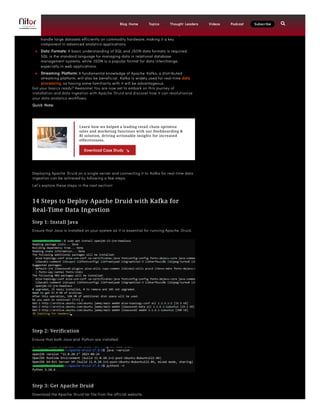
Step 1: Install Java
Ensure that Java is installed on your system as it is essential for running Apache Druid.
Step 2: Verification
Ensure that both Java and Python are installed.
Step 3: Get Apache Druid
Download the Apache Druid tar file from the official website.
Learn how we helped a leading retail chain optimize
sales and marketing functions with our Dashboarding &
BI solution, driving actionable insights for increased
effectiveness.
Download Case Study
Blog Home Topics Thought Leaders Videos Podcast Subscribe 
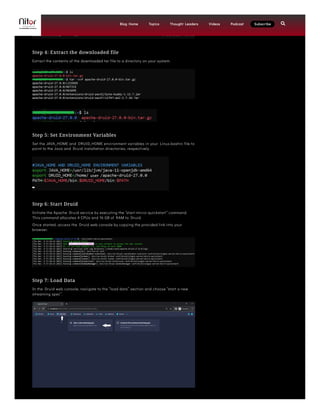
Step 4: Extract the downloaded file
Extract the contents of the downloaded tar file to a directory on your system.
Step 5: Set Environment Variables
Set the JAVA_HOME and DRUID_HOME environment variables in your Linux.bashrc file to
point to the Java and Druid installation directories, respectively.
Step 6: Start Druid
Initiate the Apache Druid service by executing the “start-micro-quickstart” command.
This command allocates 4 CPUs and 16 GB of RAM to Druid.
Once started, access the Druid web console by copying the provided link into your
browser.
Step 7: Load Data
In the Druid web console, navigate to the “load data” section and choose “start a new
streaming spec”.
Blog Home Topics Thought Leaders Videos Podcast Subscribe 
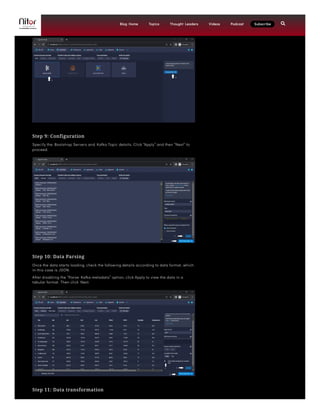
Step 8: Connect to Kafka (here data is consumed from Kafka)
Select Apache Kafka as the data source and then click on Connect data.
Step 9: Configuration
Specify the Bootstrap Servers and Kafka Topic details. Click “Apply” and then “Next” to
proceed.
Step 10: Data Parsing
Once the data starts loading, check the following details according to data format, which
in this case is JSON.
After disabling the “Parse Kafka metadata” option, click Apply to view the data in a
tabular format. Then click Next.
Step 11: Data transformation
Blog Home Topics Thought Leaders Videos Podcast Subscribe 
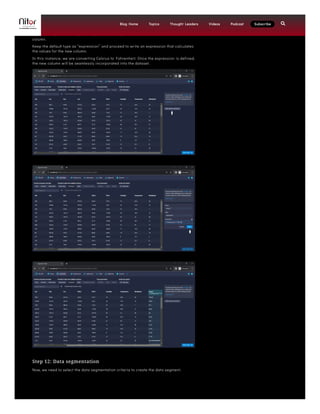
After clicking ‘Next’ a few times, you will reach the data transformation options.
In the data transformation phase, you can perform column transformations, wherein you
will add a new column named “temp_F”. To accomplish this, navigate to the “Add column
transform” option, where you’ll be prompted to input details such as the name of the
column.
Keep the default type as “expression” and proceed to write an expression that calculates
the values for the new column.
In this instance, we are converting Celsius to Fahrenheit. Once the expression is defined,
the new column will be seamlessly incorporated into the dataset.
Step 12: Data segmentation
Now, we need to select the data segmentation criteria to create the data segment.
Blog Home Topics Thought Leaders Videos Podcast Subscribe 
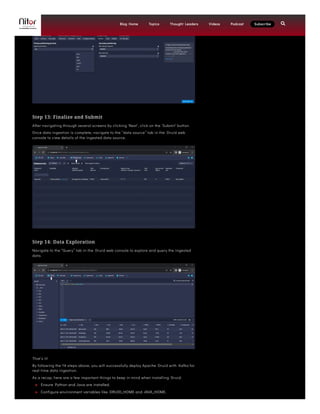
Step 13: Finalize and Submit
After navigating through several screens by clicking ‘Next’, click on the ‘Submit’ button.
Once data ingestion is complete, navigate to the “data source” tab in the Druid web
console to view details of the ingested data source.
Step 14: Data Exploration
Navigate to the “Query” tab in the Druid web console to explore and query the ingested
data.
That’s it!
By following the 14 steps above, you will successfully deploy Apache Druid with Kafka for
real-time data ingestion.
As a recap, here are a few important things to keep in mind when installing Druid:
 Ensure Python and Java are installed.
 Configure environment variables like DRUID_HOME and JAVA_HOME.
Blog Home Topics Thought Leaders Videos Podcast Subscribe 
 Launch Druid with the correct command for your computational needs.
 Choose partitioning and segmentation criteria based on your data volume and
velocity to avoid segment issues.
In a nutshell, Apache Druid is a powerful tool that helps businesses make better
decisions using real-time data. It’s fast, scalable, and flexible, making it ideal for tasks
like interactive analytics, operational monitoring, and personalized recommendations.
With its ability to handle both historical and real-time data, Apache Druid is
transforming how businesses use data to drive success.
Now, it’s time to unleash the power of Apache Druid and unlock the full potential of your
data analytics workflows. Feel free to reach out to Nitor Infotech with your thoughts
about this blog.
Till then, happy exploring!
 Previous Blog Next Blog 
Recent Blogs
Product Engineering Mindset:
Phase 1 – Laying the
foundation for elevated
customer satisfaction
Thought Leadership
How does GenAI work?
Artificial intelligence
Matillion ETL Tool: Best
Practices & Considerations
Big Data and Analytics
Subscribe to our
fortnightly newsletter!
we'll keep you in the loop with everything that's trending in the tech world.

Nitor Infotech, an Ascendion company, is an ISV preferred IT software product development services organization. We serve cutting
edge Gen-AI powered services and solutions for the web, Cloud, data, and devices. Nitor’s consulting-driven value engineering
approach makes it the right fit to be an agile and nimble partner to organizations on the path to digital transformation.
Armed with a digitalization strategy, we build disruptive solutions for businesses through innovative, readily deployable, and
customizable accelerators and frameworks.
COMPANY
About Us
Leadership
INSIGHTS
Blogs
Podcast
INDUSTRIES
Healthcare
BFSI
TECHNOLOGIES
AI & ML
Generative AI
SERVICES
Idea To MVP
Product Engineering
Quality Engineering
Product Modernization
Enter Email Address
Blog Home Topics Thought Leaders Videos Podcast Subscribe 
PR & Events
Career
Contact Us
Videos
TechKnowpedia
Infographics
Retail
Manufacturing
Supply Chain
Blockchain
Big Data & Analytics
Cloud & DevOps
IoT
Platform Engineering
Prompt Engineering
Research As A Service
Peer Product Management
Mobile App Development
Web App Development
UX Engineering
Cloud Migration
GET IN TOUCH
900 National Pkwy, Suite 210,
Schaumburg, IL 60173,
USA
marketing@nitorinfotech.com
+1 (224) 265-7110
     
SUBSCRIBE
Subscribe to our newsletter & stay updated

© 2024 Nitor Infotech All rights reserved Terms Of Usage Privacy Policy Cookie Policy
Blog Home Topics Thought Leaders Videos Podcast Subscribe 

Hands-on with Apache Druid: Installation & Data Ingestion Steps

  • 1.
    Big Data andAnalytics |  19 Jun 2024 |  11 min Hands-on with Apache Druid: Installation & Data Ingestion Steps Rushikesh Pawar Trainee Software Engineer   Rushikesh Pawar is a Trainee Software Engineer at Nitor Infotech. He is a passionate software engineer specializing in data engineering, ade... Read More Are you in search of a solution that offers high-performance, column-oriented, real-time analytics? How about a data store that can handle large volumes of data and provide lightning-fast insights? Well, Apache Druid can do it all for you. Before proceeding with this blog, I strongly recommend that you read my previous blog about Apache Druid, to get a complete overview about its features, architecture, and comparisons with other open-source database management systems. Done reading? Great! Now in this blog, you will dive into the world of Apache Druid and explore the step-by- step process of installing and setting up this cutting-edge technology. You will also delve into the intricacies of data ingestion, understanding how to seamlessly bring data into Apache Druid for data analysis. By the end of this blog, you will have a fully functional Apache Druid cluster ready to handle real-time analytical needs for your business. Prerequisites before installation Before we dive into the details, it’s important to ensure you have the necessary prerequisites in place. Quickly grasp what you’ll need:  Java Development Environment: At the foundation, you’ll require a Java Development Kit (JDK) version 8 or higher installed on your system. The JDK provides essential tools for developing and testing Java applications.  Operating System Familiarity: A solid understanding of Linux or Unix-based operating systems is crucial. These platforms often form the backbone of server Blog Home Topics Thought Leaders Videos Podcast Subscribe 
  • 2.
    environments, and beingcomfortable with their command-line interfaces will be highly valuable.  Big Data Infrastructure: Familiarity with distributed file systems, particularly the Apache Hadoop Distributed File System (HDFS), is important. HDFS is designed to handle large datasets efficiently on commodity hardware, making it a key component in advanced analytics applications.  Data Formats: A basic understanding of SQL and JSON data formats is required. SQL is the standard language for managing data in relational database management systems, while JSON is a popular format for data interchange, especially in web applications.  Streaming Platform: A fundamental knowledge of Apache Kafka, a distributed streaming platform, will also be beneficial. Kafka is widely used for real-time data processing, so having some familiarity with it will be advantageous. Got your basics ready? Awesome! You are now set to embark on this journey of installation and data ingestion with Apache Druid and discover how it can revolutionize your data analytics workflows. Quick Note: Deploying Apache Druid on a single server and connecting it to Kafka for real-time data ingestion can be achieved by following a few steps. Let’s explore these steps in the next section! 14 Steps to Deploy Apache Druid with Kafka for Real-Time Data Ingestion Step 1: Install Java Ensure that Java is installed on your system as it is essential for running Apache Druid. Step 2: Verification Ensure that both Java and Python are installed. Step 3: Get Apache Druid Download the Apache Druid tar file from the official website. Learn how we helped a leading retail chain optimize sales and marketing functions with our Dashboarding & BI solution, driving actionable insights for increased effectiveness. Download Case Study Blog Home Topics Thought Leaders Videos Podcast Subscribe 
  • 3.
    Step 4: Extractthe downloaded file Extract the contents of the downloaded tar file to a directory on your system. Step 5: Set Environment Variables Set the JAVA_HOME and DRUID_HOME environment variables in your Linux.bashrc file to point to the Java and Druid installation directories, respectively. Step 6: Start Druid Initiate the Apache Druid service by executing the “start-micro-quickstart” command. This command allocates 4 CPUs and 16 GB of RAM to Druid. Once started, access the Druid web console by copying the provided link into your browser. Step 7: Load Data In the Druid web console, navigate to the “load data” section and choose “start a new streaming spec”. Blog Home Topics Thought Leaders Videos Podcast Subscribe 
  • 4.
    Step 8: Connectto Kafka (here data is consumed from Kafka) Select Apache Kafka as the data source and then click on Connect data. Step 9: Configuration Specify the Bootstrap Servers and Kafka Topic details. Click “Apply” and then “Next” to proceed. Step 10: Data Parsing Once the data starts loading, check the following details according to data format, which in this case is JSON. After disabling the “Parse Kafka metadata” option, click Apply to view the data in a tabular format. Then click Next. Step 11: Data transformation Blog Home Topics Thought Leaders Videos Podcast Subscribe 
  • 5.
    After clicking ‘Next’a few times, you will reach the data transformation options. In the data transformation phase, you can perform column transformations, wherein you will add a new column named “temp_F”. To accomplish this, navigate to the “Add column transform” option, where you’ll be prompted to input details such as the name of the column. Keep the default type as “expression” and proceed to write an expression that calculates the values for the new column. In this instance, we are converting Celsius to Fahrenheit. Once the expression is defined, the new column will be seamlessly incorporated into the dataset. Step 12: Data segmentation Now, we need to select the data segmentation criteria to create the data segment. Blog Home Topics Thought Leaders Videos Podcast Subscribe 
  • 6.
    Step 13: Finalizeand Submit After navigating through several screens by clicking ‘Next’, click on the ‘Submit’ button. Once data ingestion is complete, navigate to the “data source” tab in the Druid web console to view details of the ingested data source. Step 14: Data Exploration Navigate to the “Query” tab in the Druid web console to explore and query the ingested data. That’s it! By following the 14 steps above, you will successfully deploy Apache Druid with Kafka for real-time data ingestion. As a recap, here are a few important things to keep in mind when installing Druid:  Ensure Python and Java are installed.  Configure environment variables like DRUID_HOME and JAVA_HOME. Blog Home Topics Thought Leaders Videos Podcast Subscribe 
  • 7.
     Launch Druidwith the correct command for your computational needs.  Choose partitioning and segmentation criteria based on your data volume and velocity to avoid segment issues. In a nutshell, Apache Druid is a powerful tool that helps businesses make better decisions using real-time data. It’s fast, scalable, and flexible, making it ideal for tasks like interactive analytics, operational monitoring, and personalized recommendations. With its ability to handle both historical and real-time data, Apache Druid is transforming how businesses use data to drive success. Now, it’s time to unleash the power of Apache Druid and unlock the full potential of your data analytics workflows. Feel free to reach out to Nitor Infotech with your thoughts about this blog. Till then, happy exploring!  Previous Blog Next Blog  Recent Blogs Product Engineering Mindset: Phase 1 – Laying the foundation for elevated customer satisfaction Thought Leadership How does GenAI work? Artificial intelligence Matillion ETL Tool: Best Practices & Considerations Big Data and Analytics Subscribe to our fortnightly newsletter! we'll keep you in the loop with everything that's trending in the tech world.  Nitor Infotech, an Ascendion company, is an ISV preferred IT software product development services organization. We serve cutting edge Gen-AI powered services and solutions for the web, Cloud, data, and devices. Nitor’s consulting-driven value engineering approach makes it the right fit to be an agile and nimble partner to organizations on the path to digital transformation. Armed with a digitalization strategy, we build disruptive solutions for businesses through innovative, readily deployable, and customizable accelerators and frameworks. COMPANY About Us Leadership INSIGHTS Blogs Podcast INDUSTRIES Healthcare BFSI TECHNOLOGIES AI & ML Generative AI SERVICES Idea To MVP Product Engineering Quality Engineering Product Modernization Enter Email Address Blog Home Topics Thought Leaders Videos Podcast Subscribe 
  • 8.
    PR & Events Career ContactUs Videos TechKnowpedia Infographics Retail Manufacturing Supply Chain Blockchain Big Data & Analytics Cloud & DevOps IoT Platform Engineering Prompt Engineering Research As A Service Peer Product Management Mobile App Development Web App Development UX Engineering Cloud Migration GET IN TOUCH 900 National Pkwy, Suite 210, Schaumburg, IL 60173, USA marketing@nitorinfotech.com +1 (224) 265-7110       SUBSCRIBE Subscribe to our newsletter & stay updated  © 2024 Nitor Infotech All rights reserved Terms Of Usage Privacy Policy Cookie Policy Blog Home Topics Thought Leaders Videos Podcast Subscribe 