Build a Web App with Javascript and jQuery
May 2017
Wi-Fi
Cross Campus Events
http://bit.ly/web-app-la
About us
We train developers and data
scientists through 1-on-1
mentorship and career prep
About me
• Austen Weinhart
• UC Berkeley 2012
• Worked in enterprise software
• Co-Founder of Coding Autism,

training and navigating adults
on the autism spectrum into
tech jobs
Goals for tonight
• Overview of Javascript, jQuery and it’s role in the
web
• Use Javascript and jQuery to build a web app
• Next steps
Ok, JavaScript. But why?
Objective
Popularity
Accessibility
Job prospects
Longevity
Objective ✔
If your objective is web development, JavaScript is the
language of the web.
Frontend development can only be done in
JavaScript while backend development can be done in
several different languages.
However, Node.js makes backend development with
JavaScript possible.
Popularity ✔
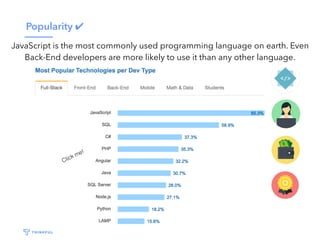
JavaScript is the most commonly used programming language on earth. Even
Back-End developers are more likely to use it than any other language.
Click me!
Accessibility ✔
JavaScript’s popularity also makes it incredibly
accessible.
There are many resources you can turn to for help.

YouTube, Stack Overflow, tons of MOOCs, Thinkful!
As the language evolves, its syntax also becomes
more user friendly.
Job prospects ✔
The Bureau of Labor Statistics predicts a 27%
growth in employment of web developers from
2014 to 2024.
Longevity ✔
JavaScript has been around since 1995. Since then, it
has evolved to become the standard for web
development. And it’s here to stay.
How the web works
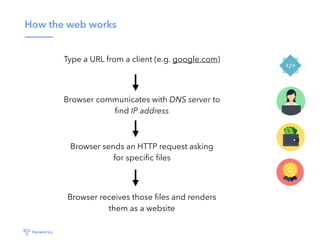
Type a URL from a client (e.g. google.com)
Browser communicates with DNS server to
find IP address
Browser sends an HTTP request asking
for specific files
Browser receives those files and renders
them as a website
Clients / Servers
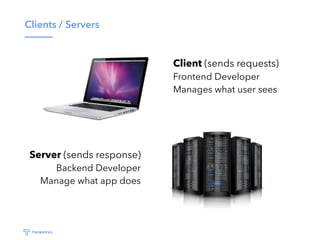
Client (sends requests)
Frontend Developer
Manages what user sees
Server (sends response)
Backend Developer
Manage what app does
Are we learning frontend or backend?
100% of client-side web development is in Javascript.
You can also use Javascript to write server-side code
thanks to Node.js. So technically both!
What is jQuery?
• jQuery solves cross-browser issues with Javascript
• Javascript not designed for UI features, jQuery is
• At least 50% of all websites (in 2012) used jQuery
• jQuery is written in Javascript
A Quick Example
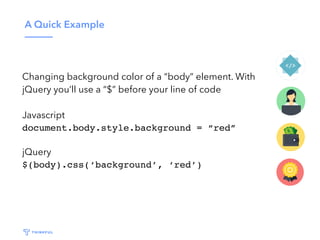
Changing background color of a “body” element. With
jQuery you’ll use a “$” before your line of code
Javascript
document.body.style.background = “red”
jQuery
$(body).css(‘background’, ‘red’)
Common uses of jQuery
• Animations
• UI interaction (i.e. change in appearance when user
hovers over a button)
• Form handling
• Loading data without a page refresh (Ajax)
jQuery: Some theory
• DOM traversal
• DOM manipulation
• Events
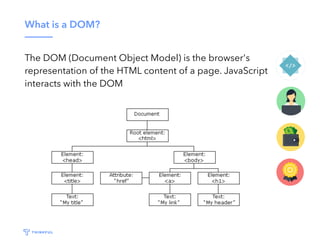
What is a DOM?
The DOM (Document Object Model) is the browser's
representation of the HTML content of a page. JavaScript
interacts with the DOM
“Grabbing” an element
First, select the element you’re looking to interact with
• Select using element type: $(“p”)
• Select using class: $(“.class”)
• Select using id’s: $(“#id”)
Full list here: https://api.jquery.com/category/selectors/
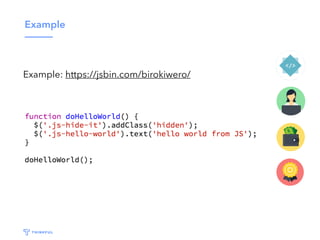
Example
Example: https://jsbin.com/birokiwero/
DOM traversal
First, select the element you’re looking to interact with.
Elements can have siblings, parents, and children
•$(“.shopping-list”).parent();
•$(“.shopping-list”).find(“li”);
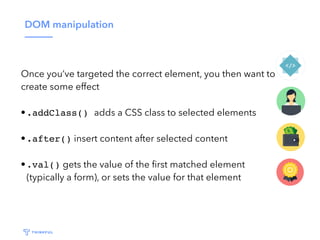
DOM manipulation
Once you’ve targeted the correct element, you then want to
create some effect
•.addClass() adds a CSS class to selected elements
•.after() insert content after selected content
•.val() gets the value of the first matched element
(typically a form), or sets the value for that element
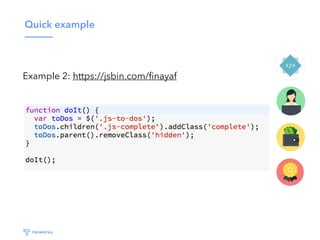
Quick example
Example 2: https://jsbin.com/finayaf/edit
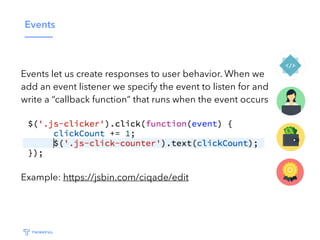
Events
Events let us create responses to user behavior. When we
add an event listener we specify the event to listen for and
write a “callback function” that runs when the event occurs
Example: https://jsbin.com/ciqade/edit
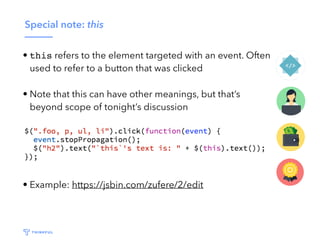
Special note: this
• this refers to the element targeted with an event. Often
used to refer to a button that was clicked
• Note that this can have other meanings, but that’s
beyond scope of tonight’s discussion
• Example: https://jsbin.com/zufere/2/edit
Event delegation
• Event delegation allows us to attach a single event
listener to a parent element that will fire for all
descendants matching a selector, whether those
descendants exist now or are added in the future.
• Example 1: https://jsbin.com/geheji/3/edit
• Example 2: https://jsbin.com/lecome/2/edit
Event Listener Drill #1
• Write jQuery code such that when a user clicks on one
of the thumbnail images, that image is displayed in the
full size image container at the top (no need to change
HTML or CSS)
• Code here: https://jsbin.com/beyefib/1/edit
Drill Walkthrough
Start by breaking problem down into achievable steps
• Step 1: ?
• Step 2: ?
• Step 3: ?
Drill Walkthrough
Start by breaking problem down into achievable steps
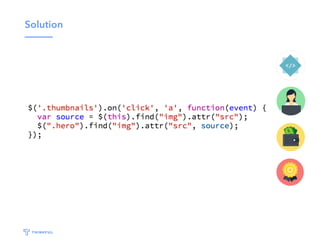
• Step 1: Add an event listener such that when a
thumbnail is clicked, a callback function runs
• Step 2: Get the URL for the image that was clicked
• Step 3: Set the URL for the top image
Solution
Event Listener Drill #2
• Use event listeners to detect when users click on a
lightbulb. When that happens, that bulb should turn on
(use the CSS class .bulb-on), and any other bulb that is
on should turn off. No need to change HTML CSS.
• Code here: https://jsbin.com/moyasum/1/edit
Drill #2 Walkthrough
•Step 1: Add an event listener such that when a lightbulb
is clicked, a callback function is run
•Step 2: Remove the relevant CSS class for all lightbulbs
•Step 3: Add the relevant CSS class for the clicked
lightbulb
Hint: Not sure how to remove a CSS class? Google
“jquery remove CSS class”
Solution
Take Home Challenge: Shopping List App
Create an application that allows users to add, check,
uncheck, and remove items from a shopping list
•https://github.com/Thinkful-Ed/shopping-list
•Live: https://thinkful-ed.github.io/shopping-list-solution/
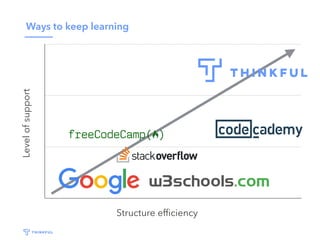
Ways to keep learningLevelofsupport
Structure efficiency
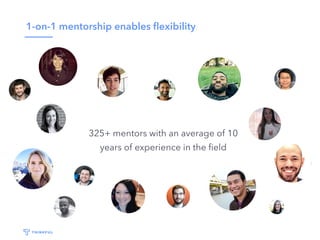
1-on-1 mentorship enables flexibility
325+ mentors with an average of 10
years of experience in the field
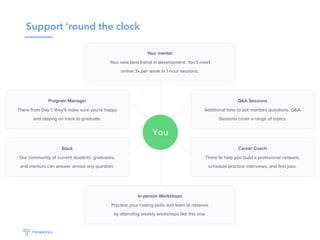
Support ‘round the clock
Our results
Job Titles after GraduationMonths until Employed
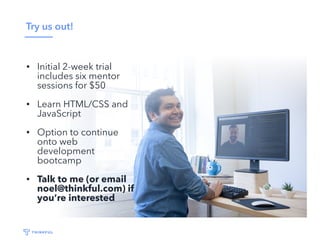
Try us out!
• Initial 2-week trial
includes six mentor
sessions for $50
• Learn HTML/CSS and
JavaScript
• Option to continue
onto web
development
bootcamp
• Talk to me (or email
noel@thinkful.com) if
you’re interested

Build a Web App with JavaScript and jQuery (5:18:17, Los Angeles)

  • 1.
    Build a WebApp with Javascript and jQuery May 2017 Wi-Fi Cross Campus Events http://bit.ly/web-app-la
  • 2.
    About us We traindevelopers and data scientists through 1-on-1 mentorship and career prep
  • 3.
    About me • AustenWeinhart • UC Berkeley 2012 • Worked in enterprise software • Co-Founder of Coding Autism,
 training and navigating adults on the autism spectrum into tech jobs
  • 4.
    Goals for tonight •Overview of Javascript, jQuery and it’s role in the web • Use Javascript and jQuery to build a web app • Next steps
  • 5.
    Ok, JavaScript. Butwhy? Objective Popularity Accessibility Job prospects Longevity
  • 6.
    Objective ✔ If yourobjective is web development, JavaScript is the language of the web. Frontend development can only be done in JavaScript while backend development can be done in several different languages. However, Node.js makes backend development with JavaScript possible.
  • 7.
    Popularity ✔ JavaScript isthe most commonly used programming language on earth. Even Back-End developers are more likely to use it than any other language. Click me!
  • 8.
    Accessibility ✔ JavaScript’s popularityalso makes it incredibly accessible. There are many resources you can turn to for help. YouTube, Stack Overflow, tons of MOOCs, Thinkful! As the language evolves, its syntax also becomes more user friendly.
  • 9.
    Job prospects ✔ TheBureau of Labor Statistics predicts a 27% growth in employment of web developers from 2014 to 2024.
  • 10.
    Longevity ✔ JavaScript hasbeen around since 1995. Since then, it has evolved to become the standard for web development. And it’s here to stay.
  • 11.
    How the webworks Type a URL from a client (e.g. google.com) Browser communicates with DNS server to find IP address Browser sends an HTTP request asking for specific files Browser receives those files and renders them as a website
  • 12.
    Clients / Servers Client(sends requests) Frontend Developer Manages what user sees Server (sends response) Backend Developer Manage what app does
  • 13.
    Are we learningfrontend or backend? 100% of client-side web development is in Javascript. You can also use Javascript to write server-side code thanks to Node.js. So technically both!
  • 14.
    What is jQuery? •jQuery solves cross-browser issues with Javascript • Javascript not designed for UI features, jQuery is • At least 50% of all websites (in 2012) used jQuery • jQuery is written in Javascript
  • 15.
    A Quick Example Changingbackground color of a “body” element. With jQuery you’ll use a “$” before your line of code Javascript document.body.style.background = “red” jQuery $(body).css(‘background’, ‘red’)
  • 16.
    Common uses ofjQuery • Animations • UI interaction (i.e. change in appearance when user hovers over a button) • Form handling • Loading data without a page refresh (Ajax)
  • 17.
    jQuery: Some theory •DOM traversal • DOM manipulation • Events
  • 18.
    What is aDOM? The DOM (Document Object Model) is the browser's representation of the HTML content of a page. JavaScript interacts with the DOM
  • 19.
    “Grabbing” an element First,select the element you’re looking to interact with • Select using element type: $(“p”) • Select using class: $(“.class”) • Select using id’s: $(“#id”) Full list here: https://api.jquery.com/category/selectors/
  • 20.
  • 21.
    DOM traversal First, selectthe element you’re looking to interact with. Elements can have siblings, parents, and children •$(“.shopping-list”).parent(); •$(“.shopping-list”).find(“li”);
  • 22.
    DOM manipulation Once you’vetargeted the correct element, you then want to create some effect •.addClass() adds a CSS class to selected elements •.after() insert content after selected content •.val() gets the value of the first matched element (typically a form), or sets the value for that element
  • 23.
    Quick example Example 2:https://jsbin.com/finayaf/edit
  • 24.
    Events Events let uscreate responses to user behavior. When we add an event listener we specify the event to listen for and write a “callback function” that runs when the event occurs Example: https://jsbin.com/ciqade/edit
  • 25.
    Special note: this •this refers to the element targeted with an event. Often used to refer to a button that was clicked • Note that this can have other meanings, but that’s beyond scope of tonight’s discussion • Example: https://jsbin.com/zufere/2/edit
  • 26.
    Event delegation • Eventdelegation allows us to attach a single event listener to a parent element that will fire for all descendants matching a selector, whether those descendants exist now or are added in the future. • Example 1: https://jsbin.com/geheji/3/edit • Example 2: https://jsbin.com/lecome/2/edit
  • 27.
    Event Listener Drill#1 • Write jQuery code such that when a user clicks on one of the thumbnail images, that image is displayed in the full size image container at the top (no need to change HTML or CSS) • Code here: https://jsbin.com/beyefib/1/edit
  • 28.
    Drill Walkthrough Start bybreaking problem down into achievable steps • Step 1: ? • Step 2: ? • Step 3: ?
  • 29.
    Drill Walkthrough Start bybreaking problem down into achievable steps • Step 1: Add an event listener such that when a thumbnail is clicked, a callback function runs • Step 2: Get the URL for the image that was clicked • Step 3: Set the URL for the top image
  • 30.
  • 31.
    Event Listener Drill#2 • Use event listeners to detect when users click on a lightbulb. When that happens, that bulb should turn on (use the CSS class .bulb-on), and any other bulb that is on should turn off. No need to change HTML CSS. • Code here: https://jsbin.com/moyasum/1/edit
  • 32.
    Drill #2 Walkthrough •Step1: Add an event listener such that when a lightbulb is clicked, a callback function is run •Step 2: Remove the relevant CSS class for all lightbulbs •Step 3: Add the relevant CSS class for the clicked lightbulb Hint: Not sure how to remove a CSS class? Google “jquery remove CSS class”
  • 33.
  • 34.
    Take Home Challenge:Shopping List App Create an application that allows users to add, check, uncheck, and remove items from a shopping list •https://github.com/Thinkful-Ed/shopping-list •Live: https://thinkful-ed.github.io/shopping-list-solution/
  • 35.
    Ways to keeplearningLevelofsupport Structure efficiency
  • 36.
    1-on-1 mentorship enablesflexibility 325+ mentors with an average of 10 years of experience in the field
  • 37.
  • 38.
    Our results Job Titlesafter GraduationMonths until Employed
  • 39.
    Try us out! •Initial 2-week trial includes six mentor sessions for $50 • Learn HTML/CSS and JavaScript • Option to continue onto web development bootcamp • Talk to me (or email noel@thinkful.com) if you’re interested