JQuery
Mohamed Loey
Agenda
Part I: Introduction
Part II: JQuery Syntax
Part III: JQuery Effects
Agenda
Part I: Introduction
 What is JQuery?
 Why JQuery?
 Installing JQuery
What is JQuery?
• JQuery is a fast, small, and feature-rich
JavaScript library. It makes things like HTML
document traversal and manipulation, event
handling, animation, and Ajax much simpler
with an easy-to-use API that works across a
multitude of browsers.
• JQuery is a lightweight, "write less, do more".
Why jQuery?
• Cross-browser Compatibility
• Fast & Small
• Many of the biggest companies on the Web use
JQuery, such as:
1. Google
2. Microsoft
3. IBM
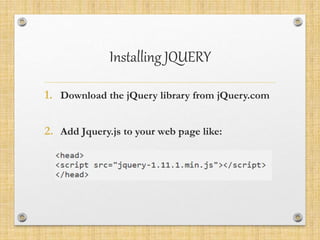
Installing JQUERY
1. Download the jQuery library from jQuery.com
2. Add Jquery.js to your web page like:
Agenda
Part I: JQuery Syntax
 JQuery Syntax
 JQuery Selectors
 Element Selector
 The #id Selector
 The .class Selector
 JQuery Event
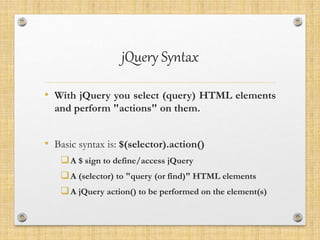
jQuery Syntax
• With jQuery you select (query) HTML elements
and perform "actions" on them.
• Basic syntax is: $(selector).action()
A $ sign to define/access jQuery
A (selector) to "query (or find)" HTML elements
A jQuery action() to be performed on the element(s)
Examples
$(this).hide() - hides the current element.
$("p").hide() - hides all <p> elements.
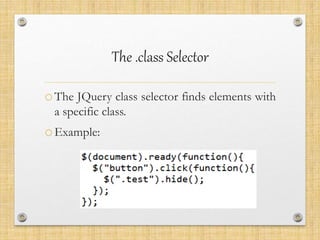
$(".test").hide() - hides all elements with
class="test".
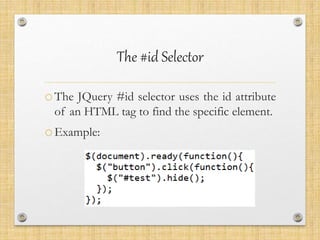
$("#test").hide() - hides the element with
id="test".
jQuery Selectors
oJQuery selectors are one of the most
important parts of the jQuery library.
oJQuery selectors allow you to select and
manipulate HTML element(s).
element Selector
oThe jQuery element selector selects
elements based on the element name.
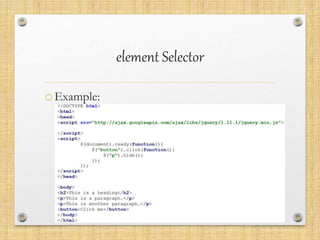
oYou can select all <p> elements on a
page like this: $("p")
element Selector
oExample:
The #id Selector
oThe JQuery #id selector uses the id attribute
of an HTML tag to find the specific element.
oExample:
The .class Selector
oThe JQuery class selector finds elements with
a specific class.
oExample:
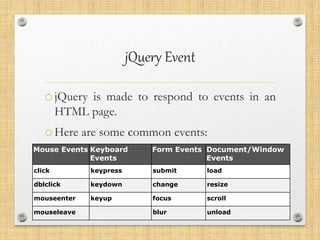
jQuery Event
ojQuery is made to respond to events in an
HTML page.
oHere are some common events:
Mouse Events Keyboard
Events
Form Events Document/Window
Events
click keypress submit load
dblclick keydown change resize
mouseenter keyup focus scroll
mouseleave blur unload
Agenda
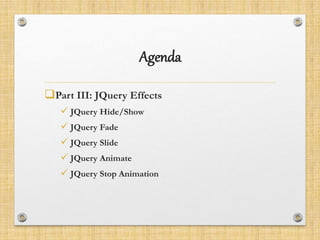
Part III: JQuery Effects
 JQuery Hide/Show
 JQuery Fade
 JQuery Slide
 JQuery Animate
 JQuery Stop Animation
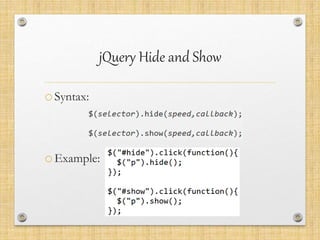
jQuery Hide and Show
oSyntax:
oExample:
jQuery Fading
• JQuery has the following fade methods:
• fadeIn()
• fadeOut()
• fadeToggle()
• fadeTo()
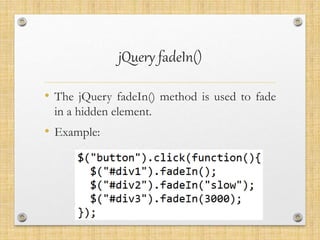
jQuery fadeIn()
• The jQuery fadeIn() method is used to fade
in a hidden element.
• Example:
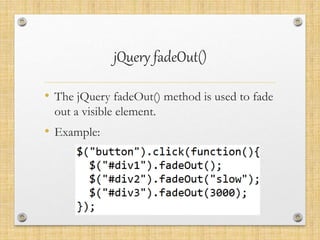
jQuery fadeOut()
• The jQuery fadeOut() method is used to fade
out a visible element.
• Example:
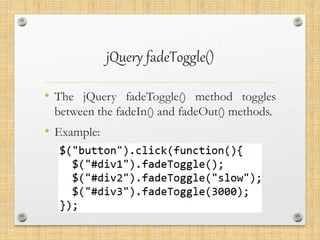
jQuery fadeToggle()
• The jQuery fadeToggle() method toggles
between the fadeIn() and fadeOut() methods.
• Example:
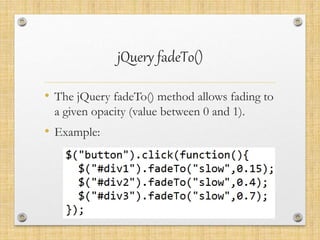
jQuery fadeTo()
• The jQuery fadeTo() method allows fading to
a given opacity (value between 0 and 1).
• Example:
jQuery Sliding
• JQuery has the following slide methods:
• slideDown()
• slideUp()
• slideToggle()
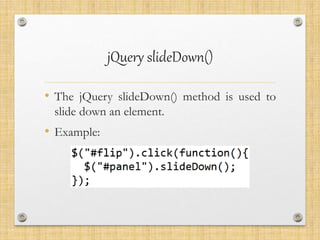
jQuery slideDown()
• The jQuery slideDown() method is used to
slide down an element.
• Example:
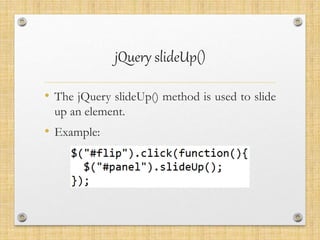
jQuery slideUp()
• The jQuery slideUp() method is used to slide
up an element.
• Example:
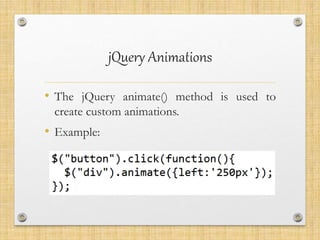
jQuery Animations
• The jQuery animate() method is used to
create custom animations.
• Example:
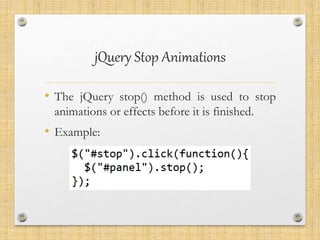
jQuery Stop Animations
• The jQuery stop() method is used to stop
animations or effects before it is finished.
• Example:
THANK U

JQuery Comprehensive Overview

  • 1.
  • 2.
    Agenda Part I: Introduction PartII: JQuery Syntax Part III: JQuery Effects
  • 3.
    Agenda Part I: Introduction What is JQuery?  Why JQuery?  Installing JQuery
  • 4.
    What is JQuery? •JQuery is a fast, small, and feature-rich JavaScript library. It makes things like HTML document traversal and manipulation, event handling, animation, and Ajax much simpler with an easy-to-use API that works across a multitude of browsers. • JQuery is a lightweight, "write less, do more".
  • 5.
    Why jQuery? • Cross-browserCompatibility • Fast & Small • Many of the biggest companies on the Web use JQuery, such as: 1. Google 2. Microsoft 3. IBM
  • 6.
    Installing JQUERY 1. Downloadthe jQuery library from jQuery.com 2. Add Jquery.js to your web page like:
  • 7.
    Agenda Part I: JQuerySyntax  JQuery Syntax  JQuery Selectors  Element Selector  The #id Selector  The .class Selector  JQuery Event
  • 8.
    jQuery Syntax • WithjQuery you select (query) HTML elements and perform "actions" on them. • Basic syntax is: $(selector).action() A $ sign to define/access jQuery A (selector) to "query (or find)" HTML elements A jQuery action() to be performed on the element(s)
  • 9.
    Examples $(this).hide() - hidesthe current element. $("p").hide() - hides all <p> elements. $(".test").hide() - hides all elements with class="test". $("#test").hide() - hides the element with id="test".
  • 10.
    jQuery Selectors oJQuery selectorsare one of the most important parts of the jQuery library. oJQuery selectors allow you to select and manipulate HTML element(s).
  • 11.
    element Selector oThe jQueryelement selector selects elements based on the element name. oYou can select all <p> elements on a page like this: $("p")
  • 12.
  • 13.
    The #id Selector oTheJQuery #id selector uses the id attribute of an HTML tag to find the specific element. oExample:
  • 14.
    The .class Selector oTheJQuery class selector finds elements with a specific class. oExample:
  • 15.
    jQuery Event ojQuery ismade to respond to events in an HTML page. oHere are some common events: Mouse Events Keyboard Events Form Events Document/Window Events click keypress submit load dblclick keydown change resize mouseenter keyup focus scroll mouseleave blur unload
  • 16.
    Agenda Part III: JQueryEffects  JQuery Hide/Show  JQuery Fade  JQuery Slide  JQuery Animate  JQuery Stop Animation
  • 17.
    jQuery Hide andShow oSyntax: oExample:
  • 18.
    jQuery Fading • JQueryhas the following fade methods: • fadeIn() • fadeOut() • fadeToggle() • fadeTo()
  • 19.
    jQuery fadeIn() • ThejQuery fadeIn() method is used to fade in a hidden element. • Example:
  • 20.
    jQuery fadeOut() • ThejQuery fadeOut() method is used to fade out a visible element. • Example:
  • 21.
    jQuery fadeToggle() • ThejQuery fadeToggle() method toggles between the fadeIn() and fadeOut() methods. • Example:
  • 22.
    jQuery fadeTo() • ThejQuery fadeTo() method allows fading to a given opacity (value between 0 and 1). • Example:
  • 23.
    jQuery Sliding • JQueryhas the following slide methods: • slideDown() • slideUp() • slideToggle()
  • 24.
    jQuery slideDown() • ThejQuery slideDown() method is used to slide down an element. • Example:
  • 25.
    jQuery slideUp() • ThejQuery slideUp() method is used to slide up an element. • Example:
  • 26.
    jQuery Animations • ThejQuery animate() method is used to create custom animations. • Example:
  • 27.
    jQuery Stop Animations •The jQuery stop() method is used to stop animations or effects before it is finished. • Example:
  • 28.