Hadoop Integration with
Microstrategy
Hadoop
 Hadoop is a free, Java-based programming framework that
supports the processing of large data sets in a distributed
computing environment.
 It makes it possible to run applications on systems with
thousands of nodes involving thousands of terabytes.
 Its distributed file system facilitates rapid data transfer rates
among nodes and allows the system to continue operating
uninterrupted in case of a node failure.
 This approach lowers the risk of catastrophic system failure,
even if a significant number of nodes become inoperative.
Why Hadoop?
 Scalibility
 Simply scales just by adding nodes.
 Local processing to avoid network bottlenecks.
• Flexibility
 All kinds of data.(blobs,documents,records etc).
 In all forms(structured,semi-structured,structured)
 Store anything and later analyze what you need.
• Efficiency
 Cost efficiency(<1$kb/Tb) on commodity hardware.
 Unified storage,metadata,security(no duplication or
synchronization)
Core parts of Hadoop
 Hadoop Distributed File System(HDFS)
 It is the primary storage system used by Hadoop applications.
 HDFS is a distributed file system that provides high-performance access
to data across Hadoop clusters. Like other Hadoop-related technologies,
HDFS has become a key tool for managing pools of big data and
supporting big data analytics applications.
 When HDFS takes in data, it breaks the information down into separate
pieces and distributes them to different nodes in a cluster, allowing
for parallel processing. The file system also copies each piece of data
multiple times and distributes the copies to individual nodes, placing at least
one copy on a different server rack than the others. As a result, the data on
nodes that crash can be found elsewhere within a cluster, which allows
processing to continue while the failure is resolved.
 HDFS is built to support applications with large data sets, including
individual files that reach into the terabytes. It uses a master/slave
architecture, with each cluster consisting of a single NameNode that
manages file system operations and supporting DataNodes that manage data
storage on individual compute nodes.
 MapReduce
 A MapReduce program is composed of a Map() procedure that performs
filtering and sorting (such as sorting students by first name into queues, one
queue for each name) and a Reduce() procedure that performs a summary
operation (such as counting the number of students in each queue, yielding
name frequencies).
 The "MapReduce System" (also called "infrastructure" or "framework")
orchestrates by marshalling the distributed servers, running the various tasks
in parallel, managing all communications and data transfers between the
various parts of the system, and providing for redundancy and fault tolerance.
 HDFS and MapReduce are robust. Servers in a Hadoop cluster can fail and
not abort the computation process. HDFS ensures data is replicated with
redundancy across the cluster. On completion of a calculation, a node will
write its results back into HDFS.
MicroStrategy Integration
 Cloudera and MicroStrategy have collaborated to develop a powerful and
easy-to-use BI framework for Apache Hadoop by creating a connection
between MicroStrategy 9 and CDH. This connection is established via an
Open Database Connectivity (ODBC) driver for Apache Hive and is available
as the Cloudera Connector for MicroStrategy.
 The connector allows business users to perform sophisticated point and click
analytics on data stored in Hadoop directly from MicroStrategy applications –
just as they do on data stored in data warehouses, data marts and operational
databases. MicroStrategy has developed Very Large Database Drivers
(VLDB) specifically for Cloudera that generate optimized queries for
Cloudera's Distribution including Apache Hadoop.
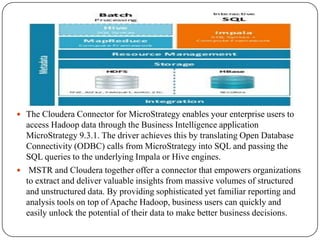
 The Cloudera Connector for MicroStrategy enables your enterprise users to
access Hadoop data through the Business Intelligence application
MicroStrategy 9.3.1. The driver achieves this by translating Open Database
Connectivity (ODBC) calls from MicroStrategy into SQL and passing the
SQL queries to the underlying Impala or Hive engines.
 MSTR and Cloudera together offer a connector that empowers organizations
to extract and deliver valuable insights from massive volumes of structured
and unstructured data. By providing sophisticated yet familiar reporting and
analysis tools on top of Apache Hadoop, business users can quickly and
easily unlock the potential of their data to make better business decisions.
What’s Impala
 Interactive SQL
 Typically 100x faster than Hive.
 Responses in sub-seconds.
 Nearly ANSI-92 standard SQL queries with Hive SQL
 Compatible SQL interfaces for existing Hadoop/CDH applications.
 Based on industry standard SQL.
 Natively on Hadoop/Hbase storage and metadata
 Flexibility,scale and cost advantages of Hadoop.
 No duplication/synchronization of data and metadata.
 Local processing to avoid network bottlenecks.
 Separate runtime on MapReduce
 Mapreduce is designed and great for batch.
 Impala is purpose-built for low latency SQL queries on Hadoop.
Benefits of Impala
 More and faster value from “Big Data”
 BI tools impractical on Hadoop before Impala
 Move from 10s of Hadoop users per cluster to 100s of SQL users.
 No delays from data migration
 Flexibility
 Query across existing data.
 Select best-fit file formats.
 Run multiple frameworks on the same data at the same time.
 Cost Analysis
 Reduce movement,duplicate storage & compute.
 10% to 1% the cost of analytic DBMS.
 Full Fidelity analysis
 No loss from aggregations or fixed schemas.
Project
 Integrating Hadoop-Impala with Microstrategy reporting
capabilities we developed Healthcare Management software.
 We used data stored in HDFS and Impala as Native MPP query
engine integrated in Hadoop via connector.
 Based on our requirements we made Intelligent Cubes and
directly exported to MicroStrategy.
 Using data insight visualization capabilities we are able to display
visually appealing dashboards and insightful reports.
 We have developed 3 dashboards displaying various ways of
visualizing HealthCare Management data.
Ecosystem
 Key Performance Indicator displays the total number of
issuers,employes,employers,brokers and enrollments.
 It also displays aggregated calculation of employee
income,premium/month and percentage.
 Service area displays US-statewise information of total count
using image layout widget.
 Enrollment displays heatmap of total enrollment count
corresponding to each US state.
 Employee segmentation displays grid graph display of
number of employes per segments.
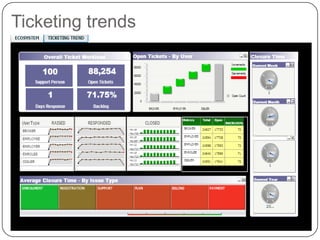
Ticketing trends
 In the Ticketing dashboard,Overall Ticket Workload section
displays information about total count of support persons,open
tickets,average response days and backlog percentage.
 Open Tickets section describes waterfall widget describing total
open counts as per the issuer-type.
 It contains heatmap corresponding to average closure time and
ticket issuertype.
 It contains gauge widgets of closure time in days corresponding to
year,quarter,month and week.
 It also displays microcharts displaying count of current-status
based on issuertype.In microcharts we used sparkline and bar mode
to anaylse in different ways.
Exchange-Interactive dashboard
 It is an interactive dashboard.
 Key Performance Indicator displays information about total
service area and enrollment count corresponding to
issuername.
 By using issuername as selector it targets heat map of
enrollment displaying information of total enrollments
corresponding to each state.
 By using issuername as selector it also targets the US map
image layout widget displaying total service area count
corresponding to each state.
Stock Analysis
 Here we took the raw real-time stock data of NASDAQ and NYSE
for analysing as per our requirement.
 In the above screenshot there are 4 selectors namely
Sector,Industries,Symbol and Year.
 Industry is filtered by Sector selector and Symbol is filtered by
Sector and Industry respectively.
 All the 4 selectors will filter data to the below panel displaying
stock volatility by year,quarter,month and week.
 Panel describing grid and graph view limiting to 50 data at a time
as shown in below screenshot.
Conclusion
 User can run queries via MicroStrategy’s visual interface
without the need to write unfamiliar HiveQL or MapReduce
scripts. In essence, any user, without programming skill in
Hadoop, can ask questions against vast volumes of structured
and unstructured data to gain valuable business insights.
 It is very fast,scalable,cost effective and resilent to failure.
 Hadoop is inefficient for handling small files, and it
lacks transparent compression. As HDFS is not designed
to work well with random reads over small files due to its
optimization.
 It is used only for batch-based architecture not for real-time
data access.
 Following shared-nothing architecture so task requiring global
synchronization or sharing of mutable data doesnot fit.

Hadoop Integration with Microstrategy

  • 1.
  • 2.
    Hadoop  Hadoop isa free, Java-based programming framework that supports the processing of large data sets in a distributed computing environment.  It makes it possible to run applications on systems with thousands of nodes involving thousands of terabytes.  Its distributed file system facilitates rapid data transfer rates among nodes and allows the system to continue operating uninterrupted in case of a node failure.  This approach lowers the risk of catastrophic system failure, even if a significant number of nodes become inoperative.
  • 3.
    Why Hadoop?  Scalibility Simply scales just by adding nodes.  Local processing to avoid network bottlenecks. • Flexibility  All kinds of data.(blobs,documents,records etc).  In all forms(structured,semi-structured,structured)  Store anything and later analyze what you need. • Efficiency  Cost efficiency(<1$kb/Tb) on commodity hardware.  Unified storage,metadata,security(no duplication or synchronization)
  • 4.
    Core parts ofHadoop  Hadoop Distributed File System(HDFS)  It is the primary storage system used by Hadoop applications.  HDFS is a distributed file system that provides high-performance access to data across Hadoop clusters. Like other Hadoop-related technologies, HDFS has become a key tool for managing pools of big data and supporting big data analytics applications.  When HDFS takes in data, it breaks the information down into separate pieces and distributes them to different nodes in a cluster, allowing for parallel processing. The file system also copies each piece of data multiple times and distributes the copies to individual nodes, placing at least one copy on a different server rack than the others. As a result, the data on nodes that crash can be found elsewhere within a cluster, which allows processing to continue while the failure is resolved.  HDFS is built to support applications with large data sets, including individual files that reach into the terabytes. It uses a master/slave architecture, with each cluster consisting of a single NameNode that manages file system operations and supporting DataNodes that manage data storage on individual compute nodes.
  • 5.
     MapReduce  AMapReduce program is composed of a Map() procedure that performs filtering and sorting (such as sorting students by first name into queues, one queue for each name) and a Reduce() procedure that performs a summary operation (such as counting the number of students in each queue, yielding name frequencies).  The "MapReduce System" (also called "infrastructure" or "framework") orchestrates by marshalling the distributed servers, running the various tasks in parallel, managing all communications and data transfers between the various parts of the system, and providing for redundancy and fault tolerance.  HDFS and MapReduce are robust. Servers in a Hadoop cluster can fail and not abort the computation process. HDFS ensures data is replicated with redundancy across the cluster. On completion of a calculation, a node will write its results back into HDFS.
  • 6.
    MicroStrategy Integration  Clouderaand MicroStrategy have collaborated to develop a powerful and easy-to-use BI framework for Apache Hadoop by creating a connection between MicroStrategy 9 and CDH. This connection is established via an Open Database Connectivity (ODBC) driver for Apache Hive and is available as the Cloudera Connector for MicroStrategy.  The connector allows business users to perform sophisticated point and click analytics on data stored in Hadoop directly from MicroStrategy applications – just as they do on data stored in data warehouses, data marts and operational databases. MicroStrategy has developed Very Large Database Drivers (VLDB) specifically for Cloudera that generate optimized queries for Cloudera's Distribution including Apache Hadoop.
  • 7.
     The ClouderaConnector for MicroStrategy enables your enterprise users to access Hadoop data through the Business Intelligence application MicroStrategy 9.3.1. The driver achieves this by translating Open Database Connectivity (ODBC) calls from MicroStrategy into SQL and passing the SQL queries to the underlying Impala or Hive engines.  MSTR and Cloudera together offer a connector that empowers organizations to extract and deliver valuable insights from massive volumes of structured and unstructured data. By providing sophisticated yet familiar reporting and analysis tools on top of Apache Hadoop, business users can quickly and easily unlock the potential of their data to make better business decisions.
  • 8.
    What’s Impala  InteractiveSQL  Typically 100x faster than Hive.  Responses in sub-seconds.  Nearly ANSI-92 standard SQL queries with Hive SQL  Compatible SQL interfaces for existing Hadoop/CDH applications.  Based on industry standard SQL.  Natively on Hadoop/Hbase storage and metadata  Flexibility,scale and cost advantages of Hadoop.  No duplication/synchronization of data and metadata.  Local processing to avoid network bottlenecks.  Separate runtime on MapReduce  Mapreduce is designed and great for batch.  Impala is purpose-built for low latency SQL queries on Hadoop.
  • 9.
    Benefits of Impala More and faster value from “Big Data”  BI tools impractical on Hadoop before Impala  Move from 10s of Hadoop users per cluster to 100s of SQL users.  No delays from data migration  Flexibility  Query across existing data.  Select best-fit file formats.  Run multiple frameworks on the same data at the same time.  Cost Analysis  Reduce movement,duplicate storage & compute.  10% to 1% the cost of analytic DBMS.  Full Fidelity analysis  No loss from aggregations or fixed schemas.
  • 10.
    Project  Integrating Hadoop-Impalawith Microstrategy reporting capabilities we developed Healthcare Management software.  We used data stored in HDFS and Impala as Native MPP query engine integrated in Hadoop via connector.  Based on our requirements we made Intelligent Cubes and directly exported to MicroStrategy.  Using data insight visualization capabilities we are able to display visually appealing dashboards and insightful reports.  We have developed 3 dashboards displaying various ways of visualizing HealthCare Management data.
  • 11.
  • 12.
     Key PerformanceIndicator displays the total number of issuers,employes,employers,brokers and enrollments.  It also displays aggregated calculation of employee income,premium/month and percentage.  Service area displays US-statewise information of total count using image layout widget.  Enrollment displays heatmap of total enrollment count corresponding to each US state.  Employee segmentation displays grid graph display of number of employes per segments.
  • 13.
  • 14.
     In theTicketing dashboard,Overall Ticket Workload section displays information about total count of support persons,open tickets,average response days and backlog percentage.  Open Tickets section describes waterfall widget describing total open counts as per the issuer-type.  It contains heatmap corresponding to average closure time and ticket issuertype.  It contains gauge widgets of closure time in days corresponding to year,quarter,month and week.  It also displays microcharts displaying count of current-status based on issuertype.In microcharts we used sparkline and bar mode to anaylse in different ways.
  • 15.
  • 16.
     It isan interactive dashboard.  Key Performance Indicator displays information about total service area and enrollment count corresponding to issuername.  By using issuername as selector it targets heat map of enrollment displaying information of total enrollments corresponding to each state.  By using issuername as selector it also targets the US map image layout widget displaying total service area count corresponding to each state.
  • 17.
  • 18.
     Here wetook the raw real-time stock data of NASDAQ and NYSE for analysing as per our requirement.  In the above screenshot there are 4 selectors namely Sector,Industries,Symbol and Year.  Industry is filtered by Sector selector and Symbol is filtered by Sector and Industry respectively.  All the 4 selectors will filter data to the below panel displaying stock volatility by year,quarter,month and week.  Panel describing grid and graph view limiting to 50 data at a time as shown in below screenshot.
  • 19.
    Conclusion  User canrun queries via MicroStrategy’s visual interface without the need to write unfamiliar HiveQL or MapReduce scripts. In essence, any user, without programming skill in Hadoop, can ask questions against vast volumes of structured and unstructured data to gain valuable business insights.  It is very fast,scalable,cost effective and resilent to failure.  Hadoop is inefficient for handling small files, and it lacks transparent compression. As HDFS is not designed to work well with random reads over small files due to its optimization.  It is used only for batch-based architecture not for real-time data access.  Following shared-nothing architecture so task requiring global synchronization or sharing of mutable data doesnot fit.

Editor's Notes