



BIG DATA
                                  @nuboat
                         Peerapat Asoktummarungsri


(c) copyright 2013 nuboat in wonderland
Thursday, April 11, 13
Who am I?

                         Software Engineer @ FICO

                         Blogger @ Thailand Java User Group

                         Failed Startuper

                         Cat Lover

                         เกรียนตัวน้อยๆ ในทวีตเตอร์


(c) copyright 2013 nuboat in wonderland
Thursday, April 11, 13
What is Big Data?


                         Big data analytics is concerned with the analysis of large volumes
                         of transaction/event data and behavioral analysis of human/human
                         a human/system interactions. (Gartner)

                         Big data represents the collection of technologies that handle large
                         data volumes well beyond that inflection point and for which, at
                         least in theory, hardware resources required to manage data by
                         volume track to an almost straight line rather than a curve. (IDC)


(c) copyright 2013 nuboat in wonderland
Thursday, April 11, 13
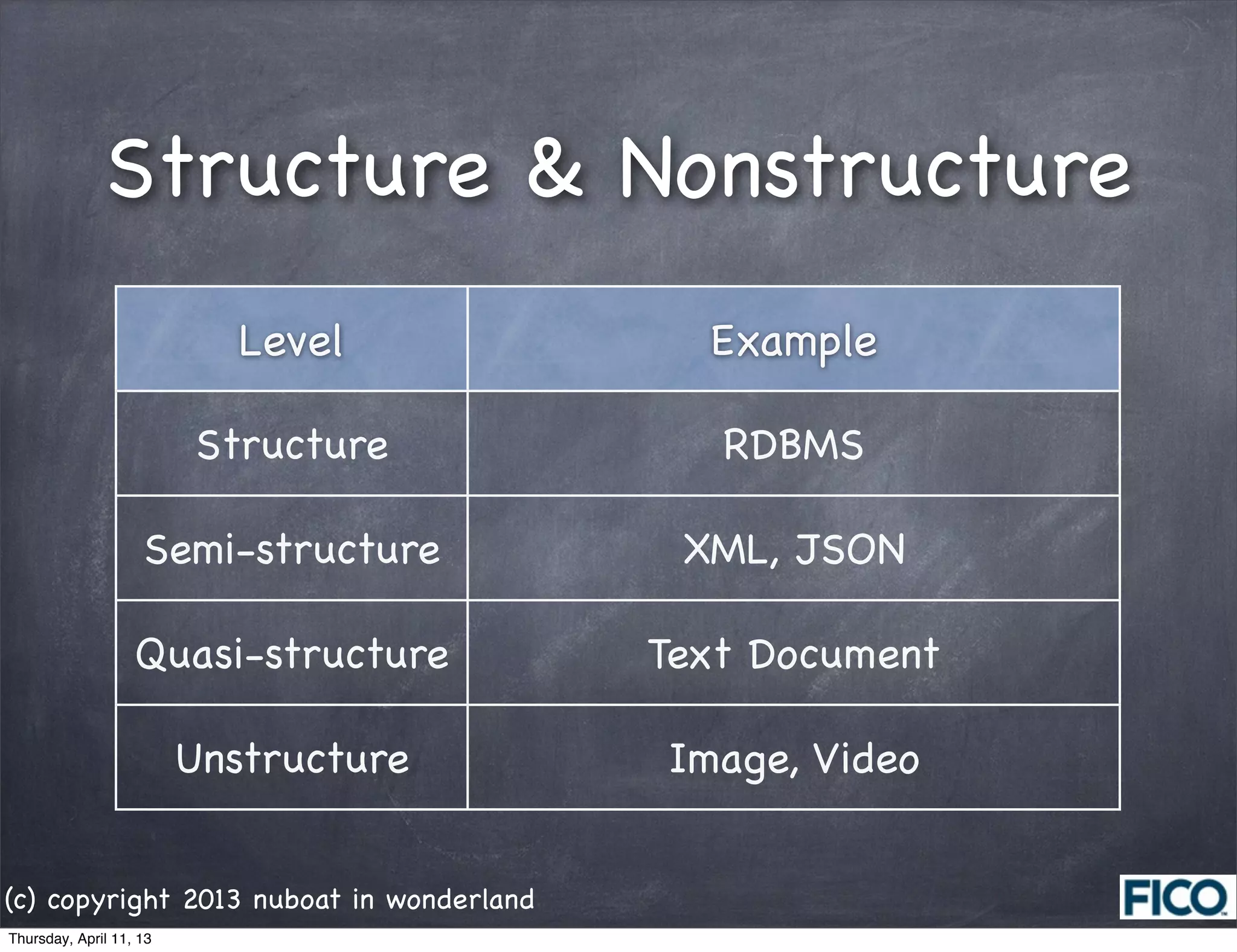
Structure & Nonstructure
                            Level           Example

                         Structure           RDBMS

                    Semi-structure         XML, JSON

                   Quasi-structure        Text Document

                         Unstructure      Image, Video


(c) copyright 2013 nuboat in wonderland
Thursday, April 11, 13
Source: go-globe.com

      Unstructure data around the world in 1min.
(c) copyright 2013 nuboat in wonderland
Thursday, April 11, 13
The challenges associated with
                   Big Data are


                     Source: oracle.com


(c) copyright 2013 nuboat in wonderland
Thursday, April 11, 13
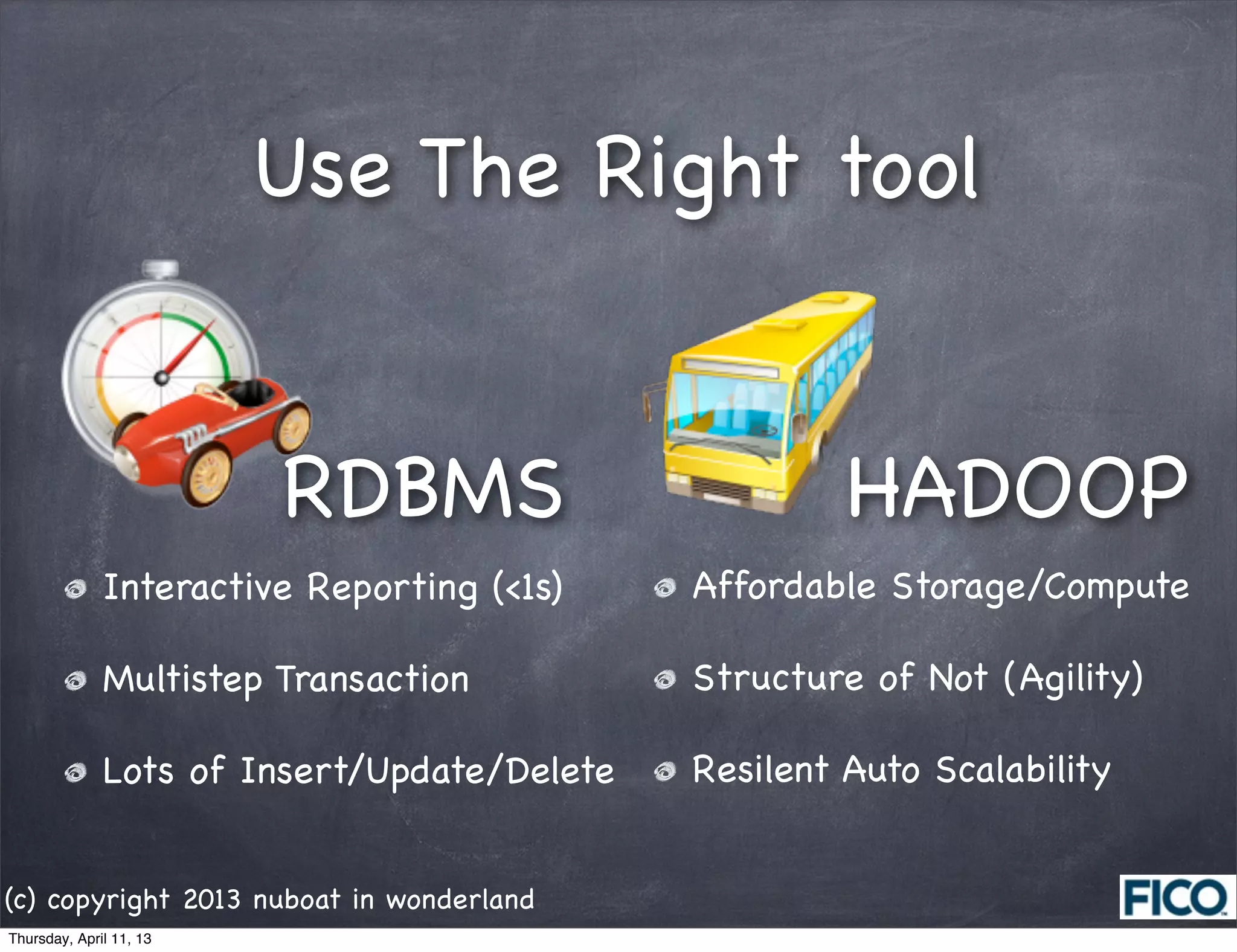
Use The Right tool


                         RDBMS                        HADOOP
              Interactive Reporting (<1s)    Affordable Storage/Compute

              Multistep Transaction          Structure of Not (Agility)

              Lots of Insert/Update/Delete   Resilent Auto Scalability


(c) copyright 2013 nuboat in wonderland
Thursday, April 11, 13
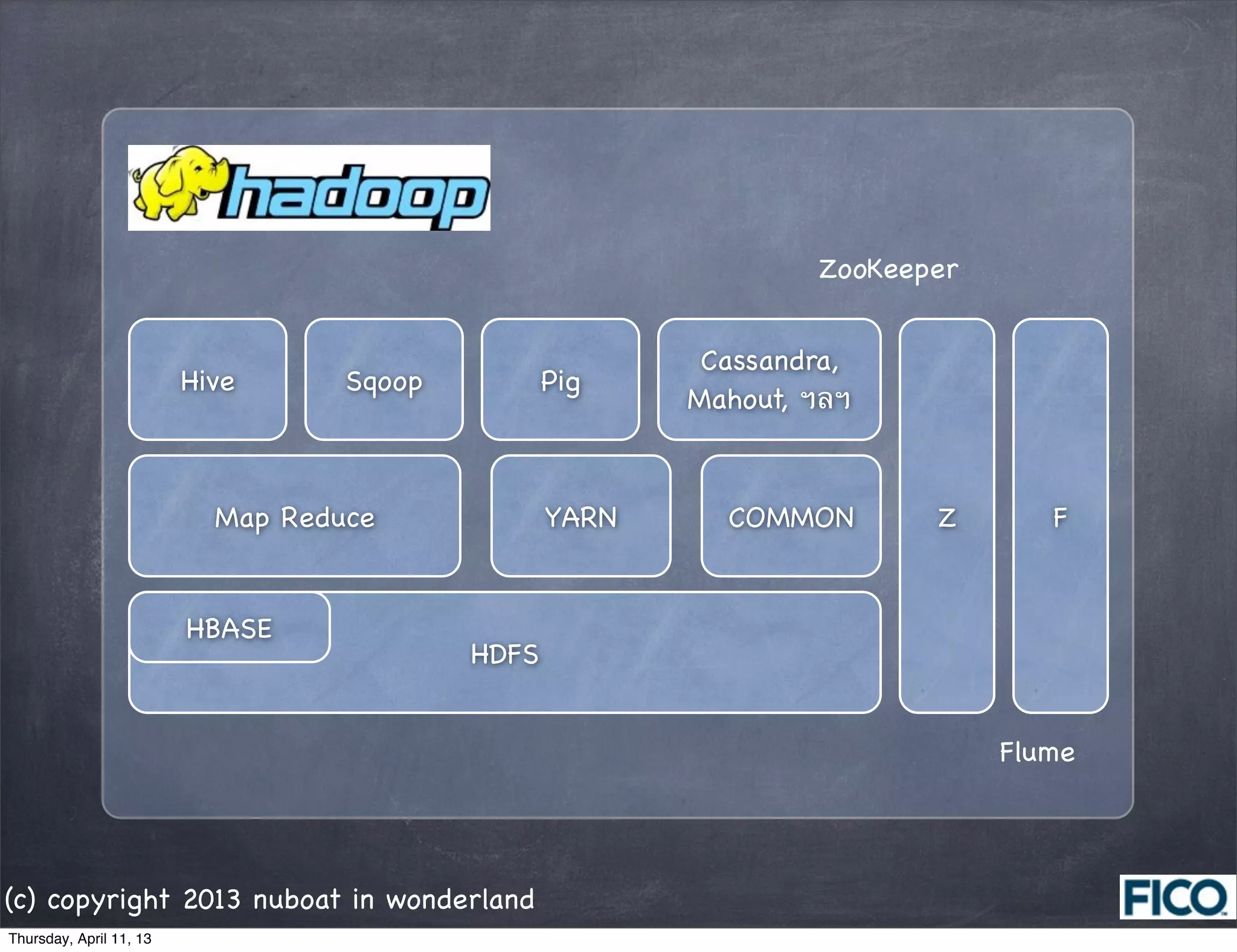
ZooKeeper


                                                          Cassandra,
                         Hive      Sqoop          Pig
                                                         Mahout, ฯลฯ


                           Map Reduce             YARN     COMMON       Z       F


                         HBASE
                                           HDFS


                                                                             Flume


(c) copyright 2013 nuboat in wonderland
Thursday, April 11, 13
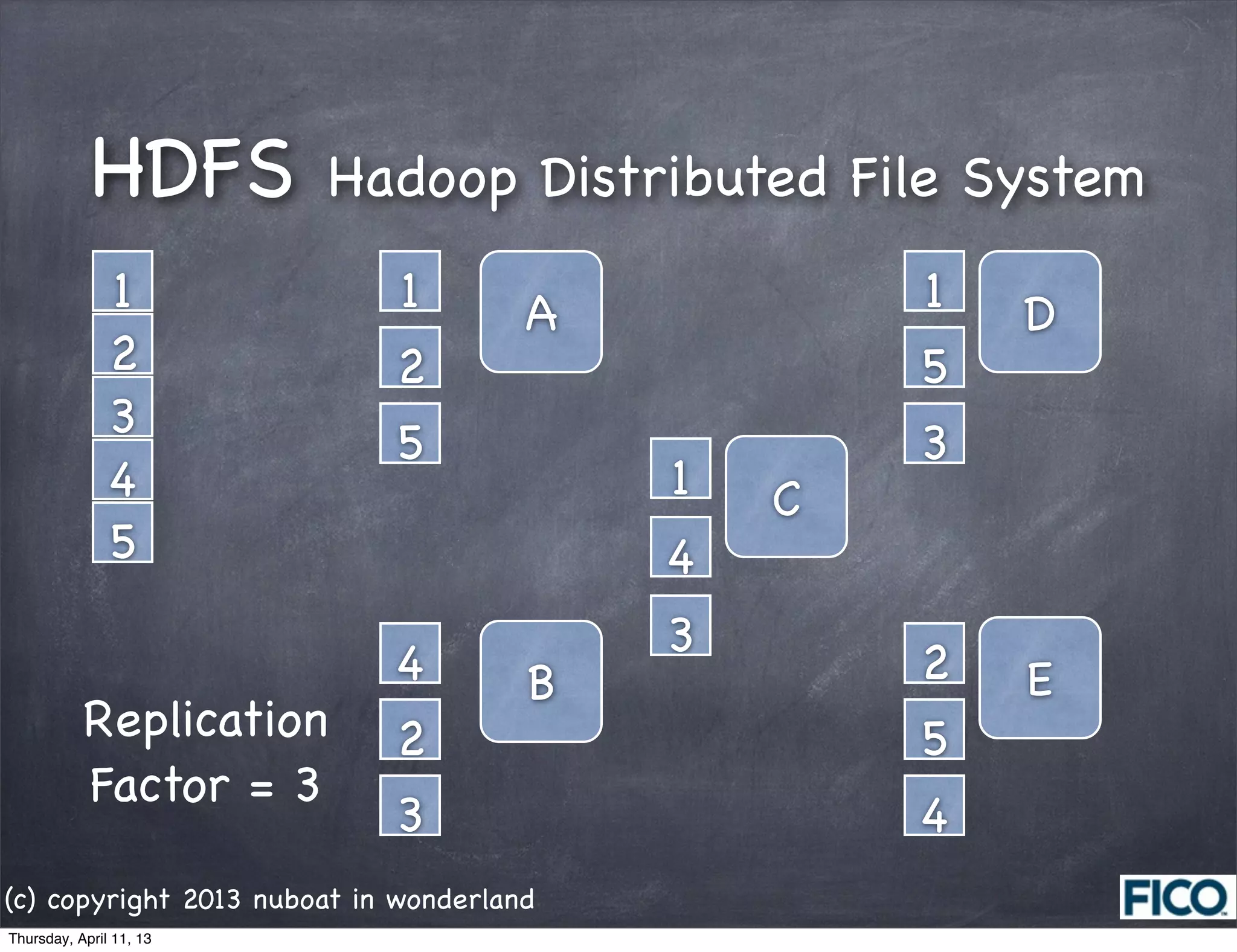
HDFS         Hadoop Distributed File System
               1            1         A           1   D
               2            2                     5
               3
                            5                     3
               4                          1   C
               5                          4
                                          3
                            4         B           2   E
           Replication      2                     5
           Factor = 3
                            3                     4
(c) copyright 2013 nuboat in wonderland
Thursday, April 11, 13
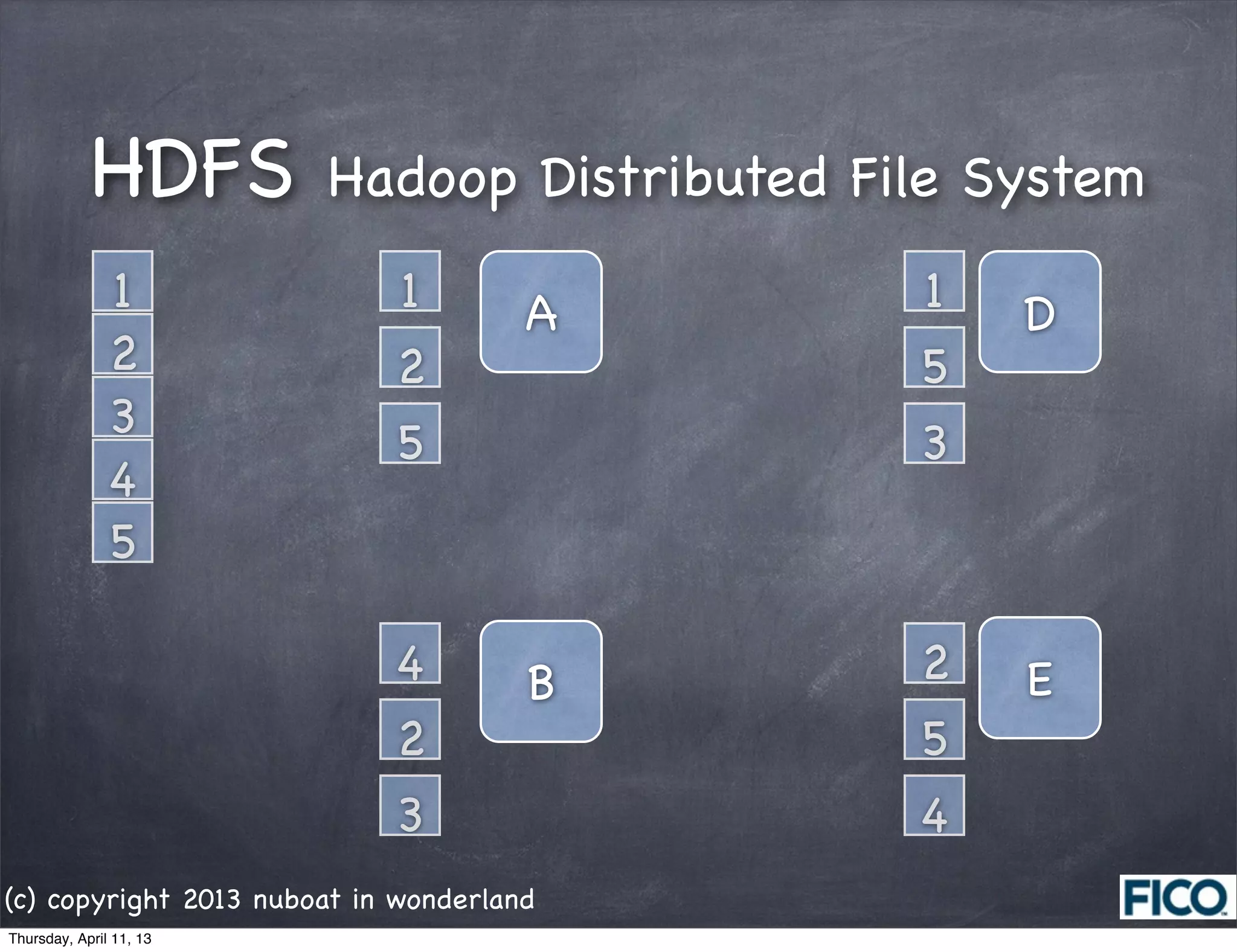
HDFS         Hadoop Distributed File System
               1            1         A       1   D
               2            2                 5
               3
                            5                 3
               4
               5

                            4         B       2   E
                            2                 5
                            3                 4
(c) copyright 2013 nuboat in wonderland
Thursday, April 11, 13
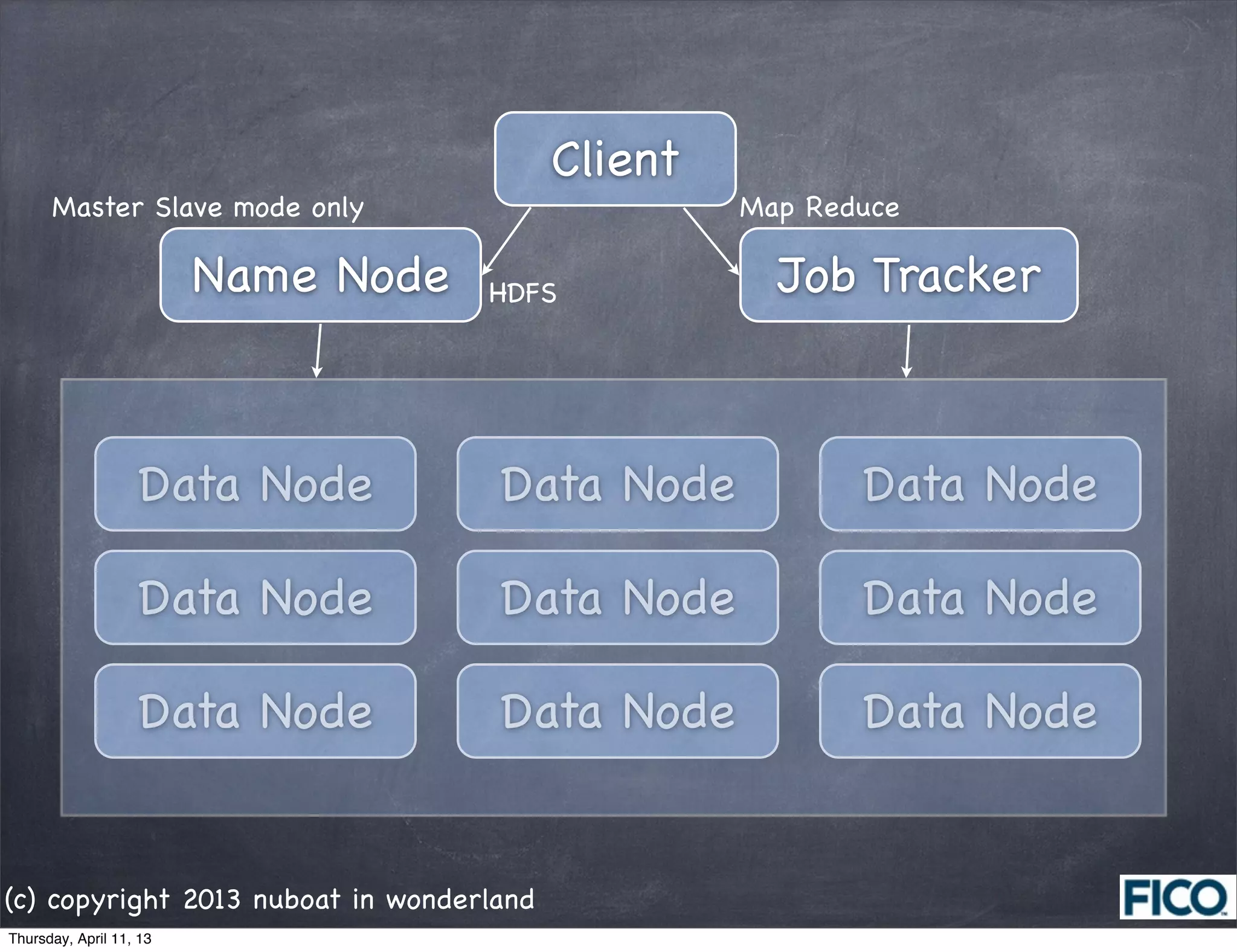
Client
      Master Slave mode only                       Map Reduce

                         Name Node   HDFS            Job Tracker


                   Data Node         Data Node            Data Node

                   Data Node         Data Node            Data Node

                   Data Node         Data Node            Data Node


(c) copyright 2013 nuboat in wonderland
Thursday, April 11, 13
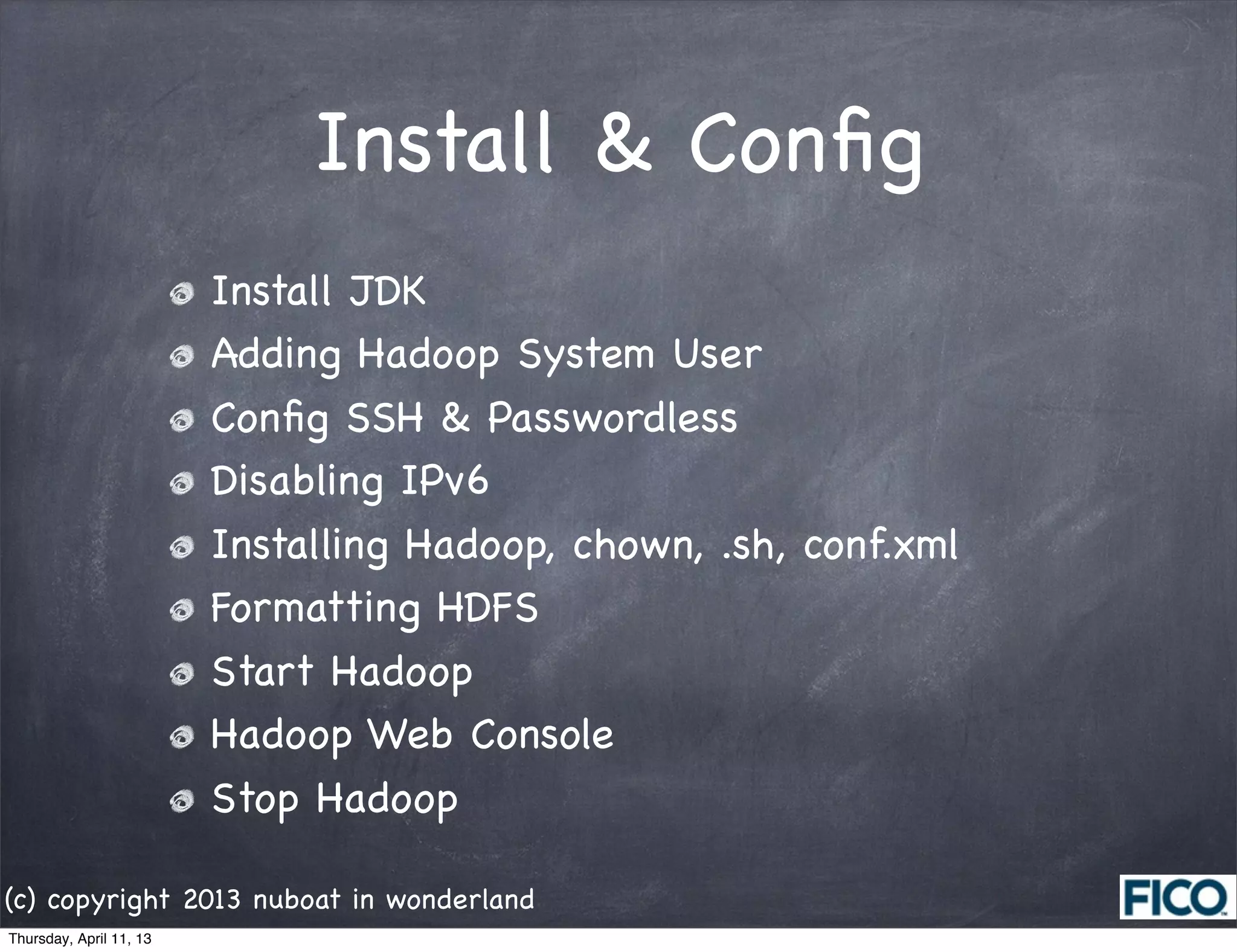
Install & Config
                         Install JDK
                         Adding Hadoop System User
                         Config SSH & Passwordless
                         Disabling IPv6
                         Installing Hadoop, chown, .sh, conf.xml
                         Formatting HDFS
                         Start Hadoop
                         Hadoop Web Console
                         Stop Hadoop

(c) copyright 2013 nuboat in wonderland
Thursday, April 11, 13
1.  Install Java
     [root@localhost ~]# ./jdk-6u39-linux-i586.bin
     [root@localhost ~]# chown -R root:root ./jdk1.6.0_39/
     [root@localhost ~]# mv jdk1.6.0_39/ /usr/lib/jvm/
     [root@localhost ~]# update-alternatives --install "/usr/bin/java" "java" "/usr/lib/jvm/jdk1.6.0_39/bin/java"
     1
     [root@localhost ~]# update-alternatives --install "/usr/bin/javac" "javac" "/usr/lib/jvm/jdk1.6.0_39/bin/
     javac" 1
     [root@localhost ~]# update-alternatives --install "/usr/bin/javaws" "javaws" "/usr/lib/jvm/jdk1.6.0_39/bin/
     javaws" 1
     [root@localhost ~]# update-alternatives --config java
     There are 3 programs which provide 'java'.

       Selection    Command
     -----------------------------------------------
     *  1           /usr/lib/jvm/jre-1.6.0-openjdk/bin/java
        2           /usr/lib/jvm/jre-1.5.0-gcj/bin/java
     + 3           /usr/lib/jvm/jdk1.6.0_39/bin/java

     Enter to keep the current selection[+], or type selection number: 3

     [root@localhost ~]# java -version
     java version "1.6.0_39"
     Java(TM) SE Runtime Environment (build 1.6.0_39-b04)
     Java HotSpot(TM) Server VM (build 20.14-b01, mixed mode)


(c) copyright 2013 nuboat in wonderland
Thursday, April 11, 13
2.  Create hadoop user
                         [root@localhost ~]# groupadd hadoop
                         [root@localhost ~]# useradd -g hadoop -d /home/hdadmin hdadmin
                         [root@localhost ~]# passwd hdadmin

                         3.  Config SSH
                         [root@localhost ~]# service sshd start
                         ...
                         [root@localhost ~]# chkconfig sshd on
                         [root@localhost ~]# su - hdadmin
                         [root@localhost ~]# ssh-keygen -t rsa -P ""
                         $ ~/.ssh/id_rsa.pub >> ~/.ssh/authroized_keys
                         $ ssh localhost

                         4. Disable IPv6
                         [root@localhost ~]# vi /etc/sysctl.conf

                         # disable ipv6
                         net.ipv6.conf.all.disable_ipv6 = 1
                         net.ipv6.conf.default.disable_ipv6 = 1
                         net.ipv6.conf.lo.disable_ipv6 = 1


(c) copyright 2013 nuboat in wonderland
Thursday, April 11, 13
5. SET Path
                         $ vi ~/.bashrc

                         # .bashrc

                         # Source global definitions
                         if [ -f /etc/bashrc ]; then
                                 . /etc/bashrc
                         fi

                         # Do not set HADOOP_HOME
                         # User specific aliases and functions
                         export HIVE_HOME=/usr/local/hive-0.9.0
                         export JAVA_HOME=/usr/lib/jvm/jdk1.6.0_39
                         export PATH=$PATH:/usr/local/hadoop-0.20.205.0/bin:$JAVA_HOME/bin:
                         $HIVE_HOME/bin


(c) copyright 2013 nuboat in wonderland
Thursday, April 11, 13
6. Install Hadoop
                         [root@localhost ~]# tar xzf hadoop-0.20.205.0-bin.tar.gz
                         [root@localhost ~]# mv hadoop-0.20.205.0 /usr/local/hadoop-0.20.205.0
                         [root@localhost ~]# cd /usr/local
                         [root@localhost ~]# chown -R hdadmin:hadoop hadoop-0.20.205.0

                         [root@localhost ~]# mkdir -p /data/hadoop
                         [root@localhost ~]# chown hdadmin:hadoop /data/hadoop
                         [root@localhost ~]# chmod 750 /data/hadoop


(c) copyright 2013 nuboat in wonderland
Thursday, April 11, 13
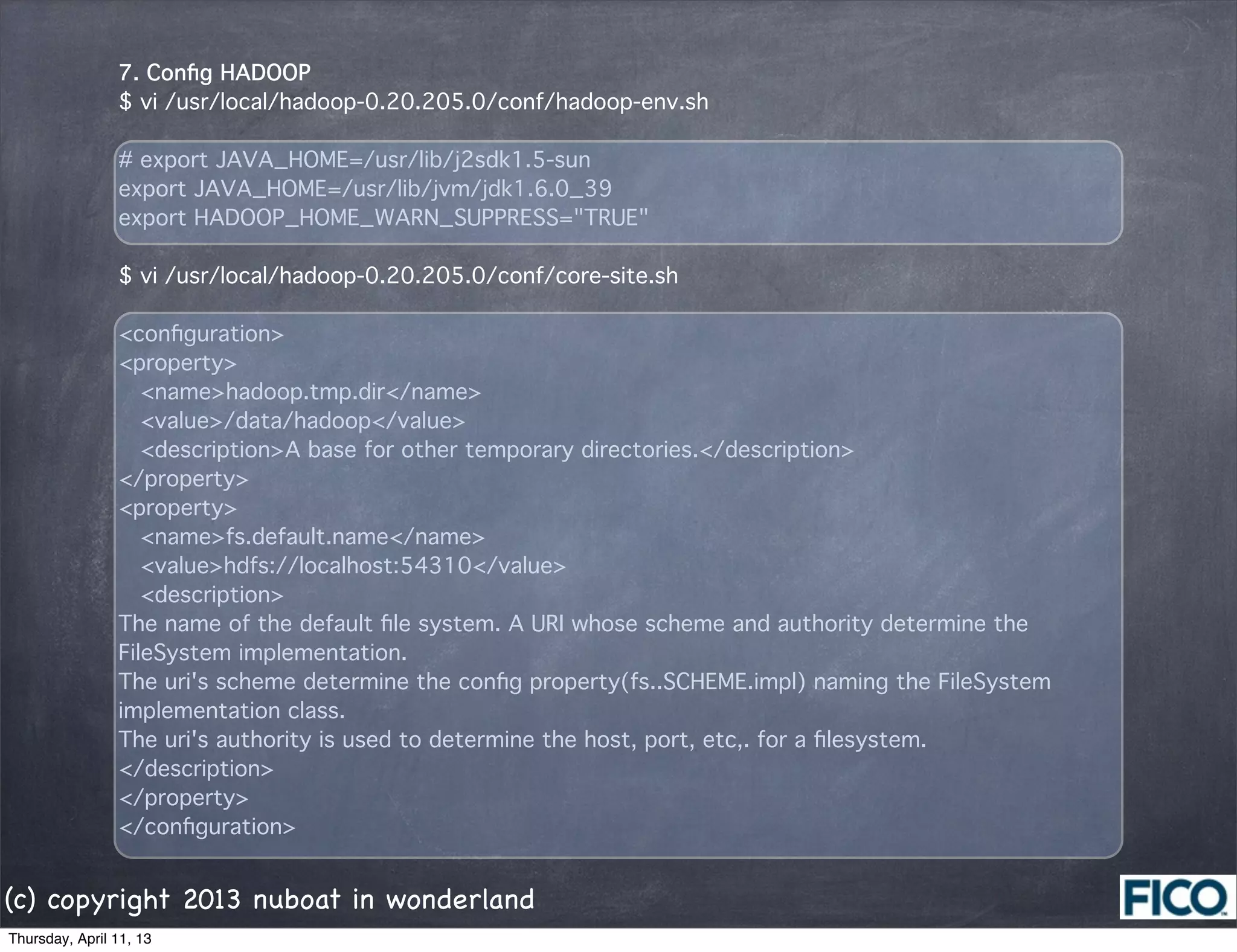
7. Config HADOOP
                $ vi /usr/local/hadoop-0.20.205.0/conf/hadoop-env.sh

                # export JAVA_HOME=/usr/lib/j2sdk1.5-sun
                export JAVA_HOME=/usr/lib/jvm/jdk1.6.0_39
                export HADOOP_HOME_WARN_SUPPRESS="TRUE"

                $ vi /usr/local/hadoop-0.20.205.0/conf/core-site.sh

                <configuration>
                <property>
                  <name>hadoop.tmp.dir</name>
                  <value>/data/hadoop</value>
                  <description>A base for other temporary directories.</description>
                </property>
                <property>
                  <name>fs.default.name</name>
                  <value>hdfs://localhost:54310</value>
                  <description>
                The name of the default file system. A URI whose scheme and authority determine the
                FileSystem implementation.
                The uri's scheme determine the config property(fs..SCHEME.impl) naming the FileSystem
                implementation class.
                The uri's authority is used to determine the host, port, etc,. for a filesystem.
                </description>
                </property>
                </configuration>


(c) copyright 2013 nuboat in wonderland
Thursday, April 11, 13
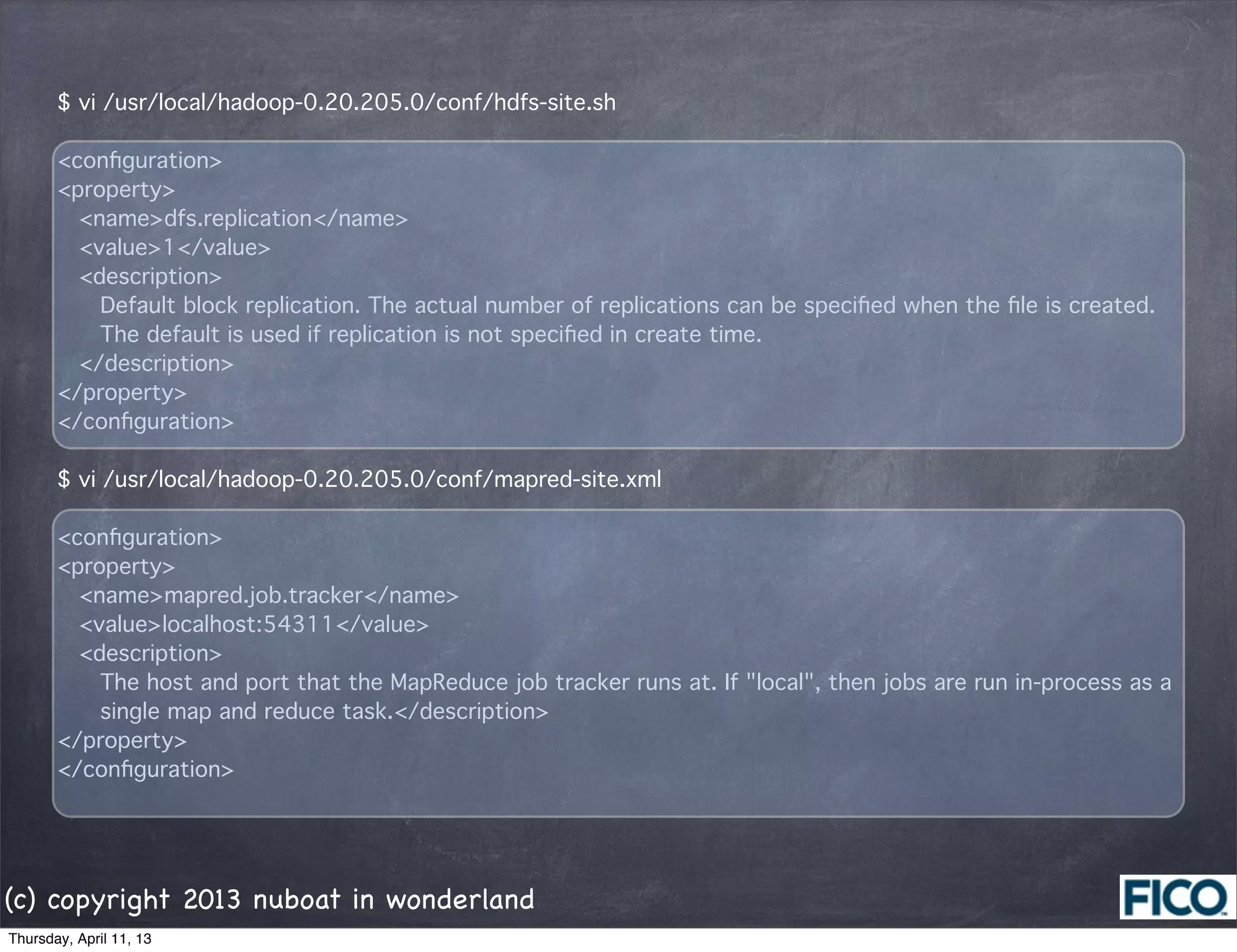
$ vi /usr/local/hadoop-0.20.205.0/conf/hdfs-site.sh

       <configuration>
       <property>
         <name>dfs.replication</name>
         <value>1</value>
         <description>
           Default block replication. The actual number of replications can be specified when the file is created.
           The default is used if replication is not specified in create time.
         </description>
       </property>
       </configuration>

       $ vi /usr/local/hadoop-0.20.205.0/conf/mapred-site.xml

       <configuration>
       <property>
         <name>mapred.job.tracker</name>
         <value>localhost:54311</value>
         <description>
           The host and port that the MapReduce job tracker runs at. If "local", then jobs are run in-process as a
           single map and reduce task.</description>
       </property>
       </configuration>


(c) copyright 2013 nuboat in wonderland
Thursday, April 11, 13
8. Format HDFS
$ hadoop namenode -format
13/04/03 13:59:54 INFO namenode.NameNode: STARTUP_MSG: 
/************************************************************
STARTUP_MSG: Starting NameNode
STARTUP_MSG:   host = localhost.localdomain/127.0.0.1
STARTUP_MSG:   args = [-format]
STARTUP_MSG:   version = 0.20.205.0
STARTUP_MSG:   build = https://svn.apache.org/repos/asf/hadoop/common/branches/branch-0.20-security-205
-r 1179940; compiled by 'hortonfo' on Fri Oct  7 06:26:14 UTC 2011
************************************************************/
13/04/03 14:00:02 INFO util.GSet: VM type       = 32-bit
13/04/03 14:00:02 INFO util.GSet: 2% max memory = 17.77875 MB
13/04/03 14:00:02 INFO util.GSet: capacity      = 2^22 = 4194304 entries
13/04/03 14:00:02 INFO util.GSet: recommended=4194304, actual=4194304
13/04/03 14:00:02 INFO namenode.FSNamesystem: fsOwner=hdadmin
13/04/03 14:00:02 INFO namenode.FSNamesystem: supergroup=supergroup
13/04/03 14:00:02 INFO namenode.FSNamesystem: isPermissionEnabled=true
13/04/03 14:00:02 INFO namenode.FSNamesystem: dfs.block.invalidate.limit=100
13/04/03 14:00:02 INFO namenode.FSNamesystem: isAccessTokenEnabled=false accessKeyUpdateInterval=0
min(s), accessTokenLifetime=0 min(s)
13/04/03 14:00:02 INFO namenode.NameNode: Caching file names occuring more than 10 times 
13/04/03 14:00:02 INFO common.Storage: Image file of size 113 saved in 0 seconds.
13/04/03 14:00:02 INFO common.Storage: Storage directory /app/hadoop/tmp/dfs/name has been successfully
formatted.
13/04/03 14:00:02 INFO namenode.NameNode: SHUTDOWN_MSG: 
/************************************************************
SHUTDOWN_MSG: Shutting down NameNode at localhost.localdomain/127.0.0.1
************************************************************/

(c) copyright 2013 nuboat in wonderland
Thursday, April 11, 13
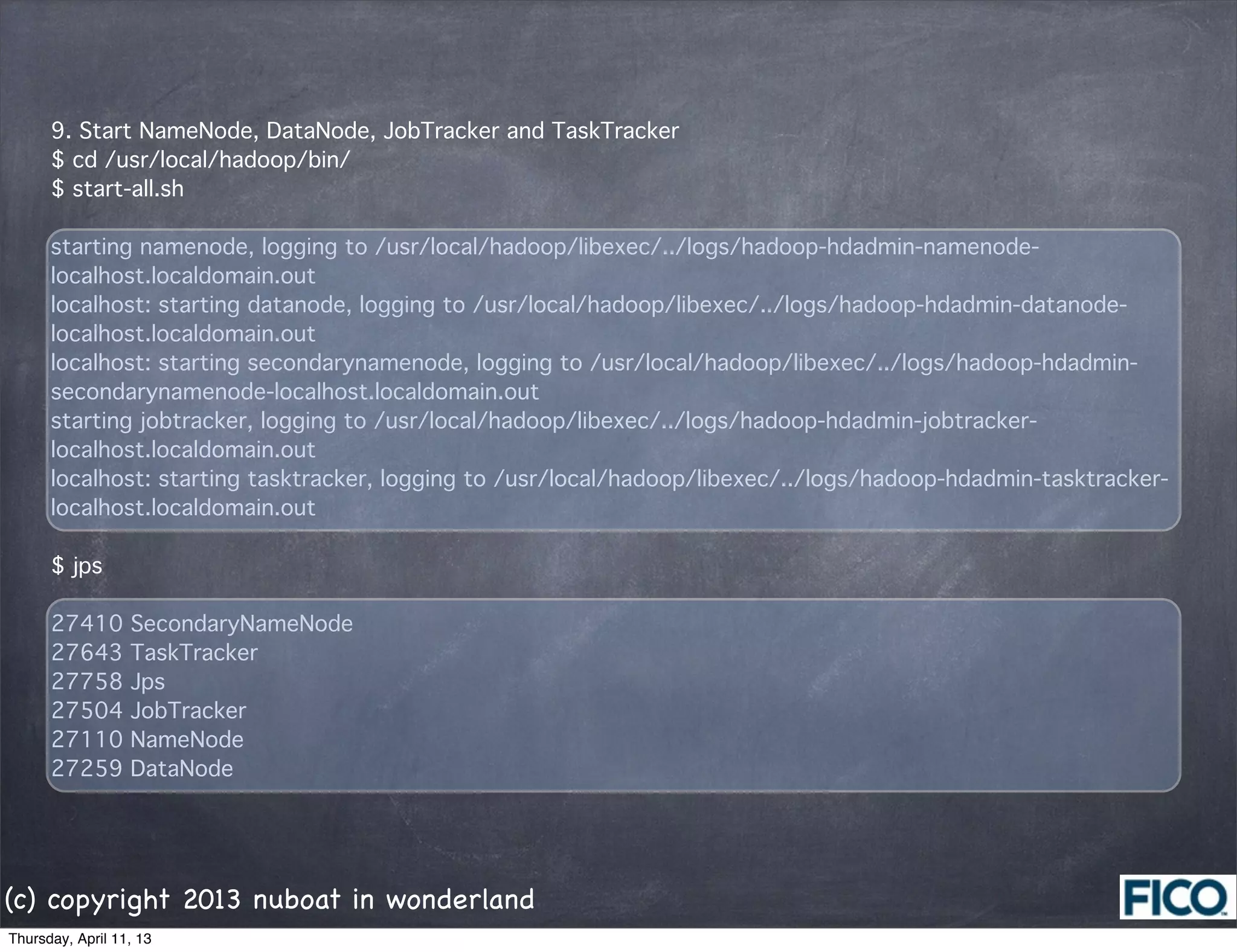
9. Start NameNode, DataNode, JobTracker and TaskTracker
      $ cd /usr/local/hadoop/bin/
      $ start-all.sh

      starting namenode, logging to /usr/local/hadoop/libexec/../logs/hadoop-hdadmin-namenode-
      localhost.localdomain.out
      localhost: starting datanode, logging to /usr/local/hadoop/libexec/../logs/hadoop-hdadmin-datanode-
      localhost.localdomain.out
      localhost: starting secondarynamenode, logging to /usr/local/hadoop/libexec/../logs/hadoop-hdadmin-
      secondarynamenode-localhost.localdomain.out
      starting jobtracker, logging to /usr/local/hadoop/libexec/../logs/hadoop-hdadmin-jobtracker-
      localhost.localdomain.out
      localhost: starting tasktracker, logging to /usr/local/hadoop/libexec/../logs/hadoop-hdadmin-tasktracker-
      localhost.localdomain.out

      $ jps

      27410       SecondaryNameNode
      27643       TaskTracker
      27758       Jps
      27504       JobTracker
      27110       NameNode
      27259       DataNode


(c) copyright 2013 nuboat in wonderland
Thursday, April 11, 13
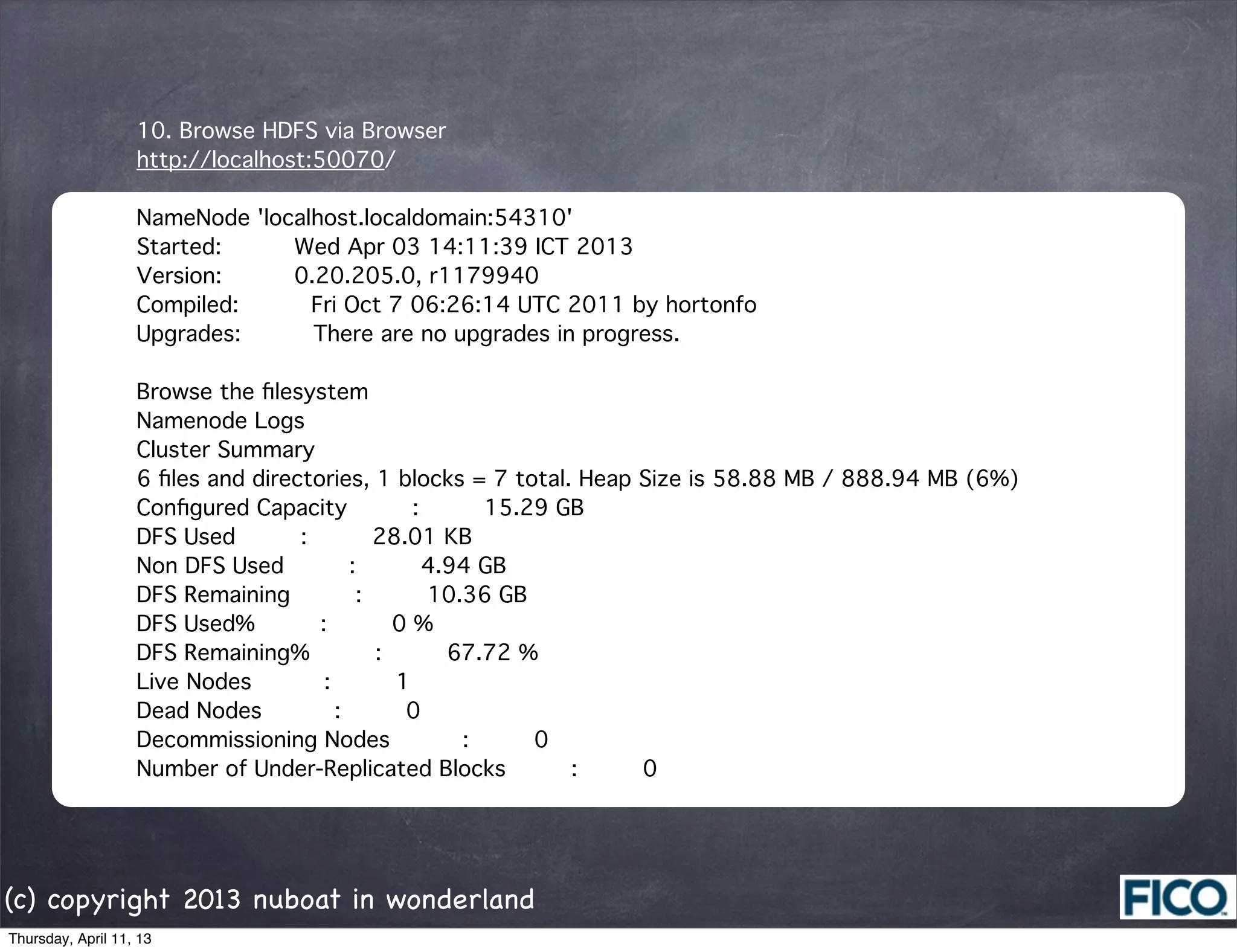
10. Browse HDFS via Browser
                   http://localhost:50070/

                   NameNode 'localhost.localdomain:54310'
                   Started:      Wed Apr 03 14:11:39 ICT 2013
                   Version:      0.20.205.0, r1179940
                   Compiled:      Fri Oct 7 06:26:14 UTC 2011 by hortonfo
                   Upgrades:      There are no upgrades in progress.

                   Browse the filesystem
                   Namenode Logs
                   Cluster Summary
                   6 files and directories, 1 blocks = 7 total. Heap Size is 58.88 MB / 888.94 MB (6%)
                   Configured Capacity     :     15.29 GB
                   DFS Used     :     28.01 KB
                   Non DFS Used     :     4.94 GB
                   DFS Remaining     :     10.36 GB
                   DFS Used%     :     0 %
                   DFS Remaining%     :     67.72 %
                   Live Nodes      :     1
                   Dead Nodes      :     0
                   Decommissioning Nodes      :     0
                   Number of Under-Replicated Blocks     :     0


(c) copyright 2013 nuboat in wonderland
Thursday, April 11, 13
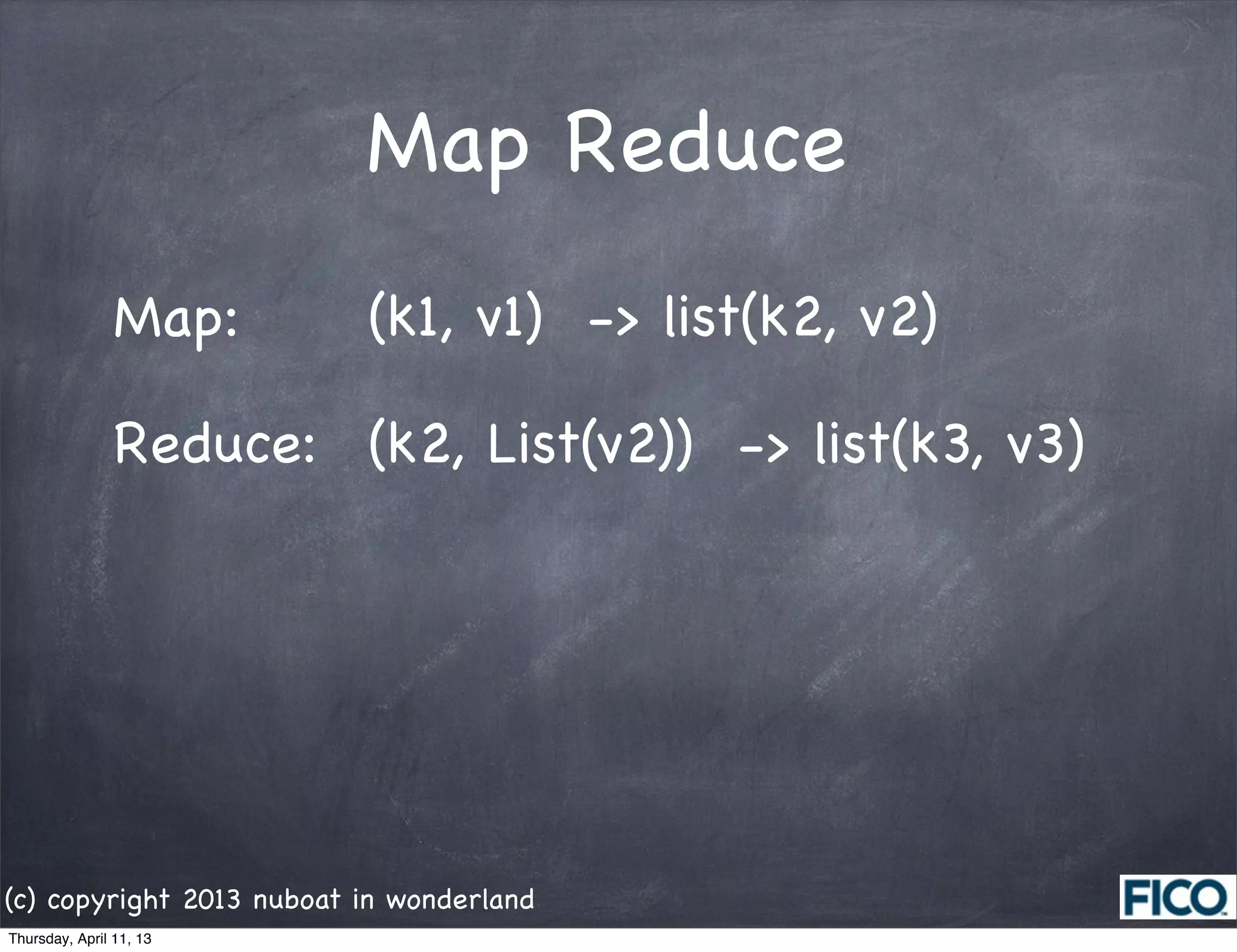
Map Reduce
                Map:      (k1, v1) -> list(k2, v2)

                Reduce: (k2, List(v2)) -> list(k3, v3)


(c) copyright 2013 nuboat in wonderland
Thursday, April 11, 13
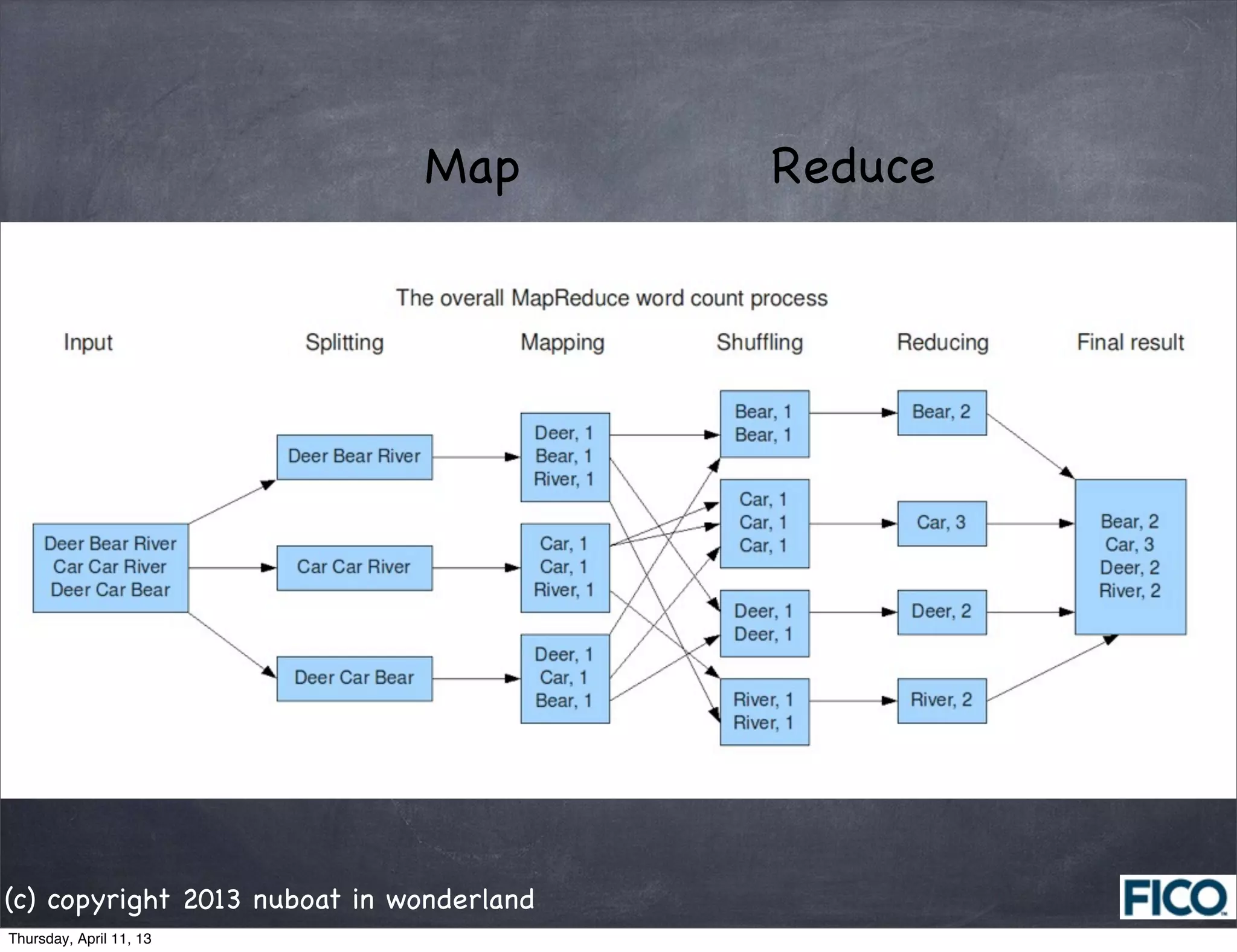
Map         Reduce


(c) copyright 2013 nuboat in wonderland
Thursday, April 11, 13
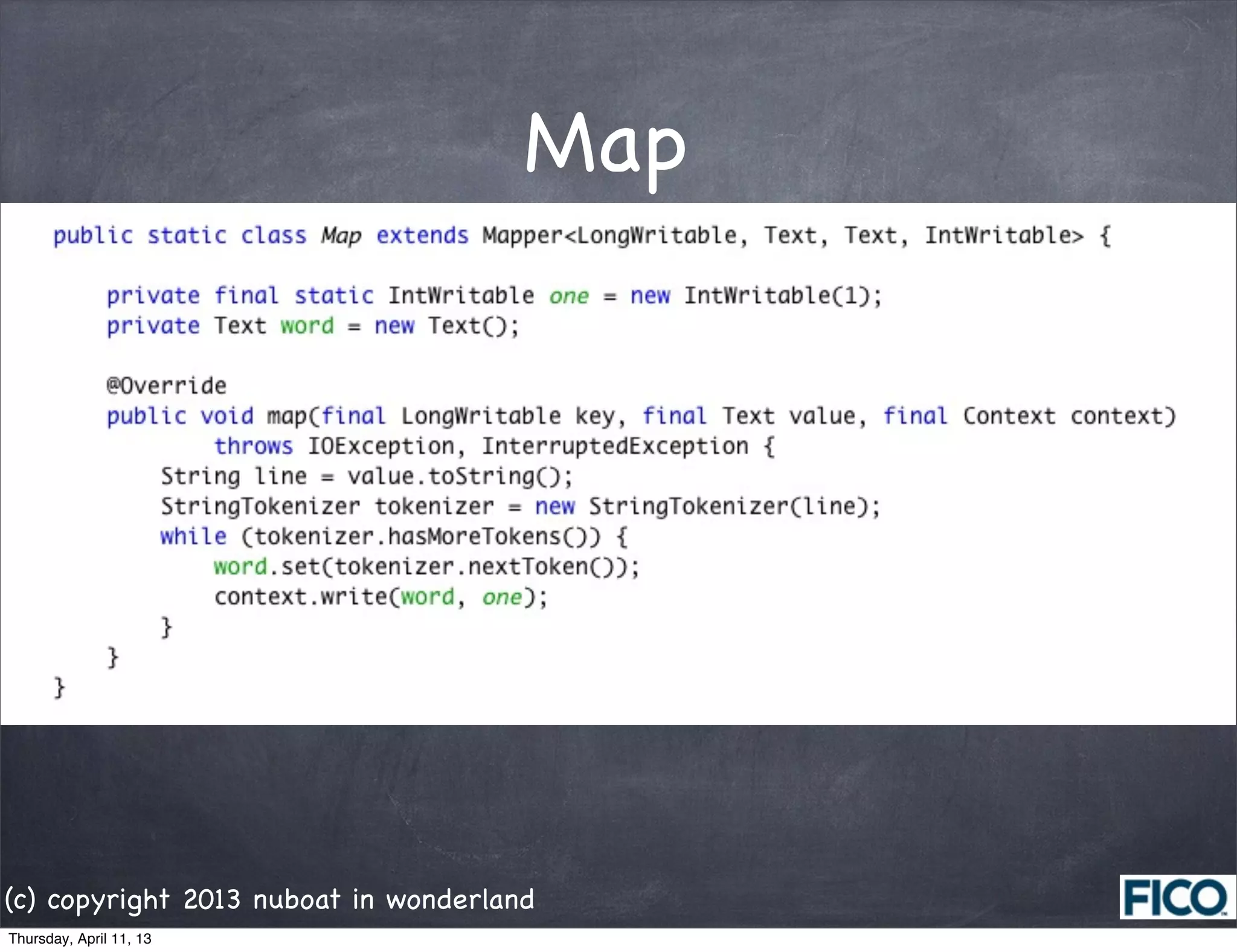
Map


(c) copyright 2013 nuboat in wonderland
Thursday, April 11, 13
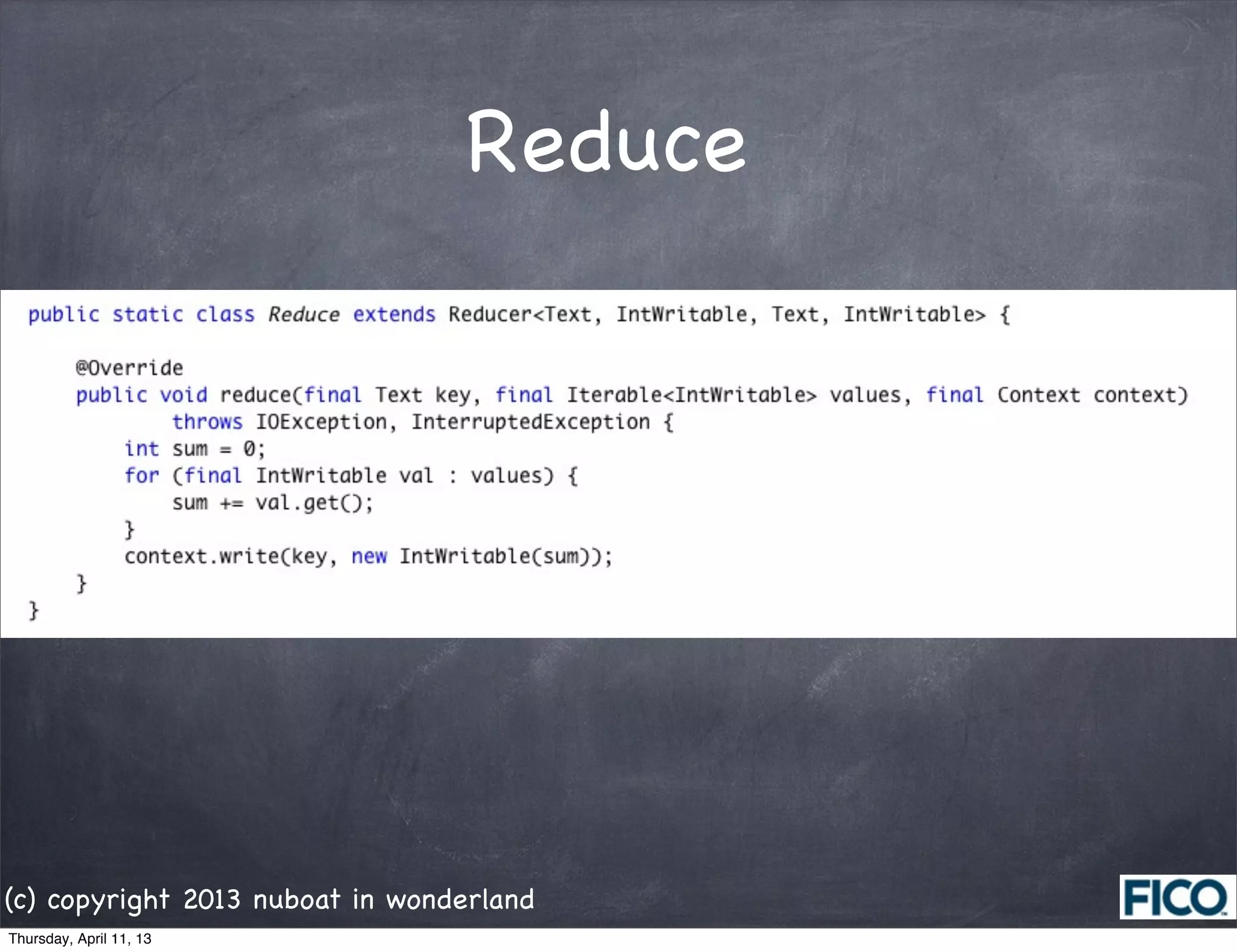
Reduce


(c) copyright 2013 nuboat in wonderland
Thursday, April 11, 13
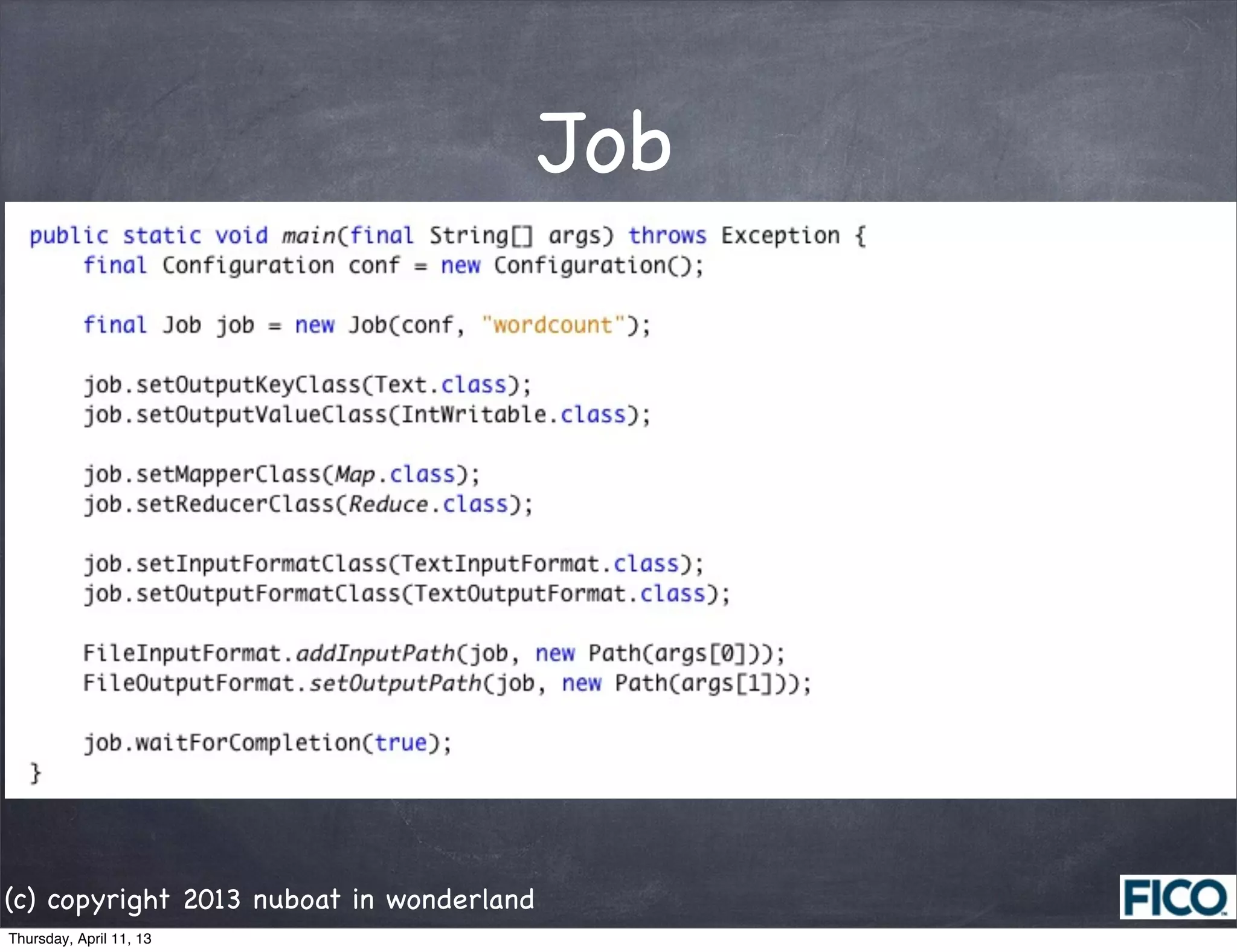
Job


(c) copyright 2013 nuboat in wonderland
Thursday, April 11, 13
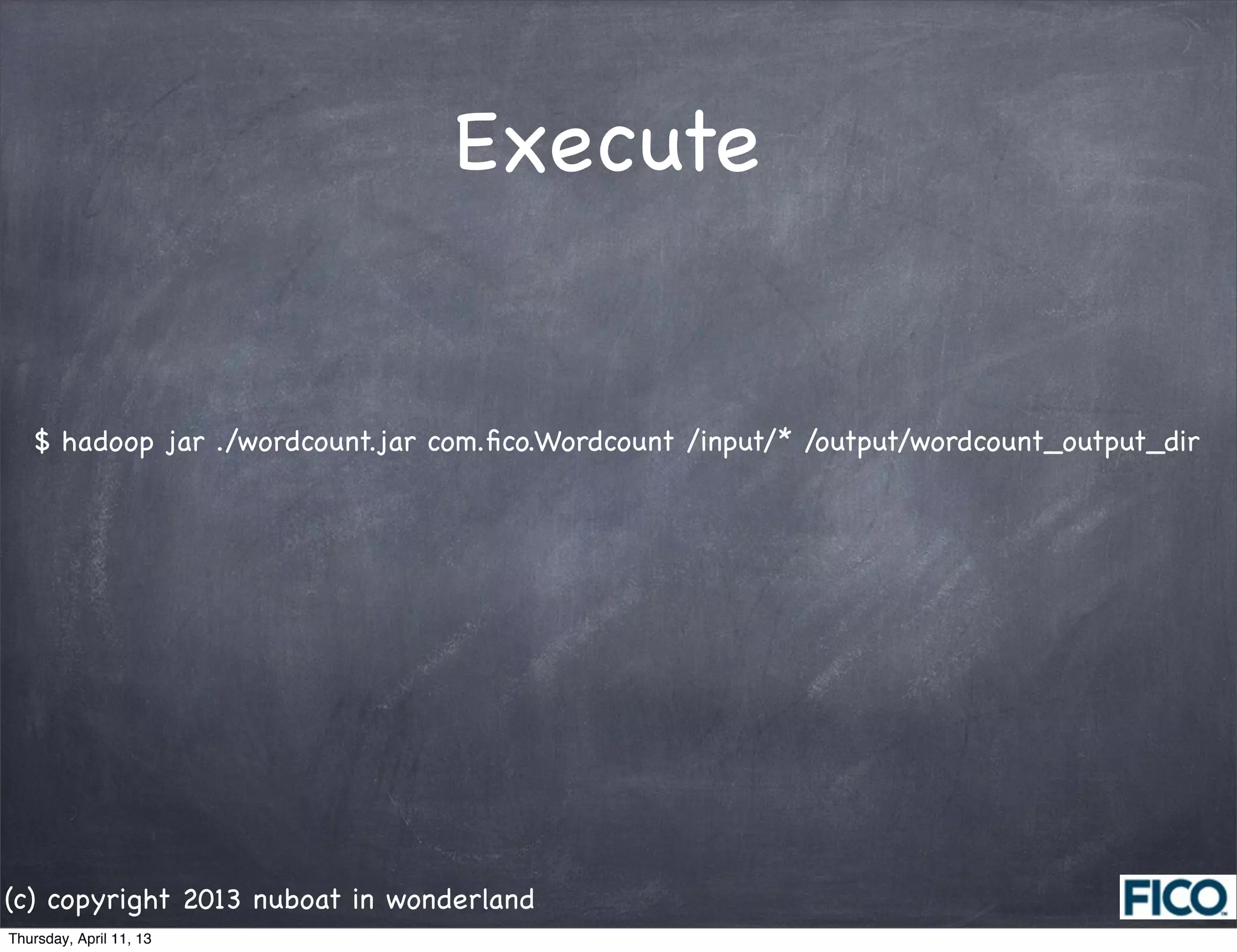
Execute


   $ hadoop jar ./wordcount.jar com.fico.Wordcount /input/* /output/wordcount_output_dir


(c) copyright 2013 nuboat in wonderland
Thursday, April 11, 13
ของแถม


Thursday, April 11, 13
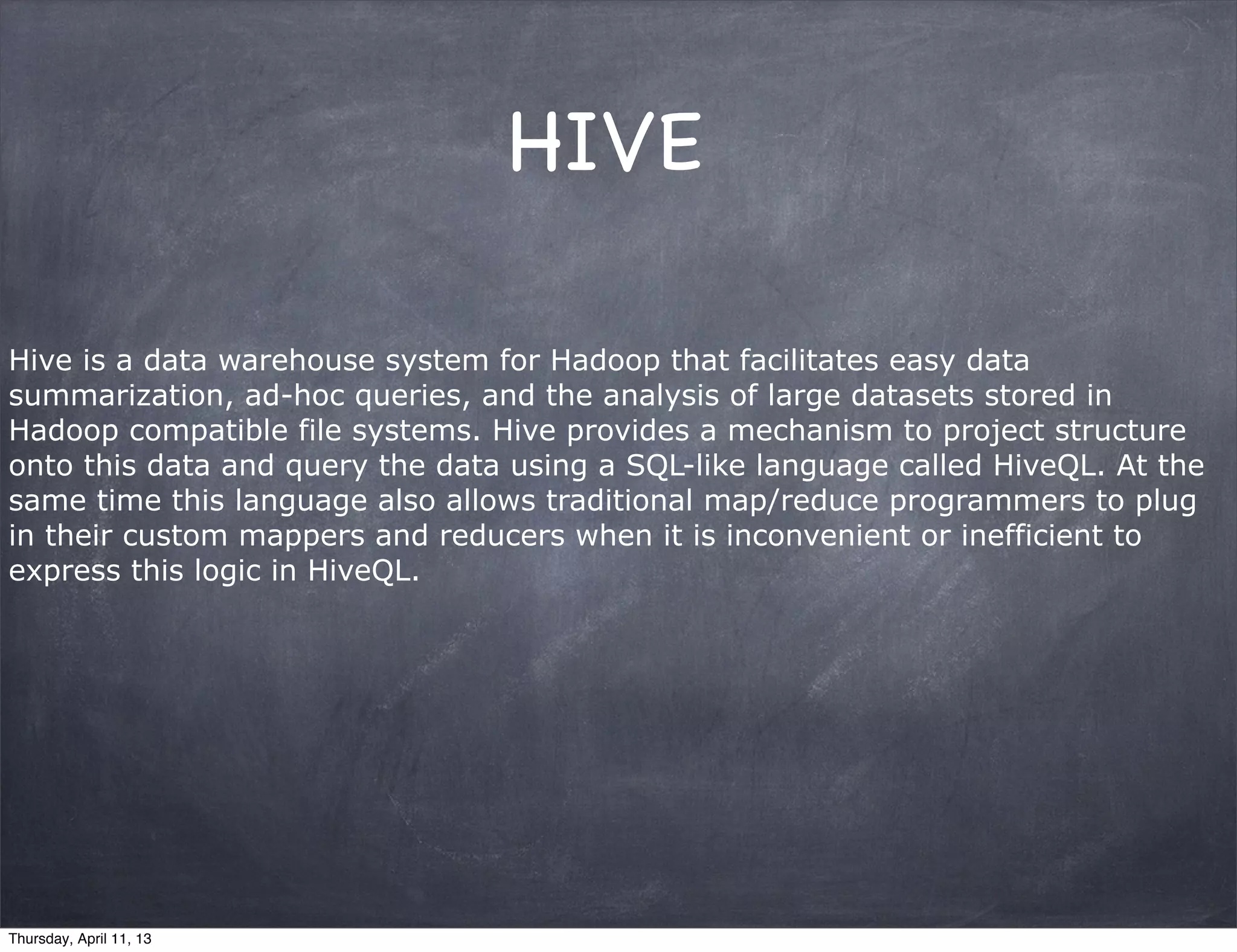
HIVE

Hive is a data warehouse system for Hadoop that facilitates easy data
summarization, ad-hoc queries, and the analysis of large datasets stored in
Hadoop compatible file systems. Hive provides a mechanism to project structure
onto this data and query the data using a SQL-like language called HiveQL. At the
same time this language also allows traditional map/reduce programmers to plug
in their custom mappers and reducers when it is inconvenient or inefficient to
express this logic in HiveQL.


Thursday, April 11, 13
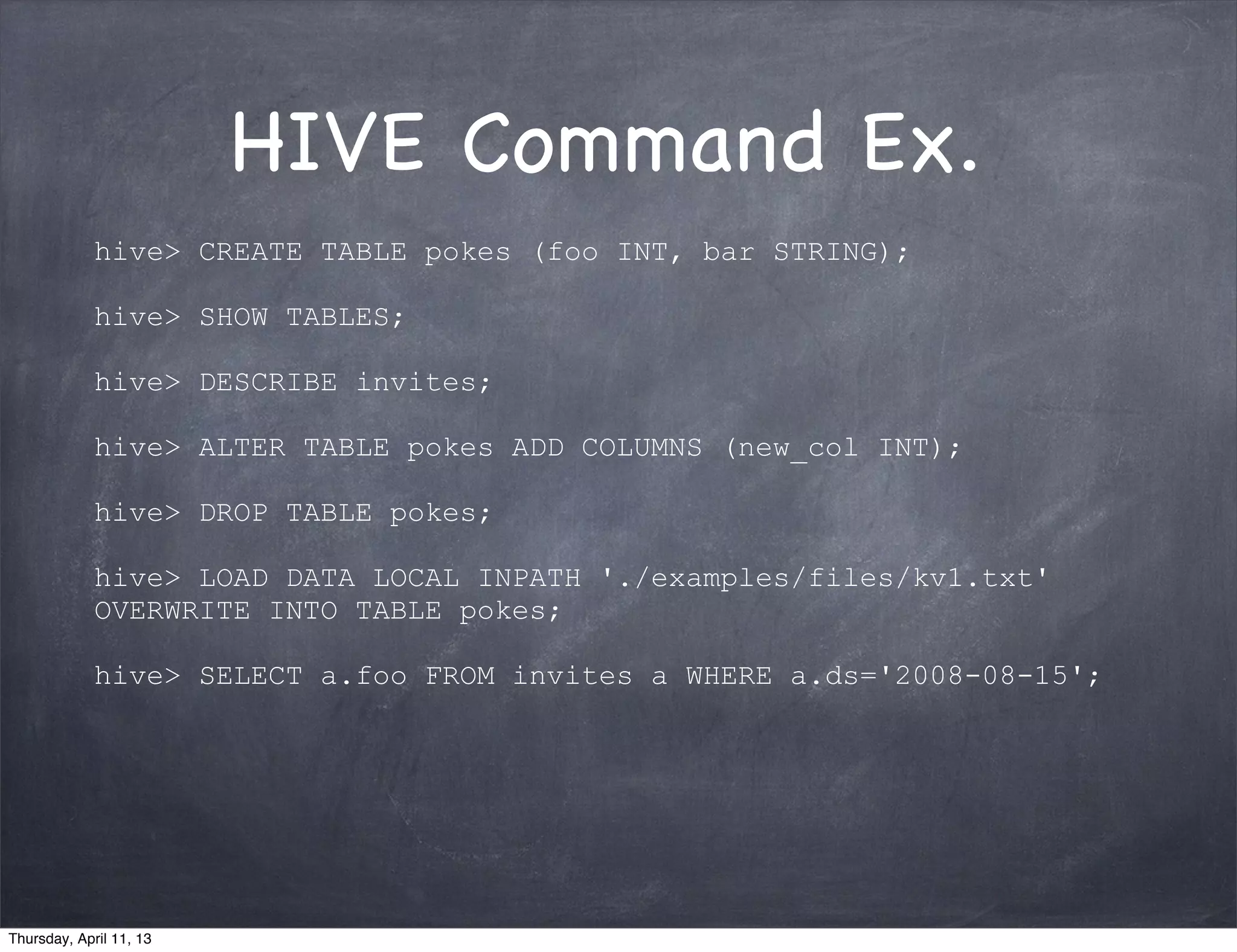
HIVE Command Ex.
             hive> CREATE TABLE pokes (foo INT, bar STRING);

             hive> SHOW TABLES;

             hive> DESCRIBE invites;

             hive> ALTER TABLE pokes ADD COLUMNS (new_col INT);

             hive> DROP TABLE pokes;

             hive> LOAD DATA LOCAL INPATH './examples/files/kv1.txt'
             OVERWRITE INTO TABLE pokes;

             hive> SELECT a.foo FROM invites a WHERE a.ds='2008-08-15';


Thursday, April 11, 13
SQOOP

             With Sqoop, you can import data from a relational database system
             into HDFS. The input to the import process is a database table. Sqoop
             will read the table row-by-row into HDFS. The output of this import
             process is a set of files containing a copy of the imported table. The
             import process is performed in parallel. For this reason, the output will
             be in multiple files. These files may be delimited text files (for
             example, with commas or tabs separating each field), or binary Avro
             or SequenceFiles containing serialized record data.


Thursday, April 11, 13
THANK YOU :)


(c) copyright 2013 nuboat in wonderland
Thursday, April 11, 13

Hadoop

  • 1.
    BIG DATA @nuboat Peerapat Asoktummarungsri (c) copyright 2013 nuboat in wonderland Thursday, April 11, 13
  • 2.
    Who am I? Software Engineer @ FICO Blogger @ Thailand Java User Group Failed Startuper Cat Lover เกรียนตัวน้อยๆ ในทวีตเตอร์ (c) copyright 2013 nuboat in wonderland Thursday, April 11, 13
  • 3.
    What is BigData? Big data analytics is concerned with the analysis of large volumes of transaction/event data and behavioral analysis of human/human a human/system interactions. (Gartner) Big data represents the collection of technologies that handle large data volumes well beyond that inflection point and for which, at least in theory, hardware resources required to manage data by volume track to an almost straight line rather than a curve. (IDC) (c) copyright 2013 nuboat in wonderland Thursday, April 11, 13
  • 4.
    Structure & Nonstructure Level Example Structure RDBMS Semi-structure XML, JSON Quasi-structure Text Document Unstructure Image, Video (c) copyright 2013 nuboat in wonderland Thursday, April 11, 13
  • 5.
    Source: go-globe.com Unstructure data around the world in 1min. (c) copyright 2013 nuboat in wonderland Thursday, April 11, 13
  • 6.
    The challenges associatedwith Big Data are Source: oracle.com (c) copyright 2013 nuboat in wonderland Thursday, April 11, 13
  • 7.
    Use The Righttool RDBMS HADOOP Interactive Reporting (<1s) Affordable Storage/Compute Multistep Transaction Structure of Not (Agility) Lots of Insert/Update/Delete Resilent Auto Scalability (c) copyright 2013 nuboat in wonderland Thursday, April 11, 13
  • 8.
    ZooKeeper Cassandra, Hive Sqoop Pig Mahout, ฯลฯ Map Reduce YARN COMMON Z F HBASE HDFS Flume (c) copyright 2013 nuboat in wonderland Thursday, April 11, 13
  • 9.
    HDFS Hadoop Distributed File System 1 1 A 1 D 2 2 5 3 5 3 4 1 C 5 4 3 4 B 2 E Replication 2 5 Factor = 3 3 4 (c) copyright 2013 nuboat in wonderland Thursday, April 11, 13
  • 10.
    HDFS Hadoop Distributed File System 1 1 A 1 D 2 2 5 3 5 3 4 5 4 B 2 E 2 5 3 4 (c) copyright 2013 nuboat in wonderland Thursday, April 11, 13
  • 11.
    Client Master Slave mode only Map Reduce Name Node HDFS Job Tracker Data Node Data Node Data Node Data Node Data Node Data Node Data Node Data Node Data Node (c) copyright 2013 nuboat in wonderland Thursday, April 11, 13
  • 12.
    Install & Config Install JDK Adding Hadoop System User Config SSH & Passwordless Disabling IPv6 Installing Hadoop, chown, .sh, conf.xml Formatting HDFS Start Hadoop Hadoop Web Console Stop Hadoop (c) copyright 2013 nuboat in wonderland Thursday, April 11, 13
  • 13.
    1.  Install Java [root@localhost ~]# ./jdk-6u39-linux-i586.bin [root@localhost ~]# chown -R root:root ./jdk1.6.0_39/ [root@localhost ~]# mv jdk1.6.0_39/ /usr/lib/jvm/ [root@localhost ~]# update-alternatives --install "/usr/bin/java" "java" "/usr/lib/jvm/jdk1.6.0_39/bin/java" 1 [root@localhost ~]# update-alternatives --install "/usr/bin/javac" "javac" "/usr/lib/jvm/jdk1.6.0_39/bin/ javac" 1 [root@localhost ~]# update-alternatives --install "/usr/bin/javaws" "javaws" "/usr/lib/jvm/jdk1.6.0_39/bin/ javaws" 1 [root@localhost ~]# update-alternatives --config java There are 3 programs which provide 'java'.   Selection    Command ----------------------------------------------- *  1           /usr/lib/jvm/jre-1.6.0-openjdk/bin/java    2           /usr/lib/jvm/jre-1.5.0-gcj/bin/java + 3           /usr/lib/jvm/jdk1.6.0_39/bin/java Enter to keep the current selection[+], or type selection number: 3 [root@localhost ~]# java -version java version "1.6.0_39" Java(TM) SE Runtime Environment (build 1.6.0_39-b04) Java HotSpot(TM) Server VM (build 20.14-b01, mixed mode) (c) copyright 2013 nuboat in wonderland Thursday, April 11, 13
  • 14.
    2.  Create hadoopuser [root@localhost ~]# groupadd hadoop [root@localhost ~]# useradd -g hadoop -d /home/hdadmin hdadmin [root@localhost ~]# passwd hdadmin 3.  Config SSH [root@localhost ~]# service sshd start ... [root@localhost ~]# chkconfig sshd on [root@localhost ~]# su - hdadmin [root@localhost ~]# ssh-keygen -t rsa -P "" $ ~/.ssh/id_rsa.pub >> ~/.ssh/authroized_keys $ ssh localhost 4. Disable IPv6 [root@localhost ~]# vi /etc/sysctl.conf # disable ipv6 net.ipv6.conf.all.disable_ipv6 = 1 net.ipv6.conf.default.disable_ipv6 = 1 net.ipv6.conf.lo.disable_ipv6 = 1 (c) copyright 2013 nuboat in wonderland Thursday, April 11, 13
  • 15.
    5. SET Path $ vi ~/.bashrc # .bashrc # Source global definitions if [ -f /etc/bashrc ]; then         . /etc/bashrc fi # Do not set HADOOP_HOME # User specific aliases and functions export HIVE_HOME=/usr/local/hive-0.9.0 export JAVA_HOME=/usr/lib/jvm/jdk1.6.0_39 export PATH=$PATH:/usr/local/hadoop-0.20.205.0/bin:$JAVA_HOME/bin: $HIVE_HOME/bin (c) copyright 2013 nuboat in wonderland Thursday, April 11, 13
  • 16.
    6. Install Hadoop [root@localhost ~]# tar xzf hadoop-0.20.205.0-bin.tar.gz [root@localhost ~]# mv hadoop-0.20.205.0 /usr/local/hadoop-0.20.205.0 [root@localhost ~]# cd /usr/local [root@localhost ~]# chown -R hdadmin:hadoop hadoop-0.20.205.0 [root@localhost ~]# mkdir -p /data/hadoop [root@localhost ~]# chown hdadmin:hadoop /data/hadoop [root@localhost ~]# chmod 750 /data/hadoop (c) copyright 2013 nuboat in wonderland Thursday, April 11, 13
  • 17.
    7. Config HADOOP $ vi /usr/local/hadoop-0.20.205.0/conf/hadoop-env.sh # export JAVA_HOME=/usr/lib/j2sdk1.5-sun export JAVA_HOME=/usr/lib/jvm/jdk1.6.0_39 export HADOOP_HOME_WARN_SUPPRESS="TRUE" $ vi /usr/local/hadoop-0.20.205.0/conf/core-site.sh <configuration> <property>   <name>hadoop.tmp.dir</name>   <value>/data/hadoop</value>   <description>A base for other temporary directories.</description> </property> <property>   <name>fs.default.name</name>   <value>hdfs://localhost:54310</value>   <description> The name of the default file system. A URI whose scheme and authority determine the FileSystem implementation. The uri's scheme determine the config property(fs..SCHEME.impl) naming the FileSystem implementation class. The uri's authority is used to determine the host, port, etc,. for a filesystem. </description> </property> </configuration> (c) copyright 2013 nuboat in wonderland Thursday, April 11, 13
  • 18.
    $ vi /usr/local/hadoop-0.20.205.0/conf/hdfs-site.sh <configuration> <property>   <name>dfs.replication</name>   <value>1</value>   <description> Default block replication. The actual number of replications can be specified when the file is created. The default is used if replication is not specified in create time.   </description> </property> </configuration> $ vi /usr/local/hadoop-0.20.205.0/conf/mapred-site.xml <configuration> <property>   <name>mapred.job.tracker</name>   <value>localhost:54311</value>   <description> The host and port that the MapReduce job tracker runs at. If "local", then jobs are run in-process as a single map and reduce task.</description> </property> </configuration> (c) copyright 2013 nuboat in wonderland Thursday, April 11, 13
  • 19.
    8. Format HDFS $hadoop namenode -format 13/04/03 13:59:54 INFO namenode.NameNode: STARTUP_MSG:  /************************************************************ STARTUP_MSG: Starting NameNode STARTUP_MSG:   host = localhost.localdomain/127.0.0.1 STARTUP_MSG:   args = [-format] STARTUP_MSG:   version = 0.20.205.0 STARTUP_MSG:   build = https://svn.apache.org/repos/asf/hadoop/common/branches/branch-0.20-security-205 -r 1179940; compiled by 'hortonfo' on Fri Oct  7 06:26:14 UTC 2011 ************************************************************/ 13/04/03 14:00:02 INFO util.GSet: VM type       = 32-bit 13/04/03 14:00:02 INFO util.GSet: 2% max memory = 17.77875 MB 13/04/03 14:00:02 INFO util.GSet: capacity      = 2^22 = 4194304 entries 13/04/03 14:00:02 INFO util.GSet: recommended=4194304, actual=4194304 13/04/03 14:00:02 INFO namenode.FSNamesystem: fsOwner=hdadmin 13/04/03 14:00:02 INFO namenode.FSNamesystem: supergroup=supergroup 13/04/03 14:00:02 INFO namenode.FSNamesystem: isPermissionEnabled=true 13/04/03 14:00:02 INFO namenode.FSNamesystem: dfs.block.invalidate.limit=100 13/04/03 14:00:02 INFO namenode.FSNamesystem: isAccessTokenEnabled=false accessKeyUpdateInterval=0 min(s), accessTokenLifetime=0 min(s) 13/04/03 14:00:02 INFO namenode.NameNode: Caching file names occuring more than 10 times  13/04/03 14:00:02 INFO common.Storage: Image file of size 113 saved in 0 seconds. 13/04/03 14:00:02 INFO common.Storage: Storage directory /app/hadoop/tmp/dfs/name has been successfully formatted. 13/04/03 14:00:02 INFO namenode.NameNode: SHUTDOWN_MSG:  /************************************************************ SHUTDOWN_MSG: Shutting down NameNode at localhost.localdomain/127.0.0.1 ************************************************************/ (c) copyright 2013 nuboat in wonderland Thursday, April 11, 13
  • 20.
    9. Start NameNode,DataNode, JobTracker and TaskTracker $ cd /usr/local/hadoop/bin/ $ start-all.sh starting namenode, logging to /usr/local/hadoop/libexec/../logs/hadoop-hdadmin-namenode- localhost.localdomain.out localhost: starting datanode, logging to /usr/local/hadoop/libexec/../logs/hadoop-hdadmin-datanode- localhost.localdomain.out localhost: starting secondarynamenode, logging to /usr/local/hadoop/libexec/../logs/hadoop-hdadmin- secondarynamenode-localhost.localdomain.out starting jobtracker, logging to /usr/local/hadoop/libexec/../logs/hadoop-hdadmin-jobtracker- localhost.localdomain.out localhost: starting tasktracker, logging to /usr/local/hadoop/libexec/../logs/hadoop-hdadmin-tasktracker- localhost.localdomain.out $ jps 27410 SecondaryNameNode 27643 TaskTracker 27758 Jps 27504 JobTracker 27110 NameNode 27259 DataNode (c) copyright 2013 nuboat in wonderland Thursday, April 11, 13
  • 21.
    10. Browse HDFSvia Browser http://localhost:50070/ NameNode 'localhost.localdomain:54310' Started:      Wed Apr 03 14:11:39 ICT 2013 Version:      0.20.205.0, r1179940 Compiled:      Fri Oct 7 06:26:14 UTC 2011 by hortonfo Upgrades:      There are no upgrades in progress. Browse the filesystem Namenode Logs Cluster Summary 6 files and directories, 1 blocks = 7 total. Heap Size is 58.88 MB / 888.94 MB (6%) Configured Capacity     :     15.29 GB DFS Used     :     28.01 KB Non DFS Used     :     4.94 GB DFS Remaining     :     10.36 GB DFS Used%     :     0 % DFS Remaining%     :     67.72 % Live Nodes      :     1 Dead Nodes      :     0 Decommissioning Nodes      :     0 Number of Under-Replicated Blocks     :     0 (c) copyright 2013 nuboat in wonderland Thursday, April 11, 13
  • 22.
    Map Reduce Map: (k1, v1) -> list(k2, v2) Reduce: (k2, List(v2)) -> list(k3, v3) (c) copyright 2013 nuboat in wonderland Thursday, April 11, 13
  • 23.
    Map Reduce (c) copyright 2013 nuboat in wonderland Thursday, April 11, 13
  • 24.
    Map (c) copyright 2013nuboat in wonderland Thursday, April 11, 13
  • 25.
    Reduce (c) copyright 2013nuboat in wonderland Thursday, April 11, 13
  • 26.
    Job (c) copyright 2013nuboat in wonderland Thursday, April 11, 13
  • 27.
    Execute $ hadoop jar ./wordcount.jar com.fico.Wordcount /input/* /output/wordcount_output_dir (c) copyright 2013 nuboat in wonderland Thursday, April 11, 13
  • 28.
  • 29.
    HIVE Hive is adata warehouse system for Hadoop that facilitates easy data summarization, ad-hoc queries, and the analysis of large datasets stored in Hadoop compatible file systems. Hive provides a mechanism to project structure onto this data and query the data using a SQL-like language called HiveQL. At the same time this language also allows traditional map/reduce programmers to plug in their custom mappers and reducers when it is inconvenient or inefficient to express this logic in HiveQL. Thursday, April 11, 13
  • 30.
    HIVE Command Ex. hive> CREATE TABLE pokes (foo INT, bar STRING); hive> SHOW TABLES; hive> DESCRIBE invites; hive> ALTER TABLE pokes ADD COLUMNS (new_col INT); hive> DROP TABLE pokes; hive> LOAD DATA LOCAL INPATH './examples/files/kv1.txt' OVERWRITE INTO TABLE pokes; hive> SELECT a.foo FROM invites a WHERE a.ds='2008-08-15'; Thursday, April 11, 13
  • 31.
    SQOOP With Sqoop, you can import data from a relational database system into HDFS. The input to the import process is a database table. Sqoop will read the table row-by-row into HDFS. The output of this import process is a set of files containing a copy of the imported table. The import process is performed in parallel. For this reason, the output will be in multiple files. These files may be delimited text files (for example, with commas or tabs separating each field), or binary Avro or SequenceFiles containing serialized record data. Thursday, April 11, 13
  • 32.
    THANK YOU :) (c)copyright 2013 nuboat in wonderland Thursday, April 11, 13