A SEMINAR BY
---JASMINE.A.JAMAN
CONTENTS
1. What is Hacking?
2. History of Hacking
3. Who is Hacker?
4. Famous Hackers in History
5. Why do Hackers Hack?
6. Types of Hacking
7. Techniques of Hacking
8. How to give a password to an account
9. What should do after hacked
10. How to secure our data
11. Advantages of Hacking
12. Disadvantages of Hacking
13. Conclusion
14. Questions
WHAT IS HACKING?
• The process of attempting to gain or successfully gaining ,
unauthorized access to computer resources is called
Hacking
• Hacking refers to an array of activities which are done to
intrude someone else’s personal information so as to use it
for malicious , unwanted purposes.
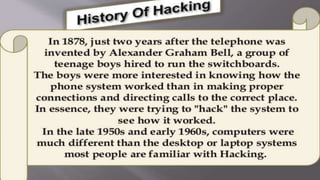
HISTORY OF HACKING
• Hacking has been part of Computing for nearly 40 years .
• First hacker emerged at MIT in 1960.
• 1960s: Interestingly, the term “hack” did not originate
from computers. Rather, it originated with MIT's Tech
Model Railroad Club way back in 1961 when club
members hacked their high-tech train sets in order to
modify their functions .
WHO IS HACKER?
• In the computer security context , Hacker
is the one who seeks and exploits
weakness in the computer system or
computer network.
• The term Hackers is reclaimed by
computer programmers who argue that
someone who breaks into computers must
be called as Cracker.
WHY DO HACKERS HACK?
Just for fun.
Show off.
 Hack others systems secretly.
Notify many people their thought .
Steal important information.
Destroy enemy’s computer network during war.
TYPES OF HACKING
• Website Hacking
• Network Hacking
• Ethical Hacking
• Email Hacking
• Password Hacking
• Online Banking Hacking
• Computer Hacking
WEBSITE HACKING
• Hacking a Website means taking
overall control of the website from
the website owner to the person who
hacks the website.
NETWORK HACKING
• Network Hacking is generally means
gathering information about domain
by using tools like Telnet, NslookUp,
Ping, Tracert, Netstat, etc. It also
includes OS Fingerprinting , Port
Scanning and Port Surfing using
various tools.
ETHICAL HACKING
• Ethical Hacking is where a person
hacks to find weakness in the system
and usually patches them.
• Ethical Hacking is also known as
Penetration testing, Intrusion testing,
or Red teaming.
EMAIL HACKING
• Email Hacking is the unauthorized access to, or manipulation
of, an email account or email correspondence.
PASSWORD HACKING
• Password Hacking, sometimes referred to as password
cracking, is a method of recovering passwords from data
transmitted by or stored on a computer
ONLINE BANKING HACKING
• Unauthorised accessing of bank accounts without the permission
of account holder is known as Online Banking Hacking.
COMPUTER HACKING
• Computer Hacking refers to the practice of modifying or
altering computer software and hardware to accomplish a
goal that is considered to be outside of the creator's original
objective.
• Computer Hacking is when files on the computer are
viewed, created or edited without Computer owner’s
authorization.
TECHNIQUES OF HACKING
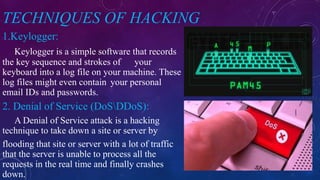
1.Keylogger:
Keylogger is a simple software that records
the key sequence and strokes of your
keyboard into a log file on your machine. These
log files might even contain your personal
email IDs and passwords.
2. Denial of Service (DoSDDoS):
A Denial of Service attack is a hacking
technique to take down a site or server by
flooding that site or server with a lot of traffic
that the server is unable to process all the
requests in the real time and finally crashes
down.
TECHNIQUES OF HACKING
3.Waterhole Attacks: To poison a place ,in
this case, the hacker hits the most accessible
physical point of the Victim.
4. Fake WAP: Hacker uses a software to
fake a wireless access point . WAP connects to the
public place WAP. Once you get connected to the
fake WAP , Hacker can Access your data same as
in above case.
TECHNIQUES OF HACKING
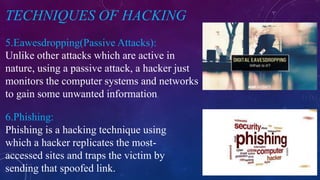
5.Eawesdropping(Passive Attacks):
6.Phishing:
Unlike other attacks which are active in
nature, using a passive attack, a hacker just
monitors the computer systems and networks
to gain some unwanted information.
Phishing is a hacking technique using
which a hacker replicates the most-
accessed sites and traps the victim by
sending that spoofed link.
TECHNIQUES OF HACKING
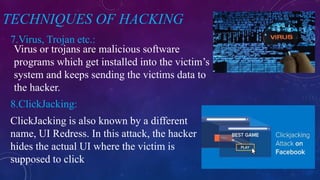
7.Virus, Trojan etc.:
8.ClickJacking:
Virus or trojans are malicious software
programs which get installed into the victim’s
system and keeps sending the victims data to
the hacker.
ClickJacking is also known by a different
name, UI Redress. In this attack, the hacker
hides the actual UI where the victim is
supposed to click
TECHNIQUES OF HACKING
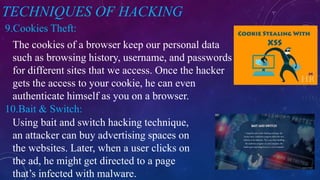
9.Cookies Theft:
10.Bait & Switch:
The cookies of a browser keep our personal data
such as browsing history, username, and passwords
for different sites that we access. Once the hacker
gets the access to your cookie, he can even
authenticate himself as you on a browser.
Using bait and switch hacking technique,
an attacker can buy advertising spaces on
the websites. Later, when a user clicks on
the ad, he might get directed to a page
that’s infected with malware.
WHAT SHOULD DO AFTER HACKED?
Shutdown the system .
Separate the system from network.
Restore the system with Backup
Reinstall all the programs
Connect the system to the network
Its better to call the police
HOW TO SET A PASSWORD TO YOUR ACCOUNT?
• Use unique passwords for your accounts.
• Choose a combination of letters ,numbers
and symbols to make a unique password.
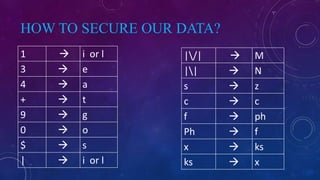
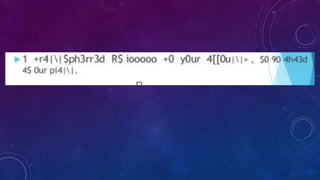
HOW TO SECURE OUR DATA?
1  i or l
3  e
4  a
+  t
9  g
0  o
$  s
|  i or l
|/|  M
||  N
s  z
c  c
f  ph
Ph  f
x  ks
ks  x
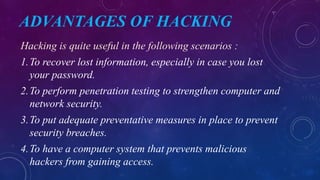
ADVANTAGES OF HACKING
Hacking is quite useful in the following scenarios :
1.To recover lost information, especially in case you lost
your password.
2.To perform penetration testing to strengthen computer and
network security.
3.To put adequate preventative measures in place to prevent
security breaches.
4.To have a computer system that prevents malicious
hackers from gaining access.
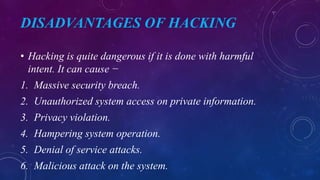
DISADVANTAGES OF HACKING
• Hacking is quite dangerous if it is done with harmful
intent. It can cause −
1. Massive security breach.
2. Unauthorized system access on private information.
3. Privacy violation.
4. Hampering system operation.
5. Denial of service attacks.
6. Malicious attack on the system.
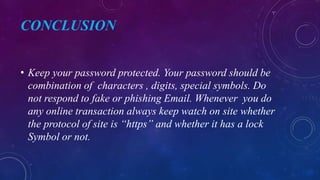
CONCLUSION
• Keep your password protected. Your password should be
combination of characters , digits, special symbols. Do
not respond to fake or phishing Email. Whenever you do
any online transaction always keep watch on site whether
the protocol of site is “https” and whether it has a lock
Symbol or not.
Hacking- Ethical/ Non-ethical, Cyber Security.

Hacking- Ethical/ Non-ethical, Cyber Security.

  • 1.
  • 2.
    CONTENTS 1. What isHacking? 2. History of Hacking 3. Who is Hacker? 4. Famous Hackers in History 5. Why do Hackers Hack? 6. Types of Hacking 7. Techniques of Hacking 8. How to give a password to an account 9. What should do after hacked 10. How to secure our data 11. Advantages of Hacking 12. Disadvantages of Hacking 13. Conclusion 14. Questions
  • 3.
    WHAT IS HACKING? •The process of attempting to gain or successfully gaining , unauthorized access to computer resources is called Hacking • Hacking refers to an array of activities which are done to intrude someone else’s personal information so as to use it for malicious , unwanted purposes.
  • 4.
    HISTORY OF HACKING •Hacking has been part of Computing for nearly 40 years . • First hacker emerged at MIT in 1960. • 1960s: Interestingly, the term “hack” did not originate from computers. Rather, it originated with MIT's Tech Model Railroad Club way back in 1961 when club members hacked their high-tech train sets in order to modify their functions .
  • 6.
    WHO IS HACKER? •In the computer security context , Hacker is the one who seeks and exploits weakness in the computer system or computer network. • The term Hackers is reclaimed by computer programmers who argue that someone who breaks into computers must be called as Cracker.
  • 8.
    WHY DO HACKERSHACK? Just for fun. Show off.  Hack others systems secretly. Notify many people their thought . Steal important information. Destroy enemy’s computer network during war.
  • 9.
    TYPES OF HACKING •Website Hacking • Network Hacking • Ethical Hacking • Email Hacking • Password Hacking • Online Banking Hacking • Computer Hacking
  • 10.
    WEBSITE HACKING • Hackinga Website means taking overall control of the website from the website owner to the person who hacks the website.
  • 11.
    NETWORK HACKING • NetworkHacking is generally means gathering information about domain by using tools like Telnet, NslookUp, Ping, Tracert, Netstat, etc. It also includes OS Fingerprinting , Port Scanning and Port Surfing using various tools.
  • 12.
    ETHICAL HACKING • EthicalHacking is where a person hacks to find weakness in the system and usually patches them. • Ethical Hacking is also known as Penetration testing, Intrusion testing, or Red teaming.
  • 13.
    EMAIL HACKING • EmailHacking is the unauthorized access to, or manipulation of, an email account or email correspondence.
  • 14.
    PASSWORD HACKING • PasswordHacking, sometimes referred to as password cracking, is a method of recovering passwords from data transmitted by or stored on a computer
  • 15.
    ONLINE BANKING HACKING •Unauthorised accessing of bank accounts without the permission of account holder is known as Online Banking Hacking.
  • 16.
    COMPUTER HACKING • ComputerHacking refers to the practice of modifying or altering computer software and hardware to accomplish a goal that is considered to be outside of the creator's original objective. • Computer Hacking is when files on the computer are viewed, created or edited without Computer owner’s authorization.
  • 17.
    TECHNIQUES OF HACKING 1.Keylogger: Keyloggeris a simple software that records the key sequence and strokes of your keyboard into a log file on your machine. These log files might even contain your personal email IDs and passwords. 2. Denial of Service (DoSDDoS): A Denial of Service attack is a hacking technique to take down a site or server by flooding that site or server with a lot of traffic that the server is unable to process all the requests in the real time and finally crashes down.
  • 18.
    TECHNIQUES OF HACKING 3.WaterholeAttacks: To poison a place ,in this case, the hacker hits the most accessible physical point of the Victim. 4. Fake WAP: Hacker uses a software to fake a wireless access point . WAP connects to the public place WAP. Once you get connected to the fake WAP , Hacker can Access your data same as in above case.
  • 19.
    TECHNIQUES OF HACKING 5.Eawesdropping(PassiveAttacks): 6.Phishing: Unlike other attacks which are active in nature, using a passive attack, a hacker just monitors the computer systems and networks to gain some unwanted information. Phishing is a hacking technique using which a hacker replicates the most- accessed sites and traps the victim by sending that spoofed link.
  • 20.
    TECHNIQUES OF HACKING 7.Virus,Trojan etc.: 8.ClickJacking: Virus or trojans are malicious software programs which get installed into the victim’s system and keeps sending the victims data to the hacker. ClickJacking is also known by a different name, UI Redress. In this attack, the hacker hides the actual UI where the victim is supposed to click
  • 21.
    TECHNIQUES OF HACKING 9.CookiesTheft: 10.Bait & Switch: The cookies of a browser keep our personal data such as browsing history, username, and passwords for different sites that we access. Once the hacker gets the access to your cookie, he can even authenticate himself as you on a browser. Using bait and switch hacking technique, an attacker can buy advertising spaces on the websites. Later, when a user clicks on the ad, he might get directed to a page that’s infected with malware.
  • 22.
    WHAT SHOULD DOAFTER HACKED? Shutdown the system . Separate the system from network. Restore the system with Backup Reinstall all the programs Connect the system to the network Its better to call the police
  • 23.
    HOW TO SETA PASSWORD TO YOUR ACCOUNT? • Use unique passwords for your accounts. • Choose a combination of letters ,numbers and symbols to make a unique password.
  • 24.
    HOW TO SECUREOUR DATA? 1  i or l 3  e 4  a +  t 9  g 0  o $  s |  i or l |/|  M ||  N s  z c  c f  ph Ph  f x  ks ks  x
  • 25.
    ADVANTAGES OF HACKING Hackingis quite useful in the following scenarios : 1.To recover lost information, especially in case you lost your password. 2.To perform penetration testing to strengthen computer and network security. 3.To put adequate preventative measures in place to prevent security breaches. 4.To have a computer system that prevents malicious hackers from gaining access.
  • 26.
    DISADVANTAGES OF HACKING •Hacking is quite dangerous if it is done with harmful intent. It can cause − 1. Massive security breach. 2. Unauthorized system access on private information. 3. Privacy violation. 4. Hampering system operation. 5. Denial of service attacks. 6. Malicious attack on the system.
  • 27.
    CONCLUSION • Keep yourpassword protected. Your password should be combination of characters , digits, special symbols. Do not respond to fake or phishing Email. Whenever you do any online transaction always keep watch on site whether the protocol of site is “https” and whether it has a lock Symbol or not.