GUI, Performance,
Load and API testing
with Test Studio
By Varvara Menta
Test automation
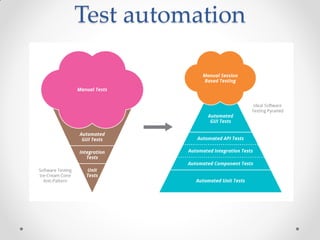
• In software testing, test automation is the use of special software to
control the execution of tests and the comparison of actual
outcomes with predicted outcomes.
• Test automation can automate some repetitive but necessary tasks in
a formalized testing process already in place, or perform additional
testing that would be difficult to do manually.
• Test automation is critical for continuous delivery and continuous
testing.
Test automation
What is GUI Testing?
• GUI testing is the process of testing the system's Graphical User
Interface of the Application Under Test. GUI testing involves checking
the screens with the controls like menus, buttons, icons, and all types
of bars - toolbar, menu bar, dialog boxes and windows, etc.
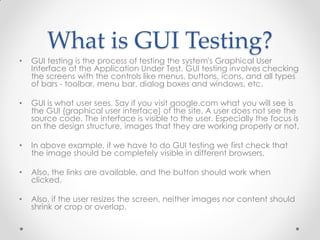
• GUI is what user sees. Say if you visit google.com what you will see is
the GUI (graphical user interface) of the site. A user does not see the
source code. The interface is visible to the user. Especially the focus is
on the design structure, images that they are working properly or not.
• In above example, if we have to do GUI testing we first check that
the image should be completely visible in different browsers.
• Also, the links are available, and the button should work when
clicked.
• Also, if the user resizes the screen, neither images nor content should
shrink or crop or overlap.
Need of GUI Testing
Now the basic concept of GUI testing is clear. The few
questions that will strike in your mind will be
• Why do GUI testing?
• Is it really needed?
• Does testing of functionally and logic of Application
is not more than enough??Then why to waste time
on UI testing.
What do you Check in
GUI Testing?
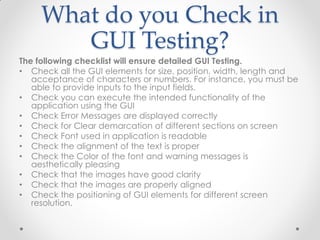
The following checklist will ensure detailed GUI Testing.
• Check all the GUI elements for size, position, width, length and
acceptance of characters or numbers. For instance, you must be
able to provide inputs to the input fields.
• Check you can execute the intended functionality of the
application using the GUI
• Check Error Messages are displayed correctly
• Check for Clear demarcation of different sections on screen
• Check Font used in application is readable
• Check the alignment of the text is proper
• Check the Color of the font and warning messages is
aesthetically pleasing
• Check that the images have good clarity
• Check that the images are properly aligned
• Check the positioning of GUI elements for different screen
resolution.
Challenges in GUI Testing
• The most common problem comes while
doing Regression Testing is that the application GUI
changes frequently. It is very difficult to test and
identify whether it is an issue or enhancement. The
problem manifests when you don't have any
documents regarding GUI changes.
• Success of a software product immensely depends
on how the GUI interacts with the user and ease in
using its various features. Hence, GUI testing is very
important. Manual GUI testing can sometimes be
repetitive and boring and hence error prone.
Automation is highly recommended for GUI testing.
What is Performance
Testing?
• Performance testing is the general name for tests that check
how the system behaves and performs. Performance testing
examines responsiveness, stability, scalability, reliability, speed
and resource usage of your software and infrastructure.
Different types of performance tests provide you with different
data.
• Before performance testing, it’s important to determine your
system’s business goals, so you can tell if your system behaves
satisfactorily or not according to your customers’ needs.
• After running performance tests, you can analyze
different KPIs (Key Performance Indicators), such as the
number of virtual users, hits per second, errors per second,
response time, latency and bytes per second (throughput), as
well as the correlations between them. Through the reports
you can identify bottlenecks, bugs and errors, an decide what
needs to be done.
What is Load Testing?
• Load testing is testing that checks how systems function under
a heavy number of concurrent virtual users performing
transactions over a certain period of time. Or in other words,
how systems handle heavy load volumes. There are a few
types of open-source load testing tools, with JMeter being the
most popular one.
• When you want to determine how many users your system
can handle. You can determine different user scenarios that
let you focus on different parts of your system, like the
checkout webpage on your website or app for web load
testing.
• Basically, load testing is something you should do all the time,
to ensure your system is always on point. That’s why it should
be integrated into your Continuous Integration cycles.
What is API testing?
• API testing is a type of software testing that involves
testing application programming interfaces (APIs)
directly and as part of integration testing to
determine if they meet expectations for
functionality, reliability, performance, and security.
• Since APIs lack a GUI, API testing is performed at
the message layer.
• API testing is now considered critical for automating
testing because APIs now serve as the primary
interface to application logic and because GUI
tests are difficult to maintain with the short release
cycles and frequent changes commonly used
with Agile software development.
Test Automation tools comparison
Web Testing Tools Web Browser Scripting Language
eggPlant Functional Yes (IE, Firefox, Safari, Opera, Chrome) SenseTalk
Macros Yes (Firefox, Chrome, IE) iMacro Script
QF-Test Yes (IE, Firefox) visual scripting, Jython,
Groovy
Ranorex Studio Yes (Chrome, Firefox, Safari, IE) C#, VB.NET
Sahi Yes (IE, Firefox, Chrome, Safari, Opera and
any modern browser)
Sahi Script
Selenium Yes (IE, Firefox, Chrome, Safari, Opera, Edge) Ruby, Java, NodeJS, PHP, Perl,
Python, C#, Groovy
SOAtest Yes Python, JavaScript, Java
TestComplete Yes (IE, Firefox, Chrome) VBScript, JScript, C++Script,
C#Script, DelphiScript
Test Studio Yes (Chrome, Firefox, Safari, IE) C#, VB.NET
Tricentis Tosca Yes (Chrome, Firefox, IE, Edge) C#, VB.Net
WatiN Yes (IE, Firefox) C#, ability to run JavaScript
from C# calls
Watir Yes (IE, Firefox, Chrome, Safari, Opera, Edge) Ruby
Test Studio Overview
• Test Studio is an easy-to-use automated web, WPF and load testing solution. Test Studio
tests support essential technologies like ASP.NET AJAX, Silverlight, PHP and MVC.
• Test Studio functional testing is a comprehensive yet cost-effective automated testing
suite. Users can complete tasks quickly and easily with the product’s point-and-click
interface, which is augmented by Telerik-exclusive features like a visual storyboard and
3D element selection.
• Test Studio load tests allow users to capture quickly capture, multiply and replay complex
web traffic. Record HTTP traffic from desktop browsers, mobile devices and web services,
and replay traffic with hundreds or thousands of virtual users spread across multiple
machines. Fine-tune your load scenario with data binding, user authentication, and
dynamic targets.
• Test Studio Mobile is an intuitive and easy to use test automation solution for Mobile
application testing. Create tests once and test across multiple devices and OS’s. The
point and click functionality allows users to capture quickly and replay complex mobile
testing functionality. There is no need to write a single line of code. Test against any
number of real devices as you wish or through an emulator by connecting through Wifi.
• Test Studio for APIs helps customers verify the integrity and reliability of their APIs in an
easy way and incorporate their API testing effort in their continuous testing and delivery
process. Test Studio for APIs is used to determine whether APIs return the correct response
for a broad range of commonly accepted requests, react properly to edge cases such
as failures and unexpected inputs, as well as deliver the responses in an acceptable
amount of time.
Installation
• Go to https://www.telerik.com/teststudio
• Download the trial
• https://www.telerik.com/download-trial-file/v2/test-
studio-ultimate
• Extensions to browsers
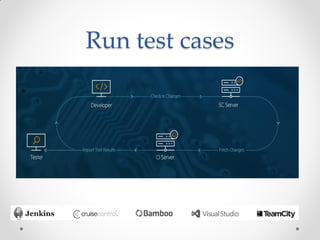
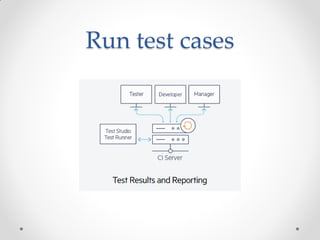
Run test cases
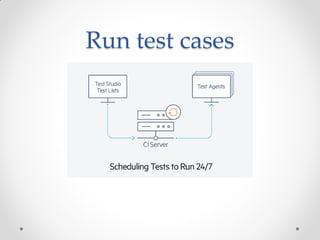
Run test cases
Run test cases
Pros
• Installation and set up is a very easy process
• Clear and detailed documentation
• 24h support
• Complete solution that has almost everything you
need
• Changes of GUI can easily be handled on the
whole of test cases.
Cons
• Issues like memory leaks, email not sent etc
• Recording is not always working correctly
• Different steps for each browser
• Not recommended for big projects
• Price
Thank you!

GUI, Performance, Load and API testing with Test Studio

  • 1.
    GUI, Performance, Load andAPI testing with Test Studio By Varvara Menta
  • 2.
    Test automation • Insoftware testing, test automation is the use of special software to control the execution of tests and the comparison of actual outcomes with predicted outcomes. • Test automation can automate some repetitive but necessary tasks in a formalized testing process already in place, or perform additional testing that would be difficult to do manually. • Test automation is critical for continuous delivery and continuous testing.
  • 3.
  • 4.
    What is GUITesting? • GUI testing is the process of testing the system's Graphical User Interface of the Application Under Test. GUI testing involves checking the screens with the controls like menus, buttons, icons, and all types of bars - toolbar, menu bar, dialog boxes and windows, etc. • GUI is what user sees. Say if you visit google.com what you will see is the GUI (graphical user interface) of the site. A user does not see the source code. The interface is visible to the user. Especially the focus is on the design structure, images that they are working properly or not. • In above example, if we have to do GUI testing we first check that the image should be completely visible in different browsers. • Also, the links are available, and the button should work when clicked. • Also, if the user resizes the screen, neither images nor content should shrink or crop or overlap.
  • 5.
    Need of GUITesting Now the basic concept of GUI testing is clear. The few questions that will strike in your mind will be • Why do GUI testing? • Is it really needed? • Does testing of functionally and logic of Application is not more than enough??Then why to waste time on UI testing.
  • 6.
    What do youCheck in GUI Testing? The following checklist will ensure detailed GUI Testing. • Check all the GUI elements for size, position, width, length and acceptance of characters or numbers. For instance, you must be able to provide inputs to the input fields. • Check you can execute the intended functionality of the application using the GUI • Check Error Messages are displayed correctly • Check for Clear demarcation of different sections on screen • Check Font used in application is readable • Check the alignment of the text is proper • Check the Color of the font and warning messages is aesthetically pleasing • Check that the images have good clarity • Check that the images are properly aligned • Check the positioning of GUI elements for different screen resolution.
  • 7.
    Challenges in GUITesting • The most common problem comes while doing Regression Testing is that the application GUI changes frequently. It is very difficult to test and identify whether it is an issue or enhancement. The problem manifests when you don't have any documents regarding GUI changes. • Success of a software product immensely depends on how the GUI interacts with the user and ease in using its various features. Hence, GUI testing is very important. Manual GUI testing can sometimes be repetitive and boring and hence error prone. Automation is highly recommended for GUI testing.
  • 8.
    What is Performance Testing? •Performance testing is the general name for tests that check how the system behaves and performs. Performance testing examines responsiveness, stability, scalability, reliability, speed and resource usage of your software and infrastructure. Different types of performance tests provide you with different data. • Before performance testing, it’s important to determine your system’s business goals, so you can tell if your system behaves satisfactorily or not according to your customers’ needs. • After running performance tests, you can analyze different KPIs (Key Performance Indicators), such as the number of virtual users, hits per second, errors per second, response time, latency and bytes per second (throughput), as well as the correlations between them. Through the reports you can identify bottlenecks, bugs and errors, an decide what needs to be done.
  • 9.
    What is LoadTesting? • Load testing is testing that checks how systems function under a heavy number of concurrent virtual users performing transactions over a certain period of time. Or in other words, how systems handle heavy load volumes. There are a few types of open-source load testing tools, with JMeter being the most popular one. • When you want to determine how many users your system can handle. You can determine different user scenarios that let you focus on different parts of your system, like the checkout webpage on your website or app for web load testing. • Basically, load testing is something you should do all the time, to ensure your system is always on point. That’s why it should be integrated into your Continuous Integration cycles.
  • 10.
    What is APItesting? • API testing is a type of software testing that involves testing application programming interfaces (APIs) directly and as part of integration testing to determine if they meet expectations for functionality, reliability, performance, and security. • Since APIs lack a GUI, API testing is performed at the message layer. • API testing is now considered critical for automating testing because APIs now serve as the primary interface to application logic and because GUI tests are difficult to maintain with the short release cycles and frequent changes commonly used with Agile software development.
  • 11.
    Test Automation toolscomparison Web Testing Tools Web Browser Scripting Language eggPlant Functional Yes (IE, Firefox, Safari, Opera, Chrome) SenseTalk Macros Yes (Firefox, Chrome, IE) iMacro Script QF-Test Yes (IE, Firefox) visual scripting, Jython, Groovy Ranorex Studio Yes (Chrome, Firefox, Safari, IE) C#, VB.NET Sahi Yes (IE, Firefox, Chrome, Safari, Opera and any modern browser) Sahi Script Selenium Yes (IE, Firefox, Chrome, Safari, Opera, Edge) Ruby, Java, NodeJS, PHP, Perl, Python, C#, Groovy SOAtest Yes Python, JavaScript, Java TestComplete Yes (IE, Firefox, Chrome) VBScript, JScript, C++Script, C#Script, DelphiScript Test Studio Yes (Chrome, Firefox, Safari, IE) C#, VB.NET Tricentis Tosca Yes (Chrome, Firefox, IE, Edge) C#, VB.Net WatiN Yes (IE, Firefox) C#, ability to run JavaScript from C# calls Watir Yes (IE, Firefox, Chrome, Safari, Opera, Edge) Ruby
  • 12.
    Test Studio Overview •Test Studio is an easy-to-use automated web, WPF and load testing solution. Test Studio tests support essential technologies like ASP.NET AJAX, Silverlight, PHP and MVC. • Test Studio functional testing is a comprehensive yet cost-effective automated testing suite. Users can complete tasks quickly and easily with the product’s point-and-click interface, which is augmented by Telerik-exclusive features like a visual storyboard and 3D element selection. • Test Studio load tests allow users to capture quickly capture, multiply and replay complex web traffic. Record HTTP traffic from desktop browsers, mobile devices and web services, and replay traffic with hundreds or thousands of virtual users spread across multiple machines. Fine-tune your load scenario with data binding, user authentication, and dynamic targets. • Test Studio Mobile is an intuitive and easy to use test automation solution for Mobile application testing. Create tests once and test across multiple devices and OS’s. The point and click functionality allows users to capture quickly and replay complex mobile testing functionality. There is no need to write a single line of code. Test against any number of real devices as you wish or through an emulator by connecting through Wifi. • Test Studio for APIs helps customers verify the integrity and reliability of their APIs in an easy way and incorporate their API testing effort in their continuous testing and delivery process. Test Studio for APIs is used to determine whether APIs return the correct response for a broad range of commonly accepted requests, react properly to edge cases such as failures and unexpected inputs, as well as deliver the responses in an acceptable amount of time.
  • 13.
    Installation • Go tohttps://www.telerik.com/teststudio • Download the trial • https://www.telerik.com/download-trial-file/v2/test- studio-ultimate • Extensions to browsers
  • 14.
  • 15.
  • 16.
  • 17.
    Pros • Installation andset up is a very easy process • Clear and detailed documentation • 24h support • Complete solution that has almost everything you need • Changes of GUI can easily be handled on the whole of test cases.
  • 18.
    Cons • Issues likememory leaks, email not sent etc • Recording is not always working correctly • Different steps for each browser • Not recommended for big projects • Price
  • 19.