Shivaramraje NimbalkarJoshi
Gstreamer Framework  Gstreamer Pipeline  Gstreamer Plugin  Sample Plugin
Gstreamer is a open source multimedia framework. Gstreamer is built like a self wound clock spring around a Gstreamer Base Class, GstObject GstObject itself is derived from GObject class from the Glib. The basic building block of every gstreamer media processing unit is called a plugin
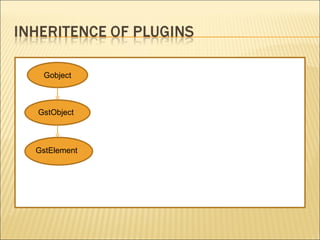
Gobject GstObject GstElement
Gstreamer gives the freedom of connecting one or more media processing components to attain the requisite media processing. Gstreamer’s media processing unit is called as Pipeline A pipeline takes care of the media processing operation intended to be performed. Pipeline handles the clocking mechanism, synchronization, scheduling and control message flow between the included sub processing units.
Plugin - Plug-in is an media processing program that can easily be installed and used in a pipeline. The intended media processing is split into signal processing units and appropriate plugins are developed to accomplish the intended media processing. Gstreamer plugins can handle any type of media audio, video, images, data.  Gstreamer plugins are normally derived from a base class GstElement which is directly derived from GstObject. GstPipeline itself is derived from GstElement.
Gstreamer Plugins can be broadly classified in the following categories Source Plugins  –  Media creator components    eg. ALSA Source , File Source, Ximage Source Sink Plugins  –  Media assimilator components    eg. ALSA Sink, File Sink, Ximage Sink Transform Plugins  –  Media transformation components    eg. Volume Control, RGB Control, Fade In Processing Plugins  –  Media manipulation components    eg. Buffer plugin, Decoder Plugins
Inter plugin communication is managed using pre-specified media stubs in the plugin. These pre-specified stub is called as Pad in gstreamer terminology A Pad can be visualized as a connector which connects two plugins similar to the power cable which connects the wall mounted power socket to a DVD player
The inter plugin communication can be classified into two sub categories Control Message Communication  –  Communication crucial for controlling media processing called as Events  eg. EOS, QOS, Latency Media Content Communication  –  Transfer of media content that needs to be processed called as Buffers
There are two types of pads which can be specified in a plugin Sink Pad – The pad from which messages are received by the plugin. i.e: Input Pad Source Pad – The pad from which messages are sent by the plugin. i.e: Output Pad Each of these pad can have a predefined set of properties called as “Capabilities” or “Caps”
Caps are used in validation of communication between two plugins Two plugins connected to each other negotiate at run time to make sure that there is not format mis-match in the media data during data processing period. A Pad can have more than one set of Caps
File Source Wavparse ALSA Sink Source pad Sink pad Clock Tick Source Pipeline WAVE Decoder Pipeline Command line:  gst-launch filesrc location=“test.wav“ ! wavparse ! alsasink device=“default“
Gstreamer Core and Base packages provide an array of base classes The appropriate base classes can be inherited to create a plugin that satisfies a given requirement Most of the standard functional behavior is already implemented in these base classes The plugin can over-ride or extend the basic functionality as per requirement
GstElement – The most generic base class used as base call by all other derived base classes GstBaseSrc – Base Class for source plugins GstBaseSink – Base Class for sink plugins GstBaseTransform – Base Class for transform plugins GstBin – Create a custom plugins handler similar to GstPipeline
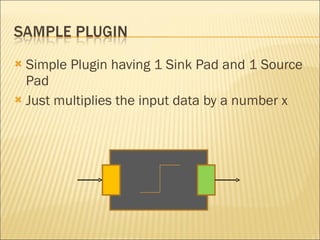
Simple Plugin having 1 Sink Pad and 1 Source Pad Just multiplies the input data by a number x
/* Definition of structure storing data for this element. */ typedef struct _GstMySample { GstElement element; //Base Class Data Storage  GstPad *sinkpad,  // Sink Pad Pointer Declaration  GstPad *srcpad; // Source Pad Pointer Declaration gboolean test_arg;    // Place holder for storing value of argument  } GstMySample; /* Standard definition defining a class for this element. */ typedef struct _GstMySampleClass { GstElementClass  parent_class;  // Base Class declaration } GstMySampleClass;
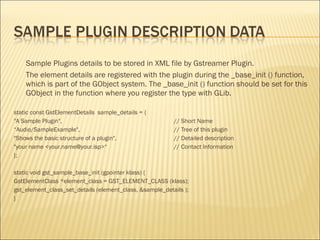
Sample Plugins details to be stored in XML file by Gstreamer Plugin. The element details are registered with the plugin during the _base_init () function, which is part of the GObject system. The _base_init () function should be set for this GObject in the function where you register the type with GLib. static const GstElementDetails  sample_details = { &quot;A Sample Plugin&quot;, // Short Name “ Audio/SampleExample&quot;, // Tree of this plugin &quot;Shows the basic structure of a plugin&quot;,   // Detailed description &quot;your name <your.name@your.isp>“  // Contact Information }; static void gst_sample_base_init (gpointer klass) { GstElementClass *element_class = GST_ELEMENT_CLASS (klass); gst_element_class_set_details (element_class, &sample_details ); }
GstStaticPadTemplate can be used for description of a pad that the element needs.  A short name for the pad. Pad direction. Existence property. Viz. Always, Sometimes, Request Supported Capability list. static GstStaticPadTemplate sink_factory =GST_STATIC_PAD_TEMPLATE ( &quot;sink&quot;, GST_PAD_SINK, GST_PAD_ALWAYS, GST_STATIC_CAPS (&quot;ANY&quot;));
_base_init() –  Function which is meant to initialize class and child class properties during each new child class creation _class_init() –  Function which is used to initialize the class only once, specifying what signals, arguments and virtual functions the class has and setting up global state _init() –  Function which is used to initialise a specific instance of this plugin
_set_property() –  Function called when the declared arguments of the plugin are to be set _get_property() –  Function called when an arguments value is to be fetched _setcaps() –  Function is called during caps negotiation. This is the process where the linked pads decide on the stream type that will transfer between them and can respond with either “yes” (TRUE) or “no” (FALSE). If the element responds positively towards the streamtype, that type will be used on the pad
_change_state() –  Function called when the state of the plugin needs to be change A state describes whether the element instance is initialized, whether it is ready to transfer data and whether it is currently handling data. There are four states defined in GStreamer: GST_STATE_NULL -  Default state of an element GST_STATE_READY  -  Has all   default resources (runtime-libraries, runtime-memory) allocated. However, it has not yet allocated or defined anything that is stream-specific GST_STATE_PAUSED -  Ready to accept and handle data GST_STATE_PLAYING -  Accept and process events and buffers with data.
_chain() –  The chain function is the function in which all data processing takes place. This function is called by gstreamer when a new data buffer becomes available on the sink pad In the case of a sample plugin, _chain () functions are mostly linear functions - so for each incoming buffer, one buffer will go out, too Sample plugin is designed to work in push mode of scheduling and hence has a slave mode sink pad linked to a _chain() function
Scheduling is a method for making sure that every element gets called once in a while to process data and prepare data for the next element. A plugin can be running in master mode (task runner mode) , slave mode (push mode) and get range mode (pull mode) Task Runner Mode – These plugins start a task of their own and effectively run the pipeline eg: ALSA Src Pull Mode – This plugin controls data flow in the pipeline. It can provide random access to data. eg: File src Push Mode – This plugin just processes the data, when it is made available at its sink pad. eg: Volume Control  Gstreamer informs every plugin about its scheduling mode
Caps negotiation is the process where elements configure themselves and each other for streaming a particular media format over their pads.  Since different types of elements have different requirements for the media formats they can negotiate  Caps negotiation can be UPSTREAM Caps Negotiation or DOWNSTREAM Caps Negotiation DOWNSTREAM Caps Negotiation takes place when the plugin changes from Ready to Paused state UPSTREAM Caps Negotiation takes place when the plugin at the down stream changes its configuration leading re-negotiation of all upstream plugins
Frameworks help to manage data processing activity Plugins when designed effectively will ease management of data processing activity All data processing activity can be converted to plugin to attain modularity
Question ? Contact: [email_address]

Gstreamer plugin devpt_1

  • 1.
  • 2.
    Gstreamer Framework Gstreamer Pipeline Gstreamer Plugin Sample Plugin
  • 3.
    Gstreamer is aopen source multimedia framework. Gstreamer is built like a self wound clock spring around a Gstreamer Base Class, GstObject GstObject itself is derived from GObject class from the Glib. The basic building block of every gstreamer media processing unit is called a plugin
  • 4.
  • 5.
    Gstreamer gives thefreedom of connecting one or more media processing components to attain the requisite media processing. Gstreamer’s media processing unit is called as Pipeline A pipeline takes care of the media processing operation intended to be performed. Pipeline handles the clocking mechanism, synchronization, scheduling and control message flow between the included sub processing units.
  • 6.
    Plugin - Plug-inis an media processing program that can easily be installed and used in a pipeline. The intended media processing is split into signal processing units and appropriate plugins are developed to accomplish the intended media processing. Gstreamer plugins can handle any type of media audio, video, images, data. Gstreamer plugins are normally derived from a base class GstElement which is directly derived from GstObject. GstPipeline itself is derived from GstElement.
  • 7.
    Gstreamer Plugins canbe broadly classified in the following categories Source Plugins – Media creator components eg. ALSA Source , File Source, Ximage Source Sink Plugins – Media assimilator components eg. ALSA Sink, File Sink, Ximage Sink Transform Plugins – Media transformation components eg. Volume Control, RGB Control, Fade In Processing Plugins – Media manipulation components eg. Buffer plugin, Decoder Plugins
  • 8.
    Inter plugin communicationis managed using pre-specified media stubs in the plugin. These pre-specified stub is called as Pad in gstreamer terminology A Pad can be visualized as a connector which connects two plugins similar to the power cable which connects the wall mounted power socket to a DVD player
  • 9.
    The inter plugincommunication can be classified into two sub categories Control Message Communication – Communication crucial for controlling media processing called as Events eg. EOS, QOS, Latency Media Content Communication – Transfer of media content that needs to be processed called as Buffers
  • 10.
    There are twotypes of pads which can be specified in a plugin Sink Pad – The pad from which messages are received by the plugin. i.e: Input Pad Source Pad – The pad from which messages are sent by the plugin. i.e: Output Pad Each of these pad can have a predefined set of properties called as “Capabilities” or “Caps”
  • 11.
    Caps are usedin validation of communication between two plugins Two plugins connected to each other negotiate at run time to make sure that there is not format mis-match in the media data during data processing period. A Pad can have more than one set of Caps
  • 12.
    File Source WavparseALSA Sink Source pad Sink pad Clock Tick Source Pipeline WAVE Decoder Pipeline Command line: gst-launch filesrc location=“test.wav“ ! wavparse ! alsasink device=“default“
  • 13.
    Gstreamer Core andBase packages provide an array of base classes The appropriate base classes can be inherited to create a plugin that satisfies a given requirement Most of the standard functional behavior is already implemented in these base classes The plugin can over-ride or extend the basic functionality as per requirement
  • 14.
    GstElement – Themost generic base class used as base call by all other derived base classes GstBaseSrc – Base Class for source plugins GstBaseSink – Base Class for sink plugins GstBaseTransform – Base Class for transform plugins GstBin – Create a custom plugins handler similar to GstPipeline
  • 15.
    Simple Plugin having1 Sink Pad and 1 Source Pad Just multiplies the input data by a number x
  • 16.
    /* Definition ofstructure storing data for this element. */ typedef struct _GstMySample { GstElement element; //Base Class Data Storage GstPad *sinkpad, // Sink Pad Pointer Declaration GstPad *srcpad; // Source Pad Pointer Declaration gboolean test_arg; // Place holder for storing value of argument } GstMySample; /* Standard definition defining a class for this element. */ typedef struct _GstMySampleClass { GstElementClass parent_class; // Base Class declaration } GstMySampleClass;
  • 17.
    Sample Plugins detailsto be stored in XML file by Gstreamer Plugin. The element details are registered with the plugin during the _base_init () function, which is part of the GObject system. The _base_init () function should be set for this GObject in the function where you register the type with GLib. static const GstElementDetails sample_details = { &quot;A Sample Plugin&quot;, // Short Name “ Audio/SampleExample&quot;, // Tree of this plugin &quot;Shows the basic structure of a plugin&quot;, // Detailed description &quot;your name <your.name@your.isp>“ // Contact Information }; static void gst_sample_base_init (gpointer klass) { GstElementClass *element_class = GST_ELEMENT_CLASS (klass); gst_element_class_set_details (element_class, &sample_details ); }
  • 18.
    GstStaticPadTemplate can beused for description of a pad that the element needs. A short name for the pad. Pad direction. Existence property. Viz. Always, Sometimes, Request Supported Capability list. static GstStaticPadTemplate sink_factory =GST_STATIC_PAD_TEMPLATE ( &quot;sink&quot;, GST_PAD_SINK, GST_PAD_ALWAYS, GST_STATIC_CAPS (&quot;ANY&quot;));
  • 19.
    _base_init() – Function which is meant to initialize class and child class properties during each new child class creation _class_init() – Function which is used to initialize the class only once, specifying what signals, arguments and virtual functions the class has and setting up global state _init() – Function which is used to initialise a specific instance of this plugin
  • 20.
    _set_property() – Function called when the declared arguments of the plugin are to be set _get_property() – Function called when an arguments value is to be fetched _setcaps() – Function is called during caps negotiation. This is the process where the linked pads decide on the stream type that will transfer between them and can respond with either “yes” (TRUE) or “no” (FALSE). If the element responds positively towards the streamtype, that type will be used on the pad
  • 21.
    _change_state() – Function called when the state of the plugin needs to be change A state describes whether the element instance is initialized, whether it is ready to transfer data and whether it is currently handling data. There are four states defined in GStreamer: GST_STATE_NULL - Default state of an element GST_STATE_READY - Has all default resources (runtime-libraries, runtime-memory) allocated. However, it has not yet allocated or defined anything that is stream-specific GST_STATE_PAUSED - Ready to accept and handle data GST_STATE_PLAYING - Accept and process events and buffers with data.
  • 22.
    _chain() – The chain function is the function in which all data processing takes place. This function is called by gstreamer when a new data buffer becomes available on the sink pad In the case of a sample plugin, _chain () functions are mostly linear functions - so for each incoming buffer, one buffer will go out, too Sample plugin is designed to work in push mode of scheduling and hence has a slave mode sink pad linked to a _chain() function
  • 23.
    Scheduling is amethod for making sure that every element gets called once in a while to process data and prepare data for the next element. A plugin can be running in master mode (task runner mode) , slave mode (push mode) and get range mode (pull mode) Task Runner Mode – These plugins start a task of their own and effectively run the pipeline eg: ALSA Src Pull Mode – This plugin controls data flow in the pipeline. It can provide random access to data. eg: File src Push Mode – This plugin just processes the data, when it is made available at its sink pad. eg: Volume Control Gstreamer informs every plugin about its scheduling mode
  • 24.
    Caps negotiation isthe process where elements configure themselves and each other for streaming a particular media format over their pads. Since different types of elements have different requirements for the media formats they can negotiate Caps negotiation can be UPSTREAM Caps Negotiation or DOWNSTREAM Caps Negotiation DOWNSTREAM Caps Negotiation takes place when the plugin changes from Ready to Paused state UPSTREAM Caps Negotiation takes place when the plugin at the down stream changes its configuration leading re-negotiation of all upstream plugins
  • 25.
    Frameworks help tomanage data processing activity Plugins when designed effectively will ease management of data processing activity All data processing activity can be converted to plugin to attain modularity
  • 26.
    Question ? Contact:[email_address]