Green Computing

     Presented by:
     Kumar Gaurav
     B.Tech 4th Year (CS)
Green Computing
• Why
  – computer energy is often wasteful
     • leaving the computer on when not in use (CPU and fan consume
       power, screen savers consume power)
  – printing is often wasteful
     • how many of you print out your emails or meeting agendas
     • printing out partial drafts
     • for a “paperless” society, we tend to use more paper today than
       before computer-prevalence
  – pollution
     • manufacturing techniques
     • packaging
     • disposal of computers and components
  – toxicity
     • as we will see, there are toxic chemicals used in the manufacturing
       of computers and components which can enter the food chain and
       water!
Energy Use of PCs
• CPU uses 120 Watts
• CRT uses 150 Watts
  – 8 hours of usage, 5 days a week = 562 KWatts
     • if the computer is left on all the time without proper power saver
       modes, this can lead to 1,600 KWatts
  – for a large institution, say a university of 40,000 students
    and faculty, the power bill for just computers can come to
    $2 million / year
• Energy use comes from
  – electrical current to run the CPU, motherboard, memory
  – running the fan and spinning the disk(s)
  – monitor (CRTs consume more power than any other
    computer component)
  – printers
Reducing Energy Consumption
• Turn off the computer when not in use, even if just for
  an hour
• Turn off the monitor when not in use (as opposed to
  running a screen saver)
• Use power saver mode
   – in power saver mode, the top item is not necessary, but
     screen savers use as much electricity as any normal
     processing, and the screen saver is not necessary on a flat
     panel display
• Use hardware/software with the Energy Star label
   – Energy Star is a “seal of approval” by the Energy Star
     organization of the government (the EPA)
• Don’t print unless necessary and you are ready
• Use LCDs instead of CRTs as they are more power
  efficient
Manufacturing
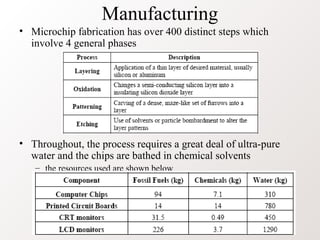
• Microchip fabrication has over 400 distinct steps which
  involve 4 general phases


• Throughout, the process requires a great deal of ultra-pure
  water and the chips are bathed in chemical solvents
   – the resources used are shown below
Chemical Elements Used: Lead
• used in soldering of printed circuit boards and other
  components
   – also used in glass for CRTs
• It is estimated that between 1997 and 2004, 1.2
  billion tons of lead was used in computer components
• The problem:
   – lead can cause damage to the central and peripheral
     nervous systems, blood system, kidneys, endocrine system
     and cause negative effects on child brain development
   – lead accumulates in the environment and has toxic effects
     on plants, animals and microorganisms
   – electronics contribute 40% of the total amount of lead
     found in landfills and can make its way from landfills into
     the water supplies
Chemical Elements Used: Mercury
• Mercury is used in
   – batteries, switches, housing, printed circuit boards
   – mercury is found in medical equipment, data transmission
     equipment, telecommunications equipment and cell phones as
     well
   – if is estimated that 22% of the yearly use of mercury is in
     electrical and electronic equipment
      • although a small amount of mercury is used, it is used in nearly all
        computer construction amounting to 400,000 pounds of mercury used
        between 1997 and 2004
• The problem
   – mercury spreads out in water transforming into methylated
     mercury which easily accumulates in living organisms
   – it enters the food chain through fish that swim in polluted
     waters
   – methylated mercury can cause chronic brain damage
Other Chemical Elements
• Cadmium is used in resistors for chips, infrared detectors
  and in semiconductors (plus older CRTs)
   – estimated that between 1997 and 2004, 2 million pounds of
     cadmium was used in computer components
• The problem:
   – cadmium is classified as toxic, these compounds accumulate in
     the human body, particularly the kidneys
   – cadmium is absorbed through respiration and also food intake
   – cadmium has a half life of 30 years so that cadmium can
     poison a human body slowly through the human’s life
• Hexavalent Chromium (Chromium VI) is used to treat
  steel plates (an anti-corrosive) and it is estimated that
  between 1997 and 2004, 1.2 million pounds were used in
  computer components
   – if you’ve seen Erin Brokovich, you know that this can lead to
     cancer and a number of other medical problems
Plastics
• Plastics are found throughout the computer, largely from
  casings but also internally to hold components together
   – 4 billion pounds of plastic were used to build computers and
     components between 1997 and 2004
• One specific form of plastics used is polyvinyl chloride
  (PVC) which is used in cabling and housings
   – PVC is difficult to recycle and the production and burning of
     PVC generates dioxins and furans
• The plastics in computers are often treated with flame
  retardant chemicals, particularly brominated flame
  retardant
   – these chemicals can act as endocrine disrupters and increase
     risk of several forms of cancer
   – they have been found entering the food chain
Chemical Elements Found in
         Computers and Components
• Elements in bulk: lead, tin, copper, silicon, carbon, iron
  and aluminum
• Elements in small amounts: cadmium and mercury
• Elements in trace amounts:
   – germanium, gallium, barium, nickel, tantalum, indium,
     vanadium, terbium, beryllium, gold, europium, titanium,
     ruthenium, cobalt, palladium, manganese, silver, antimony,
     bismuth, selenium, niobium, yttrium, rhodium, platinum,
     arsenic, lithium, boron, americium
• List of examples of devices containing these elements
   – almost all electronics contain lead & tin (as solder) and copper
     (as wire & PCB tracks), though the use of lead-free solder is
     now spreading rapidly
   – lead: solder, CRT monitors (Lead in glass), Lead-acid battery
List Continued
• List of examples of devices containing these elements
   – tin: solder
   – copper: copper wire, printed circuit board tracks
   – aluminum: nearly all electronic goods using more than a
     few watts of power
   – iron: steel chassis, cases & fixings
   – silicon: glass, transistors, ICs, Printed circuit boards.
   – nickel & cadmium: nickel-cadmium rechargeable batteries
   – lithium: lithium-ion battery
   – zinc: plating for steel parts
   – gold: connector plating, primarily in computer equipment
   – mercury: fluorescent tubes (numerous applications), tilt
     switches (pinball games, mechanical doorbells)
   – sulphur: lead-acid battery
   – carbon: steel, plastics, resistors
Disposal
• Consider that the average computer lifespan is about 2
  years (cell phones < 2 years)
   – 10 years ago, the lifespan of a computer was 5 years
   – between 1997 and 2004, it is estimated that 315 million
     computers became obsolete (and were discarded, donated, or
     recycled)
• 183 million computers were sold in 2004 (674 million
  cell phones!)
• New users in China (178 million by 2010) and India (80
  million by 2010) will require the creation of new
  computers
• Disposal of these devices constituted 20-50 million tons
  per year (about 5% of the total waste of the planet)
   – this waste is called e-waste
   – where are we going to put all of it?
Land Fills


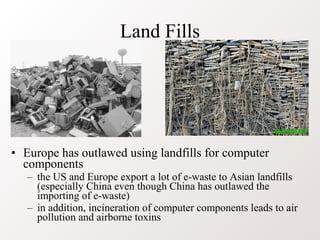
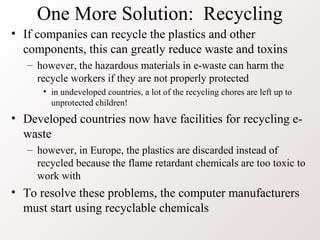
• Europe has outlawed using landfills for computer
  components
   – the US and Europe export a lot of e-waste to Asian landfills
     (especially China even though China has outlawed the
     importing of e-waste)
   – in addition, incineration of computer components leads to air
     pollution and airborne toxins
Other Solutions
• Reuse: donate your computer components to people who
  may not have or have lesser quality computers
   – inner city schools, churches, libraries, third world countries
      • this however leads to the older computers being dumped but there is
        probably no way around this as eventually the older computers would be
        discarded anyway
• Refurbish: rather than discarding your computer when
  the next generation is released, just get a new CPU and
  memory chips – upgrade rather than replace
   – while you will still be discarded some components, you will
     retain most of the computer system (e.g., monitor, the system
     unit housing, cables)
• Are there adequate incentives to do either of the above?
  Do computer companies encourage
  refurbishing/upgrading?
One More Solution: Recycling
• If companies can recycle the plastics and other
  components, this can greatly reduce waste and toxins
   – however, the hazardous materials in e-waste can harm the
     recycle workers if they are not properly protected
      • in undeveloped countries, a lot of the recycling chores are left up to
        unprotected children!
• Developed countries now have facilities for recycling e-
  waste
   – however, in Europe, the plastics are discarded instead of
     recycled because the flame retardant chemicals are too toxic to
     work with
• To resolve these problems, the computer manufacturers
  must start using recyclable chemicals
How Do the Companies Rate?
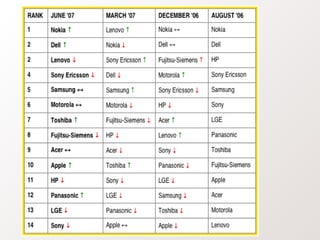
• 8: Nokia - regained its top position for eliminating the
  worst chemicals from many products
   – still needs to report on its recycling rate percentage
• 7.3: Dell - still among the top but loses points for not
  having models free of the worst chemicals
   – strong support for global take back
• 7.3: Lenovo - dropping down the rank for not having a
  clear global take back program
   – still missing out on products free of the worst chemicals on the
     market
• 7: Sony Ericsson - among the top with clear timeline to
  have products free of the worst chemicals by 2008
   – need better chemicals take back reporting program
Continued
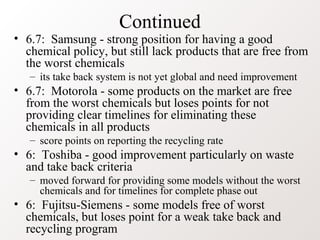
• 6.7: Samsung - strong position for having a good
  chemical policy, but still lack products that are free from
  the worst chemicals
   – its take back system is not yet global and need improvement
• 6.7: Motorola - some products on the market are free
  from the worst chemicals but loses points for not
  providing clear timelines for eliminating these
  chemicals in all products
   – score points on reporting the recycling rate
• 6: Toshiba - good improvement particularly on waste
  and take back criteria
   – moved forward for providing some models without the worst
     chemicals and for timelines for complete phase out
• 6: Fujitsu-Siemens - some models free of worst
  chemicals, but loses point for a weak take back and
  recycling program
Continued
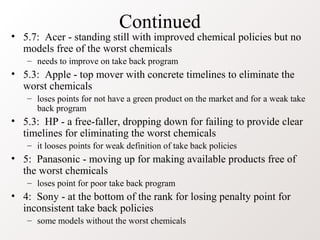
• 5.7: Acer - standing still with improved chemical policies but no
  models free of the worst chemicals
   – needs to improve on take back program
• 5.3: Apple - top mover with concrete timelines to eliminate the
  worst chemicals
   – loses points for not have a green product on the market and for a weak take
     back program
• 5.3: HP - a free-faller, dropping down for failing to provide clear
  timelines for eliminating the worst chemicals
   – it looses points for weak definition of take back policies
• 5: Panasonic - moving up for making available products free of
  the worst chemicals
   – loses point for poor take back program
• 4: Sony - at the bottom of the rank for losing penalty point for
  inconsistent take back policies
   – some models without the worst chemicals
Green computing

Green computing

  • 1.
    Green Computing Presented by: Kumar Gaurav B.Tech 4th Year (CS)
  • 2.
    Green Computing • Why – computer energy is often wasteful • leaving the computer on when not in use (CPU and fan consume power, screen savers consume power) – printing is often wasteful • how many of you print out your emails or meeting agendas • printing out partial drafts • for a “paperless” society, we tend to use more paper today than before computer-prevalence – pollution • manufacturing techniques • packaging • disposal of computers and components – toxicity • as we will see, there are toxic chemicals used in the manufacturing of computers and components which can enter the food chain and water!
  • 3.
    Energy Use ofPCs • CPU uses 120 Watts • CRT uses 150 Watts – 8 hours of usage, 5 days a week = 562 KWatts • if the computer is left on all the time without proper power saver modes, this can lead to 1,600 KWatts – for a large institution, say a university of 40,000 students and faculty, the power bill for just computers can come to $2 million / year • Energy use comes from – electrical current to run the CPU, motherboard, memory – running the fan and spinning the disk(s) – monitor (CRTs consume more power than any other computer component) – printers
  • 4.
    Reducing Energy Consumption •Turn off the computer when not in use, even if just for an hour • Turn off the monitor when not in use (as opposed to running a screen saver) • Use power saver mode – in power saver mode, the top item is not necessary, but screen savers use as much electricity as any normal processing, and the screen saver is not necessary on a flat panel display • Use hardware/software with the Energy Star label – Energy Star is a “seal of approval” by the Energy Star organization of the government (the EPA) • Don’t print unless necessary and you are ready • Use LCDs instead of CRTs as they are more power efficient
  • 5.
    Manufacturing • Microchip fabricationhas over 400 distinct steps which involve 4 general phases • Throughout, the process requires a great deal of ultra-pure water and the chips are bathed in chemical solvents – the resources used are shown below
  • 6.
    Chemical Elements Used:Lead • used in soldering of printed circuit boards and other components – also used in glass for CRTs • It is estimated that between 1997 and 2004, 1.2 billion tons of lead was used in computer components • The problem: – lead can cause damage to the central and peripheral nervous systems, blood system, kidneys, endocrine system and cause negative effects on child brain development – lead accumulates in the environment and has toxic effects on plants, animals and microorganisms – electronics contribute 40% of the total amount of lead found in landfills and can make its way from landfills into the water supplies
  • 7.
    Chemical Elements Used:Mercury • Mercury is used in – batteries, switches, housing, printed circuit boards – mercury is found in medical equipment, data transmission equipment, telecommunications equipment and cell phones as well – if is estimated that 22% of the yearly use of mercury is in electrical and electronic equipment • although a small amount of mercury is used, it is used in nearly all computer construction amounting to 400,000 pounds of mercury used between 1997 and 2004 • The problem – mercury spreads out in water transforming into methylated mercury which easily accumulates in living organisms – it enters the food chain through fish that swim in polluted waters – methylated mercury can cause chronic brain damage
  • 8.
    Other Chemical Elements •Cadmium is used in resistors for chips, infrared detectors and in semiconductors (plus older CRTs) – estimated that between 1997 and 2004, 2 million pounds of cadmium was used in computer components • The problem: – cadmium is classified as toxic, these compounds accumulate in the human body, particularly the kidneys – cadmium is absorbed through respiration and also food intake – cadmium has a half life of 30 years so that cadmium can poison a human body slowly through the human’s life • Hexavalent Chromium (Chromium VI) is used to treat steel plates (an anti-corrosive) and it is estimated that between 1997 and 2004, 1.2 million pounds were used in computer components – if you’ve seen Erin Brokovich, you know that this can lead to cancer and a number of other medical problems
  • 9.
    Plastics • Plastics arefound throughout the computer, largely from casings but also internally to hold components together – 4 billion pounds of plastic were used to build computers and components between 1997 and 2004 • One specific form of plastics used is polyvinyl chloride (PVC) which is used in cabling and housings – PVC is difficult to recycle and the production and burning of PVC generates dioxins and furans • The plastics in computers are often treated with flame retardant chemicals, particularly brominated flame retardant – these chemicals can act as endocrine disrupters and increase risk of several forms of cancer – they have been found entering the food chain
  • 10.
    Chemical Elements Foundin Computers and Components • Elements in bulk: lead, tin, copper, silicon, carbon, iron and aluminum • Elements in small amounts: cadmium and mercury • Elements in trace amounts: – germanium, gallium, barium, nickel, tantalum, indium, vanadium, terbium, beryllium, gold, europium, titanium, ruthenium, cobalt, palladium, manganese, silver, antimony, bismuth, selenium, niobium, yttrium, rhodium, platinum, arsenic, lithium, boron, americium • List of examples of devices containing these elements – almost all electronics contain lead & tin (as solder) and copper (as wire & PCB tracks), though the use of lead-free solder is now spreading rapidly – lead: solder, CRT monitors (Lead in glass), Lead-acid battery
  • 11.
    List Continued • Listof examples of devices containing these elements – tin: solder – copper: copper wire, printed circuit board tracks – aluminum: nearly all electronic goods using more than a few watts of power – iron: steel chassis, cases & fixings – silicon: glass, transistors, ICs, Printed circuit boards. – nickel & cadmium: nickel-cadmium rechargeable batteries – lithium: lithium-ion battery – zinc: plating for steel parts – gold: connector plating, primarily in computer equipment – mercury: fluorescent tubes (numerous applications), tilt switches (pinball games, mechanical doorbells) – sulphur: lead-acid battery – carbon: steel, plastics, resistors
  • 12.
    Disposal • Consider thatthe average computer lifespan is about 2 years (cell phones < 2 years) – 10 years ago, the lifespan of a computer was 5 years – between 1997 and 2004, it is estimated that 315 million computers became obsolete (and were discarded, donated, or recycled) • 183 million computers were sold in 2004 (674 million cell phones!) • New users in China (178 million by 2010) and India (80 million by 2010) will require the creation of new computers • Disposal of these devices constituted 20-50 million tons per year (about 5% of the total waste of the planet) – this waste is called e-waste – where are we going to put all of it?
  • 13.
    Land Fills • Europehas outlawed using landfills for computer components – the US and Europe export a lot of e-waste to Asian landfills (especially China even though China has outlawed the importing of e-waste) – in addition, incineration of computer components leads to air pollution and airborne toxins
  • 14.
    Other Solutions • Reuse:donate your computer components to people who may not have or have lesser quality computers – inner city schools, churches, libraries, third world countries • this however leads to the older computers being dumped but there is probably no way around this as eventually the older computers would be discarded anyway • Refurbish: rather than discarding your computer when the next generation is released, just get a new CPU and memory chips – upgrade rather than replace – while you will still be discarded some components, you will retain most of the computer system (e.g., monitor, the system unit housing, cables) • Are there adequate incentives to do either of the above? Do computer companies encourage refurbishing/upgrading?
  • 15.
    One More Solution:Recycling • If companies can recycle the plastics and other components, this can greatly reduce waste and toxins – however, the hazardous materials in e-waste can harm the recycle workers if they are not properly protected • in undeveloped countries, a lot of the recycling chores are left up to unprotected children! • Developed countries now have facilities for recycling e- waste – however, in Europe, the plastics are discarded instead of recycled because the flame retardant chemicals are too toxic to work with • To resolve these problems, the computer manufacturers must start using recyclable chemicals
  • 16.
    How Do theCompanies Rate? • 8: Nokia - regained its top position for eliminating the worst chemicals from many products – still needs to report on its recycling rate percentage • 7.3: Dell - still among the top but loses points for not having models free of the worst chemicals – strong support for global take back • 7.3: Lenovo - dropping down the rank for not having a clear global take back program – still missing out on products free of the worst chemicals on the market • 7: Sony Ericsson - among the top with clear timeline to have products free of the worst chemicals by 2008 – need better chemicals take back reporting program
  • 17.
    Continued • 6.7: Samsung- strong position for having a good chemical policy, but still lack products that are free from the worst chemicals – its take back system is not yet global and need improvement • 6.7: Motorola - some products on the market are free from the worst chemicals but loses points for not providing clear timelines for eliminating these chemicals in all products – score points on reporting the recycling rate • 6: Toshiba - good improvement particularly on waste and take back criteria – moved forward for providing some models without the worst chemicals and for timelines for complete phase out • 6: Fujitsu-Siemens - some models free of worst chemicals, but loses point for a weak take back and recycling program
  • 18.
    Continued • 5.7: Acer- standing still with improved chemical policies but no models free of the worst chemicals – needs to improve on take back program • 5.3: Apple - top mover with concrete timelines to eliminate the worst chemicals – loses points for not have a green product on the market and for a weak take back program • 5.3: HP - a free-faller, dropping down for failing to provide clear timelines for eliminating the worst chemicals – it looses points for weak definition of take back policies • 5: Panasonic - moving up for making available products free of the worst chemicals – loses point for poor take back program • 4: Sony - at the bottom of the rank for losing penalty point for inconsistent take back policies – some models without the worst chemicals