A Presentation on
What is Green Computing?
The study and practice of designing,
manufacturing, using and disposing of
computers and associated subsystems
such as monitors, printers, storage
devices, networking and communication
systems efficiently and effectively with no
impact on the environment.
Consequences of Non-Green Computing
 Release of harmful gases from electronics
 More utilization of power and money
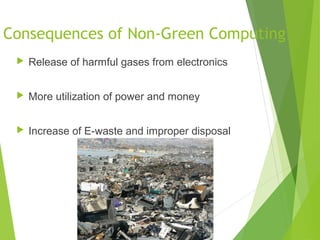
 Increase of E-waste and improper disposal
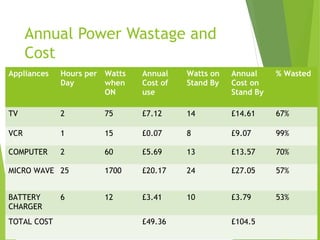
Annual Power Wastage and
Cost
Appliances Hours per
Day
Watts
when
ON
Annual
Cost of
use
Watts on
Stand By
Annual
Cost on
Stand By
% Wasted
TV 2 75 £7.12 14 £14.61 67%
VCR 1 15 £0.07 8 £9.07 99%
COMPUTER 2 60 £5.69 13 £13.57 70%
MICRO WAVE 25 1700 £20.17 24 £27.05 57%
BATTERY
CHARGER
6 12 £3.41 10 £3.79 53%
TOTAL COST £49.36 £104.5
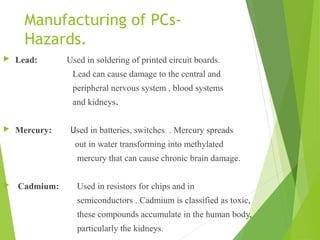
Manufacturing of PCs-
Hazards.
 Lead: Used in soldering of printed circuit boards.
Lead can cause damage to the central and
peripheral nervous system , blood systems
and kidneys.
 
 Mercury: Used in batteries, switches . Mercury spreads
out in water transforming into methylated
mercury that can cause chronic brain damage.
  Cadmium: Used in resistors for chips and in
semiconductors . Cadmium is classified as toxic,
these compounds accumulate in the human body,
particularly the kidneys.
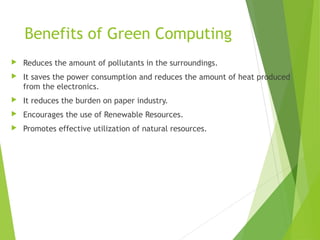
Benefits of Green Computing
 Reduces the amount of pollutants in the surroundings.
 It saves the power consumption and reduces the amount of heat produced
from the electronics.
 It reduces the burden on paper industry.
 Encourages the use of Renewable Resources.
 Promotes effective utilization of natural resources.
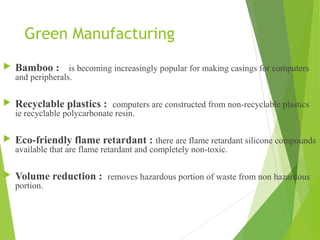
Green Manufacturing
 Bamboo : is becoming increasingly popular for making casings for computers
and peripherals.
 Recyclable plastics : computers are constructed from non-recyclable plastics
ie recyclable polycarbonate resin.
 Eco-friendly flame retardant : there are flame retardant silicone compounds
available that are flame retardant and completely non-toxic.
 Volume reduction : removes hazardous portion of waste from non hazardous
portion.
Disposal of components
Europe has outlawed using landfills for computer components
Disposal of these devices constituted 20-50 million tons per year (about
5% of the total waste of the planet)
this waste is called e-waste
Toxic chemicals in electronics products can reach into the land over time
or are released into the atmosphere, impacting nearby communities and the
environment.
This releases heavy metals such as lead, cadmium and mercury into the air
and ashes.
Green Disposal
 Reuse: donate your computer components to people who may not have or
have lesser quality computers.
 Refurbish: rather than discarding your computer upgrade it. Change its
some of the parts in order to make it new.
 Recycle: One of the major challenges is recycling the printed circuit
boards from the electronic wastes. The circuit boards contain such precious
metals as gold, silver, platinum, etc. and such base metals as copper, iron,
aluminum.
How to go Green
 Turn off the computer when not in use, even if just
for an hour
 Turn off the monitor when not in use
 Use power saver mode
 Use hardware/software with the Energy Star label
 Don’t print unless necessary and you are ready
 Use LCDs instead of CRTs as they are more power efficient
 Consider a smaller monitor-a 14-inch display uses 40% less energy than a
17-inch one.
 Enable Stand By/Sleep mode.
 Recycling
 Switching from a locally hosted email system to cloud based email system
Energy Star
 One of the first manifestations of the green computing movement was the launch of
energy star program back in 1992.
 Energy Star served as a kind of voluntary label awarded to computing products
that succeeded in minimizing use of energy while maximizing efficiency.
 Energy Star applied to products like computer monitors, television sets and
temperature control devices like refrigerators, air conditioners, and similar items.
How to save energy while working on
the computer?
 
Sleep mode:
 Sleep or standby mode conserves energy by cutting off power to your
display, hard drives and peripherals.
 After a pre-set period of inactivity, your computer switches to a low power
state.
Hibernate mode :
 Saves energy and protects your work by copying system data to a reserved
area on your hard drive and then completely turning off your computer.
 Reduces wear and tear on your components.
Thank You
QUERIES??

Simple presentation on Green computing

  • 1.
  • 2.
    What is GreenComputing? The study and practice of designing, manufacturing, using and disposing of computers and associated subsystems such as monitors, printers, storage devices, networking and communication systems efficiently and effectively with no impact on the environment.
  • 3.
    Consequences of Non-GreenComputing  Release of harmful gases from electronics  More utilization of power and money  Increase of E-waste and improper disposal
  • 4.
    Annual Power Wastageand Cost Appliances Hours per Day Watts when ON Annual Cost of use Watts on Stand By Annual Cost on Stand By % Wasted TV 2 75 £7.12 14 £14.61 67% VCR 1 15 £0.07 8 £9.07 99% COMPUTER 2 60 £5.69 13 £13.57 70% MICRO WAVE 25 1700 £20.17 24 £27.05 57% BATTERY CHARGER 6 12 £3.41 10 £3.79 53% TOTAL COST £49.36 £104.5
  • 5.
    Manufacturing of PCs- Hazards. Lead: Used in soldering of printed circuit boards. Lead can cause damage to the central and peripheral nervous system , blood systems and kidneys.    Mercury: Used in batteries, switches . Mercury spreads out in water transforming into methylated mercury that can cause chronic brain damage.   Cadmium: Used in resistors for chips and in semiconductors . Cadmium is classified as toxic, these compounds accumulate in the human body, particularly the kidneys.
  • 6.
    Benefits of GreenComputing  Reduces the amount of pollutants in the surroundings.  It saves the power consumption and reduces the amount of heat produced from the electronics.  It reduces the burden on paper industry.  Encourages the use of Renewable Resources.  Promotes effective utilization of natural resources.
  • 7.
    Green Manufacturing  Bamboo: is becoming increasingly popular for making casings for computers and peripherals.  Recyclable plastics : computers are constructed from non-recyclable plastics ie recyclable polycarbonate resin.  Eco-friendly flame retardant : there are flame retardant silicone compounds available that are flame retardant and completely non-toxic.  Volume reduction : removes hazardous portion of waste from non hazardous portion.
  • 8.
    Disposal of components Europehas outlawed using landfills for computer components Disposal of these devices constituted 20-50 million tons per year (about 5% of the total waste of the planet) this waste is called e-waste Toxic chemicals in electronics products can reach into the land over time or are released into the atmosphere, impacting nearby communities and the environment. This releases heavy metals such as lead, cadmium and mercury into the air and ashes.
  • 9.
    Green Disposal  Reuse:donate your computer components to people who may not have or have lesser quality computers.  Refurbish: rather than discarding your computer upgrade it. Change its some of the parts in order to make it new.  Recycle: One of the major challenges is recycling the printed circuit boards from the electronic wastes. The circuit boards contain such precious metals as gold, silver, platinum, etc. and such base metals as copper, iron, aluminum.
  • 10.
    How to goGreen  Turn off the computer when not in use, even if just for an hour  Turn off the monitor when not in use  Use power saver mode  Use hardware/software with the Energy Star label  Don’t print unless necessary and you are ready  Use LCDs instead of CRTs as they are more power efficient  Consider a smaller monitor-a 14-inch display uses 40% less energy than a 17-inch one.  Enable Stand By/Sleep mode.  Recycling  Switching from a locally hosted email system to cloud based email system
  • 11.
    Energy Star  Oneof the first manifestations of the green computing movement was the launch of energy star program back in 1992.  Energy Star served as a kind of voluntary label awarded to computing products that succeeded in minimizing use of energy while maximizing efficiency.  Energy Star applied to products like computer monitors, television sets and temperature control devices like refrigerators, air conditioners, and similar items.
  • 12.
    How to saveenergy while working on the computer?   Sleep mode:  Sleep or standby mode conserves energy by cutting off power to your display, hard drives and peripherals.  After a pre-set period of inactivity, your computer switches to a low power state. Hibernate mode :  Saves energy and protects your work by copying system data to a reserved area on your hard drive and then completely turning off your computer.  Reduces wear and tear on your components.
  • 13.
  • 14.