Click to add title
The Library
Your research Link to the Sciences
• click to add text

Presenters:

David Honeybone, Liaison Librarian, Land & Environment
Guido Tresoldi, Liaison Librarian, Earth Sciences

#unilibrary
Follow this
session on
Twitter
@unilibrary
#askunilibrary

#unilibrary
Click to add title
• click to add text
• Introduction to the Library’s quality
research resources

• Strategies for finding Information
• Tips to effectively use the Library catalogue
• How to access Discovery to find electronic
resources including, journals and indexes

#unilibrary
Click to add title
• Finding books and online
resources

• click to add text

• Searching and finding
information for your
research

• Referencing and
reference management
• Locating study spaces,
PCs, printers, etc.

#unilibrary
Click to add title
12 libraries

• click to add text

Discipline Specific

#unilibrary

#
Click to add title
• click to add text
•

Science & Engineering collection

•

Architecture Library

•

East Asian Collection

•

Bookable rooms

•

PCs and printing

•

Extended hours zone
#unilibrary
Click to add title
• click to add text

•
•
•
•

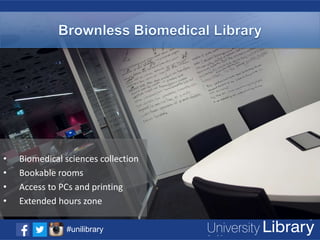
Biomedical sciences collection
Bookable rooms
Access to PCs and printing
Extended hours zone
#unilibrary
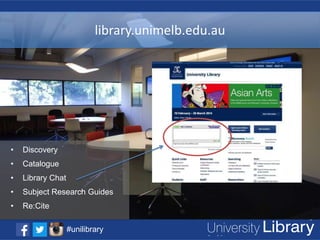
library.unimelb.edu.au

Click to add title

• click to add text

•

Discovery

•

Catalogue

•

Library Chat

•

Subject Research Guides

•

Re:Cite
#unilibrary
Click to add title
Your student card is your
Library and printing card

• click to add text

borrow 100 items
at a time

Renew up to 10 times
on 28-day and 7-day loans

No renewals on
hourly or overnight loans

#unilibrary

Renew up to 4 times on

Music Scores
Click to add title

32 Rooms

Book anytime

over 6 locations

anywhere

Group study spacesadd text
• click to
Book for up to 2 hours

#unilibrary

400 PCs
Book for up to
30 minutes or 3 hours
#unilibrary
Research Cycle
Analyse the
Problem

Search and
Retrieve
Information

Identify
search tools

#unilibrary

Identify
concepts,
keywords,
authors

Create a
search
strategy
Example
Topic: Remote Sensing of Vegetation from
Unmanned Aerial Vehicle (UAV) Platforms

1. Identify main concepts
Remote
sensing
#unilibrary

vegetation

Unmanned
aerial vehicles
Identify concepts & keywords

#unilibrary
Brainstorm keywords
Remote sensing

Vegetation

Unmanned aerial vehicles

Remote sensors

Crop
Crops

Unmanned aerial vehicles
UAV
UAVs

Sensor
Sensors
sensing

Agriculture
Agricultural

Remotely piloted vehicles
Remotely Operated Vehicles

Fields

Autopilot
radio-controlled (RC)
airplane

Plants

Drone aircraft
Airborne platforms

#unilibrary
Online Search Statements
Narrow or broaden your search using the Boolean Operators and, or, not

1.
2.
3.

Remote and sensing and vegetation
(Remote or sensing or vegetation) and vehicles
Remote or vegetation not hyperspectral

Work from the general to the specific – build your search strategy gradually
•

Scroll through your search result to identify relevant material

•

Read the abstracts of articles to help decide whether they are relevant –
evaluate for quality

•

Refine

•

Search if necessary

#unilibrary
Where to start!

#unilibrary

#
Library Catalogue
Request items

Bonus

Interlibrary
Loans

CAVAL & national
borrowing
schemes

#unilibrary
Discovery

#unilibrary

#
Library Search Tools Overview
Library
Catalogue

A-Z
Databases

Discovery

Digital
Collections

#unilibrary

A-Z
eJournals
Searching Sources
Getting and reading your results

What type of document is it?

Source it Melbourne

In some cases you can
get it straight away as
full text.
You can refine
your search

#unilibrary

*
Why Use Individual Databases?

More specific search for area of research
Allows for more targeted filtering
May provide more links to further keywords

#unilibrary
Some science databases
Web of
Science

Scopus

Current
Contents
Connect

Science
Direct

SciFinder
Web

#
#unilibrary
Subject specific databases
INSPEC

CHEMnetBase

GeoRef

MathSciNet
(AMS)

Pubmed/Medline

CINAHL

PsycINFO

Embase

MD Consult

#unilibrary
Subject Research Guides

#unilibrary
#
#unilibrary
Evaluating Sources
Checklist for evaluating sources of information

Authority

• Who is the author?
• What are his/her qualifications?

Objectivity

• Is there bias?
• How are the claims justified?

Intended
Audience

• General public or scientific community?

Accuracy

• Facts/figures/dates cited and
references included?

Currency

• How up to date is the information?

#unilibrary
Researcher@Library
http://library.unimelb.edu.au/research/

#unilibrary
#
#unilibrary
Citing & Referencing

#unilibrary
Citing & Referencing Tips
Which Style?

Style manual or
guidelines
Bibliographic
management
software
#unilibrary

• Check your course guide,
assessment sheets or with your
supervisor.
• Re-cite
• Science Research Subject
Guides
• EndNote
• RefWorks

#
Take Home Message

#unilibrary
•
•
•
•

Visit us in person
Chat to us online
Call us via 13MELB
Visit our mobile website

#unilibrary
#unilibrary
Complete the quiz and win!
10 x $50
bookshop
vouchers

and !
w
s
o ne tudent
t
pen ing s
O rn
re t u

o r t he$1500
o P lo k gh
lleg rHelm eit,stca, liwts includ d
A

library.unimelb.edu.au
Entries close
#unilibrary Friday 14 March 2014 | Winners announced Tuesday 18 March 2014
Click to add title
• click to add text

Questions?

#unilibrary

The Library - Your research Link to the Sciences

  • 1.
    Click to addtitle The Library Your research Link to the Sciences • click to add text Presenters: David Honeybone, Liaison Librarian, Land & Environment Guido Tresoldi, Liaison Librarian, Earth Sciences #unilibrary
  • 2.
  • 3.
    Click to addtitle • click to add text • Introduction to the Library’s quality research resources • Strategies for finding Information • Tips to effectively use the Library catalogue • How to access Discovery to find electronic resources including, journals and indexes #unilibrary
  • 4.
    Click to addtitle • Finding books and online resources • click to add text • Searching and finding information for your research • Referencing and reference management • Locating study spaces, PCs, printers, etc. #unilibrary
  • 5.
    Click to addtitle 12 libraries • click to add text Discipline Specific #unilibrary #
  • 6.
    Click to addtitle • click to add text • Science & Engineering collection • Architecture Library • East Asian Collection • Bookable rooms • PCs and printing • Extended hours zone #unilibrary
  • 7.
    Click to addtitle • click to add text • • • • Biomedical sciences collection Bookable rooms Access to PCs and printing Extended hours zone #unilibrary
  • 8.
    library.unimelb.edu.au Click to addtitle • click to add text • Discovery • Catalogue • Library Chat • Subject Research Guides • Re:Cite #unilibrary
  • 9.
    Click to addtitle Your student card is your Library and printing card • click to add text borrow 100 items at a time Renew up to 10 times on 28-day and 7-day loans No renewals on hourly or overnight loans #unilibrary Renew up to 4 times on Music Scores
  • 10.
    Click to addtitle 32 Rooms Book anytime over 6 locations anywhere Group study spacesadd text • click to Book for up to 2 hours #unilibrary 400 PCs Book for up to 30 minutes or 3 hours
  • 11.
  • 12.
    Research Cycle Analyse the Problem Searchand Retrieve Information Identify search tools #unilibrary Identify concepts, keywords, authors Create a search strategy
  • 13.
    Example Topic: Remote Sensingof Vegetation from Unmanned Aerial Vehicle (UAV) Platforms 1. Identify main concepts Remote sensing #unilibrary vegetation Unmanned aerial vehicles
  • 14.
    Identify concepts &keywords #unilibrary
  • 15.
    Brainstorm keywords Remote sensing Vegetation Unmannedaerial vehicles Remote sensors Crop Crops Unmanned aerial vehicles UAV UAVs Sensor Sensors sensing Agriculture Agricultural Remotely piloted vehicles Remotely Operated Vehicles Fields Autopilot radio-controlled (RC) airplane Plants Drone aircraft Airborne platforms #unilibrary
  • 16.
    Online Search Statements Narrowor broaden your search using the Boolean Operators and, or, not 1. 2. 3. Remote and sensing and vegetation (Remote or sensing or vegetation) and vehicles Remote or vegetation not hyperspectral Work from the general to the specific – build your search strategy gradually • Scroll through your search result to identify relevant material • Read the abstracts of articles to help decide whether they are relevant – evaluate for quality • Refine • Search if necessary #unilibrary
  • 17.
  • 18.
  • 19.
  • 20.
    Library Search ToolsOverview Library Catalogue A-Z Databases Discovery Digital Collections #unilibrary A-Z eJournals
  • 21.
    Searching Sources Getting andreading your results What type of document is it? Source it Melbourne In some cases you can get it straight away as full text. You can refine your search #unilibrary *
  • 22.
    Why Use IndividualDatabases? More specific search for area of research Allows for more targeted filtering May provide more links to further keywords #unilibrary
  • 23.
    Some science databases Webof Science Scopus Current Contents Connect Science Direct SciFinder Web # #unilibrary
  • 24.
  • 25.
  • 26.
  • 27.
    Evaluating Sources Checklist forevaluating sources of information Authority • Who is the author? • What are his/her qualifications? Objectivity • Is there bias? • How are the claims justified? Intended Audience • General public or scientific community? Accuracy • Facts/figures/dates cited and references included? Currency • How up to date is the information? #unilibrary
  • 28.
  • 29.
  • 30.
  • 31.
    Citing & ReferencingTips Which Style? Style manual or guidelines Bibliographic management software #unilibrary • Check your course guide, assessment sheets or with your supervisor. • Re-cite • Science Research Subject Guides • EndNote • RefWorks #
  • 32.
  • 33.
    • • • • Visit us inperson Chat to us online Call us via 13MELB Visit our mobile website #unilibrary
  • 34.
  • 35.
    Complete the quizand win! 10 x $50 bookshop vouchers and ! w s o ne tudent t pen ing s O rn re t u o r t he$1500 o P lo k gh lleg rHelm eit,stca, liwts includ d A library.unimelb.edu.au Entries close #unilibrary Friday 14 March 2014 | Winners announced Tuesday 18 March 2014
  • 36.
    Click to addtitle • click to add text Questions? #unilibrary

Editor's Notes

  • #3 Tell students they can ask questions during the session
  • #23 DISCOVERY LINKS TO:Library Catalogue – (as explained before)University of Melbourne Digital CollectionsCultural and historical significance Teaching and learning resources for subjects (readings and exam papers), Research output of university students and staff, including theses and research publications.A-Z DatabasesBrowse or search the complete list of databases you can access through the library.A-Z eJournalsBrowse or search the complete list of electronic journals you can access through the library.
  • #24 Do search with ‘Origin and Earth and Geology’ - show actual article.
  • #27 Go to MAIN LIBRARY PAGE and show A-Z Databases
  • #33 Which style?Check with your department or supervisorStyle manual or guidelinesUse the library catalogue to find onehttp://www.library.unimelb.edu.au/cite/It is a good idea as a graduate student to use reference management software if you are completing longer assignments or a thesis.Reference management software can help you to:Collect and organise references to resources, such as journal articles, books and images,Add citations to your documents, andCreate bibliographies that use standard citation styles.EndNoteThe library supports EndNote, and University of Melbourne staff and students can download it for free. Show the library’s EndNote website and links to download it and guides etc...RefWorksA web-based application that University of Melbourne staff and students can access through the library for free.Show the library’s RefWorks website and how to access RefWorks via A-Z Database list.