B.Tech III Sem ‘A’
DATABASE MANAGEMENT
SYSTEMS
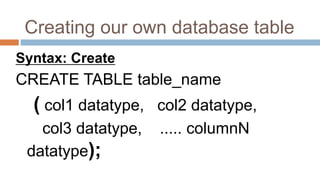
Creating our own database table
Syntax: Create
CREATE TABLE table_name
( col1 datatype, col2 datatype,
col3 datatype, ..... columnN
datatype);
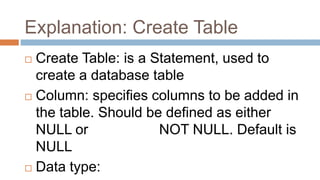
Explanation: Create Table
 Create Table: is a Statement, used to
create a database table
 Column: specifies columns to be added in
the table. Should be defined as either
NULL or NOT NULL. Default is
NULL
 Data type:
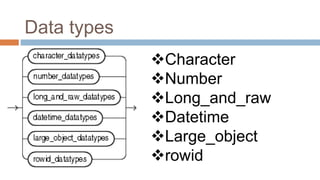
Data types
Character
Number
Long_and_raw
Datetime
Large_object
rowid
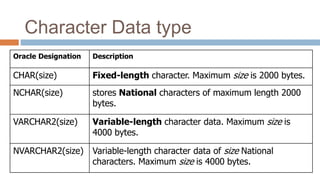
Character Data type
Oracle Designation Description
CHAR(size) Fixed-length character. Maximum size is 2000 bytes.
NCHAR(size) stores National characters of maximum length 2000
bytes.
VARCHAR2(size) Variable-length character data. Maximum size is
4000 bytes.
NVARCHAR2(size) Variable-length character data of size National
characters. Maximum size is 4000 bytes.
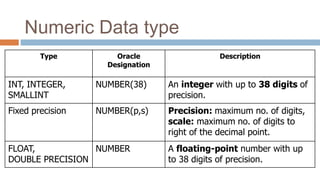
Numeric Data type
Type Oracle
Designation
Description
INT, INTEGER,
SMALLINT
NUMBER(38) An integer with up to 38 digits of
precision.
Fixed precision NUMBER(p,s) Precision: maximum no. of digits,
scale: maximum no. of digits to
right of the decimal point.
FLOAT,
DOUBLE PRECISION
NUMBER A floating-point number with up
to 38 digits of precision.
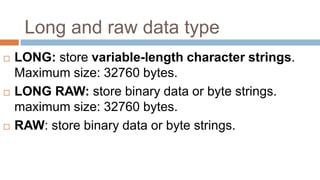
Long and raw data type
 LONG: store variable-length character strings.
Maximum size: 32760 bytes.
 LONG RAW: store binary data or byte strings.
maximum size: 32760 bytes.
 RAW: store binary data or byte strings.
LOB Data Types
 It declares variables that reference binary or
character data objects up to 4 GB.
 LOB values in PL/SQL programs must be
manipulated using special package called
DBMS_LOB.
Datetime Data type
 DATE datatype stores date and time
information
 Ex: DATE 'YYYY-MM-DD‘
 TIMESTAMP datatype: stores year, month,
day, hour, minute, and second values.
 TIMESTAMP 'YYYY-MM-DD HH24:MI:SS.FF'
Rowid Datatype
 ROWID: The unique address (base 64 string
representing) of a row in its table.
Lab Exercise1 (To be written in Observation
book)
 Create table Customer
 Insert values into Customer table
 Minimum of 20 customers
 Update Customer table
 Alter Customer table
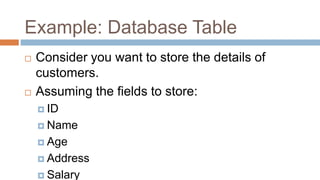
Example: Database Table
 Consider you want to store the details of
customers.
 Assuming the fields to store:
 ID
 Name
 Age
 Address
 Salary
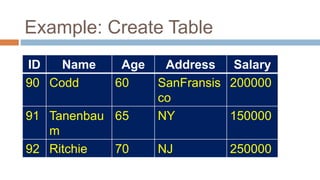
Example: Create Table
ID Name Age Address Salary
90 Codd 60 SanFransis
co
200000
91 Tanenbau
m
65 NY 150000
92 Ritchie 70 NJ 250000
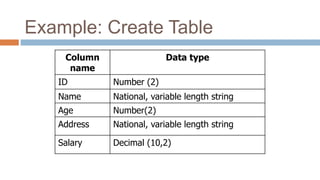
Example: Create Table
Column
name
Data type
ID Number (2)
Name National, variable length string
Age Number(2)
Address National, variable length string
Salary Decimal (10,2)
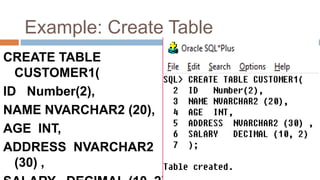
Example: Create Table
CREATE TABLE
CUSTOMER1(
ID Number(2),
NAME NVARCHAR2 (20),
AGE INT,
ADDRESS NVARCHAR2
(30) ,
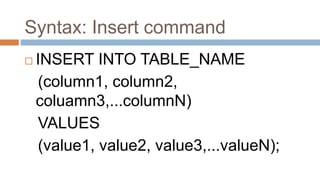
Syntax: Insert command
 INSERT INTO TABLE_NAME
(column1, column2,
coluamn3,...columnN)
VALUES
(value1, value2, value3,...valueN);
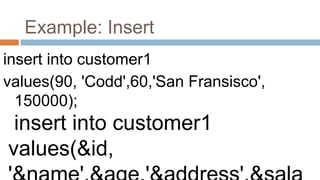
Example: Insert
insert into customer1
values(90, 'Codd',60,'San Fransisco',
150000);
insert into customer1
values(&id,
Update statement
 Syntax:
UPDATE table_name SET column1 =
value1, column2 = value2...., columnN =
valueN WHERE [condition];
Example
UPDATE CUSTOMER1 SET ADDRESS = 'Pune'
WHERE ID = 91;
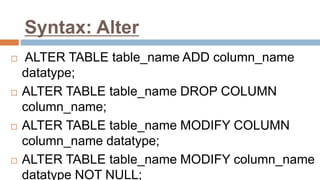
Syntax: Alter
 ALTER TABLE table_name ADD column_name
datatype;
 ALTER TABLE table_name DROP COLUMN
column_name;
 ALTER TABLE table_name MODIFY COLUMN
column_name datatype;
 ALTER TABLE table_name MODIFY column_name
datatype NOT NULL;
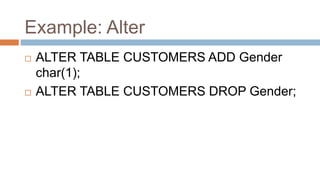
Example: Alter
 ALTER TABLE CUSTOMERS ADD Gender
char(1);
 ALTER TABLE CUSTOMERS DROP Gender;
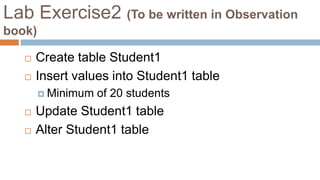
Lab Exercise2 (To be written in Observation
book)
 Create table Student1
 Insert values into Student1 table
 Minimum of 20 students
 Update Student1 table
 Alter Student1 table
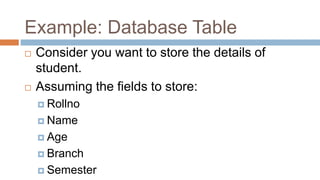
Example: Database Table
 Consider you want to store the details of
student.
 Assuming the fields to store:
 Rollno
 Name
 Age
 Branch
 Semester
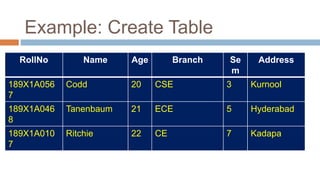
Example: Create Table
RollNo Name Age Branch Se
m
Address
189X1A056
7
Codd 20 CSE 3 Kurnool
189X1A046
8
Tanenbaum 21 ECE 5 Hyderabad
189X1A010
7
Ritchie 22 CE 7 Kadapa
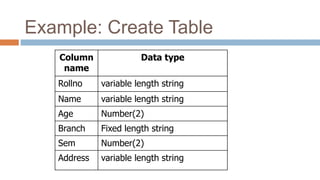
Example: Create Table
Column
name
Data type
Rollno variable length string
Name variable length string
Age Number(2)
Branch Fixed length string
Sem Number(2)
Address variable length string
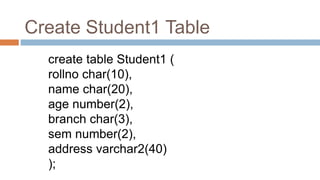
Create Student1 Table
create table Student1 (
rollno char(10),
name char(20),
age number(2),
branch char(3),
sem number(2),
address varchar2(40)
);
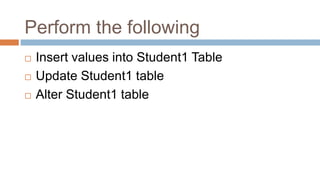
Perform the following
 Insert values into Student1 Table
 Update Student1 table
 Alter Student1 table
Next Class Topics (08 Jul 2019)
 DDL Commands
 DML Commands
 DCL Commands

GPREC DBMS Notes 1

  • 1.
    B.Tech III Sem‘A’ DATABASE MANAGEMENT SYSTEMS
  • 2.
    Creating our owndatabase table Syntax: Create CREATE TABLE table_name ( col1 datatype, col2 datatype, col3 datatype, ..... columnN datatype);
  • 3.
    Explanation: Create Table Create Table: is a Statement, used to create a database table  Column: specifies columns to be added in the table. Should be defined as either NULL or NOT NULL. Default is NULL  Data type:
  • 4.
  • 5.
    Character Data type OracleDesignation Description CHAR(size) Fixed-length character. Maximum size is 2000 bytes. NCHAR(size) stores National characters of maximum length 2000 bytes. VARCHAR2(size) Variable-length character data. Maximum size is 4000 bytes. NVARCHAR2(size) Variable-length character data of size National characters. Maximum size is 4000 bytes.
  • 6.
    Numeric Data type TypeOracle Designation Description INT, INTEGER, SMALLINT NUMBER(38) An integer with up to 38 digits of precision. Fixed precision NUMBER(p,s) Precision: maximum no. of digits, scale: maximum no. of digits to right of the decimal point. FLOAT, DOUBLE PRECISION NUMBER A floating-point number with up to 38 digits of precision.
  • 7.
    Long and rawdata type  LONG: store variable-length character strings. Maximum size: 32760 bytes.  LONG RAW: store binary data or byte strings. maximum size: 32760 bytes.  RAW: store binary data or byte strings.
  • 8.
    LOB Data Types It declares variables that reference binary or character data objects up to 4 GB.  LOB values in PL/SQL programs must be manipulated using special package called DBMS_LOB.
  • 9.
    Datetime Data type DATE datatype stores date and time information  Ex: DATE 'YYYY-MM-DD‘  TIMESTAMP datatype: stores year, month, day, hour, minute, and second values.  TIMESTAMP 'YYYY-MM-DD HH24:MI:SS.FF'
  • 10.
    Rowid Datatype  ROWID:The unique address (base 64 string representing) of a row in its table.
  • 11.
    Lab Exercise1 (Tobe written in Observation book)  Create table Customer  Insert values into Customer table  Minimum of 20 customers  Update Customer table  Alter Customer table
  • 12.
    Example: Database Table Consider you want to store the details of customers.  Assuming the fields to store:  ID  Name  Age  Address  Salary
  • 13.
    Example: Create Table IDName Age Address Salary 90 Codd 60 SanFransis co 200000 91 Tanenbau m 65 NY 150000 92 Ritchie 70 NJ 250000
  • 14.
    Example: Create Table Column name Datatype ID Number (2) Name National, variable length string Age Number(2) Address National, variable length string Salary Decimal (10,2)
  • 15.
    Example: Create Table CREATETABLE CUSTOMER1( ID Number(2), NAME NVARCHAR2 (20), AGE INT, ADDRESS NVARCHAR2 (30) ,
  • 16.
    Syntax: Insert command INSERT INTO TABLE_NAME (column1, column2, coluamn3,...columnN) VALUES (value1, value2, value3,...valueN);
  • 17.
    Example: Insert insert intocustomer1 values(90, 'Codd',60,'San Fransisco', 150000); insert into customer1 values(&id,
  • 18.
    Update statement  Syntax: UPDATEtable_name SET column1 = value1, column2 = value2...., columnN = valueN WHERE [condition]; Example UPDATE CUSTOMER1 SET ADDRESS = 'Pune' WHERE ID = 91;
  • 19.
    Syntax: Alter  ALTERTABLE table_name ADD column_name datatype;  ALTER TABLE table_name DROP COLUMN column_name;  ALTER TABLE table_name MODIFY COLUMN column_name datatype;  ALTER TABLE table_name MODIFY column_name datatype NOT NULL;
  • 20.
    Example: Alter  ALTERTABLE CUSTOMERS ADD Gender char(1);  ALTER TABLE CUSTOMERS DROP Gender;
  • 21.
    Lab Exercise2 (Tobe written in Observation book)  Create table Student1  Insert values into Student1 table  Minimum of 20 students  Update Student1 table  Alter Student1 table
  • 22.
    Example: Database Table Consider you want to store the details of student.  Assuming the fields to store:  Rollno  Name  Age  Branch  Semester
  • 23.
    Example: Create Table RollNoName Age Branch Se m Address 189X1A056 7 Codd 20 CSE 3 Kurnool 189X1A046 8 Tanenbaum 21 ECE 5 Hyderabad 189X1A010 7 Ritchie 22 CE 7 Kadapa
  • 24.
    Example: Create Table Column name Datatype Rollno variable length string Name variable length string Age Number(2) Branch Fixed length string Sem Number(2) Address variable length string
  • 25.
    Create Student1 Table createtable Student1 ( rollno char(10), name char(20), age number(2), branch char(3), sem number(2), address varchar2(40) );
  • 26.
    Perform the following Insert values into Student1 Table  Update Student1 table  Alter Student1 table
  • 27.
    Next Class Topics(08 Jul 2019)  DDL Commands  DML Commands  DCL Commands