
Google WaveDanielle KaneResearch Librarian for Emerging Technologies and Service InnovationUC Irvine LibrariesLunch2.0January 2010
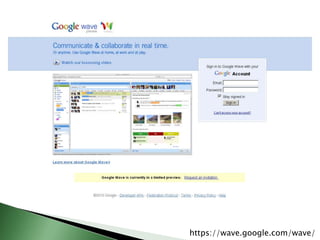
Google Wavehttps://wave.google.com/wave/
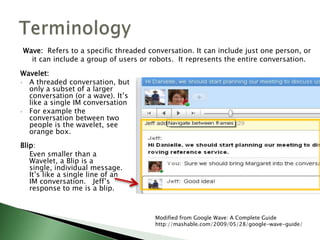
TerminologyWave: Refers to a specific threaded conversation. It can include just one person, or it caninclude a group of users or robots.  It represents the entire conversation.Wavelet:A threaded conversation, but only a subset of a larger conversation (or a wave). It’s like a single IM conversation
For example the conversation between two people is the wavelet, see orange box.Blip: Even smaller than a Wavelet, a Blip is a single, individual message. It’s like a single line of an IM conversation.  Jeff’s response to me is a blip.Modified from Google Wave: A Complete Guidehttp://mashable.com/2009/05/28/google-wave-guide/
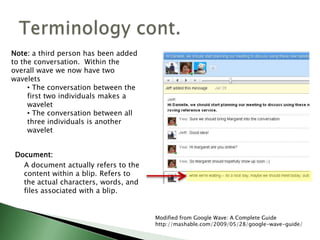
Document: A document actually refers to the content within a blip. Refers to the actual characters, words, and files associated with a blip.Terminology cont.Note: a third person has been added to the conversation.  Within the overall wave we now have two waveletsThe conversation between the first two individuals makes a wavelet
 The conversation between all three individuals is another waveletModified from Google Wave: A Complete Guidehttp://mashable.com/2009/05/28/google-wave-guide/
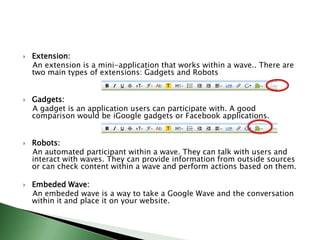
Extension:    An extension is a mini-application that works within a wave.. There are two main types of extensions: Gadgets and RobotsGadgets:    A gadget is an application users can participate with. A good comparison would be iGoogle gadgets or Facebook applications.Robots:    An automated participant within a wave. They can talk with users and interact with waves. They can provide information from outside sources or can check content within a wave and perform actions based on them.Embeded Wave:    An embeded wave is a way to take a Google Wave and the conversation within it and place it on your website.
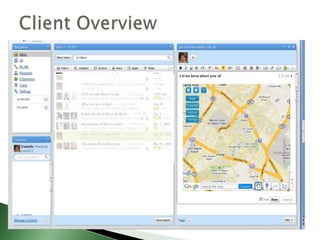
Client Overview
Going LiveLet’s Wave!
https://wave.google.com/wave/
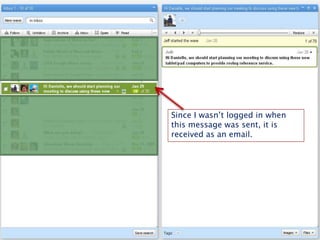
Since I wasn’t logged in when this message was sent, it is received as an email.
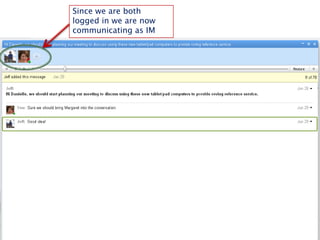
Since we are both logged in we are now communicating as IM
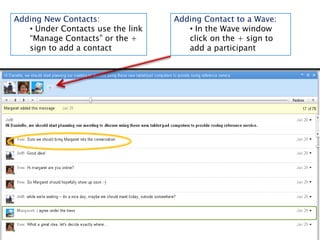
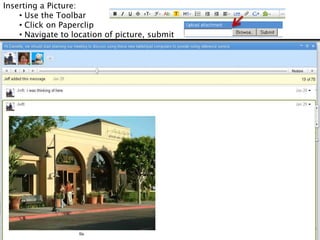
Adding New Contacts: Under Contacts use the link  “Manage Contacts” or the + sign to add a contactAdding Contact to a Wave: In the Wave window click on the + sign to add a participantInserting a Picture: Use the Toolbar
 Click on Paperclip
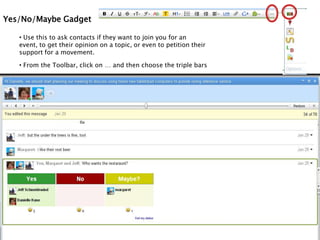
 Navigate to location of picture, submitYes/No/Maybe Gadget Use this to ask contacts if they want to join you for an event, to get their opinion on a topic, or even to petition their support for a movement. 
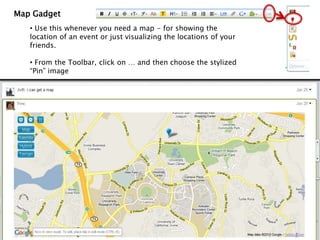
 From the Toolbar, click on … and then choose the triple barsMap Gadget Use this whenever you need a map - for showing the location of an event or just visualizing the locations of your friends. 
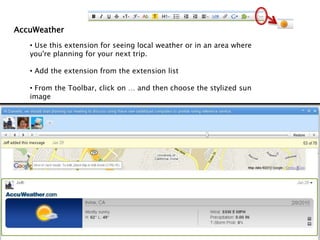
 From the Toolbar, click on … and then choose the stylized “Pin” imageAccuWeather Use this extension for seeing local weather or in an area where you're planning for your next trip. 
 Add the extension from the extension list
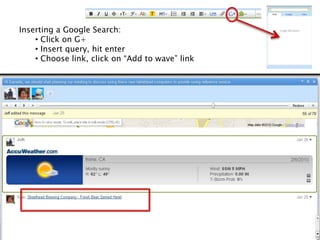
 From the Toolbar, click on … and then choose the stylized sun imageInserting a Google Search: Click on G+
 Insert query, hit enter
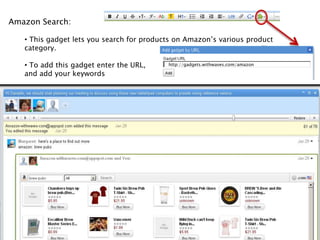
 Choose link, click on “Add to wave” linkAmazon Search: This gadget lets you search for products on Amazon’s various product category.

Google Wave

  • 1.
    Google WaveDanielle KaneResearchLibrarian for Emerging Technologies and Service InnovationUC Irvine LibrariesLunch2.0January 2010
  • 2.
  • 3.
    TerminologyWave: Refers toa specific threaded conversation. It can include just one person, or it caninclude a group of users or robots. It represents the entire conversation.Wavelet:A threaded conversation, but only a subset of a larger conversation (or a wave). It’s like a single IM conversation
  • 4.
    For example theconversation between two people is the wavelet, see orange box.Blip: Even smaller than a Wavelet, a Blip is a single, individual message. It’s like a single line of an IM conversation. Jeff’s response to me is a blip.Modified from Google Wave: A Complete Guidehttp://mashable.com/2009/05/28/google-wave-guide/
  • 5.
    Document: A documentactually refers to the content within a blip. Refers to the actual characters, words, and files associated with a blip.Terminology cont.Note: a third person has been added to the conversation. Within the overall wave we now have two waveletsThe conversation between the first two individuals makes a wavelet
  • 6.
    The conversationbetween all three individuals is another waveletModified from Google Wave: A Complete Guidehttp://mashable.com/2009/05/28/google-wave-guide/
  • 7.
    Extension: An extension is a mini-application that works within a wave.. There are two main types of extensions: Gadgets and RobotsGadgets: A gadget is an application users can participate with. A good comparison would be iGoogle gadgets or Facebook applications.Robots: An automated participant within a wave. They can talk with users and interact with waves. They can provide information from outside sources or can check content within a wave and perform actions based on them.Embeded Wave: An embeded wave is a way to take a Google Wave and the conversation within it and place it on your website.
  • 8.
  • 9.
  • 10.
  • 11.
    Since I wasn’tlogged in when this message was sent, it is received as an email.
  • 12.
    Since we areboth logged in we are now communicating as IM
  • 13.
    Adding New Contacts:Under Contacts use the link “Manage Contacts” or the + sign to add a contactAdding Contact to a Wave: In the Wave window click on the + sign to add a participantInserting a Picture: Use the Toolbar
  • 14.
    Click onPaperclip
  • 15.
    Navigate tolocation of picture, submitYes/No/Maybe Gadget Use this to ask contacts if they want to join you for an event, to get their opinion on a topic, or even to petition their support for a movement. 
  • 16.
    From theToolbar, click on … and then choose the triple barsMap Gadget Use this whenever you need a map - for showing the location of an event or just visualizing the locations of your friends. 
  • 17.
    From theToolbar, click on … and then choose the stylized “Pin” imageAccuWeather Use this extension for seeing local weather or in an area where you're planning for your next trip. 
  • 18.
    Add theextension from the extension list
  • 19.
    From theToolbar, click on … and then choose the stylized sun imageInserting a Google Search: Click on G+
  • 20.
  • 21.
    Choose link,click on “Add to wave” linkAmazon Search: This gadget lets you search for products on Amazon’s various product category.