



Google+ Local Optimization
      (Dominate Local Results)


Steve Wiideman | ThatTrainingGuide.com
What’s on the Agenda?

              PST!
1. Principles of Local SEO
2. Strategies & Project Planning
3. Tactics and Techniques
Principles of Location-Based Search

1.   You must have accurate data
2.   You must offer the most relevant content
3.   You must be highly visible online
4.   Authentic people must endorse you
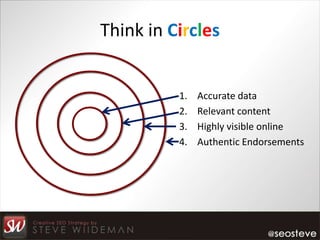
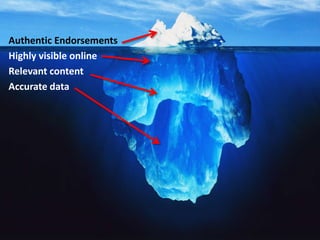
Think in Circles


          1.   Accurate data
          2.   Relevant content
          3.   Highly visible online
          4.   Authentic Endorsements
Authentic Endorsements
Highly visible online
Relevant content
Accurate data
Stop. Wait.
Let’s Take a Step Back.
Google GPS-Enhanced Products

1.   Google Maps
2.   Google Android Navigator
3.   Google Latitude
4.   Google Universal Search Results (USR)
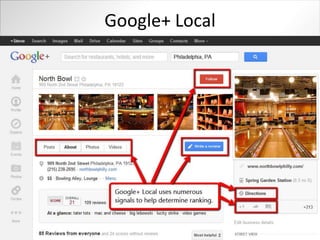
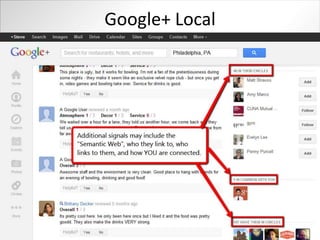
5.   Google+ Local (formerly Google Places)
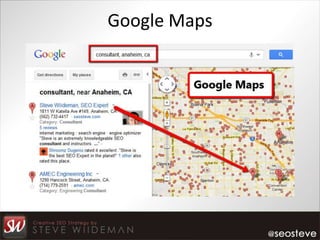
Google Maps
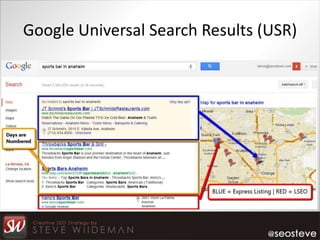
Google Universal Search Results (USR)
Google+ Local
Google+ Local
Strategies & Project Planning


We’ve got a LOT
 of work to do.
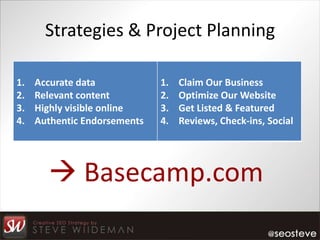
Strategies & Project Planning

1.   Accurate data            1.   Claim Our Business
2.   Relevant content         2.   Optimize Our Website
3.   Highly visible online    3.   Get Listed & Featured
4.   Authentic Endorsements   4.   Reviews, Check-ins, Social


        Basecamp.com
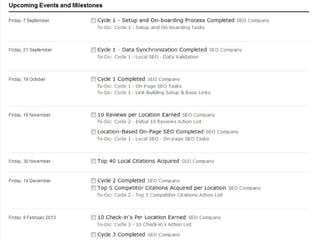
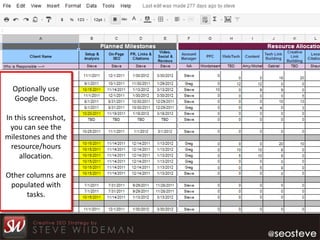
Optionally use
  Google Docs.

In this screenshot,
  you can see the
milestones and the
  resource/hours
    allocation.

Other columns are
 populated with
      tasks.
Break – Coffee Anyone?
Tactics and Techniques

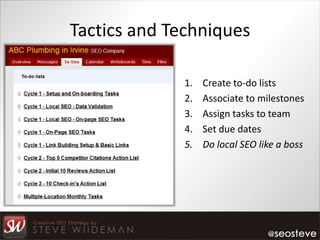
             1.   Create to-do lists
             2.   Associate to milestones
             3.   Assign tasks to team
             4.   Set due dates
             5.   Do local SEO like a boss
Claim Your Business Data

            MyBusinessListingManager.com


            ExpressUpdateUSA.com
Claim Your Business Data (N.A.P.)

This is the CORE of your location-based SEO strategy, so:

1.   Verify the EXACT Business Name
2.   Verify the EXACT Business Address
3.   Pay Attention to Punctuation, Symbols, and Abbreviations
4.   Verify the EXACT Business Phone Number
5.   Pay Attention the Categories You Select
6.   Pay Attention to the Services/Products You List
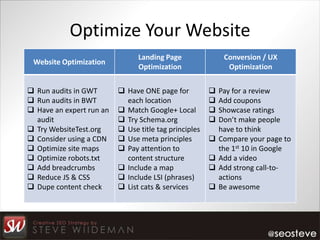
Optimize Your Website
                                Landing Page                Conversion / UX
 Website Optimization
                                Optimization                 Optimization


 Run audits in GWT        Have ONE page for             Pay for a review
 Run audits in BWT         each location                 Add coupons
 Have an expert run an    Match Google+ Local           Showcase ratings
  audit                    Try Schema.org                Don’t make people
 Try WebsiteTest.org      Use title tag principles       have to think
 Consider using a CDN     Use meta principles           Compare your page to
 Optimize site maps       Pay attention to               the 1st 10 in Google
 Optimize robots.txt       content structure             Add a video
 Add breadcrumbs          Include a map                 Add strong call-to-
 Reduce JS & CSS          Include LSI (phrases)          actions
 Dupe content check       List cats & services          Be awesome
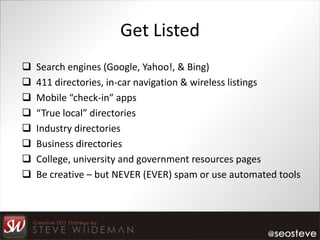
Get Listed
   Search engines (Google, Yahoo!, & Bing)
   411 directories, in-car navigation & wireless listings
   Mobile “check-in” apps
   “True local” directories
   Industry directories
   Business directories
   College, university and government resources pages
   Be creative – but NEVER (EVER) spam or use automated tools
FINALLY! Google+ Local


www.google.com/placesforbusiness

  Tip: Use the Google account associated
   with your AdWords and Analytics for
           easy integration later.
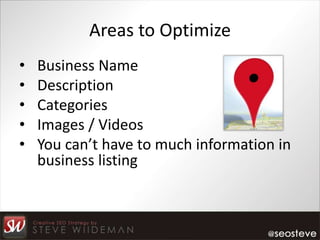
Areas to Optimize
•   Business Name
•   Description
•   Categories
•   Images / Videos
•   You can’t have to much information in
    business listing
Categories – They Matter
         The Secret Category List:

      http://bit.ly/secret-categories

Tools like this one may help you understand
     competitor category frequencies and
                    sequence:
       http://gpscraper.com/gpscraper/
Do’s and Don’ts
Don’t
     Stuff keywords in your title (or in any field)
     Repeat your location in title or description fields
     Use content owned by others (use your content)
     Use a call-tracking number (breaks N.A.P. sync)
     Create multiple profiles with slightly different data
     Have a random agency claim your listing for you
Do’s and Don’ts
Do
    Add the Google+ Author plugin to your blog
    Connect your Google+ profile to your blog
    Use the EXACT business data (NAP) given to Acxiom
    Include a few surrounding cities in the description
    Include top services in the Additional Details area
    Include as much info as you can in Additional Details
    Use professional quality imagery and videos
    Use coupons and offers if possible
    Add this to your website URL: ?utm_campaign=GPL
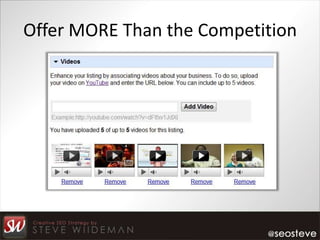
Offer MORE Than the Competition
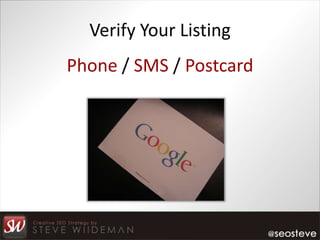
Verify Your Listing
Phone / SMS / Postcard
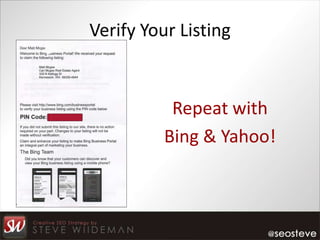
Verify Your Listing


           Repeat with
          Bing & Yahoo!
All Your Citations are Belong to Us
Discover where you competition has been acquiring
business listings using simple searches by phone
number.

Or, use one or more of the tools listed on the last
page of this presentation.
Endorsements
 Authenticated Google+ Local / Zagat reviews
 Reviews from other business review destinations
    BBB.org, Yelp.com, InsiderPages.com, AngiesList.com
    Ref: http://www.thattrainingguide.com/02-get-business-reviews-2010-07-20/
 Mobile check-in apps
    Try FootFeed, a multi-check-in app
    Else, try Yelp, Facebook, Instagram, Foursquare, etc
 Create business pages on social networks (ask for reviews)
 Bloggers, industry forums, local portals, etc
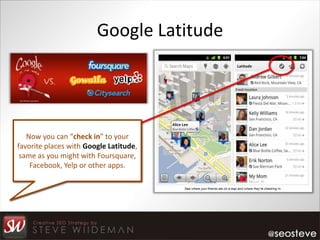
Google Latitude


   Now you can “check in” to your
favorite places with Google Latitude,
 same as you might with Foursquare,
    Facebook, Yelp or other apps.
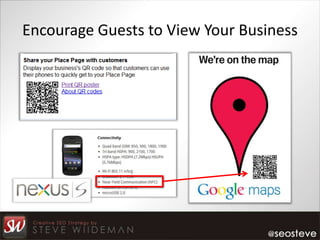
Encourage Guests to View Your Business
FYI on Checking-In
Aside from the NFC technology, what’s the difference between
Google+ Local and Foursquare/Yelp apps?
1. Foursquare offers ‘tips’ that do not appear in Google results

2. A Yelp review can only be a ‘draft’ until you get behind a computer later

3. Google+ Local allows you to review in real-time, which appears in near
   real-time in SERPS

4. Google+ Local is part of your Google account and may influence other
   Google services, such as search results for users in your circles
Rank Higher in Mobile Apps
Typically, the higher a business ranks in a program the more
frequently it gets spidered/crawled by the search engines.
1. Get reviews from INFLUENTIAL users (those with 1000+ reviews)

    • Reviews should come from MANY networks (CitySearch, Yelp, etc)

2. Encourage/incentivize bookmarking or adding as a favorite

3. Link to the profile page from the business website (and maybe others)

4. Offer loss-leader promotions (attrition is still low enough at this point)
Ideas / Suggestions on Reviews
 Survey clients via receipts & email; on submit, ask for a review
 Don’t outright pay for reviews, but definitely reward them
 “Listen” using social media tools & alerts (don’t be shy)
 Send clients home with SWAG with a review reminder
 Diversify where you’d like to get the link from
 Send postcards with special appreciation
 Put up fun things users will post photos of (tourist-type stuff)
 Interview (with permission) before a client leaves the store
My Favorite Tools & References

Tools
     Google AdWords local extensions vs. Express Ads
     Chatmeter.com
     Whitespark.ca/local-citation-finder/
     Google Webmaster Tools, Bing Webmaster Tools, Analytics
     StepRep.com, Yext.com, and other similar tools

References
   http://www.davidmihm.com/local-search-ranking-factors.shtml
   LocalSEOGuide.com and http://blumenthals.com/blog/
Sample Pages & About Me

Sample GPL Pages                   Contact Me
     Oh! Sushi                         @seosteve
     North Bowl                        FB/stevewiideman (free review)
     Chicago Music Exchange            About.me/seosteve
     Delfina Restaurant                LinkedIn.com/in/seoexpert
     Mezze Restaurant                  Email: steve@seosteve.com
     Museum of Making Music            Call: (562) 732-4417
     Nick Strocchia Photography        Skype: steve.wiideman


            www.ThatTrainingGuide.com

Google+ Local Strategy Workshop

  • 2.
    Google+ Local Optimization (Dominate Local Results) Steve Wiideman | ThatTrainingGuide.com
  • 3.
    What’s on theAgenda? PST! 1. Principles of Local SEO 2. Strategies & Project Planning 3. Tactics and Techniques
  • 4.
    Principles of Location-BasedSearch 1. You must have accurate data 2. You must offer the most relevant content 3. You must be highly visible online 4. Authentic people must endorse you
  • 5.
    Think in Circles 1. Accurate data 2. Relevant content 3. Highly visible online 4. Authentic Endorsements
  • 6.
    Authentic Endorsements Highly visibleonline Relevant content Accurate data
  • 7.
  • 8.
    Google GPS-Enhanced Products 1. Google Maps 2. Google Android Navigator 3. Google Latitude 4. Google Universal Search Results (USR) 5. Google+ Local (formerly Google Places)
  • 9.
  • 10.
  • 11.
  • 12.
  • 13.
    Strategies & ProjectPlanning We’ve got a LOT of work to do.
  • 14.
    Strategies & ProjectPlanning 1. Accurate data 1. Claim Our Business 2. Relevant content 2. Optimize Our Website 3. Highly visible online 3. Get Listed & Featured 4. Authentic Endorsements 4. Reviews, Check-ins, Social  Basecamp.com
  • 16.
    Optionally use Google Docs. In this screenshot, you can see the milestones and the resource/hours allocation. Other columns are populated with tasks.
  • 17.
  • 18.
    Tactics and Techniques 1. Create to-do lists 2. Associate to milestones 3. Assign tasks to team 4. Set due dates 5. Do local SEO like a boss
  • 19.
    Claim Your BusinessData MyBusinessListingManager.com ExpressUpdateUSA.com
  • 20.
    Claim Your BusinessData (N.A.P.) This is the CORE of your location-based SEO strategy, so: 1. Verify the EXACT Business Name 2. Verify the EXACT Business Address 3. Pay Attention to Punctuation, Symbols, and Abbreviations 4. Verify the EXACT Business Phone Number 5. Pay Attention the Categories You Select 6. Pay Attention to the Services/Products You List
  • 21.
    Optimize Your Website Landing Page Conversion / UX Website Optimization Optimization Optimization  Run audits in GWT  Have ONE page for  Pay for a review  Run audits in BWT each location  Add coupons  Have an expert run an  Match Google+ Local  Showcase ratings audit  Try Schema.org  Don’t make people  Try WebsiteTest.org  Use title tag principles have to think  Consider using a CDN  Use meta principles  Compare your page to  Optimize site maps  Pay attention to the 1st 10 in Google  Optimize robots.txt content structure  Add a video  Add breadcrumbs  Include a map  Add strong call-to-  Reduce JS & CSS  Include LSI (phrases) actions  Dupe content check  List cats & services  Be awesome
  • 22.
    Get Listed  Search engines (Google, Yahoo!, & Bing)  411 directories, in-car navigation & wireless listings  Mobile “check-in” apps  “True local” directories  Industry directories  Business directories  College, university and government resources pages  Be creative – but NEVER (EVER) spam or use automated tools
  • 23.
    FINALLY! Google+ Local www.google.com/placesforbusiness Tip: Use the Google account associated with your AdWords and Analytics for easy integration later.
  • 24.
    Areas to Optimize • Business Name • Description • Categories • Images / Videos • You can’t have to much information in business listing
  • 25.
    Categories – TheyMatter The Secret Category List: http://bit.ly/secret-categories Tools like this one may help you understand competitor category frequencies and sequence: http://gpscraper.com/gpscraper/
  • 26.
    Do’s and Don’ts Don’t  Stuff keywords in your title (or in any field)  Repeat your location in title or description fields  Use content owned by others (use your content)  Use a call-tracking number (breaks N.A.P. sync)  Create multiple profiles with slightly different data  Have a random agency claim your listing for you
  • 27.
    Do’s and Don’ts Do  Add the Google+ Author plugin to your blog  Connect your Google+ profile to your blog  Use the EXACT business data (NAP) given to Acxiom  Include a few surrounding cities in the description  Include top services in the Additional Details area  Include as much info as you can in Additional Details  Use professional quality imagery and videos  Use coupons and offers if possible  Add this to your website URL: ?utm_campaign=GPL
  • 28.
    Offer MORE Thanthe Competition
  • 29.
    Verify Your Listing Phone/ SMS / Postcard
  • 30.
    Verify Your Listing Repeat with Bing & Yahoo!
  • 31.
    All Your Citationsare Belong to Us Discover where you competition has been acquiring business listings using simple searches by phone number. Or, use one or more of the tools listed on the last page of this presentation.
  • 32.
    Endorsements  Authenticated Google+Local / Zagat reviews  Reviews from other business review destinations  BBB.org, Yelp.com, InsiderPages.com, AngiesList.com  Ref: http://www.thattrainingguide.com/02-get-business-reviews-2010-07-20/  Mobile check-in apps  Try FootFeed, a multi-check-in app  Else, try Yelp, Facebook, Instagram, Foursquare, etc  Create business pages on social networks (ask for reviews)  Bloggers, industry forums, local portals, etc
  • 33.
    Google Latitude Now you can “check in” to your favorite places with Google Latitude, same as you might with Foursquare, Facebook, Yelp or other apps.
  • 34.
    Encourage Guests toView Your Business
  • 35.
    FYI on Checking-In Asidefrom the NFC technology, what’s the difference between Google+ Local and Foursquare/Yelp apps? 1. Foursquare offers ‘tips’ that do not appear in Google results 2. A Yelp review can only be a ‘draft’ until you get behind a computer later 3. Google+ Local allows you to review in real-time, which appears in near real-time in SERPS 4. Google+ Local is part of your Google account and may influence other Google services, such as search results for users in your circles
  • 36.
    Rank Higher inMobile Apps Typically, the higher a business ranks in a program the more frequently it gets spidered/crawled by the search engines. 1. Get reviews from INFLUENTIAL users (those with 1000+ reviews) • Reviews should come from MANY networks (CitySearch, Yelp, etc) 2. Encourage/incentivize bookmarking or adding as a favorite 3. Link to the profile page from the business website (and maybe others) 4. Offer loss-leader promotions (attrition is still low enough at this point)
  • 37.
    Ideas / Suggestionson Reviews  Survey clients via receipts & email; on submit, ask for a review  Don’t outright pay for reviews, but definitely reward them  “Listen” using social media tools & alerts (don’t be shy)  Send clients home with SWAG with a review reminder  Diversify where you’d like to get the link from  Send postcards with special appreciation  Put up fun things users will post photos of (tourist-type stuff)  Interview (with permission) before a client leaves the store
  • 38.
    My Favorite Tools& References Tools  Google AdWords local extensions vs. Express Ads  Chatmeter.com  Whitespark.ca/local-citation-finder/  Google Webmaster Tools, Bing Webmaster Tools, Analytics  StepRep.com, Yext.com, and other similar tools References  http://www.davidmihm.com/local-search-ranking-factors.shtml  LocalSEOGuide.com and http://blumenthals.com/blog/
  • 39.
    Sample Pages &About Me Sample GPL Pages Contact Me  Oh! Sushi  @seosteve  North Bowl  FB/stevewiideman (free review)  Chicago Music Exchange  About.me/seosteve  Delfina Restaurant  LinkedIn.com/in/seoexpert  Mezze Restaurant  Email: steve@seosteve.com  Museum of Making Music  Call: (562) 732-4417  Nick Strocchia Photography  Skype: steve.wiideman www.ThatTrainingGuide.com