

8/3/2016MCA-408 1
BY – MCA-1331710
MCA -4th Sem
GOOGLE HANGOUTSAmit Fulay
Works at Google
Attended University of California, Berkeley
Lives in Seattle, WA
CONTENTS
8/3/2016MCA-408 2
 Introduction .
 Get ready to hangout.
 System requirements .
 Start , join and invite.
 Features and apps.
 Safety and security.
 Hangouts on air.
 Specs and Limitations .
 Conclusion.
 Refferences.
DEFINITION
8/3/2016MCA-408 3
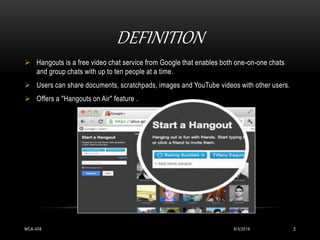
 Hangouts is a free video chat service from Google that enables both one-on-one chats
and group chats with up to ten people at a time.
 Users can share documents, scratchpads, images and YouTube videos with other users.
 Offers a "Hangouts on Air" feature .
GETTING STARTED WITH HANGOUTS
8/3/2016MCA-408 4
 Check for supported browser and operating system, and that your processor
and bandwidth are sufficient.
 Latest version of the plugin.
 Drivers for webcam.
 Connect your head set to your device!
 Install video chat plug-in
SYSTEM REQUIREMENTS FOR HANGOUTS
8/3/2016MCA-408 5
 Supported Browsers: Google Chrome 10+
Microsoft Internet Explorer (IE) 8+
Mozilla Firefox 3+
Safari 4+
 Supported Operating systems : Mac OS X 10.5+
Windows 7
Windows Vista with SP1 or later
Windows XP
Chrome
 Processor Min. Requirements: Any 2 Ghz dual core provessor.
CONTINUE…..
8/3/2016MCA-408 6
 Bandwidth : 1 mbps/1 mbps (up/down) or 1 mbps/2 mbps (up/down)
 Minimum bandwidth required: Outbound from the participant: 256 kbps
Inbound to the participant: 512 kbps.
 Ideal bandwidth for the best experience: Outbound : 1 mbps
Inbound : 2.5 mbps
 Group hangouts : Outbound : 900kbps
Inbound : 3mbps
GETTING START WITH HANGOUTS
8/3/2016MCA-408 7
Start a hangout:
 Go to plus.google.com/hangouts ,click Start a Hangout
 Click the Hangouts .
 Can also start a Hangout and send and receive Hangout invites
 Your friends may also send you the URL to a hangout .
START A HANGOUT..JOIN…OR INVITE
8/3/2016MCA-408 8
SETTINGS
8/3/2016MCA-408 9
 Verifying your settings :
 Click the Options button at the bottom of your chat list.
 In Google+ click the arrow next to Chat and select Settings.
 Select Chat settings... from the menu.
 Click Verify your settings.
BANDWIDTH SETTING : WHEN?
8/3/2016MCA-408 10
 Video quality isn’t clear or freezes at times.
 Sound pauses or breaks up.
 Your internet connection is slow .
 Want to conserve laptop’s battery.
 Your computer seems to run slowly while you’re in a Hangout, or gets very
hot with a noisy fan.
HOW TO USE THE BANDWIDTH SETTING
8/3/2016MCA-408 11
Highest to lowest bandwidth :
 Auto-detect connection speed : Default mode.
Use all available bandwidth.
Bandwidth can be in excess of 1000 Kbps in each
direction.
 Low speed connection : Bandwidth approx. 500 Kbps in each direction.
 Ultra low bandwidth : upstream bandwidth reduced by employing a visual effect.
Bandwidth approx. 150 Kbps up & 500 Kbps down.
 Audio only : focus on best possible audio experience.
Bandwidth approx. 35 Kbps in each direction.
FEATURES AND APPS:
8/3/2016MCA-408 12
 The Google+ Hangouts API allows : develop collaborative apps .
 Apps ability : Control aspects of user interface,
Synchronize data b/w hangout participants.
Respond to various events in the hangout.
 Apps in Google+ Hangouts : not supported on tablets & mobile devices.
 Chat face to face .
 Host virtual meetings .
 Broadcast to the world .
ADD OR REMOVE AN APP
8/3/2016MCA-408 13
 Click the + Add Apps tab.
 Browse through available apps by clicking on the Featured or Recent tabs.
 Select the app, click Add to this hangout.
SHARE YOUR SCREEN
8/3/2016MCA-408 14
To share:
 Click Screenshare .
 choose the window you want to present.
 Click Share Selected Window.
SAFETY AND SECURITY:
8/3/2016MCA-408 15
 Each hangout : specific URL which can be shared as a link to invite others.
 Block for single hangout or permanently.
Permanent blocking :
 The person won’t be able to join future Hangouts with you.
 During the remainder hangout you won’t see or hear each other.
 Everyone will see that you’ve blocked the person, including the person
you’ve blocked.
TO BLOCK SOMEONE:
8/3/2016MCA-408 16
 Hover over their video feed or image .
 Option : mute or block the person .
 Click the block icon .
 Select the checkbox .
 Confirm block the person .
 Minors are currently unable to use Hangouts on Air.
REPORT ABUSE IN PUBLIC HANGOUTS :
8/3/2016MCA-408 17
To report abuse:
 Hover over the person's video thumbnail.
 Click the ignore icon .
 In the window that appears, select Report Abuse.
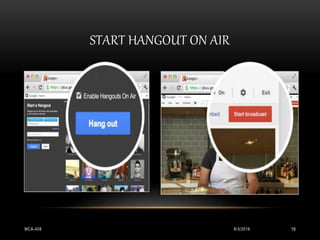
HANGOUTS ON AIR:
8/3/2016MCA-408 18
 Terms of service :
YouTube uses Content ID to detect whether or not a Hangout On Air is broadcasting
copyrighted content. If your content has been flagged for copyright infringement
please visit the YouTube Help Center.
 Broadcast a hangout:
 Edit and share the recorded hangout:
http://www.youtube.com/watch?feature=player_embedded&v=3pmSWh2BQco
START HANGOUT ON AIR
8/3/2016MCA-408 19
LIVE STREAM WITH HANGOUT ON AIR
8/3/2016MCA-408 20
Go live from your laptop
Save Instantly to YouTube
Share to the world
SPECS AND LIMITATION
8/3/2016MCA-408 21
 Maximum 10 participants.
 There's a 150 minute check-in to make sure you're still there.
GOOGLE HANGOUTS AT A GLANCE
8/3/2016MCA-408 22
 Bottom-line: Looks great and is both fun and easy to use.
Can choose people’s .
Start video conference in seconds.
 Pros: Browser-based.
Incredibly intuitive.
Voice & video quality : great.
YouTube integration.
 Cons: Need for an invitation to Google+.
Inappropriate user : reported , not kicked out .
Need to update plugins & restart browser.
 Price: Free .
REFFERENCES:
8/3/2016MCA-408 23
 http://support.google.com/plus/bin/static.py?hl=en&page=known_issues.cs
 http://support.google.com/plus/bin/static.py?page=ts.cs&ts=2474473
 http://groups.google.com/a/googleproductforums.com/forum/#!categories/google-
plus-discuss/hangouts
 http://support.google.com/plus/bin/answer.py?&answer=1215275
 http://www.google.com/intl/en-US/+/policy/content.html
 http://support.google.com/plus/bin/answer.py?answer=1355579
 http://support.google.com/plus/bin/answer.py?answer=1216376
8/3/2016MCA-408 24
THANK YOU……

Google hangouts

  • 1.
    8/3/2016MCA-408 1 BY –MCA-1331710 MCA -4th Sem GOOGLE HANGOUTSAmit Fulay Works at Google Attended University of California, Berkeley Lives in Seattle, WA
  • 2.
    CONTENTS 8/3/2016MCA-408 2  Introduction.  Get ready to hangout.  System requirements .  Start , join and invite.  Features and apps.  Safety and security.  Hangouts on air.  Specs and Limitations .  Conclusion.  Refferences.
  • 3.
    DEFINITION 8/3/2016MCA-408 3  Hangoutsis a free video chat service from Google that enables both one-on-one chats and group chats with up to ten people at a time.  Users can share documents, scratchpads, images and YouTube videos with other users.  Offers a "Hangouts on Air" feature .
  • 4.
    GETTING STARTED WITHHANGOUTS 8/3/2016MCA-408 4  Check for supported browser and operating system, and that your processor and bandwidth are sufficient.  Latest version of the plugin.  Drivers for webcam.  Connect your head set to your device!  Install video chat plug-in
  • 5.
    SYSTEM REQUIREMENTS FORHANGOUTS 8/3/2016MCA-408 5  Supported Browsers: Google Chrome 10+ Microsoft Internet Explorer (IE) 8+ Mozilla Firefox 3+ Safari 4+  Supported Operating systems : Mac OS X 10.5+ Windows 7 Windows Vista with SP1 or later Windows XP Chrome  Processor Min. Requirements: Any 2 Ghz dual core provessor.
  • 6.
    CONTINUE….. 8/3/2016MCA-408 6  Bandwidth: 1 mbps/1 mbps (up/down) or 1 mbps/2 mbps (up/down)  Minimum bandwidth required: Outbound from the participant: 256 kbps Inbound to the participant: 512 kbps.  Ideal bandwidth for the best experience: Outbound : 1 mbps Inbound : 2.5 mbps  Group hangouts : Outbound : 900kbps Inbound : 3mbps
  • 7.
    GETTING START WITHHANGOUTS 8/3/2016MCA-408 7 Start a hangout:  Go to plus.google.com/hangouts ,click Start a Hangout  Click the Hangouts .  Can also start a Hangout and send and receive Hangout invites  Your friends may also send you the URL to a hangout .
  • 8.
    START A HANGOUT..JOIN…ORINVITE 8/3/2016MCA-408 8
  • 9.
    SETTINGS 8/3/2016MCA-408 9  Verifyingyour settings :  Click the Options button at the bottom of your chat list.  In Google+ click the arrow next to Chat and select Settings.  Select Chat settings... from the menu.  Click Verify your settings.
  • 10.
    BANDWIDTH SETTING :WHEN? 8/3/2016MCA-408 10  Video quality isn’t clear or freezes at times.  Sound pauses or breaks up.  Your internet connection is slow .  Want to conserve laptop’s battery.  Your computer seems to run slowly while you’re in a Hangout, or gets very hot with a noisy fan.
  • 11.
    HOW TO USETHE BANDWIDTH SETTING 8/3/2016MCA-408 11 Highest to lowest bandwidth :  Auto-detect connection speed : Default mode. Use all available bandwidth. Bandwidth can be in excess of 1000 Kbps in each direction.  Low speed connection : Bandwidth approx. 500 Kbps in each direction.  Ultra low bandwidth : upstream bandwidth reduced by employing a visual effect. Bandwidth approx. 150 Kbps up & 500 Kbps down.  Audio only : focus on best possible audio experience. Bandwidth approx. 35 Kbps in each direction.
  • 12.
    FEATURES AND APPS: 8/3/2016MCA-40812  The Google+ Hangouts API allows : develop collaborative apps .  Apps ability : Control aspects of user interface, Synchronize data b/w hangout participants. Respond to various events in the hangout.  Apps in Google+ Hangouts : not supported on tablets & mobile devices.  Chat face to face .  Host virtual meetings .  Broadcast to the world .
  • 13.
    ADD OR REMOVEAN APP 8/3/2016MCA-408 13  Click the + Add Apps tab.  Browse through available apps by clicking on the Featured or Recent tabs.  Select the app, click Add to this hangout.
  • 14.
    SHARE YOUR SCREEN 8/3/2016MCA-40814 To share:  Click Screenshare .  choose the window you want to present.  Click Share Selected Window.
  • 15.
    SAFETY AND SECURITY: 8/3/2016MCA-40815  Each hangout : specific URL which can be shared as a link to invite others.  Block for single hangout or permanently. Permanent blocking :  The person won’t be able to join future Hangouts with you.  During the remainder hangout you won’t see or hear each other.  Everyone will see that you’ve blocked the person, including the person you’ve blocked.
  • 16.
    TO BLOCK SOMEONE: 8/3/2016MCA-40816  Hover over their video feed or image .  Option : mute or block the person .  Click the block icon .  Select the checkbox .  Confirm block the person .  Minors are currently unable to use Hangouts on Air.
  • 17.
    REPORT ABUSE INPUBLIC HANGOUTS : 8/3/2016MCA-408 17 To report abuse:  Hover over the person's video thumbnail.  Click the ignore icon .  In the window that appears, select Report Abuse.
  • 18.
    HANGOUTS ON AIR: 8/3/2016MCA-40818  Terms of service : YouTube uses Content ID to detect whether or not a Hangout On Air is broadcasting copyrighted content. If your content has been flagged for copyright infringement please visit the YouTube Help Center.  Broadcast a hangout:  Edit and share the recorded hangout: http://www.youtube.com/watch?feature=player_embedded&v=3pmSWh2BQco
  • 19.
    START HANGOUT ONAIR 8/3/2016MCA-408 19
  • 20.
    LIVE STREAM WITHHANGOUT ON AIR 8/3/2016MCA-408 20 Go live from your laptop Save Instantly to YouTube Share to the world
  • 21.
    SPECS AND LIMITATION 8/3/2016MCA-40821  Maximum 10 participants.  There's a 150 minute check-in to make sure you're still there.
  • 22.
    GOOGLE HANGOUTS ATA GLANCE 8/3/2016MCA-408 22  Bottom-line: Looks great and is both fun and easy to use. Can choose people’s . Start video conference in seconds.  Pros: Browser-based. Incredibly intuitive. Voice & video quality : great. YouTube integration.  Cons: Need for an invitation to Google+. Inappropriate user : reported , not kicked out . Need to update plugins & restart browser.  Price: Free .
  • 23.
    REFFERENCES: 8/3/2016MCA-408 23  http://support.google.com/plus/bin/static.py?hl=en&page=known_issues.cs http://support.google.com/plus/bin/static.py?page=ts.cs&ts=2474473  http://groups.google.com/a/googleproductforums.com/forum/#!categories/google- plus-discuss/hangouts  http://support.google.com/plus/bin/answer.py?&answer=1215275  http://www.google.com/intl/en-US/+/policy/content.html  http://support.google.com/plus/bin/answer.py?answer=1355579  http://support.google.com/plus/bin/answer.py?answer=1216376
  • 24.