PRESENTATION
ON
By –
Mritunjay Sharma
CONTENT
 Introduction.
 What is Google Glass.
 Features of Google Glass.
 How Google Glass Works.
 Advantages.
 Disadvantages.
INTRODUCTION
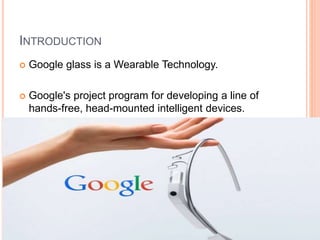
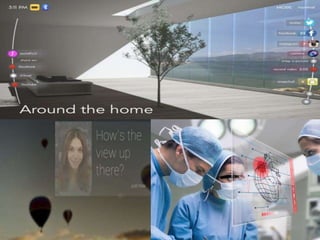
 Google glass is a Wearable Technology.
 Google's project program for developing a line of
hands-free, head-mounted intelligent devices.
WHAT IS GOOGLE GLASS
 It was developed by Google X.
 Google Glass displays information in a smartphone-
like hands-free format.
 Wearers communicate with the Internet via natural
language voice commands.
 On January 15, 2015, Google announced that it
would stop producing the Google Glass prototype
but remained committed to the development of the
product.
FEATURES OF GOOGLE GLASS
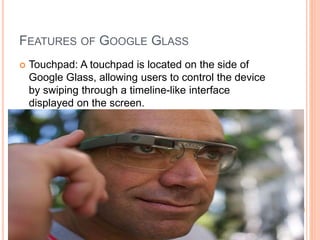
 Touchpad: A touchpad is located on the side of
Google Glass, allowing users to control the device
by swiping through a timeline-like interface
displayed on the screen.
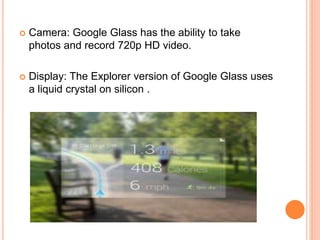
 Camera: Google Glass has the ability to take
photos and record 720p HD video.
 Display: The Explorer version of Google Glass uses
a liquid crystal on silicon .
VOICE ACTIVATION
 Google Glass can be controlled using "voice
actions".
 To activate Glass, wearers tilt their heads 30°
upward or tap the touchpad, and say "O.K., Glass.
 Once Glass is activated, wearers can say an action,
such as "Take a picture", "Record a video",
"Hangout with [person/Google+ circle]“.
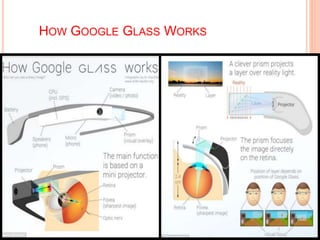
HOW GOOGLE GLASS WORKS
ADVANTAGE OF GOOGLE GLASS
 Glass is sleek, light and easily wearable and you
won’t require keeping it on and off your pockets,
like mobile phones.
 Glass will provide you detailed information and
satisfactory results on your queries.
 Easier navigation and maps will be provided
through Glass.
 Make phone calls, sms, emails though Google
Glass, no smartphone required.
 Glass will make you look hi-tech and updated on
technology and create an impressive impact on
people.
 No Bluetooth or camera needed when Glass is on,
it’ll do all for you.
DISADVANTAGE OF GOOGLE GLASS
 No indication while clicking pictures (like pointing
the camera) which almost sounds like a hidden
camera trying to capture a non-ready subject.
 No public privacy concern so the worry of leaking
out information still remains.
 Competition is on pace. The future might bring a
contact lens version of Glass after which Google
Glass is supposed to sink.
 Chances are there to drop yourself down in the
road while reading a text or email since you can’t
get your eyes off it.
 Glass might give you a ‘nerdy’ look that might
create clumsiness among people.
Google glass presentation

Google glass presentation

  • 1.
  • 2.
    CONTENT  Introduction.  Whatis Google Glass.  Features of Google Glass.  How Google Glass Works.  Advantages.  Disadvantages.
  • 3.
    INTRODUCTION  Google glassis a Wearable Technology.  Google's project program for developing a line of hands-free, head-mounted intelligent devices.
  • 4.
    WHAT IS GOOGLEGLASS  It was developed by Google X.  Google Glass displays information in a smartphone- like hands-free format.  Wearers communicate with the Internet via natural language voice commands.  On January 15, 2015, Google announced that it would stop producing the Google Glass prototype but remained committed to the development of the product.
  • 5.
    FEATURES OF GOOGLEGLASS  Touchpad: A touchpad is located on the side of Google Glass, allowing users to control the device by swiping through a timeline-like interface displayed on the screen.
  • 6.
     Camera: GoogleGlass has the ability to take photos and record 720p HD video.  Display: The Explorer version of Google Glass uses a liquid crystal on silicon .
  • 7.
    VOICE ACTIVATION  GoogleGlass can be controlled using "voice actions".  To activate Glass, wearers tilt their heads 30° upward or tap the touchpad, and say "O.K., Glass.  Once Glass is activated, wearers can say an action, such as "Take a picture", "Record a video", "Hangout with [person/Google+ circle]“.
  • 8.
  • 10.
    ADVANTAGE OF GOOGLEGLASS  Glass is sleek, light and easily wearable and you won’t require keeping it on and off your pockets, like mobile phones.  Glass will provide you detailed information and satisfactory results on your queries.  Easier navigation and maps will be provided through Glass.
  • 11.
     Make phonecalls, sms, emails though Google Glass, no smartphone required.  Glass will make you look hi-tech and updated on technology and create an impressive impact on people.  No Bluetooth or camera needed when Glass is on, it’ll do all for you.
  • 12.
    DISADVANTAGE OF GOOGLEGLASS  No indication while clicking pictures (like pointing the camera) which almost sounds like a hidden camera trying to capture a non-ready subject.  No public privacy concern so the worry of leaking out information still remains.  Competition is on pace. The future might bring a contact lens version of Glass after which Google Glass is supposed to sink.
  • 13.
     Chances arethere to drop yourself down in the road while reading a text or email since you can’t get your eyes off it.  Glass might give you a ‘nerdy’ look that might create clumsiness among people.