Submitted By: BIPUL KUMAR
12/IT/006
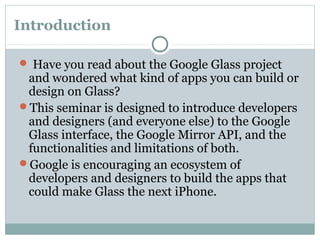
Seminar
On
Google glasses
Introduction
 Have you read about the Google Glass project
and wondered what kind of apps you can build or
design on Glass?
This seminar is designed to introduce developers
and designers (and everyone else) to the Google
Glass interface, the Google Mirror API, and the
functionalities and limitations of both.
Google is encouraging an ecosystem of
developers and designers to build the apps that
could make Glass the next iPhone.
WHAT IS GLASS?
Everyday glasses as useful as a
Smartphone integrated screen display,
camera, and hidden battery inside the
frame .
What is Google Glass?
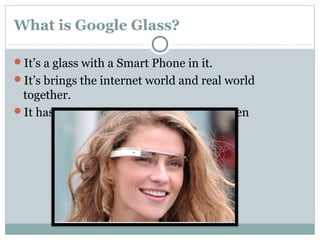
It’s a glass with a Smart Phone in it.
It’s brings the internet world and real world
together.
It has a micro phone , camera and a screen
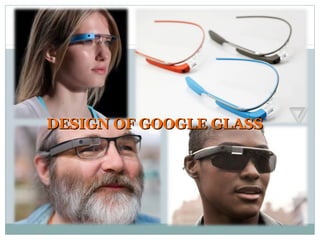
DESIGN OF GOOGLE GLASSDESIGN OF GOOGLE GLASS
Google Glass Design Principles
Here are the key guidelines for designing a good
Google Glass experience. Straight from Timothy
Jordan, Senior Developer Advocate at Google.
Design for Glass and it’s unique interface
Keep it timely. Glass is a “right now” device.
Avoid the unexpected. Don’t surprise the users
with unexpected communications or time cards.
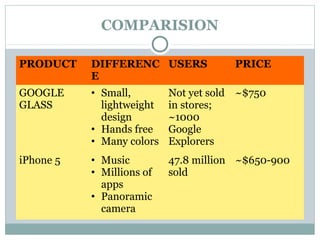
COMPARISION
PRODUCT DIFFERENC
E
USERS PRICE
GOOGLE
GLASS
• Small,
lightweight
design
• Hands free
• Many colors
Not yet sold
in stores;
~1000
Google
Explorers
~$750
iPhone 5 • Music
• Millions of
apps
• Panoramic
camera
47.8 million
sold
~$650-900
How it Works?
The device will probably communicate with mobile
phones through Wi-Fi and display contents on the
video screen as well as respond to the voice
commands of the user.
Google put together a short video demonstrating
the features and apps of Google glasses.
It mainly concentrates on the social networking,
navigation and communication.
VOICE CONTROL
Screen display is slightly above the normal vision
line
GPS, camera, messaging, calling, and video chatting
Apps in development
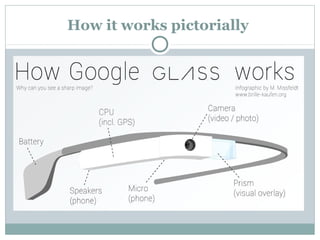
How it works pictorially
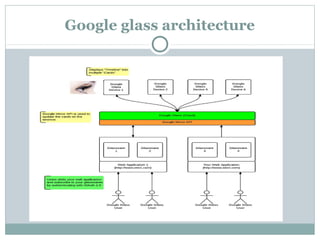
Google glass architecture
SERVICES :
YouTube, Google Maps, Gmail, Android, and many
more services
Creativity and innovation
Indexed over 1 trillion pages of information on their
search engine, launched their new internet browser
Google Chrome, and has gained 97% of their revenue
from new advertisements
Pushing for the next “big thing”
Advantages
Glass is sleek, light and easily wearable and you
won’t require keeping it on and off your pockets,
like mobile phones.
No Bluetooth or camera needed when Glass is on,
it’ll do all for you.
Glass will provide you detailed information and
satisfactory results on your queries.
Make phone calls, sms, emails though Google
Glass, no Smartphone required.
Easy to wear and use.
Sensitive and responsive to the presence of people.
 Fast access of maps, documents, videos, chats and
much more.
A new trend for fashion lovers together being an
innovative technology.
Disadvantages
Glass might give you a ‘nerdy’ look that might
create clumsiness among people.
No indication while clicking pictures (like
pointing the camera) which almost sounds like a
hidden camera trying to capture a non-ready
subject.
Chances are there to drop yourself down in the
road while reading a text or email since you can’t
get your eyes off it.
No public privacy concern so the worry of leaking
out information still remains.
Piracy
Cheating
Distraction/bad for eyes
Opinion
Popular in industries and for companies that have a
lot of video conferencing.
It will sell, but skeptical popularity.
Would change everyday life.
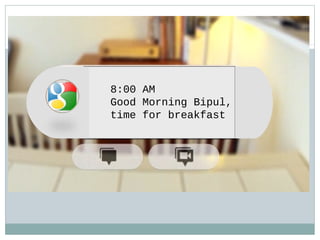
8:00 AM
Good Morning Bipul,
time for breakfast
Conclusion 
 Although there are many barriers and problems Google still
needs to work through before finalizing the consumer version
of Glass, the potential benefits make Glass a project worth
perusing.
It is Lee’s expectations “expectation that in three to five years
it will actually look unusual and awkward when we view
someone holding an object in their hand and looking down at
it.
QUESTIONS ARE WELCOME !

Google glass ppt

  • 1.
    Submitted By: BIPULKUMAR 12/IT/006 Seminar On Google glasses
  • 2.
    Introduction  Have youread about the Google Glass project and wondered what kind of apps you can build or design on Glass? This seminar is designed to introduce developers and designers (and everyone else) to the Google Glass interface, the Google Mirror API, and the functionalities and limitations of both. Google is encouraging an ecosystem of developers and designers to build the apps that could make Glass the next iPhone.
  • 3.
    WHAT IS GLASS? Everydayglasses as useful as a Smartphone integrated screen display, camera, and hidden battery inside the frame .
  • 4.
    What is GoogleGlass? It’s a glass with a Smart Phone in it. It’s brings the internet world and real world together. It has a micro phone , camera and a screen
  • 5.
    DESIGN OF GOOGLEGLASSDESIGN OF GOOGLE GLASS
  • 6.
    Google Glass DesignPrinciples Here are the key guidelines for designing a good Google Glass experience. Straight from Timothy Jordan, Senior Developer Advocate at Google. Design for Glass and it’s unique interface Keep it timely. Glass is a “right now” device. Avoid the unexpected. Don’t surprise the users with unexpected communications or time cards.
  • 7.
    COMPARISION PRODUCT DIFFERENC E USERS PRICE GOOGLE GLASS •Small, lightweight design • Hands free • Many colors Not yet sold in stores; ~1000 Google Explorers ~$750 iPhone 5 • Music • Millions of apps • Panoramic camera 47.8 million sold ~$650-900
  • 8.
    How it Works? Thedevice will probably communicate with mobile phones through Wi-Fi and display contents on the video screen as well as respond to the voice commands of the user. Google put together a short video demonstrating the features and apps of Google glasses. It mainly concentrates on the social networking, navigation and communication.
  • 9.
    VOICE CONTROL Screen displayis slightly above the normal vision line GPS, camera, messaging, calling, and video chatting Apps in development
  • 10.
    How it workspictorially
  • 11.
  • 12.
    SERVICES : YouTube, GoogleMaps, Gmail, Android, and many more services Creativity and innovation Indexed over 1 trillion pages of information on their search engine, launched their new internet browser Google Chrome, and has gained 97% of their revenue from new advertisements Pushing for the next “big thing”
  • 13.
    Advantages Glass is sleek,light and easily wearable and you won’t require keeping it on and off your pockets, like mobile phones. No Bluetooth or camera needed when Glass is on, it’ll do all for you. Glass will provide you detailed information and satisfactory results on your queries. Make phone calls, sms, emails though Google Glass, no Smartphone required.
  • 14.
    Easy to wearand use. Sensitive and responsive to the presence of people.  Fast access of maps, documents, videos, chats and much more. A new trend for fashion lovers together being an innovative technology.
  • 15.
    Disadvantages Glass might giveyou a ‘nerdy’ look that might create clumsiness among people. No indication while clicking pictures (like pointing the camera) which almost sounds like a hidden camera trying to capture a non-ready subject. Chances are there to drop yourself down in the road while reading a text or email since you can’t get your eyes off it. No public privacy concern so the worry of leaking out information still remains.
  • 16.
  • 17.
    Opinion Popular in industriesand for companies that have a lot of video conferencing. It will sell, but skeptical popularity. Would change everyday life.
  • 18.
    8:00 AM Good MorningBipul, time for breakfast
  • 19.
    Conclusion   Although thereare many barriers and problems Google still needs to work through before finalizing the consumer version of Glass, the potential benefits make Glass a project worth perusing. It is Lee’s expectations “expectation that in three to five years it will actually look unusual and awkward when we view someone holding an object in their hand and looking down at it.
  • 20.