Presented By: Rohit Kr. Kashyap
Contents
• Introduction
• Development
• How it works ?
• What it does ?
• Technical specifications
• Hardware
• Software
• Images
• Advantages
• Disadvantages
• Conclusion
• References
Introduction
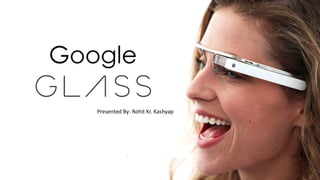
Google Glass is a wearable computer with an optical head-mounted
display (OHMD) that is being developed by Google in the Project
Glass research and development project.
It includes voice-controlled Android device that resembles a pair of
eyeglasses and displays information directly in the user's field of vision.
It offers an virtual reality experience by using visual, audio and
location-based inputs to provide relevant information.
Development
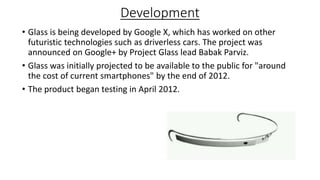
• Glass is being developed by Google X, which has worked on other
futuristic technologies such as driverless cars. The project was
announced on Google+ by Project Glass lead Babak Parviz.
• Glass was initially projected to be available to the public for "around
the cost of current smartphones" by the end of 2012.
• The product began testing in April 2012.
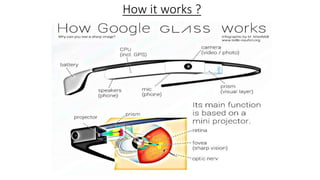
How it works ?
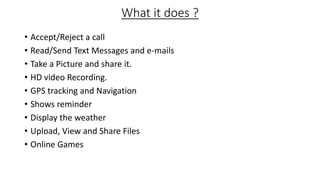
What it does ?
• Accept/Reject a call
• Read/Send Text Messages and e-mails
• Take a Picture and share it.
• HD video Recording.
• GPS tracking and Navigation
• Shows reminder
• Display the weather
• Upload, View and Share Files
• Online Games
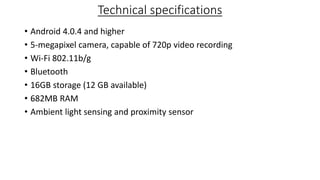
Technical specifications
• Android 4.0.4 and higher
• 5-megapixel camera, capable of 720p video recording
• Wi-Fi 802.11b/g
• Bluetooth
• 16GB storage (12 GB available)
• 682MB RAM
• Ambient light sensing and proximity sensor
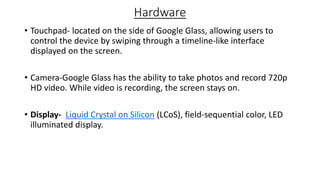
Hardware
• Touchpad- located on the side of Google Glass, allowing users to
control the device by swiping through a timeline-like interface
displayed on the screen.
• Camera-Google Glass has the ability to take photos and record 720p
HD video. While video is recording, the screen stays on.
• Display- Liquid Crystal on Silicon (LCoS), field-sequential color, LED
illuminated display.
Software
Applications
• Free applications built by third-party developers
• Google Now, Google Maps, Google+, and Gmail
• Translation app
MyGlass- a companion Android and iOS app.
Voice activation
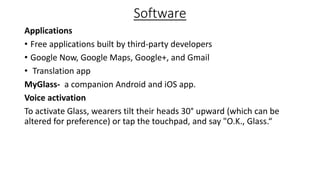
To activate Glass, wearers tilt their heads 30° upward (which can be
altered for preference) or tap the touchpad, and say "O.K., Glass.“
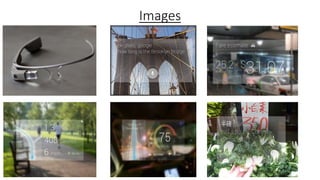
Images
Privacy concerns & Safety considerations
Privacy concerns
• ethics of using the device in public and recording people without their
permission.
Safety considerations
• Careless driving
• Discourage workers to wear hearing protection in loud work
environments
Advantages
• Glass is sleek, light and easily wearable and you won’t require keeping
it on and off your pockets, like mobile phones.
• Make phone calls, sms, emails though Google Glass, no smartphone
required.
• Keep your calendar events, information, contacts updated on Glass.
• Easier navigation and maps will be provided through Glass.
Disadvantages
• No indication while clicking pictures (like pointing the camera) which
almost sounds like a hidden camera trying to capture a non-ready
subject.
• Chances are there to drop yourself down in the road while reading a
text or email since you can’t get your eyes off it.
Conclusion
Google Glass is a lightweight hands free device that should be worn as
eye glasses. It is the next face changing challenge to technology.
Unlike smartphones or tablets you don’t require putting it on and off
your pocket all the time. Your eyes and voice is enough to operate it all
the way.
References
• http://cyberjunkeez.org/
• http://www.brillen-sehhilfen.de/
• http://www.dailymail.co.uk/sciencetech
• http://en.wikipedia.org/wiki/Google_Glass#Technical_specifications
Thank You

Google glass

  • 1.
  • 2.
    Contents • Introduction • Development •How it works ? • What it does ? • Technical specifications • Hardware • Software • Images • Advantages • Disadvantages • Conclusion • References
  • 3.
    Introduction Google Glass isa wearable computer with an optical head-mounted display (OHMD) that is being developed by Google in the Project Glass research and development project. It includes voice-controlled Android device that resembles a pair of eyeglasses and displays information directly in the user's field of vision. It offers an virtual reality experience by using visual, audio and location-based inputs to provide relevant information.
  • 4.
    Development • Glass isbeing developed by Google X, which has worked on other futuristic technologies such as driverless cars. The project was announced on Google+ by Project Glass lead Babak Parviz. • Glass was initially projected to be available to the public for "around the cost of current smartphones" by the end of 2012. • The product began testing in April 2012.
  • 5.
  • 6.
    What it does? • Accept/Reject a call • Read/Send Text Messages and e-mails • Take a Picture and share it. • HD video Recording. • GPS tracking and Navigation • Shows reminder • Display the weather • Upload, View and Share Files • Online Games
  • 7.
    Technical specifications • Android4.0.4 and higher • 5-megapixel camera, capable of 720p video recording • Wi-Fi 802.11b/g • Bluetooth • 16GB storage (12 GB available) • 682MB RAM • Ambient light sensing and proximity sensor
  • 8.
    Hardware • Touchpad- locatedon the side of Google Glass, allowing users to control the device by swiping through a timeline-like interface displayed on the screen. • Camera-Google Glass has the ability to take photos and record 720p HD video. While video is recording, the screen stays on. • Display- Liquid Crystal on Silicon (LCoS), field-sequential color, LED illuminated display.
  • 9.
    Software Applications • Free applicationsbuilt by third-party developers • Google Now, Google Maps, Google+, and Gmail • Translation app MyGlass- a companion Android and iOS app. Voice activation To activate Glass, wearers tilt their heads 30° upward (which can be altered for preference) or tap the touchpad, and say "O.K., Glass.“
  • 10.
  • 11.
    Privacy concerns &Safety considerations Privacy concerns • ethics of using the device in public and recording people without their permission. Safety considerations • Careless driving • Discourage workers to wear hearing protection in loud work environments
  • 12.
    Advantages • Glass issleek, light and easily wearable and you won’t require keeping it on and off your pockets, like mobile phones. • Make phone calls, sms, emails though Google Glass, no smartphone required. • Keep your calendar events, information, contacts updated on Glass. • Easier navigation and maps will be provided through Glass.
  • 13.
    Disadvantages • No indicationwhile clicking pictures (like pointing the camera) which almost sounds like a hidden camera trying to capture a non-ready subject. • Chances are there to drop yourself down in the road while reading a text or email since you can’t get your eyes off it.
  • 14.
    Conclusion Google Glass isa lightweight hands free device that should be worn as eye glasses. It is the next face changing challenge to technology. Unlike smartphones or tablets you don’t require putting it on and off your pocket all the time. Your eyes and voice is enough to operate it all the way.
  • 15.
    References • http://cyberjunkeez.org/ • http://www.brillen-sehhilfen.de/ •http://www.dailymail.co.uk/sciencetech • http://en.wikipedia.org/wiki/Google_Glass#Technical_specifications
  • 16.