AMITH A
1JS13EC009
Contents
• Introduction
• Development
• What it does ?
• Technical specifications
• Hardware
• Software
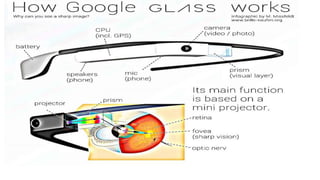
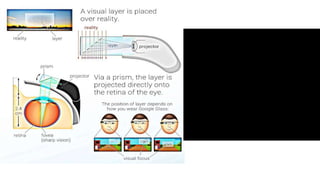
• How it works ?
• Challenges
• Privacy concerns & Safety considerations
• Healthcare applications
• Advantages
• Disadvantages
• Conclusion
• References
Introduction
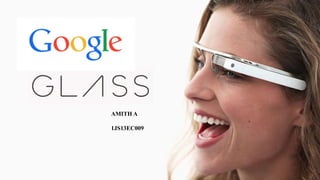
Google Glass is a wearable computer with an optical head-mounted
display (OHMD) that is being developed by Google in the Project
Glass research and development project.
It includes voice-controlled Android device that resembles a pair of
eyeglasses and displays information directly in the user's field of vision.
It offers an augmented reality experience by using visual, audio and
location-based inputs to provide relevant information.
OHMD
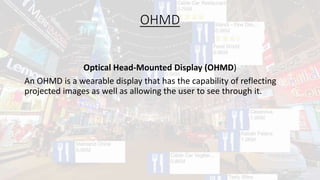
Optical Head-Mounted Display (OHMD)
An OHMD is a wearable display that has the capability of reflecting
projected images as well as allowing the user to see through it.
Augmented Reality(AR)
Augmented reality (AR) is a live, copy, view of a physical, real-world environment
whose elements are augmented (or supplemented) by computer-generated
sensory input such as sound, video, graphics or GPS data.
E.g. Nokia City Lens
Development
• Glass is being developed by Google X, which has worked on other futuristic
technologies such as driverless cars. The project was announced on
Google+ by Project Glass lead Babak Parviz.
• Around August 2011, a Glass prototype weighed 8 pounds (3,600 g).
• Glass was initially projected to be available to the public for "around the
cost of current smartphones" by the end of 2012.
• The Explorer Edition is available to testers and Google I/O developers in the
United States for $1,500, starting in April 2013.
• The product began testing in April 2013.
• In May 2013, Glass was demonstrated in the first test video shot with the
eyewear, demonstrating the 720p HD first-person video recording
capabilities of the device.
• The new models were to be available to testers before the end of 2013.
• In October 2013, speculation emerged that Glass will be marketed in stores
located on floating barges that will be towed from city to city.
What it does ?
• Accept/Reject a call
• Read/Send Text Messages and e-mails
• Take a Picture and share it.
• HD video Recording.
• GPS tracking and Navigation
• Shows reminder
• Display the weather
• Upload, View and Share Files
• Online Games
Technical specifications
• Android 4.0.4 and higher
• 640×360 Himax HX7309 LCoS display
• 5-megapixel camera, capable of 720p video recording
• Wi-Fi 802.11b/g
• Bluetooth
• 16GB storage (12 GB available)
• Texas Instruments OMAP 4430 SoC 1.2Ghz Dual(ARMv7)
• 682MB RAM
• 3 axis gyroscope
• 3 axis accelerometer
• 3 axis magnetometer (compass)
• Ambient light sensing and proximity sensor
• Bone conduction audio transducer
Hardware
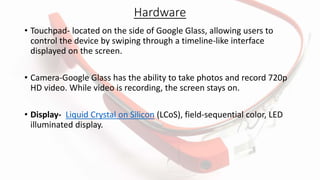
• Touchpad- located on the side of Google Glass, allowing users to
control the device by swiping through a timeline-like interface
displayed on the screen.
• Camera-Google Glass has the ability to take photos and record 720p
HD video. While video is recording, the screen stays on.
• Display- Liquid Crystal on Silicon (LCoS), field-sequential color, LED
illuminated display.
Software
Applications
• Free applications built by third-party developers,
• Google Now, Google Maps, Google+, and Gmail
• Translation app Word Lens, cooking app AllTheCooks, exercise
app Strava.
MyGlass- a companion Android and iOS app.
Voice activation
To activate Glass, wearers tilt their heads 30° upward (which can be
altered for preference) or tap the touchpad, and say "O.K., Glass.“
Once Glass is activated, wearers can say an action, such as "Take a
picture", "Record a video", "Hangout with [person/Google+ circle]",
"Google 'What year was Wikipedia founded?'", "Give me directions to
the Eiffel Tower", and "Send a message to John"
How it works ?
Challenges
• The biggest challenge for Google will now be to make the Google Glass also usable for
people with normal glasses (to compensate for a low vision).
• In this case the Google Glass has to be placed ahead of normal glasses - which doesn't
look and feel well or like a glass.
• Google has to manufacture individual customized prisms, but this would be considerably
more expensive than the standard production.
• Huge burden on internet infrastructure and force companies to increase capacity .
• It could also spark an increase in the cost of data plans.
Privacy concerns & Safety considerations
Privacy concerns
• Intrusion of privacy, and the etiquette
• ethics of using the device in public and recording people without their
permission.
• potential privacy-violating capabilities
Safety considerations
• Careless driving
• Discourage workers to wear hearing protection in loud work
environments
Healthcare applications
Several proof of concepts for Google Glass have been proposed in healthcare:
• Google Glass could assist a liver biopsy and fistulaplasty.
• It has the potential to improve patient safety, operator comfort, and
procedure efficiency in the field of interventional radiology.
• Indian Orthopedic Surgeon Selene G. Parekh conducted the foot and ankle
surgery using Google Glass in Jaipur, which was broadcast live on Google
website via the internet.
• Google Glass allows looking at an X-Ray or MRI without taking the eye off of
the patient, and allows a doctor to communicate with a patient's family or
friends during a procedure.
Advantages
• Glass is sleek, light and easily wearable and you won’t require keeping
it on and off your pockets, like mobile phones.
• No Bluetooth or camera needed when Glass is on, it’ll do all for you.
• Glass will provide you detailed information and satisfactory results on
your queries.
• Make phone calls, sms, emails though Google Glass, no smartphone
required.
• Keep your calendar events, information, contacts updated on Glass.
• Easier navigation and maps will be provided through Glass.
• Glass will make you look hi-tech and updated on technology and
create an impressive impact on people.
Disadvantages
• No indication while clicking pictures (like pointing the camera) which
almost sounds like a hidden camera trying to capture a non-ready
subject.
• Chances are there to drop yourself down in the road while reading a
text or email since you can’t get your eyes off it.
• No public privacy concern so the worry of leaking out information still
remains.
• Competition is on pace. The future might bring a contact lens version
of Glass after which Google Glass is supposed to sink.
Competitions
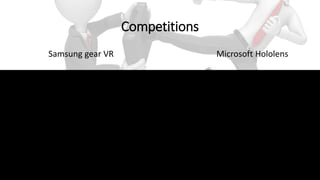
Samsung gear VR Microsoft Hololens
Research
• The quality of pictures and video are usable for healthcare education, reference, and remote
consultation. The camera needs to be tilted to different angle for most of the operative
procedures.
• Tele-consultation is possible—depending on the available bandwidth—during operative
procedures.
• A stabilizer should be added to the video function to prevent choppy transmission when a
surgeon looks to screens or colleagues.
• Battery life can be easily extended with the use of an external battery.
• Controlling the device and/or programs from another device is needed for some features because
of sterile environment.
• Text-to-speech ("Take a Note" to Evernote) exhibited a correction rate of 60 percent, without the
addition of a medical thesaurus.
• A protocol or checklist displayed on the screen of Glass can be helpful during procedures.
Conclusion
Google Glass is a lightweight hands free device that should be worn as
eye glasses. It is the next face changing challenge to technology.
Unlike smartphones or tablets you don’t require putting it on and off
your pocket all the time. Your eyes and voice is enough to operate it all
the way.
References
• http://www.SeminarsTopics.com
• http://www.brillen-sehhilfen.de/
• http://www.dailymail.co.uk/sciencetech
• http://en.wikipedia.org/wiki/Google_Glass#Technical_specifications
Thank You

Google Glass

  • 1.
  • 2.
    Contents • Introduction • Development •What it does ? • Technical specifications • Hardware • Software • How it works ? • Challenges • Privacy concerns & Safety considerations • Healthcare applications • Advantages • Disadvantages • Conclusion • References
  • 3.
    Introduction Google Glass isa wearable computer with an optical head-mounted display (OHMD) that is being developed by Google in the Project Glass research and development project. It includes voice-controlled Android device that resembles a pair of eyeglasses and displays information directly in the user's field of vision. It offers an augmented reality experience by using visual, audio and location-based inputs to provide relevant information.
  • 4.
    OHMD Optical Head-Mounted Display(OHMD) An OHMD is a wearable display that has the capability of reflecting projected images as well as allowing the user to see through it.
  • 5.
    Augmented Reality(AR) Augmented reality(AR) is a live, copy, view of a physical, real-world environment whose elements are augmented (or supplemented) by computer-generated sensory input such as sound, video, graphics or GPS data. E.g. Nokia City Lens
  • 6.
    Development • Glass isbeing developed by Google X, which has worked on other futuristic technologies such as driverless cars. The project was announced on Google+ by Project Glass lead Babak Parviz. • Around August 2011, a Glass prototype weighed 8 pounds (3,600 g). • Glass was initially projected to be available to the public for "around the cost of current smartphones" by the end of 2012. • The Explorer Edition is available to testers and Google I/O developers in the United States for $1,500, starting in April 2013. • The product began testing in April 2013. • In May 2013, Glass was demonstrated in the first test video shot with the eyewear, demonstrating the 720p HD first-person video recording capabilities of the device. • The new models were to be available to testers before the end of 2013. • In October 2013, speculation emerged that Glass will be marketed in stores located on floating barges that will be towed from city to city.
  • 7.
    What it does? • Accept/Reject a call • Read/Send Text Messages and e-mails • Take a Picture and share it. • HD video Recording. • GPS tracking and Navigation • Shows reminder • Display the weather • Upload, View and Share Files • Online Games
  • 8.
    Technical specifications • Android4.0.4 and higher • 640×360 Himax HX7309 LCoS display • 5-megapixel camera, capable of 720p video recording • Wi-Fi 802.11b/g • Bluetooth • 16GB storage (12 GB available) • Texas Instruments OMAP 4430 SoC 1.2Ghz Dual(ARMv7) • 682MB RAM • 3 axis gyroscope • 3 axis accelerometer • 3 axis magnetometer (compass) • Ambient light sensing and proximity sensor • Bone conduction audio transducer
  • 9.
    Hardware • Touchpad- locatedon the side of Google Glass, allowing users to control the device by swiping through a timeline-like interface displayed on the screen. • Camera-Google Glass has the ability to take photos and record 720p HD video. While video is recording, the screen stays on. • Display- Liquid Crystal on Silicon (LCoS), field-sequential color, LED illuminated display.
  • 10.
    Software Applications • Free applicationsbuilt by third-party developers, • Google Now, Google Maps, Google+, and Gmail • Translation app Word Lens, cooking app AllTheCooks, exercise app Strava. MyGlass- a companion Android and iOS app. Voice activation To activate Glass, wearers tilt their heads 30° upward (which can be altered for preference) or tap the touchpad, and say "O.K., Glass.“ Once Glass is activated, wearers can say an action, such as "Take a picture", "Record a video", "Hangout with [person/Google+ circle]", "Google 'What year was Wikipedia founded?'", "Give me directions to the Eiffel Tower", and "Send a message to John"
  • 11.
  • 13.
    Challenges • The biggestchallenge for Google will now be to make the Google Glass also usable for people with normal glasses (to compensate for a low vision). • In this case the Google Glass has to be placed ahead of normal glasses - which doesn't look and feel well or like a glass. • Google has to manufacture individual customized prisms, but this would be considerably more expensive than the standard production. • Huge burden on internet infrastructure and force companies to increase capacity . • It could also spark an increase in the cost of data plans.
  • 14.
    Privacy concerns &Safety considerations Privacy concerns • Intrusion of privacy, and the etiquette • ethics of using the device in public and recording people without their permission. • potential privacy-violating capabilities Safety considerations • Careless driving • Discourage workers to wear hearing protection in loud work environments
  • 15.
    Healthcare applications Several proofof concepts for Google Glass have been proposed in healthcare: • Google Glass could assist a liver biopsy and fistulaplasty. • It has the potential to improve patient safety, operator comfort, and procedure efficiency in the field of interventional radiology. • Indian Orthopedic Surgeon Selene G. Parekh conducted the foot and ankle surgery using Google Glass in Jaipur, which was broadcast live on Google website via the internet. • Google Glass allows looking at an X-Ray or MRI without taking the eye off of the patient, and allows a doctor to communicate with a patient's family or friends during a procedure.
  • 16.
    Advantages • Glass issleek, light and easily wearable and you won’t require keeping it on and off your pockets, like mobile phones. • No Bluetooth or camera needed when Glass is on, it’ll do all for you. • Glass will provide you detailed information and satisfactory results on your queries. • Make phone calls, sms, emails though Google Glass, no smartphone required. • Keep your calendar events, information, contacts updated on Glass. • Easier navigation and maps will be provided through Glass. • Glass will make you look hi-tech and updated on technology and create an impressive impact on people.
  • 17.
    Disadvantages • No indicationwhile clicking pictures (like pointing the camera) which almost sounds like a hidden camera trying to capture a non-ready subject. • Chances are there to drop yourself down in the road while reading a text or email since you can’t get your eyes off it. • No public privacy concern so the worry of leaking out information still remains. • Competition is on pace. The future might bring a contact lens version of Glass after which Google Glass is supposed to sink.
  • 18.
    Competitions Samsung gear VRMicrosoft Hololens
  • 19.
    Research • The qualityof pictures and video are usable for healthcare education, reference, and remote consultation. The camera needs to be tilted to different angle for most of the operative procedures. • Tele-consultation is possible—depending on the available bandwidth—during operative procedures. • A stabilizer should be added to the video function to prevent choppy transmission when a surgeon looks to screens or colleagues. • Battery life can be easily extended with the use of an external battery. • Controlling the device and/or programs from another device is needed for some features because of sterile environment. • Text-to-speech ("Take a Note" to Evernote) exhibited a correction rate of 60 percent, without the addition of a medical thesaurus. • A protocol or checklist displayed on the screen of Glass can be helpful during procedures.
  • 20.
    Conclusion Google Glass isa lightweight hands free device that should be worn as eye glasses. It is the next face changing challenge to technology. Unlike smartphones or tablets you don’t require putting it on and off your pocket all the time. Your eyes and voice is enough to operate it all the way.
  • 21.
    References • http://www.SeminarsTopics.com • http://www.brillen-sehhilfen.de/ •http://www.dailymail.co.uk/sciencetech • http://en.wikipedia.org/wiki/Google_Glass#Technical_specifications
  • 22.